# Technical Document: Reinforcement Learning Framework for Agents and Planners
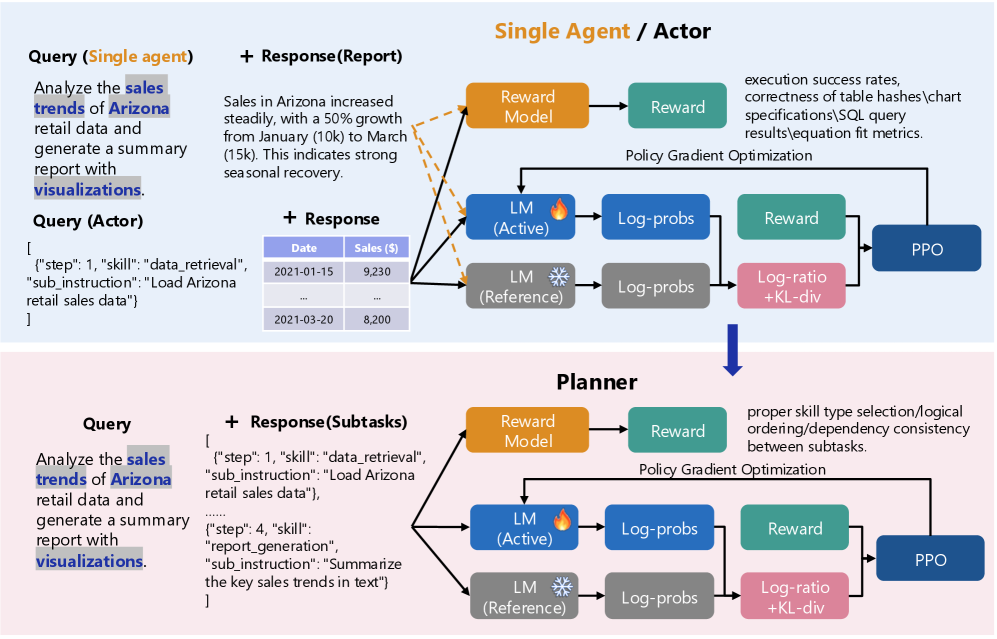
This document provides a comprehensive extraction of the technical architecture depicted in the provided image. The image illustrates a comparative reinforcement learning (RL) workflow for two distinct entities: a **Single Agent / Actor** and a **Planner**.
---
## 1. High-Level Architecture Overview
The image is divided into two primary horizontal segments, both utilizing a Proximal Policy Optimization (PPO) reinforcement learning loop.
* **Top Segment (Light Blue Background):** Focuses on the "Single Agent / Actor" workflow.
* **Bottom Segment (Light Pink Background):** Focuses on the "Planner" workflow.
* **Transition:** A blue downward arrow indicates a flow or relationship from the Agent/Actor level to the Planner level.
---
## 2. Segment 1: Single Agent / Actor
This section describes the end-to-end process of an agent generating a direct response and being evaluated.
### 2.1 Input Components (Left)
* **Query (Single agent):** "Analyze the sales trends of Arizona retail data and generate a summary report with visualizations."
* **Query (Actor):** A JSON-formatted instruction:
```json
[
{"step": 1, "skill": "data_retrieval", "sub_instruction": "Load Arizona retail sales data"}
]
```
* **+ Response (Report):** A textual summary: "Sales in Arizona increased steadily, with a 50% growth from January (10k) to March (15k). This indicates strong seasonal recovery."
* **+ Response (Data Table):**
| Date | Sales ($) |
| :--- | :--- |
| 2021-01-15 | 9,230 |
| ... | ... |
| 2021-03-20 | 8,200 |
### 2.2 Processing & Reinforcement Learning Loop (Right)
The inputs and responses are fed into three primary models:
1. **Reward Model (Orange):** Outputs to a **Reward** block (Teal).
* **Evaluation Criteria:** execution success rates, correctness of table hashes, chart specifications, SQL query results, equation fit metrics.
2. **LM (Active) (Blue with Fire Icon):** Represents the model being trained. Outputs **Log-probs**.
3. **LM (Reference) (Grey with Snowflake Icon):** Represents the frozen baseline model. Outputs **Log-probs**.
**Optimization Path:**
* The Log-probs from both LMs are compared in a **Log-ratio + KL-div** block (Pink).
* The **Reward** (Teal) and **Log-ratio + KL-div** (Pink) feed into the **PPO** (Proximal Policy Optimization) block (Dark Blue).
* A feedback line labeled **Policy Gradient Optimization** returns from PPO to the **LM (Active)**.
---
## 3. Segment 2: Planner
This section describes the workflow for a model that breaks down complex queries into subtasks.
### 3.1 Input Components (Left)
* **Query:** "Analyze the sales trends of Arizona retail data and generate a summary report with visualizations." (Identical to the Agent query).
* **+ Response (Subtasks):** A JSON array defining the plan:
```json
[
{"step": 1, "skill": "data_retrieval", "sub_instruction": "Load Arizona retail sales data"},
"......",
{"step": 4, "skill": "report_generation", "sub_instruction": "Summarize the key sales trends in text"}
]
```
### 3.2 Processing & Reinforcement Learning Loop (Right)
The architecture mirrors the Agent loop but with different evaluation criteria for the Reward Model.
1. **Reward Model (Orange):** Outputs to a **Reward** block (Teal).
* **Evaluation Criteria:** proper skill type selection, logical ordering, dependency consistency between subtasks.
2. **LM (Active) (Blue with Fire Icon):** Outputs **Log-probs**.
3. **LM (Reference) (Grey with Snowflake Icon):** Outputs **Log-probs**.
**Optimization Path:**
* **Log-ratio + KL-div** (Pink) calculates the difference between Active and Reference Log-probs.
* **PPO** (Dark Blue) receives input from the **Reward** and the **Log-ratio + KL-div** blocks.
* **Policy Gradient Optimization** loop updates the **LM (Active)**.
---
## 4. Key Technical Notations & Symbols
* **Dashed Orange Arrows:** Connect the "Response (Report)" and "Response (Data Table)" to the Reward Model and LM (Active) in the Single Agent section, indicating these outputs are the subjects of evaluation.
* **Fire Icon:** Symbolizes the "Active" or "Hot" model undergoing updates.
* **Snowflake Icon:** Symbolizes the "Reference" or "Frozen" model used for KL-divergence constraints to prevent catastrophic forgetting or model collapse.
* **KL-div:** Kullback–Leibler divergence, used here as a penalty to ensure the active policy does not drift too far from the reference policy.