## Diagram: Virtual Function (VF) Management in a Virtualized Environment
### Overview
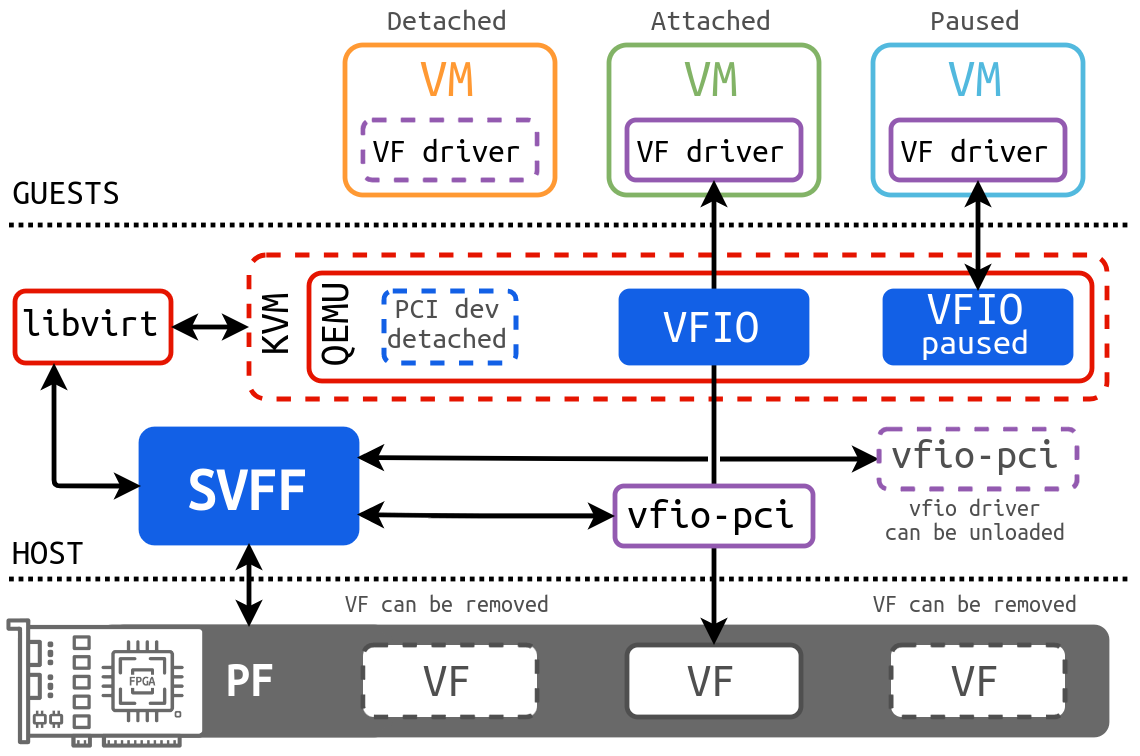
The diagram illustrates the management of Virtual Functions (VFs) in a virtualized environment, showing the interaction between Guests (Virtual Machines), the Host, and various components like libvirt, KVM/QEMU, SVFF, and VFIO. It depicts the states of VFs (detached, attached, paused) and the flow of data and control between different layers.
### Components/Axes
* **Title:** None explicitly present.
* **Sections:** The diagram is divided into three horizontal sections: GUESTS (top), KVM/QEMU (middle), and HOST (bottom).
* **Virtual Machines (VMs):** Three VMs are shown at the top, labeled "Detached" (orange outline), "Attached" (green outline), and "Paused" (light blue outline). Each VM has a "VF driver" (purple dashed outline) inside.
* **Hypervisor Components:** The middle section contains "libvirt" (red outline), "KVM/QEMU" (red dashed outline), "SVFF" (blue), "VFIO" (blue), "VFIO paused" (blue), and "vfio-pci" (purple outline). A "PCI dev detached" (blue dashed outline) is also present within the KVM/QEMU section.
* **Host Components:** The bottom section shows a physical device with an "FPGA" (gray), a "PF" (Physical Function, gray), and three "VF"s (Virtual Functions, gray).
* **Arrows:** Arrows indicate the direction of data flow and control between components.
* **Labels:** Additional labels such as "VF can be removed" and "vfio driver can be unloaded" provide context.
### Detailed Analysis
* **GUESTS Section:**
* **Detached VM:** An orange-outlined "VM" with a purple dashed-outlined "VF driver" inside.
* **Attached VM:** A green-outlined "VM" with a purple dashed-outlined "VF driver" inside.
* **Paused VM:** A light blue-outlined "VM" with a purple dashed-outlined "VF driver" inside.
* **KVM/QEMU Section:**
* **libvirt:** A red-outlined box on the left, connected to the "SVFF" and "KVM/QEMU" via bidirectional arrows.
* **KVM/QEMU:** A red dashed-outlined box containing a blue dashed-outlined "PCI dev detached". It is connected to "libvirt" and "SVFF" via bidirectional arrows. It also contains "VFIO" and "VFIO paused" (both blue).
* **SVFF:** A blue box in the center, connected to "libvirt", "KVM/QEMU", and "vfio-pci" via bidirectional arrows. It also connects to the "PF" in the HOST section via a bidirectional arrow.
* **VFIO:** A blue box connected to the "Attached VM" via a vertical arrow pointing upwards, and to "vfio-pci" via a vertical arrow pointing downwards.
* **VFIO paused:** A blue box connected to the "Paused VM" via a vertical arrow pointing upwards, and to "vfio-pci" via an arrow.
* **vfio-pci:** A purple-outlined box connected to "SVFF" via a bidirectional arrow, and to the "VF"s in the HOST section via vertical arrows pointing downwards. A note "vfio driver can be unloaded" is associated with this component.
* **HOST Section:**
* **FPGA/PF/VF:** A gray representation of a physical device with an FPGA, a "PF" (Physical Function), and three "VF"s (Virtual Functions). The "PF" is connected to "SVFF" via a bidirectional arrow.
* **VF can be removed:** Text labels above the "VF"s indicate that they can be removed.
### Key Observations
* The diagram illustrates the different states a VF can be in: detached, attached, or paused.
* The "SVFF" component appears to be central to the management of VFs, mediating communication between the hypervisor and the physical device.
* The "vfio-pci" component acts as an interface between the virtualized environment and the physical VFs.
* The ability to detach, attach, pause, and remove VFs suggests dynamic resource allocation.
### Interpretation
The diagram depicts a system for managing Virtual Functions (VFs) in a virtualized environment. The key takeaway is the dynamic allocation and management of VFs to virtual machines. The "SVFF" component likely handles the switching and routing of VFs between the host and the guests. The "VFIO" and "vfio-pci" components are involved in the secure and efficient passthrough of the VFs to the VMs. The ability to detach, attach, pause, and remove VFs allows for flexible resource management and optimization. The diagram highlights the complexity of virtualized environments and the various components required to enable efficient hardware virtualization.