\n
## Diagram: SR-IOV Device Assignment Flow
### Overview
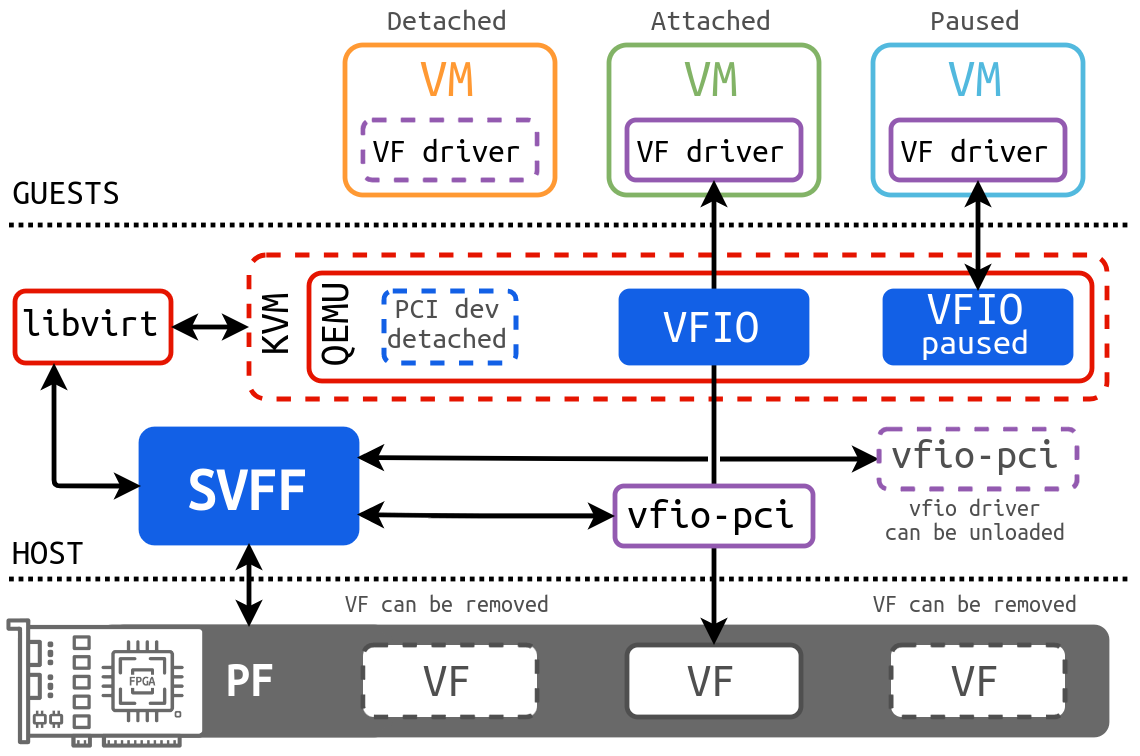
This diagram illustrates the flow of SR-IOV (Single Root I/O Virtualization) device assignment in a virtualized environment. It depicts how Virtual Functions (VFs) are assigned to Virtual Machines (VMs) and the components involved in the process on both the Host and Guest sides. The diagram shows three states of a VM: Detached, Attached, and Paused, and how the corresponding components interact in each state.
### Components/Axes
The diagram is divided into two main sections: "GUESTS" (top) and "HOST" (bottom), separated by a dotted line. Key components include:
* **VMs:** Represented by rounded rectangles in orange, blue, and green, labeled "Detached", "Attached", and "Paused" respectively. Each VM contains a "VF driver".
* **VFIO:** Represented by blue rectangles, labeled "VFIO" and "VFIO paused".
* **vfio-pci:** Represented by a light blue rectangle, labeled "vfio-pci". A dashed box around it states "vfio driver can be unloaded".
* **libvirt:** A component on the host side.
* **KVM:** A component on the host side.
* **QEMU:** A component on the host side.
* **SVFF:** A component on the host side.
* **PF:** Physical Function, represented by a chip-like icon.
* **VF:** Virtual Function, represented by a rectangular box.
* **PCI dev detached:** A text label indicating the state of a PCI device.
Connections between components are shown with arrows, indicating the flow of data or control. Dashed arrows represent potential or less direct connections.
### Detailed Analysis or Content Details
The diagram shows three parallel paths, each representing a different state of VF assignment:
**1. Detached State (Orange):**
* A VM labeled "Detached" contains a "VF driver".
* The VM connects to "VFIO" via a solid red arrow.
* "VFIO" connects to "vfio-pci" via a solid red arrow.
* "vfio-pci" connects to "SVFF" via a solid red arrow.
* "SVFF" connects to a "VF" via a solid black arrow.
* "PCI dev detached" is shown connected to "QEMU" via a dashed arrow.
* "SVFF" connects to "libvirt" via a dashed arrow.
* "SVFF" connects to a "PF" via a solid black arrow.
* Text label: "VF can be removed" is associated with the VF.
**2. Attached State (Blue):**
* A VM labeled "Attached" contains a "VF driver".
* The VM connects to "VFIO" via a solid red arrow.
* "VFIO" connects to "vfio-pci" via a solid red arrow.
* "vfio-pci" connects to "SVFF" via a solid red arrow.
* "SVFF" connects to a "VF" via a solid black arrow.
* "SVFF" connects to "libvirt" via a dashed arrow.
* "SVFF" connects to a "PF" via a solid black arrow.
* Text label: "VF can be removed" is associated with the VF.
**3. Paused State (Green):**
* A VM labeled "Paused" contains a "VF driver".
* The VM connects to "VFIO paused" via a solid red arrow.
* "VFIO paused" connects to "vfio-pci" via a solid red arrow.
* "vfio-pci" connects to "SVFF" via a solid red arrow.
* "SVFF" connects to a "VF" via a solid black arrow.
* "SVFF" connects to "libvirt" via a dashed arrow.
* "SVFF" connects to a "PF" via a solid black arrow.
* Text label: "VF can be removed" is associated with the VF.
The bottom row shows the physical hardware: a "PF" and three "VFs".
### Key Observations
* The "vfio-pci" component acts as a central point for communication between the VMs and the host's SR-IOV infrastructure.
* The "VF" can be removed in all three states.
* The "VFIO" component changes to "VFIO paused" when the VM is in the paused state.
* The diagram highlights the different states a VF can be in during device assignment.
* The dashed lines indicate optional or less direct connections, suggesting flexibility in the configuration.
### Interpretation
This diagram demonstrates the process of assigning a physical function (PF) to multiple virtual functions (VFs), which can then be directly assigned to VMs. This allows VMs to have near-native performance for I/O operations, bypassing the overhead of traditional virtualized I/O. The three states (Detached, Attached, Paused) represent the lifecycle of a VF assignment. The diagram illustrates how the SR-IOV framework enables efficient resource sharing and isolation in a virtualized environment. The "vfio-pci" driver is crucial for managing the communication between the VMs and the physical hardware. The ability to unload the vfio driver suggests a dynamic configuration capability. The diagram is a high-level overview and doesn't delve into the specific details of the SR-IOV hardware or software implementation. It focuses on the logical flow and the key components involved in the process.