## Screenshot: Step Proof Application
### Overview
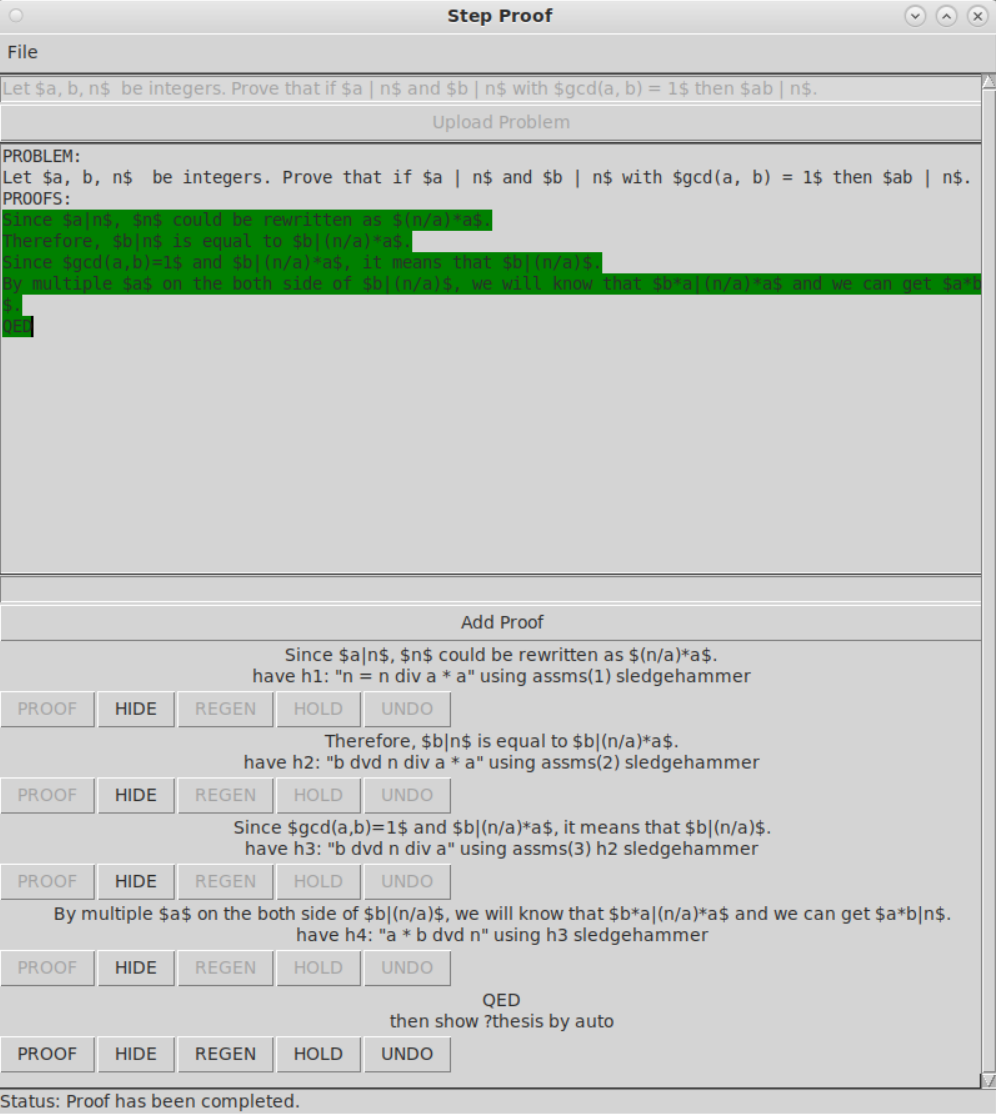
The image is a screenshot of a "Step Proof" application, likely used for mathematical proofs. It shows a problem statement, a series of proof steps, and controls for manipulating the proof. The application appears to be in a desktop environment.
### Components/Axes
* **Title Bar:** "Step Proof"
* **Menu Bar:** "File"
* **Problem Statement:**
* "Let $a, b, n$ be integers. Prove that if $a | n$ and $b | n$ with $gcd(a, b) = 1$ then $ab | n$."
* **Upload Problem Button:** "Upload Problem"
* **Proofs Section:** Displays the steps of the proof.
* **Add Proof Section:** Allows adding new steps to the proof.
* **Status Bar:** "Status: Proof has been completed."
* **Buttons:** "PROOF", "HIDE", "REGEN", "HOLD", "UNDO" (repeated for each proof step)
### Detailed Analysis or ### Content Details
**Problem Statement:**
* "Let $a, b, n$ be integers. Prove that if $a | n$ and $b | n$ with $gcd(a, b) = 1$ then $ab | n$."
**Proofs Section:**
* "PROBLEM: Let $a, b, n$ be integers. Prove that if $a | n$ and $b | n$ with $gcd(a, b) = 1$ then $ab | n$."
* "PROOFS:"
* "Since $a|n$, $n$ could be rewritten as $(n/a)*a$." (Highlighted in green)
* "Therefore, $b|n$ is equal to $b|(n/a)*a$." (Highlighted in green)
* "Since $gcd(a,b)=1$ and $b|(n/a)*a$, it means that $b|(n/a)$." (Highlighted in green)
* "By multiple $a$ on the both side of $b|(n/a)$, we will know that $b*a|(n/a)*a$ and we can get $a*b|n$." (Highlighted in green)
* "QED"
**Add Proof Section:**
* "Add Proof"
* "Since $a|n$, $n$ could be rewritten as $(n/a)*a$. have h1: "n = n div a * a" using assms(1) sledgehammer"
* "Therefore, $b|n$ is equal to $b|(n/a)*a$. have h2: "b dvd n div a * a" using assms(2) sledgehammer"
* "Since $gcd(a,b)=1$ and $b|(n/a)*a$, it means that $b|(n/a)$. have h3: "b dvd n div a" using assms(3) h2 sledgehammer"
* "By multiple $a$ on the both side of $b|(n/a)$, we will know that $b*a|(n/a)*a$ and we can get $a*b|n$. have h4: "a * b dvd n" using h3 sledgehammer"
* "QED then show ?thesis by auto"
**Buttons:**
* Each proof step has the following buttons: "PROOF", "HIDE", "REGEN", "HOLD", "UNDO"
**Status Bar:**
* "Status: Proof has been completed."
### Key Observations
* The application is designed to assist in constructing mathematical proofs.
* The proof steps are displayed sequentially.
* The "Add Proof" section allows users to add new steps to the proof.
* The "PROOF", "HIDE", "REGEN", "HOLD", and "UNDO" buttons provide control over each step.
* The status bar indicates that the proof has been completed.
* The green highlighting indicates the current focus or selection within the proof.
### Interpretation
The screenshot demonstrates a user interface for a mathematical proof assistant. The application guides the user through the steps required to prove a given theorem. The "Add Proof" section allows the user to incrementally build the proof, while the buttons provide control over each step. The highlighting suggests that the application may be interactive, allowing the user to select and manipulate different parts of the proof. The completed status indicates a successful proof construction. The application uses formal mathematical notation and terminology, suggesting it is intended for users with a background in mathematics. The use of "sledgehammer" suggests an automated proof assistant is being used.
```