## Screenshot: Step Proof Interface
### Overview
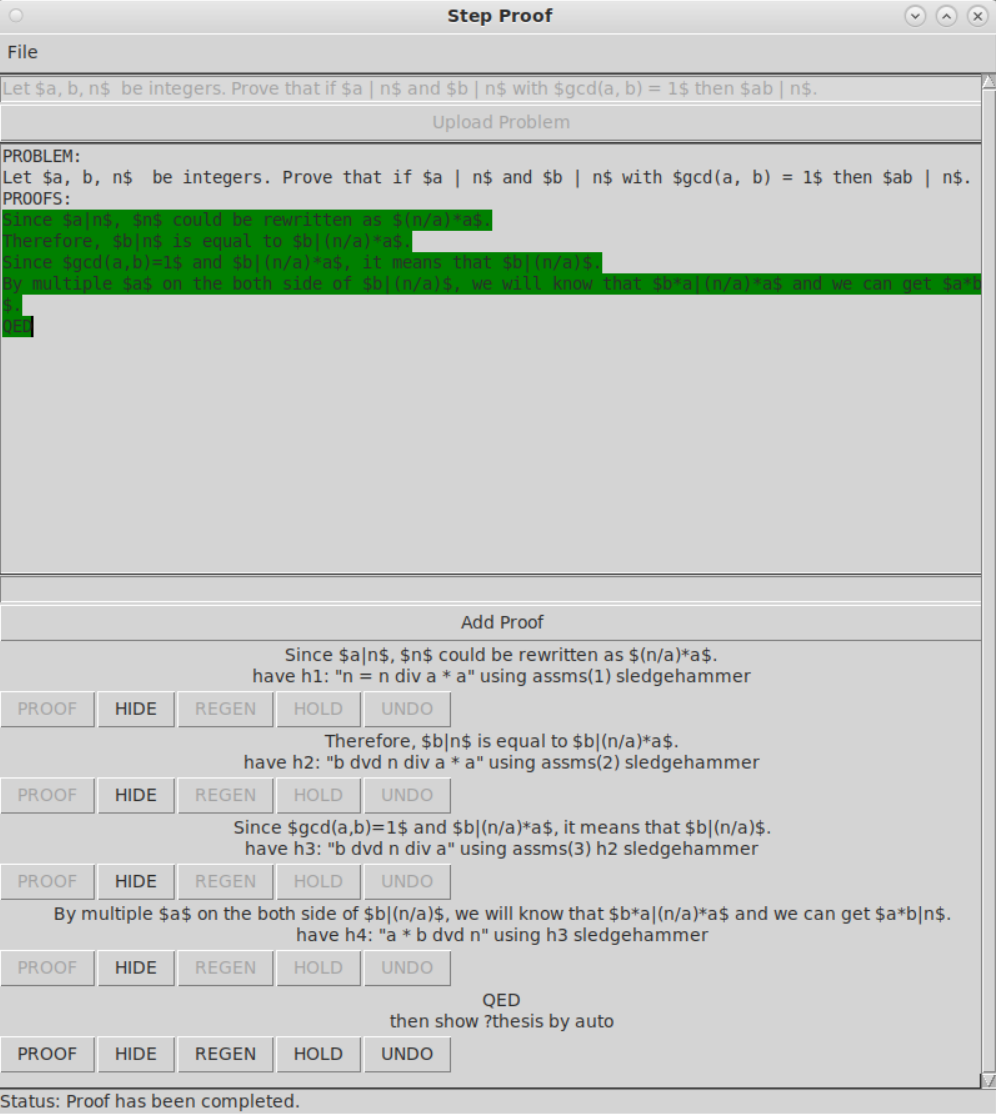
The image shows a screenshot of a proof assistant interface titled "Step Proof." It displays a formal mathematical proof process, including a problem statement, proof steps, and UI elements for managing the proof. The interface uses a structured format with commands like `PROOF`, `HIDE`, `REGEN`, `HOLD`, and `UNDO` to guide the user through constructing a proof.
### Components/Axes
- **Header**:
- Title: "Step Proof" (centered at the top).
- File menu (left-aligned).
- Close (`X`), minimize (`-`), and maximize (`+`) buttons (right-aligned).
- **Main Content**:
- **Problem Statement**:
- Text: "Let $a, b, n$ be integers. Prove that if $a | n$ and $b | n$ with $\gcd(a, b) = 1$ then $ab | n$."
- Highlighted sections (green) emphasize key steps in the proof.
- **Proof Steps**:
- **Lemma 1**:
- Text: "Since $a | n$, $n$ could be rewritten as $(n/a) * a$."
- Command: `PROOF` (button labeled "PROOF").
- **Lemma 2**:
- Text: "Therefore, $b | n$ is equal to $b | (n/a) * a$."
- Command: `HIDE` (button labeled "HIDE").
- **Lemma 3**:
- Text: "Since $\gcd(a, b) = 1$ and $b | (n/a) * a$, it means that $b | (n/a)$. By multiplying $a$ on both sides of $b | (n/a)$, we get $ab | n$."
- Command: `REGEN` (button labeled "REGEN").
- **UI Elements**:
- Buttons: `PROOF`, `HIDE`, `REGEN`, `HOLD`, `UNDO` (aligned horizontally).
- Status bar: "Status: Proof has been completed."
- **Footer**:
- "QED" (centered at the bottom).
### Detailed Analysis
- **Problem Statement**:
The problem is a number theory statement about divisibility and coprimality. The goal is to prove that if two integers $a$ and $b$ both divide $n$ and are coprime ($\gcd(a, b) = 1$), then their product $ab$ also divides $n$.
- **Proof Steps**:
1. **Lemma 1**: Rewrites $n$ as $(n/a) * a$ to express divisibility by $a$.
2. **Lemma 2**: Substitutes $n$ into the divisibility condition for $b$, showing $b | (n/a) * a$.
3. **Lemma 3**: Uses the coprimality condition ($\gcd(a, b) = 1$) to conclude $b | (n/a)$, then multiplies both sides by $a$ to derive $ab | n$.
- **UI Commands**:
- `PROOF`: Likely initiates a new proof step.
- `HIDE`: Hides intermediate steps or assumptions.
- `REGEN`: Regenerates or re-evaluates a step.
- `HOLD`: Pauses or suspends a step.
- `UNDO`: Reverts the last action.
### Key Observations
- The proof is structured hierarchically, with each lemma building on the previous one.
- The use of `$` symbols indicates LaTeX-style mathematical notation, common in formal proofs.
- The status "Proof has been completed" suggests the interface automatically verifies the correctness of the steps.
### Interpretation
This interface is designed for formal verification of mathematical proofs, likely in a domain like number theory or algebra. The step-by-step approach with commands (`PROOF`, `HIDE`, etc.) allows users to incrementally build and validate proofs, ensuring logical consistency. The completion status implies the system checks for errors or gaps in the reasoning, providing a robust tool for mathematicians or students. The highlighted sections in the problem statement emphasize critical steps, guiding the user through the proof process.
**Note**: No numerical data or charts are present; the focus is on textual and structural elements of a formal proof.