# Technical Document Extraction: Flowchart Analysis
## Overview
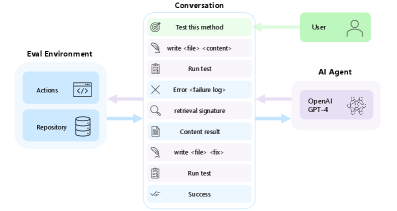
The image depicts a **flowchart** illustrating an interaction between a **User**, an **AI Agent**, and an **Eval Environment**. The diagram uses color-coded boxes, arrows, and icons to represent components, actions, and data flow.
---
## Key Components
### 1. **User**
- **Label**: "User" (green box with a person icon).
- **Role**: Initiates the interaction.
- **Action**: Sends the message:
`"Test this method"` (green text with a target icon).
---
### 2. **AI Agent**
- **Label**: "AI Agent" (purple box with a brain icon).
- **Technology**: "OpenAI GPT-4" (explicitly labeled).
- **Response**: Generates a list of actions (vertical sequence):
1. `write <file> <content>` (pink text with a feather icon).
2. `Run test` (purple text with a clipboard icon).
3. `Error <failure log>` (blue text with an X icon).
4. `retrieval signature` (blue text with a magnifying glass icon).
5. `Content result` (blue text with a document icon).
6. `write <file> <fix>` (pink text with a feather icon).
7. `Run test` (purple text with a clipboard icon).
8. `Success` (green text with a checkmark icon).
---
### 3. **Eval Environment**
- **Components**:
- **Actions**: Blue box with a code icon (`</>`).
- **Repository**: Blue box with a database icon.
- **Connections**:
- Arrows link the AI Agent's actions to the Eval Environment:
- `write <file> <content>` → Repository.
- `Run test` → Actions.
- `Error <failure log>` → Actions.
- `retrieval signature` → Repository.
- `Content result` → Repository.
- `write <file> <fix>` → Repository.
- `Run test` → Actions.
- `Success` → Repository.
---
## Flowchart Structure
1. **User** → **AI Agent**:
The User's query (`"Test this method"`) triggers the AI Agent's response.
2. **AI Agent** → **Eval Environment**:
The AI Agent's actions are mapped to specific operations in the Eval Environment (e.g., file writes, test executions, error handling).
3. **Eval Environment** → **AI Agent**:
Results (e.g., `Content result`, `Success`) feedback to the AI Agent.
---
## Color-Coding Legend
- **Green**: User actions (`"Test this method"`, `"Success"`).
- **Purple**: AI Agent actions (`"Run test"`, `"write <file> <fix>"`).
- **Pink**: File operations (`"write <file> <content>"`, `"write <file> <fix>"`).
- **Blue**: Error handling (`"Error <failure log>"`), retrieval (`"retrieval signature"`), and content results (`"Content result"`).
---
## Spatial Grounding
- **User**: Top-right corner (green box).
- **AI Agent**: Bottom-right corner (purple box).
- **Eval Environment**: Left side (blue boxes for Actions and Repository).
- **Conversation Flow**: Central vertical list connecting User → AI Agent → Eval Environment.
---
## Component Isolation
1. **Header**: User's initial query (`"Test this method"`).
2. **Main Chart**: AI Agent's response (8 actions with icons/colors).
3. **Footer**: Eval Environment's Actions and Repository, linked via arrows.
---
## Transcribed Text
### User
- `"Test this method"`
### AI Agent
1. `"write <file> <content>"`
2. `"Run test"`
3. `"Error <failure log>"`
4. `"retrieval signature"`
5. `"Content result"`
6. `"write <file> <fix>"`
7. `"Run test"`
8. `"Success"`
### Eval Environment
- `"Actions"` (code icon)
- `"Repository"` (database icon)
---
## Notes
- No numerical data, charts, or tables are present. The diagram focuses on **process flow** and **component interactions**.
- All text is in English; no additional languages are detected.
- Colors and icons are consistently used to differentiate roles and actions.