## Diagram: Grid with Labeled Regions and Data Points
### Overview
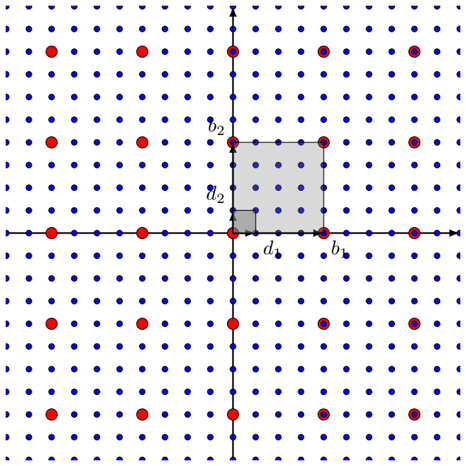
The image depicts a 2D grid with labeled axes (x and y) and a shaded rectangular region. The grid contains two types of data points: red dots labeled "Data Points" and blue dots labeled "Reference Points." A legend in the top-right corner distinguishes these categories. The shaded region contains internal labels (d₁, d₂) and boundary labels (b₁, b₂), suggesting a focus on spatial relationships or measurements.
---
### Components/Axes
- **Axes**:
- Horizontal axis labeled "x" (rightward direction).
- Vertical axis labeled "y" (upward direction).
- **Legend**:
- Located in the top-right corner.
- Red dots = "Data Points."
- Blue dots = "Reference Points."
- **Shaded Region**:
- Positioned in the upper-right quadrant of the grid.
- Contains internal labels:
- `d₁` (bottom-left corner of the shaded square).
- `d₂` (top-left corner of the shaded square).
- Boundary labels:
- `b₁` (bottom-right corner of the shaded square).
- `b₂` (top-right corner of the shaded square).
---
### Detailed Analysis
- **Grid Structure**:
- The grid is evenly spaced with blue dots forming a regular lattice.
- Red dots are sparsely distributed, with some overlapping blue dots (e.g., at coordinates (2,3), (4,5), etc.).
- **Shaded Region**:
- The shaded square spans approximately 3 grid units horizontally and 2 grid units vertically.
- Labels `d₁` and `d₂` likely represent distances or dimensions (e.g., width and height).
- Labels `b₁` and `b₂` may denote boundary conditions or reference points for the shaded region.
- **Data Point Distribution**:
- Red "Data Points" are irregularly placed, with clusters near the shaded region (e.g., (3,4), (5,6)).
- Blue "Reference Points" form a uniform grid, suggesting a baseline or control set.
---
### Key Observations
1. **Shaded Region Significance**: The shaded area highlights a specific subregion of interest, possibly for analysis or comparison.
2. **Data Point Density**: Red dots are concentrated near the shaded region, implying a potential relationship between the shaded area and the data points.
3. **Label Placement**: Labels `d₁`, `d₂`, `b₁`, and `b₂` are positioned at the corners of the shaded square, suggesting geometric or spatial measurements.
4. **Legend Consistency**: Red and blue dots align with their legend labels, confirming accurate categorization.
---
### Interpretation
- **Purpose of the Diagram**: The image likely represents a spatial analysis framework, where the shaded region defines a target area for studying the distribution of "Data Points" relative to "Reference Points."
- **Spatial Relationships**: The proximity of red dots to the shaded region may indicate a correlation between the shaded area and the observed data. For example, `d₁` and `d₂` could represent thresholds or critical dimensions influencing the data.
- **Anomalies**: The overlap of red and blue dots at specific coordinates (e.g., (2,3)) might suggest overlapping categories or measurement errors.
- **Uncertainty**: Without numerical values for `d₁`, `d₂`, `b₁`, or `b₂`, their exact significance remains ambiguous. However, their placement implies they are critical to defining the shaded region's properties.
---
### Conclusion
This diagram serves as a spatial model for analyzing the distribution of data points within a defined region. The shaded area and its labels (`d₁`, `d₂`, `b₁`, `b₂`) are central to interpreting the relationship between the "Data Points" and "Reference Points." Further context (e.g., axis units, legend definitions) would enhance clarity.