# Technical Document Extraction: Roofline Model Analysis for Llama 33B
## 1. Header Information
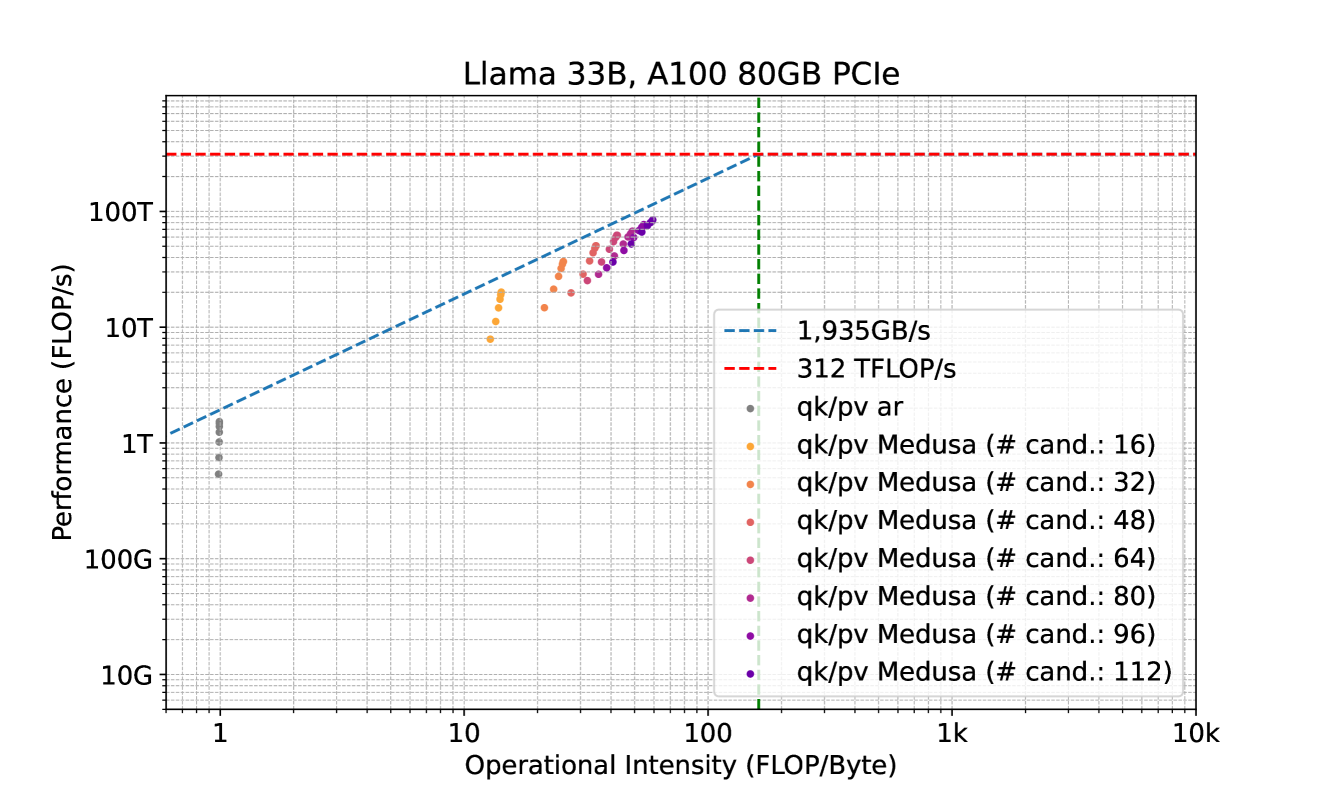
* **Title:** Llama 33B, A100 80GB PCIe
* **Subject:** Performance analysis of a Llama 33B model on an NVIDIA A100 80GB PCIe GPU using a Roofline Model.
## 2. Chart Structure and Axes
The image is a **Roofline Chart**, which plots computational performance against operational intensity on a log-log scale.
* **Y-Axis (Performance):**
* **Label:** Performance (FLOP/s)
* **Scale:** Logarithmic, ranging from 10G to over 100T.
* **Major Markers:** 10G, 100G, 1T, 10T, 100T.
* **X-Axis (Operational Intensity):**
* **Label:** Operational Intensity (FLOP/Byte)
* **Scale:** Logarithmic, ranging from approximately 0.6 to 10k.
* **Major Markers:** 1, 10, 100, 1k, 10k.
## 3. Legend and Thresholds
The legend is located in the bottom-right quadrant of the plot area.
### Theoretical Limits (Lines)
* **Memory Bandwidth Limit (Blue Dashed Line):** Labeled as **1,935GB/s**. This line slopes upward from the bottom left, representing the maximum performance achievable based on memory throughput.
* **Compute Peak Limit (Red Dashed Line):** Labeled as **312 TFLOP/s**. This horizontal line represents the maximum theoretical floating-point performance of the hardware.
* **Ridge Point (Green Vertical Dashed Line):** This line marks the intersection of the memory limit and the compute limit, occurring at an operational intensity of approximately **161 FLOP/Byte** ($312 \times 10^{12} / 1935 \times 10^9$).
### Data Series (Scatter Points)
The data points represent different configurations of "qk/pv" (likely Query-Key/Projection-Value) operations.
* **Grey dots:** `qk/pv ar` (Autoregressive)
* **Orange dots:** `qk/pv Medusa (# cand.: 16)`
* **Light Orange/Tan dots:** `qk/pv Medusa (# cand.: 32)`
* **Salmon/Light Red dots:** `qk/pv Medusa (# cand.: 48)`
* **Pink/Magenta dots:** `qk/pv Medusa (# cand.: 64)`
* **Deep Pink dots:** `qk/pv Medusa (# cand.: 80)`
* **Purple dots:** `qk/pv Medusa (# cand.: 96)`
* **Dark Purple/Indigo dots:** `qk/pv Medusa (# cand.: 112)`
## 4. Data Analysis and Trends
### Component Isolation: Main Chart Area
The chart shows a clear progression of performance as the number of "candidates" (# cand.) increases in the Medusa configuration.
1. **Standard Autoregressive (`qk/pv ar`):**
* **Trend:** Clustered at the far left.
* **Placement:** Operational Intensity $\approx 1$ FLOP/Byte. Performance ranges between **0.5T and 1.5T FLOP/s**.
* **Observation:** This is heavily memory-bound, sitting far below the compute ceiling.
2. **Medusa Configurations (Colored Dots):**
* **Trend:** As the number of candidates increases (from 16 to 112), the data points move **up and to the right** along the memory bandwidth diagonal.
* **Operational Intensity Shift:** Moves from $\approx 13$ FLOP/Byte (16 candidates) to $\approx 60$ FLOP/Byte (112 candidates).
* **Performance Shift:** Moves from $\approx 8$T FLOP/s to nearly **100T FLOP/s**.
* **Efficiency:** All Medusa points track closely to the blue dashed line (1,935 GB/s), indicating that these operations are highly optimized for memory bandwidth but remain memory-bound (as they have not reached the horizontal red line).
### Summary Table of Extracted Data (Approximate Values)
| Configuration | Color | Approx. Op. Intensity (FLOP/Byte) | Approx. Performance (FLOP/s) |
| :--- | :--- | :--- | :--- |
| **qk/pv ar** | Grey | 1 | 0.5T - 1.5T |
| **Medusa 16** | Orange | 13 - 15 | 8T - 20T |
| **Medusa 32** | Light Orange | 22 - 28 | 15T - 35T |
| **Medusa 48** | Salmon | 30 - 35 | 25T - 50T |
| **Medusa 64** | Pink | 38 - 42 | 35T - 60T |
| **Medusa 80** | Deep Pink | 45 - 50 | 45T - 70T |
| **Medusa 96** | Purple | 52 - 58 | 55T - 80T |
| **Medusa 112** | Dark Purple | 60 - 65 | 65T - 90T |
## 5. Conclusion
The chart demonstrates that the Medusa optimization significantly increases the operational intensity of the Llama 33B model compared to standard autoregressive decoding. By increasing the number of candidates, the system achieves higher FLOP/s by moving further up the memory bandwidth limit line, though even at 112 candidates, the workload remains memory-bound on the A100 80GB PCIe.