## Diagram: Data Processing and Storage Workflow
### Overview
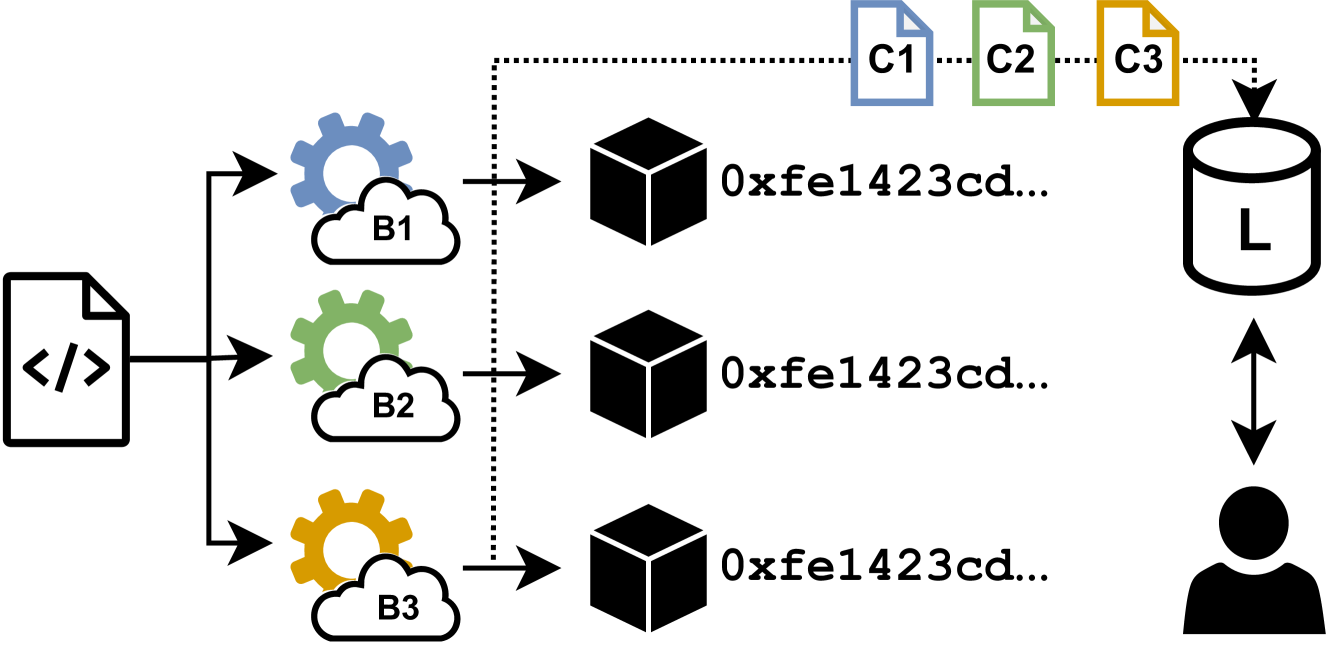
The image illustrates a data processing workflow, starting from a code file, branching into three parallel processing streams (B1, B2, B3), resulting in three data blocks, which are then transformed into three document files (C1, C2, C3) and finally stored in a database (L) that interacts with a user.
### Components/Axes
* **Input:** A code file represented by a document icon with "</>" inside.
* **Processing Streams:** Three parallel streams labeled B1, B2, and B3, each represented by a cloud icon with a gear inside. B1 is blue, B2 is green, and B3 is yellow.
* **Data Blocks:** Three black cubes, each labeled "0xfe1423cd...".
* **Document Files:** Three document icons labeled C1 (blue), C2 (green), and C3 (yellow).
* **Database:** A cylinder icon labeled "L".
* **User:** A silhouette of a person.
* **Arrows:** Arrows indicate the flow of data. Solid arrows represent direct data flow, while dotted arrows represent a transformation or derivation of data.
### Detailed Analysis or ### Content Details
1. **Input Code File:**
* A document icon with "</>" inside serves as the starting point.
2. **Parallel Processing:**
* The input code file splits into three parallel streams.
* **Stream B1 (Blue):** The code file is processed by a blue cloud icon with a blue gear inside, labeled "B1".
* **Stream B2 (Green):** The code file is processed by a green cloud icon with a green gear inside, labeled "B2".
* **Stream B3 (Yellow):** The code file is processed by a yellow cloud icon with a yellow gear inside, labeled "B3".
3. **Data Blocks:**
* Each processing stream results in a black cube labeled "0xfe1423cd...".
4. **Document Files:**
* The data blocks are transformed into document files.
* **C1 (Blue):** Corresponds to stream B1.
* **C2 (Green):** Corresponds to stream B2.
* **C3 (Yellow):** Corresponds to stream B3.
5. **Database Storage:**
* The document files are stored in a database represented by a cylinder icon labeled "L".
6. **User Interaction:**
* The database interacts with a user, indicated by a bidirectional arrow between the database and a silhouette of a person.
### Key Observations
* The diagram illustrates a parallel processing workflow where an input code file is processed in three independent streams.
* Each stream results in a data block, which is then transformed into a document file.
* The document files are stored in a database that interacts with a user.
* The colors of the processing streams (B1, B2, B3) correspond to the colors of the document files (C1, C2, C3).
### Interpretation
The diagram represents a system where code is processed in parallel to generate data, which is then organized into documents and stored in a database for user access. The parallel processing likely aims to improve efficiency and reduce processing time. The transformation of data blocks into document files suggests a structured organization of the processed data. The user interaction with the database indicates that the processed data is intended for consumption or analysis by a user.