## System Diagram: SR-IOV PCIe Device Virtualization
### Overview
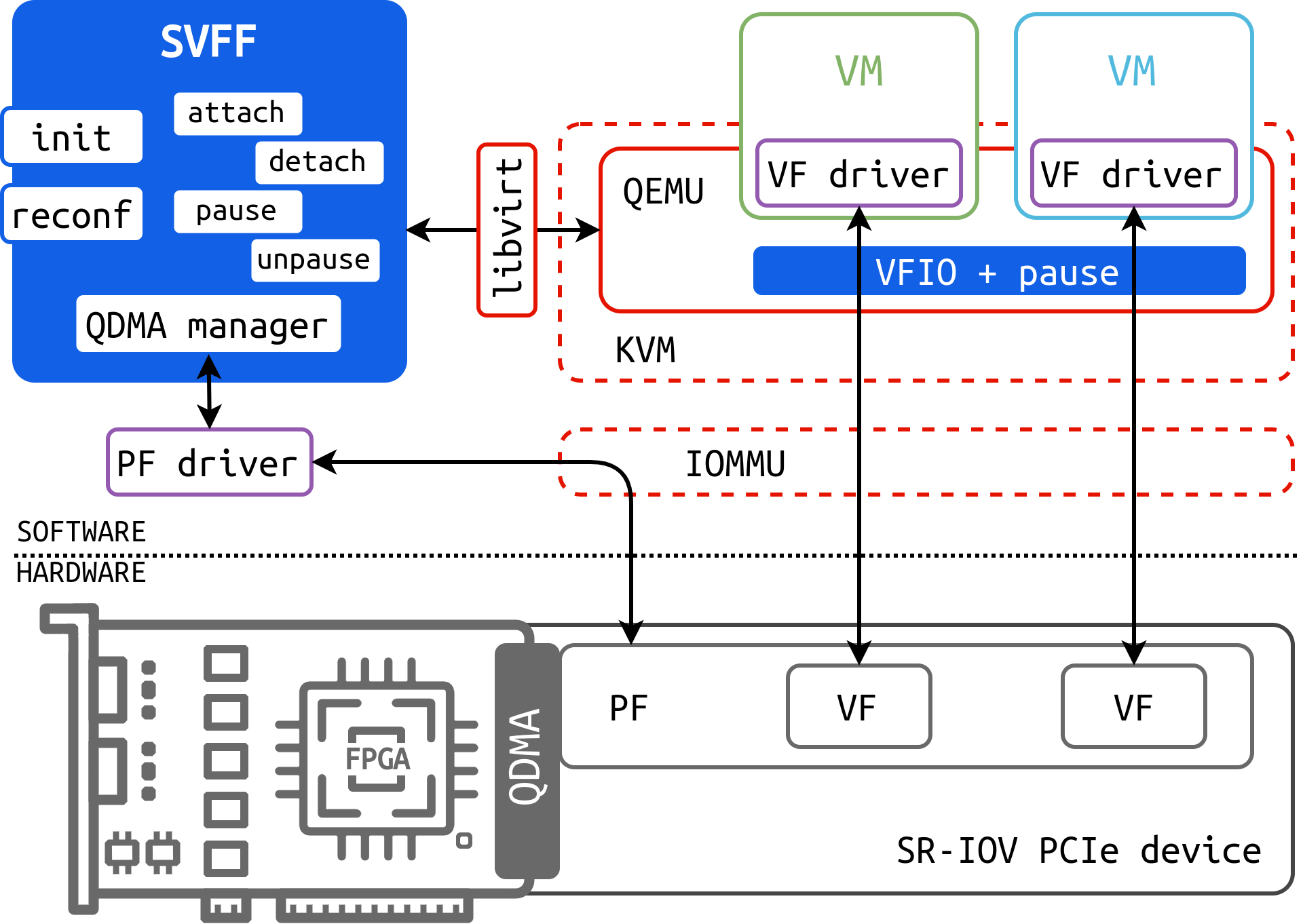
The image is a system diagram illustrating the virtualization of an SR-IOV PCIe device. It shows the interaction between software components (SVFF, PF driver, VF drivers, VMs, QEMU/KVM) and hardware components (SR-IOV PCIe device with PF, VFs, FPGA, and QDMA). The diagram highlights the flow of data and control between these components, emphasizing the role of virtualization technologies like libvirt, QEMU, KVM, and IOMMU.
### Components/Axes
* **Title:** None explicitly given, but the diagram depicts SR-IOV PCIe device virtualization.
* **Software/Hardware Layers:** The diagram is divided into software and hardware layers, separated by a dotted line.
* **SVFF (blue rectangle):** Contains the following functions: init, attach, detach, reconf, pause, unpause, and QDMA manager.
* **libvirt (red rectangle):** Acts as an interface between SVFF and the virtualization stack.
* **VM (Virtual Machine) (green and light blue rectangles):** Represents virtual machines.
* **VF driver (purple rectangle):** Resides within each VM.
* **QEMU (red dashed rectangle):** A hypervisor.
* **VFIO + pause (blue rectangle):** Located within QEMU.
* **KVM (red dashed rectangle):** Kernel-based Virtual Machine.
* **IOMMU (red dashed rectangle):** I/O Memory Management Unit.
* **PF driver (purple rectangle):** Manages the Physical Function of the SR-IOV device.
* **SR-IOV PCIe device (gray rectangle):** Contains the Physical Function (PF), Virtual Functions (VFs), FPGA, and QDMA.
* **PF (gray rectangle):** Physical Function of the SR-IOV device.
* **VF (gray rectangle):** Virtual Function of the SR-IOV device.
* **FPGA:** Field Programmable Gate Array.
* **QDMA:** Quad Data Movement Accelerator.
### Detailed Analysis or Content Details
* **SVFF:**
* Position: Top-left corner.
* Functions: init, attach, detach, reconf, pause, unpause, QDMA manager.
* **libvirt:**
* Position: Right of SVFF, connecting to QEMU/KVM.
* **VMs:**
* Two VMs are shown, one green and one light blue.
* Each VM has a VF driver (purple rectangle).
* **QEMU/KVM:**
* QEMU contains VFIO + pause (blue rectangle).
* KVM is the underlying virtualization technology.
* **IOMMU:**
* Connects the VMs to the SR-IOV PCIe device.
* **PF driver:**
* Connects SVFF to the PF of the SR-IOV PCIe device.
* **SR-IOV PCIe device:**
* Contains PF, two VFs, FPGA, and QDMA.
* The PF connects to the PF driver.
* The VFs connect to the VMs via the IOMMU.
* QDMA is connected to the SVFF via the QDMA manager.
### Key Observations
* The diagram illustrates the flow of data and control from the SVFF through libvirt, QEMU/KVM, IOMMU, and finally to the SR-IOV PCIe device.
* The PF driver manages the physical function of the device, while the VF drivers manage the virtual functions within the VMs.
* The IOMMU provides memory protection and isolation for the VMs.
* The QDMA is managed by the SVFF, enabling high-performance data transfer.
### Interpretation
The diagram provides a high-level overview of how an SR-IOV PCIe device is virtualized. It demonstrates the interaction between various software and hardware components, highlighting the role of virtualization technologies in enabling multiple VMs to share a single physical device. The use of SR-IOV allows for near-native performance in the VMs, as the VFs provide direct access to the device's resources. The diagram emphasizes the importance of the IOMMU for security and isolation, ensuring that each VM can only access its assigned resources. The SVFF plays a central role in managing the device and its functions, providing a unified interface for controlling the virtualization process.