## Diagram: World Model Enhancements
### Overview
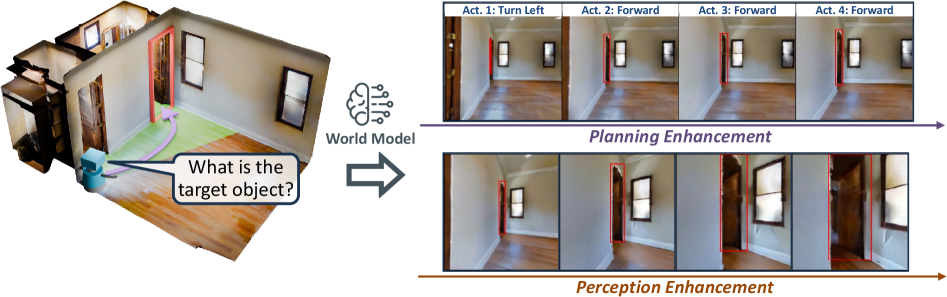
The image illustrates the concept of enhancing a "World Model" for a robot navigating an indoor environment. It compares the robot's planned actions with enhancements in planning and perception. The diagram shows a 3D representation of a room, a robot, and a sequence of images representing the robot's actions with and without enhancements.
### Components/Axes
* **Left Side:** A 3D rendering of a room with a robot. A speech bubble points to a doorway and asks "What is the target object?". An arrow indicates a path for the robot.
* **Center:** A brain icon labeled "World Model" with an arrow pointing to the right.
* **Top Right:** A sequence of four images labeled "Act. 1: Turn Left", "Act. 2: Forward", "Act. 3: Forward", and "Act. 4: Forward". These images are associated with "Planning Enhancement".
* **Bottom Right:** A sequence of four images, mirroring the top sequence, associated with "Perception Enhancement".
* **Arrows:** Two horizontal arrows, one above and one below the image sequences, indicating the progression of actions. The top arrow is associated with "Planning Enhancement" and the bottom arrow with "Perception Enhancement".
### Detailed Analysis
**Left Side (3D Rendering):**
* The 3D rendering shows a room with wooden floors, white walls, and a window.
* A doorway is highlighted in red/pink.
* A blue robot is positioned in the room.
* A speech bubble originating from the robot displays the question "What is the target object?".
* A curved purple arrow indicates a possible path for the robot.
* The floor is colored green along the path.
**Center (World Model):**
* A brain icon with digital circuit patterns represents the "World Model".
* A grey arrow points from the "World Model" to the right, indicating the flow of information or processing.
**Top Right (Planning Enhancement):**
* The sequence of images represents the robot's actions with planning enhancement.
* Each image corresponds to a specific action:
* Act. 1: Turn Left - The doorway is highlighted in red.
* Act. 2: Forward - The doorway is highlighted in red.
* Act. 3: Forward - The doorway is highlighted in red.
* Act. 4: Forward - The doorway is highlighted in red.
* A purple arrow indicates the progression of actions.
**Bottom Right (Perception Enhancement):**
* The sequence of images represents the robot's actions with perception enhancement.
* Each image corresponds to a specific action:
* Act. 1: Turn Left - The doorway is highlighted in red.
* Act. 2: Forward - The doorway is highlighted in red.
* Act. 3: Forward - The doorway is highlighted in red.
* Act. 4: Forward - The doorway is highlighted in red.
* A brown arrow indicates the progression of actions.
### Key Observations
* The diagram contrasts "Planning Enhancement" and "Perception Enhancement" in the context of robot navigation.
* The red highlights in the images likely indicate the robot's focus or target object.
* The "World Model" is central to both planning and perception enhancements.
### Interpretation
The diagram illustrates how a "World Model" can be enhanced to improve a robot's ability to navigate and interact with its environment. The comparison between "Planning Enhancement" and "Perception Enhancement" suggests that both aspects are crucial for effective robot navigation. The question "What is the target object?" highlights the importance of object recognition and goal-oriented behavior in robotics. The diagram implies that by improving the robot's understanding of the world (through the "World Model"), its planning and perception capabilities can be significantly enhanced, leading to more efficient and accurate navigation.