## Flowchart: Self-Debug Loop for Math Problem Solving
### Overview
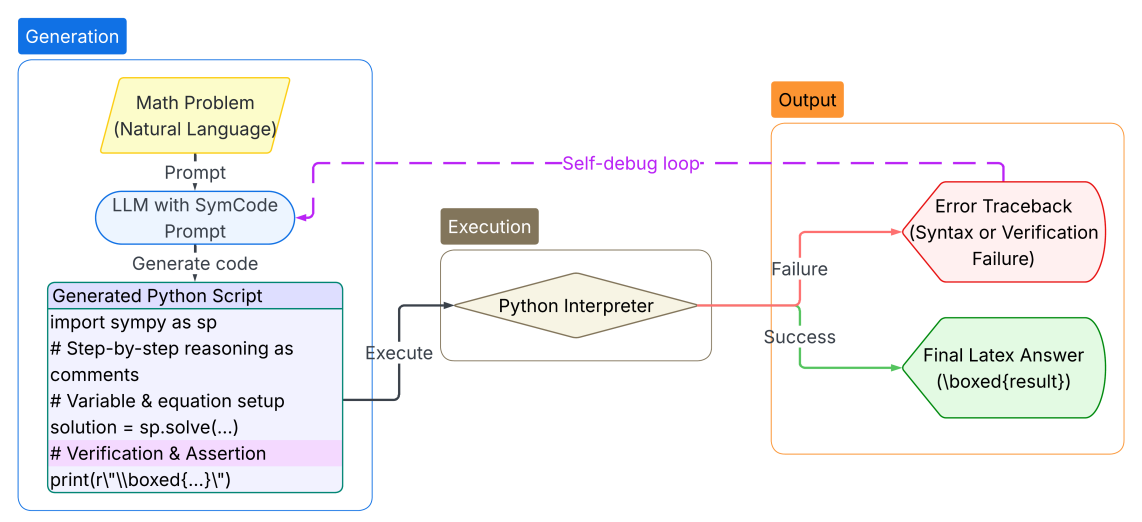
This diagram illustrates a computational pipeline designed for solving mathematical problems using a Large Language Model (LLM). The process utilizes a "Code-as-Reasoning" approach, where the LLM generates Python code to solve a problem, executes it via an interpreter, and employs a feedback loop (self-debug) to correct errors if the execution fails.
### Components/Axes
The diagram is segmented into three primary functional regions, defined by colored outlines:
1. **Generation (Left, Blue Box):** Contains the input and the code generation logic.
2. **Execution (Center, Brown Box):** Contains the computational engine.
3. **Output (Right, Orange Box):** Contains the terminal states (Success or Failure).
**Spatial Positioning:**
* **Top-Left:** The process begins with the "Math Problem."
* **Center:** The "Python Interpreter" acts as the central hub for execution.
* **Top-Right:** The "Self-debug loop" connects the failure state back to the generation phase.
### Detailed Analysis
#### 1. Generation Region (Left)
* **Input:** A yellow parallelogram labeled "Math Problem (Natural Language)."
* **Processing:** An arrow points downward to a blue rounded rectangle labeled "LLM with SymCode Prompt."
* **Output:** An arrow points downward to a light purple box labeled "Generated Python Script."
* **Script Content:** The box contains the following code structure:
```python
import sympy as sp
# Step-by-step reasoning as comments
# Variable & equation setup
solution = sp.solve(...)
# Verification & Assertion
print(r"\boxed{...}")
```
#### 2. Execution Region (Center)
* **Action:** An arrow labeled "Execute" connects the "Generated Python Script" to a diamond-shaped box labeled "Python Interpreter."
#### 3. Output Region (Right)
* **Branching Logic:** The "Python Interpreter" outputs to two distinct paths:
* **Failure Path (Red):** Leads to a red rounded shape labeled "Error Traceback (Syntax or Verification Failure)."
* **Success Path (Green):** Leads to a green rounded shape labeled "Final Latex Answer (\boxed{result})."
#### 4. Feedback Mechanism
* **Self-debug loop:** A dashed purple arrow originates from the "Error Traceback" shape and loops back to the "LLM with SymCode Prompt" box, labeled "Self-debug loop."
### Key Observations
* **Deterministic Verification:** The script explicitly includes `# Verification & Assertion` and `print(r"\boxed{...}")`, indicating that the system relies on the Python interpreter to verify the logic rather than trusting the LLM's raw text output.
* **Symbolic Math:** The import of `sympy` confirms the system is designed for symbolic mathematics, allowing for exact algebraic solutions rather than numerical approximations.
* **Iterative Refinement:** The "Self-debug loop" is the critical component. It implies that the LLM is provided with the error traceback, allowing it to perform a second pass to correct syntax errors or logical flaws in the generated script.
### Interpretation
This diagram represents a sophisticated "Program-of-Thought" architecture. By offloading the mathematical calculation to a deterministic Python interpreter, the system mitigates the common LLM issue of "hallucinating" arithmetic or algebraic steps.
The "Self-debug loop" is the most significant feature here; it transforms the LLM from a static generator into an agent capable of error correction. If the Python interpreter throws an error (e.g., a `SyntaxError` or an assertion failure), the system does not simply stop. Instead, it feeds the error back into the LLM, effectively asking the model to "fix the code based on this error." This iterative process significantly increases the reliability of the system for complex, multi-step mathematical reasoning. The use of `\boxed{}` suggests the final output is intended for integration into LaTeX-based documents or platforms (like Overleaf or academic papers).