## Diagram: LLM-Based Math Problem Solving and Self-Debugging Architecture
### Overview
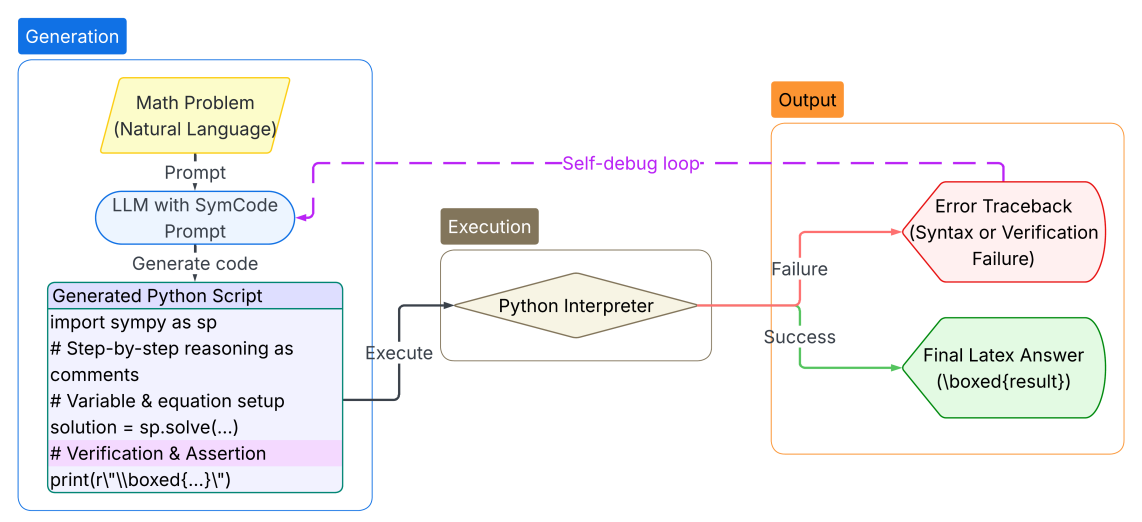
This image is a system architecture flowchart detailing an automated process for solving natural language math problems using a Large Language Model (LLM), Python code generation, and an automated self-debugging loop.
*Language Declaration:* All text present in this image is in **English**. There are no other languages present.
*Data Note:* This image represents a logical process flow and system architecture; it does not contain numerical datasets, charts, or quantitative data.
### Components & Flow
The diagram is spatially divided into three primary functional regions, arranged from left to right:
1. **Generation** (Left side, bounded by a blue rounded rectangle)
2. **Execution** (Center, bounded by a tan rounded rectangle)
3. **Output** (Right side, bounded by an orange rounded rectangle)
Connecting these regions are directional arrows indicating the flow of data and control, including a feedback loop.
### Content Details (Component Isolation & Transcription)
#### 1. Generation Region (Left)
Located on the left side, identified by a solid blue label "Generation" at the top left. It contains three sequential nodes flowing top-to-bottom:
* **Input Node (Top):** A yellow parallelogram representing data input.
* *Transcription:* "Math Problem\n(Natural Language)"
* *Flow:* A downward dashed arrow labeled "Prompt" connects this to the next node.
* **Processing Node (Middle):** A light blue oval representing an AI process.
* *Transcription:* "LLM with SymCode\nPrompt"
* *Flow:* A downward dashed arrow labeled "Generate code" connects this to the next node.
* **Output/Code Node (Bottom):** A light purple rectangle with a darker header, representing a code file.
* *Header Transcription:* "Generated Python Script"
* *Body Transcription* (Code block):
```python
import sympy as sp
# Step-by-step reasoning as
# comments
# Variable & equation setup
solution = sp.solve(...)
# Verification & Assertion
print(r"\\boxed{...}")
```
* *Visual Note:* The line `# Verification & Assertion` is highlighted with a light pink background.
* *Flow:* A solid black line labeled "Execute" exits the right side of this box, pointing into the Execution region.
#### 2. Execution Region (Center)
Located in the middle, identified by a brown label "Execution" at the top left.
* **Process Node:** A single tan diamond shape representing a decision or execution engine.
* *Transcription:* "Python Interpreter"
* *Flow:* The "Execute" line from the Generation region enters the left point of the diamond. A solid line exits the right point of the diamond and splits into two distinct paths leading to the Output region.
#### 3. Output Region (Right)
Located on the right side, identified by an orange label "Output" at the top left. It contains two possible end-states based on the execution results.
* **Failure Path (Top):** A solid red line labeled "Failure" leads to a red-outlined irregular hexagon (document shape).
* *Transcription:* "Error Traceback\n(Syntax or Verification\nFailure)"
* *Flow (The Loop):* A dashed purple line originates from the top of this failure box. It travels leftward across the top of the diagram, labeled "--Self-debug loop-", and points downward into the "LLM with SymCode Prompt" oval in the Generation region.
* **Success Path (Bottom):** A solid green line labeled "Success" leads to a green-outlined irregular hexagon (document shape).
* *Transcription:* "Final Latex Answer\n(`\boxed{result}`)"
### Key Observations
* **Code-Based Problem Solving:** The system does not rely on the LLM to directly output the final mathematical answer. Instead, it relies on the LLM to write a Python script using the `sympy` library (a Python library for symbolic mathematics).
* **Automated Error Correction:** The presence of the purple dashed "--Self-debug loop-" is the most critical feature. If the Python script fails (either due to syntax errors or failing the generated assertions), the error traceback is fed back into the LLM to prompt a correction.
* **Structured Output:** The final successful output is explicitly formatted in LaTeX, specifically using the `\boxed{}` command, which is standard in mathematical typesetting to highlight final answers.
### Interpretation
This diagram illustrates an advanced prompting and execution strategy designed to mitigate the inherent weaknesses of Large Language Models in performing complex arithmetic and symbolic math.
By forcing the LLM to translate a natural language problem into Python code (`SymCode Prompt`), the system offloads the actual mathematical computation to a deterministic engine (the `Python Interpreter` and `sympy`).
Furthermore, the system is fault-tolerant. The inclusion of `# Verification & Assertion` within the generated code implies that the LLM is instructed to write tests for its own logic. If the code fails to run or fails the logical assertions, the "Self-debug loop" provides the LLM with the exact error traceback, allowing it to iteratively fix its own code without human intervention. The process only terminates when the Python interpreter successfully executes the script, resulting in a highly reliable, LaTeX-formatted final answer.