\n
## Diagram: LLM-Based Math Problem Solving Workflow
### Overview
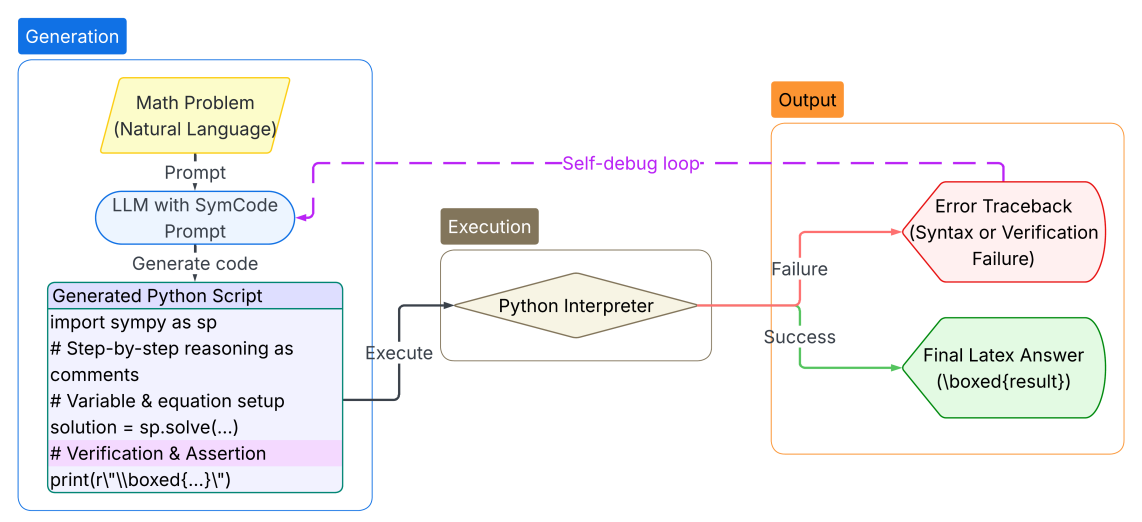
This diagram illustrates the workflow of a Large Language Model (LLM) equipped with SymCode for solving math problems. It depicts the process from receiving a natural language math problem to generating a final LaTeX answer, including a self-debugging loop. The diagram is segmented into "Generation" and "Output" sections, connected by an "Execution" phase.
### Components/Axes
The diagram consists of several rectangular components representing stages or elements in the process. These are connected by arrows indicating the flow of information or control. Key components include:
* **Math Problem (Natural Language):** The initial input.
* **Prompt:** Input to the LLM.
* **LLM with SymCode:** The core processing unit.
* **Prompt:** Input to code generation.
* **Generate code:** Output from the LLM.
* **Generated Python Script:** The code generated by the LLM. Contains example code snippets.
* **Python Interpreter:** Executes the generated code.
* **Execute:** Action taken by the Python Interpreter.
* **Error Traceback (Syntax or Verification Failure):** Output in case of failure.
* **Final LaTeX Answer (\boxed{result}):** The desired output upon success.
* **Self-debug loop:** A dashed arrow indicating a feedback loop.
### Detailed Analysis or Content Details
The diagram shows a clear flow:
1. A **Math Problem (Natural Language)** is provided as input.
2. This problem is used as a **Prompt** to an **LLM with SymCode**.
3. The LLM generates code based on another **Prompt**.
4. The **Generated Python Script** is shown with the following example code:
* `import sympy as sp`
* `# Step-by-step reasoning as comments`
* `# Variable & equation setup`
* `solution = sp.solve(...)`
* `# Verification & Assertion`
* `print(r"\boxed{...}")`
5. The script is then **Execute**d by a **Python Interpreter**.
6. The execution can result in two outcomes:
* **Failure:** Leading to an **Error Traceback (Syntax or Verification Failure)**.
* **Success:** Leading to a **Final LaTeX Answer (\boxed{result})**.
7. A **Self-debug loop** (dashed arrow) connects the "Execution" phase back to the "LLM with SymCode", indicating that the LLM can refine its code based on execution results.
### Key Observations
* The diagram emphasizes the iterative nature of the problem-solving process through the self-debugging loop.
* The inclusion of example code within the "Generated Python Script" component provides insight into the LLM's code generation strategy.
* The diagram clearly distinguishes between successful and unsuccessful execution paths.
* The use of LaTeX formatting for the final answer suggests a focus on mathematical notation.
### Interpretation
This diagram illustrates a sophisticated approach to math problem solving using LLMs. The integration of SymCode allows the LLM to generate executable code, enabling verification and refinement of solutions. The self-debugging loop is crucial for handling complex problems where initial code generation may not yield the correct answer. The diagram highlights the importance of both natural language understanding (to interpret the math problem) and code generation/execution (to solve the problem). The use of LaTeX for the final answer suggests a focus on presenting results in a standard mathematical format. The diagram suggests a system designed for accuracy and robustness, capable of handling both syntax and verification errors. The inclusion of comments in the generated code indicates an attempt to make the reasoning process transparent and understandable.