## Diagram: Browser Use Agent
### Overview
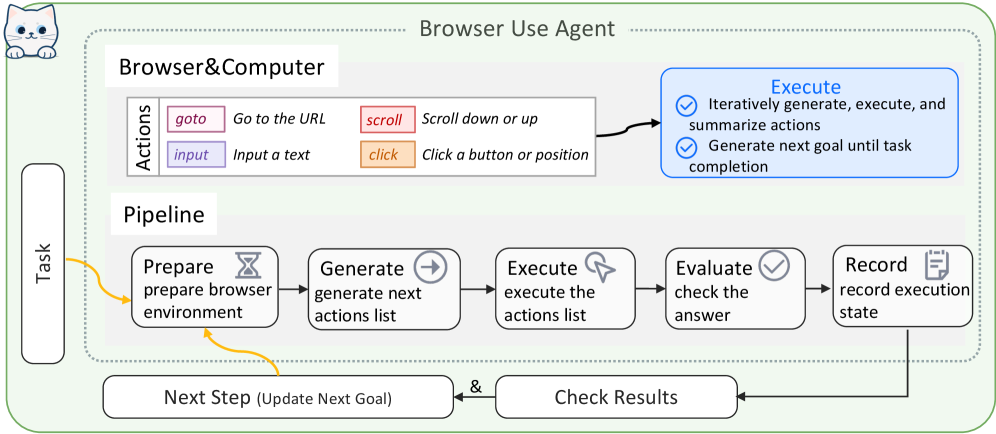
The image is a diagram illustrating the architecture and workflow of a Browser Use Agent. It outlines the interaction between the agent, the browser/computer, and the task it's designed to perform. The diagram includes components for defining actions, a pipeline for executing tasks, and mechanisms for updating goals and checking results.
### Components/Axes
* **Title:** Browser Use Agent
* **Task:** A rounded rectangle on the left side labeled "Task".
* **Browser&Computer:** A rectangle encompassing the "Actions" and "Pipeline" sections.
* **Actions:** A section within "Browser&Computer" that defines possible actions:
* **goto:** Go to the URL (colored purple)
* **input:** Input a text (colored light purple)
* **scroll:** Scroll down or up (colored light red)
* **click:** Click a button or position (colored light orange)
* **Pipeline:** A sequence of steps for task execution:
* **Prepare:** prepare browser environment (hourglass icon)
* **Generate:** generate next actions list (arrow icon)
* **Execute:** execute the actions list (cursor icon)
* **Evaluate:** check the answer (checkmark icon)
* **Record:** record execution state (document icon)
* **Execute (Blue Box):** A blue rounded rectangle containing:
* Iteratively generate, execute, and summarize actions
* Generate next goal until task completion
* **Next Step (Update Next Goal):** A rounded rectangle at the bottom.
* **Check Results:** A rounded rectangle at the bottom.
### Detailed Analysis or ### Content Details
* **Task to Prepare:** A yellow arrow connects the "Task" box to the "Prepare" step in the "Pipeline".
* **Prepare to Generate:** A black arrow connects the "Prepare" step to the "Generate" step.
* **Generate to Execute:** A black arrow connects the "Generate" step to the "Execute" step.
* **Execute to Evaluate:** A black arrow connects the "Execute" step to the "Evaluate" step.
* **Evaluate to Record:** A black arrow connects the "Evaluate" step to the "Record" step.
* **Record to Generate:** A black arrow connects the "Record" step back to the "Generate" step, forming a loop.
* **Record to Next Step:** A black arrow connects the "Record" step to the "Next Step (Update Next Goal)" box.
* **Prepare to Next Step:** A yellow arrow connects the "Prepare" step to the "Next Step (Update Next Goal)" box.
* **Next Step & Check Results:** The "Next Step (Update Next Goal)" box is connected to the "Check Results" box with an "&" symbol.
* **Check Results to Record:** A black arrow connects the "Check Results" box to the "Record" step.
### Key Observations
* The diagram illustrates a cyclical process where the agent prepares the environment, generates actions, executes them, evaluates the results, records the state, and then generates new actions based on the recorded state.
* The "Next Step (Update Next Goal)" and "Check Results" components provide feedback and control mechanisms for the agent.
* The "Actions" section defines the basic operations the agent can perform within the browser.
### Interpretation
The diagram presents a high-level overview of a Browser Use Agent's architecture and workflow. The agent operates in a loop, continuously generating, executing, and evaluating actions to achieve a given task. The "Next Step" and "Check Results" components suggest that the agent can adapt its strategy based on the outcome of previous actions. The separation of "Actions" from the "Pipeline" suggests a modular design where the agent's capabilities can be extended by adding new actions. The diagram highlights the key components and their interactions, providing a clear understanding of how the agent operates within a browser environment.