\n
## Diagram: Browser Use Agent Pipeline
### Overview
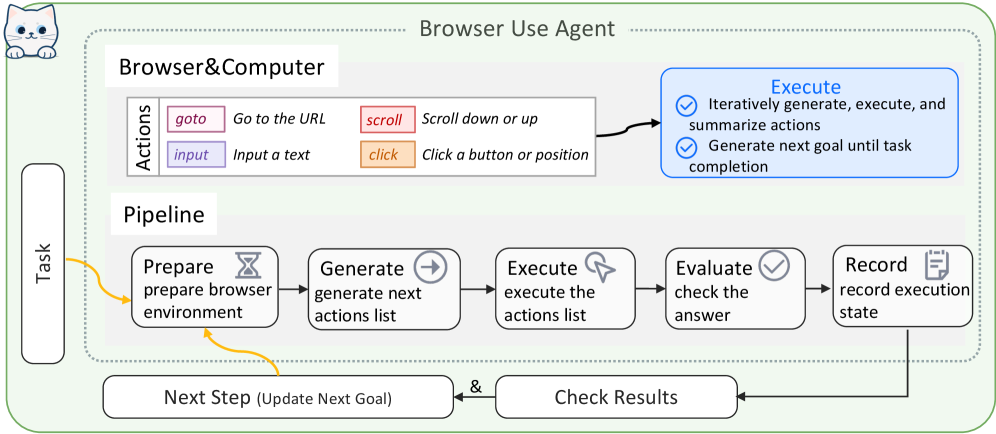
The image depicts a diagram illustrating the pipeline of a "Browser Use Agent". It shows the flow of a task through several stages, from preparation to recording, with feedback loops for checking results and updating the goal. The diagram is divided into two main sections: "Browser & Computer" and "Pipeline".
### Components/Axes
The diagram consists of the following components:
* **Header:** "Browser Use Agent"
* **Browser & Computer Section:** Contains "Actions" with four options: "goto", "input", "scroll", and "click".
* **Pipeline Section:** Contains five stages: "Prepare", "Generate", "Execute", "Evaluate", and "Record".
* **Task Input:** A rectangular box labeled "Task" on the left side, feeding into the "Prepare" stage.
* **Feedback Loops:** Arrows indicating feedback from "Check Results" to "Next Step" and from "Evaluate" to "Check Results".
* **Output:** "Check Results" and "Next Step (Update Next Goal)".
### Detailed Analysis or Content Details
The diagram illustrates a cyclical process.
1. **Task:** A task is initiated and fed into the "Prepare" stage.
2. **Prepare:** The browser environment is prepared.
3. **Generate:** A list of next actions is generated.
4. **Execute:** The actions list is executed.
5. **Evaluate:** The answer is checked.
6. **Record:** The execution state is recorded.
7. **Check Results:** The results are checked.
8. **Next Step:** The next goal is updated.
The "Browser & Computer" section details the available actions:
* **goto:** Go to the URL.
* **input:** Input a text.
* **scroll:** Scroll down or up.
* **click:** Click a button or position.
The "Execute" section in the upper-right corner provides further details:
* Iteratively generate, execute, and summarize actions.
* Generate next goal until task completion.
The arrows indicate the flow of information and control. The arrow from "Check Results" to "Next Step" suggests an iterative refinement of the goal based on the results. The arrow from "Evaluate" to "Check Results" indicates a feedback loop for verifying the answer.
### Key Observations
The diagram emphasizes an iterative and goal-oriented approach to browser automation. The feedback loops suggest a continuous process of evaluation and refinement. The "Browser & Computer" section highlights the basic actions that the agent can perform. The "Execute" section emphasizes the iterative nature of the process.
### Interpretation
This diagram represents a closed-loop system for automating browser tasks. The agent takes a task as input, prepares the environment, generates a sequence of actions, executes those actions, evaluates the results, and records the execution state. The feedback loops allow the agent to adapt its strategy based on the results, ultimately aiming to achieve the task goal. The system is designed to be iterative, continuously refining its actions until the task is completed. The inclusion of "Record" suggests a logging or debugging capability, allowing for analysis of the agent's behavior. The diagram suggests a sophisticated AI agent capable of complex browser interactions. The agent is not simply executing pre-defined scripts, but rather dynamically generating and adapting its actions based on the observed results.