## Diagram: Browser Use Agent Workflow
### Overview
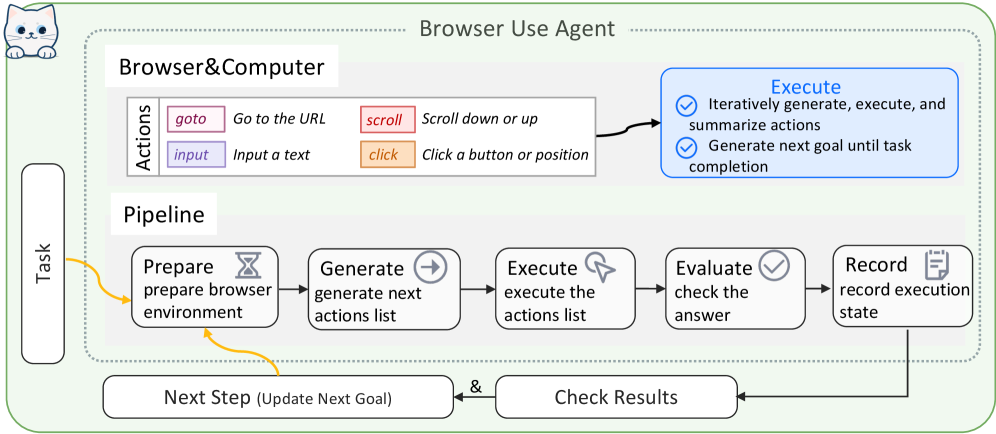
This diagram illustrates the workflow of a Browser Use Agent, detailing how it interacts with a browser/computer environment to execute tasks. The process is divided into three main sections: **Browser & Computer Actions**, **Pipeline**, and **Execute**. The workflow emphasizes iterative goal generation, action execution, and result evaluation.
---
### Components/Axes
#### Browser & Computer Actions
- **Actions** (color-coded):
- **goto** (pink): "Go to the URL"
- **input** (purple): "Input a text"
- **scroll** (red): "Scroll down or up"
- **click** (orange): "Click a button or position"
#### Pipeline
- **Steps** (sequential flow):
1. **Prepare**: Prepare browser environment (yellow arrow)
2. **Generate**: Generate next actions list (gray arrow)
3. **Execute**: Execute the actions list (gray arrow)
4. **Evaluate**: Check the answer (gray arrow)
5. **Record**: Record execution state (gray arrow)
6. **Next Step**: Update next goal (yellow arrow)
#### Execute Section
- **Key Features** (blue box):
- ✅ Iteratively generate, execute, and summarize actions
- ✅ Generate next goal until task completion
---
### Detailed Analysis
#### Browser & Computer Actions
- **Color-Coded Actions**:
- **Pink (goto)**: Navigates to a specified URL.
- **Purple (input)**: Enters text into a field.
- **Red (scroll)**: Adjusts page position vertically.
- **Orange (click)**: Simulates a mouse click at a position or on a button.
#### Pipeline Workflow
1. **Prepare**: Initializes the browser environment for task execution.
2. **Generate**: Creates a list of actions required to achieve the task.
3. **Execute**: Carries out the generated actions in sequence.
4. **Evaluate**: Validates whether the executed actions achieved the desired outcome.
5. **Record**: Logs the execution state for future reference or debugging.
6. **Next Step**: Updates the task goal based on evaluation results, enabling iterative refinement.
#### Execute Section
- **Iterative Process**:
- The agent repeatedly generates, executes, and summarizes actions until the task is complete.
- Emphasizes adaptability by updating goals dynamically based on evaluation outcomes.
---
### Key Observations
1. **Color-Coding Consistency**: The legend colors (pink, purple, red, orange) strictly match the corresponding action labels.
2. **Sequential Dependency**: The pipeline steps are tightly coupled, with each phase feeding into the next (e.g., "Generate" → "Execute").
3. **Iterative Focus**: The "Execute" section highlights the agent's ability to refine its approach through repeated cycles.
4. **State Management**: The "Record" step ensures transparency by logging execution states, critical for debugging or auditing.
---
### Interpretation
This diagram represents a structured, automated workflow for task execution using a browser. The agent's design prioritizes:
- **Modularity**: Each action type (goto, input, etc.) is clearly defined and color-coded for easy reference.
- **Iterative Improvement**: By updating goals based on evaluation results, the agent adapts to dynamic task requirements.
- **Transparency**: Recording execution states ensures accountability and facilitates troubleshooting.
The workflow mirrors human-like problem-solving, where actions are planned, executed, and refined until the task is completed. The use of color-coding and sequential arrows enhances readability, making the process intuitive for developers or users implementing such a system.