## Diagram: Dependency and Action Correction
### Overview
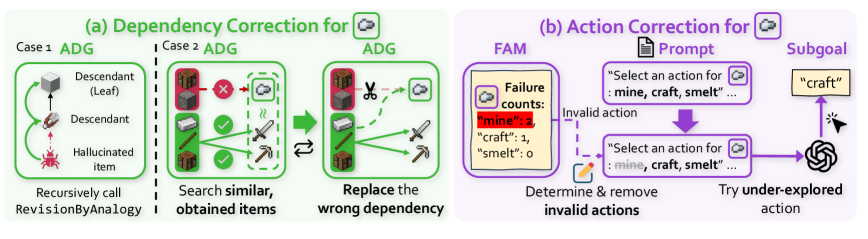
The image presents two diagrams illustrating correction mechanisms for dependency and action errors. Diagram (a) focuses on "Dependency Correction for ADG" (Action Dependency Graph), showing two cases where dependencies are corrected. Diagram (b) focuses on "Action Correction for FAM" (Failure Aware Module), detailing how invalid actions are identified and removed.
### Components/Axes
**Diagram (a): Dependency Correction for ADG**
* **Title:** (a) Dependency Correction for
* **Sub-titles:** Case 1 ADG, Case 2 ADG, ADG
* **Elements:**
* **Case 1:**
* A cube labeled "Descendant (Leaf)"
* A brown item labeled "Descendant"
* A red bug labeled "Hallucinated item"
* Arrows indicating the flow of dependency
* Text: "Recursively call RevisionByAnalogy"
* **Case 2:**
* A set of Minecraft blocks (wood, stone) marked with a red "X"
* A sword and pickaxe marked with a green checkmark
* An arrow indicating a search for similar obtained items
* Text: "Search similar, obtained items"
* **ADG (Corrected):**
* A cloud icon
* A pair of scissors cutting the dependency
* A sword and pickaxe
* An arrow indicating the replacement of the wrong dependency
* Text: "Replace the wrong dependency"
**Diagram (b): Action Correction for FAM**
* **Title:** (b) Action Correction for
* **Labels:** FAM, Prompt, Subgoal
* **Elements:**
* **FAM (Failure Aware Module):**
* A box labeled "Failure counts:"
* "mine": 2 (highlighted in red)
* "craft": 1
* "smelt": 0
* **Prompt:**
* A document icon
* Text: "Select an action for: mine, craft, smelt..." (repeated twice)
* A purple arrow indicating the flow of action selection
* **Subgoal:**
* A box labeled "craft"
* A cursor pointing towards the "craft" subgoal
* An icon resembling a neural network
* **Text:**
* "Determine & remove invalid actions"
* "Try under-explored action"
* "Invalid action" (associated with a dashed line)
### Detailed Analysis or ### Content Details
**Diagram (a):**
* **Case 1:** Illustrates a scenario where a hallucinated item is identified and removed from the dependency graph. The flow starts from the "Descendant (Leaf)" and goes down to the "Hallucinated item."
* **Case 2:** Shows a scenario where incorrect dependencies (wood and stone blocks) are replaced with correct ones (sword and pickaxe). The process involves searching for similar obtained items and then replacing the wrong dependency.
**Diagram (b):**
* The "Failure counts" box indicates the number of times each action ("mine," "craft," "smelt") has failed. "mine" has failed twice, "craft" once, and "smelt" zero times.
* The process involves selecting an action from a prompt, identifying invalid actions based on failure counts, removing them, and then trying under-explored actions to achieve the subgoal.
### Key Observations
* **Dependency Correction:** Focuses on correcting errors in the dependency graph by identifying and replacing incorrect or hallucinated items.
* **Action Correction:** Focuses on improving action selection by learning from past failures and prioritizing under-explored actions.
* **Failure Counts:** The "mine" action has the highest failure count, suggesting it is the most problematic action.
### Interpretation
The diagrams illustrate two different approaches to error correction in a system, likely related to AI or game playing. The dependency correction aims to ensure the accuracy of the underlying dependency graph, while the action correction focuses on improving the decision-making process by learning from past failures. The combination of these two correction mechanisms likely leads to a more robust and efficient system. The red highlighting of "mine": 2 suggests that the system prioritizes addressing the "mine" action due to its high failure rate.