# Technical Document: Analysis of GUI Automation Task Sequences
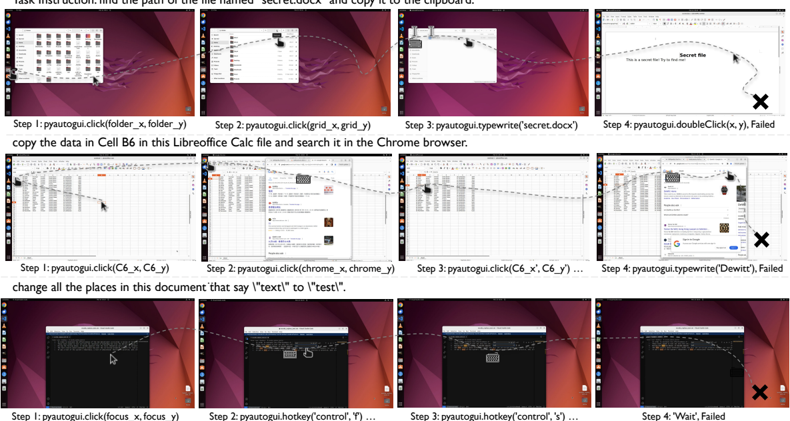
This document provides a detailed extraction and analysis of the provided image, which illustrates three distinct task sequences for a GUI automation agent (using `pyautogui`). Each sequence consists of a natural language instruction, four sequential screenshots showing the cursor path (dashed line) and interactions, and the corresponding code steps.
---
## Task Sequence 1: File Search and Path Copying
**Instruction:** "Task instruction: find the path of the file named 'secret.docx' and copy it to the clipboard."
### Component Breakdown
* **Step 1:**
* **Action:** `pyautogui.click(folder_x, folder_y)`
* **Visual:** The cursor moves to a folder icon in a file manager window (Ubuntu/GNOME environment).
* **Step 2:**
* **Action:** `pyautogui.click(grid_x, grid_y)`
* **Visual:** The cursor clicks on a search or grid view icon within the file manager.
* **Step 3:**
* **Action:** `pyautogui.typewrite('secret.docx')`
* **Visual:** A search bar is active; the text is being entered to filter files.
* **Step 4:**
* **Action:** `pyautogui.doubleClick(x, y), Failed`
* **Visual:** The cursor moves toward a document labeled "Secret file" with the text "This is a secret file! Try to find me!".
* **Outcome:** Marked with a large black **"X"**, indicating a failure in the final execution step.
---
## Task Sequence 2: Data Extraction and Web Search
**Instruction:** "copy the data in Cell B6 in this Libreoffice Calc file and search it in the Chrome browser."
### Component Breakdown
* **Step 1:**
* **Action:** `pyautogui.click(C6_x, C6_y)`
* **Visual:** The cursor is positioned over a spreadsheet (LibreOffice Calc). Note: The code says C6, but the instruction requested B6.
* **Step 2:**
* **Action:** `pyautogui.click(chrome_x, chrome_y)`
* **Visual:** The cursor moves to the Google Chrome browser window. A Google search page is visible.
* **Step 3:**
* **Action:** `pyautogui.click(C6_x', C6_y') ...`
* **Visual:** The cursor returns to the spreadsheet application.
* **Step 4:**
* **Action:** `pyautogui.typewrite('Dewitt'), Failed`
* **Visual:** The cursor is in the Chrome search bar. The text "Dewitt" (presumably the data from the cell) is typed.
* **Outcome:** Marked with a large black **"X"**, indicating a failure.
---
## Task Sequence 3: Text Replacement in Editor
**Instruction:** "change all the places in this document that say \"text\" to \"test\"."
### Component Breakdown
* **Step 1:**
* **Action:** `pyautogui.click(focus_x, focus_y)`
* **Visual:** The cursor clicks inside a code editor window (VS Code style) containing a block of text.
* **Step 2:**
* **Action:** `pyautogui.hotkey('control', 'f') ...`
* **Visual:** The "Find" widget is triggered in the top right of the editor.
* **Step 3:**
* **Action:** `pyautogui.hotkey('control', 's') ...`
* **Visual:** The cursor is near the save/replace interface. Note: 'control', 's' is typically "Save," whereas 'control', 'h' is usually "Replace."
* **Step 4:**
* **Action:** `"Wait", Failed`
* **Visual:** The cursor moves away from the active area toward the bottom right.
* **Outcome:** Marked with a large black **"X"**, indicating a failure.
---
## Summary of Key Data and Trends
| Task | Target Application | Primary Action | Final Status |
| :--- | :--- | :--- | :--- |
| File Search | File Manager (Nautilus) | Search & Double Click | **Failed** |
| Data Search | LibreOffice Calc / Chrome | Copy & Web Search | **Failed** |
| Text Edit | Text Editor (VS Code) | Find & Replace | **Failed** |
### Technical Observations
1. **Pathing:** All sequences use dashed lines to represent the spatial trajectory of the mouse cursor across the desktop environment.
2. **Language:** All text is in **English**.
3. **Failure Pattern:** Every sequence shown ends in a "Failed" state at Step 4, indicated by both the text label and a visual "X" over the final frame. This suggests the image is likely from a dataset used to train or evaluate error detection in GUI automation agents.
4. **Inconsistencies:** In Task 2, the instruction asks for Cell **B6**, but the code logs click coordinates for **C6**. This discrepancy may be the cause of the recorded failure.