# Technical Document Extraction: RFT Portal Dashboard
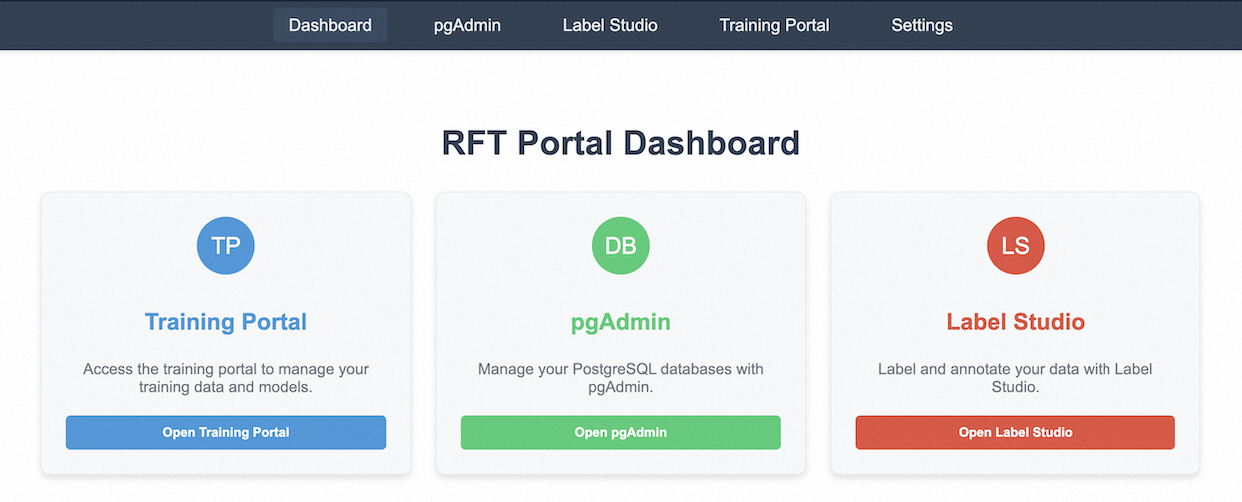
This document provides a comprehensive extraction of the textual and structural information contained within the provided image of a software interface.
## 1. Component Isolation
The interface is organized into three distinct vertical regions:
* **Header (Navigation Bar):** A dark blue horizontal bar containing global navigation links.
* **Main Title:** A central heading identifying the page.
* **Main Content (Service Cards):** A horizontal layout of three interactive cards, each representing a specific tool or service.
---
## 2. Header Information (Navigation Bar)
The navigation bar is located at the top of the screen. The active page is highlighted with a subtle background box.
| Navigation Item | Status |
| :--- | :--- |
| **Dashboard** | Active (Selected) |
| **pgAdmin** | Inactive |
| **Label Studio** | Inactive |
| **Training Portal** | Inactive |
| **Settings** | Inactive |
---
## 3. Main Title
* **Text:** `RFT Portal Dashboard`
* **Placement:** Centered below the navigation bar.
---
## 4. Service Cards (Main Content)
The dashboard features three primary service cards. Each card follows a consistent structure: an icon with initials, a service title, a brief description, and a call-to-action (CTA) button.
### Card 1: Training Portal
* **Icon:** Blue circle with white text **"TP"**
* **Title:** Training Portal (Blue text)
* **Description:** "Access the training portal to manage your training data and models."
* **CTA Button:** Blue button with white text **"Open Training Portal"**
### Card 2: pgAdmin
* **Icon:** Green circle with white text **"DB"**
* **Title:** pgAdmin (Green text)
* **Description:** "Manage your PostgreSQL databases with pgAdmin."
* **CTA Button:** Green button with white text **"Open pgAdmin"**
### Card 3: Label Studio
* **Icon:** Red/Orange circle with white text **"LS"**
* **Title:** Label Studio (Red/Orange text)
* **Description:** "Label and annotate your data with Label Studio."
* **CTA Button:** Red/Orange button with white text **"Open Label Studio"**
---
## 5. Technical Summary
* **Language:** English (100%). No other languages detected.
* **Interface Type:** Web-based Management Dashboard.
* **Functionality:** The dashboard acts as a centralized hub (portal) for three distinct technical workflows: Machine Learning training (Training Portal), Database Management (pgAdmin), and Data Annotation (Label Studio).
* **Visual Logic:** The interface uses color-coding (Blue, Green, Red) to differentiate between the three functional domains, maintaining this color consistency across the icon, title, and button of each respective card.