## [Diagram]: Multi-Speaker Speech Processing Pipeline Flowchart
### Overview
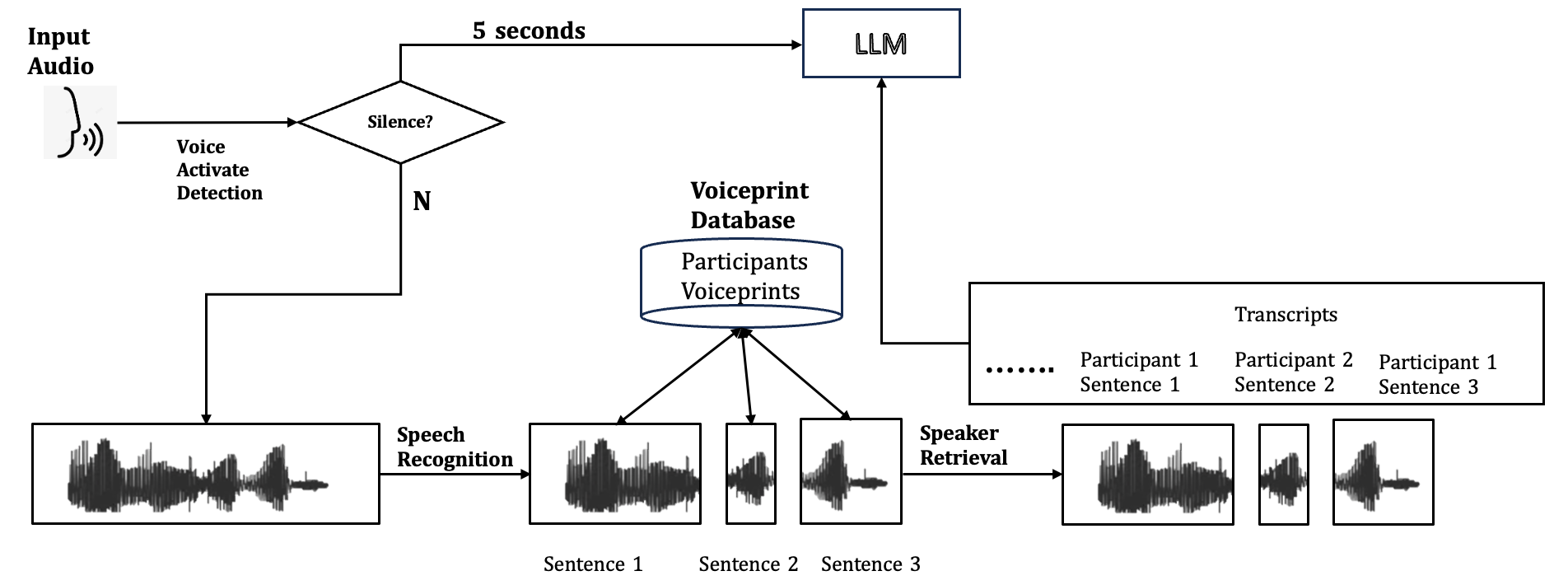
The image is a technical flowchart diagram illustrating a multi-stage pipeline for processing audio input from multiple speakers. The system performs voice activity detection, speech recognition, speaker identification using voiceprints, and transcript generation, ultimately feeding the processed information into a Large Language Model (LLM). The flow is primarily left-to-right with a central database component.
### Components/Axes
The diagram consists of several interconnected components, represented by boxes, a diamond, a cylinder, and waveform icons, linked by directional arrows. All text is in English.
**Key Components & Labels:**
1. **Input Audio:** Top-left. Represented by an icon of a head with sound waves.
2. **Voice Activate Detection:** Text label below the "Input Audio" icon.
3. **Decision Diamond:** Labeled "Silence?". It has two output paths:
* **"5 seconds"**: An arrow leading to the "LLM" box.
* **"N"** (for "No"): An arrow leading down to the main processing pipeline.
4. **Waveform Box (Initial):** A rectangular box containing a single, complex audio waveform.
5. **Speech Recognition:** Text label on an arrow leading from the initial waveform box to a set of segmented waveforms.
6. **Segmented Waveforms:** Three separate boxes, each containing a simpler waveform. They are labeled below as:
* "Sentence 1"
* "Sentence 2"
* "Sentence 3"
7. **Voiceprint Database:** A cylindrical database icon located centrally above the segmented waveforms. It is labeled:
* **Title:** "Voiceprint Database"
* **Contents:** "Participants Voiceprints"
8. **Speaker Retrieval:** Text label on an arrow leading from the segmented waveforms to a final set of waveforms.
9. **Final Waveforms:** Three boxes containing waveforms, visually similar to the segmented ones but now associated with speaker identity.
10. **Transcripts:** A large rectangular box on the right. It contains:
* **Title:** "Transcripts"
* **Content:** A list format showing:
* "......"
* "Participant 1 Sentence 1"
* "Participant 2 Sentence 2"
* "Participant 1 Sentence 3"
11. **LLM:** A rectangular box at the top-right. It receives two inputs: the "5 seconds" path from the "Silence?" check and an arrow from the "Transcripts" box.
### Detailed Analysis
**Process Flow:**
1. **Start:** The process begins with "Input Audio".
2. **Voice Activation Detection:** The audio is checked for voice activity.
3. **Silence Check:** A decision point ("Silence?") determines the next step.
* **If Silence is detected (Yes path, implied):** The system waits for "5 seconds" and then sends a signal to the "LLM". The "N" (No) path is taken if speech is present.
* **If Speech is present (N path):** The audio waveform is passed to the next stage.
4. **Speech Recognition:** The continuous audio stream is processed and segmented into individual sentences ("Sentence 1", "Sentence 2", "Sentence 3").
5. **Speaker Identification:** The segmented sentences are processed alongside the "Voiceprint Database" which stores "Participants Voiceprints". The "Speaker Retrieval" step uses this database to associate each sentence with a specific speaker.
6. **Transcript Generation:** The output is a structured transcript listing each sentence with its identified speaker (e.g., "Participant 1 Sentence 1").
7. **LLM Integration:** The final "Transcripts" are sent to the "LLM". The LLM also receives a direct signal from the initial silence detection path, suggesting it may be triggered or informed by periods of inactivity.
### Key Observations
* The diagram clearly separates the tasks of **what was said** (Speech Recognition) and **who said it** (Speaker Retrieval via Voiceprint Database).
* The "Silence?" check acts as a gatekeeper. It appears to have a dual function: triggering the LLM after a timeout (5 seconds of silence) and allowing active speech to enter the processing pipeline.
* The transcript example shows that the system can handle interleaved speech from multiple participants (Participant 1, then 2, then 1 again).
* The flowchart uses standard symbols: rectangles for processes/data, a diamond for a decision, a cylinder for a database, and arrows for flow direction.
### Interpretation
This diagram outlines an **end-to-end multi-speaker speech processing system** designed for conversational analysis. Its primary purpose is to convert raw, multi-speaker audio into a structured, speaker-attributed text transcript suitable for consumption by a Large Language Model.
The architecture suggests a focus on **meeting or conversation transcription**. The "Voiceprint Database" implies a pre-enrolled set of users, making this suitable for known-participant scenarios like team meetings, interviews, or call center analytics rather than anonymous crowd audio.
The direct link from the "Silence?" check to the LLM is a notable design choice. It could indicate that the LLM is used for **summarization or action generation** triggered by natural pauses in conversation, or that silence periods are themselves a meaningful signal for the LLM to process (e.g., to identify turn-taking or thinking time).
The system's value lies in its ability to **disentangle and structure conversational data**. By providing the LLM with not just the text but also the speaker identity for each utterance, it enables more sophisticated analysis, such as tracking individual contributions, analyzing dialogue dynamics, or generating speaker-specific summaries. The absence of numerical data or trends confirms this is a conceptual process flow diagram, not a data visualization.