# Technical Document Extraction: Reinforcement Learning Training Architectures
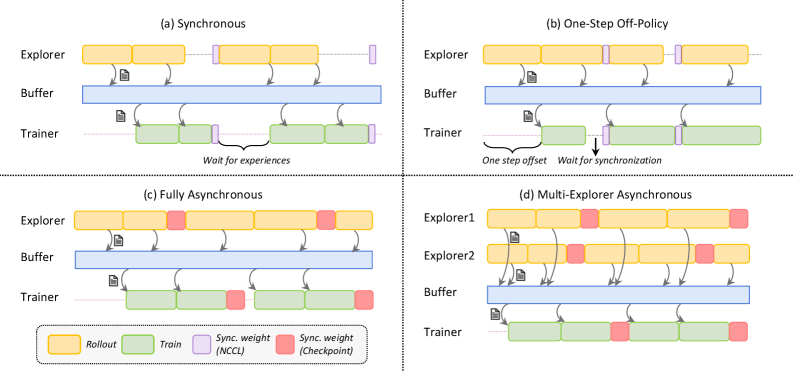
This document provides a detailed technical extraction of an image illustrating four different architectural patterns for Reinforcement Learning (RL) training workflows.
## 1. Global Legend and Component Definitions
The following components and color codes are consistent across all four diagrams.
| Component | Color | Description |
| :--- | :--- | :--- |
| **Rollout** | Yellow (Rounded Rect) | Data collection phase performed by the Explorer. |
| **Train** | Green (Rounded Rect) | Model optimization phase performed by the Trainer. |
| **Sync. weight (NCCL)** | Purple (Thin Rect) | Fast weight synchronization using NCCL (NVIDIA Collective Communications Library). |
| **Sync. weight (Checkpoint)** | Red (Thin Rect) | Weight synchronization via checkpointing (typically slower/asynchronous). |
| **Buffer** | Light Blue (Long Rect) | Shared storage for experiences (Replay Buffer). |
| **Data Flow** | Curved Arrows | Arrows from Explorer to Buffer indicate data storage; arrows from Buffer to Trainer indicate data sampling. |
| **Document Icon** | Grey Icon | Represents the transfer of experience data/logs. |
---
## 2. Architectural Analysis by Quadrant
The image is divided into four quadrants (a through d), representing a progression from synchronous to fully asynchronous multi-agent systems.
### (a) Synchronous
* **Components:** Explorer, Buffer, Trainer.
* **Workflow:**
1. The Explorer completes two Rollout blocks.
2. Data is pushed to the Buffer.
3. The Trainer remains idle initially, labeled with the text: *"Wait for experiences"*.
4. Once data is available, the Trainer performs two Train blocks.
5. A **Sync. weight (NCCL)** (purple) event occurs simultaneously for both Explorer and Trainer, halting both processes until the update is complete.
* **Trend:** Sequential execution with significant idle time for the Trainer.
### (b) One-Step Off-Policy
* **Components:** Explorer, Buffer, Trainer.
* **Workflow:**
1. The Trainer starts with a delay, labeled: *"One step offset"*.
2. The Explorer performs Rollouts continuously, punctuated by **Sync. weight (NCCL)** (purple) events.
3. The Trainer processes data from the Buffer.
4. A specific synchronization point is highlighted with a downward arrow and the text: *"Wait for synchronization"*. This indicates the Trainer must wait for the Explorer to reach a sync point before it can proceed with the next training step.
* **Trend:** Overlapped execution but still constrained by rigid synchronization points.
### (c) Fully Asynchronous
* **Components:** Explorer, Buffer, Trainer.
* **Workflow:**
1. The Explorer and Trainer operate independently.
2. Synchronization is handled via **Sync. weight (Checkpoint)** (red).
3. The Explorer does not stop for the Trainer; it continues Rollouts and updates its weights from checkpoints whenever they become available.
4. The Trainer continues training and periodically saves checkpoints.
* **Trend:** Maximum hardware utilization; no "Wait" states are visible in the timeline.
### (d) Multi-Explorer Asynchronous
* **Components:** Explorer1, Explorer2, Buffer, Trainer.
* **Workflow:**
1. Two independent Explorer lines (Explorer1 and Explorer2) perform Rollouts at different cadences.
2. Both Explorers push data into a single shared **Buffer**.
3. The Trainer samples from this aggregated Buffer.
4. Weight synchronization is performed via **Sync. weight (Checkpoint)** (red) across all three active entities (Explorer1, Explorer2, and Trainer).
* **Trend:** Scaled-out data collection. The Trainer is constantly fed by multiple sources, and synchronization is decoupled from the execution loops.
---
## 3. Spatial Grounding and Textual Labels
* **Header Labels:**
* (a) Synchronous [Top-Left]
* (b) One-Step Off-Policy [Top-Right]
* (c) Fully Asynchronous [Bottom-Left]
* (d) Multi-Explorer Asynchronous [Bottom-Right]
* **Y-Axis Labels (Internal to each quadrant):**
* Explorer / Explorer1 / Explorer2
* Buffer
* Trainer
* **Legend Position:** Located in the bottom-left quadrant, contained within a dashed rounded box.
* **Annotations:**
* *"Wait for experiences"* (Quadrant a, under Trainer line)
* *"One step offset"* (Quadrant b, under Trainer start)
* *"Wait for synchronization"* (Quadrant b, between Trainer blocks)
## 4. Summary of Data Flow
In all models, the **Explorer** is the producer of data (Yellow $\rightarrow$ Blue Buffer), and the **Trainer** is the consumer of data (Blue Buffer $\rightarrow$ Green). The primary differentiator between the four diagrams is the **temporal alignment** and the **mechanism of weight feedback** (Purple/NCCL vs. Red/Checkpoint).