## Diagram: Synchronization Strategies in a Distributed System
### Overview
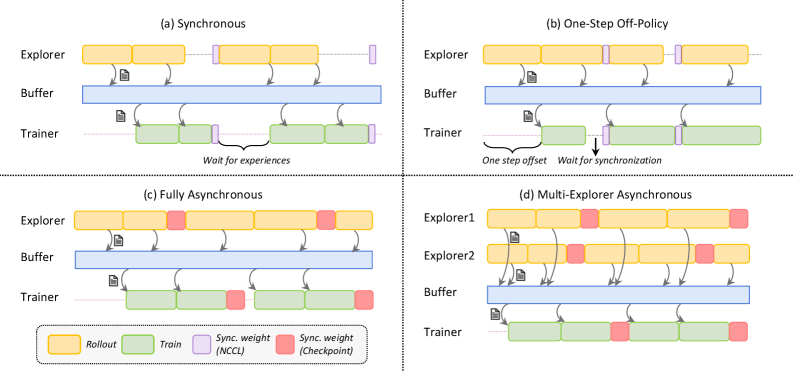
The image depicts four synchronization strategies (a-d) for a distributed system involving **Explorers**, **Buffers**, and **Trainers**. Each quadrant illustrates data flow, synchronization points, and component interactions using color-coded blocks and arrows.
### Components/Axes
- **Components**:
- **Explorers**: Generate data (yellow blocks labeled "Rollout").
- **Buffers**: Temporary storage (blue blocks).
- **Trainers**: Process data (green blocks labeled "Train").
- **Synchronization Elements**:
- **Sync. weight (NCCL)**: Purple blocks (inter-component synchronization).
- **Sync. weight (Checkpoint)**: Red blocks (checkpoint synchronization).
- **Arrows**: Indicate data flow direction.
- **Legend**: Located at the bottom, mapping colors to actions (Rollout, Train, Sync. weight, Checkpoint).
### Detailed Analysis
#### Quadrant (a) Synchronous
- **Flow**:
- Explorers → Buffers (yellow → blue).
- Buffers → Trainers (blue → green).
- Trainers wait for experiences (dashed arrow).
- **Synchronization**:
- Purple "Sync. weight (NCCL)" blocks between Explorers and Buffers.
- No checkpoints (no red blocks).
#### Quadrant (b) One-Step Off-Policy
- **Flow**:
- Explorers → Buffers (yellow → blue).
- Buffers → Trainers (blue → green).
- **Synchronization**:
- One-step offset (dashed arrow from Explorers to Buffers).
- Purple "Sync. weight (NCCL)" blocks between Buffers and Trainers.
- "Wait for synchronization" note.
#### Quadrant (c) Fully Asynchronous
- **Flow**:
- Explorers → Buffers (yellow → blue).
- Buffers → Trainers (blue → green).
- **Synchronization**:
- Red "Sync. weight (Checkpoint)" blocks at intervals.
- No explicit waiting (fully asynchronous).
#### Quadrant (d) Multi-Explorer Asynchronous
- **Flow**:
- Two Explorers (Explorer1, Explorer2) → Buffers (yellow → blue).
- Buffers → Trainers (blue → green).
- **Synchronization**:
- Red "Sync. weight (Checkpoint)" blocks at intervals.
- Arrows indicate parallel data flow from multiple Explorers.
### Key Observations
1. **Synchronous (a)**: Strict synchronization with delays ("Wait for experiences").
2. **One-Step Off-Policy (b)**: Introduces latency via offset but synchronizes before training.
3. **Fully Asynchronous (c)**: No waiting but relies on checkpoints for consistency.
4. **Multi-Explorer Asynchronous (d)**: Scales to multiple Explorers but requires checkpoint synchronization.
### Interpretation
- **Trade-offs**:
- Synchronous strategies prioritize consistency but reduce throughput.
- Asynchronous strategies improve parallelism but risk data staleness without checkpoints.
- **Checkpoints**: Critical in asynchronous systems (red blocks) to ensure data consistency.
- **Multi-Explorer Scalability**: Quadrant (d) suggests handling multiple data sources but complicates synchronization.
- **NCCL vs. Checkpoint**: NCCL (purple) enables real-time sync, while checkpoints (red) act as recovery points.
This diagram highlights the balance between synchronization overhead, data freshness, and system scalability in distributed training pipelines.