\n
## Screenshot: Query and Response Interface
### Overview
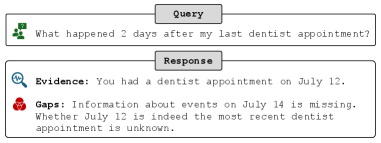
The image is a screenshot of a query and response interface, likely from a conversational AI or information retrieval system. It displays a user query and the system's response, broken down into "Evidence" and "Gaps" sections.
### Components/Axes
The interface is divided into two main sections: "Query" and "Response". Each section is contained within a rectangular box with a light gray background. The "Query" box is positioned above the "Response" box. Within the "Response" box, there are two sub-sections: "Evidence" and "Gaps", each also contained within a rectangular box. Small icons are present to the left of each section title.
### Content Details
**Query:**
The query text is: "What happened 2 days after my last dentist appointment?"
An icon of a person with a speech bubble is present to the left of the query.
**Response:**
* **Evidence:** "You had a dentist appointment on July 12."
An icon of a magnifying glass is present to the left of the evidence.
* **Gaps:** "Information about events on July 14 is missing. Whether July 12 is indeed the most recent dentist appointment is unknown."
An icon of a broken chain link is present to the left of the gaps.
### Key Observations
The system provides a direct answer based on available information (Evidence) and explicitly states what information is missing to fully answer the query (Gaps). The response highlights the uncertainty regarding the recency of the July 12 appointment.
### Interpretation
The interface demonstrates a system capable of understanding a natural language query, retrieving relevant information, and acknowledging limitations in its knowledge. The separation of "Evidence" and "Gaps" is a valuable feature, promoting transparency and helping the user understand the basis for the response. The system doesn't attempt to infer or guess information it doesn't have, instead explicitly stating the missing data. This approach is crucial for building trust and avoiding misinformation. The system is designed to be informative and honest about its capabilities. The use of icons adds a visual cue to the type of information being presented.