## Screenshot: AI Query-Response Interface
### Overview
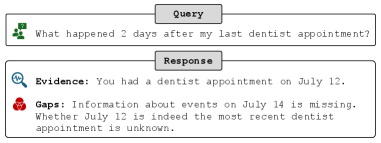
The image is a screenshot of a user interface, likely from a chatbot or AI assistant. It displays a user's natural language query and the system's structured response, which breaks down the answer into "Evidence" and "Gaps." The interface uses icons and color-coding to categorize information.
### Components/Axes
The interface is composed of two primary sections arranged vertically:
1. **Query Box (Top):** A light gray rectangular box containing the user's question.
* **Icon:** A green square with a white, stylized speech bubble or chat icon on the left.
* **Text:** "What happened 2 days after my last dentist appointment?"
2. **Response Box (Bottom):** A larger white rectangular box with a blue header bar labeled "Response".
* **Evidence Section:**
* **Icon:** A blue magnifying glass icon on the left.
* **Label:** "Evidence:" in bold.
* **Text:** "You had a dentist appointment on July 12."
* **Gaps Section:**
* **Icon:** A red triangle with a white exclamation mark (warning icon) on the left.
* **Label:** "Gaps:" in bold.
* **Text:** "Information about events on July 14 is missing. Whether July 12 is indeed the most recent dentist appointment is unknown."
### Content Details
* **Query Text:** "What happened 2 days after my last dentist appointment?"
* **Evidence Text:** "You had a dentist appointment on July 12."
* **Gaps Text:** "Information about events on July 14 is missing. Whether July 12 is indeed the most recent dentist appointment is unknown."
* **Language:** All text is in English.
### Key Observations
1. **Structured Response Format:** The system does not provide a direct narrative answer. Instead, it deconstructs the query into a known fact (Evidence) and identifies missing or uncertain information (Gaps).
2. **Temporal Reasoning:** The system correctly interprets "2 days after" July 12 as July 14, which is the date referenced in the Gaps.
3. **Assumption Challenging:** The Gaps section explicitly questions a core assumption of the user's query—that July 12 is the *last* appointment. This indicates the system is designed to handle ambiguity and incomplete context.
4. **Visual Coding:** Icons (green chat, blue magnifying glass, red warning) and bold labels are used for quick visual parsing of information types.
### Interpretation
This screenshot demonstrates a specific design philosophy for an AI assistant focused on transparency and precision. Rather than potentially fabricating an answer based on incomplete data, the system:
* **Isolates Verifiable Facts:** It extracts and presents the concrete piece of data it can confirm from its knowledge base (the appointment date).
* **Explicitly Maps Uncertainty:** It clearly defines the boundaries of its knowledge by stating what information is missing to fully answer the question. This is a Peircean investigative approach, acknowledging the "Gaps" in the available evidence.
* **Promotes User Awareness:** By highlighting the assumption about the "most recent" appointment, it prompts the user to verify or provide additional context, turning the interaction into a collaborative clarification process rather than a simple Q&A.
The design prioritizes epistemic honesty over the appearance of omniscience. The value lies not in giving a potentially wrong answer, but in accurately diagnosing why a complete answer cannot be given and what specific information would be needed to provide one. This is crucial for applications where reliability and traceability of information are paramount.