## Screenshot: Query-Response Interface
### Overview
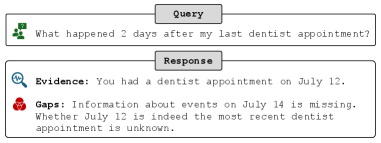
The image depicts a structured query-response interface with two primary sections: a **Query** box and a **Response** box. The interface uses icons to denote categories (e.g., user/group, evidence, gaps) and includes textual content for context.
### Components/Axes
- **Query Section**:
- Label: "Query" (bold, centered at the top).
- Text: "What happened 2 days after my last dentist appointment?"
- Icon: Green user/group symbol (left-aligned).
- **Response Section**:
- Label: "Response" (bold, centered at the top).
- Subsections:
- **Evidence**:
- Icon: Blue magnifying glass (left-aligned).
- Text: "Evidence: You had a dentist appointment on July 12."
- **Gaps**:
- Icon: Red three-circle symbol (left-aligned).
- Text: "Gaps: Information about events on July 14 is missing. Whether July 12 is indeed the most recent dentist appointment is unknown."
### Detailed Analysis
- **Textual Content**:
- The query explicitly references a timeframe ("2 days after") and a specific event ("last dentist appointment").
- The response provides a confirmed date (July 12) for the appointment but flags uncertainty about subsequent events (July 14) and the recency of the appointment.
- **UI Elements**:
- Icons are color-coded: green (query), blue (evidence), red (gaps).
- Text is left-aligned under each subsection, with clear hierarchical separation between "Evidence" and "Gaps."
### Key Observations
1. **Temporal Ambiguity**: The response confirms an appointment on July 12 but lacks data for July 14, creating a gap in the timeline.
2. **Uncertainty in Recency**: The system questions whether July 12 is the most recent appointment, suggesting potential missing or conflicting data.
3. **Structured Output**: The interface enforces a clear distinction between verified information ("Evidence") and missing data ("Gaps").
### Interpretation
- **System Limitations**: The response highlights gaps in data retrieval, indicating either incomplete records or a failure to process follow-up events (e.g., July 14).
- **User Context**: The query implies the user is tracking health-related events (dentist appointments), possibly for medical or administrative purposes.
- **Critical Gaps**: The missing information about July 14 could impact decision-making (e.g., scheduling follow-ups, verifying treatment timelines). The uncertainty about the appointment’s recency suggests potential data inconsistencies or user input errors.
This interface serves as a diagnostic tool to identify missing or ambiguous data points in event tracking systems, emphasizing the need for robust temporal and contextual validation.