# Technical Document Extraction: Flowchart Analysis
## 1. Component Identification
### Key Labels and Elements
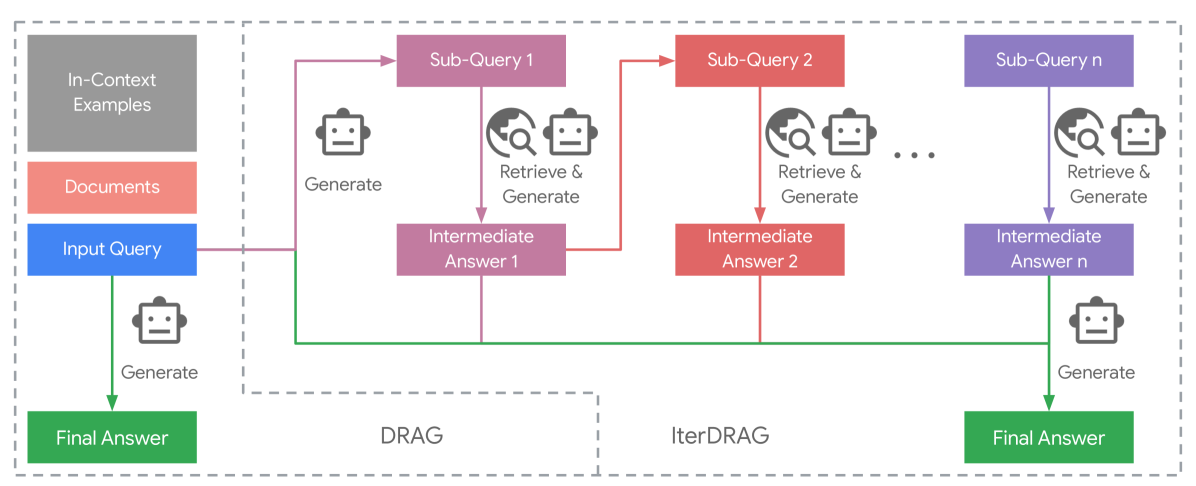
- **Input Query**: Blue box at the start of the flowchart
- **In-Context Examples**: Gray box (top-left)
- **Documents**: Red box (below In-Context Examples)
- **Sub-Queries**:
- Sub-Query 1 (purple)
- Sub-Query 2 (red)
- Sub-Query n (purple)
- **Intermediate Answers**:
- Intermediate Answer 1 (purple)
- Intermediate Answer 2 (red)
- Intermediate Answer n (purple)
- **Final Answer**: Green box (bottom-left and bottom-right)
- **Methods**:
- DRAG (left side)
- IterDRAG (right side)
### Spatial Grounding
- **Legend Colors**:
- Gray: In-Context Examples
- Red: Documents / Sub-Query 2
- Blue: Input Query
- Purple: Sub-Queries 1/n / Intermediate Answers 1/n
- Green: Final Answer
## 2. Flowchart Structure
### DRAG Method (Left Side)
1. **Input Query** → Generates **Final Answer** directly
2. Uses **In-Context Examples** and **Documents** as context
3. Single-path flow with no intermediate steps
### IterDRAG Method (Right Side)
1. **Input Query** → Generates **Sub-Query 1**
2. **Sub-Query 1** → "Retrieve & Generate" → **Intermediate Answer 1**
3. **Intermediate Answer 1** → Generates **Sub-Query 2**
4. **Sub-Query 2** → "Retrieve & Generate" → **Intermediate Answer 2**
5. ... (repeats for Sub-Query n → Intermediate Answer n)
6. **Intermediate Answer n** → Generates **Final Answer**
## 3. Symbolic Elements
- **Robot Icon**: Appears next to all "Generate" actions
- **Magnifying Glass**: Appears next to all "Retrieve & Generate" actions
- **Earth Globe**: Appears next to all "Retrieve & Generate" actions
## 4. Color-Coded Flow Analysis
| Component | Color | Connection Pattern |
|-------------------------|-------|----------------------------------------|
| Input Query | Blue | Single arrow to Final Answer (DRAG) |
| In-Context Examples | Gray | Contextual input for DRAG |
| Documents | Red | Contextual input for DRAG |
| Sub-Queries 1/n | Purple| Sequential generation in IterDRAG |
| Intermediate Answers | Purple/Red | Iterative refinement in IterDRAG |
| Final Answer | Green | Terminal output for both methods |
## 5. Methodological Comparison
### DRAG
- **Pros**:
- Simpler architecture
- Direct generation from input
- **Cons**:
- Limited context utilization
- No iterative refinement
### IterDRAG
- **Pros**:
- Multi-stage refinement
- Contextual feedback loops
- Scalable sub-query structure
- **Cons**:
- Increased computational complexity
- Longer processing time
## 6. Critical Observations
1. **Color Consistency**:
- Purple consistently represents generative steps
- Red marks both documents and Sub-Query 2
- Green exclusively marks final outputs
2. **Iterative Pattern**:
- Sub-Queries and Intermediate Answers form a closed-loop system
- Each Sub-Query n directly informs Intermediate Answer n
3. **Contextual Dependency**:
- DRAG relies entirely on pre-existing context (In-Context Examples + Documents)
- IterDRAG builds context dynamically through intermediate steps
## 7. Technical Implications
- **DRAG Suitability**:
- Best for simple, context-rich queries
- Ideal when computational resources are limited
- **IterDRAG Suitability**:
- Optimal for complex, multi-faceted queries
- Recommended when accuracy outweighs speed
- **Scalability**:
- IterDRAG's "n" sub-queries suggest horizontal scalability
- DRAG remains fixed-architecture
## 8. Missing Elements
- No explicit data points or numerical values present
- No temporal or quantitative metrics included
- No alternative pathways or error handling shown
## 9. Diagram Transcription