## Diagram: Hugging Face Ecosystem Overview
### Overview
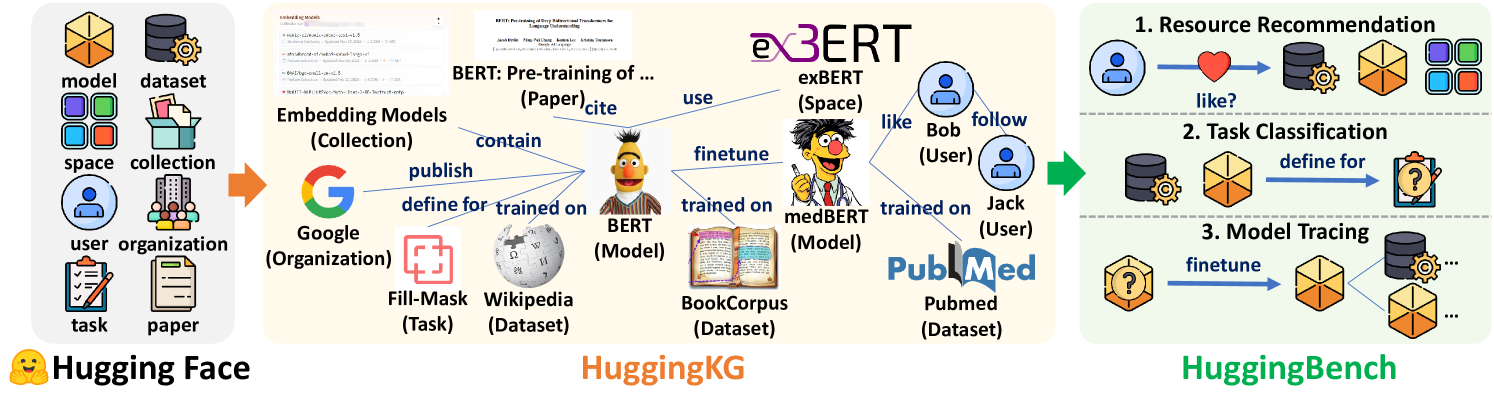
The image is a diagram illustrating the Hugging Face ecosystem and its components, including models, datasets, spaces, users, organizations, tasks, and papers. It shows how these components interact, particularly focusing on the pre-training and fine-tuning of BERT models and their applications in resource recommendation, task classification, and model tracing.
### Components/Axes
The diagram is divided into three main sections, each representing a different aspect of the Hugging Face ecosystem:
1. **Left Section (Hugging Face):**
* Icons representing: model, dataset, space, collection, user, organization, task, and paper.
* Label: "Hugging Face" with a smiling face emoji.
2. **Middle Section (HuggingKG):**
* Focuses on BERT model pre-training and fine-tuning.
* Elements include:
* "Embedding Models (Collection)"
* "BERT: Pre-training of ... (Paper)cite"
* "Google (Organization)"
* "Fill-Mask (Task)"
* "Wikipedia (Dataset)"
* "BookCorpus (Dataset)"
* "Pubmed (Dataset)"
* "BERT (Model)"
* "medBERT (Model)"
* "exBERT (Space)"
* "Bob (User)"
* "Jack (User)"
* Relationships are indicated by arrows and labels like "contain," "publish," "define for," "trained on," "use," "finetune," "like," and "follow."
3. **Right Section (HuggingBench):**
* Illustrates applications of the models.
* Numbered list:
1. "Resource Recommendation"
2. "Task Classification"
3. "Model Tracing"
### Detailed Analysis or ### Content Details
* **Left Section (Hugging Face):**
* The icons represent the core components of the Hugging Face platform.
* The orange arrow indicates a flow or progression towards the middle section.
* **Middle Section (HuggingKG):**
* "Embedding Models (Collection)" contain papers.
* "BERT: Pre-training of ... (Paper)cite" uses BERT model.
* "Google (Organization)" publishes and defines for tasks.
* "Fill-Mask (Task)" and "Wikipedia (Dataset)" are used to train BERT.
* "BookCorpus (Dataset)" and "Pubmed (Dataset)" are used to train medBERT.
* BERT is fine-tuned to create medBERT and exBERT.
* exBERT is a space.
* Bob likes exBERT.
* Jack follows Bob.
* **Right Section (HuggingBench):**
1. **Resource Recommendation:** A user "likes" a resource, leading to a recommendation of a model, dataset, space, and collection.
2. **Task Classification:** A model is defined for a task, leading to a question mark icon.
3. **Model Tracing:** A model is fine-tuned, leading to other models and datasets.
### Key Observations
* The diagram highlights the interconnectedness of the Hugging Face ecosystem.
* BERT model pre-training and fine-tuning are central themes.
* The diagram illustrates the flow of information and resources within the ecosystem.
### Interpretation
The diagram provides a high-level overview of the Hugging Face ecosystem, emphasizing the relationships between different components and the workflow of model development and application. It demonstrates how models are pre-trained on various datasets, fine-tuned for specific tasks, and used in applications like resource recommendation and task classification. The diagram also highlights the social aspect of the platform, with users "liking" and "following" resources and other users. The overall message is that Hugging Face provides a comprehensive platform for developing, sharing, and using machine learning models.