TECHNICAL ASSET FINGERPRINT
fae67735df73f3b1a824ea20
Click to view fullscreen
Press ESC or click to close
FOUND IN PAPERS
EXPERT: gemini-2.0-flash VERSION 1
RUNTIME: nugit/gemini/gemini-2.0-flash
INTEL_VERIFIED
## System Architecture Diagram: Planning Agent and Tool Interaction
### Overview
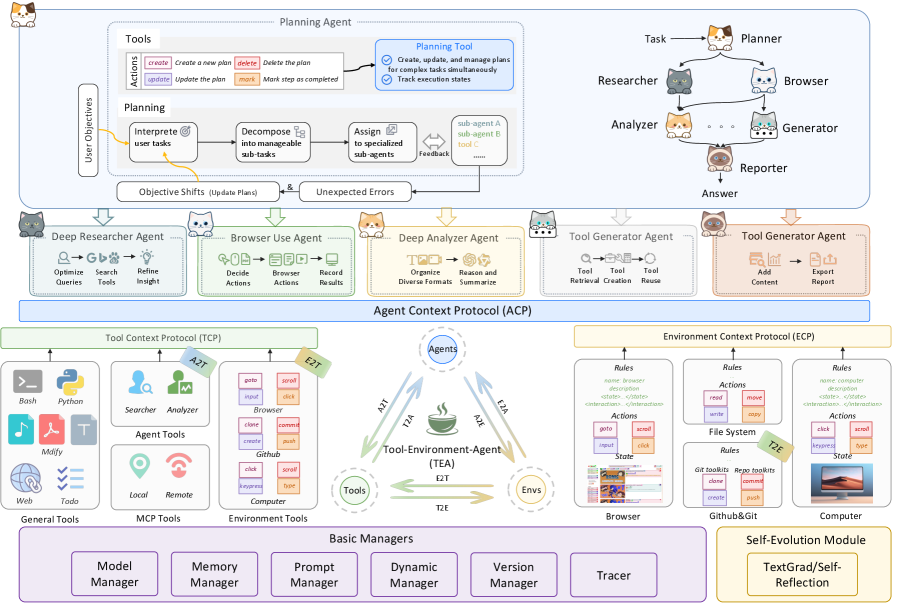
The image presents a system architecture diagram detailing the interaction between a Planning Agent, various specialized agents, tools, and the environment. It illustrates the flow of information and control within the system, emphasizing the role of the Planning Agent in coordinating tasks and managing resources. The diagram includes components such as user objectives, planning tools, specialized agents (Researcher, Browser, Analyzer, Generator), context protocols (TCP, ACP, ECP), and basic managers.
### Components/Axes
**1. Top Section: Planning Agent**
* **User Objectives:** Located on the left, indicating the starting point of the process.
* **Planning Agent:** The central component, responsible for managing and coordinating tasks.
* **Tools:**
* Actions: create, update, delete, mark.
* Planning: Interpret user tasks, Decompose into manageable sub-tasks, Assign to specialized sub-agents.
* Planning Tool: Create, update, and manage plans for complex tasks simultaneously; Track execution states.
* **Objective Shifts (Update Plans) & Unexpected Errors:** Represent feedback loops and potential disruptions.
* **Planner:** Top-right, connected to Task.
* **Researcher, Browser, Analyzer, Generator, Reporter:** Specialized agents branching from the Planner.
* **Answer:** Bottom-right, the final output.
**2. Middle Section: Specialized Agents**
* **Deep Researcher Agent:** Optimizes queries, searches tools, refines insight.
* **Browser Use Agent:** Decides actions, browses actions, records results.
* **Deep Analyzer Agent:** Organizes diverse formats, reasons and summarizes.
* **Tool Generator Agent (x2):** Tool retrieval, creation, reuse; Add content, export report.
**3. Central Section: Agent Context Protocol (ACP)**
* **Tool Context Protocol (TCP):** Connects agents to tools.
* **Environment Context Protocol (ECP):** Connects agents to the environment.
* **Tool-Environment-Agent (TEA):** Central hub connecting Tools, Environment (Envs), and Agents.
* **Arrows:** Indicate the flow of information between Agents (A), Tools (T), and Environment (E). Labeled as A2T, T2A, A2E, E2A, E2T, T2E.
**4. Bottom Section: Tools and Managers**
* **General Tools:** Bash, Python, Mdify, Web, Todo.
* **MCP Tools:** Searcher, Analyzer (Agent Tools), Local, Remote.
* **Environment Tools:** Browser, Github, Computer.
* **Basic Managers:** Model Manager, Memory Manager, Prompt Manager, Dynamic Manager, Version Manager, Tracer.
**5. Environment Context Protocol (ECP) Details:**
* **Rules:** Name, description, state, interaction.
* **Actions:** Read, write, goto, kexpres, clone, create.
* **Examples:** File System, Browser, Github&Git, Computer.
### Detailed Analysis or ### Content Details
**1. Planning Agent Flow:**
* The process starts with User Objectives, which are fed into the Planning Agent.
* The Planning Agent uses Tools to create, update, and manage plans.
* The Planning Agent decomposes tasks and assigns them to specialized sub-agents.
* Feedback loops and error handling are incorporated through Objective Shifts and Unexpected Errors.
* The Planner delegates tasks to Researcher, Browser, Analyzer, and Generator agents.
* The Reporter agent synthesizes information to produce an Answer.
**2. Specialized Agent Functions:**
* **Deep Researcher Agent:** Focuses on information retrieval and refinement.
* **Browser Use Agent:** Interacts with web browsers to gather information.
* **Deep Analyzer Agent:** Processes and summarizes diverse data formats.
* **Tool Generator Agent:** Manages the creation and reuse of tools.
**3. Context Protocols:**
* **Tool Context Protocol (TCP):** Facilitates communication between agents and tools.
* **Agent Context Protocol (ACP):** Serves as a central communication hub for agents, tools, and the environment.
* **Environment Context Protocol (ECP):** Manages interactions between agents and the environment.
**4. Tool-Environment-Agent (TEA) Interaction:**
* The TEA component acts as a central point for communication between agents, tools, and the environment.
* Arrows indicate the direction of information flow:
* A2T: Agent to Tool
* T2A: Tool to Agent
* A2E: Agent to Environment
* E2A: Environment to Agent
* E2T: Environment to Tool
* T2E: Tool to Environment
**5. Environment Context Protocol (ECP) Details:**
* **Rules:** Define the structure and behavior of interactions within the environment.
* **Actions:** Represent specific operations that can be performed within the environment.
* **Examples:**
* **Browser:** Actions include goto, input, click, scroll, kexpres, type.
* **File System:** Actions include read, write, move, copy, clone, commit, create, push.
* **Computer:** Actions include click, scroll, kexpres, type.
### Key Observations
* The diagram emphasizes a modular and hierarchical structure, with the Planning Agent at the top level and specialized agents performing specific tasks.
* Context protocols (TCP, ACP, ECP) play a crucial role in managing communication and interactions between different components.
* The Tool-Environment-Agent (TEA) component serves as a central hub for coordinating activities.
* The diagram incorporates feedback loops and error handling mechanisms to ensure robustness.
### Interpretation
The diagram illustrates a sophisticated system architecture designed for complex task management and problem-solving. The Planning Agent acts as a central coordinator, delegating tasks to specialized agents and managing resources. The use of context protocols (TCP, ACP, ECP) ensures seamless communication and interaction between different components. The Tool-Environment-Agent (TEA) component facilitates the integration of tools and the environment into the overall system.
The architecture is designed to be flexible and adaptable, with feedback loops and error handling mechanisms to address unexpected events. The modular structure allows for easy expansion and modification of the system. The inclusion of basic managers (Model Manager, Memory Manager, Prompt Manager, Dynamic Manager, Version Manager, Tracer) suggests a focus on efficient resource management and performance optimization.
Overall, the diagram presents a comprehensive and well-designed system architecture for intelligent task management and problem-solving.
DECODING INTELLIGENCE...