\n
## Diagram: Agent Architecture Overview
### Overview
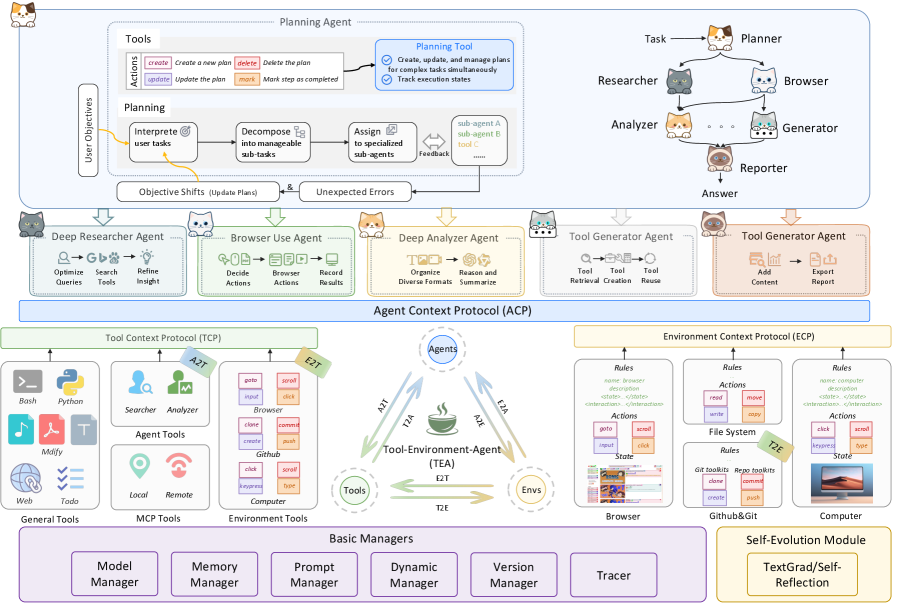
This diagram illustrates the architecture of an agent system, likely a large language model (LLM) based agent, detailing its components, interactions, and underlying protocols. The diagram is structured around a central "Agent Context Protocol (ACP)" and shows how various agents, tools, and environments interact to achieve user objectives. The diagram is oriented from top to bottom, with user objectives at the top and the underlying infrastructure at the bottom.
### Components/Axes
The diagram is composed of several key sections:
* **Top Section (Planning):** Includes "User Objectives", "Actions", "Planning Agent", "Planning Tool", "Task", "Planner", "Researcher", "Analyzer", "Generator", "Reporter", and "Answer".
* **Middle Section (Agents):** Contains "Deep Researcher Agent", "Browser Use Agent", "Deep Analyzer Agent", and "Deep Generator Agent".
* **Central Section (Protocols):** Features "Tool Context Protocol (TCP)", "Agent Context Protocol (ACP)", and "Environment Context Protocol (ECP)".
* **Bottom Section (Infrastructure):** Includes "Tool-Environment-Agent (TEA)", "Envs", "General Tools", "Basic Managers", and "Self-Evolution Module".
* **Tools:** Icons representing various tools like search, browser, code execution, and writing.
* **Agents:** Represented by cartoon robot icons, each with a specific function.
* **Protocols:** Boxes outlining the communication protocols between components.
* **Arrows:** Indicate the flow of information and control between components.
### Detailed Analysis or Content Details
**Top Section (Planning):**
* **User Objectives:** Input to the "Actions" block.
* **Actions:** Contains icons for "Interpret user tasks", "Decompose into manageable sub-tasks", "Assign sub-agent to specialized sub-tasks", and "Feedback".
* **Planning Agent:** A box stating "Create, update, and manage plans for complex tasks simultaneously. Track execution states".
* **Planning Tool:** Checkmark icon.
* **Task:** Connected to "Planner".
* **Planner:** Connected to "Researcher".
* **Researcher:** Connected to "Analyzer".
* **Analyzer:** Connected to "Generator".
* **Generator:** Connected to "Reporter".
* **Reporter:** Connected to "Answer".
**Middle Section (Agents):**
* **Deep Researcher Agent:** Contains icons for "Optimize Search", "Refine Insight", and "Queries".
* **Browser Use Agent:** Contains icons for "Decide Actions", "Browser Results", "Record Actions", and "Reverse Results".
* **Deep Analyzer Agent:** Contains icons for "Organize Diverse Formats", "Reason and Summarize".
* **Deep Generator Agent:** Contains icons for "Tool Retrieval", "Tool Creation", "Reuse", "Add Content", "Expert Report".
**Central Section (Protocols):**
* **Tool Context Protocol (TCP):** Shows connections to "Bash", "Python", "Searcher", "Analyzer", "Agent Tools", "Web", "Tools", "Local", "Remote".
* **Agent Context Protocol (ACP):** Central hub connecting all agents.
* **Environment Context Protocol (ECP):** Shows connections to "File System", "Browser", "Computer".
**Bottom Section (Infrastructure):**
* **Tool-Environment-Agent (TEA):** Contains "Agents", "Tools", and "Envs".
* **General Tools:** Icons for "Web", "Tools", "Modify".
* **Basic Managers:** Includes "MCP Tool Manager", "Memory Manager", "Prompt Manager", "Dynamic Manager".
* **Self-Evolution Module:** Includes "Version Manager", "Tracer", "Reflection".
**Connections & Flows:**
* User Objectives flow down to Actions, then to the Planning Agent.
* The Planning Agent interacts with the Planning Tool and generates a Task.
* The Task is processed by the Planner, Researcher, Analyzer, Generator, and Reporter, ultimately leading to an Answer.
* The Deep Researcher Agent utilizes search tools.
* The Browser Use Agent interacts with a browser.
* The Deep Analyzer Agent processes information.
* The Deep Generator Agent creates content.
* The TCP manages interactions with tools and environments.
* The ACP facilitates communication between agents.
* The ECP manages interactions with the environment.
* The TEA provides the underlying infrastructure.
* Basic Managers handle core functionalities.
* The Self-Evolution Module enables learning and improvement.
### Key Observations
* The diagram emphasizes a modular and hierarchical architecture.
* The ACP serves as a central communication hub.
* The system incorporates multiple agents, each specializing in a specific task.
* The use of protocols (TCP, ACP, ECP) suggests a well-defined communication framework.
* The inclusion of a Self-Evolution Module indicates a focus on continuous learning and improvement.
* The diagram is visually complex, suggesting a sophisticated system.
* The use of cartoon robot icons for agents adds a friendly and approachable aesthetic.
### Interpretation
The diagram depicts a sophisticated agent system designed to handle complex tasks by breaking them down into smaller, manageable sub-tasks. The system leverages multiple specialized agents, each equipped with specific tools and capabilities. The ACP acts as a central nervous system, coordinating communication and collaboration between agents. The TCP and ECP provide standardized interfaces for interacting with tools and environments, respectively. The Self-Evolution Module suggests that the system is capable of learning from its experiences and improving its performance over time.
The diagram highlights the importance of modularity, communication, and adaptability in building intelligent agent systems. The use of protocols and specialized agents allows for greater flexibility and scalability. The inclusion of a Self-Evolution Module suggests a commitment to continuous improvement and long-term sustainability.
The diagram suggests a system capable of automating complex workflows, providing intelligent assistance, and adapting to changing circumstances. It represents a significant step towards building more powerful and versatile AI agents. The diagram is a high-level overview and does not provide specific details about the implementation of each component. However, it provides a clear and concise representation of the system's overall architecture and functionality.