## Diagram: AI Model Adaptation Methods
### Overview
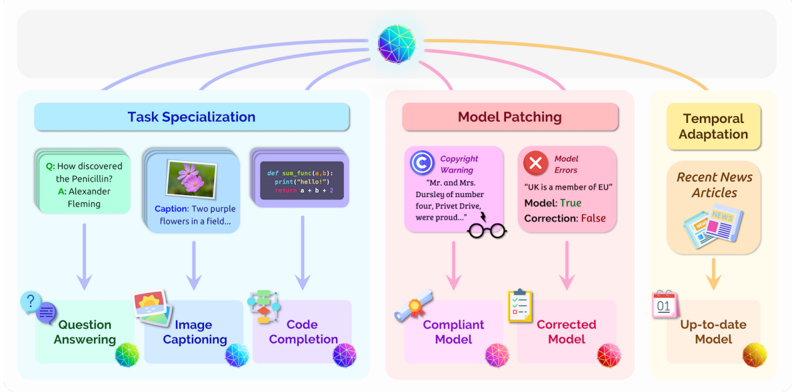
The image is a conceptual diagram illustrating three distinct methods for adapting a general-purpose AI model (represented by a central, colorful, geometric sphere) for specialized use cases. The diagram is divided into three main colored sections, each representing a different adaptation strategy: Task Specialization (blue), Model Patching (pink), and Temporal Adaptation (yellow). Arrows flow from the central model to each section, and within each section, arrows indicate the process flow.
### Components/Axes
The diagram is organized into three primary vertical panels, each with a title and a process flow.
**Central Element:**
* A multi-colored, geometric sphere at the top center, representing a base AI model.
* Three colored arrows (blue, pink, yellow) originate from this sphere and point to the three main sections below.
**Left Panel: Task Specialization (Blue Theme)**
* **Title:** "Task Specialization" (in a blue header box).
* **Process Flow:** Three parallel vertical flows, each starting with an example input and ending with a specialized model icon.
1. **Question Answering Flow:**
* Input Box (Green): "Q: How discovered the Penicillin? A: Alexander Fleming"
* Arrow pointing down to a label: "Question Answering" with a green question mark icon.
* Ends with a green/blue model sphere icon.
2. **Image Captioning Flow:**
* Input Box (Blue): An image of two purple flowers. Text: "Caption: Two purple flowers in a field..."
* Arrow pointing down to a label: "Image Captioning" with a blue image icon.
* Ends with a blue model sphere icon.
3. **Code Completion Flow:**
* Input Box (Purple): Code snippet: `def sum_func(a,b): print("Hello") a + b = ...`
* Arrow pointing down to a label: "Code Completion" with a purple code brackets icon.
* Ends with a purple model sphere icon.
**Center Panel: Model Patching (Pink Theme)**
* **Title:** "Model Patching" (in a pink header box).
* **Process Flow:** Two parallel vertical flows, each starting with an error/warning example and ending with a corrected model.
1. **Copyright Warning Flow:**
* Input Box (Pink): Icon of a copyright symbol (©). Text: "Copyright Warning 'Mr. and Mrs. Dursley, of number four, Privet Drive, were proud...'"
* Arrow pointing down to a label: "Compliant Model" with a pink checkmark/shield icon.
* Ends with a pink model sphere icon.
2. **Model Errors Flow:**
* Input Box (Red): Icon of an 'X'. Text: "Model Errors 'UK is a member of EU' Model: True Correction: False"
* Arrow pointing down to a label: "Corrected Model" with a yellow clipboard icon.
* Ends with a red model sphere icon.
* **Additional Element:** A pair of black eyeglasses is positioned between the two input boxes, symbolizing review or inspection.
**Right Panel: Temporal Adaptation (Yellow Theme)**
* **Title:** "Temporal Adaptation" (in a yellow header box).
* **Process Flow:** A single vertical flow.
* Input Box (Yellow): "Recent News Articles" with an icon of a newspaper.
* Arrow pointing down to a label: "Up-to-date Model" with a calendar icon showing "01".
* Ends with a yellow/orange model sphere icon.
### Detailed Analysis
The diagram explicitly labels and provides concrete examples for each adaptation method:
* **Task Specialization** is shown creating three distinct models from the base model: one for answering factual questions, one for describing images, and one for completing code.
* **Model Patching** addresses two types of post-deployment issues: 1) **Copyright Warning** (using a Harry Potter text excerpt as an example of protected content the model should not reproduce), and 2) **Model Errors** (using a factual error about the UK's EU membership, with a "True/False" correction log).
* **Temporal Adaptation** involves updating the model with "Recent News Articles" to create an "Up-to-date Model," addressing the problem of knowledge staleness.
### Key Observations
1. **Visual Coding:** Each adaptation method is consistently color-coded (blue, pink, yellow) from its title box through the process elements to the final model icon.
2. **Flow Direction:** All processes flow downward from the general model to specialized outputs. The central model is the source for all three adaptation pathways.
3. **Example Specificity:** The diagram uses very specific, recognizable examples (Alexander Fleming, a Harry Potter quote, a post-Brexit fact) to make abstract concepts concrete.
4. **Iconography:** Each sub-process and output model is paired with a unique, descriptive icon (question mark, image, code brackets, shield, clipboard, calendar).
### Interpretation
This diagram presents a framework for understanding how a static, general AI model can be made more useful, safe, and current. It argues that adaptation isn't a single process but occurs along three independent axes:
1. **Capability Axis (Task Specialization):** The model is fine-tuned or prompted to excel at specific, narrow tasks (QA, captioning, coding), trading generality for performance.
2. **Safety & Accuracy Axis (Model Patching):** The model's behavior is corrected after deployment to comply with rules (copyright) and fix factual errors, acting as a form of "debugging" or "content moderation."
3. **Knowledge Axis (Temporal Adaptation):** The model's underlying knowledge base is refreshed with new information to prevent it from becoming obsolete.
The central placement of the base model suggests these are complementary, not mutually exclusive, strategies. A production system might employ all three: a model specialized for medical QA (Task Specialization), patched to avoid giving dangerous advice (Model Patching), and regularly updated with the latest research (Temporal Adaptation). The eyeglasses icon in the Model Patching section subtly emphasizes the need for human oversight in the correction process. The diagram effectively communicates that moving from a raw AI model to a practical application requires deliberate intervention across multiple dimensions.