# Technical Document Extraction: Comparison of Code Editing Workflows
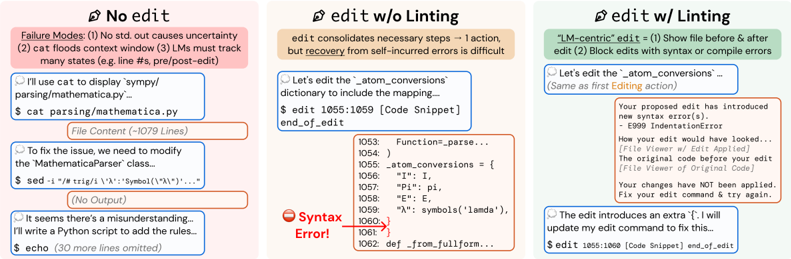
This document analyzes a comparative diagram illustrating three different Large Language Model (LLM) interaction patterns for code editing: **No edit**, **edit w/o Linting**, and **edit w/ Linting**.
---
## 1. Component Isolation
The image is segmented into three vertical panels, each representing a different workflow strategy.
### Panel A: No edit (Left)
* **Background Color:** Light Red
* **Header Summary:**
* **Failure Modes:** (1) No std. out causes uncertainty (2) cat floods context window (3) LMs must track many states (e.g. line #s, pre/post-edit)
* **Workflow Steps:**
1. **Action (Blue Box):**
* *Thought:* "I'll use cat to display `sympy/parsing/mathematica.py`..."
* *Command:* `$ cat parsing/mathematica.py`
2. **System Response (Orange Box):** `File Content (~1079 Lines)`
3. **Action (Blue Box):**
* *Thought:* "To fix the issue, we need to modify the `MathematicaParser` class..."
* *Command:* `$ sed -i "/# trig/i \ 'λ':Symbol('\*\λ\*')'..."`
4. **System Response (Orange Box):** `(No Output)`
5. **Action (Blue Box):**
* *Thought:* "It seems there's a misunderstanding... I'll write a Python script to add the rules..."
* *Command:* `$ echo (30 more lines omitted)`
### Panel B: edit w/o Linting (Center)
* **Background Color:** Light Orange
* **Header Summary:**
* `edit` consolidates necessary steps → 1 action, but **recovery** from self-incurred errors is difficult.
* **Workflow Steps:**
1. **Action (Blue Box):**
* *Thought:* "Let's edit the `_atom_conversions` dictionary to include the mapping..."
* *Command:* `$ edit 1055:1059 [Code Snippet] end_of_edit`
2. **System Response (Orange Box - Code Block):**
```python
1053: Function=_parse...
1054: )
1055: _atom_conversions = {
1056: "I": I,
1057: "Pi": pi,
1058: "E": E,
1059: "λ": symbols('lamda'),
1060: }
1061: }
1062: def _from_fullform...
```
3. **Error Indicator:** A red "no entry" icon points to line 1060 with the text: **"Syntax Error!"** (Note: The snippet shows an extra closing brace at line 1061).
### Panel C: edit w/ Linting (Right)
* **Background Color:** Light Green
* **Header Summary:**
* **"LM-centric" edit** = (1) Show file before & after edit (2) Block edits with syntax or compile errors.
* **Workflow Steps:**
1. **Action (Blue Box):**
* *Thought:* "Let's edit the `_atom_conversions`... (Same as first Editing action)"
2. **System Response (Orange Box - Feedback):**
* "Your proposed edit has introduced new syntax error(s). - E999 IndentationError"
* "How your edit would have looked... [File Viewer w/ Edit Applied]"
* "The original code before your edit [File Viewer of Original Code]"
* "Your changes have NOT been applied. Fix your edit command & try again."
3. **Action (Blue Box - Correction):**
* *Thought:* "The edit introduces an extra `{`. I will update my edit command to fix this..."
* *Command:* `$ edit 1055:1060 [Code Snippet] end_of_edit`
---
## 2. Key Trends and Comparative Analysis
| Feature | No edit | edit w/o Linting | edit w/ Linting |
| :--- | :--- | :--- | :--- |
| **Efficiency** | Low (Multiple steps: cat, sed, echo) | High (Single `edit` command) | High (Single command + feedback) |
| **Context Usage** | High (Dumps entire files) | Low (Targeted line ranges) | Low (Targeted line ranges) |
| **Error Handling** | Silent failure (No output) | State corruption (Applies bad code) | **Proactive** (Blocks bad code) |
| **Feedback Loop** | Manual verification required | Requires manual fix of broken state | Automated linting guides the LM |
---
## 3. Technical Observations
* **Spatial Grounding:** The diagram uses a left-to-right progression of "maturity" in tool design.
* **The "No edit" workflow** demonstrates the "Context Window Flood" problem where reading a 1079-line file consumes significant tokens and makes tracking line numbers difficult for the LM.
* **The "edit w/o Linting" workflow** shows that while a specialized `edit` tool reduces token usage, it creates a "Recovery" problem. If the LM makes a syntax error (shown at line 1060/1061), the codebase is now broken, and the LM must spend more effort fixing its own mistake.
* **The "edit w/ Linting" workflow** introduces a "Guardrail." By refusing to apply the edit and showing a "Before vs. After" comparison, the system prevents the codebase from entering a broken state and provides the LM with the exact error (E999 IndentationError) needed to self-correct.