## Screenshot: Code Editing Scenarios with Linting Comparison
### Overview
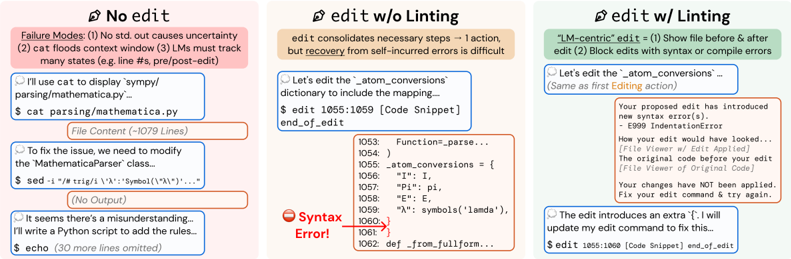
The image presents three side-by-side panels comparing code editing workflows under different linting conditions. Each panel demonstrates a user attempting to modify Python code, with varying levels of system feedback and error handling. The scenarios progress from no editing assistance to full linting integration.
### Components/Axes
1. **Panel Structure**:
- Three vertical panels labeled:
- "No edit" (left, pink background)
- "edit w/o Linting" (center, beige background)
- "edit w/ Linting" (right, green background)
- Each panel contains:
- User/system dialogue boxes
- Code snippets with line numbers
- Error indicators and system responses
- Failure mode annotations
2. **Code Elements**:
- File path: `$ cat parsing/mathematica.py`
- Class reference: `MathematicaParser`
- Dictionary modification: `atom_conversions`
- Syntax error markers: Red circles with "Syntax Error!" text
3. **System Feedback**:
- Error messages in red boxes
- Code diff indicators
- Line number references (e.g., 1055:1059)
- Failure mode enumerations
### Detailed Analysis
#### No edit Panel
- **User Action**: Attempts to display file content using `cat`
- **System Response**: Shows file content with syntax error in `MathematicaParser` class
- **Failure Modes**:
1. No standard output causes uncertainty
2. Context window flooding from `cat` command
3. Need to track multiple states (pre/post-edit)
#### edit w/o Linting Panel
- **User Action**: Edits `atom_conversions` dictionary
- **System Response**:
- Shows code snippet with syntax error at line 1059
- Error message: "Syntax Error!" with red circle indicator
- Original code viewer with error context
- **User Recovery**: Adjusts edit command to fix error
#### edit w/ Linting Panel
- **User Action**: Same edit command as previous panel
- **System Response**:
- Proactive error detection: "Your proposed edit has introduced new syntax error(s)"
- Error code: E999 IndentationError
- Code diff viewer showing original vs. proposed edit
- Blocked edit application with recovery instructions
- **User Recovery**: Updates edit command to fix error
### Key Observations
1. **Error Propagation**:
- No edit scenario leads to uncertain failure modes
- Edit without linting creates recoverable but detectable errors
- Linting prevents error application but requires command adjustments
2. **Code Context**:
- All panels reference the same file (`parsing/mathematica.py`)
- Consistent line numbering across panels (1053-1060)
- Syntax errors consistently appear in dictionary definitions
3. **System Behavior**:
- Linting introduces proactive error checking
- No edit scenario lacks feedback mechanisms
- Edit w/o linting provides reactive error reporting
### Interpretation
The panels demonstrate a clear progression in code editing safety:
1. **No edit** represents uncontrolled environments where errors propagate without feedback
2. **Edit w/o linting** shows reactive error detection but requires manual recovery
3. **Edit w/ linting** enables proactive error prevention through real-time validation
The consistent presence of `atom_conversions` modifications across all panels suggests this is a critical code component. The linting system's ability to block erroneous edits before application (right panel) contrasts with the reactive approach in the middle panel, highlighting the value of pre-commit validation. However, the need for users to adjust their edit commands even with linting indicates potential friction in the workflow that could be optimized.
The failure mode annotations in the left panel emphasize the systemic challenges of uncontrolled environments, while the right panel's error prevention demonstrates how linting transforms error management from reactive to proactive. The identical line numbers across panels suggest these are sequential editing attempts on the same codebase, providing a controlled comparison of different editing paradigms.