## Diagram: Kernel Task Scheduling
### Overview
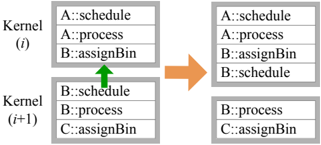
The image depicts a diagram illustrating the scheduling of tasks across two kernel iterations, labeled Kernel (i) and Kernel (i+1). It shows the tasks present in each kernel and how they are reordered or transferred between iterations.
### Components/Axes
* **Kernel (i):** Represents the first kernel iteration.
* Tasks:
* A::schedule
* A::process
* B::assignBin
* **Kernel (i+1):** Represents the subsequent kernel iteration.
* Tasks:
* B::schedule
* B::process
* C::assignBin
* **Arrow (Green, Upward):** Indicates a task transfer from Kernel (i+1) to Kernel (i). Specifically, B::schedule is moved from Kernel (i+1) to Kernel (i).
* **Arrow (Orange, Rightward):** Indicates the resulting task arrangement after the transfer.
### Detailed Analysis
**Kernel (i) - Before Transfer:**
* A::schedule
* A::process
* B::assignBin
**Kernel (i+1) - Before Transfer:**
* B::schedule
* B::process
* C::assignBin
**Transfer:**
* B::schedule is moved from Kernel (i+1) to Kernel (i), as indicated by the green upward arrow.
**Kernel (i) - After Transfer:**
* A::schedule
* A::process
* B::assignBin
* B::schedule
**Kernel (i+1) - After Transfer:**
* B::process
* C::assignBin
### Key Observations
* The diagram illustrates a task scheduling or reordering process between two kernel iterations.
* The green arrow indicates a specific task (B::schedule) being moved from Kernel (i+1) to Kernel (i).
* The orange arrow shows the resulting state of the tasks in each kernel after the transfer.
### Interpretation
The diagram demonstrates a dynamic task scheduling mechanism where tasks can be transferred between kernel iterations. The movement of "B::schedule" from Kernel (i+1) to Kernel (i) suggests a possible prioritization or load balancing strategy. This could be due to dependencies, resource availability, or other scheduling criteria. The diagram highlights the change in task order and assignment between consecutive kernel executions.