# Unknown Title
## Piko: A Design Framework for Programmable Graphics Pipelines
Anjul Patney ∗
Stanley Tzeng †
Kerry A. Seitz, Jr. ‡
John D. Owens §
University of California, Davis
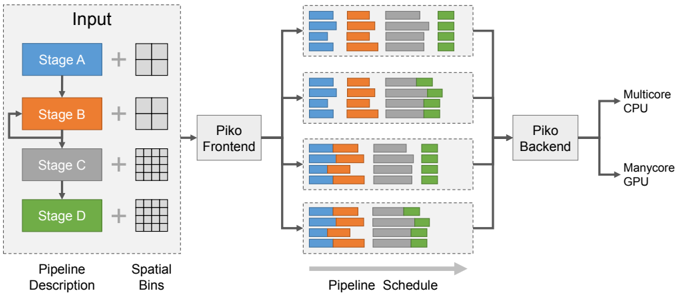
Figure 1: Piko is a framework for designing and implementing programmable graphics pipelines that can be easily retargeted to different application configurations and architectural targets. Piko's input is a functional and structural description of the desired graphics pipeline, augmented with a per-stage grouping of computation into spatial bins (or tiles), and a scheduling preference for these bins. Our compiler generates efficient implementations of the input pipeline for multiple architectures and allows the programmer to tweak these implementations using simple changes in the bin configurations and scheduling preferences.
<details>
<summary>Image 1 Details</summary>
### Visual Description
## System Architecture Diagram: Parallel Processing Pipeline
### Overview
The image is a technical system architecture diagram illustrating a multi-stage data processing pipeline. It depicts how an input, described by a pipeline and spatial bins, is processed through a frontend, distributed across parallel execution units, and finally handled by a backend for execution on heterogeneous hardware (CPU and GPU). The flow is from left to right.
### Components/Axes
The diagram is organized into four main regions from left to right:
1. **Input Region (Left):**
* A dashed box labeled **"Input"**.
* Contains a vertical sequence of four colored blocks representing stages:
* **Stage A** (Blue block)
* **Stage B** (Orange block)
* **Stage C** (Gray block)
* **Stage D** (Green block)
* Each stage block is connected to a plus sign (`+`) and a grid icon.
* Below the sequence, two labels define the components:
* **"Pipeline Description"** (positioned under the stage blocks).
* **"Spatial Bins"** (positioned under the grid icons).
2. **Frontend & Scheduling Region (Center-Left):**
* A single box labeled **"Piko Frontend"**.
* It receives input from the "Input" region.
* It outputs to four parallel horizontal pipelines.
3. **Parallel Pipeline Region (Center):**
* Four identical horizontal pipelines stacked vertically.
* Each pipeline is a dashed box containing a sequence of colored blocks. The color order in each pipeline is consistent: **Blue, Orange, Gray, Green**.
* The blocks within each pipeline vary in width and arrangement, suggesting different task distributions or workloads.
* A large gray arrow below this region points to the right and is labeled **"Pipeline Schedule"**.
4. **Backend & Output Region (Right):**
* A box labeled **"Piko Backend"** that collects output from all four parallel pipelines.
* The backend connects to two final output hardware targets:
* **"Multicore CPU"**
* **"Manycore GPU"**
### Detailed Analysis
* **Data Flow:** The flow is strictly left-to-right: `Input -> Piko Frontend -> [4 Parallel Pipelines] -> Piko Backend -> Hardware Targets (CPU/GPU)`.
* **Color Coding & Legend:** There is no separate legend box. The color coding is intrinsic to the diagram:
* **Blue** = Stage A
* **Orange** = Stage B
* **Gray** = Stage C
* **Green** = Stage D
* This color scheme is maintained from the initial "Input" stage blocks through to the task blocks within each of the four parallel pipelines.
* **Spatial Arrangement:**
* The "Input" region is on the far left.
* The "Piko Frontend" is immediately to its right.
* The four parallel pipelines occupy the central area, stacked vertically.
* The "Piko Backend" is to the right of the pipelines.
* The hardware targets ("Multicore CPU", "Manycore GPU") are on the far right.
* **Component Relationships:** The diagram shows a one-to-many-to-one relationship. A single input description is fanned out by the frontend into multiple parallel execution schedules (the four pipelines), which are then collected and managed by a single backend for final execution on available hardware.
### Key Observations
1. **Parallelism:** The core concept is parallel execution. The single input pipeline is scheduled into four distinct parallel execution paths.
2. **Heterogeneous Execution:** The system is designed to target both multicore CPUs and manycore GPUs, indicating a focus on performance across different hardware architectures.
3. **Abstraction Layers:** The diagram shows clear abstraction layers: a high-level "Pipeline Description" and "Spatial Bins" are translated by the "Piko Frontend" into concrete, parallel "Pipeline Schedule[s]".
4. **Task Granularity:** The varying widths of the colored blocks within the parallel pipelines suggest that the workload (tasks from Stages A-D) is partitioned into chunks of different sizes for parallel execution.
### Interpretation
This diagram represents a **compiler or runtime system for parallel computing**, likely named "Piko". Its purpose is to take a high-level description of a computational pipeline (Stages A-D) and spatial data partitioning (Spatial Bins), and automatically generate an optimized schedule for executing that pipeline in parallel.
The system's intelligence lies in the **"Piko Frontend"**, which performs the crucial task of **mapping a logical pipeline onto physical parallel resources**. The four parallel pipelines in the center represent the scheduled work, showing how the original stages are broken down and distributed. The **"Piko Backend"** then acts as the executor, managing the actual computation on the target hardware (CPU/GPU).
The key takeaway is the automation of parallelization. A developer defines *what* to compute (the pipeline) and *how* the data is structured (spatial bins), and the Piko system determines *how* to compute it efficiently in parallel across available hardware. This is a common pattern in high-performance computing (HPC), data processing frameworks, and graphics rendering pipelines.
</details>
## Abstract
We present Piko, a framework for designing, optimizing, and retargeting implementations of graphics pipelines on multiple architectures. Piko programmers express a graphics pipeline by organizing the computation within each stage into spatial bins and specifying a scheduling preference for these bins. Our compiler, Pikoc , compiles this input into an optimized implementation targeted to a massively-parallel GPU or a multicore CPU.
Piko manages work granularity in a programmable and flexible manner, allowing programmers to build load-balanced parallel pipeline implementations, to exploit spatial and producer-consumer locality in a pipeline implementation, and to explore tradeoffs between these considerations. We demonstrate that Piko can implement a wide range of pipelines, including rasterization, Reyes, ray tracing, rasterization/ray tracing hybrid, and deferred rendering. Piko allows us to implement efficient graphics pipelines with relative ease and to quickly explore design alternatives by modifying the spatial binning configurations and scheduling preferences for individual stages, all while delivering real-time performance that is within a factor six of state-of-the-art rendering systems.
CR Categories: I.3.1 [Computer Graphics]: Hardware architecture-Parallel processing; I.3.2 [Computer Graphics]: Graphics Systems-Stand-alone systems
∗ email:apatney@nvidia.com
† email:stzeng@nvidia.com
‡ email:kaseitz@ucdavis.edu
§ email:jowens@ece.ucdavis.edu
Keywords:
graphics pipelines, parallel computing
## 1 Introduction
Renderers in computer graphics often build upon an underlying graphics pipeline: a series of computational stages that transform a scene description into an output image. Conceptually, graphics pipelines can be represented as a graph with stages as nodes, and the flow of data along directed edges of the graph. While some renderers target the special-purpose hardware pipelines built into graphics processing units (GPUs), such as the OpenGL/Direct3D pipeline (the 'OGL/D3D pipeline'), others use pipelines implemented in software, either on CPUs or, more recently, using the programmable capabilities of modern GPUs. This paper concentrates on the problem of implementing a graphics pipeline that is both highly programmable and high-performance by targeting programmable parallel processors like GPUs.
Hardware implementations of the OGL/D3D pipeline are extremely efficient, and expose programmability through shaders which customize the behavior of stages within the pipeline. However, developers cannot easily customize the structure of the pipeline itself, or the function of non-programmable stages. This limited programmability makes it challenging to use hardware pipelines to implement other types of graphics pipelines, like ray tracing, micropolygon-based pipelines, voxel rendering, volume rendering, and hybrids that incorporate components of multiple pipelines. Instead, developers have recently begun using programmable GPUs to implement these pipelines in software (Section 2), allowing their use in interactive applications.
Efficient implementations of graphics pipelines are complex: they must consider parallelism, load balancing, and locality within the bounds of a restrictive programming model. In general, successful pipeline implementations have been narrowly customized to a particular pipeline and often to a specific hardware target. The abstractions and techniques developed for their implementation are not easily extensible to the more general problem of creating efficient yet structurally- as well as functionally-customizable, or programmable pipelines. Alternatively, researchers have explored more general systems for creating programmable pipelines, but these systems compare poorly in performance against more customized pipelines, primarily because they do not exploit specific characteristics of the pipeline that are necessary for high performance.
Our framework, Piko, builds on spatial bins, or tiles, to expose an interface which allows pipeline implementations to exploit loadbalanced parallelism and both producer-consumer and spatial locality, while still allowing high-level programmability. Like traditional pipelines, a Piko pipeline consists of a series of stages (Figure 1), but we further decompose those stages into three abstract phases (Table 2). These phases expose the salient characteristics of the pipeline that are helpful for achieving high performance. Piko pipelines are compiled into efficient software implementations for multiple target architectures using our compiler, Pikoc . Pikoc uses the LLVM framework [Lattner and Adve 2004] to automatically translate user pipelines into the LLVM intermediate representation (IR) before converting it into code for a target architecture.
We see two major differences from previous work. First, we describe an abstraction and system for designing and implementing generalized programmable pipelines rather than targeting a single programmable pipeline. Second, our abstraction and implementation incorporate spatial binning as a fundamental component, which we demonstrate is a key ingredient of high-performance programmable graphics pipelines.
The key contributions of this paper include:
- Leveraging programmable binning for spatial locality in our abstraction and implementation, which we demonstrate is critical for high performance;
- Factoring pipeline stages into 3 phases, AssignBin , Schedule , and Process , which allows us to flexibly exploit spatial locality and which enhances portability by factoring stages into architecture-specific and -independent components;
- Automatically identifying and exploiting opportunities for compiler optimizations directly from our pipeline descriptions; and
- A compiler at the core of our programming system that automatically and effectively generates pipeline code from the Piko abstraction, achieving our goal of constructing easily-modifiable and -retargetable, high-performance, programmable graphics pipelines.
## 2 Programmable Graphics Abstractions
Historically, graphics pipeline designers have attained flexibility through the use of programmable shading. Beginning with a fixedfunction pipeline with configurable parameters, user programmability began in the form of register combiners, expanded to programmable vertex and fragment shaders (e.g., Cg [Mark et al. 2003]), and today encompasses tessellation, geometry, and even generalized compute shaders in Direct3D 11. Recent research has also proposed programmable hardware stages beyond shading, including a delay stream between the vertex and pixel processing units [Aila et al. 2003] and the programmable culling unit [Hasselgren and Akenine-Möller 2007].
The rise in programmability has led to a number of innovations beyond the OGL/D3D pipeline. Techniques like deferred rendering (including variants like tiled-deferred lighting in compute shaders, as well as subsequent approaches like 'Forward+' and clustered forward rendering), amount to building alternative pipelines that schedule work differently and exploit different trade-offs in locality, parallelism, and so on. In fact, many modern games already implement a deferred version of forward rendering to reduce the cost of shading and reduce the number of rendering passes [Andersson 2009].
Recent research uses the programmable aspects of modern GPUs to implement entire pipelines in software. These efforts include RenderAnts, which implements a GPU Reyes renderer [Zhou et al. 2009]; cudaraster [Laine and Karras 2011], which explores software rasterization on GPUs; VoxelPipe, which targets real-time GPU voxelization [Pantaleoni 2011], and the Micropolis Reyes renderer [Weber et al. 2015]. The popularity of such explorations demonstrates that entirely programmable pipelines are not only feasible but desirable as well. These projects, however, target a single specific pipeline for one specific architecture, and as a consequence their implementations offer limited opportunities for flexibility and reuse.
A third class of recent research seeks to rethink the historical approach to programmability, and is hence most closely related to our work. GRAMPS [Sugerman et al. 2009] introduces a programming model that provides a general set of abstractions for building parallel graphics (and other) applications. Sanchez et al. [2011] implemented a multi-core x86 version of GRAMPS. NVIDIA's high-performance programmable ray tracer OptiX [Parker et al. 2010] also allows arbitrary pipes, albeit with a custom scheduler specifically designed for their GPUs. By and large, GRAMPS addresses expression and scheduling at the level of pipeline organization, but does not focus on handling efficiency concerns within individual stages. Instead, GRAMPS successfully focuses on programmability, heterogeneity, and load balancing, and relies on the efficient design of inter-stage sequential queues to exploit producer-consumer locality. The latter is in itself a challenging implementation task that is not addressed by the GRAMPS abstraction. The principal difference in our work is that instead of using queues, we use 2D tiling to group computation in a manner that helps balance parallelism with locality and is more optimized towards graphcal workloads. While GRAMPS proposes queue sets to possibly expose parallelism within a stage (which may potentially support spatial bins), it does not allow any flexibility in the scheduling strategies for individual bins, which, as we will demonstrate, is important to ensure efficiency by tweaking the balance between spatial/temporal locality and load balance. Piko also merges user stages together into a single kernel for efficiency purposes. GRAMPS relies directly on the programmer's decomposition of work into stages so that fusion, which might be a target-specific optimization, must be done at the level of the input pipeline specification.
Peercy et al. [2000] and FreePipe [Liu et al. 2010] implement an entire OGL/D3D pipeline in software on a GPU, then explore modifications to their pipeline to allow multi-fragment effects. These GPGPU software rendering pipelines are important design points; they describe and analyze optimized GPU-based software implementations of an OGL/D3D pipeline, and are thus important comparison points for our work. We demonstrate that our abstraction allows us to identify and exploit optimization opportunities beyond the FreePipe implementation.
Halide [Ragan-Kelley et al. 2012] is a domain-specific embedded language that permits succinct, high-performance implementations of state-of-the-art image-processing pipelines. In a manner similar to Halide, we hope to map a high-level pipeline description to a lowlevel efficient implementation. However, we employ this strategy in a different application domain, programmable graphics, where data
Table 1: Examples of Binning in Graphics Architectures. We characterize pipelines based on when spatial binning occurs. Pipelines that bin prior to the geometry stage are classified under 'referenceimage binning'. Interleaved and tiled rasterization pipelines typically bin between the geometry and rasterization stage. Tiled depth-based composition pipelines bin at the sample or composition stage. Finally, 'bin everywhere' pipelines bin after every stage by re-distributing the primitives in dynamically updated queues.
| Reference-Image Binning | PixelFlow [Olano and Lastra 1998] Chromium [Humphreys et al. 2002] |
|-------------------------------|------------------------------------------------------------------------------------------------------------------------------------------------------------------------|
| Interleaved Rasterization | AT&T Pixel Machine [Potmesil and Hoffert 1989] SGI InfiniteReality [Montrym et al. 1997] NVIDIA Fermi [Purcell 2010] |
| Tiled Rasterization/ Chunking | RenderMan [Apodaca and Mantle 1990] cudaraster [Laine and Karras 2011] ARMMali [Olson 2012] PowerVR [Imagination Technologies Ltd. 2011] RenderAnts [Zhou et al. 2009] |
| Tiled Depth-Based Composition | Lightning-2 [Stoll et al. 2001] |
| Bin Everywhere | Pomegranate [Eldridge et al. 2000] |
granularity varies much more throughout the pipeline and dataflow is both more dynamically varying and irregular. Spark [Foley and Hanrahan 2011] extends the flexibility of shaders such that instead of being restricted to a single pipeline stage, they can influence several stages across the pipeline. Spark allows such shaders without compromising modularity or having a significant impact on performance, and in fact Spark could be used as a shading language to layer over pipelines created by Piko. We share design goals that include both flexibility and competitive performance in the same spirit as Sequoia [Fatahalian et al. 2006] and StreamIt [Thies et al. 2002] in hopes of abstracting out the computation from the underlying hardware.
## 3 Spatial Binning
Both classical and modern graphics systems often render images by dividing the screen into a set of regions, called tiles or spatial bins , and processing those bins in parallel. Examples include tiled rasterization, texture and framebuffer memory layouts, and hierarchical depth buffers. Exploiting spatial locality through binning has five major advantages. First, it prunes away unnecessary work associated with the bin-primitives not affecting a bin are never processed. Second, it allows the hardware to take advantage of data and execution locality within the bin itself while processing (for example, tiled rasterization leads to better locality in a texture cache). Third, many pipeline stages may have a natural granularity of work that is most efficient for that particular stage; binning allows programmers to achieve this granularity at each stage by tailoring the size of bins. Fourth, it exposes an additional level of data parallelism, the parallelism between bins. And fifth, grouping computation into bins uncovers additional opportunities for exploiting producer-consumer locality by narrowing working-set sizes to the size of a bin.
Spatial binning has been a key part of graphics systems dating to some of the earliest systems. The Reyes pipeline [Cook et al. 1987] tiles the screen, rendering one bin at a time to avoid working sets that are too large; Pixel-Planes 5 [Fuchs et al. 1989] uses spatial binning primarily for increasing parallelism in triangle rendering and other pipelines. More recently, most major GPUs use some form of spatial binning, particularly in rasterization [Olson 2012; Purcell 2010].
Recent software renderers written for CPUs and GPUs also make extensive use of screen-space tiling: RenderAnts [Zhou et al. 2009] uses buckets to limit memory usage during subdivision and sample stages, cudaraster [Laine and Karras 2011] uses a bin hierarchy to eliminate redundant work and provide more parallelism, and VoxelPipe [Pantaleoni 2011] uses tiles for both bucketing purposes and exploiting spatial locality. Table 1 shows examples of graphics systems that have used a variety of spatial binning strategies.
The advantages of spatial binning are so compelling that we believe, and will show, that exploiting spatial binning is a crucial component for performance in efficient implementations of graphics pipelines. Previous work in software-based pipelines that take advantage of binning has focused on specific, hardwired binning choices that are narrowly tailored to one particular pipeline. In contrast, the Piko abstraction encourages pipeline designers to express pipelines and their spatial locality in a more general, flexible, straightforward way that exposes opportunities for binning optimizations and performance gains.
## 4 Expressing Pipelines Using Piko
## 4.1 High-Level Pipeline Abstraction
Graphics algorithms and APIs are typically described as pipelines (directed graphs) of simple stages that compose to create complex behaviors. The OGL/D3D abstraction is described in this fashion, as are Reyes and GRAMPS, for instance. Pipelines aid understanding, make dataflow explicit, expose locality, and permit reuse of individual stages across different pipelines. At a high level, the Piko pipeline abstraction is identical, expressing computation within stages and dataflow as communication between stages. Piko supports complex dataflow patterns, including a single stage feeding input to multiple stages, multiple stages feeding input to a single stage, and cycles (such as Reyes recursive splitting).
Where the abstraction differs is within a pipeline stage. Consider a BASELINE system that would implement one of the above pipelines as a set of separate per-stage kernels, each of which distributes its work to available parallel cores, and the implementation connects the output of one stage to the input of the next through off-chip memory. Each instance of a BASELINE kernel would run over the entire scene's intermediate data, reading its input from off-chip memory and writing its output back to off-chip memory. This implementation would have ordered semantics and distribute work in each stage in FIFO order.
Our BASELINE would end up making poor use of both the producerconsumer locality between stages and the spatial locality within and between stages. It would also require a rewrite of each stage to target a different hardware architecture. Piko specifically addresses these issues by balancing between enabling productivity and portability through a high-level programming model, while specifying enough information to allow high-performance implementations. The distinctive feature of the abstraction is the ability to cleanly separate the implementation of a high-performance graphics pipeline into separable, composable concerns, which provides two main benefits:
- It facilitates modularity and architecture independence.
- It integrates locality and spatial binning in a way that exposes opportunities to explore the space of optimizations involving locality and load-balance.
For the rest of the paper, we will use the following terminology for the parts of a graphics pipeline. Our pipelines are expressed as directed graphs where each node represents a self-contained functional unit or a stage . Edges between nodes indicate flow of data between stages, and each data element that flows through the edges is a primitive . Examples of common primitives are patches, vertices, triangles, and fragments. Stages that have no incoming edges are source stages, and stages with no outgoing edges are drain stages.
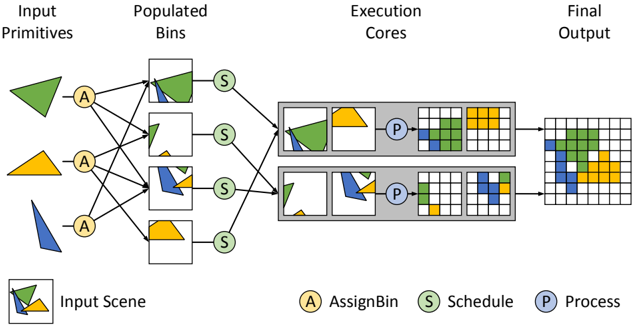
Figure 2: The three phases of a Piko stage. This diagram shows the role of AssignBin , Schedule , and Process in the scan conversion of a list of triangles using two execution cores. Spatial binning helps in (a) extracting load-balanced parallelism by assigning triangles into smaller, more uniform, spatial bins, and (b) preserving spatial locality within each bin by grouping together spatially-local data. The three phases help fine-tune how computation is grouped and scheduled, and this helps quickly explore the optimization space of an implementation.
<details>
<summary>Image 2 Details</summary>
### Visual Description
## Diagram: Parallel Processing Pipeline for Geometric Primitives
### Overview
The image is a technical flowchart illustrating a parallel processing pipeline for rendering or computing geometric shapes. It depicts a left-to-right workflow where input shapes are distributed, scheduled, processed in parallel cores, and combined into a final output grid. The diagram uses color-coded shapes (green, yellow, blue triangles) and labeled circular nodes to represent different stages of the process.
### Components/Axes
The diagram is organized into four sequential columns, with a legend and an "Input Scene" reference at the bottom.
**Columns (from left to right):**
1. **Input Primitives:** Contains three distinct geometric shapes:
* A green triangle (top).
* A yellow triangle (middle).
* A blue triangle (bottom).
2. **Populated Bins:** Contains four square bins, each holding a different combination of the input shapes.
* Bin 1 (top): Contains the green triangle and a portion of the blue triangle.
* Bin 2: Contains a small green triangle and a small blue triangle.
* Bin 3: Contains a blue triangle and a small yellow triangle.
* Bin 4 (bottom): Contains the yellow triangle.
3. **Execution Cores:** Contains two parallel processing units (gray rectangles), each with an internal workflow.
* Each core receives input from two of the "Populated Bins" via "Schedule" nodes.
* Inside each core: Input shapes -> A "Process" (P) node -> Intermediate grid representations.
4. **Final Output:** A single, larger grid that combines the processed results from both Execution Cores into one composite image.
**Legend (Bottom Center):**
* **A** (Yellow circle): AssignBin
* **S** (Green circle): Schedule
* **P** (Blue circle): Process
**Input Scene (Bottom Left):**
* A small box showing a composite of the three input triangles (green, yellow, blue) overlapping, labeled "Input Scene."
### Detailed Analysis
**Flow and Connections:**
1. **Assignment Phase:** Each of the three "Input Primitives" connects to a yellow **AssignBin (A)** node. Lines from these 'A' nodes distribute the shapes into the four "Populated Bins." The connections are many-to-many; for example, the green triangle is assigned to the top two bins.
2. **Scheduling Phase:** Each of the four "Populated Bins" connects to a green **Schedule (S)** node. These 'S' nodes then route the bins to one of the two "Execution Cores."
* The top two bins (containing primarily green/blue shapes) are scheduled to the **top Execution Core**.
* The bottom two bins (containing primarily blue/yellow shapes) are scheduled to the **bottom Execution Core**.
3. **Processing Phase:** Within each "Execution Core":
* The scheduled shapes are processed by a blue **Process (P)** node.
* The 'P' node transforms the vector shapes into a pixelated or rasterized grid format. The intermediate grids show the shapes represented as colored blocks (green, yellow, blue) on a white grid.
4. **Output Combination:** The final grid outputs from both Execution Cores are merged to create the single "Final Output" grid. This grid shows all three colored shapes (green, yellow, blue) represented as blocks in their correct relative positions.
**Spatial Grounding:**
* The **legend** is positioned at the bottom center of the entire diagram.
* The **"Input Scene"** reference is in the bottom-left corner.
* The **"Execution Cores"** are stacked vertically in the center-right of the diagram.
* The **"Final Output"** grid is positioned on the far right, centered vertically.
### Key Observations
* **Parallelism:** The core concept is parallel processing. The workload (the four bins) is split between two independent execution cores to speed up computation.
* **Data Distribution:** The initial "AssignBin" stage is responsible for breaking down the input scene into manageable chunks (bins) that can be processed in parallel.
* **Transformation:** The pipeline shows a clear transformation from vector-based "Input Primitives" to rasterized "Final Output" via the "Process" stage.
* **Color Consistency:** The colors of the shapes (green, yellow, blue) are maintained consistently throughout the entire pipeline, from input to final output, allowing for clear tracking.
### Interpretation
This diagram most likely illustrates a **parallel graphics rendering pipeline** or a **computational geometry processing system**. The "Input Primitives" are vector graphics. The "AssignBin" stage performs spatial partitioning or task decomposition, grouping parts of the scene into bins. The "Schedule" stage load-balances these bins across available processing units ("Execution Cores"). The "Process" stage within each core performs the actual rasterization or computation, converting vectors to pixels. Finally, the partial results are composited into the complete "Final Output" image.
The key takeaway is the demonstration of how a complex scene can be efficiently rendered or computed by breaking it into independent tasks, processing them in parallel, and combining the results. This is a fundamental pattern in high-performance computing and real-time graphics. The diagram effectively communicates the flow of data and the separation of concerns (assignment, scheduling, processing) within such a system.
</details>
Table 2: Purpose and granularity for each of the three phases during each stage. We design these phases to cleanly separate the key steps in a pipeline built around spatial binning. Note: we consider Process a per-bin operation, even though it often operates on a per-primitive basis.
| Phase | Granularity | Purpose |
|-----------|--------------------------|------------------------------------|
| AssignBin | Per-Primitive | How to group computation? |
| Schedule | Per-Bin | When to compute? Where to compute? |
| Process | Per-Bin or Per-primitive | How to compute? |
Programmers divide each Piko pipeline stage into three phases (summarized in Table 2 and Figure 2). The input to a stage is a group or list of primitives, but phases, much like OGL/D3D shaders, are programs that apply to a single input element (e.g., a primitive or bin) or a small group thereof. However, unlike shaders, phases belong in each stage of the pipeline, and provide structural as well as functional information about a stage's computation. The first phase in a stage, AssignBin , specifies how a primitive is mapped to a user-defined bin. The second phase, Schedule , assigns bins to cores. The third phase, Process , performs the actual functional computation for the stage on the primitives in a bin. Allowing the programmer to specify both how primitives are binned and how bins are scheduled onto cores allows Pikoc to take advantage of spatial locality.
Now, if we simply replace n pipeline stages with 3 n simpler phases and invoke our BASELINE implementation, we would gain little benefit from this factorization. Fortunately, we have identified and implemented several high-level optimizations on stages and phases that make this factorization profitable. We describe some of our optimizations in Section 5.
As an example, Listing 1 shows the phases of a very simple fragment shader stage. In the AssignBin stage, each fragment goes into a single bin chosen based on its screen-space position. To maximally exploit the machine parallelism, Schedule requests the runtime to distribute bins in a load-balanced fashion across the machine.
Process then executes a simple pixel shader, since the computation by now is well-distributed across all available cores. For the full source code of this simple raster pipeline, please refer to the supplementary materials. Now, let us describe each phase in more detail.
AssignBin The first step for any incoming primitive is to identify the tile(s) that it may influence or otherwise belongs to. Since this depends on both the tile structure as well as the nature of computation in the stage, the programmer is responsible for mapping primitives to bins. Primitives are put in bins with the assignToBin function that assigns a primitive to a bin. Listing 1 assigns an input fragment f based on its screen-space position.
Schedule The best execution schedule for computation in a pipeline varies with stage, characteristics of the pipeline input, and target architectures. Thus, it is natural to want to customize scheduling preferences in order to retarget a pipeline to a different scenario. Furthermore, many pipelines impose constraints on the observable order in which primitives are processed. In Piko, the programmer explicitly provides such preference and constraints on how bins are scheduled on execution cores. Specifically, once primitives are assigned into bins, the Schedule phase allows the programmer to specify how and when bins are scheduled onto cores. The input to Schedule is a reference to a spatial bin, and the routine can chose to dispatch computation for that bin, and if it does, it can also choose a specific execution core or scheduling preference.
We also recognize two cases of special scheduling constraints in the abstraction: the case where all bins from one stage must complete processing before a subsequent stage can begin, and the case where all primitives from one bin must complete processing before any primitives in that bin can be processed by a subsequent stage. Listing 1 shows an example of a Schedule phase that schedules primitives to cores in a load-balanced fashion.
Because of the variety of scheduling mechanisms and strategies on different architectures, we expect Schedule phases to be the most architecture-dependent of the three. For instance, a manycore GPU implementation may wish to maximize utilization of cores by load balancing its computation, whereas a CPU might choose to schedule in chunks to preserve cache peformance, and hybrid CPU-GPU may wish to preferentially assign some tasks to a particular processor
```
class FragmentShaderStage : public Stage {
// ...
void assignBin(int binID = getBinFrom(f, bin) {
this->assignToBin(f, binID);
}
void schedule(int binID) {
specifySchedule(LOAD_BALANCE);
}
void process(piko_fragment f, int binID) {
cvec3f material = gencvc3f(0.80f, 0.75f, 0.65f);
cvec3f lightvec = normalize(gencvc3f(1.1));
this->emit(f, 0);
}
};
Listing 1: Example Piko routines for a fragment shader pipeline
stage and its corresponding pipeline RasterPipe. In the listing,
blue indicates Piko-specific keywords, purple indicates user-defined
parameters, and red indicates parameters that are not specific to Piko.
```
Listing 1: Example Piko routines for a fragment shader pipeline stage and its corresponding pipeline RasterPipe. In the listing, blue indicates Piko-specific keywords, purple indicates user-defined objects, and sea-green indicates user-defined functions. The template parameters to Stage are, in order: binSizeX, binSizeY, threads per bin, incoming primitive type, and outgoing primitive type. We specify a LoadBalance scheduler to take advantage of the many cores on the GPU.
```
(CPU or GPU).
```
Schedule phases specify not only where computation will take place but also when that computation will be launched. For instance, the programmer may specify dependencies that must be satisfied before launching computation for a bin. For example, an order-independent compositor may only launch on a bin once all its fragments are available, and a fragment shader stage may wait for a sufficiently large batch of fragments to be ready before launching the shading computation. Currently, our implementation Pikoc resolves such constraints by adding barriers between stages, but a future implementation might choose to dynamically resolve such dependencies.
Process While AssignBin defines how primitives are grouped for computation into bins, and Schedule defines where and when that computation takes place, the Process phase defines the typical functional role of the stage. The most natural example for Process is a vertex or fragment shader, but Process could be an intersection test, a depth resolver, a subdivision task, or any other piece of logic that would typically form a standalone stage in a conventional graphics pipeline description. The input to Process is the primitive on which it should operate. Once a primitive is processed and the output is ready, the output is sent to the next stage via the emit keyword. emit takes the output and an ID that specifies the next stage. In the graph analogy of nodes (pipeline stages), the ID tells the current node which edge to traverse down toward the next node. Our notation is that Process emit s from zero to many primitives that are the input to the next stage or stages.
We expect that many Process phases will exhibit data parallelism over the primitives. Thus, by default, the input to Process is a single primitive. However, in some cases, a Process phase may be better implemented using a different type of parallelism or may require access to multiple primitives to work correctly. For these cases, we provide a second version of Process that takes a list of primitives as input. This option allows flexibility in how the phase utilizes parallelism and caching, but it limits our ability to perform pipeline optimizations like kernel fusion (discussed in Section 5.2.1). It is also analogous to the categorization of graphics code into pointwise and groupwise computations, as presented by Foley et al. [2011].
## 4.2 Programming Interface
A developer of a Piko pipeline supplies a pipeline definition with each stage separated into three phases: AssignBin , Schedule , and Process . Pikoc analyzes the code to generate a pipeline skeleton that contains information about the vital flow of the pipeline. From the skeleton, Pikoc performs a synthesis stage where it merges pipeline stages together to output an efficient set of kernels that executes the original pipeline definition. The optimizations performed during synthesis, and different runtime implementations of the Piko kernels, are described in detail in Section 5 and Section 6 respectively.
From the developer's perspective, one writes several pipeline stage definitions; each stage has its own AssignBin , Schedule , and Process . Then the developer writes a pipeline class that connects the pipeline stages together. We express our stages in a simple C++-like language.
These input files are compiled by Pikoc into two files: a file containing the target architecture kernel code, and a header file with a class that connects the kernels to implement the pipeline. The developer creates an object of this class and calls the run() method to run the specified pipeline.
The most important architectural targets for Piko are multi-core CPU architectures and manycore GPUs 1 , and Pikoc is able to generate code for both. In the future we also would like to extend its capabilities to target clusters of CPUs and GPUs, and CPU-GPU hybrid architectures.
## 4.3 Using Directives When Specifying Stages
Pikoc exposes several special keywords, which we call directives , to help a developer directly express commonly-used yet complex implementation preferences. We have found that it is usually best for the developer to explicitly state a particular preference, since it is often much easier to do so, and at the same time it helps enable optimizations which Pikoc might not have gathered using static analysis. For instance, if the developer wishes to broadcast a primitive to all bins in the next stage, he can simply use AssignToAll in AssignBin . Directives act as compiler hints and further increase optimization potential. We summarize our directives in Table 3 and discuss their use in Section 5.
We combine these directives with the information that Pikoc derives in its analysis step to create what we call a pipeline skeleton. The skeleton is the input to Pikoc 's synthesis step, which we also describe in Section 5.
## 4.4 Expressing Common Pipeline Preferences
We now present a few commonly encountered pipeline design strategies, and how we interpret them in our abstraction:
No Tiling In cases where tiling is not a beneficial choice, the simplest way to indicate it in Piko is to set bin sizes of all stages to 0 × 0 ( Pikoc translates it to the screen size). Usually such pipelines (or stages) exhibit parallelism at the per-primitive level. In Piko, we can use All and tileSplitSize in Schedule to specify the size of individual primitive-parallel chunks.
1 In this paper we define a 'core' as a hardware block with an independent program counter rather than a SIMD lane; for instance, an NVIDIA streaming multiprocessor (SM).
Table 3: The list of directives the programmer can specify to Piko during each phase. The directives provide basic structural information about the workflow and facilitate optimizations.
| Phase | Name | Purpose |
|-----------|----------------------------------------------------------------------|-------------------------------------------------------------------------------------------------------------------------------------------------------------------------------------------------------------------------------------------------------------------------------------------------------------------------------------------------------------------------------------------------------------------------------------------|
| AssignBin | AssignPreviousBins AssignToBoundingBox AssignToAll | Assign incoming primitive to the same bin as in the previous stage Assign incoming primitive to bins based on its bounding box Assign incoming primitive to all bins |
| Schedule | DirectMap LoadBalance Serialize All tileSplitSize EndStage(X) EndBin | Statically schedule each bin to available cores in a round-robin fashion Dynamically schedule bins to available cores in a load-balanced fashion Schedule all bins to a single core for sequential execution Schedule a bin to all cores (used with tileSplitSize ) Size of chunks to split a bin across multiple cores (used with All ) Wait until stage X is finished Wait until the previous stage finishes processing the current bin |
Bucketing Renderer Due to resource constraints, often the best way to run a pipeline to completion is through a depth-first processing of bins, that is, running the entire pipeline (or a sequence of stages) over individual bins in serial order. In Piko, it is easy to express this preference through the use of the All directive in Schedule , wherein each bin of a stage maps to all available cores. Our synthesis scheme prioritizes depth-first processing in such scenarios, preferring to complete as many stages for a bin before processing the next bin. See Section 5.2 for details.
Sort-Middle Tiled Renderer A common design methodology for forward renderers divides the pipeline into two phases: world-space geometry processing and screen-space fragment processing. Since Piko allows a different bin size for each stage, we can simply use screen-sized bins with primitive-level parallelism in the geometry phase, and smaller bins for the screen-space processing.
Use of Fixed-Function Hardware Blocks Fixed-function hardware accessible through CUDA or OpenCL (like texture fetch units) is easily integrated into Piko using the mechanisms in those APIs. However, in order to use standalone units like a hardware rasterizer or tessellation unit that cannot be directly addressed, the best way to abstract them in Piko is through a stage that implements a single pass of an OGL/D3D pipeline. For example, a deferred rasterizer could use OGL/D3D for the first stage, then a Piko stage to implement the deferred shading pass.
## 5 Pipeline Synthesis with Pikoc
Pikoc is built on top of the LLVM compiler framework. Since Piko pipelines are written using a subset of C++, Pikoc uses Clang, the C and C++ frontend to LLVM, to compile pipeline source code into LLVMIR. We further use Clang in Pikoc 's analysis step by walking the abstract syntax tree (AST) that Clang generates from the source code. From the AST, we are able to obtain the directives and infer the other optimization information discussed previously, as well as determine how pipeline stages are linked together. Pikoc adds this information to the pipeline skeleton, which summarizes the pipeline and contains all the information necessary for pipeline optimization.
Pikoc then performs pipeline synthesis in three steps. First, we identify the order in which we want to launch individual stages (Section 5.1). Once we have this high-level stage ordering, we optimize the organization of kernels to both maximize producerconsumer locality and eliminate any redundant/unnecessary computation (Section 5.2). The result of this process is the kernel mapping : a scheduled sequence of kernels and the phases that make up the computation inside each. Finally, we use the kernel mapping to output two files that implement the pipeline: the kernel code for the target architecture and a header file that contains host code for setting up and executing the kernel code.
We follow typical convention for building complex applications on GPUs using APIs like OpenCL and CUDA by instantiating a pipeline as a series of kernels. Each kernel represents a machinewide computation consisting of parts of one or more pipeline stages. Rendering each frame consists of launching a sequence of kernels scheduled by a host, or a CPU thread in our case. Neighboring kernel instances do not share local memory, e.g., caches or shared memory.
An alternative to multi-kernel design is to express the entire pipeline as a single kernel, which manages pipeline computation via dynamic work queues and uses a persistent-kernel approach [Aila and Laine 2009; Gupta et al. 2012] to efficiently schedule the computation. This is an attractive strategy for implementation and has been used in OptiX, but we prefer the multi-kernel strategy for two reasons. First, efficient dynamic work-queues are complicated to implement on many core architectures and work best for a single, highly irregular stage. Second, the major advantages of dynamic work queues, including dynamic load balance and the ability to capture producer-consumer locality, are already exposed to our implementation through the optimizations we present in this section.
Currently, Pikoc targets two hardware architectures: multicore CPUs and NVIDIA GPUs. In addition to LLVM's many CPU backends, NVIDIA's libNVVM compiles LLVM IR to PTX assembly code, which can then be executed on NVIDIA GPUs using the CUDA driver API 2 . In the future, Pikoc 's LLVM integration will allow us to easily integrate new back ends (e.g., LLVM backends for SPIR and HSAIL) that will automatically target heterogeneous processors like Intel's Haswell or AMD's Fusion. To integrate a new backend into Pikoc , we also need to map all Piko API functions to their counterparts in the new backend and create a new host code generator that can set up and launch the pipeline on the new target.
## 5.1 Scheduling Pipeline Execution
Given a set of stages arranged in a pipeline, in what order should we run these stages? The Piko philosophy is to use the pipeline skeleton with the programmer-specified directives to build a schedule 3 for these stages. Unlike GRAMPS [Sugerman et al. 2009], which takes a dynamic approach to global scheduling of pipeline stages, we use a largely static global schedule due to our multi-kernel design.
The most straightforward schedule is for a linear, feed-forward pipeline, such as the OGL/D3D rasterization pipeline. In this case,
2 https://developer.nvidia.com/cuda-llvm-compiler
3 Please note that the scheduling described in this section is distinct from the Schedule phase in the Piko abstraction. Scheduling here refers to the order in which we run kernels in a generated Piko pipeline.
we schedule stages in descending order of their distance from the last (drain) stage.
By default, a stage will run to completion before the next stage begins. However, we deviate from this rule in two cases: when we fuse kernels such that multiple stages are part of the same kernel (discussed in Section 5.2.1), and when we launch stages for bins in a depth-first fashion (e.g., chunking), where we prefer to complete an entire bin before beginning another. We generate a depth-first schedule when a stage specification directs the entire machine to operate on a stage's bins in sequential order (e.g., by using the All directive). In this scenario, we continue to launch successive stages for each bin as long as it is possible; we stop when we reach a stage that either has a larger bin size than the current stage or has a dependency that prohibits execution. In other words, when given the choice between launching the same stage on another bin or launching the next stage on the current bin, we choose the latter. This decision is similar to the priorities expressed in Sugerman et al. [2009]. In contrast to GRAMPS, our static schedule prefers launching stages farthest from the drain first, but during any stripmining or depthfirst tile traversal, we prefer stages closer to the drain in the same fashion as the dynamic scheduler in GRAMPS. This heuristic has the following advantage: when multiple branches are feeding into the draining stage, finishing the shorter branches before longer branches runs the risk of over-expanding the state. Launching the stages farthest from the drain ensures that the stages have enough memory to complete their computation.
More complex pipeline graph structures feature branches. With these, we start by partitioning the pipeline into disjoint linear branches, splitting at points of convergence, divergence, or explicit dependency (e.g., EndStage ). This method results in linear, distinct branches with no stage overlap. Within each branch, we order stages using the simple technique described above. However, in order to determine inter-branch execution order, we sort all branches in descending order of the distance-from-drain of the branch's starting stage. We attempt to schedule branches in this order as long as all inter-branch dependencies are contained within the already scheduled branches. If we encounter a branch where this is not true, we skip it until its dependencies are satisfied. Rasterization with a shadow map requires this more complex branch ordering method; the branch of the pipeline that generates the shadow map should be executed before the main rasterization branch.
The final consideration when determining stage execution order is managing pipelines with cycles. For non-cyclic pipelines, we can statically determine stage execution ordering, but cycles create a dynamic aspect because we often do not know at compile time how many times the cycle will execute. For cycles that occur within a single stage (e.g., Reyes's Split in Section 7), we repeatedly launch the same stage until the cycle completes. We acknowledge that launching a single kernel with a dynamic work queue is a better solution in this case, but Pikoc doesn't currently support that. Multi-stage cycles (e.g., the trace loop in a ray tracer) pose a bigger stage ordering challenge. In the case where a stage receives input from multiple stages, at least one of which is not part of a cycle containing the current stage, we allow the current stage to execute (as long as any other dependencies have been met). Furthermore, by identifying the stages that loop back to previously executed stages, we can explicitly determine which portions of the pipeline should be repeated.
Please refer to the supplementary material for some example pipelines and their stage execution order.
## 5.2 Pipeline Optimizations
The next step in generating the kernel mapping for a pipeline is determining the contents of each kernel. We begin with a basic, conservative division of stage phases into kernels such that each kernel contains three phases: the current stage's Schedule and Process phases, and the next stage's AssignBin phase. This structure realizes the simple, inefficient BASELINE in which each kernel fetches its bins, schedules them onto cores per Schedule , executes Process on them, and writes the output to the next stage's bins using the latter's AssignBin . The purpose of Pikoc 's optimization step is to use static analysis and programmer-specified directives to find architecture-independent optimization opportunities. We discuss these optimizations below.
## 5.2.1 Kernel Fusion
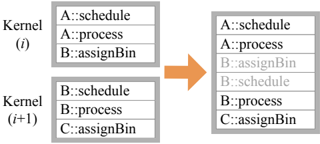
Combining two kernels into one-'kernel fusion'-both reduces kernel overhead and allows an implementation to exploit producerconsumer locality between the kernels.
<details>
<summary>Image 3 Details</summary>
### Visual Description
## Diagram: Kernel Task Scheduling and Merging
### Overview
The image is a technical diagram illustrating a process of task merging or interleaving from two computational kernels into a single execution sequence. It visually represents how tasks labeled with specific identifiers (A, B, C) and operations (schedule, process, assignBin) are combined from two separate kernel contexts into one ordered list, with a visual distinction (color) applied to tasks originating from the second kernel.
### Components/Axes
The diagram consists of three primary rectangular boxes and a directional arrow.
1. **Left Side - Input Kernels (Two Boxes Stacked Vertically):**
* **Top Box:** Labeled `Kernel (i)`. Contains a vertical list of three tasks.
* **Bottom Box:** Labeled `Kernel (i+1)`. Contains a vertical list of three tasks.
* **Arrow:** A solid orange arrow originates from the right edge of the space between the two left boxes and points to the single box on the right, indicating a transformation or mapping process.
2. **Right Side - Output Sequence (One Box):**
* A single, taller rectangular box containing a vertical list of six tasks. This box has no explicit label.
### Detailed Analysis
**Task Lists and Transcription:**
* **Kernel (i) Tasks (Top-Left Box):**
1. `A::schedule`
2. `A::process`
3. `B::assignBin`
* **Kernel (i+1) Tasks (Bottom-Left Box):**
1. `B::schedule`
2. `B::process`
3. `C::assignBin`
* **Merged Output Sequence (Right Box):**
The tasks are listed in the following order. The first three entries are in **black text**, and the last three entries are in **light gray text**.
1. `A::schedule` (Black)
2. `A::process` (Black)
3. `B::assignBin` (Black)
4. `B::schedule` (Gray)
5. `B::process` (Gray)
6. `C::assignBin` (Gray)
**Spatial Grounding & Color Mapping:**
* The legend is implicit in the color coding of the text within the right-hand box.
* **Black Text:** Corresponds exactly to the three tasks from `Kernel (i)`. They occupy the top half (positions 1-3) of the output list.
* **Gray Text:** Corresponds exactly to the three tasks from `Kernel (i+1)`. They occupy the bottom half (positions 4-6) of the output list.
* The orange arrow is a visual connector, not a data series, and does not map to a legend item.
**Flow and Relationship:**
The diagram shows a direct, ordered concatenation. The entire list from `Kernel (i)` is placed first, followed immediately by the entire list from `Kernel (i+1)`. There is no interleaving (e.g., A, B, A, B) or reordering based on task type. The relationship is a simple sequential merge.
### Key Observations
1. **Strict Sequential Merge:** The output is a pure concatenation of the two input lists in their original order (`Kernel (i)` then `Kernel (i+1)`).
2. **Visual Differentiation by Origin:** The only difference between the tasks in the output list is their text color, which serves as a visual marker of their source kernel. All task text content is preserved exactly.
3. **Task Naming Convention:** Tasks follow a consistent `Identifier::Operation` format (e.g., `A::schedule`). The identifiers (A, B, C) suggest different data objects or resources, while the operations (schedule, process, assignBin) suggest a pipeline of actions performed on them.
4. **Kernel Indexing:** The use of `(i)` and `(i+1)` implies these are consecutive instances or iterations of a kernel execution, possibly in a loop or sequence.
### Interpretation
This diagram likely illustrates a **task scheduling or dependency resolution strategy** in a parallel or pipelined computing system, such as a GPU warp scheduler or a CPU thread pool manager.
* **What it demonstrates:** It shows a conservative merging strategy where all tasks from one kernel context are completed before any tasks from the next context begin. This could represent a **barrier synchronization** point or a simple **FIFO (First-In, First-Out) queue** model where kernels are processed to completion in order.
* **Relationship between elements:** The left side represents isolated execution contexts (kernels), each with its own private task queue. The right side represents a unified, global execution queue. The arrow represents the scheduler's action of dequeuing tasks from the individual kernel queues and enqueuing them into the global stream.
* **Notable implications:** The gray coloring of the `Kernel (i+1)` tasks in the output is significant. It may indicate:
* **Lower Priority:** Tasks from the newer kernel are visually de-emphasized, suggesting they are of lower priority or are speculative.
* **Stalling/Dependency:** The system may be stalling the execution of `Kernel (i+1)` tasks until `Kernel (i)` tasks are complete, perhaps due to resource conflicts (e.g., both kernels needing the same `B` resource).
* **Visualization Aid:** It is primarily a visual aid to help the viewer trace the origin of each task in the merged list, confirming the concatenation logic.
* **Underlying principle:** The diagram argues for a simple, predictable, and sequential execution model over more complex interleaved or out-of-order models. It prioritizes clarity and isolation of kernel contexts over potential throughput gains from interleaving. The presence of the same identifier (`B`) in both kernels suggests potential resource contention that this scheduling model may be designed to avoid by serializing access.
</details>
Opportunity The simplest case for kernel fusion is when two subsequent stages (a) have the same bin size, (b) map primitives to the same bins, (c) have no dependencies between them, (d) each receive input from only one stage and output to only one stage, and (e) both have Schedule phases that map execution to the same core. For example, a rasterization pipeline's Fragment Shading and Depth Test stages can be fused. If requirements are met, a primitive can proceed from one stage to the next immediately and trivially, so we fuse these two stages into one kernel. These constraints can be relaxed in certain cases (such as a EndBin dependency, discussed below), allowing for more kernel fusion opportunities. We anticipate more complicated cases where kernel fusion is possible but difficult to detect; however, even detecting only the simple case above is highly profitable.
Implementation Two stages, A and B, can be fused by having A's emit statements call B's process phase directly. We can also fuse more than two stages using the same approach.
## 5.2.2 Schedule Optimization
While we allow a user to express arbitrary logic in a Schedule routine, we observe that most common patterns of scheduler design can be reduced to simpler and more efficient versions. Two prominent cases include:
## Pre-Scheduling
<details>
<summary>Image 4 Details</summary>
### Visual Description
## Diagram: Kernel Function Mapping and Transition
### Overview
The image is a technical diagram illustrating a relationship and transition between two computational kernels, labeled Kernel (i) and Kernel (i+1). It depicts the functions contained within each kernel and shows a specific dependency link between them, as well as an overall progression from one kernel to the next.
### Components/Axes
The diagram consists of two primary rectangular blocks representing the kernels, positioned side-by-side.
* **Left Block (Kernel (i)):**
* **Header:** "Kernel (i)"
* **Content (List of Functions):**
1. `A::schedule`
2. `A::process`
3. `A::assignBin`
* **Right Block (Kernel (i+1)):**
* **Header:** "Kernel (i+1)"
* **Content (List of Functions):**
1. `B::schedule`
2. `B::process`
3. `C::assignBin`
* **Connecting Elements:**
1. A **green arrow** originates from the `A::assignBin` function in Kernel (i) and points directly to the `B::schedule` function in Kernel (i+1).
2. A large, **orange arrow** is positioned between the two kernel blocks, pointing from left (Kernel (i)) to right (Kernel (i+1)), indicating a general transition or sequence.
### Detailed Analysis
The diagram presents a structured view of two sequential computational units.
* **Kernel (i) Composition:** Contains three functions, all prefixed with the module/component identifier `A`. The functions are `schedule`, `process`, and `assignBin`.
* **Kernel (i+1) Composition:** Contains three functions with different prefixes. Two are prefixed with `B` (`schedule`, `process`), and one is prefixed with `C` (`assignBin`).
* **Specific Dependency (Green Arrow):** The green arrow establishes a direct, specific link. It shows that the output or completion of the `assignBin` function from module `A` in the first kernel is a prerequisite for, or triggers, the `schedule` function from module `B` in the subsequent kernel.
* **General Transition (Orange Arrow):** The orange arrow signifies the overall flow or progression from the state or execution context of Kernel (i) to that of Kernel (i+1). This could represent a pipeline stage, a time step, or a logical sequence in a larger process.
### Key Observations
1. **Function Naming Convention:** All functions follow a `Module::FunctionName` pattern, indicating a modular design where functions belong to specific components (A, B, C).
2. **Asymmetric Composition:** While both kernels have three functions, the module prefixes change. Kernel (i) is entirely from module `A`, while Kernel (i+1) mixes modules `B` and `C`.
3. **Cross-Module Dependency:** The critical insight is the green arrow, which highlights a cross-module (`A` to `B`) and cross-kernel dependency. This is a more specific relationship than the general kernel-to-kernel transition shown by the orange arrow.
4. **Spatial Layout:** The legend (the function lists) is contained within each kernel block. The key relational elements (the arrows) are placed in the space between the blocks, with the green arrow's tail and head precisely aligned with the specific functions it connects.
### Interpretation
This diagram likely models a **task scheduling or pipeline execution system** in a parallel or modular computing environment.
* **What it suggests:** The system is broken down into discrete kernels (i, i+1), which could be time steps, pipeline stages, or thread blocks. Within each kernel, tasks (schedule, process, assignBin) from different modules (A, B, C) are executed.
* **How elements relate:** The orange arrow shows the sequential flow of kernels. The green arrow reveals a finer-grained, data-flow or control-flow dependency: the "bin assignment" task in the first stage (by module A) must complete before the "scheduling" task in the next stage (by module B) can begin. This implies that `A::assignBin` produces data or a state that `B::schedule` requires.
* **Notable pattern/anomaly:** The shift from a single-module kernel (`A`) to a multi-module kernel (`B` and `C`) is significant. It suggests that Kernel (i+1) integrates work from different components, possibly coordinating their outputs. The absence of a direct link to `C::assignBin` might indicate it operates independently or depends on other, unshown factors.
* **Underlying principle:** The diagram emphasizes that understanding a system requires looking at both the **macro-level sequence** (kernel transitions) and the **micro-level dependencies** (specific function calls between modules). The green arrow is the most critical piece of information, exposing a potential bottleneck or synchronization point in the workflow.
</details>
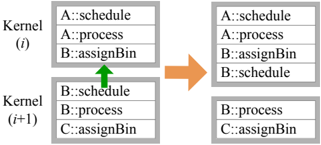
Opportunity For many Schedule phases, core selection is either static or deterministic given the incoming bin ID (specifically, when DirectMap , Serialize , or All are used). In these scenarios, we can pre-calculate the target core ID even before Schedule is ready for execution (i.e., before all dependencies have been met). This both eliminates some runtime work and provides the opportunity to run certain tasks (such as data allocation on heterogeneous implementations) before a stage is ready to execute.
Implementation The optimizer detects the pre-scheduling optimization by identifying one of the three aforementioned Schedule directives. This optimization allows us to move a given stage's Schedule phase into the same kernel as its AssignBin phase so that core selection happens sooner and so that other implementationspecific benefits can be exploited.
## Schedule Elimination
<details>
<summary>Image 5 Details</summary>
### Visual Description
## Diagram: Kernel Task Allocation Transition
### Overview
The image is a technical diagram illustrating a state transition between two computational kernels, labeled Kernel (i) and Kernel (i+1). It depicts a filtering or reassignment process where specific tasks (identified by a `Component::Task` naming convention) are removed or altered when moving from one kernel iteration to the next. The diagram uses a simple box-and-arrow flowchart style.
### Components/Axes
The diagram is composed of the following spatially arranged elements:
1. **Left Column (Source State):**
* **Top Box:** Labeled `Kernel (i)`. Contains a list of three tasks.
* **Bottom Box:** Labeled `Kernel (i+1)`. Contains a list of three tasks.
* *Positioning:* These two boxes are stacked vertically on the left side of the image.
2. **Central Element:**
* A large, solid orange arrow pointing from the left column to the right column. This indicates the direction of the process or transformation.
3. **Right Column (Resulting State):**
* **Top Box:** Unlabeled, but corresponds to the transformed state of the top-left box. Contains a list of two tasks.
* **Bottom Box:** Unlabeled, but corresponds to the transformed state of the bottom-left box. Contains a list of two tasks.
* *Positioning:* These two boxes are stacked vertically on the right side of the image, aligned with their counterparts on the left.
### Detailed Analysis
**Task Lists and Transformation:**
* **Kernel (i) - Top Box (Source):**
1. `A::schedule`
2. `A::process`
3. `B::assignBin`
* **Kernel (i) - Bottom Box (Source):**
1. `B::schedule` (This text is in a lighter gray font compared to the others).
2. `B::process`
3. `C::assignBin`
* **Transformation (via Orange Arrow):** The arrow signifies a process applied to the tasks in Kernel (i) to produce the state shown on the right.
* **Resulting State - Top Box:**
1. `A::schedule`
2. `A::process`
* **Change:** The task `B::assignBin` has been removed.
* **Resulting State - Bottom Box:**
1. `B::process`
2. `C::assignBin`
* **Change:** The task `B::schedule` (the grayed-out text) has been removed.
### Key Observations
1. **Selective Removal:** The transformation does not affect all tasks equally. It specifically removes one task from each kernel's list.
2. **Grayed-Out Text:** The task `B::schedule` in the source Kernel (i+1) is displayed in a lighter gray. This visual distinction likely indicates it is in a different state (e.g., completed, pending, invalid) prior to the transformation, which may explain its subsequent removal.
3. **Task Naming Convention:** All tasks follow the pattern `[Component Identifier]::[Task Name]`. The components involved are `A`, `B`, and `C`. The tasks are `schedule`, `process`, and `assignBin`.
4. **Spatial Consistency:** The layout is consistent, with the top and bottom boxes on each side maintaining their relative positions, making the before-and-after comparison clear.
### Interpretation
This diagram likely models a step in a parallel computing or task scheduling system, such as a GPU warp scheduler or a CPU thread pool manager. The key insight is the **selective filtering of tasks between kernel iterations**.
* **What it demonstrates:** The system is transitioning from a state where certain tasks are queued (Kernel i) to a subsequent state (Kernel i+1) where specific tasks are no longer present. The removal of `B::assignBin` from the top group and the pre-emptively grayed-out `B::schedule` from the bottom group suggests a logic where tasks associated with component `B` are being deprioritized, completed, or reallocated.
* **Relationship between elements:** The orange arrow is the critical operator. It represents the scheduling policy or execution logic that evaluates the task list in Kernel (i) and produces the refined list for Kernel (i+1). The gray text acts as a visual cue for a precondition that influences this logic.
* **Notable Pattern:** The pattern is not random removal. It appears to target specific task types (`schedule` and `assignBin`) for component `B`, while leaving `process` tasks and all tasks for components `A` and `C` intact. This could indicate a phase-based execution where scheduling and bin assignment for a particular resource (`B`) are completed in one cycle, allowing only processing to continue to the next cycle.
**In essence, the diagram visualizes a state change in a computational workflow, highlighting how a scheduler prunes or advances a task list based on component-specific rules and pre-existing task states.**
</details>
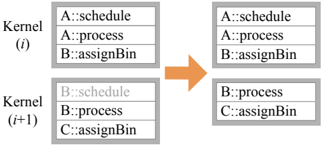
Opportunity Modern parallel architectures often support a highly efficient hardware scheduler that offers a reasonably fair allocation of work to computational cores. Despite the limited customizability of such a scheduler, we utilize its capabilities whenever it matches a pipeline's requirements. For instance, if a designer requests bins of a fragment shader to be scheduled in a load-balanced fashion (e.g., using the LoadBalance directive), we can simply offload this task to the hardware scheduler by presenting each bin as an independent unit of work (e.g., a CUDA block or OpenCL workgroup).
Implementation When the optimizer identifies a stage using the LoadBalance directive, it removes that stage's Schedule phase in favor of letting the hardware scheduler allocate the workload.
## 5.2.3 Static Dependency Resolution
<details>
<summary>Image 6 Details</summary>
### Visual Description
## Diagram: Kernel Synchronization Flowchart
### Overview
The image is a technical diagram illustrating a synchronization process between two computational kernels, labeled Kernel (i) and Kernel (i+1). It depicts two states: an initial state on the left and a synchronized state on the right, connected by a "Local Sync" operation. The diagram uses a flowchart style with rectangular boxes representing kernels and their internal task lists, connected by directional arrows.
### Components/Axes
The diagram is composed of the following elements:
1. **Kernel Boxes:** Four rectangular boxes, each containing a title and a list of three tasks.
* **Top-Left Box:** Title: `Kernel (i)`. Tasks: `A::schedule`, `A::process`, `B::assignBin`.
* **Bottom-Left Box:** Title: `Kernel (i+1)`. Tasks: `B::schedule`, `B::process`, `C::assignBin`.
* **Top-Right Box:** Title: `Kernel (i)`. Tasks: `A::schedule`, `A::process`, `B::assignBin`.
* **Bottom-Right Box:** Title: `Kernel (i+1)`. Tasks: `B::schedule`, `B::process`, `B::assignBin`.
2. **Arrows and Labels:**
* A vertical arrow points downward from the top-left box to the bottom-left box.
* A horizontal arrow labeled **"Local Sync"** points from the left side of the diagram to the right side.
* A vertical arrow points downward from the top-right box to the bottom-right box.
3. **Footer Labels:**
* Below the left column: `B::schedule::endStage(A)`
* Below the right column: `B::schedule::endBin(A)`
### Detailed Analysis
The diagram presents a before-and-after view of a kernel synchronization event.
* **Initial State (Left Column):**
* Kernel (i) is executing tasks related to entity `A` (`A::schedule`, `A::process`) and a task for entity `B` (`B::assignBin`).
* Kernel (i+1) is executing tasks for entity `B` (`B::schedule`, `B::process`) and a task for entity `C` (`C::assignBin`).
* The label `B::schedule::endStage(A)` suggests that the `B::schedule` task in Kernel (i+1) has a dependency or synchronization point with the completion of a stage related to entity `A` from Kernel (i).
* **Synchronization Action:** The "Local Sync" arrow indicates a synchronization barrier or data exchange operation between the two kernels.
* **Synchronized State (Right Column):**
* Kernel (i)'s task list remains unchanged.
* Kernel (i+1)'s task list has changed: the final task is now `B::assignBin` instead of `C::assignBin`.
* The label `B::schedule::endBin(A)` now appears, indicating the synchronization point has advanced or changed context.
### Key Observations
1. **Task Modification:** The primary change after synchronization is in Kernel (i+1). The task `C::assignBin` is replaced with `B::assignBin`. This implies that the synchronization operation resulted in Kernel (i+1) receiving a new task (`B::assignBin`) related to entity `B`, potentially from Kernel (i), and its previous task for entity `C` was either completed, deferred, or replaced.
2. **Synchronization Point Evolution:** The footer label changes from `endStage(A)` to `endBin(A)`. This suggests the synchronization is tied to the lifecycle of entity `A`, progressing from a "stage" completion to a "bin" completion.
3. **Task Naming Convention:** Tasks follow a `Entity::Action` format (e.g., `A::schedule`). The entities involved are `A`, `B`, and `C`. Kernel (i) handles `A` and `B`, while Kernel (i+1) initially handles `B` and `C`.
### Interpretation
This diagram likely illustrates a **task dependency and handoff mechanism in a parallel or multi-kernel computing system**, such as a GPU warp scheduler or a distributed processing pipeline.
* **What it demonstrates:** It shows how work items (represented by entities A, B, C) are managed across different execution units (kernels). Kernel (i) appears to be a producer or upstream processor for entity `B`, while Kernel (i+1) is a consumer or downstream processor.
* **Relationship between elements:** The "Local Sync" is the critical operation that resolves dependencies. Before sync, Kernel (i+1) is ready to work on entity `C` but is waiting (`endStage(A)`) for a signal from Kernel (i)'s work on `A`. After the sync, Kernel (i) has provided the necessary data or signal for entity `B`, allowing Kernel (i+1) to update its work queue to process `B::assignBin` and its wait condition advances to `endBin(A)`.
* **Notable anomaly/pattern:** The replacement of `C::assignBin` with `B::assignBin` is the key event. This indicates a dynamic task queue where kernels can receive new work items from other kernels upon synchronization, rather than having a static, pre-assigned list of tasks. The system appears designed for flexible, dependency-driven task scheduling.
</details>
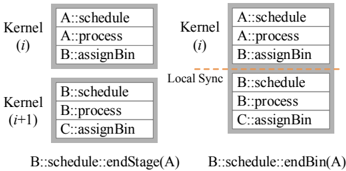
Opportunity The previous optimizations allowed us to statically resolve core assignment. Here we also optimize for static resolution of dependencies. The simplest form of dependencies are those that request completion of an upstream stage (e.g., the EndStage directive) or the completion of a bin from the previous stage (e.g., the EndBin directive). The former dependency occurs in rasterization pipelines with shadow mapping, where the Fragment Shade stage cannot proceed until the pipeline has finished generating the shadow map (specifically, the shadow map's Composite stage). The latter dependency occurs when synchronization is required between two stages, but the requirement is spatially localized (e.g., between the Depth Test and Composite stages in a rasterization pipeline with order-independent transparency).
Implementation We interpret EndStage as a global synchronization construct and, thus, prohibit any kernel fusion with a previous stage. By placing a kernel break between stages, we enforce the EndStage dependency because once a kernel has finished running, the stage(s) associated with that kernel are complete.
In contrast, EndBin denotes a local synchronization, so we allow kernel fusion and place a local synchronization within the kernel between stages. However, this strategy only works if a bin is not split across multiple cores. If a bin is split, we fall back to global synchronization.
## 5.2.4 Single-Stage Process Optimizations
Currently, we treat Process stages as architecture-independent. In general, this is a reasonable assumption for graphics pipelines. However, we have noted some specific scenarios where architecturedependent Process routines might be desirable. For instance, with sufficient local storage and small enough bins, a particular architecture might be able to instantiate an on-chip depth buffer, or with a fast global read-only storage, lookup-table-based rasterizers become possible. Exploring architecture-dependent Process stages is an interesting area of future work.
## 6 Runtime Implementation
We designed Piko to target multiple architectures, and we currently focus on two distinct targets: a multicore CPU and a manycore GPU. Certain aspects of our runtime design span both architectures. The uniformity in these decisions provides a good context for comparing differences between the two architectures. The degree of impact of optimizations in Section 5.2 generally varies between architectures, and that helps us tweak pipeline specifications to exploit architectural strengths. Along with using multi-kernel implementations, our runtimes also share the following characteristics:
Bin Management For both architectures, we consider a simple data structure for storing bins: each stage maintains a list of bins, each of which is a list of primitives belonging to the corresponding bin. Currently, both runtimes use atomic operations to read and write to bins. However, using prefix sums for updating bins while maintaining primitive order is a potentially interesting alternative.
Work-Group Organization In order to accommodate the most common scheduling directives of static and dynamic load balance, we simply package execution work groups into CPU threads/CUDA blocks such that they respect the directives we described in Section 4.3:
LoadBalance As discussed in Section 5.2.2, for dynamic load balancing Pikoc simply relies on the hardware scheduler for fair allocation of work. Each bin is assigned to exactly one CPU thread/CUDA block, which is then scheduled for execution by the hardware scheduler.
DirectMap While we cannot guarantee that a specific computation will run on a specific hardware core, here Pikoc packages multiple pieces of computation-for example, multiple binstogether as a single unit to ensure that they will all run on the same physical core.
Piko is designed to target multiple architectures by primarily changing the implementation of the Schedule phase of stages. Due to the intrinsic architectural differences between different hardware targets, the Piko runtime implementation for each target must exploit the unique architectural characteristics of that target in order to obtain efficient pipeline implementations. Below are some architecturespecific runtime implementation details.
Multicore CPU In the most common case, a bin will be assigned to a single CPU thread. When this mapping occurs, we can manage the bins without using atomic operations. Each bin will then be processed serially by the CPU thread.
Generally, we tend to prefer DirectMap Schedule s. This scheduling directive often preserves producer-consumer locality by mapping corresponding bins in different stages to the same hardware core. Today's powerful CPU cache hierarchies allow us to better exploit this locality.
NVIDIA GPU High-end discrete GPUs have a large number of wide-SIMD cores. We thus prioritize supplying large amounts of work to the GPU and ensuring that work is relatively uniform. In specifying our pipelines, we generally prefer Schedule s that use the efficient, hardware-assisted LoadBalance directive whenever appropriate.
Because we expose a threads-per-bin choice to the user when defining a stage, the user can exploit knowledge of the pipeline and/or expected primitive distribution to maximize efficiency. For example, if the user expects many bins to have few primitives in them, then the user can specify a small value for threads-per-bin so that multiple bins get mapped to the same GPU core. This way, we are able to exploit locality within a single bin, but at the same time we avoid losing performance when bins do not have a large number of primitives.
## 7 Evaluation
## 7.1 Piko Pipeline Implementations
In this section, we evaluate performance for two specific pipeline implementations, described below-rasterization and Reyes-but the Piko abstraction can effectively express a range of other pipelines as well. In the supplementary material, we describe several additional Piko pipelines, including a triangle rasterization pipeline with deferred shading, a particle renderer, and and a ray tracer.
BASELINE Rasterizer To understand how one can use Piko to design an efficient graphics pipeline, we begin by presenting a Piko implementation of our BASELINE triangle rasterizer. This pipeline consist of 5 stages connected linearly: Vertex Shader , Rasterizer , Fragment Shader , Depth Test , and Composite . Each of these stages will use full-screen bins, which means that they will not make use of spatial binning. The Schedule phase for each stage will request a LoadBalance scheduler, which will result in each stage being mapped to its own kernel. Thus, we are left with a rasterizer that runs each stage, one-at-a-time, to completion and makes use of neither spatial nor producer-consumer locality. When we run this naive pipeline implementation, the performance leaves much to be desired. We will see how we can improve performance using Piko optimizations in Section 7.2.
Reyes As another example pipeline, let us explore a Piko implementation of a Reyes micropolygon renderer. For our implementation, we split the rendering into four pipeline stages: Split , Dice , Sample , and Shade . One of the biggest differences between Reyes and a forward raster pipeline is that the Split stage in Reyes is irregular in both execution and data. Bezier patches may go through an unbounded number of splits; each split may emit primitives that must be split again ( Split ), or instead diced ( Dice ). These irregularities combined make Reyes difficult to implement efficiently on a GPU. Previous GPU implementations of Reyes required significant amounts of low-level, processor-specific code, such as a custom software scheduler [Patney and Owens 2008; Zhou et al. 2009; Tzeng et al. 2010; Weber et al. 2015].
In contrast, we represent Split in Piko with only a few lines of code. Split is a self-loop stage with two output channels: one back to itself, and the other to Dice . Split 's Schedule stage performs the
Figure 3: We use the above scenes for evaluating characteristics of our rasterizer implementations. Fairy Forest (top-left) is a scene with 174K triangles with many small and large triangles. Buddha (topright) is a scene with 1.1M very small triangles. Mecha (bottom-left) has 254K small- to medium-sized triangles, and Dragon (bottomright) contains 871K small triangles. All tests were performed at a resolution of 1024 × 768.
<details>
<summary>Image 7 Details</summary>
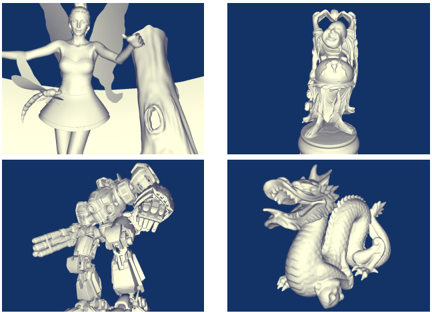
### Visual Description
## 3D Model Composite: Four Distinct Character Renders
### Overview
The image is a composite of four separate 3D model renders, arranged in a 2x2 grid. Each model is presented in a monochromatic, untextured (clay or default shader) style against a uniform dark blue background. The models represent diverse subjects: a fantasy humanoid, a seated figure on a throne, a mechanical robot, and a mythical creature with a rider. There is no embedded text, labels, axes, or data charts within the image itself.
### Components/Axes
* **Layout:** A 2x2 grid with four distinct quadrants.
* **Background:** A solid, dark blue color (#000080 approximate) fills the entire background of each quadrant.
* **Rendering Style:** All models are rendered with a uniform, matte, off-white or light gray material, suggesting a default 3D software shader (like a "clay" render). Lighting creates soft shadows to define form.
* **Text/Labels:** **None present.** The image contains no textual information, titles, legends, or annotations.
### Detailed Analysis
The image is segmented into four independent regions, processed below:
**1. Top-Left Quadrant: Fantasy Humanoid Figure**
* **Subject:** A stylized, slender humanoid figure, likely female, with large, translucent-looking fairy or insect wings.
* **Pose:** Standing, left arm extended outward, right arm holding a tall, vertical staff or pillar.
* **Key Details:**
* Wears a short, flared dress or tunic.
* Has a segmented, tail-like appendage extending from the lower back.
* The staff/pillar has a smooth, organic form with a recessed oval detail near the top.
* The figure's head is smooth, with suggested facial features but no fine detail.
* **Spatial Grounding:** The figure is centered in the quadrant. The staff is positioned to the figure's right (viewer's right).
**2. Top-Right Quadrant: Seated Figure on Throne**
* **Subject:** A robust, armored figure seated on an ornate, high-backed throne.
* **Pose:** Seated upright, hands resting on the throne's arms or lap.
* **Key Details:**
* The figure appears to be wearing elaborate armor with shoulder guards.
* The throne is highly detailed with decorative elements, including what appear to be dragon or beast heads at the top corners of the backrest.
* The figure's face is stern, with a possible beard or helmet.
* The base of the throne is circular.
* **Spatial Grounding:** The entire composition (figure and throne) is centered within the quadrant.
**3. Bottom-Left Quadrant: Mechanical Robot**
* **Subject:** A bulky, humanoid robot or mech suit.
* **Pose:** Standing in a slight contrapposto, facing towards the viewer's left.
* **Key Details:**
* The right arm is replaced by a large, multi-barreled rotary cannon (Gatling-style weapon).
* The left arm is a standard manipulator hand.
* The torso and legs are heavily armored with segmented plates.
* The head is a small, sensor-like unit set into the upper torso.
* **Spatial Grounding:** The robot is centered, with its weapon arm extending towards the left edge of the quadrant.
**4. Bottom-Right Quadrant: Dragon with Rider**
* **Subject:** A classic Western-style dragon with a small humanoid rider on its back.
* **Pose:** The dragon is rearing up on its hind legs, wings partially spread, head turned to the viewer's left. The rider is seated just behind the dragon's neck.
* **Key Details:**
* The dragon has a long, serpentine neck, prominent horns, and a ridged spine.
* Its mouth is open, showing teeth.
* The rider is small in scale compared to the dragon, wearing what appears to be a helmet and simple clothing.
* The dragon's tail curls around towards the front.
* **Spatial Grounding:** The dragon and rider are centered, with the dragon's head and wings occupying the upper portion of the quadrant.
### Key Observations
* **Diversity of Genre:** The four models span fantasy (fairy, dragon rider), mythological/historical (throne figure), and science fiction (robot) genres.
* **Consistent Presentation:** Despite the subject diversity, all models are presented with identical rendering style, lighting, and background, creating a cohesive visual set. This suggests they may be from the same artist's portfolio, a 3D asset pack, or a technical demonstration of modeling skill across different subjects.
* **Lack of Textual Data:** The image is purely visual. It contains zero alphanumeric information to extract. All information is conveyed through the geometry and form of the 3D models.
* **Model Complexity:** All four models exhibit a high level of geometric detail, particularly the ornate throne and the mechanical components of the robot.
### Interpretation
This composite image serves as a **technical showcase or portfolio piece** for 3D modeling. The choice to present the models in a uniform, untextured "clay" render is deliberate—it strips away the distraction of color and texture to focus the viewer's attention entirely on the **quality of the sculpt, the silhouette, the anatomical or mechanical structure, and the overall composition** of each model.
The arrangement in a grid allows for easy comparison of form and complexity across different subject matters. The absence of any text or data means the image's purpose is not to inform quantitatively but to **demonstrate qualitative skill** in digital sculpting and character/creature design. A viewer can infer the artist's versatility and proficiency in creating both organic and hard-surface models. The dark blue background provides high contrast, making the light-colored models stand out clearly for examination.
</details>
split operation and depending on the need for more splitting, writes its output to one of the two output channels. Dice takes in Bezier patches as input and outputs diced micropolygons from the input patch. Both Dice and Sample closely follow the GPU algorithm described by Patney et al. [2008] but without its implementation complexity. Shade uses a diffuse shading model to color in the final pixels.
Split and Dice follow a LoadBalance scheme for scheduling work with fullscreen bins. These bins do not map directly to screen space as Bezier patches are not tested for screen coverage. Instead, in these stages, the purpose of the bins is to help distribute work evenly. Since Sample does test for screen coverage, its bins partition the screen evenly into 32 × 32 bins. Shade uses a DirectMap scheme to ensure that generated fragments from Sample can be consumed quickly. To avoid the explosion of memory typical of Reyes implementations, our implementation strip-mines the initial set of patches via a tweakable knob so that any single pass will fit within the GPU's available resources.
§
Since a Piko pipeline is written as a series of separate stages, we can reuse these stages in other pipelines. For instance, the Shade stage in the Reyes pipeline is nearly identical to the Fragment Shader stage in the raster pipeline. Furthermore, since Piko factors out programmable binning into the AssignBin phase, we can also share binning logic between stages. In Reyes, both Split and Dice use the same round-robin AssignBin routine to ensure an even distribution of Bézier patches. The Vertex Shader stage of our binned rasterization pipeline (described in Section 7.2.2) uses this AssignBin routine as well. In addition, Reyes's Sample stage uses the same AssignBin as the rasterizer's Rasterizer stage, since these two stages perform similar operations of screen-primitive intersection. Being able to reuse code across multiple pipelines and stages is a key strength of Piko. Users can easily prototype and develop new pipelines by connecting existing pipeline stages together.
## 7.2 Piko Lets Us Easily Explore Design Alternatives
The performance of a graphics pipeline can depend heavily on the scene being rendered. Scenes can differ in triangle size, count, and distribution, as well as the complexity of the shaders used to render the scene. Furthermore, different target architectures vary greatly in their design, often requiring modification of the pipeline design in order to achieve optimal performance on different architectures. Now we will walk through a design exercise, using the Fairy Forest and Buddha scenes (Figure 3), and show how simple changes to Piko pipelines can allow both exploration and optimization of design alternatives.
## 7.2.1 Changing BASELINE's Scheduler
Our BASELINE pipeline separates each stage into separate kernels; it leverages neither spatial nor producer-consumer locality, but dynamically load-balances all primitives in each stage by using the LoadBalance scheduling directive. Let's instead consider a pipeline design that assumes primitives are statically load-balanced and optimizes for producer-consumer locality. If we now specify the DirectMap scheduler, Pikoc aggressively fuses all stages together into a single kernel; this simple change results in an implementation faithful to the FreePipe design [Liu et al. 2010].
Figure 4a shows how the relative performance of this single-kernel pipeline varies with varying pixel shader complexity. As shader complexity increases, the computation time of shading a primitive significantly outweighs the time spent loading the primitive from and storing it to memory. Thus, the effects of poor load-balancing in the FreePipe design become apparent because many of the cores of the hardware target will idle while waiting for a few cores to finish their workloads. For simple shaders, the memory bandwidth requirement overshadows the actual computation time, so FreePipe's ability to preserve producer-consumer locality becomes a primary concern. This difference is particularly evident when running the pipeline on the GPU, where load balancing is crucial to keep the device's computation cores saturated with work. Piko lets us quickly explore this tradeoff by only changing the Schedule s of the pipeline stages.
## 7.2.2 Adding Binning to BASELINE
Neither BASELINE nor the FreePipe designs exploit the spatial locality that we argue is critical to programmable graphics pipelines. Thus, let's return to the LoadBalance Schedule s and apply that schedule to a binned pipeline; Piko allows us to change the bin sizes of each stage by simply changing the template parameters, as shown in Listing 1. By rapidly experimenting with different bin sizes, we were able to obtain a speedup in almost all cases (Figure 4b). We achieve a significant speedup on the GPU using the Fairy Forest scene. However, the overhead of binning results in a performance loss on the Buddha scene because the triangles are small and similarly sized. Thus, a naive, non-binned distribution of work suffices for this scene, and binning provides no benefits. On the CPU, a more capable cache hierarchy means that adding bins to our scenes is less useful, but we still achieve some speedup nonetheless. For Piko users, small changes in pipeline descriptions allows them to quickly make significant changes in pipeline configuration or differentiate between different architectures.
## 7.2.3 Exploring Binning with Scheduler Variations
Piko also lets us easily combine Schedule optimizations with binning. For example, using a DirectMap schedule for the Rasterizer and Fragment Shader stages means that these two stages can be automatically fused together by Pikoc . For GPUs in particular, this is a profitable optimization for low shader complexity (Figure 4c).
Through this exploration, we have shown that design decisions that prove advantageous on one scenario or hardware target can actually harm performance on a different one. To generalize, the complex cache hierarchies on modern CPUs allow for better exploitation of spatial and producer-consumer locality, whereas the wide SIMD
Table 4: Performance comparison of an optimized Piko rasterizer against cudaraster, the current state-of-the-art in software rasterization on GPUs. We find that a Piko-generated rasterizer is about 3-6 × slower than cudaraster.
| Scene | cudaraster (ms/frame) | Piko raster (ms/frame) | Relative Performance |
|--------------|-------------------------|--------------------------|------------------------|
| Fairy Forest | 1.58 | 8.8 | 5.57 × |
| Buddha | 2.63 | 11.2 | 4.26 × |
| Mecha | 1.91 | 6.4 | 3.35 × |
| Dragon | 2.58 | 10.2 | 3.95 × |
processors and hardware work distributors on modern GPUs can better utilize load-balanced implementations. Using Piko, we can quickly make these changes to optimize a pipeline for multiple targets. Pikoc does all of the heavy lifting in restructuring the pipeline and generating executable code, allowing Piko users to spend their time experimenting with different design decisions, rather than having to implement each design manually.
## 7.3 Piko Delivers Real-Time Performance
As we have demonstrated, Piko allows pipeline writers to explore design trade-offs quickly in order to discover efficient implementations. In this section, we compare our Piko triangle rasterization pipeline and Reyes micropolygon pipeline against their respective state-of-the-art implementations to show that Piko pipelines can, in fact, achieve respectable performance. We ran our Piko pipelines on an NVIDIA Tesla K40c GPU.
## 7.3.1 Triangle Rasterization
We built a high-performance GPU triangle rasterizer using Piko. Our implementation inherits many ideas from cudaraster [Laine and Karras 2011], but our programming model helps us separately express the algorithmic and optimization concerns. Table 4 compares the performance of Piko's rasterizer against cudaraster. Across several test scenes (Figure 3), we find that cudaraster is approximately 3-6 × faster than Piko rasterizer.
We justify this gap in performance by identifying the difference between the design motivations of the two implementations. Cudaraster is extremely specialized to NVIDIA's GPU architecture and hand-optimized to achieve maximum performance for triangle rasterization on that architecture. It benefits from several architecturespecific features that are difficult to generalize into a higher-level abstraction, including its use of core-local shared memory to stage data before and after fetching from off-chip memory, and use of texture caches to accelerate read-only memory access.
While a Piko implementation also prioritizes performance and is built with knowledge of the memory hierarchy, we have designed it with equal importance to programmability, flexibility, and portability. We believe that achieving performance within 3-6 × of cudaraster while maintaining these goals demonstrates Piko's ability to realize efficient pipeline implementations.
## 7.3.2 Reyes Micropolygon Renderer
Figure 5 shows the performance of our Reyes renderer with two scenes: Bigguy and Teapot. We compared the performance of our Reyes renderer to Micropolis [Weber et al. 2015], a recentlypublished Reyes implementation with a similarly-structured split loop to ours.
We compared the performance of our Split stage, written using Piko, to Micropolis's 'Breadth' split stage. On the Teapot scene,
Figure 4: Impact of various Piko configurations on the rendering performance of a rasterization pipeline. Frametimes are relative to BASELINE for (a) and (b) and relative to using all LoadBalance schedules for (c); lower is better. Shader complexity was obtained by varying the number of lights in the illumination computation. (a) Relative to no fusion, FreePipe-style aggressive stage fusion is increasingly inefficient as shading complexity increases. However, it is a good choice for simple shaders. (b) In almost all cases, using spatial binning results in a performance improvement. Because the triangles in the Buddha scene are small and regularly distributed, the benefits of binning are overshadowed by the overhead of assigning these many small triangles to bins. (c) Compared to using all LoadBalance schedules, the impact of fusing the Rasterization and Fragment Shader stages depends heavily on the target architecture. Both versions benefit from spatial binning, but only the fused case leverages producer-consumer locality. On the CPU, the cache hierarchy allows for better exploitation of this locality. However, on the GPU, the resultant loss in load-balancing due to the fusion greatly harms performance. Piko lets us quickly explore these design alternatives, and many others, without rewriting any pipeline stages.
<details>
<summary>Image 8 Details</summary>
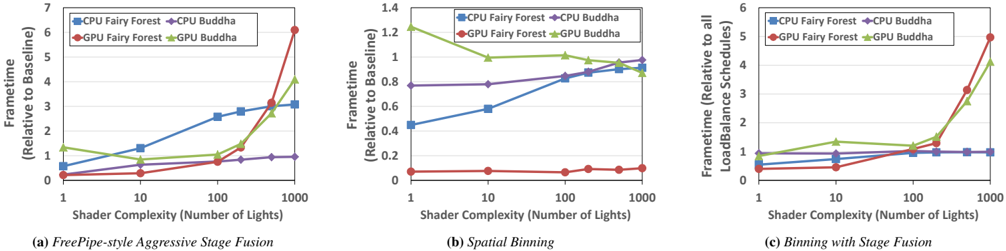
### Visual Description
## Line Charts: Performance Comparison of Three Rendering Techniques
### Overview
The image displays three line charts arranged horizontally, comparing the performance (framerate relative to a baseline) of two 3D models ("Fairy Forest" and "Buddha") rendered on CPU and GPU across three different rendering optimization techniques. The charts plot performance against increasing shader complexity (number of lights).
### Components/Axes
* **Common X-Axis (All Charts):** "Shader Complexity (Number of Lights)". It is a logarithmic scale with major tick marks at 1, 10, 100, and 1000.
* **Common Legend (All Charts):** Located in the top-left corner of each chart.
* Blue Square Line: `CPU Fairy Forest`
* Red Circle Line: `GPU Fairy Forest`
* Purple Diamond Line: `CPU Buddha`
* Green Triangle Line: `GPU Buddha`
* **Chart-Specific Y-Axes:**
* **Chart (a):** "Frametime (Relative to Baseline)". Scale ranges from 0 to 7.
* **Chart (b):** "Frametime (Relative to Baseline)". Scale ranges from 0 to 1.4.
* **Chart (c):** "Frametime (Relative to all LoadBalance Schedules)". Scale ranges from 0 to 6.
### Detailed Analysis
#### Chart (a): FreePipe-style Aggressive Stage Fusion
* **Trend Verification:**
* `CPU Fairy Forest` (Blue): Slopes steadily upward.
* `GPU Fairy Forest` (Red): Slopes gently upward until 100 lights, then spikes sharply upward.
* `CPU Buddha` (Purple): Remains nearly flat, with a very slight upward trend.
* `GPU Buddha` (Green): Slopes gently upward until 100 lights, then increases more sharply.
* **Data Points (Approximate):**
* **At 1 Light:** CPU Fairy Forest ~0.5, GPU Fairy Forest ~0.2, CPU Buddha ~0.2, GPU Buddha ~1.3.
* **At 10 Lights:** CPU Fairy Forest ~1.3, GPU Fairy Forest ~0.3, CPU Buddha ~0.4, GPU Buddha ~0.7.
* **At 100 Lights:** CPU Fairy Forest ~2.6, GPU Fairy Forest ~0.7, CPU Buddha ~0.8, GPU Buddha ~1.0.
* **At 1000 Lights:** CPU Fairy Forest ~3.0, GPU Fairy Forest ~6.0, CPU Buddha ~0.9, GPU Buddha ~4.0.
#### Chart (b): Spatial Binning
* **Trend Verification:**
* `CPU Fairy Forest` (Blue): Slopes steadily upward.
* `GPU Fairy Forest` (Red): Remains very low and nearly flat.
* `CPU Buddha` (Purple): Remains nearly flat.
* `GPU Buddha` (Green): Slopes gently downward.
* **Data Points (Approximate):**
* **At 1 Light:** CPU Fairy Forest ~0.45, GPU Fairy Forest ~0.05, CPU Buddha ~0.8, GPU Buddha ~1.25.
* **At 10 Lights:** CPU Fairy Forest ~0.6, GPU Fairy Forest ~0.05, CPU Buddha ~0.8, GPU Buddha ~1.0.
* **At 100 Lights:** CPU Fairy Forest ~0.85, GPU Fairy Forest ~0.05, CPU Buddha ~0.85, GPU Buddha ~1.0.
* **At 1000 Lights:** CPU Fairy Forest ~1.0, GPU Fairy Forest ~0.1, CPU Buddha ~1.0, GPU Buddha ~0.9.
#### Chart (c): Binning with Stage Fusion
* **Trend Verification:**
* `CPU Fairy Forest` (Blue): Slopes gently upward.
* `GPU Fairy Forest` (Red): Slopes gently upward until 100 lights, then spikes sharply upward.
* `CPU Buddha` (Purple): Remains nearly flat.
* `GPU Buddha` (Green): Slopes gently upward until 100 lights, then increases more sharply.
* **Data Points (Approximate):**
* **At 1 Light:** CPU Fairy Forest ~0.6, GPU Fairy Forest ~0.5, CPU Buddha ~0.8, GPU Buddha ~0.9.
* **At 10 Lights:** CPU Fairy Forest ~0.7, GPU Fairy Forest ~0.6, CPU Buddha ~0.9, GPU Buddha ~1.3.
* **At 100 Lights:** CPU Fairy Forest ~0.9, GPU Fairy Forest ~1.1, CPU Buddha ~1.0, GPU Buddha ~1.1.
* **At 1000 Lights:** CPU Fairy Forest ~1.0, GPU Fairy Forest ~5.0, CPU Buddha ~1.0, GPU Buddha ~4.0.
### Key Observations
1. **Performance Cliff for GPU:** In techniques (a) and (c), the GPU performance for both models degrades severely (framerate spikes) when shader complexity reaches 1000 lights. This cliff is absent in technique (b).
2. **CPU Stability:** CPU performance for the "Buddha" model is remarkably stable across all techniques and complexities. CPU performance for "Fairy Forest" degrades linearly with complexity in all cases.
3. **Technique (b) Anomaly:** Spatial Binning (b) shows a unique trend where GPU performance for "Buddha" actually *improves* slightly as complexity increases, and GPU performance for "Fairy Forest" remains excellent and flat.
4. **Model Sensitivity:** The "Fairy Forest" model generally shows greater performance sensitivity (steeper slopes) to increased complexity than the "Buddha" model, especially on the GPU.
### Interpretation
The data demonstrates a critical performance trade-off in rendering pipeline design. **FreePipe-style Aggressive Stage Fusion (a)** and **Binning with Stage Fusion (c)** offer good performance at low-to-moderate light counts but suffer from a catastrophic performance breakdown at very high complexity (1000 lights), particularly on the GPU. This suggests these methods may have scalability issues or encounter a resource bottleneck (e.g., register pressure, memory bandwidth) under extreme load.
In contrast, **Spatial Binning (b)** exhibits excellent and stable scalability. It maintains low frametimes for GPU workloads even at 1000 lights, indicating it effectively manages the increased computational load. The slight performance *improvement* for the GPU Buddha model is anomalous and could suggest that the binning strategy becomes more efficient with certain scene characteristics at higher densities, or it may be within measurement noise.
The consistent linear degradation of CPU Fairy Forest performance across all techniques implies that CPU-bound work for that model scales directly with light count, unaffected by the GPU-focused optimizations. The stability of CPU Buddha suggests its workload is less dependent on the number of lights. This analysis highlights that the choice of rendering technique must be guided by the expected scene complexity (light count) and the target hardware's performance profile.
</details>
Figure 5: Test scenes from our Reyes pipeline generated by Pikoc . The left scene, Bigguy, renders at 127.6 ms. The right scene, Teapot, renders at 85.1 ms.
<details>
<summary>Image 9 Details</summary>
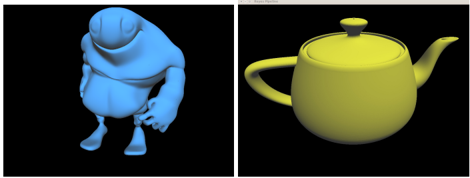
### Visual Description
## 3D Model Render: Blue Character and Yellow Teapot
### Overview
The image displays two distinct 3D models rendered against a solid black background. The models are presented side-by-side in separate panels, suggesting a comparison or showcase of different 3D assets. There is no embedded text, labels, axes, or data charts within the image itself. The content is purely visual, consisting of two geometrically complex objects.
### Components/Axes
* **Left Panel:** Contains a 3D model of a stylized, muscular humanoid character.
* **Right Panel:** Contains a 3D model of a classic teapot, specifically the iconic "Utah Teapot" often used as a standard reference object in computer graphics.
* **Background:** Uniform black (#000000) for both panels, providing high contrast for the models.
* **Text/Labels:** None present in the image.
### Detailed Analysis
**Left Model (Blue Character):**
* **Color:** Uniform light blue, with shading indicating a single, likely directional, light source from the upper left.
* **Form:** A stylized, cartoonish humanoid figure with exaggerated proportions.
* **Key Features:**
* **Head:** Large, bulbous, and smooth with a pronounced brow ridge. No distinct facial features (eyes, nose, mouth) are visible.
* **Torso:** Extremely muscular and broad, tapering to a narrow waist. The chest and abdominal muscles are defined.
* **Arms:** Thick and muscular, ending in large, clenched fists.
* **Legs:** Relatively short and thin compared to the torso, ending in simple, foot-like forms.
* **Pose:** Standing upright, facing slightly towards the right of the frame, with arms held slightly away from the body.
**Right Model (Yellow Teapot):**
* **Color:** Uniform matte yellow, with soft shading indicating a similar light source direction as the left model.
* **Form:** The classic Utah Teapot geometry, a standard test model in 3D graphics.
* **Key Features:**
* **Body:** A rounded, bulbous main chamber.
* **Spout:** A curved spout extending from the side.
* **Handle:** A looped handle on the opposite side from the spout.
* **Lid:** A domed lid with a small knob on top.
* **Pose:** Oriented in a standard three-quarter view, showcasing its profile.
### Key Observations
1. **Lack of Textual Data:** The image contains zero textual information—no titles, annotations, measurements, or labels.
2. **Contrast in Complexity:** The left model is a custom, organic character design, while the right model is a standardized, geometric primitive used for technical benchmarking.
3. **Uniform Material:** Both models appear to use a simple, non-textured Lambertian or similar diffuse shader, emphasizing form over surface detail.
4. **Spatial Grounding:** The two models are presented in distinct, adjacent rectangular frames with a thin white border separating them. The blue character occupies the left frame, and the yellow teapot occupies the right frame.
### Interpretation
This image is a technical render, likely from a 3D modeling, animation, or computer graphics pipeline. Its primary purpose is to display the geometry and basic shading of two different types of 3D assets.
* **The Blue Character** represents a custom, artistic asset, possibly a character concept or a base mesh for further sculpting and texturing. Its exaggerated, muscular form suggests it could be for a stylized game or animation.
* **The Yellow Teapot** is a fundamental reference object in the history of computer graphics. Its presence indicates this render might be part of a lighting test, a shader development exercise, or a demonstration of a rendering engine's capability to handle standard geometry. The Utah Teapot is often used to check for correct rendering of curves, shadows, and self-occlusion.
The side-by-side presentation invites comparison between a "real-world" artistic asset and a canonical technical test object. The uniform black background and simple lighting are chosen to isolate and clearly evaluate the models' forms without environmental distraction. The absence of any data or text confirms this is a visual output for assessment, not an informational chart or diagram.
</details>
we achieved 9.44 million patches per second (Mp/s), vs. Micropolis's 12.92 Mp/s; while a direct comparison of GPUs is difficult, Micropolis ran on an AMD GPU with 1.13x more peak compute and 1.11x more peak bandwidth than ours. Our implementation is 1.37x slower, but Micropolis is a complex, heavily-optimized and -tuned implementation targeted to a single GPU, whereas ours is considerably simpler, easier to write, understand, and modify, and more portable. For many scenarios, these concerns may outweigh modest performance differences.
## 8 Conclusion
Programmable graphics pipelines offer a new opportunity for existing and novel rendering ideas to impact next-generation interactive graphics. Our contribution, the Piko framework, targets high performance with programmability. Piko's main design decisions are the use of binning to exploit spatial locality as a fundamental building block for programmable pipelines, and the decomposition of pipeline stages into AssignBin , Schedule and Process phases to enable high-level exploration of the optimization alternatives. This helps implement performance optimizations and enhance programmability and portability. More broadly, we hope our work contributes to the conversation about how to think about implementing programmable pipelines.
One of the most important challenges in this work is how a high-level programming system can enable the important optimizations nec- essary to generate efficient pipelines. We believe that emphasizing spatial locality, so prevalent in both hardware-accelerated graphics and in the fastest programmable pipelines, is a crucial ingredient in efficient implementations. In the near future, we hope to investigate two extensions to this work, non-uniform bin sizes (which may offer better load balance) and spatial binning in higher dimensions (for applications like voxel rendering and volume rendering). Certainly special-purpose hardware takes advantage of binning in the form of hierarchical or tiled rasterizers, low-precision on-chip depth buffers, texture derivative computation, among others. However, our current binning implementations are all in software. Could future GPU programming models offer more native support for programmable spatial locality and bins?
From the point of view of programmable graphics, Larrabee [Seiler et al. 2008] took a novel approach: it eschewed special-purpose hardware in favor of pipelines that were programmed at their core in software. One of the most interesting aspects of Larrabee's approach to graphics was software scheduling. Previous generations of GPUs had relied on hardware schedulers to distribute work to parallel units; the Larrabee architects instead advocated software control of scheduling. Piko's schedules are largely statically compilergenerated, avoiding the complex implementations of recent work on GPU-based software schedulers, but dynamic, efficient scheduling has clear advantages for dynamic workloads (the reason we leverage the GPU's scheduling hardware for limited distribution within Piko already). Exploring the benefits and drawbacks of more general dynamic work scheduling, such as more task-parallel strategies, is another interesting area of future work.
In this paper, we consider pipelines that are entirely implemented in software, as our underlying APIs have no direct access to fixedfunction units. As these APIs add this functionality (and this API design alone is itself an interesting research problem), certainly this is worth revisiting, for fixed-function units have significant advantages. A decade ago, hardware designers motivated fixed-function units (and fixed-function pipelines) with their large computational performance per area; today, they cite their superior power efficiency. Application programmers have also demonstrated remarkable success at folding, spindling, and mutilating existing pipelines to achieve complex effects for which those pipelines were never designed. It is certainly fair to say that fixed-function power efficiency and programmer creativity are possible reasons why programmable pipelines may never replace conventional approaches. But thinking about pipelines from a software perspective offers us the opportunity to explore a space of alternative rendering pipelines, possibly as prototypes for future hardware, that would not be considered in a hardware-focused environment. And it is vital to perform a fair comparison against the most capable and optimized programmable pipelines, ones that take advantage of load-balanced parallelism and data locality, to strike the right balance between hardware and software. We hope our work is a step in this direction.
## References
- AILA, T., AND LAINE, S. 2009. Understanding the efficiency of ray traversal on GPUs. In Proceedings of High Performance Graphics 2009 , 145-149.
- AILA, T., MIETTINEN, V., AND NORDLUND, P. 2003. Delay streams for graphics hardware. ACM Transactions on Graphics 22 , 3 (July), 792-800.
- ANDERSSON, J. 2009. Parallel graphics in Frostbite-current & future. In Beyond Programmable Shading (ACM SIGGRAPH 2009 Course) , ACM, New York, NY, USA, SIGGRAPH '09, 7:1-7:312.
- APODACA, A. A., AND MANTLE, M. W. 1990. RenderMan: Pursuing the future of graphics. IEEE Computer Graphics & Applications 10 , 4 (July), 44-49.
- COOK, R. L., CARPENTER, L., AND CATMULL, E. 1987. The Reyes image rendering architecture. In Computer Graphics (Proceedings of SIGGRAPH 87) , 95-102.
- ELDRIDGE, M., IGEHY, H., AND HANRAHAN, P. 2000. Pomegranate: A fully scalable graphics architecture. In Proceedings of ACM SIGGRAPH 2000 , Computer Graphics Proceedings, Annual Conference Series, 443-454.
- FATAHALIAN, K., HORN, D. R., KNIGHT, T. J., LEEM, L., HOUSTON, M., PARK, J. Y., EREZ, M., REN, M., AIKEN, A., DALLY, W. J., AND HANRAHAN, P. 2006. Sequoia: Programming the memory hierarchy. In SC '06: Proceedings of the 2006 ACM/IEEE Conference on Supercomputing , 83.
- FOLEY, T., AND HANRAHAN, P. 2011. Spark: modular, composable shaders for graphics hardware. ACM Transactions on Graphics 30 , 4 (July), 107:1-107:12.
- FUCHS, H., POULTON, J., EYLES, J., GREER, T., GOLDFEATHER, J., ELLSWORTH, D., MOLNAR, S., TURK, G., TEBBS, B., AND ISRAEL, L. 1989. Pixel-Planes 5: A heterogeneous multiprocessor graphics system using processor-enhanced memories. In Computer Graphics (Proceedings of SIGGRAPH 89) , vol. 23, 79-88.
- GUPTA, K., STUART, J., AND OWENS, J. D. 2012. A study of persistent threads style GPU programming for GPGPU workloads. In Proceedings of Innovative Parallel Computing , InPar '12.
- HASSELGREN, J., AND AKENINE-MÖLLER, T. 2007. PCU: The programmable culling unit. ACM Transactions on Graphics 26 , 3 (July), 92:1-92:10.
- HUMPHREYS, G., HOUSTON, M., NG, R., FRANK, R., AHERN, S., KIRCHNER, P., AND KLOSOWSKI, J. 2002. Chromium: A stream-processing framework for interactive rendering on clusters. ACM Transactions on Graphics 21 , 3 (July), 693-702.
- IMAGINATION TECHNOLOGIES LTD. 2011. POWERVR Series5 Graphics SGX architecture guide for developers , 5 July. Version 1.0.8.
- LAINE, S., AND KARRAS, T. 2011. High-performance software rasterization on GPUs. In High Performance Graphics , 79-88.
- LATTNER, C., AND ADVE, V. 2004. LLVM: A compilation framework for lifelong program analysis & transformation. In Proceedings of the 2004 International Symposium on Code Generation and Optimization , CGO '04, 75-86.
- LIU, F., HUANG, M.-C., LIU, X.-H., AND WU, E.-H. 2010. FreePipe: a programmable parallel rendering architecture for efficient multi-fragment effects. In I3D '10: Proceedings of the 2010 ACM SIGGRAPH Symposium on Interactive 3D Graphics and Games , 75-82.
- MARK, W. R., GLANVILLE, R. S., AKELEY, K., AND KILGARD, M. J. 2003. Cg: A system for programming graphics hardware in a C-like language. ACM Transactions on Graphics 22 , 3 (July), 896-907.
- MONTRYM, J. S., BAUM, D. R., DIGNAM, D. L., AND MIGDAL, C. J. 1997. InfiniteReality: A real-time graphics system. In Proceedings of SIGGRAPH 97 , Computer Graphics Proceedings, Annual Conference Series, 293-302.
- OLANO, M., AND LASTRA, A. 1998. A shading language on graphics hardware: The PixelFlow shading system. In Proceedings of SIGGRAPH 98 , Computer Graphics Proceedings, Annual Conference Series, 159-168.
- OLSON, T. J. 2012. Saving the planet, one handset at a time: Designing low-power, low-bandwidth GPUs. In ACM SIGGRAPH 2012 Mobile .
- PANTALEONI, J. 2011. VoxelPipe: A programmable pipeline for 3D voxelization. In High Performance Graphics , HPG '11, 99-106.
- PARKER, S. G., BIGLER, J., DIETRICH, A., FRIEDRICH, H., HOBEROCK, J., LUEBKE, D., MCALLISTER, D., MCGUIRE, M., MORLEY, K., ROBISON, A., AND STICH, M. 2010. OptiX: A general purpose ray tracing engine. ACM Transactions on Graphics 29 , 4 (July), 66:1-66:13.
- PATNEY, A., AND OWENS, J. D. 2008. Real-time Reyes-style adaptive surface subdivision. ACM Transactions on Graphics 27 , 5 (Dec.), 143:1-143:8.
- PEERCY, M. S., OLANO, M., AIREY, J., AND UNGAR, P. J. 2000. Interactive multi-pass programmable shading. In Proceedings of ACM SIGGRAPH 2000 , Computer Graphics Proceedings, Annual Conference Series, 425-432.
- POTMESIL, M., AND HOFFERT, E. M. 1989. The Pixel Machine: A parallel image computer. In Computer Graphics (Proceedings of SIGGRAPH 89) , vol. 23, 69-78.
- PURCELL, T. 2010. Fast tessellated rendering on Fermi GF100. In High Performance Graphics Hot3D .
- RAGAN-KELLEY, J., ADAMS, A., PARIS, S., LEVOY, M., AMARASINGHE, S., AND DURAND, F. 2012. Decoupling algorithms from schedules for easy optimization of image processing pipelines. ACM Transactions on Graphics 31 , 4 (July), 32:132:12.
- SANCHEZ, D., LO, D., YOO, R. M., SUGERMAN, J., AND KOZYRAKIS, C. 2011. Dynamic fine-grain scheduling of pipeline parallelism. In Proceedings of the 2011 International Conference on Parallel Architectures and Compilation Techniques , IEEE Computer Society, Washington, DC, USA, PACT '11, 22-32.
- SEILER, L., CARMEAN, D., SPRANGLE, E., FORSYTH, T., ABRASH, M., DUBEY, P., JUNKINS, S., LAKE, A., SUGERMAN, J., CAVIN, R., ESPASA, R., GROCHOWSKI, E., JUAN, T., AND HANRAHAN, P. 2008. Larrabee: A many-core x86 architecture for visual computing. ACM Transactions on Graphics 27 , 3 (Aug.), 18:1-18:15.
- STOLL, G., ELDRIDGE, M., PATTERSON, D., WEBB, A., BERMAN, S., LEVY, R., CAYWOOD, C., TAVEIRA, M., HUNT, S., AND HANRAHAN, P. 2001. Lightning-2: A high-performance
display subsystem for PC clusters. In Proceedings of ACM SIGGRAPH 2001 , Computer Graphics Proceedings, Annual Conference Series, 141-148.
- SUGERMAN, J., FATAHALIAN, K., BOULOS, S., AKELEY, K., AND HANRAHAN, P. 2009. GRAMPS: A programming model for graphics pipelines. ACM Transactions on Graphics 28 , 1 (Jan.), 4:1-4:11.
- THIES, W., KARCZMAREK, M., AND AMARASINGHE, S. P. 2002. StreamIt: A language for streaming applications. In Proceedings of the 11th International Conference on Compiler Construction , R. N. Horspool, Ed., Lecture Notes in Computer Science. Springer-Verlag, Apr., 179-196.
- TZENG, S., PATNEY, A., AND OWENS, J. D. 2010. Task management for irregular-parallel workloads on the GPU. In Proceedings of High Performance Graphics 2010 , 29-37.
- WEBER, T., WIMMER, M., AND OWENS, J. D. 2015. Parallel Reyes-style adaptive subdivision with bounded memory usage. In Proceedings of the ACM SIGGRAPH Symposium on Interactive 3D Graphics and Games , i3D 2015.
- ZHOU, K., HOU, Q., REN, Z., GONG, M., SUN, X., AND GUO, B. 2009. RenderAnts: Interactive Reyes rendering on GPUs. ACM Transactions on Graphics 28 , 5 (Dec.), 155:1-155:11.