## The PlayStation Reinforcement Learning Environment (PSXLE)
## Carlos Purves, C˘ at˘ alina Cangea, Petar Veliˇ ckovi´ c
Department of Computer Science and Technology University of Cambridge
{cp614, catalina.cangea, petar.velickovic}@cst.cam.ac.uk
## Abstract
We propose a new benchmark environment for evaluating Reinforcement Learning (RL) algorithms: the PlayStation Learning Environment (PSXLE), a PlayStation emulator modified to expose a simple control API that enables rich game-state representations. We argue that the PlayStation serves as a suitable progression for agent evaluation and propose a framework for such an evaluation. We build an action-driven abstraction for a PlayStation game with support for the OpenAI Gym interface and demonstrate its use by running OpenAI Baselines .
## 1 Introduction
Reinforcement Learning (RL) describes a form of machine learning in which an agent learns how to interact with an environment through the acquisition of rewards that are chosen to encourage good behaviours and penalise harmful ones. The environment is described to the agent at each point in time by a state encoding . A well-trained agent should use this encoding to select its next action as one that maximises its long-term cumulative reward. This model of learning has proved effective in many real-world environments, including in self-driving cars [1], traffic control [2], advertising [3] and robotics [4].
An important advance in RL research came with the development of Deep Q-Networks (DQN), in which agents utilise deep neural networks to interpret complex state spaces. Increased attention towards RL in recent years has led to further advances such as Double DQN [5], Prioritised Experience Replay [6] and Duelling Architectures [7] bringing improvements over DQN. Policy-based methods such as A3C have brought further improvements [8] and asynchronous methods to RL.
In order to quantify the success of these learning algorithms and to demonstrate improvements in new approaches, a common evaluation methodology is needed. Computer games are typically used to fulfil this role, providing practical advantages over other types of environments: episodes are reproducible , due to the lack of uncontrollable stochasticity; they offer comparatively low-dimensional state encodings; and the notion of a 'score' translates naturally into one of a 'reward'. The use of computer games also serves a more abstract purpose: to court public interest in RL research. Describing the conclusions of research in terms of a player's achievement in a computer game makes the work more approachable and improves its comprehensibility, as people can utilise their own experience of playing games as a baseline for comparison.
In 2015, Mnih et al. [9] used the Atari-2600 console as an environment in which to evaluate DQN. Their agent outperformed human expert players in 22 out of the 49 games that were used in training. In 2016, OpenAI announced OpenAI Gym [10], which allows researchers and developers to interface with games and physical simulations in a standardised way through a Python library. Gym now represents the de-facto standard evaluation method for RL algorithms [11]. It includes, amongst
others [12], several Atari-2600 games which utilise Arcade Learning Environment (ALE) [13] to interface with a console emulation.
One of the most important considerations in developing successful RL methods in complex environments is the choice of state encoding . This describes the relationship between the state of an environment and the format of the data available to the agent. For a human playing a game, 'state' can mean many things, including: the position of a character in a world, how close enemies are, the remaining time on a clock or the set of previous actions. While these properties are easy for humans to quantify, RL environments usually do not encode them explicitly for two reasons. Firstly, doing so would simplify the problem too much, permitting reliance on a human understanding of the environment-something which should ideally be approximated through learning. Secondly, it does not allow agents to generalise, since each game's state will be described by different properties. Rather, game-based RL environments typically consider the 'state' to be an element of some common state space . Common examples of such spaces are the set of a console's possible display outputs or its RAM contents.
Until now, RL research has seen little exploration of the use of sound effects in state encodings. This is clearly not due to a lack of methods for processing audio data; there is substantial research precedent in the areas of speech recognition [14], audio in affective computing [15] and unsupervised approaches to music genre detection [16]. A discussion about richer state encodings is particularly pertinent given the success of existing RL approaches within conventional environments. A significant gap exists between the richness and complexity of such environments and those representing the eventual goal of RL: real-world situations with naturally many-dimensional state spaces.
To help narrow this gap, this paper introduces the PlayStation Reinforcement Learning Environment (PSXLE): a toolkit for training agents to play Sony PlayStation 1 games. PSXLE is designed to follow from the standard set by ALE and enable RL research using more complex environments and state encodings. It increases the complexity of the games that can be used within a framework such as OpenAI Gym, due to the significant hardware differences between the consoles. PSXLE utilises this additional complexity by exposing raw audio output from the console alongside RAM and display contents. We implement an OpenAI Gym interface for the PlayStation game Kula World and use OpenAI Baselines to evaluate the performance of two popular RL algorithms with it.
## 2 PlayStation
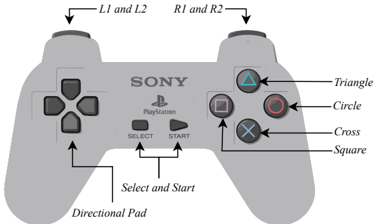
Figure 1: The PlayStation controller, highlighting its 14 buttons.
<details>
<summary>Image 1 Details</summary>
### Visual Description
## Diagram: Sony PlayStation Controller Layout
### Overview
The image is a labeled diagram of a Sony PlayStation controller, highlighting the positions and functions of its buttons and components. The controller is depicted in grayscale with black text and arrows pointing to key elements.
### Components/Axes
- **Labels**:
- **L1 and L2**: Arrows point to the left analog stick buttons.
- **R1 and R2**: Arrows point to the right analog stick buttons.
- **Triangle, Circle, Cross, Square**: Arrows point to the four action buttons on the right side.
- **Select and Start**: Arrows point to the central buttons.
- **Directional Pad**: Arrow points to the four-directional buttons on the left.
- **Text**:
- "SONY" and "PlayStation" branding is centered at the top.
- Button symbols (△, ○, ×, □) are labeled with their names.
### Detailed Analysis
- **Button Placement**:
- **Left Side**:
- Directional Pad (up, down, left, right) at the bottom-left corner.
- L1 and L2 buttons above the left analog stick.
- **Right Side**:
- Action buttons (Triangle, Circle, Cross, Square) arranged in a diamond pattern.
- R1 and R2 buttons above the right analog stick.
- **Center**:
- Select and Start buttons between the analog sticks.
- **Spatial Grounding**:
- Labels are positioned directly above or adjacent to their corresponding components.
- No numerical data or scales are present.
### Key Observations
- The layout follows a standardized ergonomic design for gameplay efficiency.
- Action buttons (Triangle, Circle, Cross, Square) are grouped on the right for quick access.
- Analog sticks (L1/L2, R1/R2) are positioned for thumb control during gameplay.
### Interpretation
This diagram illustrates the functional organization of a PlayStation controller, emphasizing its modular design for intuitive use. The separation of directional inputs (left) and action buttons (right) optimizes hand placement for gaming. The inclusion of L1/L2 and R1/R2 buttons suggests additional functionality (e.g., shooting, menu navigation) beyond basic directional control. The absence of numerical data confirms this is a schematic representation rather than a performance metric.
</details>
The Sony PlayStation 1 (sometimes PSX or PlayStation ) is a console first released by Sony Computer Entertainment in 1994. It has 2 megabytes of RAM, 16.7 million displayable colours and a 33.9 MHz CPU, which contrasts with the Atari-2600's 128 bytes of RAM, 128 displayable colours and a 1.19MHz CPU. Since its launch, the number of titles available for the PlayStation has grown to almost 8000 worldwide, more than the 500 that are available for the Atari-2600 console. PlayStation games are controlled using a handheld controller, shown in Figure 1. The controller has 14 buttons, with Start typically used to pause a game.
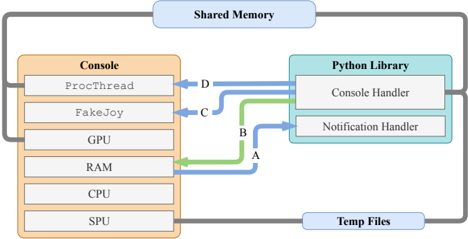
Figure 2: A visualisation of the Inter-Process Communication used in PSXLE. Pipes are coloured green, FIFO queues are coloured blue and Unix fopen calls are coloured grey. A is used to notify the PSXLE Python library that parts of memory have changed and that events like load\_state and save\_state have completed. B , representing standard input stdin , is used to communicate which regions of memory the console should watch. C is used to send simulated button presses to the console. D sends instructions to the console, such as loading and saving state or loading an ISO.
<details>
<summary>Image 2 Details</summary>
### Visual Description
## Diagram: System Architecture Overview
### Overview
The diagram illustrates a system architecture involving a **Console**, **Python Library**, **Shared Memory**, and **Temp Files**. It depicts data flow between hardware components (GPU, RAM, CPU, SPU) and software components (ProcThread, FakeJoy, Console Handler, Notification Handler). Arrows labeled A, B, C, D indicate data transfer directions and types.
### Components/Axes
- **Console**: Contains hardware/software components:
- `ProcThread`
- `FakeJoy`
- GPU
- RAM
- CPU
- SPU
- **Python Library**: Contains:
- `Console Handler`
- `Notification Handler`
- **Shared Memory**: Centralized data exchange hub.
- **Temp Files**: External storage for temporary data.
### Detailed Analysis
- **Arrow A (Green)**: Data flows from **RAM** (Console) to **Console Handler** (Python Library).
- **Arrow B (Blue)**: Data flows from **Notification Handler** (Python Library) to **CPU** (Console).
- **Arrow C (Blue)**: Data flows from **FakeJoy** (Console) to **Notification Handler** (Python Library).
- **Arrow D (Blue)**: Data flows from **ProcThread** (Console) to **Console Handler** (Python Library).
- **Shared Memory**: Acts as a bidirectional bridge between Console and Python Library.
- **Temp Files**: Connected to the Console via a gray line, suggesting indirect or secondary data exchange.
### Key Observations
- **Color Coding**:
- Blue arrows (A, B, C, D) likely represent primary data flows.
- Green arrow (A) may indicate a specialized or high-priority data path.
- Gray line to Temp Files suggests lower-priority or auxiliary data handling.
- **Flow Direction**:
- Data originates from Console components (e.g., `ProcThread`, `FakeJoy`) and is processed by the Python Library.
- Responses from the Python Library (e.g., `Notification Handler`) are routed back to the Console (e.g., CPU).
- **Component Isolation**:
- The Console and Python Library are distinct but interconnected, with Shared Memory enabling real-time communication.
- Temp Files are peripheral, likely used for overflow or non-critical data.
### Interpretation
This diagram represents a **modular system architecture** where the Console (hardware/software) and Python Library (software) collaborate via Shared Memory. The use of arrows (A–D) suggests a structured data pipeline:
1. **Input Processing**: `ProcThread` and `FakeJoy` (Console) generate data, which is sent to the Python Library via Shared Memory (arrow D and C).
2. **Handling and Notification**: The Python Library processes data (`Console Handler`) and sends notifications back to the Console (arrow B).
3. **Resource Utilization**: RAM (Console) directly interacts with the Python Library (arrow A), indicating shared resource management.
4. **Temporary Storage**: Temp Files serve as a fallback or auxiliary storage, possibly for large datasets or non-real-time data.
**Notable Patterns**:
- The system emphasizes **real-time data exchange** between hardware and software layers.
- The Python Library acts as a **middleware**, translating between Console components and higher-level logic.
- **Shared Memory** is central to the architecture, minimizing latency by avoiding disk I/O for critical data.
**Underlying Implications**:
- The design prioritizes **efficiency** (via Shared Memory) and **modularity** (separating Console and Python Library).
- The use of Temp Files suggests **scalability** for handling data beyond Shared Memory capacity.
- The bidirectional flow (Console → Python Library → Console) implies **feedback loops** for dynamic adjustments.
</details>
## 3 Implementation
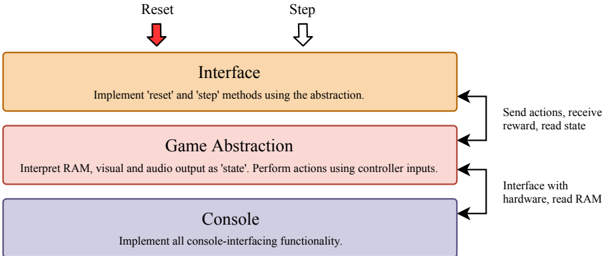
PSXLE is built using a fork of PCSX-R 1 , an open-source emulator created in 2009. We made modifications to the source of PCSX-R by adding simple Inter-Process Communication (IPC) toolsthe structure of which is shown in Figure 2-to simulate controller inputs and read console output through an external interface. The PSXLE Python library uses these tools to provide a simple, game-agnostic PlayStation console interface. To specialise the environment to a certain game and implement an interface such as OpenAI Gym, a customised environment stack can be created that abstracts console-level functions across two layers. Figure 3 visualises the structure of such a stack. Specialisation to individual games occurs within the 'game abstraction' component, which uses the Console API to translate game actions (such as 'move forwards') into console functions (such as 'press up').
The Console API supports four primary forms of interaction:
## · General:
- -run and kill control the executing process of the emulator;
- -freeze and unfreeze will freeze and unfreeze the emulator's execution, respectively;
- -speed is a property of Console which, when set, will synchronously set the speed of execution of the console, expressed as a percentage relative to default speed.
## · Controller:
- -hold\_button and release\_button simulate a press down and release of a given controller button-referred to here as control events ;
- -touch\_button holds, pauses for a specified amount of time and then releases a button;
- -delay\_button adds a (millisecond-order) delay between successive control events
## · RAM:
- -read\_bytes and write\_byte directly read from and write to console memory;
- -add\_memory\_listener and clear\_memory\_listeners control which parts of the console's memory should have asynchronous listeners attached when the console runs;
- -sleep\_memory\_listener and wake\_memory\_listener tell the console which listeners are active.
- Audio/Visual:
1 Available at https://github.com/pcsxr/PCSX-Reloaded/
- -start\_recording\_audio and stop\_recording\_audio control when the console should record audio and when it should stop;
- -get\_screen synchronously returns an np.array of the console's instantaneous visual output.
Example usage of the PSXLE interface can be found in Appendix A.
Figure 3: The proposed architecture for PlayStation RL environments includes three components: the interface , which allows agents to perform actions and receive feedback; the game abstraction , which translates game actions into controller inputs and console state (visual, audio and RAM) into state representations; and the console , which handles communication with the emulator.
<details>
<summary>Image 3 Details</summary>
### Visual Description
## Flowchart: System Architecture for Game Controller Interface
### Overview
The diagram illustrates a three-layer system architecture for a game controller interface, showing the flow of data and control between hardware, game abstraction, and interface components. Arrows indicate bidirectional communication between layers, with specific functions assigned to each layer.
### Components/Axes
1. **Interface Layer** (Top)
- Label: "Interface"
- Description: "Implement 'reset' and 'step' methods using the abstraction."
- Arrows:
- Red arrow labeled "Reset" pointing downward
- Black arrow labeled "Step" pointing downward
2. **Game Abstraction Layer** (Middle)
- Label: "Game Abstraction"
- Description: "Interpret RAM, visual and audio output as 'state'. Perform actions using controller inputs."
- Arrows:
- Black arrow labeled "Send actions, receive reward, read state" pointing right
- Black arrow labeled "Interface with hardware, read RAM" pointing left
3. **Console Layer** (Bottom)
- Label: "Console"
- Description: "Implement all console-interfacing functionality."
- Arrows: None directly connected (only receives from Game Abstraction)
### Detailed Analysis
- **Interface Layer**: Contains control flow management with explicit 'reset' and 'step' operations. The red "Reset" arrow suggests emergency termination capability.
- **Game Abstraction Layer**: Acts as middleware, translating low-level hardware data (RAM, visual/audio) into game state while handling controller input processing.
- **Console Layer**: Represents the lowest level, handling direct hardware interaction and memory access.
### Key Observations
1. Bidirectional communication exists between Interface and Game Abstraction layers
2. Console layer only receives information from Game Abstraction
3. "State" is defined as a composite of RAM, visual, and audio data
4. Controller inputs are used for action execution in Game Abstraction
5. Hardware interaction occurs at both Game Abstraction and Console layers
### Interpretation
This architecture demonstrates a hierarchical control system where:
1. The Interface layer manages high-level game operations through abstraction
2. The Game Abstraction layer serves as a critical translation layer between hardware and interface
3. The Console layer provides foundational hardware access
4. The system emphasizes state management through multi-modal data interpretation (RAM, visual, audio)
5. The bidirectional arrows suggest real-time feedback loops between interface and game abstraction layers
The design prioritizes modularity, with each layer handling specific responsibilities while maintaining necessary communication channels. The explicit separation of console interfacing functionality suggests potential for hardware abstraction or cross-platform compatibility.
</details>
## 4 Game abstraction
OpenAI Gym environments expose three methods: reset , which restarts an episode and returns the initial state; step , which takes an action as an argument and performs it within the environment; and render , which renders the current state to a window, or as text.
The step function takes an integer representing an action and returns a tuple containing: state , which is the value of the state of the system after an action has taken place; reward , which gives the reward gained by performing a certain action; done , which is a Boolean value indicating whether the episode has finished; and info , which gives extra information about the environment. Gym requires that these methods return synchronously. There are two possible approaches to deriving this synchrony with PlayStation games.
Firstly, the environment could exercise granular control over the execution of the console, choosing how many frames to skip for each move. This approach is common and is used to implement the
<details>
<summary>Image 4 Details</summary>

### Visual Description
## State Transition Diagram: Process Flow with Incremental Steps
### Overview
The diagram illustrates a sequential process divided into three distinct states, connected by directional arrows. Each arrow is labeled with "+4", indicating a consistent incremental value applied during state transitions. The states are labeled "State" with black lines beneath them, and the arrows are blue with curved trajectories.
### Components/Axes
- **States**: Three identical rectangular blocks labeled "State" (left, center, right). Each state is separated by a black horizontal line.
- **Transitions**: Blue arrows connect each state to the next, curving upward and downward in a wave-like pattern. Each arrow is annotated with "+4" in black text.
- **Visual Elements**:
- Arrows are uniformly blue, suggesting a single transition type.
- No explicit legend is present, but the blue color and "+4" labels imply a standardized transition mechanism.
### Detailed Analysis
- **State Labels**: All three states are uniformly labeled "State" in black text, with no differentiation between them.
- **Transition Values**: Each arrow explicitly states "+4", indicating a fixed increment applied during state transitions.
- **Spatial Arrangement**:
- States are positioned horizontally, left to right.
- Arrows originate from the top of each state, curve outward, and point to the next state.
- Black lines anchor each state to the diagram's baseline.
### Key Observations
1. **Uniform Transitions**: All transitions between states use the same "+4" increment, suggesting a linear progression.
2. **Repetitive Structure**: The diagram repeats the same pattern (State → +4 → State) three times, emphasizing cyclical or iterative behavior.
3. **No Intermediate States**: Transitions occur directly between labeled states without sub-states or branching paths.
### Interpretation
The diagram represents a process where each state transition involves a fixed increment of +4. The repetition of states and transitions implies a loop or iterative workflow, though the diagram does not explicitly close the loop (e.g., no arrow from the final state back to the first). The use of "+4" could symbolize:
- A quantitative increase (e.g., points, resources, or steps).
- A qualitative progression (e.g., phases in a workflow).
- A mathematical operation applied at each stage.
The absence of a legend or additional context leaves the exact meaning of "+4" open to interpretation, but the diagram emphasizes consistency in transitions. The black lines under each state may indicate stability or defined boundaries before progression.
</details>
(a) A visualisation of frame skip and frame stacking. In [9], only every fourth frame is considered and of those, every four frames are combined (stacked) into a single state representation. New frames are requested by the Python library upon each action, making this approach synchronous.
<details>
<summary>Image 5 Details</summary>

### Visual Description
Icon/Small Image (771x51)
</details>
(b) An asynchronous approach to frame skipping. In environments where actions are long or have variable length, the state transition occurs asynchronously. The transition ends once the immediate effects of the associated action have ceased.
Figure 4: A comparison of the state-delimiting techniques used in [9] and those used in this paper.
Atari-2600 environments in Gym. In cases where a simple snapshot of the environment would leave ambiguity (such as when the motion of an object could be in several directions), consecutive frames may be stacked to produce a corresponding state encoding. Frame skipping works well for simple games, but is not always suitable if moves can take a variable amount of time to finish. If the skip is less than the number of frames a move takes to finish, the agent may choose its next action before a previous move has finished. In many games, this would lead to the chosen action not being completed properly. If the environment was to skip significantly more frames than required, the agent would unnecessarily incur a delay in making moves.
A second approach would be to allow the console to run asynchronously for the duration of each move, with an associated condition that signifies the move being over. For example, a move that involves collecting a valuable item might be 'finished' once a player's score has changed. To the agent, the move would begin when step was called and end as soon as the score had increased. This approach is easy to implement with PSXLE, using memory listeners that respond to changes in RAM. These approaches are contrasted in Figure 4.
## 5 Kula World
Kula World is a game developed by Game Design Sweden A.B. and released in 1998. It involves controlling a ball within a world that contains a series of objects. The world consists of a platform on which the ball can move.
An object can be a coin, a piece of fruit or a key, each of which are collected when a player moves into them. The ball is controlled through the use of the directional pad and the cross button shown in Figure 1. Pressing the right or left directional button rotates the direction of view 90 degrees clockwise or anti-clockwise about the line perpendicular to the platform. Pressing the up directional button moves the player forwards on the platform, in the direction that the camera is facing. Pressing the cross button makes the ball jump, this can be pressed simultaneously with the forward directional button to make the ball jump forwards . Jumping forwards moves the player two squares forwards, over the square in front of it. If the player jumps onto a square that doesn't exist, the game will end.
## 5.1 Actions
The definition of the action space for Kula World is relatively simple. We omitted the jump action since this served no purpose within the levels that were tested. In total, the action space is given by:
<!-- formula-not-decoded -->
There is a clock on each level, which counts down in seconds from a level-specific start value. To complete a level, the player must pick up all of the keys and move to a goal square before the clock reaches zero. Collecting objects gains points, which are added to the player's score for the level.
It is not suitable to employ frame skipping in Kula World, since moves can vary in length. A jump, for example, takes roughly a second longer than a camera rotation. The duration of moves can also depend on the specific state of a level; for example, moving forwards to collect a coin takes longer than moving forwards without collecting a coin. This is a problem since a move cannot be carried out while another is taking place. Further, since the logic for the game takes place within the CPU of the console, it is not possible in general to predict the duration of a move prior to it finishing. Instead, the asynchronous approach described earlier is used. We did not use any kind of frame stacking since a snapshot of the console's display does not contain any ambiguous motion.
## 5.2 Rewards
There are several ways of 'losing the game' in Kula World: falling off the edge of the platform, being 'spiked' by an object in the game or running out of time. We consider these to be identical events in terms of their reward, although the abstraction supports assigning different values to each way of losing. It also supports adding the player's remaining time to the state encoding, to ensure that agents aren't misled by time running out in the level. If the remaining time of a level is low, agents will learn that moves are likely to yield negative rewards and modify their behaviour appropriately. A constant negative value is added to the reward incurred by all actions in order to discourage agents from making moves that do not lead to timely outcomes.
A user of this abstraction specifies a function score\_to\_reward , which takes a score change (such as 250 for a coin, 1000 for a key and 0 for a non-scoring action) and returns the instantaneous reward. In addition, they specify fixed rewards for winning and losing the game. While they can choose score\_to\_reward arbitrarily, most implementations will ensure that: the instantaneous reward increases for increasing changes in score, the reward of a non-scoring action is a small negative value and the discounted sum of these rewards is always bounded, to aid stability in learning.
## 5.3 State
The abstraction does not prescribe a state encoding, instead it returns a tuple of relevant data after each move has finished. The contents of the tuple are:
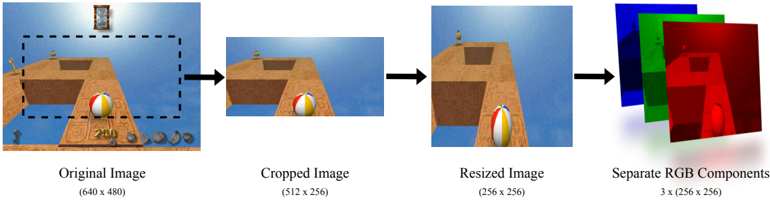
- visual : an RGB array derived using the process shown in Figure 5.
- reward : the value of instantaneous reward resulting from the move that has just been executed.
- playing : a value indicating whether the player is still 'alive'.
- clock : the number of seconds that remain in which the player must complete the level.
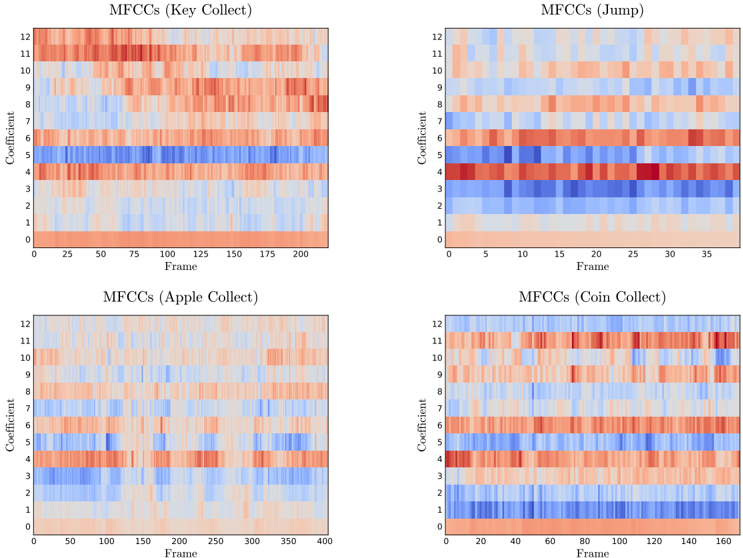
- sound : one of either: None , if the practitioner has not instructed the abstraction to record the sound of moves; an array of Mel-frequency Cepstral Coefficients (MFCCs), if the abstraction was instantiated with use\_mfcc set to True ; or an array describing the raw audio output of the console over the duration of the move, otherwise.
- duration\_real : the amount of time the move took to complete.
- duration\_game : the amount of the player's remaining time that the move took to complete, relative to the in-game clock.
- score : the score that the player has achieved so far in the current episode .
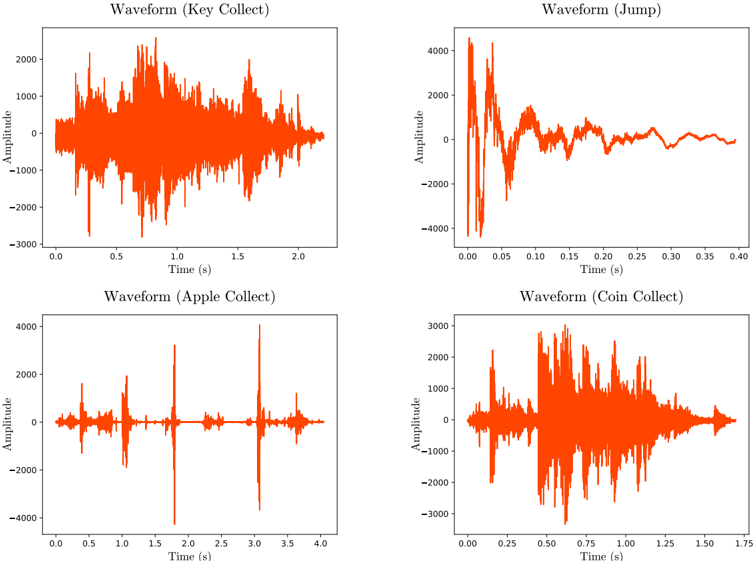
When a move does not make a sound, sound will be an empty array. When a move makes a sound with a duration shorter than that of the move, silence from the recording will be removed from both its start and end. If a move's sound lasts longer than the duration of the move, the game will continue running until either the audio has ceased or the maximum recording time has been exceeded. The result of these features is that the audio output of moves is succinct, as shown in Appendix B, but that moves may take longer to execute when the abstraction is recording audio.
Figure 5: Frame processing used for complex state representations. Images have their red, green and blue (RGB) channels separated.
<details>
<summary>Image 6 Details</summary>
### Visual Description
## Diagram: Image Processing Workflow
### Overview
The image depicts a sequential workflow of image processing steps, starting with an original image and progressing through cropping, resizing, and RGB component separation. Each stage is visually represented with labeled outputs and dimensional annotations.
### Components/Axes
1. **Original Image**
- Label: "Original Image"
- Dimensions: (640 x 480)
- Visual: A rectangular image with a beach scene, including a beach ball, wooden structure, and horizon.
2. **Cropped Image**
- Label: "Cropped Image"
- Dimensions: (512 x 256)
- Visual: A zoomed-in portion of the original image, focusing on the beach ball and wooden structure.
3. **Resized Image**
- Label: "Resized Image"
- Dimensions: (256 x 256)
- Visual: A square image derived from the cropped image, maintaining the same content but scaled down.
4. **Separate RGB Components**
- Label: "Separate RGB Components"
- Dimensions: 3 x (256 x 256)
- Visual: Three overlapping squares representing red, green, and blue channels, each with a distinct color overlay.
### Detailed Analysis
- **Original Image**: The starting point with dimensions 640x480. Contains a beach scene with a beach ball, wooden structure, and horizon.
- **Cropped Image**: Reduced dimensions (512x256) by removing peripheral elements (e.g., horizon, distant objects). Focuses on the central subject (beach ball).
- **Resized Image**: Further reduced to 256x256, maintaining aspect ratio. Content remains identical to the cropped image but scaled.
- **RGB Components**: Three identical-sized (256x256) channels (red, green, blue) extracted from the resized image. Each channel isolates a single color component.
### Key Observations
- **Dimensional Reduction**: Each step reduces image size: 640x480 → 512x256 → 256x256.
- **Aspect Ratio Change**: Original (4:3) → Cropped (2:1) → Resized (1:1).
- **Channel Separation**: RGB components are visually distinct (red, green, blue overlays) but share the same spatial dimensions.
### Interpretation
This workflow illustrates standard image preprocessing steps:
1. **Cropping** isolates a region of interest (e.g., the beach ball).
2. **Resizing** standardizes dimensions for downstream tasks (e.g., neural network input).
3. **RGB Separation** enables color channel analysis (e.g., edge detection, color correction).
The process emphasizes spatial and color data manipulation, critical for computer vision applications. No numerical trends or outliers are present, as the image focuses on procedural steps rather than quantitative data.
</details>
## 6 Evaluation
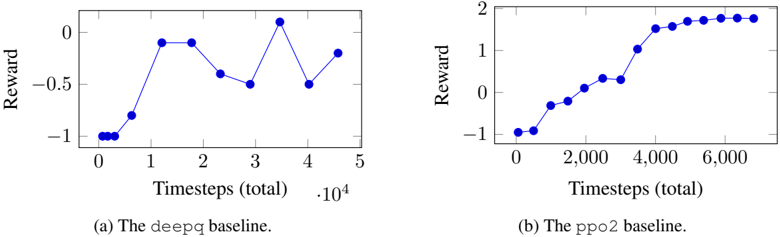
Appendix A gives example usage of both the game abstraction and the OpenAI Gym interface. The Kula-v1 Gym environment supports Kula World levels from 1 up to 10, uses the console's screen as its state encoding and (by default) uses the reward function described in Table 1. This environment was used with deepq and ppo2 from OpenAI Baselines 2 . The ppo2 baseline is an implementation of Proximal Policy Optimization Algorithms from Schulman et al. [17]. The results of these are shown in Figures 8a and 8b.
2 Available at https://github.com/openai/baselines
Table 1: Reward function.
| Event | Score change | Reward |
|---------------|----------------|----------|
| Coin collect | +250 | 0.2 |
| Key collect | +1000 | 0.4 |
| Fruit collect | +2500 | 0.6 |
| Win level | - | 1 |
| Lose level | - | -1 |
<details>
<summary>Image 7 Details</summary>
### Visual Description
## Screenshot: Game Interface Grid
### Overview
The image displays a 3x4 grid of gameplay scenes from a physics-based puzzle game. Each scene features a wooden platform structure with a multicolored ball (red/white/blue) positioned differently across the grid. The background consistently shows a desert-like environment with a clear sky. No textual information is visible in the image.
### Components/Axes
- **Grid Layout**: 3 rows (top to bottom) × 4 columns (left to right)
- **Scene Elements**:
- Wooden platforms with varying configurations
- Multicolored balls (red/white/blue) in different positions
- Desert environment with sand textures and sky backdrop
- **UI Elements**:
- Bottom row contains blurred icons (possibly score counters or level indicators)
- No legible text present in any scene
### Detailed Analysis
1. **Scene Composition**:
- All scenes share identical environmental elements (desert, sky)
- Platform structures vary in complexity:
- Top row: Simple linear paths
- Middle row: Increasingly complex geometries
- Bottom row: Most intricate configurations
- Ball positions show deliberate variation across grid:
- Top-left: Ball at platform start
- Top-right: Ball at platform end
- Bottom-center: Ball mid-air (suggesting motion)
2. **Visual Patterns**:
- Color consistency: All balls use identical red/white/blue pattern
- Platform materials: Uniform brown wood texture across all scenes
- Environmental consistency: Identical sky color (#87CEEB) and sand tones
### Key Observations
- No textual elements present in any scene
- Ball positions suggest progression or level variation
- Platform complexity increases from top to bottom rows
- UI elements at bottom are non-functional in this static image
### Interpretation
This appears to be a level selection or tutorial interface for a physics-based puzzle game. The grid layout likely represents different challenge levels, with increasing complexity from top to bottom. The consistent environmental elements suggest a desert-themed game world. The absence of text implies either:
1. The interface is designed for multilingual support (text not localized in this screenshot)
2. The game relies on visual cues rather than textual instructions
3. This is a prototype version lacking finalized UI text
The ball positioning variations across scenes indicate different starting conditions or objectives for each level. The mid-air ball in the bottom-center scene particularly suggests dynamic physics interactions are central to gameplay mechanics.
</details>
(a) Starting locations, as used in training.
(b) The evaluation episode start location.
<details>
<summary>Image 8 Details</summary>
### Visual Description
## Screenshot: Video Game Interface
### Overview
The image depicts a screenshot from a 3D platformer game. The scene includes a character standing on a platform with a blue sky and orange terrain in the background. The UI displays a score, collectible items, and gameplay elements like a timer and health indicators.
### Components/Axes
- **Score**: "1200" displayed at the bottom center of the screen.
- **Collectibles**:
- Gold coin icon (positioned left of the score).
- Shield icon (left of the gold coin).
- Sword icon (right of the gold coin).
- Heart icon (right of the sword).
- **Gameplay Elements**:
- Hourglass symbol (top center, indicating a time limit).
- Floating platforms with symbols:
- Left platform: Crown symbol.
- Right platform: Star symbol.
- **Character**: A small humanoid figure on the left platform, wearing a red outfit.
- **Ball**: A green, white, and red striped ball on the ground between platforms.
### Detailed Analysis
- **Score**: "1200" is the only numerical value visible, likely representing points collected.
- **Collectibles**: Icons suggest resources or power-ups (e.g., shield for defense, sword for attack).
- **Platform Symbols**: Crown and star may denote special objectives or collectibles.
- **Hourglass**: Implies a time-based challenge, though no numerical timer is visible.
- **Ball**: Positioned centrally, possibly a gameplay mechanic (e.g., puzzle element).
### Key Observations
- The score "1200" is the only explicit numerical data.
- Collectible icons are evenly distributed across the UI, suggesting balanced resource management.
- The hourglass and floating symbols hint at time-sensitive objectives and collectible items.
### Interpretation
The interface suggests a game focused on exploration, resource collection, and time management. The absence of a numerical timer contrasts with the hourglass symbol, possibly indicating a hidden or dynamic time mechanic. The character’s position on the left platform and the ball’s central placement may imply an upcoming interaction or puzzle. The score of 1200 reflects progress but lacks context (e.g., maximum score, level completion threshold).
No text in other languages is present. All elements align with typical platformer game mechanics, emphasizing collectibles, health, and time constraints.
</details>
Figure 6: Screenshots from Kula World showing each possible start position.
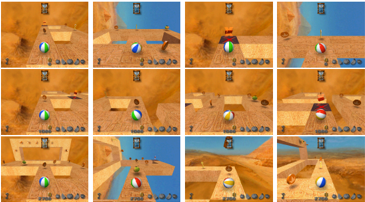
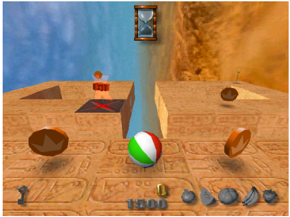
This approach to training is not particularly interesting, since the agent is presented with the same situation in each episode. As a result, the agent simply learns a set of moves which will result in it winning that level in the shortest time and with the highest score. To make the problem more challenging, we propose varying the player's start position within the level and the use of multiple levels. The game does not offer this feature by default, but it can be implemented using the tools available in PSXLE. To add an additional starting position for a player, simply save a PSXLE state with it at the desired position. We chose to limit the time available to complete each level to 80 seconds, rather than the usual 100, so that each starting state allowed the same amount of time to complete the level. The environment Kula-random-v1 takes this approach. It presents the agent with one of four different starting position in each of the first three levels of the game. There is an additional starting position within Level 2 that is reserved for use in validation episodes in which no learning takes place and the agent picks moves from its learned policy. Each of the starting positions are shown in Figure 6.
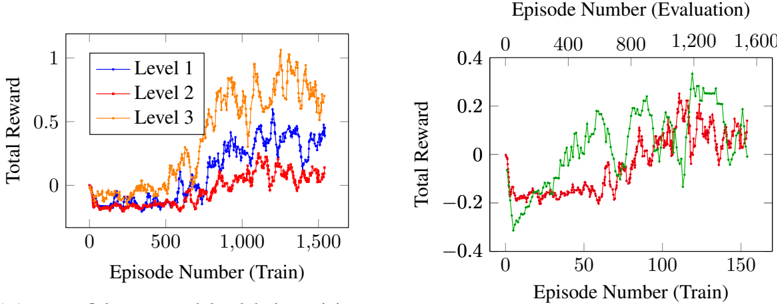
We implemented a simple DQN agent based on the network presented in Mnih et al. [9], for use with Kula-random-v1 . The results are summarised in Figure 7a and Figure 7b.
Surprisingly, the agent was most successful in learning how to play Level 3, despite it being the most complex for human players. This may be due to Level 3 introducing new physics that are not intuitive to humans, but are easier to navigate for the agent. Level 2 requires players jump between islands, meaning a jump can either be very profitable for a player (in that it gains access to more coins) or very bad (because the player falls off the platform). This discrepancy means that agents must disambiguate a jump that is required for it to reach the goal square from one that will end the game. By comparison, Level 3 does not require any jumps to complete.
The agent performs similarly from the reserved start position as it did from the other available locations in Level 2. It is promising that the agent did not perform notably worse when given an unseen start state, it is also worth noting that the performance of the agent was fairly lacklustre on Level 2 in general.
In order to leverage the audio recording features of PSXLE, we developed another environment: Kula-audio-v1 . This environment includes a representation of the audio output from each move within its state encoding. The state encoding is the richest yet, containing visual output, audio output, time remaining on the level and score. Since MFCCs have been successful in machine learning contexts for classifying audio data, they are used here to represent the audio output of a move. The MFCC outputs for some moves are shown in Appendix B.
Finally, since the agent starts each episode from a specified state, the states in its memory are dominated by those that occur at the start of the level. For PlayStation games, which are usually quite
complex and have long levels, this can result in lenghtly training times. Prioritised experience replay [6] attempts to combat this by replaying state transitions that the agent learned the most from. We propose a modification to this, prioritised state replay , in which an agent can resume play from a state which it has previously visited, allowing the agent to perform a different action. This can be trivially implemented using the save\_state and load\_state methods in PSXLE and could help to reduce the time required to learn complex games. No agents have been trained using this approach.
<details>
<summary>Image 9 Details</summary>
### Visual Description
## Line Graphs: Training and Evaluation Performance Across Levels
### Overview
The image contains two line graphs comparing total reward performance across training episodes. The left graph tracks three levels (1, 2, 3) during training, while the right graph compares two models/conditions during evaluation. All data points are approximate due to visual estimation.
### Components/Axes
**Left Graph (Training):**
- **X-axis**: Episode Number (Train) ranging from 0 to 1,600
- **Y-axis**: Total Reward (0 to 1)
- **Legend**: Top-right corner with three entries:
- Blue line: Level 1
- Red line: Level 2
- Orange line: Level 3
**Right Graph (Evaluation):**
- **X-axis**: Episode Number (Train) ranging from 0 to 1,600
- **Y-axis**: Total Reward (-0.4 to 0.4)
- **Lines**:
- Green line (no legend label)
- Red line (no legend label)
- **Note**: No explicit legend present for the right graph.
### Detailed Analysis
**Left Graph Trends:**
1. **Level 3 (Orange)**:
- Starts near 0 at 0 episodes
- Sharp upward trend to ~0.8 by 600 episodes
- Peaks at ~1.0 around 1,200 episodes
- Declines to ~0.6 by 1,600 episodes
2. **Level 2 (Red)**:
- Begins near 0
- Gradual rise to ~0.6 by 1,000 episodes
- Peaks at ~0.8 around 1,400 episodes
- Fluctuates downward to ~0.4 by 1,600 episodes
3. **Level 1 (Blue)**:
- Starts near 0
- Slow rise to ~0.4 by 1,000 episodes
- Peaks at ~0.6 around 1,600 episodes
- Shows minimal fluctuation
**Right Graph Trends:**
1. **Green Line**:
- Starts at -0.2
- Steady upward trajectory to 0.4 by 1,600 episodes
- No significant dips after initial rise
2. **Red Line**:
- Begins at -0.2
- Sharp rise to 0.3 around 1,200 episodes
- Sharp decline to -0.1 by 1,600 episodes
- Multiple fluctuations between 0.1 and 0.3
### Key Observations
1. **Training Performance**:
- Level 3 outperforms Levels 1 and 2 in total reward during training
- All levels show diminishing returns after ~1,200 episodes
- Level 1 lags significantly behind Levels 2 and 3
2. **Evaluation Performance**:
- Green line demonstrates consistent improvement over time
- Red line exhibits overfitting-like behavior (peak then collapse)
- Evaluation rewards are lower in magnitude (-0.4 to 0.4 vs 0 to 1)
3. **Data Gaps**:
- No explicit legend for the right graph's lines
- Unclear relationship between training levels and evaluation lines
- Missing context for negative reward values in evaluation
### Interpretation
The data suggests a tiered learning system where higher levels (3 > 2 > 1) achieve better training performance, though all plateau after ~1,200 episodes. The evaluation graph reveals two distinct models: the green line shows stable improvement (possibly a well-generalized model), while the red line demonstrates unstable performance with a sharp peak followed by collapse (potential overfitting or unstable training). The negative reward values in evaluation may indicate penalty systems or different task constraints compared to training. The absence of a legend for the right graph limits direct comparison between training levels and evaluation models, suggesting either a visualization oversight or intentional separation of metrics.
</details>
- (b) The green line shows a moving average over 5 validation episodes for the reserved location, the red line is the same as in Figure 7a.
- (a) Agent proficiency on each level during training. Start locations within each level are chosen uniformly at random from those shown in Figure 6. The line shows a moving average over 10 training episodes.
Figure 7: Evaluation of a simple DQN implementation for Kula-random-v1 .
<details>
<summary>Image 10 Details</summary>
### Visual Description
## Line Graphs: Reward vs. Timesteps for DeepQ and PPO2 Baselines
### Overview
The image contains two line graphs comparing the performance of two reinforcement learning baselines (`deepq` and `ppo2`) over time. Each graph plots "Reward" against "Timesteps (total)", with distinct trends observed for each baseline.
---
### Components/Axes
1. **Graph (a): The `deepq` baseline**
- **X-axis**: "Timesteps (total)" with values from 0 to 5 (scaled by 10⁴, i.e., 0 to 50,000 timesteps).
- **Y-axis**: "Reward" ranging from -1 to 0.
- **Legend**: Labeled "(a) The `deepq` baseline" at the bottom.
- **Line**: Blue, with discrete data points connected by straight lines.
2. **Graph (b): The `ppo2` baseline**
- **X-axis**: "Timesteps (total)" with values from 0 to 6,000.
- **Y-axis**: "Reward" ranging from -1 to 2.
- **Legend**: Labeled "(b) The `ppo2` baseline" at the bottom.
- **Line**: Blue, with discrete data points connected by straight lines.
---
### Detailed Analysis
#### Graph (a): `deepq` Baseline
- **Key Data Points**:
- Timestep 0: Reward ≈ -1.
- Timestep 1: Reward ≈ 0.
- Timestep 2: Reward ≈ 0.
- Timestep 3: Reward ≈ -0.5.
- Timestep 4: Reward ≈ 0.
- Timestep 5: Reward ≈ -0.5.
- **Trend**: The reward fluctuates significantly, with sharp increases and decreases. The baseline starts at -1, peaks at 0 (timesteps 1–2), drops to -0.5 (timestep 3), recovers to 0 (timestep 4), and ends at -0.5 (timestep 5).
#### Graph (b): `ppo2` Baseline
- **Key Data Points**:
- Timestep 0: Reward ≈ -1.
- Timestep 2,000: Reward ≈ -0.5.
- Timestep 4,000: Reward ≈ 1.
- Timestep 6,000: Reward ≈ 2.
- **Trend**: The reward increases steadily from -1 to 2, with a plateau near 2 after timestep 4,000. The improvement is smooth and consistent compared to `deepq`.
---
### Key Observations
1. **Volatility vs. Stability**:
- `deepq` exhibits erratic performance, with rewards oscillating between -1 and 0.
- `ppo2` shows a stable, upward trajectory, achieving a reward of 2 by the end of training.
2. **Scaling Differences**:
- `deepq` is evaluated over 50,000 timesteps (0–5 × 10⁴), while `ppo2` is evaluated over 6,000 timesteps. This suggests differing training durations or problem complexities.
3. **Performance Gap**:
- `ppo2` outperforms `deepq` by a margin of 2.5 (reward of 2 vs. -0.5 at their final timesteps).
---
### Interpretation
- **Algorithmic Efficiency**: The `ppo2` baseline demonstrates superior learning stability and optimization, likely due to its policy optimization framework, which reduces variance in rewards.
- **DeepQ Limitations**: The `deepq` baseline’s fluctuations may stem from Q-learning’s sensitivity to exploration-exploitation trade-offs or reward sparsity.
- **Practical Implications**: `ppo2` is preferable for tasks requiring consistent performance, while `deepq` might be suitable for simpler or less dynamic environments.
No additional languages or non-textual elements are present. All data points and labels are explicitly extracted from the graphs.
</details>
Figure 8: A plot of the average reward over 100 episodes, as given by OpenAI Baselines, against the number of timesteps that the agent had played. The agents were trained on Level 1 of Kula World using a visual state encoding.
## 7 Conclusion
The results from deepq and ppo2 baselines show how two different RL algorithms can perform to a vastly different standard within the Kula World environment. From this, it is clear that PlayStation games can represent suitable environments in which to evaluate the effectiveness of RL algorithms.
The approach shown in this paper for Kula World can be customised to work with many different PlayStation games. The design of PSXLE makes it simple to build abstractions that support interfaces like OpenAI Gym. Armed with such abstractions, researchers will be able to apply existing RL implementations on more complex environments with richer state spaces. The challenges that the audio and complex visual rendering in PlayStation games present to RL could help us to close the gap between what we want agents to achieve and the methodology that we use to evaluate them.
## Appendices
## A Library usage
To demonstrate the functionality of the work presented in this paper, example scripts are shown below. These are chosen to show how practitioners can interact with the environment at each level of abstraction.
## A.1 Console
This script creates a console running Kula World, loads Level 1 and moves the player forwards two steps.
```
```
## A.2 Game abstraction
This script creates a Game object for Kula World and plays it randomly.
```
```
## A.3 Interface
This script uses the OpenAI Gym implementation of Kula World to play randomly. Note that the methods being used are entirely game-agnostic.
```
```
```
```
## B Audio outputs
Figure 9: Raw audio output for a selection of moves within Kula World, obtained using PSXLE's audio recording feature. The abstraction employs cropping and extended move times to ensure that the full audio waveform for each move is captured.
<details>
<summary>Image 11 Details</summary>
### Visual Description
## Waveform Charts: Action-Specific Amplitude-Time Analysis
### Overview
The image contains four distinct waveform charts, each labeled with a specific action ("Key Collect," "Jump," "Apple Collect," "Coin Collect"). All charts plot **Amplitude** (y-axis) against **Time (s)** (x-axis) using orange-colored data points. The charts exhibit varying amplitude ranges, durations, and temporal patterns, suggesting differences in the physical or sensor-based characteristics of each action.
---
### Components/Axes
1. **X-Axis (Time)**:
- Labeled "Time (s)" across all charts.
- Time ranges vary:
- Key Collect: 0.0–2.0s
- Jump: 0.0–0.4s
- Apple Collect: 0.0–4.0s
- Coin Collect: 0.0–1.75s
2. **Y-Axis (Amplitude)**:
- Labeled "Amplitude" across all charts.
- Amplitude ranges vary:
- Key Collect: -3000 to 2000
- Jump: -4000 to 4000
- Apple Collect: -6000 to 4000
- Coin Collect: -3000 to 3000
3. **Legend**:
- No explicit legend is visible, but all data points are uniformly orange. This implies a single data series per chart.
---
### Detailed Analysis
#### Waveform (Key Collect)
- **Trend**: Highly erratic with frequent sharp peaks and troughs. Amplitude fluctuates rapidly between -3000 and 2000.
- **Key Data Points**:
- Sharp spike at ~0.5s (amplitude ~1500).
- Sustained oscillations between 0.8s–1.5s.
- Gradual decay toward 2.0s.
#### Waveform (Jump)
- **Trend**: Sudden amplitude spike at 0.0s (peak ~4000), followed by rapid decay. Stabilizes near baseline (-1000 to 1000) after 0.1s.
- **Key Data Points**:
- Initial spike at 0.0s (amplitude ~4000).
- Sharp drop to -2000 at 0.05s.
- Minimal activity after 0.15s.
#### Waveform (Apple Collect)
- **Trend**: Two dominant spikes: one at ~0.5s (amplitude ~3000) and another at ~3.0s (amplitude ~2500). Baseline activity between spikes.
- **Key Data Points**:
- First spike at 0.5s (amplitude ~3000).
- Second spike at 3.0s (amplitude ~2500).
- Sustained oscillations between 2.5s–3.5s.
#### Waveform (Coin Collect)
- **Trend**: Gradual amplitude increase from 0.0s–1.0s, followed by a sharp peak at 1.5s (amplitude ~3000). Post-peak decay.
- **Key Data Points**:
- Baseline activity (amplitude ~0) until 1.0s.
- Sharp rise to 3000 at 1.5s.
- Rapid decay to -2000 by 1.75s.
---
### Key Observations
1. **Duration Variability**:
- "Jump" has the shortest duration (0.4s), while "Apple Collect" spans the longest (4.0s).
2. **Amplitude Extremes**:
- "Apple Collect" exhibits the highest negative amplitude (-6000), while "Jump" has the highest positive amplitude (~4000).
3. **Temporal Patterns**:
- "Key Collect" and "Coin Collect" show sustained oscillations, whereas "Jump" is a transient event.
- "Apple Collect" has bimodal spikes, suggesting two distinct phases of activity.
---
### Interpretation
1. **Action-Specific Dynamics**:
- **Jump**: Likely a brief, high-impact action (e.g., physical jump) with rapid energy dissipation.
- **Apple Collect**: Suggests a prolonged interaction (e.g., picking up an object) with two distinct engagement phases.
- **Coin Collect**: Indicates a gradual buildup of activity (e.g., reaching for a coin) followed by a sudden peak (e.g., grasping).
- **Key Collect**: Represents erratic, high-frequency motion (e.g., rapid key presses or vibrations).
2. **Sensor Sensitivity**:
- The amplitude ranges (-6000 to 4000) imply a sensor capable of detecting both high-intensity and low-intensity movements.
3. **Anomalies**:
- The abrupt decay in "Jump" after 0.1s may indicate a reset or stabilization mechanism.
- The bimodal spikes in "Apple Collect" could reflect a two-step process (e.g., grasping and lifting).
4. **Practical Implications**:
- These waveforms could be used to classify human actions via machine learning models, with distinct temporal and amplitude signatures for each activity.
- The "Key Collect" waveform’s noise might require filtering for applications like gesture recognition.
</details>
Figure 10: MFCCs derived from the waveforms in Figure 9.
<details>
<summary>Image 12 Details</summary>
### Visual Description
## Heatmaps: MFCC Coefficient Analysis Across Tasks
### Overview
The image contains four heatmaps visualizing Mel-frequency cepstral coefficients (MFCCs) across different audio processing tasks: Key Collect, Jump, Apple Collect, and Coin Collect. Each heatmap maps coefficient values (0-12) against frame indices, with color gradients indicating magnitude (red = positive, blue = negative). Frame ranges vary per task (0-200, 0-35, 0-400, 0-160).
### Components/Axes
- **X-axis (Frame)**:
- Key Collect: 0–200 (25-unit increments)
- Jump: 0–35 (5-unit increments)
- Apple Collect: 0–400 (50-unit increments)
- Coin Collect: 0–160 (20-unit increments)
- **Y-axis (Coefficient)**: 0–12 (integer labels)
- **Legend**:
- Top-right corner
- Red = Positive values
- Blue = Negative values
- White = Neutral/zero
### Detailed Analysis
1. **Key Collect (Top-Left)**
- Frame range: 0–200
- Notable:
- Coefficient 5 shows a horizontal blue band (~frames 50–150)
- Coefficients 1–3 and 7–12 exhibit sporadic red/blue spikes
- Coefficient 0 (bottom row) is predominantly red
2. **Jump (Top-Right)**
- Frame range: 0–35
- Notable:
- Coefficient 4 has a dense red band (~frames 10–25)
- Coefficient 11 shows intermittent blue activity
- Coefficient 0 (bottom row) is mostly red
3. **Apple Collect (Bottom-Left)**
- Frame range: 0–400
- Notable:
- Coefficient 3 has a persistent blue band (~frames 50–350)
- Coefficient 9 shows sporadic red spikes
- Coefficient 0 (bottom row) is uniformly red
4. **Coin Collect (Bottom-Right)**
- Frame range: 0–160
- Notable:
- Coefficient 2 has a dense red band (~frames 40–120)
- Coefficient 11 shows intermittent blue activity
- Coefficient 0 (bottom row) is predominantly red
### Key Observations
- **Coefficient 0** (baseline) consistently shows red dominance across all tasks, suggesting strong positive energy in low-frequency components.
- Task-specific patterns:
- **Jump**: Short-duration red/blue bursts (≤35 frames)
- **Apple Collect**: Longest duration patterns (400 frames)
- **Coin Collect**: Mid-range activity with localized red/blue clusters
- **Coefficient 5** (Key Collect) and **Coefficient 3** (Apple Collect) show sustained negative activity, potentially indicating task-specific noise or filtering.
### Interpretation
The heatmaps reveal task-dependent MFCC patterns, with:
1. **Coefficient 0** acting as a universal baseline (low-frequency energy)
2. Task-specific coefficients showing distinct activation profiles:
- **Jump**: High-frequency bursts (Coefficient 4)
- **Apple Collect**: Mid-frequency suppression (Coefficient 3)
- **Coin Collect**: Mid-frequency dominance (Coefficient 2)
3. The blue/red dichotomy suggests phase relationships in audio features, with red indicating constructive interference and blue destructive interference.
These patterns could inform feature selection for audio classification models, with Coefficient 0 serving as a universal feature and task-specific coefficients (2, 3, 4, 5, 11) providing discriminative power.
</details>
## References
- [1] S. Wang, D. Jia, and X. Weng, 'Deep Reinforcement Learning for Autonomous Driving,' arXiv e-prints , p. arXiv:1811.11329, Nov 2018.
- [2] I. Arel, C. Liu, T. Urbanik, and A. G. Kohls, 'Reinforcement learning-based multi-agent system for network traffic signal control,' IET Intelligent Transport Systems , vol. 4, pp. 128-135, June 2010.
- [3] J. Jin, C. Song, H. Li, K. Gai, J. Wang, and W. Zhang, 'Real-Time Bidding with Multi-Agent Reinforcement Learning in Display Advertising,' arXiv e-prints , p. arXiv:1802.09756, Feb 2018.
- [4] S. Levine, C. Finn, T. Darrell, and P. Abbeel, 'End-to-End Training of Deep Visuomotor Policies,' arXiv e-prints , p. arXiv:1504.00702, Apr 2015.
- [5] H. van Hasselt, A. Guez, and D. Silver, 'Deep Reinforcement Learning with Double Q-Learning,' AAAI Conference on Artificial Intelligence , 2016.
- [6] T. Schaul, J. Quan, I. Antonoglou, and D. Silver, 'Prioritized Experience Replay,' arXiv e-prints , p. arXiv:1511.05952, Nov 2015.
- [7] Z. Wang, T. Schaul, M. Hessel, H. Hasselt, M. Lanctot, and N. Freitas, 'Dueling Network Architectures for Deep Reinforcement Learning,' Proceedings of The 33rd International Conference on Machine Learning , vol. 48, pp. 1995-2003, 20-22 Jun 2016.
- [8] V. Mnih, A. P. Badia, M. Mirza, A. Graves, T. Lillicrap, T. Harley, D. Silver, and K. Kavukcuoglu, 'Asynchronous Methods for Deep Reinforcement Learning,' Proceedings of The 33rd International Conference on Machine Learning , vol. 48, pp. 1928-1937, 20-22 Jun 2016.
- [9] V. Mnih, K. Kavukcuoglu, D. Silver, A. A. Rusu, J. Veness, M. G. Bellemare, A. Graves, M. Riedmiller, A. K. Fidjeland, G. Ostrovski, S. Petersen, C. Beattie, A. Sadik, I. Antonoglou,
H. King, D. Kumaran, D. Wierstra, S. Legg, and D. Hassabis, 'Human-level control through deep reinforcement learning,' Nature , vol. 518, pp. 529 EP -, Feb 2015.
- [10] G. Brockman and J. Schulman, 'OpenAI Gym Beta.' https://openai.com/blog/ openai-gym-beta/ . Accessed: 2019-01-12.
- [11] D. T. Behrens, 'Deep Reinforcement Learning and Autonomous Driving.' https:// ai-guru.de/deep-reinforcement-learning-and-autonomous-driving/ . Accessed: 2019-03-04.
- [12] OpenAI, 'OpenAI Gym Environments.' https://gym.openai.com/envs/ . Accessed: 2019-01-12.
- [13] M. G. Bellemare, Y. Naddaf, J. Veness, and M. Bowling, 'The Arcade Learning Environment: An Evaluation Platform for General Agents,' arXiv e-prints , p. arXiv:1207.4708, Jul 2012.
- [14] G. Hinton, L. Deng, D. Yu, G. E. Dahl, A. Mohamed, N. Jaitly, A. Senior, V. Vanhoucke, P. Nguyen, T. N. Sainath, and B. Kingsbury, 'Deep Neural Networks for Acoustic Modeling in Speech Recognition: The Shared Views of Four Research Groups,' IEEE Signal Processing Magazine , vol. 29, pp. 82-97, Nov 2012.
- [15] Z. Zeng, J. Tu, B. M. Pianfetti, and T. S. Huang, 'Audio-Visual Affective Expression Recognition Through Multistream Fused HMM,' IEEE Transactions on Multimedia , vol. 10, pp. 570577, June 2008.
- [16] Xi Shao, Changsheng Xu, and M. S. Kankanhalli, 'Unsupervised classification of music genre using hidden Markov model,' in 2004 IEEE International Conference on Multimedia and Expo (ICME) (IEEE Cat. No.04TH8763) , vol. 3, pp. 2023-2026 Vol.3, June 2004.
- [17] J. Schulman, F. Wolski, P. Dhariwal, A. Radford, and O. Klimov, 'Proximal Policy Optimization Algorithms,' arXiv e-prints , p. arXiv:1707.06347, Jul 2017.