## The Abduction of Sherlock Holmes: A Dataset for Visual Abductive Reasoning
Jack Hessel* 1 , Jena D. Hwang* 1 , Jae Sung Park 2 , Rowan Zellers 2 , Chandra Bhagavatula 1 , Anna Rohrbach 3 , Kate Saenko 4 , and Yejin Choi 1 , 2
1 Allen Institute for AI { jackh,jenah,chandrab } @allenai.org 2 Paul G. Allen School of Computer Science & Engineering, University of Washington { jspark96,rowanz,yejin } @cs.washington.edu 3 University of California, Berkeley anna.rohrbach@berkeley.edu 4 Boston University and MIT-IBM Watson AI saenko@bu.edu
Abstract. Humans have remarkable capacity to reason abductively and hypothesize about what lies beyond the literal content of an image. By identifying concrete visual clues scattered throughout a scene, we almost can't help but draw probable inferences beyond the literal scene based on our everyday experience and knowledge about the world. For example, if we see a '20 mph' sign alongside a road, we might assume the street sits in a residential area (rather than on a highway), even if no houses are pictured. Can machines perform similar visual reasoning?
We present Sherlock , an annotated corpus of 103K images for testing machine capacity for abductive reasoning beyond literal image contents. We adopt a free-viewing paradigm: participants first observe and identify salient clues within images (e.g., objects, actions) and then provide a plausible inference about the scene, given the clue. In total, we collect 363K (clue, inference) pairs, which form a first-of-its-kind abductive visual reasoning dataset. Using our corpus, we test three complementary axes of abductive reasoning. We evaluate the capacity of models to: i) retrieve relevant inferences from a large candidate corpus; ii) localize evidence for inferences via bounding boxes, and iii) compare plausible inferences to match human judgments on a newlycollected diagnostic corpus of 19K Likert-scale judgments. While we find that fine-tuning CLIP-RN50x64 with a multitask objective outperforms strong baselines, significant headroom exists between model performance and human agreement. Data, models, and leaderboard available at http://visualabduction.com/ .
You know my method.
It is founded upon the observation of trifles.
## 2 J. Hessel et al.
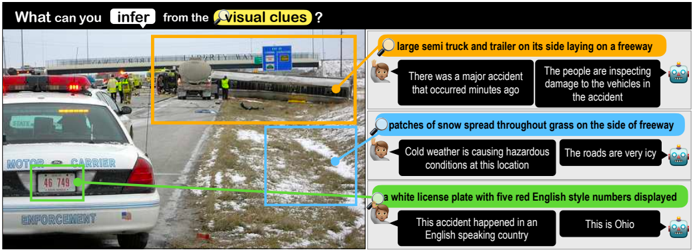
Fig. 1: We introduce Sherlock : a corpus of 363K commonsense inferences grounded in 103K images. Annotators highlight localized clues (color bubbles) and draw plausible abductive inferences about them (speech bubbles). Our models are able to predict localized inferences (top predictions are shown), but we quantify a large gap between machine performance and human agreement.
<details>
<summary>Image 1 Details</summary>
### Visual Description
## Image Analysis: Accident Scene
### Overview
The image depicts an accident scene on a freeway, with a large semi-truck and trailer on its side. The image is annotated with boxes and text bubbles highlighting key visual clues and inferences that can be drawn from them.
### Components/Axes
* **Image:** A photograph of the accident scene.
* **Annotations:**
* Orange Box: Encloses the overturned semi-truck and trailer.
* Blue Box: Highlights patches of snow on the side of the freeway.
* Green Box: Focuses on the license plate of a police vehicle.
* **Text Bubbles:**
* Orange Bubble: "large semi truck and trailer on its side laying on a freeway"
* Sub-bubbles: "There was a major accident that occurred minutes ago", "The people are inspecting damage to the vehicles in the accident"
* Blue Bubble: "patches of snow spread throughout grass on the side of freeway"
* Sub-bubbles: "Cold weather is causing hazardous conditions at this location", "The roads are very icy"
* Green Bubble: "a white license plate with five red English style numbers displayed"
* Sub-bubbles: "This accident happened in an English speaking country", "This is Ohio"
* **Header:** "What can you infer from the visual clues?"
### Detailed Analysis or ### Content Details
* **Accident Scene:** A large semi-truck and trailer are overturned on the side of a freeway. Emergency personnel are present.
* **Snow Patches:** Patches of snow are visible on the grassy area adjacent to the freeway.
* **Police Vehicle:** A police vehicle is parked at the scene. The license plate is white with red numbers "46 749". The vehicle is labeled "MOTOR CARRIER ENFORCEMENT".
* **Inferences:**
* The accident likely occurred recently.
* The accident is being investigated.
* The weather conditions are cold and icy.
* The accident occurred in Ohio, an English-speaking country.
### Key Observations
* The overturned truck is the most prominent feature of the image.
* The presence of snow suggests that weather may have been a contributing factor to the accident.
* The police vehicle indicates that the accident is under investigation.
* The text bubbles provide interpretations of the visual clues.
### Interpretation
The image and its annotations illustrate how visual clues can be used to infer information about an event. The overturned truck immediately suggests an accident. The snow patches suggest potentially hazardous driving conditions. The presence of emergency personnel and a police vehicle confirm that the accident is being addressed. The annotations guide the viewer to make these inferences, highlighting the importance of observation and deduction. The location is identified as Ohio, providing further context.
</details>
## 1 Introduction
The process of making the most plausible inference in the face of incomplete information is called abductive reasoning, [47] personified by the iconic visual inferences of the fictional detective Sherlock Holmes. 5 Upon viewing a scene, humans can quickly synthesize cues to arrive at abductive hypotheses that go beyond the what's captured in the frame. Concrete cues are diverse: people take into account the emotion and mood of the agents, speculate about the rationale for the presence/absence of objects, and zero-in on small, contextual details; all the while accounting for prior experiences and (potential mis)conceptions. 6 Fig. 1 illustrates: snow may imply dangerous road conditions, an Ohio licence plate may suggest the location of the accident, and a blue sign may indicate this road is an interstate. Though not all details are equally important, certain salient details shape our abductive inferences about the scene as a whole [56]. This type of visual information is often left unstated.
We introduce Sherlock , a new dataset of 363K commonsense inferences grounded in 103K images. Sherlock makes explicit typically-unstated cognitive processes: each image is annotated with at least 3 inferences which pair depicted details (called clues) with commonsense conclusions that aim to go beyond what is literally pictured (called inferences). Sherlock is more diverse than many existing visual commonsense corpora like Visual Commonsense Reasoning [75]
5 While Holmes rarely makes mistakes, he frequently misidentifies his mostly abductive process of reasoning as 'deductive.' [39,8]
6 The correctness of abductive reasoning is certainly not guaranteed. Our goal is to study perception and reasoning without endorsing specific inferences (see § 3.1).
Table 1: Comparison between Sherlock and prior annotated corpora addressing visual abductive reasoning from static images. Sherlock showcases a unique data collection paradigm, leading to a rich variety of non-human centric (i.e., not solely grounded in human references) visual abductive inferences.
| Dataset | # Images | Format | bboxes? | free- viewing? | human- centric? |
|----------------------|------------|----------------|-----------|------------------|-------------------|
| VCR [75] | 110K | QA | ✓ | | ✓ |
| VisualCOMET [44] | 59K | If/Then KB | ✓ | | ✓ |
| Visual7W [79] | 47K | QA | ✓ | partial | |
| Visual Madlibs [72] | 11K | FiTB | ✓ | partial | ✓ |
| Abstract Scenes [65] | 4.3K | KB | | | |
| Why In Images [49] | 792 | KB | | | ✓ |
| BD2BB [48] | 3.2K | If/Then | | ✓ | ✓ |
| FVQA [66] | 2.2K | QA+KB | | | |
| OK-VQA [36] | 14K | QA | | ✓ | |
| KB-VQA [67] | 700 | QA | ✓ | | |
| Sherlock | 103K | clue/inference | ✓ | ✓ | |
and VisualCOMET [44], 7 due to its free-viewing data collection paradigm: we purposefully do not pre-specify the types of clues/inferences allowed, leaving it to humans to identify the most salient and informative elements and their implications. Other forms of free-viewing like image captions may not be enough: a typical caption for Fig. 1 may mention the accident and perhaps the snow, but smaller yet important details needed to comprehend the larger scene (like the blue freeway sign or the Ohio plates) may not be mentioned explicitly [5]. Dense captioning corpora [22] attempts to overcome this problem by highlighting all details, but it does so without accounting for which details are salient (and why).
Using our corpus, we propose three complementary tasks that evaluate different aspects of machine capacity for visual abductive reasoning:
1. Retrieval of Abductive Inferences: given an image+region, the algorithm scores a large set of candidate inferences and is rewarded for assigning a high score to the gold annotation.
2. Localization of Evidence: the algorithm selects a bounding box within the image that provides the best evidence for a given inference.
3. Comparison of Plausibility: the algorithm scores a small set of plausible inferences for a given image+region, and is rewarded for aligning its scores with human judgments over those sets.
In our setup, a single model undertakes all of these tasks: we ask algorithms to score the plausibility of an inference given an image and a bounding box contained within it. 8 We can directly compare models in their capacity to perform abductive reasoning, without relying on indirect generation evaluation metrics.
Model predicted inferences are given in Fig. 1. The model is a fine-tuned CLIP [51] augmented to allow bounding boxes as input, enabling users to specify particular regions for the model to make abductive inferences about. Our best model, a multitask version of CLIP RN50x64 , outperforms strong baselines like UNITER [9] and LXMERT [61] primarily because it pays specific attention to the
7 For instance, 94% of visual references in [75] are about depicted actors, and [44] even requires KB entries to explicitly regard people; see Fig. 2.
8 We reserve generative evaluations (e.g., BLEU/CIDEr) for future work: shortcuts (e.g., outputting the technically correct 'this is a photo' for all inputs) make generation evaluation difficult in the abductive setting (see § 6). Nonetheless, generative models can be evaluated in our setup; we experiment with one in § 5.1.
## 4 J. Hessel et al.
<details>
<summary>Image 2 Details</summary>
### Visual Description
## Image Analysis: Visual Reasoning and Scene Understanding
### Overview
The image presents a scene analysis using visual reasoning and commonsense knowledge. It combines a real-world image with textual annotations and reasoning tasks, demonstrating how AI systems can interpret visual information and make inferences. The image is divided into two main sections: the left side shows the image with annotations, and the right side presents visual commonsense reasoning (VCR) and VisualCOMET tasks.
### Components/Axes
**Left Side (Image and Sherlock)**
* **Image:** A scene depicting a person (Person 1) at what appears to be a bar or restaurant. Other individuals are present in the background.
* **Annotations:**
* "Person 5" (pink box): Highlights a person in the background.
* "Clue A" (green box): Encloses a beer sign on the wall.
* "Clue B" (orange box): Encloses a USD hanging on a pitcher.
* **Sherlock:** Provides interpretations of the clues.
* "CLUE A: a beer sign on the wall → this is the USA"
* "CLUE B: USD hanging on a pitcher → alcohol is served here"
**Right Side (Visual Commonsense Reasoning and VisualCOMET)**
* **Visual Commonsense Reasoning (VCR):** Poses a question about the scene and provides multiple-choice answers.
* "QUESTION: What is Person1 doing?"
* "(1) He is dancing."
* "(2) He is giving a speech."
* "(3) Person1 is getting his medicine."
* "(4) He is ordering a drink from Person5"
* **VisualCOMET:** Presents an event and infers what happened before and why.
* "EVENT: Person5 mans the register and takes order"
* "Before Person5 needed to... write down orders"
* "Because Person5 wanted to... have everyone pay for their orders"
### Detailed Analysis or Content Details
**Image Annotations:**
* The pink box around "Person 5" is located on the left side of the image, highlighting a person standing near the bar.
* The green box around "Clue A" is located in the top-center of the image, enclosing a beer sign. The sign appears to be a "Miller Lite" sign.
* The orange box around "Clue B" is located in the center-left of the image, enclosing a pitcher with what appears to be a dollar bill hanging on it.
**Sherlock Interpretations:**
* "CLUE A: a beer sign on the wall → this is the USA" suggests that the presence of a beer sign indicates the scene is likely in the United States.
* "CLUE B: USD hanging on a pitcher → alcohol is served here" suggests that the presence of a dollar bill hanging on a pitcher indicates that alcohol is being served.
**Visual Commonsense Reasoning (VCR):**
* The question "What is Person1 doing?" is posed, with Person1 being the man in the foreground.
* The multiple-choice answers suggest different possible actions: dancing, giving a speech, getting medicine, or ordering a drink.
**VisualCOMET:**
* The event "Person5 mans the register and takes order" describes the action of Person5.
* The "Before" inference suggests that Person5 needed to write down orders before taking them.
* The "Because" inference suggests that Person5 wanted everyone to pay for their orders.
### Key Observations
* The image combines visual information with textual reasoning to demonstrate AI's ability to understand scenes.
* The Sherlock interpretations provide basic deductions based on visual clues.
* The VCR task requires understanding the context of the scene to choose the most appropriate answer.
* The VisualCOMET task demonstrates the ability to infer events that happened before and the reasons behind them.
### Interpretation
The image demonstrates a multi-faceted approach to visual scene understanding. It combines object detection (identifying people and objects), commonsense reasoning (inferring the location and activity based on clues), and event prediction (understanding the sequence of events and their causes). The Sherlock interpretations are simple but effective in demonstrating how visual cues can lead to deductions. The VCR and VisualCOMET tasks showcase more advanced reasoning capabilities, requiring a deeper understanding of the scene and the relationships between objects and people. The image highlights the potential of AI systems to not only recognize objects but also to understand the context and meaning of visual scenes.
</details>
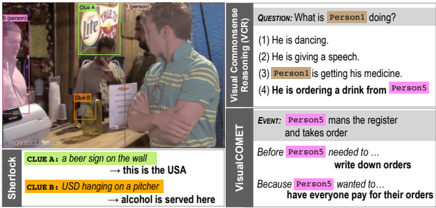
Fig. 2: Side-by-side comparison of VCR [75], VisualCOMET [44], and Sherlock on a representative instance. Sherlock showcases a wider range of (non-human centric) situational contexts.
correct input bounding box. We additionally show that 1) for all tasks, reasoning about the full context of the image (rather than just the region corresponding to the clue) results in the best performance; 2) a text-only model cannot solve the comparison task even when given oracle region descriptions; and 3) a multi-task model fit on both clues/inferences at training time performs best even when only inferences are available at test time.
We foresee Sherlock as a difficult diagnostic benchmark for vision-andlanguage models. On our comparison task, in terms of pairwise accuracy, our best model lags significantly below human agreement (headroom also exists for retrieval and localization). We release code, data, and models at http: //visualabduction.com/ .
## 2 Related Work
Abductive reasoning. Abduction, a form of everyday reasoning first framed byPeirce, [46,47]; involves the creating of explanatory hypothesesbased on limited evidence. Humans use abduction to reconcile seemingly disconnected observations to arrive at meaningful conclusions [56] but readily retract in presence of new evidence [1]. In linguistics, abduction for communicated meaning (in an impoverished conversational context) is systematized through conversational maxims [15]. In images, [5] show that different object types have different likelihoods of being mentioned in image captions (e.g., 'fireworks' is always mentioned if depicted, but 'fabric' is not), but that object type alone does not dictate salience for abductive inferences, e.g., a TV in a living room may not be as conceptually salient as a TV in a bar, which may signal a particular type of bar. Abductive reasoning has recently received attention in language processing tasks [6,50,11,45], proof writing [60], and discourse processing [17,42], etc.
Beyond visual recognition. Several tasks that go beyond image description/recognition have been proposed, including visual and analogical reasoning [43,77,21,3], scene semantics [23], commonsense interactions [65,49], temporal/causal reasoning [26,71], and perceived importance [5]. Others have explored commonsense reasoning tasks posed over videos, which usually have more input available than a single frame [63,20,31,74,13,32,78,12,34,19] (inter alia).
Visual abductive reasoning. Sherlock builds upon prior grounded visual abductive reasoning efforts (Table 1). Corpora like Visual Commonsense Reasoning (VCR) [75], VisualCOMET [44], and Visual7W [79] are most similar to Sherlock in providing benchmarks for rationale-based inferences (i.e., the why and how). But, Sherlock differs in format and content (Fig. 2). Instead of annotated QA pairs like in [79,75] where one option is definitively correct, free-text clue/inference pairs allow for broader types of image descriptions, lending itself to softer and richer notions of reasoning (see § 4)-inferences are not definitively correct vs. incorrect, rather, they span a range of plausibility. Deviating from the constrained, human-centric annotation of [44], Sherlock clue/inference pairs support a broader range of topics via our open-ended annotation paradigm (see § 3). Sherlock 's inferences can be grounded on any number of visual objects in an image, from figures central to the image (e.g., persons, animals, objects) to background cues (e.g., time, location, circumstances).
## 3 Sherlock Corpus
The Sherlock corpus contains a total of 363K abductive commonsense inferences grounded in 81K Visual Genome [29] images (photographs from Flickr) and 22K Visual Commonsense Reasoning (VCR) [75] images (still-frames from movies). Images have an average of 3.5 observation pairs , each consisting of: : an observable entity or object in the image, along with bounding box(es)
- clue specifying it (e.g., 'people wearing nametags').
- inference : an abductive inference associated with the clue; not immediately obvious from the image content (e.g., 'the people don't know each other').
Both clues and inferences are represented via free text in English; both have an average length of seven tokens; per clue, there are a mean/median of 1.17/1.0 bounding boxes per clue. We divide the 103K annotated images into a training/validation/test set of 90K/6.6K/6.6K. Further details are available in § A.
Annotation process. We crowdsource our dataset via Amazon Mechanical Turk (MTurk). For each data collection HIT, a manually qualified worker is given an image and prompted for 3 to 5 observation pairs . For each observation pair , the worker is asked to write a clue, highlight the regions in the image corresponding to the clue, and write an inference triggered by the clue. To discourage purely deductive reasoning, the workers are actively encouraged to think beyond the literally depicted scene, while working within real-world expectations. Crowdworkers also self-report Likert ratings of confidence in the correctness of their abductive inferences along a scale of 'definitely' = 3/3, 'likely' = 2/3, and 'possibly' = 1/3. The resulting inferences span this range (31%, 51%, 18%, respectively). To validate corpus quality, we run a validation round for 17K observation pairs in which crowdworkers provide ratings for acceptability (is the annotation reasonable?), bboxes (are the boxes reasonably placed for the clue?), and interestingness (how interesting is the annotation?). We find that 97.5% of the observation pairs are acceptable with 98.3% accurate box placement; and 71.9% of inferences are found to be interesting.
<details>
<summary>Image 3 Details</summary>
### Visual Description
## Sankey Diagram: Clue Topics vs. Inference Topics
### Overview
This Sankey diagram illustrates the relationship between "Clue Topics" and "Inference Topics," showing the flow and distribution of associations between them. The diagram displays the percentage of each topic and the strength of the connections between clue topics and inference topics.
### Components/Axes
* **Left Side:** "Clue Topics" - Lists various topics that serve as clues.
* **Right Side:** "Inference Topics" - Lists topics that are inferred from the clues.
* **Nodes:** Each topic is represented by a node, with its percentage value displayed next to it.
* **Links:** The connections between the nodes represent the flow from clue topics to inference topics, with the width of the link indicating the strength of the association.
* **Percentages:** Each topic has a percentage value indicating its relative importance or frequency.
### Detailed Analysis
**Clue Topics (Left Side):**
* **Eating & Dining:** 11% (Orange)
* **Nature Scenes:** 7% (Green)
* **Everyday Outdoor Scenes:** 10% (Yellow)
* **Environment & Landscape:** 6% (Dark Green)
* **Gatherings:** 8% (Gray)
* **Signs & Writings:** 7% (Light Brown)
* **Everyday Objects:** 16% (Dark Brown)
* **Attire:** 11% (Light Yellow)
* **Actions & Activities:** 15% (Pink)
* **Vehicles & Traffic:** 9% (Light Blue)
**Inference Topics (Right Side):**
* **Eating & Dining:** 11% (Orange)
* **Time and Weather:** 12% (Light Green)
* **Nature & Animals:** 8% (Dark Green)
* **Everyday Scenes:** 15% (Yellow)
* **Object & Categorization:** 17% (Dark Brown)
* **Occasions & Events:** 11% (Light Yellow)
* **Persons & Characterization:** 19% (Pink)
* **Vehicles & Travel:** 9% (Light Blue)
**Connections and Flow:**
* **Eating & Dining (11%):** Clue topic connects strongly to the same inference topic.
* **Nature Scenes (7%):** Clue topic connects to Nature & Animals.
* **Everyday Outdoor Scenes (10%):** Clue topic connects to Everyday Scenes.
* **Environment & Landscape (6%):** Clue topic connects to Nature & Animals.
* **Gatherings (8%):** Clue topic connects to Occasions & Events.
* **Signs & Writings (7%):** Clue topic connects to Object & Categorization.
* **Everyday Objects (16%):** Clue topic connects strongly to Object & Categorization.
* **Attire (11%):** Clue topic connects to Persons & Characterization.
* **Actions & Activities (15%):** Clue topic connects strongly to Persons & Characterization.
* **Vehicles & Traffic (9%):** Clue topic connects to Vehicles & Travel.
### Key Observations
* **Object & Categorization:** The "Everyday Objects" clue topic (16%) has a strong connection to the "Object & Categorization" inference topic (17%).
* **Persons & Characterization:** The "Actions & Activities" clue topic (15%) has a strong connection to the "Persons & Characterization" inference topic (19%).
* **Direct Correlation:** Some topics, like "Eating & Dining" and "Vehicles & Traffic/Travel," show a direct correlation between the clue and inference topics.
* **Nature Related:** "Nature Scenes" and "Environment & Landscape" both connect to "Nature & Animals".
### Interpretation
The Sankey diagram illustrates how different clue topics lead to specific inferences. The strength of the connections indicates the likelihood of inferring a particular topic from a given clue. For example, "Everyday Objects" strongly suggests "Object & Categorization," while "Actions & Activities" strongly suggests "Persons & Characterization." The diagram highlights the relationships between observable clues and the inferences people draw from them, providing insights into cognitive associations and common-sense reasoning. The direct correlations suggest straightforward associations, while the more complex flows indicate nuanced relationships between clues and inferences.
</details>
## 3.1 Dataset Exploration
Sherlock 's abductive inferences cover a wide variety of real world experiences from observations about unseen yet probable details of the image (e.g., 'smoke at an outdoor gathering' → 'something is being grilled') to elaborations on the expected social context (e.g., 'people wearing nametags' → '[they] don't know each other'). Some inferences are highly likely to be true (e.g., 'wet pavement' → 'it has rained recently'); others are less definitively verifiable, but nonetheless plausible (e.g., 'large trash containers' → 'there is a business nearby'). Even the inferences crowdworkers specify as 3/3 confident are almost always abductive, e.g., wet pavement strongly but not always indicate rain. Through a rich array of natural observations, Sherlock provides a tangible view into the abductive inferences people use on an everyday basis (more examples in Fig. 14).
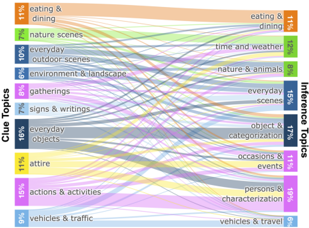
Assessing topic diversity. To gauge the diversity of objects and situations represented in Sherlock , we run an LDA topic model [7] over the observation pairs . The topics span a range of common everyday objects, entities, and situations (Fig. 3). Inference topics associated with the clues include withincategory associations (e.g., 'baked potatoes on a ceramic plate' → 'this [is] a side dish') and cross-category associations (e.g., 'a nametag' (attire) → 'she works here' (characterization)). Many topics are not human centric; compared to VCR/VisualCOMET in which 94%/100% of grounded references are to people. A manual analysis of 150 clues reveals that only 36% of Sherlock observation pairs are grounded on people.
Intended use cases. We manually examine of 250 randomly sampled observation pairs to better understand how annotators referenced protected characteristics (e.g., gender, color, nationality). A majority of inferences (243/250) are not directly about protected characteristics, though, a perceived gender is often made explicit via pronoun usage, e.g., 'she is running.' As an additional check, we pass 30K samples of our corpus through the Perspective API. 9 A manual examination of 150 cases marked as 'most toxic' reveals mostly false positives (89%), though 11% of this sample do contain lewd content (mostly prompted by
9 https://www.perspectiveapi.com/ ; November 2021 version. The API (which itself is imperfect and has biases [18,38,55]) assigns toxicity value 0-1 for a given input text. Toxicity is defined as 'a rude, disrespectful, or unreasonable comment that is likely to make one leave a discussion.'
Fig. 3: Overview of the topics represented in the clues and inferences in Sherlock . This analysis shows that Sherlock covers a variety of topics commonly accessible in the natural world. Color of the connections reflect the clue topic.
<details>
<summary>Image 4 Details</summary>

### Visual Description
Icon/Small Image (24x26)
</details>
<details>
<summary>Image 5 Details</summary>
### Visual Description
## Image Analysis: Scene Description and Inference
### Overview
The image presents a scene with a street view on the left and a block of text on the right. A cartoon robot is shown on the bottom-left, seemingly "thinking" about the scene, with a question mark above its head. An arrow points from the robot's thought process to a statement in the text block. The text block contains a series of observations and inferences about the scene.
### Components/Axes
* **Left Side:** A street scene with people and vehicles. The scene is partially highlighted with green and purple overlays, possibly indicating areas of interest for analysis.
* **Right Side:** A text block containing a series of statements.
* **Bottom-Left:** A cartoon robot with a question mark.
* **Arrow:** An arrow connecting the robot's thought process to the final statement in the text block.
### Detailed Analysis or ### Content Details
**Text Block Content:**
The text block contains the following statements:
* "The traffic is bad in this area"
* "this man needs glasses to see"
* "Pots, pans, and food are stored here."
* "it has many items the person likes to eat"
* "the person is on the go"
* "he is baking cookies for a party he is attending tomorrow"
* "this is the person drinking the tea."
* "there's no one inside the building"
* "It is not during rush hour" (This statement is underlined)
**Scene Description:**
The street scene appears to show a moderately busy street with people and vehicles. The green and purple overlays highlight specific areas, but without further context, their exact purpose is unclear.
### Key Observations
* The text block contains a mix of direct observations ("The traffic is bad in this area") and inferences ("It is not during rush hour").
* The underlined statement "It is not during rush hour" seems to be the conclusion drawn from the scene, possibly contradicting the initial observation about traffic.
* The robot and question mark suggest an AI or machine learning system is attempting to understand or interpret the scene.
### Interpretation
The image likely represents a scenario where an AI system is analyzing a scene and generating descriptions and inferences. The initial observations are followed by a conclusion that seems to contradict one of the earlier statements. This could indicate a limitation in the AI's understanding or a more nuanced interpretation of the scene. The underlined statement suggests that despite the traffic, the AI has determined it is not rush hour, possibly based on other factors not explicitly mentioned in the text. The image highlights the challenges and complexities of AI-based scene understanding and inference.
</details>
- (a) Retrieval of abductive inferences
<details>
<summary>Image 6 Details</summary>
### Visual Description
## Diagram: Image-Text Matching Task
### Overview
The image depicts a diagram illustrating an image-text matching task. It shows three text phrases at the top, three corresponding image segments at the bottom, and a robot icon with a question mark in the middle, representing the task of matching the text to the correct image segment.
### Components/Axes
* **Top Row:** Three text phrases enclosed in rounded rectangles:
* "People can purchase them" (top-left)
* "She is there for shopping" (top-center)
* "The price for the towels" (top-right)
* **Middle:** A dashed rectangle containing a robot icon with a question mark. This represents the task or model attempting to match the text to the images.
* **Bottom Row:** Three image segments, each showing a scene with people and products. Each image has a highlighted region in pink.
* Image 1 (bottom-left): Highlighted region shows a sign with text.
* Image 2 (bottom-center): Highlighted region shows a sign with text.
* Image 3 (bottom-right): Highlighted region shows a woman with a hat and a child.
### Detailed Analysis or ### Content Details
The diagram illustrates a task where a model (represented by the robot) needs to associate each text phrase with the correct image segment. The lines connecting the text phrases to the images indicate the correct matches.
* "People can purchase them" is connected to the first image (bottom-left).
* "She is there for shopping" is connected to the third image (bottom-right).
* "The price for the towels" is connected to the second image (bottom-center).
### Key Observations
The key observation is the matching of text descriptions to relevant image regions. The highlighted regions in the images likely contain visual cues that correspond to the text descriptions.
### Interpretation
The diagram represents a visual reasoning task where the goal is to understand the relationship between text and images. The robot icon symbolizes an AI model that needs to learn these associations. The task requires understanding the content of both the text and the images and finding the correct correspondence between them. The highlighted regions in the images suggest areas of interest that are most relevant to the given text descriptions.
</details>
(b) Localization of evidence
<details>
<summary>Image 7 Details</summary>
### Visual Description
## Image Analysis: Historical Photograph with Textual Annotations
### Overview
The image is a composite of a black and white photograph and several textual and graphical annotations. The photograph depicts a group of people, possibly soldiers, walking in a line. The annotations include text boxes with statements, a question mark, and graphical elements like emojis and a robot icon.
### Components/Axes
* **Photograph:** A black and white image showing a line of people walking, with a building in the background. A purple overlay highlights a section of the people in the line.
* **Text Boxes:**
* A blue text box contains the following statements:
* "they are part of an organization"
* "they are porters"
* "this is during WWII"
* "they are saying goodbye"
* A dotted-line box contains a question mark "?".
* **Graphical Elements:**
* An emoji of a person with brown hair.
* Six thumbs-up icons.
* A robot icon.
### Detailed Analysis or ### Content Details
* **Photograph Details:** The people in the photograph appear to be wearing uniforms. The background shows a building that looks like a barracks or administrative building.
* **Text Box Content:** The statements in the blue text box offer possible interpretations of the photograph. The question mark suggests an unknown or missing piece of information.
### Key Observations
* The purple overlay on the photograph highlights a specific group of people within the larger line.
* The text statements provide context and possible interpretations of the photograph.
* The question mark indicates uncertainty or a need for further information.
### Interpretation
The image appears to be part of an educational or interactive exercise. The photograph serves as the primary visual stimulus, while the text statements offer potential interpretations or facts related to the image. The question mark suggests an element of inquiry or a missing piece of information that needs to be identified. The thumbs-up icons may indicate agreement or approval of the statements. The robot icon could represent an AI or automated system involved in the exercise. The image prompts the viewer to analyze the photograph, consider the provided statements, and potentially fill in the missing information.
</details>
- (c) Comparison of plausibility
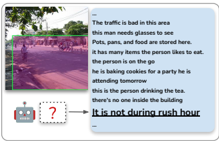
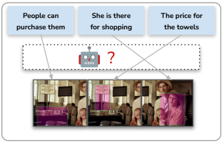
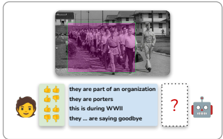
Fig. 4: We pose three tasks over Sherlock : In retrieval , models are tasked with finding the ground-truth inference across a wide range of inferences, some much more plausible/relevant than others. In localization , models must align regions within the same image to several inferences written about that image. For comparison , we collect 19K Likert ratings from human raters across plausible candidates, and models are evaluated in their capacity to reconstruct human judgments across the candidates. Despite intrinsic subjectivity, headroom exists between human agreement and model performance, e.g., on the comparison task.
visual content in the R-rated VCR movies) or stigmas related to, e.g., gender and weight. See § A.4 for a more complete discussion.
While our analysis suggests that the relative magnitude of potentially offensive content is low in Sherlock , we still advocate against deployed use-cases that run the risk of perpetuating potential biases: our aim is to study abductive reasoning without endorsing the correctness or appropriateness of particular inferences. We foresee Sherlock as 1) a diagnostic corpus for measuring machine capacity for visual abductive reasoning; 2) a large-scale resource to study the types of inferences people may make about images; and 3) a potentially helpful resource for building tools that require understanding abductions specifically, e.g., for detecting purposefully manipulative content posted online, it could be useful to specifically study what people might assume about an image (rather than what is objectively correct; more details in Datasheet ( § F) [14]).
## 4 From Images to Abductive Inferences
We operationalize our corpus with three tasks, which we call retrieval, localization, and comparison. Notationally, we say that an instance within the Sherlock corpus consists of an image i , a region specified by N bounding boxes r = {⟨ x 1 i , x 2 i , y 1 i , y 2 i ⟩} N i =1 , 10 a clue c corresponding to a literal description of r 's contents, and an in F erence f that an annotator associated with i , r , and c . We consider:
10 As discussed in § 3, N has a mean/median of 1.17/1.0 across the corpus.
1. Retrieval of Abductive Inferences: For a given image/region pair ( i , r ), how well can models select the ground-truth inference f from a large set of candidates ( ∼ 1K) covering a broad swath of the corpus?
2. Localization of Evidence: Given an image i and an inference f written about an (unknown) region within the image, how well can models locate the proper region?
3. Comparison of Plausibility: Given an image/region pair ( i , r ) and a small set ( ∼ 10) of relevant inferences, can models predict how humans will rank their plausibility?
Each task tests a complementary aspect of visual abductive reasoning (Fig. 4): retrieval tests across a broad range of inferences, localization tests within-images, and comparison tests for correlation with human judgement. Nonetheless, the same model can undertake all three tasks if it implements the following interface:
## Sherlock Abductive Visual Reasoning Interface
- Input: An image i , a region r within i , and a candidate inference f .
- Target: A score s , where s is proportional to the plausibility that f could be inferred from ( i , r ).
That is, we assume a model m : ( i , r , f ) → R that scores inference f 's plausibility for ( i , r ). Notably, the interface takes as input inferences, but not clues: our intent is to focus evaluation on abductive reasoning, rather than the distinct setting of literal referring expressions. 11 Clues can be used for training m ; as we will see in § 5 our best performing model, in fact, does use clues at training time.
## 4.1 Retrieval of Abductive Inferences
For retrieval evaluation, at test time, we are given an ( i , r ) pair, and a large ( ∼ 1K) 12 set of candidate inferences f ∈ F , only one of which was written by an annotator for ( i , r ); the others are randomly sampled from the corpus. In the im → txt direction, we compute the mean rank of the true item (lower=better) and P @1 (higher=better); in the txt → im direction, we report mean rank (lower=better).
## 4.2 Localization of Evidence
Localization assesses a model's capacity select a regions within an image that most directly supports a given inference. Following prior work on literal referring expression localization [28,25,73] (inter alia), we experiment in two settings: 1) we are given all the ground-truth bounding boxes for an image, and 2) we are given only automatic bounding box proposals from an object detection model.
11 In § B.1, for completeness, we give results on the retrieval and localization setups, but testing on clues instead.
12 Our validation/test sets contain about 23K inferences. For efficiency we randomly split into 23 equal sized chunks of about 1K inferences, and report retrieval averaged over the resulting splits.
Table 2: Test results for all models across all three tasks. CLIP RN50x64 outperforms all models in all setups, but significant headroom exists, e.g., on Comparison between the model and human agreement.
| | Retrieval | Retrieval | Retrieval | Localization | Comparison |
|-----------------------------|--------------------|-------------|---------------|-----------------------|--------------------------|
| | im → txt ( ↓ ) txt | → im ( ↓ | @1 im → txt ( | GT-Box/Auto-Box ( ↑ ) | Val/Test Human Acc ( ↑ ) |
| Random | 495.4 | 495.4 | 0.1 | 30.0/7.9 | 1.1/-0.6 |
| Bbox Position/Size | 257.5 | 262.7 | 1.3 | 57.3/18.8 | 5.5/1.4 |
| LXMERT | 51.1 | 48.8 | 14.9 | 69.5/30.3 | 18.6/21.1 |
| UNITER Base | 40.4 | 40.0 | 19.8 | 73.0/33.3 | 20.0/22.9 |
| CLIP ViT-B/16 | 19.9 | 21.6 | 30.6 | 85.3/38.6 | 20.1/21.3 |
| CLIP RN50x16 | 19.3 | 20.8 | 31.0 | 85.7/38.7 | 21.6/23.7 |
| CLIP RN50x64 | 19.3 | 19.7 | 31.8 | 86.6/39.5 | 25.1/26.0 |
| ↰ + multitask clue learning | 16.4 | 17.7 | 33.4 | 87.2 / 40.6 | 26.6 / 27.1 |
| Human + (Upper Bound) | - | - | - | 92.3/(96.2) | 42.3/42.3 |
GTbounding boxes. We assume an image i , the set of 3+ inferences F written for that image, and the (unaligned) set of regions R corresponding to F . The model must produce a one-to-one assignment of F to R in the context of i . In practice, we score all possible F × R pairs via the abductive visual reasoning interface, and then compute the maximum linear assignment [30] using lapjv's implementation of [24]. The evaluation metric is the accuracy of this assignment, averaged over all images. To quantify an upper bound, a human rater performed the assignment for 101 images, achieving an average accuracy of 92.3%.
Auto bounding boxes. We compute 100 bounding box proposals per image by applying Faster-RCNN [54] with a ResNeXt101 [69] backbone trained on Visual Genome to all the images in our corpus. Given an image i and an inference f that was written about the image, we score all 100 bounding box proposals independently and take the highest scoring one as the prediction. We count a prediction as correct if it has IoU > 0 . 5 with a true bounding box that corresponds to that inference, 13 and incorrect otherwise. 14
## 4.3 Comparison of Plausibility
We assess model capacity to make fine-grained assessments given a set of plausible inferences. For example, in Fig. 4c (depicting a group of men marching and carrying bags), human raters are likely to say that they are military men and that the photo was taken during WWII, and unlikely to see them as porters despite them carrying bags. Our evaluation assumes that a performant model's predictions should correlate with the (average) relative judgments made by humans, and we seek to construct a corpus that supports evaluation of such reasoning.
13 Since the annotators were able to specify multiple bounding boxes per observation pair , we count a match to any of the labeled bounding boxes.
14 A small number of images do not have a ResNeXt bounding box with IoU > 0 . 5 with any ground truth bounding box: in § 5.1, we show that most instances (96.2%) are solvable with this setup.
Constructing sets of plausible inferences. We use a performant model checkpoint fine-tuned for the Sherlock tasks 15 to compute the similarity score between all ( i , r , f ) triples in the validation/test sets. Next, we perform several filtering steps: 1) we only consider pairs where the negative inference received a higher score than the ground-truth according to the model; 2) we perform soft text deduplication to downsample inferences that are semantically similar; and 3) we perform hard text deduplication, only allowing inferences to appear verbatim 3x times. Then, through an iterative process, we uniquely sample a diverse set of 10 inferences per ( i , r ) that meet these filtering criteria. This results in a set of 10 plausible inference candidates for each of 485/472 validation/test images. More details are in § E. In a retrieval sense, these plausible inferences can be viewed as 'hard negatives:' i.e., none are the gold annotated inference, but a strong model nonetheless rates them as plausible.
Human rating of plausible inferences. Using MTurk, we collect two annotations of each candidate inference on a three-point Likert scale ranging from 1 (bad: 'irrelevant'/'verifiably incorrect') to 3 (good: 'statement is probably true; the highlighted region supports it.'). We collect 19K annotations in total (see § E for full details). Because abductive reasoning involves subjectivity and uncertainty, we expect some amount of intrinsic disagreement between raters. 16 We measure model correlation with human judgments on this set via pairwise accuracy. For each image, for all pairs of candidates that are rated differently on the Likert scale, the model gets an accuracy point if it orders them consistently with the human rater's ordering. Ties are broken randomly but consistently across all models. For readability, we subtract the accuracy of a random model (50%) and multiply by two to form the final accuracy metric.
## 5 Methods and Experiments
Training objective. To support the interface described in § 4, we train models m : ( i , r , f ) → R that score inference f 's plausibility for ( i , r ). We experiment with several different V+L backbones as detailed below; for each, we train by optimizing model parameters to score truly corresponding ( i , r , f ) triples more highly than negatively sampled ( i , r , f fake ) triples.
LXMERT [61] is a vision+language transformer [64] model pre-trained on Visual Genome [29] and MSCOCO [33]. The model is composed of three transformer encoders [64]: an object-relationship encoder (which takes in ROI features+locations with a max of 36, following [2]), a language encoder that processes word tokens, and a cross modality encoder. To provide region information r , we calculate the ROI feature of r and always place it in the first object token to the visual encoder (this is a common practice for, e.g., the VCR dataset [75]).
15 Specifically, a CLIP RN50x16 checkpoint that achieves strong validation retrieval performance (comparable to the checkpoint of the reported test results in § 5.1); model details in § 5.
16 In § 5.1, we show that models achieve significantly less correlation compared to human agreement.
We follow [9] to train the model in 'image-text retrieval' mode by maximizing the margin m = . 2 between the cosine similarity scores of positive triple ( i , r , f ) and two negative triples ( i , r , f fake ) and ( i fake , r fake , f ) through triplet loss.
UNITER [9] consists of a single, unified transformer that takes in image and text embeddings. We experiment with the Base version pre-trained on MSCOCO [33], Visual Genome [29], Conceptual Captions [57], and SBU Captions [41]. We apply the same strategy of region-of-reference-first passing and train with the same triplet loss following [9].
CLIP. We finetune the ViT-B/16 , RN50x16 , and RN50x50 versions of CLIP [51]. Text is represented via a 12-layer text transformer. For ViT-B/16 , images are represented by a 12-layer vision transformer [10], whereas for RN50x16 / RN50x64 , images are represented by EfficientNet-scaled ResNet50 [16,62].
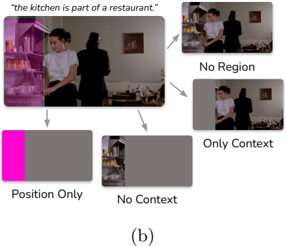
We modify CLIP to incorporate the bounding box as input. Inspired by a similar process from [76,70], to pass a region to CLIP, we simply draw a bounding box on an image in pixel space-we use a green-bordered / opaque purple box as depicted in Fig. 5b (early experiments proved this more effective than modifying CLIP's architecture). To enable CLIP to process the widescreen images of VCR, we apply it twice to the input using overlapping square regions, i.e., graphically, like this: [ 1 [ 2 ] 1 ] 2 , and average the resulting embeddings. We finetune using InfoNCE [59,40]. We sample a batch of truly corresponding ( i , r , f ) triples, render the regions r in their corresponding images, and then construct all possible negative ( i , r , f fake ) triples in the batch by aligning each inference to each ( i , r ). We use the biggest minibatch size possible using 8 GPUs with 48GB of memory each: 64, 200, and 512 for RN50x64 , RN50x16 , and ViT-B/16 , respectively.
Multitask learning. All models thus far only utilize inferences at training time. We experiment with a multitask learning setup using CLIP that additionally trains with clues. In addition to training using our abductive reasoning objective, i.e., InfoNCE on inferences, we mix in an additional referring expression objective, i.e., InfoNCE on clues. Evaluation remains the same: at test time, we do not assume access to clues. At training time, for each observation, half the time we sample an inference (to form ( i , r , f ), and half the time we sample a clue (to form ( i , r , c )). The clue/inference mixed batch of examples is then handed to CLIP, and a gradient update is made with InfoNCE as usual. To enable to model to differentiate between clues/inferences, we prefix the texts with clue: / inference: , respectively.
Baselines. In addition to a random baseline, we consider a content-free version of our CLIP ViT-B/16 model that is given only the position/size of each bounding box. In place of the image, we pass a mean pixel value across the entire image and draw the bounding box on the image using an opaque pink box (see § 5.2).
## 5.1 Results
Table 2 contains results for all the tasks: In all cases, our CLIP-based models perform best, with RN50x64 outperforming its smaller counterparts. Incorporating the multitask objective pushes performance further. While CLIP performs the
| | P @1 ( ↑ ) | Val/Test Human ( ↑ ) |
|------------------------------|--------------|------------------------|
| CLIP ViT-B/16 | 30.5 | 20.1/21.2 |
| ↰ Position only | 1.3 | 5.5/1.4 |
| ↰ No Region | 18.1 | 16.8/19.0 |
| input ↰ No Context | 24.8 | 18.1/17.8 |
| ↰ Only context | 18.9 | 17.4/16.3 |
| ↰ Trained w/ only Clues | 23 | 16.2/19.7 |
| ↰ Crop no Widescreen | 27.8 | 23.1/21.8 |
| model ↰ Resize no Widescreen | 27.7 | 19.4/20.6 |
| ↰ Zero shot w/ prompt | 12 | 10.0/9.5 |
(a)
Fig. 5: We perform ablations by varying the input data, top (a), and the modeling components, bottom (a). Figure (b) depicts our image input ablations, which are conducted by drawing in pixel-space directly, following [76]. Having no context may make it difficult to situate the scene more broadly; here: neatly stacked cups could be in a bar, a hotel, a store, etc. Access only the context of the dining room is also insufficient. For modeling, bottom (a), cropping/resizing decreases performance on retrieval ( P @1), but not comparison (Val/Test Human).
<details>
<summary>Image 8 Details</summary>
### Visual Description
## Diagram: Image Context Analysis
### Overview
The image is a diagram illustrating the impact of context on image understanding. It shows a main image of a kitchen scene with two figures, and then presents variations of the image with different elements removed or isolated to demonstrate the importance of region, context, and position.
### Components/Axes
* **Main Image (Top-Left)**: A scene depicting a kitchen, a woman in a white shirt, and a figure in a dark suit. A refrigerator is highlighted in magenta. The caption above the image reads: "the kitchen is part of a restaurant."
* **No Region (Top-Right)**: A smaller image showing the same scene, but without the magenta-highlighted refrigerator.
* **Only Context (Right-Center)**: A smaller image showing the same scene, but with the woman and the figure in the dark suit removed.
* **Position Only (Bottom-Left)**: A rectangular block with the left portion colored magenta, representing the position of the refrigerator without any visual context.
* **No Context (Bottom-Center)**: A smaller image showing only the refrigerator and the shelves next to it.
* **(b) (Bottom-Center)**: Label indicating the figure number.
### Detailed Analysis or ### Content Details
* **Main Image**: The main image sets the scene and provides full context. The magenta highlight draws attention to the refrigerator.
* **No Region**: Removing the highlighted region (refrigerator) changes the understanding of the scene.
* **Only Context**: Removing the figures focuses attention on the background and the kitchen environment.
* **Position Only**: This isolates the spatial location of the refrigerator, devoid of any visual information.
* **No Context**: This isolates the refrigerator and the shelves next to it, removing the broader kitchen environment.
### Key Observations
* The diagram emphasizes how different elements (region, context, position) contribute to the overall understanding of an image.
* Removing or isolating elements alters the interpretation of the scene.
### Interpretation
The diagram demonstrates the importance of context in image understanding. The main image provides a complete scene, and the subsequent variations show how removing or isolating elements affects the interpretation. The "Position Only" and "No Context" variations highlight the significance of both spatial location and visual information in identifying and understanding objects within an image. The diagram suggests that a holistic approach, considering all elements, is crucial for accurate image analysis.
</details>
best, UNITER is more competitive on comparison and less competitive on retrieval and localization. We speculate this has to do with the nature of each task: retrieval requires models to reason about many incorrect examples, whereas, the inferences in the comparison task are usually relevant to the objects in the scene. In § C, we provide ablations that demonstrate CLIP models outperform UNITER even when trained with a smaller batch size. Compared to human agreement on comparison, our best model only gets 65% of the way there (27% vs. 42 %).
## 5.2 Ablations
We perform data and model ablations on CLIP ViT-B/16 . Results are in Fig. 5. Input ablations. Each part of our visual input is important. Aside from the position only model, the biggest drop-off in performance results from not passing the region as input to CLIP, e.g., P @1 for im → txt retrieval nearly halves, dropping from 31 to 18, suggesting that CLIP relies on the local region information to reason about the image. Removing the region's content ('Only Context') unsurprisingly hurts performance, but so does removing the surrounding context ('No Context'). That is, the model performs the best when it can reason about the clue and its full visual context jointly. On the text side, we trained a model with only clues; retrieval and comparison performance both drop, which suggests that clues and inferences carry different information (additional results in § B.1). Model ablations. Weconsidered two alternate image processing configurations. Instead of doing two CLIP passes per image to facilitate widescreen processing ( § 5), we consider (i) center cropping and (ii) pad-and-resizing. Both take less computation, but provide less information to the model. Cropping removes the
<details>
<summary>Image 9 Details</summary>

### Visual Description
Icon/Small Image (23x26)
</details>
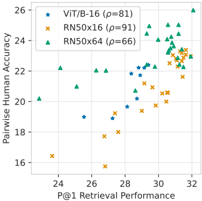
Fig. 6: Validation retrieval perf. ( P @1) vs. comparison acc. for CLIP checkpoints.
<details>
<summary>Image 10 Details</summary>
### Visual Description
## Scatter Plot: Retrieval Performance vs. Human Accuracy
### Overview
The image is a scatter plot comparing the P@1 Retrieval Performance against Pairwise Human Accuracy for three different models: ViT/B-16, RN50x16, and RN50x64. Each model is represented by a different color and marker. The plot shows the relationship between the retrieval performance of these models and how well they align with human judgment.
### Components/Axes
* **X-axis:** P@1 Retrieval Performance (range: approximately 23 to 32)
* **Y-axis:** Pairwise Human Accuracy (range: approximately 16 to 26)
* **Legend (top-left):**
* Blue stars: ViT/B-16 (ρ=81)
* Orange crosses: RN50x16 (ρ=91)
* Green triangles: RN50x64 (ρ=66)
### Detailed Analysis
* **ViT/B-16 (Blue Stars):**
* Trend: Generally, as P@1 Retrieval Performance increases, Pairwise Human Accuracy also increases.
* Data Points: The data points are scattered between P@1 values of approximately 25 and 30, and Pairwise Human Accuracy values of approximately 19 and 23.
* **RN50x16 (Orange Crosses):**
* Trend: Similar to ViT/B-16, there's a general upward trend.
* Data Points: The data points are concentrated between P@1 values of approximately 27 and 32, and Pairwise Human Accuracy values of approximately 16 and 24.
* **RN50x64 (Green Triangles):**
* Trend: The trend is less clear, but the data points are clustered in the upper-right corner.
* Data Points: The data points are mostly located between P@1 values of approximately 29 and 32, and Pairwise Human Accuracy values of approximately 22 and 25.
### Key Observations
* RN50x64 generally has higher P@1 Retrieval Performance and Pairwise Human Accuracy compared to ViT/B-16 and RN50x16.
* RN50x16 has the highest ρ value (91), while RN50x64 has the lowest (66).
* There is a positive correlation between P@1 Retrieval Performance and Pairwise Human Accuracy for all models, although the strength of the correlation varies.
### Interpretation
The scatter plot suggests that there is a relationship between a model's retrieval performance and its alignment with human judgment. Models with higher P@1 Retrieval Performance tend to have higher Pairwise Human Accuracy. The ρ values in the legend likely represent a correlation coefficient or a similar metric indicating the strength of the relationship between the model's performance and human judgment. The higher the ρ value, the stronger the correlation.
RN50x16 has the highest correlation (ρ=91), suggesting it aligns most closely with human judgment, even though its absolute performance (as indicated by the scatter plot) is not the highest. RN50x64, despite having the lowest correlation (ρ=66), generally performs better in terms of both P@1 Retrieval Performance and Pairwise Human Accuracy. This could indicate that while RN50x64 is generally more accurate, its errors are less aligned with human errors compared to RN50x16.
</details>
Fig. 7: Error analysis: examples of false positives and false negatives predicted by our model on the comparison task's validation set.
<details>
<summary>Image 11 Details</summary>
### Visual Description
## Image Analysis: Image Classification Examples
### Overview
The image presents a series of image classification examples. Each example consists of an image, a textual description of the image, and two "agents" (a robot and a human) providing a binary classification (correct or incorrect) of the description.
### Components/Axes
Each example has the following components:
1. **Image:** A photograph depicting a scene or object.
2. **Description:** A textual statement describing the content of the image.
3. **Robot Agent:** A robot icon with a thumbs-up (correct) or thumbs-down (incorrect) symbol.
4. **Human Agent:** A human face icon with a thumbs-up (correct) or thumbs-down (incorrect) symbol.
### Detailed Analysis or ### Content Details
**Example 1 (Top-Left):**
* **Image:** A street scene with a traffic light, street signs ("RIGHT LANE" and "FILBERT"), and a pole.
* **Description:** "People can park their cars on Filbert street for as long as they want."
* **Robot Agent:** Thumbs-up (correct).
* **Human Agent:** Thumbs-down (incorrect).
**Example 2 (Top-Right):**
* **Image:** A florist shop with various plants and flowers.
* **Description:** "This is a florist shop."
* **Robot Agent:** Thumbs-down (incorrect).
* **Human Agent:** Thumbs-up (correct).
**Example 3 (Bottom-Left):**
* **Image:** A room with a window and a person's arm.
* **Description:** "This is a room in high rise apartment building with old metal frame windows."
* **Robot Agent:** Thumbs-up (correct).
* **Human Agent:** Thumbs-down (incorrect).
**Example 4 (Bottom-Right):**
* **Image:** A scene with objects hidden under a table or shelf.
* **Description:** "They are hiding from someone."
* **Robot Agent:** Thumbs-down (incorrect).
* **Human Agent:** Thumbs-down (incorrect).
### Key Observations
* The robot and human agents often disagree on the correctness of the descriptions.
* The descriptions vary in their level of specificity and potential for ambiguity.
### Interpretation
The image illustrates a comparison between machine (robot) and human understanding of image content. The discrepancies in classification suggest that:
* **Machine learning models may struggle with nuanced or subjective interpretations.** For example, the robot incorrectly identifies the florist shop, possibly due to a lack of specific training data or an inability to recognize the context.
* **Human understanding can be influenced by prior knowledge and contextual awareness.** The human agent correctly identifies the florist shop, likely based on visual cues and general knowledge.
* **Ambiguity in descriptions can lead to disagreements.** The statement about parking on Filbert street is open to interpretation, as it doesn't specify whether parking is actually allowed or not.
* **The task of image classification is not always straightforward and can involve subjective judgment.** The "hiding" example is particularly ambiguous, as it requires inferring intent from the image.
</details>
sides of images, whereas pad-and-resize lowers the resolution significantly. The bottom half of the table in Fig. 5a reports the results: both configurations lower performance on retrieval tasks, but there's less impact for comparison.
Better retrieval → better comparison. In Fig. 6, we observe a high correlation between the retrieval performance of our (single-task) CLIP model checkpoints ( P @1) and the comparison human accuracy for the comparison task. For the smaller RN50x16 and ViT-B/16 models, this effect cannot simply be explained by training time; for RN50x16 , pearson corr. between training steps and comparison performance is 81, whereas, the correlation between P @1 and comparison performance is 91. Overall, it's plausible that a model with higher precision at retrieval could help further bridge the gap on the comparison task.
Oracle text-only models are insufficient. One potential concern with our setup is that clues may map one-to-one onto inferences, e.g., if all soccer balls in our corpus were mapped onto 'the owner plays soccer' (and vice versa). We compare to an oracle baseline that makes this pessimistic assumption (complementing our 'No Context' ablation, which provides a comparable context-free visual reference to the clue). We give the model oracle access to the ground-truth clues. Following [6], we use T5-Large v1.1 [52] to map clues to inferences with no access to the image by fitting P (inference | clue) in a sequence-to-sequence fashion; training details are in § B. The resulting text-only clue → inference model, when given the clue 'chipped paint and rusted umbrella poles' , estimates likely inferences, for example: 'the area is in a disrepair' , 'the city does not care about its infrastructure.' , etc. The text-only oracle under-performs vs. CLIP despite the fact that, unlike CLIP, it's given the ground-truth clue : on comparison, it achieves 22.8/19.3 val/test accuracy; significantly lower than 26.6/27.1 that our best vision+language model achieves. This is probably because global scene context cannot be fully summarized via a local referring expression. In the prior 'chipped paint and rusted umbrella poles' example, the true inference, 'this beach furniture does not get put inside at night' , requires additional visual context beyond the clue-chipped paint and a rusty umbrella alone may not provide enough context to infer that this furniture is beach furniture.
## 5.3 Error Analysis
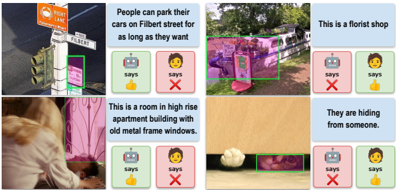
We conduct a quantitative error analysis of multitask CLIP RN50x64 for the comparison task. We select 340 validation images with highest human agreement, and split images into two groups: one where the model performed above average, and one where the model performed below average. We attempt to predict into which group an image will fall using logistic regression in 5-fold cross-validation. Overall, errors are difficult to predict. Surface level image/text features of the images/inferences are not very predictive of errors: relative to a 50% ROC AUC baseline, CLIP ViT-B/16 image features achieve 55%, whereas the mean SentenceBERT [53] embedding of the inference achieves 54%. While not available a priori , more predictive than content features of model errors are human Likert ratings: a single-feature mean human agreement model achieves 57% AUC, (more human agreement = better model performance).
Fig. 7 gives qualitative examples of false positives/negatives. The types of abductive reasoning the model falls short on are diverse. In the boat example, the model fails to notice that a florist has set up shop on a ship deck; in the window example, the model misinterprets the bars over the windows as being outside the building versus inside and attached to a bed-frame. The model is capable of reading some simple signs, but, as highlighted by [37], reasoning about the semantics of written text placed in images remains a challenge, e.g., a 'no parking' sign is misidentified as an 'okay to park' sign. Overall: the difficult-tocategorize nature of these examples suggests that the Sherlock corpus makes for difficult benchmark for visual abductive reasoning.
## 6 Conclusion
We introduce Sherlock , a corpus of visual abductive reasoning containing 363K clue/inference observation pairs across 103K images. Our work complements existing abductive reasoning corpora, both in format (free-viewing, free-text) and in diversity (not human-centric). Our work not only provides a challenging vision+language benchmark, but also, we hope it can serve as a resource for studying visual abductive reasoning more broadly. Future work includes:
1. Salience: in Sherlock , annotators specify salient clues; how/why does salience differ from other free-viewing setups, like image captioning?
2. Ambiguity: when/why do people (justifiably) come to different conclusions?
3. Generative evaluation metrics: generation evaluation in abductive setting, i.e., without definitive notions of correctness, remains a challenge.
Acknowledgments. This work was funded by DARPA MCS program through NIWC Pacific (N66001-19-2-4031), the DARPA SemaFor program, and the Allen Institute for AI. AR was additionally in part supported by the DARPA PTG program, as well as BAIR's industrial alliance program. We additionally thank the UC Berkeley Semafor group for the helpful discussions and feedback.
## References
1. Aliseda, A.: The logic of abduction: an introduction. In: Springer Handbook of Model-Based Science, pp. 219-230 (2017)
2. Anderson, P., He, X., Buehler, C., Teney, D., Johnson, M., Gould, S., Zhang, L.: Bottom-up and top-down attention for image captioning and visual question answering. In: CVPR (2018)
3. Antol, S., Agrawal, A., Lu, J., Mitchell, M., Batra, D., Zitnick, C.L., Parikh, D.: VQA: Visual Question Answering. In: ICCV (2015)
4. Bender, E.M., Friedman, B.: Data statements for natural language processing: Toward mitigating system bias and enabling better science. TACL 6 , 587-604 (2018)
5. Berg, A.C., Berg, T.L., Daume, H., Dodge, J., Goyal, A., Han, X., Mensch, A., Mitchell, M., Sood, A., Stratos, K., et al.: Understanding and predicting importance in images. In: CVPR (2012)
6. Bhagavatula, C., Bras, R.L., Malaviya, C., Sakaguchi, K., Holtzman, A., Rashkin, H., Downey, D., tau Yih, W., Choi, Y.: Abductive commonsense reasoning. In: ICLR (2020)
7. Blei, D.M., Ng, A.Y., Jordan, M.I.: Latent dirichlet allocation. JMLR 3 , 993-1022 (2003)
8. Carson, D.: The abduction of sherlock holmes. International Journal of Police Science & Management 11 (2), 193-202 (2009)
9. Chen, Y.C., Li, L., Yu, L., Kholy, A.E., Ahmed, F., Gan, Z., Cheng, Y., Liu, J.: UNITER: Universal image-text representation learning. In: ECCV (2020)
10. Dosovitskiy, A., Beyer, L., Kolesnikov, A., Weissenborn, D., Zhai, X., Unterthiner, T., Dehghani, M., Minderer, M., Heigold, G., Gelly, S., et al.: An image is worth 16x16 words: Transformers for image recognition at scale. In: ICLR (2021)
11. Du, L., Ding, X., Liu, T., Qin, B.: Learning event graph knowledge for abductive reasoning. In: ACL (2021)
12. Fang, Z., Gokhale, T., Banerjee, P., Baral, C., Yang, Y.: Video2Commonsense: Generating commonsense descriptions to enrich video captioning. In: EMNLP (2020)
13. Garcia, N., Otani, M., Chu, C., Nakashima, Y.: KnowIT vqa: Answering knowledge-based questions about videos. In: AAAI (2020)
14. Gebru, T., Morgenstern, J., Vecchione, B., Vaughan, J.W., Wallach, H., Iii, H.D., Crawford, K.: Datasheets for datasets. Communications of the ACM (2021)
15. Grice, H.P.: Logic and conversation. In: Speech acts, pp. 41-58. Brill (1975)
16. He, K., Zhang, X., Ren, S., Sun, J.: Deep residual learning for image recognition. In: CVPR (2016)
17. Hobbs, J.R., Stickel, M.E., Appelt, D.E., Martin, P.: Interpretation as abduction. Artificial intelligence 63 (1-2), 69-142 (1993)
18. Hosseini, H., Kannan, S., Zhang, B., Poovendran, R.: Deceiving google's perspective api built for detecting toxic comments. arXiv preprint arXiv:1702.08138 (2017)
19. Ignat, O., Castro, S., Miao, H., Li, W., Mihalcea, R.: WhyAct: Identifying action reasons in lifestyle vlogs. In: EMNLP (2021)
20. Jang, Y., Song, Y., Yu, Y., Kim, Y., Kim, G.: Tgif-QA: Toward spatio-temporal reasoning in visual question answering. In: CVPR (2017)
21. Johnson, J., Hariharan, B., Van Der Maaten, L., Fei-Fei, L., Lawrence Zitnick, C., Girshick, R.: Clevr: A diagnostic dataset for compositional language and elementary visual reasoning. In: CVPR (2017)
22. Johnson, J., Karpathy, A., Fei-Fei, L.: Densecap: Fully convolutional localization networks for dense captioning. In: CVPR (2016)
23. Johnson, J., Krishna, R., Stark, M., Li, L.J., Shamma, D., Bernstein, M., Fei-Fei, L.: Image retrieval using scene graphs. In: CVPR (2015)
24. Jonker, R., Volgenant, A.: A shortest augmenting path algorithm for dense and sparse linear assignment problems. Computing 38 (4), 325-340 (1987)
25. Kazemzadeh, S., Ordonez, V., Matten, M., Berg, T.: ReferItGame: Referring to objects in photographs of natural scenes. In: EMNLP (2014)
26. Kim, H., Zala, A., Bansal, M.: CoSIm: Commonsense reasoning for counterfactual scene imagination. In: NAACL (2022)
27. Kingma, D.P., Ba, J.: Adam: A method for stochastic optimization. arXiv preprint arXiv:1412.6980 (2014)
28. Krahmer, E., Van Deemter, K.: Computational generation of referring expressions: A survey. Computational Linguistics 38 (1), 173-218 (2012)
29. Krishna, R., Zhu, Y., Groth, O., Johnson, J., Hata, K., Kravitz, J., Chen, S., Kalantidis, Y., Li, L.J., Shamma, D.A., Bernstein, M.S., Fei-Fei, L.: Visual genome: Connecting language and vision using crowdsourced dense image annotations. IJCV (2016)
30. Kuhn, H.W.: The hungarian method for the assignment problem. Naval research logistics quarterly 2 (1-2), 83-97 (1955)
31. Lei, J., Yu, L., Berg, T.L., Bansal, M.: TVQA+: Spatio-temporal grounding for video question answering. In: ACL (2020)
32. Lei, J., Yu, L., Berg, T.L., Bansal, M.: What is more likely to happen next? videoand-language future event prediction. In: EMNLP (2020)
33. Lin, T.Y., Maire, M., Belongie, S.J., Hays, J., Perona, P., Ramanan, D., Doll´ ar, P., Zitnick, C.L.: Microsoft COCO: Common objects in context. In: ECCV (2014)
34. Liu, J., Chen, W., Cheng, Y., Gan, Z., Yu, L., Yang, Y., Liu, J.: Violin: A largescale dataset for video-and-language inference. In: CVPR (2020)
35. Loshchilov, I., Hutter, F.: Decoupled weight decay regularization. In: ICLR (2019)
36. Marino, K., Rastegari, M., Farhadi, A., Mottaghi, R.: OK-VQA: A visual question answering benchmark requiring external knowledge. In: CVPR (2019)
37. Mishra, A., Shekhar, S., Singh, A.K., Chakraborty, A.: OCR-VQA: Visual question answering by reading text in images. In: ICDAR (2019)
38. Mitchell, M., Wu, S., Zaldivar, A., Barnes, P., Vasserman, L., Hutchinson, B., Spitzer, E., Raji, I.D., Gebru, T.: Model cards for model reporting. In: FAccT (2019)
39. Niiniluoto, I.: Defending abduction. Philosophy of science 66 , S436-S451 (1999)
40. Oord, A.v.d., Li, Y., Vinyals, O.: Representation learning with contrastive predictive coding. arXiv preprint arXiv:1807.03748 (2018)
41. Ordonez, V., Kulkarni, G., Berg, T.L.: Im2text: Describing images using 1 million captioned photographs. In: NeurIPS (2011)
42. Ovchinnikova, E., Montazeri, N., Alexandrov, T., Hobbs, J.R., McCord, M.C., Mulkar-Mehta, R.: Abductive reasoning with a large knowledge base for discourse processing. In: IWCS (2011)
43. Park, D.H., Darrell, T., Rohrbach, A.: Robust change captioning. In: ICCV (2019)
44. Park, J.S., Bhagavatula, C., Mottaghi, R., Farhadi, A., Choi, Y.: VisualCOMET: Reasoning about the dynamic context of a still image. In: ECCV (2020)
45. Paul, D., Frank, A.: Generating hypothetical events for abductive inference. In: *SEM (2021)
46. Peirce, C.S.: Philosophical writings of Peirce, vol. 217. Courier Corporation (1955)
47. Peirce, C.S.: Pragmatism and pragmaticism, vol. 5. Belknap Press of Harvard University Press (1965)
48. Pezzelle, S., Greco, C., Gandolfi, G., Gualdoni, E., Bernardi, R.: Be different to be better! a benchmark to leverage the complementarity of language and vision. In: Findings of EMNLP (2020)
49. Pirsiavash, H., Vondrick, C., Torralba, A.: Inferring the why in images. Tech. rep. (2014)
50. Qin, L., Shwartz, V., West, P., Bhagavatula, C., Hwang, J., Bras, R.L., Bosselut, A., Choi, Y.: Back to the future: Unsupervised backprop-based decoding for counterfactual and abductive commonsense reasoning. In: EMNLP (2020)
51. Radford, A., Kim, J.W., Hallacy, C., Ramesh, A., Goh, G., Agarwal, S., Sastry, G., Askell, A., Mishkin, P., Clark, J., et al.: Learning transferable visual models from natural language supervision. arXiv preprint arXiv:2103.00020 (2021)
52. Raffel, C., Shazeer, N., Roberts, A., Lee, K., Narang, S., Matena, M., Zhou, Y., Li, W., Liu, P.J.: Exploring the limits of transfer learning with a unified text-to-text transformer. JMLR (2020)
53. Reimers, N., Gurevych, I.: Sentence-bert: Sentence embeddings using siamese bertnetworks. In: EMNLP (2019)
54. Ren, S., He, K., Girshick, R., Sun, J.: Faster R-CNN: Towards real-time object detection with region proposal networks. NeurIPS (2015)
55. Sap, M., Card, D., Gabriel, S., Choi, Y., Smith, N.A.: The risk of racial bias in hate speech detection. In: ACL (2019)
56. Shank, G.: The extraordinary ordinary powers of abductive reasoning. Theory & Psychology 8 (6), 841-860 (1998)
57. Sharma, P., Ding, N., Goodman, S., Soricut, R.: Conceptual captions: A cleaned, hypernymed, image alt-text dataset for automatic image captioning. In: ACL (2018)
58. Shazeer, N., Stern, M.: Adafactor: Adaptive learning rates with sublinear memory cost. In: ICML (2018)
59. Sohn, K.: Improved deep metric learning with multi-class n-pair loss objective. In: NeurIPS (2016)
60. Tafjord, O., Mishra, B.D., Clark, P.: ProofWriter: Generating implications, proofs, and abductive statements over natural language. In: Findings of ACL (2021)
61. Tan, H., Bansal, M.: LXMERT: Learning cross-modality encoder representations from transformers. In: EMNLP (2019)
62. Tan, M., Le, Q.: Efficientnet: Rethinking model scaling for convolutional neural networks. In: ICML (2019)
63. Tapaswi, M., Zhu, Y., Stiefelhagen, R., Torralba, A., Urtasun, R., Fidler, S.: MovieQA: Understanding stories in movies through question-answering. In: CVPR (2016)
64. Vaswani, A., Shazeer, N., Parmar, N., Uszkoreit, J., Jones, L., Gomez, A.N., Kaiser, L., Polosukhin, I.: Attention is all you need. In: NeurIPS (2017)
65. Vedantam, R., Lin, X., Batra, T., Zitnick, C.L., Parikh, D.: Learning common sense through visual abstraction. In: ICCV (2015)
66. Wang, P., Wu, Q., Shen, C., Dick, A., Van Den Hengel, A.: FVQA: Fact-based visual question answering. TPAMI 40 (10), 2413-2427 (2017)
67. Wang, P., Wu, Q., Shen, C., Hengel, A.v.d., Dick, A.: Explicit knowledge-based reasoning for visual question answering. In: IJCAI (2017)
68. Wolf, T., Debut, L., Sanh, V., Chaumond, J., Delangue, C., Moi, A., Cistac, P., Rault, T., Louf, R., Funtowicz, M., Davison, J., Shleifer, S., von Platen, P.,
Ma, C., Jernite, Y., Plu, J., Xu, C., Scao, T.L., Gugger, S., Drame, M., Lhoest, Q., Rush, A.M.: Transformers: State-of-the-art natural language processing. In: EMNLP: System Demonstrations (2020)
69. Xie, S., Girshick, R., Doll´ ar, P., Tu, Z., He, K.: Aggregated residual transformations for deep neural networks. In: CVPR (2017)
70. Yao, Y., Zhang, A., Zhang, Z., Liu, Z., Chua, T.S., Sun, M.: CPT: Colorful prompt tuning for pre-trained vision-language models. arXiv preprint arXiv:2109.11797 (2021)
71. Yi, K., Gan, C., Li, Y., Kohli, P., Wu, J., Torralba, A., Tenenbaum, J.B.: CLEVRER: Collision events for video representation and reasoning. In: ICLR (2020)
72. Yu, L., Park, E., Berg, A.C., Berg, T.L.: Visual Madlibs: Fill in the blank image generation and question answering. In: ICCV (2015)
73. Yu, L., Poirson, P., Yang, S., Berg, A.C., Berg, T.L.: Modeling context in referring expressions. In: ECCV (2016)
74. Zadeh, A., Chan, M., Liang, P.P., Tong, E., Morency, L.P.: Social-iq: A question answering benchmark for artificial social intelligence. In: CVPR (2019)
75. Zellers, R., Bisk, Y., Farhadi, A., Choi, Y.: From recognition to cognition: Visual commonsense reasoning. In: CVPR (2019)
76. Zellers, R., Lu, X., Hessel, J., Yu, Y., Park, J.S., Cao, J., Farhadi, A., Choi, Y.: MERLOT: multimodal neural script knowledge models. In: NeurIPS (2021)
77. Zhang, C., Gao, F., Jia, B., Zhu, Y., Zhu, S.C.: Raven: A dataset for relational and analogical visual reasoning. In: CVPR (2019)
78. Zhang, H., Huo, Y., Zhao, X., Song, Y., Roth, D.: Learning contextual causality from time-consecutive images. In: CVPR Workshops (2021)
79. Zhu, Y., Groth, O., Bernstein, M., Fei-Fei, L.: Visual7W: Grounded question answering in images. In: CVPR (2016)
<details>
<summary>Image 12 Details</summary>

### Visual Description
Icon/Small Image (24x24)
</details>
## Supplementary Material
## A Sherlock Data Collection and Evaluation
The dataset was collected during the month of February of 2021. The data collected is in English and HITs were open to workers originating from US, Canada, Great Britain and Australia. We target for a worker payment rate of $15/hour for all our HITs. For data collection and qualifications, average pay for the workers came to $16-$20 with median workers being compensated $12/hour. We hash Worker IDs to preserve anonymity. A sample of data collection HIT is shown in Fig. 11 (with instructions shown in Fig. 10).
## A.1 Qualification of Workers
As a means for ensuring high quality annotations, 266 workers were manually selected through a qualification and training rounds. The workers were presented with three images and asked to provide three observation pairs per image. Each of the worker responses were manually evaluated. A total 297 workers submitting 8 reasonable observation pairs out of of 9 were qualified for training.
The process of creating bounding boxes and linking these boxes to the observation pairs was complex enough to necessitate a training stage. For the training round, qualified workers were given a standard data collection hit (Fig. 11) at a higher pay to account for the time expected for them to learn the process. An additional training round was encouraged for a small pool of workers to ensure all workers were on the page with regards to the instructions and the mechanism of the hit. 266 workers worked on and completed the training (remaining 31 did not return for the training round). In this paper, we use the term qualified workers to refer to the workers who have completed both the qualification and training round.
## A.2 Data Collection
As described in § 3, we collected a total of 363K observation pairs which consist of a clue and inference. Further examples of annotations are shown in Fig. 14.
Image sourcing. For VCR images, we use the subset also annotated by VisualCOMET [44]; we limit our selection to images that contain at least 3 unique entities (persons or objects). For Visual Genome, during early annotation rounds, crowdworkers shared that particular classes of images were common and less interesting (e.g., grazing zebras, sheep in pastures). In response, we performed a semantic de-duplication step by hierarchical clustering into 80K clusters of extracted CLIP ViT-B/32 features [51] and sample a single image from each resulting cluster. We annotate 103K images in total, and divide them into a training/validation/test set of 90K/6.6K/6.6K, aligned with the community standard splits for these corpora.
Bounding boxes. For each clue in an observation pair , the workers were asked to draw one or more bounding boxes around image regions relevant to the clue. For example, for the clue 'a lot of architectural decorations' given for the lower right image in Fig. 14, the worker chose box each of the architectural features separately in their own bounding box. While it was not strictly enforced, we encouraged the workers to keep to a maximum of 3 bounding boxes per clue, with allowance for more if necessitated by the image and the observation pair , based on worker's individual discretion.
## A.3 Corpus Validation
To verify the quality of annotation, we run a validation over 17K observation pairs . For each observation pair , we present three independent crowdworkers with its associated image and its annotation: the clue with its corresponding region bound-boxed in the image and the inference along with its confidence rating. The workers are then asked rate the observation pairs along three dimensions: (1) acceptability of the observation pair (is the observation pair reasonable given the image?), (2) appropriateness of bounding boxes (do the bounding boxes appropriately represent the clue?), and (3) interestingness of the observation pair (how interesting is the observation pair ?). The annotation template of the HIT is shown in Fig. 12.
## A.4 Details on exploration of social biases
The clues and inferences we collect from crowdsource workers are abductive, and thus are uncertain. Despite this type of reasoning being an important aspect of human cognition, heuristics and assumptions may reflect false and harmful social biases. As a concrete example: early on in our collection process during a qualifying round, we asked 70 workers to annotate an image of a bedroom, where action figures were placed on the bed. Many said that the bedroom was likely to belong to a male child, citing the action figures as evidence. We again emphasize that our goal is to study heuristic reasoning, without endorsing the particular inferences themselves.
Sample analysis. While curating the corpus, we (the authors) have examined several thousand annotations. To supplement our qualitative experience, in addition, we conducted a close reading of a random sample of 250 inferences. This close reading was focused on references to protected characteristics of people and potentially offensive/NSFW cases.
During both our informal inspection and close reading, we observed similar patterns. Like in other vision and language corpora depicting humans, the most common reference to a protected characteristic was perceived gender, e.g., annotators often assumed depicted people were 'a man' or 'a woman' (and sometimes, age is also assumed, e.g., 'an old man'). Aside from perception standing-in for identity, a majority of inferences are not specifically/directly about protected
characteristics and are SFW (243/250 in our sample). The small number of exceptions included: assumptions about the gender of owners of items similar to the action figure example above (1/250 cases); speculation about the race of an individual based on a sweater logo (1/250); and commenting on bathing suits with respect to gender (1/250).
Since still frames in VCR are taken from movies, some depict potentially offensive imagery, e.g., movie gore, dated tropes, etc. The images in VCR come with the following disclaimer, which we also endorse (via visualcommonsense.com): 'many of the images depict nudity, violence, or miscellaneous problematic things (such as Nazis, because in many movies Nazis are the villains). We left these in though, partially for the purpose of learning (probably negative but still important) commonsense implications about the scenes. Even then, the content covered by movies is still pretty biased and problematic, which definitely manifests in our data (men are more common than women, etc.).'
Statistical analysis. While the random sample analysis suggests that a vast majority of annotations in our corpus do not reference protected characteristics and are SFW, for an additional check, we passed a random set of 30K samples (10K each from training/val/test) clues/inferences through the Perspective API. 17 While the API itself is imperfect and itself has biases [18,38,55], it nonetheless can provide some additional information on potentially harmful content in our corpus. We examined the top 50 clue/inference pairs across each split marked as most likely to be toxic. Most of these annotations were false positives, e.g., 'a dirty spoon' was marked as potentially toxic likely because of the word 'dirty.' But, this analysis did highlight a very small amount of lewd/NSFW/offensive content. Out of the 30K cases filtered through the perspective API, we discovered 6 cases of weight stigmatization, 2 (arguably) lewd observation, 1 dark comment about a cigarette leading to an early death for a person, 1 (arguable) case of insensitivity to mental illness, 6 cases of sexualized content, and 1 (arguable) case where someone was highlighted for wearing non-traditionally-gendered clothing.
## B Additional Modeling Details
After some light hyperparameter tuning on the validation set, the best learning rate for fine-tuning our CLIP models was found to be .00001 with AdamW [35,27]. We use a linear learning rate warmup over 500 steps for RN50x16 and ViT-B/16 , and 1000 for RN50x64 . Our biggest model, RN50x64 , takes about 24 hours to converge when trained on 8 Nvidia RTX6000 cards. For data augmentation during training, we use pytorch 's RandomCrop , RandomHorizontalFlip , RandomGrayscale , and ColorJitter . For our widescreen CLIP variants, data augmentations are executed on each half of the image independently. We compute visual/textual embeddings via a forward pass of the respective branches of CLIP - for our widescreen model, we simply average the resultant embeddings for each side of the image. To compute similarity score, we use cosine similarity,
17 https://www.perspectiveapi.com/ ; November 2021 version.
| | Retrieval | Retrieval | Localization GT-Box/Auto-Box ( ↑ |
|--------------------|-------------|-------------------|------------------------------------|
| | im → txt ( | ↓ ) P @1 im → txt | ( ↑ ) ) |
| RN50x64 -inference | 12.8 | 43.4 | 92.5/41.4 |
| RN50x64 -clue | 6.2 | 54.3 | 94.7/53.3 |
| RN50x64 -multitask | 5.4 | 57.5 | 95.3 / 54.3 |
Table 3: Retrieval and localization results when clues are used at evaluation time instead of inferences. This task is more akin to referring expression retrieval/localization rather than abductive commonsense reasoning. While clue retrieval/localization setups are easier overall (i.e., referring expressions are easier both models to reason about) the model trained for abductive reasoning, RN50x64 -inference, performs worse than the model trained on referring expressions RN50x64 -clue.
and then scale the resulting similarities using a logit scaling factor, following [51]. Training is checkpointed every 300 gradient steps, and the checkpoint with best validation P @1 retrieval performance is selected.
Ablation details. For all ablations, we use the ViT-B/16 version of CLIP for training speed: this version is more than twice as fast as our smallest ResNet, and enabled us to try more ablation configurations.
A cleaner training corpus. Evaluations are reported over version 1.1 of the Sherlock validation/test sets. However, our models are trained on version 1.0, which contains 3% more data; early experiments indicate that the removed data doesn't significantly impact model performance. This data was removed because we discovered a small number of annotators were misusing the original collection interface, and thus, we removed their annotations. We encourage follow-up work to use version 1.1, but include version 1.0 for the sake of replicability.
T5 model details. We train T5-Large to map from clues to inferences using the Huggingface transformers library [68]; we parallelize using the Huggingface accelerate package. We use Adafactor [58] with learning rate .001 and batch size 32, train for 5 epochs, and select the checkpoint with the best validation loss.
## B.1 Results on Clues instead of Inferences
Whereas inferences capture abductive inferences, clues are more akin to referring expressions. While inferences are our main focus at evaluation time, Sherlock also contains an equal number of clues, which act as literal descriptions of image regions: Sherlock thus provides a new dataset of 363K localized referring expressions grounded in the image regions of VisualGenome and VCR. As a pointer towards future work, we additionally report results for the retrieval and
<details>
<summary>Image 13 Details</summary>

### Visual Description
Icon/Small Image (24x25)
</details>
localization setups, but instead of using a version testing on inference texts, we test on clues. We do not report over our human-judged comparison sets, because or raters only observed inferences in that case. Table 3 includes prediction results of two models in this setting: both are RN50x64 models trained with widescreen processing and with clues highlighted in pixel space, but one is trained on inferences, and one is trained on clues.
## C Batch Size Ablation
We hypothesize the nature of the hard negatives the models encounter during training is related to their performance. Because UNITER and LXMERT are bidirectional, they are quadratically more memory intensive vs. CLIP: as a result, for those models, we were only able to train with 18 negative examples per positive (c.f. CLIP ViT-B/16 , which uses 511 negatives). To check that batch size/number of negatives wasn't the only reason CLIP outperformed UNITER, we conducted an experiment varying ViT-B/16 's batch size from 4 to 512; the results are given in Fig. 8. Batch size doesn't explain all performance differences: with a batch size of only 4, our weakest CLIP-based model still localizes better than UNITER, and, at batch size 8, it surpasses UNITER's retrieval performance.
## D Clues and inferences vs. literal captions
Fig. 8: The effect of batch size on performance of ViT/B-16 . UNITER batch size is 256. Performance on all tasks increases with increasing batch size, but appears to saturate, particularly for comparison.
<details>
<summary>Image 14 Details</summary>
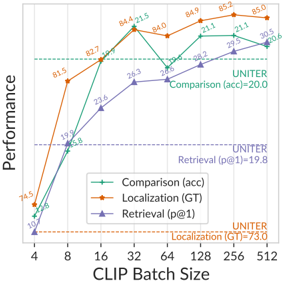
### Visual Description
## Chart: Performance vs. CLIP Batch Size
### Overview
This chart displays the performance of three different tasks (Comparison, Localization, and Retrieval) as a function of the CLIP Batch Size. The performance is measured in terms of accuracy (acc) for Comparison, ground truth (GT) for Localization, and precision at 1 (p@1) for Retrieval. The x-axis represents the CLIP Batch Size, and the y-axis represents the performance metric.
### Components/Axes
* **X-axis:** CLIP Batch Size, with values 4, 8, 16, 32, 64, 128, 256, 512.
* **Y-axis:** Performance (no specific units given).
* **Legend (bottom-left):**
* Green: Comparison (acc)
* Orange: Localization (GT)
* Purple: Retrieval (p@1)
* **Horizontal dashed lines:**
* Green: UNITER Comparison (acc) = 20.0
* Orange: UNITER Localization (GT) = 73.0
* Purple: UNITER Retrieval (p@1) = 19.8
### Detailed Analysis
* **Comparison (acc) - Green:**
* Trend: Initially increases sharply, then plateaus and fluctuates.
* Data Points:
* 4: 10.7
* 8: 19.9
* 16: 82.7
* 32: 84.4
* 64: 26.8
* 128: 28.2
* 256: 21.1
* 512: 30.5
* **Localization (GT) - Orange:**
* Trend: Increases rapidly at first, then plateaus.
* Data Points:
* 4: 74.5
* 8: 81.5
* 16: 82.7
* 32: 84.4
* 64: 84.0
* 128: 84.9
* 256: 85.2
* 512: 85.0
* **Retrieval (p@1) - Purple:**
* Trend: Increases, then plateaus.
* Data Points:
* 4: 5.8
* 8: 15.8
* 16: 23.6
* 32: 26.3
* 64: 26.8
* 128: 21.1
* 256: 29.5
* 512: 20.6
### Key Observations
* Localization (GT) consistently outperforms the other two tasks across all batch sizes.
* The performance of Comparison (acc) fluctuates significantly, especially after a batch size of 32.
* The performance of Retrieval (p@1) plateaus after a batch size of 32.
* The horizontal lines indicate the performance of UNITER, which serves as a baseline for comparison.
### Interpretation
The chart suggests that increasing the CLIP Batch Size initially improves the performance of all three tasks. However, after a certain point (around 32), the performance plateaus or even fluctuates. This indicates that there may be diminishing returns to increasing the batch size beyond a certain threshold.
Localization (GT) consistently achieves the highest performance, suggesting that it is the most effective task for the given model and data. The fluctuating performance of Comparison (acc) may indicate that it is more sensitive to the batch size or other factors.
The UNITER baseline provides a point of reference for evaluating the performance of the three tasks. The fact that the tasks often exceed the UNITER baseline suggests that the model is performing well.
</details>
Fig. 9: The SentenceBERT [53] cosine similarity between clues/inferences and MSCOCO captions; MSCOCO caption self-similarity included for reference. On average, clues are closer to MSCOCO captions than inferences.
<details>
<summary>Image 15 Details</summary>
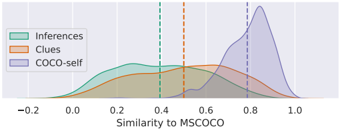
### Visual Description
## Density Plot: Similarity to MSCOCO
### Overview
The image is a density plot comparing the similarity of three different datasets ("Inferences", "Clues", and "COCO-self") to the MSCOCO dataset. The x-axis represents the similarity score, ranging from -0.2 to 1.0. The y-axis represents the density of data points at each similarity score. Vertical dashed lines indicate the approximate mean similarity for each dataset.
### Components/Axes
* **X-axis:** "Similarity to MSCOCO", ranging from -0.2 to 1.0 in increments of 0.2.
* **Y-axis:** Density (no explicit scale provided).
* **Legend (Top-Left):**
* "Inferences" (Sea Green)
* "Clues" (Orange)
* "COCO-self" (Lavender)
* **Vertical Dashed Lines:**
* Sea Green: Represents the mean similarity for "Inferences". Located at approximately 0.4.
* Orange: Represents the mean similarity for "Clues". Located at approximately 0.5.
* Lavender: Represents the mean similarity for "COCO-self". Located at approximately 0.8.
### Detailed Analysis
* **Inferences (Sea Green):** The density plot for "Inferences" starts around -0.2 and peaks around 0.3, then gradually decreases. The mean similarity is indicated by a sea green dashed line at approximately 0.4.
* **Clues (Orange):** The density plot for "Clues" starts around -0.1 and peaks around 0.5, then decreases. The mean similarity is indicated by an orange dashed line at approximately 0.5.
* **COCO-self (Lavender):** The density plot for "COCO-self" starts around 0.4 and peaks around 0.8, then decreases sharply. The mean similarity is indicated by a lavender dashed line at approximately 0.8.
### Key Observations
* "COCO-self" has the highest mean similarity to MSCOCO, followed by "Clues", and then "Inferences".
* The "COCO-self" distribution is more concentrated around its mean, while "Inferences" and "Clues" have wider distributions.
* The "Inferences" distribution has a longer tail towards lower similarity scores.
### Interpretation
The density plot illustrates how similar the "Inferences", "Clues", and "COCO-self" datasets are to the MSCOCO dataset. The "COCO-self" dataset, as expected, exhibits the highest similarity, suggesting it is most closely aligned with the MSCOCO data. "Clues" shows a moderate similarity, while "Inferences" has the lowest similarity and a broader range, indicating greater variability in its relationship to MSCOCO. The mean similarity lines provide a quick visual comparison of the central tendency for each dataset's similarity to MSCOCO.
</details>
We ran additional analyses to explore the textual similarity between Sherlock 's clues and inferences vs. literal image descriptions. For 2K images, we computed text overlap using S-BERT cosine similarity [53] between MS COCO captions and Sherlock clues/inferences. The result is in Fig. 9. As a baseline we include COCO self-similarity with held-out captions. Clues are more similar to COCO captions than inferences, presumably because they make reference to the same types of literal objects/actions that are described in literal captions.
## E Comparison Human Evaluation Set Details
We aim to sample a diverse and plausible set of candidate inferences for images to form our comparison set. Our process is a heuristic effort designed to elicit 'interesting' annotations from human raters. Even if the process isn't perfect for generating interesting candidates, because we solicit human ratings we show inferences to annotators and ask them to rate their plausibility, the resulting set will still be a valid representation of human judgment. We start by assuming all inferences could be sampled for a given image+region, and proceed to filter according to several heuristics.
First, we use a performant RN50x16 checkpoint as a means of judging plausibility of inferences. This checkpoint achieves 18.5/20.6/31.5 im2txt/txt2im/P@1 respectively on retrieval on v1.0 of the Sherlock corpus; this is comparable to the RN50x16 checkpoint we report performance on in our main results section. We use this checkpoint to score all validation/test (image+region, inference) possibilities.
Global filters. We assume that if the model is already retrieving its ground truth inference which high accuracy, the instance is probably not as interesting: for each image, we disqualify all inferences that receive a lower plausibility estimate from our RN50x16 checkpoint vs. the ground truth inference (this also discards the ground-truth inference). This step ensures that the negative inferences we sample are more plausible than the ground truth inference according to the model. Next, we reduce repetitiveness of our inference texts using two methods. First, we perform the same semantic de-duplication via hierarchical clustering as described in § 3: clustering is computed on SentenceBERT [53] representations of inferences ( all-MiniLM-L6-v2 ). We compute roughly 18K clusters (corresponding to 80% of the dataset size) and sample a single inference from each cluster: this results in 20% of the corpus being removed from consideration, but maintains diversity, because each of the 18K clusters is represented. Second, we perform a hard-deduplication by only allowing three verbatim copies of each inference to be sampled.
Local filters. After these global filters, we begin the iterative sampling process for each image+region. If, after all filtering, a given image+region has fewer than 20 candidates to select from, we do not consider it further. Then, in a greedy fashion, we build-up the candidate set by selecting the remaining inference with i)
the highest model plausibility ii) that is maximally dissimilar to the already sampled inferences for this image according to the SentenceBERT representations. Both of these objectives are cosine similarities in vector spaces (one between image and text, and one between text and text). We assign weights so that the image-text similarity (corresponding to RN50x16 plausibility) is 5x more important than the text-text dissimilarity (corresponding to SentenceBERT diversity). After iteratively constructing a diverse and plausible set of 10 inferences for a given image under this process, we globally disqualify the sampled inferences such that no inference is sampled more than once for each image (unless it is a verbatim duplicate, in which case, it may be sampled up to 3 times).
Finally, for all of the images we are able to sample a set of 10 inferences for, we sort by how promising they are collectively according to a weighted sum of: the (globally ranked) average length of the sampled inferences, the (globally ranked) diversity of the set of 10 (measured by mean all-pairs SentenceBERT cosine sim: lower=more diverse), and 5x the (globally ranked) average plausibility according to RN50x16 . We collect 2 human judgments for each of the 10 inferences for the top 500 images from the val/test sets (1K total) according to this heuristic ranking. The total is 20K human judgments, which formed v1 of the Sherlock comparison corpus. v1.1 has 19K judgments.
Crowdowrking details. For the comparison task, we designed an additional HIT to collect human feedback on the retrieved inferences. In the HIT, workers were presented with the images with the appropriate clue region highlighted. Then they were provided with the inferences and were asked to rate them on a likert scale of 1-3, with 1 as 'irrelevant' or 'verifiably incorrect', 2 as 'statement is probably true but there is a better highlighted region to support it', and 3 as 'statement is probably true and the highlighted region supports it'. A sample of evaluation HIT is shown in Fig. 13. Human agreement on this setup is reported as accuracy § 5.1.
## F Datasheet for Sherlock
In this section, we present a Datasheet [14,4] for Sherlock .
1. Motivation For Datasheet Creation
- Why was the dataset created? Sherlock was created to support the study of visual abductive reasoning. Broadly speaking, in comparison to corpora which focus on concrete, objective facets depicted within visual scenes (e.g., the presence/absence of objects), we collected Sherlock with the goal of better understanding the types of abductive inferences that people make about images. All abductive inferences carry uncertainty. We aim to study the inferences we collect, but do not endorse their objectivity, and do not advocate for use cases that risk perpetuating them.
- Has the dataset been used already? The annotations we collect are novel, but the images are sourced from two widely-used, existing datasets: Visual Genome [29] and VCR [75].
- What (other) tasks could the dataset be used for? Aside from our retrieval/localization setups, Sherlock could be useful as a pretraining corpus for models that aim to capture information about what people might assume about an image, rather than what is literally depicted in that image. One potentially promising case: if a malicious actor were posting emotionally manipulative content online, it might be helpful to study the types of assumptions people might make about their posts, rather than the literal contents of the post itself.
- Who funded dataset creation? This work was funded by DARPA MCS program through NIWC Pacific (N66001-19-2-4031), the DARPA SemaFor program, and the Allen Institute for AI.
## 2. Data composition
- What are the instances? We refer to the instances as clues/inferences, which are authored by crowdworkers. As detailed in the main text of the paper, a clue is a bounding box coupled with a free-text description of the literal contents of that bounding box. An inference is an abductive conclusion that the crowdworker thinks could be true about the clue.
- How many instances are there? There are 363K commonsense inferences grounded in 81K Visual Genome images and 22K VCR images.
- What data does each instance consist of? Each instance contains 3 things: a clue, a short English literal description of a portion of the image, an inference, a short English description of an inference associated with the clue that aims to be not immediately obvious from the image content, and a bounding box specified with the region of interest.
- Is there a label or target associated with each instance? We discuss in the paper several tasks, which involve predicting inferences, bounding boxes, etc.
- Is any information missing from individual instances? Not systematically - in rare circumstances, we had to discard some instances because of malformed crowdworking inputs.
- Are relationships between individual instances made explicit? Yes - the annotations for a given image are all made by the same annotator and are aggregated based on that.
- Does the dataset contain all possible instances or is it a sample? This is a natural language sample of abductive inferences; it would probably be impossible to enumerate all of them.
- Are there recommended data splits? Yes, they are provided.
- Are there any errors, sources of noise, or redundancies in the dataset? If so, please provide a description. Yes: some annotations are repeated by crowdworkers. When we collected the corpus of Likert judgments for evaluation, we performed both soft and hard deduplication steps, ensuring that the text people were evaluating wasn't overly repetitive.
- Is the dataset self-contained, or does it link to or otherwise rely on external resources (e.g., websites, tweets, other datasets)? It
- links to the images provided by Visual Genome and VCR. If images were removed from those corpora, our annotations wouldn't be grounded.
## 3. Collection Process
- What mechanisms or procedures were used to collect the data? We collected data using Amazon Mechanical Turk.
- How was the data associated with each instance acquired? Was the data directly observable (e.g., raw text, movie ratings), reported by subjects (e.g., survey responses), or indirectly inferred or derived from other data? Paid crowdworkers provided the annotations.
- If the dataset is a sample from a larger set, what was the sampling strategy (e.g., deterministic, probabilistic with specific sampling probabilities)? We downsample common image types via a semantic deduplication step. Specifically, some of our crowdworkers were rightfully pointing out that it's difficult to say interesting things about endless pictures of zebra; these types of images are common in visual genome. So, we performed hierarchical clustering on the images from that corpus, and then sampled 1 image from each of 80K clusters. The result is a downsampling of images with similar feature representations. We stopped receiving comments about zebras after this deduplication step.
- Who was involved in the data collection process (e.g., students, crowdworkers, contractors) and how were they compensated (e.g., how much were crowdworkers paid)? Crowdworkers constructed the corpus via a mechanical turk HIT we designed. We our target was to pay $ 15/hour. A post-hoc analysis revealed that crowdworkers were paid a median $ 12/hr and a mean of $ 16-20/hour, depending on the round.
- Over what timeframe was the data collected? Does this timeframe match the creation timeframe of the data associated with the instances (e.g., recent crawl of old news articles)? If not, please describe the timeframe in which the data associated with the instances was created. The main data was collected in February 2021.
## 4. Data Preprocessing
- Was any preprocessing/cleaning/labeling of the data done (e.g., discretization or bucketing, tokenization, part-of-speech tagging, SIFT feature extraction, removal of instances, processing of missing values)? Yes, significant preprocessing was conducted. The details are in
- Was the 'raw' data saved in addition to the preprocessed, cleaned, labeled data (e.g., to support unanticipated future uses)? If so, please provide a link or other access point to the 'raw' data. The concept of 'raw' data is difficult to specify in our case. We detail the data we release in the main body of the paper.
- Is the software used to preprocess/clean/label the instances available? If so, please provide a link or other access point. We plan
to release some software related to modeling, and also have provided some appendices that detail the crowdworking labelling efforts.
- Does this dataset collection/processing procedure achieve the motivation for creating the dataset stated in the first section of this datasheet? If not, what are the limitations? We think so. It's difficult to fully specify the abductive reasoning process of humans. But we think our work goes a step beyond existing corpora.
5. Dataset Distribution
- How will the dataset be distributed?
The dataset is available at http://visualabduction.com/ .
- When will the dataset be released/first distributed? What license (if any) is it distributed under?
The dataset is released under CC-BY 4.0 and the code is released under Apache 2.0.
- Are there any copyrights on the data?
The copyright for the new annotations is held by AI2 with all rights reserved.
- Are there any fees or access restrictions?
No - our annotations are freely available.
6. Dataset Maintenance
- Who is supporting/hosting/maintaining the dataset?
The dataset is hosted and maintained by AI2.
- Will the dataset be updated? If so, how often and by whom?
We do not currently have plans to update the dataset regularly.
- Is there a repository to link to any/all papers/systems that use this dataset?
No, but if future work finds this work helpful, we hope they will consider citing this work.
- If others want to extend/augment/build on this dataset, is there a mechanism for them to do so?
People are free to remix, use, extend, build, critique, and filter the corpus: we would be excited to hear more about use cases either via our github repo, or via personal correspondence.
7. Legal and Ethical Considerations
- Were any ethical review processes conducted (e.g., by an institutional review board)?
Crowdworking studies involving no personal disclosures of standard computer vision corpora are not required by our IRB to be reviewed by them. While we are not lawyers, the opinion is based on United States federal regulation 45 CFR 46, under which this study qualifies and as exempt and does not require IRB review.
<details>
<summary>Image 16 Details</summary>

### Visual Description
Icon/Small Image (24x25)
</details>
- (a) Wedo not collect personal information. Information gathered is strictly limited to general surveys probing at general world knowledge.
- (b) We take precaution to anonymize Mechanical WorkerIDs in a manner that the identity of the human subjects cannot be readily ascertained (directly or indirectly).
- (c) We do not record or include any interpersonal communication or contact between investigation and subject.
## Specifically:
- We do not have access to the underlying personal records and will record information in such a manner that the identity of the human subject cannot readily be ascertained.
- Information generated by participants is non-identifying without turning over the personal records attached to these worker IDs.
- We do not record or include any interpersonal communication or contact between investigation and subject.
## - Does the dataset contain data that might be considered confidential?
Potentially, yes. Most of the content in the corpus that would be considered potentially private/confidential would likely be depicted in the images of Visual Genome (VCR are stills from movies where actors onscreen are presumably aware of their public actions). While we distribute no new images, if an image is removed from Visual Genome (or VCR), it will be removed from our corpus as well.
- Does the dataset contain data that, if viewed directly, might be offensive, insulting, threatening, or might otherwise cause anxiety? If so, please describe why
As detailed in the main body of the paper, we have searched for toxic content using a mix of close reading of instances and the Perspective API from Google. In doing this, we have identified a small fraction of instances that could be construed as offensive. For example, in a sample of 30K instances, we discovered 6 cases that arguably offensive (stigmatizes depicted people's weight based on visual cues). Additionally, some of the images from VCR, gathered from popular movies, can depict potentially offensive/disturbing content. The screens can be 'R Rated,' e.g., some images depict movie violence with zombies, some of the movies have Nazis as villains, and thus, some of the screenshots depict Nazi symbols. We reproduce VCR's content warning about such imagery in § A.2.
## - Does the dataset relate to people?
Yes: the corpus depicts people, and the annotations are frequently abductive inferences that relate to people. As detailed in the main body of the paper, 36% of inferences (or more) are grounded on people; and, many inferences that are not directly grounded on people may relate to them. Moreover, given that we aim to study abduction, which is an intrinsi-
cally subjective process, the annotations themselves are, at least in part, reflections of the annotators themselves.
- Does the dataset identify any subpopulations (e.g., by age, gender)?
We don't explicitly disallow identification by gender or age, e.g., in the clues/inferences, people often will use gendered pronouns or aged language in reference to people who are depicted (e.g., 'the old man'). Furthermore, while we undertook the sample/statistical toxicity analysis detailed in the main body of the paper, we have not manually verified that all 363K clue/inference pairings are free of any reference to a subpopulation. For example, we observed one case wherein an author speculated about the country-of-origin of an individual being Morroco, clued by the observation that they were wearing a fez. Like the other observations in our corpus, it's not necessarily the case that this is an objectively true inference, even if the fez is a hat that is worn in Morroco.
- Is it possible to identify individuals (i.e., one or more natural persons), either directly or indirectly (i.e., in combination with other data) from the dataset?
The data collection process specifically instructs workers to avoid identifying any individual in particular (e.g., actors in movie scenes). Instead, they are specifically instructed to use general identifiers to describe people (e.g. 'student', 'old man', 'engineer'). In our experience with working with the corpus, we haven't encountered any instances where our annotators specifically identified anyone, e.g., by name. The images contained in VCR and Visual Genome that we source from do contain uncensored images of faces. But, if images are removed from those corpora, they will be removed from Sherlock as well, as we do not plan to re-host the images ourselves.
<details>
<summary>Image 17 Details</summary>
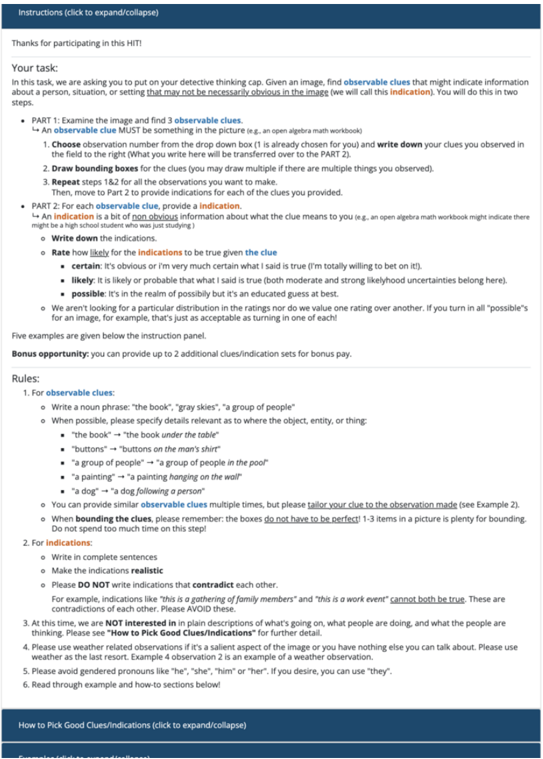
### Visual Description
## Instructions: Detective Task
### Overview
The image presents instructions for a task where the user must identify observable clues in an image and provide indications based on those clues. The instructions are divided into two parts: finding observable clues and providing indications for each clue. The document also includes rules and guidelines for completing the task.
### Components/Axes
* **Title:** Instructions (click to expand/collapse)
* **Introduction:** Thanks for participating in this HIT!
* **Task Description:**
* Find observable clues that might indicate information about a person, situation, or setting.
* The clues should not be necessarily obvious.
* **Part 1: Examine the image and find 3 observable clues.**
* An observable clue MUST be something in the picture (e.g., an open algebra math workbook).
* Steps:
1. Choose observation number from the drop down box (1 is already chosen for you) and write down your clues you observed in the field to the right (What you write here will be transferred over to the PART 2).
2. Draw bounding boxes for the clues (you may draw multiple if there are multiple things you observed).
3. Repeat steps 1&2 for all the observations you want to make.
Then, move to Part 2 to provide indications for each of the clues you provided.
* **Part 2: For each observable clue, provide a indication.**
* An indication is a bit of non obvious information about what the clue means to you (e.g., an open algebra math workbook might indicate there might be a high school student who was just studying).
* Write down the indications.
* Rate how likely for the indications to be true given the clue:
* **certain:** It's obvious or i'm very much certain what I said is true (I'm totally willing to bet on it!).
* **likely:** It is likely or probable that what I said is true (both moderate and strong likelyhood uncertainties belong here).
* **possible:** It's in the realm of possibily but it's an educated guess at best.
* We aren't looking for a particular distribution in the ratings nor do we value one rating over another. If you turn in all "possible"s for an image, for example, that's just as acceptable as turning in one of each!
* **Bonus opportunity:** you can provide up to 2 additional clues/indication sets for bonus pay.
* **Rules:**
1. **For observable clues:**
* Write a noun phrase: "the book", "gray skies", "a group of people"
* When possible, please specify details relevant as to where the object, entity, or thing:
* "the book" → "the book under the table"
* "buttons" → "buttons on the man's shirt"
* "a group of people" → "a group of people in the pool"
* "a painting" → "a painting hanging on the wall"
* "a dog" → "a dog following a person"
* You can provide similar observable clues multiple times, but please tailor your clue to the observation made (see Example 2).
* When bounding the clues, please remember: the boxes do not have to be perfect! 1-3 items in a picture is plenty for bounding. Do not spend too much time on this step!
2. **For indications:**
* Write in complete sentences
* Make the indications realistic
* Please DO NOT write indications that contradict each other.
* For example, indications like "this is a gathering of family members" and "this is a work event" cannot both be true. These are contradictions of each other. Please AVOID these.
3. At this time, we are NOT interested in in plain descriptions of what's going on, what people are doing, and what the people are thinking. Please see "How to Pick Good Clues/Indications" for further detail.
4. Please use weather related observations if it's a salient aspect of the image or you have nothing else you can talk about. Please use weather as the last resort. Example 4 observation 2 is an example of a weather observation.
5. Please avoid gendered pronouns like "he", "she", "him" or "her". If you desire, you can use "they'".
6. Read through example and how-to sections below!
* **Footer:** How to Pick Good Clues/Indications (click to expand/collapse)
### Detailed Analysis or ### Content Details
The instructions outline a two-part task that involves identifying observable clues in an image and providing indications based on those clues. The instructions emphasize the importance of providing non-obvious information and avoiding contradictions in the indications. The document also provides rules and guidelines for completing the task, including examples of how to write observable clues and indications.
### Key Observations
* The task requires the user to think critically and creatively to identify clues and provide indications.
* The instructions emphasize the importance of providing non-obvious information and avoiding contradictions.
* The document provides clear rules and guidelines for completing the task.
### Interpretation
The instructions are designed to guide users through a task that requires them to analyze an image and draw inferences based on observable clues. The task is intended to be challenging and requires the user to think critically and creatively. The instructions emphasize the importance of providing non-obvious information and avoiding contradictions, which suggests that the task is designed to assess the user's ability to think logically and draw reasonable conclusions. The inclusion of rules and guidelines ensures that all users approach the task in a consistent manner.
</details>
Fig. 10: Instructions for Sherlock data collection HIT.
<details>
<summary>Image 18 Details</summary>
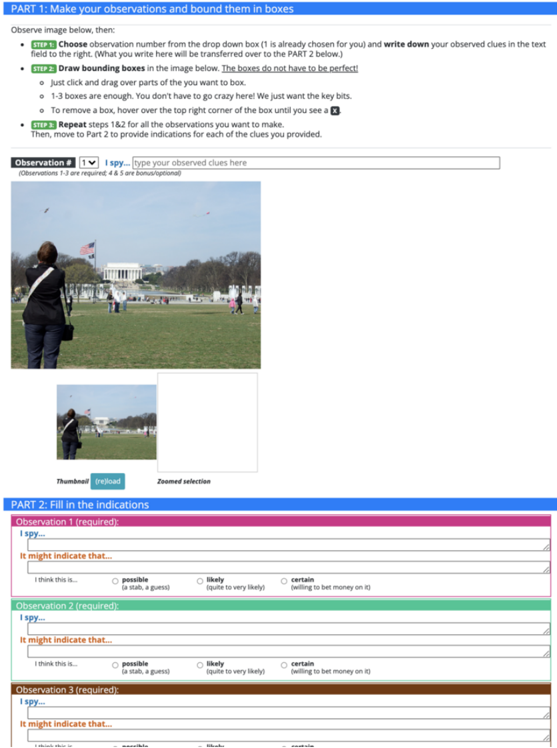
### Visual Description
## Form: Observation and Indication Task
### Overview
The image shows a form divided into two parts. Part 1 involves observing an image and marking specific elements within it. Part 2 requires filling in indications based on the observations made in Part 1. The form includes instructions, input fields, and radio button selections.
### Components/Axes
**Part 1: Make your observations and bound them in boxes**
* **Instructions:**
* Step 1: Choose observation number from the drop-down box (1 is already chosen for you) and write down your observed clues in the text field to the right. (What you write here will be transferred over to the PART 2 below.)
* Step 2: Draw bounding boxes in the image below. The boxes do not have to be perfect!
* Just click and drag over parts of the you want to box.
* 1-3 boxes are enough. You don't have to go crazy here! We just want the key bits.
* To remove a box, hover over the top right corner of the box until you see a X.
* Step 3: Repeat steps 1&2 for all the observations you want to make. Then, move to Part 2 to provide indications for each of the clues you provided.
* **Observation Input:**
* Dropdown menu labeled "Observation #" with the value "1" selected.
* Text input field labeled "I spy..." with the prompt "type your observed clues here".
* Note: "(Observations 1-3 are required: 4 & 5 are bonus/optional)"
* **Image:**
* A photograph showing a person with their back to the viewer, taking a picture of the Lincoln Memorial in Washington D.C.
* A smaller thumbnail of the same image with a "Thumbnail (reload)" label below it.
* A "Zoomed selection" area, which is currently blank.
**Part 2: Fill in the indications**
* **Observation 1 (required):**
* "I spy..." - Text input field.
* "It might indicate that..." - Text input field.
* Radio button options:
* "I think this is..."
* "possible (a stab, a guess)"
* "likely (quite to very likely)"
* "certain (willing to bet money on it)"
* **Observation 2 (required):**
* "I spy..." - Text input field.
* "It might indicate that..." - Text input field.
* Radio button options:
* "I think this is..."
* "possible (a stab, a guess)"
* "likely (quite to very likely)"
* "certain (willing to bet money on it)"
* **Observation 3 (required):**
* "I spy..." - Text input field.
* "It might indicate that..." - Text input field.
* Radio button options:
* "I think this is..."
* "possible (a stab, a guess)"
* "likely (quite to very likely)"
* "certain (willing to bet money on it)"
### Detailed Analysis or ### Content Details
* The form is designed to guide users through a process of observation and inference.
* Part 1 focuses on identifying and marking specific elements in an image.
* Part 2 requires users to interpret the significance of their observations and express their level of confidence in their interpretations.
* The radio button options in Part 2 provide a structured way for users to indicate their certainty, ranging from "possible" to "certain."
* Observations 1-3 are required, while 4 and 5 are optional.
### Key Observations
* The image in Part 1 shows a common tourist scene, suggesting that the observations might relate to landmarks, people, or activities.
* The "Zoomed selection" area in Part 1 is currently empty, indicating that the user has not yet selected a specific area of the image to zoom in on.
* The form uses clear and concise language to guide users through the task.
### Interpretation
The form is designed to elicit critical thinking and analytical skills. By requiring users to make observations, interpret their significance, and express their level of confidence, the form encourages a systematic approach to understanding visual information. The task could be used in various contexts, such as training intelligence analysts, improving observational skills, or assessing cognitive abilities. The form's structure promotes a clear and logical thought process, making it a valuable tool for enhancing analytical reasoning.
</details>
Fig. 11: Template setup for Sherlock data collection HIT. Instructions are shown in Figure 10
<details>
<summary>Image 19 Details</summary>
### Visual Description
## Instructions: Image and Observation Pair Evaluation
### Overview
The image presents instructions for a task involving the evaluation of image and observation pairs. The task consists of three main parts: assessing the appropriateness of bounding boxes, evaluating the reasonableness of the observation, and determining how interesting the observation is.
### Components/Axes
The image contains the following elements:
* **Header:** "Instructions (click to expand/collapse)" and "Thanks for participating in this HIT!"
* **Task Description:** A general introduction to the task.
* **Evaluation Criteria:**
* Appropriateness of bounding boxes (Appropriate, Mostly Appropriate, Entirely Off).
* Reasonableness of the observation (Highly Reasonable, Relatively Reasonable, Unreasonable).
* Interestingness of the observation (Very Interesting, Interesting, Caption-like, Not At All Interesting).
* **Note:** A reminder not to overthink the answers and that the first judgement is great.
### Detailed Analysis or ### Content Details
**Task Description:**
The task involves being given an image and an observation pair (clues + indication). The task is to:
1. **Determine if the bounding boxes are appropriate for the observation pair.**
* **Appropriate:** Bounding boxes all the important elements. It is acceptable if the observation specifies "flowers" and 1-3 flowers are boxed, even if there are other flowers in the picture, as long as KEY elements are covered.
* **Mostly Appropriate:** Most of the important elements are boxed, but there are missing some key elements.
* **Entirely Off:** The boxes are entirely off topic or they are missing.
2. **Evaluate how reasonable the observation pair is.**
* **Highly Reasonable:** The observation totally makes sense given the image.
* **Relatively Reasonable:** The observation makes sense given the image, though perhaps the evaluator doesn't fully agree on the details of the observation.
* **Unreasonable:** The observation is nonsensical for the image.
* **Note:** The task is to evaluate reasonability or validity of the assumptions made in the observation, not the truthfulness of the observation.
* **Example:** In a shot where Harry Potter is standing next to Dumbledore, the observation reads: "The old man is the boy's grandfather". While the movie plot tells us this is not true, it is still a valid guess for someone who hasn't seen the movie. Therefore, the observation is considered highly or relatively reasonable (depending on how strongly you agree).
3. **Finally, tell us how interesting the observation is.**
* **Very Interesting:** This is a clever or an astute observation.
* **Interesting:** This is an interesting observation.
* **Caption-like:** This observation reads too much like a caption (just states what's obviously happening in the picture).
* **Not At All Interesting:** The evaluator wouldn't say this is interesting at all.
**Note:**
The instructions emphasize not overthinking the answers and trusting the first judgement.
### Key Observations
* The instructions provide clear criteria for evaluating image and observation pairs.
* The example clarifies the distinction between truthfulness and reasonability.
* The instructions encourage quick and intuitive responses.
### Interpretation
The instructions outline a human intelligence task (HIT) that requires subjective evaluation of image and observation pairs. The task aims to assess the quality of observations based on their appropriateness, reasonableness, and interestingness. The instructions emphasize the importance of considering the assumptions made in the observation rather than its factual accuracy. The example provided helps to clarify this distinction and guide the evaluator's judgment. The overall goal is to gather human insights on the relationship between images and their corresponding observations.
</details>
<details>
<summary>Image 20 Details</summary>
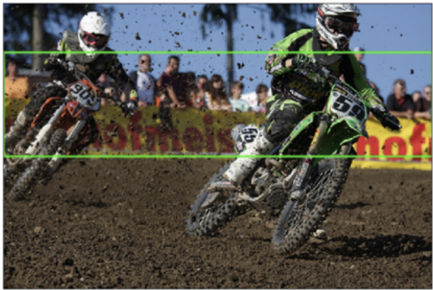
### Visual Description
## Photograph: Motocross Race
### Overview
The image is a photograph of a motocross race, capturing two racers in action on a dirt track. The foreground is filled with dirt and debris kicked up by the motorcycles, while a crowd of spectators is visible in the background.
### Components/Axes
* **Foreground:** Dirt track with visible tire tracks and kicked-up debris.
* **Middle Ground:** Two motocross racers on their motorcycles.
* **Background:** A crowd of spectators behind a banner.
* **Racers:**
* Racer 1: On the left, riding a red and white motorcycle with the number "909".
* Racer 2: On the right, riding a green and black motorcycle with the number "59".
* **Banner:** A yellow banner with brown text, partially obscured. The text appears to be "Hotmak".
### Detailed Analysis or Content Details
* **Racer 1 (Left):**
* Motorcycle: Predominantly red and white.
* Number: "909" is visible on the front of the motorcycle.
* Gear: White helmet, dark riding gear.
* **Racer 2 (Right):**
* Motorcycle: Predominantly green and black.
* Number: "59" is visible on the front of the motorcycle.
* Gear: White helmet, green and black riding gear.
* **Background Details:**
* Spectators: A crowd of people is visible behind the banner.
* Banner Text: The banner appears to say "Hotmak".
* **Environmental Conditions:**
* Weather: Sunny, with a clear blue sky visible in the upper portion of the image.
* Track Condition: Dry and dusty, with significant amounts of dirt being kicked up by the motorcycles.
### Key Observations
* The racers are in close proximity, suggesting a competitive moment in the race.
* The dirt and debris indicate high speed and intense action.
* The crowd suggests a well-attended event.
### Interpretation
The photograph captures the intensity and excitement of a motocross race. The close proximity of the racers, the flying dirt, and the presence of a crowd all contribute to a sense of high-stakes competition. The image highlights the skill and daring of the racers as they navigate the challenging terrain.
</details>
Fig. 12: Instructions and template setup for Sherlock data validation HIT.
<details>
<summary>Image 21 Details</summary>
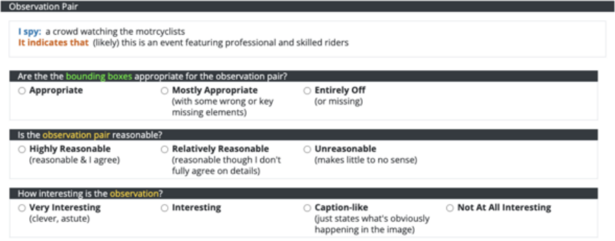
### Visual Description
## Form: Observation Pair Evaluation
### Overview
The image shows a form for evaluating an "Observation Pair." It includes the observation itself, an interpretation, and three multiple-choice questions about the observation's quality.
### Components/Axes
The form is divided into four sections:
1. **Observation Pair:** Contains the observation and its interpretation.
2. **Bounding Boxes Appropriateness:** Assesses if the bounding boxes are appropriate.
3. **Observation Pair Reasonableness:** Assesses the reasonableness of the observation pair.
4. **Observation Interest:** Assesses how interesting the observation is.
### Detailed Analysis
**1. Observation Pair:**
* **I spy:** a crowd watching the motrcyclists
* **It indicates that:** (likely) this is an event featuring professional and skilled riders
**2. Are the the bounding boxes appropriate for the observation pair?**
* Appropriate
* Mostly Appropriate (with some wrong or key missing elements)
* Entirely Off (or missing)
**3. Is the observation pair reasonable?**
* Highly Reasonable (reasonable & I agree)
* Relatively Reasonable (reasonable though I don't fully agree on details)
* Unreasonable (makes little to no sense)
**4. How interesting is the observation?**
* Very Interesting (clever, astute)
* Interesting
* Caption-like (just states what's obviously happening in the image)
* Not At All Interesting
### Key Observations
* The observation describes a crowd watching motorcyclists.
* The interpretation suggests the event features professional and skilled riders.
* The form uses multiple-choice questions to evaluate the observation pair based on bounding box appropriateness, reasonableness, and interest.
### Interpretation
The form is designed to gather feedback on the quality of observation pairs. The multiple-choice questions allow for a structured assessment of different aspects of the observation, such as its accuracy, relevance, and level of insight. The "Observation Pair" section provides the context for the evaluation, while the subsequent questions allow the evaluator to express their opinion on the observation's quality.
</details>
<details>
<summary>Image 22 Details</summary>
### Visual Description
## Task Instructions and Image Analysis
### Overview
The image presents instructions for a task involving rating machine-generated statements about images with highlighted regions. The task requires evaluating whether the statements are "Good," "Okay," or "Bad" based on the highlighted region's relevance to the statement. An example image is provided, along with two machine-generated statements to be evaluated.
### Components/Axes
* **Header:**
* "Instructions (click to expand/collapse)"
* "Thanks for participating in this HIT!"
* "Your task:"
* **Task Instructions:**
* The task involves rating machine predictions about images with highlighted regions.
* Rating scale: Good, Okay, Bad.
* "Good": probably or definitely correct, AND the region is the best part of the image to support the conclusion.
* "Okay": the sentence is probably correct for the scene, BUT there is definitely a better region in the image that would support the conclusion.
* "Bad": there is little to no evidence in the image for the conclusion, or the conclusion is verifiably false.
* "IMPORTANT: you MUST take the region of the image as a basis of deciding whether the image is Good or Okay."
* **Notes:**
* "Please assess the statements individually."
* Example provided regarding statement consistency.
* "Please be forgiving of minor spelling, grammar, and plural (e.g., "man" vs. "men") errors."
* **Examples:**
* "Examples (click to expand/collapse)"
* **Image:**
* A still from a movie or TV show, featuring three people in what appears to be a bar or restaurant.
* A "Lite" beer sign is highlighted with a green box.
* Text above the image: "(Click on the image to view the original.)"
* "MOVIECLIPS.com" watermark at the bottom of the image.
* **Machine Statements:**
* "Machine statement 1: "${machine\_statement\_1}""
* Radio buttons for "Good," "Okay," and "Bad" with corresponding descriptions.
* Good: statement is true for image, the region highlighted is the best
* Okay: statement could be true, but a different region would be better, or I can't tell for sure it's true.
* Bad: statement is verifiably incorrect, is not justified by the image nor the region, or is irrelevant.
* "Machine statement 2: "${machine\_statement\_2}""
* Radio buttons for "Good," "Okay," and "Bad" with corresponding descriptions.
* Good: statement is true for image, the region highlighted is the best
* Okay: statement could be true, but a different region would be better, or I can't tell for sure it's true.
* Bad: statement is verifiably incorrect, is not justified by the image nor the region, or is irrelevant.
### Detailed Analysis or ### Content Details
The image provides a clear set of instructions for a human-in-the-loop task. The task requires the user to evaluate machine-generated statements based on a highlighted region in an image. The instructions emphasize the importance of considering the highlighted region when making a judgment. The example image shows a scene with a highlighted beer sign, and the user must decide if the machine-generated statements accurately reflect the content and relevance of that region.
### Key Observations
* The task relies on human judgment to assess the quality of machine predictions.
* The highlighted region serves as the primary focus for evaluation.
* The instructions provide clear criteria for each rating category (Good, Okay, Bad).
* The machine statements are placeholders "${machine\_statement\_1}" and "${machine\_statement\_2}", indicating that the actual statements would be dynamically generated during the task.
### Interpretation
The image describes a task designed to evaluate the performance of machine learning models in understanding and interpreting images. By having humans rate the machine's statements, the task aims to gather data that can be used to improve the accuracy and reliability of these models. The emphasis on the highlighted region suggests that the task is specifically designed to assess the model's ability to identify and understand the significance of specific objects or areas within an image. The task is part of a Human Intelligence Task (HIT).
</details>
<details>
<summary>Image 23 Details</summary>
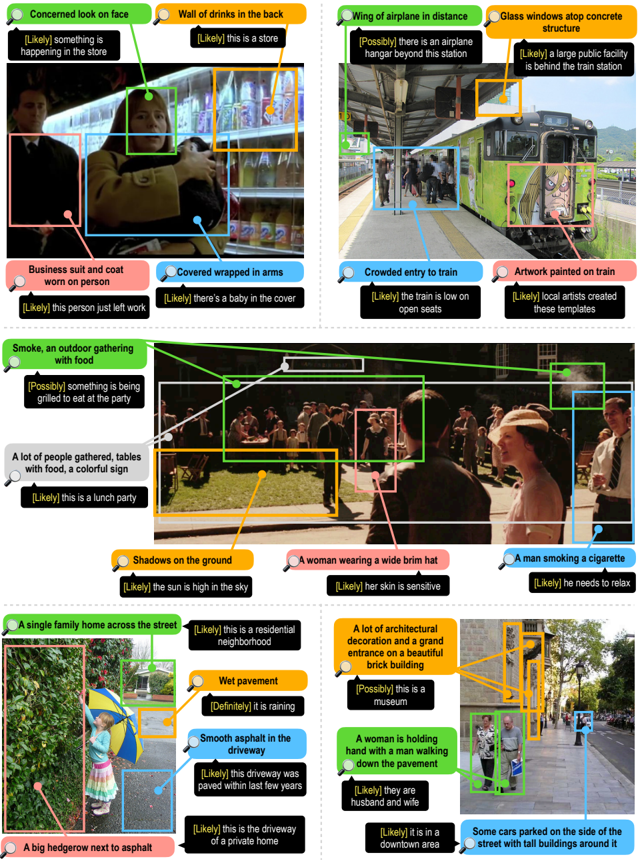
### Visual Description
## Image Analysis: Scene Annotations
### Overview
The image presents a collage of six different scenes, each annotated with bounding boxes and descriptive text. The annotations provide details about the objects, people, and activities within each scene, along with likelihood assessments.
### Components/Axes
Each scene is analyzed with the following elements:
* **Scene Image:** A photograph or still image capturing a specific moment or location.
* **Bounding Boxes:** Rectangular outlines highlighting specific objects or regions of interest within the scene. Each box is associated with a description.
* **Descriptive Text:** Short phrases or sentences providing information about the content within the bounding box.
* **Likelihood Assessment:** A bracketed statement (e.g., "[Likely]", "[Possibly]", "[Definitely]") indicating the confidence level associated with the description.
* **Color-Coded Annotations:** Each annotation type (object, person, activity) is associated with a specific color for easy identification.
### Detailed Analysis or Content Details
Here's a breakdown of each scene:
1. **Scene 1 (Top-Left):**
* **Concerned look on face (Green):** A person with a concerned expression. [Likely] something is happening in the store.
* **Wall of drinks in the back (Orange):** A shelf stocked with beverages. [Likely] this is a store.
* **Business suit and coat worn on person (Pink):** A person wearing formal attire. [Likely] this person just left work.
* **Covered wrapped in arms (Blue):** A person holding something wrapped in their arms. [Likely] there's a baby in the cover.
2. **Scene 2 (Top-Right):**
* **Wing of airplane in distance (Black):** A distant airplane wing. [Possibly] there is an airplane hangar beyond this station.
* **Glass windows atop concrete structure (Orange):** A building with glass windows. [Likely] a large public facility is behind the train station.
* **Crowded entry to train (Blue):** People boarding a train. [Likely] the train is low on open seats.
* **Artwork painted on train (Pink):** Graffiti or artwork on the side of the train. [Likely] local artists created these templates.
3. **Scene 3 (Middle):**
* **Smoke, an outdoor gathering with food (Green):** Smoke rising in an outdoor setting with people and food. [Possibly] something is being grilled to eat at the party.
* **A lot of people gathered, tables with food, a colorful sign (Orange):** A gathering of people around tables with food. [Likely] this is a lunch party.
* **Shadows on the ground (Orange):** Shadows cast on the ground. [Likely] the sun is high in the sky.
* **A woman wearing a wide brim hat (Pink):** A woman wearing a hat. [Likely] her skin is sensitive.
* **A man smoking a cigarette (Blue):** A man smoking. [Likely] he needs to relax.
4. **Scene 4 (Bottom-Left):**
* **A single family home across the street (Green):** A house across the street. [Likely] this is a residential neighborhood.
* **Wet pavement (Orange):** Pavement that appears wet. [Definitely] it is raining.
* **Smooth asphalt in the driveway (Blue):** A driveway made of asphalt. [Likely] this driveway was paved within last few years.
* **A big hedgerow next to asphalt (Pink):** A large hedge next to the asphalt. [Likely] this is the driveway of a private home.
5. **Scene 5 (Bottom-Right):**
* **A lot of architectural decoration and a grand entrance on a beautiful brick building (Orange):** A building with ornate architectural details. [Possibly] this is a museum.
* **A woman is holding hand with a man walking down the pavement (Green):** A couple walking hand-in-hand. [Likely] they are husband and wife.
* **Some cars parked on the side of the street with tall buildings around it (Blue):** Cars parked on a street with tall buildings. [Likely] it is in a downtown area.
### Key Observations
* The annotations provide contextual information about the scenes, going beyond simple object detection.
* The likelihood assessments add a layer of uncertainty, acknowledging that the descriptions are interpretations rather than definitive statements.
* The color-coding helps to quickly identify the different types of annotations.
### Interpretation
The image demonstrates a scene understanding task, where the goal is to analyze visual content and provide meaningful descriptions. The annotations combine object detection with contextual reasoning to infer activities, relationships, and environmental conditions. The use of likelihood assessments acknowledges the inherent ambiguity in visual interpretation. The variety of scenes showcases the model's ability to generalize across different environments and situations.
</details>
Fig. 13: Instructions and template setup for Sherlock model evaluation HIT.
<!-- image -->
<!-- image -->
Fig. 14: Examples of clues and inference pair annotations in Sherlock over images from Visual Genome and VCR. For each observation pair , an inference (speech bubble) is grounded in a concrete clue (color bubble) present in an image. confidence score (in the order of decreasing confidence: 'Definitely' > 'Likely' > 'Possibly') for each inference is shown in yellow.
<!-- image -->