# SimLOD: Simultaneous LOD Generation and Rendering
## SimLOD: Simultaneous LOD Generation and Rendering
Markus Schütz, Lukas Herzberger, Michael Wimmer
TU Wien
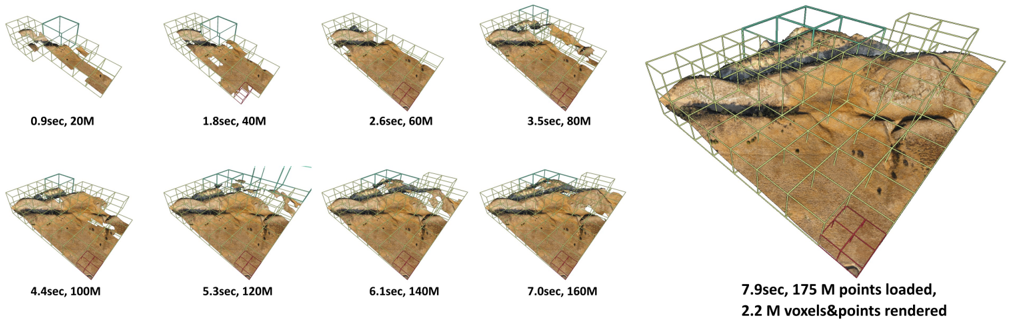
Figure 1: State-of-the-art LOD generation approaches require users to wait until the entire data set is processed before they are able to view it. Our approach incrementally constructs an LOD structure directly on the GPU while points are being loaded from disk, and immediately displays intermediate results. Loading the depicted point cloud was bottlenecked to 22M points/sec by the industry-standard but CPUintensive compression format (LAZ). Our approach is able to handle up to 580M points/sec while still rendering the loaded data in real time.
<details>
<summary>Image 1 Details</summary>
### Visual Description
## Progressive 3D Point Cloud Rendering Sequence
### Overview
The image displays a sequence of eight 3D renderings of a terrain model, illustrating the progressive loading and rendering of point cloud data over time. The sequence progresses from a sparse, initial representation to a dense, fully detailed final model. A larger, final rendering is featured prominently on the right side.
### Components/Axes
* **Visual Elements:** Each frame shows a 3D perspective view of a terrain surface (appearing as a brown, textured landscape) enclosed within a wireframe bounding box. The bounding box is composed of green and red grid lines.
* **Labels:** Each of the eight smaller frames has a text label directly beneath it, indicating the elapsed time and the number of points loaded at that stage.
* **Final Frame Label:** The large, final rendering on the right has a detailed label below it specifying the final time, total points loaded, and the number of voxels and points rendered.
* **Spatial Layout:** The eight progressive stages are arranged in two rows of four, moving from top-left to bottom-right. The final, detailed rendering occupies the right third of the image.
### Detailed Analysis
The sequence documents a loading and rendering process. The data for each stage is as follows:
1. **Stage 1 (Top-Left):** `0.9sec, 20M` - Initial sparse point cloud.
2. **Stage 2:** `1.8sec, 40M` - Density increases.
3. **Stage 3:** `2.6sec, 60M` - Terrain features become more defined.
4. **Stage 4:** `3.5sec, 80M` - Continued densification.
5. **Stage 5 (Bottom-Left):** `4.4sec, 100M` - Surface details are clearer.
6. **Stage 6:** `5.3sec, 120M` - High-density point cloud.
7. **Stage 7:** `6.1sec, 140M` - Near-final density.
8. **Stage 8:** `7.0sec, 160M` - Very dense point cloud.
9. **Final Render (Right):** `7.9sec, 175 M points loaded, 2.2 M voxels&points rendered` - The culmination of the process, showing the fully rendered model with both point and voxel data.
**Trend Verification:** The visual trend across the eight small frames is a clear increase in point density and surface detail. The terrain becomes progressively less transparent and more solid-looking. The time between stages increases non-linearly (e.g., +0.9s, +0.8s, +0.9s, +0.9s, +0.9s, +0.8s, +0.9s, +0.9s), suggesting a roughly constant data throughput rate as more points are loaded.
### Key Observations
* **Non-Linear Time Progression:** While the point count increases in steady 20M increments for the first eight stages, the time increments are not perfectly uniform, hovering around 0.8-0.9 seconds per 20M points.
* **Final Stage Data:** The final stage introduces a new metric: **2.2 M voxels**. This indicates a transition from a pure point cloud to a volumetric (voxel-based) representation for the final rendering, which is a more complex data structure.
* **Visual Fidelity:** The visual improvement between stages is most dramatic in the early stages (e.g., from 20M to 60M points). The difference between the later stages (e.g., 140M to 160M) is more subtle, suggesting diminishing visual returns for added data beyond a certain density.
* **Spatial Grounding:** The legend (the text labels) is consistently placed directly below its corresponding image frame. The final, summary label is centered beneath the large final rendering.
### Interpretation
This image is a technical demonstration of a progressive loading or level-of-detail (LOD) system for large-scale 3D geospatial data. It visually and quantitatively answers the question: "How does the system perform as we load more data?"
The data suggests the system is designed for efficiency. It can provide a usable, low-fidelity preview of the terrain very quickly (under 1 second with 20M points) and then progressively refine it. The consistent time-per-20M-points indicates a stable data pipeline. The final step, which includes voxelization, implies the system is not just displaying points but converting them into a structured format suitable for advanced applications like simulation, analysis, or physics, where volumetric data is more useful than a raw point cloud. The entire sequence is a compelling argument for the system's capability to handle massive datasets (175 million points) in a user-friendly, progressive manner.
</details>
## Abstract
About: We propose an incremental LOD generation approach for point clouds that allows us to simultaneously load points from disk, update an octree-based level-of-detail representation, and render the intermediate results in real time while additional points are still being loaded from disk. LOD construction and rendering are both implemented in CUDA and share the GPU's processing power, but each incremental update is lightweight enough to leave enough time to maintain real-time frame rates.
Background: LOD construction is typically implemented as a preprocessing step that requires users to wait before they are able to view the results in real time. This approach allows users to view intermediate results right away.
Results: Our approach is able to stream points from an SSD and update the octree on the GPU at rates of up to 580 million points per second (~9.3GB/s from a PCIe 5.0 SSD) on an RTX 4090. Depending on the data set, our approach spends an average of about 1 to 2 ms to incrementally insert 1 million points into the octree, allowing us to insert several million points per frame into the LOD structure and render the intermediate results within the same frame.
Discussion/Limitations: We aim to provide near-instant, real-time visualization of large data sets without preprocessing. Outof-core processing of arbitrarily large data sets and color-filtering for higher-quality LODs are subject to future work.
## CCS Concepts
- Computing methodologies → Rendering;
## 1. Introduction
Point clouds are an alternative representation of 3D models, comprising vertex-colored points without connectivity, and are typically obtained by scanning the real world via means such as laser scanners or photogrammetry. Since they are vertex-colored, large amounts of points are required to represent details that triangle meshes can cheaply simulate with textures. As such, point clouds are not an efficient representation for games, but they are nevertheless popular and ubiquitously available due to the need to scan real-world objects, buildings, and even whole countries.
Examples for massive point-cloud data sets include: The 3D Elevation Program (3DEP), which intends to scan the entire USA [3DEP], and Entwine[ENT], which currently hosts 53.6 trillion points that were collected in various individual scan campaigns within the 3DEP program [ENTW]. The Actueel Hoogtebestand Nederland (AHN) [AHN] program repeatedly scans the entire Netherlands, with the second campaign resulting in 640 billion points [AHN2], and the fourth campaign being underway. Many other countries also run their own country-wide scanning programs to capture the current state of land and infrastructure. At a smaller scale, buildings are often scanned as part of construction, planning, and digital heritage. But even though these are smaller in extent, they still comprise hundreds of millions to several billion points due to the higher scan density of terrestrial LIDAR and photogrammetry.
One of the main issues when working with large point clouds is the computational effort that is required to process and render hundreds of millions to billions of points. Level-of-detail structures are an essential tool to quickly display visible parts of a scene up to a certain amount of detail, thus reducing load times and improving rendering performance on lower-end devices. However, generating these structures can also be a time-consuming process. Recent GPU-based methods [SKKW23] improved LOD compute times down to a second per billion points, but they still require users to wait until the entire data set has been loaded and processed before the resulting LOD structure can be rendered. Thus, if loading a billion points takes 60 seconds plus 1 second of processing, users still have to wait 61 seconds to inspect the results.
In this paper, we propose an incremental LOD generation approach that allows users to instantly look at data sets as they are streamed from disk, without the need to wait until LOD structures are generated in advance. This approach is currently in-core, i.e., data sets must fit into memory, but we expect that it will serve as a basis for future out-of-core implementations to support arbitrarily large data sets.
Our contributions to the state-of-the-art are as follows:
- An approach that instantly displays large amounts of points as they are loaded from fast SSDs, and simultaneously updates an LOD structure directly on the GPU to guarantee high real-time rendering performance.
- As a smaller, additional contribution, we demonstrate that dynamically growing arrays of points via linked-lists of chunks can be rendered fairly efficiently in modern, compute-based rendering pipelines.
Specifically not a contribution is the development of a new LOD
structure. We generate the same structure as Wand et al. [WBB*08] or Schütz et al. [SKKW23], which are also very similar to the widely used modifiable nested octrees [SW11]. We opted for constructing the former over the latter because quantized voxels compress better than full-precision points (down to 10 bits per colored voxel), which improves the transfer speed of lower LODs over the network. Furthermore, since inner nodes are redundant, we can compute more representative, color-filtered values. However, both compression and color filtering are applied in post-processing before storing the results on disk and are not covered by this paper. This paper focuses on incrementally creating the LOD structure and its geometry as fast as possible for immediate display and picks a single color value from the first point that falls into a voxel cell.
## 2. Related Work
## 2.1. LOD Structures for Point Clouds
Point-based and hybrid LOD representations were initially proposed as a means to efficiently render mesh models at lower resolutions [RL00; CAZ01; CH02; DVS03] and possibly switch to the original triangle model at close-up views. With the rising popularity of 3D scanners that produce point clouds as intermediate and/or final results, these algorithms also became useful to handle the enormous amounts of geometry that are generated by scanning the real world. Layered point clouds (LPC) [GM04] was the first GPU-friendly as well as view-dependent approach, which made it suitable for visualizing arbitrarily large data sets. LPCs organize points into a multi-resolution binary tree where each node represents a part of the point cloud at a certain level of detail, with the root node depicting the whole data set at a coarse resolution, and child nodes adding additional detail in their respective regions. Since then, further research has improved various aspects of LPCs, such as utilizing different tree structures [WS06; WBB*08; GZPG10; OLRS23], improving LOD construction times [MVvM*15; KJWX19; SOW20; BK20; KB21] and higher-quality sampling strategies instead of selecting random subsets [vvL*22; SKKW23].
In this paper, we focus on constructing a variation of LPCs proposed by Wand et al. [WBB*08], which utilizes an octree where each node creates a coarse representation of the point cloud with a resolution of 128 3 cells, and leaf nodes store the original, fullprecision point data, as shown in Figure 2. Wand et al. suggest various primitives as coarse, representative samples (quantized points, Surfels, ...), but for this work we consider each cell of the 128 3 grid to be a voxel. A similar voxel-based LOD structure by Chajdas et al. [CRW14] uses 256 3 voxel grids in inner nodes and original triangle data in leaf nodes. Modifiable nested octrees (MNOs) [SW11] are also similar to the approach by Wand et al. [WBB*08], but instead of storing all points in leaves and representative samples (Surfels, Voxels, ...) in inner nodes, MNOs fill empty grid cells with points from the original data set.
Since our goal is to display all points the instant they are loaded from disk to GPU memory, we need LOD construction approaches that are capable of efficiently inserting new points into the hierarchy, expanding it if necessary, and updating all affected levels of detail. This disqualifies recent bottom-up or hybrid bottom-up and
top-down approaches [MVvM*15; SOW20; BK20; SKKW23] that achieve a high construction performance, but which require preprocessing steps that iterate through all data before they actually start with the construction of the hierarchy. Wand et al. [WBB*08] as well as Scheiblauer and Wimmer [SW11], on the other hand, propose modifiable LOD structures with deletion and insertion methods, which make these inherently suitable to our goal since we can add a batch of points, draw the results, and then add another batch of points. Bormann et al. [BDSF22] were the first to specifically explore this concept for point clouds by utilizing MNOs, but flushing updated octree nodes to disk that an external rendering engine can then stream and display. They achieved a throughput of 1.8 million points per second, which is sufficient to construct an LOD structure as fast as a laser scanner generates point data. A downside of these CPU-based approaches is that they do not parallelize well, as threads need to avoid processing the same node or otherwise sync critical operations. In this paper, we propose a GPU-friendly approach that allows an arbitrary amount of threads to simultaneously insert points, which allows us to construct and render on the same GPU at rates of up to 580 million points per second, or up to 1.2 billion points per second for construction without rendering.
While we focus on point clouds, there are some notable related works in other fields that allow simultaneous LOD generation and rendering. In general, any LOD structure with insertion operations can be assumed to fit these criteria, as long as inserting a meaningful amount of geometry can be done in milliseconds. Careil et al. [CBE20] demonstrate a voxel painter that is backed by a compressed LOD structure. We believe that Dreams - a popular 3D scene painting and game development tool for the PS4 - also matches the criteria, as developers reported experiments with LOD structures, and described the current engine as a 'cloud of clouds of point clouds" [Eva15].
## 2.2. Linked Lists
Linked lists are a well-known and simple structure whose constant insertion and deletion complexity, as well as the possibility to dynamically grow without relocation of existing data, make it useful as part of more complex data structures and algorithms (e.g.leastrecently-used (LRU) Caches [YMC02]). On GPUs, they can be used to realize order-independent transparency [YHGT10] by creating pixel-wise lists of fragments that can then be sorted and drawn front to back. In this paper, we use linked lists to append an unknown amount of points and voxels to octree nodes during LOD construction.
## 3. Data Structure
## 3.1. Octree
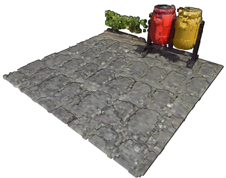
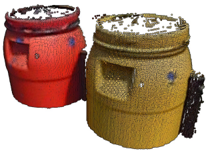
The LOD data structure we use is an octree-based [SW11] layered point cloud [GM04] with representative voxels in inner nodes and the original, full-precision point data in leaf nodes, which makes it essentially identical to the structures of Wand et al. [WBB*08] or Schütz et al. [SKKW23]. Leaf nodes store up to 50k points and inner nodes up to 128 3 (2M) voxels, but typically closer to 128 2 (16k) voxels due to the surfacic nature of point cloud data sets. The sparse nature of surface voxels is the reason why we store them in
<details>
<summary>Image 2 Details</summary>
### Visual Description
## 3D Rendered Scene: Utility Area with Gas Cylinders
### Overview
The image is a 3D rendered scene depicting a small, paved utility area. The scene is viewed from a high-angle, isometric-like perspective. The primary elements are a stone-paved ground surface, two industrial gas cylinders on a stand, and a small green plant. There is no textual information, charts, diagrams, or data tables present in the image.
### Components & Spatial Layout
* **Ground Plane:** A rectangular area paved with irregular, grey stone tiles. The tiles have a rough, textured appearance with visible grout lines. The paving extends from the bottom-left to the top-right of the frame.
* **Gas Cylinder Assembly (Top-Right):**
* **Stand:** A simple, dark grey or black metal frame holding two cylinders upright. It has a rectangular base and vertical supports.
* **Cylinder 1 (Left):** A bright red, cylindrical gas tank. It has a rounded top with a valve assembly and a darker red or black band near the top.
* **Cylinder 2 (Right):** A yellow or mustard-colored cylindrical gas tank, similar in shape and size to the red one. It also has a valve assembly on top.
* **Placement:** The stand and cylinders are positioned in the upper-right quadrant of the paved area, near the back edge.
* **Plant (Top-Center):** A small, leafy green plant or bush. It is located to the left of the gas cylinders, near the back edge of the paving. Its exact species is indeterminate from the render.
* **Lighting & Atmosphere:** The scene is lit with neutral, diffuse lighting, casting soft shadows beneath the cylinders and plant. The background is a plain, light grey or white void, indicating this is an isolated asset render, not part of a larger environment.
### Detailed Analysis
* **Materials & Textures:**
* The stone paving has a detailed normal map or texture giving it a bumpy, uneven surface.
* The gas cylinders have a semi-glossy, painted metal material.
* The plant uses a simple green texture with some variation in leaf color.
* **Scale & Proportions:** Using the gas cylinders as a reference (assuming a standard height of ~1-1.5 meters), the paved area appears to be approximately 3m x 4m. The plant is roughly 0.5m tall.
* **Color Palette:** The scene is dominated by the neutral grey of the stone. The primary color accents are the saturated red and yellow of the cylinders, with a secondary accent from the green plant.
### Key Observations
1. **No Textual Data:** The image contains zero text—no labels, signs, markings on the cylinders, or UI elements.
2. **Asset Render Style:** The clean background, isolated objects, and clear lighting suggest this is a 3D model showcase or a game asset preview, not a screenshot from an active simulation or game.
3. **Functional Grouping:** The cylinders and plant are placed together at the back of the paved area, leaving the foreground open. This suggests a designated storage or utility zone within a larger space.
4. **Visual Contrast:** The bright, artificial colors of the cylinders contrast sharply with the natural, muted tones of the stone and plant.
### Interpretation
This image does not present data or information to be extracted in a traditional technical document sense. Instead, it **visually defines a specific environmental asset or scene composition.**
* **Purpose:** The scene likely serves as a reference for 3D artists, level designers, or technical artists. It demonstrates how specific assets (paving, cylinders, foliage) are intended to look and be arranged together.
* **Implied Context:** The combination of industrial gas cylinders and a small plant in a paved area suggests a **back-alley, rooftop, or industrial courtyard setting**. It implies a human-maintained space where utility equipment is stored, but nature is beginning to encroach or is intentionally placed.
* **Technical Readiness:** The clean render allows for clear inspection of model geometry, texture quality, and material properties, which is crucial for technical evaluation before integration into a larger project like a video game, architectural visualization, or simulation.
* **Absence of Information:** The complete lack of text or data points is a key observation. Any technical document using this image would need to supply all contextual information (e.g., "Figure 1: Example of prop dressing for Level 3's utility area") separately. The image itself only provides visual, not semantic, information.
</details>
(a) Inner node with Voxels.
<details>
<summary>Image 3 Details</summary>
### Visual Description
## Photograph: Industrial Machinery Components
### Overview
The image is a studio-style photograph against a plain white background, showcasing two heavy-duty industrial components. These appear to be cast metal housings or casings, possibly for pumps, valves, or gearboxes, showing signs of wear and surface texture. There is no chart, diagram, or embedded text block present in the image.
### Components/Axes
* **Primary Subjects:** Two distinct cylindrical components.
* **Component 1 (Left/Background):** A red-painted component. It features a large circular flange on top with multiple bolt holes. A rectangular opening is visible on its side facing the viewer. The surface shows a rough, cast texture with some paint chipping and wear.
* **Component 2 (Right/Foreground):** A yellow-painted component, positioned slightly in front of and to the right of the red one. It has a similar large top flange with bolt holes. A prominent rectangular opening is on its side. Attached to its right side is a smaller, black, finned component, which may be an electric motor or a heat sink.
* **Background:** A seamless, neutral white background, providing clear isolation of the subjects.
* **Lighting:** Even, diffuse lighting from the front-left, creating soft shadows that define the form and texture of the objects.
### Detailed Analysis
* **Material & Condition:** Both main components appear to be made of cast iron or a similar metal, given their textured surface and robust construction. The paint (red and yellow) is worn in places, revealing a darker substrate, suggesting these are used or refurbished parts.
* **Spatial Relationship:** The yellow component is the focal point, placed in the foreground. The red component is positioned behind it and to the left, partially obscured. The black finned attachment is on the right side of the yellow component.
* **Key Features:**
* **Flanges:** Both have heavy, circular top flanges with a pattern of bolt holes (approximately 8-12 holes visible on each), indicating they are designed to be securely bolted to another assembly.
* **Openings:** The large rectangular side openings suggest access points for maintenance, inspection, or connection to other ducting or piping.
* **Surface:** The exterior has a pebbled or "orange peel" texture typical of sand-cast metal.
### Key Observations
1. **No Textual Information:** There are no visible labels, serial numbers, nameplates, or any legible text on the components or in the image itself. The small black attachment on the yellow component may have markings, but they are not resolvable in this image.
2. **Functional Design:** The presence of large flanges and access ports strongly indicates these are pressure-containing or fluid-handling housings meant for integration into a larger industrial system.
3. **Color Coding:** The use of distinct red and yellow paint could be for identification (e.g., different models, pressure ratings, or stages in a process) within a facility, but the specific meaning cannot be determined from the image alone.
4. **Wear Patterns:** The wear is most noticeable on edges and around the flanges, consistent with handling and bolting operations.
### Interpretation
This image serves as a product or inventory photograph for industrial hardware. The primary information conveyed is the physical form, relative size, and condition of these two specific components.
* **What it demonstrates:** The photo clearly shows the robust construction, connection interfaces (flanges), and access points of the housings. It allows a technical viewer to assess their general type, possible application (e.g., heavy-duty pump casing), and physical state.
* **Relationship between elements:** The side-by-side placement allows for direct visual comparison of the two units, highlighting similarities in design (flanges, openings) and differences in color and attachments (the black component on the yellow unit).
* **Notable Anomalies:** The complete absence of identifying marks is notable. In a technical context, this would necessitate reliance on external documentation or physical measurement for identification. The black finned attachment on only one unit suggests it may be an optional or model-specific accessory.
**Conclusion:** This is a descriptive photograph containing **no extractable textual data, charts, or diagrams**. Its informational value lies entirely in the visual representation of the mechanical components' geometry, features, and apparent condition. For precise technical specifications, manufacturer details, or operational parameters, external sources would be required.
</details>
- (b) Leaf node with points.
Figure 2: (a) Close-up of a lower-resolution inner-node comprising 20 698 voxels that were sampled on a 128 3 grid. (b) A fullresolution leaf node comprising 22 858 points.
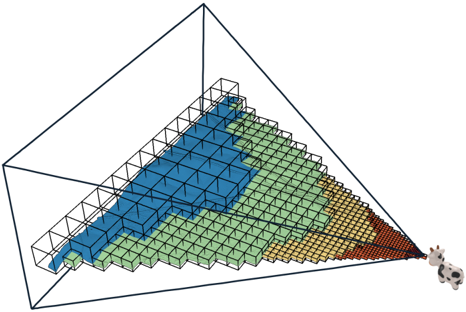
Figure 3: Higher-level octree nodes rendered closer to the camera. Inner nodes store lists of representative voxels that were sampled on a 128 3 grid, and leaf nodes store up to 50k full-precision points.
<details>
<summary>Image 4 Details</summary>
### Visual Description
## 3D Diagram: Hierarchical Pyramid of Cubes
### Overview
The image displays a three-dimensional, wireframe tetrahedron (a triangular pyramid) containing a structured arrangement of smaller, colored cubes. The cubes are organized in layers that follow the pyramid's geometry, decreasing in size and increasing in number from the top vertex to the base. A small icon of a person or robot with a camera is positioned at the bottom-right vertex of the pyramid, appearing to observe or interact with the structure. There are **no textual labels, axis titles, legends, or numerical markers** present in the image. The information is conveyed entirely through visual geometry, color, and spatial relationships.
### Components/Axes
* **Primary Structure:** A wireframe tetrahedron (pyramid with a triangular base) outlined in dark blue/black lines. It defines the spatial boundary.
* **Internal Components:** A grid of small, solid-colored cubes arranged in a hierarchical, layered pattern that conforms to the pyramid's shape.
* **Color Palette:** Four distinct colors are used for the cubes, arranged in contiguous regions:
* **Blue:** Occupies the top-most layers.
* **Green:** Forms a middle layer beneath the blue.
* **Yellow/Orange:** Forms a lower layer beneath the green.
* **Red:** Occupies the lowest, most numerous layers at the base.
* **Observer Icon:** A small, monochromatic (grey/white) icon of a figure (possibly a robot or person with a camera) is placed at the bottom-right corner vertex of the pyramid's wireframe, oriented towards the interior cube structure.
### Detailed Analysis
* **Spatial Arrangement & Flow:** The cubes are arranged in a strict, grid-like pattern that follows the pyramid's faces. The structure suggests a top-down hierarchy or a process flow from the apex (blue) to the base (red).
* **Cube Size & Quantity Trend:** There is a clear inverse relationship between vertical position and cube size/quantity.
* **Top (Blue Region):** Contains the largest individual cubes. They are fewest in number, forming a sparse, coarse grid.
* **Middle (Green Region):** Cubes are smaller than the blue ones and more numerous, forming a denser grid.
* **Lower (Yellow/Orange Region):** Cubes are smaller still and more numerous than the green layer.
* **Base (Red Region):** Contains the smallest individual cubes. They are the most numerous, forming a very fine, dense grid at the bottom of the pyramid.
* **Color Gradient Logic:** The color progression from cool (blue) at the top to warm (red) at the bottom is a common visual metaphor for a gradient of intensity, priority, temperature, or stage in a process (e.g., from abstract to concrete, from input to output, from low to high density).
### Key Observations
1. **No Textual Data:** The diagram is purely conceptual and contains zero alphanumeric information. All meaning must be inferred from visual encoding.
2. **Perfect Geometric Alignment:** Every cube is perfectly aligned within the 3D grid defined by the pyramid's wireframe, indicating a highly structured, systematic model.
3. **Discrete Color Regions:** The colors are not blended; they form distinct, contiguous blocks. This suggests categorical separation rather than a continuous spectrum.
4. **Observer Placement:** The icon's position at a vertex, looking inward, implies it is either the source of the data (input) or the consumer/analyst of the structure (output).
### Interpretation
This diagram is an abstract visualization of a **hierarchical or multi-resolution data model**. The pyramid shape is a classic metaphor for structures where a broad base supports a narrow top.
* **What it Suggests:** The model likely represents a system where information or entities are processed, filtered, or aggregated as they move from the base to the apex.
* The **red base** could represent raw, high-volume, low-level data or individual components.
* The **yellow and green layers** represent intermediate stages of processing, grouping, or abstraction.
* The **blue apex** represents the most refined, aggregated, or high-level output/conclusion.
* **Relationships:** The flow is implicitly vertical. The observer icon at the base-right vertex is intriguing. It could symbolize:
* The **entry point** for data collection (observing the raw, red-level details).
* The **vantage point** for analysis, looking up through the layers of abstraction.
* An **agent** interacting with the system at its most concrete level.
* **Anomalies & Abstraction:** The primary "anomaly" is the complete lack of labels, which makes the diagram universally applicable but non-specific. It is a template for thinking about hierarchical systems (e.g., neural network layers, organizational structures, information retrieval pyramids, or multi-scale simulation models) rather than a presentation of specific data. The precision of the cube grid implies a digital, computational, or highly systematized context.
</details>
lists instead of grids - exactly the same as points. Figure 3 illustrates how more detailed, higher-level nodes are rendered close to the camera.
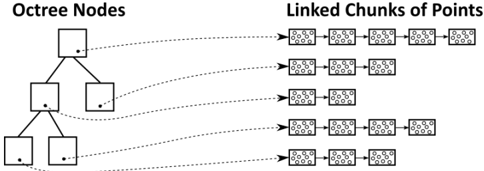
The difference to the structure of Schütz et al. [SKKW23] is that we store points and voxels in linked lists of chunks of points, which allows us to add additional capacity by allocating and linking additional chunks, as shown in Figure 4. An additional difference to Wand et al. [WBB*08] is that they use hash maps for their 128 3 voxel sampling grids, whereas we use a 128 3 bit = 256 kb occupancy grid per inner node to simplify massivelly parallel sampling on the GPU.
Despite the support for dynamic growth via linked lists, this structure still supports efficient rendering in compute-based pipelines, where each individual workgroup can process points in a chunk in parallel, and then traverse to the next chunk as needed. In our implementation, each chunk stores up to 1 , 000 points or voxels (Discussion in Section 7.4), with the latter being implemented as points where coordinates are quantized to the center of a voxel cell.
Figure 4: Octree nodes store 3D data as linked chunks of points/voxels. Linked chunks enable dynamic growth as new 3D data is added; efficient removal (after splitting leaves) by simply putting chunks back into a pool for re-use; and efficient rendering in compute-based pipelines.
<details>
<summary>Image 5 Details</summary>
### Visual Description
## Diagram: Octree Spatial Data Structure with Linked Point Chunks
### Overview
The image is a black-and-white technical diagram illustrating the relationship between an **Octree** data structure and its associated **Linked Chunks of Points**. It visually explains how spatial data (points) are hierarchically organized and stored. The diagram is divided into two primary sections connected by dashed arrows.
### Components/Axes
1. **Left Section: "Octree Nodes"**
* **Title:** "Octree Nodes" (top-left).
* **Structure:** A hierarchical tree diagram.
* A single **root node** at the top.
* The root node branches into **two child nodes** at the second level.
* Each of these two child nodes branches further into **two child nodes** at the third level, resulting in **four leaf nodes**.
* **Node Representation:** Each node is a square containing a single black dot, likely representing a spatial region or a data point within that region.
2. **Right Section: "Linked Chunks of Points"**
* **Title:** "Linked Chunks of Points" (top-right).
* **Structure:** Multiple horizontal chains of rectangular blocks.
* **Chunk Representation:** Each rectangular block ("chunk") contains a pattern of small dots, representing a collection or cluster of data points.
* **Linking:** The chunks within each chain are connected by short horizontal lines, indicating a linked list or sequential data structure.
3. **Connections (Dashed Arrows):**
* Dashed arrows originate from the black dot inside each octree node and point to the **first chunk** in a corresponding chain on the right.
* This establishes a direct, one-to-one relationship between a spatial node in the octree and the head of a linked list of point data chunks.
### Detailed Analysis
* **Spatial Hierarchy:** The octree demonstrates a classic 2D spatial subdivision (a quadtree, though labeled "Octree," which is typically 3D). The root represents the entire space, which is recursively subdivided.
* **Data Linkage Mapping:**
* The **Root Node** (top) is linked to a chain of **5 point chunks**.
* The **Left Child Node** (middle level) is linked to a chain of **3 point chunks**.
* The **Right Child Node** (middle level) is linked to a chain of **2 point chunks**.
* The **Four Leaf Nodes** (bottom level) are each linked to a chain of **4 point chunks**.
* **Data Distribution:** The number of point chunks linked to each node varies (5, 3, 2, 4, 4, 4, 4), suggesting that the density or amount of point data is not uniform across the different spatial regions represented by the nodes.
### Key Observations
1. **One-to-Many Relationship:** Each octree node, regardless of its level in the hierarchy, points to the start of a *list* of data chunks, not just a single data point. This indicates a design for handling variable data density per spatial region.
2. **Consistent Leaf Node Data:** All four leaf nodes at the bottom of the hierarchy are linked to chains of identical length (4 chunks each). This could imply a uniform data distribution at the finest level of spatial subdivision or a design choice to cap chunk list length at leaves.
3. **Non-Uniform Higher-Level Data:** The root and intermediate nodes have varying numbers of linked chunks (5, 3, 2), reflecting the aggregated or summarized data content of their respective, larger spatial regions.
4. **Visual Encoding:** The diagram uses simple, clear visual metaphors: squares for spatial containers, dots for points/centers, and linked rectangles for data lists. The dashed arrows explicitly map the abstract tree structure to the concrete data storage layout.
### Interpretation
This diagram explains a common optimization technique in computer graphics, computational geometry, or spatial databases. The **octree** provides a hierarchical spatial index, allowing for efficient queries (e.g., "find all points near this location") by quickly narrowing down relevant regions. The **linked chunks of points** represent the actual point cloud data, stored in manageable, sequential blocks.
The key insight is the **decoupling of the spatial index (tree) from the raw data storage (linked lists)**. This architecture allows:
* **Efficient Traversal:** The tree enables fast spatial searches.
* **Flexible Data Storage:** The linked chunk lists can grow or be managed independently of the tree structure. A node can point to a long list if its region is dense with points, or a short list if it's sparse.
* **Memory Locality:** Storing points in chunks (rather than individually) can improve cache performance during processing.
The variation in chunk list lengths visually argues that real-world spatial data is rarely uniform, and this data structure is designed to handle that irregularity efficiently. The diagram serves as a blueprint for implementing a system that balances fast spatial access with practical data management.
</details>
## 3.2. Persistent Buffer
Since we require large amounts of memory allocations on the device from within the CUDA kernel throughout the LOD construction over hundreds of frames, we manage our own custom persistent buffer to keep the cost of memory allocation to a minimum. To that end, we simply pre-allocate 90% of the available GPU memory. An atomic offset counter keeps track of how much memory we already allocated and is used to compute the returned memory pointer during new allocations.
Note that sparse buffers via virtual memory management may be an alternative, as discussed in Section 8.
## 3.3. Voxel Sampling Grid
Voxels are sampled by inscribing a 128 3 voxel grid into each inner node, using 1 bit per cell to indicate whether that cell is still empty or already occupied. Inner nodes therefore require 256kb of memory in addition to the chunks storing the voxels (in our implementation as points with quantized coordinates). Grids are allocated from the persistent buffer whenever a leaf node is converted into an inner node.
## 3.4. Chunks and the Chunk Pool
We use chunks of points/voxels to dynamically increase the capacity of each node as needed, and a chunk pool where we return chunks that are freed after splitting a leaf node (chunk allocations for the newly created inner node are handled separately). Each chunk has a static capacity of N points/voxels (1 , 000 in our implementation), which makes it trivial to manage chunks as they all have the same size. Initially, the pool is empty and new chunks are allocated from the persistent buffer. When chunks are freed after splitting a leaf node, we store the pointers to these chunks inside the chunk pool. Future chunk allocations first attempt to acquire chunk pointers from the pool, and only allocate new chunks from the persistent buffer if there are none left in the pool.
## 4. Incremental LOD Construction - Overview
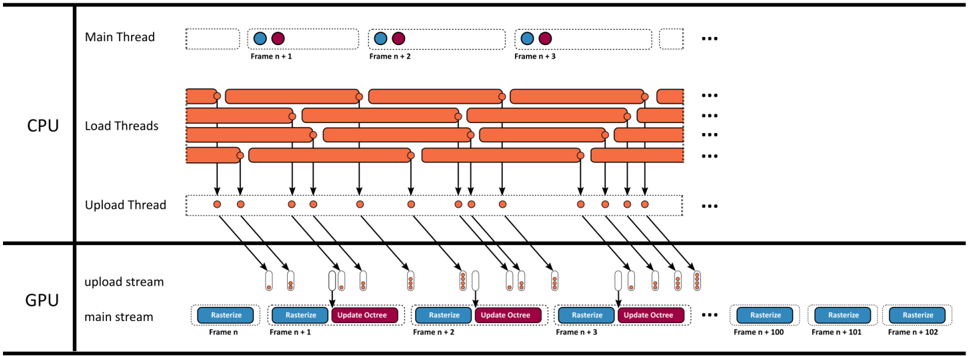
Our method loads batches of points from disk to GPU memory, updates the LOD structure in one CUDA kernel, and renders the updated results with another CUDA kernel. Figure 5
shows an overview of that pipeline. Both kernels utilize persistent threads [GSO12; KKSS18] using the cooperative group API [HP17] in order to merge numerous sub-passes into a single CUDA kernel. Points are loaded from disk to pinned CPU memory in batches of 1M points, utilizing multiple load threads. Whenever a batch is loaded, it is appended to a queue. A single uploader thread watches that queue and asynchronously copies any loaded batches to a queue in GPU memory. In each frame, the main thread launches the rasterize kernel that draws the entire scene, followed by an update kernel that incrementally inserts all batches of points into the octree that finished uploading to the GPU.
## 5. Incrementally Updating the Octree
In each frame, the GPU may receive several batches of 1M points each. The update kernel loops through the batches and inserts them into the octree as shown in Figure 6. First, the octree is expanded until the resulting leaf nodes will hold at most 50k points. It then traverses each point of the batch through the octree again to generate voxels for inner nodes. Afterwards, it allocates sufficient chunks for each node to store all points in leaf-, and voxels in inner nodes. In the last step, it inserts the points and voxels into the newly allocated chunks of memory.
The premise of this approach is that it is cheaper in massively parallel settings to traverse the octree multiple times for each point and only insert them once at the end, rather than traversing the tree once per point but with the need for complex synchronization mechanisms whenever a node needs splitting or additional chunks of memory need to be allocated.
## 5.1. Expanding the Octree
CPU-based top-down approaches [WBB*08; SW11] typically traverse the hierarchy from root to leaf, update visited nodes along the way, and append points to leaf nodes. If a leaf node receives too many points, it 'spills" and is split into 8 child nodes. The points inside the spilling node are then redistributed to its newly generated child nodes. This approach works well on CPUs, where we can limit the insertion and expansion of a subtree to a single thread, but it raises issues in a massively parallel setting, where thousands of threads may want to insert points while we simultaneously need to split that node and redistribute the points it already contains.
To support massively parallel insertions of all points on the GPU, we propose an iterative approach that resembles a depthfirst-iterative-deepening search [Kor85]. Instead of attempting to fully expand the octree structure in a single step, we repeatedly expand it by one level until no more expansions are needed. This approach also decouples expansions of the hierarchy and insertions into a node's list of points, which is now deferred to a separate pass. Since we already defer the insertion of points into nodes, we also defer the redistribution of points from spilled nodes. We maintain a spill buffer, which accumulates points of spilled nodes. Points in the spill buffer are subsequently treated exactly the same as points inside the batch buffer that we are currently adding to the octree, i.e., the update kernel reinserts spilled points into the octree from scratch, along with the newly loaded batch of points.
## Timeline
<details>
<summary>Image 6 Details</summary>
### Visual Description
## Diagram: Multi-Threaded CPU-GPU Rendering Pipeline
### Overview
This image is a technical diagram illustrating a multi-threaded rendering pipeline, showing the parallel processing and data flow between CPU and GPU threads over a sequence of frames. It visualizes how frame rendering tasks are distributed and synchronized across different hardware units.
### Components/Axes
The diagram is divided into two primary horizontal sections, separated by a thick black line:
1. **CPU Section (Top):** Contains three distinct thread types.
2. **GPU Section (Bottom):** Contains two distinct streams.
**CPU Components:**
* **Main Thread:** A single row at the top. It shows a sequence of frames labeled `Frame n+1`, `Frame n+2`, `Frame n+3`, followed by an ellipsis (`...`). Each frame is represented by a dashed box containing two colored circles: a blue circle on the left and a purple circle on the right.
* **Load Threads:** Multiple rows (approximately 5-6 visible) below the Main Thread. Each row consists of a series of long, horizontal orange bars with rounded ends, representing continuous work units. These bars are staggered and overlap across rows, indicating parallel execution. An ellipsis (`...`) appears at the end of each row.
* **Upload Thread:** A single row below the Load Threads. It consists of a dashed box containing a series of small, solid orange dots. Black arrows point downward from specific orange dots in the Load Threads to these dots in the Upload Thread. More arrows point from the Upload Thread dots down into the GPU section. An ellipsis (`...`) is at the end.
**GPU Components:**
* **upload stream:** A row receiving data from the CPU's Upload Thread. It shows small, vertical rectangular blocks (appearing as pairs of a white and an orange rectangle) that correspond to the data packets sent from the CPU.
* **main stream:** A row at the bottom showing the primary GPU work. It displays a sequence of labeled tasks for consecutive frames:
* `Frame n`: A blue box labeled `Rasterize`.
* `Frame n+1`: A blue `Rasterize` box followed by a purple `Update Octree` box.
* `Frame n+2`: A blue `Rasterize` box followed by a purple `Update Octree` box.
* `Frame n+3`: A blue `Rasterize` box followed by a purple `Update Octree` box.
* An ellipsis (`...`) follows.
* Further to the right, three standalone blue `Rasterize` boxes are shown for `Frame n+100`, `Frame n+101`, and `Frame n+102`.
### Detailed Analysis
**Data Flow & Timing:**
1. **CPU Load Phase:** The `Load Threads` show long, overlapping orange bars, indicating that multiple assets or scene components are being loaded or processed in parallel on the CPU. This work is not synchronized to a single frame's timeline.
2. **CPU Upload Phase:** Specific completion points within the `Load Threads` (represented by the end of an orange bar) trigger an upload task. This is shown by arrows pointing to a dot in the `Upload Thread`. The `Upload Thread` then serializes these tasks, sending data packets (represented by arrows) to the GPU's `upload stream`.
3. **GPU Execution Phase:** The GPU's `main stream` operates on a strict per-frame schedule. For each frame starting from `n+1`, it performs two main operations in sequence: first `Rasterize` (blue), then `Update Octree` (purple). The `Rasterize` operation for a given frame (e.g., `Frame n+1`) appears to begin before the `Update Octree` for the previous frame (`Frame n`) is complete, suggesting pipelining.
4. **Asynchronous Upload:** The data arriving in the GPU's `upload stream` is decoupled from the `main stream`. The uploads happen in bursts that do not directly align with the start of each frame's `Rasterize` task, indicating asynchronous data transfer to avoid stalling the GPU's main rendering work.
**Spatial Grounding:**
* The **legend/labels** for thread types (`Main Thread`, `Load Threads`, `Upload Thread`) are positioned on the far left of the CPU section.
* The **legend/labels** for GPU streams (`upload stream`, `main stream`) are positioned on the far left of the GPU section.
* **Frame labels** (`Frame n`, `Frame n+1`, etc.) are placed directly below their corresponding task boxes in the GPU `main stream` and inside the dashed boxes of the CPU `Main Thread`.
* **Task labels** (`Rasterize`, `Update Octree`) are embedded within their respective colored boxes (blue and purple) in the GPU `main stream`.
### Key Observations
1. **Parallelism vs. Serialization:** The CPU `Load Threads` exhibit massive parallelism (many overlapping bars), while the CPU `Upload Thread` and GPU `main stream` are serialized pipelines.
2. **Pipeline Staggering:** The GPU `main stream` shows a clear staggered pattern. The `Rasterize` task for `Frame n+1` starts while the `Update Octree` for `Frame n` is still active, demonstrating a classic graphics pipeline to maximize GPU utilization.
3. **Long-Term Consistency:** The isolated `Rasterize` boxes for frames `n+100` to `n+102` on the far right suggest this pipeline pattern continues consistently for many frames.
4. **Color-Coded Tasks:** The diagram uses color consistently: **Orange** for CPU-side work (loading, uploading), **Blue** for GPU rasterization, and **Purple** for GPU octree updates. The two circles in the CPU `Main Thread` (blue and purple) likely symbolize the CPU's coordination or dependency on these two GPU task types.
### Interpretation
This diagram depicts a sophisticated, high-performance rendering architecture designed to keep both the CPU and GPU busy by decoupling their workloads.
* **What it demonstrates:** The system separates the unpredictable, parallelizable work of asset loading (CPU `Load Threads`) from the strict, frame-locked work of rendering (GPU `main stream`). The `Upload Thread` acts as a bridge, managing the transfer of loaded data to the GPU without forcing the main render loop to wait.
* **Relationship between elements:** The CPU's `Main Thread` likely orchestrates the frame schedule, but the heavy lifting is offloaded to worker threads. The GPU is fed by two asynchronous streams: one for data (`upload stream`) and one for commands (`main stream`). This allows texture or geometry uploads to happen in the background while the GPU is busy rasterizing the current frame.
* **Notable implications:** The architecture minimizes "GPU starvation" by ensuring data is uploaded just-in-time or ahead of need. The `Update Octree` task per frame suggests a dynamically changing scene where spatial acceleration structures are rebuilt or updated each frame. The overall design prioritizes throughput and frame rate stability over minimizing the latency of a single frame, which is typical for real-time rendering engines in games or simulations. The clear separation of concerns (load, upload, rasterize, update) is a hallmark of a mature, optimized graphics pipeline.
</details>
<details>
<summary>Image 7 Details</summary>

### Visual Description
Icon/Small Image (22x19)
</details>
<details>
<summary>Image 8 Details</summary>

### Visual Description
Icon/Small Image (32x22)
</details>
<details>
<summary>Image 9 Details</summary>

### Visual Description
Icon/Small Image (32x22)
</details>
<details>
<summary>Image 10 Details</summary>

### Visual Description
Icon/Small Image (30x19)
</details>
<details>
<summary>Image 11 Details</summary>

### Visual Description
Icon/Small Image (23x21)
</details>
<details>
<summary>Image 12 Details</summary>

### Visual Description
Icon/Small Image (22x23)
</details>
A batch of onemillionpoints.
Multiple load threads simultaneously load batches of points from the disk into pinned memory and queue them for upload.
Eachframe, the main thread launches the rasterization and update kernels.
- Therasterizationkernel renders the currentstateof the octree into an OpenGL framebuffer.
- The update kernel incrementally inserts all queued points into the octree.
Figure 5: Timeline of our system over several frames.
In detail, to expand the octree, we repeat the following two subpasses until no more nodes are spilled and all leaf nodes are marked as final for this update (see also Figure 6):
- Counting: In each iteration, we traverse the octree for each point of the batch and all spilled points accumulated in previous iterations during the current update, and atomically increment the point counter of each hit leaf node that is not yet marked as final by one.
- Splitting: All leaf nodes whose point counter exceeds a given threshold, e.g., 50k points, are split into 8 child nodes, each with a point counter of 0. The points it already contained are added to the list of spilled points. Note that the spilled points do not need to be associated with the nodes that they formerly belonged to - they are added to the octree from scratch. Furthermore, the chunks that stored the spilled points are released back to the chunk pool and may be acquired again later. Leaf nodes whose point counter does not exceed the threshold are marked as final so that further iterations during this update do not count points twice.
The expansion pass is finished when no more nodes are spilling, i.e., all leaf nodes are marked final.
## 5.2. Voxel Sampling
Lower levels of detail are populated with voxel representations of the points that traversed these nodes. Therefore, once the octree expansion is finished, we traverse each point through the octree again, and whenever a point visits an inner node, we project it into the inscribed 128 3 voxel sampling grid and check if the respective cell is empty or already occupied by a voxel. If the cell is empty, we create a voxel, increment the node's voxel counter, and set the corresponding bit in the sample grid to mark it as occupied. Note that in this way, the voxel gets the color of the first point that projects to it.
However, just like the points, we do not store voxels in the nodes right away because we do not know the amount of memory/chunks that each node requires until all voxels for the current incremental update are generated. Thus, voxels are first stored in a temporary backlog buffer with a large capacity. In theory, adding a batch of 1 million points may produce up to ( octreeLevels -1 ) million voxels because each inner node's sampling grid has the potential to hold 128 3 = 2 M voxels, and adding spatially close points may lead to several new octree levels until they are all separated into leaf nodes with at most 50k points. However, in practice, none of the test data sets of this paper produced more than 1M voxels per batch of 1M points, and of our numerous other data sets, the largest required backlog size was 2.4M voxels. Thus, we suggest using a backlog size of 10M points to be safe.
## 5.3. Allocating Chunks
After expansion and voxel sampling, we now know the exact amount of points and voxels that we need to store in leaf and inner nodes. Using this knowledge, we check all affected nodes whether their chunks have sufficient free space to store the new points/voxels, or if we need to allocate new chunks of memory to raise the nodes' capacity by 1000 points or voxels per chunk. In total, we need ⌊ counter + POINTS \_ PER \_ CHUNK -1 POINTS \_ PER \_ CHUNK ⌋ linked chunks per node.
(a) Adding 10 points to the octree. (1) Expanding the octree by repeatedly counting and splitting until leaf nodes hold at most T points (depicted: 5, in practice: 50k). (2) Leaves that were not split do not count points again. (3) The voxel sampling pass inserts all points again, creates voxels for empty cells in inner nodes, and stores new voxels (and the nodes they belong to) in a temporary backlog buffer. (4) Now that we know the number of new points and voxels, we allocate the necessary chunks (depicted size: 2, in practice: 1000) to store them. (5) All points are inserted again, traverse to the leaf, and are inserted into the chunks. Voxels from the backlog are inserted into the respective inner nodes.
<details>
<summary>Image 13 Details</summary>

### Visual Description
\n
## Technical Diagram: Octree Expansion and Voxel Processing Pipeline
### Overview
This image is a technical process diagram illustrating a five-stage pipeline for expanding an octree structure and processing voxel data. The diagram flows horizontally from left to right, with each major stage numbered (1 through 5) and separated by vertical dashed lines or bold arrows. The process involves hierarchical data structures (octrees) and their interaction with voxel grids and memory chunks.
### Components/Axes
The diagram is segmented into five sequential stages:
1. **Stage 1: Expand Octree** (Leftmost section, subdivided into 5 sub-steps).
2. **Stage 2: Sample Voxels** (Second section from left).
3. **Stage 3: Allocate Chunks** (Third section from left).
4. **Stage 4: Insert Points & Voxels** (Rightmost section).
**Visual Elements:**
* **Tree Structures:** Represent octree nodes. Each node is a square box containing a number.
* **Numbers:** Integer values within the tree nodes (e.g., 0, 10, 7, 3, 4, 2).
* **Spherical Icons:** Clusters of red, green, and blue spheres appear above certain nodes, likely representing point cloud data or voxel samples associated with that node.
* **Arrows:** Black arrows indicate the flow of the process between major stages. Thinner, curved arrows within stages show data movement or relationships.
* **Grids:** Small square grids (e.g., a 1x8 grid in Stage 2, a 2x4 grid in Stage 4) represent arrays or buffers of voxel data.
* **Rectangles:** Pink outlined rectangles in Stage 3 represent allocated memory chunks.
* **Icons:** A purple circle with a white 'X' appears in Stage 2, possibly indicating a removed or invalid element.
### Detailed Analysis
**Stage 1: Expand Octree**
This stage shows the iterative refinement of an octree through a sequence of "Count" and "Split" operations.
* **Sub-step 1 (Input):** A single root node containing the value `0`.
* **Sub-step 2 (Count):** The root node now contains `10`. A cluster of colored spheres appears above it.
* **Sub-step 3 (Split):** The root node is empty. It has two child nodes, both containing `0`.
* **Sub-step 4 (Count):** The left child contains `7`, the right child contains `3`. Colored spheres are above the left child.
* **Sub-step 5 (Split):** The left child is empty and has two children, both `0`. The right child remains with `3`.
* **Sub-step 6 (Count):** The left-most grandchild contains `3`, the right grandchild (from the left child) contains `4`. Colored spheres are above the node with `4`. The right child from the previous split still contains `3`.
**Stage 2: Sample Voxels**
* Input: The octree state from the end of Stage 1 (a tree with nodes containing values `3`, `4`, and `3`).
* Process: A 1x8 grid (blue squares) is shown at the top right. A curved arrow points from this grid to the node containing `4`.
* Output: The tree structure is modified. The node that contained `4` now contains `2`. One of its child nodes is a solid grey square (possibly indicating an empty or sampled-out voxel). The purple 'X' icon is placed near the node that previously held a `3` (the right child of the root).
**Stage 3: Allocate Chunks**
* Input: The modified tree from Stage 2 (nodes with `4`, `2`, `3`, `4`).
* Process: Each leaf node with a value (`4`, `2`, `3`, `4`) has a curved arrow pointing to a set of pink outlined rectangles. Each node points to two rectangles, suggesting each node's data is allocated to two memory chunks.
**Stage 4: Insert Points & Voxels**
* Input: The tree from Stage 3.
* Process: The final state of the octree is shown. The node values are `2`, `3`, `4`, and `4`. From each leaf node, arrows point to small data arrays.
* The node with `2` points to an array: `[0, 0]`.
* The node with `3` points to an array: `[0, 0]`.
* The two nodes with `4` point to arrays: `[0, 0]` and `[0, 0]` respectively.
* A 2x4 grid of blue squares is shown at the top right, connected to the tree.
### Key Observations
1. **Data Flow:** The pipeline transforms a raw count (`10`) at the root into a refined, spatially partitioned octree where data is distributed to leaf nodes and finally inserted into structured arrays.
2. **Numerical Transformation:** The total count (`10`) is conserved through splits: `7+3=10`, then `3+4+3=10`. In the final stage, the leaf node values (`2, 3, 4, 4`) sum to `13`, which may indicate a change in data representation or the inclusion of new voxel samples from Stage 2.
3. **Visual Anomaly:** The purple 'X' in Stage 2 is a unique icon not repeated elsewhere, highlighting a specific operation (e.g., pruning, error handling, or voxel rejection) at that step.
4. **Spatial Grounding:** The colored sphere clusters are consistently placed above nodes that are actively being processed or hold significant data (the root after first count, a child after split, etc.). The legend for these colors is absent, so their specific meaning (e.g., RGB channels, data types) is inferred but not confirmed.
### Interpretation
This diagram details a computational geometry or computer graphics algorithm for managing sparse volumetric data (voxels) using an octree. The process is a classic "divide-and-conquer" strategy:
1. **Expansion (Stage 1):** The octree is built adaptively. Regions with high data density (counts) are recursively subdivided ("Split") to create a more granular spatial index.
2. **Sampling & Allocation (Stages 2 & 3):** The abstract tree structure is connected to concrete data. Voxels are sampled from a source grid, and memory is allocated in chunks corresponding to the leaf nodes of the refined tree. This step bridges the logical spatial partition with physical memory management.
3. **Insertion (Stage 4):** The final step populates the allocated memory with the actual point or voxel data, completing the pipeline from raw input to a structured, query-ready data format.
The **purple 'X'** is a critical investigative point. It suggests the algorithm includes a validation or optimization step where certain voxels or tree nodes are discarded, which is essential for handling noise or enforcing constraints in real-world data like 3D scans. The conservation and then apparent increase of the numerical count imply the pipeline integrates multiple data sources (the initial point cloud and the sampled voxel grid). This diagram would be fundamental for engineers implementing a voxel-based renderer, a 3D reconstruction system, or a physics simulation engine dealing with volumetric data.
</details>
(b) For illustrative purposes, we now add a batch of just two points which makes one of the nodes spill. (6) When splitting, we move all previously inserted points into a spill buffer. (7, 8) for the remainder of this frame's update, points in the spill buffer and the current batch get identical treatment.
<details>
<summary>Image 14 Details</summary>

### Visual Description
\n
## Diagram: Octree Expansion and Voxel Processing Pipeline
### Overview
The image is a technical diagram illustrating a four-stage pipeline for processing spatial data using an octree structure. The pipeline progresses from left to right, showing how an initial octree is expanded, how voxels are sampled from it, how memory chunks are allocated, and finally how points and voxels are inserted into the structure. The diagram uses simplified tree representations with numbered nodes and visual metaphors for voxels and memory allocation.
### Components/Axes
The diagram is segmented into four primary vertical sections, each with a title at the top:
1. **Expand Octree** (Leftmost section)
2. **Sample Voxels** (Center-left)
3. **Allocate Chunks** (Center-right)
4. **Insert Points & Voxels** (Rightmost section)
Within the "Expand Octree" section, there are four sub-steps separated by vertical dashed lines, labeled at the bottom:
* **Input**
* **Count**
* **Split**
* **Count** (a second counting step)
**Visual Components:**
* **Tree Structures:** Represented by squares (nodes) connected by lines. Numbers inside the squares indicate a count or value associated with that node.
* **Voxels:** Represented by small, light-blue cubes. A cluster of these cubes appears in a box in the "Sample Voxels" and "Insert Points & Voxels" stages.
* **Points:** Represented by small, dark blue circles. They appear attached to specific tree nodes in the "Expand Octree" and "Insert Points & Voxels" stages.
* **Chunks/Memory Blocks:** Represented by small, colored rectangles (pink and light blue outlines) in the "Allocate Chunks" and "Insert Points & Voxels" stages.
* **Arrows:** Black arrows indicate the flow of the process between the four main stages. Faint gray lines in "Sample Voxels" show the sampling relationship.
### Detailed Analysis
**1. Expand Octree Stage:**
This stage shows the iterative process of refining an octree node.
* **Input:** A simple tree with a root node and three child nodes. The children have the values `3`, `3`, and `4`.
* **Count:** A point (dark blue circle) is associated with the root node. The child node values are updated to `3`, `3`, and `6`.
* **Split:** The root node is split. It now has four child nodes. The original three children are retained, and a new, fourth child is added with a value of `0`. The point remains associated with the (now internal) root node.
* **Count (Second):** After the split, the point is still at the root. The child node values are updated to `3`, `2`, `0`, and `4`. The node that previously had `6` now has `2` and `4`, indicating its data was distributed to its new children.
**2. Sample Voxels Stage:**
This stage is more abstract. It shows a tree structure (similar to the final tree from the previous stage) on the left. To its right is a box containing a 2x4 grid of light-blue voxel cubes. Faint gray lines connect specific nodes in the tree to this grid, suggesting that voxels are being sampled or associated with those nodes.
**3. Allocate Chunks Stage:**
This stage shows a tree with the following node values from top to bottom, left to right: `5` (root), `3`, `3`, `2`, `2`, `4`. To the right of the tree, there are columns of small, colored rectangles (pink and light blue outlines). These likely represent allocated memory chunks. The number of chunks appears to correspond to the node values (e.g., the root node `5` has a column of 5 chunks next to it).
**4. Insert Points & Voxels Stage:**
This is the final, composite stage. It combines elements from all previous stages:
* The final tree structure from "Allocate Chunks" (nodes: `5`, `3`, `3`, `2`, `2`, `4`).
* The cluster of light-blue voxel cubes from "Sample Voxels" is shown in a box at the top right.
* The dark blue point is shown attached to the root node (`5`).
* The columns of colored memory chunks from "Allocate Chunks" are shown to the right of their respective tree nodes.
### Key Observations
* **Process Flow:** The diagram clearly depicts a sequential pipeline: Expand -> Sample -> Allocate -> Insert.
* **Data Transformation:** The "Expand Octree" stage demonstrates how a node's data (value `6`) is redistributed to new child nodes (`2` and `4`) after a split operation.
* **Visual Metaphors:** The diagram uses consistent visual metaphors: cubes for voxels, circles for points, and colored rectangles for memory chunks.
* **Spatial Grounding:** The legend/labels are primarily in the top titles and bottom sub-step labels. The color coding is consistent: dark blue for points, light blue for voxels, pink/light blue outlines for chunks. The placement of the voxel box and chunk columns is consistently to the right of their associated tree structures.
### Interpretation
This diagram illustrates a core algorithm in computer graphics, simulation, or spatial computing for dynamically managing a sparse 3D dataset. The octree is used to adaptively subdivide space only where data exists.
* **What it demonstrates:** The pipeline shows how to efficiently handle a growing dataset. First, the octree structure is refined ("Expand") to accommodate new data at a finer resolution. Then, the actual volumetric data ("Voxels") is sampled from this structure. Next, memory ("Chunks") is allocated in a structured way that likely corresponds to the octree nodes for efficient access. Finally, new data points and voxels are inserted into this pre-allocated, organized structure.
* **Relationships:** Each stage depends on the output of the previous one. The tree structure from the expansion stage defines where voxels are sampled. The final tree structure and node values determine the memory allocation pattern. The insertion stage populates this prepared structure.
* **Notable Pattern:** The transition from the first "Count" (value `6`) to the post-split "Count" (values `2` and `4`) is a key detail. It shows the octree's purpose: breaking down a large, dense region (requiring a count of 6) into smaller, more manageable sub-regions (counts of 2 and 4) after spatial subdivision. This is fundamental to achieving efficient spatial queries and rendering.
</details>
Figure 6: The CUDA kernel that incrementally updates the octree. (a) First, it inserts a batch with 10 points into the initially empty octree and (b) then adds another batch with two points that causes a split of a non-empty leaf node.
## 5.4. Storing Points and Voxels
To store points inside nodes, we traverse each point from the input batch and the spill buffer again through the octree to the respective leaf node and atomically update that node's numPoints variable. The atomic update returns the point index within the node, from which we can compute the index of the chunk and the index within the chunk where we store the point.
We then iterate through the voxels in the backlog buffer, which stores voxels and for each voxel a pointer to the inner node that it belongs to. Insertion is handled the same way as points - we atomically update each node's numVoxels variable, which returns an index from which we can compute the target chunk index and the position within that chunk.
## 6. Rendering
Points and voxels are both drawn as pixel-sized splats by a CUDA kernel that utilizes atomic operations to retain the closest sample in each pixel [GKLR13; Eva15; SKW22]. Custom computebased software-rasterization pipelines are particularly useful for our method because traditional vertex-shader-based pipelines are not suitable for drawing linked lists of chunks of points. A CUDA kernel, however, has no issues looping through points in a chunk, and then traversing to the next chunk in the list. The recently introduced mesh and task shaders could theoretically also deal with linked lists of chunks of points, but they may benefit from smaller chunk sizes, and perhaps even finer-grained nodes (smaller sam- pling grids that lead to fewer voxels per node, and a lower maximum of points in leaf nodes).
During rendering, we first assemble a list of visible nodes, comprising all nodes whose bounding box intersects the view frustum and which have a certain size on screen. Since inner nodes have a voxel resolution of 128 3 , we need to draw their half-sized children if they grow larger than 128 pixels. We draw nodes that fulfill the following conditions:
- Nodes that intersect the view frustum.
- Nodes whose parents are larger than 128 pixels. In that case, the parent is hidden and all its children are made visible instead.
Figure 3 illustrates the resulting selection of rendered octree nodes within a frustum. Seemingly higher-LOD nodes are rendered towards the edge of the screen due to perspective distortions that make the screen-space bounding boxes bigger. For performancesensitive applications, developers may instead want to do the opposite and reduce the LOD at the periphery and fill the resulting holes by increasing the point sizes.
To draw points or voxels, we launch one workgroup per visible node whose threads loop through all samples of the node and jump to the next chunk when needed, as shown in listing 1.
```
for (int i = 0; i < nodes[workgroupIndex].points.size(); i++) {
if (nodes[workgroupIndex].points.get(i).isSmaller) {
pointIndex = i;
break;
}
}
```
```
```
Listing 1: CUDA code showing threads of a workgroup iterating through all points in a node, processing num\_threads points at a time in parallel. Threads advance to the next chunk as needed.
## 7. Evaluation
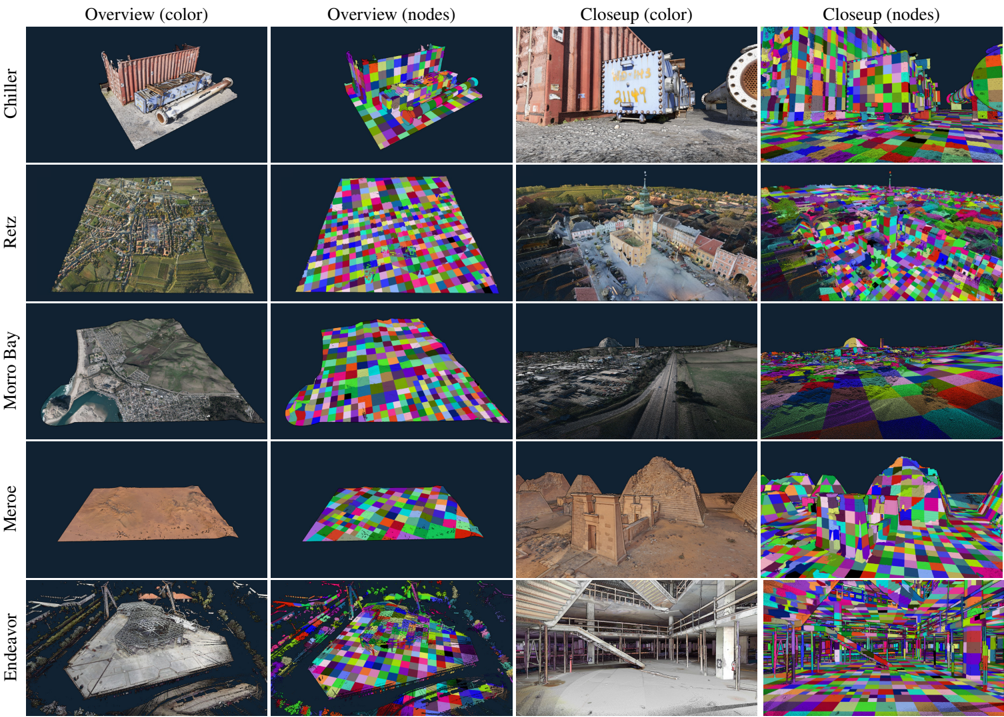
Our method was implemented in C++ and CUDA, and evaluated on the test data sets shown in Figure 7.
The following systems were used for the evaluation:
| OS | GPU | CPU | Disk |
|------------|----------|---------------|-----------------|
| Windows 10 | RTX 3060 | Ryzen 7 2700X | Samsung 980 PRO |
| Windows 11 | RTX 4090 | Ryzen 9 7950X | Crucial T700 |
Special care was taken to ensure meaningful results for disk IO in our benchmarks:
- On Microsoft Windows, traditional C++ file IO operations such as fread or ifstream are automatically buffered by the operating system. This leads to two issues - First, it makes the initial access to a file slower and significantly increases CPU usage, which decreases the overall performance of the application and caused stutters when streaming a file from SSD to GPU for the first time. Second, it makes future accesses to the same file faster because the OS now serves it from RAM instead of reading from disk.
- Since we are mostly interested in first-read performance, we implemented file access on Windows via the Windows API's ReadFileEx function together with the FILE\_FLAG\_NO\_BUFFERING flag. It ensures that data is read from disk and also avoids caching it in the first place. As an added benefit, it also reduces CPU usage and resulting stutters.
We evaluated the following performance aspects, with respect to our goal of simultaneously updating the LOD structure and rendering the intermediate results:
1. Throughput of the incremental LOD construction in isolation.
2. Throughput of the incremental LOD construction while streaming points from disk and simultaneously rendering the interme-
2. diate results in real time.
3. Average and maximum duration of all incremental updates.
4. Performance of rendering nodes up to a certain level of detail.
## 7.1. Data Sets
We evaluated a total of five data sets shown in Figure 7, three file formats, and Morton-ordering vs. the original ordering by scan position. Chiller and Meroe are photogrammetry-based data sets, Morro Bay is captured via aerial LIDAR, Endeavor via terrestrial laser scans, and Retz via a combination of terrestrial (town center, high-density) and aerial LIDAR (surrounding, low-density).
The LAS and LAZ file formats are industry-standard point cloud formats. Both store XYZ, RGB, and several other attributes. Due to this, LAS requires either 26 or 34 bytes per point for our data sets. LAZ provides a good and lossless compression down to around 2-5 bytes/point, which is why most massive LIDAR data sets are distributed in that format. However, it is quite CPU-intensive and therefore slow to decode. SIM is a custom file format that stores points in the update kernel's expected format - XYZRGBA (3 x float + 4 x uint8, 16 bytes per point).
Endeavor is originally ordered by scan position and the timestamp of the points, but we also created a Morton-ordered variation to evaluate the impact of the order.
## 7.2. Construction Performance
Table 1 covers items 1-3 and shows the construction performance of our method on the test systems. The incremental LOD construction kernel itself achieves throughputs of up to 300M points per second on an RTX 3060, and up to 1.2 billion points per second on an RTX 4090. The whole system, including times to stream points from disk and render intermediate results, achieves up to 100 million points per second on an RTX 3060 and up to 580 million points per second on the RTX 4090. The durations of the incremental updates are indicators for the overall impact on fps (average) and occasional stutters (maximum). We implemented a time budget of 10ms per frame to reduce the maximum durations of the update kernel (RTX 3060: 45ms → 16ms; RTX 4090 25ms → 13ms). After the budget is exceeded, the kernel stops and resumes the next frame. Our method benefits from locality as shown by the Morton-ordered variant of the Endeavor data set, which increases the construction performance by a factor of x2.5 (497 MP/s → 1221 MP/s).
## 7.3. Rendering Performance
Regarding rendering performance, we show that linked lists of chunks of points/voxels are suitable for high-performance real-time rendering by rendering the constructed LOD structure at high resolutions (pixel-sized voxels), whereas performance-sensitive rendering engines (targeting browsers, VR, ...) would limit the number of points/voxels of the same structure to a point budget in the singledigit millions, and then fill resulting gaps by increasing point sizes accordingly. Table 3 shows that we are able to render up to 89.4 million pixel-sized points and voxels in 2.7 milliseconds, which leaves the majority of a frame's time for the construction kernel (or higher-quality shading). Table 4 shows that the size of chunks has negligible impact on rendering performance (provided they are larger than the workgroup size).
We implemented the atomic-based point rasterization by Schütz et al. [SKW21], including the early-depth test. Compared to their
Figure 7: Overview and close-ups of our test data sets. The second and fourth columns illustrate the rendered octree nodes.
<details>
<summary>Image 15 Details</summary>
### Visual Description
## 3D Scene Reconstruction Dataset Visualization
### Overview
The image is a composite figure, likely from a technical paper or presentation, showcasing five different 3D scene datasets. It is structured as a 5x4 grid. Each row represents a distinct dataset, labeled on the far left. Each column represents a specific visualization type of that dataset, with headers at the top. The figure compares photorealistic color renders with corresponding "node" visualizations (likely representing mesh vertices, segmentation, or feature points) from both an overview and a close-up perspective.
### Components/Axes
**Row Labels (Vertical Axis, Left Side):**
1. **Chiller**
2. **Reitz**
3. **Morro Bay**
4. **Meroe**
5. **Endeavor**
**Column Headers (Horizontal Axis, Top):**
1. **Overview (color)** - A wide-angle, photorealistic 3D render of the entire scene.
2. **Overview (nodes)** - The same wide-angle view, but with a multicolored checkerboard pattern overlaid on the geometry, representing nodes or segments.
3. **Closeup (color)** - A detailed, zoomed-in photorealistic render of a specific area within the scene.
4. **Closeup (nodes)** - The same detailed view with the multicolored node/segmentation overlay.
### Detailed Analysis
The grid contains 20 individual image panels. The content of each row is as follows:
- **Row 1: Chiller**
- *Overview (color):* Shows an industrial chiller unit with pipes on a concrete pad.
- *Overview (nodes):* The same chiller unit and ground plane are covered in a grid of brightly colored squares (red, green, blue, yellow, magenta, cyan).
- *Closeup (color):* A tighter shot focusing on the chiller's control panel and adjacent large pipe flange.
- *Closeup (nodes):* The close-up view with the same colorful node pattern applied to all surfaces.
- **Row 2: Reitz**
- *Overview (color):* An aerial view of a small European-style town with a central church spire, surrounded by fields.
- *Overview (nodes):* The entire town and terrain are represented by the multicolored node grid.
- *Closeup (color):* A street-level view looking towards the town square and church.
- *Closeup (nodes):* The street-level view with nodes covering buildings, ground, and sky.
- **Row 3: Morro Bay**
- *Overview (color):* A coastal landscape featuring a large rock formation (Morro Rock), a bay, and a town.
- *Overview (nodes):* The coastal terrain and rock are visualized with the node pattern.
- *Closeup (color):* A view along a road or path near the coast, with buildings and the rock in the distance.
- *Closeup (nodes):* The coastal path view with the node overlay.
- **Row 4: Meroe**
- *Overview (color):* A desert landscape showing the ruins of ancient pyramids or structures.
- *Overview (nodes):* The desert ground and pyramid structures are covered in the node grid.
- *Closeup (color):* A detailed view of the weathered brickwork of one of the ancient structures.
- *Closeup (nodes):* The detailed structure view with the node pattern.
- **Row 5: Endeavor**
- *Overview (color):* An overhead view of a complex industrial or construction site with a large circular foundation.
- *Overview (nodes):* The entire industrial site geometry is represented by the node pattern.
- *Closeup (color):* An interior view of a large, unfinished building with exposed steel beams and a staircase.
- *Closeup (nodes):* The interior view with nodes applied to all structural elements and floors.
### Key Observations
1. **Consistent Visualization Schema:** The "nodes" visualization uses an identical, vibrant, multi-colored checkerboard pattern across all five datasets, suggesting a standardized method for displaying mesh topology, segmentation, or feature point distribution.
2. **Scene Diversity:** The datasets cover a wide range of environments: industrial object (Chiller), urban/town (Reitz), coastal (Morro Bay), archaeological/desert (Meroe), and large-scale industrial/construction (Endeavor).
3. **Scale Variation:** The "Overview" vs. "Closeup" columns demonstrate the model's or dataset's capability at both macro (entire scene) and micro (detailed surface) scales.
4. **Data Fidelity:** The "color" renders appear to be high-quality, photorealistic reconstructions or synthetic renders, indicating the source data is likely RGB-D scans, photogrammetry, or high-fidelity synthetic environments.
### Interpretation
This figure serves as a qualitative showcase for a 3D scene understanding, reconstruction, or segmentation system. The primary purpose is to visually demonstrate the system's output or the nature of the datasets used for training/evaluation.
- **What it demonstrates:** The side-by-side comparison of "color" and "nodes" views allows a viewer to assess how well the underlying geometric representation (the nodes) aligns with the photorealistic appearance. The consistency of the node pattern suggests a unified representation format across diverse scenes.
- **Relationship between elements:** The rows establish the breadth of testing environments, while the columns establish the depth of analysis (global vs. local, appearance vs. geometry). The "Closeup" views are critical for evaluating fine-grained detail preservation.
- **Notable patterns:** The most significant pattern is the application of a uniform, artificial color scheme to natural and man-made scenes in the "nodes" columns. This is not an aesthetic choice but a technical one, likely to make individual segments or vertices visually distinct for analysis. The outlier in terms of scene content is "Chiller," which is a single object scan rather than an environmental scene, indicating the method is being tested on both object-level and scene-level data.
- **Underlying purpose:** This type of visualization is common in computer vision research papers dealing with 3D semantic segmentation, neural radiance fields (NeRFs), or mesh reconstruction. It provides intuitive, visual proof of concept that the method can handle complex, real-world geometry across various domains. The figure argues for the robustness and generalizability of the associated technical approach.
</details>
brute-force approach that renders all points in each frame, our onthe-fly LOD approach reduces rendering times on the RTX 4090 by about 5 to 12 times, e.g. Morro Bay is rendered about 5 to 9 times faster (overview: 7.1ms → 0.8ms; closeup: 6.3ms → 1.1ms) and Endeavor is rendered about 5 to 12 times faster (overview: 13.7ms → 1.1ms; closeup: 13.8ms → 2.7ms). Furthermore, the generated LOD structures would allow improving rendering performance even further by lowering the detail to less than 1 point per pixel. In terms of throughput (rendered points/voxels per second), our method is several times slower (Morro Bay overview: 50MP/s → 15.8MP/s; Endeavor overview: 58MP/s → 15.5MP/s). This is likely because throughput dramatically rises with overdraw, i.e., if thousands of points project to the same pixel, they share state and collaboratively update the pixel.
At this time, we did not implement the approach presented in Schütz et al.'s follow-up paper [SKW22] that further improves rendering performance by compressing points and reducing memory bandwidth.
## 7.4. Chunk Sizes
Table 4 shows the impact of chunk sizes on LOD construction and rendering performance. Smaller chunk sizes reduce memory usage but also increase construction duration. The rendering duration, on the other hand, is largely unaffected by the range of tested chunk sizes. We opted for a chunk size of 1k for this paper because it makes our largest data set Endeavor - fit on the GPU, and because the slightly better construction kernel performance of larger chunks did not significantly improve the total throughput of the system.
## 7.5. Performance Discussion
Our approach constructs LOD structures up to 320 times faster than the incremental, CPU-based approach of Bormann et al. [BDSF22] (1.8MP/s → 580MP/s) (Peak result of 1.8MP/s taken from Bormann et al.) while points are simultaneously rendered on the same GPU, and up to 677 times faster if we only account for the construction times (1.8MP/s → 1222MP/s). On the same 4090 test system, our incremental approach is about 7.6 times slower than the non-incremental, GPU-based construction method of Schütz et al. [SKKW23] for the same first-come sampling method (Morro
M. Schütz & L. Herzberger & M. Wimmer / SimLOD: Simultaneous LOD Generation and Rendering 9 of 12
| Data Set | GPU | points | | | Update | Update | Duration | Duration | Throughput | Throughput | Throughput |
|--------------------|----------|----------|--------|-----------|----------|----------|---------------|-------------|----------------|--------------|--------------|
| Data Set | GPU | (M) | format | size (GB) | avg (ms) | max (ms) | updates (sec) | total (sec) | updates (MP/s) | total (MP/s) | total (GB/s) |
| Chiller | RTX 3060 | 73.6 | LAS | 1.9 | 1.2 | 13.3 | 0.2 | 1.3 | 297 | 54 | 1.4 |
| | | | SIM | 1.2 | 2.0 | 14.0 | 0.2 | 0.8 | 298 | 87 | 1.4 |
| Retz | | 145.5 | LAS | 4.9 | 1.0 | 14.9 | 0.6 | 3.2 | 260 | 45 | 1.5 |
| | | | SIM | 2.3 | 2.8 | 14.3 | 0.5 | 1.6 | 272 | 91 | 1.4 |
| Morro Bay | | 350.0 | LAS | 11.9 | 1.2 | 15.9 | 1.4 | 7.6 | 242 | 46 | 1.6 |
| | | | SIM | 5.6 | 4.1 | 16.1 | 1.4 | 3.5 | 247 | 100 | 1.6 |
| Chiller | RTX 4090 | 73.6 | LAS | 1.9 | 0.6 | 7.5 | 0.1 | 0.3 | 1,215 | 291 | 7.5 |
| | | | SIM | 1.2 | 0.6 | 8.0 | 0.1 | 0.2 | 1,217 | 439 | 7.2 |
| Retz | | 145.5 | LAS | 4.9 | 0.4 | 8.0 | 0.1 | 0.7 | 1,145 | 221 | 7.4 |
| | | | SIM | 2.3 | 1.0 | 8.6 | 0.1 | 0.4 | 1,187 | 425 | 6.7 |
| Morro Bay | | 350.0 | LAS | 11.9 | 0.6 | 9.2 | 0.4 | 1.5 | 979 | 234 | 8.0 |
| | | | SIM | 5.6 | 1.5 | 10.9 | 0.3 | 0.8 | 1,030 | 458 | 7.3 |
| Meroe | | 684.4 | LAS | 23.3 | 0.7 | 10.4 | 0.8 | 2.8 | 882 | 241 | 8.2 |
| | | | SIM | 11.4 | 1.9 | 12.1 | 0.7 | 1.7 | 945 | 401 | 6.4 |
| Endeavor | | 796.0 | LAS | 20.7 | 7.0 | 12.6 | 1.6 | 2.6 | 497 | 307 | 8.0 |
| | | | LAZ | 8.0 | 0.2 | 7.2 | 2.4 | 25.1 | 328 | 32 | 0.3 |
| | | | SIM | 12.7 | 9.1 | 12.9 | 1.6 | 2.3 | 497 | 341 | 5.4 |
| Endeavor (z-order) | | | SIM | 12.7 | 2.2 | 10.7 | 0.7 | 1.4 | 1,221 | 581 | 9.3 |
Table 1: LOD Construction Performance showing average and maximum durations of the update kernel, total duration of all updates or the whole system, and the throughput in million points per second (MP/s) or gigabytes per second (GB/s). Total duration includes the time to load points from disk, stream them to the GPU, and insert them into the octree. Update measures the duration of all incremental per-frame (may process multiple batches) updates in isolation. Throughput in GB/s refers to the file size, which depends on the number of points and the storage format (ranging from 10 (LAZ), 16(SIM) to 26 or 34(LAS) byte per point).
| | overview | overview | overview | overview | closeup | closeup | closeup | closeup |
|-----------|------------|------------|------------|------------|-----------|-----------|-----------|-----------|
| | points | voxels | nodes | duration | points | voxels | nodes | duration |
| Chiller | 1.5M | 10.3M | 450 | 1.3 ms | 22.7M | 19.5M | 1813 | 3.5 ms |
| Morro Bay | 0.4M | 12.5M | 518 | 1.5 ms | 8.8M | 16.2M | 1065 | 2.2 ms |
| Meroe | 1.4M | 2.5M | 208 | 0.9 ms | 24.6M | 21.0M | 2069 | 3.7 ms |
| Endeavor | 5.2M | 11.8M | 914 | 2.1 ms | 54.0M | 50.7M | 4811 | 7.5 ms |
Table 2: Rendering performance from overview and closeup viewpoints shown in Figure 7. Points and voxels are both rendered as pixel-sized splats. Some voxels may be processed but discarded because they are replaced by higher-res data in visible child nodes. Up to 104 million points+voxels stored in linked-lists inside 4 , 811 octree nodes are rasterized at >120fps for close-up views at high levels of detail.
| | | overview | overview | overview | overview | overview | closeup | closeup | closeup | closeup | closeup |
|-----------|------|------------|------------|------------|------------|------------|-----------|-----------|-----------|-----------|------------|
| | GPU | points | voxels | nodes | duration | samples/ms | points | voxels | nodes | duration | samples/ms |
| Chiller | 3060 | 2.6M | 8.4M | 441 | 3.3 ms | 3.3M | 28.0M | 7.9M | 1678 | 7.4 ms | 4.9M |
| Retz | | 5.2M | 12.4M | 644 | 4.4 ms | 4.0M | 18.9M | 7.5M | 1616 | 6.0 ms | 4.4M |
| Morro Bay | | 0.6M | 12.0M | 477 | 3.5 ms | 3.6M | 16.3M | 13.7M | 1346 | 6.5 ms | 4.6M |
| Chiller | 4090 | 2.6M | 8.4M | 441 | 0.7 ms | 15.7M | 28.0M | 7.9M | 1678 | 1.3 ms | 27.6M |
| Retz | | 5.2M | 12.4M | 644 | 0.8 ms | 22.0M | 18.9M | 7.5M | 1616 | 1.1 ms | 24.0M |
| Morro Bay | | 0.6M | 12.0M | 477 | 0.8 ms | 15.8M | 16.3M | 13.7M | 1346 | 1.1 ms | 27.3M |
| Meroe | | 1.9M | 2.0M | 190 | 0.5 ms | 7.8M | 36.4M | 17.5M | 2500 | 1.9 ms | 28.4M |
| Endeavor | | 6.5M | 10.5M | 906 | 1.1 ms | 15.5M | 72.7M | 16.7M | 4956 | 2.7 ms | 33.1M |
Table 3: Rendering performance from overview and closeup viewpoints shown in Figure 7. Samples (Points+Voxels) are both rendered as pixel-sized splats.
| Chunk Size | construct (ms) | Memory (GB) | rendering (ms) |
|--------------|------------------|---------------|------------------|
| 500 | 933.9 | 17.1 | 1.9 |
| 1 000 | 734.9 | 17.2 | 1.9 |
| 2 000 | 654.5 | 17.6 | 1.9 |
| 5 000 | 618.1 | 18.9 | 1.9 |
| 10 000 | 611 | 21 | 1.9 |
Table 4: The Impact of points/voxels per chunk on total construction duration, memory usage for octree data, and rendering times. (Close-up viewpoint of the Meroe data set on an RTX 4090)
Bay: 7500 MP/s → 979 MP/s), but about 18 times (Morro Bay; LAS; with rendering: 13 MP/s → 234 MP/s) to 75 times (Morro Bay; LAS; construction: 13 MP/s → 979 MP/s) faster than their non-incremental, CPU-based method [SOW20].
In practice, point clouds are often compressed and distributed as LAZ files. LAZ compression is lossless and effective, but slow to decode. Incremental methods such as Bormann et al. [BDSF22] and ours are especially interesting for these as they allow users to immediately see results while loading is in progress. Although nonincremental methods such as [SKKW23] feature a significantly higher throughput of several billions of points per second, they are nevertheless bottle-necked by the 32 million points per second (see Table 1, Endeavor) with which we can load and decompress such data sets, while they can only display the results after loading and processing is fully finished.
## 8. Conclusion, Discussion and Potential Improvements
In this paper, we have shown that GPU-based computing allows us to incrementally construct an LOD structure for point clouds at the rate at which points can be loaded from an SSD, and immediately display the results to the user in real time. Thus, users are able to quickly inspect large data sets right away. without the need to wait until LOD construction is finished.
There are, however, several limitations and potential improvements that we would like to mention:
- Out-of-Core : This approach is currently in-core only and serves as a baseline and a step towards future out-of-core approaches. For arbitrarily large data sets, out-of-core approaches are necessary that flush least-recently-modified-and-viewed nodes to disk. Once they are needed again, they will have to be reloaded - either because the node becomes visible after camera movement, or because newly loaded points are inserted into previously flushed nodes.
- Compression : In-between 'keeping the node's growable data structure in memory" and 'flushing the entire node to disk" is the potential to keep nodes in memory, but convert them into a more efficient structure. 'Least recently modified" nodes can be converted into a non-growable, compressed form with higher memory and rendering efficiency, and 'least recently modified and viewed" nodes could be compressed even further and decoded on-demand for rendering. For reference, voxel coordinates could be encoded relative to voxels in parent nodes, which requires about 2 bit per voxel, and color values of z-ordered voxels could
be encoded with BC texture compression [BC], which requires about 8 bit per color, for a total of 10 bit per voxel. Currently, our implementation uses 16 bytes (128 bit) per voxel.
- Color-Filtering : Our implementation currently does a firstcome color sampling for voxels, which leads to aliasing artifacts similar to textured meshes without mipmapping, or in some cases even bias towards the first scan in a collection of multiple overlapping scans. The implementation offers a rendering mode that blends overlapping points [BHZK05; SKW21], which significantly improves quality, but a sparse amount of overlapping points at low LODs are not sufficient to reconstruct a perfect representation of all the missing points from higher LODs. Thus, proper color filtering approaches will need to be implemented to create representative averages at lower levels of detail. We implemented averaging in post-processing [SKKW23], but in the future, we would like to integrate color sampling directly into the incremental LOD generation pipeline. The main reason we did not do this yet is the large amount of extra memory that is required to accumulate colors for each voxel, rather than the single bit that is required to select the first color. We expect that this approach can work with the help of least-recently-used queues that help us predict which nodes still need high-quality sampling grids, and which nodes do not need them anymore. This can also be combined with the hash map approach by Wand et al. [WBB*08], which reduces the amount of memory of each individual sampling grid.
- Quality : To improve quality, future work in fast and incremental LOD construction may benefit from fitting higher quality point primitives (Surfels, Gaussian Splats, ... [PZvBG00; ZPvBG01; WHA*07;KKLD23]) to represent lower levels of detail. Considering the throughput of SSDs (up to 580M Points/sec), efficient heuristics to quickly generate and update splats are required, and load balancing schemes that progressively refine the splats closer to the user's current viewpoint.
- Sparse Buffers : An alternative to the linked-list approach for growable arrays of points may be the use of virtual memory management (VMM) [PS20]. VMM allows allocating large amounts of virtual memory, and only allocates actual physical memory as needed (similar to OpenGL's ARB\_sparse\_buffer extension [Inc14]). Thus, each node could allocate a massive virtual capacity for its points in advance, progressively back it with physical memory as the amount of points we add grows, and thereby make linked lists obsolete. We did not explore this option at this time because our entire update kernel - including allocation of new nodes, insertion of points and required allocations of additional memory, etc. - runs on the device, while VMMoperations must be called from the host.
The source code for this paper is available at https:// github.com/m-schuetz/SimLOD . The repository also contains several subsets of the Morro Bay data set (which in turn is a subset of San Simeon [CA13]) in different file formats.
## 9. Acknowledgements
The authors wish to thank Weiss AG for the Chiller data set; Riegl Laser Measurement Systems for providing the data set of the town of Retz ; PG&E and Open Topography for the Morro Bay data set (a
subset of the San Simeon data set) [CA13]; Iconem for the Northern necropolis - Meroë data set [Meroe]; NVIDIA for the Endeavor data set; Keenan Crane for the Spot model; and Bunds et al. [CA19] for the San Andras Fault data set.
This research has been funded by WWTF project ICT22-055 Instant Visualization and Interaction for Large Point Clouds , and FFG project LargeClouds2BIM .
## References
- [3DEP] 3D Elevation Program (3DEP) . https://www.usgs.gov/ core-science-systems/ngp/3dep , Accessed 2020.09.18 2.
- [AHN] AHN . https : / / www . ahn . nl / kwaliteitsbeschrijving , Accessed 2023.06.01 2.
- [AHN2] AHN2 . https : / / www . pdok . nl / introductie/ /article/actueel-hoogtebestand-nederland-ahn2-, Accessed 2021.03.27 2.
- [BC] MICROSOFT. BC7 Format . Accessed 2023.06.09. 2022. URL: https : / / learn . microsoft . com / en -us / windows / win32 / direct3d11 / bc7 - format # bc7 implementation/ 10.
- [BDSF22] BORMANN, PASCAL, DORRA, TOBIAS, STAHL, BASTIAN, and FELLNER, DIETER W. 'Real-time Indexing of Point Cloud Data During LiDAR Capture'. Computer Graphics and Visual Computing (CGVC) . Ed. by VANGORP, PETER and TURNER, MARTIN J. The Eurographics Association, 2022. ISBN: 978-3-03868-188-5. DOI: 10.2312/ cgvc.20221173 3, 8, 10.
- [BHZK05] BOTSCH, MARIO, HORNUNG, ALEXANDER, ZWICKER, MATTHIAS, and KOBBELT, LEIF. 'High-quality surface splatting on today's GPUs'. Proceedings Eurographics/IEEE VGTC Symposium PointBased Graphics, 2005. 2005, 17-141 10.
- [BK20] BORMANN, PASCAL and KRÄMER, MICHEL. 'A System for Fast and Scalable Point Cloud Indexing Using Task Parallelism'. Smart Tools and Apps for Graphics - Eurographics Italian Chapter Conference . Ed. by BIASOTTI, SILVIA, PINTUS, RUGGERO, and BERRETTI, STEFANO. The Eurographics Association, 2020 2, 3.
- [CA13] PACIFIC GAS & ELECTRIC COMPANY. PG&E Diablo Canyon Power Plant (DCPP): San Simeon and Cambria Faults, CA, Airborne Lidar survey . Distributed by OpenTopography. 2013 10, 11.
- [CA19] BUNDS, M.P., SCOTT, C., TOKÉ, N.A., et al. High Resolution Topography of the Central San Andreas Fault at Dry Lake Valley . Distributed by OpenTopography, Accessed 2023.09.29. 2020 11.
- [CAZ01] COHEN, J.D., ALIAGA, D.G., and ZHANG, WEIQIANG. 'Hybrid simplification: combining multi-resolution polygon and point rendering'. Proceedings Visualization, 2001. VIS '01. 2001, 37-539. DOI: 10.1109/VISUAL.2001.964491 2.
- [CBE20] CAREIL, VICTOR, BILLETER, MARKUS, and EISEMANN, ELMAR. 'Interactively modifying compressed sparse voxel representations'. Computer Graphics Forum . Vol. 39. 2. Wiley Online Library. 2020, 111-119 3.
- [CH02] COCONU, LIVIU and HEGE, HANS-CHRISTIAN. 'HardwareAccelerated Point-Based Rendering of Complex Scenes'. Eurographics Workshop on Rendering . Ed. by DEBEVEC, P. and GIBSON, S. The Eurographics Association, 2002. ISBN: 1-58113-534-3. DOI: 10.2312/ EGWR/EGWR02/043-052 2.
- [CRW14] CHAJDAS, MATTHÄUS G., REITINGER, MATTHIAS, and WESTERMANN, RÜDIGER. 'Scalable rendering for very large meshes'. Journal of WSCG 22 (2014), 77-85 2.
- [DVS03] DACHSBACHER, CARSTEN, VOGELGSANG, CHRISTIAN, and STAMMINGER, MARC. 'Sequential Point Trees'. ACM Trans. Graph. 22.3 (2003), 657-662 2.
- [ENT] Entwine . https://entwine.io/ , Accessed 2021.04.13 2.
- [ENTW] USGS / Entwine . https://usgs.entwine.io , Accessed 2020.09.18 2.
- [Eva15] EVANS, ALEX. 'Learning from failure: A Survey of Promising, Unconventional and Mostly Abandoned Renderers for 'Dreams PS4', a Geometrically Dense, Painterly UGC Game'. ACM SIGGRAPH 2015 Courses, Advances in Real-Time Rendering in Games . http : / / media . lolrus . mediamolecule . com / AlexEvans \_ SIGGRAPH-2015.pdf [Accessed 7-June-2022]. 2015 3, 6.
- [GKLR13] GÜNTHER, CHRISTIAN, KANZOK, THOMAS, LINSEN, LARS, and ROSENTHAL, PAUL. 'A GPGPU-based Pipeline for Accelerated Rendering of Point Clouds'. J. WSCG 21 (2013), 153-161 6.
- [GM04] GOBBETTI, ENRICO and MARTON, FABIO. 'Layered Point Clouds: A Simple and Efficient Multiresolution Structure for Distributing and Rendering Gigantic Point-sampled Models'. Comput. Graph. 28.6 (2004), 815-826 2, 3.
- [GSO12] GUPTA, KSHITIJ, STUART, JEFF A., and OWENS, JOHN D. 'A study of Persistent Threads style GPU programming for GPGPU workloads'. 2012 Innovative Parallel Computing (InPar) . 2012, 1-14. DOI: 10.1109/InPar.2012.6339596 4.
- [GZPG10] GOSWAMI, P., ZHANG, Y., PAJAROLA, R., and GOBBETTI, E. 'High Quality Interactive Rendering of Massive Point Models Using Multi-way kd-Trees'. 2010 18th Pacific Conference on Computer Graphics and Applications . 2010, 93-100 2.
- [HP17] HARRIS, MARK and PERELYGIN, KYRYLO. Cooperative Groups: Flexible CUDA Thread Programming . Accessed 2023.06.05. 2017. URL: https://developer.nvidia.com/blog/cooperativegroups/ 4.
- [Inc14] INC., THE KHRONOS GROUP. ARB\_sparse\_buffer Extension . Accessed 2023.06.01. 2014. URL: https://registry.khronos. org/OpenGL/extensions/ARB/ARB\_sparse\_buffer. txt/ 10.
- [KB21] KOCON, KEVIN and BORMANN, PASCAL. 'Point cloud indexing using Big Data technologies'. 2021 IEEE International Conference on Big Data (Big Data) . 2021, 109-119 2.
- [KJWX19] KANG, LAI, JIANG, JIE, WEI, YINGMEI, and XIE, YUXIANG. 'Efficient Randomized Hierarchy Construction for Interactive Visualization of Large Scale Point Clouds'. 2019 IEEE Fourth International Conference on Data Science in Cyberspace (DSC) . 2019, 593-597 2.
- [KKLD23] KERBL, BERNHARD, KOPANAS, GEORGIOS, LEIMKÜHLER, THOMAS, and DRETTAKIS, GEORGE. '3D Gaussian Splatting for RealTime Radiance Field Rendering'. ACM Transactions on Graphics 42.4 (July 2023). URL: https://repo-sam.inria.fr/fungraph/ 3d-gaussian-splatting/ 10.
- [KKSS18] KENZEL, MICHAEL, KERBL, BERNHARD, SCHMALSTIEG, DIETER, and STEINBERGER, MARKUS. 'A High-Performance Software Graphics Pipeline Architecture for the GPU'. 37.4 (July 2018). ISSN: 0730-0301. DOI: 10.1145/3197517.3201374 . URL: https: //doi.org/10.1145/3197517.3201374 4.
- [Kor85] KORF, RICHARD E. 'Depth-first iterative-deepening: An optimal admissible tree search'. Artificial intelligence 27.1 (1985), 97-109 4.
- [Meroe] ICONEM. Northern necropolis - Meroë . Accessed 2023.06.05. URL: https://app.iconem.com/#/3d/project/public/ 6384d382 - 5e58 - 4454 - b8e6 - dec45b6e6078 / scene / c038fb6f-c16b-421e-a2ac-f7292f1b1c64/ 11.
- [MVvM*15] MARTINEZ-RUBI, OSCAR, VERHOEVEN, STEFAN, van MEERSBERGEN, M., et al. 'Taming the beast: Free and open-source massive point cloud web visualization'. Capturing Reality Forum 2015, Salzburg, Austria. 2015 2, 3.
- [OLRS23] OGAYAR-ANGUITA, CARLOS J., LÓPEZ-RUIZ, ALFONSO, RUEDA-RUIZ, ANTONIO J., and SEGURA-SÁNCHEZ, RAFAEL J. 'Nested spatial data structures for optimal indexing of LiDAR data'. ISPRS Journal of Photogrammetry and Remote Sensing 195 (2023), 287297. ISSN: 0924-2716 2.
- [PS20] PERRY, CORY and SAKHARNYKH, NIKOLAY. Introducing LowLevel GPU Virtual Memory Management . Accessed 2023.06.01. 2020. URL: https : / / developer . nvidia . com / blog / introducing - low - level - gpu - virtual - memory management/ 10.
- [PZvBG00] PFISTER, HANSPETER, ZWICKER, MATTHIAS, van BAAR, JEROEN, and GROSS, MARKUS. 'Surfels: Surface Elements As Rendering Primitives'. Proceedings of the 27th Annual Conference on Computer Graphics and Interactive Techniques . SIGGRAPH '00. New York, NY, USA: ACM Press/Addison-Wesley Publishing Co., 2000, 335342 10.
- [RL00] RUSINKIEWICZ, SZYMON and LEVOY, MARC. 'QSplat: A Multiresolution Point Rendering System for Large Meshes'. Proceedings of the 27th Annual Conference on Computer Graphics and Interactive Techniques . SIGGRAPH '00. USA: ACM Press/Addison-Wesley Publishing Co., 2000, 343-352 2.
- [SKKW23] SCHÜTZ, MARKUS, KERBL, BERNHARD, KLAUS, PHILIP, and WIMMER, MICHAEL. GPU-Accelerated LOD Generation for Point Clouds . Feb. 2023. URL: https://www.cg.tuwien.ac.at/ research/publications/2023/SCHUETZ-2023-LOD/ 2, 3, 8, 10.
- [SKW21] SCHÜTZ, MARKUS, KERBL, BERNHARD, and WIMMER, MICHAEL. 'Rendering Point Clouds with Compute Shaders and Vertex Order Optimization'. Computer Graphics Forum 40.4 (2021), 115126. ISSN: 1467-8659. URL: https://www.cg.tuwien.ac.at/ research/publications/2021/SCHUETZ-2021-PCC/ 7, 10.
- [SKW22] SCHÜTZ, MARKUS, KERBL, BERNHARD, and WIMMER, MICHAEL. 'Software Rasterization of 2 Billion Points in Real Time'. Proceedings of the ACM on Computer Graphics and Interactive Techniques 5.3 (July 2022), 1-17 6, 8.
- [SOW20] SCHÜTZ, MARKUS, OHRHALLINGER, STEFAN, and WIMMER, MICHAEL. 'Fast Out-of-Core Octree Generation for Massive Point Clouds'. Computer Graphics Forum 39.7 (Nov. 2020), 1-13. ISSN: 1467-8659 2, 3, 10.
- [SW11] SCHEIBLAUER, CLAUS and WIMMER, MICHAEL. 'Out-of-Core Selection and Editing of Huge Point Clouds'. Computers & Graphics 35.2 (2011), 342-351 2-4.
- [vvL*22] VAN OOSTEROM, PETER, VAN OOSTEROM, SIMON, LIU, HAICHENG, et al. 'Organizing and visualizing point clouds with continuous levels of detail'. ISPRS Journal of Photogrammetry and Remote Sensing 194 (2022), 119-131. ISSN: 0924-2716 2.
- [WBB*08] WAND, MICHAEL, BERNER, ALEXANDER, BOKELOH, MARTIN, et al. 'Processing and interactive editing of huge point clouds from 3D scanners'. Computers & Graphics 32.2 (2008), 204-220 2-4, 10.
- [WHA*07] WEYRICH, TIM, HEINZLE, SIMON, AILA, TIMO, et al. 'A Hardware Architecture for Surface Splatting'. ACM Trans. Graph. 26.3 (July 2007), 90-es. ISSN: 0730-0301. DOI: 10.1145/1276377. 1276490 . URL: https://doi.org/10.1145/1276377. 1276490 10.
- [WS06] WIMMER, MICHAEL and SCHEIBLAUER, CLAUS. 'Instant Points: Fast Rendering of Unprocessed Point Clouds'. Symposium on Point-Based Graphics . Ed. by BOTSCH, MARIO, CHEN, BAOQUAN, PAULY, MARK, and ZWICKER, MATTHIAS. The Eurographics Association, 2006. ISBN: 3-905673-32-0 2.
- [YHGT10] YANG, JASON C., HENSLEY, JUSTIN, GRÜN, HOLGER, and THIBIEROZ, NICOLAS. 'Real-Time Concurrent Linked List Construction on the GPU'. en. Computer Graphics Forum 29.4 (2010). \_eprint: https://onlinelibrary.wiley.com/doi/pdf/10.1111/j.14678659.2010.01725.x, 1297-1304. ISSN: 1467-8659. URL: https:// onlinelibrary.wiley.com/doi/abs/10.1111/j.14678659.2010.01725.x (visited on 09/19/2023) 3.
- [YMC02] YOON, JINHYUK, MIN, SANG LYUL, and CHO, YOOKUN. 'Buffer cache management: predicting the future from the past'. Proceedings International Symposium on Parallel Architectures, Algorithms and Networks. I-SPAN'02 . 2002, 105-110. DOI: 10.1109/ISPAN. 2002.1004268 3.
- [ZPvBG01] ZWICKER, MATTHIAS, PFISTER, HANSPETER, van BAAR, JEROEN, and GROSS, MARKUS. 'Surface Splatting'. Proceedings of the 28th Annual Conference on Computer Graphics and Interactive Techniques . SIGGRAPH '01. New York, NY, USA: Association for Computing Machinery, 2001, 371-378. ISBN: 158113374X. URL: https: //doi.org/10.1145/383259.383300 10.