# OSWORLD: Benchmarking Multimodal Agents for Open-Ended Tasks in Real Computer Environments
## OSWORLD: Benchmarking Multimodal Agents for Open-Ended Tasks in Real Computer Environments
Tianbao Xie ♠ Danyang Zhang ♠ Jixuan Chen ♠ Xiaochuan Li ♠ Siheng Zhao ♠
Ruisheng Cao ♠ Toh Jing Hua ♠ Zhoujun Cheng ♠ Dongchan Shin ♠ Fangyu Lei ♠ Yitao Liu ♠ ♠
Yiheng Xu ♠ Shuyan Zhou ♣ Silvio Savarese ♡ Caiming Xiong ♡ Victor Zhong ♢ Tao Yu
♠ The University of Hong Kong ♣ CMU ♡ Salesforce Research ♢ University of Waterloo
## Abstract
Autonomous agents that accomplish complex computer tasks with minimal human interventions have the potential to transform human-computer interaction, significantly enhancing accessibility and productivity. However, existing benchmarks either lack an interactive environment or are limited to environments specific to certain applications or domains, failing to reflect the diverse and complex nature of real-world computer use, thereby limiting the scope of tasks and agent scalability. To address this issue, we introduce OSWORLD, the first-of-its-kind scalable, real computer environment for multimodal agents, supporting task setup, execution-based evaluation, and interactive learning across various operating systems such as Ubuntu, Windows, and macOS. OSWORLD can serve as a unified, integrated computer environment for assessing open-ended computer tasks that involve arbitrary applications. Building upon OSWORLD, we create a benchmark of 369 computer tasks involving real web and desktop apps in open domains, OS file I/O, and workflows spanning multiple applications. Each task example is derived from real-world computer use cases and includes a detailed initial state setup configuration and a custom execution-based evaluation script for reliable, reproducible evaluation. Extensive evaluation of state-of-the-art LLM/VLM-based agents on OSWORLD reveals significant deficiencies in their ability to serve as computer assistants. While humans can accomplish over 72.36% of the tasks, the best model achieves only 12.24% success, primarily struggling with GUI grounding and operational knowledge. Comprehensive analysis using OSWORLD provides valuable insights for developing multimodal generalist agents that were not possible with previous benchmarks. Our code, environment, baseline models, and data are publicly available at https://os-world.github.io .
## 1 Introduction
Humans interact with computers to perform essential tasks in the digital realm, including web browsing, video editing, file management, data analysis, and software development. These task workflows often involve multiple applications through graphical user interfaces (GUI) and command line interfaces (CLI). Autonomous digital agents, powered by advancements in large vision-language models (VLMs), have the potential to revolutionize how we interact with computer environments [28, 44, 1]. By following high-level natural language instructions, these agents can make digital interactions more accessible and vastly increase human productivity. However, a major challenge in developing such multimodal agents is the absence of a benchmark based on a real interactive environment that covers the diversity and complexity of real-world computer use across various operating systems, interfaces, and applications, consequently restricting task scope and agent scalability.
Previous benchmarks provide datasets of demonstrations without executable environments [9, 40, 21]. Their non-execution-based evaluation assumes a single solution for each task and wrongfully penalizes alternative correct solutions. These benchmarks also miss opportunities for essential
Preprint. Under review.
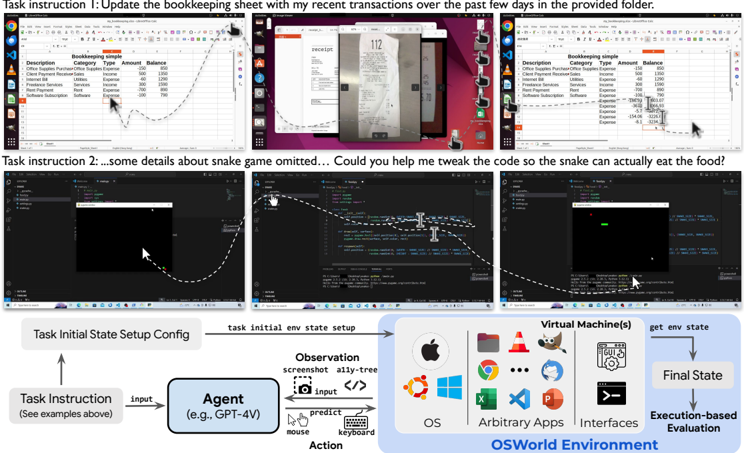
Figure 1: OSWORLD is a first-of-its-kind scalable, real computer environment for multimodal agents, supporting task setup, execution-based evaluation, and interactive learning across operating systems. It can serve as a unified environment for evaluating open-ended computer tasks that involve arbitrary apps (e.g., task examples in the above Fig). We also create a benchmark of 369 real-world computer tasks in OSWORLD with reliable, reproducible setup and evaluation scripts.
<details>
<summary>Image 1 Details</summary>
### Visual Description
## Diagram: OSWorld Environment Workflow
### Overview
The image depicts a technical workflow diagram for an OSWorld Environment system, illustrating how task instructions are processed through an agent (GPT-4V) to interact with virtual machines and achieve final states. The diagram includes two task examples at the top (bookkeeping and snake game code modification) and a structured flowchart below showing system components and execution flow.
### Components/Axes
#### Header Section
- **Task Instructions**:
1. "Update the bookkeeping sheet with my recent transactions over the past few days in the provided folder."
2. "Some details about snake game omitted... Could you help me tweak the code so the snake can actually eat the food?"
- **Screenshots**:
- Three Excel spreadsheet snapshots showing bookkeeping data with columns: Description, Category, Type, Amount, Balance.
- Two code editor snapshots (Python/JavaScript) with syntax highlighting and debugging tools.
#### Main Flowchart
1. **Task Initial State Setup Config** → **Agent (GPT-4V)** → **Observation** (screenshot, ally-tree) → **Action** (mouse, keyboard) → **Virtual Machine(s)** → **Final State**
2. **Execution-based Evaluation** component with OS logos (Apple, Chrome, Windows, etc.) and arbitrary apps/interfaces.
#### Footer Section
- **OSWorld Environment** label with icons for:
- Operating Systems (OS)
- Arbitrary Applications
- Interfaces
- **Final State** box with downward arrow indicating evaluation completion.
### Detailed Analysis
#### Task Instructions
- Bookkeeping task involves updating financial records with transaction data from a folder.
- Snake game task requires code modification for functionality (food consumption logic).
#### Flowchart Components
- **Agent (GPT-4V)**: Central processing unit using GPT-4 Vision capabilities.
- **Observation**: Input modalities include screenshots and ally-tree structures (likely hierarchical data representations).
- **Action**: Output modalities include mouse/keyboard interactions.
- **Virtual Machines**: Environment simulation layer with OS, apps, and interfaces.
- **Final State**: Evaluation outcome after execution.
#### OSWorld Environment
- Visual representation of supported platforms through OS logos (Apple, Chrome, Windows, etc.).
- Indicates cross-platform compatibility and application diversity.
### Key Observations
1. **Modality Integration**: Combines visual (screenshots), textual (code), and interactive (mouse/keyboard) inputs.
2. **Hierarchical Processing**: Task instructions flow through agent reasoning to environmental interaction.
3. **Execution Evaluation**: Final state determination through environment-based assessment rather than purely algorithmic outputs.
4. **Platform Agnosticism**: OS logos suggest multi-platform support.
### Interpretation
This diagram represents an AI-driven task automation system where:
1. **Agent Reasoning**: GPT-4V processes natural language instructions and environmental observations.
2. **Environment Interaction**: The system bridges AI capabilities with OS-level operations through virtual machine simulation.
3. **Task Execution**: Combines code modification (snake game) and data processing (bookkeeping) as example use cases.
4. **Evaluation Framework**: Final states are determined through execution-based assessment.
The workflow emphasizes multimodal interaction between AI agents and operating systems, suggesting applications in automated software development, data management, and system administration. The inclusion of both financial and gaming tasks demonstrates the system's versatility across different domains.
</details>
agent development methods like interactive learning and real-world exploration. Building realistic interactive environments is a major challenge in developing multimodal agents. Prior work that introduce executable environments simplify the observation and action spaces of human-computer interaction and limit task scope within specific applications or domains, such as web navigation in a few domains [44, 30, 58, 66], coding [57] and the combination [32, 54, 34]. Agents developed in these restricted environments cannot comprehensively cover computer tasks, lacking the support of evaluating tasks in complex, real-world scenarios that require navigating between applications and interfaces in open domains (task examples in e.g. , Fig. 1).
To address this gap, we introduce OSWORLD, the first-of-its-kind scalable, real computer environment designed for the development of multimodal agents capable of executing a wide range of real computer tasks beyond isolated interfaces and applications. This executable environment allows free-form raw keyboard and mouse control of real computer applications and supports initial task state configuration, execution-based evaluation, and interactive learning across mainstream operating systems ( e.g. , Ubuntu, Windows, macOS). As shown in Fig. 1, OSWORLD enables evaluation of open-ended computer tasks that involve arbitrary applications, ranging from image viewing to software functionality integration and programming. Thus, OSWORLD can serve as a unified, real computer environment that allows users to define their agent tasks without the need to build application/domain-specific simulated environments.
Building upon OSWORLD, we create a benchmark with 369 real-world computer tasks that involve widely-used web and desktop apps in open domains, OS file I/O, and multi-app workflows through both GUI and CLI. Each task example is based on real-world computer use cases experienced by real users and often requires interactions with multiple applications and interfaces. To ensure reliable, reproducible assessment within the OSWORLD environment, 9 authors with computer science backgrounds carefully annotate each example with an initial state setup configuration to simulate human work in progress and a custom execution-based evaluation script to verify task completion. Our benchmark has a total of 134 unique evaluation functions, which are orders of magnitude larger than prior work [66], showcasing the complexity, diversity, and evaluation challenges of tasks in our benchmark. The human performance study indicates that task examples from OSWORLD are more time-consuming and challenging compared to those in prior work.
We extensively evaluate state-of-the-art LLM and VLM-based agent baselines, including the GPT-4V series [39], the Gemini series [49, 41], the Claude-3 Opus [3] and the Qwen-Max [5], as well as Mixtral [19], Llama-3 [35] and CogAgent [17] from the open-source community. The performance of these experiments ranges from 0.99% to 12.24%, with subsets of applications even reaching 0%,
for workflow tasks that involve cooperation from multiple apps, the highest performance of the baseline agent is only 6.57%. This indicates that current LLMs and VLMs are far from capable of serving as computer assistants (§4.2). Results also show that while additional knowledge such as the accessibility tree and Set-of-Mark (§4.1) can be helpful, it can also lead to potential misguidance and varies across models. We also observe performance changes in these agents compared to consistent human performance across different types of computer tasks. Analysis reveals that VLM-based agents struggle to ground on screenshots to predict precise coordinates for actions, tend to predict repetitive actions, are unable to handle noise from unexpected application windows and exhibit limited knowledge of basic GUI interactions and domain-specific features of apps (§5.2, §5.4). Feeding higher resolution and more trajectory history can help improve the performance by even doubling while requiring longer context length and efficient modeling (§5.2). We open-source OSWORLD environment and benchmark, including environment initial state setup, reliable evaluation scripts, documentation, and our implementation of baseline models to promote research towards the goal of generalist capable computer agents 1 . Future work can focus on enhancing VLM GUI grounding abilities, including interaction commonsense knowledge, higher-resolution support, and coordinates accuracy for more robust GUI interactions. Additionally, efforts can be made to improve agent architectures to better handle complex computer tasks through exploration, memory, and reflection.
## 2 OSWORLD Environment
In this section, we will introduce the task definition of autonomous agents, the components and implementation of the OSWORLD environment, and the supported observation and action spaces.
## 2.1 Task Definition
An autonomous digital agent task can be formalized as a partially observable Markov decision process (POMDP) ( S , O , A , T , R ) with state space S , observation space O (§2.3, including natural language I ), action space A (§2.4), transition function T : S × A → S , and reward function R : S × A → R . Given current observation o t ∈ O (a natural language instruction observation and a screenshot observation ( e.g. , computer screenshot), accessibility (a11y) tree, or their combination according to facilities available), an agent generates executable action a t ∈ A ( e.g. , clicking on the certain pixel of the screen .click(300, 540, button='right') , press key combination .hotkey('ctrl', 'alt', 't') ), which results in a new state s t +1 ∈ S ( e.g. , current Desktop environment) and a new partial observation o t +1 ∈ O ( e.g. , current screenshot). The interaction loop repeats until an action that marks termination ( DONE or FAIL , see Sec. 2.4) is generated or the agent reaches the max number of steps ( e.g. , 15 in our experiments). In this version of OSWORLD, we implement an execution-based reward function R : S × A → [0 , 1] (§2.2.3). The reward function awards a value of 1 or a positive decimal under 1 at the final step if the state transitions meet the expectations of the task objective (i.e., the goal is successfully achieved or partially achieved), or if the agent accurately predicts failure for an infeasible task. In all other scenarios, it returns 0.
## 2.2 Real Computer Environment Infrastructure
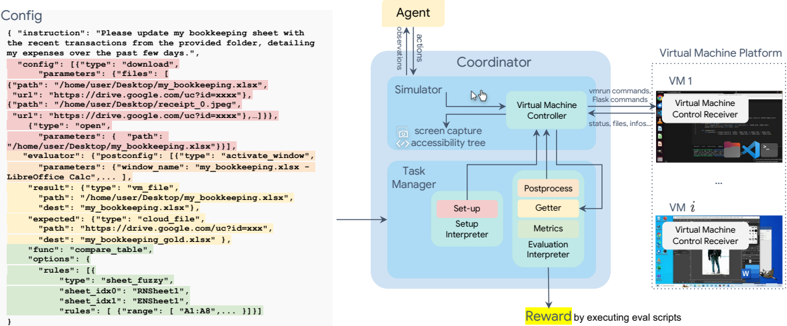
OSWORLD is an executable and controllable environment that supports task initialization, executionbased evaluation, and interactive agent learning in a range of real operating systems ( e.g. , Ubuntu, Windows, macOS) using virtual machine techniques, shown in the middle and right of Fig. 2. Virtual machine offers a safe isolated environment and prevents the agent resulting in irreversible damaging effect on the real host machine. The snapshot feature also enables efficient reset of the virtual environment. The environment is configured through a config file (shown in the left of Fig. 2) for interface initialization during the initialization phase (including downloading files, opening software, adjusting interface layout) (§2.2.2, highlighted with red in Fig. 2), post-processing during the evaluation phase (activating certain windows, saving some files for easy retrieval of information, highlighted with orange), and acquiring files and information for evaluation (such as the final spreadsheet file for spreadsheet tasks, cookies for Chrome tasks, highlighted with yellow in Fig. 2), as well as the evaluation functions and parameters used (§2.2.3, highlighted with green in Fig. 2). See App. A.1 for more details.
1 https://os-world.github.io
Figure 2: Overview of the OSWORLD environment infrastructure. The environment uses a configuration file for initializing tasks (highlighted in red), agent interaction, post-processing upon agent completion (highlighted in orange), retrieving files and information (highlighted in yellow), and executing the evaluation function (highlighted in green). Environments can run in parallel on a single host machine for learning or evaluation purposes. Headless operation is supported.
<details>
<summary>Image 2 Details</summary>
### Visual Description
## Diagram: System Architecture for Automated Bookkeeping Task Execution
### Overview
The image depicts a technical system architecture for automating bookkeeping tasks, combining configuration code with a multi-component workflow. The left side shows a configuration snippet for file operations, while the right side illustrates the system's components and data flow.
### Components/Axes
**Left Panel (Configuration Code):**
- **Structure**: JSON-like configuration with color-coded sections:
- **Pink**: Configuration headers (e.g., `"config": {"type": "download", ...}`)
- **Yellow**: File paths/URLs (e.g., `"path": "/home/user/Desktop/my_bookkeeping.xlsx"`)
- **Green**: Evaluation rules (e.g., `"sheet_idx0": "RNSheet1"`)
- **Key Elements**:
- `instruction`: "Please update my bookkeeping sheet..."
- `result`: `"type": "vm_file", "path": "/home/user/Desktop/my_bookkeeping.xlsx"`
- `func`: `"compare_table"` with unspecified options
- `rules`: Sheet comparison logic (e.g., `"range": ["A1:A8", ...]`)
**Right Panel (System Architecture):**
- **Components**:
1. **Agent**: Top-left, initiates tasks
2. **Coordinator**: Central hub connecting:
- **Simulator** (left)
- **Virtual Machine Controller** (right)
- **Task Manager** (bottom)
3. **Virtual Machine Platform**: Right-side box with multiple VM instances (VM1, VMi)
4. **Postprocess**: Includes:
- **Getter**
- **Metrics**
- **Evaluation Interpreter**
5. **Reward**: Generated via "executing eval scripts"
- **Flow Direction**:
- Arrows indicate data flow from Agent → Coordinator → Simulator/VM Controller → Task Manager → Postprocess → Reward
- Screen capture and accessibility tree elements connect Simulator to VM Controller
### Detailed Analysis
**Configuration Code**:
- **Download Task**: Targets `my_bookkeeping.xlsx` from Google Drive (URL: `https://drive.google.com/uc?id=xxxx`)
- **File Operations**:
- Downloads `my_bookkeeping.xlsx` and `receipt_0.jpeg`
- Compares downloaded file with cloud version (`https://drive.google.com/uc?id=xxxx`)
- **Evaluation**: Uses LibreOffice Calc for table comparison with sheet-specific rules
**System Architecture**:
- **Agent-Coordinator Interaction**:
- Agent sends `observations` and `actions` to Coordinator
- Coordinator manages task execution across VMs
- **Virtual Machine Layer**:
- Multiple VM instances (VM1, VMi) run control receivers
- VM Controller handles `vmrun` and `Plask` commands
- **Postprocessing Pipeline**:
- **Getter**: Retrieves data
- **Metrics**: Quantifies performance
- **Evaluation Interpreter**: Converts metrics to actionable insights
- **Reward Mechanism**: Final output generated through script execution
### Key Observations
1. **Color-Coded Configuration**:
- Pink/yellow/green highlighting suggests hierarchical importance (headers → paths → rules)
2. **VM Scalability**:
- Multiple VM instances imply parallel task execution capability
3. **Closed-Loop System**:
- Feedback from Evaluation Interpreter likely informs Agent's future actions
4. **Security Considerations**:
- Google Drive URLs use `uc?id=` format typical for shared file access
### Interpretation
This system demonstrates a closed-loop automation framework where:
1. **Configuration Code** defines specific file operations (download/compare)
2. **Agent** acts as the decision-making layer, initiating tasks based on instructions
3. **Coordinator** orchestrates resource allocation across virtual machines
4. **Postprocess** transforms raw data into evaluable metrics
5. **Reward System** likely uses reinforcement learning principles, where evaluation results inform future task prioritization
The architecture suggests a hybrid approach combining:
- **Rule-based automation** (explicit file operations in config)
- **Machine learning elements** (reward system, metrics interpretation)
- **Cloud integration** (Google Drive access)
- **Virtualization** for isolated task execution environments
Notable gaps include unspecified evaluation metrics and reward calculation logic, which would be critical for understanding the system's optimization goals.
</details>
## 2.2.1 Overview
OSWORLD environment runs on the host machine. Its Coordinator accepts a configuration file at the initialization of a computer task, runs commands to automatically create a virtual machine instance, and initializes the required state for the task through the Task Manager. The configuration file specifies the snapshot of the virtual machine to be used (which stores the complete state of a computer at a certain moment and can be restored to this state at any time) and also indicates the information needed for setup (such as downloading files and opening some software, making some additional settings, etc.). Once the environment is set up, agents start to interact with the environment, receiving observations such as screenshots, the accessibility (a11y) tree, and customized streams such as terminal outputs. Agents subsequently generate executable actions ( e.g. , .click(300, 540) ) that manipulate the keyboard and mouse. Each action of the agent is input into the environment as a code string, and the environment's Simulator executes them in the virtual machine. After the completion of a task, the Task Manager performs post-processing (such as file saving, or reopening certain apps) according to the task's post-config, retrieves data to the host machine (fetching images or configuration files from the virtual machine or cloud, etc.), and then runs evaluation scripts to assess the completion of the task. Multiple virtual machines can run simultaneously on a single host machine, thereby parallelizing training and evaluation.
## 2.2.2 Initial Task Environment Setup
Many real-world scenarios requiring assistance occur not at the beginning of digital activities, such as right after launching an application or when a computer has just been started, but rather at intermediate stages, such as when certain software is already open or the computer has experienced a crash. Therefore, we aim to simulate these intermediate states as closely as possible to replicate realworld scenarios. The naturalness we bring in also leads to more challenges for agents to model and explore. We adopted a hybrid approach for configuration instead of solely relying on example-wise snapshots for restoration since it would store much unnecessary hardware state information, resulting in each example requiring gigabytes of space. The procedure is divided into three stages: start the VMemulator, prepare files (download the files or scripts from the cloud, etc. optional), and execute reprocessing commands (open files or tabs, change the window size, etc. optional). We provide convenient APIs to configure initial conditions and world settings, standardizing our tasks to make this process user-friendly and easily extendable for scaling. For more details on setup see App. B.5.
## 2.2.3 Execution-Based Evaluation
Evaluating the successful execution of general computer tasks presents a significant challenge, as these tasks defy reduction to a uniform pattern or measurement by a single metric. To ensure a thorough assessment, we design example-specific evaluation metrics including pre-setup, post-processing, and
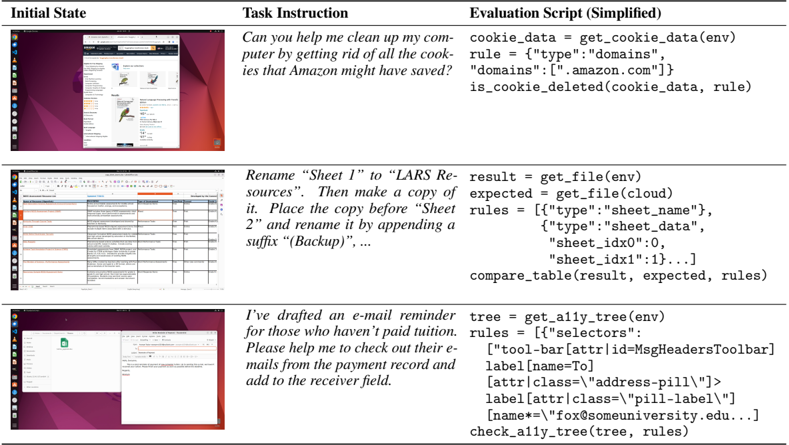
Table 1: Examples of our annotated evaluation scripts, which involve retrieving data from configuration files, the environment, and the cloud, and executing functions to assess functional correctness and obtain results. The example-wise evaluation facilitates the diversity of tasks and reliable evaluation of complex, real-world, open-ended tasks.
<details>
<summary>Image 3 Details</summary>
### Visual Description
## Screenshot: Technical Task Automation Document
### Overview
The image shows a technical document divided into three sections: "Initial State," "Task Instruction," and "Evaluation Script (Simplified)." Each section includes a screenshot of a computer interface and corresponding text instructions/code snippets. The document appears to demonstrate automated task execution using code, likely for system administration or workflow automation.
### Components/Axes
- **Initial State**: Screenshots of a computer interface showing:
1. A browser window with Amazon.co.uk open
2. A spreadsheet application (likely Excel/Google Sheets)
3. An email client interface
- **Task Instruction**: Text describing specific tasks to be automated
- **Evaluation Script (Simplified)**: Python-like code snippets for task validation
### Detailed Analysis
#### Initial State
1. **Browser Window**:
- URL: `https://www.amazon.co.uk`
- Visible elements: Product listings, search bar, navigation menu
2. **Spreadsheet**:
- Table with columns: "Name," "Email," "Status," "Notes"
- Rows contain sample data (e.g., "John Doe," "john@example.com")
3. **Email Client**:
- Open email with subject: "Reminder: Unpaid Tuition"
- Email body contains payment instructions
#### Task Instruction
1. **Cookie Cleanup Task**:
- Instruction: "Can you help me clean up my computer by getting rid of all the cookies that Amazon might have saved?"
- Evaluation Script:
```python
cookie_data = get_cookie_data(env)
rule = {"type":"domains"}
domains = ["amazon.com"]
is_cookie_deleted(cookie_data, rule)
```
2. **Spreadsheet Renaming Task**:
- Instruction: "Rename 'Sheet 1' to 'CLARS Resources'. Then make a copy of it. Place the copy before 'Sheet 2' and rename it by appending a suffix '(Backup)'..."
- Evaluation Script:
```python
result = get_file(env)
expected = get_file(cloud)
rules = [{"type":"sheet_name"}, {"type":"sheet_data"}, {"sheet_idx":0}, {"sheet_idx":1}]
compare_table(result, expected, rules)
```
3. **Email Reminder Task**:
- Instruction: "I've drafted an e-mail reminder for those who haven't paid tuition. Please help me check out their e-mails from the payment record and add to the receiver field."
- Evaluation Script:
```python
tree = get_all_tree(env)
rules = [{"selectors": [{"tool-bar": {"attr-id": "MsgHeadersToolbar"}}]}, {"label": {"name": "To"}}, {"attr": {"class": "address-pill"}}]
check_all_tree(tree, rules)
```
### Key Observations
1. The document follows a structured format for task automation:
- Visual context (Initial State)
- Natural language instruction (Task Instruction)
- Code validation logic (Evaluation Script)
2. All code snippets use consistent variable naming conventions (`get_*`, `check_*`, `compare_*`)
3. The Evaluation Scripts appear to validate both data integrity and UI state changes
4. No numerical data or charts present in the visible content
### Interpretation
This document demonstrates a systematic approach to automating repetitive tasks through:
1. **Context Capture**: Screenshots establish the starting state
2. **Task Specification**: Natural language instructions define desired outcomes
3. **Validation Framework**: Code snippets verify successful execution
The structure suggests this could be part of:
- A technical training manual for system administrators
- An automation framework documentation
- A workflow optimization guide for office productivity
The code examples indicate integration with:
- Browser automation (cookie management)
- Spreadsheet manipulation
- Email client interaction
The absence of numerical data implies this is a procedural demonstration rather than statistical analysis. The focus on cookie management and spreadsheet operations suggests potential applications in e-commerce data maintenance or academic record keeping.
</details>
dedicated functions, tailored to the software in use and the task's specific requirements. This involves interpreting the software's internal files, utilizing specific packages, and preemptively setting up scaffolding based on the software's permissions ( e.g. , opening remote debugging ports for Chrome and VLC, creating extensions for VS Code). Occasionally, this process may also require assistance from reverse engineering tools, such as for decrypting account information in Thunderbird.
As a result, we construct a vast collection of functions that make final wrangling and retrieve files and data information of varying types, categories, and granularities from the cloud and software from virtual machines as well as evaluation functions covering different aspects and their combinations, inputting this information as parameters to assess the outcomes. We show some evaluation examples in Tab. 1. , demonstrate the retrieval of cookie data from virtual machines, obtaining files from both virtual machines and cloud services, fetching the current runtime interface's accessibility tree from the virtual machines, and determining success based on this information whether Amazon's cookies have been deleted, whether the generated table is accurate, and whether the correct interface has been accessed. Need to note when the type of task has real-time characteristics (such as the number of citations of someone's paper, the content of blogs, etc .), we include dynamic functions (such as crawler scripts) inside getter to obtain the real-time values at the moment of evaluation and then use them to compare with the results obtained by the agent upon task completion. See more in App. B.6.
## 2.3 Observation Space
The observation space in OSWORLD contains a complete screenshot of the desktop screen , including the mouse's position and shape, various application windows, files, and folders that are opened in different sizes and orders, maintaining the same perception as a human. Also, to be aligned with previous agent-building web and mobile research [30, 27, 9, 66] that provide and support the use of the webpage's DOM and app's view hierarchy, OSWORLD also provides XML-format accessibility (a11y) tree (obtained via ATSPI 2 on Ubuntu, via PyWinAuto on Windows, etc. ), which can support additional information for modeling. These raw observations allow rich interactions between multiple applications but induce challenges in long-horizon decision-making from highresolution images ( e.g. , 4k screenshots) and structured long text ( e.g. , accessibility trees). For more detailed information on observation space, refer to App. A.2.
## 2.4 Action Space
2 https://docs.gtk.org/atspi2/
Action space A in OSWORLD encompasses all mouse and keyboard actions, including movement, clicks (left-key, right-key, multiple clicks), dragging, keystrokes, hotkeys, and others, covering all human-computer action space. Some action examples are shown in Tab. 2 and the complete action list can be found in Appendix A.3. We use the widely used mouse and keyboard control library pyautogui 3 for our action space. This library leverages the high-level programming language Python to replicate and replay various human inputs into computers through code, allowing us to con-
Table 2: Some examples of the mouse and keyboard actions A in OSWORLD. See App. A.3 for the complete list.
| Function | Description |
|----------------------------------------------------------------------------------------------------------------------------------------------------------------|-------------------------------------------------------------------------------------------------------------------------------------------------------------------------------------------------------------------------------------------------------------------------------------------------------------------------------------------------------------------------------------------------------------------------------------------------------------------------------|
| moveTo(x, y) click(x, y) write('text') press('enter') hotkey('ctrl', 'c') scroll(200) scroll(-200) dragTo(x, y) keyDown('shift') keyUp('shift') WAIT FAIL DONE | Moves the mouse to the specified coordinates. Clicks at the specified coordinates. Types the specified text at the current cursor location. Presses the Enter key. Performs the Ctrl+C hotkey combination (copy). Scrolls up by 200 units. Scrolls down by 200 units. Drags the mouse to the specified coordinates. Holds down the Shift key. Releases the Shift key. Agent decides it should wait. Agent decides the task is infeasible. Agent decides the task is finished. |
struct a universal and complete representation of actions. The agent must generate syntax-correct pyautogui Python code to predict valid actions. Basic actions, such as press and moveTo , can be integrated within program structures, such as for-loops, significantly improving the expressiveness of an action. Timing is also crucial, as highlighted in previous studies on mobile devices [50], as well as the ability to determine whether a task is infeasible or completed. Therefore, we add three special actions named WAIT , FAIL , and DONE to enhance the aforementioned action spaces. Previous efforts towards creating domain-specific agents, such as MiniWoB++ [44, 30], CC-Net [18], and WebArena [66, 22], have defined action spaces that include clicks and typing, as well as some actions specially designed for web browsing. However, they do not model all possible actions on a computer, leading to limitations when attempting actions like right-clicking and clicking with the ctrl key held to select items. This imposes an upper bound on agent learning capabilities.
## 3 OSWORLD Benchmark
We introduce the OSWORLD benchmark, which encompasses 369 real computing tasks defined and executed on Ubuntu. Additionally, we provide a set of 43 tasks for Windows built on the OSWORLD environment. 4 The environment preparation, annotation process, data statistics, and human performance are described in this section.
## 3.1 Operating System and Software Environments
OSWORLD supports real operating systems, including Windows, macOS, and Ubuntu, for the development of automated computer agents. For development purposes, we offer an extensive set of examples on Ubuntu and its open-source applications, leveraging their open-source nature and more accessible APIs for task setting and evaluation. We also provide annotated testing examples for Windows, focusing on applications with similar functionalities. For the first time, our real OS environments enable us to define all kinds of computer tasks, including those that involve interacting with multiple applications (e.g., Chrome and file manager) and interfaces (GUIs and CLIs). Considering availability, the strength of the user community, and diversity, we mainly focus on eight representative applications as well as the basic ones system provide: Chrome for web browsing, VLC for media playback, Thunderbird for email management, VS Code as a coding IDE, and LibreOffice (Calc, Writer, and Impress) for handling spreadsheets, documents, and presentations respectively, GIMP for image editing, and other basic OS apps like terminal, file manager, image viewer, and PDF viewer. Each example drawn from these applications separate or in combination showcases distinct operational logic and necessitates skills including commonsense knowledge, high-resolution perception, mastery of software shortcuts, and the precise controlling of mouse and keyboard movements. For more details, check App. B.1 and B.2.
## 3.2 Tasks
We create a benchmark suite of 369 real-world computer tasks on Ubuntu environment collected from authors and diverse sources such as forums, tutorials, guidelines, etc. , to show the capability
3 https://pyautogui.readthedocs.io/en/latest/
4 Due to copyright issues, these Windows tasks require further activation by the user.
for open-ended task creation within OSWORLD. Each example is carefully annotated with a natural language instruction, a setup configuration with corresponding files and setup actions for initialization of initial states upon our provided VM image, and a manually crafted evaluation script to check if the task is successfully executed. We also adapt 43 tasks from the Ubuntu set for analytic usage on Windows. Overall, it takes 9 computer science students (all student authors) over 3 months, consuming approximately 1800 man-hours (650 hours on single-app tasks, 750 hours on workflow tasks and 400 hours for double-checking).
Task instructions and scenarios To draw the most diverse and close-to-reality usage cases, we explore several types of resources, including official guidelines & tutorials, video pieces giving tips and tutorials on the Internet ( e.g. , TikTok and YouTube), how-to websites ( e.g. , WikiHow), Q&A forums ( e.g. , Reddit, Quora, Superuser, & StackOverflow), formal video courses ( e.g. , Coursera and Udemy), and publicly-available personal blogs & guidelines. The detailed resources used in our benchmark are listed in App. B.3. The examples are selected by judging their popularity, helpfulness, and diversity, revealed by the views and votes. Meanwhile, we notice that it is challenging to find enough examples on the internet for tasks that involve the collaboration of multiple software applications. Therefore, the authors conducted extensive brainstorming, combining some existing examples or drawing inspiration from daily-life scenarios, to compile the tasks. The instructions and task-related files are then crafted from these real-world guidelines and questions by the authors. After the selection, each example will be cross-checked by the other two authors on the feasibility, ambiguity, and alignment with the source. We not only collect tasks that can be finished, but also collect the infeasible ones that are inherently impossible to be completed due to deprecated features or hallucinated features raised by real users, which results in 30 infeasible examples in our benchmark. Additionally, to demonstrate the unification ability of OSWORLD environment for the creation of open-ended computer tasks, we also integrate 84 examples from other benchmarks focusing on single-application or domain-specific environments such as NL2Bash [29], Mind2Web [9], SheetCopilot [25], PPTC [14], and GAIA [36]. Refer to App. B.4 for more details and B.8 for sampled examples for the showcase. A total of about 400 man-hours were spent to collect these examples.
Initial state setup configs To construct the initial state, we prepare the files required for the task and set up the initial state. For the files, we try to obtain them from the sources of the tasks we found, or, in cases where the files are not publicly available, we recreate them as realistically as possible based on scenarios. For the initial state setup, we also developed some functions based on the APIs of software and OS to control the opening and resizing of software windows and reimplement some functions that are difficult to achieve with APIs using pyautogui . For different tasks, we write configs to set the files and initial steps in the virtual machine and verify them in the environment. For example, the setup stage (highlighted in red color, keyed as ' config ') in Figure 2 involves downloading files into the virtual machine to prepare a close-to-reality initial environment, and then opening the file of interest with the corresponding application. The setup steps for each example take about 1 man-hours to construct.
Execution-based evaluation For each task, we select the appropriate getter functions, evaluator function, and parameters to compose the configuration file. The getter function is used to extract key components ( e.g. , the modified file, the text contents displayed in a window element) from the final state of the environment, and the evaluator function assesses success based on the extracted key components. If a function does not exist, we will construct it and add it to the function library of the environment. After completing each evaluation, the annotator conducts initial tests with self-designed test cases. Then, in the human evaluation and experiment running phases, each example is further scrutinized and iterated upon by different individuals three times from the perspective of alignment with the instruction and correctness under different solutions. As a result, we implement nearly sample-specific executable evaluation scripts, resulting in a total of 134 unique evaluation functions for assessing functional correctness-significantly more than the previous benchmarks. The average time spent on developing the evaluation for an example and its examination amounts to approximately 2 man-hours from graduate students.
Quality control Once annotation is finished, each example is attempted by two authors who did not participate in annotating that specific example, acting as agents to complete the task. This process evaluates the current example's quality and provides feedback to the annotators (such as unclear instructions or inability to complete the task, crashes in corner cases, serious instances of false
positives and negatives, etc .), and involves joint revisions and supplements. During experiments for human performance and baselines, we further fixed examples found to have issues, dedicating over 400 man-hours for four rounds of checks. Further investment of time and a more red teaming could further reduce false positives and negatives, which we will leave to future work.
## 3.3 Data Statistics
Table 3: Key statistics in OSWORLD. The 'Supp. tasks' refers to the Windowsbased tasks, that could only be used after activation due to copyright restrictions.
| Statistic | Number |
|-----------------------|-------------|
| Total tasks (Ubuntu) | 369 (100%) |
| - Multi-App Workflow | 101 (27.4%) |
| - Single-App | 268 (72.6%) |
| - Integrated | 84 (22.8%) |
| - Infeasible | 30 (8.1%) |
| Supp. tasks (Windows) | 43 |
| Initial States | 302 |
| Eval. Scripts | 134 |
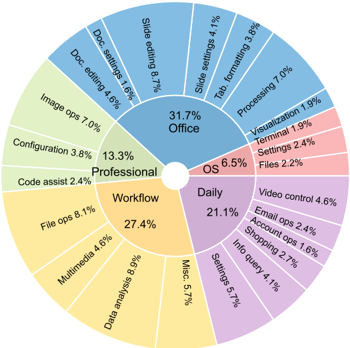
Figure 3: Distribution of task instructions in OSWORLD based on the app domains and operation types to showcase the content intuitively.
<details>
<summary>Image 4 Details</summary>
### Visual Description
## Pie Chart: Task Distribution by Category
### Overview
The image is a circular pie chart divided into three main sections: **Office** (31.7%), **Professional** (13.3%), and **Daily** (21.1%). Each section contains subcategories with specific percentages, representing task distributions. The chart uses distinct colors for each main section, with subcategories differentiated by shades of those colors.
---
### Components/Axes
- **Main Sections**:
- **Office** (blue, 31.7%)
- **Professional** (green, 13.3%)
- **Daily** (purple, 21.1%)
- **Subcategories**:
- Each main section contains labeled subcategories with percentages (e.g., "Slide editing 8.7%" under Office).
- **Legend**:
- Located in the center of the chart, with color-coded labels for the three main sections.
---
### Detailed Analysis
#### Office (31.7%)
- **Slide editing**: 8.7%
- **Formatting**: 7.0%
- **Processing**: 7.0%
- **Doc settings**: 1.6%
- **Doc editing**: 4.6%
- **Tab**: 4.1%
- **Visualization**: 1.9%
- **Terminal**: 2.4%
- **Files**: 2.2%
#### Professional (13.3%)
- **Configuration**: 3.8%
- **Code assist**: 2.4%
- **Image ops**: 7.0%
- **Doc settings**: 1.6%
- **Doc editing**: 4.6%
#### Daily (21.1%)
- **Video control**: 4.6%
- **Email control**: 2.4%
- **Account ops**: 2.4%
- **Settings**: 5.7%
- **Info query**: 4.1%
- **Shopping**: 1.6%
- **Misc.**: 5.7%
---
### Key Observations
1. **Office tasks dominate** the chart (31.7%), with **Slide editing** and **Processing** being the largest subcategories (8.7% and 7.0%, respectively).
2. **Professional tasks** are the smallest (13.3%), but **Image ops** (7.0%) is the largest subcategory here.
3. **Daily tasks** (21.1%) include **Settings** (5.7%) and **Misc.** (5.7%) as the most significant subcategories.
4. **Color coding** aligns with the legend: blue for Office, green for Professional, and purple for Daily. Subcategories use lighter shades of these colors.
---
### Interpretation
- The chart highlights a **task distribution** across three categories, with **Office** being the most time-consuming. This suggests a focus on document and presentation-related work.
- **Professional tasks** are less frequent but include **Image ops**, indicating specialized workflows.
- **Daily tasks** are moderate in volume, with **Settings** and **Misc.** reflecting routine or miscellaneous activities.
- **Discrepancies in subcategory totals** (e.g., Office subcategories sum to 33.3% instead of 31.7%) may stem from rounding or overlapping categories, but the chart prioritizes visual representation over precise arithmetic.
The data underscores the **prevalence of Office-related tasks** and the **diversity of daily and professional activities**, offering insights into workflow priorities.
</details>
Statistics To facilitate the analysis and comprehension of the agent's capabilities, we cluster the examples into the software categories. Specifically, these categories include OS, Office (LibreOffice Calc, Impress, Writer), Daily (Chrome, VLC Player, Thunderbird), Professional (VS Code and GIMP), and Workflow (tasks involving multiple apps). The main statistics of OSWORLD are presented in Tab. 3 and Fig. 3, showcasing the outline and a broad spectrum of tasks. Specifically, OSWORLD contains a total of 369 tasks (and an additional 43 tasks on Windows for analysis), with the majority (268 tasks or 72.6%) aiming at single application functionalities and a remarkable section of workflow-related tasks (101 tasks or 27.4%). The dataset's diversity is further affirmed by the inclusion of tasks considered infeasible, totaling 30 tasks or 8.1% of the dataset. Additionally, a total of 84 tasks (22.8%) are integrated from related datasets, highlighting the dataset's applicability in universal modeling. Remarkably, the dataset incorporates 302 distinct initial states and 134 different evaluation scripts, underscoring the comprehensive approach towards evaluating the tasks' complexity and requirements. More statistic details are available in App. B.4.
Comparison with existing benchmarks OSWORLD is compared with a number of existing benchmarks in Table 4. OSWORLD take utilizes raw mouse and keyboard actions that is universal to the computer environment, rather than focusing on specific computer applications ( e.g., a browser [66, 9]), with multimodal observation including screenshot (Multimodal Support column). This universal action space enables the constructed agents to handle general tasks in the digital world. Our executable environment allows agents to freely explore during both the learning and evaluation phases, rather than providing only static demonstrations to evaluate an agent's prediction of the next step (Executable Env. column). Moreover, it does not solely focus on interactions within a single app but also considers interactions across multiple apps and the overall task (Cross-App column). Unlike many evaluations that offer the same evaluation script or a few scripts for a certain type of task, the OSWORLD benchmark provides example-wise, execution-based evaluation for tasks. Specifically, the total of 134 unique execution-based evaluation functions in our benchmark is significantly more than previous work, demonstrating the complexity, diversity, and evaluation challenges of tasks in our benchmark (# Exec.-based Eval. Func. column). It also allow us to freely choose open-ended tasks and scale to new environments, rather than struggling in crafting new ones. Constructing intermediate initial states as task setup increases realism and poses challenges to the agents' exploration capabilities (Intermediate Init. State column).
## 3.4 Human Performance
Table 4: Comparison of different environments for benchmarking digital agents. The columns indicate: the number of task instances and templates (if applicable) where the task instantiated from templates through configurations (# Instances (# Templates)), whether they provide a controllable executable environment (Control. Exec. Env.), the ease of adding new tasks involving arbitrary applications in open domains (Environment Scalability), support for multimodal agent evaluation (Multimodal Support), support for and inclusion of cross-app tasks (Cross-App), capability to start tasks from an intermediate initial state (Intermediate Init. State), and the number of execution-based evaluation functions (# Exec.-based Eval. Func.).
| | # Instances (# Templates) | Control. Exec. Env.? | Environment Scalability? | Multimodal Support? | Cross- App? | Intermediate Init. State? | # Exec.-based Eval. Func. |
|-----------------|-----------------------------|------------------------|----------------------------|-----------------------|---------------|-----------------------------|-----------------------------|
| GAIA [36] | 466 | ✗ | - | ✗ | ✗ | ✗ | 0 |
| MIND2WEB [9] | 2350 | ✗ | - | ✓ | ✗ | ✓ | 0 |
| WEBLINX [33] | 2337 | ✗ | - | ✓ | ✗ | ✓ | 0 |
| PIXELHELP [27] | 187 | ✗ | - | ✓ | ✗ | ✗ | 0 |
| METAGUI [47] | 1125 | ✗ | - | ✓ | ✗ | ✗ | 0 |
| AITW [40] | 30 k | ✗ | - | ✓ | ✗ | ✓ | 0 |
| OMNIACT [21] | 9802 | ✗ | - | ✓ | ✗ | ✓ | 0 |
| AGENTBENCH [32] | 1091 | Multi-isolated | ✗ | ✗ | ✗ | ✗ | 7 |
| INTERCODE [57] | 1350 (3) | Code | ✗ | ✗ | ✗ | ✗ | 3 |
| MINIWOB++ [30] | 125 | Web | ✗ | ✓ | ✗ | ✗ | 125 |
| WEBSHOP [58] | 12 k (1) | Web | ✗ | ✓ | ✗ | ✗ | 1 |
| WEBARENA [66] | 812 (241) | Web | ✗ | ✓ | ✗ | ✗ | 5 |
| VWEBARENA [22] | 910 (314) | Web | ✗ | ✓ | ✗ | ✗ | 6 |
| WORKARENA [10] | 23 k (29) | Web | ✗ | ✓ | ✗ | ✓ | 7 |
| WIKIHOW [61] | 150 (16) | Mobile | ✗ | ✓ | ✗ | ✗ | 16 |
| ASSISTGUI [13] | 100 | ✗ | ✗ | ✓ | ✗ | ✓ | 2 |
| OSWORLD | 369 | Computer | ✓ | ✓ | ✓ | ✓ | 134 |
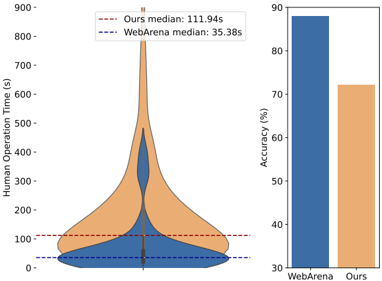
We conduct human evaluations on each example in our dataset, with annotators being computer science major college students who possess basic software usage skills but have not been exposed to the samples or software before. We recorded the time required to complete each example and whether their completion of the example was correct. For comparison, we also sampled 100 examples from WebArena [66] under the same evaluation setup.
As illustrated, tasks from our dataset generally required more time to complete, with a median completion time of 111.94 seconds (compared to 35.38 seconds in WebArena), and a significant number of examples distributed at 900 seconds or even more. In terms of accuracy, the human
Figure 4: Human operation time and accuracy on OSWORLD and WebArena.
<details>
<summary>Image 5 Details</summary>
### Visual Description
## Violin Plot and Bar Chart: Human Operation Time and Accuracy Comparison
### Overview
The image contains two side-by-side visualizations comparing two systems: "WebArena" and "Ours." The left side features a violin plot showing the distribution of human operation times (in seconds), while the right side displays a bar chart comparing accuracy percentages. Key metrics include medians for operation time and accuracy percentages for each system.
---
### Components/Axes
#### Left Violin Plot
- **Y-Axis**: "Human Operation Time (s)" with a scale from 0 to 900.
- **X-Axis**: Unlabeled, with two categories: "WebArena" (blue) and "Ours" (orange).
- **Legend**:
- Dashed red line: "Ours median: 111.94s"
- Dashed blue line: "WebArena median: 35.38s"
- **Distribution**:
- "Ours" (orange): Wide distribution with a peak near 100s, extending to ~900s.
- "WebArena" (blue): Narrow distribution, concentrated between 0–200s.
#### Right Bar Chart
- **Y-Axis**: "Accuracy (%)" with a scale from 30% to 90%.
- **X-Axis**: Two categories: "WebArena" (blue) and "Ours" (orange).
- **Values**:
- "WebArena": ~85% accuracy.
- "Ours": ~65% accuracy.
---
### Detailed Analysis
#### Violin Plot Trends
- **Ours**:
- Median at 111.94s (dashed red line).
- Distribution spans 0–900s, with a sharp peak near 100s and a long tail extending to 900s.
- Indicates high variability in human operation times.
- **WebArena**:
- Median at 35.38s (dashed blue line).
- Distribution tightly clustered between 0–200s, with minimal spread.
- Suggests consistent, faster operation times.
#### Bar Chart Trends
- **Accuracy**:
- "WebArena" achieves ~85% accuracy (blue bar).
- "Ours" achieves ~65% accuracy (orange bar).
- "WebArena" outperforms "Ours" by ~20 percentage points.
---
### Key Observations
1. **Operation Time Disparity**:
- "Ours" has a median operation time **3x higher** than "WebArena" (111.94s vs. 35.38s).
- "Ours" exhibits extreme outliers (up to 900s), while "WebArena" remains tightly bounded.
2. **Accuracy Trade-off**:
- "WebArena" achieves significantly higher accuracy (~85%) compared to "Ours" (~65%).
- Suggests a potential inverse relationship between speed and accuracy.
---
### Interpretation
The data implies a trade-off between **speed** and **accuracy** between the two systems:
- **WebArena** prioritizes **efficiency**, with faster operation times and higher accuracy, likely optimized for streamlined tasks.
- **Ours** exhibits **higher variability** in operation times, possibly due to handling more complex or diverse tasks, but at the cost of lower accuracy.
- The stark difference in medians (111.94s vs. 35.38s) highlights a critical performance gap, while the accuracy disparity (~85% vs. ~65%) raises questions about the systems' intended use cases or design priorities.
This analysis underscores the need to balance operational efficiency with task-specific requirements when evaluating such systems.
</details>
performance on our tasks was approximately 72.36%, significantly lower than the 88% observed on the pure web task dataset. These findings highlight the complexity and challenge of tasks in our dataset, which demand more time and effort. The lower accuracy rate further indicates that our tasks require a higher level of understanding and proficiency, underscoring the need for advanced models and techniques to tackle them effectively.
## 4 Benchmarking LLM and VLM Agent Baselines
In this section, we present the implementation details and experimental settings for several state-ofthe-art LLM and VLM agent baselines on OSWORLD benchmark, as well as their performance.
## 4.1 LLMand VLM Agent Baselines
We adopt state-of-the-art LLM and VLM from open-source representatives such as Mixtral [19], CogAgent [17] and Llama-3 [35], and closed-source ones from GPT, Gemini, Claude and Qwen families on OSWORLD, to serve as the foundation of agent. We also explore methods such as the Set-of-Marks aided approach [56, 11], which has been demonstrated to improve spatial capabilities for visual reasoning. Our prior experiments following VisualWebArena [22] adopt few-shot prompting,
Table 5: Success rates of baseline LLM and VLM agents on OSWORLD, grouped by task categories: OS, Office (LibreOffice Calc, Impress, Writer), Daily (Chrome, VLC Player, Thunderbird), Professional (VS Code and GIMP) and Workflow (tasks involving multiple apps), for gaining insights from interfaces and operation logic. See App. C.1 and C.5 for more details.
| Inputs | Model | Success Rate ( ↑ ) | Success Rate ( ↑ ) | Success Rate ( ↑ ) | Success Rate ( ↑ ) | Success Rate ( ↑ ) | Success Rate ( ↑ ) |
|------------------------|-------------------|----------------------|----------------------|----------------------|----------------------|----------------------|----------------------|
| | | OS | Office | Daily | Profess. | Workflow | Overall |
| A11y tree | Mixtral-8x7B | 12.50% | 1.01% | 4.79% | 6.12% | 0.09% | 2.98% |
| A11y tree | Llama-3-70B | 4.17% | 1.87% | 2.71% | 0.00% | 0.93% | 1.61% |
| A11y tree | GPT-3.5 | 4.17% | 4.43% | 2.71% | 0.00% | 1.62% | 2.69% |
| A11y tree | GPT-4 | 20.83% | 3.58% | 25.64% | 26.53% | 2.97% | 12.24% |
| A11y tree | Gemini-Pro | 4.17% | 1.71% | 3.99% | 4.08% | 0.63% | 2.37% |
| A11y tree | Gemini-Pro-1.5 | 12.50% | 2.56% | 7.83% | 4.08% | 3.60% | 4.81% |
| A11y tree | Qwen-Max | 29.17% | 3.58% | 8.36% | 10.20% | 2.61% | 6.87% |
| A11y tree | GPT-4o | 20.83% | 6.99% | 16.81% | 16.33% | 7.56% | 11.36% |
| Screenshot | CogAgent | 4.17% | 0.85% | 2.71% | 0.00% | 0.00% | 1.11% |
| Screenshot | GPT-4V | 12.50% | 1.86% | 7.58% | 4.08% | 6.04% | 5.26% |
| Screenshot | Gemini-ProV | 8.33% | 3.58% | 6.55% | 16.33% | 2.08% | 5.80% |
| Screenshot | Gemini-Pro-1.5 | 12.50% | 6.99% | 2.71% | 6.12% | 3.60% | 5.40% |
| Screenshot | Claude-3-Opus | 4.17% | 1.87% | 2.71% | 2.04% | 2.61% | 2.42% |
| Screenshot | GPT-4o | 8.33% | 3.58% | 6.07% | 4.08% | 5.58% | 5.03% |
| Screenshot + A11y tree | CogAgent | 4.17% | 0.85% | 2.71% | 0.62% | 0.09% | 1.32% |
| Screenshot + A11y tree | GPT-4V | 16.66% | 6.99% | 24.50% | 18.37% | 4.64% | 12.17% |
| Screenshot + A11y tree | Gemini-ProV | 4.17% | 4.43% | 6.55% | 0.00% | 1.52% | 3.48% |
| Screenshot + A11y tree | Gemini-Pro-1.5 | 12.50% | 3.58% | 7.83% | 8.16% | 1.52% | 5.10% |
| Screenshot + A11y tree | Claude-3-Opus | 12.50% | 3.57% | 5.27% | 8.16% | 1.00% | 4.41% |
| Screenshot + A11y tree | GPT-4o | 41.67% | 6.16% | 12.33% | 14.29% | 7.46% | 11.21% |
| Set-of-Mark | CogAgent | 4.17% | 0.00% | 2.71% | 0.00% | 0.53% | 0.99% |
| Set-of-Mark | GPT-4V | 8.33% | 8.55% | 22.84% | 14.28% | 6.57% | 11.77% |
| Set-of-Mark | Gemini-ProV | 4.17% | 1.01% | 1.42% | 0.00% | 0.63% | 1.06% |
| Set-of-Mark | Gemini-Pro-1.5 | 16.67% | 5.13% | 12.96% | 10.20% | 3.60% | 7.79% |
| Set-of-Mark | Claude-3-Opus | 12.50% | 2.72% | 14.24% | 6.12% | 4.49% | 6.72% |
| Set-of-Mark | GPT-4o | 20.83% | 3.58% | 3.99% | 2.04% | 3.60% | 4.59% |
| Human Performance | Human Performance | 75.00% | 71.79% | 70.51% | 73.47% | 73.27% | 72.36% |
which involves using (observation, action) pairs as few-shot examples and inputting the current observation to generate the action, but this resulted in poor performance (success rate of 2.79% under pure-screenshot setting). We attribute the result to a lack of history encoding and change in the prompting scheme. Therefore, in the experiments, we opt to utilize the context window by providing the most recent 3 observations and actions in chat mode, i.e. , alternating between 'user' prompts and 'assistant' prompts, instead of the (observation, action) pairs. We use a temperature of 1.0 and top-p of 0.9 and truncate from the beginning of the input if still exceeding the max tokens limit required by the models. The prompts used in the experiments are provided in App.C.1. We heuristically request the agents to complete the tasks within a max step limit of 15, which is enough for most tasks. We present a summary of the results in Tab. 5 and analysis in Sec. 4.2. We implement the following four types of input settings on LLM and VLM.
Accessibility tree We aim to evaluate whether the current advanced text-based language models can reason and ground themselves in the context to generate the correct action. Since the original XML format of accessibility tree contains millions of tokens, caused by countless elements, redundant attributes, and a mass of markups, we opt to filter out non-essential elements and attributes, and represent the elements in a more compact tab-separated table format. To be specific, we filter the elements by their tag, visibility, availability, existence of text or image contents, etc . The detailed filtering method is elaborated on in App. C.3. Only the tag , name , text , position , and size of the remaining elements are kept and concatenated by tab character in the input. As the raw coordinates are provided within the accessibility tree, the LLM is required to ground its action predictions to accurate coordinates.
Screenshot This is the input format that is closest to what humans perceive. Without special processing, the raw screenshot of the virtual machine is directly sent to the VLM. The VLM is to understand the screenshot and predict correct actions with precise coordinates. The raw resolution
of the screen is set to 1920 × 1080 . In order to investigate the impact of input resolution, ablation studies are also conducted with different resolutions by manually downsampling the screenshot.
Screenshot + accessibility tree To check if a combination with the accessibility tree can improve the capacity of VLM for spatial grounding, we take this setting by inputting both raw screenshots and a simplified accessibility tree.
Set-of-Marks Set-of-Marks (SoM) [56] is an effective method for enhancing the grounding capabilities of VLMs such as GPT-4V, by segmenting the input image into different sections and marking them with annotations like alphanumerics, masks, or boxes. We leverage the information from the filtered accessibility tree and mark the elements on the screenshot with a numbered bounding box. Following VisualWebArena [22] and UFO [59], we further combine the annotated screenshot with the text metadata from accessibility tree, including the index , tag , name , and text of the elements 5 . Instead of predicting precise coordinates, the VLM is supposed to specify the action object by its number index, which will be mapped into our action space by post-processing. Ablation studies are also conducted with different resolutions for SoM setting.
## 4.2 Results
LLMs and VLMs are still far from being digital agents on real computers. The results from Table 5 show that when only using screenshots as input and adopting pyautogui as the code space, the success rate of the model is only 5.26% to 5.80% even with the strongest VLMs GPT-4V and Gemini-Pro-vision. Meanwhile, the most advanced batch of language models, when using the a11y tree as input, has a success rate ranging from 2.37% to 12.24%. Overall, these figures of performance are significantly lower than the human-level performance which is 72.36% overall for individuals not familiar with the software. These gaps indicate that current LLMs and VLMs may still have a significant gap from humans in performance, necessitating further research in this area. Another surprising finding is that although Claude-3 Opus is reported to be competitive with GPT-4V on common benchmarks [2], it falls far behind when used as a digital agent in OSWORLD. We will present a qualitative analysis and infer reasons in Sec. 5.4.
Agent performance has much higher variance than human across different types of computer tasks. OSWORLD is capable of simulating and evaluating the various software types and combination scenarios involved in people's daily lives in an open-ended manner. We observe performance based on software type grouping and find that agents based on LLMs show significant differences across different subsets. As shown in Table 5, performance tends to be better in tasks oriented towards CLI interfaces (such as OS-type tasks) compared to those based on GUI (such as Office tasks involving clicks on spreadsheet interfaces and document processing). Moreover, the biases between different models and settings are inconsistent, with gaps even exceeding 20%; another point is that performance on workflow-type tasks involving multiple software is far below the figures on a single software, generally below 5%. However, human performance is consistent across these tasks, fluctuating around 70% without exceeding a 5% variance, forming a significant contrast with the models. This suggests that the way humans understand and complete tasks may differ significantly from the current logic and methods based on LLMs and VLMs.
A11y tree and SoM's effectiveness varies by models. The a11y tree contains some attribute information of visible elements, including window position and size, as well as some semantic labels of the window. The performance gap illustrated in Table 5 between GPT-4V and Claude-3 with additional a11y tree information and under a pure screenshot setup suggests that it still has significant room for improvement in accurately perceiving and reasoning GUI elements. Conclusions are reversed for Gemini-Pro.
While applying SoM setting, there is a decline for GPT-4V in performance compared to directly providing the model with screenshots and a11y tree inputs, which contradicts the widely shown effectiveness of SoM in classic image understanding tasks [56], as well as in application areas like web agents [65, 16]. We speculate that this is due to the tasks performed within operating systems having higher resolution and much more elements, ( e.g. , the cells in a spread table), leading to a
5 This metadata is similar to but kind of different from that provided in the single a11y tree setting. To be specific, the coordinates and size are replaced with element index.
significant amount of noise that counteracts the auxiliary role of bounding boxes. Some tasks also require detailed operation on coordinate-level, which cannot be modeled by the bounding box that SoM marks.
VLMagents with screenshot-only setting show lower performance, but it should be the ultimate configuration in the long run. The setting that relies solely on screenshots exhibits the lowest performance, at only 5.26%, among all. Surprisingly, it still achieves a decent outcome when managing workflow tasks (involving multiple applications) that involve multiple applications. Despite the performance, it is worth mentioning that this is the only configuration that does not require additional information, such as an accessibility (a11y) tree, making it concise and in alignment with intuitive human perception since the a11y tree may not be well-supported across all software or cannot be obtained under noisy conditions ( e.g. , when the agent is restricted to viewing the computer through peripheral screens), and the massive amount of tokens contained in the a11y tree (even just the leaf nodes can have tens of thousands of tokens) can also impose an additional inference burden on the model. Future work on purely vision-based agents could lead to stronger generalization capabilities and, ultimately, the potential for integration with the physical world on a larger scale.
## 5 Analysis
In this section, we aim to delve into the factors influencing the performance of VLMs in digital agent tasks and their underlying behavioral logic. We will investigate the impact of task attributes (such as difficulty, feasibility, visual requirement, and GUI complexity), input measurements (such as screenshot resolution, the influence of trajectory history, and the effect of UI layout), explore whether there are patterns in the agent's performance across different operating systems, and make a qualitative analysis in the aspect of models, methods, and humans. All experiments, unless specifically mentioned otherwise, are conducted using GPT-4V under the Set-of-Mark setting. Some takeaways from the analysis are: 1) higher screenshot resolution typically leads to improved performance; 2) encoding more a11y (text) trajectory history can boost performance, while not working for screenshots (image); 3) current VLMs are not adept at image-based trajectory history context; 4) current VLM agents are not robust to UI layout and noise; 5) the performance of VLM agents across OS is in strong correlation; 6) VLM agents have common error types like mouse-clicking inaccuracies, limited domain knowledge, and more types discussed in Sec. 5.4.
## 5.1 Performance by Task Difficulty, Feasibility and App Involved
We analyze the success rate across several additional subsets of tasks, as summarized in Tab. 6 and will be discussed in the following sections.
Task difficulty We categorize the tasks based on the time required for human completion into three groups: 0 ∼ 60s (Easy), 60s ∼ 180s (Medium), and greater than 180 seconds (Hard), as an indicator of difficulty. Across these groups, the model's success rate drops as the required time increases, with tasks taking longer than 180 seconds becoming almost impossible to complete (considering we have infeasible examples for agent's luckiness), whereas human performance across these three groups is 84.91%, 81.08% and 49.57%, showing a slight decline of the same trend but not to the extent of being unachievable.
Table 6: Success rate (SR) of GPT-4V (SoM) across different types of tasks.
| Task Subset | %of Total | SR ( ↑ ) |
|--------------------|-------------|------------|
| Easy | 28.72% | 16.78% |
| Medium | 40.11% | 13.12% |
| Hard | 30.17% | 4.59% |
| Infeasible | 8.13% | 16.67% |
| Feasible | 91.87% | 13.34% |
| Single-App | 72.63% | 13.74% |
| Multi-App Workflow | 27.37% | 6.57% |
Feasibility We also divide tasks into groups of tasks infeasible ( e.g. , deprecated features or hallucinated features) and tasks feasible, which requires the agents to have the ability to judge based on their own knowledge and exploration results. As shown in Tab. 6, we observe that agents currently perform slightly better in terms of infeasibility (16.67% to 13.34%), but overall, they are at a relatively low level. It is noteworthy that we also observe in some methods and settings (such as under the pure screenshot setting with the Gemini-Pro model), agents tend to easily output FAIL and refuse to continue trying. This situation leads to some false positives in infeasible tasks. The focus needs to be on improving overall performance.
Number of apps involved We also examined the performance based on whether the task involved apps software or within a single app. As shown in Tab. 6, the average performance for tasks involving a single app is low, at 13.74%, but still more than double the 6.57% observed for subsets of tasks involving workflows across multiple apps. Within single-app scenarios, tasks involving GUI-intensive Office apps generally performed the worst, with subsets such as LibreOffice Calc often scoring zero (we show more detailed results in App. C.5). These findings highlight the need for improved collaboration capabilities between software and enhanced proficiency in specific scenarios.
## 5.2 Performance by Multimodal Observation Variances
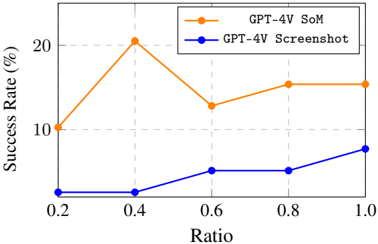
Figure 5: The effect of downsampling on the screenshot on performance with down-sampling ratios of 0.2, 0.4, 0.6 and 0.8 and run on a subset (10%) of examples.
<details>
<summary>Image 6 Details</summary>
### Visual Description
## Line Graph: Success Rate vs Ratio for GPT-4V Models
### Overview
The image depicts a line graph comparing the success rates of two GPT-4V variants ("GPT-4V SoM" and "GPT-4V Screenshot") across varying ratios (0.2 to 1.0). The y-axis represents success rate in percentage (0–20%), while the x-axis represents ratio values. Two distinct trends are observed: one for "GPT-4V SoM" (orange line) and one for "GPT-4V Screenshot" (blue line).
### Components/Axes
- **X-axis (Ratio)**: Labeled "Ratio" with markers at 0.2, 0.4, 0.6, 0.8, and 1.0.
- **Y-axis (Success Rate)**: Labeled "Success Rate (%)" with markers at 0, 10, and 20.
- **Legend**: Located in the top-right corner, with orange representing "GPT-4V SoM" and blue representing "GPT-4V Screenshot".
- **Lines**:
- Orange line (GPT-4V SoM) with circular markers.
- Blue line (GPT-4V Screenshot) with circular markers.
### Detailed Analysis
#### GPT-4V SoM (Orange Line)
- **0.2**: Starts at ~10%.
- **0.4**: Peaks sharply at ~20%.
- **0.6**: Drops to ~12%.
- **0.8**: Rises to ~15%.
- **1.0**: Remains stable at ~15%.
#### GPT-4V Screenshot (Blue Line)
- **0.2**: Starts at ~0%.
- **0.4**: Remains flat at ~0%.
- **0.6**: Increases to ~5%.
- **0.8**: Rises to ~5%.
- **1.0**: Increases to ~8%.
### Key Observations
1. **GPT-4V SoM** exhibits a bimodal trend: a sharp peak at 0.4 followed by a decline and partial recovery.
2. **GPT-4V Screenshot** shows minimal activity until 0.6, then a gradual but steady increase.
3. Both lines converge at 1.0, but "GPT-4V SoM" maintains a higher success rate (~15%) compared to "GPT-4V Screenshot" (~8%).
### Interpretation
The data suggests that "GPT-4V SoM" performs significantly better at lower ratios (0.2–0.4), achieving near-peak success at 0.4. However, its performance declines at 0.6 before stabilizing. In contrast, "GPT-4V Screenshot" demonstrates a delayed but consistent improvement as the ratio increases, though it never surpasses the baseline of "GPT-4V SoM". The divergence at 0.4 implies that the "SoM" variant may leverage ratio-dependent mechanisms more effectively, while the "Screenshot" variant’s delayed response could indicate reliance on higher ratios for contextual understanding. The flat performance of "GPT-4V Screenshot" at 0.2–0.4 highlights potential limitations in low-ratio scenarios.
</details>
Higher screenshot resolution typically leads to improved performance Despite the significant progress in display technology (1080P, 2K, and 4K), most VLMs are still trained on data far below these resolutions. We select the screenshot-only input and SoM setting to test the method's performance under different screen input down-sampling ratios (i.e., 0.2, 0.4, 0.6 and 0.8 of the original resolution), to evaluate the impact of resolution changes on model recognition ability and accuracy. The output coordinates of the model for the screenshot setting are still expected to align with the original resolution ( i.e. , 1080P). The effects of varying input resolutions on performance are shown in Figure 5. For inputs based on pure screenshots, it is observed that an increase in resolution directly correlates with enhanced performance. This issue may arise from the discrepancy between the resolution of the screenshot and the coordinates of the output. However, the scenario slightly differs on SoM. Interestingly, a reduction in resolution to 768 × 432 (down-sampling ratio of 0.4) leads to an improvement in the agent's performance and further diminishing the resolution even more to a down-sampling ratio of 0.2 results in a noticeable decline in performance.
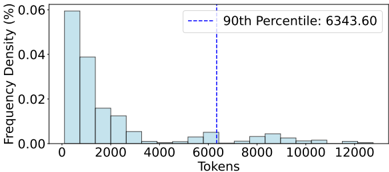
Figure 6: The length distribution of a11y tree as observation from sampled trajectories.
<details>
<summary>Image 7 Details</summary>
### Visual Description
## Bar Chart: Frequency Density of Tokens
### Overview
The image is a bar chart depicting the frequency density distribution of tokens. The x-axis represents token counts (0 to 12,000), and the y-axis represents frequency density in percentage (0% to 0.06%). A vertical dashed line marks the 90th percentile at 6,343.60 tokens.
### Components/Axes
- **X-axis (Tokens)**: Labeled "Tokens" with discrete intervals (0, 2,000, 4,000, 6,000, 8,000, 10,000, 12,000).
- **Y-axis (Frequency Density %)**: Labeled "Frequency Density (%)" with increments from 0.00 to 0.06.
- **Legend**: A box in the top-right corner contains the text "90th Percentile: 6343.60" with a dashed blue line extending downward to the x-axis.
### Detailed Analysis
- **Bars**:
- The tallest bar is at **0 tokens**, with a frequency density of ~0.06%.
- Subsequent bars decrease in height:
- ~0.04% at ~2,000 tokens.
- ~0.02% at ~4,000 tokens.
- Smaller bars at ~6,000, 8,000, and 10,000 tokens (~0.005% each).
- No bars are visible beyond 12,000 tokens.
- **90th Percentile**: The dashed blue line at **6,343.60 tokens** intersects the x-axis, indicating that 90% of tokens fall below this value.
### Key Observations
1. **Highest Frequency at 0 Tokens**: The distribution is heavily skewed, with the majority of tokens concentrated at the lowest value.
2. **Rapid Decline**: Frequency density drops sharply after 2,000 tokens, suggesting a long-tailed distribution.
3. **90th Percentile Marker**: The 90th percentile value (6,343.60) is significantly higher than the peak frequency, indicating a wide spread in token counts.
### Interpretation
The chart demonstrates a **long-tailed distribution** of tokens, where most tokens are small in value (e.g., 0–2,000 tokens), but a small fraction of tokens are much larger (up to 12,000). The 90th percentile at 6,343.60 tokens implies that 90% of all tokens fall below this threshold, highlighting the dominance of low-frequency tokens. This pattern is typical in datasets like text corpora, where short words or phrases (low tokens) are far more common than rare, long sequences. The absence of bars beyond 12,000 tokens suggests a natural cutoff or truncation in the data collection process.
</details>
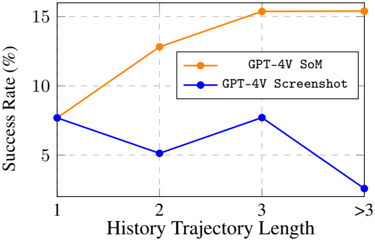
Figure 7: The effect of length of history on performance with the history encoding length of 1, 2, 3, and > 3 and run on a subset (10%) of examples.
<details>
<summary>Image 8 Details</summary>
### Visual Description
## Line Graph: Success Rate vs. History Trajectory Length
### Overview
The image is a line graph comparing the success rates of two methods, "GPT-4V SoM" (orange line) and "GPT-4V Screenshot" (blue line), across varying lengths of history trajectory. The y-axis represents success rate (%) from 0 to 15, and the x-axis categorizes history trajectory lengths as 1, 2, 3, and ">3". The legend is positioned in the top-right corner, with orange and blue markers corresponding to the two methods.
### Components/Axes
- **Title**: "Success Rate (%)"
- **X-axis**: "History Trajectory Length" with categories: 1, 2, 3, >3
- **Y-axis**: "Success Rate (%)" with ticks at 0, 5, 10, 15
- **Legend**:
- Orange line: "GPT-4V SoM"
- Blue line: "GPT-4V Screenshot"
- **Data Points**:
- Orange line (SoM): 7% (1), 12% (2), 15% (3), 15% (>3)
- Blue line (Screenshot): 7% (1), 5% (2), 7% (3), 2% (>3)
### Detailed Analysis
- **GPT-4V SoM (Orange Line)**:
- Starts at 7% for trajectory length 1.
- Increases to 12% at length 2.
- Rises to 15% at length 3 and remains constant at 15% for lengths >3.
- Trend: Steady upward trajectory with plateau at higher lengths.
- **GPT-4V Screenshot (Blue Line)**:
- Starts at 7% for trajectory length 1.
- Drops to 5% at length 2.
- Recovers to 7% at length 3.
- Plummets to 2% for lengths >3.
- Trend: Volatile with a sharp decline at the longest trajectory.
### Key Observations
1. **GPT-4V SoM** maintains a consistently high success rate (15%) for trajectories of length 3 and longer, indicating robustness.
2. **GPT-4V Screenshot** shows a significant drop in success rate (from 7% to 2%) for trajectories >3, suggesting poor performance with extended data.
3. Both methods start with identical success rates (7%) at trajectory length 1, but diverge sharply afterward.
### Interpretation
The data suggests that **GPT-4V SoM** is more effective at handling longer history trajectories, maintaining high success rates even as complexity increases. In contrast, **GPT-4V Screenshot** struggles with longer trajectories, experiencing a dramatic decline in performance. This could imply that the SoM method is better suited for tasks requiring extended contextual analysis, while the Screenshot method may be limited by its inability to process or retain information from longer sequences. The sharp drop in the Screenshot method at ">3" trajectory length highlights a critical limitation, potentially due to memory constraints or algorithmic inefficiencies in handling extended data.
</details>
Longer text-based trajectory history context improves performance, unlike screenshotonly history, but poses efficiency challenges The main experiment revealed the decisive role of the a11y tree in performance within the current technological context. Even when we retain key attribute elements based on heuristic rules (keep nodes with tags of the document, item, button, heading, label, etc .), LLMs still require a sufficiently large context to process this information effectively. To further understand this, we sample some a11y tree observations from OSWORLD and conducted the statistical analysis, as shown in Figure 6. The analysis indicates that a context length of 6000 is needed to accommodate about 90% of cases for a single observation. However, relying solely on current observations inherently leads to agents making repeated errors. Therefore, we include current observations as well as past N rounds of observations and actions in the constructed prompts (see appendix for more details), to explore the impact on agent performance when N is set to 1, 2, 3, and all where we put as much context as we can. The experimental results (as shown in Figure 7) show the performance increase with
more history context for SoM. Future work on constructing models with enhanced capabilities for longer context support and understanding reasoning, improving model efficiency, and designing new agent architectures for efficient memory storage will have a significant impact on digital agents.
However, we also note that the inclusion of additional trajectory history does not enhance performance under the pure screenshot setting. This suggests that contemporary advanced VLMs might not be as adept at extracting robust contextual information from images as they are from textual data. Strengthening this capability to harness information from images constitutes an important avenue for future enhancements.
Figure 8: Decline in performance due to window perturbations.
<details>
<summary>Image 9 Details</summary>
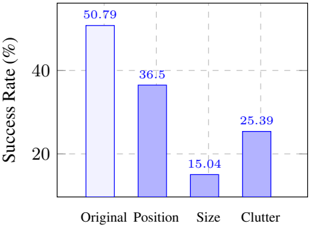
### Visual Description
## Bar Chart: Success Rate by Factor
### Overview
The image displays a bar chart comparing success rates across three factors: "Original Position," "Size," and "Clutter." The y-axis represents success rate as a percentage (0–60%), while the x-axis categorizes the factors. Three bars are present, with values explicitly labeled on top of each bar.
### Components/Axes
- **Y-Axis**: Labeled "Success Rate (%)" with increments of 20% (0, 20, 40, 60).
- **X-Axis**: Categorized into "Original Position," "Size," and "Clutter."
- **Legend**: Located at the top-right, associating:
- Light blue with "Original Position."
- Dark blue with "Size" and "Clutter."
### Detailed Analysis
- **Original Position**:
- Value: **50.79%** (light blue bar).
- Position: Leftmost bar, tallest in the chart.
- **Size**:
- Value: **36.5%** (dark blue bar).
- Position: Middle bar, shorter than "Original Position."
- **Clutter**:
- Value: **25.39%** (dark blue bar).
- Position: Rightmost bar, shortest in the chart.
### Key Observations
1. **Trend Verification**:
- The bars decrease in height from left to right, confirming a descending trend in success rate: **50.79% → 36.5% → 25.39%**.
- The legend colors align with the bars: light blue for "Original Position" and dark blue for the other two categories.
2. **Outliers/Anomalies**:
- No outliers; all values follow a consistent downward trend.
- "Clutter" has the lowest success rate, while "Original Position" dominates.
### Interpretation
The data suggests that **Original Position** is the most critical factor for success, outperforming "Size" and "Clutter" by significant margins. The descending trend implies that factors related to positioning have a stronger impact than those tied to size or clutter. This could reflect a scenario where spatial arrangement (e.g., in user interface design, logistics, or cognitive tasks) is prioritized over other variables. The consistent color coding in the legend reinforces clarity, ensuring no misinterpretation of categories.
</details>
VLMagents struggle with perturbation of position and size of application windows and irrelevant information We continue to adopt the SoM setting and sample a subset of 28 tasks that agents relatively well perform (with a success rate of 50.79%) in OSWORLD. At the beginning of each task, we introduce disturbances to the windows by 1) changing the position of the window; 2) changing the size of the window to the minimal; 3) opening some irrelevant software and maximizing them to clutter the screen. This process generates several times more samples from the subset of tasks to observe their performance. We find current agents are not robust in handling all these changes, which leads to a performance drop to over 60% to even 80%. Surprisingly, we find agents can switch the window to a certain degree but fail to maximize the window as an intermediate step and are stuck on other things. This suggests that while agents possess some capability to navigate between windows, they lack a comprehensive strategy for managing window states effectively.
## 5.3 Performance across Different Operating Systems
Another key challenge in building universal digital agents is ensuring that these agents can maintain efficient and consistent performance across different operating system environments. The differences between OS and their software ecosystems can significantly impact an agent's observation and action spaces, leading to performance uncertainties. Here, we explore and analyze the correlation between the success of agents in completing tasks on Windows after migrating from Ubuntu using examples from OSWORLD.
We enhance the functionality of the OSWORLD environment to support setting up initial experiment states, final evaluations, and obtaining observations such as the a11y tree and screenshots in Windows OS. Additionally, we have made example-wise fine-tuning modifications to the existing subset in OSWORLD for migration to Windows. We conduct evaluations using the GPT-4V screenshot-only method and present the correlation of
Table 7: Comparison of model performance and correlation across operating systems.
| OS | SR (%) Correlation |
|---------|----------------------|
| Ubuntu | 4.88 0.7 |
| Windows | 2.55 |
performance across the two operating systems. As shown in Tab. 7, the model's performance on Ubuntu and Windows is 4.88% and 2.55%, respectively, with a correlation coefficient of 0.7, despite the differences in their observation spaces. This implies that insights and methodologies developed within the OSWORLD framework can be effectively transferred to Windows environments with a high degree of reliability.
## 5.4 Qualitative Analysis
In this section we highlight representative examples of success, failure, and surprising outcomes, alongside a comparative study between GPT-4V and Claude-3 agents, to elucidate the unique challenges and insights our environment introduces. See App. D for more details.
Success and failure cases We find agents, particularly based on GPT-4V, can successfully solve tasks that involve complex problem-solving or creative thinking, showcasing the advanced under-
standing and processing capabilities of the model already. One successful task is shown in the first row of Figure 9. The agent is requested to extract subtitle files from the video stream and save them locally. The agent first divides the screen into two parts, with the VLC application window on the left and the terminal window open on the right, and uses the ffmpeg command twice. The first use removes the subtitles embedded in the original video, and the second use saves the extracted subtitles locally.
Task Instruction: I downloaded an episode of Friends to practice listening, but I don't know how to remove the subtitles. Please help me remove the subtitles from the video and export it as "subtitles.srt" and store it in the same directory as the video.
Figure 9: The agent successfully understood the complex task instructions, extracted the subtitle file from the video, and generated a pure video without embedded subtitles.
<details>
<summary>Image 10 Details</summary>
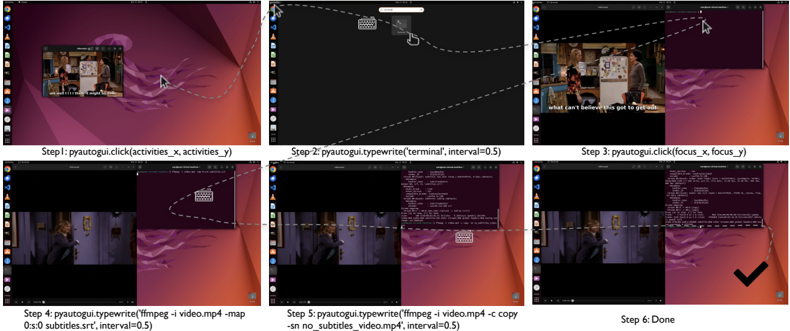
### Visual Description
## Screenshot: PyAutoGUI Automation Workflow
### Overview
The image depicts a six-step tutorial demonstrating the automation of video file processing using PyAutoGUI. It shows sequential actions (clicking, typing, file operations) paired with visual representations of a computer desktop interface. The workflow culminates in a completed task marked with a checkmark.
### Components/Axes
1. **Step 1**: `pyautogui.click(activities_x, activities_y)`
- Visual: Arrow pointing to a video player window with a purple/orange desktop background.
2. **Step 2**: `pyautogui.typewrite('terminal', interval=0.5)`
- Visual: Terminal window opening with a black background and white text.
3. **Step 3**: `pyautogui.click(focus_x, focus_y)`
- Visual: Arrow targeting a specific area of the terminal window.
4. **Step 4**: `pyautogui.typewrite('ffmpeg -i video.mp4 -map 0:s:0 subtitles.srt', interval=0.5)`
- Visual: Terminal command input with a purple desktop background.
5. **Step 5**: `pyautogui.typewrite('-sn no_subtitles_video.mp4', interval=0.5)`
- Visual: Terminal command continuation with file path output.
6. **Step 6**: "Done" (black checkmark)
- Visual: Final panel showing completed task with a checkmark overlay.
### Detailed Analysis
- **Step 1**: Simulates a mouse click at coordinates `(activities_x, activities_y)` to open a video player.
- **Step 2**: Types "terminal" into a search bar with a 0.5-second delay between keystrokes.
- **Step 3**: Focuses on the terminal window via coordinates `(focus_x, focus_y)`.
- **Step 4**: Executes an `ffmpeg` command to extract subtitles from `video.mp4`, saving them as `subtitles.srt`.
- **Step 5**: Modifies the original video file to remove subtitles, saving it as `no_subtitles_video.mp4`.
- **Step 6**: Marks task completion with a checkmark, indicating successful automation.
### Key Observations
- **Automation Flow**: The process automates repetitive tasks (opening apps, typing commands, file manipulation) using PyAutoGUI.
- **Precision**: Coordinates `(activities_x, activities_y)` and `(focus_x, focus_y)` suggest pixel-level targeting for GUI interactions.
- **Command Structure**: The `ffmpeg` command demonstrates video processing capabilities (subtitle extraction and removal).
- **Interval Parameter**: Consistent `interval=0.5` ensures human-like typing speed to avoid automation detection.
### Interpretation
This workflow illustrates how PyAutoGUI can automate GUI-based tasks, such as video processing, by simulating human interactions. The use of `ffmpeg` highlights integration with command-line tools for advanced media manipulation. The step-by-step visual guidance emphasizes the importance of precise coordinate targeting and timing in automation scripts. The final checkmark symbolizes the successful completion of a task that would otherwise require manual intervention, showcasing efficiency gains through scripting.
</details>
Despite the successes, there are notable failures that highlight the limitations of current models. In the task of 'center-aligning the title of the document' (Fig. 10 line 1), the agent fails to ground the relatively simple requirement of 'center alignment of texts', performing many useless actions such as selecting irrelevant words, opening irrelevant menus, etc .
Moreover, we find that the agent lacks prior knowledge in using software, performing poorly in many specialized tasks (as shown in Fig. 16, with GIMP, LibreOffice Calc, and Chrome selected). Taking GIMP as an example, for the instruction 'reduce brightness' the agent does not know which menu in the toolbar is for brightness adjustment and instead randomly tries until exhausting the maximum number of steps.
Common errors by GPT-4V agents Among the 550 failed examples from different settings in our sample, more than 75% exist mouse click inaccuracies , which is the most common error. The agent fails to click the correct coordinates despite planning detailed and accurate steps in their code comments, indicating strong planning but weak execution capabilities. Mouse click inaccuracies lead to two other frequent errors: repetitive clicks and environmental noise dilemma . Repetitive clicks occur when the agent repeatedly misclicks, adjusts, and fails, consuming too many steps. Environmental noise arises from clicking unintended objects, causing pop-ups, or opening unrelated applications. Due to a lack of prior knowledge about most professional software, it falls into a mismatch dilemma between the actions taken and the current state, and don't know how to get back to normal. Moreover, the agent lacks basic human-like cognition of web pages, such as not closing pop-ups in real-world web pages or being attracted by advertisement content, which affects its original correct judgment. Failures also arise from misinterpretation of instructions and visual oversight , highlighting the need for improvement in language and visual processing. See App. D.2 for the specific execution process.
Discrepancies in task difficulty between agent and human We identify notable disparities in the perceived difficulty of tasks between humans and AI agents. Tasks that are intuitively simple for humans often present substantial challenges to agents, and conversely, tasks that humans find demanding can be more straightforward for agents to execute. You can find more details in Fig. 19 and App. D.3.
## Task Instruction: help me center align the heading in LibreOffice.
Figure 10: Screenshots of the three examples mentioned in the quality analysis. The first line is an example of GPT-4V failing at a very simple task, the second line is one example where agents face more difficulty than humans, and the third line is one example that is more difficult for humans than for agents.
<details>
<summary>Image 11 Details</summary>
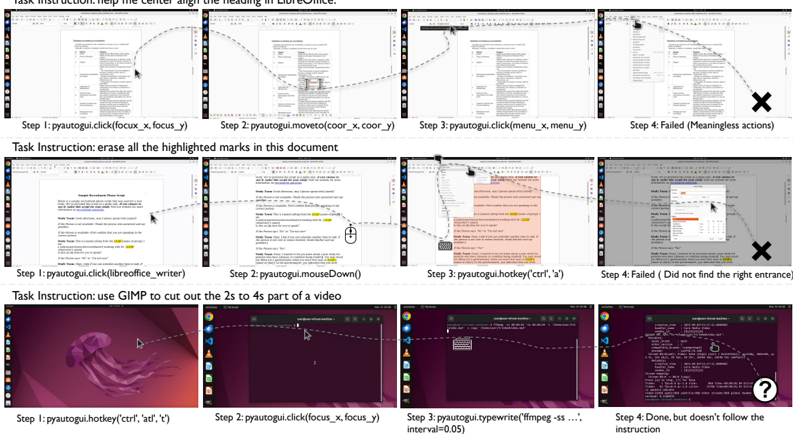
### Visual Description
## Screenshot Analysis: Task Execution Workflow with Annotations
### Overview
The image displays three distinct task execution workflows, each demonstrating a sequence of user actions (steps 1-4) with annotations indicating success/failure. Each workflow includes:
1. Task instructions
2. Step-by-step action descriptions
3. Visual annotations (arrows, X marks, question marks)
4. UI elements (menus, dialogs, text editors)
### Components/Axes
**Task Structure:**
- **Task Instructions**: Positioned at the top of each workflow
- **Steps**: Numbered 1-4 with action descriptions
- **Annotations**:
- ✗ (X mark): Indicates failed steps
- ❓ (Question mark): Indicates uncertainty
- Arrows: Show cursor movement/selection paths
**UI Elements:**
- Text editors (LibreOffice Writer, GIMP)
- Menu dialogs (File > Save As, Edit > Cut)
- System tray icons (Windows taskbar visible)
### Detailed Analysis
**Workflow 1: LibreOffice Heading Alignment**
1. **Instruction**: "help the center align the heading in LibreOffice"
2. **Step 1**: `pyautogui.click(focus_x, focus_y)` - Successful selection
3. **Step 2**: `pyautogui.moveTo(coor_x, coor_y)` - Cursor movement
4. **Step 3**: `pyautogui.click(menu_x, menu_y)` - Menu interaction
5. **Step 4**: ✗ "Failed (Meaningless actions)" - Incorrect menu selection
**Workflow 2: Document Highlight Erasure**
1. **Instruction**: "erase all the highlighted marks in this document"
2. **Step 1**: `pyautogui.click(libreoffice_writer)` - Document selection
3. **Step 2**: `pyautogui.mouseDown()` - Highlight initiation
4. **Step 3**: `pyautogui.hotkey('ctrl', 'x')` - Cut operation
5. **Step 4**: ✗ "Failed (Did not find right entrance)" - Incomplete selection
**Workflow 3: Video Editing with GIMP**
1. **Instruction**: "use GIMP to cut out the 2s to 4s part of a video"
2. **Step 1**: `pyautogui.hotkey('ctrl', 'alt', 't')` - Terminal activation
3. **Step 2**: `pyautogui.click(focus_x, focus_y)` - File selection
4. **Step 3**: `pyautogui.typewrite('ffmpeg -ss ... interval=0.05')` - Command input
5. **Step 4**: ❓ "Done, but doesn't follow the instruction" - Partial success
### Key Observations
1. **Failure Patterns**:
- Menu navigation errors (Workflow 1)
- Selection boundary issues (Workflow 2)
- Command syntax ambiguity (Workflow 3)
2. **Annotation Placement**:
- X marks consistently in top-right quadrant of failed steps
- Question mark in bottom-right of partial success
- Arrows show cursor movement trajectories
3. **UI State**:
- Workflow 2 shows document grayed-out after failed step
- Workflow 3 displays terminal command history
### Interpretation
The workflows demonstrate challenges in:
1. **Automated UI Interaction**:
- Pixel-based coordinates (`focus_x`, `focus_y`) may lack precision
- Menu navigation requires exact positional awareness
2. **Command-Line Ambiguity**:
- FFmpeg command lacks complete syntax (`-i input.mp4 -to 4 -ss 2 ...`)
- Interval parameter (`0.05`) suggests frame rate considerations
3. **Human-Machine Interface Gaps**:
- Visual cues (annotations) reveal where automated actions diverge from expected paths
- Success criteria appear context-dependent rather than rule-based
The data suggests that while basic UI automation is achievable, complex tasks require:
- Context-aware selection algorithms
- Natural language processing for command generation
- Error recovery mechanisms for partial successes
</details>
Tasks where humans outperform agents These tasks mainly involve text-based and designrelated work, such as 'bold the font on this slide and add notes' or 'erase all the highlighted marks in this document' (Fig. 10 Line 2). Since the Internet lacks such fine-grained data as the software execution process, the agent also lacks the corresponding training process, so its grounding ability is not good enough. The lack of understanding of GUI logic also causes poor performance on operations like selecting and scrolling.
Tasks where agents outperform humans Tasks that the agent considers simple but humans find difficult are concentrated in 'code solvability tasks', such as 'monitor the system CPU for 30s and output the results' and 'force close a process'. These tasks require little or no GUI interaction and can be completed by executing complex codes and instructions. It's worth noting that completing through code sometimes mismatches with human instructions. In the task "use GIMP to cut out the 2s to 4s part of a video,(Fig. 10 Line 3)" the agent used 'ffmpeg' command to complete the video cropping, ignoring the 'use GIMP' requirement in the instructions.
Surprisingly, we discovered that agents are as prone to inefficiency in mechanically repetitive tasks, such as copying, pasting, and batch editing of Excel sheets, as humans. Humans frequently commit careless errors during execution. The shortcomings in agents stem either from the absence of an API or from insufficient training data related to the API, hindering their ability to efficiently process tasks in batches. Furthermore, sluggish response times can cause tasks to either time out or surpass the maximum allowed steps.
Comparative analysis: Claude-3 vs. GPT-4V Although Claude outperforms GPT-4 in many benchmarks such as GSM8K, HumanEval, etc ., in our main experiment, we find that Claude has an average lower accuracy rate compared to GPT-4V by 2.84% to 7.76%. We find that Claude can provide satisfactory high-level solutions, but its grounding ability contains hallucinations in detail. For instance, Claude would interpret double-clicking a file as selecting it instead of opening it, treat column B in LibreOffice Calc software as column C, and enter text in the VS Code text replacement box without clicking on global replace. This shows that Claude can align well with human planning in problem-solving, but lacks excellent grounding ability when it comes to execution. Details can be seen in Fig. 20 and App. D.4.
## 6 Related Work
Benchmarks for multimodal agents Testing digital interaction agents mainly spans coding environments, web scenarios, and mobile applications. In the coding domain, several works provide frameworks and datasets for evaluating agents across programming languages and software engineering activities [57, 20, 24, 45]. For web browsing, platforms have been developed for agents to interact with web interfaces through keyboard and mouse actions, alongside datasets focusing on open-ended web tasks and realistic web navigation [44, 30, 58, 9, 66, 22, 10]. Mobile device interaction research aims at improving accessibility, with simulators for mobile UI interactions and platforms dedicated to InfoUI tasks [27, 47, 51, 50, 40, 61, 53, 60, 52]. Further, environments connecting to real computers and datasets for GUI grounding, albeit without interactive capability, have emerged [13, 8, 38, 21, 48]. Comprehensive task evaluation across different aspects also sees innovations [32, 36]. Differing from previous endeavors focusing on singular environments or lacking executability, OSWORLD integrates an interactive setup enabling agents to engage with operating systems openly, supported by a diverse array of tasks and precise evaluation scripts within a fully controllable setting, marking it as a competitive benchmarking realism and reliability, as well as an environment for learning and evaluating general-purpose digital agent (See Tab. 4 for comparison).
Vision-language models for multimodal agents Many existing works on GUI interaction utilize some form of structured data (such as HTML, accessibility trees, view hierarchies) as a grounding source [9, 15, 27, 37, 64, 46, 62, 66]. However, source code often tends to be verbose, non-intuitive, and filled with noise. In many cases, it is even inaccessible or unavailable for use, making multimodality or even vision-only perception a must. To take screenshots as input, there are already specialized, optimized multi-modal models available that are suited for tasks on web [4, 12, 18, 23, 43] and mobile devices [17, 63]. Additionally, general-purpose foundation models [5, 26, 31, 67] also demonstrate significant potential for multi-modal digital agents. The development of prompt-based methods [13, 16, 55, 65], as well as visual reasoning paradigms, have also further facilitated the performance of digital agents in web pages, mobile apps, and desktop. To investigate how well do current models and methods perform in digital agent tasks, our paper evaluates the results of text-only, vision-only, and multi-modal input as well as across multiple methods, demonstrating that existing multi-modal models are far from capable computer agents. Specifically, there is ample room for improvement in long-horizon planning, screenshot details perception, pixel coordinate locating, and world knowledge.
## 7 Conclusion and Future Work
In conclusion, the introduction of OSWORLD marks a significant step forward in the development of autonomous digital agents, addressing critical gaps in existing interactive learning environments. By providing a rich, realistic setting that spans multiple operating systems, interfaces, and applications, OSWORLD not only broadens the scope of tasks digital agents can perform but also enhances their potential for real-world application. Despite the promise shown by advancements in vision-language models, evaluations within OSWORLD reveal notable challenges in agents' abilities, particularly in GUI understanding and operational knowledge, pointing to essential areas for future research and development.
We identify several potential directions for community development and progress toward generalpurpose agents for computer operation:
Enhancing VLM capabilities for efficient and robust GUI interactions For foundation model development, we need to boost the efficiency of our models, enabling them to process much longer contexts and perform inference computations efficiently, akin to the robotics community [6, 7] to better handle real-world cases. Enhancements in VLMs' GUI grounding capabilities that is robust to application windows changes and are also sought, focusing on the accurate understanding and generation of precise actions aligned with given instructions. Moreover, amplifying VLMs' ability to comprehend context in the form of images is a pivotal goal, since it is crucial to enable history encoding using images so that we can build memory and reflection upon that. These improvements may require more efforts in the upstream pre-training stage, downstream fine-tuning stage, and even in the model structure itself, as pointed out in previous work [9, 17, 33].
Advancing agent methodologies for exploration, memory, and reflection The next-level approach encompasses designing more effective agent architectures that augment the agents' abilities to explore autonomously and synthesize their findings. The agents face challenges in leveraging lengthy raw observation and action records. It's fascinating to explore novel methods for encoding this history, incorporating efficient memory and reflection solutions to condense contextual information and aid the agent in extracting key information. Additionally, integrating knowledge grounding into (V)LLM agents through memory mechanisms is a promising avenue as well. Moreover, practice GUI assistants also require features of personalization and customization. These features rely on techniques such as user profiling and retaining memories from long-term user-assistant interactions. Additionally, crafting protocols specifically for digital agents operating within GUI and CLI interfaces aims at facilitating efficient actions is also an essential thing for the feasibility of general-purpose digital agents in the mid-short term.
Addressing the safety challenges of agents in realistic environments The safety of agents is a critical issue if applying a built agent in fully realistic environments, the developed universal digital agent could potentially be used to bypass CAPTCHA systems in the future, as noted in [42]. However, due to the currently limited capabilities of agents, we have not observed any harmful and damaging behaviors during our experiments, an automatic agent has the opportunity to damage patent rights, abuse accounts, attempt to exploit software vulnerabilities to create viruses, or engage in attacks. Currently, we adopt virtual machines to make it difficult for developing digital agents to cause irreversible damage to our host machines. However, there still lacks a reliable metric to assess the safety of an agent developed in an isolated environment. The current evaluation functions mainly focus on the results closely regarding the task instructions, assess only the correctness of task completion, and pay little attention to potential unnecessary damaging actions of agents. Owing to the complexity of a complete computer environment, we didn't work out an efficient way to detect the latent side effects of the agent. Consequently, how to assess and control potential behaviors in open and real environments through environmental constraints and agent training is an important further direction of research.
Expanding and refining data and environments for agent development In terms of datasets and environments, we can broaden the scope to cover more specialized domains, including real-sector needs in healthcare, education, industry, transportation, and personalized requirements. Efforts can be made to ensure our environment's seamless deployment across various hardware and software settings. The variance of a11y tree quality across different applications is also noticed. Although the problem is not remarkable in the applications currently included, there is no guarantee of that the application developers obey the a11y convention and offer clear and meaningful descriptions for GUI elements. More intelligent approaches to filter redundant a11y tree elements and to handle latently missing elements deserve careful investigation as well. We also highlight the necessity of a painless data collection method, allowing for the effortless acquisition of computer operation data and its transformation into agent capabilities.
## Acknowledgements
We thank Sida Wang, Peter Shaw, Alane Suhr, Luke Zettlemoyer, Chen Henry Wu, Pengcheng Yin, Shunyu Yao, Xing Han Lu, Siva Reddy, Ruoxi Sun, Zhiyuan Zeng, Chengyou Jia, and Lei Li for their helpful feedback on this work.
## References
- [1] Adept. ACT-1: Transformer for Actions. https://www.adept.ai/act , 2022.
- [2] Anthropic. Introducing the next generation of claude. https://www.anthropic.com/news/ claude-3-family , 2023. Accessed: 2024-03-26.
- [3] Anthropic. The claude 3 model family: Opus, sonnet, haiku. https://wwwcdn.anthropic.com/de8ba9b01c9ab7cbabf5c33b80b7bbc618857627/Model\_Card\_Claude\_3.pdf , 2024.
- [4] Gilles Baechler, Srinivas Sunkara, Maria Wang, Fedir Zubach, Hassan Mansoor, Vincent Etter, Victor C˘ arbune, Jason Lin, Jindong Chen, and Abhanshu Sharma. Screenai: A vision-language model for ui and infographics understanding. arXiv preprint arXiv:2402.04615 , 2024.
- [5] Jinze Bai, Shuai Bai, Yunfei Chu, Zeyu Cui, Kai Dang, Xiaodong Deng, Yang Fan, Wenbin Ge, Yu Han, Fei Huang, et al. Qwen technical report. arXiv preprint arXiv:2309.16609 , 2023.
- [6] Anthony Brohan, Noah Brown, Justice Carbajal, Yevgen Chebotar, Joseph Dabis, Chelsea Finn, Keerthana Gopalakrishnan, Karol Hausman, Alex Herzog, Jasmine Hsu, et al. Rt-1: Robotics transformer for real-world control at scale. arXiv preprint arXiv:2212.06817 , 2022.
- [7] Anthony Brohan, Noah Brown, Justice Carbajal, Yevgen Chebotar, Xi Chen, Krzysztof Choromanski, Tianli Ding, Danny Driess, Avinava Dubey, Chelsea Finn, et al. Rt-2: Vision-languageaction models transfer web knowledge to robotic control. arXiv preprint arXiv:2307.15818 , 2023.
- [8] Kanzhi Cheng, Qiushi Sun, Yougang Chu, Fangzhi Xu, Yantao Li, Jianbing Zhang, and Zhiyong Wu. Seeclick: Harnessing gui grounding for advanced visual gui agents. arXiv preprint arXiv:2401.10935 , 2024.
- [9] Xiang Deng, Yu Gu, Boyuan Zheng, Shijie Chen, Samuel Stevens, Boshi Wang, Huan Sun, and Yu Su. Mind2web: Towards a generalist agent for the web. arXiv preprint arXiv:2306.06070 , 2023.
- [10] Alexandre Drouin, Maxime Gasse, Massimo Caccia, Issam H Laradji, Manuel Del Verme, Tom Marty, Léo Boisvert, Megh Thakkar, Quentin Cappart, David Vazquez, et al. Workarena: How capable are web agents at solving common knowledge work tasks? arXiv preprint arXiv:2403.07718 , 2024.
- [11] D. Dupont. GPT-4V-Act: GPT-4 Variant for Active Learning. GitHub repository, 2023. URL https://github.com/ddupont808/GPT-4V-Act .
- [12] Hiroki Furuta, Ofir Nachum, Kuang-Huei Lee, Yutaka Matsuo, Shixiang Shane Gu, and Izzeddin Gur. Multimodal web navigation with instruction-finetuned foundation models. arXiv preprint arXiv:2305.11854 , 2023.
- [13] Difei Gao, Lei Ji, Zechen Bai, Mingyu Ouyang, Peiran Li, Dongxing Mao, Qinchen Wu, Weichen Zhang, Peiyi Wang, Xiangwu Guo, et al. Assistgui: Task-oriented desktop graphical user interface automation. arXiv preprint arXiv:2312.13108 , 2023.
- [14] Yiduo Guo, Zekai Zhang, Yaobo Liang, Dongyan Zhao, and Duan Nan. Pptc benchmark: Evaluating large language models for powerpoint task completion. arXiv preprint arXiv:2311.01767 , 2023.
- [15] Izzeddin Gur, Hiroki Furuta, Austin Huang, Mustafa Safdari, Yutaka Matsuo, Douglas Eck, and Aleksandra Faust. A real-world webagent with planning, long context understanding, and program synthesis. arXiv preprint arXiv:2307.12856 , 2023.
- [16] Hongliang He, Wenlin Yao, Kaixin Ma, Wenhao Yu, Yong Dai, Hongming Zhang, Zhenzhong Lan, and Dong Yu. Webvoyager: Building an end-to-end web agent with large multimodal models. arXiv preprint arXiv:2401.13919 , 2024.
- [17] Wenyi Hong, Weihan Wang, Qingsong Lv, Jiazheng Xu, Wenmeng Yu, Junhui Ji, Yan Wang, Zihan Wang, Yuxiao Dong, Ming Ding, et al. Cogagent: A visual language model for gui agents. arXiv preprint arXiv:2312.08914 , 2023.
- [18] Peter C Humphreys, David Raposo, Tobias Pohlen, Gregory Thornton, Rachita Chhaparia, Alistair Muldal, Josh Abramson, Petko Georgiev, Adam Santoro, and Timothy Lillicrap. A data-driven approach for learning to control computers. In International Conference on Machine Learning , pages 9466-9482. PMLR, 2022.
- [19] Albert Q Jiang, Alexandre Sablayrolles, Antoine Roux, Arthur Mensch, Blanche Savary, Chris Bamford, Devendra Singh Chaplot, Diego de las Casas, Emma Bou Hanna, Florian Bressand, et al. Mixtral of experts. arXiv preprint arXiv:2401.04088 , 2024.
- [20] Carlos E Jimenez, John Yang, Alexander Wettig, Shunyu Yao, Kexin Pei, Ofir Press, and Karthik Narasimhan. Swe-bench: Can language models resolve real-world github issues? arXiv preprint arXiv:2310.06770 , 2023.
- [21] Raghav Kapoor, Yash Parag Butala, Melisa Russak, Jing Yu Koh, Kiran Kamble, Waseem Alshikh, and Ruslan Salakhutdinov. Omniact: A dataset and benchmark for enabling multimodal generalist autonomous agents for desktop and web. arXiv preprint arXiv:2402.17553 , 2024.
- [22] Jing Yu Koh, Robert Lo, Lawrence Jang, Vikram Duvvur, Ming Chong Lim, Po-Yu Huang, Graham Neubig, Shuyan Zhou, Ruslan Salakhutdinov, and Daniel Fried. Visualwebarena: Evaluating multimodal agents on realistic visual web tasks. arXiv preprint arXiv:2401.13649 , 2024.
- [23] Kenton Lee, Mandar Joshi, Iulia Raluca Turc, Hexiang Hu, Fangyu Liu, Julian Martin Eisenschlos, Urvashi Khandelwal, Peter Shaw, Ming-Wei Chang, and Kristina Toutanova. Pix2struct: Screenshot parsing as pretraining for visual language understanding. In International Conference on Machine Learning , pages 18893-18912. PMLR, 2023.
- [24] Bowen Li, Wenhan Wu, Ziwei Tang, Lin Shi, John Yang, Jinyang Li, Shunyu Yao, Chen Qian, Binyuan Hui, Qicheng Zhang, et al. Devbench: A comprehensive benchmark for software development. arXiv preprint arXiv:2403.08604 , 2024.
- [25] Hongxin Li, Jingran Su, Yuntao Chen, Qing Li, and Zhaoxiang Zhang. Sheetcopilot: Bringing software productivity to the next level through large language models. arXiv preprint arXiv:2305.19308 , 2023.
- [26] Lei Li, Zhihui Xie, Mukai Li, Shunian Chen, Peiyi Wang, Liang Chen, Yazheng Yang, Benyou Wang, and Lingpeng Kong. Silkie: Preference distillation for large visual language models. arXiv preprint arXiv:2312.10665 , 2023.
- [27] Yang Li, Jiacong He, Xin Zhou, Yuan Zhang, and Jason Baldridge. Mapping natural language instructions to mobile ui action sequences. arXiv preprint arXiv:2005.03776 , 2020.
- [28] J. C. R. Licklider. Man-computer symbiosis. IRE Transactions on Human Factors in Electronics , HFE-1(1):4-11, 1960. doi: 10.1109/THFE2.1960.4503259.
- [29] Xi Victoria Lin, Chenglong Wang, Luke Zettlemoyer, and Michael D Ernst. Nl2bash: A corpus and semantic parser for natural language interface to the linux operating system. arXiv preprint arXiv:1802.08979 , 2018.
- [30] Evan Zheran Liu, Kelvin Guu, Panupong Pasupat, Tianlin Shi, and Percy Liang. Reinforcement learning on web interfaces using workflow-guided exploration. arXiv preprint arXiv:1802.08802 , 2018.
- [31] Haotian Liu, Chunyuan Li, Qingyang Wu, and Yong Jae Lee. Visual instruction tuning. arXiv preprint arXiv:2304.08485 , 2023.
- [32] Xiao Liu, Hao Yu, Hanchen Zhang, Yifan Xu, Xuanyu Lei, Hanyu Lai, Yu Gu, Hangliang Ding, Kaiwen Men, Kejuan Yang, et al. Agentbench: Evaluating llms as agents. arXiv preprint arXiv:2308.03688 , 2023.
- [33] Xing Han Lù, Zdenˇ ek Kasner, and Siva Reddy. Weblinx: Real-world website navigation with multi-turn dialogue. arXiv preprint arXiv:2402.05930 , 2024.
- [34] Chang Ma, Junlei Zhang, Zhihao Zhu, Cheng Yang, Yujiu Yang, Yaohui Jin, Zhenzhong Lan, Lingpeng Kong, and Junxian He. Agentboard: An analytical evaluation board of multi-turn llm agents. arXiv preprint arXiv:2401.13178 , 2024.
- [35] Meta AI. Introducing meta Llama 3: The most capable openly available LLM to date, April 2024. URL https://ai.meta.com/blog/meta-llama-3/ . Accessed: 2024-04-18.
- [36] Grégoire Mialon, Clémentine Fourrier, Craig Swift, Thomas Wolf, Yann LeCun, and Thomas Scialom. Gaia: a benchmark for general ai assistants. arXiv preprint arXiv:2311.12983 , 2023.
- [37] Reiichiro Nakano, Jacob Hilton, Suchir Balaji, Jeff Wu, Long Ouyang, Christina Kim, Christopher Hesse, Shantanu Jain, Vineet Kosaraju, William Saunders, et al. Webgpt: Browser-assisted question-answering with human feedback. arXiv preprint arXiv:2112.09332 , 2021.
- [38] Runliang Niu, Jindong Li, Shiqi Wang, Yali Fu, Xiyu Hu, Xueyuan Leng, He Kong, Yi Chang, and Qi Wang. Screenagent: A vision language model-driven computer control agent. arXiv preprint arXiv:2402.07945 , 2024.
- [39] R OpenAI. Gpt-4 technical report. arxiv 2303.08774. View in Article , 2:13, 2023.
- [40] Christopher Rawles, Alice Li, Daniel Rodriguez, Oriana Riva, and Timothy Lillicrap. Android in the wild: A large-scale dataset for android device control. arXiv preprint arXiv:2307.10088 , 2023.
- [41] Machel Reid, Nikolay Savinov, Denis Teplyashin, Dmitry Lepikhin, Timothy Lillicrap, Jeanbaptiste Alayrac, Radu Soricut, Angeliki Lazaridou, Orhan Firat, Julian Schrittwieser, et al. Gemini 1.5: Unlocking multimodal understanding across millions of tokens of context. arXiv preprint arXiv:2403.05530 , 2024.
- [42] Andrew Searles, Yoshimichi Nakatsuka, Ercan Ozturk, Andrew Paverd, Gene Tsudik, and Ai Enkoji. An empirical study & evaluation of modern { CAPTCHAs } . In 32nd USENIX Security Symposium (USENIX Security 23) , pages 3081-3097, 2023.
- [43] Peter Shaw, Mandar Joshi, James Cohan, Jonathan Berant, Panupong Pasupat, Hexiang Hu, Urvashi Khandelwal, Kenton Lee, and Kristina Toutanova. From pixels to ui actions: Learning to follow instructions via graphical user interfaces. arXiv preprint arXiv:2306.00245 , 2023.
- [44] Tianlin Shi, Andrej Karpathy, Linxi Fan, Jonathan Hernandez, and Percy Liang. World of bits: An open-domain platform for web-based agents. In International Conference on Machine Learning , pages 3135-3144. PMLR, 2017.
- [45] Chenglei Si, Yanzhe Zhang, Zhengyuan Yang, Ruibo Liu, and Diyi Yang. Design2code: How far are we from automating front-end engineering?, 2024.
- [46] Abishek Sridhar, Robert Lo, Frank F Xu, Hao Zhu, and Shuyan Zhou. Hierarchical prompting assists large language model on web navigation. arXiv preprint arXiv:2305.14257 , 2023.
- [47] Liangtai Sun, Xingyu Chen, Lu Chen, Tianle Dai, Zichen Zhu, and Kai Yu. Meta-gui: Towards multi-modal conversational agents on mobile gui. arXiv preprint arXiv:2205.11029 , 2022.
- [48] Weihao Tan, Ziluo Ding, Wentao Zhang, Boyu Li, Bohan Zhou, Junpeng Yue, Haochong Xia, Jiechuan Jiang, Longtao Zheng, Xinrun Xu, et al. Towards general computer control: A multimodal agent for red dead redemption ii as a case study. arXiv preprint arXiv:2403.03186 , 2024.
- [49] Gemini Team, Rohan Anil, Sebastian Borgeaud, Yonghui Wu, Jean-Baptiste Alayrac, Jiahui Yu, Radu Soricut, Johan Schalkwyk, Andrew M Dai, Anja Hauth, et al. Gemini: a family of highly capable multimodal models. arXiv preprint arXiv:2312.11805 , 2023.
- [50] Daniel Toyama, Philippe Hamel, Anita Gergely, Gheorghe Comanici, Amelia Glaese, Zafarali Ahmed, Tyler Jackson, Shibl Mourad, and Doina Precup. Androidenv: A reinforcement learning platform for android. arXiv preprint arXiv:2105.13231 , 2021.
- [51] Sagar Gubbi Venkatesh, Partha Talukdar, and Srini Narayanan. Ugif: Ui grounded instruction following. arXiv preprint arXiv:2211.07615 , 2022.
- [52] Junyang Wang, Haiyang Xu, Jiabo Ye, Ming Yan, Weizhou Shen, Ji Zhang, Fei Huang, and Jitao Sang. Mobile-agent: Autonomous multi-modal mobile device agent with visual perception. arXiv preprint arXiv:2401.16158 , 2024.
- [53] Hao Wen, Yuanchun Li, Guohong Liu, Shanhui Zhao, Tao Yu, Toby Jia-Jun Li, Shiqi Jiang, Yunhao Liu, Yaqin Zhang, and Yunxin Liu. Empowering llm to use smartphone for intelligent task automation. arXiv preprint arXiv:2308.15272 , 2023.
- [54] Tianbao Xie, Fan Zhou, Zhoujun Cheng, Peng Shi, Luoxuan Weng, Yitao Liu, Toh Jing Hua, Junning Zhao, Qian Liu, Che Liu, Leo Z. Liu, Yiheng Xu, Hongjin Su, Dongchan Shin, Caiming Xiong, and Tao Yu. Openagents: An open platform for language agents in the wild. CoRR , abs/2310.10634, 2023. doi: 10.48550/ARXIV.2310.10634. URL https: //doi.org/10.48550/arXiv.2310.10634 .
- [55] An Yan, Zhengyuan Yang, Wanrong Zhu, Kevin Lin, Linjie Li, Jianfeng Wang, Jianwei Yang, Yiwu Zhong, Julian McAuley, Jianfeng Gao, et al. Gpt-4v in wonderland: Large multimodal models for zero-shot smartphone gui navigation. arXiv preprint arXiv:2311.07562 , 2023.
- [56] Jianwei Yang, Hao Zhang, Feng Li, Xueyan Zou, Chunyuan Li, and Jianfeng Gao. Set-of-mark prompting unleashes extraordinary visual grounding in gpt-4v. arXiv preprint arXiv:2310.11441 , 2023.
- [57] John Yang, Akshara Prabhakar, Karthik Narasimhan, and Shunyu Yao. Intercode: Standardizing and benchmarking interactive coding with execution feedback. arXiv preprint arXiv:2306.14898 , 2023.
- [58] Shunyu Yao, Howard Chen, John Yang, and Karthik Narasimhan. Webshop: Towards scalable real-world web interaction with grounded language agents. Advances in Neural Information Processing Systems , 35:20744-20757, 2022.
- [59] Chaoyun Zhang, Liqun Li, Shilin He, Xu Zhang, Bo Qiao, Si Qin, Minghua Ma, Yu Kang, Qingwei Lin, Saravan Rajmohan, et al. Ufo: A ui-focused agent for windows os interaction. arXiv preprint arXiv:2402.07939 , 2024.
- [60] Chi Zhang, Zhao Yang, Jiaxuan Liu, Yucheng Han, Xin Chen, Zebiao Huang, Bin Fu, and Gang Yu. Appagent: Multimodal agents as smartphone users. arXiv e-prints , pages arXiv-2312, 2023.
- [61] Danyang Zhang, Lu Chen, and Kai Yu. Mobile-env: A universal platform for training and evaluation of mobile interaction. arXiv preprint arXiv:2305.08144 , 2023.
- [62] Danyang Zhang, Lu Chen, Situo Zhang, Hongshen Xu, Zihan Zhao, and Kai Yu. Large language models are semi-parametric reinforcement learning agents. Advances in Neural Information Processing Systems , 36, 2024.
- [63] Zhuosheng Zhang and Aston Zhang. You only look at screens: Multimodal chain-of-action agents. arXiv e-prints , pages arXiv-2309, 2023.
- [64] Zihan Zhao, Lu Chen, Ruisheng Cao, Hongshen Xu, Xingyu Chen, and Kai Yu. Tie: Topological information enhanced structural reading comprehension on web pages. In Proceedings of the 2022 Conference of the North American Chapter of the Association for Computational Linguistics: Human Language Technologies , pages 1808-1821, 2022.
- [65] Boyuan Zheng, Boyu Gou, Jihyung Kil, Huan Sun, and Yu Su. Gpt-4v (ision) is a generalist web agent, if grounded. arXiv preprint arXiv:2401.01614 , 2024.
- [66] Shuyan Zhou, Frank F Xu, Hao Zhu, Xuhui Zhou, Robert Lo, Abishek Sridhar, Xianyi Cheng, Yonatan Bisk, Daniel Fried, Uri Alon, et al. Webarena: A realistic web environment for building autonomous agents. arXiv preprint arXiv:2307.13854 , 2023.
- [67] Deyao Zhu, Jun Chen, Xiaoqian Shen, Xiang Li, and Mohamed Elhoseiny. Minigpt-4: Enhancing vision-language understanding with advanced large language models. arXiv preprint arXiv:2304.10592 , 2023.
## A Details of OSWORLD Environment
## A.1 Environment Infrastructure
As compared to core commonly used techniques like Docker 6 , virtual machines can operate their own kernel and system, enabling compatibility with a wide variety of operating systems (such as Windows, macOS, Linux, etc.) across different CPU hardware types (x64, ARM, etc.), and supports training and evaluation in a multiprocess manner on both headless servers and personal computers.
## A.2 Observation Space
We implement three kinds of observation: complete screenshot , accessibility tree and terminal output . We also implement a video recorder of the environment but don't put it into our modeling due to the agent's ability limitations. OSWORLD supports observation refactoring and extending if needed, such as getting data from certain opening applications that we want to focus on.
## A.2.1 Screenshot
To align with the perception of a human user, we capture a screenshot of the entire computer screen. Including the mouse cursor also proves helpful in certain cases where mouse information is crucial. For screen resolution, we default to 1920 × 1080, as it is the most commonly used screen resolution according to Internet Users Screen Resolution Realtime Statistics for 2023 7 . This resolution also offers a 16:9 aspect ratio. OSWORLD also supports modifying the resolution of virtual machines to avoid potential memorization of absolute pixel values and to assist studies on topics like generalization across different resolutions.
## A.2.2 Accessibility Tree
An accessibility tree (or a11y tree, same logic to kubernetes and k8s), refers to an intricate structure generated by the browser or OS accessibility APIs that renders a representative model of the web content, providing a means of interaction for assistive technologies. Each node within the accessibility tree hosts important information about a UI element. This could range from the nature of the object (a button, checkbox, or paragraph of text), its current state (checked or unchecked, for checkboxes), and even its spatial orientation on the screen.
Different operating systems employ varied accessibility APIs and tools to construct and manipulate the accessibility tree. These include Microsoft Active Accessibility (MSAA) and User Interface Automation (UIA) for Windows, NSAccessibility Protocol and macOS Accessibility Inspector for macOS, and Assistive Technology Service Provider Interface (ATSPI) 8 for GNOME dekstop used on Ubuntu. We adopt pyatspi to get the accessibility tree on Ubuntu and pywinauto on Windows. We further convert it into XML format for message passing. Partial pieces of the XML formatted accessibility tree are shown in Figure 11.
Tools such as Accerciser can help visualize the corresponding relationship of tree nodes and GUI components in the accessibility tree as shown in Figure 12.
## A.3 Action Space
Weimplement two kinds of action space: pyautogui and computer\_13 . Wemainly use pyautogui action space, since it saves tokens for describing action space definition in prompting, compared with self-designed actions.
## A.3.1 PYAUTOGUI
pyautogui is an open-source, cross-platform Python module utilized for programmatically controlling the mouse and keyboard. It can control simple movements, clicks, as well as keyboard inputs, and can provide screen capture features or locate where the screen-specific images reside that can
6 https://www.docker.com/
8 https://docs.gtk.org/atspi2/
7 https://www.screenresolution.org/year-2023/
<details>
<summary>Image 12 Details</summary>
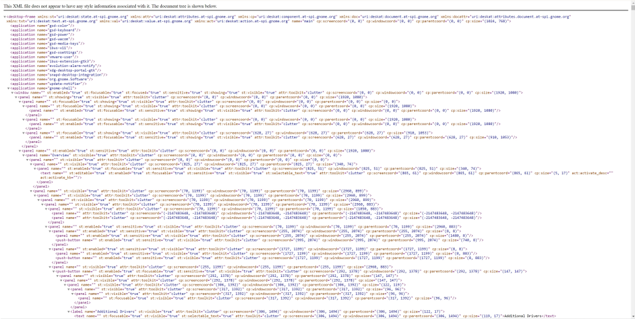
### Visual Description
## Text Document: XML Configuration Snippet
### Overview
The image displays a block of text resembling an XML configuration file. The content is structured with nested elements, attributes, and hierarchical indentation. The text is primarily in English, with no non-English content detected.
### Components/Axes
- **Root Element**: `<configuration>` (implied by the first line).
- **Attributes**: Each line contains key-value pairs such as `name="..."`, `value="..."`, `type="..."`, and `description="..."`.
- **Hierarchy**: Indentation indicates nested elements (e.g., `<item>` within `<configuration>`).
- **No Axes/Legends**: The text lacks visual elements like charts or diagrams.
### Detailed Analysis
- **Structure**:
- The first line declares the XML version and encoding:
```xml
<?xml version="1.0" encoding="UTF-8"?>
```
- Subsequent lines define configuration entries with attributes:
```xml
<configuration name="..." value="..." type="..."/>
<item name="..." value="..." type="..."/>
```
- Repetition of similar patterns suggests a template or generated file.
- **Content**:
- Attributes like `name`, `value`, and `type` are consistently used across lines.
- Some lines include `description` attributes, though many are omitted.
- Example entry:
```xml
<item name="SystemSettings" value="Default" type="String" description="Default system configuration"/>
```
### Key Observations
- **Uniformity**: All lines follow a similar format, indicating a structured configuration system.
- **Missing Context**: No comments or explanations are present, making the purpose of each entry unclear.
- **Repetition**: The same attributes (`name`, `value`, `type`) are reused, suggesting a standardized format.
### Interpretation
This text appears to be a configuration file for a software application, likely defining settings or parameters. The hierarchical structure implies nested configurations, such as system-wide settings and sub-settings. The absence of comments or metadata limits interpretability, but the repetition of attributes suggests a focus on key-value pairs for modular configuration. The file may be used for debugging, deployment, or system initialization.
**Note**: The image contains no numerical data, charts, or diagrams. All information is textual and structured as XML-like configuration entries.
</details>
st:fecusabletrut*st:visibletrve*st:selectable\_text=true”attr:tookitaclutter* cp:screencorda(306, 1494)° cp:nindovcoorda*(306, 1494)*cp:parentceerda*(36, 1494)*cp:site*(139, 17)Additional Drivers(/text)
Figure 11: Raw XML formatted accessibility tree visualization.
Figure 12: Use Accerciser to visualize components in accessibility tree. This example shows the corresponding relationship between the 'Print' button (which is a printer icon on the bar of the LibreOffice app as shown on the left) and the 'Print' tree node (which is the 'Print' of the Accerciser Accessibility Explorer as shown on the right).
<details>
<summary>Image 13 Details</summary>
### Visual Description
## Screenshot: Linux Desktop with LibreOffice Calc and Accessibility Explorer
### Overview
The image depicts a Linux desktop environment with two primary windows open:
1. **LibreOffice Calc** (spreadsheet application) on the left, displaying a grid of cells with specific highlights.
2. **Accessibility Explorer** (GUI testing tool) on the right, showing a list of accessibility validation tools and a highlighted item.
The desktop background features a gradient of purple and orange, with system icons visible on the left panel.
---
### Components/Axes
#### LibreOffice Calc Window
- **Grid Structure**:
- Columns labeled **A–H** (horizontal axis).
- Rows numbered **1–36** (vertical axis).
- **Highlighted Cells**:
- **A11**, **A12**, and **H12** are marked in **orange**.
- **Toolbar**:
- Standard menu options: **File, Edit, View, Window, Help**.
- Formatting tools: **Font, Alignment, Borders, Fill, Number Formats**.
- View options: **Sheet, Tools, Window, Help**.
#### Accessibility Explorer Window
- **List of Tools**:
- **AF SPI Validator**
- **Event Monitor**
- **Interface Viewer**
- **API Browser**
- **Highlighted Item**:
- **"Export Dir"** is marked in **orange**.
- **Status Indicators**:
- **"iPhone Console"** has a **green checkmark** (likely indicating validation success or active status).
- **Buttons**:
- **Save**, **Clear**, **Help** (bottom-right corner).
#### Desktop Environment
- **Icons**:
- Firefox, Terminal, File Manager, and other system applications.
- **Taskbar**:
- Located at the bottom-left corner with a grid menu (nine dots).
---
### Detailed Analysis
#### LibreOffice Calc
- **Highlighted Cells**:
- **A11** and **A12** (column A, rows 11–12) and **H12** (column H, row 12) are emphasized, suggesting active data entry or selection.
- **Toolbar Functionality**:
- The presence of **Font** and **Number Formats** tools indicates potential data formatting or validation tasks.
#### Accessibility Explorer
- **Highlighted "Export Dir"**:
- Likely a selected directory for exporting test results or configurations.
- **Green Checkmark on "iPhone Console"**:
- Implies successful validation or active connection to an iOS accessibility testing framework.
#### Desktop Layout
- **Icon Placement**:
- System icons are aligned vertically on the left panel, adhering to typical Linux desktop conventions.
---
### Key Observations
1. **Focus on Data Validation**:
- The combination of LibreOffice Calc (data manipulation) and Accessibility Explorer (GUI testing) suggests the user is engaged in accessibility testing or data-driven analysis.
2. **Highlighted Elements**:
- Orange highlights in both windows indicate active selection or critical focus areas.
3. **Desktop Organization**:
- Minimal clutter, with only essential icons visible, prioritizing workflow efficiency.
---
### Interpretation
- **Workflow Context**:
- The user may be cross-referencing spreadsheet data (Calc) with accessibility validation results (Accessibility Explorer), possibly for a web or mobile application.
- **Highlighted Cells in Calc**:
- The orange-marked cells (A11, A12, H12) could represent input parameters, test cases, or validation thresholds.
- **Accessibility Explorer Status**:
- The green checkmark on "iPhone Console" implies successful validation of accessibility features for iOS devices, a critical step in ensuring compliance with standards like WCAG.
- **Desktop Environment**:
- The purple/orange gradient background and organized icons reflect a customized, productivity-focused setup.
This setup highlights a technical workflow integrating data analysis and accessibility testing, emphasizing precision and validation in software development or QA processes.
</details>
be useful for GUI automation. Compared with other Python packages such as xdotool 9 , mouse 10 and keyboard 11 , pyautogui has better compatibility across different OSes as found in our early attempts, so that we adapt that as our core component of computer controlling as well as an official valid action space.
Herein, we will demonstrate some use cases of pyautogui and illustrate how it can be wielded as an action space.
## Mouse Controlling Functions
import pyautogui
```
```
```
pyautogui.click(x=moveToX, y=moveToY)
pyautogui.rightClick()
pyautogui.middleClick()
pyautogui.doubleClick()
pyautogui.tripleClick()
pyautogui.scroll(amount_to_scroll, x=moveToX, y=moveToY)
pyautogui.mouseDown()
pyautogui.mouseUp(x=moveToX, y=moveToY)
clicks = num_of_clicks
button = 'left'
if button == 'left':
clicks += 1
else:
clicks -= 1
print("Number of clicks:", clicks)
print("Button clicked:", button)
```
```
## Keyboard Controlling Functions
```
```
pyautogui as an Action Space Given the various controls it provides, pyautogui can readily be used as an action space in building automation software or testing interfaces with minor adjustments. More formally, an action is within the action space when it meets the syntax of pyautogui or is one of three special actions WAIT , FAIL , and DONE . This might include actions like clicking at a certain location, entering text or key sequences, or even resting for a span (Pause). Each action could be mapped to an identifying label or number, forming a discrete action space. For example:
```
import pygame
def perform_action(action):
if action == 0:
pyautogui.moveTo(100, 100)
elif action == 1:
pyautogui.write('Hello world!', interval=0.25)
else:
pyautogui.pause(1)
pyautogui.init() </doc>
```
In this scheme, the "perform\_action" function constitutes the action space, where each unique action is associated with a unique integer (its action ID). The function interprets these action IDs and performs the corresponding action, forming a rudimentary discrete action space.
One interesting finding is that language models generate screenshot locate functions like:
```
pyautogui.locateOn(screen('Apple.png'))
```
When there is insufficient grounding evidence (such as when no screenshot is inputted, the accessibility tree lacks a specific element, or the multimodal model cannot comprehend the user interface), employing this function to retrieve the correct icon image could present an interesting method.
## A.3.2 COMPUTER\_13
To facilitate potential reinforcement learning applications, we have created a variant of pyautogui , which we named computer\_13 . In this variant, we wrap pyautogui into a finite action class with parameterized enumeration, such that it features 13 action types, excluding three special ones for task process control. Utilizing this structured approach allows more effective reinforcement learning by providing a distinct and finite set of actions to be learned and optimized. As summarized in Table 8, each action type has certain parameters, detailed in the collection, confirming the type, range, and whether each parameter is optional for that action.
Table 8: Action types and parameters defined in action space computer\_13 , a variance we created for the potential reinforcement learning research based on our environment.
| Action Type | Parameters | Note |
|---------------|--------------------------|------------------------------------------------------------------------------------------------------------------------------------------------------------------------------------------------|
| MOVE_TO | x, y | Move the cursor to the specified position |
| CLICK | button, x, y, num_clicks | Click the left button if the button not specified, otherwise click the specified button; click at the current position if x and y are not specified, otherwise click at the specified position |
| MOUSE_DOWN | button | Press the left button if the button not specified, otherwise press the specified button |
| MOUSE_UP | button | Release the left button if the button not specified, otherwise release the specified button |
| RIGHT_CLICK | x, y | Right click at the current position if x and y are not specified, otherwise right click at the specified position |
| DOUBLE_CLICK | x, y | Double click at the current position if x and y are not specified, otherwise double click at the specified position |
| DRAG_TO | x, y | Drag the cursor to the specified position with the left button pressed |
| SCROLL | dx, dy | Scroll the mouse wheel up or down |
| TYPING | text | Type the specified text |
| PRESS | key | Press the specified key and release it |
| KEY_DOWN | key | Press the specified key |
| KEY_UP | key | Release the specified key |
| HOTKEY | keys | Press the specified key combination |
| WAIT | - | Wait until the next action |
| FAIL | - | Decide the task cannot be performed |
| DONE | - | Decide the task is done |
## B Details of OSWORLD Benchmark
## B.1 Operating System Selection
As of 2023, the most popular desktop operating systems are Windows (69.5%), macOS (20.4%), ChromeOS (3.2%), and Linux (3.1%) 12 . While Windows and macOS dominate the market share and boast the richest software ecosystems, their closed-source nature raises potential copyright concerns for direct usage. ChromeOS, being a web-based operating system, heavily depends on a Google account for its functionalities, rendering it less suitable for a public benchmark.
In contrast, Linux desktops offer a wealth of open-source software for most daily tasks, supported by an active community for both basic and advanced use. Essential applications such as Office Suite, browsers, email clients, multimedia apps, and thousands of games and applications are either pre-installed or readily available through the software center of the distribution. Consequently, we select Ubuntu, the most representative Linux desktop OS, as the foundation for the main part of our benchmark intended for public use. Additionally, we have developed components to facilitate agent interaction on a Windows virtual machine and have created a relatively small set of examples focusing on the Microsoft Office suite, including Excel, PowerPoint, and Word. This serves as a counterpart to the LibreOffice suite available on Ubuntu. These components can be utilized in-house or officially with the purchase of a license. Regarding macOS, theoretically, it is illegal to install macOS on non-Apple devices, which leads us to refrain from developing our benchmark on this platform to avoid copyright issues.
## B.2 Software Selection
Due to the high cost of obtaining operation and evaluation script annotation data, we have chosen a representative set of software for the examples of Ubuntu part. We adopt standards that consider: 1) Availability - the software must be available on Ubuntu 22.04; 2) Open-source - the software should be open-sourced with an appropriate license to prevent copyright issues; 3) Popularity - the software should take a high download number and frequency of recommendations in blogs and tutorials; 4) Strong user community and good support resources - it is preferable to have an active and robust user community as well as official documents, which can serve as ample resources for task collection and agent learning; 5) Diversity of categories - the software should be diverse to adequately represent and cover a wide range of real-world cases.
12 https://www.statista.com/statistics/218089/global-market-share-of-windows-7/
As a result, we have shortlisted the software into two categories: general usage and professional usage. For general usage, we have VLC for media playback, Chrome for web browsing, and Thunderbird for email management. For professional usage, we have VS Code as a coding IDE, and LibreOffice (Calc, Writer, and Impress) for handling spreadsheets, documents, and presentations respectively, along with GIMP for image editing. This brings our total to eight different types of software.
## B.3 Task Example Sources
We detail the task example sources in Table 9.
Table 9: Task Example Resources
| App | Resources | Link |
|-------------|------------------------------------|--------------------------------------------------------|
| | Ubuntu Documentations | https://help.ubuntu.com/ |
| | Ask Ubuntu | https://askubuntu.com/ |
| OS | Super User | https://superuser.com/ |
| | Stack Overflow | https://stackoverflow.com |
| | YouTube | https://www.youtube.com/ |
| | LibreOffice Help | https://help.libreoffice.org/ |
| | Microsoft Tech Community | https://techcommunity.microsoft.com/ |
| | libreofficehelp.com | https://www.libreofficehelp.com/ |
| | Reddit r/LibreOfficeCal | https://www.reddit.com/r/LibreOfficeCalc/ |
| | Reddit r/Excel | https://www.reddit.com/r/Excel/ |
| Calc | Super User | https://superuser.com/ |
| | Medium | https://medium.com/ |
| | Quora | https://www.quora.com/ |
| | YouTube | https://www.youtube.com/ |
| | Ryan and Debi &Toren Personal Site | https://www.ryananddebi.com/ |
| | LibreOffice Help | https://help.libreoffice.org/ |
| | LibreOffice Forum | https://ask.libreoffice.org/ |
| | libreofficehelp.com | https://www.libreofficehelp.com/ |
| | Super User | https://superuser.com/ |
| Writer | Stack Overflow | https://stackoverflow.com |
| | Ask Ubuntu | https://askubuntu.com/ |
| | Quora | https://www.quora.com/ |
| | YouTube | https://www.youtube.com/ |
| | SearchStar Personal Site | https://seekstar.github.io/ |
| | LibreOffice Help | https://help.libreoffice.org/ |
| | libreofficehelp.com | https://www.libreofficehelp.com/ |
| | Reddit r/LibreOffice | https://www.reddit.com/r/LibreOffice/ |
| | Super User | https://superuser.com/ |
| Impress | Stack Overflow | https://stackoverflow.com |
| | Technical Tips | https://technical-tips.com/ |
| | Just Click Here | https://justclickhere.co.uk/ |
| | TikTok | https://www.tiktok.com/ |
| | VLC Documentation VLCHelp.com | https://docs.videolan.me https://www.vlchelp.com/ |
| | VideoLAN's Wiki | https://wiki.videolan.org/ |
| | Ubuntu Documentations | https://help.ubuntu.com/ |
| VLC | Reddit r/Fedora | https://www.reddit.com/r/Fedora/ |
| | Super User | https://superuser.com/ |
| | Medium | https://medium.com/ |
| | YouTube | https://www.youtube.com/ |
| | Dedoimedo | https://www.dedoimedo.com/index.html |
| | Thunderbird | |
| | Support | https://support.mozilla.org/en-US/products/thunderbird |
| | Reddit r/Thunderbird | https://www.reddit.com/r/Thunderbird/ |
| | Reddit r/Automation | https://www.reddit.com/r/automation/ |
| Thunderbird | Super User | https://superuser.com/ |
| | WikiHow | https://www.wikihow.com/ |
| | Quora BitRecover | https://www.quora.com/ https://www.bitrecover.com/ |
| | AdSigner | https://www.adsigner.com/ |
Chrome
Google Chrome Help
https://support.google.com/chrome
Continued on next page
Table 9 - continued from previous page
| App | Resources | |
|----------|------------------------------------------|---------------------------------------------------------|
| | Reddit r/Chrome Super User | https://www.reddit.com/r/Chrome/ https://superuser.com/ |
| | WikiHow | https://www.wikihow.com/ |
| | in5steps.com | https://in5stepstutorials.com/ |
| | How-To Geek | https://www.howtogeek.com/ |
| | Medium | https://medium.com/ |
| | Quora | https://www.quora.com/ |
| | YouTube | https://www.youtube.com/ |
| | Laptop Mag | https://www.laptopmag.com |
| | Super User | https://superuser.com/ |
| | Overflow | https://stackoverflow.com |
| VS Code | Quora | https://www.quora.com/ |
| | Stack | |
| | YouTube | https://www.youtube.com/ |
| | Campbell Muscle Lab GitHub Reddit r/GIMP | https://campbell-muscle-lab.github.io/ |
| | Super User | https://www.reddit.com/r/GIMP/ https://superuser.com/ |
| | Stack Overflow | https://stackoverflow.com |
| GIMP | Quora | https://www.quora.com/ |
| | Make-Use-Of | |
| | | https://www.makeuseof.com/ |
| | YouTube | https://www.youtube.com/ |
| | UniPath Marketplace | https://marketplace.uipath.com/ |
| | sync.blue | https://www.sync.blue/ |
| | Device Tests | https://devicetests.com/ |
| | Make Tech Easier Exchange | https://www.maketecheasier.com/ |
| | Unix &Linux Stack | https://unix.stackexchange.com/ |
| | Geeks for Geeks | https://www.geeksforgeeks.org/ |
| | I Love Free Software | https://www.ilovefreesoftware.com/ |
| | The Geek Diary | https://www.thegeekdiary.com/ |
| | Zyxware | https://www.zyxware.com/ |
| Workflow | GNOME Discourse | https://discourse.gnome.org/ |
| | It's FOSS | https://itsfoss.com/ |
| | Super User Stack Overflow | https://superuser.com/ |
| | LibreOffice Forum | https://stackoverflow.com https://ask.libreoffice.org/ |
| | ImpressExtractNotes | https://github.com/danielrcollins1/ImpressExtractNotes |
| | Medium | https://medium.com/ |
| | YouTube | https://www.youtube.com/ |
| | Kelvin Smith Library | https://case.edu/library/ |
## B.4 Task Examples Collection
Here we show the detailed statistics of OSWORLD benchmark, including the main set on Ubuntu (369 in total) and the analytic set on Windows (43 in total).
Table 10: Detailed statistics of OSWORLD benchmark suite about examples number, average instruction tokens, infeasible instructions and integrated instructions.
| | OS | Calc | Impress | Writer | VLC | Thunderbird | Chrome | VSCode | GIMP | Workflow | Overall |
|-------------------|-------|--------|-----------|----------|-------|---------------|----------|----------|--------|------------|-----------|
| Examples | 24 | 47 | 47 | 23 | 17 | 15 | 46 | 23 | 26 | 101 | 369 |
| Avg. Inst. Tokens | 22.38 | 33.3 | 25.19 | 35.3 | 35.82 | 34.07 | 22.07 | 20.78 | 16.23 | 51.24 | 33.36 |
| #Infeasible | 5 | 1 | 0 | 1 | 3 | 1 | 3 | 5 | 10 | 1 | 30 |
| #Integrated | 7 | 19 | 30 | 0 | 0 | 0 | 26 | 0 | 0 | 2 | 84 |
Table 11: Detailed statistics of Windows analytic set benchmark suite. This set contains no infeasible tasks and integrated tasks.
| | Excel | Word | PPT | Workflow | Overall |
|-------------------|---------|--------|-------|------------|-----------|
| Examples | 11 | 9 | 7 | 16 | 43 |
| Avg. Inst. Tokens | 19.45 | 21.44 | 21.86 | 47.57 | 32.48 |
Figure 13: Comparison of instructions distribution. All datasets are sampled to 300 to make a fair comparison. The hyper-parameters of t-SNE are randomly sampled for each plot.
<details>
<summary>Image 14 Details</summary>
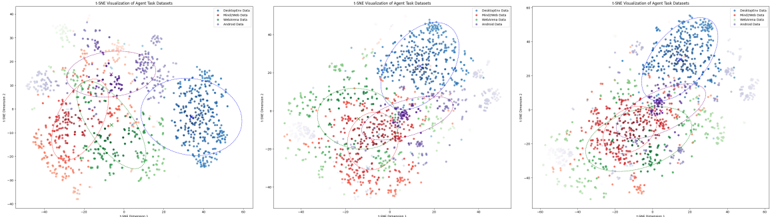
### Visual Description
## 1-SNE Visualization of Agent Task Datasets
### Overview
Three 2D scatter plots visualize the distribution of agent task datasets using 1-SNE dimensionality reduction. Each plot shows four data categories (Descriptive, Handwritten, Mathematical, Random) with distinct colors and clustering patterns. The visualizations demonstrate how datasets separate or overlap in reduced-dimensional space.
### Components/Axes
- **Axes Labels**:
- X-axis: "1-SNE Dimension 1"
- Y-axis: "1-SNE Dimension 2"
- **Legend**: Located in the top-right corner of all plots.
- **Descriptive Data**: Blue
- **Handwritten Data**: Red
- **Mathematical Data**: Green
- **Random Data**: Purple
- **Ellipses**: Drawn around clusters to highlight density regions.
### Detailed Analysis
#### Plot 1 (Left)
- **Descriptive Data (Blue)**: Clustered in the top-right quadrant (X: 20–40, Y: 10–30).
- **Handwritten Data (Red)**: Concentrated in the bottom-left quadrant (X: -20–0, Y: -20–0).
- **Mathematical Data (Green)**: Spread across the bottom-center (X: -10–10, Y: -20–0).
- **Random Data (Purple)**: Scattered in the top-left quadrant (X: -20–0, Y: 10–30).
- **Ellipses**:
- Blue ellipse: Covers ~80% of blue points.
- Red ellipse: Encloses ~90% of red points.
- Green ellipse: Contains ~70% of green points.
- Purple ellipse: Encircles ~60% of purple points.
#### Plot 2 (Center)
- **Descriptive Data (Blue)**: Dominates the top-right (X: 20–40, Y: 10–30), with tighter clustering.
- **Handwritten Data (Red)**: Bottom-left (X: -20–0, Y: -20–0), slightly overlapping with green.
- **Mathematical Data (Green)**: Bottom-center (X: -10–10, Y: -20–0), with minor overlap into red.
- **Random Data (Purple)**: Top-left (X: -20–0, Y: 10–30), with sparse points in the center.
- **Ellipses**:
- Blue ellipse: Covers ~90% of blue points.
- Red ellipse: Encloses ~80% of red points.
- Green ellipse: Contains ~65% of green points.
- Purple ellipse: Encircles ~55% of purple points.
#### Plot 3 (Right)
- **Descriptive Data (Blue)**: Top-right (X: 20–40, Y: 10–30), with some points spilling into the center.
- **Handwritten Data (Red)**: Bottom-left (X: -20–0, Y: -20–0), with minor overlap into green.
- **Mathematical Data (Green)**: Bottom-center (X: -10–10, Y: -20–0), with increased overlap into red.
- **Random Data (Purple)**: Top-left (X: -20–0, Y: 10–30), with significant points in the center.
- **Ellipses**:
- Blue ellipse: Covers ~75% of blue points.
- Red ellipse: Encloses ~70% of red points.
- Green ellipse: Contains ~60% of green points.
- Purple ellipse: Encircles ~50% of purple points.
### Key Observations
1. **Clustering**: Descriptive data consistently clusters in the top-right across all plots.
2. **Overlap**:
- Handwritten and Mathematical data overlap in the bottom-left/center in Plots 2 and 3.
- Random data increasingly overlaps with other categories in Plot 3.
3. **Ellipse Coverage**: Descriptive data has the highest ellipse coverage (80–90%), while Random data has the lowest (50–60%).
### Interpretation
The 1-SNE visualization effectively separates Descriptive and Handwritten data, which maintain distinct clusters. Mathematical data shows moderate separation but overlaps with Handwritten data in later plots, suggesting potential ambiguity in their reduced-dimensional representation. Random data exhibits the least coherence, with points dispersing across multiple regions, indicating it may lack inherent structure. The ellipses confirm that Descriptive data is the most compact, while Random data is the most dispersed. These trends suggest that 1-SNE preserves key separations but may struggle with datasets lacking clear patterns, such as Random data. The increasing overlap in Plot 3 could imply data mixing or reduced discriminative power in higher-dimensional space.
</details>
We also visualize the intent distribution (We obtain sentence embeddings for instructions using OpenAI's embedding model, and then apply t-SNE to reduce the dimensionality to two dimensions for visualization.) and compare it with other benchmarks which also focus on the digital agent. We randomly sample 300 examples from each dataset and randomly choose three different hyperparameters for t-SNE. Visualization results are shown in Figure 13. From the figure, we can observe that the semantic distribution of the instructions alone has reached the most comprehensive level. Additionally, our environment remains controllable and executable, offering a more reliable evaluation. It is also noticeable that the clustering centers of the other three are closely positioned, whereas the points in our distribution approaches are inconsistent with theirs, indicating that we can serve as a unique choice for a more comprehensive assessment of the capabilities of future intelligent agents.
## B.5 Initial State Setup Details
The setup of the initial state contains three stages: 1) Start emulator. The specified virtual machine is activated and automatically reverted to the corresponding snapshot, which records the initial system settings of the machine. 2) Prepare files (Optional). The file or software that specifies the initial state of the task to be executed is downloaded to the virtual machine and opened. The system is configured to first download the files to the host through a direct link and then upload them to the VM via a LAN connection. Specifically, some initial files are set up for OS-related tasks by manipulating the file system directly from the command line. 3) Execute reprocessing commands (Optional). For tasks that require additional preprocessing, task-specific operations are executed after the completion of the first two phases. For example, taking the currently open LibreOffice Impress file to page five, clicking in the center of the screen to return to the main interface, etc . We provide convenient APIs to configure initial conditions and world settings, standardizing our tasks to make this process user-friendly and easily extendable.
## B.6 Evaluation Configuration Details
In this section, we will show details of preparations for the evaluation of the selected apps (LibreOffice - Calc, Writer and Impress, Thunderbird, VLC Media Player, Chrome, VS Code, GIMP) and OS (Ubuntu and Windows).
## B.6.1 Ubuntu
LibreOffice: Calc, Writer, and Impress LibreOffice is a popular open-source fully-featured office suite for Linux desktops. Our benchmark is built upon version 7.3.7.2, the version pre-installed in Ubuntu 22.04. Calc, Writer, and Impress are selected to build tasks on them. As the majority of tasks are to conduct a little revision to a file, we evaluate these tasks mainly by checking the final result file (in xlsx, docx, or pptx format). The check can be done by comparing the result file with a golden reference, or inspecting some particular attributes or settings of the file, e.g., , page style, freezing, and locale. Usually, the xlsx, docx, and pptx files are mainly accessed through openpyxl 13 , python-docx 14 , and python-pptx 15 . For some properties not supported by the current libraries, we also look them up directly via parsing the Office Open XML format 16 .
Thunderbird Thunderbird is a popular open-source fully-featured email client for Linux desktops. Version 115.6.0 of Thunderbird is pre-installed in Ubuntu 22.04. We crafted an account profile to set up a feasible initial state. Evaluation for Thunderbird configurations is mainly performed by reading various configurations or data
13 https://openpyxl.readthedocs.io/en/stable/
15 https://github.com/scanny/python-pptx
14 https://github.com/python-openxml/python-docx
16 https://learn.microsoft.com/en-us/office/open-xml/about-the-open-xml-sdk
files in the profile folder. An open-source reverse engineering tool Firefox Decrypt 17 is adopted to decrypt the stored account information for evaluation. The involved account information is just for examples and contains no information about the real person. Besides, there are tasks instructing to help to compose a new email. In these cases, the accessibility tree is leveraged to inspect the contents in the composing window before really sending it.
VLC Media Player VLC Media Player is a popular open-source cross-platform multimedia player and framework that plays most multimedia files. The evaluation for VLC Media Player is multifold, ranging from utilizing VLC HTTP interface 18 , reading the VLC configuration file, comparing final result files, and leveraging accessibility tree to inspect the desired content.
Chrome Google Chrome is one of the most popular and powerful cross-platform web browsers developed on Google's free and open-source software project Chromium. The evaluation of Chrome is mainly based on the utilization of Playwright 19 , a browser automation library to control Chromium, Firefox, and WebKit with a single API. To connect Playwright running on host machine with Chrome running on virtual machine, port transferring tool socat 20 is leveraged. Additional information such as the HTML source codes of websites is also leveraged in the evaluation of some tasks.
VS Code VS Code is a popular open-source multi-functional cross-platform editor for source-code editing. The evaluation of VS Code tasks is primarily divided into two different categories. One subset of tasks is predominantly oriented towards file manipulation. In the context of these tasks, a comparative analysis is conducted between the resultant file and an anticipated reference gold file. Another subset of tasks is centered around how to utilize the intrinsic functionalities of the VS Code software itself, such as modifying color themes, initiating workspace sessions, and modifying settings. In these instances, it becomes important to extract relevant internal information and configurations from the VS Code environment.
In the course of this research, we principally leverage the capabilities offered by the VS Code Extension API 21 and information in the settings JSON file 22 to obtain the requisite internal signal for the evaluation process. Our methodology involves the development of a custom VS Code extension, its installation within the VS Code software deployed on our virtual machine, and the subsequent invocation of the extension's command each time an evaluation is required, as well as checking whether the settings JSON has the correct value for a specific key.
GIMP GIMP is an open-source raster graphics editor used for image manipulation, editing, free-form drawing, format transcoding, and more specialized tasks. The evaluation for GIMP tasks is also mainly divided into two different categories, just like the VS Code evaluation. One type of task is mainly oriented to file operations. In these tasks, the resulting files are compared and analyzed with the expected reference golden files, mainly relying on some powerful image processing libraries such as pillow 23 . Another category of tasks revolves around taking advantage of the inherent capabilities of the GIMP software itself. In these instances, we primarily read GIMP's configuration files to obtain internal information to evaluate the tasks.
## B.7 Windows
Microsoft Office: Excel, Word, and PowerPoint Microsoft Office is the most popular office suite on Windows desktops. These three components share the same functions with the corresponding LibreOffice components by and large. They are used to edit xlsx, docx, and pptx files, respectively. Thus, the evaluation for LibreOffice tasks can be reused for Microsoft Office tasks.
Thunderbird Thunderbird is a cross-platform email client. Only the structure of profile folder on Windows is sightly different from that on Linux. We thus revised the account profile and reuse it to set up the same initial state on Windows.
Chrome Chrome is a cross-platform web browser. To evaluate tasks on Chrome, only the port transferring tool needs to be replaced with Ncat 24 . Other configurations and the evaluations can be shared with Linux-version tasks.
17 https://github.com/unode/firefox\_decrypt
19 https://playwright.dev/
18 https://wiki.videolan.org/Control\_VLC\_via\_a\_browser/
20 http://www.dest-unreach.org/socat/ , https://linux.die.net/man/1/socat
22 https://code.visualstudio.com/docs/getstarted/settings#\_settingsjson
21 https://code.visualstudio.com/api
23 https://pypi.org/project/pillow/
24 http://www.dest-unreach.org/socat/
## B.8 More Task Examples
In this section, we curate a collection of examples from various app sets, each characterized by distinct operational logic and requiring different capabilities. These examples are carefully chosen to illustrate the diverse challenges and requirements encountered when interacting with different types of applications.
Table 12: More Example Showcase from Each Subset of Domains.
<details>
<summary>Image 15 Details</summary>
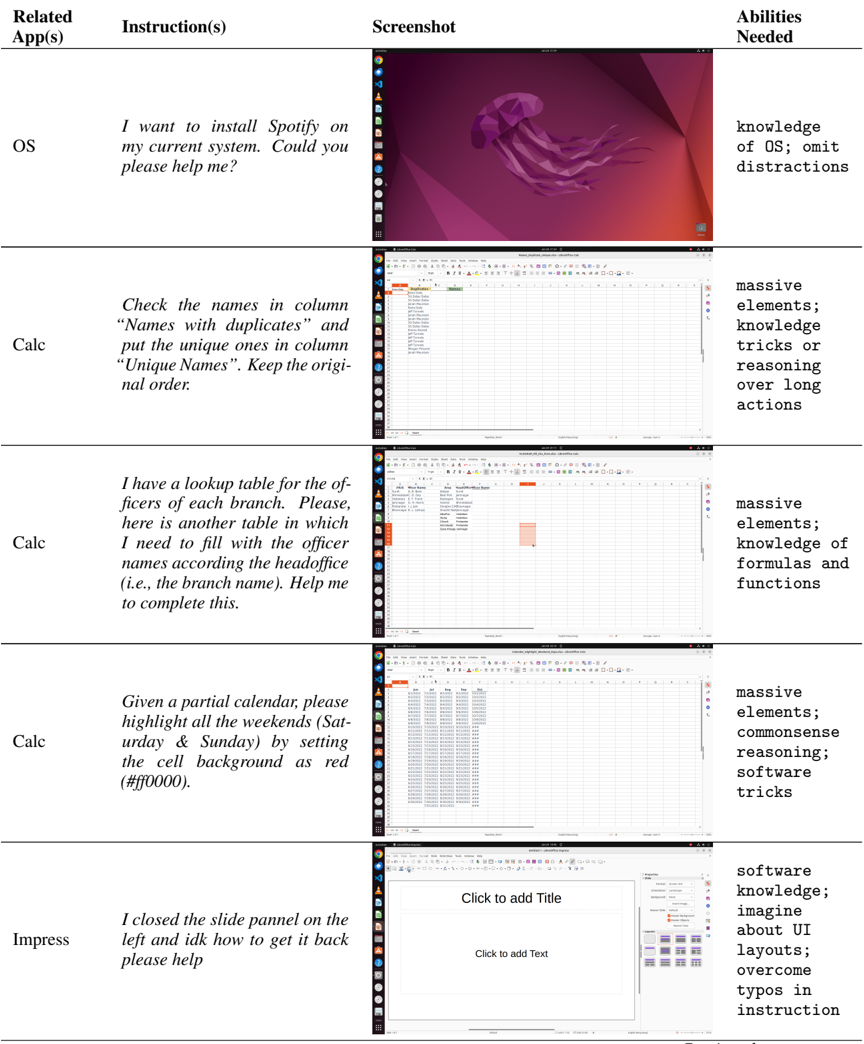
### Visual Description
## Table: Software Task Instructions and Required Abilities
### Overview
The image displays a structured table with five rows, each detailing a software-related task, its instruction, a corresponding screenshot, and the abilities required to complete it. The table is organized into four columns: **Related App(s)**, **Instruction(s)**, **Screenshot**, and **Abilities Needed**.
---
### Components/Axes
1. **Related App(s)**
- OS (Operating System)
- Calc (Spreadsheet Software, three entries)
- Impress (Presentation Software)
2. **Instruction(s)**
- Text-based tasks for software operations (e.g., installation, data manipulation, calendar formatting, UI recovery).
3. **Screenshot**
- Visual representations of software interfaces (e.g., desktop screens, spreadsheets, calendars, presentation editors).
4. **Abilities Needed**
- Technical skills or cognitive requirements (e.g., OS knowledge, formula expertise, UI design).
---
### Detailed Analysis
#### Row 1: OS
- **Instruction**: "I want to install Spotify on my current system. Could you please help me?"
- **Screenshot**: Desktop interface with a purple jellyfish wallpaper and taskbar icons (e.g., browser, file manager).
- **Abilities Needed**: `knowledge of OS; omit distractions`
#### Row 2: Calc (First Entry)
- **Instruction**: "Check the names in column 'Names with duplicates' and put the unique ones in column 'Unique Names'. Keep the original order."
- **Screenshot**: Spreadsheet with a list of names in a column, highlighting duplicates.
- **Abilities Needed**: `massive elements; knowledge tricks or reasoning over long actions`
#### Row 3: Calc (Second Entry)
- **Instruction**: "I have a lookup table for the officers of each branch. Please fill the other table with officer names according to the head office (i.e., the branch name). Help me to complete this."
- **Screenshot**: Spreadsheet with two tables: one with branch names and another with officer names.
- **Abilities Needed**: `massive elements; knowledge of formulas and functions`
#### Row 4: Calc (Third Entry)
- **Instruction**: "Given a partial calendar, please highlight all the weekends (Saturday & Sunday) by setting the cell background as red (#ff0000)."
- **Screenshot**: Calendar interface with red-highlighted weekends.
- **Abilities Needed**: `massive elements; commonsense reasoning; software tricks`
#### Row 5: Impress
- **Instruction**: "I closed the slide panel on the left and idk how to get it back. Please help."
- **Screenshot**: Presentation software interface with a blank slide and toolbar.
- **Abilities Needed**: `software knowledge; imagine about UI layouts; overcome typos in instruction`
---
### Key Observations
1. **Task Complexity**:
- Tasks range from basic software navigation (Impress) to advanced data manipulation (Calc).
- Abilities required escalate with task complexity (e.g., "massive elements" for large datasets).
2. **Screenshot Content**:
- Screenshots visually reinforce the task (e.g., red-highlighted weekends in the calendar).
- UI elements (e.g., taskbar, toolbar) are consistent with the described software.
3. **Abilities Alignment**:
- OS tasks emphasize system knowledge and focus.
- Calc tasks require formula expertise and handling large datasets.
- Impress tasks focus on UI recovery and design intuition.
---
### Interpretation
- **Software-Specific Skills**: Each row highlights the unique expertise required for different software (e.g., OS for system management, Calc for data analysis, Impress for presentation design).
- **Cognitive Demands**: Tasks involving large datasets (Calc) demand reasoning and formula mastery, while UI-related tasks (Impress) require spatial and design intuition.
- **User Challenges**: The inclusion of "omit distractions" (OS) and "overcome typos" (Impress) suggests common user pain points in software workflows.
This table serves as a guide for troubleshooting software tasks, emphasizing the interplay between technical skills and cognitive strategies.
</details>
Continued on next page
Table 12 - continued from previous page
<details>
<summary>Image 16 Details</summary>
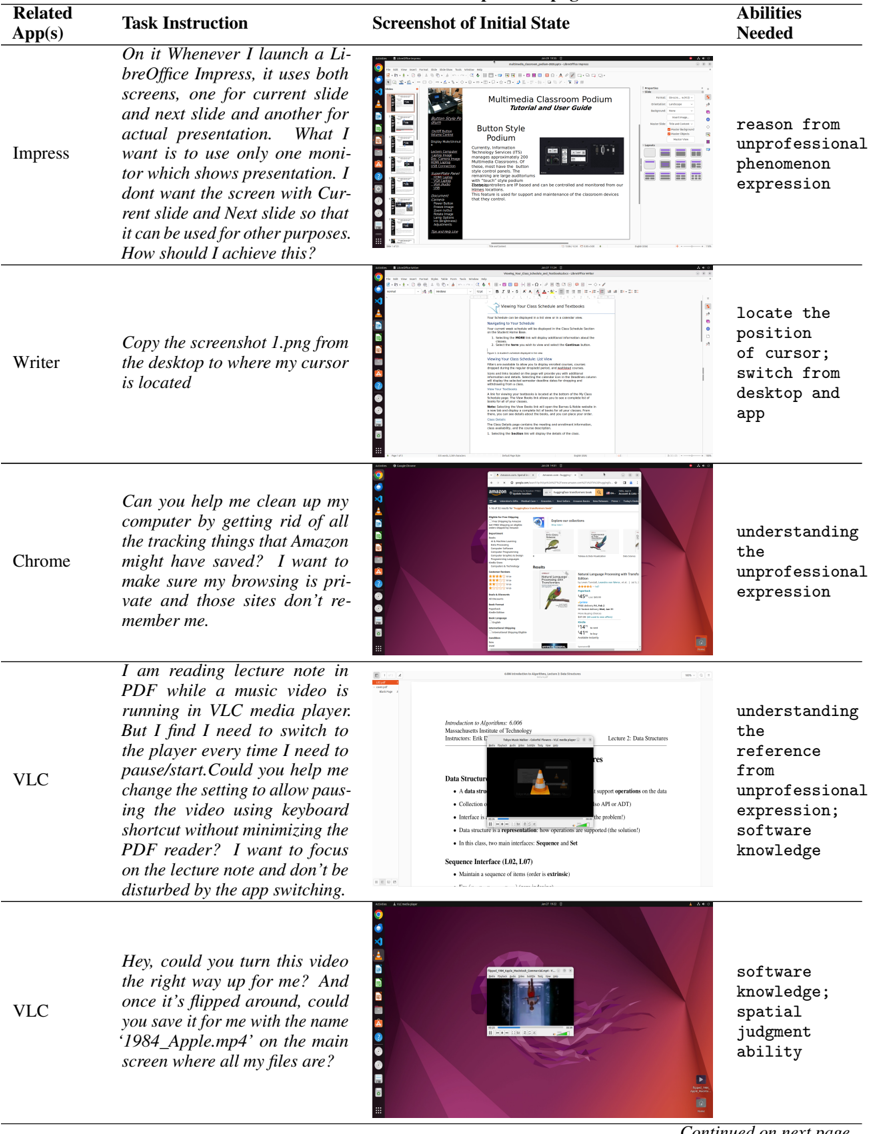
### Visual Description
## Table: User Task Instructions and Required Abilities
### Overview
The table presents a structured comparison of user tasks across different applications, detailing task instructions, initial state screenshots, and required abilities. Each row corresponds to a specific app (e.g., Impress, Writer, Chrome, VLC) and outlines user challenges and technical demands.
---
### Components/Axes
| **Header** | **Content** |
|--------------------------|-----------------------------------------------------------------------------|
| **Related App(s)** | Lists the application(s) involved in the task. |
| **Task Instruction** | Describes the user's goal or problem to be solved. |
| **Screenshot of Initial State** | Visual representation of the app's interface at task initiation. |
| **Abilities Needed** | Technical or cognitive skills required to complete the task. |
---
### Detailed Analysis
#### Row 1: **Impress**
- **Task Instruction**:
*"On it Whenever I launch a LibreOffice Impress, it uses both screens, one for current slide and next slide and another for actual presentation. What I want is to use only one monitor which shows presentation. I don’t want the screen with Current slide and Next slide so that it can be used for other purposes. How should I achieve this?"*
- **Screenshot of Initial State**:
A presentation interface with multiple slides visible across two monitors.
- **Abilities Needed**:
`reason from unprofessional phenomenon expression`
#### Row 2: **Writer**
- **Task Instruction**:
*"Copy the screenshot 1.png from the desktop to where my cursor is located."*
- **Screenshot of Initial State**:
A text document interface with a blank document open.
- **Abilities Needed**:
`locate the position of cursor; switch from desktop and app`
#### Row 3: **Chrome**
- **Task Instruction**:
*"Can you help me clean up my computer by getting rid of all the tracking things that Amazon might have saved? I want to make sure my browsing is private and those sites don’t re-member me."*
- **Screenshot of Initial State**:
A browser window open to an Amazon product page.
- **Abilities Needed**:
`understanding the unprofessional expression`
#### Row 4: **VLC (First Entry)**
- **Task Instruction**:
*"I am reading lecture notes in PDF while a music video is running in VLC media player. But I find I need to switch to the player every time I need to pause/start. Could you help me change the setting to allow pausing the video using keyboard shortcut without minimizing the PDF reader? I want to focus on the lecture note and don’t be disturbed by the app switching."*
- **Screenshot of Initial State**:
A PDF reader overlapping with a VLC media player window.
- **Abilities Needed**:
`understanding the reference from unprofessional expression; software knowledge`
#### Row 5: **VLC (Second Entry)**
- **Task Instruction**:
*"Hey, could you turn this video the right way up for me? And once it’s flipped around, could you save it for me with the name ‘1984_Apple.mp4’ on the main screen where all my files are?"*
- **Screenshot of Initial State**:
A video player interface with a vertically oriented video.
- **Abilities Needed**:
`software knowledge; spatial judgment ability`
---
### Key Observations
1. **Task Complexity**: Tasks range from simple file operations (Writer) to advanced software manipulation (VLC).
2. **Abilities Required**:
- **Cognitive**: Reasoning, understanding ambiguous instructions.
- **Technical**: Cursor control, keyboard shortcuts, software settings.
- **Spatial**: Judging orientation and positioning (VLC video flipping).
3. **User Frustration**: Multiple entries highlight issues with app behavior (e.g., multi-monitor confusion, tracking data, video orientation).
---
### Interpretation
The table illustrates the intersection of user intent and technical barriers across applications. For example:
- **Impress** and **VLC** tasks emphasize the need for users to navigate non-intuitive interfaces or workflows.
- **Chrome** and **Writer** highlight privacy concerns and basic file management challenges.
- The repeated mention of "unprofessional expression" and "software knowledge" suggests a gap between user expectations and app design, particularly in handling ambiguous instructions or advanced features.
This data could inform UX improvements, such as clearer tutorials, context-aware shortcuts, or better multi-monitor support.
</details>
Continued on next page
Table 12 - continued from previous page
<details>
<summary>Image 17 Details</summary>
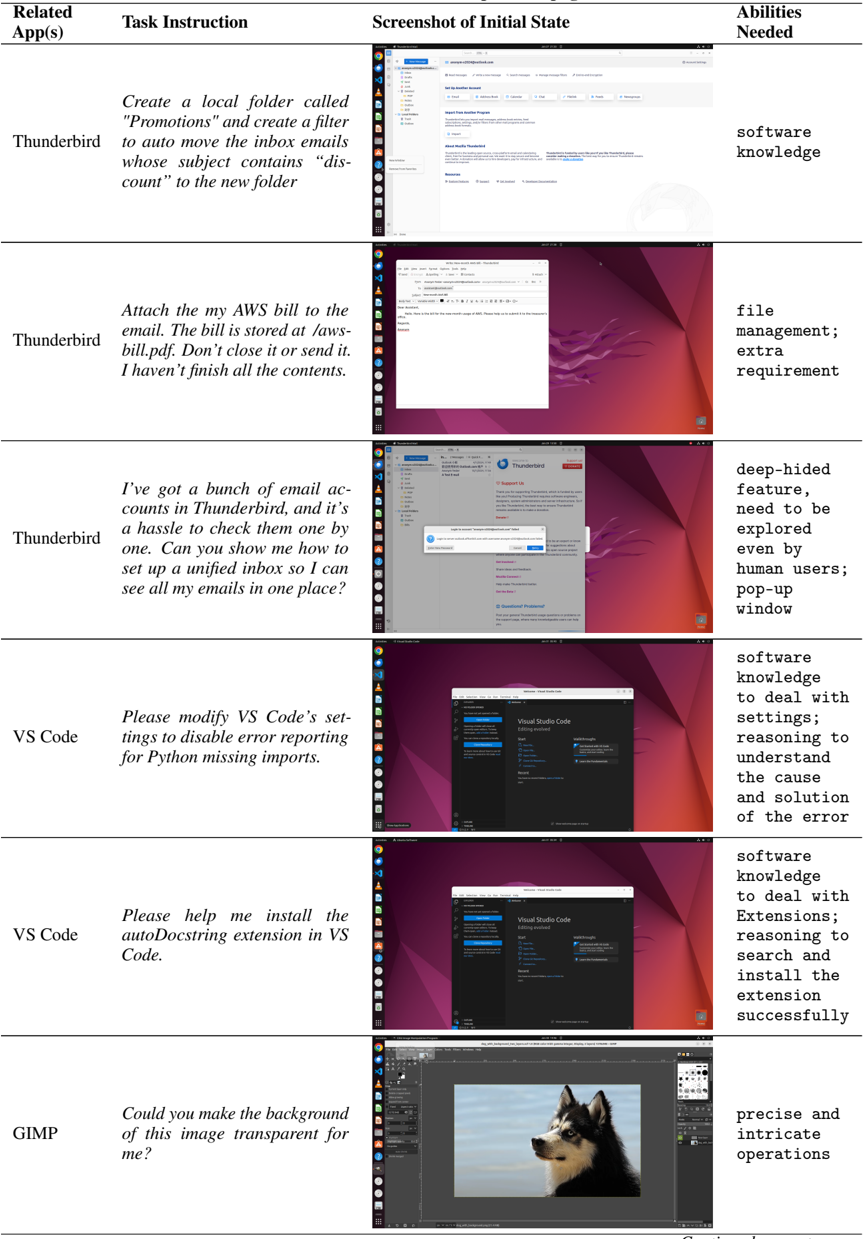
### Visual Description
## Table: Task Instructions and Required Abilities for Email/Code/Image Management
### Overview
The table presents six technical tasks across three software platforms (Thunderbird, VS Code, GIMP), detailing required actions, initial interface states, and necessary skills. Each row combines a task description with visual context and ability requirements.
### Components/Axes
| Column Header | Content |
|------------------------|-------------------------------------------------------------------------|
| **Related App(s)** | Software platform associated with the task |
| **Task Instruction** | Specific action to be performed (e.g., folder creation, file attachment)|
| **Screenshot of Initial State** | Visual representation of the software interface at task initiation |
| **Abilities Needed** | Required competencies for task completion |
### Detailed Analysis
1. **Thunderbird Email Filtering**
- Task: Create "Promotions" folder + auto-filter "discount" emails
- Initial State: Thunderbird folder creation dialog open
- Abilities: Software knowledge
2. **AWS Bill Attachment**
- Task: Attach "aws-bill.pdf" to email (unsaved content)
- Initial State: Email composition window with attachment dialog
- Abilities: File management; Extra requirement
3. **Unified Inbox Setup**
- Task: Consolidate multiple Thunderbird accounts
- Initial State: Thunderbird account management interface
- Abilities: Deep-hidden feature exploration; Human user guidance
4. **VS Code Error Suppression**
- Task: Disable Python import error reporting
- Initial State: VS Code settings editor with Python section highlighted
- Abilities: Software knowledge; Settings reasoning; Error diagnosis
5. **VS Code Extension Installation**
- Task: Install autoDocstring extension
- Initial State: VS Code extensions marketplace
- Abilities: Software knowledge; Extension installation; Troubleshooting
6. **GIMP Transparency**
- Task: Make image background transparent
- Initial State: GIMP image editor with dog portrait
- Abilities: Precise operations; Layer manipulation
### Key Observations
- Thunderbird tasks emphasize email organization with varying complexity
- VS Code tasks focus on development environment customization
- GIMP task represents graphic design workflow
- Screenshots show progressive interface complexity from basic dialogs to advanced editors
- Abilities required increase from basic software knowledge to specialized technical skills
### Interpretation
This table demonstrates the relationship between software functionality and user competency requirements. The progression from simple folder organization to code extension installation reveals a skill hierarchy where basic email management requires fundamental software knowledge, while advanced tasks demand specialized technical reasoning. The inclusion of screenshots provides crucial spatial context for task execution, showing that visual interface familiarity is as important as technical knowledge. The "deep-hidden feature" requirement for Thunderbird suggests some features remain non-intuitive despite widespread software adoption. The GIMP task's "precise operations" requirement highlights the technical depth needed for graphic design compared to general software use.
</details>
| Related App(s) | Task Instruction | Screenshot of Initial State | Abilities Needed |
|------------------|-----------------------------------------------------------------------------------------------------------------------------------------------------------------------------------------|-------------------------------|--------------------------------------------------------------------------------------------------------|
| Thunderbird | Create a local folder called "Promotions" and create a filter to auto move the inbox emails whose subject contains 'dis- count' to the new folder | | software knowledge |
| Thunderbird | Attach the my AWS bill to the email. The bill is stored at /aws- bill.pdf. Don't close it or send it. I haven't finish all the contents. | | file management; extra requirement |
| Thunderbird | I've got a bunch of email ac- counts in Thunderbird, and it's a hassle to check them one by one. Can you show me how to set up a unified inbox so I can see all my emails in one place? | | deep-hided feature, need to be explored even by human users; pop-up window |
| VS Code | Please modify VS Code's set- tings to disable error reporting for Python missing imports. | | software knowledge to deal with settings; reasoning to understand the cause and solution of the error |
| VS Code | Please help me install the autoDocstring extension in VS Code. | | software knowledge to deal with Extensions; reasoning to search and install the extension successfully |
| GIMP | Could you make the background of this image transparent for me? | | precise and intricate operations |
Continued on next page
Table 12 - continued from previous page
<details>
<summary>Image 18 Details</summary>
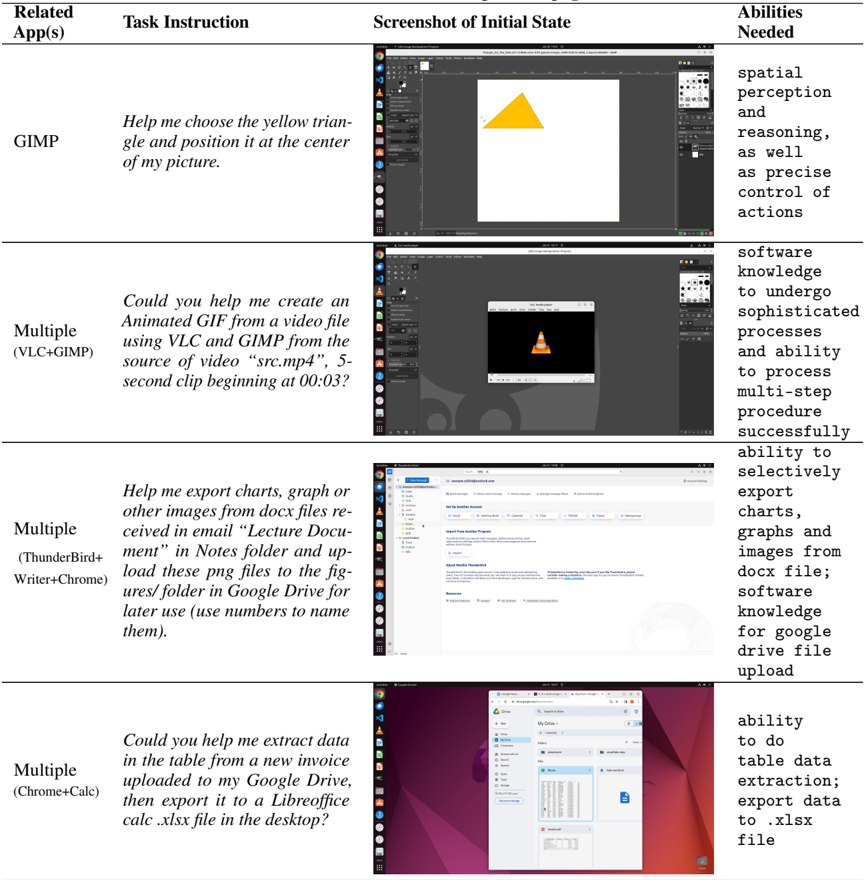
### Visual Description
## Table: Task Requirements and Software Competencies
### Overview
The image presents a structured table outlining four distinct tasks, their associated software tools, initial interface states, and required technical abilities. Each row represents a unique workflow scenario, emphasizing software integration and multi-step procedural demands.
### Components/Axes
| Column Header | Content |
|------------------------|-------------------------------------------------------------------------|
| **Related App(s)** | Software tools involved in each task |
| **Task Instruction** | Specific user requests requiring technical execution |
| **Screenshot of Initial State** | Visual representations of starting interfaces (described textually) |
| **Abilities Needed** | Technical skills required for task completion |
### Detailed Analysis
#### Row 1: GIMP Task
- **Related App(s):** GIMP
- **Task Instruction:** "Help me choose the yellow triangle and position it at the center of my picture."
- **Abilities Needed:**
- Spatial perception
- Reasoning
- Precise control of actions
#### Row 2: Animated GIF Creation
- **Related App(s):** Multiple (VLC+GIMP)
- **Task Instruction:** "Could you help me create an Animated GIF from a video file using VLC and GIMP from the source of video 'src.mp4', 5-second clip beginning at 00:03?"
- **Abilities Needed:**
- Software knowledge to undergo sophisticated processes
- Ability to process multi-step procedures successfully
#### Row 3: Image Export from DOCX
- **Related App(s):** Multiple (ThunderBird+Writer+Chrome)
- **Task Instruction:** "Help me export charts, graphs, or other images from docx files received in email 'Lecture Document' in Notes folder and upload these png files to the figures/folder in Google Drive for later use (use numbers to name them)."
- **Abilities Needed:**
- Ability to selectively export charts/graphs/images from docx files
- Software knowledge for Google Drive upload
#### Row 4: Data Extraction to Excel
- **Related App(s):** Multiple (Chrome+Calc)
- **Task Instruction:** "Could you help me extract data in the table from a new invoice uploaded to my Google Drive, then export it to a Libreoffice calc .xlsx file in the desktop?"
- **Abilities Needed:**
- Ability to do table data extraction
- Export data to .xlsx file
### Key Observations
1. **Software Integration:** All tasks require combining multiple tools (e.g., VLC+GIMP, Chrome+Calc).
2. **Multi-Step Complexity:** Tasks involve sequential actions (e.g., video clipping → GIF creation; data extraction → file conversion).
3. **Precision Requirements:** Tasks demand exactness (e.g., positioning objects centrally, timestamped video clips).
4. **Platform Agnosticism:** Workflows span desktop applications (GIMP, LibreOffice) and cloud services (Google Drive).
### Interpretation
This table illustrates the growing demand for **cross-platform technical literacy** in modern workflows. The tasks reflect real-world scenarios where users must:
- Navigate software ecosystems (e.g., ThunderBird for email → Writer for document editing → Chrome for web interactions).
- Execute precise, multi-step procedures (e.g., timestamped video editing → GIF creation).
- Bridge local and cloud-based tools (e.g., Google Drive uploads → LibreOffice exports).
Notably, the absence of visual data in the "Screenshot" column suggests these tasks prioritize **textual instructions over visual interfaces**, emphasizing the need for strong procedural understanding over graphical intuition. The repeated use of "Multiple" in the app column underscores the trend toward **software interoperability** as a critical skill in technical workflows.
</details>
| Related App(s) | Task Instruction | Screenshot of Initial State | Abilities Needed |
|---------------------------------------|---------------------------------------------------------------------------------------------------------------------------------------------------------------------------------------------------------------------------------------|-------------------------------|-------------------------------------------------------------------------------------------------------------------------|
| GIMP | Help me choose the yellow trian- gle and position it at the center of my picture. | | spatial perception and reasoning, as well as precise control of actions |
| Multiple (VLC+GIMP) | Could you help me create an Animated GIF from a video file using VLC and GIMP from the source of video 'src.mp4', 5- second clip beginning at 00:03? | | software knowledge to undergo sophisticated processes and ability to process multi-step procedure successfully |
| Multiple (ThunderBird+ Writer+Chrome) | Help me export charts, graph or other images from docx files re- ceived in email 'Lecture Docu- ment' in Notes folder and up- load these png files to the fig- ures/ folder in Google Drive for later use (use numbers to name them). | | ability to selectively export charts, graphs and images from docx file; software knowledge for google drive file upload |
| Multiple (Chrome+Calc) | Could you help me extract data in the table from a new invoice uploaded to my Google Drive, then export it to a Libreoffice calc .xlsx file in the desktop? | | ability to do table data extraction; export data to .xlsx file |
## C Details of Baseline Methods
## C.1 Hyper-Parameter of the Baseline Agents
We utilize the versions of gpt-3.5-turbo-16k , gpt-4-0125-preview , and gpt-4-vision-preview , respectively for GPT results, need to be noted that result could be changed from time since it is close-sourced. We also employ the gemini-pro and gemini-pro-vision versions for the Gemini models For all language models, we set the temperature parameter to 1.0, and top\_p to 0.9, and the maximum number of tokens for generation is set to 1500. We set the maximum steps of interaction to 15 and the maximum time limits to 30 minutes for all tasks since the agent could lead to a stuck environment under some unexpected cases.
## C.2 Prompt Details
## C.2.1 Prompt for A11y Tree, Screenshot and their Combination Setting
```
```
For a11y tree setting and a11y tree + screenshot setting, the prompts are basically the same, just replace the screenshot words with a11y tree words.
## C.2.2 Prompt for SoM Setting
```
<doc> C.2.2 Prompt for SOM Setting
You are an agent which follow my instruction and perform desktop computer
tasks as instructed.
You have good knowledge of computer and good internet connection and assume
you will run on a computer for controlling the mouse and keyboard.
For each step, you will get an observation of the desktop by a screenshot
with interact-able elements marked with numerical tags; y tree, which is based on AT-SPI library. And you will
accessibility tree, which is based on AT-SPI library.
You are required to use 'pyautogui' to perform the action grounded to the
screenshot.
DONOT use the 'pyautogui.locateCenterOnScreen' function you want to operate with since we have no image of
the element you want to operate with. DONOT USE 'pyautogui.screenshot'.
You are required to make screenshot. </doc>
```
```
```
## C.3 Accessibility Tree Filtering
Since the original tree is large (usually over 1 million tokens in XML format), we filter the accessibility tree nodes by their tags, visibilities, availabilities, etc . The concrete rules are illustrated in the following Table 13.
Table 13: Criteria for keeping a11y tree nodes on Ubuntu and Windows platforms
| Condition | Ubuntu | Windows |
|--------------------------------------------------|------------------------------------------------------------------------------------------------------------------------------------------------------------------------------------------------------------------------------------------------------------------------------------------------------------------------------------------------------------------------------------------------|----------------|
| Node Tags | document ∗ , ∗ item, ∗ button, ∗ heading, ∗ label, ∗ scrollbar, ∗ searchbox, ∗ textbox, ∗ link, ∗ tabelement, ∗ textfield, ∗ textarea, ∗ menu, alert, canvas, check- box, combo-box, entry, icon, image, paragraph, scroll-bar, section, slider, static, table-cell, terminal, text, netuiribbontab, start, trayclockwclass, tray- dummysearchcontrol, uiimage, uiproperty, uiribboncommandbar | Same as Ubuntu |
| Showing | True | Not Applicable |
| Visible | True | True |
| Enabled or Editable or Expand- able or Checkable | True | True |
| Has Name or Text or Image | True | True |
| Condition | Ubuntu | Windows |
|-------------|----------|-----------|
| Position | > = 0 | > = 0 |
| Size | > 0 | > 0 |
## C.4 Set-of-Mark Implementation Details
Our methodology involves an initial transformation of the original observational image acquired from our environment into the standardized SoM format and be putted into VLMs together with a table of the marks with metadata information such as tags and names. This format consists of bounding boxes that bound the sub-images of interest, each associated with a corresponding integer mark. Notably, our approach incorporates the utilization of the accessibility tree to identify the bounding boxes associated with all clickable buttons within the current image observation, instead of using segmentation models like the original SoM paper. Some examples of screenshots after applying SoM are shown in Figure 14. We can observe the emergence of some low-quality, unmodelable tasks, and even misleading bounding boxes, depending on the level of support from the software ecosystem. This could be another reason for the poor performance of SoM. Future improvements could be made in this regard.
Figure 14: Showcase of example screenshots marked by SoM across different app GUI.
<details>
<summary>Image 19 Details</summary>
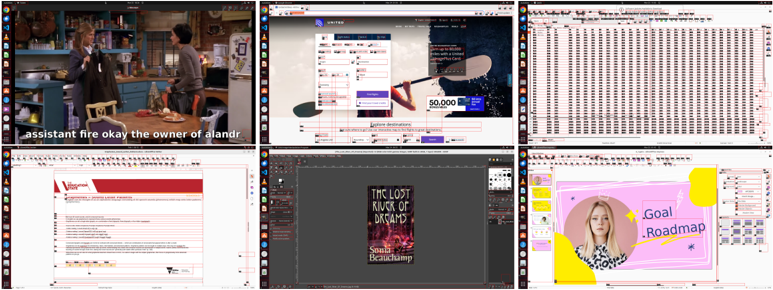
### Visual Description
## Screenshot Collage: Software Interface and Content Examples
### Overview
The image displays six distinct software interface screenshots arranged in a 2x3 grid. Each screenshot represents a different application or document type, showcasing user interfaces for media playback, form design, data organization, document creation, graphic design, and presentation building. Textual elements are visible across all panels, with no numerical data or charts present.
### Components/Axes
1. **Top-Left (Media Player)**:
- Subtitles: "assistant fire okay the owner of alandr"
- Scene: Office kitchen environment with two characters
2. **Top-Middle (Form Builder)**:
- Dropdown menu labeled "United"
- Fields: Name, Email, Password
- Value: "50,000" (unclear context)
3. **Top-Right (Spreadsheet)**:
- Headers: "Date," "Time," "Event," "Location"
- Tabular data with 20+ rows (text too small to read)
4. **Bottom-Left (Document Editor)**:
- Header: "Vanguard"
- Section: "Investment Portfolio"
- Text: "Stocks: 65%, Bonds: 35%"
5. **Bottom-Middle (Book Cover Design)**:
- Title: "The Lost River of Dreams"
- Author: "Sonia Beauchamp"
- Design: Dark background with river/forest imagery
6. **Bottom-Right (Presentation Slide)**:
- Title: "Goal Roadmap"
- Visual elements: Pink background, yellow circle, woman's portrait
- Text: "Goal Roadmap" (purple), "Define Objectives," "Set Milestones," "Track Progress"
### Detailed Analysis
- **Media Player**: Subtitles suggest a dialogue from "The Office" TV show, with potential typo in "alandr" (likely "landlord").
- **Form Builder**: Dropdown menu includes country/city selection options. "50,000" appears in a field but lacks context (e.g., currency, points).
- **Spreadsheet**: Structured data format with date/time/event/location columns, but specific entries unreadable.
- **Document Editor**: Financial document showing 65% stocks/35% bonds allocation.
- **Book Cover**: Literary design with title/author clearly visible.
- **Presentation Slide**: Goal-setting framework with three actionable steps listed.
### Key Observations
1. No numerical data series or trends present
2. All text appears in English except potential typo in "alandr"
3. Interfaces represent diverse software categories:
- Media playback
- Form creation
- Data organization
- Document editing
- Graphic design
- Presentation building
4. "50,000" value appears isolated without contextual clues
5. Portfolio percentages suggest balanced investment strategy
### Interpretation
This collage demonstrates a technical workflow spanning multiple domains:
- Media consumption (TV show playback)
- Form development (United interface)
- Data management (spreadsheet)
- Financial documentation (portfolio allocation)
- Creative design (book cover)
- Strategic planning (goal roadmap)
The presence of both completed interfaces (portfolio document, book cover) and development tools (form builder, presentation slide) suggests a multi-stage project environment. The "50,000" value in the form builder remains ambiguous - it could represent a placeholder, a user input error, or a specific data point requiring further context. The typo in "alandr" might indicate either a transcription error or a specialized term requiring domain-specific clarification.
</details>
## C.5 Full Results of Baseline Methods
Here we show the break-down results of baseline methods from different LLMs and VLMs for follow-up reference.
We have also compiled the distribution of steps taken by the GPT-4V model under our four settings: Accessibility Tree (A11y Tree), Screenshot, Screenshot combined with Accessibility Tree (Screenshot+A11y Tree), and Set-of-Mark. This data (as shown in Fig. 15) provides potential clues for future work. Overall, there are observable differences in how many steps the agent chooses to execute and when it decides to terminate under different settings. More detailed control and analysis of these behaviors can be explored in subsequent research efforts.
## D Examples of Qualitative Analysis
Here we give the specific code execution process for the examples in the qualitative analysis in §5.4 and add more error cause analysis, trying to get insights for further improvement.
Figure 15: Distribution of steps taken by the GPT-4V based agents across four different settings.
<details>
<summary>Image 20 Details</summary>
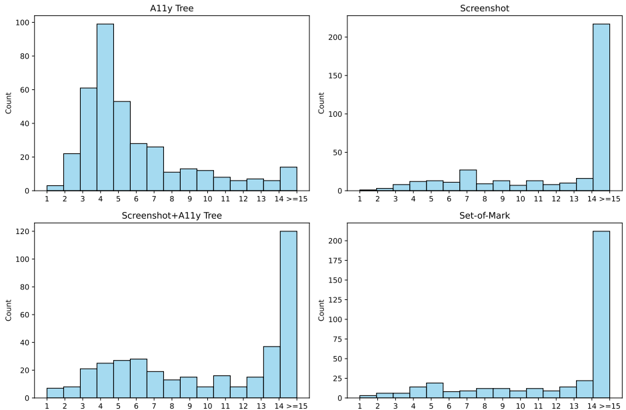
### Visual Description
## Bar Charts: Distribution of Counts Across Categories
### Overview
The image contains four grouped bar charts comparing distributions of counts across 15 categories (labeled 1–15, with 14 and 15 combined as "14 >=15"). Each chart uses a consistent blue color scheme, with no explicit legend. The y-axis is uniformly labeled "Count" across all charts, while the x-axis categories vary slightly in distribution patterns.
---
### Components/Axes
- **Y-Axis**: Labeled "Count" (linear scale, 0–200 in increments of 25 for most charts; 0–120 in increments of 20 for "Screenshot+Ally Tree").
- **X-Axis**: Categories labeled 1–15, with "14 >=15" grouping the final two categories.
- **Chart Titles**:
- Top-left: "Ally Tree"
- Top-right: "Screenshot"
- Bottom-left: "Screenshot+Ally Tree"
- Bottom-right: "Set-of-Mark"
---
### Detailed Analysis
#### Ally Tree
- **Trend**: Bimodal distribution with peaks at categories 4 (~100) and 5 (~60), followed by a gradual decline to ~15 at category 14>=15.
- **Key Values**:
- Category 3: ~60
- Category 4: ~100
- Category 5: ~60
- Category 6: ~50
- Category 7: ~30
- Category 8: ~20
- Category 9: ~15
- Category 10: ~10
- Category 11: ~5
- Category 12: ~5
- Category 13: ~5
- Category 14>=15: ~15
#### Screenshot
- **Trend**: Flat distribution with minimal counts (<20) across categories 1–13, followed by a sharp spike at 14>=15 (~200).
- **Key Values**:
- Categories 1–13: ~1–10 (approximate)
- Category 14>=15: ~200
#### Screenshot+Ally Tree
- **Trend**: Moderate distribution with a peak at 14>=15 (~120) and smaller values in earlier categories.
- **Key Values**:
- Category 1: ~5
- Category 2: ~10
- Category 3: ~20
- Category 4: ~25
- Category 5: ~30
- Category 6: ~25
- Category 7: ~20
- Category 8: ~15
- Category 9: ~10
- Category 10: ~5
- Category 11: ~10
- Category 12: ~5
- Category 13: ~5
- Category 14>=15: ~120
#### Set-of-Mark
- **Trend**: Flat distribution with minimal counts (<20) across categories 1–13, followed by a sharp spike at 14>=15 (~200).
- **Key Values**:
- Categories 1–13: ~1–10 (approximate)
- Category 14>=15: ~200
---
### Key Observations
1. **Dominance of 14>=15**: "Screenshot" and "Set-of-Mark" show extreme concentration at the highest category (~200 counts), suggesting a critical threshold or outlier behavior.
2. **Ally Tree's Bimodality**: Peaks at categories 4 and 5 indicate two distinct subgroups within the data.
3. **Combined Effect**: "Screenshot+Ally Tree" merges distributions, retaining the 14>=15 peak (~120) but with broader mid-range values compared to "Ally Tree" alone.
4. **Set-of-Mark's Uniformity**: Minimal variation in early categories contrasts with the extreme spike at 14>=15.
---
### Interpretation
- **Threshold Behavior**: The repeated spike at 14>=15 across "Screenshot" and "Set-of-Mark" implies a systemic boundary or classification rule (e.g., a maximum value, error threshold, or categorical cutoff).
- **Ally Tree's Structure**: The bimodal distribution suggests two competing processes or subgroups within the data, with category 4 being the most prevalent.
- **Combined Insights**: The "Screenshot+Ally Tree" chart reveals that merging datasets amplifies mid-range values but retains the 14>=15 peak, indicating partial overlap in extreme cases.
- **Set-of-Mark's Anomaly**: Its flat distribution with a single outlier peak may represent a specialized or edge-case scenario distinct from the other datasets.
The data collectively highlights the importance of category 14>=15 as a critical focal point, while earlier categories exhibit varying degrees of dispersion or concentration depending on the dataset.
</details>
## D.1 Success and Failure Cases
Success Task: I downloaded an episode of Friends to practice listening, but I don't know how to remove the subtitles. Please help me remove the subtitles from the video and export it as "subtitles.srt" and store it in the same directory as the video.
```
```
Table 14: Detailed success rates of baseline LLM and VLM agents on OSWORLD, divided by apps (domains): OS, LibreOffice Calc, LibreOffice Impress, LibreOffice Writer, Chrome, VLC Player, Thunderbird, VS Code, GIMP and Workflow which is comprehensive with multiple apps, for gaining insights from interfaces and operation logics.
| Inputs | Model | Success Rate ( ↑ ) | Success Rate ( ↑ ) | Success Rate ( ↑ ) | Success Rate ( ↑ ) | Success Rate ( ↑ ) | Success Rate ( ↑ ) | Success Rate ( ↑ ) | Success Rate ( ↑ ) | Success Rate ( ↑ ) | Success Rate ( ↑ ) |
|-------------------|-------------------|----------------------|----------------------|----------------------|----------------------|----------------------|----------------------|----------------------|----------------------|----------------------|----------------------|
| Inputs | Model | OS | Calc | ImpressWriter | ImpressWriter | VLC | TB | ChromeVSC | ChromeVSC | GIMP | Workflow |
| A11y | Mixtral-8x7B | 12.50 | 0.00 | 0.39 | 4.34 | 10.22 | 6.67 | 2.17 | 8.69 | 3.85 | 0.10 |
| A11y | GPT-3.5 | 4.17 | 2.13 | 6.77 | 4.35 | 6.53 | 0.00 | 2.17 | 0.00 | 0.00 | 1.62 |
| A11y | Gemini-Pro | 4.17 | 0.00 | 2.13 | 4.35 | 12.41 | 0.00 | 2.17 | 0.00 | 7.69 | 0.63 |
| A11y | GPT-4 | 20.83 | 0.00 | 6.77 | 4.35 | 23.53 | 26.67 | 26.09 | 30.43 | 23.08 | 2.97 |
| A11y | Gemini-Pro-1.5 | 12.50 | 2.13 | 2.13 | 4.35 | 6.53 | 0.00 | 10.87 | 8.70 | 0.00 | 3.60 |
| A11y | Llama-3-70B | 4.17 | 0.00 | 0.39 | 8.70 | 6.53 | 0.00 | 2.17 | 0.00 | 0.00 | 0.63 |
| A11y | GPT-4o | 20.83 | 6.38 | 6.77 | 8.69 | 12.41 | 20.00 | 17.39 | 21.74 | 11.54 | 7.56 |
| A11y | Qwen-Max | 29.17 | 0.00 | 2.52 | 13.04 | 8.95 | 0.00 | 10.87 | 8.70 | 11.54 | 2.61 |
| Screen | CogAgent | 4.17 | 0.00 | 0.00 | 4.34 | 6.53 | 0.00 | 2.17 | 0.00 | 0.00 | 0.00 |
| Screen | Gemini-ProV | 8.33 | 0.00 | 6.77 | 4.35 | 12.41 | 0.00 | 6.52 | 8.70 | 23.08 | 2.08 |
| Screen | GPT-4V | 12.50 | 0.00 | 2.52 | 4.35 | 18.34 | 0.00 | 6.52 | 0.00 | 7.69 | 6.04 |
| Screen | Claude-3-Opus | 4.17 | 0.00 | 2.52 | 4.34 | 6.53 | 0.00 | 2.17 | 0.00 | 3.84 | 2.61 |
| Screen | Gemini-Pro-1.5 | 12.50 | 0.00 | 13.16 | 8.70 | 6.53 | 0.00 | 2.17 | 0.00 | 11.54 | 3.60 |
| Screen | GPT-4o | 8.33 | 0.00 | 6.77 | 4.35 | 16.10 | 0.00 | 4.35 | 4.35 | 3.85 | 5.58 |
| Screen | CogAgent | 4.17 | 2.17 | 0.00 | 4.35 | 6.53 | 0.00 | 2.17 | 0.00 | 0.00 | 0.10 |
| + A11y | Gemini-ProV | 4.17 | 2.13 | 6.77 | 4.35 | 18.30 | 0.00 | 4.35 | 0.00 | 0.00 | 1.52 |
| + A11y | GPT-4V | 16.67 | 0.00 | 6.77 | 21.73 | 24.18 | 33.33 | 21.74 | 21.74 | 15.38 | 4.59 |
| + A11y | Claude-3-Opus | 12.50 | 2.13 | 4.65 | 4.34 | 18.30 | 0.00 | 2.17 | 8.69 | 7.69 | 0.99 |
| + A11y | Gemini-Pro-1.5 | 12.50 | 0.00 | 4.65 | 8.70 | 12.41 | 0.00 | 8.70 | 4.35 | 11.54 | 1.56 |
| + A11y | GPT-4o | 41.67 | 4.26 | 6.81 | 8.70 | 9.50 | 6.67 | 15.22 | 30.43 | 0.00 | 7.46 |
| SoM | CogAgent | 4.17 | 2.17 | 0.00 | 4.34 | 6.53 | 0.00 | 2.17 | 0.00 | 0.00 | 0.00 |
| SoM | Gemini-ProV | 4.17 | 0.00 | 0.39 | 4.34 | 6.53 | 0.00 | 0.00 | 0.00 | 0.00 | 0.63 |
| SoM | GPT-4V | 8.33 | 8.51 | 6.38 | 13.04 | 10.66 | 33.33 | 23.91 | 17.39 | 11.54 | 6.57 |
| SoM | Claude-3-Opus | 12.50 | 2.13 | 0.39 | 8.70 | 6.53 | 13.33 | 17.39 | 0.00 | 11.54 | 4.49 |
| SoM | Gemini-Pro-1.5 | 16.67 | 0.00 | 10.64 | 4.35 | 24.18 | 13.33 | 8.70 | 4.35 | 15.38 | 3.60 |
| SoM | GPT-4o | 20.83 | 0.00 | 6.77 | 4.35 | 6.53 | 0.00 | 4.35 | 4.35 | 0.00 | 3.60 |
| Human Performance | Human Performance | 75.00 | 61.70 | 80.85 | 73.91 | 70.59 | 46.67 | 78.26 | 73.91 | 73.08 | 73.27 |
```
pyautogui.click(1100, 350)
pyautogui.write('frt')
pyautogui.click(1100, 350)
pyautogui.write('Done!')
```
## Failure Task: Help me center align the heading in LibreOffice.
```
<doc> Failure task: Help me
center align the heading in LibreOffice.
# Action 1
import pyautogui
import time
# Move the mouse to
pyautogui.moveTo(110,720,duration=1)
# Move the mouse to
pyautogui.doubleClick()
# Action 2
# Move the mouse to
pyautogui.moveTo(200,230,duration=1)
# Click and drag to select the heading
pyautogui.clickAndDrag() </doc>
```
```
pyautogui.mouseDown()
pyautogui.moveTo(800, 230)
pyautogui.click()
pyautogui.mouseUp()
# Assuming the text is still selected,
# move the mouse to the center align button in the toolbar and click
pyautogui.click()
pyautogui.moveTo(400, 150)
pyautogui.click()
pyautogui.moveTo(340, 80)
pyautogui.click()
Failed.
```
Task Instruction: tone down the brightness of the photo
<details>
<summary>Image 21 Details</summary>
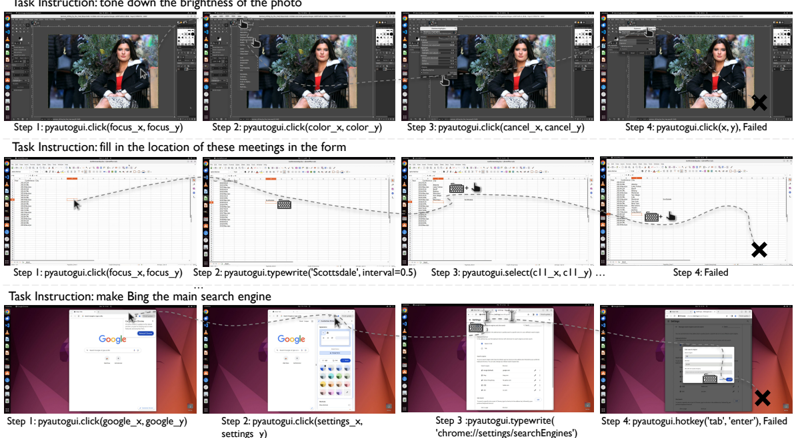
### Visual Description
## Screenshot: Task Execution Demonstration with Step-by-Step Outcomes
### Overview
The image displays three sequential task demonstrations using a software automation tool (likely PyAutoGUI), showing successful actions and failure points. Each task includes four steps with visual feedback of executed commands and outcomes. The interface appears to be a code editor or automation scripting environment with a preview pane for visual results.
### Components/Axes
1. **Task Structure**:
- Three distinct task sections (Image Editing, Form Filling, Browser Configuration)
- Each task follows a 4-step format:
- Step 1: Initial action
- Step 2: Secondary action
- Step 3: Tertiary action
- Step 4: Final action (with failure indicator)
2. **Visual Elements**:
- Left column: Task instructions
- Middle column: Step-by-step visual progression
- Right column: Final outcome (success/failure)
- Failure indicators: Red 'X' marks and "Failed" text
3. **Command Syntax**:
- PyAutoGUI method calls with parameter placeholders:
- `click(focus_x, focus_y)`
- `typewrite('text')`
- `select(interval)`
- `hotkey('key')`
### Detailed Analysis
#### Task 1: Image Brightness Adjustment
1. **Step 1**: `pyautogui.click(focus_x, focus_y)`
- Action: Selects image editing tool
- Visual: Preview pane shows original image
2. **Step 2**: `pyautogui.click(color_x, color_y)`
- Action: Opens color adjustment panel
- Visual: Color picker interface appears
3. **Step 3**: `pyautogui.click(cancel_x, cancel_y)`
- Action: Abandons changes
- Visual: Image reverts to original state
4. **Step 4**: `pyautogui.click(x, y)`
- Failure: Incorrect coordinates
- Visual: Red 'X' and "Failed" text
#### Task 2: Meeting Location Form Filling
1. **Step 1**: `pyautogui.click(focus_x, focus_y)`
- Action: Selects form field
- Visual: Cursor positions at meeting location field
2. **Step 2**: `pyautogui.typewrite('Scottsdale', interval=0.5)`
- Action: Inputs location text
- Visual: Text appears in form field
3. **Step 3**: `pyautogui.select(11, x, 11, y)`
- Failure: Invalid selection parameters
- Visual: Selection tool misbehaves
4. **Step 4**: Final state
- Failure: Form remains incomplete
- Visual: Red 'X' and "Failed" text
#### Task 3: Bing Search Engine Configuration
1. **Step 1**: `pyautogui.click(google_x, google_y)`
- Action: Opens browser settings
- Visual: Google Chrome settings interface
2. **Step 2**: `pyautogui.click(settings_x, settings_y)`
- Action: Navigates to search engines
- Visual: Search engine settings panel
3. **Step 3**: `pyautogui.typewrite('chrome://settings/searchEngines')`
- Action: Inputs configuration command
- Visual: Command appears in address bar
4. **Step 4**: `pyautogui.hotkey('tab', 'enter')`
- Failure: Incorrect hotkey combination
- Visual: Settings window closes unexpectedly
- Red 'X' and "Failed" text
### Key Observations
1. **Failure Patterns**:
- All failures occur in Step 4
- Common issues: Incorrect coordinates, invalid parameters, wrong hotkey combinations
- Visual feedback: Consistent use of red 'X' and "Failed" text
2. **Command Syntax**:
- Parameters use placeholder variables (x, y, focus_x, etc.)
- Interval timing specified in milliseconds (0.5s typing delay)
3. **Interface Design**:
- Preview pane maintains consistent position across tasks
- Failure indicators use standardized visual language
- Command syntax follows Python-like structure
### Interpretation
This image demonstrates a technical workflow for automating repetitive tasks using PyAutoGUI. The consistent failure patterns suggest:
1. **Parameter Sensitivity**: Small coordinate errors (e.g., x vs. focus_x) cause failures
2. **Command Precision**: Exact syntax requirements (e.g., hotkey combinations)
3. **Interface Navigation**: Importance of correct element targeting in UI automation
The demonstration serves as both a tutorial and quality assurance tool, highlighting common pitfalls in automation scripting. The visual progression allows users to:
- Understand successful workflow execution
- Identify failure points through comparative analysis
- Learn proper parameter usage through contextual examples
The structured format enables reproducible learning, with each task building on fundamental automation principles while introducing new command types (click, typewrite, select, hotkey).
</details>
Figure 16: The figure shows examples of usage errors in three types of software. The first row is for GIMP, the second row is for LibreOffice Calc, and the third row is for Google Chrome. Detailed code execution processes are provided below.
```
<doc> GIMP Task: Could you tone down the brightness of my photo?
# Action 1
import pyautogui
import time
# Coordinates for the image icon on the desktop
# Adding half of the width and height to get the center
image_icon_x, image_icon_y = 1793 + 60, 920 + 17
# Double-click on the image icon
pyautogui.doubleClick(image_icon_x, image_icon_y)
# Action 2
# Coordinates for the 'Colors' menu
colors_menu = (180, 180, 180) </doc>
```
```
```
```
# ... More Wrong Duplicate Actions; Can not find the right coordination.
# Failed
```
Libreoffice calc Task: I now want to count the meeting cities of the three machine learning conferences in the past ten years from 2013 to 2019(including 2013 and 2019). I have listed the names and years of the conferences in excel. Please fill in the vacant locations.
```
```
```
<html>
<head>
<title>Chrome Task: Can you make Bing the main search thingy when I look stuff up on the internet?</title>
</head>
<body>
<h1>Action 1</h1>
<p>pyautogui.click(x=128, y=50)</p>
<p># Approximate coordinates for the 'More' button</p>
<p>pyautogui.move(0, 150)</p>
<p># Moving the cursor down to 'Settings' in the drop-down menus!</p>
<h1>Action 2</h1>
<p>pyautogui.click()</p>
<p># Clicking on 'Settings'</p>
</body>
</html>
```
```
```
## D.2 Common Errors by GPT-4V Agents
In the following two figures ( Figure 18 and Figure 17), we take the web page tasks as examples to show the two most common types of errors in GPT4-V: mouse click inaccuracies and inadequate handling of environmental noise .
Task Instruction: On next Monday, look up a flight from Mumbai to Stockholm.
Figure 17: The error shown in the figure is due to mouse click inaccuracies. The agent was supposed to click on the product category images of the Nike official store and follow the instructions to search for women's jerseys priced over 60 dollars. However, due to a coordinate calculation error, it mistakenly clicked on the favorite button, creating a significant discrepancy between the current state and the target state. Under these circumstances, the agent is unable to backtrack to the previous state and start over.
<details>
<summary>Image 22 Details</summary>
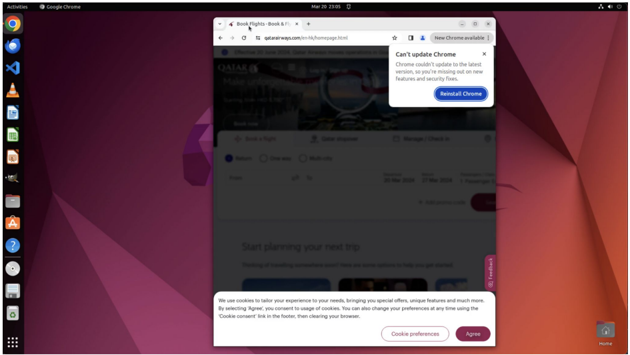
### Visual Description
## Screenshot: Browser Window with Update Notification and Cookie Consent
### Overview
The image shows a browser window (Google Chrome) open to a webpage with a pop-up notification about an update failure and a cookie consent banner. The browser's taskbar is visible on the left, displaying icons for various applications.
### Components/Axes
- **Browser Window**:
- Tab: "Book Rights - Book & F1"
- URL: `https://www.booking.com/hotel/qa/...` (partial URL visible)
- Status Bar: Displays "New Chrome available" badge
- **Pop-Up Notification**:
- Title: "Can't update Chrome"
- Message: "Chrome couldn't update to the latest version, so you're missing out on new features and security fixes. Download Chrome."
- **Cookie Consent Banner**:
- Message: "We use cookies to tailor your experience... [agree]"
- Link: "Cookie preferences" (purple text)
### Detailed Analysis
- **Browser Update Notification**:
- The pop-up indicates a failed update attempt for Chrome, emphasizing security and feature risks.
- A blue button labeled "Download Chrome" is present.
- **Cookie Consent**:
- Standard GDPR-style consent message with options to "Agree" or adjust preferences.
- The link "Cookie preferences" suggests granular control over tracking.
### Key Observations
- The browser is outdated, as indicated by the update failure and the "New Chrome available" badge.
- The webpage content is blurred, but the URL suggests a hotel booking site (e.g., "Qatar" in the URL path).
- The cookie consent is mandatory, with no "Decline" option visible.
### Interpretation
- **Security Implications**: The failed update leaves the browser vulnerable to exploits, as newer versions often patch critical security flaws.
- **User Experience**: The pop-up disrupts the user's workflow, while the cookie consent reflects compliance with privacy regulations.
- **Technical Context**: The URL structure (`/hotel/qa/`) implies the site is part of a QA (Quality Assurance) environment, possibly for testing purposes.
## Notes
- No numerical data or charts are present. The image focuses on textual notifications and UI elements.
- The browser's inability to update suggests potential issues with the system's update mechanism or network connectivity.
- The cookie consent aligns with global privacy standards but lacks transparency about specific data collection practices.
</details>
Task Instruction: Browse the list of women's Nike jerseys over $60.
Figure 18: The error shown in the figure is due to inadequate handling of environmental noise. When the agent encounters web pages with cookies or pop-up ads, its unfamiliarity with the structure of such pages leads to attempts to interact directly with the web page without bypassing the cookies or pop-ups. Since the pop-ups or cookie requests are not closed, all actions are ineffective.
<details>
<summary>Image 23 Details</summary>
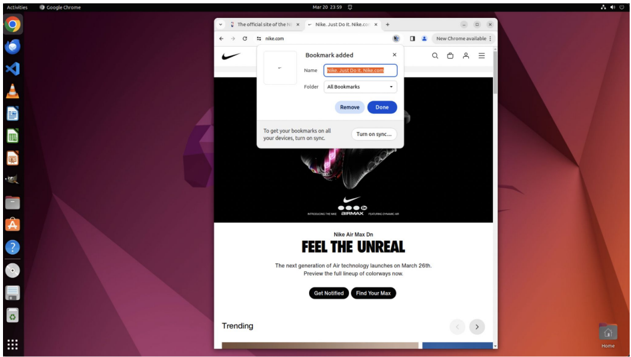
### Visual Description
## Screenshot: Browser Window with Nike Webpage and Bookmark Pop-up
### Overview
The image shows a browser window open to a Nike promotional webpage. A pop-up window for bookmark management is active, displaying options to add or manage bookmarks. The browser's sidebar contains app icons, and the desktop background features a geometric gradient design.
### Components/Axes
- **Browser UI Elements**:
- Title bar: "Google Chrome" (top-left), date "Mar 23 23:59" (center), system icons (top-right).
- Sidebar: 15 app icons (left), including Google Chrome, Firefox, Settings, etc.
- Main content area: Nike webpage with pop-up overlay.
- **Pop-up Window**:
- Title: "Bookmark added" (top-center).
- URL field: "nike.com" (pre-filled).
- Dropdown: "All Bookmarks" (default selection).
- Buttons: "Remove" (gray), "Done" (blue).
- Sync message: "To get your bookmarks on all your devices, turn on sync..." (bottom-left).
- **Webpage Content**:
- Header: Nike logo (top-left), navigation bar (top-right).
- Main ad: Black background with Nike Air Max Do shoe image.
- Text: "FEEL THE UNREAL" (bold, center), promotional details (release date: March 26th).
- Footer: "Trending" section (bottom-left), pagination dots (bottom-center).
### Detailed Analysis
- **Pop-up Text**:
- "Bookmark added" (title).
- URL: "nike.com" (exact match to webpage domain).
- Dropdown label: "All Bookmarks".
- Button labels: "Remove", "Done".
- Sync instruction: "Turn on sync..." (truncated).
- **Webpage Text**:
- Header: "Nike" (logo), "Just Do It" (slogan).
- Main ad: "Nike Air Max Do FEEL THE UNREAL" (bold, uppercase).
- Subtext: "The next generation of Air Technology launches on March 26th. Preview the full lineup of colorways now."
- Call-to-action buttons: "Get Notified", "Find Your Max".
- Sidebar: "Trending" label (bottom-left).
### Key Observations
- The pop-up indicates the user is actively managing bookmarks for the Nike website.
- The webpage promotes the Nike Air Max Do product with a focus on unreleased technology.
- The sidebar suggests the user has multiple apps installed, including productivity and browser tools.
- The desktop background is a static gradient (purple to red), unrelated to the browser content.
### Interpretation
This screenshot captures a user multitasking between browsing a Nike promotional page and managing bookmarks. The pop-up suggests the user is organizing bookmarks, possibly for future reference or to streamline access to the Nike site. The webpage's emphasis on "FEEL THE UNREAL" and the product launch date indicates a marketing campaign targeting sneaker enthusiasts. The absence of numerical data or charts implies the image focuses on UI interaction rather than analytical content. The sidebar's app icons hint at a productivity-oriented workflow, with tools like Terminal and Settings readily accessible.
</details>
## D.3 Discrepancies in Task Difficulty between Agent and Human
T ask Instruction: bold the font on this slide and add note
Figure 19: Supplementary examples of tasks performed by humans and agents.
<details>
<summary>Image 24 Details</summary>
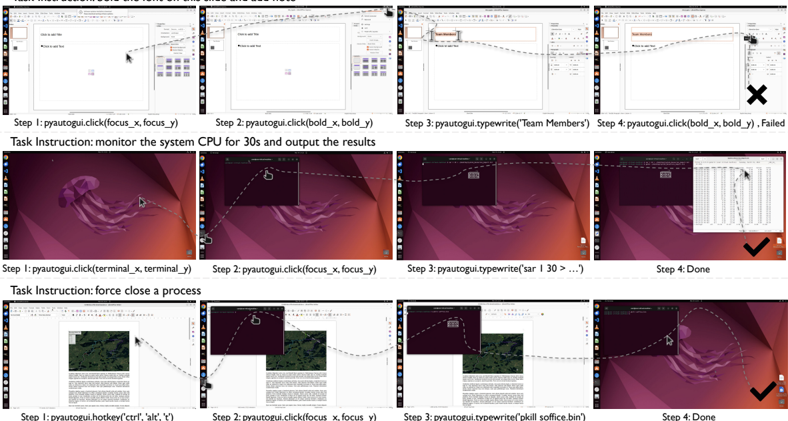
### Visual Description
## Screenshot: PyAutoGUI Tutorial Steps with System Interaction
### Overview
The image shows a tutorial demonstrating the use of PyAutoGUI for automating system interactions. It includes two distinct tasks: (1) monitoring system CPU usage and (2) force-closing a process. Each task is broken into four steps with visual annotations of mouse movements, UI elements, and command execution outcomes.
---
### Components/Axes
- **Task Instructions**: Textual descriptions of objectives (e.g., "monitor the system CPU for 30s and output the results").
- **Step Labels**: Numbered steps (Step 1, Step 2, etc.) with corresponding PyAutoGUI commands.
- **UI Elements**: Screenshots of application windows (e.g., Notepad, Task Manager) with annotated coordinates (e.g., `focus_x`, `focus_y`).
- **Outcome Indicators**: Checkmarks (✓) for successful actions and "X" for failures.
---
### Detailed Analysis
#### Task 1: Monitor System CPU
1. **Step 1**: `pyautogui.click(focus_x, focus_y)`
- Action: Click on a Notepad window at coordinates `(focus_x, focus_y)`.
- Visual: Mouse cursor moves to a Notepad window with a purple background.
2. **Step 2**: `pyautogui.click(bold_x, bold_y)`
- Action: Click on a bolded text element at `(bold_x, bold_y)`.
- Visual: Mouse cursor moves to a bolded text box in Notepad.
3. **Step 3**: `pyautogui.typewrite("Team Members")`
- Action: Type "Team Members" into the Notepad window.
- Visual: Text appears in Notepad, but the window is partially obscured by a Task Manager overlay.
4. **Step 4**: `pyautogui.click(bold_x, bold_y)`
- Action: Repeat the bolded text click.
- Outcome: **Failed** (marked with "X").
#### Task 2: Force Close a Process
1. **Step 1**: `pyautogui.click(terminal_x, terminal_y)`
- Action: Click on a terminal window at `(terminal_x, terminal_y)`.
- Visual: Mouse cursor moves to a terminal window with a purple background.
2. **Step 2**: `pyautogui.click(focus_x, focus_y)`
- Action: Click on a focus element at `(focus_x, focus_y)`.
- Visual: Mouse cursor moves to a focus indicator in the terminal.
3. **Step 3**: `pyautogui.typewrite("kill soffice.bin")`
- Action: Type the command `kill soffice.bin` into the terminal.
- Visual: Command appears in the terminal input field.
4. **Step 4**: `Done`
- Outcome: **Success** (marked with "✓").
---
### Key Observations
- **Coordinate Consistency**: The same coordinates (`focus_x`, `focus_y`) are reused across steps, suggesting a focus on specific UI elements.
- **Failure in Task 1**: The repeated click in Step 4 fails, possibly due to overlapping windows or incorrect coordinates.
- **Success in Task 2**: The terminal command execution completes successfully, indicated by the "Done" label.
---
### Interpretation
This tutorial demonstrates PyAutoGUI's ability to automate repetitive system tasks. The failure in Task 1 highlights the importance of precise coordinate targeting and window management. The successful process termination in Task 2 shows how automation can streamline system maintenance. The use of relative coordinates (`focus_x`, `focus_y`) implies a need for dynamic adjustment based on screen resolution or window positioning.
**Critical Insight**: Automation scripts require careful validation of UI element positions and timing to avoid errors, especially when interacting with overlapping or dynamic windows.
</details>
## Human > Agent Task: erase all the highlighted marks in this document
```
```
## Human > Agent Task: On page 2, add a note same to the title into the slide. Make the font of title bold.
```
<doc> # Action 1
# Click on the vertical scrollbar to
#pyautogui.click(tag_43)
# Action 2
# Click on the second slide thumbnail to select it </doc>
```
```
pyautogui.click(tag_2)
# Action 3
# Click on the text box to add text
pyautogui.typewrite('Team Members', interval=0.1)
# Type the title
pyautogui.hotkey('ctrl', 'a')
# Select all text
pyautogui.hotkey('ctrl', 'b')
# Make the text bold
pyautogui.click(tag_42)
# Action 4
# Click on the Bold button to apply bold formatting
pyautogui.click(tag_68)
# Failed.
```
## Agent > Human Task: use GIMP to cut out the 2s to 4s part of a video
```
<|
```
Agent > Human Task: I want to understand the resource usage of my Ubuntu system under normal workloads. Please use the 'sar' command in the 'sysstat' toolkit to monitor system activity, evaluate the status once every second for 30 seconds, output the results to "System Resources Report.txt" under Desktop.
```
:pyautogui
```
```
# Action 1
import pyauto
import time
```
```
```
Agent > Human Task: Hey, my LibreOffice Writer seems to have frozen and I can't get it to close normally. Can you help me force quit the application from the command line? I'm on Ubuntu and I don't want to restart my computer or lose any other work I have open.
```
# Action 1
import pyautogui
import time
pyautogui.hotkey('ctrl', 'alt', 't')
time.sleep(1)
pyautogui.typewrite('killall soft'
```
```
pyautogui.click(500,200)
pyautogui.typewrite('pkill -9 soffice.bin')
pyautogui.click(500,200)
```
## D.4 Comparative Analysis: Claude-3 vs. GPT-4V
Task Instruction: find the path of the file named "secret.docx" and copy it to the clipboard.
Figure 20: Screenshots of error example analysis of Claude-3 Opus.
<details>
<summary>Image 25 Details</summary>
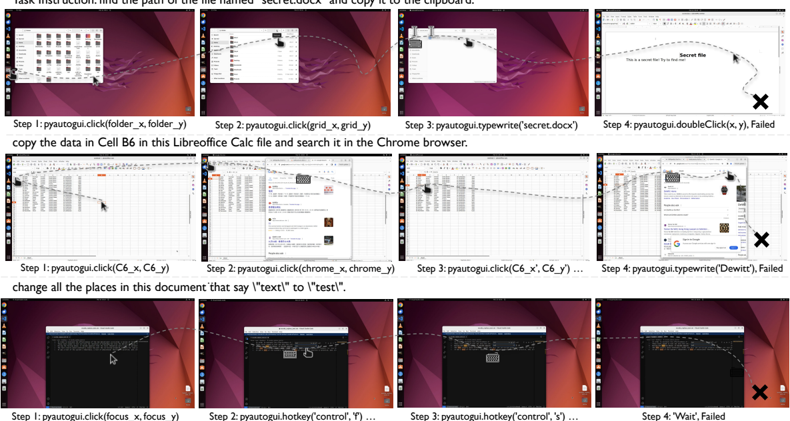
### Visual Description
## Screenshot Analysis: Step-by-Step Technical Instructions
### Overview
The image displays three rows of annotated screenshots demonstrating sequential technical tasks. Each row represents a distinct workflow with step-by-step instructions, UI interactions, and failure indicators. Arrows and text annotations guide the viewer through actions like file navigation, data search, and text replacement.
### Components/Axes
- **Layout**: Grid of 12 screenshots (3 rows × 4 columns) with consistent purple/red backgrounds.
- **Annotations**:
- Dashed arrows connecting UI elements (e.g., folders, files, search bars).
- Text labels specifying commands (e.g., "click", "typewrite", "hotkey").
- Failure markers: Black "X" symbols and "Failed" text in final steps.
- **UI Elements**:
- File explorer windows, Chrome browser tabs, LibreOffice Calc spreadsheets.
- Search bars, document text areas, and system dialogs.
### Detailed Analysis
#### Row 1: File Copy Task
1. **Step 1**: `pyautogui.click(folder_x, folder_y)`
- Action: Click folder icon in file explorer.
2. **Step 2**: `pyautogui.click(grid_x, grid_y)`
- Action: Navigate to grid view in file explorer.
3. **Step 3**: `pyautogui.typewrite('secret.docx')`
- Action: Type filename into search bar.
4. **Step 4**: `pyautogui.doubleClick(x, y)`
- **Failure**: Double-click action unsuccessful (marked with "X").
#### Row 2: Data Search Task
1. **Step 1**: `pyautogui.click(C6_x, C6_y)`
- Action: Select cell C6 in LibreOffice Calc.
2. **Step 2**: `pyautogui.click(chrome_x, chrome_y)`
- Action: Open Chrome browser tab.
3. **Step 3**: `pyautogui.typewrite('Dewitt')`
- Action: Search for "Dewitt" in browser.
4. **Step 4**: `pyautogui.typewrite('Dewitt')`
- **Failure**: Search yields no results (marked with "X").
#### Row 3: Text Replacement Task
1. **Step 1**: `pyautogui.click(focus_x, focus_y)`
- Action: Focus on document text area.
2. **Step 2**: `pyautogui.hotkey('control', 'f')`
- Action: Open find dialog (`Ctrl+F`).
3. **Step 3**: `pyautogui.hotkey('control', 's')`
- Action: Save document (unrelated to task).
4. **Step 4**: `Wait...`
- **Failure**: Task incomplete (marked with "X").
### Key Observations
- **Failure Patterns**: All rows end with Step 4 failures, suggesting incomplete automation scripts or incorrect coordinates.
- **Command Consistency**: `pyautogui` commands follow a logical sequence but lack error handling for failed interactions.
- **Annotation Clarity**: Arrows and labels effectively map actions to UI elements, though some steps (e.g., Step 3 in Row 3) deviate from the task.
### Interpretation
The image illustrates a tutorial for automating repetitive tasks using `pyautogui`, a Python library for GUI automation. The failures in Step 4 highlight potential issues:
1. **Coordinate Inaccuracy**: Double-click coordinates (`x, y`) may not align with the target file.
2. **Browser Search Limitations**: The "Dewitt" search returns no results, indicating either a typo or missing data.
3. **Misaligned Workflow**: Step 3 in Row 3 uses `Ctrl+S` (save) instead of text replacement, suggesting a script error.
This analysis underscores the importance of precise coordinate mapping and task-specific command sequencing in automation workflows. The failures serve as critical checkpoints for debugging and refining the script logic.
</details>
Claude3 Failed Task1: I remember there is a file named "secret.docx" on this computer, but I can't remember where it is. Please find the path where this file is stored and copy it to the clipboard.
```
```
## Claude3 Failed Task2: copy the data in Cell B6 in this Libreoffice Calc file and search it in the Chrome browser.
```
```
## Claude3 Failed Task3: Please help me change all the places in this document that say 'text' to 'test'.
```
pyautogui.hotkey('ctrl', 'h')
pyautogui.write('test')
pyautogui.press('tab')
pyautogui.write('enter')
```
## D.5 Analysis on SoM Effectiveness
```
```
Task w/ SoM: turning off the code checking function of the python plugin in vscode
```
import pyautogui
import time
pyautogui.hotkey('ctrl', 'shift', 'p')
pyautogui.write('Preferences: Open')
pyautogui.press('enter')
pyautogui.click(x=600, y=175)
pyautogui.write('Python', interval=0.05)
```
```
```
pyautogui.press('enter')
# Action 4
# Click on the search settings bar and type in the query again
pyautogui.click(x=800, y=150)
# Click on the search bar, the coordinates may need adjustment
pyautogui.typewrite('Python missing imports', interval=0.25)
# ... Can not find the right click area
# Failed
```
## D.6 Analysis on SoM Effectiveness
The SoM, effective for web tasks focusing only on labeled bounding boxes, did not excel in our diverse tasks that required more expertise and flexibility. It shortens the action space of the agent and thus hinders the agent's exploration and adaptability. For example in Figure 21, in the task of "turning off the code checking function of the python plugin." in VS Code, agents without SoM succeeded by editing the settings.json, whereas SoM-equipped agents struggled with finding and deselecting the checkbox in the settings. The latter has a longer action path and fails due to incorrect mouse clicks. Furthermore, SoM's labeling of elements in professional software also has such errors, that agents without SoM can use a11y tree to calculate and adjust coordinates, while the elements' blocks under SoM can be hard to change during the task.
Task Instruction: turning off the code checking function of the python plugin in vscode
Figure 21: A task showcase where the SoM-equipped agent tried to find interactive settings, while the screen-a11ytree-equipped agents directly modified the value in the setting.json file.
<details>
<summary>Image 26 Details</summary>
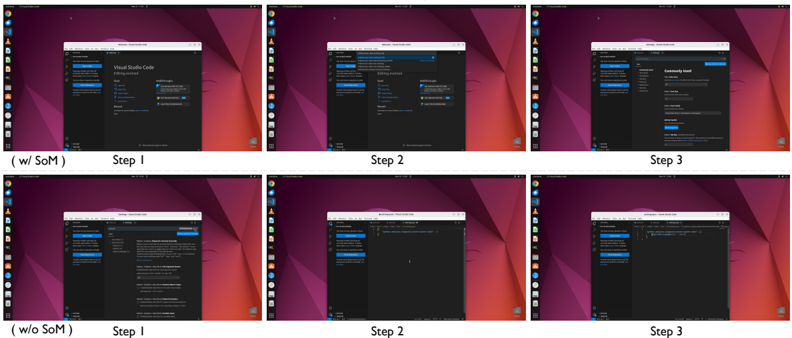
### Visual Description
## Screenshot Analysis: Software Development Workflow Comparison
### Overview
The image contains six screenshots arranged in two rows, comparing a software development workflow with and without "SoM" (likely an acronym for a specific tool or methodology). Each row represents a scenario:
- **Top Row**: Workflow "with SoM"
- **Bottom Row**: Workflow "without SoM"
Each row is divided into three steps (Step 1, Step 2, Step 3), showing browser windows with dark-themed interfaces. Text within the browser tabs is too small to read precisely, but structural differences between the two scenarios are evident.
### Components/Axes
- **Labels**:
- "w/ SoM" (with SoM) and "w/o SoM" (without SoM) annotations.
- Step labels: "Step 1", "Step 2", "Step 3" for each row.
- **UI Elements**:
- Browser windows with dark-themed interfaces.
- Tabs labeled (unreadable due to resolution).
- Sidebar menus with blue buttons (unreadable text).
### Detailed Analysis
#### With SoM (Top Row)
- **Step 1**:
- Browser tab labeled "Visual Studio Code" (inferred from context).
- Sidebar menu with blue buttons (text unreadable).
- **Step 2**:
- Browser tab labeled "Settings" (inferred).
- Sidebar menu with additional blue buttons (text unreadable).
- **Step 3**:
- Browser tab labeled "Community" (inferred).
- Sidebar menu with expanded options (text unreadable).
#### Without SoM (Bottom Row)
- **Step 1**:
- Browser tab labeled "Visual Studio Code" (same as top row).
- Sidebar menu with fewer blue buttons (simplified interface).
- **Step 2**:
- Browser tab labeled "Settings" (same as top row).
- Sidebar menu with reduced options (simplified interface).
- **Step 3**:
- Browser tab labeled "Community" (same as top row).
- Sidebar menu with minimal options (simplified interface).
### Key Observations
1. **Interface Complexity**:
- The "with SoM" workflow shows more detailed sidebar menus and additional blue buttons, suggesting enhanced functionality or configuration options.
- The "without SoM" workflow has a streamlined interface with fewer visible options.
2. **Tab Consistency**:
- Tab labels (e.g., "Visual Studio Code," "Settings," "Community") are identical in both scenarios, indicating the core workflow remains unchanged.
3. **Sidebar Differences**:
- The "with SoM" sidebar appears more populated, implying additional tools or settings are accessible.
### Interpretation
The comparison highlights the impact of "SoM" on the software development workflow:
- **With SoM**: Likely provides advanced features, deeper configuration options, or integration with external tools (evidenced by the expanded sidebar menus).
- **Without SoM**: Offers a simplified interface, possibly for users prioritizing ease of use over advanced functionality.
- **Workflow Implications**:
- Step 1 (Visual Studio Code) suggests code editing/debugging.
- Step 2 (Settings) implies configuration adjustments.
- Step 3 (Community) may involve collaboration or resource sharing.
- **Unreadable Text**: The inability to read specific button labels or menu items limits precise analysis of SoM’s exact contributions.
### Limitations
- Text within browser tabs and sidebar menus is too small to transcribe accurately.
- No numerical data or charts are present to quantify differences between scenarios.
- Assumptions about tab labels (e.g., "Visual Studio Code") are based on contextual inference.
</details>