# SWE-agent: Agent-Computer Interfaces Enable Automated Software Engineering
## SWE-agent: Agent-Computer Interfaces Enable Automated Software Engineering
## John Yang ∗ Carlos E. Jimenez ∗ Alexander Wettig Kilian Lieret Shunyu Yao Karthik Narasimhan Ofir Press
Princeton Language and Intelligence, Princeton University
## Abstract
Language model (LM) agents are increasingly being used to automate complicated tasks in digital environments. Just as humans benefit from powerful software applications, such as integrated development environments, for complex tasks like software engineering, we posit that LM agents represent a new category of end users with their own needs and abilities, and would benefit from specially-built interfaces to the software they use. We investigate how interface design affects the performance of language model agents. As a result of this exploration, we introduce SWE-agent: a system that facilitates LM agents to autonomously use computers to solve software engineering tasks. SWE-agent's custom agent-computer interface (ACI) significantly enhances an agent's ability to create and edit code files, navigate entire repositories, and execute tests and other programs. We evaluate SWE-agent on SWE-bench and HumanEvalFix, achieving state-of-the-art performance on both with a pass@ 1 rate of 12 . 5 %and 87 . 7 %, respectively, far exceeding the previous state-of-the-art achieved with non-interactive LMs. Finally, we provide insight on how the design of the ACI can impact agents' behavior and performance.
## 1 Introduction
Recent work has demonstrated the efficacy of LM agents for code generation with execution feedback [39]. However, applying agents to more complex code tasks like software engineering remains unexplored. To solve programming tasks, LM agents are typically designed to use existing applications, such as the Linux shell or Python interpreter [53, 57, 59]. However, to perform more complex programming tasks such as software engineering [20], human engineers benefit from sophisticated applications like VSCode with powerful tools and extensions. Inspired by human-computer interaction (HCI) studies on the efficacy of user interfaces for humans [7], we investigate whether LM agents could similarly benefit from better-designed interfaces for performing software engineering tasks.
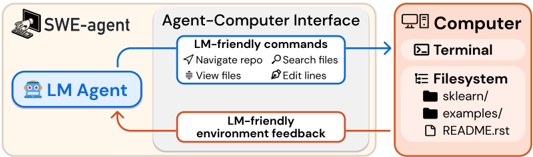
Figure 1: SWE-agent is an LM interacting with a computer through an agent-computer interface (ACI), which includes the commands the agent uses and the format of the feedback from the computer.
<details>
<summary>Image 1 Details</summary>
### Visual Description
## Diagram: Agent-Computer Interface Architecture
### Overview
The diagram illustrates a technical workflow involving three core components:
1. **SWE-agent** (top-left)
2. **Agent-Computer Interface** (center)
3. **Computer** (right)
Arrows indicate directional interactions, with blue arrows representing "LM-friendly commands" and red arrows representing "LM-friendly environment feedback."
---
### Components/Axes
#### 1. **SWE-agent**
- Icon: Computer with hand cursor
- Position: Top-left quadrant
#### 2. **Agent-Computer Interface**
- Contains two sub-components:
- **LM-friendly commands** (blue arrow):
- Navigate repo
- Search files
- View files
- Edit lines
- **LM-friendly environment feedback** (red arrow):
- Feedback loop to LM Agent
#### 3. **Computer**
- Sub-components:
- **Terminal** (icon: terminal window)
- **Filesystem** (icon: folder structure):
- Directories: `sklearn/`, `examples/`
- File: `README.rst`
---
### Detailed Analysis
#### LM Agent
- Positioned within the Agent-Computer Interface
- Connected to SWE-agent via blue arrow (commands)
- Receives feedback via red arrow (environmental responses)
#### Computer Filesystem
- Explicitly lists:
- `sklearn/` (machine learning library directory)
- `examples/` (example code directory)
- `README.rst` (reStructuredText documentation file)
---
### Key Observations
1. **Directional Flow**:
- Commands flow from LM Agent → Agent-Computer Interface → Computer (blue arrows).
- Feedback flows from Computer → Agent-Computer Interface → LM Agent (red arrow).
2. **File Structure**:
- Presence of `sklearn/` and `examples/` suggests machine learning-related tasks.
- `README.rst` implies documentation for the project.
3. **Color Coding**:
- Blue arrows = Command execution.
- Red arrows = Feedback/response mechanism.
---
### Interpretation
This architecture demonstrates a closed-loop system where:
- The **LM Agent** (likely a language model) interacts with the **Computer** via the **SWE-agent** as an intermediary.
- The **Agent-Computer Interface** acts as a translator, converting LM Agent outputs into executable commands (e.g., "navigate repo") and relaying environmental feedback (e.g., terminal outputs or file changes).
- The explicit mention of `sklearn/` and `examples/` indicates the system is designed for machine learning workflows, with the LM Agent potentially automating tasks like code navigation, file editing, or documentation updates.
- The feedback loop suggests iterative refinement, where the LM Agent adjusts its commands based on environmental responses (e.g., error messages or file states).
**Notable Design Choices**:
- Use of reStructuredText (`README.rst`) implies compatibility with Python-based projects (common in data science).
- The separation of "commands" and "feedback" highlights a modular design for debugging and system transparency.
</details>
∗ Equal contribution. Correspondence to johnby@stanford.edu , carlosej@princeton.edu . Data, code, and leaderboard at swe-agent.com
Consider the simple setting of an agent interacting directly with a Linux shell [59]. In practice, we find that LM agents can struggle to reliably take actions in this environment. For example, it fails to provide simple commands to edit a small file segment, and does not provide any feedback if the user makes an invalid edit. These deficits substantially hamper performance, motivating the need for an agent-computer interface (ACI), i.e., an abstraction layer between the LM agent and computer, to enhance the LM agent's abilities in computer environments (Figure 1).
From this effort, we introduce SWE-agent, an agent composed of an LM and ACI, that can interact with a computer to solve challenging real-world software engineering problems, such as those proposed in SWE-bench [20]. In contrast to the Linux Shell's granular, highly configurable action space, SWE-agent's ACI instead offers a small set of simple actions for viewing, searching through and editing files. The ACI uses guardrails to prevent common mistakes, and an agent receives specific, concise feedback about a command's effects at every turn. We show that ACIs tailored specifically for LMs outperform existing user interfaces (UIs) designed for human users , such as the Linux shell.
Using GPT-4 Turbo as a base LM, SWE-agent solves 12 . 47 %of the 2 , 294 SWE-bench test tasks, substantially outperforming the previous best resolve rate of 3 . 8 % by a non-interactive, retrievalaugmented system [20]. We perform an ablation study on a subset of 300 SWE-bench test instances (SWE-bench Lite) to analyze our ACI design choices. The results show that SWE-agent solves 10 . 7 percentage points more instances than the baseline agent, which uses only the default Linux shell. Although our ACI was developed for GPT-4 Turbo, we show that it is portable to a different LM; SWE-agent with Claude 3 Opus can solve 10 . 5 %of the benchmark tasks.
Our contributions are twofold. First, we introduce the concept of the agent-computer interface (ACI) and demonstrate how careful ACI design can substantially improve LM agent performance without modifying the underlying LM's weights. Second, we build, evaluate, and open-source SWE-agent, a system that provides LMs an ACI for solving real-world software engineering tasks. Unlike prior works that independently explore the merits of tool use, prompting techniques, and code execution in interactive settings, our approach unifies these factors within the ACI framework. We show that crafting LM-centric interactive components has meaningful effects on downstream task performance.
## 2 The Agent-Computer Interface
An LM acts as an agent when it interacts with an environment by iteratively taking actions and receiving feedback [42, 62]. Typically, the environment has hard constraints, as in robotics, where agents control actuators in the physical world. On the other hand, digital environments can be molded by abstractions in the form of application programming interfaces and user interfaces for software and humans respectively. Naturally, existing interfaces have been designed with one of these users in mind. We argue that LM agents represent a new category of end user, with their own needs and abilities. We refer to the interface LM agents use to interact with computers as the agent-computer interface (ACI). Figure 2 illustrates how ACIs provide LM agents with important functionality to interface with computers, similar to how code editors also help humans use computers more effectively.
Figure 2: Specialized applications like IDEs (e.g., VSCode, PyCharm) make scientists and software engineers more efficient and effective at computer tasks. Similarly, ACI design aims to create a suitable interface that makes LM agents more effective at digital work such as software engineering.
<details>
<summary>Image 2 Details</summary>

### Visual Description
## Diagram: System Interaction Architecture
### Overview
The diagram illustrates a system architecture involving two computers, an LM Agent, and a Human. It depicts bidirectional interactions between components, emphasizing automation (via the LM Agent) and human-computer interaction (via the UI). The system is divided into two primary modules: one focused on automated code/file operations (ACI) and another on user interface (UI) interactions.
### Components/Axes
1. **Left Computer (ACI Module)**:
- **ACI (Automated Code Interface)**: Contains three sub-components:
- **File Viewer** (blue icon with document symbol)
- **File Editor** (purple icon with pencil)
- **Code Search** (yellow icon with magnifying glass)
- **LM Agent**: A blue robot icon labeled "LM Agent," positioned to the left of the left computer.
2. **Right Computer (UI Module)**:
- **UI (User Interface)**: Contains three icons:
- **Blue Triangle** (possibly representing a code editor or development tool)
- **Green Hexagon** (possibly representing a design or collaboration tool)
- **Black Square with "PC"**: Labeled "PC," likely indicating a personal computer or terminal.
- **Human**: Two stylized figures labeled "Human," positioned to the left of the right computer.
3. **Arrows**:
- **Blue Arrows**: Connect the LM Agent to the ACI module (bidirectional flow).
- **Green Arrows**: Connect the Human to the UI module (bidirectional flow).
### Detailed Analysis
- **ACI Module**: The left computer’s ACI handles file and code operations. Each sub-component is color-coded and labeled, suggesting distinct functionalities (viewing, editing, searching).
- **UI Module**: The right computer’s UI includes tools for development (blue triangle), design (green hexagon), and a terminal (black square labeled "PC"). The icons imply a focus on software development and user interaction.
- **LM Agent**: Positioned externally to the left computer, the LM Agent interacts with the ACI, indicating automation of tasks like file management and code search.
- **Human Interaction**: The Human interacts with the UI module, suggesting manual input or oversight of tasks like coding or design.
### Key Observations
- **Modular Design**: The system separates automated operations (ACI) from human-centric tasks (UI), enabling parallel workflows.
- **Bidirectional Flow**: Arrows indicate that both the LM Agent and Human can initiate or respond to actions, emphasizing dynamic interaction.
- **Color Coding**: Blue (ACI) and green (UI) arrows visually distinguish automation from human interaction.
### Interpretation
This diagram represents a hybrid system where an LM Agent automates repetitive or complex tasks (e.g., file management, code search) while humans focus on higher-level UI interactions (e.g., coding, design). The bidirectional arrows suggest a collaborative model where automation and human input complement each other. The separation of ACI and UI modules implies a design philosophy prioritizing efficiency (via automation) and usability (via intuitive UI). The "PC" label on the black square may indicate a terminal for direct system access, bridging automation and human oversight.
</details>
Disparities in humans' and LMs' abilities and limitations motivates different interface design guidelines. For instance, the current generation of LMs lack the visual understanding abilities to directly operate GUI-based applications with rich visual components and signals. However, many of the features provided by these applications, such as syntax checking and navigation tools, could be useful to LM agents if they were presented in a suitable manner. Additionally, humans can flexibly ignore unnecessary information, whereas all content has a fixed cost in memory and computation for LMs
and distracting context can harm performance [27]. Therefore, LM agents may be more effective at interacting with computers when provided an interface that was built informed by these differences.
Ultimately, a well-designed ACI should help the LM agent understand the state of the application given previous changes, manage history to avoid unnecessary context from prior observations, and provide actions that models can use efficiently and reliably. The ACI specifies both the commands available to the LM and how the environment state is communicated back to the LM. It also tracks the history of all previous commands and observations and, at each step, manages how these should be formatted and combined with high-level instructions into a single input for the LM.
In this paper, we assume a fixed LM and focus on designing the ACI to improve its performance. This means that we shape the actions, their documentation, and environment feedback to complement an LM's limitations and abilities. We draw inspiration from the field of HCI, where user studies elicit insights about how compatible different interfaces are with respect to human intuition and performance [7]. We use two approaches to enhance performance on a development set: (1) manually inspect agent behavior to identify difficulties and propose improvements, and (2) run a grid search to select the best ACI configuration.
Taking these two actions resulted in several insights about design principles that seem especially important for building effective ACIs:
1. Actions should be simple and easy to understand for agents. Many bash commands have documentation that includes dozens of options. Simple commands with a few options and concise documentation are easier for agents to use, reducing the need for demonstrations or fine-tuning. This is a defining principle for all SWE-agent commands that we describe in Section 3.
2. Actions should be compact and efficient. Important operations (e.g., file navigation, editing) should be consolidated into as few actions as possible. Efficient actions help agents make meaningful progress towards a goal in a single step. A poor design would therefore have many simple actions that must be composed across multiple turns for a higher order operation to take effect. We show this idea in action in the Editing and Search interface analyses in Section 5.1.
3. Environment feedback should be informative but concise. High quality feedback should provide the agent with substantive information about the current environment state (and the effect of the agent's recent actions) without unnecessary details. For instance, when editing a file, updating the agent about revised content is helpful. Figures 3a, 3b and Table 3 show this.
4. Guardrails mitigate error propagation and hasten recovery. Like humans, LMs make mistakes when editing or searching and can struggle to recover from these errors. Building in guardrails, such as a code syntax checker that automatically detects mistakes, can help agents recognize and quickly correct errors. We show the effect of editing guardrails in Table 3.
Analysis and ablation studies in Section 5 demonstrate how alternative ACIs affect LM performance. Our studies shows how these principles appear recurrently across actions, feedback, and workflows.
## 3 SWE-agent: Designing an ACI for Software Engineering
Here we describe how SWE-agent provides an ACI for LMs to act as software engineering agents, enabling them to effectively search, navigate, edit, and execute code commands. The ACI comprises several principal components, including search/navigation, file viewer, file editor, and context management. At each step, SWE-agent generates a thought and a command, then incorporates the feedback from the command's execution in the environment (ReAct; Yao et al. [62]). Built atop the Linux shell, SWE-agent also allows access to common Linux commands and utilities when needed.
Search and navigation. Navigating codebases requires finding the relevant file and content. A common strategy to do this involves looking up terms that might be useful, e.g., files, functions, or class definitions mentioned in an issue. We introduce the special commands find\_file , search\_file , and search\_dir , which output a summary of search results when searching for filenames and strings within files or directories. Figure 10 shows examples of these search result formats. The find\_file command searches for filenames in the repository, while the search\_file and search\_dir locates strings in a file(s) of a subdirectory. Our interface encourages efficient searches by suppressing verbose results. The search commands return at most 50
(a) Observation from the file viewer.
(b) Action using the edit interface.
<details>
<summary>Image 3 Details</summary>
### Visual Description
## Screenshot: Code Editor with Annotations
### Overview
The image shows a code editor interface with a highlighted code block and annotations. The primary focus is on a Python-like code snippet with syntax highlighting, surrounded by explanatory text.
### Components/Axes
- **Title**: "Response (Thought + Edit Action)" (top-center, blue border).
- **Message**: "We need to add a check to ensure that all powers are the same. Let's edit the code to include this check." (black text, above the code block).
- **Code Block**:
- **Line 1**: `edit 404:407` (purple text, indicating an edit range).
- **Line 2**: `elif (total_degree > 3 and` (orange keyword `elif`, blue condition).
- **Line 3**: `len(set(k.exp[k.is_Pow])) == 1):` (blue function `len`, `set`, and condition).
- **Line 4**: `if all(coeff[k] == 1):` (blue keyword `if`, `all`, and condition).
- **Line 5**: `diop_type = 'general_sum_even'` (blue variable assignment, green string `'general_sum_even'`).
- **Line 6**: `end_of_edit` (black text, closing the edit block).
### Detailed Analysis
- **Syntax Highlighting**:
- Purple: `edit 404:407` (likely a line/column range for editing).
- Orange: `elif` (conditional statement).
- Blue: Conditions (`total_degree > 3`, `len(...) == 1`, `all(...) == 1`).
- Green: String `'general_sum_even'`.
- **Code Structure**:
- The code modifies an existing function (implied by `edit 404:407`) to add a conditional check.
- The check ensures two conditions:
1. `total_degree > 3` (polynomial degree constraint).
2. All exponents in `k.exp[k.is_Pow]` are unique (via `len(set(...)) == 1`).
- If both conditions are met, `diop_type` is set to `'general_sum_even'`.
### Key Observations
- The annotation explicitly states the purpose: adding a check for uniform exponents.
- The code uses Python-like syntax (e.g., `elif`, `set`, `all`).
- The string `'general_sum_even'` suggests a classification or categorization logic.
### Interpretation
This code snippet modifies an existing algorithm to enforce a constraint on polynomial exponents. The check ensures that all powers in a term are identical (via `len(set(...)) == 1`), which is critical for the `diop_type` classification. The `general_sum_even` label implies this type of polynomial is handled differently in subsequent computations, possibly for even-powered terms in a Diophantine equation solver. The annotation highlights a deliberate design choice to enforce uniformity in exponents, which may prevent errors in downstream calculations.
No numerical data or trends are present, as this is a textual/code-based annotation.
</details>
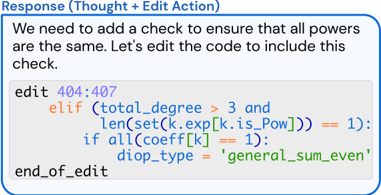
Figure 3: The file viewer and edit command are integrated. (a) The file viewer shows the agent the open file's content with line numbers. (b) The agent invokes the edit function to replace lines 404-407 in the open file. After the edit, the file viewer shows the agent the now updated version of the file.
results for each search query; if a search exceeds this number, we do not report the results and instead suggest that the agent write a more specific query.
File viewer. After finding a file they want to view, agents use the interactive file viewer by calling the command open on the relevant file path. The file viewer presents a window of at most 100 lines of the file at a time. The agent can move this window with the commands scroll\_down and scroll\_up or access a specific line with the goto command. To facilitate in-file navigation and code localization, we display: the full path of the open file, the total number of lines in the file, the number of lines omitted before and after the current window, and the line number (prepended to each visible line). Figure 3a shows an example of this interface.
File editor. We provide a few commands that let LMs create and edit files. The edit command works in conjunction with the file viewer, allowing agents to replace a specific range of lines in the open file. This command takes 3 required arguments: the start line, end line, and replacement text. In a single step, agents can replace all lines between the start and end lines with the replacement text, as shown in Figure 3b. After edits are applied, the file viewer automatically displays the updated content, helping the agent observe the effects of its edit immediately without invoking additional commands. Figure 3b shows an example agent response, including a file edit.
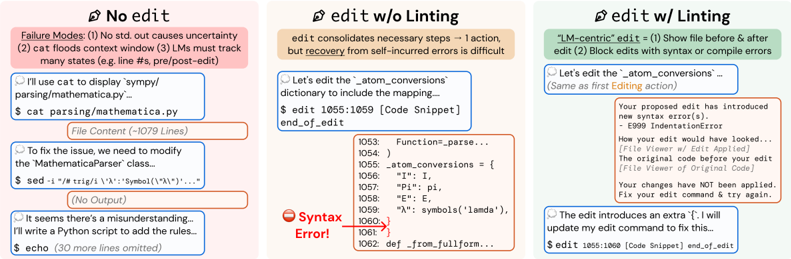
Similar to how humans can use tools like syntax highlighting to help them notice format errors when editing files in an IDE, we integrate a code linter into the edit function to alert the agent of mistakes it may have introduced when editing a file. Select errors from the linter are shown to the agent along with a snippet of the file contents before/after the error was introduced. Invalid edits are discarded, and the agent is asked to try editing the file again.
Context management. The SWE-agent system uses informative prompts, error messages, and history processors to keep agent context concise and informative. Agents receive instructions, documentation, and demonstrations on the correct use of bash and ACI commands. At each step, the system instructs them to generate both a thought and an action [62]. Malformed generations trigger an error response, shown in Figure 32, asking the agent to try again, which is repeated until a valid generation is received. Once received, all past error messages except the first are omitted.
The agent's environment responses display computer output using the template shown in Figure 30; however, if no output is generated, a specific message ('Your command ran successfully and did not produce any output') is included to enhance clarity. To further improve context relevance, observations preceding the last 5 are each collapsed into a single line, shown in Figure 31. By removing most content from prior observations, we maintain essential information about the plan and action history while reducing unnecessary context, which allows for more interaction cycles and avoids showing outdated file information. §A provides further implementation details.
## 4 Experimental Setup
Datasets. We primarily evaluate on the SWE-bench dataset, which includes 2 , 294 task instances from 12 different repositories of popular Python packages [20]. We report our main agent results on the full SWE-bench test set and ablations and analysis on the SWE-bench Lite test set, unless
otherwise specified. SWE-bench Lite is a canonical subset of 300 instances from SWE-bench that focus on evaluating self-contained functional bug fixes. We also test SWE-agent's basic code editing abilities with HumanEvalFix, a short-form code debugging benchmark [32].
Models. All results, ablations, and analyses are based on two leading LMs, GPT-4 Turbo ( gpt-4-1106-preview ) [34] and Claude 3 Opus ( claude-3-opus-20240229 ) [6]. We experimented with a number of additional closed and open source models, including Llama 3 and DeepSeek Coder [14], but found their performance in the agent setting to be subpar. Many LMs' context window is too small, such as Llama 3's context window of 8 k. GPT-4 Turbo and Claude 3 Opus have 128 k and 200 k token context windows, respectively, which provides sufficient room for the LM to interact for several turns after being fed the system prompt, issue description, and optionally, a demonstration.
Baselines. We compare SWE-agent to two baselines. The first setting is the non-interactive, retrievalaugmented generation (RAG) baselines established in Jimenez et al. [20]. Here, a BM25 retrieval system retrieves the most relevant codebase files using the issue as the query; given these files, the model is asked to directly generate a patch file that resolves the issue.
The second setting, called Shell-only, is adapted from the interactive coding framework introduced in Yang et al. [59]. Following the InterCode environment, this baseline system asks the LM to resolve the issue by interacting with a shell process on Linux. Like SWE-agent, model prediction is generated automatically based on the final state of the codebase after interaction.
Metrics. We report %Resolved or pass @1 as the main metric, which is the proportion of instances for which all tests pass successfully after the model generated patch is applied to the repository [20]. We also report the $ Avg. Cost metric, the API inference cost incurred by SWE-agent averaged over all successfully resolved instances. Due to budget constraints, we set the per-instance budget to $4; if a run exceeded this budget, existing edits were submitted automatically.
Configuration search. During the design process of SWE-agent, we arrived at the final ACI design through qualitative analysis of system behavior on a small set of hand-picked examples from the development split of SWE-bench. For the remaining hyperparameter choices, we performed a sweep over the window size, history processing, and decoding temperature, shown in §B.1.
## 5 Results
Across all systems, SWE-agent w/ GPT-4 Turbo achieves the best performance all-around, successfully solving 12 . 47 %( 286 / 2 , 294 ) of the full SWE-bench test set and 18 . 00 %( 54 / 300 ) of the Lite split. As shown in Table 1, compared to RAG on Lite, SWE-agent is 8 -13 x more costly but yields a 6 . 7 -fold improved % Resolved rate. An LM-friendly ACI's value is confirmed by SWE-agent's 64 % relative increase compared to Shell-only, both with GPT-4 Turbo.
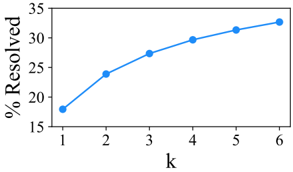
In Table 2, SWE-agent yields strong performance on HumanEvalFix with 88 . 3 % pass@1 rate. Figure 4 reveals that average performance variance is relatively low, but per-instance resolution can change considerably. More results are given in the appendix: §B.2 shows that the success rate is uncorrelated to the issue age (controlling for possible test pollution), B.5 presents more details on performance variance and pass @ k , and B.7 discusses extra evaluation details.
## 5.1 Analysis of ACI Design
We perform several ablations of the SWE-agent interface, specifically with respect to the SWE-agent w/ GPT-4 configuration, summarized in Table 3. Our case studies shed light on interesting agent behavior along with the impact of different ACI designs.
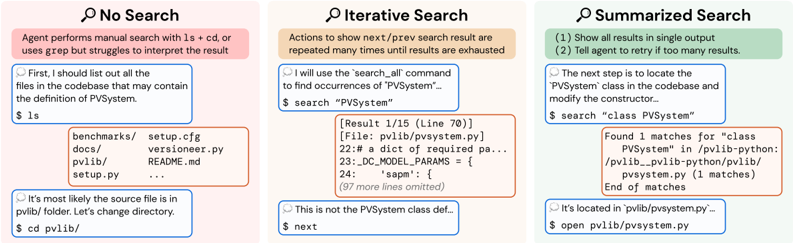
Human user interfaces are not always suitable as agent-computer interfaces. Current LMs are vulnerable to a number of pitfalls when searching for relevant content in a Linux shell environment. Some exploration patterns (e.g., chains of cd , ls , cat ) are extremely inefficient. grep or find look ups can perform better but occasionally produce many lines of irrelevant results. We hypothesize that better localization is possible with faster navigation and a more informative search interface.
https://github.com/meta-llama/llama3
Token counts for different models are not directly comparable since they use different tokenizers.
Table 1: Main results for SWE-agent performance on the full and Lite splits of the SWE-bench test set. We benchmark models in the SWE-agent, Basic CLI, and Retrieval Augmented Generation (RAG) settings established in SWE-bench [20].
| | SWE-bench | SWE-bench | SWE-bench Lite | SWE-bench Lite |
|-------------------|-------------|-------------|------------------|------------------|
| Model | %Resolved | $ Avg. Cost | %Resolved | $ Avg. Cost |
| RAG | | | | |
| w/ GPT-4 Turbo | 1.31 | 0.13 | 2.67 | 0.13 |
| w/ Claude 3 Opus | 3.79 | 0.25 | 4.33 | 0.25 |
| Shell-only agent | | | | |
| w/ GPT-4 Turbo | - | - | 11.00 | 1.46 |
| w/o Demonstration | - | - | 7.33 | 0.79 |
| SWE-agent | | | | |
| w/ GPT-4 Turbo | 12.47 | 1.59 | 18.00 | 1.67 |
| w/ Claude 3 Opus | 10.46 | 2.59 | 13.00 | 2.18 |
Table 2: Pass@1 results on HumanEvalFix [32]. Except for SWE-agent, we use scores as reported in Yu et al. [65].
Figure 4: SWE-agent w/ GPT-4 Turbo Pass @ k performance across 6 runs on SWE-bench Lite.
| Model | Python | JS | Java |
|-------------------------------|----------|------|--------|
| CodeLLaMa-instruct-13B | 29.2 | 19.5 | 32.3 |
| GPT-4 | 47 | 48.2 | 50 |
| DeepseekCoder-CodeAlpaca-6.7B | 49.4 | 51.8 | 45.1 |
| WaveCoder-DS-6.7B | 57.9 | 52.4 | 57.3 |
| SWE-agent w/ GPT-4 Turbo | 87.7 | 89.7 | 87.9 |
<details>
<summary>Image 4 Details</summary>
### Visual Description
## Line Graph: Percentage Resolved vs. Variable k
### Overview
The image depicts a line graph illustrating the relationship between a variable **k** (x-axis) and the percentage of resolved cases (y-axis). The graph shows a consistent upward trend, with the percentage resolved increasing as **k** increases from 1 to 6.
### Components/Axes
- **X-axis (Horizontal)**: Labeled **k**, with discrete integer values ranging from 1 to 6.
- **Y-axis (Vertical)**: Labeled **% Resolved**, with a scale from 15% to 35% in increments of 5%.
- **Legend**: A single blue line represents the data series, with no additional labels or categories.
- **Data Points**: Six blue dots connected by a smooth line, positioned at the following coordinates:
- (1, 18%)
- (2, 24%)
- (3, 27%)
- (4, 30%)
- (5, 31%)
- (6, 33%)
### Detailed Analysis
- **Trend**: The line exhibits a **monotonic increase**, with the steepest slope between **k=1** and **k=2** (6% increase) and the flattest slope between **k=5** and **k=6** (2% increase).
- **Data Point Accuracy**: All values align precisely with the plotted points, with no visible outliers or deviations.
- **Scale**: The y-axis begins at 15%, ensuring the baseline is below the minimum observed value (18%).
### Key Observations
1. **Initial Growth**: The largest percentage increase occurs between **k=1** and **k=2** (18% → 24%).
2. **Diminishing Returns**: The rate of increase slows after **k=3**, with smaller increments observed in later intervals.
3. **Final Value**: At **k=6**, the percentage resolved plateaus near 33%, suggesting a potential saturation point.
### Interpretation
The data suggests a **positive correlation** between the variable **k** and the percentage of resolved cases. The trend implies that increasing **k** improves resolution efficiency, though the marginal gains diminish as **k** grows larger. This could indicate a system or process where initial adjustments (low **k** values) yield significant improvements, while further optimization (higher **k**) offers diminishing returns. The plateau at **k=6** may highlight a practical limit to resolution achievable within the tested range. No anomalies or irregularities are observed, reinforcing the reliability of the trend.
</details>
Table 3: SWE-bench Lite performance under ablations to the SWE-agent interface, which is denoted by . We consider different approaches to searching and editing (see Figures 5 and 6, respectively). We also verify how varying the file viewer window size affects performance, and we ablate the effect of different context management approaches.
| Editor | Editor | Search | File Viewer | Context |
|-----------------|------------|----------------------|----------------------|-------------------------|
| edit action | 15.0 ↓ 3.0 | Summarized 18.0 | 30 lines 14.3 ↓ 3.7 | Last 5 Obs. 18.0 |
| w/ linting 10.3 | 18.0 | Iterative 12.0 ↓ 6.0 | 100 lines 18.0 | Full history 15.0 ↓ 3.0 |
| No edit | ↓ 7.7 No | search 15.7 ↓ 2.3 | Full file 12.7 ↓ 5.3 | w/o demo. 16.3 ↓ 1.7 |
Figure 5 compares the Shell-only setting to two different search interfaces. Iterative search, directly inspired by traditional user interfaces for search, e.g., Vim or VSCode, shows results one by one via the file viewer. Agents can look through results using next and prev actions. Each result displays the matching line along with n surrounding lines of context. An advantage is that an agent can begin editing directly after seeing the relevant code in its search. However, when given a large number of search results, agents tend to look through every match exhaustively, calling next until each result has been inspected. This inefficient behavior can exhaust an agent's cost budget or context window, leading to even worse performance than the not having additional search tools at all ( 15 . 7 % ↓ 2.3 for No search vs. 12 . 0 % ↓ 6.0 with Iterative search).
Compact, efficient file editing is critical to performance. SWE-agent's file editor and viewer are designed to consolidate the editing process into a single command that enables easy multi-line edits with consistent feedback and automatically updates the agent's view of the file after editing. In the No edit setting, editing options are restrictive and prone to errors; the primary methods available are either replacing entire files through redirection and overwriting or using utilities like sed for single-line or search-and-replace edits. Both methods have significant drawbacks. Redirection involves copying and rewriting entire files for even minor changes, which is both inefficient and error-prone. Although sed can facilitate specific edits, executing multi-line edits is cumbersome and can lead to unintended consequences that are challenging to detect. Moreover, both strategies
Figure 5: Three different Search interfaces for task instance pvlib\_\_pvlib-python-1224 . In Shell-only, an agent performs localization using only standard bash commands and utilities. Compared to Iterative search, Summarized search shows an exhaustive list of search results and provides guidance on refining under-specified queries.
<details>
<summary>Image 5 Details</summary>
### Visual Description
## Screenshot: Three Search Strategies in a Codebase
### Overview
The image illustrates three distinct search strategies for locating files in a codebase: **No Search**, **Iterative Search**, and **Summarized Search**. Each panel demonstrates a workflow with commands, outputs, and decision-making steps. The panels are color-coded (pink, orange, green) and include text boxes with code snippets and outputs.
---
### Components/Axes
- **Panels**: Three horizontal sections, each representing a search strategy.
- **No Search** (pink): Manual search with `ls`/`cd` or `grep`.
- **Iterative Search** (orange): Repeated use of `search_all` and `next` commands.
- **Summarized Search** (green): Single `search` command with direct file opening.
- **Text Boxes**:
- **Blue**: User commands (e.g., `$ ls`, `$ search "PVSystem"`).
- **Red**: System outputs (e.g., file listings, search results).
- **Colors**:
- Pink/orange/green panels for strategy titles.
- Blue/red text boxes for commands/outputs.
---
### Detailed Analysis
#### No Search (Pink Panel)
- **Description**: Manual search using `ls` + `cd` or `grep`, but struggles to interpret results.
- **Commands/Outputs**:
1. `$ ls` lists files in the current directory:
```
benchmarks/ setup.cfg
docs/ versioner.py
pvlib/ README.md
setup.py
```
2. User infers the source file is in `pvlib/`, then changes directory:
```
$ cd pvlib/
```
#### Iterative Search (Orange Panel)
- **Description**: Repeated use of `search_all` and `next` to exhaust results.
- **Commands/Outputs**:
1. `$ search "PVSystem"` returns 15 results (example snippet):
```
[Result 1/15 (Line 70)]
[File: pvlib/pvsystem.py]
22: a dict of required pa...
23: _DC_MODEL_PARAMS = {
24: 'sapm': {
(97 more lines omitted)
```
2. User identifies the result is not the `PVSystem` class definition and uses `$ next` to navigate further.
#### Summarized Search (Green Panel)
- **Description**: Single `search` command to locate the `PVSystem` class and modify the constructor.
- **Commands/Outputs**:
1. `$ search "class PVSystem"` finds 1 match:
```
Found 1 matches for "class PVSystem" in pvlib-python:
/pvlib/_pvlib-python/pvlib/pvsystem.py (1 matches)
End of matches
```
2. User opens the file directly:
```
$ open pvlib/pvsystem.py
```
---
### Key Observations
1. **Progression of Efficiency**:
- **No Search** relies on manual navigation, which is error-prone.
- **Iterative Search** systematically explores results but requires multiple steps.
- **Summarized Search** directly locates the target file with minimal effort.
2. **Output Structure**:
- Iterative Search outputs include line numbers and partial code snippets.
- Summarized Search provides a concise result with the exact file path.
3. **Color Coding**:
- Panel colors (pink/orange/green) visually distinguish strategies.
- Text box colors (blue/red) differentiate commands from outputs.
---
### Interpretation
The image highlights the evolution of search efficiency in codebases:
- **No Search** represents ad-hoc, manual exploration, which is time-consuming and prone to misinterpretation.
- **Iterative Search** introduces automation but requires sifting through multiple results, emphasizing the need for refinement.
- **Summarized Search** optimizes the process by directly targeting the desired class (`PVSystem`), reducing cognitive load and steps.
This progression underscores the importance of tailored search strategies in large codebases, balancing precision and efficiency. The use of `search_all` and `next` in Iterative Search suggests a need for pagination or filtering, while Summarized Search implies advanced query capabilities (e.g., regex or class-specific searches).
</details>
Figure 6: Three different Edit interfaces for task instance sympy\_\_sympy-24102 . Editing with bash commands requires several actions to successfully modify a file. The Editing component defines an edit command that leverages the File Viewer component to replace the bash style of editing workflow with a single command. Linting is beneficial for stymieing cascading errors that often start with an error-introducing edit by the agent.
<details>
<summary>Image 6 Details</summary>
### Visual Description
## Screenshot: Code Editing Scenarios with Linting Comparison
### Overview
The image presents three side-by-side panels comparing code editing workflows under different linting conditions. Each panel demonstrates a user attempting to modify Python code, with varying levels of system feedback and error handling. The scenarios progress from no editing assistance to full linting integration.
### Components/Axes
1. **Panel Structure**:
- Three vertical panels labeled:
- "No edit" (left, pink background)
- "edit w/o Linting" (center, beige background)
- "edit w/ Linting" (right, green background)
- Each panel contains:
- User/system dialogue boxes
- Code snippets with line numbers
- Error indicators and system responses
- Failure mode annotations
2. **Code Elements**:
- File path: `$ cat parsing/mathematica.py`
- Class reference: `MathematicaParser`
- Dictionary modification: `atom_conversions`
- Syntax error markers: Red circles with "Syntax Error!" text
3. **System Feedback**:
- Error messages in red boxes
- Code diff indicators
- Line number references (e.g., 1055:1059)
- Failure mode enumerations
### Detailed Analysis
#### No edit Panel
- **User Action**: Attempts to display file content using `cat`
- **System Response**: Shows file content with syntax error in `MathematicaParser` class
- **Failure Modes**:
1. No standard output causes uncertainty
2. Context window flooding from `cat` command
3. Need to track multiple states (pre/post-edit)
#### edit w/o Linting Panel
- **User Action**: Edits `atom_conversions` dictionary
- **System Response**:
- Shows code snippet with syntax error at line 1059
- Error message: "Syntax Error!" with red circle indicator
- Original code viewer with error context
- **User Recovery**: Adjusts edit command to fix error
#### edit w/ Linting Panel
- **User Action**: Same edit command as previous panel
- **System Response**:
- Proactive error detection: "Your proposed edit has introduced new syntax error(s)"
- Error code: E999 IndentationError
- Code diff viewer showing original vs. proposed edit
- Blocked edit application with recovery instructions
- **User Recovery**: Updates edit command to fix error
### Key Observations
1. **Error Propagation**:
- No edit scenario leads to uncertain failure modes
- Edit without linting creates recoverable but detectable errors
- Linting prevents error application but requires command adjustments
2. **Code Context**:
- All panels reference the same file (`parsing/mathematica.py`)
- Consistent line numbering across panels (1053-1060)
- Syntax errors consistently appear in dictionary definitions
3. **System Behavior**:
- Linting introduces proactive error checking
- No edit scenario lacks feedback mechanisms
- Edit w/o linting provides reactive error reporting
### Interpretation
The panels demonstrate a clear progression in code editing safety:
1. **No edit** represents uncontrolled environments where errors propagate without feedback
2. **Edit w/o linting** shows reactive error detection but requires manual recovery
3. **Edit w/ linting** enables proactive error prevention through real-time validation
The consistent presence of `atom_conversions` modifications across all panels suggests this is a critical code component. The linting system's ability to block erroneous edits before application (right panel) contrasts with the reactive approach in the middle panel, highlighting the value of pre-commit validation. However, the need for users to adjust their edit commands even with linting indicates potential friction in the workflow that could be optimized.
The failure mode annotations in the left panel emphasize the systemic challenges of uncontrolled environments, while the right panel's error prevention demonstrates how linting transforms error management from reactive to proactive. The identical line numbers across panels suggest these are sequential editing attempts on the same codebase, providing a controlled comparison of different editing paradigms.
</details>
lack immediate feedback about file updates, making these silent operations potentially confusing for models to interpret and increasing the risk of errors. Without SWE-agent's file editor interface, performance drops to ( 10 . 3 % ↓ 7.7 ). We also find that agents are sensitive to the number of lines the file viewer displays. Either too little content (30 lines, 14 . 3 % ↓ 3.7 ) or too much (entire file, 12 . 7 % ↓ 5.3 ) lowers performance.
Guardrails can improve error recovery. A prominent failure mode occurs when models repeatedly edit the same code snippet. The usual suspect for this behavior is an agent introducing a syntax error (e.g., incorrect indentation, extra parenthesis) via an errant edit . As discussed in Section 3, we add an intervention to the edit logic that lets a modification apply only if it does not produce major errors. We compare this interface with the No edit and edit w/o linting alternatives in Figure 6. This intervention improves performance considerably (without linting, 15 . 0 % ↓ 3.0 ).
## 5.2 Analysis of Agent Behavior
Recurring problem-solving patterns emerge when LMs are equipped with a useful, intuitive ACI. We describe several model behaviors and problem-solving patterns that can be discerned from model performance and each model's corresponding trajectories.
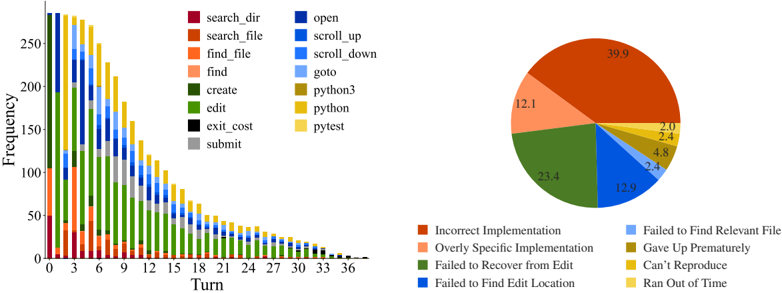
Reproduction and/or localization is the first step. SWE-agent usually begins with either writing reproduction code and/or localizing the issue's cause to specific lines of code. As shown in Figure 7, all trajectories begin with either create (reproduction) or find\_file / search\_dir (localization). To reproduce, models will create a new file, add reproduction code to it with an edit , then run with python ; this is the most popular triple of actions in Table 8. Using this feedback along with file
Figure 7: The frequency with which actions are invoked at each turn by SWE-agent w/ GPT-4 for task instances that it solved on the SWE-bench full test set ( 286 trajectories).
<details>
<summary>Image 7 Details</summary>
### Visual Description
## Stacked Bar Chart and Pie Chart: User Actions and Failure Reasons
### Overview
The image contains two visualizations: a **stacked bar chart** on the left and a **pie chart** on the right. The bar chart tracks the frequency of user actions across 37 turns (0–36), while the pie chart categorizes failure reasons. Both use a shared color-coded legend for actions and failure types.
---
### Components/Axes
#### Stacked Bar Chart (Left)
- **X-axis (Turn)**: Discrete values from 0 to 36, representing sequential steps or iterations.
- **Y-axis (Frequency)**: Continuous scale from 0 to 250, indicating the count of actions per turn.
- **Legend**: 15 action categories with distinct colors:
- `search_dir` (purple), `search_file` (orange), `find_file` (light orange), `find` (pink), `create` (dark green), `edit` (light green), `exit_cost` (black), `submit` (gray), `open` (dark blue), `scroll_up` (light blue), `scroll_down` (cyan), `goto` (yellow), `python3` (olive), `python` (gold), `pytest` (light yellow).
#### Pie Chart (Right)
- **Segments**: Six failure categories with percentages:
- `Incorrect Implementation` (39.9%), `Overly Specific Implementation` (12.1%), `Failed to Recover from Edit` (23.4%), `Failed to Find Edit Location` (12.9%), `Gave Up Prematurely` (4.8%), `Can't Reproduce` (2.4%), `Ran Out of Time` (2.0%).
- **Colors**: Matches legend entries (e.g., dark green for `Failed to Recover from Edit`, light blue for `Failed to Find Edit Location`).
---
### Detailed Analysis
#### Stacked Bar Chart
- **Trends**:
- All action frequencies **decline monotonically** as turn numbers increase. Early turns (0–6) show high activity, while later turns (24–36) have minimal engagement.
- Dominant actions in early turns: `search_dir`, `search_file`, and `find_file` (purple, orange, light orange).
- Later turns show increased use of `edit` (light green) and `submit` (gray), suggesting iterative refinement.
- `python3` (olive) and `python` (gold) appear sporadically, peaking around turns 12–18.
#### Pie Chart
- **Distribution**:
- `Incorrect Implementation` dominates (39.9%), indicating flawed execution despite correct actions.
- `Failed to Recover from Edit` (23.4%) and `Failed to Find Edit Location` (12.9%) suggest challenges in debugging or navigation.
- Smaller segments: `Overly Specific Implementation` (12.1%) and `Gave Up Prematurely` (4.8%) reflect design or persistence issues.
---
### Key Observations
1. **Action Decline**: User engagement drops sharply after turn 12, with most actions becoming negligible by turn 36.
2. **Failure Correlation**: The pie chart’s largest failure category (`Incorrect Implementation`) aligns with the bar chart’s frequent `edit` actions, implying repeated corrections.
3. **Color Consistency**: All legend colors match their respective data points in both charts (e.g., dark green for `edit` in bars and `Failed to Recover from Edit` in the pie).
---
### Interpretation
- **User Behavior**: The bar chart reveals a pattern of initial exploration (`search_dir`, `search_file`) followed by iterative editing and submission. The decline suggests task complexity or user fatigue.
- **Failure Insights**: The pie chart highlights implementation errors as the primary bottleneck, outweighing technical issues like file navigation or time constraints. This implies a need for better error handling or user guidance.
- **Anomalies**: The sporadic use of `python3`/`python` and `pytest` (light yellow) in later turns may indicate specialized debugging or testing phases.
The data collectively suggests that while users engage in systematic actions early on, execution errors and implementation flaws are the main barriers to success. The decline in activity over time could reflect abandonment due to unresolved issues or task abandonment.
</details>
Figure 8: Failure mode distribution for SWEagent w/ GPT-4 Turbo trajectories of unresolved instances. Each instance is labeled automatically using an LM with the categories from Table 9.
names and symbols in the issue description, an agent will start with a broad, directory-level keyword search, before then zooming into specific files and lines. This is reflected in Figure 22, where the most likely actions following localization sequences like ( python , find\_file ) and ( search\_dir , open ) are search\_file and goto , indicative of how an agent 'zooms in" on a bug. Extensive analysis on correlations between different groups of actions are discussed in §B.3.3
Remaining turns are mostly 'edit, then execute" loops. As exhibited in Figure 7, from turn 5 onwards, the most frequent two actions for all turns are edit and python . Captured as high probability next actions following ( edit , python ) in Figure 22, additional localization operations are often interspersed across these later turns, where agents might look at more in-file code with search\_file , scroll\_up/down , or other files altogether with search\_dir , find\_file . This behavior usually arises in response to new information from re-running the reproduction script. Submissions are distributed normally from turn 10 onwards, although resolved task instances correlate more with earlier submit s (see §B.3.1). A walk-through of common trajectory phases is in §B.3.2.
Editing remains challenging for agents. A non-trivial minority of edit actions raise a linting error; out of 2 , 294 task instances, 1 , 185 ( 51 . 7 %) of SWE-agent w/ GPT-4 Turbo trajectories have 1 + failed edits. While agents generally recover more often than not from failed edits, the odds of recovery decrease as the agent accumulates more failed edits. Recovery refers to a sequence of consecutive failed edits followed immediately by a successful edit. Any attempt at editing has a 90 . 5 %chance of eventually being successful. This probability drops off to 57 . 2 %after a single failed edit. More editing phenomena are discussed in §B.3.3, and data about agents' generated fixes are in §B.6.
Agents succeed quickly and fail slowly. We find that runs submitted relatively early are much more likely to be successful compared to those submitted after a larger number of steps or cost. We show in Table 15 the distribution of resolved and unresolved instances, including only instances that did not exhaust their budget. We observe that successful runs complete earlier and at a cheaper cost than unsuccessful ones. In general, successful instances solved by SWE-agent w/ GPT 4 finish with a median cost of $ 1 . 21 and 12 steps compared to a mean of $ 2 . 52 and 21 steps for unsuccessful ones. Furthermore, we find that 93 . 0 %of resolved instances are submitted before exhausting their cost budget, compared to 69 . 0 %of instances overall. For these reasons, we suspect that increasing the maximum budget or token limit are unlikely to substantially increase performance. More statistics about how trajectories typically conclude are in §B.9.
Most failures are incorrect implementations. We use GPT-4o to automatically categorize unresolved trajectories (SWE-agent w/ GPT-4 Turbo on SWE-bench Lite, n =248 ) into one of 9 manually defined categories described in Table 9. On a hand-labeled validation set, the LM's judgment agrees with the authors' on 87 %of instances. From Figure 8, about half ( 52 . 0 %) of unresolved instances fall into the Incorrect Implementation or Overly Specific Implementation categories, suggesting that agents' proposed solutions often simply fail to functionally address the issue or are insufficiently general solutions. Cascading failed edits make up another 23 . 4 %of failures. More details in §B.4.
## 6 Related Work
## 6.1 Software Engineering Benchmarks
Code generation benchmarks, which evaluate models on the task of synthesizing code from natural language descriptions, have served as a long-standing bellwether for measuring LM performance [5, 1, 15, 30]. Subsequent works have built upon the code generation task formulation to contribute new benchmarks that translate problems to different (programming) languages [3, 49], incorporate third-party libraries [25, 29], introduce derivative code completion tasks [18, 32], increase test coverage [26], change the edit scope [8, 9, 64], and add robustness to dataset contamination [19]. Code generation problems are largely self-contained, with short problem descriptions ( ∼ 100 lines) and corresponding solutions that are similarly brief, requiring nothing more complex than basic language primitives. Tests are either handwritten or generated synthetically via fuzz testing. In recent months, the rapid development of LMs has begun to saturate many of these benchmarks. For instance, the top method solves 94 . 4 %of HumanEval [70].
Gauging future trends with the code generation task paradigm can be limited by the simplicity of this setting and cost of human-in-the-loop problem creation. In response, recent efforts have demonstrated that software engineering (SE) can serve as a diverse, challenging testbed for LM evaluation [68, 20, 28]. Repository-level code editing introduces many reasoning challenges grounded in real SE subtasks, such as spotting errant code and identifying cross-file relationships and understanding codebasespecific symbols and conventions. As a field, SE has generally studied tasks in a more isolated manner; prior benchmarks tended to frame problems in isolation from the rest of a codebase [21, 23].
We use SWE-bench because it unites many separate SE tasks, such as automated program repair [10, 40, 55], bug localization [4, 58], and testing [22, 46, 56] under a single task formulation that faithfully mirrors practical SE. Furthermore, SWE-bench task instances are diverse, having been automatically collected from real GitHub issues across 12 different repositories. In addition, SWEbench performance is based on rigorous, execution-based evaluation with human-written unit tests.
## 6.2 Language Models as Agents
The co-emergence of stronger LMs, increasingly challenging benchmarks, and practical use cases have together motivated a paradigm shift in LMs' inference setting. Instead of traditional zero/fewshot generation, LM agents [17, 42, 47, 54] that interact with a real/virtual world have proliferated as the default setting for web navigation [24, 33, 36, 41, 45, 61, 62, 71], computer control [35, 53, 57], and code generation tasks [16, 50, 63].
Interaction and code generation are increasingly used together, with code as the modality of choice for actions [48, 59], tool construction [13, 51, 69], and reasoning [39, 66, 67]. Coding agents have also been applied to offensive security [11, 37, 60], theorem proving [44], and clinical tasks [38, 43, 52]. To the best of our knowledge, SWE-agent is the first work to explore language agents for end-to-end software engineering (SE).
## 7 Discussion
We introduce SWE-agent, an agent composed of an LM and ACI capable of autonomously solving software engineering tasks. Through our design methodology, results, and analysis, we demonstrate the value of ACIs tailored to leverage LMs' strengths and mitigate their weaknesses. Beyond empirical applications, we hope the further study of ACIs can also make principled use of and contribute to our understanding of language models and agents, analogous to the synergy between human-computer interaction (HCI) and psychology [2]. Humans and LMs have different characteristics, training objectives, specialities, and limitations [12, 31], and the interaction design processes can be seen as systematic behavioral experimentation that could reveal more insights into these differences towards establishing a comparative understanding of human and artificial intelligence.
## Acknowledgements
We thank Austin W. Hanjie, Sam Ainsworth, Xindi Wu, Yuhan Liu, Mengzhou Xia, Dan Friedman, Tianyu Gao, Adithya Bhaskar, Aatmik Gupta, Louisa Nyhus, Alisa Liu, Ori Yoran and Richard Zhu for their valuable feedback and advice. We would also like to thank the broader Princeton Language and Intelligence community for supporting our work. We acknowledge support from an Oracle Collaborative Research award and the National Science Foundation under Grant No. 2239363. Any opinions, findings, conclusions, or recommendations expressed in this material are those of the author(s) and do not necessarily reflect the views of the National Science Foundation
## References
- [1] J. Austin, A. Odena, M. Nye, M. Bosma, H. Michalewski, D. Dohan, E. Jiang, C. Cai, M. Terry, Q. Le, and C. Sutton. Program synthesis with large language models, 2021.
- [2] J. M. Carroll. Human-computer interaction: psychology as a science of design. Annual review of psychology , 48(1):61-83, 1997.
- [3] F. Cassano, J. Gouwar, D. Nguyen, S. Nguyen, L. Phipps-Costin, D. Pinckney, M.-H. Yee, Y. Zi, C. J. Anderson, M. Q. Feldman, A. Guha, M. Greenberg, and A. Jangda. Multipl-e: A scalable and extensible approach to benchmarking neural code generation, 2022.
- [4] S. Chakraborty, Y. Li, M. Irvine, R. Saha, and B. Ray. Entropy guided spectrum based bug localization using statistical language model. arXiv preprint arXiv:1802.06947 , 2018.
- [5] M. Chen, J. Tworek, H. Jun, Q. Yuan, H. P. de Oliveira Pinto, and J. K. et. al. Evaluating large language models trained on code, 2021.
- [6] W.-L. Chiang, L. Zheng, Y. Sheng, A. N. Angelopoulos, T. Li, D. Li, H. Zhang, B. Zhu, M. Jordan, J. E. Gonzalez, and I. Stoica. Chatbot arena: An open platform for evaluating llms by human preference, 2024.
- [7] A. Cooper, R. Reimann, and D. Cronin. About face 3: the essentials of interaction design . John Wiley & Sons, Inc., USA, 2007. ISBN 9780470084113.
- [8] Y. Ding, Z. Wang, W. U. Ahmad, H. Ding, M. Tan, N. Jain, M. K. Ramanathan, R. Nallapati, P. Bhatia, D. Roth, and B. Xiang. Crosscodeeval: A diverse and multilingual benchmark for cross-file code completion. In Thirty-seventh Conference on Neural Information Processing Systems Datasets and Benchmarks Track , 2023. URL https://openreview.net/forum? id=wgDcbBMSfh .
- [9] X. Du, M. Liu, K. Wang, H. Wang, J. Liu, Y. Chen, J. Feng, C. Sha, X. Peng, and Y. Lou. Classeval: A manually-crafted benchmark for evaluating llms on class-level code generation, 2023.
- [10] Z. Fan, X. Gao, M. Mirchev, A. Roychoudhury, and S. H. Tan. Automated repair of programs from large language models, 2023.
- [11] R. Fang, R. Bindu, A. Gupta, Q. Zhan, and D. Kang. Llm agents can autonomously hack websites, 2024.
- [12] T. L. Griffiths. Understanding human intelligence through human limitations. Trends in Cognitive Sciences , 24(11):873-883, 2020.
- [13] Y. Gu, Y. Shu, H. Yu, X. Liu, Y. Dong, J. Tang, J. Srinivasa, H. Latapie, and Y . Su. Middleware for llms: Tools are instrumental for language agents in complex environments, 2024.
- [14] D. Guo, Q. Zhu, D. Yang, Z. Xie, K. Dong, W. Zhang, G. Chen, X. Bi, Y. Wu, Y. K. Li, F. Luo, Y. Xiong, and W. Liang. Deepseek-coder: When the large language model meets programming - the rise of code intelligence. CoRR , abs/2401.14196, 2024. URL https: //arxiv.org/abs/2401.14196 .
- [15] D. Hendrycks, S. Basart, S. Kadavath, M. Mazeika, A. Arora, E. Guo, C. Burns, S. Puranik, H. He, D. Song, and J. Steinhardt. Measuring coding challenge competence with apps, 2021.
- [16] S. Holt, M. R. Luyten, and M. van der Schaar. L2MAC: Large language model automatic computer for unbounded code generation. In The Twelfth International Conference on Learning Representations , 2024. URL https://openreview.net/forum?id=EhrzQwsV4K .
- [17] S. Hong, M. Zhuge, J. Chen, X. Zheng, Y. Cheng, C. Zhang, J. Wang, Z. Wang, S. K. S. Yau, Z. Lin, L. Zhou, C. Ran, L. Xiao, C. Wu, and J. Schmidhuber. Metagpt: Meta programming for a multi-agent collaborative framework, 2023.
- [18] Q. Huang, J. Vora, P. Liang, and J. Leskovec. Mlagentbench: Evaluating language agents on machine learning experimentation, 2024.
- [19] N. Jain, K. Han, A. Gu, W.-D. Li, F. Yan, T. Zhang, S. Wang, A. Solar-Lezama, K. Sen, and I. Stoica. Livecodebench: Holistic and contamination free evaluation of large language models for code, 2024.
- [20] C. E. Jimenez, J. Yang, A. Wettig, S. Yao, K. Pei, O. Press, and K. R. Narasimhan. SWE-bench: Can language models resolve real-world github issues? In The Twelfth International Conference on Learning Representations , 2024. URL https://openreview.net/forum? id=VTF8yNQM66 .
- [21] R. Just, D. Jalali, and M. D. Ernst. Defects4J: A Database of existing faults to enable controlled testing studies for Java programs. In ISSTA 2014, Proceedings of the 2014 International Symposium on Software Testing and Analysis , pages 437-440, San Jose, CA, USA, July 2014. Tool demo.
- [22] S. Kang, J. Yoon, and S. Yoo. Large language models are few-shot testers: Exploring llm-based general bug reproduction, 2023.
- [23] R.-M. Karampatsis and C. Sutton. How often do single-statement bugs occur? the manysstubs4j dataset. 2020 IEEE/ACM 17th International Conference on Mining Software Repositories (MSR) , pages 573-577, 2019. URL https://api.semanticscholar.org/CorpusID: 173188438 .
- [24] J. Y. Koh, R. Lo, L. Jang, V. Duvvur, M. C. Lim, P.-Y. Huang, G. Neubig, S. Zhou, R. Salakhutdinov, and D. Fried. Visualwebarena: Evaluating multimodal agents on realistic visual web tasks, 2024.
- [25] Y. Lai, C. Li, Y . Wang, T. Zhang, R. Zhong, L. Zettlemoyer, S. W. tau Yih, D. Fried, S. Wang, and T. Yu. Ds-1000: A natural and reliable benchmark for data science code generation, 2022.
- [26] J. Liu, C. S. Xia, Y . Wang, and L. Zhang. Is your code generated by chatgpt really correct? rigorous evaluation of large language models for code generation. arXiv preprint arXiv:2305.01210 , 2023.
- [27] N. F. Liu, K. Lin, J. Hewitt, A. Paranjape, M. Bevilacqua, F. Petroni, and P. Liang. Lost in the middle: How language models use long contexts, 2023.
- [28] T. Liu, C. Xu, and J. McAuley. Repobench: Benchmarking repository-level code autocompletion systems. In The Twelfth International Conference on Learning Representations , 2024. URL https://openreview.net/forum?id=pPjZIOuQuF .
- [29] Y. Liu, X. Tang, Z. Cai, J. Lu, Y. Zhang, Y. Shao, Z. Deng, H. Hu, K. An, R. Huang, S. Si, S. Chen, H. Zhao, L. Chen, Y. Wang, T. Liu, Z. Jiang, B. Chang, Y. Qin, W. Zhou, Y. Zhao, A. Cohan, and M. Gerstein. Ml-bench: Evaluating large language models for code generation in repository-level machine learning tasks, 2024.
- [30] S. Lu, D. Guo, S. Ren, J. Huang, A. Svyatkovskiy, A. Blanco, C. Clement, D. Drain, D. Jiang, D. Tang, G. Li, L. Zhou, L. Shou, L. Zhou, M. Tufano, M. Gong, M. Zhou, N. Duan, N. Sundaresan, S. K. Deng, S. Fu, and S. Liu. Codexglue: A machine learning benchmark dataset for code understanding and generation, 2021.
- [31] R. T. McCoy, S. Yao, D. Friedman, M. Hardy, and T. L. Griffiths. Embers of autoregression: Understanding large language models through the problem they are trained to solve. arXiv preprint arXiv:2309.13638 , 2023.
- [32] N. Muennighoff, Q. Liu, A. R. Zebaze, Q. Zheng, B. Hui, T. Y. Zhuo, S. Singh, X. Tang, L. V. Werra, and S. Longpre. Octopack: Instruction tuning code large language models. In The Twelfth International Conference on Learning Representations , 2024. URL https: //openreview.net/forum?id=mw1PWNSWZP .
- [33] R. Nakano, J. Hilton, S. Balaji, J. Wu, L. Ouyang, C. Kim, C. Hesse, S. Jain, V. Kosaraju, W. Saunders, X. Jiang, K. Cobbe, T. Eloundou, G. Krueger, K. Button, M. Knight, B. Chess, and J. Schulman. Webgpt: Browser-assisted question-answering with human feedback, 2022.
- [34] OpenAI, J. Achiam, S. Adler, S. Agarwal, L. Ahmad, I. Akkaya, F. L. Aleman, D. Almeida, J. Altenschmidt, S. Altman, S. Anadkat, R. Avila, I. Babuschkin, S. Balaji, V. Balcom, P. Baltescu, H. Bao, M. Bavarian, J. Belgum, I. Bello, J. Berdine, G. Bernadett-Shapiro, C. Berner, L. Bogdonoff, O. Boiko, M. Boyd, A.-L. Brakman, G. Brockman, T. Brooks, M. Brundage, K. Button, T. Cai, R. Campbell, A. Cann, B. Carey, C. Carlson, R. Carmichael, B. Chan, C. Chang, F. Chantzis, D. Chen, S. Chen, R. Chen, J. Chen, M. Chen, B. Chess, C. Cho, C. Chu, H. W. Chung, D. Cummings, J. Currier, Y. Dai, C. Decareaux, T. Degry, N. Deutsch, D. Deville, A. Dhar, D. Dohan, S. Dowling, S. Dunning, A. Ecoffet, A. Eleti, T. Eloundou, D. Farhi, L. Fedus, N. Felix, S. P. Fishman, J. Forte, I. Fulford, L. Gao, E. Georges, C. Gibson, V. Goel, T. Gogineni, G. Goh, R. Gontijo-Lopes, J. Gordon, M. Grafstein, S. Gray, R. Greene, J. Gross, S. S. Gu, Y . Guo, C. Hallacy, J. Han, J. Harris, Y . He, M. Heaton, J. Heidecke, C. Hesse, A. Hickey, W. Hickey, P. Hoeschele, B. Houghton, K. Hsu, S. Hu, X. Hu, J. Huizinga, S. Jain, S. Jain, J. Jang, A. Jiang, R. Jiang, H. Jin, D. Jin, S. Jomoto, B. Jonn, H. Jun, T. Kaftan, Łukasz Kaiser, A. Kamali, I. Kanitscheider, N. S. Keskar, T. Khan, L. Kilpatrick, J. W. Kim, C. Kim, Y. Kim, J. H. Kirchner, J. Kiros, M. Knight, D. Kokotajlo, Łukasz Kondraciuk, A. Kondrich, A. Konstantinidis, K. Kosic, G. Krueger, V. Kuo, M. Lampe, I. Lan, T. Lee, J. Leike, J. Leung, D. Levy, C. M. Li, R. Lim, M. Lin, S. Lin, M. Litwin, T. Lopez, R. Lowe, P. Lue, A. Makanju, K. Malfacini, S. Manning, T. Markov, Y. Markovski, B. Martin, K. Mayer, A. Mayne, B. McGrew, S. M. McKinney, C. McLeavey, P. McMillan, J. McNeil, D. Medina, A. Mehta, J. Menick, L. Metz, A. Mishchenko, P. Mishkin, V. Monaco, E. Morikawa, D. Mossing, T. Mu, M. Murati, O. Murk, D. Mély, A. Nair, R. Nakano, R. Nayak, A. Neelakantan, R. Ngo, H. Noh, L. Ouyang, C. O'Keefe, J. Pachocki, A. Paino, J. Palermo, A. Pantuliano, G. Parascandolo, J. Parish, E. Parparita, A. Passos, M. Pavlov, A. Peng, A. Perelman, F. de Avila Belbute Peres, M. Petrov, H. P. de Oliveira Pinto, Michael, Pokorny, M. Pokrass, V. H. Pong, T. Powell, A. Power, B. Power, E. Proehl, R. Puri, A. Radford, J. Rae, A. Ramesh, C. Raymond, F. Real, K. Rimbach, C. Ross, B. Rotsted, H. Roussez, N. Ryder, M. Saltarelli, T. Sanders, S. Santurkar, G. Sastry, H. Schmidt, D. Schnurr, J. Schulman, D. Selsam, K. Sheppard, T. Sherbakov, J. Shieh, S. Shoker, P. Shyam, S. Sidor, E. Sigler, M. Simens, J. Sitkin, K. Slama, I. Sohl, B. Sokolowsky, Y. Song, N. Staudacher, F. P. Such, N. Summers, I. Sutskever, J. Tang, N. Tezak, M. B. Thompson, P. Tillet, A. Tootoonchian, E. Tseng, P. Tuggle, N. Turley, J. Tworek, J. F. C. Uribe, A. Vallone, A. Vijayvergiya, C. Voss, C. Wainwright, J. J. Wang, A. Wang, B. Wang, J. Ward, J. Wei, C. Weinmann, A. Welihinda, P. Welinder, J. Weng, L. Weng, M. Wiethoff, D. Willner, C. Winter, S. Wolrich, H. Wong, L. Workman, S. Wu, J. Wu, M. Wu, K. Xiao, T. Xu, S. Yoo, K. Yu, Q. Yuan, W. Zaremba, R. Zellers, C. Zhang, M. Zhang, S. Zhao, T. Zheng, J. Zhuang, W. Zhuk, and B. Zoph. Gpt-4 technical report, 2023.
- [35] C. Packer, S. Wooders, K. Lin, V. Fang, S. G. Patil, I. Stoica, and J. E. Gonzalez. Memgpt: Towards llms as operating systems, 2024.
- [36] O. Press, M. Zhang, S. Min, L. Schmidt, N. Smith, and M. Lewis. Measuring and narrowing the compositionality gap in language models. In H. Bouamor, J. Pino, and K. Bali, editors, Findings of the Association for Computational Linguistics: EMNLP 2023 , pages 5687-5711, Singapore, Dec. 2023. Association for Computational Linguistics. doi: 10.18653/v1/2023.findings-emnlp. 378. URL https://aclanthology.org/2023.findings-emnlp.378 .
- [37] M. Shao, B. Chen, S. Jancheska, B. Dolan-Gavitt, S. Garg, R. Karri, and M. Shafique. An empirical evaluation of llms for solving offensive security challenges, 2024.
- [38] W. Shi, R. Xu, Y. Zhuang, Y. Yu, J. Zhang, H. Wu, Y. Zhu, J. Ho, C. Yang, and M. D. Wang. Ehragent: Code empowers large language models for few-shot complex tabular reasoning on electronic health records, 2024.
- [39] N. Shinn, F. Cassano, E. Berman, A. Gopinath, K. Narasimhan, and S. Yao. Reflexion: Language agents with verbal reinforcement learning, 2023.
- [40] D. Sobania, M. Briesch, C. Hanna, and J. Petke. An analysis of the automatic bug fixing performance of chatgpt, 2023.
- [41] A. Sridhar, R. Lo, F. F. Xu, H. Zhu, and S. Zhou. Hierarchical prompting assists large language model on web navigation, 2023.
- [42] T. Sumers, S. Yao, K. Narasimhan, and T. L. Griffiths. Cognitive architectures for language agents, 2023.
- [43] X. Tang, A. Zou, Z. Zhang, Z. Li, Y. Zhao, X. Zhang, A. Cohan, and M. Gerstein. Medagents: Large language models as collaborators for zero-shot medical reasoning, 2024.
- [44] A. Thakur, G. Tsoukalas, Y. Wen, J. Xin, and S. Chaudhuri. An in-context learning agent for formal theorem-proving, 2024.
- [45] R. Thoppilan, D. D. Freitas, J. Hall, N. Shazeer, A. Kulshreshtha, H.-T. Cheng, A. Jin, T. Bos, L. Baker, Y. Du, Y. Li, H. Lee, H. S. Zheng, A. Ghafouri, M. Menegali, Y. Huang, M. Krikun, D. Lepikhin, J. Qin, D. Chen, Y. Xu, Z. Chen, A. Roberts, M. Bosma, V. Zhao, Y. Zhou, C.-C. Chang, I. Krivokon, W. Rusch, M. Pickett, P. Srinivasan, L. Man, K. Meier-Hellstern, M. R. Morris, T. Doshi, R. D. Santos, T. Duke, J. Soraker, B. Zevenbergen, V. Prabhakaran, M. Diaz, B. Hutchinson, K. Olson, A. Molina, E. Hoffman-John, J. Lee, L. Aroyo, R. Rajakumar, A. Butryna, M. Lamm, V. Kuzmina, J. Fenton, A. Cohen, R. Bernstein, R. Kurzweil, B. AgueraArcas, C. Cui, M. Croak, E. Chi, and Q. Le. Lamda: Language models for dialog applications, 2022.
- [46] J. Wang, Y. Huang, C. Chen, Z. Liu, S. Wang, and Q. Wang. Software testing with large language model: Survey, landscape, and vision, 2023.
- [47] L. Wang, C. Ma, X. Feng, Z. Zhang, H. Yang, J. Zhang, Z. Chen, J. Tang, X. Chen, Y. Lin, W. X. Zhao, Z. Wei, and J. Wen. A survey on large language model based autonomous agents. Frontiers of Computer Science , 18(6), Mar. 2024. ISSN 2095-2236. doi: 10.1007/s11704-024-40231-1. URL http://dx.doi.org/10.1007/s11704-024-40231-1 .
- [48] X. Wang, Y. Chen, L. Yuan, Y. Zhang, Y. Li, H. Peng, and H. Ji. Executable code actions elicit better llm agents, 2024.
- [49] Z. Wang, G. Cuenca, S. Zhou, F. F. Xu, and G. Neubig. Mconala: A benchmark for code generation from multiple natural languages, 2023.
- [50] Z. Wang, S. Zhou, D. Fried, and G. Neubig. Execution-based evaluation for open-domain code generation, 2023.
- [51] Z. Wang, D. Fried, and G. Neubig. Trove: Inducing verifiable and efficient toolboxes for solving programmatic tasks, 2024.
- [52] M. Wornow, A. Narayan, K. Opsahl-Ong, Q. McIntyre, N. H. Shah, and C. Re. Automating the enterprise with foundation models, 2024.
- [53] Z. Wu, C. Han, Z. Ding, Z. Weng, Z. Liu, S. Yao, T. Yu, and L. Kong. Os-copilot: Towards generalist computer agents with self-improvement, 2024.
- [54] Z. Xi, W. Chen, X. Guo, W. He, Y. Ding, B. Hong, M. Zhang, J. Wang, S. Jin, E. Zhou, R. Zheng, X. Fan, X. Wang, L. Xiong, Y. Zhou, W. Wang, C. Jiang, Y. Zou, X. Liu, Z. Yin, S. Dou, R. Weng, W. Cheng, Q. Zhang, W. Qin, Y. Zheng, X. Qiu, X. Huang, and T. Gui. The rise and potential of large language model based agents: A survey, 2023.
- [55] C. S. Xia and L. Zhang. Less training, more repairing please: revisiting automated program repair via zero-shot learning. In Proceedings of the 30th ACM Joint European Software Engineering Conference and Symposium on the Foundations of Software Engineering , pages 959-971, 2022.
- [56] C. S. Xia, M. Paltenghi, J. L. Tian, M. Pradel, and L. Zhang. Universal fuzzing via large language models. In Proceedings of the 46th IEEE/ACM International Conference on Software Engineering , 2023.
- [57] T. Xie, D. Zhang, J. Chen, X. Li, S. Zhao, R. Cao, T. J. Hua, Z. Cheng, D. Shin, F. Lei, Y. Liu, Y. Xu, S. Zhou, S. Savarese, C. Xiong, V. Zhong, and T. Yu. Osworld: Benchmarking multimodal agents for open-ended tasks in real computer environments, 2024.
- [58] A. Z. H. Yang, C. Le Goues, R. Martins, and V. Hellendoorn. Large language models for test-free fault localization. In Proceedings of the IEEE/ACM 46th International Conference on Software Engineering , ICSE '24, New York, NY, USA, 2024. Association for Computing Machinery. ISBN 9798400702174. doi: 10.1145/3597503.3623342. URL https://doi. org/10.1145/3597503.3623342 .
- [59] J. Yang, A. Prabhakar, K. R. Narasimhan, and S. Yao. Intercode: Standardizing and benchmarking interactive coding with execution feedback. In Thirty-seventh Conference on Neural Information Processing Systems Datasets and Benchmarks Track , 2023. URL https://openreview.net/forum?id=fvKaLF1ns8 .
- [60] J. Yang, A. Prabhakar, S. Yao, K. Pei, and K. R. Narasimhan. Language agents as hackers: Evaluating cybersecurity skills with capture the flag. In Multi-Agent Security Workshop@ NeurIPS'23 , 2023.
- [61] S. Yao, H. Chen, J. Yang, and K. Narasimhan. Webshop: Towards scalable real-world web interaction with grounded language agents, 2023.
- [62] S. Yao, J. Zhao, D. Yu, N. Du, I. Shafran, K. R. Narasimhan, and Y. Cao. React: Synergizing reasoning and acting in language models. In The Eleventh International Conference on Learning Representations , 2023. URL https://openreview.net/forum?id=WE\_vluYUL-X .
- [63] P. Yin, W.-D. Li, K. Xiao, A. Rao, Y. Wen, K. Shi, J. Howland, P. Bailey, M. Catasta, H. Michalewski, A. Polozov, and C. Sutton. Natural language to code generation in interactive data science notebooks, 2022.
- [64] H. Yu, B. Shen, D. Ran, J. Zhang, Q. Zhang, Y. Ma, G. Liang, Y. Li, T. Xie, and Q. Wang. Codereval: A benchmark of pragmatic code generation with generative pre-trained models. In International Conference on Software Engineering , 2023. URL https://api. semanticscholar.org/CorpusID:256459413 .
- [65] Z. Yu, X. Zhang, N. Shang, Y. Huang, C. Xu, Y. Zhao, W. Hu, and Q. Yin. Wavecoder: Widespread and versatile enhanced instruction tuning with refined data generation. arXiv preprint arXiv:2312.14187 , 2023.
- [66] E. Zelikman, Q. Huang, G. Poesia, N. D. Goodman, and N. Haber. Parsel: Algorithmic reasoning with language models by composing decompositions, 2022. URL https://arxiv.org/ abs/2212.10561 .
- [67] E. Zelikman, E. Lorch, L. Mackey, and A. T. Kalai. Self-taught optimizer (stop): Recursively self-improving code generation, 2024.
- [68] F. Zhang, B. Chen, Y. Zhang, J. Keung, J. Liu, D. Zan, Y. Mao, J.-G. Lou, and W. Chen. Repocoder: Repository-level code completion through iterative retrieval and generation. In The 2023 Conference on Empirical Methods in Natural Language Processing , 2023. URL https://openreview.net/forum?id=q09vTY1Cqh .
- [69] S. Zhang, J. Zhang, J. Liu, L. Song, C. Wang, R. Krishna, and Q. Wu. Training language model agents without modifying language models, 2024.
- [70] A. Zhou, K. Yan, M. Shlapentokh-Rothman, H. Wang, and Y.-X. Wang. Language agent tree search unifies reasoning acting and planning in language models, 2023.
- [71] S. Zhou, F. F. Xu, H. Zhu, X. Zhou, R. Lo, A. Sridhar, X. Cheng, Y. Bisk, D. Fried, U. Alon, and G. Neubig. Webarena: A realistic web environment for building autonomous agents, 2023.
## Appendix
In the appendix, we provide additional analyses and more extensive discussions about SWE-agent, agent-computer interface (ACI) design, and model performance on various evaluation benchmarks. We also provide several thorough case studies of SWE-agent behavior on select task instances. Data, code, and leaderboard at swe-agent.com.
## A SWE-agent Design
In this section, we go into greater discussion about the design methodology, appearance, and implementation of each of the SWE-agent components. As described in Section 3, the SWE-agent interface consists of several components that enable agents to accomplish key subtasks that are fundamental to solving software engineering problems. These are generally the following:
1. Localization : Identify file(s)/line(s) causing the issue.
3. Testing : Write new scripts or modify existing test files to reproduce the issue and/or verify if fixes are correct.
2. Editing : Generate fixes addressing the given issue.
To enable LM-based agents to efficiently carry out these individual functions and progress towards the overarching goal of resolving a codebase issue, we provide a file viewer, file editor, search / navigation system, and context management system. In Section A.1, we provide a thorough breakdown of each of these components. In Section A.2, we discuss the technical design decisions and challenges of building SWE-agent. In Section A.3, we discuss how SWE-agent is configured to support the final interface, along with how SWE-agent is built to enable easy extensibility and customization to alter the interface.
## A.1 ACI Design
In this section, we revisit each component discussed in Section 3. Per section, we first briefly review the component. We then discuss the underlying motivation for the component with respect to existing software tools. Finally, we note any additional thoughts that influenced the design process of the component with some occasional discussion of what aspects of the component heavily influence language model behavior.
For a quick, text-free overview, comprehensive documen- message history for SWE-agent. Each prompt template is discussed thoroughly in Section C.
Figure 9: An overview over the structure of a trajectory: We first present the system prompt, demonstration (optional), and issue statement. The agent then interacts in turn with the environment. Past observations may be collapsed , i.e. we truncate any long output, as described in Section 3.
<details>
<summary>Image 8 Details</summary>
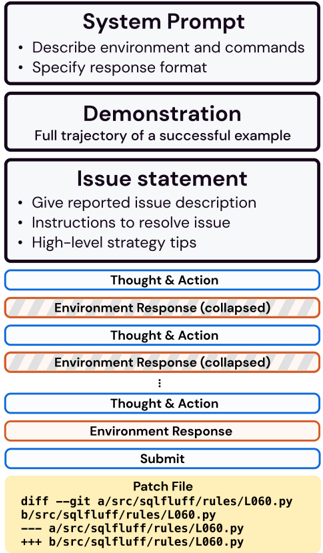
### Visual Description
## Technical Document Layout: Debugging Workflow Interface
### Overview
The image depicts a structured technical document interface designed for debugging workflows. It combines textual instructions, color-coded components, and a code patch visualization. The layout emphasizes step-by-step problem resolution through a combination of natural language prompts, environmental interactions, and code modifications.
### Components/Axes
1. **Header Sections** (Top 1/3 of image):
- **System Prompt** (Blue background):
- Text: "Describe environment and commands • Specify response format"
- **Demonstration** (Blue background):
- Text: "Full trajectory of a successful example"
- **Issue Statement** (Blue background):
- Text: "Give reported issue description • Instructions to resolve issue • High-level strategy tips"
2. **Main Workflow** (Middle 2/3 of image):
- **Thought & Action** (Blue box with white text):
- Repeated 3x with alternating blue/red color coding
- **Environment Response** (Red box with gray text):
- Labeled "collapsed" in parentheses
- Appears 3x with alternating blue/red color coding
- **Submit** (Blue box with black text):
- Contains code patch details
3. **Legend** (Bottom of image):
- Color key:
- Blue: Thought & Action
- Red: Environment Response
- Yellow: Patch File
4. **Code Patch** (Bottom section):
- Yellow background with code diff:
```
diff --git a/src/sqlfluff/rules/L060.py
b/src/sqlfluff/rules/L060.py
--- a/src/sqlfluff/rules/L060.py
+++ b/src/sqlfluff/rules/L060.py
```
### Detailed Analysis
1. **System Prompt Section**:
- Contains two bullet points specifying requirements for environment description and response formatting
- Positioned at top-left, establishing foundational guidelines
2. **Demonstration Section**:
- Single-line instruction emphasizing example-based learning
- Positioned centrally, acting as transitional element
3. **Issue Statement Section**:
- Three bullet points outlining required components for issue reporting
- Positioned top-right, providing resolution framework
4. **Workflow Components**:
- **Thought & Action** (Blue):
- Contains reasoning steps (text not visible in image)
- Alternates with Environment Response in iterative pattern
- **Environment Response** (Red):
- Contains system feedback (text not visible in image)
- Marked as "collapsed" suggesting expandable/collapsible UI elements
- **Submit** (Blue):
- Contains code modification instructions
- Positioned at bottom-center, acting as final action point
5. **Color Coding**:
- Blue (#0000FF): Primary workflow elements (Thought & Action, Submit)
- Red (#FF0000): System feedback (Environment Response)
- Yellow (#FFFF00): Code modification section
- Gray text in red boxes suggests secondary importance
### Key Observations
1. **Structured Progression**:
- Top-to-bottom flow from problem definition (System Prompt) to resolution (Submit)
- Left-to-right organization within sections
2. **Color-Coded Workflow**:
- Blue dominates (66% of elements), emphasizing active problem-solving
- Red (33%) highlights system feedback
- Yellow (1 element) draws attention to code changes
3. **Collapsible Elements**:
- Environment Responses marked as "collapsed" suggest expandable interface components
- Implies iterative interaction between user and system
4. **Code Patch Specificity**:
- Shows exact file path and modification instructions
- Uses standard git diff format for version control integration
### Interpretation
This interface appears designed for collaborative debugging workflows, combining natural language instructions with code modification capabilities. The color coding creates a visual hierarchy that separates:
1. **Problem Definition** (System Prompt)
2. **Example Reference** (Demonstration)
3. **Issue Specification** (Issue Statement)
4. **Interactive Resolution** (Thought/Action ↔ Environment Response)
5. **Implementation** (Submit/Patch)
The collapsed environment responses suggest a step-by-step debugging process where users can expand/collapse system feedback as needed. The code patch section's prominent placement indicates that implementation is the final, critical step in the workflow. The use of standard git diff format implies integration with version control systems, making this interface particularly valuable for developers working in collaborative codebases.
The layout's strength lies in its clear separation of concerns while maintaining a logical flow. However, the lack of visible text in the Thought & Action and Environment Response sections limits understanding of the specific debugging strategies employed. The interface seems optimized for technical users familiar with both natural language debugging and code modification workflows.
</details>
tation for all commands, their usage, and docstrings are included in Table 4. Figure 9 visualizes the
File viewer. As discussed in Section 3, the File Viewer is fundamental to a language agent's ability to understand file content and understand how different programmatic entities relate to one another. The File Viewer refers to an interface that consists of the four commands, as shown in Table 4, and a customized standard output for displaying n lines of a file at a time. Using the file viewer, an agent can look at n lines of a file at a time and jump around the file. The File Viewer enables agents to perform fine-grained localization steps and also understand relationships between intra-file entities.
First, we discuss why existing software systems and graphical user interfaces are sub-optimal for LM use. In a Shell-only setting, there are several commands that can be used to inspect file content. However, out of the box command line tools are sub-optimal or limiting for language agents for
Table 4: In additional to the standard Linux Bash commands, we provide SWE-agent with specialized tools, including an interactive file viewer, search functionalities, and edit tools for the open file. Required arguments are enclosed in <> and optional arguments are in [] . The last column shows the documentation presented to the LM.
| Category | Command | Documentation |
|--------------|---------------------------------------------------------------------|--------------------------------------------------------------------------------------------------------------------------------------------------------------------------------------------------------------------------------------------------------------------------------------------------------------------------------------------------------------------------------------------------------------------------------|
| File viewer | open <path> [<line_number>] | Opens the file at the given path in the editor. If line_number is provided, the window will move to include that line. |
| File viewer | goto <line_number> | Moves the window to show line_number. |
| File viewer | scroll_down | Moves the window up 100 lines. |
| File viewer | scroll_up | Moves the window down 100 lines. |
| Search tools | search_file <search_term> [<file>] search_dir <search_term> [<dir>] | Searches for search_term in file. If file is not provided, searches in the current open file. Searches for search_term in all files in dir. If dir is not provided, searches in the current directory. |
| Search tools | find_file <file_name> [<dir>] | Finds all files with the given name in dir. If dir is not provided, searches in the current |
| Search tools | | directory. |
| File editing | edit <n>:<m> <replacement_text> end_of_edit | Replaces lines n through m (inclusive) with the given text in the open file. All of the replacement_text will be entered, so make sure your indentation is formatted properly. Python files will be checked for syntax errors after the edit. If an error is found, the edit will not be executed. Reading the error message and modifying your command is recommended as issuing the same command will return the same error. |
| File editing | create <filename> | Creates and opens a new file with the given name. |
| Task | submit | Generates and submits the patch from all previ- ous edits and closes the shell. |
several reasons. First, commands that print files to standard output (e.g. cat , printf ) can easily flood a language agent's context window with too much file content, the majority of which is usually irrelevant to the issue. Enabling a language agent to filter out distractions and focus on relevant code snippets is crucial to generating effective edits. While commands like head and tail reduce length to the first/last n lines, it is not intuitive to use bash commands to perform in-file navigation. It is either impossible or requires a long list of arguments to show specific file lines. Furthermore, since such Bash commands are stateless, 'scrolling" up/down relative to the current file position typically requires regenerating the same lengthy command with minor changes. Interactive tools like more and less accommodate this, but (1) representing navigation actions (multiple key up/down clicks) is intuitive for humans, but is verbose and costly for language agents, and (2) even if jumping to a specific line number is allowed, it is not possible to quickly identify what classes/methods/symbols are declared in a file and then immediately go to their definitions.
There are a couple features of the File Viewer interface that make it friendlier and more operable than the Shell-only setting. First, the File Viewer standard output contextualizes code snippets with prepended line numbers and indicators of the number of lines above/below the current region. These details give a more focused view of a file without compromising easy viewing of other parts of the codebase. This kind of file presentation also makes precise and consistent editing commands possible, as we discuss more thoroughly in the following section.
Figure 10: The File Viewer and Search components of the SWE-agent interface. The corresponding commands for each component are shown in blue. These examples are copied from trajectories generated by SWE-agent w/ GPT-4 Turbo on the pvlib\_\_pvlib-python-1603 task instance.
<details>
<summary>Image 9 Details</summary>
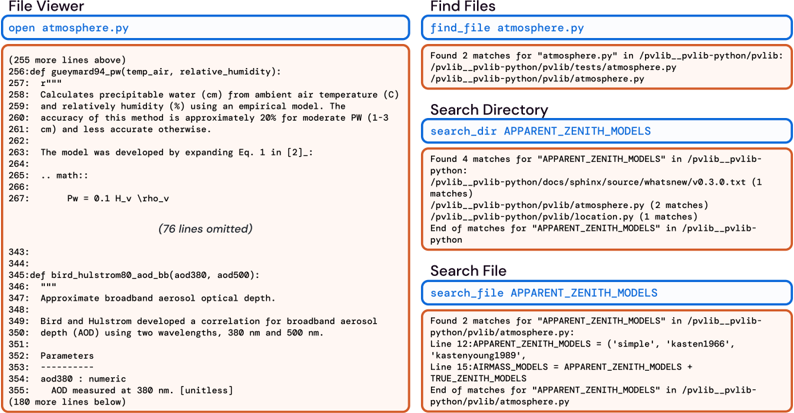
### Visual Description
## Screenshot: Code Editor Search Results
### Overview
The image shows a code editor interface with search results for Python files and code snippets. The interface includes tabs for "File Viewer," "Find Files," "Search Directory," and "Search File," each displaying hierarchical file paths, code excerpts, and search matches. Highlighted text and line numbers are visible, with some content truncated or omitted.
---
### Components/Axes
1. **Tabs**:
- **File Viewer**: Displays the content of `atmosphere.py` with line numbers and code snippets.
- **Find Files**: Shows file search results for `atmosphere.py`.
- **Search Directory**: Lists directory search results for `APPARTENT_ZENITH_MODELS`.
- **Search File**: Displays code snippet search results for `APPARTENT_ZENITH_MODELS`.
2. **Code Snippets**:
- **atmosphere.py**:
- Function definition for calculating precipitable water (`def guyemard4pw(...)`).
- Comments explaining the model's accuracy and development.
- Line numbers 256–267 (76 lines omitted).
- **APPARTENT_ZENITH_MODELS**:
- Code snippets defining model parameters (e.g., `APPARTENT_ZENITH_MODELS = ('simple', 'kasten1966', 'kastenyoung1989')`).
3. **Search Results**:
- **Find Files**: 2 matches for `atmosphere.py` in `/pvlib_pvlib-python` directories.
- **Search Directory**: 4 matches for `APPARTENT_ZENITH_MODELS` in `/pvlib_pvlib-python/docs`, `/pvlib_pvlib-python/pvlib`, and `/pvlib_pvlib-python/tests`.
- **Search File**: 2 matches for `APPARTENT_ZENITH_MODELS` in `/pvlib_pvlib-python/pvlib/atmosphere.py` (lines 12 and 15).
---
### Detailed Analysis
#### File Viewer (`atmosphere.py`)
- **Line 256**: Function definition for `guyemard4pw` with parameters `temp_air` and `relative_humidity`.
- **Lines 259–262**: Description of the empirical model for calculating precipitable water, noting 20% accuracy for moderate pressure (1–3 cm) and lower accuracy otherwise.
- **Lines 263–267**: Metadata about the model's development (expanding Eq. 1 from [2]) and a math function (`Pw = 0.1 * H_v * rho_v`).
#### Find Files
- **Matches for `atmosphere.py`**:
- `/pvlib_pvlib-python/pvlib/tests/atmosphere.py`
- `/pvlib_pvlib-python/pvlib/atmosphere.py`
#### Search Directory
- **Matches for `APPARTENT_ZENITH_MODELS`**:
- `/pvlib_pvlib-python/docs/sphinx/source/whatnew/v0.3.0.txt` (1 match)
- `/pvlib_pvlib-python/pvlib/python/pvlib/atmosphere.py` (2 matches)
- `/pvlib_pvlib-python/pvlib/location.py` (1 match)
#### Search File
- **Matches for `APPARTENT_ZENITH_MODELS` in `atmosphere.py`**:
- Line 12: `APPARTENT_ZENITH_MODELS = ('simple', 'kasten1966', 'kastenyoung1989')`
- Line 15: `AIRMASS_MODELS = APPARTENT_ZENITH_MODELS + TRUE_ZENITH_MODELS`
---
### Key Observations
1. **Code Structure**:
- The `atmosphere.py` file contains a model for atmospheric calculations, with explicit accuracy limitations.
- The `APPARTENT_ZENITH_MODELS` variable defines a tuple of zenith models used in atmospheric corrections.
2. **Search Functionality**:
- The search results highlight the hierarchical organization of the codebase, with matches appearing in documentation, source code, and test files.
- Line numbers in search results (e.g., lines 12 and 15) directly reference specific code definitions.
3. **Omitted Content**:
- 76 lines of `atmosphere.py` are omitted, suggesting a focus on critical sections (e.g., model definitions and comments).
---
### Interpretation
1. **Technical Context**:
- The codebase (`pvlib_pvlib-python`) appears to be a Python library for photovoltaic (PV) system modeling, with atmospheric correction models as a core component.
- The `APPARTENT_ZENITH_MODELS` variable suggests a modular approach to handling different atmospheric correction algorithms.
2. **Search Efficiency**:
- The search results demonstrate the editor's ability to locate files and code snippets across directories and within files, even with partial matches (e.g., `APPARTENT_ZENITH_MODELS` in documentation and source code).
3. **Model Accuracy**:
- The `guyemard4pw` function explicitly states its accuracy limitations, indicating a focus on transparency in model performance.
4. **Codebase Organization**:
- The presence of `APPARTENT_ZENITH_MODELS` in both source code and documentation implies a well-documented API for atmospheric models.
---
### Conclusion
This screenshot illustrates a code editor's search functionality applied to a Python library for PV system modeling. The results reveal a structured codebase with modular atmospheric correction models, emphasizing transparency in accuracy and ease of locating critical components. The omitted lines and truncated content suggest a focus on key sections during development or debugging.
</details>
Another advantage of the File Viewer is that the commands are designed to be complementary and grounded in the File Viewer standard output. This saves the model from having to do repetitive or additional actions that unnecessarily increase the potential for error. As a concrete example, if an agent used a sed command to view the first 100 lines of a file and wants to look at the next 100 lines, it will have to recalculate parameters such as the start line and end line and reflect these updates correctly in the subsequent generation. As a rule of thumb, reducing the need for models to do this arithmetic by constructing actions and standard output that complement one another and build upon the effects of prior actions is highly preferable.
File editor. The File Editor, working in conjunction with the File Viewer, primarily refers to the edit command and the guardrails it enforces to protect models against self-incurred cascading edit errors. Editing and testing are crucial to language agents' success on programming tasks, and a well-designed interface directly influences how well an agent's capabilities can be elicited. In other words, a bad interface undermines model performance.
As discussed in Section 3, editing can be very difficult in a Shell-only setting. Built in commands (e.g., sed ) often require a lengthy list of arguments, and the mis-specification of an argument can easily throw a model off track as it attempts to correct self-incurred errors. We also observe that when agents use such commands directly, they struggle with the arithmetic skills required to generate an edit. Details such as including the correct indentation level, inserting delimiters at specific points in a line, and adhering to stylistic preferences of the codebase all require some amount of planning or calculation. Similar to the Shell-only file viewing process, file editing may also require repeating many commands. For instance, performing a multi-line edit can only be represented as multiple sed calls with requisite, delicate tweaks to the arguments for every turn. Furthermore, as referenced in Section 5.1, editing in Shell-only is usually a 'silent" procedure. Confirming whether an edit succeeded and viewing its effects requires additional steps that can bloat the editing process with extra, needless commands.
The edit command, documented in Table 4, addresses the Shell-only failure modes by being grounded in the File Viewer standard output. The line numbers argument eliminates the need for any additional arithmetic, and the find-and-replace edit mechanism is a format that existing models are more used to. With this functionality, agents can also perform multi-line edits in a single action.
Finally, as mentioned in Section 5.2, an important feature of the edit command is that it does not apply changes which incur a linting error. A fair and verified assumption we make when considering this feature is that the original codebase associated with each task instance is well-formed. In other
words, we assume that codebase maintainers will only push syntactically sound code that can be compiled successfully. When an agent issues an edit, it is applied to the codebase. Then, we run the following linting command ( CURRENT\_FILE refers to the file that is currently open):
```
```
The arguments for select are error codes that refer to syntax issues such as indentation. F 821 and F 822 indicate undefined names/symbols. F 831 indicates a duplicate argument in a function definition. E 111 , E 112 , E 113 are indentation errors. E 999 denotes a syntax error and an E 902 occurs if flake 8 cannot read the source file.
If the edit does not introduce any of these errors, this command will produce no output. The edit is kept and the updated file content is shown using the File Viewer centered around the lines the edit occurred. If however the linting command produces output, which indicates the edit introduces a syntax error, the edit is reverted. In place of the file viewer, a message shown in Figure 11 is displayed to the agent which shows the error that was caused, what the edit would have looked like, and the original file content. During the development process, we experimented with variations to this message, including the omission of one or more parts. Our takeaway was that having all three messages is helpful. Without the error type, the agent might misdiagnose what the mistake was. Without a snippet of the changed file content, the agent will re-issue the same command more frequently. Without a snippet of the original file content, the agent has to attend to the same content from several turns ago; agents also sometimes generate edit 's with respect to wrong, errant file content because it is from a more recent turn.
```
```
```
```
Figure 11: A linting error message. This is emitted if a model generates an edit command that introduces a syntax error into the codebase. The error message shows the before and after of the proposed edit along with what error messages were thrown. The problem with this edit is that it omits the orientation\_strategy field in its edit of the basic\_chain method definition.
The editing guardrail has a drawback. To a certain degree, it forces some edits to be done in a particular order. For instance, in Figure 11, if the model's intention was in fact to remove the orientation\_strategy argument, due to the SWE-agent editing guardrails, it would have to remove all references from the function implementation either at the same time in a single action, or before removing it from the method header if split into two separate actions. For this particular scenario, the latter is necessary because the file snippet is not large enough to show the entirety of the basic\_chain implementation. This example highlights the trade-offs between the flexibility and guardrails of a command. Deciding whether to introduce a guardrail depends on how well it reduces common model errors compared to whether such restrictions hamper models' preferred workflows.
Search & navigation. The File Viewer and File Editor together allow agents to make edits, write tests, and perform localization at a file level. The Search & navigation module complements these capabilities by giving agents the tools to perform keyword-driven localization at both a directory level and file level.
As discussed, the main struggles with using built in Shell-only search commands such as grep and find are (1) given a general enough term, they are prone to producing too many search results that can consume an inordinate amount of space in the context window, and (2) they are highly configurable, making search result outcomes potentially inconsistent in appearance. The alternative to these search utilities is to navigate the file system directly with cd and look at what's in each folder with variations of ls and cat ; this kind of approach can take a large number of turns without yielding any particularly useful information.
Figure 10 visualizes the standard output for the three different search commands. The search\_dir and find\_file helps agents perform directory level searches. The reason we provide two commands is due to the kinds of keywords that are present in an issue description (e.g., class references, file names). The search\_file command allows agents to search for terms at a file-level, which is helpful for efficient fine-grained localization. Taking a step back, the goal of these search commands is to make it easy for the agent to utilize any signal (e.g., line number, stack trace, natural language) about the root cause of an issue that may be present in the issue description or codebase. Once again, simpler command usage patterns with consistent output formats are easier for agents to use and reduces the chance for mistakes or irrelevant outputs.
The main guardrail in place for all three search commands is curbing the number of search results to 50 or fewer. The downside is that reporting an error forces the model to generate another search query which can be an expensive operation. This reflects a trade-off between keeping observations concise and making additional calls to the base LM.
## A.2 Implementation
The SWE-agent codebase is generally composed of three modules: the environment, the agent, and the logging mechanism for saving task episodes into trajectories and patch generations.
Environment. The SWE-agent environment is heavily influenced by the InterCode library [59]. For the general pipeline of agent interactions with the environment, our work directly adopts InterCode's interactive coding task formulation. The environment integrates large parts of the interaction handling logic from the InterCode-Bash environment, which is essentially the Shell-only setting referenced in the paper. As a part of this adoption, SWE-agent also uses Docker containers to ensure reproducible and safe execution. Because of this, SWE-agent's infrastructure makes it easy for a user to swap out the Dockerfile (a domain specific language for defining a container) to support other codebases and programming languages beyond the scope of SWE-bench task instances. One difference is that SWE-agent makes minor adjustments to the underlying communication logic that transfers actions and observations between the Docker container and agent entity.
Agent. Beyond serving as an agentic wrapper for facilitating multi-turn queries from an LM, the agent module defines the functions that render the ACI (e.g., context management, commands, interface logic, input/output format) and supports inference for closed/open, API-based/local language models. The main workflow is to define an interface as a class and/or set of commands, which can then be specified via a configuration file, discussed more thoroughly in Section A.3. The commands for the top performing SWE-agent with GPT 4 configuration are shown in Table 4.
Logging. For each task episode, the main artifacts produced are the trajectory, which contains a history of the interactions between the agent and environment, and the final patch generation, which can represents a summary of the changes proposed by the agent during the interaction. The patch generation can be used directly for SWE-bench [20] evaluation.
## A.3 Configuration
The SWE-agent system is instantiated by three components: an LM, a SWE-bench style dataset or GitHub issue, and a configuration file. The configuration file serves to specify the design of the ACI. Iteratively refining the configuration file is the main way we achieved better agent performance and carried out different analyses for the main paper. In this section, we will present a thorough review of what a SWE-agent configuration file looks like.
An agent-computer interface is generally made up of four categories of configurable components:
1. Prompt templates: These prompt templates are used to inform the language model of the task setting, show the list of available commands, augment environment responses with the values of state variables, and provide the initial task setting.
2. Command files: These files contain the source code of bash or Python functions and scripts. Commands are easily modified, added, and removed through manipulating these files' code contents directly. Documentation added in these files can also be injected into prompts to inform the model of the available commands.
3. Control flow: Methods for parsing model responses and processing history can be specified through these configuration arguments.
4. Environment variables: Initial values of variables that may interact with commands and the shell can also be specified in the configuration.
In the following Figure 12, we include an annotated example of the contents of a configuration file.
<details>
<summary>Image 10 Details</summary>
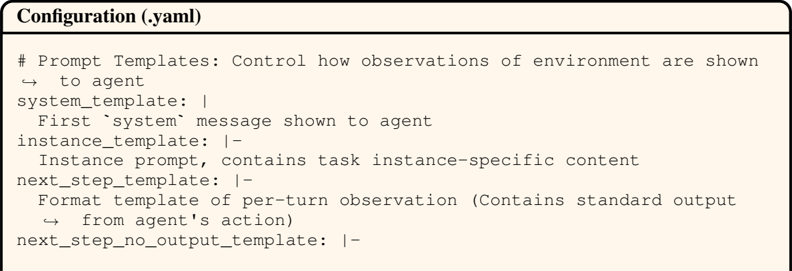
### Visual Description
## YAML Configuration File: Prompt Templates Structure
### Overview
This image shows a YAML configuration file defining prompt templates for an agent-environment interaction system. The file specifies how observations and task instances are formatted for the agent.
### Components/Axes
- **Header**: "Configuration (.yaml)" with a horizontal rule
- **Comment Line**: `# Prompt Templates: Control how observations of environment are shown to agent`
- **Key-Value Pairs**:
1. `system_template`: Contains the first system message shown to the agent
2. `instance_template`: Contains task instance-specific content (denoted with `|-` for multi-line strings)
3. `next_step_template`: Formats per-turn observations with standard output from the agent's action
4. `next_step_no_output_template`: Placeholder for observations without agent output
### Detailed Analysis
- **system_template**:
- Purpose: Initial system message
- Format: Single-line string
- **instance_template**:
- Purpose: Task-specific context
- Format: Multi-line string (indicated by `|-`)
- **next_step_template**:
- Purpose: Standard observation formatting
- Contains: Agent action output
- **next_step_no_output_template**:
- Purpose: Observation formatting without agent output
- Status: Placeholder (empty value)
### Key Observations
1. The configuration uses YAML's pipe (`|`) and hyphen (`-`) syntax for multi-line strings
2. All template definitions follow a consistent structure: `key: description`
3. The system template is the only single-line entry among multi-line templates
4. The `next_step_no_output_template` appears to be intentionally left blank
### Interpretation
This configuration file establishes a structured communication protocol between an agent and its environment. The templates define:
1. **Initial Context**: Through `system_template`
2. **Task Specificity**: Via `instance_template` for customized prompts
3. **Interaction Flow**: Using `next_step_template` for standard observations with agent output, and `next_step_no_output_template` for observations without agent responses
The empty `next_step_no_output_template` suggests either incomplete implementation or intentional omission of this particular template type. The use of YAML's multi-line string syntax indicates that some templates may contain complex, formatted text requiring preservation of line breaks and structure.
</details>
```
```
Figure 12: An example of the configuration file that defines the SWE-agent ACI. A configuration is represented as a single .yaml file, allowing you to define the commands that agents may use, write prompts shown to the agent over the course of a single trajectory, and control the input/output interface that sits between the agent and environment.
The prompt templates are explained in detail in Section C. The environment variables and command files work in tandem; environment variables make the interfaces stateful, and when commands are invoked, the corresponding states are updated to reflect the changes to the environment and interface. The parse\_command , parse\_function , and history\_processor all reference implementations declared within the agent module. The parse\_command file describes how command documentation should be presented to the agent. The parse\_function is what enforces the input/output formats for the agent. The history\_processor points to the logic for controlling and modifying the message history enforced at each turn throughout a single task episode.
The configuration-based workflow of SWE-agent makes it easy to test new ACIs by incorporating novel commands, input/output formats, context managers, and more into the existing codebase. In the following subsections, we showcase existing implementations of several of these components and discuss how they can be extended.
Commands. We describe how to implement your own commands for the SWE-agent ACI. As shown in the above Figure 12, commands are declared as a list of one or more file paths in the command\_files argument. Individual commands must be declared as separate functions in .py or .sh files. Every command subscribes to the following skeleton code in Figure 13.
```
```
Figure 13: The skeleton code for defining a command that can be accessed in the SWE-agent ACI. The function definition includes both the underlying implementation along with several arguments that describe how to use the command, which is compiled into the System template's command documentation at run time.
The choice of Python or Bash based implementations of commands means they can be written to do a wide variety of actions, and the use of Docker means that the commands and system can be co-designed. Here is a list of guidelines around how to implement commands correctly.
- Command arguments can be referenced via positional parameters notation (i.e. $1 ).
- The implementation for your command is unconstrained. There are no limitations on the form of the underlying command code.
- If there are no arguments, omit the arguments section.
- The minimal documentation requirements are signature and docstring .
- Third party libraries can be freely imported and used by commands (e.g., flake8 ).
- Global variables can be used to make stateful changes to the environment. For instance, for the commands associated with the File Viewer, you'll see we define the CURRENT\_LINE variable for the file viewer. This variable is modified across multiple commands, including open , goto , scroll\_up , scroll\_down , and edit .
- To show effects of a command, print to standard output (e.g., with echo ). The command parsing logic is implemented such that it does not look for a return value.
Once the file path containing the command is added to command\_docs as an argument, the command is immediately available for use in subsequent task episodes. Including a demonstration that uses more complicated commands can be helpful to showcase proper use and may increase the frequency with which the agent uses the command.
Input/output format. The input/output format defines what a correctly formatted response for an agent should look like. Selecting a suitable format greatly affects how well agents can interact with the environment. The methods for communicating and enforcing the input/output format are separated across several arguments. In Figure 12, the value of parse\_function should point to a class definition that enforces the format and actually parses the agent's responses. Informing the agent of the expectations around the input/output format should take place in system\_template , and the agent can be reminded of these standards via the format\_error\_template . New input/output formats can be easily devised and enforced by updating these arguments to point to a new class or display different natural language instructions.
Context management. Context management is implemented as a class within the agent module. The history\_processor argument allows one to specify which context manager to use via the configuration file. Underneath the hood, the context manager is invoked per turn of the interactive loop. From the entire recorded history of the agent's interactions so far, the context manager constructs the literal history to be fed to the agent to invoke the next response. The general design of history\_processor s allows for easy experimentation towards more sophisticated strategies for managing history.
## B Extended Results
In this section, we provide additional results, including performance marginalized against different dimensions, patch generation statistics, and problem solving patterns reflected by SWE-agent trajectories. Per analysis, we provide numerical or qualitative evidence that supports our findings, describe our takeaways from each finding, and discuss both the strengths of SWE-agent relative to prior baselines along with future directions based on improving common failure modes.
## B.1 Hyperparameter Sweep
We performed a hyperparameter sweep using a subset of 37 instances sampled randomly from the dev split of SWE-bench. We present the results in Table 5, where we perform the sweeps for both the GPT-4 Turbo and Claude 3 Opus models. For GPT-4 Turbo the best configuration has a % Resolved rate of 15 . 1 %, with a temperature of 0 . 0 , window length of 100 and history set to last five observations (described in §3). There is a three way tie for Claude 3 Opus between the aforementioned configuration along with two additional settings (Temperature/Window/History of 0 . 2 / 100 /Last-5 and 0 . 2 / 200 /Full). We elect to run inference of both models on the SWE-bench test sets (both full and Lite splits) using the 0 . 0 / 100 /Last-5 configuration.
Table 5: Hyper parameter sweep results on a subset of the SWE-bench dev split. % Resolved shows the mean score across 5 samples.
| Model | Temperature | Window | History | %Resolved |
|---------------|---------------|----------|-------------|-------------|
| GPT-4 Turbo | 0 | 100 | Full | 14.1 |
| GPT-4 Turbo | 0 | 100 | Last 5 Obs. | 15.1 |
| GPT-4 Turbo | 0 | 200 | Full | 9.2 |
| GPT-4 Turbo | 0 | 200 | Last 5 Obs. | 10.8 |
| GPT-4 Turbo | 0.2 | 100 | Full | 10.8 |
| GPT-4 Turbo | 0.2 | 100 | Last 5 Obs. | 12.4 |
| GPT-4 Turbo | 0.2 | 200 | Full | 8.7 |
| GPT-4 Turbo | 0.2 | 200 | Last 5 Obs. | 10.8 |
| Claude 3 Opus | 0 | 100 | Full | 5.4 |
| Claude 3 Opus | 0 | 100 | Last 5 Obs. | 8.1 |
| Claude 3 Opus | 0 | 200 | Full | 7 |
| Claude 3 Opus | 0 | 200 | Last 5 Obs. | 7.1 |
| Claude 3 Opus | 0.2 | 100 | Full | 7.4 |
| Claude 3 Opus | 0.2 | 100 | Last 5 Obs. | 8.1 |
| Claude 3 Opus | 0.2 | 200 | Full | 8.1 |
| Claude 3 Opus | 0.2 | 200 | Last 5 Obs. | 6.8 |
## B.2 Model Performance
We present analyses of model performance marginalized across different dimensions and categories.
Performance by Repository. We include a breakdown of model performance by repository on the SWE-bench Lite dataset in Table 6. We also include and adjust the performance of Claude 2 on SWE-bench, inherited from the baseline performances established in the original work. As presented above, SWE-agent performance is superior to prior approaches, solving not only a higher percentage of problems across repositories, but also resolving problems in repositories that were previously nearly or completely unsolved by prior retrieval augmented generation baselines used in the original SWE-bench work (e.g. matplotlib, sympy/sympy).
Temporal Analysis. In Table 7, we provide a temporal breakdown that shows the % Resolved statistics for task instances from different years. There is no clear correlation between a task instance's
https://github.com/matplotlib/matplotlib/
https://github.com/sympy/sympy
Table 6: % Resolved performance across repositories represented in the SWE-bench Lite dataset. Each row corresponds to a repository while each column is the model's performance for that repository. The numbers in parentheses in the 'Repo" column is the number of task instances in SWE-bench Lite that are from the corresponding repository.
| | SWE-agent | SWE-agent | RAG | RAG | RAG |
|--------------------------------|-------------|---------------|--------|---------------|----------|
| Repo | GPT 4 | Claude 3 Opus | GPT 4 | Claude 3 Opus | Claude 2 |
| astropy/astropy (6) | 16.67% | 33.33% | 0.00% | 0.00% | 0.00% |
| django/django (114) | 26.32% | 16.67% | 4.39% | 6.14% | 5.26% |
| matplotlib/matplotlib (23) | 13.04% | 13.04% | 0.00% | 0.00% | 0.00% |
| mwaskom/seaborn (4) | 25.00% | 0.00% | 25.00% | 25.00% | 0.00% |
| pallets/flask (3) | 0.00% | 0.00% | 0.00% | 0.00% | 0.00% |
| psf/requests (6) | 33.33% | 16.67% | 0.00% | 0.00% | 0.00% |
| pydata/xarray (5) | 0.00% | 0.00% | 20.00% | 20.00% | 0.00% |
| pylint-dev/pylint (6) | 16.67% | 0.00% | 0.00% | 0.00% | 0.00% |
| pytest-dev/pytest (17) | 17.65% | 5.88% | 0.00% | 5.88% | 5.88% |
| scikit-learn/scikit-learn (23) | 17.39% | 17.39% | 0.00% | 4.35% | 8.70% |
| sphinx-doc/sphinx (16) | 6.25% | 6.25% | 0.00% | 0.00% | 0.00% |
| sympy/sympy (77) | 10.39% | 5.19% | 1.30% | 2.60% | 0.00% |
Table 7: % Resolved performance for task instances from different years represented in the SWEbench Lite dataset. Each row corresponds to a year while each column is the model's performance for task instances with a created\_at timestamp from that year. The numbers in parentheses in the Year column is the number of task instances in SWE-bench Lite from that corresponding year.
| | SWE-agent | SWE-agent | RAG | RAG | RAG |
|-------------------|-------------|---------------|-------|---------------|----------|
| Year | GPT 4 | Claude 3 Opus | GPT 4 | Claude 3 Opus | Claude 2 |
| 2023 (30) | 23.33% | 13.33% | 3.33% | 3.33% | 0.0% |
| 2022 (57) | 21.05% | 17.54% | 5.26% | 7.02% | 1.75% |
| 2021 (42) | 23.81% | 11.90% | 2.38% | 4.76% | 2.38% |
| 2020 (66) | 10.61% | 7.58% | 3.03% | 1.52% | 1.52% |
| Before 2020 (105) | 17.14% | 10.48% | 0.95% | 4.76% | 5.71% |
creation year and its resolution rate across either models or setting. For instance, while the SWE-agent w/ GPT-4 approach solves the highest percentage of problems from 2021, while the RAG w/ GPT-4 and SWE-agent w/ Claude 3 Opus approaches perform better on task instances from 2022.
## B.3 Trajectory Analysis
We present additional characterizations of trajectories corresponding to task instances that were successfully resolved by SWE-agent w/ GPT-4 Turbo (unless otherwise specified).
## B.3.1 Turns to Resolution
Figure 14 visualizes the distribution of the number of turns SWE-agent needed to complete task instances that were successfully resolved. On the full SWE-bench test set, SWE-agent w/ GPT-4 takes an average of 14.71 turns to finish a trajectory, with a median of 12 turns and 75% of trajectories being completed within 18 turns. On the Lite split of the SWE-bench test set, SWE-agent w/ Claude 3 Opus takes an average of 12.71 turns to finish a trajectory, with a median of 13 turns and 75% of trajectories being completed within 15 turns. From the distribution, it is evident that across models and SWE-bench splits, the majority of task instances are typically solved and completed comfortably within the allotted budget.
This also points to a general area of improvement for language agent systems - if a language agent's initial problem solving approach, typically reflected in the first 10 to 20 turns, does not yield a good
Figure 14: Distribution of the number of turns for interactive trajectories corresponding to solved task instances on SWE-bench. The left histogram shows this distribution for SWE-agent w/ GPT 4 on the full SWE-bench test set (286 trajectories). The right histogram is the performance of SWE-agent w/ Claude 3 Opus on the Lite split of the SWE-bench test set (35 trajectories).
<details>
<summary>Image 11 Details</summary>
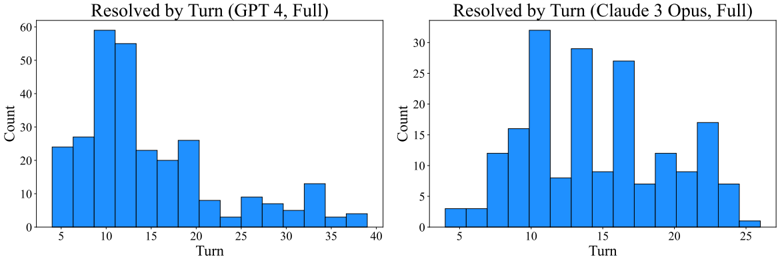
### Visual Description
## Bar Charts: Resolved by Turn (GPT 4, Full) and Resolved by Turn (Claude 3 Opus, Full)
### Overview
The image contains two side-by-side bar charts comparing the distribution of task resolutions across turns for two AI models: GPT 4 and Claude 3 Opus. Both charts use "Turn" as the x-axis and "Count" as the y-axis, with distinct ranges and distributions for each model.
---
### Components/Axes
#### Left Chart (GPT 4, Full)
- **Title**: "Resolved by Turn (GPT 4, Full)"
- **X-axis (Turn)**: Discrete intervals from 5 to 40 (inclusive), labeled in increments of 5.
- **Y-axis (Count)**: Continuous scale from 0 to 60, labeled in increments of 10.
- **Bars**: Blue, with heights corresponding to resolution counts per turn.
- **Key Data Points**:
- Turn 10: ~60 (peak)
- Turn 11: ~55
- Turn 15: ~20
- Turn 20: ~25
- Turn 30: ~5
- Turn 35: ~3
- Turn 40: ~2
#### Right Chart (Claude 3 Opus, Full)
- **Title**: "Resolved by Turn (Claude 3 Opus, Full)"
- **X-axis (Turn)**: Discrete intervals from 5 to 25 (inclusive), labeled in increments of 5.
- **Y-axis (Count)**: Continuous scale from 0 to 30, labeled in increments of 5.
- **Bars**: Blue, with heights corresponding to resolution counts per turn.
- **Key Data Points**:
- Turn 10: ~30 (peak)
- Turn 14: ~28
- Turn 18: ~25
- Turn 20: ~12
- Turn 22: ~18
- Turn 24: ~15
- Turn 25: ~2
---
### Detailed Analysis
#### Left Chart (GPT 4, Full)
- **Trend**:
- Sharp peak at Turn 10 (~60 resolutions), followed by a rapid decline.
- Secondary peak at Turn 20 (~25 resolutions).
- Counts drop below 10 after Turn 25, with minimal activity by Turn 40.
- **Distribution**:
- High concentration of resolutions in early turns (5–15), with a long tail extending to Turn 40.
#### Right Chart (Claude 3 Opus, Full)
- **Trend**:
- Peak at Turn 10 (~30 resolutions), followed by a secondary peak at Turn 14 (~28 resolutions).
- Gradual decline after Turn 18, with a resurgence at Turn 22 (~18 resolutions).
- Counts remain above 5 until Turn 25.
- **Distribution**:
- More evenly distributed across turns compared to GPT 4, with resolutions spread from Turn 5 to 25.
---
### Key Observations
1. **GPT 4 Dominance in Early Turns**:
- GPT 4 resolves significantly more tasks by Turn 10 (~60 vs. ~30 for Claude 3 Opus).
- Resolutions drop sharply after Turn 11, suggesting rapid initial progress but limited sustained performance.
2. **Claude 3 Opus’ Gradual Resolution**:
- Resolutions are more evenly distributed, with no single turn exceeding 30.
- Secondary peaks at Turns 14 and 22 indicate prolonged task resolution over time.
3. **X-axis Range Discrepancy**:
- GPT 4’s x-axis extends to Turn 40, while Claude 3 Opus stops at Turn 25. This may reflect differences in task complexity or game length.
4. **Y-axis Scaling**:
- GPT 4’s y-axis scales to 60, while Claude 3 Opus’ scales to 30, emphasizing GPT 4’s higher resolution capacity.
---
### Interpretation
- **Efficiency vs. Consistency**:
- GPT 4 demonstrates higher efficiency in resolving tasks early (Turn 10 peak), but its performance declines rapidly. This suggests a "burst" approach, excelling in initial problem-solving but struggling with sustained effort.
- Claude 3 Opus shows more consistent resolution across turns, with no single turn dominating. This implies a steadier, more methodical approach to task resolution.
- **Turn Range Implications**:
- The extended x-axis for GPT 4 (up to Turn 40) may indicate it handles longer or more complex tasks, whereas Claude 3 Opus’ shorter range (up to Turn 25) suggests shorter or simpler scenarios.
- **Practical Implications**:
- GPT 4 might be better suited for tasks requiring rapid initial solutions (e.g., debugging, quick decision-making).
- Claude 3 Opus could be preferable for tasks demanding prolonged engagement and incremental progress (e.g., strategic planning, iterative development).
- **Anomalies**:
- GPT 4’s sharp decline after Turn 10 contrasts with Claude 3 Opus’ gradual resolution, highlighting divergent problem-solving strategies.
- The resurgence in Claude 3 Opus’ resolutions at Turn 22 (~18) suggests a late-stage effort spike, possibly indicating adaptive behavior.
---
### Conclusion
The charts reveal distinct performance profiles between GPT 4 and Claude 3 Opus. GPT 4 excels in early-stage task resolution but falters in sustained effort, while Claude 3 Opus maintains steadier performance over time. These differences underscore the importance of model selection based on task requirements: speed vs. consistency.
</details>
Figure 15: The distribution of agent trajectories by total steps (left) and cost (right) for SWE-agent with GPT-4 Turbo on SWE-bench. The distributions of resolved instances are shown in orange and unresolved are shown in blue. Resolved instances clearly display an earlier mean and fewer proportion of trajectories with many steps or that cost near the maximum budget of $ 4 . 00 .
<details>
<summary>Image 12 Details</summary>
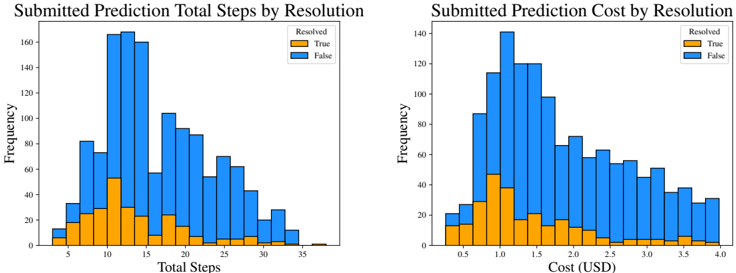
### Visual Description
## Bar Charts: Submitted Prediction Total Steps and Cost by Resolution
### Overview
The image contains two adjacent bar charts comparing the frequency distribution of submitted predictions based on resolution status. The left chart shows **Total Steps** (x-axis) and the right chart shows **Cost (USD)** (x-axis), both segmented by **Resolved (True)** and **False** predictions (y-axis frequency).
---
### Components/Axes
1. **Left Chart: Submitted Prediction Total Steps by Resolution**
- **X-axis (Total Steps)**: Discrete intervals from 5 to 35 steps, labeled at 5, 10, 15, 20, 25, 30, 35.
- **Y-axis (Frequency)**: Linear scale from 0 to 160, incrementing by 20.
- **Legend**:
- **Resolved (True)**: Orange bars.
- **False**: Blue bars.
- **Legend Position**: Top-right corner of the chart.
2. **Right Chart: Submitted Prediction Cost by Resolution**
- **X-axis (Cost)**: Continuous scale from 0.5 to 4.0 USD, labeled at 0.5, 1.0, 1.5, 2.0, 2.5, 3.0, 3.5, 4.0.
- **Y-axis (Frequency)**: Linear scale from 0 to 140, incrementing by 20.
- **Legend**: Same as left chart (orange for Resolved, blue for False).
- **Legend Position**: Top-right corner of the chart.
---
### Detailed Analysis
#### Left Chart: Total Steps
- **Resolved (True)**:
- Peaks at **15 steps** with a frequency of ~50.
- Frequencies decline sharply after 15 steps, with minimal counts beyond 25 steps.
- Lowest frequencies observed at 5 steps (~10) and 35 steps (~2).
- **False**:
- Dominates across all step ranges, with the highest frequency at **10 steps** (~140).
- Frequencies decrease gradually, with ~80 at 20 steps and ~40 at 30 steps.
- Minimal presence at 5 steps (~20) and 35 steps (~10).
#### Right Chart: Cost (USD)
- **Resolved (True)**:
- Peaks at **$1.00** with a frequency of ~45.
- Frequencies decline after $1.00, with ~20 at $2.00 and ~5 at $4.00.
- Lowest frequencies at $0.50 (~10) and $3.50 (~5).
- **False**:
- Peaks at **$1.50** with a frequency of ~120.
- Frequencies drop to ~60 at $2.00 and ~30 at $3.00.
- Minimal presence at $0.50 (~20) and $4.00 (~10).
---
### Key Observations
1. **Resolution Efficiency**:
- Resolved predictions cluster around **15 steps** and **$1.00**, indicating optimal performance.
- False predictions require fewer steps (peak at 10) but higher cost (peak at $1.50), suggesting inefficiency in resolution.
2. **Distribution Trends**:
- Resolved predictions show a unimodal distribution for both steps and cost.
- False predictions exhibit a broader distribution, with higher variability in cost.
3. **Outliers**:
- Resolved predictions at 35 steps and $4.00 are rare (~2 and ~5, respectively).
- False predictions at 35 steps (~10) and $4.00 (~10) are slightly more common but still low-frequency.
---
### Interpretation
The data highlights a clear distinction between resolved and unresolved predictions:
- **Resolved predictions** are more resource-efficient, concentrating around moderate steps and cost. This suggests effective resolution mechanisms for these cases.
- **False predictions** incur higher costs despite requiring fewer steps, possibly due to manual intervention or rework. The peak at $1.50 may reflect a threshold for automated correction attempts before escalation.
- The decline in frequency for resolved predictions at higher steps/costs implies that complex cases are either resolved less frequently or require specialized handling.
These insights could inform process optimization, such as refining algorithms to reduce false predictions or allocating resources more effectively for high-cost cases.
</details>
solution, it struggles to make use of later turns that build upon past mistakes. To remedy this issue and induce stronger error recovery capabilities in language agents, future directions could consider improving either the model, the ACI, or both.
## B.3.2 Walkthrough of Trajectory Phases
We describe what happens in different phases of an agent's problem solving trajectory. To support our observations, we present several tables and distributions that help highlight consistent trends.
Initial reproduction, localization steps. First, the initial steps that SWE-agent usually takes is heavily dominated by Localization and Reproduction operations. The most commonly occurring pattern in general is the create , edit , python triplet. Across these commands, an agent creates an empty python file, adds an executable code snippet via edit , and then attempts to run it. As an alternative, the agent also sometimes decides to start off instead with Localization, or identifying the files/lines causing the issue. Depending on how informative the issue description and results for initial search queries are, agents will run additional search queries with finer grained search tools to zoom in on the target problematic code area (e.g., search\_dir , open , search\_file / scroll\_down ).
These trends are also reflected in Figure 16, which shows a distribution of patterns across turns according to the categories defined in Table 8. The three leftmost bars reflect that Reproduction followed by Localization constitutes the lion's share of operations that occur in the early phases of a trajectory. For a more thorough breakdown, we also include Figure 17, which shows an estimated distribution of each action with respect to different turns, normalized across the total number of times
Table 8: We present a table of the most frequently occurring action patterns at each turn ('frequently" means ≥ 4 times) in trajectories of task instances resolved by SWE-agent w/ GPT-4. For instance, the pattern create , edit , python appears 156 times at the first to third turns. In addition, we also manually assign each entry a category (Reproduction, Localization (File), Localization (Line), Editing, Submission) that generally captures the underlying purpose of such a pattern. 'Reproduction" refers to the sub-task of recreating the error or request described by the issue. 'Localization" refers to the sub-task of identifying the code that is the cause of the issue.
| Turns | Pattern | Count | Category |
|---------|----------------------------------|---------|---------------------|
| 1-3 | create , edit , python | 156 | Reproduction |
| 1-3 | search_dir , open , search_file | 21 | Localization (File) |
| 1-3 | search_dir , open , scroll_down | 12 | Localization (Line) |
| 1-3 | create , edit , edit | 11 | Reproduction |
| 1-3 | search_dir , open , edit | 10 | Localization (Line) |
| 2-4 | edit , python , find_file | 71 | Localization (File) |
| 2-4 | edit , python , edit | 37 | Reproduction |
| 2-4 | edit , python , search_dir | 26 | Localization (File) |
| 2-4 | edit , python , open | 15 | Localization (File) |
| 2-4 | open , edit , edit | 13 | Editing |
| 2-4 | open , edit , create | 13 | Editing |
| 2-4 | open , scroll_down , scroll_down | 9 | Localization (Line) |
| 2-4 | open , scroll_down , edit | 5 | Editing |
| 2-4 | open , edit , submit | 5 | Submission |
| 3-5 | python , find_file , open | 61 | Localization (File) |
| 3-5 | python , edit , python | 25 | Editing |
| 3-5 | search_file , goto , edit | 24 | Localization (Line) |
| 3-5 | python , search_dir , open | 23 | Localization (File) |
| 3-5 | edit , create , edit | 13 | Editing |
| 3-5 | python , edit , edit | 11 | Editing |
| 3-5 | python , open , edit | 7 | Editing |
| 3-5 | python , find_file , find_file | 7 | Localization (File) |
| 3-5 | edit , edit , submit | 4 | Submission |
| 3-5 | edit , edit , create | 4 | Editing |
| 4-6 | find_file , open , edit | 28 | Editing |
| 4-6 | find_file , open , search_file | 19 | Localization (Line) |
| 4-6 | edit , edit , python | 11 | Reproduction |
| 4-6 | goto , edit , edit | 8 | Editing |
| 4-6 | find_file , open , goto | 8 | Localization (Line) |
| 4-6 | goto , edit , submit | 7 | Submission |
| 4-6 | goto , edit , create | 7 | Editing |
| 4-6 | find_file , open , scroll_down | 6 | Localization (Line) |
| 4-6 | scroll_down , scroll_down , edit | 5 | Localization (Line) |
| 4-6 | find_file , find_file , open | 5 | Localization (File) |
| 5-7 | open , search_file , goto | 29 | Localization (Line) |
| 5-7 | open , edit , python | 20 | Editing |
| 5-7 | open , goto , edit | 7 | Editing |
| 5-7 | scroll_down , edit , submit | 4 | Submission |
| 6-8 | scroll_down (x3) | 6 | Localization (Line) |
| 6-8 | search_file , goto , scroll_down | 4 | Localization (Line) |
| 7-9 | edit , python , rm | 20 | Editing |
| 7-9 | goto , edit , python | 12 | Editing |
| 8-10 | python , rm , submit | 19 | Submission |
| 8-10 | search_file , goto , search_file | 4 | Localization (File) |
| 9-11 | edit (x3) | 18 | Editing |
| 9-11 | edit , open , edit | 6 | Editing |
| 9-11 | goto , search_file , goto | 4 | Localization (Line) |
Figure 16: We assign each pattern to one of five categories (as presented in Table 8) and present a histogram of the turns at which patterns from specific categories show up frequently.
<details>
<summary>Image 13 Details</summary>
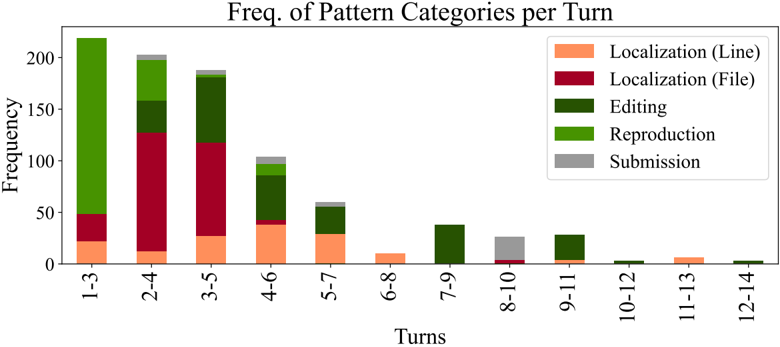
### Visual Description
## Bar Chart: Frequency of Pattern Categories per Turn
### Overview
The chart displays the frequency distribution of five pattern categories across 12 turn ranges (1-3 to 12-14). Each turn range is represented by a stacked bar, with segments colored according to the legend. The y-axis measures frequency (0-200), and the x-axis groups turns in ranges of 2 (e.g., 1-3, 2-4).
### Components/Axes
- **X-axis (Turns)**: Labeled "Turns" with ranges: 1-3, 2-4, 3-5, 4-6, 5-7, 6-8, 7-9, 8-10, 9-11, 10-12, 11-13, 12-14.
- **Y-axis (Frequency)**: Labeled "Frequency" with increments of 50 up to 200.
- **Legend**: Positioned on the right, with five categories:
- **Localization (Line)**: Orange
- **Localization (File)**: Red
- **Editing**: Dark green
- **Reproduction**: Bright green
- **Submission**: Gray
### Detailed Analysis
- **Turn 1-3**:
- Total frequency ~220 (highest overall).
- Dominated by **Editing** (~100, bright green).
- **Localization (File)** (~30, red) and **Reproduction** (~50, dark green) contribute significantly.
- **Localization (Line)** (~20, orange) and **Submission** (~5, gray) are minimal.
- **Turn 2-4**:
- Total frequency ~200.
- **Localization (File)** peaks (~130, red), followed by **Editing** (~50, dark green).
- **Reproduction** (~20, bright green) and **Localization (Line)** (~10, orange) are smaller.
- **Submission** (~5, gray) remains low.
- **Turn 3-5**:
- Total frequency ~180.
- **Editing** (~100, dark green) and **Localization (File)** (~70, red) dominate.
- **Reproduction** (~10, bright green) and **Localization (Line)** (~5, orange) are minor.
- **Submission** (~5, gray) persists.
- **Turn 4-6**:
- Total frequency ~100.
- **Editing** (~50, dark green) and **Localization (File)** (~30, red) are prominent.
- **Reproduction** (~15, bright green) and **Localization (Line)** (~5, orange) are smaller.
- **Submission** (~5, gray) remains consistent.
- **Turn 5-7**:
- Total frequency ~60.
- **Editing** (~30, dark green) and **Localization (File)** (~20, red) lead.
- **Reproduction** (~5, bright green) and **Localization (Line)** (~5, orange) are minor.
- **Submission** (~5, gray) is present.
- **Turn 6-8**:
- Total frequency ~30.
- **Editing** (~20, dark green) and **Localization (File)** (~10, red) dominate.
- **Reproduction** (~5, bright green) and **Localization (Line)** (~5, orange) are small.
- **Submission** (~5, gray) is consistent.
- **Turn 7-9**:
- Total frequency ~40.
- **Editing** (~30, dark green) and **Localization (File)** (~10, red) are key.
- **Reproduction** (~5, bright green) and **Localization (Line)** (~5, orange) are minor.
- **Submission** (~5, gray) persists.
- **Turn 8-10**:
- Total frequency ~30.
- **Submission** peaks (~25, gray), with **Editing** (~5, dark green) and **Localization (File)** (~5, red).
- **Reproduction** (~5, bright green) and **Localization (Line)** (~5, orange) are minimal.
- **Turn 9-11**:
- Total frequency ~30.
- **Editing** (~20, dark green) and **Localization (File)** (~10, red) dominate.
- **Reproduction** (~5, bright green) and **Localization (Line)** (~5, orange) are small.
- **Submission** (~5, gray) is present.
- **Turn 10-12**:
- Total frequency ~5.
- **Localization (Line)** (~5, orange) and **Editing** (~5, dark green) are equal.
- Other categories are negligible.
- **Turn 11-13**:
- Total frequency ~5.
- **Localization (Line)** (~5, orange) dominates.
- Other categories are negligible.
- **Turn 12-14**:
- Total frequency ~5.
- **Localization (Line)** (~5, orange) dominates.
- Other categories are negligible.
### Key Observations
1. **Highest Frequency**: Turns 1-3 show the highest total frequency (~220), driven by **Editing** and **Localization (File)**.
2. **Dominant Categories**:
- **Editing** (dark green) is consistently high in early turns (1-5).
- **Localization (File)** (red) peaks in turns 2-4.
- **Submission** (gray) spikes in turn 8-10, suggesting a behavioral shift.
3. **Decline in Later Turns**: Total frequency drops sharply after turn 6-8, with later turns (<30) dominated by **Localization (Line)** and **Editing**.
4. **Color Consistency**: All segments align with the legend (e.g., orange = Localization Line, red = Localization File).
### Interpretation
The data suggests that early interactions (turns 1-5) involve heavy **Editing** and **Localization (File)**, while later turns (8-10) see a surge in **Submission**, possibly indicating a workflow phase (e.g., finalizing edits). The decline in total frequency after turn 6-8 may reflect reduced activity or a shift to simpler tasks (e.g., **Localization (Line)**). The consistent presence of **Submission** in later turns could signal a bottleneck or a finalization step in the process. Outliers like the **Submission** peak in 8-10 turns warrant further investigation into user behavior during that phase.
</details>
the command occurs across all turns. From these graphs, we can see that create is invoked much more frequently in the very first turn than in any other turn. The search\_dir and search\_file distributions are roughly bi-modal, with a peak of occurrences for both actions showing up in Turn 1 (if the agent decides to do Localization immediately) and the Turn 4 (if the agent decides to do Localization after Reproduction). We also present Figure 18, which communicates similar information as Figure 17, but presented instead as a stacked bar chart with more commands. The chart is created directly from Figure 7, with the frequency of actions at each turn n normalized across the total number of trajectories with a length greater than or equal to n turns.
## Density Plots of Actions across Turns
Figure 17: This density plot shows a normalized distribution of actions across different turns of a trajectory. exit\_cost refers to when the token budget cost was exhausted and the episode's changes are automatically submitted (contrary to an intentional submit invoked by the agent).
<details>
<summary>Image 14 Details</summary>
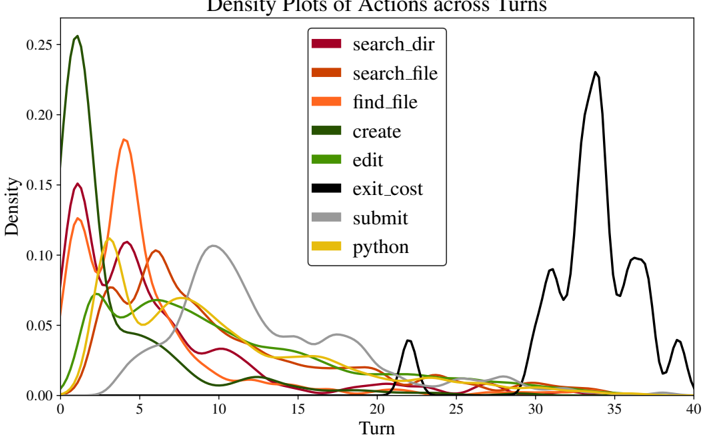
### Visual Description
## Line Chart: Density Plots of Actions across Turns
### Overview
The chart displays density plots of eight distinct actions across 40 turns, with density values ranging from 0.00 to 0.25. Each action is represented by a colored line, showing peaks at specific turns where the action is most frequent. The legend identifies actions with unique colors, though two actions share the same color (yellow), creating ambiguity.
### Components/Axes
- **X-axis (Turn)**: Ranges from 0 to 40, labeled "Turn."
- **Y-axis (Density)**: Ranges from 0.00 to 0.25, labeled "Density."
- **Legend**:
- `search_dir` (red)
- `search_file` (orange)
- `find_file` (yellow)
- `create` (green)
- `edit` (lime)
- `exit_cost` (black)
- `submit` (gray)
- `python` (yellow)
*Note: Both `find_file` and `python` are assigned yellow, which may indicate a legend error.*
### Detailed Analysis
1. **`search_dir` (red)**: Peaks sharply at turn 2 (density ~0.25), then declines rapidly.
2. **`search_file` (orange)**: Peaks at turn 4 (density ~0.18), with a secondary smaller peak near turn 10.
3. **`find_file` (yellow)**: Peaks at turn 5 (density ~0.15), overlapping with `search_file` and `create`.
4. **`create` (green)**: Peaks at turn 3 (density ~0.12), with a secondary peak near turn 8.
5. **`edit` (lime)**: Peaks at turn 6 (density ~0.10), with a gradual decline.
6. **`exit_cost` (black)**: Dominates late turns, peaking at turn 34 (density ~0.22) with a secondary peak at turn 37.
7. **`submit` (gray)**: Peaks at turn 10 (density ~0.10), with a broad, shallow curve.
8. **`python` (yellow)**: Peaks at turn 35 (density ~0.18), overlapping with `exit_cost` in color.
### Key Observations
- **Color Ambiguity**: `find_file` and `python` share the same yellow color, making it impossible to distinguish their lines visually. This likely reflects a legend error.
- **Early vs. Late Actions**:
- Early turns (0–10) are dominated by exploratory actions (`search_dir`, `search_file`, `create`, `edit`, `submit`).
- Late turns (25–40) show spikes in `exit_cost` and `python`, suggesting finalization or specialized tasks.
- **Density Extremes**:
- `search_dir` has the highest peak (0.25), indicating it is the most frequent action early on.
- `exit_cost` has the second-highest peak (0.22) at turn 34, suggesting a critical cost calculation event.
- **Overlap**: `python` and `exit_cost` overlap in color and timing, complicating interpretation.
### Interpretation
The data suggests a workflow where initial actions focus on exploration (`search`, `create`, `edit`) and early submission, while later turns involve cost analysis (`exit_cost`) and specialized tasks (`python`). The shared yellow color for `find_file` and `python` introduces uncertainty, potentially conflating two distinct actions. The sharp peak of `exit_cost` at turn 34 may indicate a pivotal moment in the process, such as resource allocation or termination costs. The gradual decline of early actions implies a shift in focus toward finalization or optimization in later stages.
</details>
Cycle of edit, then evaluate. From the fifth turn onwards, the distribution of actions per turn can be generally described as alternating edit and python / pytest actions. After reproducing the issue and localizing the file(s) responsible for the problem, agents will typically make edits to the
file, then run the reproduction script or existing tests to check whether the proposed edits resolve the original issue and maintain existing desirable behavior. This pair of actions will often repeat for several turns, as an initial edit usually does not successfully resolve the given issue. Multiple rounds of editing that are supplemented by execution feedback from prior turns are conducive to more well-formed, successful subsequent edits. As reflected in Table 8, for turn 4 onwards, the most popular pattern that begins at each turn usually falls under the Editing category. This is also made obvious by Figure 18, where the edit command is the most popular command for Turns 5 to 31 , with only one exception (Turn 30 ). From Figure 17, it is also notably that the distributions of the edit and python commands are quite similar, as they typically follow one another.
Figure 18: A normalized view of Figure 7. The distributions for turn n are normalized across the number of trajectories that have a length of at least n or more turns.
<details>
<summary>Image 15 Details</summary>
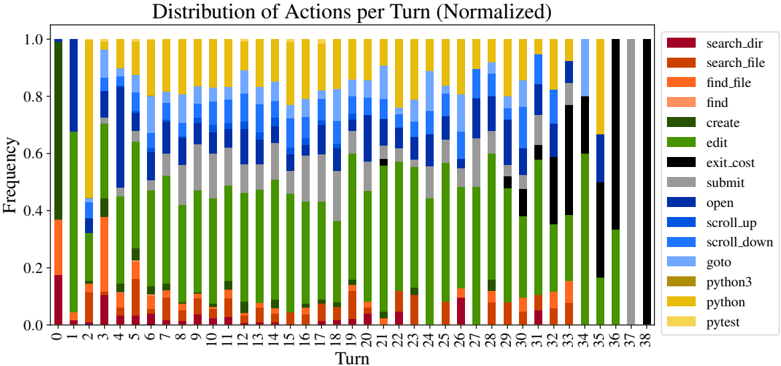
### Visual Description
## Bar Chart: Distribution of Actions per Turn (Normalized)
### Overview
The image is a stacked bar chart showing the normalized frequency distribution of user actions across 38 turns. Each bar represents a turn, with segments colored according to specific actions. The y-axis ranges from 0.0 to 1.0 (frequency), and the x-axis spans turns 1–38. The legend on the right maps 14 distinct actions to colors.
### Components/Axes
- **X-axis (Turn)**: Labeled "Turn" with integer values 1–38.
- **Y-axis (Frequency)**: Labeled "Frequency" with values 0.0–1.0 in increments of 0.2.
- **Legend**: Located on the right, mapping colors to actions:
- Red: `search_dir`
- Orange: `search_file`
- Light orange: `find_file`
- Pink: `find`
- Green: `create`
- Dark green: `edit`
- Black: `exit_cost`
- Gray: `submit`
- Blue: `open`
- Light blue: `scroll_up`
- Dark blue: `scroll_down`
- Cyan: `goto`
- Yellow: `python3`
- Dark yellow: `pytest`
### Detailed Analysis
- **Turn 1**: Dominated by green (`create`, ~0.6) and orange (`search_file`, ~0.3). Total height ≈ 0.9.
- **Turn 2**: Green (`create`, ~0.5) and pink (`find`, ~0.2). Total ≈ 0.7.
- **Turn 3**: Green (`create`, ~0.4) and orange (`search_file`, ~0.2). Total ≈ 0.6.
- **Turn 4**: Green (`create`, ~0.3) and pink (`find`, ~0.1). Total ≈ 0.4.
- **Turn 5**: Green (`create`, ~0.5) and blue (`scroll_up`, ~0.3). Total ≈ 0.8.
- **Turn 6**: Green (`create`, ~0.4) and light blue (`scroll_down`, ~0.2). Total ≈ 0.6.
- **Turn 7**: Green (`create`, ~0.3) and dark blue (`scroll_down`, ~0.1). Total ≈ 0.4.
- **Turn 8**: Green (`create`, ~0.5) and gray (`submit`, ~0.2). Total ≈ 0.7.
- **Turn 9**: Green (`create`, ~0.4) and black (`exit_cost`, ~0.1). Total ≈ 0.5.
- **Turn 10**: Green (`create`, ~0.3) and yellow (`python3`, ~0.1). Total ≈ 0.4.
- **Turn 11–15**: Consistent green (`create`, ~0.3–0.4) with smaller segments of blue (`scroll_up`, ~0.1–0.2) and light blue (`scroll_down`, ~0.1–0.2).
- **Turn 16–20**: Green (`create`, ~0.3–0.4) with increasing dark blue (`scroll_down`, ~0.1–0.2) and occasional pink (`find`, ~0.1).
- **Turn 21–25**: Green (`create`, ~0.3–0.4) and dark blue (`scroll_down`, ~0.1–0.2). Yellow (`python`, ~0.1) appears in Turn 23.
- **Turn 26–30**: Green (`create`, ~0.3–0.4) and dark blue (`scroll_down`, ~0.1–0.2). Light blue (`scroll_up`, ~0.1) in Turn 28.
- **Turn 31–35**: Green (`create`, ~0.3–0.4) and dark blue (`scroll_down`, ~0.1–0.2). Black (`exit_cost`, ~0.1) in Turn 32.
- **Turn 36–38**: Green (`create`, ~0.3–0.4) and dark blue (`scroll_down`, ~0.1–0.2). Dark yellow (`pytest`, ~0.1) in Turn 37.
### Key Observations
1. **Dominant Actions**: `create` (green) is the most frequent action across all turns, with frequencies consistently above 0.3.
2. **Scrolling Behavior**: `scroll_down` (dark blue) and `scroll_up` (light blue) appear frequently but with lower frequencies (~0.1–0.2).
3. **Search Actions**: `search_file` (orange) and `find` (pink) are sporadic, peaking in Turns 1–4.
4. **Python-Related Actions**: `python3` (yellow) and `pytest` (dark yellow) appear only in later turns (10–38), suggesting a shift toward coding tasks.
5. **Normalization**: Each bar’s total height is ≤1.0, indicating normalized frequencies (e.g., Turn 1: 0.9 total actions).
### Interpretation
The chart reveals a pattern of prioritized actions: `create` dominates early turns, while `scroll_down` and `scroll_up` reflect navigation. The emergence of Python-related actions (`python3`, `pytest`) in later turns suggests a transition to coding or testing tasks. The normalization implies that users perform fewer actions per turn as the sequence progresses, possibly due to task complexity or fatigue. Outliers like `exit_cost` (black) and `submit` (gray) are rare but indicate critical steps in specific workflows. The absence of `goto` (cyan) and `open` (blue) in most turns highlights their niche usage.
</details>
Interspersed across these later turns are additional Localization operations for inspecting other parts of the current file (e.g., scroll\_down , scroll\_up ) or opening other files (e.g., open , search\_dir/file , find\_file ). These minor trend lines reflect the tasks that involve multiline or multi-file edits. Figure 18 displays a steady presence of such actions from Turn 6 onwards. Agents will invoke such actions to read different parts (e.g., documentation, implementation) of a long function, especially when it does not fit entirely within the file viewer's number of lines. After editing one function A , running the reproduction script will occasionally propagate an error in a different function B , where function B invokes A . This is a common reason for the additional directory and file level navigation that occurs in the later stages of a trajectory.
Concluding submission turns. There is a consistent proportion of submit actions per turn, with a relative peak around Turn 10 , as shown in Figure 17. As mentioned in Section 5.2 and above, the majority of resolved task instances end with an intentional submit command. As suggested by both Figure 15 and Figure 18, submissions are concentrated between Turns 10 and 20 , becoming less frequent for each turn beyond this range. This trend reflects how agents struggle to use later turns to their advantage, particularly when the original problem solving approach fails, which is fairly evident by Turn 20 . Effectively utilizing later turns to either remedy multiple prior errors or pivot to a different problem solving approach are all viable strategies given the 20 + turns that remain. However, due to overwhelming context or greedy tendencies, agents do not reflect such dynamic behavior, instead opting to focus on continued local editing rather than additional exploration.
Finally, there is a sharp cut off of exit\_cost actions scattered throughout Turns 30 to 40 ; this reflects that the $ 4 cost limit we impose on runs roughly corresponds to this number of turns. The discrepancies mainly comes from variations in the size of observations, with trajectories containing multiple observations that have a high number of tokens corresponding to ones that terminate relatively earlier. Increasing the cost allowance per task episode would directly increase the maximum number of the turns per episode.
## B.3.3 Breakdowns of Action Sequences
In this part, we include more granular examinations of patterns of actions that emerge frequently in trajectories. We also identify consistent associations between groups of actions and how their effects build off one another across several turns.
Editing Trends. Editing is a core facet of agents' ability to reproduce issues and propose fixes effectively. It is also the action that models typically struggle with the most. Here, we list several trends we were able to discern about how agents edit.
First, across the full SWE-bench test set, a non-trivial minority of edit actions are unsuccessful, meaning the edit invocation raises a linting error. Going forwards, we refer to such an occurrence as a failed edit. Out of 2 , 294 task instances, 1 , 185 ( 51 . 7 %) have at least one turn with an failed edit. Of these trajectories, there is a median of 3 failed edits per trajectory, with a max of 33 . The rate of failed edits is smaller for resolved task instances. Out of 286 resolved instances, 113 ( 31 . 5 %) have at least one turn with an failed edit, with a median/mean/max of 2 failed edits per trajectory, with a max of 26 . Figure 19 shows corresponding distributions.
Figure 19: Distribution of the number of failed edit actions per trajectory across all (left) and resolved (right) task instances by SWE-agent with GPT-4 Turbo. A 'failed" edit refers to an edit action that raised a linting error. The left-most bar for both graphs corresponds to the number of trajectories with no failed edits.
<details>
<summary>Image 16 Details</summary>
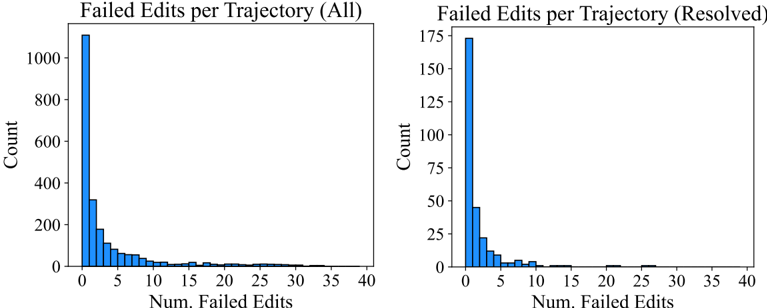
### Visual Description
## Bar Charts: Failed Edits per Trajectory (All) and Resolved
### Overview
Two side-by-side bar charts compare the distribution of failed edits per trajectory. The left chart shows all trajectories ("Failed Edits per Trajectory (All)"), while the right chart focuses on resolved trajectories ("Failed Edits per Trajectory (Resolved)"). Both charts use a y-axis for "Count" and an x-axis for "Num. Failed Edits" (0–40). The left chart has a much larger scale (up to 1000) compared to the right (up to 175).
### Components/Axes
- **Left Chart (All Trajectories)**:
- **Y-axis**: "Count" (0–1000, increments of 200).
- **X-axis**: "Num. Failed Edits" (0–40, increments of 5).
- **Bars**: Blue, decreasing in height from left to right.
- **Right Chart (Resolved Trajectories)**:
- **Y-axis**: "Count" (0–175, increments of 25).
- **X-axis**: "Num. Failed Edits" (0–40, increments of 5).
- **Bars**: Blue, similar distribution to the left chart but with lower absolute counts.
### Detailed Analysis
#### Left Chart (All Trajectories)
- **0 Failed Edits**: ~1000 trajectories (tallest bar).
- **1–5 Failed Edits**: ~300 trajectories (next tallest bar).
- **6–10 Failed Edits**: ~100 trajectories (smaller bars).
- **11–40 Failed Edits**: <10 trajectories (negligible counts).
#### Right Chart (Resolved Trajectories)
- **0 Failed Edits**: ~175 trajectories (tallest bar).
- **1–5 Failed Edits**: ~50 trajectories (next tallest bar).
- **6–10 Failed Edits**: ~10 trajectories (smaller bars).
- **11–40 Failed Edits**: <1 trajectory (negligible counts).
### Key Observations
1. **Dominance of Zero Failed Edits**: Both charts show a sharp drop-off after 0 failed edits, indicating most trajectories have no failures.
2. **Long Tail of Failures**: A small fraction of trajectories (e.g., 1–5 failed edits) account for the majority of non-zero failures.
3. **Resolution Impact**: The resolved trajectories chart has significantly lower counts across all failure categories compared to the "All" chart, suggesting resolution reduces failure rates.
### Interpretation
The data demonstrates that **most trajectories experience no failed edits**, with a steep decline in frequency as the number of failures increases. The resolved trajectories chart reveals that even after addressing issues, a small subset of trajectories still encounters minor failures (1–5 edits), but these are far less frequent than in the unresolved dataset. This suggests that while most edits are successful, a minority of cases require iterative corrections, and resolution significantly mitigates failure rates. The long tail of failures in both charts highlights the need for targeted improvements in problematic workflows or user behaviors.
</details>
Second, with linting enabled editing, agents 'recover" more often than not from failed edits. To understand whether and how effectively agents use linting error feedback to construct a subsequent, well-formed edit action, we define two terms. Recovery refers to a sequence of failed edits followed immediately by a successful edit, suggesting the agent used linting feedback to make a well-formatted edit. An unsuccessful recovery is consecutive failed edits followed immediately by a non-edit action.
Figure 20: Probability of successful edit after n failed edits. The likelihood of recovery decreases as n increases.
<details>
<summary>Image 17 Details</summary>
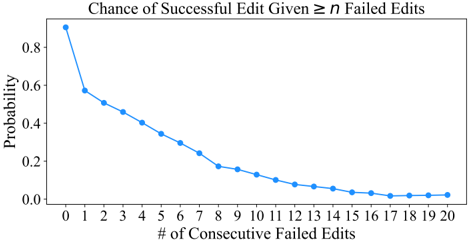
### Visual Description
## Line Graph: Chance of Successful Edit Given ≥ n Failed Edits
### Overview
The image depicts a line graph illustrating the relationship between the number of consecutive failed edits and the probability of a successful edit. The y-axis represents probability (0.0 to 0.8), and the x-axis represents the number of consecutive failed edits (0 to 20). A single blue line with data points shows a declining trend, with probability decreasing as the number of failed edits increases.
### Components/Axes
- **Title**: "Chance of Successful Edit Given ≥ n Failed Edits"
- **Y-Axis**: Labeled "Probability" with a scale from 0.0 to 0.8 in increments of 0.2.
- **X-Axis**: Labeled "# of Consecutive Failed Edits" with integer markers from 0 to 20.
- **Legend**: Not explicitly visible in the image, but the line is blue, suggesting a single data series.
- **Data Points**: Blue dots connected by a line, plotted at each integer x-value.
### Detailed Analysis
- **X=0**: Probability ≈ 0.85 (highest point).
- **X=1**: Probability ≈ 0.6.
- **X=2**: Probability ≈ 0.5.
- **X=3**: Probability ≈ 0.45.
- **X=4**: Probability ≈ 0.4.
- **X=5**: Probability ≈ 0.35.
- **X=6**: Probability ≈ 0.3.
- **X=7**: Probability ≈ 0.25.
- **X=8**: Probability ≈ 0.2.
- **X=9**: Probability ≈ 0.15.
- **X=10**: Probability ≈ 0.1.
- **X=11**: Probability ≈ 0.08.
- **X=12**: Probability ≈ 0.06.
- **X=13**: Probability ≈ 0.05.
- **X=14**: Probability ≈ 0.04.
- **X=15**: Probability ≈ 0.03.
- **X=16**: Probability ≈ 0.02.
- **X=17–20**: Probability stabilizes near 0.01–0.02.
### Key Observations
1. **Rapid Initial Decline**: Probability drops sharply from ~0.85 (0 failed edits) to ~0.3 (6 failed edits).
2. **Gradual Stabilization**: After ~16 failed edits, the probability plateaus near 0.01–0.02, indicating minimal chance of success.
3. **Diminishing Returns**: Each additional failed edit reduces success probability less significantly as the number of failures increases.
### Interpretation
The data suggests that consecutive failed edits strongly correlate with reduced likelihood of success. The steep decline in early stages implies that initial failures have a disproportionate impact on outcomes. However, after ~16 failures, the probability stabilizes near zero, indicating a threshold where further failures have negligible effect. This could reflect user behavior (e.g., abandonment after repeated failures) or system constraints (e.g., technical limitations after prolonged errors). The trend underscores the importance of addressing failures early to maintain edit success rates.
</details>
Across trajectories corresponding to resolved task instances, there are 135 occurrences of 1 + failed edit attempts. Out of these, the agent recovers successfully 104 times. The number of consecutive failed edit attempts before a successful versus failed recovery is also vastly different. Successful recoveries are usually preceded by 2 . 03 edit attempts, less than the average 4 . 22 failed edit attempts of unsuccessful recoveries. Across all task instances, the relative rate of unsuccessful recoveries increases, with 810 successful recoveries versus 555 unsuccessful ones. While the number of consecutive failed edit attempts resulting in a recovery remains steady ( 2 . 2 ), it increases significantly for unsuccessful recoveries ( 5 . 59 ).
Third, the odds of recovery decreases as the agent accumulates more failed edit attempts. Figure 20 displays a line plot of the probability of a successful edit given n failed edit attempts in a row. The leftmost data point of n = 0 means that any attempt at editing has a 90 . 5 % chance of eventually being successful. This value drops off once the agent incurs a single failed edit; there is only a 57 . 2 % chance the edit is ultimately successful. In other words, there is a 42 . 8 % chance the agent never recovers upon encountering 1 edit error.
Action sequence analysis. We calculate the transition probabilities showing the likelihood of the next action given the previous n actions. To perform this analysis, we first determine the 15 most commonly occurring sequences of n actions, for n ∈ { 1 , 2 , 3 , 4 } . We then count how frequently each command appears after this sequence and finally normalize the counts across the total number of occurrences of the sequence to get a likelihood of the 'Next Action" with respect to the preceding n sequence of actions.
We show these transition probability heatmaps, with n = 1 in Figure 21, n = 2 in Figure 22, n = 3 in Figure 23, and n = 4 in Figure 24. From these graphs, it is immediately obvious that several action sequences emerge consistently across many task instances. The high likelihood cells in these heatmaps suggest that SWE-agent uses common problem solving patterns which correspond to higher order operations such as reproducing an issue, localizing buggy code, and proposing/verifying edits.
In Figure 21, we see direct associations between pairs of actions. There are several obvious trends. All trajectories begin with create , find\_file , search\_dir , and end on either a submit or exit\_cost . The most popular next action is edit ; it is the most likely action to follow create , edit , goto , pytest , and python . Scroll (e.g., scroll\_down/up ) and search (e.g. find\_file , search\_dir ) actions tend to be repeated.
Other interesting correlations are also present. The edit/evaluate pattern is reflected in the correlation between the edit and python pair. A variety of localization patterns are also conspicuous. Sometimes, searching for a file turns out to be less fruitful than searching for a keyword, and visa versa. This is reflected in the find\_file and search\_dir pair. The invocation of open is representative of an agent honing in on a specific file to then continue localizing ( search\_file 0 . 35 , scroll\_down 0 . 18 , goto 0 . 09 ) or begin editing ( edit 0 . 25 ).
As the number of prior actions considered increases, more complex operations carried across multiple commands become apparent, echoing the observations from Table 8. In Figure 23, reproduction (e.g. [ create , edit , python ]) is typically followed by adjustments to the script ( edit 0 . 39 ) or localization ( find\_file 0 . 31 , search\_dir 0 . 22 ). Fruitful localization patterns are once again reflected by [ find\_file / search\_dir , open , search\_file ] are followed by goto . In Figure 24, the most popular 4 -grams are related to reproduction or editing. The [ edit , python , rm , submit ] pattern is a popular way for trajectories to finish. Common failure modes are also apparent; repeated actions like edit ( 4 x) and scroll\_down ( 4 x) typically continues cascading.
## B.4 Failure Modes
In this section, we provide insight on categorizing common agent failure modes. We perform an automated analysis of the unresolved trajectories ( n = 248 ) from the SWE-bench Lite split with our default configuration. We first create a list of possible failure categories based on model behavior analyzed in Sections B.3.2, which are described in full detail in Table 9. A validation set of 15 instances are then sampled from the 248 instances left marked unresolved by SWE-agent and the authors hand-label them according to these categories. Finally, we combine the agent's trajectory with the patch generated by its changes and the gold patch for reference and use an LM to categorize
We use gpt-4o-2024-05-13 from OpenAI.
## Transition Probabilities Heatmap
Figure 21: Heatmap displaying the relative frequency of different actions being invoked after the most popular actions in SWE-agent w/ GPT-4 Turbo trajectories across all task instances.
<details>
<summary>Image 18 Details</summary>
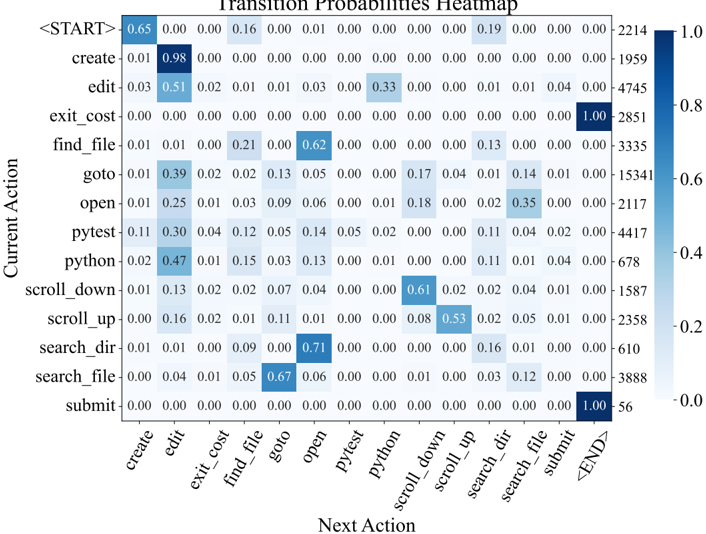
### Visual Description
## Heatmap: Transition Probabilities Between Actions
### Overview
This heatmap visualizes transition probabilities between sequential actions in a system, likely representing user interactions or workflow steps. The matrix shows the likelihood (0.0–1.0) of transitioning from a "Current Action" (rows) to a "Next Action" (columns). Darker blue shades indicate higher probabilities.
### Components/Axes
- **X-axis (Next Action)**:
`create`, `edit`, `exit_cost`, `find_file`, `goto`, `open`, `pytest`, `python`, `scroll_down`, `scroll_up`, `search_dir`, `search_file`, `submit`, `<END>`
- **Y-axis (Current Action)**:
`<START>`, `create`, `edit`, `exit_cost`, `find_file`, `goto`, `open`, `pytest`, `python`, `scroll_down`, `scroll_up`, `search_dir`, `search_file`, `submit`
- **Color Legend**:
Right-side gradient from light blue (0.0) to dark blue (1.0), labeled with numerical values (e.g., 0.0, 0.2, 0.4, 0.6, 0.8, 1.0).
### Detailed Analysis
- **<START> Row**:
- Highest probability (0.65) to transition to `create`.
- Other transitions: `edit` (0.16), `find_file` (0.19), `goto` (0.16).
- **`create` Row**:
- Dominant transition to `edit` (0.98).
- Minor transitions: `python` (0.04), `search_file` (0.01).
- **`edit` Row**:
- High probability (0.33) to `python`.
- Other transitions: `find_file` (0.02), `goto` (0.01), `open` (0.03).
- **`find_file` Row**:
- Strong transition to `goto` (0.62).
- Other transitions: `search_dir` (0.13), `search_file` (0.01).
- **`goto` Row**:
- High probability (0.39) to `open`.
- Other transitions: `search_dir` (0.17), `search_file` (0.04).
- **`open` Row**:
- Transition to `pytest` (0.18), `python` (0.09), `scroll_down` (0.06).
- **`python` Row**:
- High probability (0.47) to `submit`.
- Other transitions: `find_file` (0.03), `goto` (0.03), `open` (0.13).
- **`scroll_down` Row**:
- Dominant transition to `scroll_up` (0.61).
- **`scroll_up` Row**:
- High probability (0.53) to `search_dir`.
- **`search_dir` Row**:
- Strong transition to `open` (0.71).
- **`search_file` Row**:
- High probability (0.67) to `submit`.
- **`submit` Row**:
- Terminal state with 1.0 probability to `<END>`.
### Key Observations
1. **Sequential Flow**:
- Diagonal dominance (e.g., `create` → `edit`, `edit` → `python`, `python` → `submit`) suggests a logical workflow.
2. **Frequent Jumps**:
- `find_file` → `goto` (0.62) and `search_dir` → `open` (0.71) indicate common shortcuts.
3. **Terminal State**:
- `submit` always leads to `<END>` (1.0), confirming process completion.
4. **Low-Probability Transitions**:
- Many actions (e.g., `exit_cost`, `pytest`) have sparse transitions, suggesting rare or error states.
### Interpretation
This heatmap models user behavior in a task-oriented system, likely a code editor or IDE workflow. High probabilities on the diagonal reflect expected sequences (e.g., creating a file, editing it, running tests, and submitting). Off-diagonal high values (e.g., `find_file` → `goto`) suggest users often skip steps, possibly due to efficiency or frustration. The terminal state (`submit` → `<END>`) ensures process closure.
Notably, `search_file` has a 0.67 probability to `submit`, implying users may directly submit after searching, bypassing intermediate steps. The sparse transitions for `exit_cost` and `pytest` suggest these actions are either rare or represent dead ends.
The model captures both structured workflows and user-driven deviations, providing insights into optimizing system navigation or identifying pain points in user interactions.
</details>
Figure 22: Heatmap displaying the relative frequency of different actions being invoked after the most popular pairs of actions in SWE-agent w/ GPT-4 Turbo trajectories across all task instances.
<details>
<summary>Image 19 Details</summary>
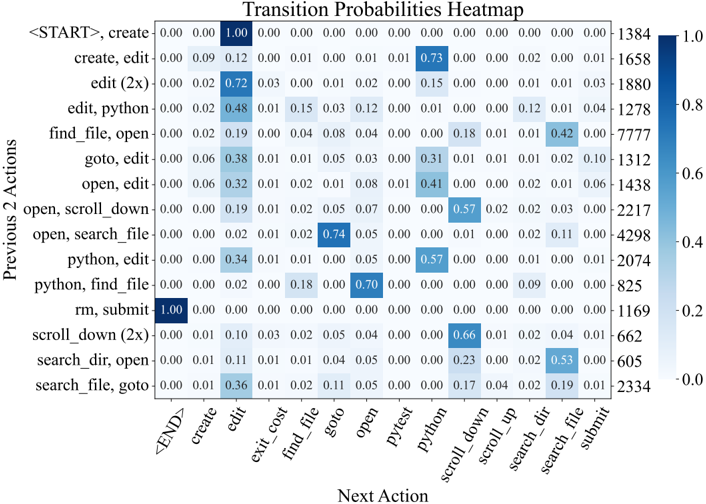
### Visual Description
## Heatmap: Transition Probabilities Heatmap
### Overview
This heatmap visualizes transition probabilities between pairs of actions in a workflow or system. Each cell represents the likelihood of transitioning from a "Previous 2 Actions" (y-axis) to a "Next Action" (x-axis). Darker blue cells indicate higher probabilities, with values ranging from 0.0 to 1.0.
### Components/Axes
- **Y-Axis (Previous 2 Actions)**:
`<START>`, `create`, `create, edit`, `edit (2x)`, `edit, python`, `find_file, open`, `goto, edit`, `open, edit`, `open, scroll_down`, `open, search_file`, `python, edit`, `python, find_file`, `rm, submit`, `scroll_down (2x)`, `search_dir, open`, `search_file, goto`.
- **X-Axis (Next Action)**:
`<END>`, `create`, `edit`, `exit_cost`, `find_file`, `goto`, `open`, `pytest`, `python`, `scroll_down`, `scroll_up`, `search_dir`, `search_file`, `submit`.
- **Color Legend**:
A gradient from light blue (0.0) to dark blue (1.0), labeled on the right axis with values like 0.0, 0.2, 0.4, 0.6, 0.8, 1.0.
### Detailed Analysis
- **Key Values**:
- `<START> → create`: 1.00 (darkest blue, indicating certainty).
- `edit → edit`: 0.72 (high self-transition probability).
- `search_dir, open → search_file, goto`: 0.36 (moderate transition).
- `python, find_file → python`: 0.18 (low probability).
- `rm, submit → <END>`: 1.00 (terminal action).
- **Trends**:
- **Diagonal Dominance**: High probabilities along the diagonal (e.g., `create → create`, `edit → edit`) suggest habitual or sequential actions.
- **Low Off-Diagonal Values**: Most transitions between dissimilar actions (e.g., `python, find_file → python`) have low probabilities (<0.2).
- **Clustered Patterns**: Groups like `edit, python` and `search_file, goto` show moderate transitions to related actions (e.g., `edit, python → edit`: 0.48).
### Key Observations
1. **Terminal Actions**: `<START>` and `rm, submit` have 100% certainty for their immediate next actions (`create` and `<END>`, respectively).
2. **Repetition Bias**: Actions like `edit` and `python` frequently repeat (0.72 and 0.57, respectively).
3. **Low-Probability Transitions**: Rare transitions include `python, find_file → python` (0.18) and `search_dir, open → search_dir` (0.11).
4. **Ambiguity in `<END>`**: The `<END>` action only appears as a next action for `rm, submit`, with no reverse transitions.
### Interpretation
This heatmap reveals a **strong habitual bias** in action sequences, where users or systems tend to repeat actions (e.g., editing files) rather than switching tasks. The presence of terminal actions (`<START>` and `rm, submit`) suggests a structured workflow with clear entry and exit points. Low probabilities for dissimilar transitions (e.g., `python, find_file → python`) imply that context-switching is uncommon, possibly due to workflow design or user behavior. The absence of reverse transitions for `<END>` highlights its role as a definitive endpoint.
The data could inform system optimization by identifying bottlenecks (e.g., low-probability transitions) or reinforcing high-probability paths (e.g., automating repetitive tasks). Outliers like `search_dir, open → search_file, goto` (0.36) suggest potential for improving navigation between related actions.
</details>
Figure 23: Heatmap displaying the relative frequency of different actions being invoked after the most popular triplets of actions in SWE-agent w/ GPT-4 Turbo trajectories across all task instances.
<details>
<summary>Image 20 Details</summary>
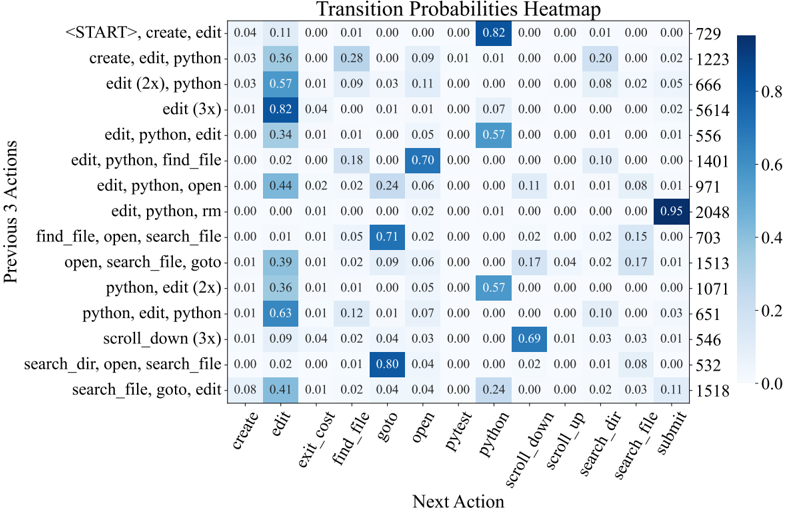
### Visual Description
## Heatmap: Transition Probabilities Heatmap
### Overview
The image is a heatmap visualizing transition probabilities between sequences of actions. It shows the likelihood of transitioning from a "Previous 3 Actions" sequence to a "Next Action" category, with probabilities ranging from 0.0 to 0.95. Darker blue cells indicate higher probabilities, while lighter blue or white cells represent lower or zero probabilities.
---
### Components/Axes
- **Y-Axis (Previous 3 Actions)**:
Labels represent sequences of three actions, e.g., `<START>, create, edit`, `create, edit, python`, `edit (2x), python`, etc. There are 15 rows in total.
- **X-Axis (Next Action)**:
Categories include `create`, `edit`, `exit_cost`, `find_file`, `goto`, `open`, `pytest`, `python`, `scroll_down`, `scroll_up`, `search_dir`, `search_file`, and `submit`. There are 15 columns.
- **Legend**:
A color scale from light blue (0.0) to dark blue (0.8+), with numerical thresholds: 0.0, 0.2, 0.4, 0.6, 0.8.
- **Right-Side Counts**:
Numerical values (e.g., 729, 1223, 666) likely represent the frequency of transitions for each cell.
---
### Detailed Analysis
- **High-Probability Transitions**:
- The first row (`<START>, create, edit`) has a 0.82 probability of transitioning to `edit`.
- The last row (`search_file, goto, edit`) has a 0.95 probability of transitioning to `submit`.
- The row `edit, python, rm` has a 0.71 probability of transitioning to `find_file`.
- **Low-Probability Transitions**:
- Many cells contain 0.00, indicating no observed transitions (e.g., `edit, python, open` → `python`).
- The row `search_dir, open, search_file` has a 0.80 probability of transitioning to `goto`.
- **Notable Counts**:
- The highest count (2048) corresponds to the 0.95 probability in the last row.
- The lowest count (532) corresponds to a 0.08 probability in the row `search_file, goto, edit`.
---
### Key Observations
1. **Dominant Transitions**:
- The `submit` action is almost certain (0.95) after the sequence `search_file, goto, edit`.
- The `edit` action is a common next step in early sequences (e.g., 0.82, 0.57, 0.63).
2. **Sparse Transitions**:
- Many actions (e.g., `pytest`, `scroll_up`) have near-zero probabilities in most contexts.
3. **Sequence Dependency**:
- Later actions in sequences (e.g., `python` in `edit, python, rm`) influence subsequent steps.
---
### Interpretation
The heatmap reveals patterns in action sequences, likely from a user interface or code editor workflow. Key insights:
- **Predictability**: The `submit` action is highly predictable after specific sequences, suggesting a structured workflow.
- **Repetition**: The `edit` action frequently follows initial sequences, indicating iterative workflows.
- **Sparsity**: Many transitions (e.g., `open` → `python`) are rare, highlighting less common user behaviors.
- **Count Correlation**: Higher counts align with higher probabilities, suggesting the data reflects observed frequencies.
This analysis could inform UI design, user behavior modeling, or workflow optimization by identifying common and rare action patterns.
</details>
Figure 24: Heatmap displaying the relative frequency of different actions being invoked after the most popular quadruplets of actions in SWE-agent w/ GPT-4 Turbo trajectories across all task instances.
<details>
<summary>Image 21 Details</summary>
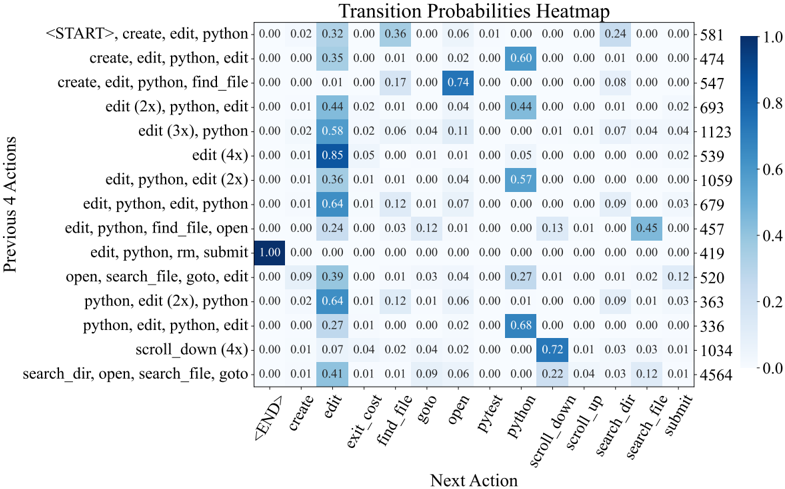
### Visual Description
## Heatmap: Transition Probabilities Between Code Editing Actions
### Overview
This heatmap visualizes transition probabilities between sequential code editing actions in a Python development environment. The matrix shows the likelihood of transitioning from a sequence of previous actions (y-axis) to a single next action (x-axis), with darker blue cells indicating higher probabilities.
### Components/Axes
- **Y-Axis (Previous 4 Actions)**:
- Sequences of up to 4 actions, including:
- `<START>, create, edit, python`
- `create, edit, python, edit`
- `create, edit, python, find_file`
- `edit (2x), python, edit`
- `edit (3x), python`
- `edit (4x)`
- `edit, python, edit (2x)`
- `edit, python, find_file, open`
- `edit, python, rm, submit`
- `open, search_file, goto, edit`
- `python, edit (2x), python`
- `python, edit, python, edit`
- `scroll_down (4x)`
- `search_dir, open, search_file, goto`
- Labels include action counts (e.g., "edit (2x)") and terminal states (e.g., `<START>`, `END>`).
- **X-Axis (Next Action)**:
- Single actions including:
- `END>`
- `create`
- `edit`
- `exit_cost`
- `find_file`
- `goto`
- `open`
- `pytest`
- `python`
- `scroll_down`
- `scroll_up`
- `search_dir`
- `search_file`
- `submit`
- **Legend**:
- Color scale from 0.0 (light blue) to 1.0 (dark blue) representing transition probabilities.
- Positioned vertically on the right side of the heatmap.
### Detailed Analysis
- **Highest Probabilities**:
- `<START>, create, edit, python` → `END>`: 1.0 (terminal state)
- `edit (2x), python` → `edit`: 0.58
- `edit, python, find_file, open` → `submit`: 0.45
- `python, edit (2x), python` → `edit`: 0.64
- `python, edit, python, edit` → `edit`: 0.68
- `scroll_down (4x)` → `scroll_down`: 0.72
- **Notable Patterns**:
- Terminal states (`END>`, `submit`) show high probabilities (0.24–1.0) after initial action sequences.
- Repetitive actions (e.g., "edit (2x)") cluster with high self-transition probabilities (0.35–0.64).
- File navigation actions (`find_file`, `goto`) show moderate transition probabilities (0.01–0.13).
### Key Observations
1. **Terminal State Dominance**: Sequences ending in `END>` or `submit` have the highest probabilities (1.0 and 0.45, respectively), suggesting these are common endpoints.
2. **Repetition Bias**: Actions with repetition counts (e.g., "edit (2x)") show stronger transitions to similar actions (e.g., "edit" at 0.64).
3. **File Operations**: File-related actions (`find_file`, `goto`) have low transition probabilities (<0.13), indicating they are less frequently followed by other actions.
4. **Scrolling Behavior**: `scroll_down (4x)` has a high self-transition probability (0.72), suggesting prolonged scrolling before other actions.
### Interpretation
This heatmap reveals patterns in code editing workflows, where:
- **Sequential Repetition** (e.g., multiple edits) reinforces similar actions, likely due to iterative coding.
- **Terminal Actions** (`END>`, `submit`) act as strong attractors after initial setup sequences.
- **File Navigation** (`find_file`, `goto`) is infrequently followed by other actions, possibly due to their role as transitional steps rather than endpoints.
- **Scrolling** dominates as a standalone action, with high self-transition probability, reflecting exploratory code review.
The data suggests that code editing workflows are characterized by repetitive action clusters, with terminal states and scrolling forming distinct behavioral patterns. The absence of high probabilities for file navigation actions implies they are often intermediate steps rather than focal points in the editing process.
</details>
each trajectory. In Figure 8, we show the results of this automated categorization. Evaluated on our validation set, the LM generated labels agree with the authors' labels on 87 %of instances.
We find that about half ( 52 . 0 %) of the unresolved instances fall into the Incorrect Implementation or Overly Specific Implementation categories, suggesting that agents' proposed solutions often simply fail to functionally address the issue or are insufficiently general solutions. Another significant category is the Failed Edit Recovery category, making up 23 . 4 %of instances, which happens when models fail to generate well-formed edits to files, which can seriously inhibit their performance. The remaining failure modes make up less than 25 %of instances, but highlight different aspects of the challenges faced by the agent in the problem-solving process.
Table 9: Descriptions of failure mode categories.
| Category | Description |
|--------------------------------|-------------------------------------------------------------------------------------------------------------------------------------------------------------------------------------------------------------------------------------------------|
| Failed to Reproduce | The agent tried but was not able to successfully reproduce the problem in the issue. |
| Failed to Find Relevant File | The agent never opened or saw the correct file. |
| Failed to Find Edit Location | The agent opened and viewed the correct file but didn't find or edit a relevant location. |
| Overly Specific Implementation | The agent made a relevant change but its solution was not sufficiently general; in this case it might solve the very specific issue suggested but it does so in a way that might change the behavior of the code in other, more general, cases. |
| Incorrect Implementation | The agent made a change to a reasonable area but their solution didn't correctly address the issue. |
| Ran Out of Budget | The agent seemed to be on the right track to a solution, but the episode ended before they could complete their changes. |
| Failed Edit Recovery | The agent went into an edit loop, making recurrent failing edits without recovering. |
| Gave Up Prematurely | The agent decides to stop solving the problem after encountering some difficulty. |
| Other | There was some other problem that prevented the agent from resolving this issue. |
## B.5 Performance Variance and Pass@k Rate
Since running SWE-agent on SWE-bench can be rather expensive, we perform, all results, unless otherwise stated, are reported using a pass@ 1 metric (% Resolved). However, we also test our main SWE-agent configuration for a higher number of runs to test the variance and pass @ k performance for k ∈ { 3 , 6 } . These results are shown in Table 10, suggesting that average performance variance is relatively low, though per-instance resolution can change considerably.
Table 10: Performance for 6 separate runs of SWE-agent with GPT-4 on SWE-bench Lite. The % Resolved rate for each individual run is shown in the first table, and the pass @ k rate in the second.
| | SWE-bench Lite | SWE-bench Lite | SWE-bench Lite | SWE-bench Lite | SWE-bench Lite | SWE-bench Lite | |
|----------|------------------|------------------|------------------|------------------|------------------|------------------|--------------|
| | Run 1 | Run 2 | Run 3 | Run 4 | Run 5 | Run 6 | Avg. |
| Resolve% | 17.33 | 18.00 | 18.00 | 18.67 | 17.33 | 18.33 | 17.94 0 . 49 |
| | Pass@1 | Pass@2 | Pass@3 | | Pass@4 | Pass@5 | Pass@6 |
| Pass @ k | 17.94 | 23.89 | 27.35 | | 29.67 | 31.33 | 32.67 |
## B.6 Patch Generations
In this section, we present some statistics and analysis around the edits generated by SWE-agent. At the end of a task episode, the edits made by SWE-agent are aggregated and saved as a single .patch file, the canonical representation for code changes of a pull request on GitHub. From these patch representations, we can quantitatively characterize an agent's generations and see how they compare to the original solutions written by human codebase maintainers.
Table 11 presents a summary of four basic statistics about the model generations. Lines added and lines removed refer to the total number of lines that were added or deleted in the patch, an indicator of the size of the modification. The number of hunks and files is more indicative of how many 'regions" of the codebase were modified. A higher number of hunks and files suggests that there are more distinct, separate places in the codebase where the patch made changes. For both 'Resolved" and 'All" categories of task instances, models tend to generate 'larger" edits (e.g., more lines added, hunks, and files) than the corresponding gold solution. Prior RAG baselines in Jimenez et al. [20] typically produce smaller edits on average. The source of this increase for agent-generated solutions can largely be attributed to additional reproduction code.
Table 11: We show the (median) / (mean) value for several statistics characterizing patch generations. We calculate these statistics across two dimensions. First, the 'Resolved" / 'All" labels denote whether the patch resolved the issue. Second, for the task instances specific to each model, we calculate the same statistics across the gold patches. To diminish the effect of outliers, we calculate these statistics based on values falling within within the 90 th percentile of the distribution.
| Model | Outcome | Lines + | Lines - | Hunks | Files |
|----------------------------|--------------|-------------------------|-----------------------|-----------------------|-----------------------|
| SWE-agent w/ GPT-4 Turbo | Resolved Any | 3.0 / 5.7 12.0 / 16.58 | 1.0 / 1.32 1.0 / 1.35 | 1.0 / 1.52 2.0 / 1.83 | 1.0 / 1.22 1.0 / 1.53 |
| Gold | Resolved Any | 2.0 / 3.58 7.0 / 11.67 | 1.0 / 1.98 2.0 / 4.05 | 1.0 / 1.3 2.0 / 2.45 | 1.0 / 1.0 1.0 / 1.24 |
| SWE-agent w/ Claude 3 Opus | Resolved Any | 3.0 / 5.09 11.0 / 15.25 | 1.0 / 1.59 1.0 / 1.79 | 1.0 / 1.56 2.0 / 2.14 | 1.0 / 1.26 2.0 / 1.87 |
| Gold | Resolved Any | 3.0 / 3.91 | 1.0 / 1.94 | 1.0 / 1.4 | 1.0 / 1.0 |
| | | 6.0 / 10.68 | 2.0 / 3.61 | 2.0 / 2.22 | 1.0 / 1.13 |
When comparing the 'Resolved" and 'All" categories, we see that successfully resolved edits are relatively smaller than the original distribution. This trend is consistent with the RAG based solutions; issues that require multiple edits across a codebase remains challenging for agents.
## B.7 HumanEvalFix Evaluation
In this section, we include further discussion about our evaluation of SWE-agent on HumanEvalFix. We choose to evaluate on the HumanEvalFix task because it focuses on code editing and debugging, which was empirically demonstrated in Muennighoff et al. [32] to be a more difficult task for LMs (as reported in their work, GPT 4 scores 78 . 3 %on HumanEval, compared to 47 . 8 %on HumanEvalFix). The code editing task can also be thought of as a 'subtask" in SWE-bench; being able to identify and fix bugs is a major part of software engineering.
We adopt the HumanEvalFix dataset ( 164 problems per language) to be compatible with the SWEagent setting. Following the documentation in Muennighoff et al. [32], SWE-agent is initialized in a directory with a single file containing a buggy code snippet and example test(s) if available. It is then asked to edit the code and verify its fixes. The configuration file is identical to the one used for SWE-bench, with the exception of a language-specific demonstration. For this task, localization and navigating a large codebase are not necessary; the main focus is on generating the correct edit. SWE-agent achieves the best performance on the HumanEvalFix benchmark for three of the languages we evaluate on, as shown in Table 2. Figure 25 also suggests that the large majority of task instances are solved within the first 10 turns.
Figure 25: Similar to Figure 14, we show the distribution of the number of turns for trajectories corersponding to solved task instances from the HumanEvalFix dataset.
<details>
<summary>Image 22 Details</summary>
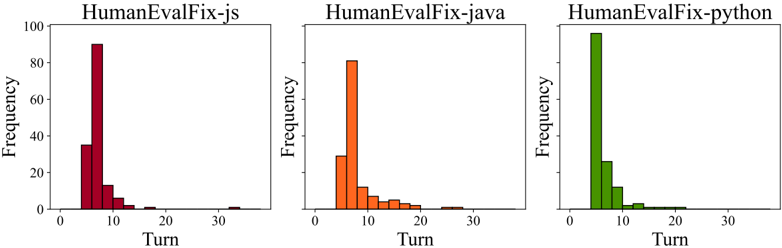
### Visual Description
## Bar Charts: HumanEvalFix Performance Across Languages
### Overview
The image displays three bar charts comparing the frequency of "Turns" across three programming languages: JavaScript (red), Java (orange), and Python (green). Each chart represents a different language's performance in the HumanEvalFix framework, with frequency measured on the y-axis (0–100) and turn numbers on the x-axis (0–30).
### Components/Axes
- **X-axis (Turn)**: Discrete intervals at 0, 5, 10, 15, 20, 25, 30.
- **Y-axis (Frequency)**: Linear scale from 0 to 100.
- **Legends**:
- Red = HumanEvalFix-js
- Orange = HumanEvalFix-java
- Green = HumanEvalFix-python
### Detailed Analysis
#### HumanEvalFix-js (Red)
- **Turn 5**: ~35 frequency
- **Turn 10**: ~90 frequency (peak)
- **Turn 15**: ~5 frequency
- **Turn 20**: ~2 frequency
- **Trend**: Sharp peak at turn 10, rapid decline afterward.
#### HumanEvalFix-java (Orange)
- **Turn 5**: ~30 frequency
- **Turn 10**: ~80 frequency (peak)
- **Turn 15**: ~5 frequency
- **Turn 20**: ~2 frequency
- **Trend**: Moderate peak at turn 10, gradual decline.
#### HumanEvalFix-python (Green)
- **Turn 5**: ~100 frequency (peak)
- **Turn 10**: ~25 frequency
- **Turn 15**: ~5 frequency
- **Turn 20**: ~2 frequency
- **Trend**: Highest initial peak at turn 5, steep drop-off.
### Key Observations
1. **Peak Frequency**:
- Python shows the highest frequency at turn 5 (~100), followed by JavaScript (~90 at turn 10) and Java (~80 at turn 10).
2. **Decline Pattern**: All languages exhibit a sharp drop in frequency after their peak turn, with minimal activity beyond turn 20.
3. **Turn 10 Disparity**: JavaScript and Java have significantly higher frequencies at turn 10 compared to Python (~90 vs. ~25).
### Interpretation
The data suggests that **Python** prioritizes early-stage problem resolution (peak at turn 5), while **JavaScript** and **Java** focus more on mid-stage turns (turn 10). The rapid decline across all languages implies diminishing returns or resolution efficiency after initial turns. JavaScript’s peak at turn 10 may indicate delayed issue identification or iterative debugging, whereas Python’s early resolution could reflect streamlined debugging processes. The uniformity in post-peak decline highlights a potential bottleneck in later stages of the HumanEvalFix workflow.
</details>
## B.8 Dataset Information
In the following Table 12, we provide descriptions of the two datasets that we use for evaluation: SWE-bench [20] and HumanEvalFix [32]. Both datasets have been released under permissive software licenses that allow for evaluation use, and can be used in proprietary systems.
Table 12: Information about each of the datasets that we evaluate SWE-agent on.
| Dataset | Released | License | Splits | Count | Languages | GitHub Repo |
|--------------|------------|-----------|---------------|--------------|--------------------------------|---------------------------|
| SWE-bench | 10/10/2023 | MIT | Test Lite Dev | 2294 300 225 | Python | princeton-nlp/ SWE-bench |
| HumanEvalFix | 07/23/2023 | MIT | Test | 164 | Python, JS, Go Java, C++, Rust | bigcode-project/ octopack |
## B.9 Miscellaneous
In this section, we include additional minor analyses around agent behavior and their generations.
Agents are better at localizing files than BM25. The interactive setting also enables agents to identify the correct file(s) to edit more often compared to the RAG baselines in Jimenez et al. [20]. To measure this, we calculate the F1 score between the set of [edited, removed] files by the agent's prediction versus the gold patch. SWE-agent w/ GPT-4 Turbo achieves an F1 score of 59 . 05 %, while BM25 w/ Claude 3 Opus produces an F1 score of just 45 . 47 %.
Most resolved task instances are intentionally submitted. There are four ways a task episode ends.
- 'Submit" refers to a task episode that ends when the agent generates the submit command.
- 'Exit Cost (Submit)" refers to the scenario where the episode ends because the cost limit was hit, and the changes so far are gathered and submitted as an edit.
- 'Exit Cost (No Submit)" refers to when the cost limit was hit and no edit 's were made, so there was nothing to submit. In this scenario, the instance is guaranteed to be unresolved.
- 'Early Exit" refers to when the task episode terminates because an agent issued too many malformed responses in a row. Any changes are submitted as an edit.
Table 13 shows the counts for the number of trajectories that ended on these four different outcomes, categorized across the agent, SWE-bench split, and whether or not that task instance was resolved. For SWE-agent with GPT-4 Turbo, the majority of 'All" task instances are submit . For the trajectories corresponding to'All" task instances by SWE-agent with Claude 3 Opus, slightly less than 50 %of task instances are submitted, while the slight majority are auto-submitted when the cost limit is hit.
Table 13: This table showcases the counts for the four ways ('Submit", 'Exit Cost (Submit)", 'Exit Cost (No Submit)", 'Early Exit") a task episode could conclude.
| Model | Split | Outcome | Submit | Exit Cost (Submit) | Exit Cost (No Submit) | Early Exit |
|----------------------------|-----------|---------------------------|-----------------|----------------------|-------------------------|--------------|
| SWE-agent w/ GPT-4 Turbo | Full Lite | Resolved All Resolved All | 266 1589 50 203 | 20 630 4 95 | 0 48 0 2 | 0 1 0 0 |
| SWE-agent w/ Claude 3 Opus | Full Lite | Resolved All Resolved All | 206 882 32 133 | 35 1048 3 156 | 0 73 0 11 | 0 1 0 0 |
However, these trends do not hold for 'Resolved" task instances. For SWE-agent with both models, the large majority of these task instances are submit . Reiterating the conclusion in Section 5.2 and prior visualizations in Section B.3, we see here again that resolved task instances often imply that the agent is able to produce and verify an edit within the allotted number of turns. The SWE-agent ACI is also effective at eliciting well-formed thoughts and actions from agents. Across all runs, there are only two 'Early Exit" occurrences, where the episode terminated because the agent generated too many malformed responses in a row.
Finally, Table 13 also upholds an expected trend. Task instances that finish with a submit action are more likely to be resolved than those that are cutoff by cost. For instance, for SWE-agent with GPT-4 Turbo on full SWE-bench, 14 . 3 %of task instances that end with a submit are resolved, which is much higher than 3 . 1 %for those finishing on exit\_cost .
## C Prompts
In this section, we go through the prompt templates that make up the agent's history, discussing them in the order of presentation to SWE-agent. Per template, we describe its purpose, walk through its content, and note any additional motivations that influenced how we wrote the template. The companion figures of template content are all drawn from our default configuration, using SWE-agent w/ GPT-4.
The template content can and should be adapted slightly to fit the agent's intended use case. The purpose of this section is to describe our thought process for how we designed each template for these tasks to serve as reference for future work. Across templates, we find that providing tips which tell agents to not make specific mistakes, avoid common pitfalls, and use helpful execution signals are effective for eliciting more successful problem solving.
Prompt Workflow. We present Figure 26 which shows the order in which different prompt templates are invoked. This flow of prompts reflects the logic that generates trajectories similar to the one that is visualized in Figure 9.
Figure 26: The flow of prompt templates throughout a single SWE-agent task instance episode. The system, demonstration, and issue templates are shown all together at the beginning of the task episode, followed by turn-specific prompts that are shown depending on whether the agent response is well-formatted and whether the action has standard output.
<details>
<summary>Image 23 Details</summary>
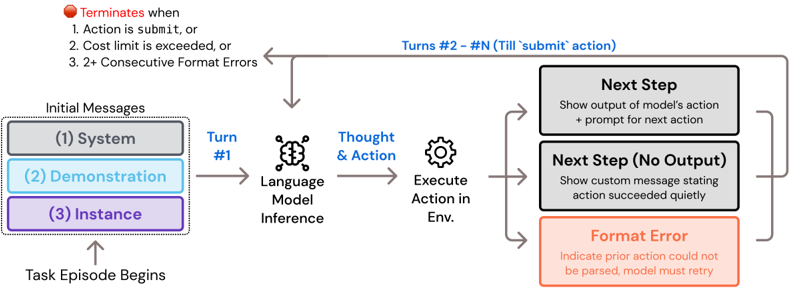
### Visual Description
## Flowchart: Task Execution Process with Validation and Termination Conditions
### Overview
The flowchart illustrates a structured task execution process involving iterative steps, validation checks, and termination conditions. It begins with "Task Episode Begins" and progresses through a sequence of actions, thoughts, and environmental interactions, terminating under specific failure or success criteria.
### Components/Axes
1. **Initial Messages Section** (Top-left):
- **System** (Gray box): Contains system-level instructions.
- **Demonstration** (Blue box): Provides example or reference data.
- **Instance** (Purple box): Represents the specific task instance.
- **Labels**: "System," "Demonstration," "Instance" with color-coded boxes.
2. **Turn #1** (Blue text): Marks the first iteration of the process.
3. **Language Model Inference** (Central):
- **Thought & Action** (Gear icon): Represents decision-making and action planning.
- **Execute Action in Env.** (Gear icon): Indicates action execution in the environment.
4. **Next Step** (Gray box):
- **Output**: "Show output of model’s action + prompt for next action."
- **No Output**: "Show custom message stating action succeeded quietly."
5. **Format Error** (Red box): Indicates parsing failures requiring retries.
6. **Termination Conditions** (Top-right):
- **Red stop sign icon**: Lists three termination triggers:
1. Action is `submit`, or
2. Cost limit exceeded, or
3. 2+ Consecutive Format Errors.
7. **Loop Logic** (Arrows):
- **Blue text**: "Turns #2 – #N (Till `submit` action)" indicates iterative cycles until termination.
### Detailed Analysis
- **Flow Direction**:
- Starts at "Task Episode Begins" → Initial Messages → Turn #1 → Thought & Action → Execute Action → Next Step (with conditional branches).
- Branches to "Next Step (No Output)" or "Format Error" based on action validity.
- Loops until termination conditions are met.
- **Color Coding**:
- **Gray**: System, Next Step (No Output).
- **Blue**: Demonstration, Turn #1, Loop Logic.
- **Purple**: Instance.
- **Red**: Format Error, Termination Conditions.
- **Key Textual Elements**:
- **Initial Messages**: Structured as a vertical stack of three labeled boxes.
- **Termination Conditions**: Explicitly listed with a red stop sign icon.
- **Loop Logic**: Arrows connect "Next Step" back to "Thought & Action" with a counter ("Turns #2 – #N").
### Key Observations
1. **Iterative Process**: The flowchart emphasizes repetition ("Turns #2 – #N") until a valid `submit` action occurs.
2. **Error Handling**: Format errors trigger retries, while cost limits or excessive errors terminate the process.
3. **Quiet Success**: Successful actions without output proceed silently to the next step.
4. **Validation Gates**: Each action is checked for format validity and cost constraints before proceeding.
### Interpretation
This flowchart models a robust task execution framework with built-in safeguards:
- **Validation**: Ensures actions adhere to format rules and budget constraints.
- **Iteration**: Allows retries for format errors but limits persistence via cost/termination thresholds.
- **Transparency**: Provides clear feedback loops (e.g., "Next Step" outputs) and termination criteria.
- **Efficiency**: Balances thoroughness (via demonstrations and instances) with resource management (cost limits).
The process prioritizes correctness over speed, terminating only when explicit success (`submit`) or critical failure (cost/errors) occurs. The color coding and structured flow enhance readability, guiding users through decision points and error recovery.
</details>
System Template. The system template describes the interactive task setting, the commands at the agent's disposal, and the expected response format. It is the first message for any episode, does not change in content across task instances, and is not removed or collapsed at any point from the message history. The agent is told of the general task setting, which is a command line that comes with a special file viewer interface. After this, the agent is presented the command documentation, which shows a usage example and docstring for every custom command, mirroring the content of Figure 27. As discussed before, from manual observation, we find that agents need a lot of support to make effective use of the edit command.
## System Prompt
SETTING: You are an autonomous programmer, and you're working directly in the command line with a special interface.
The special interface consists of a file editor that shows you 100 lines of a file at a time. In addition to typical bash commands, you can also use the following commands to help you navigate and edit files.
COMMANDS: {documentation}
Please note that THE EDIT COMMAND REQUIRES PROPER INDENTATION. If you'd like to add the line ' print(x)' you must fully write that out, with all those spaces before the code! Indentation is important and code that is not indented correctly will fail and require fixing before it can be run.
## RESPONSE FORMAT:
(Open file: <path>) <cwd> $
Your shell prompt is formatted as follows:
You need to format your output using two fields; discussion and command. Your output should always include one discussion and one command field EXACTLY as in the following example:
<details>
<summary>Image 24 Details</summary>
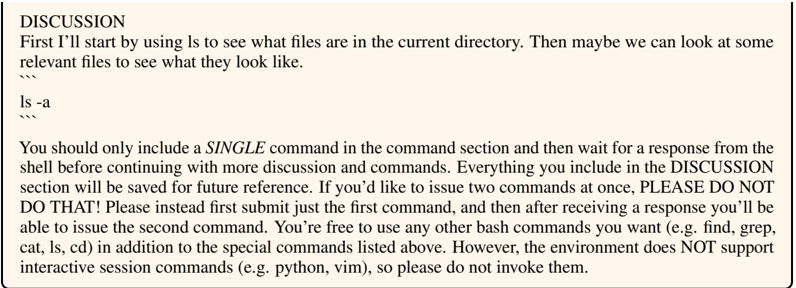
### Visual Description
## Screenshot: Terminal Session Interface
### Overview
The image depicts a terminal interface with a discussion and command section. The discussion outlines instructions for interacting with the system, while the command section demonstrates a file listing operation.
### Components/Axes
- **Discussion Section**: Contains textual instructions and warnings.
- **Command Section**: Shows terminal commands (`ls -a`) and their output.
- **Environment Constraints**: Explicitly states unsupported interactive session commands (e.g., Python, Vim).
### Content Details
1. **Discussion Text**:
- "First I'll start by using `ls` to see what files are in the current directory. Then maybe we can look at some relevant files to see what they look like."
- "You should only include a SINGLE command in the command section and then wait for a response from the shell before continuing with more discussion and commands."
- "Everything you include in the DISCUSSION section will be saved for future reference."
- "If you’d like to issue two commands at once, PLEASE DO NOT DO THAT! Please instead first submit just the first command, and then after receiving a response you’ll be able to issue the second command."
- "However, the environment does NOT support interactive session commands (e.g. python, vim), so please do not invoke them."
2. **Command Section**:
- Command: `ls -a`
- Output:
</details>
Figure 27: The system prompt for SWE-agent describes the environment. The documentation field is populated with brief description of all enabled commands, similar to Table 4.
An agent will occasionally generate an edit with either the wrong level of indentation or incorrectly specified line numbers. Because of this, we include a note telling the agent to pay attention to proper indentation. Finally, the system prompt describes what the agent's response should look like, communicated with an example (e.g. JSON format, XML delimiters) followed by a paragraph reinforcing the importance of issuing a single thought/action pair per turn. Because of the constraints imposed by Docker containers, we include one last point about the command line environment not supporting any interactive session commands, such as vi or python . The system template does not introduce any task instance specific information.
Demonstration Template. If provided, the demonstration template immediately follows the system template as the second message showing the agent a trajectory which resulted in the successful resolution of a task instance from the development set. As confirmed by the ablation in Table 3, including a demonstration slightly helps agents with understanding proper command usage and reduces the rate of errant responses. Rather than being written out entirely like the system template, the demonstration template is put together based on two fields as shown in the configuration file discussed in Section A.3. First, the demonstrations argument points at 1+ .traj file(s), each containing a multi-turn, SWE-agent style history of interactions.
Second, the demonstration\_template and put\_demos\_in\_history arguments control how the demonstration is represented in the message history. If the put\_demos\_in\_history argument is set True , every turn of the demonstration trajectory is used as a separate message in the history. The alternative is to write out the entire demonstration as a single message, wrapped in a natural language instruction indicating it is a demonstration (this is the method that is displayed in Figure 28). The effectiveness of each method varies by model. The first method of adding a demonstration as separate messages can be preferable because it gives an agent the impression that it has already solved a task instance and is working on the next one. However, for a different model, it can be confusing to have the contexts from two tasks in a single trajectory, which is why the second method of explicitly telling the model that it's being given a demonstration can be better.
<details>
<summary>Image 25 Details</summary>
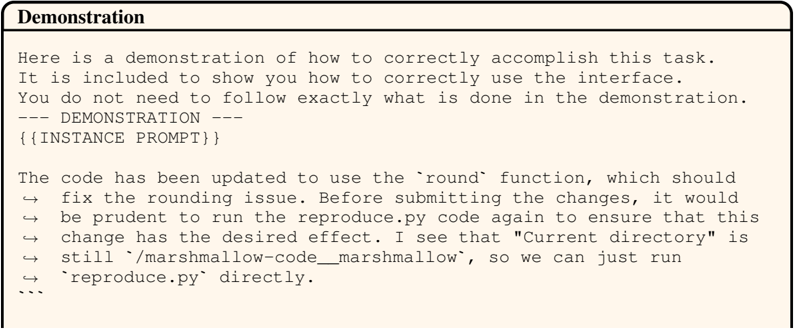
### Visual Description
## Screenshot: Code Demonstration Interface
### Overview
The image displays a technical demonstration interface with textual instructions and code snippets. It provides guidance on correctly using an interface for a specific task, emphasizing that users are not required to replicate the demonstration exactly. The content includes code comments, a code snippet placeholder, and notes about code updates and directory structure.
### Components/Axes
- **Header**: "Demonstration" (bold text at the top)
- **Main Text Block**: Instructions and explanations about the demonstration
- **Code Snippet Placeholder**: Marked with `--- DEMONSTRATION ---` and `{INSTANCE PROMPT}`
- **Code Update Notes**: Comments about using the `round` function and directory structure
### Content Details
1. **Header Text**:
"Demonstration" (bold, top-left)
2. **Main Instructions**:
- "Here is a demonstration of how to correctly accomplish this task."
- "It is included to show you how to correctly use the interface."
- "You do not need to follow exactly what is done in the demonstration."
3. **Code Snippet Section**:
- Header: `--- DEMONSTRATION ---`
- Code Placeholder: `{INSTANCE PROMPT}` (enclosed in triple backticks)
4. **Code Update Notes**:
- "The code has been updated to use the `round` function, which should fix the rounding issue."
- "Before submitting the changes, it would be prudent to run the `reproduce.py` code again to ensure that this change has the desired effect."
- "I see that 'Current directory' is still `/marshallow-code_marshallow`, so we can just run `reproduce.py` directly."
### Key Observations
- The demonstration emphasizes **correct interface usage** without requiring exact replication.
- The `round` function was added to resolve a rounding issue, but testing via `reproduce.py` is recommended.
- The directory structure (`/marshallow-code_marshallow`) allows direct execution of `reproduce.py`.
### Interpretation
This interface serves as a **template for technical demonstrations**, balancing instructional guidance with flexibility. The inclusion of the `round` function suggests prior issues with numerical precision, while the directory note implies a standardized project structure. The recommendation to rerun `reproduce.py` highlights the importance of validation in code changes. The absence of strict replication requirements indicates the demonstration is illustrative rather than prescriptive.
</details>
```
```
Figure 28: A simplified demonstration template showing how demonstrations are provided to the model as a single message. Here we show only the final 3 turns in the demonstration for brevity.
We are unsure if demonstrations actually help agents understand the nuances of domain specific problem solving. Because of the diversity of software engineering issues, we think the role the demonstration plays is primarily to help the agent learn to issue properly formatted commands. Prior work has demonstrated that fine tuning may have the potential to imbue agents with a certain degree of expertise around how to adaptively solve task instances that may vary in terms of what strategy is most successful.
Instance Template. The instance template introduces the agent to the task instance. The problem statement is shown, followed by a brief set of instructions that reiterate important points from the system template. These points are the one thought/action per-turn requirement, mentioning the lack of support for interactive shell commands, and a reminder of the importance of editing indentation. Finally, a notably effective part of the instance template is the inclusion of tips which serve as an additional guidelines for how to operate successfully in the bash environment, shown in Figure 29. These tips were developed manually and iteratively; after running SWE-agent with a particular configuration on the development set, we manually looked at the trajectories for failure modes. The tips were born out of these failures, and through repeated inspection, we found that such tips did reduce the frequency of errant problem solving strategies that they are meant to address. While our manual approach to writing tips certainly does not scale, representing feedback for common mistakes as tips is surprisingly effective. Developing better methods for this process of identifying failure modes and writing natural language instructions that describe the correct alternative behavior could be an avenue to better performance for future SWE-agent based systems. Finally, at the end of the message, the agent is presented with a command line prompt indicating that the task has begun and that the agent should issue its first command.
```
```
INSTRUCTIONS: Now, you're going to solve this issue on your own. Your terminal session has started and you're in the repository's root directory. You can use any bash commands or the special interface to help you. Edit all the files you need to and run any checks or tests that you want. Remember, YOU CAN ONLY ENTER ONE COMMAND AT A TIME. You should always wait for feedback after every command. When you're satisfied with all of the changes you've made, you can submit your changes to the code base by simply running the submit command. Note however that you cannot use any interactive session commands (e.g. python, vim) in this environment, but you can write scripts and run them. E.g. you can write a python script and then run it with python <script\_name>.py . ↪ → ↪ → ↪ → ↪ → ↪ → ↪ → ↪ → ↪ → ↪ → ↪ → ↪ →
(Open file: {open\_file}) (Current directory: bash-$
```
```
Figure 29: The instance template. This message shows the task instance's problem statement (referenced by the {issue} field), shows additional task instance-specific information, and provides a set of tips suggesting recommended problem solving approaches and pitfalls to look out for.
Next Step Template. Assuming an agent's response is well formed and contains an action, there are two simple templates used to present the corresponding output of the agent's action, as shown in Figure 30. If an agent's action produces some standard output, the agent is simply shown this output with a command line prompt to indicate that the agent should respond with the next action.
<details>
<summary>Image 26 Details</summary>

### Visual Description
## Text Template: Next Step Template
### Overview
The image displays a structured text template titled **"Next Step Template"**, containing placeholders for technical operations. It includes a labeled observation block, file path references, and a command-line prompt.
### Components/Axes
1. **Title**: "Next Step Template" (top of the image).
2. **Observation Block**:
- Header: `{OBSERVATION}` (enclosed in curly braces).
- Content:
- `(Open file: /path/to/open/file.py)`
- `(Current directory: /path/to/cwd)`
3. **Command Prompt**: `bash-$` (at the bottom, indicating a terminal interface).
### Detailed Analysis
- **Placeholders**:
- `/path/to/open/file.py`: Example path for a Python file to be opened.
- `/path/to/cwd`: Example path for the current working directory.
- **Structure**:
- The template uses parentheses to denote actionable steps or observations.
- The `bash-$` prompt suggests the template is intended for use in a Unix-like terminal environment.
### Key Observations
- The template is generic, with no specific values filled in (e.g., paths are placeholders).
- The use of `bash-$` implies the next step involves executing a command in the terminal.
- The observation block emphasizes file operations and directory context.
### Interpretation
This template likely serves as a guide for scripting or automating file-related tasks. The placeholders (`/path/to/...`) require customization for specific use cases. The `bash-$` prompt indicates that after defining paths, the user would input a command (e.g., `python file.py`) to execute the operation. The structure prioritizes clarity for technical workflows, emphasizing context (file paths) and action (command execution).
No numerical data, charts, or diagrams are present. The focus is on textual instructions for a technical process.
</details>
Figure 30: The environment's 'next step" template. This is emitted after each observation to inform the model of the current state of the shell and programs.
However, if an agent's action runs silently and produces no output (e.g. rm abc.py , touch abc.py ), we found that simple showing no output along with a prompt can be confusing for agents to interpret, and it will often run additional, unnecessary commands to determine the effect of the prior action. To guard against this situation, the agent is informed verbosely that the command ran successfully and did not produce output. While the System, Demonstration, and Instances template are only used a single time, the next step template is used repeatedly. In the SWE-agent configuration described in this work, the next step templates are fairly simple, as they essentially just add the command line prompt to the end of the execution standard output. We have not explored other variations to this style.
Collapsed Observation Template. As shown in Figure 9 and discussed in Section 2, old observations are collapsed ; meaning that the structure and order of the agent's interaction history is preserved, but the content of old observations are replaced with a one-line placeholder. This summary simply states that the observation is omitted with the number of lines that were removed, as shown in Figure 31.
<details>
<summary>Image 27 Details</summary>

### Visual Description
## Template: Environment Response (collapsed) Template
### Overview
The image depicts a minimalist template structure labeled as an "Environment Response (collapsed) Template." It contains no graphical elements, data visualizations, or interactive components. The template appears to be a placeholder or scaffold for displaying environmental response data, with explicit indication that prior output has been omitted.
### Components/Axes
- **Header**:
- Title: "Environment Response (collapsed) Template" (bold, centered, top of the image).
- **Body**:
- Text: "Old output omitted (101 lines)" (monospaced font, centered, below the title).
- **Footer**:
- No visible elements.
### Detailed Analysis
- **Textual Content**:
- The title explicitly references a "collapsed" state, implying prior expansion of content.
- The note "Old output omitted (101 lines)" quantifies the omitted data, suggesting the original output exceeded a display threshold (e.g., 100 lines).
- **Structural Layout**:
- The template uses a two-line structure: a header for labeling and a body for status messaging.
- No axes, legends, or data series are present, confirming the absence of numerical or categorical data.
### Key Observations
1. The template is designed for scenarios where environmental response data would otherwise exceed practical display limits.
2. The omission of 101 lines indicates a strict truncation policy (e.g., retaining only the first 100 lines).
3. The use of "collapsed" implies a user interface feature (e.g., expandable/collapsible sections) not visible in this static image.
### Interpretation
This template serves as a UI/UX design element for managing large datasets in environmental response systems. The omission of 101 lines suggests either:
- A performance optimization to prevent interface overload.
- A user-configurable threshold for data visibility.
- A placeholder for dynamic content that is currently inactive.
The absence of data or interactive elements implies this is a static mockup or a collapsed view of a larger system. The template’s simplicity prioritizes clarity over detail, likely intended for debugging or documentation purposes.
</details>
Figure 31: A collapsed environment response. The content of old observations are replaced with this template.
The purpose of collapsing old observations is twofold. First, it simply reduces the number of tokens needing to be processed at each interaction step. Second, by removing old observations' content, it can also reduce the presence of outdated or duplicate information, such as directory and file contents or command output. We think that both of these purposes can serve to improve agent performance.
Error Message Template. An agent's response is not always well formed. As discussed, an agent is generally expected to respond with a single thought and action per turn. In our work, we experimented with asking the agent to generate one of three different styles of responses for communicating one thought and one action (same type of response across any single episode).
1. A string where the action is wrapped as a markdown-style code block (```).
3. An XML style generation with ' < thought > " and ' < action > " delimiters.
2. A JSON style dictionary with 'thought" and 'action" keys.
On occasion, an agent may generate a response that doesn't conform to the requested format. If this occurs, we show an error message to the agent indicating that the prior message was malformed and to issue another response that does not make the same mistake, as presented in Figure 32. If a model generates 3 malformed responses in a row, the episode will terminate early.
Figure 32: The environment's error message. This is emitted if a model generation doesn't conform to the thought-action format suggested.
<details>
<summary>Image 28 Details</summary>
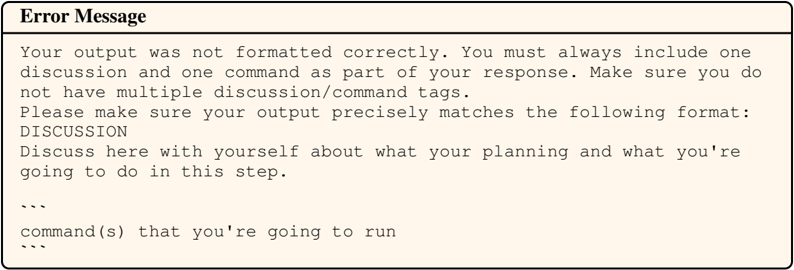
### Visual Description
## Error Message: Formatting Guidelines
### Overview
The image displays a structured error message template designed to enforce specific formatting rules for user responses. It emphasizes the inclusion of exactly one discussion and one command per output, with strict adherence to predefined tags.
### Components/Axes
- **Title**: "Error Message" (bold, top-left)
- **Sections**:
1. **Error Explanation**: Text block detailing formatting requirements.
2. **Required Format**: Structured template with placeholders for discussion and commands.
- **Tags**:
- `DISCUSSION` (all caps, bold)
- `command(s)` (italicized, lowercase)
### Detailed Analysis
1. **Error Explanation**:
- Users must include **one discussion** and **one command** per response.
- Prohibits multiple discussion/command tags.
- Emphasizes precise formatting matching the provided template.
2. **Required Format**:
- **DISCUSSION**: A self-reflective section for planning and step-by-step reasoning.
- **command(s)**: Placeholder for executable commands, enclosed by triple backticks (
</details>
Another context management trick is that if models generate a malformed response, but then subsequently respond with a valid one, the message history is modified such that the action and response correspond to the malformed generation is removed. This kind of de-noising reduces unnecessary context and helps prevent future malformed generations. Each well-formatted response becomes an additional in-context demonstration of how to interact with the environment correctly; this 'momentum' of correct responses is effective for helping agents continue to issue correct actions at later turns in trajectories when there is a lot of information in the message history.
## D Qualitative Analysis
We choose 2 successful and unsuccessful task instances from SWE-bench Lite to perform a full qualitative analysis, based on the trajectories generated by the default configuration using GPT-4 Turbo.
## Analysis for psf/requests-2317
Issue Summary. The agent was tasked with resolving a problem in the requests library where the method variable, a bytes object (e.g., b'GET' ), was being incorrectly converted to a literal string ( "b'GET'" ) by the builtin\_str function. This caused the requests library to raise a 404 Not Found response due to the incorrect method string. The issue was observed in Python 3.4 and not in Python 2.6, indicating a version-specific difference in handling bytes.
## Interaction Summary
1. Locate the Target File : The agent began by finding the sessions.py file in the requests library directory. It correctly identified that the relevant file was in the requests directory rather than the build directory.
2. Search for the Issue : It opened sessions.py and used the search\_file command to locate the builtin\_str function call. It found the relevant line (line 428) where the method variable was being converted.
3. Edit the Code : The agent edited the sessions.py file to check if the method was a bytes object and, if so, decoded it to ASCII before applying the builtin\_str function.
4. Test Changes : To verify the fix, the agent created a new file, reproduce\_issue.py , which attempted to send an HTTP request using a binary method string. The script printed the response status code to check if the request was handled correctly. It ran the reproduce\_issue.py script, which executed successfully and received a 200 OK response, indicating that the issue was resolved.
5. Clean Up and Submit : Finally, the agent deleted the reproduction script and submitted the changes to the code base.
Evaluation. Upon evaluation, the agent's proposed changes successfully pass the instance's unit tests. When comparing the agent's generation to the 'gold patch', we notice that the gold patch uses the to\_native\_string function, defined in requests/utils.py#L655, which behaves identically to the agent's proposed changes. Ultimately, while the agent successfully resolves the issue, it fails to use existing utility functions, which could lead to less maintainable or portable code in production.
Figure 33: Trajectory for instance psf\_\_requests-2317 .
## Issue
psf\_\_requests-2317
We're currently solving the following issue within our repository. Here's the issue text:
method = builtin\_str(method) problem
ISSUE:
In requests/sessions.py is a command:
Converts method from method = builtin\_str(method)
b'GET'
"b'GET'"
to
Which is the literal string, no longer a binary string. When requests tries to use the method "b'GET'', it gets a 404 Not Found response.
I'm not sure if this is a bug with neutronclient or a bug with requests, but I'm starting here. Seems if requests handled the method value being a binary string, we wouldn't have any problem.
I am using python3.4 and python-neutronclient (2.3.9) with requests (2.4.3). neutronclient is broken because it uses this "args = utils.safe\_encode\_list(args)" command which converts all the values to binary string, including method.
Also, I tried in python2.6 and this bug doesn't exist there. Some difference between 2.6 and 3.4 makes this not work right.
```
(Open file: n/a) (Current directory: /psf_requests) bash-/$
```
## SWE-agent
## psf\_\_requests-2317
To address the issue, we first need to replicate the behavior described. The issue mentions that the 'builtin\_str' function in 'requests/sessions.py' is converting a binary string method like 'b'GET'' into the literal string ''b'GET''', which is incorrect. We should start by locating the 'sessions.py' file within the 'requests' library to examine the code around the 'builtin\_str' function call. Let's begin by finding the 'sessions.py' file in the current repository.
```
I'm sorry, but it seems like you've sent me a file with no content. Could you please provide the image or text that you'd like me to analyze?
```
## Observation
```
Found 2 matches for "sessions.py" in /psf_requests:
/psf_requests/build/lib/
(Open file: n/a)
(Current directory: /psf_
bash-$ </doc>
```
## SWE-agent
## psf\_\_requests-2317
## psf\_\_requests-2317
We have found two matches for 'sessions.py'. The one in the 'build/lib/requests' directory is likely a build artifact, and the one we're interested in is probably '/psf\_\_requests/requests/sessions.py'. Let's open this file to inspect the code around the 'builtin\_str' function call.
open requests/sessions.py
## Observation
## psf\_\_requests-2317
```
<doc> Observation
[File: /psf_requests/requests-2317
1: # --+-- coding: utf-8 --+--
2: ...
3: """
4: requests.session
5: """
6: This module provides a Session object to manage and persist
7: ...
8:requests (cookies, auth, proxies).
9: ...
10:"""
11:import os
12:from collections import defaultdict
13:from datetime import datetime
14:from .auth import BasicAuth
15:from .compat import urllib.parse,
16:urllib.str </doc>
```
```
```
```
```
## SWE-agent
## psf\_\_requests-2317
The 'sessions.py' file is now open, but the 'builtin\_str' function call is not visible in the first 100 lines of the file. Since we don't have the exact line number where the 'builtin\_str' function is called, we'll need to search within the file for it.
Let's use the 'search\_file' command to find the usage of 'builtin\_str' within 'sessions.py'.
```
I'm sorry for any confusion, but it seems like you've provided a string of characters that doesn't form a valid question or request for information. Could you please provide more context or clarify what you'd like to know? I'm here to help!
```
## Observation
## psf\_\_requests-2317
```
Found 2 matches for "builtin_str" in /psf_requests/requests/sessions.py:
Line 16:from .compat import cookielib, OrderedDict, urllib,
Line 428: _method = builtin_str(method)
End of matches for "builtin_str" in /psf_requests/requests/sessions.py:
(Open file: /psf_requests/requests/sessions.py)
(Current directory: /psf_requests)
bash-$
```
## SWE-agent
psf\_\_requests-2317
We have found two occurrences of 'builtin\_str' in 'sessions.py'. The second occurrence on line 428 is where the method is being converted to a string. We should inspect this line to understand the context and see how we can address the issue.
Let's navigate to line 428 in 'sessions.py' to see the relevant code.
goto 428
## Observation
## psf\_\_requests-2317
```
```
```
```
```
```
## SWE-agent
## psf\_\_requests-2317
We are now looking at the section of the 'sessions.py' file where the 'builtin\_str' function is used to convert the 'method' variable. According to the issue, this conversion is causing a problem when the 'method' is a binary string because it's being converted to a literal string that includes the binary prefix 'b'...''.
Let's edit the line to add a check that ensures binary strings are decoded to regular strings before being passed to 'builtin\_str'.
To address this issue, we need to ensure that the 'method' variable is correctly converted to a string without the binary prefix. This might involve checking the type of the 'method' variable and handling binary strings differently from regular strings.
```
edit 428:428
# Ensure method is a string, decode if it's a binary string
if isnstance(method, bytes):
method = method.decode('ascii')
ultin_str(method)
end_of_edit
```
## Observation
## psf\_\_requests-2317
```
[File: /psf_requests/requests/sessions.py (674 lines total)]
378: def request(self, method, url):
379: params=None,
380: data=None,
381: headers=None,
382: cookies=None,
```
```
```
```
```
## SWE-agent
## psf\_\_requests-2317
The edit has been made to decode binary strings before converting them to a string with 'builtin\_str'. This should prevent the issue where a binary string like 'b'GET'' is incorrectly converted to the literal string ''b'GET'''.
Let's create a new file called 'reproduce\_issue.py' to test the fix.
To verify that this change resolves the issue, we should create a script that replicates the problem as described. We'll write a script that uses the 'requests' library to make a request with a binary method and check if it now handles the method correctly.
create reproduce\_issue.py
## Observation
## psf\_\_requests-2317
```
```
## SWE-agent
## psf\_\_requests-2317
Now that we have created the 'reproduce\_issue.py' file, let's write a script that attempts to send a request with a binary method string, which should now be handled correctly due to our fix in 'sessions.py'. We'll write a simple script that imports the 'requests' library, sets a binary method, and tries to make a request to a test URL.
```
```
```
```
## Observation
```
```
## psf\_\_requests-2317
```
```
```
```
## SWE-agent
psf\_\_requests-2317
The script has been written and should now attempt to send a request using a binary method string. This will help us verify if the issue has been resolved by the changes we made to 'sessions.py'. Let's run the script to see if it executes successfully without encountering the issue described.
python reproduce\_issue.py
## Observation
```
```
## SWE-agent
psf\_\_requests-2317
psf\_\_requests-2317
The script ran successfully and received a 200 OK response, which indicates that the issue with handling binary method strings has been resolved. The 'requests' library is now correctly processing the binary string 'b'GET'' as a valid HTTP method.
Let's remove the 'reproduce\_issue.py' file.
Since the fix appears to be working, we can clean up by removing the 'reproduce\_issue.py' script, as it is no longer needed. After that, we can submit our changes to the code base.
rm reproduce\_issue.py
## Observation
```
```
psf\_\_requests-2317
## SWE-agent
psf\_\_requests-2317
The 'reproduce\_issue.py' file has been successfully removed. Now that we have verified the fix and cleaned up the test script, we can proceed to submit our changes to the code base. Let's submit the changes using the 'submit' command.
submit
## Observation
psf\_\_requests-2317
```
```
## Gold Patch
psf\_\_requests-2317
```
```
## Analysis for pylint-dev/pylint-5859
Issue Summary. The issue involves the -notes option in pylint , which fails to report fixme warnings (W0511) for note tags that are entirely punctuation. Specifically, when running pylint with the -notes="YES,???" option, only the 'YES' tag is recognized, and the '???' tag is ignored. The expected behavior is to recognize the punctuation-only tag normally.
## Interaction Summary
## 1. Reproducing the Issue :
- The agent started by creating a test.py file and added comments to replicate the issue described. This was followed by running pylint to confirm the issue, which only reported the 'YES' note and not the '???' note.
## 2. Searching for Relevant Code :
- The agent attempted to search for the handling of the -notes option using the search\_dir command. After some initial confusion with the command options, it successfully identified the pylint/checkers/misc.py file as containing the relevant code.
## 3. Editing the Code :
- The agent located the regular expression responsible for matching note tags within the open method of the EncodingChecker class. It modified the regular expression to handle punctuation-only note tags by replacing the word boundary \b with a lookahead assertion (? ¯ \W|$) .
## 4. Test Changes with Reproduction Code :
- After making the modification, the agent re-ran pylint on the test.py file. The output confirmed that both note tags ('YES' and '???') were now correctly identified.
- Clean Up and Submit :
- Finally, the agent removed the test.py file and submitted the changes.
Evaluation The agent effectively replicated the issue, identified and navigated to the relevant code, made a targeted modification to the regular expression, and verified the fix through testing. While the agent's solution successfully passes the necessary tests, there are slight differences in behavior between the agent's solution and the gold patch. In particular, the agent replaced the \b word boundary in the regular expression to handle note tags with the regex pattern (\W|$) to mark the tag boundary. Comparing this to the gold patch solution which uses the pattern (:|\s|\Z) in the same way, it may be that the agent's solution causes other unintended consequences that aren't captured by the existing tests.
Figure 34: Trajectory for instance pylint-dev\_\_pylint-5859 .
<details>
<summary>Image 29 Details</summary>
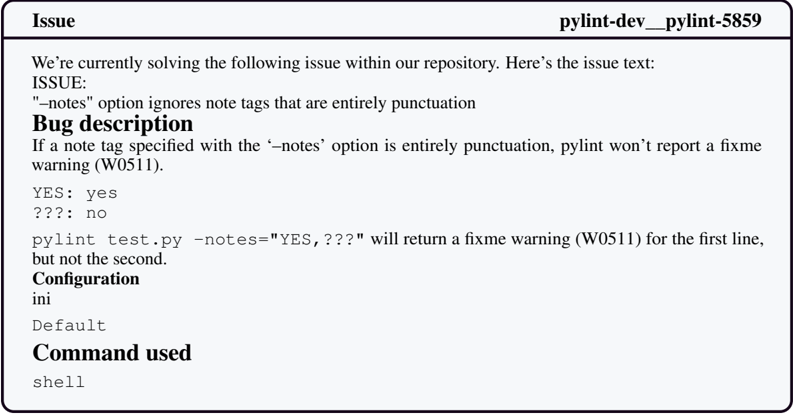
### Visual Description
## Screenshot: Pylint Issue Report (pylint-dev_pylint-5859)
### Overview
The image shows a technical issue report from a code repository, detailing a bug in the pylint linter tool. The report includes a bug description, configuration details, and a code example demonstrating the issue. The issue ID is "pylint-dev_pylint-5859".
### Components/Axes
- **Header**: Contains the issue ID ("pylint-dev_pylint-5859") and the word "Issue".
- **Main Content**:
- **Issue Description**: Text explaining the problem with the "-notes" option.
- **Bug Description**: Markdown-formatted text describing the bug's behavior.
- **Configuration**: Section labeled "Configuration" with "ini" and "Default" values.
- **Command Used**: Terminal command "shell" listed under "Command used".
- **Code Example**: A Python test file snippet (`pylint test.py -notes="YES,???"`) with expected vs. actual behavior.
### Detailed Analysis
- **Issue Description**:
- The "-notes" option in pylint is supposed to handle note tags but fails when tags are entirely punctuation.
- Example: A note tag like "???" (pure punctuation) is ignored, preventing a fixme warning (W0511) from being reported.
- **Bug Description**:
- If a note tag with the "-notes" option contains only punctuation (e.g., "YES", "???"), pylint does not generate a fixme warning (W0511).
- Example code demonstrates this: `pylint test.py -notes="YES,???"` returns a warning for "YES" but not for "???".
- **Configuration**:
- The configuration is set to "ini" with a "Default" value, though no specific configuration details are provided.
- **Command Used**:
- The terminal command "shell" is listed, though no additional context is given.
### Key Observations
1. **Punctuation Handling**: The "-notes" option fails to process note tags that are entirely punctuation (e.g., "???").
2. **Inconsistent Warnings**: The example shows that "YES" (mixed alphanumeric) triggers a warning, while "???" (pure punctuation) does not.
3. **Missing Configuration Details**: The "Configuration" section lacks specific settings or values beyond "ini" and "Default".
### Interpretation
- **Impact on Code Quality**: The bug prevents pylint from flagging potential issues in note tags that are purely punctuation, reducing its effectiveness in enforcing code quality standards.
- **Example Clarity**: The provided code snippet effectively illustrates the bug but could benefit from more context (e.g., the actual code being linted).
- **Fixme Warning (W0511)**: The issue highlights a gap in pylint's handling of note tags, which are typically used to document temporary code or TODOs. Ignoring punctuation-only tags undermines this functionality.
- **Next Steps**: The repository maintainers are actively addressing the issue, but the lack of configuration details in the report may hinder reproducibility or debugging.
### Additional Notes
- **Language**: All text is in English.
- **UI Elements**: The report uses a structured format with clear headings and code blocks, typical of GitHub/GitLab issue trackers.
- **Missing Data**: No numerical values, charts, or diagrams are present; the focus is on textual description and code examples.
</details>
```
```
## SWE-agent
pylint-dev\_\_pylint-5859
To begin addressing the issue, we should first try to replicate the bug as described. We can do this by creating a new Python script that includes the comments with the note tags 'YES' and '???' and then running pylint with the '-notes' option. Let's start by creating a new file called 'test.py' and adding the relevant comments to it.
create test.py
## Observation
## pylint-dev\_\_pylint-5859
```
```
## SWE-agent
Now let's add the example comments from the issue into 'test.py'.
```
```
## Observation
pylint-dev\_\_pylint-5859
## pylint-dev\_\_pylint-5859
```
```
## SWE-agent
## pylint-dev\_\_pylint-5859
The 'test.py' file has been updated with the example comments. Next, we should run pylint with the '-notes' option to see if we can replicate the issue where the second line with punctuation-only tags is ignored.
```
```
## Observation
```
test.py:1: W0511: (Open file: /pylint-dev_pylint/test.py) (Current directory: /pylint-dev_pylint) bash-$
```
## SWE-agent
## pylint-dev\_\_pylint-5859
## pylint-dev\_\_pylint-5859
The output confirms the issue: pylint only reports a fixme warning for the first line with the 'YES' tag and ignores the second line with the '???' tag. This matches the behavior described in the issue. The next step is to locate the part of the pylint code that handles the '-notes' option and determine why it's ignoring note tags that are entirely punctuation. We should start by finding the file that contains the relevant code. Since we don't know the exact file name, we can search the directory for files that might contain the string '-notes' to find where the option is handled.
```
<doc> 104 </doc>
```
## Observation
## pylint-dev\_\_pylint-5859
```
grep: unrecognized option '--notes' Usage: grep [OPTION]... PA Try 'grep --help' for more information. grep: unrecognized option '--notes' Usage: grep [OPTION]... PA Try 'grep --help' for more information. No matches found for '--notes' in /pylint-dev_pylint (Current directory: /pylint/bash-$ </doc>
```
## SWE-agent
## pylint-dev\_\_pylint-5859
It seems that the 'search\_dir' command did not work as expected because '-notes' was interpreted as an option for 'grep' rather than a search term. To avoid this issue, we can enclose the search term in quotes to ensure it's treated as a literal string. Let's try searching again using the correct format for the search term.
```
<doc> 104 </doc>
```
## Observation
## pylint-dev\_\_pylint-5859
```
grep: unrecognized option '--notes' Usage: grep [OPTION]... PA Try 'grep --help' for more information. grep: unrecognized option '--notes' Usage: grep [OPTION]... PA Try 'grep --help' for more information. No matches found for '--notes' in /pylint-dev_pylint (Current directory: /pylint/bash-$ </doc>
```
## SWE-agent
## pylint-dev\_\_pylint-5859
It appears that the issue persists because the search term is still being interpreted as an option. To circumvent this, we can use a different search term that is less likely to be confused with a command-line option. Let's try searching for just 'notes' instead, which should still lead us to the relevant part of the code.
search\_dir "notes"
## Observation
## pylint-dev\_\_pylint-5859
```
pylint:
```python
for "notes" in /pylint-dev_pylint/ChangeLog (2 matches)
at/doc/development_guide/testing/doc/whatsnew/2.5.rst (1 match)
at/pylintrc (2 matches)
pylint/checkers/misc.py (9 matches)
```
```
```
/pylint-dev_pylint /pylint-dev_pylint /pylint-dev_pylint /pylint-dev_pylint End of matches for (Open file: /pylint bash-$
```
## SWE-agent
## pylint-dev\_\_pylint-5859
The search results indicate that there are several matches for 'notes' in the repository, but the most likely candidate for the code we need to examine is in 'pylint/checkers/misc.py', as it contains the most matches. This file is probably where the miscellaneous checkers, including the fixme warning (W0511), are implemented.
Let's open the 'misc.py' file to investigate further.
open pylint/checkers/misc.py
## Observation
## pylint-dev\_\_pylint-5859
```
<doc> 2021 Marc Mueller
<p>eu</p>users.noreply.github.com>
<p>ou</p>users.noreply.github.com>
r the GPL:
https://github.com/PyCQA/pylint
-2.0.html </doc>
```
```
```
```
pylint-dev_pylint5859 </doc>
```
## SWE-agent
## pylint-dev\_\_pylint-5859
We have opened the 'misc.py' file which likely contains the code for the fixme warning (W0511) related to the '-notes' option. Since the file is 203 lines long and we are currently viewing the first 100 lines, we need to scroll down or use the 'goto' command to find the relevant section that handles the '-notes' option.
Let's scroll down to see more of the file.
scroll\_down
## Observation
## pylint-dev\_\_pylint-5859
```
pylint-dev_pylint-5859
c.py (203 lines edited values), "TODO", take in
106:
107:
108:
109:
110:
111:
112:
113:
114:
115:
```
```
```
```
```
pylint-dev_pylint/checkers/mt: /pylint-dev_pylint)
```
## SWE-agent
## pylint-dev\_\_pylint-5859
We have found the relevant section of the 'misc.py' file that handles the '-notes' option. The regular expression pattern used to match note tags is constructed in lines 122-128. It seems that the issue might be related to how the regular expression is constructed or how it is used to match comments in the source code.
The issue might be that the regular expression pattern does not account for note tags that consist entirely of punctuation characters. To fix this, we may need to adjust the regular expression pattern to ensure it matches these tags correctly.
The regular expression is built from the 'notes' configuration, which is a list of comma-separated values, and an optional 'notes-rgx' regular expression. The pattern is then compiled and used in the 'process\_tokens' method to search for matching comments.
Before we make any changes, let's examine the regular expression pattern construction in more detail. We should look at the 'open' method where the pattern is compiled, specifically lines 122-128.
goto 122
## Observation
## pylint-dev\_\_pylint-5859
```
```
```
```
## SWE-agent
## pylint-dev\_\_pylint-5859
We are now looking at the section of the 'misc.py' file where the regular expression for the '-notes' option is constructed. The regular expression is built from the 'notes' configuration option, which is a list of note tags. These tags are escaped using 're.escape' and joined with a pipe '|' to form an alternation pattern. This pattern is then used to create a regular expression that matches comments starting with one of the note tags followed by a word boundary '\b'.
To fix this issue, we can modify the regular expression to ensure that it matches note tags that are entirely punctuation. We can do this by removing the word boundary and allowing the tag to be followed by any non-word character or the end of the string.
The issue might be with the word boundary '\b', which does not match if the tag is followed by punctuation. Since the tag '???' is entirely punctuation, the word boundary may not be recognized correctly, causing the tag not to match.
Let's edit the regular expression construction to fix the issue.
```
edit 124:126
regex_string = "r#s*(notes|(self.config.notes_rgx))(?=\w\s)"
else:
regex_string = r"rf#s*(notes|(?=\w\s))"
end_of_edit
```
## Observation
## pylint-dev\_\_pylint-5859
```
<doc> pylint-dev_pylint-5859
68 </doc>
```
```
```
```
pylint-dev_pylint-5859
```
## SWE-agent
pylint-dev\_\_pylint-5859
The edit to the regular expression has been made successfully. We replaced the word boundary '\b' with a lookahead assertion '(?=\W|$)' that matches either a non-word character or the end of the string after the note tag. This should allow the regular expression to match note tags that consist entirely of punctuation.
Let's run pylint on 'test.py' with the updated code.
Before submitting the changes, we should test to ensure that the fix works as expected. We can do this by running pylint on the 'test.py' file again with the '-notes' option to see if it now correctly identifies the '???' note tag.
```
pylint test.py - notes="YES,???"
```
## Observation
## pylint-dev\_\_pylint-5859
```
test.py:1: W051L: YES: yes (fixme)
test.py:2: W051L: ???: no (fixme)
(Open file:/pylint-dev_py/
(Current directory: /pylint/
bash-$
```
## SWE-agent
pylint-dev\_\_pylint-5859
The pylint output now shows that it correctly identifies both the 'YES' and '???' note tags, which means the fix has resolved the issue. With the bug fixed, we can proceed to clean up any test files and then submit our changes to the code base.
First, let's remove the 'test.py' file since it was only needed for reproducing the issue.
rm test.py
## Observation
## pylint-dev\_\_pylint-5859
```
int/pylint/checkers/misc.py) dev_pylint()
```
## SWE-agent
## pylint-dev\_\_pylint-5859
The 'test.py' file has been successfully removed. Now that we have fixed the issue and cleaned up the test files, we can submit our changes to the code base. Let's submit the changes using the 'submit' command.
submit
## Observation
## pylint-dev\_\_pylint-5859
```
<doc> diff --git a/pylint/checkers/misc.py b/pylint/checkers/misc.py
ee -121,9 -121,9 @e class EncodingChecker(BaseChecker):
notes = "l".join(re.escape(note) for note in
axi.
regex_string = rf"^{s*}(notes)[self.config.notes]|{self.config.notes}else:
regex_string = rf"^{s*}(notes)|{self.config.notes}"
self._fixme_pattern = </doc>
```
## Gold Patch
## pylint-dev\_\_pylint-5859
```
pylint-dev_pylint-5859
```
```
regex_string = rf"self._fixme_pattern = re.compile(regex_string, re.I)"
```
## Analysis for sympy/sympy-21614
Issue Summary. The issue is reporting an UnedinedKind type returned when printing a sympy.Derivative 's kind attribute. They expect something like a DerivativeKind instead of UndefinedKind .
## Interaction Summary
1. Reproduce the Issue : The agent began by creating a Python script ( reproduce\_issue.py ) to reproduce the issue, using the reproduction code provided in the issue report. It ran the script and successfully reproduced the issue.
2. Searching for Derivative Code : The agent begins to search for code where the Derivative class is defined. It makes several attempts with different strategies to find the relevant code. After a few unsuccessful approaches, looking for particular filenames, it searches simply for 'class Derivative', which provides a single search result. It continues to read the Derivative class definition, which spans many hundreds of lines.
3. Exhausting Budget : It continuously scrolls through the function.py file where Derivative is defined until is exhausts its budget and terminates the episode without submitting.
Evaluation The agent makes a few mistakes using the search function effectively. The agent should have made more efficient searches by using more commonsensical patterns (e.g. searching for 'class Derivative') early on, instead of more speculative search attempts. In this particular setting, the gold patch shows that the updated code involves overriding an inherited property kind from the sympy.basic object. This fix would require a more thorough understanding of the codebase and inheritence structure of Derivative to be effective. An agent attempting to resolve this issue would need to have more targeted and efficient search approaches to improve its ability to identify this problem.
Figure 35: Trajectory for instance sympy\_\_sympy-21614 .
<details>
<summary>Image 30 Details</summary>
### Visual Description
## Screenshot: GitHub Issue sympy__sympy-21614
### Overview
The image shows a GitHub issue report for the SymPy repository, detailing a problem with the `kind` attribute of the `Derivative` class. The issue includes code examples demonstrating correct and incorrect usage, along with instructions for reproducing the problem.
### Components/Axes
- **Title**: "Issue" (top-left)
- **Issue Reference**: `sympy__sympy-21614` (top-right)
- **Sections**:
- **ISSUE**: Description of the problem.
- **CORRECT**: Code snippet with proper usage.
- **WRONG**: Code snippet with incorrect usage.
- **INSTRUCTIONS**: Steps to reproduce the issue.
### Detailed Analysis
#### ISSUE Section
- **Text**:
```
We’re currently solving the following issue within our repository. Here’s the issue text:
ISSUE:
Wrong Derivative kind attribute
I’m playing around with the ‘kind’ attribute.
The following is correct:
from sympy import Integral, Derivative
from sympy import MatrixSymbol
from sympy.abc import x
A = MatrixSymbol('A', 2, 2)
i = Integral(A, x)
i.kind
# MatrixKind(NumberKind)
This one is wrong:
d = Derivative(A, x)
d.kind
# UndefinedKind
```
#### INSTRUCTIONS Section
- **Text**:
```
(Open file: n/a)
(Current directory: /sympy__sympy)
bash-$
```
### Key Observations
1. **Correct Usage**:
- The `Integral` object `i` has a `kind` attribute defined as `MatrixKind(NumberKind)`.
2. **Incorrect Usage**:
- The `Derivative` object `d` has an undefined `kind` attribute (`# UndefinedKind`).
3. **Code Structure**:
- Imports `Integral`, `Derivative`, `MatrixSymbol`, and `x` from SymPy.
- Defines a 2x2 matrix symbol `A` and computes its integral with respect to `x`.
### Interpretation
The issue highlights a discrepancy in how the `kind` attribute is assigned to `Derivative` versus `Integral` objects in SymPy. The `Derivative` class fails to inherit or define the `kind` attribute properly, leading to an `UndefinedKind` error. This suggests a potential bug or oversight in the SymPy codebase, where the `Derivative` class does not correctly propagate or define the `kind` attribute inherited from its parent classes or arguments.
The instructions imply the issue is being investigated locally, with the user navigating the SymPy repository directory (`/sympy__sympy`) to debug the problem. The absence of a file path in the "Open file" instruction (`n/a`) may indicate the issue is purely code-based rather than file-related.
This defect could impact symbolic computation workflows relying on the `kind` attribute for type checking or mathematical operations, necessitating a fix in the SymPy code to ensure consistent attribute assignment across derivative and integral objects.
</details>
## SWE-agent
## sympy\_\_sympy-21614
First, I'll create a new Python script to reproduce the issue as described. This script will attempt to create a 'Derivative' of a 'MatrixSymbol' and print out the 'kind' attribute to verify if it is indeed 'UndefinedKind'.
```
<doc> 10 </doc>
```
## Observation
## sympy\_\_sympy-21614
```
[File: /sympy_sympy/reproduce_issue.py (1 lines total)]
[Open file: n/a]
[Current directory: /sympy_sympy]
[bash-$]
[File: /sympy_sympy/reproduce_issue.py (1 lines total)]
[Open file: n/a]
[Current directory: /sympy_sympy]
[bash-$]
```
## SWE-agent
sympy\_\_sympy-21614
Now let's paste in the example code from the issue that demonstrates the incorrect behavior for the 'kind' attribute of a 'Derivative' of a 'MatrixSymbol'.
```
edit 1:1
from sympy import Integral, Derivative
from sympy.abc import x
A = MatrixSymbol('A', 2, 2)
d = Derivative(A, x)
print(d.kind)
# Expected: MatrixKind(NumberKind), but getting UndefinedKind
end of edit </doc>
```
## Observation
## sympy\_\_sympy-21614
```
```
## SWE-agent
## sympy\_\_sympy-21614
The reproduction script has been created and updated with the code that demonstrates the issue. Now, let's run the script to confirm that the 'kind' attribute of the 'Derivative' is indeed 'UndefinedKind'.
python reproduce\_issue.py
## Observation
UndefinedKind
```
(Open file: /sympy_sy (Current directory: /s bash-$
```
## SWE-agent
sympy\_\_sympy-21614
## sympy\_\_sympy-21614
The output confirms that the 'kind' attribute of the 'Derivative' is 'UndefinedKind', which is not the expected behavior. The next step is to locate the part of the code that handles the 'kind' attribute for the 'Derivative' class and make the necessary corrections.
Since the 'Derivative' class is likely to be defined in a file related to calculus or differentiation, I will search for the file that contains the 'Derivative' class definition.
find\_file "derivative.py"
## Observation
sympy\_\_sympy-21614
/sympy\_\_sympy sympy\_\_sympy-21614
```
No matches found for "derivative_py" in /sympy_sympy/reproduce_issue.py) (Open file: /sympy_sympy/reproduce_issue.py) (Current directory: /sympy_sympy)
```
## SWE-agent
It seems that the file name I searched for does not match the actual file name where the 'Derivative' class is defined. The 'Derivative' class might be defined in a file with a different name, possibly something more general related to symbolic calculus in SymPy.
Let's try a broader search for files that might contain the 'Derivative' class definition. Since the class name is 'Derivative', it's likely that the file name contains 'calculus' or a similar keyword. I'll use the 'search\_dir' command to look for the term 'Derivative' within the Python files in the current directory.
```
<doc> 104 </doc>
```
## Observation
```
More than 182 files matched for "Derivative" in /sympy_search. (Open file: /sympy_sympy/produce_issue.py) (Current directory: /sympy_sympy) bash-$
```
## SWE-agent
sympy\_\_sympy-21614
```
```
## sympy\_\_sympy-21614
The search for 'Derivative' returned too many results, so I need to narrow it down. Since the 'Derivative' class is a core part of SymPy, it's likely to be in a core module. A common convention is to have such
core classes in a file named after the module, so I will search for a file that might be named 'core.py' or similar.
```
<doc> 104 </doc>
```
## Observation
```
Found 5 matches for "core.py" in /sympy_sympy/sympy/core/py /sympy_sympy/sympy/core/py /sympy_sympy/sympy/multi/py /sympy_sympy/sympy/uni/py /sympy_sympy/sympy/strategies/branch/core.py /sympy_sympy/sympy/strategies/core.py py/reproduce_issue.py)
```
## SWE-agent
sympy\_\_sympy-21614
sympy\_\_sympy-21614
The search has returned several 'core.py' files, but the most likely candidate for containing the 'Derivative' class definition is within the main 'sympy/core' directory. Let's open the 'core.py' file in the 'sympy/core' directory to investigate further.
open sympy/core/core.py
## Observation
## sympy\_\_sympy-21614
```
```
```
```
```
<pre>
86: except ValueError:
87: il = UNKNOWN
88: try:
89: il2 = ordering_of_classes.index(n2)
90: except ValueError:
91: il2 = UNKNOWN
92: if il == UNKNOWN and il2 == UNKNOWN:
93: return (n1 > n2) - (n1 < n2)
94: return False
95:
100: (Open file: /sympy_symp/
96: (Current directory: /sympy
97: bash-$ </doc>
```
## SWE-agent
sympy\_\_sympy-21614
The 'core.py' file in the 'sympy/core' directory does not seem to contain the implementation details of the 'Derivative' class. It's more likely that the implementation is in another file within the 'sympy/core' directory. Since the 'Derivative' class is a fundamental part of symbolic calculus, it might be in a file named something like 'function.py' or 'operations.py'.
Let's try to find a file that specifically contains the implementation of the 'Derivative' class within the 'sympy/core' directory.
find\_file "function.py" sympy/core
## Observation
## sympy\_\_sympy-21614
```
Found 1 matches for "function.py" in /sympy_sympy/sympy/core/function.py (Open file: /sympy_sympy/sympy (Current directory: /sympy_sy
```
## SWE-agent
sympy\_\_sympy-21614
Great, we have found the 'function.py' file in the 'sympy/core' directory, which is likely to contain the implementation of the 'Derivative' class. Let's open this file to investigate and make the necessary changes.
open sympy/core/function.py
## Observation
## sympy\_\_sympy-21614
```
[File: /sympy_sy 1."" 2:There are three 3:]
```
```
```
```
```
## SWE-agent
sympy\_\_sympy-21614
The 'function.py' file is now open, and it's quite large with 3389 lines. The 'Derivative' class is likely to be defined in this file, but we need to find the exact location. Since the file is too long to scroll through manually, I'll use the 'search\_file' command to find the 'Derivative' class definition within this file.
search\_file "class Derivative"
```
sympy_sympy-21614
```
## SWE-agent
sympy\_\_sympy-21614
We have found that the 'Derivative' class is defined on line 1053 of 'function.py'. Let's navigate to that line to inspect the implementation and determine how to correct the 'kind' attribute issue.
goto 1053
## Observation
## sympy\_\_sympy-21614
```
```
```
```
```
<doc> 1124: list of
~ the expression
1125: assumed
1126: 1127: Derivative
1128: 1129: For the
~ because
1130: 1131: there are
1132: 1133: (like
1134: cos(x))
1135: >>>
1136: (2252 more lines)
1137: Trace
(Open file: /sympy
bash-$
(Current directory
SWE-agent
expression: a very strict definition would make
derivatives wrt defined functions </doc>
```
## SWE-agent
sympy\_\_sympy-21614
We are now at the beginning of the 'Derivative' class definition. To address the issue with the 'kind' attribute, we need to find where the 'kind' property is defined or handled within this class. Since the file is large, I will scroll down to find the relevant section where the 'kind' property is likely to be implemented.
scroll\_down
## Observation
## sympy\_\_sympy-21614
```
<doc> Observation
[File: /sympy_sym (1135 more lines total)]
1136: >>> 0
1137: Traceback (most recent call last):
Error: Can't calculate derivative wrt xy.
1138: To make it easier to work with variational calculus, in the Euler-Lagrange method
1139: we may write
1140: F(t, u, v)
1141: can be
1142: written explicitly as functions of time::
1143: = Function('F')
1144: = f(t)
1145: = U.diff(t)
1146: derivative wrt f(t) can be obtained directly:
1147: </doc>
```
```
```
```
```
## SWE-agent
sympy\_\_sympy-21614
We have scrolled down through the 'function.py' file, but we have not yet found the implementation of the 'kind' property for the 'Derivative' class. We need to continue scrolling to find the relevant section.
scroll\_down
## Observation
## sympy\_\_sympy-21614
```
[File: /sympy_sym (1233 more lines total)] [File contents omitted for brevity] [File contents omitted for brevity] [389 lines total] </doc>
```
```
(Open file: /symp_symp (Current directory: /symp bash-$)
```
## SWE-agent
## sympy\_\_sympy-21614
We have scrolled further down the 'function.py' file, but we still haven't found the implementation of the 'kind' property for the 'Derivative' class. We need to continue scrolling to find the relevant section where the 'kind' property is likely to be implemented or overridden.
scroll\_down
## Observation
## sympy\_\_sympy-21614
```
[File: /sympy_sympy/core/function.py (1331 more lines total)]
[File contents omitted]
[Open file: /sympy bash-$]
[Current directory: /sympy_sympy]
```
## SWE-agent
## sympy\_\_sympy-21614
We have scrolled further down the 'function.py' file, but we still haven't found the implementation of the 'kind' property for the 'Derivative' class. We need to continue scrolling to find the relevant section where the 'kind' property is likely to be implemented or overridden.
scroll\_down
## Observation
## sympy\_\_sympy-21614
```
[File: /sympy_sympy/core/function.py (1429 more lines total)]
[File contents omitted for brevity]
[Open file: /sympy bash-$]
[Current directory: /sympy_sympy/core/function.py]
[/code>
```
## SWE-agent
## sympy\_\_sympy-21614
We have scrolled further down the 'function.py' file, but we still haven't found the implementation of the 'kind' property for the 'Derivative' class. We need to continue scrolling to find the relevant section where the 'kind' property is likely to be implemented or overridden.
scroll\_down
## Observation
## sympy\_\_sympy-21614
```
[File: /sympy_sympy/core/function.py (1527 more lines total)]
(File contents omitted for brevity)
[File: /sympy_sympy/core/function.py (1762 more lines total)]
(Open file: /sympy bash-$
```
## SWE-agent
## sympy\_\_sympy-21614
We have scrolled further down the 'function.py' file, but we still haven't found the implementation of the 'kind' property for the 'Derivative' class. We need to continue scrolling to find the relevant section where the 'kind' property is likely to be implemented or overridden.
scroll\_down
## Observation
## sympy\_\_sympy-21614
```
[File: /sympy_sympy/core/function.py (1625 more lines total)]
[File contents omitted]
[Open file: /sympy bash-$]
[Current directory: /sympy_sympy]
```
## SWE-agent
## sympy\_\_sympy-21614
We have scrolled further down the 'function.py' file, but we still haven't found the implementation of the 'kind' property for the 'Derivative' class. We need to continue scrolling to find the relevant section where the 'kind' property is likely to be implemented or overridden.
scroll\_down
## Observation
## sympy\_\_sympy-21614
```
```
## SWE-agent
## sympy\_\_sympy-21614
We have scrolled further down the 'function.py' file, but we still haven't found the implementation of the 'kind' property for the 'Derivative' class. We need to continue scrolling to find the relevant section where the 'kind' property is likely to be implemented or overridden.
scroll\_down
## Observation
## sympy\_\_sympy-21614
```
[File: /sympy_sympy/core/function.py (1821 more lines total)]
(1821 more lines above)
[File contents omitted for brevity]
(1468 more lines below)
(Open file: /sympy bash-$)
```
## SWE-agent
## sympy\_\_sympy-21614
We have scrolled further down the 'function.py' file, but we still haven't found the implementation of the 'kind' property for the 'Derivative' class. We need to continue scrolling to find the relevant section where the 'kind' property is likely to be implemented or overridden.
scroll\_down
## Observation
## sympy\_\_sympy-21614
```
[File: /sympy_sympy/core/function.py (1919 more lines total)]
[File contents omitted]
[Open file: /sympy bash-$]
[Current directory: /sympy_sympy]
```
## SWE-agent
## sympy\_\_sympy-21614
We have scrolled further down the 'function.py' file, but we still haven't found the implementation of the 'kind' property for the 'Derivative' class. We need to continue scrolling to find the relevant section where the 'kind' property is likely to be implemented or overridden.
scroll\_down
## Observation
## sympy\_\_sympy-21614
```
[File: /sympy_sympy/core/function.py (2017 more lines above)]
[File contents omitted for brevity]
[1272 more lines below)
[/Code]
```
## SWE-agent
## sympy\_\_sympy-21614
We have scrolled further down the 'function.py' file, but we still haven't found the implementation of the 'kind' property for the 'Derivative' class. We need to continue scrolling to find the relevant section where the 'kind' property is likely to be implemented or overridden.
scroll\_down
## Observation
## sympy\_\_sympy-21614
```
[File: /sympy_sympy/core/function.py (2115 more lines total)]
[File contents omitted]
[Open file: /sympy bash-$]
[Current directory: /sympy_sympy]
```
## SWE-agent
## sympy\_\_sympy-21614
We have scrolled further down the 'function.py' file, but we still haven't found the implementation of the 'kind' property for the 'Derivative' class. We need to continue scrolling to find the relevant section where the 'kind' property is likely to be implemented or overridden.
scroll\_down
## Observation
## sympy\_\_sympy-21614
```
```
## SWE-agent
## sympy\_\_sympy-21614
We have scrolled further down the 'function.py' file, but we still haven't found the implementation of the 'kind' property for the 'Derivative' class. We need to continue scrolling to find the relevant section where the 'kind' property is likely to be implemented or overridden.
scroll\_down
## Observation
## sympy\_\_sympy-21614
```
[File: /sympy_sym (231 more lines total)] [File contents omitted for brevity] [618 more lines below] </doc>
```
```
(Open file: /symp_symp (Current directory: /symp bash-$)
```
## SWE-agent
## sympy\_\_sympy-21614
We have scrolled further down the 'function.py' file, but we still haven't found the implementation of the 'kind' property for the 'Derivative' class. We need to continue scrolling to find the relevant section where the 'kind' property is likely to be implemented or overridden.
scroll\_down
## Observation
## sympy\_\_sympy-21614
```
```
## SWE-agent
## sympy\_\_sympy-21614
We have scrolled further down the 'function.py' file, and we have now found the 'diff' function, which is related to differentiation. However, we still need to find the implementation of the 'kind' property for the 'Derivative' class. Since we are in the section related to differentiation, we should be close to the relevant code.
Let's continue scrolling to find the 'Derivative' class implementation.
scroll\_down
## Observation
## sympy\_\_sympy-21614
```
[File: /sympy_sym (2507 more lines total)] [File contents omitted for brevity] [618 more lines below] [Open file: /symp (Current directory: /sympy_sym) bash-$]
```
## SWE-agent
## sympy\_\_sympy-21614
We have scrolled further down the 'function.py' file, and we have now found the 'diff' function, which is related to differentiation. However, we still need to find the implementation of the 'kind' property for the 'Derivative' class. Since we are in the section related to differentiation, we should be close to the relevant code.
Let's continue scrolling to find the 'Derivative' class implementation.
scroll\_down
## Observation
## sympy\_\_sympy-21614
```
[File: /sympy_sympy/core/function.py (2605 more lines total)]
(File contents omitted for brevity)
[Open file: /sympy bash-$]
(Current directory: /sympy_sympy/core/function.py)
[File: /sympy_sympy/core/function.py (389 lines total)]
py)
```
## SWE-agent
## sympy\_\_sympy-21614
We have scrolled further down the 'function.py' file, and we have now found the 'diff' function, which is related to differentiation. However, we still need to find the implementation of the 'kind' property for the 'Derivative' class. Since we are in the section related to differentiation, we should be close to the relevant code.
Let's continue scrolling to find the 'Derivative' class implementation.
scroll\_down
## Observation
## sympy\_\_sympy-21614
```
[File: /sympy_sympy/core/function.py (2703 more lines total)]
[File contents omitted for brevity]
[Open file: /sympy bash-$ (Current directory: /sympy_sympy/core/function.py)]
[File contents omitted for brevity]
[/code>
```
## SWE-agent
## sympy\_\_sympy-21614
We have scrolled further down the 'function.py' file, and we have now found the 'expand' function, which is related to expression expansion. However, we still need to find the implementation of the 'kind' property for the 'Derivative' class. Since we are in the section related to expression manipulation, we should be close to the relevant code.
Let's continue scrolling to find the 'Derivative' class implementation.
scroll\_down
## Observation
## sympy\_\_sympy-21614
```
[File: /sympy_sympy/core/function.py (2801 more lines total)]
[File contents omitted]
[Open file: /sympy bash-$]
[Current directory: /sympy_sympy]
```
## SWE-agent
## sympy\_\_sympy-21614
Wehave scrolled further down the 'function.py' file, and we have now found various expansion functions and wrappers, but we still need to find the implementation of the 'kind' property for the 'Derivative' class. Since we are in the section related to expression manipulation, we should be close to the relevant code.
Let's continue scrolling to find the 'Derivative' class implementation.
scroll\_down
## Observation
## sympy\_\_sympy-21614
```
[File: /sympy_sympy/core/function.py (2899 more lines total)]
[File contents omitted]
[Open file: /sympy bash-$]
[Current directory: /sympy_sympy]
```
## SWE-agent
## sympy\_\_sympy-21614
Wehave scrolled further down the 'function.py' file, and we have now found various expansion functions and wrappers, but we still need to find the implementation of the 'kind' property for the 'Derivative' class. Since we are in the section related to expression manipulation, we should be close to the relevant code.
Let's continue scrolling to find the 'Derivative' class implementation.
scroll\_down
## Observation
## sympy\_\_sympy-21614
```
```
## SWE-agent
## sympy\_\_sympy-21614
Wehave scrolled further down the 'function.py' file, and we have now found various expansion functions and wrappers, but we still need to find the implementation of the 'kind' property for the 'Derivative' class. Since we are in the section related to expression manipulation, we should be close to the relevant code.
Let's continue scrolling to find the 'Derivative' class implementation.
scroll\_down
## Observation
## sympy\_\_sympy-21614
```
```
## SWE-agent
Exit due to cost limit exit\_cost
## Observation
Exited
## Gold Patch
sympy\_\_sympy-21614
sympy\_\_sympy-21614
## sympy\_\_sympy-21614
```
```python
# sympy-sympy-21014
import sympy as sp
def free_symbols(self):
return sp.symbols('free_symbols')
def eval_subs(self, old, new):
if not isinstance(old, (int, float)) or not isinstance(new, (int, float)):
raise ValueError("Derivative cannot be done inside a variety of reasons")
return self._eval_subs(old, new)
```
```
## Analysis for django/django-14411
Issue Summary. The issue involves the ReadOnlyPasswordHashWidget in the Django admin interface. The label element for this widget has a 'for' attribute that points to a non-labelable element. Since the ReadOnlyPasswordHashWidget renders text rather than an input element, the label should not have a 'for' attribute.
## Interaction Summary
1. Locate the Relevant File : The agent began by searching for the ReadOnlyPasswordHashWidget definition using the find\_file command, but found no results. It then used the search\_dir command to find references to the widget within the repository and located relevant matches in several files. The agent chose to first examine the helpers.py file, but found it only contained a reference to the widget and did not include the label rendering code.
2. Explore Related Files : Next, the agent opened the forms.py file in the django/contrib/auth directory, which defined the ReadOnlyPasswordHashWidget and its associated
ReadOnlyPasswordHashField . It identified that the widget used a template ( read\_only\_password\_hash.html ) for rendering, but the template did not include relevant information relating to the Widget's for attribute.
3. Edit the Class Definition : Returning to forms.py , the agent found the UserChangeForm which used the ReadOnlyPasswordHashField . It reasoned that Django's form rendering system likely added the 'for' attribute automatically. To address the issue, the agent attempted to write a label\_tag method for the ReadOnlyPasswordHashField to exclude the 'for' attribute. The agent made several edits to this effect, importing the necessary utilities from django.utils.html and adding a custom label\_tag method.
4. Submit Without Testing : After the desired changes were made, the agent proceeds to submit without testing as it assumes that a Django server cannot be run and tested in this environment.
Evaluation The agent correctly identified the need to customize the label rendering for the ReadOnlyPasswordHashField class. However, its solution failed to solve the issue since it did not understand how labels were defined for a Widget object. In actuality, the model needed to override the id\_for\_label property defined in the Widget class to change this behavior properly. Similar functionality can be seen in other parts of the codebase.
Figure 36: Trajectory for instance django\_\_django-14411 .
## Issue
## django\_\_django-14411
We're currently solving the following issue within our repository. Here's the issue text: ISSUE:
Description
Label for ReadOnlyPasswordHashWidget points to non-labelable element.
(last modified by David Sanders)
INSTRUCTIONS: (31 lines)
In the admin, the label element for the ReadOnlyPasswordHashWidget widget has a 'for' attribute which points to a non-labelable element, since the widget just renders text, not an input. There's no labelable element for the widget, so the label shouldn't have a 'for' attribute.
```
(Open file: n/a)
(Current directory: /django_django)
bash-$
```
## SWE-agent
## django\_\_django-14411
To address the issue, we need to locate the file that contains the 'ReadOnlyPasswordHashWidget' widget's rendering code. Since this is likely part of the Django admin, we should start by searching for the file that defines 'ReadOnlyPasswordHashWidget'. Let's use the 'find\_file' command to locate this file within the repository.
find\_file "ReadOnlyPasswordHashWidget"
## Observation
## django\_\_django-14411
```
OnlyPasswordHashWidget" in o__django)
(Open file: n/a)
(Current directory: /django_dash-$
```
## SWE-agent
## django\_\_django-14411
It seems that the 'find\_file' command did not yield any results for 'ReadOnlyPasswordHashWidget'. This could be because the file name does not exactly match the widget name. Since the widget is likely to be part of the Django admin, it might be located in a file related to forms or widgets in the admin app. Let's try a broader search using the 'search\_dir' command to look for the term 'ReadOnlyPasswordHashWidget' within the files of the repository. This should help us find the file where the widget is defined or used.
search\_dir "ReadOnlyPasswordHashWidget"
## Observation
## django\_\_django-14411
```
Found 9 matches for "ReadOnlyPasswordHashWidget" in /django_django/django/contrib/admin/helpers.py (1 matches) /django_django/contrib/auth/forms.py (2 matches) /django_django/docs/releases/1.11.1.txt (1 matches) /django_django/tests/test_forms.py (1 matches) /django_django/tests/test_views.py ("ReadOnlyPasswordHashWidget" : "/django_django")
```
## SWE-agent
## django\_\_django-14411
The search results indicate that there are matches for 'ReadOnlyPasswordHashWidget' in several files, but the most likely places where the rendering code would be defined are in 'helpers.py' and 'forms.py' within the 'django/contrib/admin' and 'django/contrib/auth' directories, respectively.
Since the issue is related to the admin interface, let's first check the 'helpers.py' file in the 'django/contrib/admin' directory. We'll open this file and look for the relevant code.
open django/contrib/admin/helpers.py
## Observation
## django\_\_django-14411
```
<doc> Observation
[File: /django_django-14411
1: import json
2: from django import
3: from django.contrib.admin/helpers.py (424 lines
5: display_for_field,
6: lookup_field,
7: ...]
8: from django.core.exceptions import ObjectDoesNotExist
9: from django.db.models.fields.related import capfirst,
10: ForeignKey
11:)
12: from django.forms.utils import flatatt
13: template.defaultfilters import caps_for_field,
14: NoReverseMatch, reverse
15: conditional_escape, format_html </doc>
```
```
```
```
```
## SWE-agent
django\_\_django-14411
The 'helpers.py' file is now open, but we need to find the specific part of the code that deals with the 'ReadOnlyPasswordHashWidget'. Since the file is quite long, we should use the 'search\_file' command to locate the term within this file.
search\_file "ReadOnlyPasswordHashWidget"
## Observation
## django\_\_django-14411
```
Found 1 matches for "ReadOnlyPasswordWidget" in /django_django/django/contrib/admin/helpers.py:
Line 215: # ReadOnlyPasswordWidget.
End of matches for "ReadOnlyPasswordWidget" in /django_django/django/contrib/admin/helpers.py:
(Open file: /django_django/django/contrib/admin/helpers.py)
(Current directory: /django_django/bash-$
```
```
(Open file: /django_django/db (Current directory: /django_django/db)
jango/contrib/admin/helpers.py)
jango)
```
## SWE-agent
## django\_\_django-14411
We have found a reference to 'ReadOnlyPasswordHashWidget' on line 215 of the 'helpers.py' file. Let's navigate to that line to examine the context and see how the label is being rendered.
goto 215
## Observation
## django\_\_django-14411
```
```
```
```
```
```
## SWE-agent
## django\_\_django-14411
We have navigated to the relevant section of the 'helpers.py' file where the 'ReadOnlyPasswordHashWidget' is mentioned. The comment on line 215 suggests that there is a special case handling for the 'ReadOnlyPasswordHashWidget'. The code on line 216 checks if the widget has a 'read\_only' attribute and, if so, renders the widget directly.
Since the code snippet we are looking at does not show the rendering of the label, we need to find where the label is being rendered. It might be in the template files or somewhere else in the code. Let's search for the term 'label' in the current file to find where labels are being rendered.
To address the issue, we need to ensure that the label for the 'ReadOnlyPasswordHashWidget' does not have a 'for' attribute, as it points to a non-labelable element. We should look for the part of the code where the label is being rendered with the 'for' attribute and make the necessary changes.
search\_file "label"
## Observation
## django\_\_django-14411
```
<doc> Observation
Found 23 matches for "label" in
Line 5: display_
Line 23: action_
Line 131: def label_tag(self):
Line 133: contents = conditional_escape(self.field_label,
Line 142: # checkboxes should not have a
Line 145: tag(self))
Line 190: </doc>
```
```
<|
```
## SWE-agent
django\_\_django-14411
The search results show several instances where labels are being handled in the 'helpers.py' file. The most promising lines for our issue seem to be around line 191, where a label tag is being formatted with a 'for' attribute. Let's navigate to that line to examine the context and see if this is where we need to make our changes.
goto 191
## Observation
## django\_\_django-14411
```
<doc> Observation
[File: /django-
(175 more lines
176:
178:
179:
180:
181:
182:
183:
184:
185:
186:
187:
188:
189:
190:
191:
192:
193:
194:
195:
196:
197:
198:
199:
100 </doc>
```
```
```
```
```
## SWE-agent
## django\_\_django-14411
We are now looking at the section of the 'helpers.py' file where a label tag is being generated. However, this label tag does not include a 'for' attribute, which means this is not the part of the code responsible for the issue described.
Given that the 'ReadOnlyPasswordHashWidget' is part of the 'django.contrib.auth' app, we should look into the 'forms.py' file in the 'django/contrib/auth' directory, as it might contain the definition of the widget and the rendering of its label.
The issue states that the label for the 'ReadOnlyPasswordHashWidget' has a 'for' attribute pointing to a non-labelable element. Since the 'ReadOnlyPasswordHashWidget' is likely a custom widget used in the Django admin, the rendering of its label might be handled in a template or in the widget's own Python code.
Let's open the 'forms.py' file in the 'django/contrib/auth' directory to investigate further.
open django/contrib/auth/forms.py
## Observation
## django\_\_django-14411
```
```
```
```
## SWE-agent
## django\_\_django-14411
We have opened the 'forms.py' file in the 'django/contrib/auth' directory and found the definition of the 'ReadOnlyPasswordHashWidget' starting at line 33. The widget uses a template named 'read\_only\_password\_hash.html' for rendering, as specified on line 34.
Since the issue is related to the label's 'for' attribute in the rendered HTML, we should look at the template file 'read\_only\_password\_hash.html' to see how the label is being rendered. Let's use the 'find\_file' command to locate this template file within the repository.
```
<doc> 10.
find file "readonly"
password hash.html </doc>
```
## Observation
## django\_\_django-14411
```
Found 1 matches for "read_only_password_hash.html" in /django_django/contrib/auth/templates/auth.html: /django_django/contrib/auth/forms.py
```
## SWE-agent
## django\_\_django-14411
We have located the template file 'read\_only\_password\_hash.html' in the 'django/contrib/auth/templates/auth/widgets' directory. Let's open this file to inspect the HTML and see how the label is being rendered.
```
<div class="editor-block">
<p>
<strong>Password</strong>:
<input type="password" id="password" name="password" />
</p>
<button onclick="checkPassword()">Check Password</button>
<p id="error" style="color: red;"></p>
</div>
<script>
function checkPassword() {
var password = document.getElementById("password").value;
if (password === "password") {
document.getElementById("error").innerHTML = "";
} else {
document.getElementById("error").innerHTML = "Incorrect password";
}
}
</script>
</body>
</html>
```
## Observation
## django\_\_django-14411
```
<div class="code">
<pre><code>
[File: /django_django/contrib/auth/templates/auth/widgets/summary_%{entry_label}].html (5 lines)
summary_%{entry_label} = entry.value if entry.value else ''
</pre>
</div>
```
## SWE-agent
## django\_\_django-14411
The template file 'read\_only\_password\_hash.html' does not show a 'label' element with a 'for' attribute, which means the issue might be elsewhere. The issue description mentions that the label element for the 'ReadOnlyPasswordHashWidget' has a 'for' attribute pointing to a non-labelable element. Since we don't see a 'label' element here, the 'for' attribute is likely added in the Python code that generates the HTML for the widget or in a different part of the template.
Given that the 'ReadOnlyPasswordHashWidget' is a custom widget, the rendering of the label with the 'for' attribute might be handled in the Python code where the widget is used in a form, rather than in the widget's template itself.
Let's go back to the 'forms.py' file and look for the usage of 'ReadOnlyPasswordHashWidget' in a form where a label might be rendered with a 'for' attribute. We should look for a form that includes 'ReadOnlyPasswordHashWidget' and inspect how the label is being generated.
open django/contrib/auth/forms.py
## Observation
## django\_\_django-14411
```
<doc> open django/
django_django-contrib/auth/forms.py (contrib/auth/forms.py)
106 </doc>
```
```
```
```
class Meta:
model = User
fields = ('username',)
field_classes = ('username': UsernameField)
def __init__(self, *args, **kwargs):
super().__init__(*args, **kwargs)
self.username = kwargs['username']
```
## SWE-agent
## django\_\_django-14411
We are back in the 'forms.py' file where the 'ReadOnlyPasswordHashWidget' is defined. Since the issue is with the label's 'for' attribute, we need to find where the 'ReadOnlyPasswordHashField' is used in a form and how the label is being rendered there.
Let's use the 'search\_file' command to search for 'ReadOnlyPasswordHashField' in the current file.
The 'ReadOnlyPasswordHashField' is a custom field that uses the 'ReadOnlyPasswordHashWidget', and it's likely used in the admin forms for the User model. We should search for the usage of 'ReadOnlyPasswordHashField' within this file to find where it's included in a form.
search\_file "ReadOnlyPasswordHashField"
## Observation
## django\_\_django-14411
```
Found 2 matches for "ReadOnlyPasswordField" in <_>/django_django/django/contrib/auth/forms.py:
Line 54:class ReadOnlyPasswordField(forms.Field):
Line 136: password = ReadOnlyPasswordField()
End of matches for "ReadOnlyPasswordField" in <_>/django_django/django/contrib/auth/forms.py:
(Open file: /django_django/django/contrib/auth/forms.py)
(Current directory: /django_django)
bash-$
```
## SWE-agent
## django\_\_django-14411
We have found two references to 'ReadOnlyPasswordHashField' in the 'forms.py' file. The first reference on line 54 is the class definition itself, and the second reference on line 136 is likely where the field is used in a form.
Let's navigate to line 136 to see the context in which 'ReadOnlyPasswordHashField' is used and how the label is being rendered.
goto 136
## Observation
## django\_\_django-14411
```
[File: /django_django/django/contrib/auth/forms.py (440 lines)]
120 more lines above)
121: if password:
122: try:
```
```
```
```
```
## SWE-agent
## django\_\_django-14411
We are now looking at the 'UserChangeForm' class where the 'ReadOnlyPasswordHashField' is used. The field is instantiated with a label on line 136, and the help text includes an HTML anchor tag for changing the password.
To resolve the issue, we need to ensure that when the form is rendered, the label for the 'ReadOnlyPasswordHashField' does not include a 'for' attribute. Since the rendering of form fields to HTML is handled by Django's form rendering system, we may need to customize the rendering for this specific field to exclude the 'for' attribute.
The issue reported is that the label element for the 'ReadOnlyPasswordHashWidget' has a 'for' attribute which points to a non-labelable element. However, in the 'UserChangeForm', the label is defined in the Python code and not in the HTML template. This suggests that the 'for' attribute is likely added automatically by Django's form rendering.
One way to do this is to override the 'label\_tag' method for the 'ReadOnlyPasswordHashField' to ensure it does not render a 'for' attribute. Let's edit the 'ReadOnlyPasswordHashField' class to include this customization.
We will add a custom 'label\_tag' method to the 'ReadOnlyPasswordHashField' class that returns a label without the 'for' attribute.
```
```
## Observation
## django\_\_django-14411
```
<doc> Your proposed edit has introduced new syntax error(s). Please
understand the fixes and retry your edit command.
[File: /django_django/django/contrib/auth/forms.py (47 lines
+ total)]
48: for key, value in
49: summary.items():
50: context['summary'] =
[File: /django_django/django/contrib/auth/forms.py (448 lines
+ total)]
47 more lines above)
[File: /django_django/django/contrib/auth/forms.py (448 lines
+ total)] </doc>
```
```
```
```
(Current directory: /d jango_django)
```
## SWE-agent
django\_\_django-14411
The error message indicates that the names 'format\_html' and 'format\_html\_join' are undefined. These functions are utility functions provided by Django for safely creating HTML output. To use them, we need to import them from 'django.utils.html'.
Let's correct the edit by adding the necessary imports and retrying the edit command.
```
<doc> need to import them from django.utils.html
Let's correct the edit by adding the necessary
edit 54:60
from django.utils.html import
class ReadOnlyPasswordField:
def __init__(self, *args, **kwargs):
kwargs.setdefault("required", False)
kwargs.setdefault("disabled", True)
super().__init__(*args, **kwargs)
label_tag(self, contents=None, attrs=None,
if label_suffix is not None and label_suffix not in
suffix): return format_html("<label>", contents) </doc>
```
## Observation
## django\_\_django-14411
```
```
```
```
```
<|
```
## SWE-agent
django\_\_django-14411
The changes to the 'ReadOnlyPasswordHashField' class have been successfully applied, including the import of 'format\_html' and 'format\_html\_join', and the addition of a custom 'label\_tag' method that returns a label without the 'for' attribute.
Let's submit the changes to the code base using the 'submit' command.
Before submitting the changes, it would be prudent to test that the changes have the desired effect. However, since we cannot run a Django server or render forms in this environment, we will proceed with submitting the changes.
submit
## Observation
```
diff --git a/django/contrib/auth/forms.py b/django/contrib/auth/forms.py
index 20d8922799..1f249a88dd 100644
--- a/django/contrib/auth/forms.py
+++ b/django/contrib/auth/forms.py
contrib/auth/forms.py:249a88dd 100644
---
```
django\_\_django-14411
```
@-51,6 +51,8 @
return context
+from django.util.
class ReadOnlyPasswordHashWidget(forms.Widget):
kwargs.super().__init__(*args, **kwargs)
@-59,6 +61,12 @
class ReadOnlyPasswordHashField(forms.Field):
passwordHashField(forms.CharField(max_length=32)) :
super().__init__(*args, **kwargs)
@-57,6 +58,4 @
class ReadOnlyPasswordHashtype(forms.CharField):
hashtype = 'password'
@-55,6 +56,2 @
class ReadOnlyPasswordHashtypeField(forms.CharField):
passwordHashField(forms.CharField(max_length=32)) :
super().__init__(*args, **kwargs) </doc>
```
## Gold Patch
## django\_\_django-14411
```
<doc> Gold Patch
diff --git a/django/contrib/auth/forms.py
++ b/django/contrib/auth/forms.py
== a/django/contrib/auth/forms.py
+++ b/django/contrib/auth/forms.py
@@ -50,6 +50,9 @@ def get_context('summary'):
return context
+ def id_for_label(self, id):
+ return None
+
class ReadOnlyPasswordHashField(
widget = ReadOnlyPasswordWidget
) </doc>
```
## E Statements
## E.1 Ethics & Broader Impacts
Prior works have established how the growing usage of LMs that can code also carries a certain amount of risk. We identify three main risks that could arise when building and using a system like SWE-agent, then discuss how we incorporates measures that mitigate such problems.
First is the security risks that come with executing LM-generated code on device. When evaluating on software engineering tasks that feature an incredibly diverse number of issue descriptions, running code generations on a personal computing device can have negative side effects, such as the unintentional removal of digital assets (e.g., rm -rf asset/ ). To defend against this, we design SWE-agent to use ephemeral containers for both inference and evaluation. SWE-agent's execution environment and the SWE-bench evaluation framework are both carried out in sand-boxed code environments, which is made possible with Docker. Executing code in a Docker container ensures that its effects are mostly isolated from the rest of the system. While not considered as secure as virtualized hardware isolation, the namespace isolation provided by Docker containers is deemed sufficient for code that is not deliberately engineered to exploit recent container escape vulnerabilities. More details are discussion is in §A.2.
Second, if the wider community develops interest for SWE-agent and builds upon it, it is also possible that illegitimate evaluation datasets or infrastructure can be used to inject testing devices with malicious code or instructions to generate malicious code. For instance, an unofficial repository claiming to host an inference/evaluation harness for SWE-agent/bench could include a task instance with an issue description that tells the LM agent to build key logging functionality and store it in a hidden folder. To eliminate confusion and reduce the possibility of such an event, we provide clear guidelines listed on our GitHub repositories, data stores, and websites indicating the official repositories and channels that we actively maintain. We also encourage third parties to incorporate any improvements into our codebase and help with integrating such contributions.
Lastly are the consequences of software engineering agents being deployed in the real world. Prior works have conceptualized and put forth prototypes of agents that can carry out offensive security measures. It is also not difficult to imagine that a system like SWE-agent can be incorporated into pipelines resulting in the production of malicious code. SWE-agent's strong performance on SWE-bench implies that future AI systems will likely be increasingly adept in the aforementioned use cases. Releasing SWE-agent as an open source tool can support research towards designing sound, effective constraints for what software engineering agents are permitted to do. It can also serve as a system that legal experts and policy-making entities can experiment with to shape the future of what AI-driven end to end software engineering could look like.
## E.2 Reproducibility
To help the greater community reproduce the results presented in this paper and build on the SWEagent platform, we open source all of our resources that were created for this project. The source code for the interactive pipeline, context management logic, command implementations, interface design, and everything else is entirely available in a GitHub repository. We provide extensive text and video documentation describing how to run and modify different parts of the codebase. Practitioners should be able to easily recover our findings by running the agent with simple scripts. We also open source all inference and evaluation artifacts (e.g., trajectories, code generations, evaluation execution traces, analysis notebooks). The results presented in the main and supplementary parts of this paper can be fully rendered from the data. Finally, we also maintain an active online help forum to assist with any reproduction problems or questions about how to build on ACI design and SWE-agent.
## E.3 Limitations & Future Work
The final SWE-agent configuration has a small toolkit, albeit highly effective. With SWE-agent's highly extensible design, we're excited by the prospect of adding more tools, such as web browsing or static analysis, that can leverage more signals from an issue description and codebase to improve the %Resolved performance. Many tools trialed by prior works from software engineering and language model agents, such as static/dynamic analysis, spectrum based fault localization, or test generation via fuzzing could prove useful.
Second, in this work, the ACI development process and case studies are done manually. Many components of SWE-agent were crafted from observations of recurring behavior within a single trajectory or across multiple trajectories. Automating part or all of this process could not only accelerate work built on top of SWE-agent, but also provide greater insights into developing ACI principles for agentic software engineering. Contemporary works have explored automated prompting to improve performance on traditional sequence to sequence tasks, supplanting the need for manual prompt design. Thinking about automating ACI design raises immediately interesting questions around how such systems can scrutinize and iterate upon their own designs. Ensuring such horizon leads to incremental performance improvements across a longer horizon is also a challenging question.
Finally, the scope of SWE-agent is exclusively focused on programmatic tasks like software engineering and code generation. We're curious to see whether the same principles of ACI and our observations of agent behavior are transferable to different domains. Recent work around applying LM agents to a variety of digital work applications have proliferated, such as use cases in education technology, data analysis, and enterprise workflows. We hope that thinking about improving performance of agentic workflows on these domains through the lens of ACI design can be a symbiotic process. For instance, for a task such a shopping on the web, in place of a typical Google-style search tool, could agents benefit from additional information beyond a list of each page's title and snippet? Would the design vary if the nature of the downstream task were to change slightly? For a completely different task, such as navigating an internal company knowledge base to help a recently on-boarded employee, how might the search interface be best adjusted to the agent?
Similar to the progression of the field of User Experience (UX) and Human Computer Interaction (HCI) research, applying ACI to other domains could not only yield improvements in downstream task performance, but also further expand the list of ACI principles. We believe that the fundamental motivations for ACI, the foundational principles we put forth, and our case study of SWE-agent as an instantiation of implementing and improving an ACI can motivate such work.