## DOES SPATIAL COGNITION EMERGE IN FRONTIER MODELS?
Santhosh Kumar Ramakrishnan ∗ Erik Wijmans Philipp Kr¨ ahenb¨ uhl Vladlen Koltun
Apple
## ABSTRACT
Not yet. We present SPACE, a benchmark that systematically evaluates spatial cognition in frontier models. Our benchmark builds on decades of research in cognitive science. It evaluates large-scale mapping abilities that are brought to bear when an organism traverses physical environments, smaller-scale reasoning about object shapes and layouts, and cognitive infrastructure such as spatial attention and memory. For many tasks, we instantiate parallel presentations via text and images, allowing us to benchmark both large language models and large multimodal models. Results suggest that contemporary frontier models fall short of the spatial intelligence of animals, performing near chance level on a number of classic tests of animal cognition. Code and data are available: https://github.com/apple/ml-space-benchmark
## 1 INTRODUCTION
Frontier models have achieved impressive performance in mathematics, coding, general knowledge, and commonsense reasoning (Hendrycks et al., 2021a;b; Chen et al., 2021; Sakaguchi et al., 2021; Yue et al., 2024). This remarkable progress has inspired characterizations of frontier models as possessing the intelligence of a smart high schooler and predictions of the imminent arrival of superintelligence (Aschenbrenner, 2024). These characterizations are often underpinned by the premise that competence (or even mastery) in some aspects of cognition is symptomatic of broad cognitive competence. This is not self-evident. To quote Brooks's first law of artificial intelligence, 'When an AI system performs a task, human observers immediately estimate its general competence in areas that seem related. Usually that estimate is wildly overinflated.' (Brooks, 2024).
Our work focuses on spatial cognition, a foundational form of intelligence that is present in a broad spectrum of animals including humans (Marshall & Fink, 2001; Waller & Nadel, 2013; Mallot, 2024). Spatial cognition refers to the ability of animals to perceive and interact with their surroundings, build mental representations of objects and environments, and draw upon these representations to support navigation and manipulation. Decades of research in animal cognition have characterized the spatial cognition of mice, rats, bats, pigeons, corvids, dogs, wolves, elephants, marmosets, tamarins, howler monkeys, baboons, chimpanzees, and humans (Tolman, 1948; Menzel, 1973; Peters, 1974; Gillner & Mallot, 1998; Marshall & Fink, 2001; Noser & Byrne, 2007; Tommasi et al., 2012; Porter & Garber, 2013; Blaser et al., 2013; Geva-Sagiv et al., 2015; Presotto et al., 2019; de Guinea et al., 2021; Payne et al., 2021; Xu et al., 2024; Xavier et al., 2024; Welklin et al., 2024). Human infants already possess rudimentary spatial cognition, which subsequently improves along developmental schedules that have been characterized (Blades & Spencer, 1994; Newcombe, 2000; Vasilyeva & Lourenco, 2012). Spatial cognition is known to underpin more advanced cognitive abilities (Kozhevnikov et al., 2007; Newcombe, 2010; Young et al., 2018).
The emergence of spatial cognition has been linked to embodiment (Smith & Gasser, 2005; Jansen & Heil, 2010; Frick & M¨ ohring, 2016), without which the development of spatial cognition may be impaired (Foreman et al., 1990; Anderson et al., 2013). However, frontier models are typically trained in a disembodied manner on corpora of text, images, and video. Does spatial cognition emerge in disembodied frontier models? To study this question systematically, we develop SPACE,
∗ Corresponding author: s ramakrishnan@apple.com
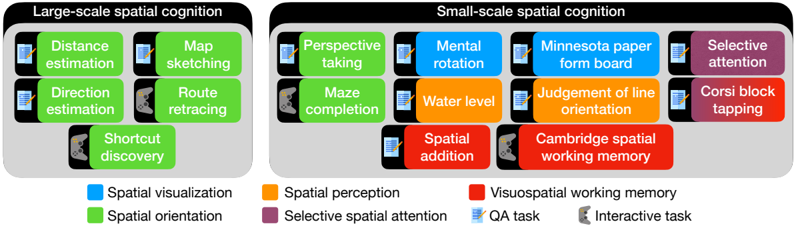
Figure 1: SPACE: Spatial Perception And Cognition Evaluation. We design a suite of spatial cognition tasks based on the cognitive science literature. These are broadly classified into large-scale and small-scale spatial cognition. Large-scale tasks require understanding space at the level of environments and evaluate spatial orientation and cognitive mapping abilities. Small-scale tasks require understanding space at the level of objects or object arrangements and evaluate skills such as spatial visualization, spatial orientation, spatial perception, selective spatial attention and visuospatial working memory. These tasks can be multiple-choice question answering, or interactive games. We develop multimodal as well as purely textual presentations, which support evaluation of both large language models (LLMs) and vision-language models (VLMs).
<details>
<summary>Image 1 Details</summary>
### Visual Description
## Diagram: Spatial Cognition Tasks
### Overview
The image presents a diagram categorizing spatial cognition tasks into two main groups: Large-scale spatial cognition and Small-scale spatial cognition. Each category lists specific tasks associated with different cognitive functions, indicated by color-coded blocks. Icons are used to denote the task type (QA task or Interactive task).
### Components/Axes
* **Titles:**
* Top-left: Large-scale spatial cognition
* Top-right: Small-scale spatial cognition
* **Legend:** Located at the bottom of the image.
* Blue: Spatial visualization
* Green: Spatial orientation
* Orange: Spatial perception
* Purple: Selective spatial attention
* QA task: Icon of a document with a pen
* Interactive task: Icon of a game controller
* **Task Blocks:** Rectangular blocks containing the name of each task, color-coded according to the cognitive function it relates to.
### Detailed Analysis or ### Content Details
**Large-scale spatial cognition:**
* **Spatial Orientation (Green):**
* Distance estimation (QA task icon)
* Map sketching (QA task icon)
* Direction estimation (QA task icon)
* Route retracing (Interactive task icon)
* Shortcut discovery (Interactive task icon)
**Small-scale spatial cognition:**
* **Spatial Orientation (Green):**
* Perspective taking (QA task icon)
* Maze completion (Interactive task icon)
* **Spatial Visualization (Blue):**
* Mental rotation (QA task icon)
* **Spatial Perception (Orange):**
* Water level (QA task icon)
* Spatial addition (QA task icon)
* Judgement of line orientation (QA task icon)
* **Selective Spatial Attention (Purple):**
* Selective attention (QA task icon)
* Corsi block tapping (QA task icon)
* **Visuospatial Working Memory (Red):**
* Cambridge spatial working memory (Interactive task icon)
* Minnesota paper form board (QA task icon)
### Key Observations
* Large-scale spatial cognition tasks are primarily associated with spatial orientation.
* Small-scale spatial cognition tasks are more diverse, involving spatial visualization, spatial perception, selective spatial attention, and visuospatial working memory.
* QA tasks are more prevalent than interactive tasks.
### Interpretation
The diagram illustrates the different cognitive processes involved in spatial reasoning, distinguishing between large-scale and small-scale environments. Large-scale cognition focuses on navigation and orientation within larger spaces, while small-scale cognition involves more detailed spatial analysis and manipulation. The color-coding helps to categorize tasks based on the underlying cognitive functions they engage. The presence of both QA and interactive tasks suggests a variety of methods for assessing these cognitive abilities.
</details>
a benchmark that builds on decades of research in cognitive science. Our benchmark comprises two broad classes of tasks, covering large-scale and small-scale spatial cognition (Hegarty et al., 2006; Meneghetti et al., 2022; Newcombe, 2024). See Figure 1 for an overview.
Large-scale spatial cognition has to do with a model's ability to understand its surroundings. In large-scale tasks, the model is familiarized with an environment and is then asked to estimate distances and directions to landmarks, sketch a map of the environment, retrace a known route, or discover a shortcut to a goal. Small-scale spatial cognition has to do with a model's ability to perceive, imagine, and mentally transform objects in two or three dimensions. Together, large-scale and small-scale tasks evaluate core cognitive abilities such as spatial perception, visualization, orientation, selective attention, and visuospatial memory (Lacroix et al., 2021; Meneghetti et al., 2022).
We design text-based and image-based presentations to evaluate both large language-only and vision-language models (LLMs and VLMs, respectively). Our results indicate that contemporary frontier models have not yet reached competency - let alone mastery - in spatial cognition. On key large-scale spatial cognition tasks, frontier multimodal models perform near chance level, even when presented with an allocentric (map) view of the environment. The strongest models exhibit much better performance on some small-scale tasks that evaluate selective spatial attention and visuospatial working memory, especially with purely textual presentations via character arrays, but perform near chance on other tasks such as mental rotation (Vandenberg & Kuse, 1978), perspective taking (Kozhevnikov & Hegarty, 2001), maze completion (Lacroix et al., 2021), or the classic Minnesota Paper Form Board test (Likert & Quasha, 1941; 1969).
## 2 RELATED WORK
Spatial cognition. Spatial cognition is a branch of cognitive science that seeks to understand how humans and animals perceive, interpret, represent, and interact with objects and environments (Marshall & Fink, 2001; Landau, 2002; Waller & Nadel, 2013; Mallot, 2024; Newcombe, 2024). This involves the perception of object sizes, shapes, and scales, as well as the relationships between objects and landmarks in the environment (including location, distance, direction, and orientation). Spatial cognition is broadly divided into two categories: large-scale and small-scale (Hegarty et al., 2006; Jansen, 2009; Meneghetti et al., 2022; Newcombe, 2024). Large-scale spatial cognition refers to the ability to build spatial representations of environments and use them effectively for navigation and spatial reasoning. Large-scale spatial cognition tasks typically involve egocentric spatial transformations, where the viewer's perspective changes with respect to the environment while the spatial relationships between parts of the environment remain constant (Wang et al., 2014). Smallscale spatial cognition refers to the ability to perceive, imagine, and mentally transform objects or shapes in 2D or 3D. This is typically evaluated using paper and pencil tasks that require allocentric spatial transformations of objects and shapes (Wang et al., 2014). While large-scale spatial cognition has been demonstrated in a wide range of animals (Tolman, 1948; Menzel, 1973; Peters, 1974;
O'Keefe & Nadel, 1978; Gillner & Mallot, 1998; Richardson et al., 1999; Geva-Sagiv et al., 2015; Toledo et al., 2020), the study of small-scale spatial cognition is specific to humans.
Emergent spatial representations. Several works have shown that spatial representations, a phenomenon similar to spatial cognition, can emerge in neural networks (Banino et al., 2018; Cueva & Wei, 2018; Wijmans et al., 2023; Sorscher et al., 2023). These works train a neural network from scratch for path integration or navigation tasks and analyze the model weights to identify spatial representations.
Spatial reasoning in large language models. PlanBench (Valmeekam et al., 2024) and CogEval (Momennejad et al., 2023) evaluate LLMs on text-based planning tasks such as navigation, delivery logistics and block stacking to evaluate cognitive mapping and planning. Yamada et al. (2024) evaluate spatial reasoning in LLMs by performing map traversals on different types of graphs and evaluate the model's self-localization ability. EWOK (Ivanova et al., 2024) studies spatial plausibility reasoning in LLMs. In comparison to these benchmarks, SPACE evaluates a broader array of cognitive abilities and implements multimodal presentations of classic animal cognition experiments.
Benchmarks for large multimodal models. The recent successes of multimodal models (OpenAI, 2024; Li et al., 2024a; Reid et al., 2024) have been facilitated by large-scale training on text and multimodal corpora (Rana, 2010; Together Computer, 2023; Chen et al., 2023; Laurenc ¸on et al., 2023; Gadre et al., 2023), followed by tuning on human preferences (Liu et al., 2023a; Awadalla et al., 2024; Ouyang et al., 2022; Rafailov et al., 2023). The remarkable advances in the capabilities of these models inspired a variety of benchmarks that evaluate their performance. Early multimodal benchmarks consisted of single-task datasets such as visual question answering (Antol et al., 2015; Goyal et al., 2019; Marino et al., 2019) and image captioning (Chen et al., 2015). However, due to the limited scope of early datasets and concerns regarding potential test-data leakage, newer benchmarks use diverse collections of tasks (Fu et al., 2023; Yu et al., 2024; Liu et al., 2023b; Yue et al., 2024; Lu et al., 2024; Ying et al., 2024). While these datasets primarily focus on image understanding, newer datasets that emphasize spatiotemporal reasoning have been proposed for video (Li et al., 2024b; Fu et al., 2024a; Majumdar et al., 2024).
Recent studies highlight a number of shortcomings of frontier multimodal models (Moskvichev et al., 2023; Tong et al., 2024; Chen et al., 2024a; Fu et al., 2024b). One such shortcoming is that models may not perceive the image in detail, often missing fine-grained details or ignoring the image entirely (Chen et al., 2024b; Guan et al., 2024; Tong et al., 2024). HallusionBench proposes a new dataset of image pairs, where tiny edits are made from one image to another that change the answer to the question (Guan et al., 2024). MMVP identifies issues with CLIP-based pretraining of visual encoders, which make current models blind to certain visual patterns, and proposes a benchmark of CLIP-blind image pairs where the same question has opposite answers (Tong et al., 2024). MMStar shows that many questions in multimodal benchmarks can be answered correctly without the image and proposes a new split of existing benchmarks that addresses this issue (Chen et al., 2024b).
Another shortcoming of existing models is their lack of spatial perception and reasoning (Chen et al., 2024a; Cheng et al., 2024). SpatialVLM proposes a VQA dataset that requires answering questions about relative spatial arrangements and metric relationships (Chen et al., 2024a). SpatialRGPT further includes region-level understanding (Cheng et al., 2024). MOCHI evaluates the ability of vision models to identify rotated versions of procedurally-generated objects (Bonnen et al., 2025). 'Perception test' aims to overcome shortcomings of standard video datasets by creating a diagnostic dataset where participants record videos while following complex scripts depicting interesting events (Patraucean et al., 2023). It evaluates fundamental perceptual skills (memory, abstraction, intuitive physics, and semantics) and various types of reasoning.
Another line of work considers skill acquisition (the ability to learn a skill and apply it to new scenarios). Prior work has studied this using visual analogical reasoning (Chollet, 2019; Moskvichev et al., 2023; Yiu et al., 2024). The ARC dataset contains samples consisting of a few examples of abstract grids and their transformations and one or more test inputs (Chollet, 2019). The objective is to understand the transformation performed using the examples and apply it to test inputs. The transformations have been further organized into specific concepts with varying degrees of difficulty in the ConceptARC dataset (Moskvichev et al., 2023). Inspired by ARC and developmental psy-
chology, the KiVA dataset studies visual analogies in the context of visually realistic 3D shapes with concepts like transformations in color, size, rotations, reflections, and counting (Yiu et al., 2024).
## 3 SPACE: A BENCHMARK FOR S PATIAL P ERCEPTION A ND C OGNITION E VALUATION
We develop a benchmark for evaluating the spatial cognition of frontier models. The benchmark comprises large-scale and small-scale tasks and is designed for compatibility with both text-only and multimodal models.
## 3.1 LARGE-SCALE SPATIAL COGNITION
In large-scale spatial cognition tasks, we evaluate the ability of models to build spatial representations of their surrounding environment, and whether they can use these representations to reason about and navigate in the environment. There are two stages to these tasks. First, we familiarize the model with an environment by showing a video walkthrough. 1 The model must build a mental representation of the environment that captures the locations of start, goal and landmark locations, and their spatial relationships. After the model is familiarized with the environment, we evaluate the model's spatial representation using five tasks derived from the cognitive science literature (Meneghetti et al., 2022). See Figure 2(top) and Figure 3 for an overview.
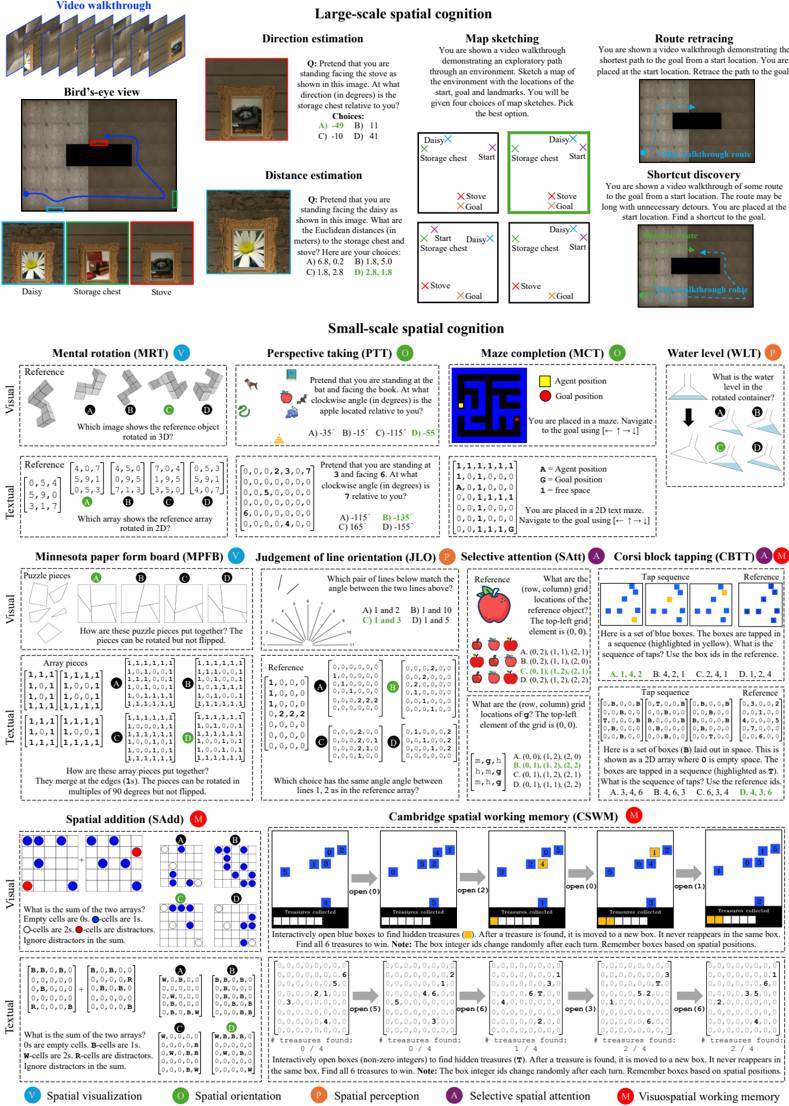
- 1 . Direction estimation. The goal is to determine the directions to other landmarks from a given landmark. The participant is asked to pretend that they are facing a landmark A, and then asked to estimate the direction (in degrees) to another landmark B. This is known as a pointing trial in the cognitive science literature (Allen et al., 1996; Hegarty et al., 2006; Pazzaglia & Taylor, 2007; Weisberg et al., 2014; Meneghetti et al., 2016). We formulate this as a multiple-choice QA task with four options for the direction (only one correct option).
- 2 . Distance estimation. The goal is to determine the straight-line distances from one landmark to all other landmarks (Allen et al., 1996; Hegarty et al., 2006). The participant is asked to pretend that they are facing a landmark A, and then asked to estimate the Euclidean distance to all the other landmarks. We pose this as a multiple-choice QA with four options for the list of distances to each landmark. Since current models are not good at estimating metric measurements (Chen et al., 2024a; Cheng et al., 2024), we generate incorrect options such that the ratios of distances between landmarks are not preserved, making it easier to identify the correct option.
- 3 . Map sketching. The goal is to draw a map of the environment that contains the start, goal and landmark positions (Allen et al., 1996; Hegarty et al., 2006; Pazzaglia & Taylor, 2007; Weisberg et al., 2014; Meneghetti et al., 2016; 2021). We formulate this as multiple-choice QA with four options for the map sketches. The correct option preserves the true spatial relationships between the different map elements, while the incorrect options skew the spatial relationships randomly.
- 4 . Route retracing. The goal is to retrace the route shown in the video from the start to the goal (Allen et al., 1996; Pazzaglia & Taylor, 2007; Meneghetti et al., 2016; 2021). This task evaluates the model's ability to remember landmarks seen in the route and the actions required along the route to reach the goal. We formulate this as an interactive task where the model receives the current observation, decides which action to take, and receives updated observations based on the actions taken. We measure performance using the SPL metric (success weighted by path length), which penalizes the model for taking unnecessary detours (Anderson et al., 2018). (The demonstrated route, which the model must retrace, is always the shortest path to the goal.)
- 5 . Shortcut discovery. The goal is to discover a shortcut (i.e., a route never observed before) from the start to the goal after observing a video walkthrough that takes detours to reach the goal (Tolman, 1948; Allen et al., 1996; Pazzaglia & Taylor, 2007; Meneghetti et al., 2016; 2021). The ability to discover shortcuts in familiar environments is a key indicator of cognitive mapping ability (Tolman, 1948). When designing environments and walkthrough paths, we ensured that a novel shortcut exists that the model can exploit. Similar to route retracing, we treat this as an interactive navigation task and measure performance using the SPL metric.
1 For text-only models, the 'video walkthrough' is a sequence of discrete map observations presented as arrays of characters, see Figure 3 for examples.
֯
֯
Figure 2: The tasks in SPACE. For all tasks (other than the water level test), we include multimodal as well as purely textual presentations, to support evaluating both large language models (LLMs) and vision-language models (VLMs). For large-scale tasks, we visualize examples from the egocentric image presentation here and visualize alternate presentations in Figure 3. For small-scale tasks, we visualize both visual and textual presentations here. Bolding of characters in the arrays is for illustration purposes only.
<details>
<summary>Image 2 Details</summary>
### Visual Description
## Cognitive Task Examples: Spatial Cognition
### Overview
The image presents a collection of cognitive tasks designed to assess spatial cognition. These tasks are divided into two main categories: large-scale spatial cognition and small-scale spatial cognition. Each task is presented with a visual stimulus, a question or instruction, and multiple-choice answers.
### Components/Axes
**1. Large-scale spatial cognition:**
- **Direction estimation:** Assesses the ability to estimate directions relative to a given viewpoint.
- **Distance estimation:** Assesses the ability to estimate distances between objects in a scene.
- **Map sketching:** Assesses the ability to create a cognitive map of an environment.
- **Route retracing:** Assesses the ability to retrace a path in a virtual environment.
- **Shortcut discovery:** Assesses the ability to find shortcuts in a virtual environment.
**2. Small-scale spatial cognition:**
- **Mental rotation (MRT):** Assesses the ability to mentally rotate 3D objects.
- **Perspective taking (PTT):** Assesses the ability to take another person's perspective.
- **Maze completion (MCT):** Assesses the ability to navigate a maze.
- Legend: Yellow = Agent position, Red = Goal position, A = Agent position, G = Goal position, 1 = free space
- **Water level (WLT):** Assesses the understanding of water level in a rotated container.
- **Minnesota paper form board (MPFB):** Assesses the ability to mentally assemble 2D shapes.
- **Judgement of line orientation (JLO):** Assesses the ability to judge the orientation of lines.
- **Selective attention (SAtt):** Assesses the ability to selectively attend to specific objects in a visual scene.
- **Corsi block tapping (CBTT):** Assesses visuo-spatial working memory.
- **Spatial addition (SAdd):** Assesses the ability to perform spatial addition.
- **Cambridge spatial working memory (CSWM):** Assesses spatial working memory.
### Detailed Analysis
**Large-scale spatial cognition:**
* **Direction estimation:**
* Question: Pretend that you are standing facing the stove as shown in this image. At what direction (in degrees) is the storage chest relative to you?
* Choices: A) -49, B) 11, C) -10, D) 41
* **Distance estimation:**
* Question: Pretend that you are standing facing the daisy as shown in this image. What are the Euclidean distances (in meters) to the storage chest and stove? Here are your choices:
* Choices: A) 6.8, 0.2, B) 1.8, 5.0, C) 1.8, 2.8, D) 2.8, 1.8
* **Map sketching:**
* Description: You are shown a video walkthrough demonstrating an exploratory path through an environment. Sketch a map of the environment with the locations of the start, goal and landmarks. You will be given four choices of map sketches. Pick the best option.
* Four map options are presented, each showing the relative positions of "Daisy," "Storage chest," "Stove," "Start," and "Goal."
* **Route retracing:**
* Description: You are shown a video walkthrough demonstrating the shortest path to the goal from a start location. You are placed at the start location. Retrace the path to the goal.
* **Shortcut discovery:**
* Description: You are shown a video walkthrough of some route to the goal from a start location. The route may be long with unnecessary detours. You are placed at the start location. Find a shortcut to the goal.
**Small-scale spatial cognition:**
* **Mental rotation (MRT):**
* Visual: A reference 3D object is shown, along with four rotated versions (A, B, C, D).
* Question: Which image shows the reference object rotated in 3D?
* Textual: Arrays of numbers are presented, representing the reference object and the rotated versions.
* Question: Which array shows the reference array rotated in 2D?
* Reference array: `[[4,0,7],[0,5,4],[5,9,0],[3,1,7]]`
* Array A: `[[4,5,0],[5,9,1],[0,5,3],[7,1,3]]`
* Array B: `[[7,0,4],[0,9,5],[7,1,3],[3,5,0]]`
* Array C: `[[0,5,3],[1,9,5],[3,5,0],[4,0,7]]`
* Array D: `[[0,5,3],[5,9,1],[3,5,0],[4,0,7]]`
* **Perspective taking (PTT):**
* Visual: An image shows a bat, a book, and an apple.
* Question: Pretend that you are standing at the bat and facing the book. At what clockwise angle (in degrees) is the apple located relative to you?
* Choices: A) -35, B) -15, C) -115, D) -55
* Visual: A number 6 is shown.
* Question: Pretend that you are standing at 3 and facing 6. At what clockwise angle (in degrees) is 7 relative to you?
* Choices: A) -115, B) -135, C) 165, D) -155
* Textual: Arrays of numbers are presented.
* `[[0,0,2,3,0,7],[0,0,0,0,0,0,0],[5,0,0,0,0,0,0],[6,0,0,0,0,0,0],[0,0,0,0,4,0,0]]`
* **Maze completion (MCT):**
* Visual: A maze is shown, with a yellow square representing the agent's position and a red square representing the goal position.
* Instruction: You are placed in a maze. Navigate to the goal using [↑ → ↓ ←].
* Textual: A 2D text maze is presented.
* `[[1,1,1,1,1,1],[1,0,1,0,0,0],[A,0,1,0,0,0],[0,0,1,1,1,1],[0,0,1,0,0,0],[0,0,1,0,0,0],[0,0,1,1,1,G]]`
* Instruction: You are placed in a 2D text maze. Navigate to the goal using [↑ → ↓ ←].
* **Water level (WLT):**
* Visual: A rotated container is shown, along with four options (A, B, C, D) representing the water level.
* Question: What is the water level in the rotated container?
* **Minnesota paper form board (MPFB):**
* Visual: Puzzle pieces are shown.
* Question: How are these puzzle pieces put together? The pieces can be rotated but not flipped.
* Textual: Arrays of numbers are presented, representing the puzzle pieces.
* Question: How are these array pieces put together? They merge at the edges (1s). The pieces can be rotated in multiples of 90 degrees but not flipped.
* Array pieces:
* `[[1,1,1,1],[1,0,1,1],[1,0,1,1],[1,1,1,1]]`
* `[[1,1,1,1],[1,0,0,1],[1,0,0,1],[1,1,1,1]]`
* **Judgement of line orientation (JLO):**
* Visual: A reference angle is shown, along with multiple pairs of lines.
* Question: Which pair of lines below match the angle between the two lines above?
* Choices: A) 1 and 2, B) 1 and 10, C) 1 and 3, D) 1 and 5
* Textual: Arrays of numbers are presented, representing the line orientations.
* Question: Which choice has the same angle between lines 1, 2 as in the reference array?
* Reference array: `[[1,0,0,0],[1,0,0,0],[0,2,2,2],[0,0,0,0]]`
* **Selective attention (SAtt):**
* Visual: An image shows an apple and other objects.
* Question: What are the (row, column) grid locations of the reference object? The top-left grid element is (0, 0).
* Choices: A. (0, 2), (1, 1), (2, 1), B. (0, 2), (1, 1), (2, 0), C. (0, 1), (1, 2), (2, 1), D. (0, 2), (1, 2), (2, 2)
* Visual: An image shows g and other objects.
* Question: What are the (row, column) grid locations of g? The top-left element of the grid is (0, 0).
* Choices: A. (0, 0), (1, 2), (2, 0), B. (0, 1), (1, 2), (2, 2), C. (0, 1), (1, 2), (2, 1), D. (0, 1), (1, 1), (2, 2)
* **Corsi block tapping (CBTT):**
* Visual: A set of blue boxes is shown. The boxes are tapped in a sequence (highlighted in yellow).
* Question: What is the sequence of taps? Use the box ids in the reference.
* Choices: A. 1, 4, 2, B. 4, 2, 1, C. 2, 4, 1, D. 1, 2, 4
* Visual: A set of boxes (B) laid out in space. This is shown as a 2D array where 0 is empty space. The boxes are tapped in a sequence (highlighted as T).
* Question: What is the sequence of taps? Use the reference ids.
* Choices: A. 3, 4, 6, B. 4, 6, 3, C. 6, 3, 4, D. 4, 3, 6
* **Spatial addition (SAdd):**
* Visual: Two arrays are shown, with cells containing dots and distractors.
* Question: What is the sum of the two arrays? Empty cells are 0s. -cells are 1s. O-cells are 2s. -cells are distractors. Ignore distractors in the sum.
* Textual: Arrays of numbers are presented, representing the arrays.
* Question: What is the sum of the two arrays? 0s are empty cells. B-cells are 1s. W-cells are 2s. R-cells are distractors. Ignore distractors in the sum.
* **Cambridge spatial working memory (CSWM):**
* Visual: A series of open blue boxes are shown, with treasures hidden inside.
* Description: Interactively open blue boxes to find hidden treasures. After a treasure is found, it is moved to a new box. It never reappears in the same box. Note: The box integer ids change randomly after each turn. Remember boxes based on spatial positions. Find all 6 treasures to win.
* Textual: The number of treasures found is displayed.
* Description: Interactively open boxes (non-zero integers) to find hidden treasures (T). After a treasure is found, it is moved to a new box. Find all 6 treasures to win. Note: The box integer ids change randomly after each turn. Remember boxes based on spatial positions.
### Key Observations
* The tasks cover a wide range of spatial cognitive abilities, from large-scale navigation to small-scale object manipulation.
* The tasks use a variety of visual stimuli, including images, diagrams, and text.
* The tasks are presented with clear instructions and multiple-choice answers.
### Interpretation
The collection of tasks provides a comprehensive assessment of spatial cognitive abilities. The tasks are designed to measure different aspects of spatial cognition, such as spatial orientation, spatial visualization, spatial memory, and spatial reasoning. The results of these tasks can be used to identify individuals with spatial cognitive deficits or to track changes in spatial cognitive abilities over time. The tasks are relevant to a variety of real-world activities, such as navigation, object manipulation, and problem-solving.
</details>
֯
֯
֯
֯
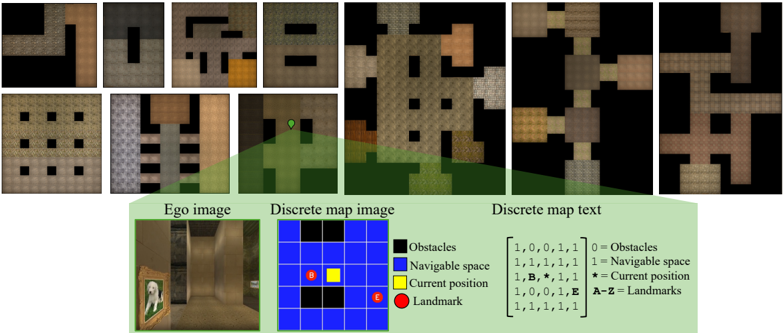
Figure 3: Large-scale spatial cognition. We design ten environment layouts based on experimental protocols in cognitive science. The top row shows bird's-eye view renderings of these environments. To evaluate largescale spatial cognition in frontier models, we implement three observation spaces: egocentric image, discrete map (DM) image, and discrete map (DM) text (see bottom row). Ego image shows a first-person view within the environment. DMimage shows a quantized, allocentric bird's-eye view of the 2 . 5m × 2 . 5m region centered on the current position. Unlike ego image, DM image enables performing the large-scale tasks in a simplified setting without requiring perspective geometry. DM text depicts the DM image using text characters. We evaluate multimodal models using ego image and DM image, and large language models using DM text.
<details>
<summary>Image 3 Details</summary>
### Visual Description
## Environment Mapping and Representation
### Overview
The image presents a collection of environment maps and representations, including top-down views of maze-like structures, an ego-centric image, a discrete map image, and a discrete map text representation. The image demonstrates different ways to represent the same environment for navigation and understanding.
### Components/Axes
* **Top-Down Maze Views:** A series of images showing maze-like environments from a top-down perspective. These views vary in complexity and layout.
* **Ego Image:** A first-person perspective image showing a hallway with a painting on the wall.
* **Discrete Map Image:** A grid-based representation of an environment, with color-coded elements:
* Black: Obstacles
* Blue: Navigable space
* Yellow: Current position
* Red: Landmark
* **Discrete Map Text:** A matrix of numerical and symbolic values representing the environment:
* 0: Obstacles
* 1: Navigable space
* \*: Current position
* A-Z: Landmarks
### Detailed Analysis
* **Top-Down Maze Views:** These views provide a global understanding of the environment's layout. The mazes vary in structure, some with clear pathways and others with more complex, interconnected routes.
* **Ego Image:** This image provides a realistic, first-person view of the environment. It shows a hallway with a painting, giving a sense of depth and visual detail.
* **Discrete Map Image:** The grid shows a 5x5 map. The current position is in the center. There is a landmark 'E' in the bottom right and a landmark 'B' in the top left.
* **Discrete Map Text:** The text representation corresponds to the discrete map image. The matrix is:
```
[1, 0, 0, 1, 1]
[1, 1, 1, 1, 1]
[1, B, *, 1, 1]
[1, 0, 0, 1, E]
[1, 1, 1, 1, 1]
```
### Key Observations
* The image demonstrates different levels of abstraction in environment representation, from realistic images to simplified grid-based maps and numerical matrices.
* The discrete map image and text provide a compact and structured way to represent the environment for computational purposes.
* The ego image provides a realistic view that can be used for visual navigation and landmark recognition.
### Interpretation
The image illustrates the concept of environment mapping and representation, which is crucial in robotics, autonomous navigation, and game development. The different representations serve different purposes: the top-down views provide a global understanding, the ego image provides a realistic view, and the discrete map provides a structured representation for computation. The discrete map text is a machine-readable format that can be used by algorithms to plan paths and navigate the environment. The combination of these representations allows for a comprehensive understanding of the environment, enabling intelligent agents to navigate and interact with it effectively.
</details>
## 3.1.1 IMPLEMENTATION
3D environment generation. We create ten environment layouts based on prior work in cognitive science and artificial intelligence (Tolman, 1948; Gillner & Mallot, 1998; Richardson et al., 1999; Banino et al., 2018; Bouchekioua et al., 2021). Figure 3 shows bird's-eye view images of each layout. See the appendix for more details about the environment generation process.
Observation spaces. We create multiple observation spaces to support evaluating both text-only and vision+text models. These are egocentric images, discrete map (DM) images, and discrete map (DM) text presentations.
- Ego image. The environment is captured using a forward-facing perspective camera placed at the model's location in the environment. This is similar to the setup of an animal navigating through an immersive environment and requires understanding perspective geometry.
- DMimage. This is a quantized bird's-eye view image of a 2 . 5m × 2 . 5m area in the environment surrounding the model's location. This is akin to a human using a map to navigate. The current location is always at the center of the DM image. We use a Pacman-like coloring scheme highlighting the obstacles, navigable space, current postion, and landmarks. DM image simplifies the mapping process by removing the need for perspective geometry understanding.
- DMtext. This is a translation of DM image to an text array. We carefully select the text encoding to ensure compatibility with text tokenizers of popular models and ensure that each element of the array is encoded by the tokenizers of all evaluated models as a distinct token.
See Figure 3 (bottom) for examples of these presentations. The first two observation spaces are used for models that support visual inputs, while the last observation space is used for text-only models. See the appendix for additional illustrations of these tasks and dataset statistics.
## 3.2 SMALL-SCALE SPATIAL COGNITION
In small-scale spatial cognition tasks, we evaluate the models' ability to perceive, imagine, and mentally transform objects or shapes in two and three dimensions. We build on the body of work on visuospatial abilities, which are evaluated in humans via paper-and-pencil tasks (Allen et al., 1996; Weisberg et al., 2014; Meneghetti et al., 2022). These abilities may be used to explain individual differences between participants in large-scale spatial cognition (Meneghetti et al., 2022). We define ten small-scale tasks to evaluate abilities such as spatial perception, spatial visualization, spatial orientation, selective attention, and visuospatial working memory. See Figure 2(bottom) for illustrations of each task. We summarize each task below and provide additional details in the appendix.
- 6 . Mental rotation test (MRT). This is a test of spatial visualization, i.e., the ability to mentally manipulate 2D or 3D stimuli (Vandenberg & Kuse, 1978). In the visual presentation, a reference 3D shape from Shepard & Metzler (1971) is provided along with four choices. The correct choice is a rotated version of the reference, and the remaining choices are rotated versions of an alternate shape. The goal is to identify the correct choice from the distractors. The text-only version of this task uses 2D character arrays, akin to the card rotations test from French et al. (1963).
- 7 . Perspective taking test (PTT). This is a test of spatial orientation, i.e., the ability to imagine being in a different position in space and seeing the surroundings from a new perspective (Kozhevnikov & Hegarty, 2001). We place N randomly-sampled objects (like apples, bats, dogs, books, grapes, etc.) at random locations in an image (with no overlap between objects). The objective is to take the perspective of standing next to an object (say, a bat) facing another object (say, a book), and determine the relative orientation of a third object (say, an apple). This is a multiple-choice QA with four options (only one correct option).
- 8 . Water level test (WLT). This is a test of spatial perception (Piaget et al., 1957). Originally, it was designed to evaluate children's knowledge about the horizontal nature of the surface of water in a sealed bottle regardless of its orientation. Performance on the water-level test was found to be related to performance on spatial ability tests (Foltz, 1978; Wittig & Allen, 1984). We present the model with an image of a water container partially filled with water and ask it to imagine the position of the water if the container were tilted. We implement this as a four-way multiplechoice QA, where each choice is an image showing the tilted container with varying water levels. The objective is to select the one choice that shows the correct water level.
- 9 . Minnesota Paper Form Board test (MPFB). This is a test of spatial visualization, where the model must perform multi-step manipulations of complex spatial information (Meneghetti et al., 2022). Specifically, we provide the model with pieces of a figure and ask it to identify how the pieces fit together (Likert & Quasha, 1941; 1969). We programmatically segment a square into five pieces, and rotate the pieces randomly to generate the final segments. We generate alternate segmentations of a square as negative choices for a multiple-choice QA presentation.
- 10 . Judgement of Line Orientation test (JLO). This is a test of spatial perception (Benton, 1994), where a model must determine the angle between two lines in an image. Our visual presentation shows two lines in an image along with a set of 11 reference lines. The objective is to determine the pair of reference lines that have the same angles between them as the lines in the image. This is presented as a multiple-choice QA with four choices (only one of them correct). Our text-only presentation implements the tasks via lines embedded in 2D integer arrays.
- 11 . Selective attention task (SAtt). This is a test of selective spatial attention, i.e., the ability to selectively attend to a particular region of space while ignoring others (Serences & Kastner, 2014; Pahor et al., 2022). In particular, we use the widely used cancellation task, where the goal is to search for and mark out target stimuli embedded amidst distractors (Della Sala et al., 1992; Brickenkamp & Zillmer, 1998; Dalmaijer et al., 2015; Lacroix et al., 2021; Pahor et al., 2022; Kalina & Walgrave, 2004). We design the task as multiple-choice QA with objects as the stimuli for visual evaluation and characters as stimuli for text-only evaluation. The target stimuli and distractors are arranged on a grid. The answer must be selected from one out of four options. The correct option lists the (row, column) pairs that localize the target stimuli in the grid.
- 12 . Maze completion task (MCT). This is an interactive game to evaluate spatial orientation, planning, and executive functioning (Lacroix et al., 2021). We programmatically create mazes using Mazelib (Stilley, 2014) and render them using a Pacman-like color scheme for the visual presentation and a character array for the text-only presentation (similar to DM image and DM text in Figure 3). Using the maze rendering, a model must sequentially select an up/down/left/right action to reach the goal and execute a stop action to successfully complete the task. If the model does not reach the goal within 250 actions, it is considered to have failed. We measure the success rate, i.e., the percentage of mazes where the model reaches the goal within the allotted time.
- 13 . Corsi block-tapping task (CBTT). This is a test of visuospatial working memory and attention (Corsi, 1972; Claessen et al., 2015). We create a digital Corsi board with N blue-colored blocks that are randomly placed on the board with no overlap ( N ∈ [5 , 8]) . We randomly sample a sequence of K taps, where each block is tapped at most once ( K ∈ [4 , N ]) . The taps are digitally rendered on the blocks by highlighting them in yellow when tapped, yielding an sequence of K images. After presenting the K images, we provide a rendering of the board with integer IDs
assigned to each block and ask the model to reproduce the sequence of taps using these IDs. We treat this as multiple-choice QA with four choices of tap sequences, only one of which is correct.
- 14 . Spatial addition task (SAdd). This is a test of visuospatial working memory, i.e., the ability to store and manipulate spatial information in memory (Wechsler, 2009). The model is presented with two 2D grids, where each grid location can be empty or contain a blue or red dot. The objective is to add the two grids together by following certain rules. If a grid location has a blue dot in exactly one of grids, the result should be a blue dot. If a grid location has blue dots on both grids, the result should be a white dot. Red dots are distractors and must be ignored. We programmatically generate grid pairs with sizes sampled from { 3 , 5 , 7 , 9 } and pseudo-randomly populate them with blue and red dots. We formulate the task as multiple-choice QA, presenting four grids as possible answers, exactly one of which is correct.
- 15 . Cambridge spatial working memory test (CSWM). This is an interactive game that evaluates visuospatial working memory (Sahakian et al., 1988). The model is presented with an image containing N blue colored boxes ( N ∈ [3 , 7]) . A yellow 'treasure' is initially hidden in one of the boxes. The model must sequentially select boxes one at a time to find the hidden treasure. Once the treasure is found, another treasure is placed in one of the remaining boxes. The objective is to locate all the yellow treasures via a process of elimination. We programmatically generate instances of this task by randomly sampling blue boxes, placing them at random locations (without overlap), and placing the treasures in each box in random order. At each step, we assign random integer IDs to each box as a reference for selecting a box. The boxes' integer IDs are randomized in each step, forcing the model to remember boxes based on their spatial positions. When the model finds a treasure, the box containing the treasure becomes yellow. The model must find all the treasures before a time limit T (determined based on N ) to succeed.
As with large-scale spatial cognition, we also implement purely textual presentations of these tasks to support evaluation of large language models (LLMs). Figure 2 illustrates both the multimodal and the purely textual presentations. The key idea in instantiating the textual presentations is to encode all spatial information via 2D character arrays. We did not identify a natural such encoding for the water level test (WLT) and did not include a text-only presentation for it for this reason. See the appendix for additional illustrations of these tasks. In some tasks, such as MRT, MPFB, and JLO, the text presentations are substantially easier than the corresponding visual presentations. However, the visual and textual presentations match closely for the remaining tasks, enabling us to identify modality-specific limitations of multimodal models by evaluating them on the two presentations.
## 4 EXPERIMENTS
Baselines. We evaluate a number of LLMs and VLMs. Using text-only presentations, we evaluate GPT-4v and GPT-4o (OpenAI, 2023; 2024), Claude 3.5 Sonnet (Anthropic, 2024), the Llama3 family (Dubey et al., 2024), Mistral models such as Mixtral 8x7B, Mixtral 8x22B, and Mistral 123B (Jiang et al., 2024; Mistral AI team, 2024a), and two Yi 1.5 models (Young et al., 2024). Using multimodal presentations, we evaluate GPT-4v and GPT-4o (OpenAI, 2023; 2024), Claude 3.5 Sonnet (Anthropic, 2024), LlaVA-NeXT-Interleave (Li et al., 2024a), Pixtral 12B (Mistral AI team, 2024b), and Phi-3.5-vision (Abdin et al., 2024). We use the vLLM inference engine for evaluating the open-source models (Kwon et al., 2023). For each task, we implement a prompt that provides a detailed description of the task and the expected response format (see the appendix). We also list the results of a chance baseline that selects an answer at random. For multiple-choice QA tasks, chance is at 25% . For interactive tasks, the chance baseline samples an action at random in each step. We further include human performance for reference for the multiple-choice QA tasks. See the appendix for additional implementation details.
Large-scale spatial cognition results. The results are shown in Table 1, grouped by presentation modality (ego image, DM image, DM text). For image-based presentations, we evaluate Claude 3.5 Sonnet, GPT-4v and GPT-4o because they support video understanding (via a succession of images). For DM text, we evaluate both open and closed LLMs. We also list the performance of the chance baseline for calibration, as well as human performance (see the appendix for details). In the text-only modality, Claude 3.5 Sonnet attains the highest average performance. Mistral 123B is the highest-performing open model. All evaluated models struggle with large-scale spatial cognition, falling significantly below human performance on direction estimation, distance estimation,
## Observation space: Ego image
Table 1: Large-scale spatial cognition results. The three tables show results for different observation spaces. Results below 50% of human performance are gray. Methods are sorted based on their overall performance.
| Method | Direction estimation | Distance estimation | Map sketching | Route retracing | Shortcut discovery | Average |
|-------------------|----------------------------|----------------------------|----------------------------|----------------------------|----------------------------|----------------------------|
| Human | 82.8 | 83.2 | 96.6 | - | - | - |
| GPT-4o | 32 . 0 ± 4 . 1 | 36 . 5 ± 5 . 0 | 33 . 3 ± 4 . 1 | 6 . 6 ± 3 . 6 | 6 . 4 ± 1 . 0 | 23 . 0 |
| Claude 3.5 Sonnet | 29 . 0 ± 2 . 9 | 34 . 4 ± 2 . 9 | 27 . 5 ± 8 . 3 | 7 . 4 ± 2 . 8 | 0 . 0 ± 0 . 0 | 19 . 6 |
| GPT-4v | 29 . 7 ± 0 . 3 | 31 . 9 ± 2 . 7 | 20 . 0 ± 11 . 8 | 1 . 6 ± 1 . 2 | 3 . 9 ± 0 . 9 | 17 . 4 |
| Chance | 25.0 | 25.0 | 25.0 | 0.0 | 0.0 | 15.0 |
| | Observation space: DMimage | Observation space: DMimage | Observation space: DMimage | Observation space: DMimage | Observation space: DMimage | Observation space: DMimage |
| Method | Direction estimation | Distance estimation | Map sketching | Route retracing | Shortcut discovery | Average |
| Human | 82.9 | 82.5 | 100.0 | - | - | - |
| GPT-4o | 29 . 5 ± 5 . 5 | 31 . 9 ± 1 . 0 | 33 . 3 ± 3 . 3 | 23 . 6 ± 3 . 1 | 25 . 9 ± 2 . 0 | 28 . 8 |
| Claude 3.5 Sonnet | 32 . 5 ± 2 . 3 | 40 . 0 ± 2 . 6 | 30 . 0 ± 4 . 1 | 15 . 4 ± 4 . 3 | 13 . 7 ± 6 . 4 | 26 . 3 |
| GPT-4v | 26 . 3 ± 3 . 0 | 29 . 3 ± 4 . 1 | 45 . 0 ± 5 . 0 | 13 . 7 ± 5 . 2 | 15 . 3 ± 3 . 0 | 25 . 9 |
| Chance | 25.0 | 25.0 | 25.0 | 0.0 | 0.0 | 15.0 |
| | Observation space: DMtext | Observation space: DMtext | Observation space: DMtext | Observation space: DMtext | Observation space: DMtext | Observation space: DMtext |
| Method | Direction estimation | Distance estimation | Map sketching | Route retracing | Shortcut discovery | Average |
| Human | 66.7 | 76.5 | 66.7 | - | - | - |
| Claude 3.5 Sonnet | 29 . 2 ± 4 . 4 | 40 . 2 ± 3 . 1 | 51 . 7 ± 5 . 5 | 26 . 5 ± 2 . 9 | 20 . 0 ± 3 . 0 | 33 . 5 |
| GPT-4o | 28 . 7 ± 4 . 1 | 33 . 3 ± 1 . 7 | 46 . 7 ± 4 . 1 | 27 . 5 ± 3 . 2 | 26 . 6 ± 0 . 1 | 32 . 6 |
| Mistral 123B | 30 . 5 ± 5 . 1 | 28 . 9 ± 5 . 7 | 38 . 3 ± 5 . 5 | 20 . 3 ± 2 . 8 | 19 . 9 ± 3 . 0 | 27 . 6 |
| GPT-4v | 30 . 7 ± 4 . 1 | 26 . 5 ± 2 . 7 | 40 . 8 ± 6 . 0 | 20 . 6 ± 5 . 8 | 15 . 4 ± 2 . 0 | 26 . 8 |
| Llama 3 70B | 27 . 0 ± 2 . 2 | 30 . 4 ± 1 . 9 | 35 . 0 ± 8 . 3 | 13 . 2 ± 9 . 2 | 5 . 3 ± 4 . 1 | 22 . 2 |
| Yi 1.5 34B | 26 . 2 ± 4 . 7 | 35 . 7 ± 1 . 4 | 35 . 0 ± 10 . 7 | 3 . 2 ± 0 . 2 | 1 . 1 ± 1 . 6 | 20 . 2 |
| Mixtral 8x22B | 21 . 3 ± 1 . 9 | 19 . 4 ± 1 . 4 | 39 . 2 ± 12 . 6 | 1 . 5 ± 1 . 4 | 3 . 9 ± 1 . 7 | 17 . 0 |
| Yi 1.5 9B | 10 . 8 ± 1 . 0 | 20 . 0 ± 3 . 7 | 35 . 0 ± 5 . 0 | 5 . 0 ± 2 . 2 | 1 . 3 ± 1 . 5 | 14 . 4 |
| Llama 3 8B | 22 . 5 ± 2 . 9 | 24 . 6 ± 2 . 1 | 23 . 3 ± 7 . 1 | 0 . 0 ± 0 . 0 | 1 . 1 ± 1 . 6 | 14 . 3 |
| Mixtral 8x7B | 15 . 8 ± 2 . 0 | 16 . 1 ± 1 . 4 | 30 . 0 ± 8 . 2 | 1 . 1 ± 1 . 6 | 1 . 1 ± 1 . 6 | 12 . 8 |
| Chance | 25.0 | 25.0 | 25.0 | 0.0 | 0.0 | 15.0 |
and map sketching, and less than 30% SPL on route retracing and shortcut discovery, even with allocentric presentation. With egocentric multimodal presentation (the closest counterpart to classic experimental protocols in animal cognition), the models are near chance level on all tasks.
Human performance ranges from 80% to 100% accuracy on image-based presentations of the multiple-choice QA tasks. Since perceiving large sequences of text arrays is non-trivial for humans, the performance drops to 65% -80% for the text presentations.
Small-scale spatial cognition results. The results are shown in Table 2. With multimodal presentations, we benchmark GPT-4o, GPT-4v, Claude 3.5 Sonnet, and a number of open multimodal models. With purely textual presentations, we benchmark both open and closed models. We also list the performance of the chance baseline for calibration, as well as human performance (see the appendix for details).
Performance of some model classes (e.g., GPT-4o, GPT-4v, Claude 3.5 Sonnet) on purely textual presentations is considerably higher than on multimodal presentations. The best-performing models, Claude 3.5 Sonnet and GPT-4o, achieve 43.8% and 40.1% average accuracies in the multimodal regime and 64.5% and 65.2% average accuracies with purely textual presentations. (Chance is < 25% .) We attribute this in part to the simplified nature of the text-only implementations of tasks like MRT, MPFB, and JLO (e.g., the text-only presentation of mental rotation uses only 2D shapes and constrained 2D rotations) and in part to the relative developmental maturity of large language models (LLMs) versus multimodal models on the remaining tasks.
On tasks that evaluate visuospatial working memory (specifically SAtt, CBTT, SAdd, and CSWM), the strongest LLMs perform well. On selective attention (SAtt), GPT-4o, Claude 3.5 Sonnet, Mistral 123B, and GPT-4v all achieve over 95% accuracy, matching or outperforming the human performance on this task. On the other hand, all models perform poorly on maze completion (MCT), in both presentation modalities. (Note that the models operate with full visibility, as illustrated in Figure 2.) With multimodal presentation, all evaluated models are near chance on perspective taking (PTT) and the Minnesota Paper Form Board test (MPFB). On mental rotation (MRT), the best models are near chance with multimodal presentation, which uses 3D shapes, and only marginally better with purely textual presentation, which uses 2D arrays and constrained rotations.
Multimodal
Table 2: Small-scale spatial cognition results. The two tables show results for multimodal and text-only presentations, respectively. Results below 50% of human performance are gray, results above 90% of human performance are bold . Methods are sorted based on their average performance. ( ∗ Some multimodal models ran out of memory on MCT and CSWM tasks; their accuracy is taken to be 0 for calculating the average.)
| Method | MRT | PTT | WLT | MPFB | JLO | SAtt | MCT | CBTT | SAdd | CSWM | Average |
|---------------------|---------------------|---------------------|---------------------|-------------------|-----------------|-----------------|----------------|----------------|---------------------|-------------------------------|-----------|
| Human | 78.5 | 80.0 | 94.0 | 84.0 | 82.0 | 95.0 | - | 100.0 | 98.0 | - | - |
| Claude 3.5 Sonnet | 29 . 9 ± 3 . 8 | 21 . 8 ± 2 . 9 | 37 . 0 ± 4 . 6 | 35 . 5 ± 7 . 0 | 40 . 5 ± 3 . 8 | 90 . 5 ± 3 . 5 | 2 . 2 ± 1 . 8 | 56 . 5 ± 3 . 8 | 48 . 0 ± 6 . 2 | 76 . 7 ± 2 . 5 | 43.8 |
| GPT-4o | 33 . 3 ± 1 . 9 | 26 . 5 ± 3 . 6 | 59 . 0 ± 10 . 8 | 27 . 0 ± 2 . 2 | 26 . 5 ± 5 . 9 | 70 . 2 ± 1 . 8 | 10 . 4 ± 1 . 0 | 68 . 0 ± 2 . 0 | 40 . 5 ± 7 . 1 | 40 . 0 ± 0 . 0 | 40.1 |
| GPT-4v | 32 . 3 ± 0 . 3 | 28 . 0 ± 2 . 0 | 35 . 0 ± 7 . 7 | 22 . 5 ± 4 . 1 | 26 . 5 ± 6 . 8 | 59 . 8 ± 4 . 4 | 0 . 7 ± 1 . 0 | 44 . 5 ± 3 . 0 | 32 . 0 ± 4 . 5 | 26 . 7 ± 3 . 4 | 30 . 8 |
| Pixtral 12B | 28 . 3 ± 3 . 1 | 23 . 2 ± 4 . 9 | 43 . 0 ± 7 . 0 | 30 . 5 ± 7 . 9 | 24 . 5 ± 7 . 3 | 36 . 0 ± 3 . 9 | OOM | 39 . 5 ± 3 . 0 | 28 . 5 ± 6 . 1 | OOM | 25 . 4 ∗ |
| Phi-3.5-vision | 24 . 1 ± 1 . 0 | 27 . 0 ± 3 . 2 | 22 . 5 ± 7 . 9 | 26 . 0 ± 0 . 0 | 21 . 0 ± 4 . 1 | 44 . 0 ± 4 . 6 | OOM | 33 . 0 ± 4 . 6 | 22 . 0 ± 6 . 8 | OOM | 22 . 0 ∗ |
| Llava interleave 7B | 25 . 1 ± 3 . 2 | 25 . 8 ± 5 . 8 | 25 . 0 ± 8 . 5 | 25 . 0 ± 3 . 3 | 24 . 0 ± 5 . 7 | 32 . 0 ± 4 . 9 | OOM | 25 . 5 ± 5 . 7 | 27 . 0 ± 4 . 1 | OOM | 20 . 9 ∗ |
| Chance | 25.0 | 25.0 | 25.0 | 25.0 | 25.0 | 25.0 | 0.0 | 25.0 | 25.0 | 33 . 8 ± 5 . 4 | 23.4 |
| | Text-only | Text-only | Text-only | Text-only | Text-only | Text-only | Text-only | Text-only | Text-only | Text-only | Text-only |
| Method | MRT | PTT | MPFB | JLO | SAtt | MCT | | CBTT | SAdd | CSWM | Average |
| Human | 90.0 | 75.0 | 92.0 | 98.0 | 96.0 | | - | 100.0 | 98.0 | - | - |
| GPT-4o | 41 . 9 ± 6 . 2 | 55 . 5 ± 3 . 9 | 50 . 5 ± 9 . 6 | 66 . 5 ± 4 . 8 | 98 . 8 ± | 0 . 4 21 . 5 | ± 3 . 8 | 82 . 5 ± 1 . 7 | 93 . 5 ± 3 . 6 | 76 . 7 ± 2 . 5 | 65.2 |
| Claude 3.5 Sonnet | 37 . 5 ± 1 . 8 | 50 . 0 ± 7 . 5 | 45 . 0 ± 6 . 7 | 70 . 5 ± 4 . 3 | 97 . 0 ± 1 | . 0 10 . 0 | ± 1 . 1 | 97 . 5 ± 0 . 9 | 91 . 5 ± 4 . 3 | 82 . 0 ± 3 . 3 | 64.5 |
| Mistral 123B | 39 . 4 ± 6 . 2 | 44 . 8 ± 4 . 0 | 48 . 5 ± 5 . 2 | 57 . 0 ± 5 . 4 | 97 . 5 ± | 0 . 5 14 . 8 | ± 2 . 8 | 88 . 5 ± 0 . 9 | 92 . 5 ± 0 . 9 | 62 . 0 ± 2 . 8 | 60.5 |
| GPT-4v | 41 . 2 ± 7 . 2 | 67 . 5 ± 6 . 5 | 34 . 0 ± 6 . 0 | 62 . 0 ± 4 . 0 | 95 . 8 ± | 1 . 3 3 . 7 | ± 1 . 0 | 87 . 5 ± 3 . 6 | 79 . 0 ± 2 . 2 | 45 . 3 ± 2 . 5 | 57.3 |
| Llama 3 70B | 28 . 1 ± 9 . 2 | 29 . 2 ± 2 . 4 | 38 . 5 ± 3 . 8 | 42 . 5 ± 0 . 9 | 71 . 8 ± | 3 . 8 1 . 5 | ± 1 . 0 | 52 . 5 ± 5 . 7 | 62 . 5 ± 5 . 4 | 34 . 0 ± 5 . 9 | 40.0 |
| Mixtral 8x22B | 26 . 9 ± 3 . 2 | 24 . 5 ± 5 . 2 | 31 . 0 ± 5 . 9 | 36 . 0 ± 5 . 1 | 73 . 5 ± | 3 . 6 1 . 5 | ± 2 . 1 | 55 . 0 ± 3 . 3 | 68 . 0 ± 6 . 8 | 17 . 3 ± 2 . 5 | 37 . 0 |
| Yi 1.5 34B | 20 . 6 ± 6 . 0 | 28 . 0 ± 2 . 1 | 34 . 5 ± 4 . 6 | 33 . 5 ± 3 . 6 | 58 . 2 ± | 4 . 3 0 . 7 | ± 1 . 0 | 35 . 5 ± 8 . 4 | 41 . 5 ± 0 . 9 | 24 . 0 ± 0 . 0 | 30 . 7 |
| Yi 1.5 9B | 21 . 2 ± 1 . 2 | 23 . 8 ± 2 . 7 | 30 . 0 ± 3 . | ± 5 . | 48 . 2 ± | 4 . 0 0 . 7 | ± 1 . 0 | 36 . 5 ± 4 . 6 | 51 . 5 ± 8 . 9 | 24 . 7 ± 8 . 4 | 29 . 0 |
| | 14 . 4 ± 1 . | ± 5 . 1 | 2 | 24 . 5 5 | | . 7 0 . 0 | ± 0 . 0 | 27 . 5 ± 7 . 1 | | 26 . 0 ± 6 . 5 | 24 . 7 |
| Llama 3 8B | 1 | 25 . 8 | 26 . 0 ± 4 . 2 | 27 . 0 ± 1 . 7 | 46 . 0 ± | 3 | | 22 . 5 | 30 . 0 ± 7 . 3 | | 23 . 8 |
| Mixtral 8x7B Chance | 19 . 4 ± 4 . 5 25.0 | 10 . 5 ± 0 . 9 25.0 | 29 . 5 ± 5 . 7 25.0 | 27 . 5 ± 7 . 25.0 | 5 39 . 0 ± 25.0 | 5 . 4 0 . 0 0.0 | ± 0 . 0 | ± 3 . 8 25.0 | 43 . 5 ± 3 . 3 25.0 | 22 . 7 ± 4 . 1 33 . 0 ± 5 . 3 | 23.1 |
Humans perform well, achieving over 80% accuracy on the majority of the multiple-choice QA tasks with both text-only and multimodal presentations. Humans perform better on the textual presentations of tasks like MRT, MPFB and JLO than their vision counterparts due to the simplified nature of the text-only implementations.
Ecological compatibility of SPACE with frontier models. Our results indicate that current frontier models lack spatial cognition. Alternatively, these results could be the result of models not understanding the inputs presented to them (i.e., the inputs are not ecological compatibility). We study this in Appendix A.1 and demonstrate that this is not the case. Models can understand the inputs correctly and perform non-spatial cognition tasks well, yet fail to demonstrate spatial cognition.
## 5 DISCUSSION
We presented SPACE, a benchmark for spatial cognition in frontier models. Our evaluation of contemporary models brings up intriguing questions and opportunities for further investigation. First, our results underscore that frontier models exhibit a fundamentally different form of intelligence from what has been observed (and studied) in humans and animals. No biological intelligence we have encountered has exhibited such advanced skill in some aspects of higher cognition (Trinh et al., 2024) while failing so profoundly in basic spatial cognition. This is particularly intriguing because in biological intelligence, spatial cognition is considered a prerequisite for higher cognition, and breakdowns in spatial cognition are diagnostic of higher-level disorders (Cappa, 2008; Possin, 2010; Verghese et al., 2017; Cammisuli et al., 2024). From a scientific standpoint, the constellation of traits exhibited by frontier models is fascinating and may inspire a new cognitive science (Simon, 2019). As a precautionary stance, we can refrain from drawing analogies based on experience with biological cognition. (E.g., 'a model won the Mathematics Olympiad therefore it possesses a comparable cognitive repertoire to a human Olympiad winner and could be expected to have comparable skill in other domains'.)
Could deficiencies in spatial cognition be causally linked to some of the puzzling breakdowns exhibited by contemporary frontier models in higher-level tasks? What is the roadmap for bringing spatial cognition in frontier models up to the level of animal cognition (and perhaps beyond)? Is this a prerequisite for attaining some of the more far-reaching aspirations of contemporary artificial intelligence research? Does embodiment play a role, as it has in prior forms of intelligence (Smith & Gasser, 2005; Savva et al., 2019)? Or will artificial cognition continue to develop along a fundamentally different ontogenetic path? We expect further advances to increase the robustness and generality of frontier models, and to continue to broaden our understanding of the nature of intelligence.
## REFERENCES
- Marah I Abdin, Sam Ade Jacobs, Ammar Ahmad Awan, Jyoti Aneja, Ahmed Awadallah, Hany Awadalla, Nguyen Bach, Amit Bahree, Arash Bakhtiari, Harkirat S. Behl, et al. Phi-3 technical report: A highly capable language model locally on your phone. arXiv:2404.14219 , 2024.
- Gary L Allen, Kathleen C Kirasic, Shannon H Dobson, Richard G Long, and Sharon Beck. Predicting environmental learning from spatial abilities: An indirect route. Intelligence , 22(3), 1996.
- David I Anderson, Joseph J Campos, David C Witherington, Audun Dahl, Monica Rivera, Minxuan He, Ichiro Uchiyama, and Marianne Barbu-Roth. The role of locomotion in psychological development. Frontiers in Psychology , 4, 2013.
- Peter Anderson, Angel X. Chang, Devendra Singh Chaplot, Alexey Dosovitskiy, Saurabh Gupta, Vladlen Koltun, Jana Kosecka, Jitendra Malik, Roozbeh Mottaghi, Manolis Savva, and Amir R. Zamir. On evaluation of embodied navigation agents. arXiv:1807.06757 , 2018.
- Anthropic. Introducing Claude 3.5 Sonnet, 2024. https://www.anthropic.com/news/ claude-3-5-sonnet .
- Stanislaw Antol, Aishwarya Agrawal, Jiasen Lu, Margaret Mitchell, Dhruv Batra, C. Lawrence Zitnick, and Devi Parikh. VQA: Visual question answering. In ICCV , 2015.
- Leopold Aschenbrenner. Situational awareness: The decade ahead, 2024. https: //situational-awareness.ai/wp-content/uploads/2024/06/ situationalawareness.pdf .
- Anas Awadalla, Le Xue, Oscar Lo, Manli Shu, Hannah Lee, Etash Kumar Guha, Matt Jordan, Sheng Shen, Mohamed Awadalla, Silvio Savarese, Caiming Xiong, Ran Xu, Yejin Choi, and Ludwig Schmidt. MINT-1T: Scaling open-source multimodal data by 10x: A multimodal dataset with one trillion tokens. arXiv:2406.11271 , 2024.
- Andrea Banino, Caswell Barry, Benigno Uria, Charles Blundell, Timothy Lillicrap, Piotr Mirowski, Alexander Pritzel, Martin J Chadwick, Thomas Degris, Joseph Modayil, et al. Vector-based navigation using grid-like representations in artificial agents. Nature , 557(7705), 2018.
- Arthur Lester Benton. Contributions to neuropsychological assessment: A clinical manual . Oxford University Press, USA, 1994.
- Mark Blades and Christopher Spencer. The development of children's ability to use spatial representations. Advances in child development and behavior , 25, 1994.
- Nicole Blaser, G Dell'Omo, G Dell'Ariccia, David Paul Wolfer, and H-P Lipp. Testing cognitive navigation in unknown territories: homing pigeons choose different targets. Journal of Experimental Biology , 216(16), 2013.
- Tyler Bonnen, Stephanie Fu, Yutong Bai, Thomas O'Connell, Yoni Friedman, Nancy Kanwisher, Josh Tenenbaum, and Alexei Efros. Evaluating multiview object consistency in humans and image models. In NeurIPS , 2025.
- Youcef Bouchekioua, Aaron P Blaisdell, Yutaka Kosaki, Iku Tsutsui-Kimura, Paul Craddock, Masaru Mimura, and Shigeru Watanabe. Spatial inference without a cognitive map: the role of higher-order path integration. Biological Reviews , 96(1), 2021.
- R Brickenkamp and E Zillmer. Test d2: concentration-endurance test. Gottingen Ger. CJ Hogrefe , 1998.
- Rodney Brooks. Rodney brooks' three laws of artificial intelligence, 2024. https://rodneybrooks.com/ rodney-brooks-three-laws-of-artificial-intelligence/ .
- Davide Maria Cammisuli, Gloria Marchesi, Virginia Bellocchio, Edoardo Nicol` o Aiello, Barbara Poletti, Federico Verde, Vincenzo Silani, Nicola Ticozzi, Stefano Zago, Teresa Difonzo, et al. Behavioral disorders of spatial cognition in patients with mild cognitive impairment due to alzheimer's disease (the bdsc-mci project): Ecological validity of the corsi learning suvra-span test. Journal of Personalized Medicine , 14(5), 2024.
- SF Cappa. Cognitive neurology: a clinical textbook . Oxford University Press, 2008.
- Boyuan Chen, Zhuo Xu, Sean Kirmani, Brian Ichter, Danny Driess, Pete Florence, Dorsa Sadigh, Leonidas J. Guibas, and Fei Xia. Spatialvlm: Endowing vision-language models with spatial reasoning capabilities. In CVPR , 2024a.
- Lin Chen, Jinsong Li, Xiaoyi Dong, Pan Zhang, Conghui He, Jiaqi Wang, Feng Zhao, and Dahua Lin. Sharegpt4v: Improving large multi-modal models with better captions. arXiv:2311.12793 , 2023.
- Lin Chen, Jinsong Li, Xiaoyi Dong, Pan Zhang, Yuhang Zang, Zehui Chen, Haodong Duan, Jiaqi Wang, Yu Qiao, Dahua Lin, and Feng Zhao. Are we on the right way for evaluating large visionlanguage models? arXiv:2403.20330 , 2024b.
- Mark Chen, Jerry Tworek, Heewoo Jun, Qiming Yuan, Henrique Pond´ e de Oliveira Pinto, Jared Kaplan, Harri Edwards, Yuri Burda, Nicholas Joseph, Greg Brockman, et al. Evaluating large language models trained on code. arXiv:2107.03374 , 2021.
- Xinlei Chen, Hao Fang, Tsung-Yi Lin, Ramakrishna Vedantam, Saurabh Gupta, Piotr Doll´ ar, and C. Lawrence Zitnick. Microsoft COCO captions: Data collection and evaluation server. arXiv:1504.00325 , 2015.
- An-Chieh Cheng, Hongxu Yin, Yang Fu, Qiushan Guo, Ruihan Yang, Jan Kautz, Xiaolong Wang, and Sifei Liu. Spatialrgpt: Grounded spatial reasoning in vision language model. arXiv:2406.01584 , 2024.
- Franc ¸ois Chollet. On the measure of intelligence. arXiv:1911.01547 , 2019.
- Michiel HG Claessen, Ineke JM Van Der Ham, and Martine JE Van Zandvoort. Computerization of the standard corsi block-tapping task affects its underlying cognitive concepts: a pilot study. Applied Neuropsychology: Adult , 22(3), 2015.
- Philip Michael Corsi. Human memory and the medial temporal region of the brain. Phd thesis, McGill University, 1972. https://escholarship.mcgill.ca/concern/theses/ 05741s554 .
- Christopher J. Cueva and Xue-Xin Wei. Emergence of grid-like representations by training recurrent neural networks to perform spatial localization. In ICLR , 2018.
- Edwin S Dalmaijer, Stefan Van der Stigchel, Tanja CW Nijboer, Tim HW Cornelissen, and Masud Husain. Cancellationtools: All-in-one software for administration and analysis of cancellation tasks. Behavior Research Methods , 47, 2015.
- Dawson-Haggerty et al. trimesh, 2019. https://trimesh.org/ .
- Miguel de Guinea, Alejandro Estrada, K Anne-Isola Nekaris, and Sarie Van Belle. Cognitive maps in the wild: revealing the use of metric information in black howler monkey route navigation. Journal of Experimental Biology , 224(15), 2021.
- Sergio Della Sala, Marcella Laiacona, Hans Spinnler, and Chiara Ubezio. A cancellation test: its reliability in assessing attentional deficits in Alzheimer's disease. Psychological Medicine , 22(4), 1992.
- Jia Deng, Wei Dong, Richard Socher, Li-Jia Li, Kai Li, and Li Fei-Fei. Imagenet: A large-scale hierarchical image database. In CVPR , 2009.
- Abhimanyu Dubey, Abhinav Jauhri, Abhinav Pandey, Abhishek Kadian, Ahmad Al-Dahle, Aiesha Letman, Akhil Mathur, Alan Schelten, Amy Yang, Angela Fan, et al. The llama 3 herd of models. arXiv:2407.21783 , 2024.
- Pul Ashby Foltz. Adult performance on piaget's water level task and its relation of spatial orientation and visualization. Master's thesis, University of Richmond, 1978. https://scholarship.richmond.edu/cgi/viewcontent.cgi? article=1424&context=masters-theses .
- Nigel Foreman, Denny Foreman, Alison Cummings, and Sandra Owens. Locomotion, active choice, and spatial memory in children. The Journal of General Psychology , 117(2), 1990.
- John W French, Ruth B Ekstrom, and Leighton A Price. Manual for kit of reference tests for cognitive factors. 1963.
- Andrea Frick and Wenke M¨ ohring. A matter of balance: Motor control is related to children's spatial and proportional reasoning skills. Frontiers in Psychology , 6, 2016.
- Chaoyou Fu, Peixian Chen, Yunhang Shen, Yulei Qin, Mengdan Zhang, Xu Lin, Zhenyu Qiu, Wei Lin, Jinrui Yang, Xiawu Zheng, Ke Li, Xing Sun, and Rongrong Ji. MME: A comprehensive evaluation benchmark for multimodal large language models. arXiv:2306.13394 , 2023.
- Chaoyou Fu, Yuhan Dai, Yondong Luo, Lei Li, Shuhuai Ren, Renrui Zhang, Zihan Wang, Chenyu Zhou, Yunhang Shen, Mengdan Zhang, et al. Video-mme: The first-ever comprehensive evaluation benchmark of multi-modal llms in video analysis. arXiv:2405.21075 , 2024a.
- Xingyu Fu, Yushi Hu, Bangzheng Li, Yu Feng, Haoyu Wang, Xudong Lin, Dan Roth, Noah A. Smith, Wei-Chiu Ma, and Ranjay Krishna. BLINK: Multimodal large language models can see but not perceive. arXiv:2404.12390 , 2024b.
- Samir Yitzhak Gadre, Gabriel Ilharco, Alex Fang, Jonathan Hayase, Georgios Smyrnis, Thao Nguyen, Ryan Marten, Mitchell Wortsman, Dhruba Ghosh, Jieyu Zhang, et al. Datacomp: In search of the next generation of multimodal datasets. In NeurIPS , 2023.
- Maya Geva-Sagiv, Liora Las, Yossi Yovel, and Nachum Ulanovsky. Spatial cognition in bats and rats: from sensory acquisition to multiscale maps and navigation. Nature Reviews Neuroscience , 16(2), 2015.
- Sabine Gillner and Hanspeter A Mallot. Navigation and acquisition of spatial knowledge in a virtual maze. Journal of Cognitive Neuroscience , 10(4), 1998.
- Yash Goyal, Tejas Khot, Aishwarya Agrawal, Douglas Summers-Stay, Dhruv Batra, and Devi Parikh. Making the V in VQA matter: Elevating the role of image understanding in visual question answering. International Journal of Computer Vision , 127(4), 2019.
- Tianrui Guan, Fuxiao Liu, Xiyang Wu, Ruiqi Xian, Zongxia Li, Xiaoyu Liu, Xijun Wang, Lichang Chen, Furong Huang, Yaser Yacoob, et al. Hallusionbench: an advanced diagnostic suite for entangled language hallucination and visual illusion in large vision-language models. In CVPR , 2024.
- Mary Hegarty and David Waller. A dissociation between mental rotation and perspective-taking spatial abilities. Intelligence , 32(2), 2004.
- Mary Hegarty, Daniel R Montello, Anthony E Richardson, Toru Ishikawa, and Kristin Lovelace. Spatial abilities at different scales: Individual differences in aptitude-test performance and spatiallayout learning. Intelligence , 34(2), 2006.
- Dan Hendrycks, Collin Burns, Steven Basart, Andy Zou, Mantas Mazeika, Dawn Song, and Jacob Steinhardt. Measuring massive multitask language understanding. In ICLR , 2021a.
- Dan Hendrycks, Collin Burns, Saurav Kadavath, Akul Arora, Steven Basart, Eric Tang, Dawn Song, and Jacob Steinhardt. Measuring mathematical problem solving with the MATH dataset. In NeurIPS Datasets and Benchmarks , 2021b.
- Anna A Ivanova, Aalok Sathe, Benjamin Lipkin, Unnathi Kumar, Setayesh Radkani, Thomas H Clark, Carina Kauf, Jennifer Hu, RT Pramod, Gabriel Grand, et al. Elements of world knowledge (ewok): A cognition-inspired framework for evaluating basic world knowledge in language models. arXiv:2405.09605 , 2024.
- Petra Jansen. The dissociation of small-and large-scale spatial abilities in school-age children. Perceptual and Motor Skills , 109(2), 2009.
- Petra Jansen and Martin Heil. The relation between motor development and mental rotation ability in 5-to 6-year-old children. International Journal of Developmental Science , 4(1), 2010.
- Albert Q. Jiang, Alexandre Sablayrolles, Antoine Roux, Arthur Mensch, Blanche Savary, Chris Bamford, Devendra Singh Chaplot, Diego de Las Casas, Emma Bou Hanna, Florian Bressand, et al. Mixtral of experts. arXiv:2401.04088 , 2024.
- Ashley N Kalina and Suzie A Walgrave. Normative evaluation of a letter cancellation instrument for the assessment of sustained attention: A construct validation study. The Journal of Undergraduate Research , 2(1), 2004.
- Maria Kozhevnikov and Mary Hegarty. A dissociation between object manipulation spatial ability and spatial orientation ability. Memory & Cognition , 29, 2001.
- Maria Kozhevnikov, Michael A Motes, and Mary Hegarty. Spatial visualization in physics problem solving. Cognitive Science , 31(4), 2007.
- Woosuk Kwon, Zhuohan Li, Siyuan Zhuang, Ying Sheng, Lianmin Zheng, Cody Hao Yu, Joseph Gonzalez, Hao Zhang, and Ion Stoica. Efficient memory management for large language model serving with PagedAttention. In SOSP , 2023.
- Emilie Lacroix, St´ ephanie Cornet, Naima Deggouj, and Martin Gareth Edwards. The visuo-spatial abilities diagnosis (vsad) test: Evaluating the potential cognitive difficulties of children with vestibular impairment through a new tablet-based computerized test battery. Behavior Research Methods , 53, 2021.
- Barbara Landau. Spatial cognition. In Encyclopedia of the Human Brain . Elsevier, 2002.
- Hugo Laurenc ¸on, Lucile Saulnier, L´ eo Tronchon, Stas Bekman, Amanpreet Singh, Anton Lozhkov, Thomas Wang, Siddharth Karamcheti, Alexander M. Rush, Douwe Kiela, Matthieu Cord, and Victor Sanh. OBELICS: An open web-scale filtered dataset of interleaved image-text documents. In NeurIPS , 2023.
- Feng Li, Renrui Zhang, Hao Zhang, Yuanhan Zhang, Bo Li, Wei Li, Zejun Ma, and Chunyuan Li. Llava-next-interleave: Tackling multi-image, video, and 3d in large multimodal models. arXiv:2407.07895 , 2024a.
- Kunchang Li, Yali Wang, Yinan He, Yizhuo Li, Yi Wang, Yi Liu, Zun Wang, Jilan Xu, Guo Chen, Ping Luo, et al. Mvbench: A comprehensive multi-modal video understanding benchmark. In CVPR , 2024b.
- Rensis Likert and WH Quasha. Minnesota Paper Form Board Test . Psychological Corporation, 1941.
- Rensis Likert and William H Quasha. Revised Minnesota paper form board test . Psychological Corporation, 1969.
- Haotian Liu, Chunyuan Li, Qingyang Wu, and Yong Jae Lee. Visual instruction tuning. In NeurIPS , 2023a.
- Yuan Liu, Haodong Duan, Yuanhan Zhang, Bo Li, Songyang Zhang, Wangbo Zhao, Yike Yuan, Jiaqi Wang, Conghui He, Ziwei Liu, Kai Chen, and Dahua Lin. Mmbench: Is your multi-modal model an all-around player? arXiv:2307.06281 , 2023b.
- Pan Lu, Hritik Bansal, Tony Xia, Jiacheng Liu, Chunyuan Li, Hannaneh Hajishirzi, Hao Cheng, KaiWei Chang, Michel Galley, and Jianfeng Gao. Mathvista: Evaluating mathematical reasoning of foundation models in visual contexts. In ICLR , 2024.
- Arjun Majumdar, Anurag Ajay, Xiaohan Zhang, Pranav Putta, Sriram Yenamandra, Mikael Henaff, Sneha Silwal, Paul Mcvay, Oleksandr Maksymets, Sergio Arnaud, et al. Openeqa: Embodied question answering in the era of foundation models. In CVPR , 2024.
- Hanspeter A Mallot. From Geometry to Behavior: An Introduction to Spatial Cognition . MIT Press, 2024.
- Kenneth Marino, Mohammad Rastegari, Ali Farhadi, and Roozbeh Mottaghi. OK-VQA: A visual question answering benchmark requiring external knowledge. In CVPR , 2019.
- J´ er ˆ ome Marquet-Dol´ eac, R´ egis Soppelsa, and Jean-Michel Albaret. Laby 5-12: Test des labyrinthes . Hogrefe, 2010.
- John C Marshall and Gereon R Fink. Spatial cognition: Where we were and where we are. Neuroimage , 14(1), 2001.
- Chiara Meneghetti, Clara Zancada-Men´ endez, Patricia Sampedro-Piquero, Laudino Lopez, Massimiliano Martinelli, Lucia Ronconi, and Barbara Rossi. Mental representations derived from navigation: The role of visuo-spatial abilities and working memory. Learning and Individual Differences , 49, 2016.
- Chiara Meneghetti, Laura Miola, Enrico Toffalini, Massimiliano Pastore, and Francesca Pazzaglia. Learning from navigation, and tasks assessing its accuracy: The role of visuospatial abilities and wayfinding inclinations. Journal of Environmental Psychology , 75, 2021.
- Chiara Meneghetti, Laura Miola, Tommaso Feraco, and Veronica Muffato. Individual differences in navigation: An introductory overview. In Prime Archives in Psychology . Vide Leaf, 2nd edition, 2022.
- Emil W Menzel. Chimpanzee spatial memory organization. Science , 182(4115), 1973.
- Mistral AI team. Large enough, 2024a. https://mistral.ai/news/ mistral-large-2407/ .
- Mistral AI team. Announcing pixtral 12b, 2024b. https://mistral.ai/news/ pixtral-12b/ .
- Ida Momennejad, Hosein Hasanbeig, Felipe Vieira Frujeri, Hiteshi Sharma, Robert Osazuwa Ness, Nebojsa Jojic, Hamid Palangi, and Jonathan Larson. Evaluating cognitive maps in large language models with cogeval: No emergent planning. In NeurIPS , 2023.
- Arsenii Moskvichev, Victor Vikram Odouard, and Melanie Mitchell. The conceptarc benchmark: Evaluating understanding and generalization in the ARC domain. Transactions on Machine Learning Research , 2023.
- Nora S. Newcombe. Making space: The development of spatial representation and reasoning . MIT Press, 2000.
- Nora S. Newcombe. Picture this: Increasing math and science learning by improving spatial thinking. American Educator , 34(2), 2010.
- Nora S. Newcombe. Spatial Cognition. In Open Encyclopedia of Cognitive Science . MIT Press, 2024.
- Rahel Noser and Richard W Byrne. Mental maps in chacma baboons (papio ursinus): using intergroup encounters as a natural experiment. Animal Cognition , 10, 2007.
- John O'Keefe and Lynn Nadel. The hippocampus as a cognitive map . Oxford University Press, 1978.
- OpenAI. GPT-4 technical report. arXiv:2303.08774 , 2023.
- OpenAI. Hello gpt-4o, 2024. https://openai.com/index/hello-gpt-4o/ .
- Long Ouyang, Jeffrey Wu, Xu Jiang, Diogo Almeida, Carroll L. Wainwright, Pamela Mishkin, Chong Zhang, Sandhini Agarwal, Katarina Slama, Alex Ray, John Schulman, Jacob Hilton, Fraser Kelton, Luke Miller, Maddie Simens, Amanda Askell, Peter Welinder, Paul F. Christiano, Jan Leike, and Ryan Lowe. Training language models to follow instructions with human feedback. In NeurIPS , 2022.
- Anja Pahor, Randy E Mester, Audrey A Carrillo, Eunice Ghil, Jason F Reimer, Susanne M Jaeggi, and Aaron R Seitz. Ucancellation: A new mobile measure of selective attention and concentration. Behavior Research Methods , 54(5), 2022.
- Viorica Patraucean, Lucas Smaira, Ankush Gupta, Adri` a Recasens, Larisa Markeeva, Dylan Banarse, Skanda Koppula, Joseph Heyward, Mateusz Malinowski, Yi Yang, et al. Perception test: A diagnostic benchmark for multimodal video models. In NeurIPS , 2023.
- HL Payne, GF Lynch, and Dmitriy Aronov. Neural representations of space in the hippocampus of a food-caching bird. Science , 373(6552), 2021.
- Francesca Pazzaglia and Holly A Taylor. Perspective, instruction, and cognitive style in spatial representation of a virtual environment. Spatial Cognition and Computation , 7(4), 2007.
- Michael Peters, Bruno Laeng, Kerry Latham, Marla Jackson, Raghad Zaiyouna, and Chris Richardson. A redrawn vandenberg and kuse mental rotations test-different versions and factors that affect performance. Brain and Cognition , 28(1), 1995.
- Roger Paul Peters. Wolf-sign: Scents And Space In A Wide-ranging Predator. University of Michigan, 1974.
- Jean Piaget, Baerbel Inhelder, F. J. Langdon, and J. L. Lunzer. The child's conception of space. British Journal of Educational Studies , 5(2), 1957.
- Leila M Porter and Paul A Garber. Foraging and spatial memory in wild weddell's saddleback tamarins (saguinus fuscicollis weddelli) when moving between distant and out-of-sight goals. International Journal of Primatology , 34, 2013.
- Katherine L Possin. Visual spatial cognition in neurodegenerative disease. Neurocase , 16(6), 2010.
- Andrea Presotto, Richard Fayrer-Hosken, Caitlin Curry, and Marguerite Madden. Spatial mapping shows that some african elephants use cognitive maps to navigate the core but not the periphery of their home ranges. Animal Cognition , 22, 2019.
- Rafael Rafailov, Archit Sharma, Eric Mitchell, Christopher D. Manning, Stefano Ermon, and Chelsea Finn. Direct preference optimization: Your language model is secretly a reward model. In NeurIPS , 2023.
- Ahad Rana. Common crawl - building an open web-scale crawl using hadoop, 2010. https: //www.slideshare.net/hadoopusergroup/common-crawlpresentation .
- Machel Reid, Nikolay Savinov, Denis Teplyashin, Dmitry Lepikhin, Timothy P. Lillicrap, JeanBaptiste Alayrac, Radu Soricut, Angeliki Lazaridou, Orhan Firat, Julian Schrittwieser, et al. Gemini 1.5: Unlocking multimodal understanding across millions of tokens of context. arXiv:2403.05530 , 2024.
- Anthony E Richardson, Daniel R Montello, and Mary Hegarty. Spatial knowledge acquisition from maps and from navigation in real and virtual environments. Memory & Cognition , 27(4), 1999.
- Barbara J Sahakian, Robin G Morris, John L Evenden, Andrew Heald, Raymond Levy, Michael Philpot, and Trevor W Robbins. A comparative study of visuospatial memory and learning in alzheimer-type dementia and parkinson's disease. Brain , 111(3), 1988.
- Keisuke Sakaguchi, Ronan Le Bras, Chandra Bhagavatula, and Yejin Choi. Winogrande: an adversarial winograd schema challenge at scale. Commun. ACM , 64(9), 2021.
- Manolis Savva, Abhishek Kadian, Oleksandr Maksymets, Yili Zhao, Erik Wijmans, Bhavana Jain, Julian Straub, Jia Liu, Vladlen Koltun, Jitendra Malik, Devi Parikh, and Dhruv Batra. Habitat: A platform for embodied AI research. In ICCV , 2019.
- John T. Serences and Sabine Kastner. A multi-level account of selective attention. The Oxford Handbook of Attention , 2014.
- Roger N Shepard and Jacqueline Metzler. Mental rotation of three-dimensional objects. Science , 171(3972), 1971.
Herbert A. Simon. The Sciences of the Artificial . MIT Press, 3rd edition, 2019.
- Linda Smith and Michael Gasser. The development of embodied cognition: Six lessons from babies. Artificial Life , 11(1-2), 2005.
- Ben Sorscher, Gabriel C Mel, Samuel A Ocko, Lisa M Giocomo, and Surya Ganguli. A unified theory for the computational and mechanistic origins of grid cells. Neuron , 111(1), 2023.
- Robert J Spencer, Carrington R Wendell, Paul P Giggey, Stephen L Seliger, Leslie I Katzel, and Shari R Waldstein. Judgment of line orientation: an examination of eight short forms. Journal of Clinical and Experimental Neuropsychology , 35(2), 2013.
- John Stilley. mazelib: A python api for creating and solving mazes, 2014. https://github. com/john-science/mazelib .
- Together Computer. Redpajama: An open source recipe to reproduce llama training dataset, 2023. https://github.com/togethercomputer/RedPajama-Data .
- Sivan Toledo, David Shohami, Ingo Schiffner, Emmanuel Lourie, Yotam Orchan, Yoav Bartan, and Ran Nathan. Cognitive map-based navigation in wild bats revealed by a new high-throughput tracking system. Science , 369(6500), 2020.
- Edward C Tolman. Cognitive maps in rats and men. Psychological Review , 55(4), 1948.
- Luca Tommasi, Cinzia Chiandetti, Tommaso Pecchia, Valeria Anna Sovrano, and Giorgio Vallortigara. From natural geometry to spatial cognition. Neuroscience & Biobehavioral Reviews , 36(2), 2012.
- Shengbang Tong, Zhuang Liu, Yuexiang Zhai, Yi Ma, Yann LeCun, and Saining Xie. Eyes wide shut? Exploring the visual shortcomings of multimodal LLMs. In CVPR , 2024.
- Trieu Trinh, Yuhuai Wu, Quoc Le, He He, and Thang Luong. Solving olympiad geometry without human demonstrations. Nature , 2024.
- Karthik Valmeekam, Alberto Olmo, Sarath Sreedharan, and Subbarao Kambhampati. PlanBench: An extensible benchmark for evaluating large language models on planning and reasoning about change. In NeurIPS , 2024.
- Steven G Vandenberg and Allan R Kuse. Mental rotations, a group test of three-dimensional spatial visualization. Perceptual and Motor Skills , 47(2), 1978.
- Marina Vasilyeva and Stella F Lourenco. Development of spatial cognition. Wiley Interdisciplinary Reviews: Cognitive Science , 3(3), 2012.
- Joe Verghese, Richard Lipton, and Emmeline Ayers. Spatial navigation and risk of cognitive impairment: A prospective cohort study. Alzheimer's & Dementia , 13(9), 2017.
- David Ed Waller and Lynn Ed Nadel. Handbook of Spatial Cognition . American Psychological Association, 2013.
- Lu Wang, Allan S Cohen, and Martha Carr. Spatial ability at two scales of representation: A metaanalysis. Learning and Individual Differences , 36, 2014.
- David Wechsler. WMS-IV: Wechsler Memory Scale . Pearson, 2009.
- Steven M Weisberg, Victor R Schinazi, Nora S Newcombe, Thomas F Shipley, and Russell A Epstein. Variations in cognitive maps: understanding individual differences in navigation. Journal of Experimental Psychology: Learning, Memory, and Cognition , 40(3), 2014.
- Joseph F Welklin, Benjamin R Sonnenberg, Carrie L Branch, Virginia K Heinen, Angela M Pitera, Lauren M Benedict, Lauren E Whitenack, Eli S Bridge, and Vladimir V Pravosudov. Spatial cognitive ability is associated with longevity in food-caching chickadees. Science , 385(6713), 2024.
- Erik Wijmans, Manolis Savva, Irfan Essa, Stefan Lee, Ari S. Morcos, and Dhruv Batra. Emergence of maps in the memories of blind navigation agents. In ICLR , 2023.
- Michele Andrisin Wittig and Mary J Allen. Measurement of adult performance on piaget's water horizontality task. Intelligence , 8(4), 1984.
- Dˆ everton Pl´ acido Xavier, Filipa Abreu, Antonio Souto, and Nicola Schiel. Choosing the best way: how wild common marmosets travel to efficiently exploit resources. Animal Cognition , 27(1), 2024.
- Jiayun Xu, Mauricio Girardi-Schappo, Jean-Claude Beique, Andr´ e Longtin, and Leonard Maler. Shortcutting from self-motion signals reveals a cognitive map in mice. Elife , 13, 2024.
- Yutaro Yamada, Yihan Bao, Andrew Kyle Lampinen, Jungo Kasai, and Ilker Yildirim. Evaluating spatial understanding of large language models. Transactions on Machine Learning Research , 2024.
- Kaining Ying, Fanqing Meng, Jin Wang, Zhiqian Li, Han Lin, Yue Yang, Hao Zhang, Wenbo Zhang, Yuqi Lin, Shuo Liu, et al. Mmt-bench: A comprehensive multimodal benchmark for evaluating large vision-language models towards multitask AGI. In ICML , 2024.
- Eunice Yiu, Maan Qraitem, Charlie Wong, Anisa Noor Majhi, Yutong Bai, Shiry Ginosar, Alison Gopnik, and Kate Saenko. Kiva: Kid-inspired visual analogies for testing large multimodal models. arXiv:2407.17773 , 2024.
- Alex Young, Bei Chen, Chao Li, Chengen Huang, Ge Zhang, Guanwei Zhang, Heng Li, Jiangcheng Zhu, Jianqun Chen, Jing Chang, et al. Yi: Open foundation models by 01.ai. arXiv:2403.04652 , 2024.
- Christopher J Young, Susan C Levine, and Kelly S Mix. The connection between spatial and mathematical ability across development. Frontiers in Psychology , 9, 2018.
- Weihao Yu, Zhengyuan Yang, Linjie Li, Jianfeng Wang, Kevin Lin, Zicheng Liu, Xinchao Wang, and Lijuan Wang. Mm-vet: Evaluating large multimodal models for integrated capabilities. In ICML , 2024.
- Xiang Yue, Yuansheng Ni, Kai Zhang, Tianyu Zheng, Ruoqi Liu, Ge Zhang, Samuel Stevens, Dongfu Jiang, Weiming Ren, Yuxuan Sun, et al. MMMU: A massive multi-discipline multimodal understanding and reasoning benchmark for expert AGI. In CVPR , 2024.
## A APPENDIX
## A.1 ECOLOGICAL COMPATIBILITY OF MULTIMODAL INPUTS WITH FRONTIER MODELS
Our results in Section 4 suggest that state-of-the-art frontier models fail in the spatial cognition tasks presented in SPACE. These failures can be attributed to the lack of spatial cognition in these models. Alternatively, these failures could be due to models not comprehending the inputs presented to them (i.e., the inputs are not ecologically compatible with the models). To rule out this alternative possibility, we design additional tests unrelated to spatial cognition on the same vision / text inputs used in our benchmark. If models succeed on these tests, we can infer that the inputs are ecologically compatible since the models can understand and perform tasks using these inputs. In each test, we pose a series of multiple-choice questions evaluating a model's fine-grained understanding of the inputs. We now describe these additional tests.
## Test 1: Given discrete map image / text inputs (see Figure 3), answer the following questions:
- Q1. What is the size of the grid (H x W)?
- Q2. What is your current (x, y) location?
- Q3. What are the (x, y) locations of all navigable cells? Include cells containing landmarks and your current position.
- Q4. What are the (x, y) locations of all obstacle cells?
- Q5. What are the landmarks visible in the image / array?
- Q6. What are the locations of the landmarks visible in the image / array?
## Test 2: Given an ego image (see Figure 3), answer the following questions:
- Q1. What is the name of the landmark visible in the image?
- Q2. Is the landmark < name > in the left half of the image?
- Q3. Is the landmark < name > in the right half of the image?
- Q4. Is the landmark < name > in the central section of the image?
## Test 3: Given two consecutive ego images from a walkthrough (see Figure 4), answer the following question:
- Q1. What is the action taken to go from image 1 to image 2 (move forward, turn left, turn right, wait/do nothing)?
## Test 4: Given a perspective taking image / text array (see Figures 9 and 10), answer the following questions:
- Q1. How many objects / non-zero locations are present in the image / array?
- Q2. What objects / non-zero locations are present in the image / array?
- Q3. Is < object / location > to the left of < object / location > in the image / array?
- Q4. Is < object / location > to the above < object / location > in the image / array?
## Test 5: Given water level test images (see Figure 11), answer the following questions:
- Q1. Is there water in the water container?
- Q2. From image 1 to image 2, is the water container rotated to the left, right or not rotated at all?
- Q3. From image 1 to image 2, what is the absolute rotation angle of the water container (in degrees)?
## Test 6: Given a grid of icons / characters from selective attention (see Figures 16 and 17), answer the following questions:
- Q1. How many total objects / characters are present in the image / grid (including repetitions)?
- Q2. What is the size of the grid of objects / characters (width x height)?
- Q3. How many unique objects / characters are present in the grid (ignore repetitions)?
Results discussion: We evaluate GPT-4o and GPT-4v on these tests. The results are shown in Tables 3 and 4. Both models largely understand DM image and text inputs (test 1). However, they fall short in calculating the grid size for DM images (Q1). GPT-4o understands egocentric images,
## Multimodal evaluation
| | Test | 1 | 1 | 1 | 1 | 1 | | Test 2 | Test 2 | Test 2 | Test 2 | Test 2 | Test 3 |
|--------|--------|------|------|------|-------|------|------|----------|----------|----------|----------|----------|----------|
| Model | Q1 | Q2 | Q3 | Q4 | Q5 | Q6 | Avg. | Q1 | Q2 | Q3 | Q4 | Avg. | Q1 |
| GPT-4o | 30.4 | 78.2 | 89.4 | 87.8 | 100.0 | 93.6 | 79.9 | 100.0 | 84.0 | 95.5 | 83.5 | 92.6 | 59.3 |
| GPT-4v | 55.8 | 86.2 | 89.8 | 91.2 | 99.8 | 79.2 | 83.6 | 98.0 | 45.0 | 36.5 | 56.5 | 66.8 | 48.0 |
## Text-only evaluation
Table 3: Measuring ecological compatibility of multimodal inputs with frontier models (part 1)
| | Test 1 | Test 1 | Test 1 | Test 1 | Test 1 | Test 1 | Test 1 | Test 2 | Test 2 | Test 2 | Test 2 | Test 2 | Test 3 |
|--------|----------|----------|----------|----------|----------|----------|----------|----------|----------|----------|----------|----------|----------|
| Model | Q1 | Q2 | Q3 | Q4 | Q5 | Q6 | Avg. | Q1 | Q2 | Q3 | Q4 | Avg. | Q1 |
| GPT-4o | 100.0 | 100.0 | 77.5 | 85.6 | 100.0 | 82.8 | 90.9 | - | - | - | - | - | - |
| GPT-4v | 100.0 | 100.0 | 96.8 | 91.0 | 100.0 | 77.6 | 94.2 | - | - | - | - | - | - |
## Multimodal evaluation
| Model | | | | | | Test 4 | Test 4 | Test 4 | Test 4 | Test | Test | Test | Test |
|---------|------|------|------|------|------|----------|----------|----------|----------|--------|--------|--------|--------|
| Model | Q1 | Q2 | Q3 | Q4 | Avg. | Q1 | Q2 | Q3 | Avg. | Q1 | Q2 | Q3 | Avg. |
| GPT-4o | 99.6 | 99.6 | 89.8 | 87.7 | 92.4 | 100.0 | 73.9 | 38.7 | 64.0 | 83.0 | 90.5 | 58.2 | 77.2 |
| GPT-4v | 78.3 | 87.4 | 78.4 | 76.0 | 79.0 | 100.0 | 56.3 | 32.4 | 55.4 | 74.5 | 88.0 | 35.8 | 66.0 |
## Text-only evaluation
Table 4: Measuring ecological compatibility of multimodal inputs with frontier models (part 2)
| | Test 4 | Test 4 | Test 4 | Test 4 | Test 5 | Test 5 | Test 5 | Test 5 | Test 5 | Test 6 | Test 6 | Test 6 | Test 6 |
|--------|----------|----------|----------|----------|----------|----------|----------|----------|----------|----------|----------|----------|----------|
| Model | Q1 | Q2 | Q3 | Q4 | Avg. | Q1 | Q2 | Q3 | Avg. | Q1 | Q2 | Q3 | Avg. |
| GPT-4o | 97.6 | 99.6 | 99.5 | 94.2 | 97.4 | - | - | - | - | 100.0 | 100.0 | 99.5 | 99.8 |
| GPT-4v | 96.8 | 98.1 | 92.2 | 76.8 | 90.8 | - | - | - | - | 99.5 | 100.0 | 94.8 | 98.1 |
i.e., recognizes and localizes landmarks in egocentric images (test 2). GPT-4v recognizes landmarks well (Q1), but performs poorly in localization (Q2, Q3 and Q4). Both GPT-4o and GPT-4v perform poorly on action estimation (test 3) and estimation of water container rotations (Q2 and Q3 in test 5). GPT-4o excels in understanding the perspective taking inputs with multimodal and text-only presentations (test 4). GPT-4v also performs well on test 4, but is worse with multimodal inputs when compared to text-only inputs. Finally, both GPT-4o and GPT-4v perform adequately with counting objects (Q1 in test 6) and grid sizes (Q2 in test 6) on selective attention task inputs with multimodal inputs. However, they struggle to calculate the number of unique objects / characters (Q3 in test 6). Both GPT-4o and GPT-4v excel at the text-only presentation of test 6.
Our results indicate that state-of-the-art models can understand multimodal and text-only inputs provided in our benchmark. They perform well in most of the tests, but have specific shortcomings (e.g., localizing landmarks in ego images for GPT-4v, understanding rotations of water containers and counting unique characters / objects in a grid). Importantly, the average results on each test is much higher than the SPACE task counterparts. For example, even though GPT-4o and GPT-4v understand DM text inputs nearly perfectly (test 1), they perform poorly in the DM text versions of the large-scale spatial cognition tasks (see Table 1). Similarly, even though GPT-4o understands the perspective taking inputs nearly perfectly for both text-only and multimodal presentations, it performs poorly on the perspective taking task in SPACE (see Table 2). Therefore, the failure of frontier models on SPACE is most likely due to their lack of spatial cognition, and not because they cannot understand the inputs presented to them.
## A.2 SMALL-SCALE SPATIAL COGNITION: ADDITIONAL DETAILS
We described the small-scale spatial cognition tasks from our benchmark in Section 3.2. Here, we provide additional details about the historical context and motivations behind these tasks.
Mental rotation test (MRT). This was introduced by Vandenberg & Kuse (1978) as a test of spatial visualization. The original MRT contained 20 items, where each item consisted of a criterion figure, two correct alternatives, and two distractors (Vandenberg & Kuse, 1978). The criterion figure is a perspective rendering of a 3D criterion shape from Shepard & Metzler (1971). The correct alternatives are rotated versions of the criterion shape, where the rotation is applied in the 2D image space
on the criterion figure, or along the vertical axis in 3D for the criterion shape. The distractors are rotated mirror-images of the criterion shape or renderings of other criterion shapes. The goal was to identify the two correct alternatives from the four choices. We implement a version of MRT with one correct choice and three distractors, and incorporate rotations along multiple axes (Peters et al., 1995).
Perspective taking test (PTT). This was introduced by Kozhevnikov & Hegarty (2001) as a test of spatial orientation. An arrangement of objects is shown on a piece of paper. A test participant is asked to take the perspective of standing next to an object (say, object A) facing another (say, object B), and is required to point to a third object (say, object C). This task has been used extensively in subsequent literature (Hegarty & Waller, 2004; Weisberg et al., 2014; Meneghetti et al., 2022). We implement this task by randomly sampling N icons of objects like cars, carrots, chairs, and grapes and place them at random locations in an image (with no overlap between objects). We then randomly sample three of the N objects as A, B, and C.
Water level test (WLT). This was introduced by Piaget et al. (1957) as a test of visuospatial perception. Originally, the test was designed to evaluate children's knowledge about the horizontal nature of the surface of water in a sealed bottle regardless of its orientation. Children were presented with bottles partially filled with colored water and asked to imagine the position of the water if it were tilted. Children had to gesture, draw, or use cardboard cutouts to answer the question (Piaget et al., 1957; Foltz, 1978; Wittig & Allen, 1984). Performance on the water-level test was found to be related to performance on spatial ability tests (Foltz, 1978; Wittig & Allen, 1984).
Judgement of Line Orientation test (JLO). This was introduced by Benton (1994) as a measure of visuospatial perception. The original implementation contained 30 samples presented in a flip-book style, where two lines are shown at the top of each page. The goal is to determine the angles between the two lines by comparing them to an array of reference lines (i.e., pick two reference lines that have same angle between them as the lines at the top). There have been multiple variations of JLO with subsets of the 30 questions for faster evaluation (Spencer et al., 2013). We recreate the JLO test suite by randomly sampling pairs of lines on a 2D plane with an angle between 0 to 180 degrees (in multiples of 18 degrees) and formulate it as multiple-choice QA.
Selective attention task (SAtt). This is designed to evaluate selective spatial attention (Serences & Kastner, 2014; Pahor et al., 2022). In particular, we use the widely used cancellation task, where the goal is to search for and mark out target stimuli embedded amidst distractors (Della Sala et al., 1992; Brickenkamp & Zillmer, 1998; Dalmaijer et al., 2015; Lacroix et al., 2021; Pahor et al., 2022; Kalina &Walgrave, 2004). The stimuli may be characters (Brickenkamp & Zillmer, 1998; Dalmaijer et al., 2015; Pahor et al., 2022; Della Sala et al., 1992; Kalina & Walgrave, 2004), pictures (Lacroix et al., 2021; Pahor et al., 2022), or icons (Lacroix et al., 2021). We implement this task with objects as the stimuli for visual evaluation and characters as stimuli for textual evaluation.
Maze completion task (MCT). This task was designed to evaluate spatial orientation, planning, and executive functioning (Lacroix et al., 2021). It was used as a neuropsychological test to assess executive function disorders in children (Marquet-Dol´ eac et al., 2010).
Corsi block-tapping task (CBTT). This is designed to assess visuospatial working memory and attention in healthy participants and patients with known or suspected brain damage (Corsi, 1972; Claessen et al., 2015). An examiner demonstrates a sequence of block-tapping movements on a board containing fixed blocks placed in pseudo-random positions. Participants are required to reproduce the same sequence (forward condition) or the inverted sequence (backward condition) of block-tapping movements to succeed. We evaluate frontier models on the forward condition since prior work has not found significant differences between task performance in the forward and backward conditions (Claessen et al., 2015).
Spatial addition task (SAdd). This was introduced in the fourth edition of the Wechsler Memory Scale, a suite of neuropsychological tests to evaluate memory function in individuals aged 16 to 90 (Wechsler, 2009). SAdd evaluates visuospatial storage and manipulation in working memory. A test participant is shown a grid with blue and red dots for five seconds. The participant is asked to remember the location of the blue dots and ignore the red dots. The participant is then shown another such grid. The objective is to add the two grids together by following certain rules. If a grid location has a blue dot in exactly one of grids, the result should be blue. If a grid location has blue dots on both grids, the result should be white.
Cambridge spatial working memory test (CSWM). This was designed to evaluate spatial working memory in human subjects (Sahakian et al., 1988). Multiple colored boxes are shown on a screen. Ayellow 'treasure' is initially hidden in one of the boxes. The participant must select boxes one at a time to open them and search for the treasure. Once the treasure is found, another treasure is placed in one of the remaining boxes. The intention is for the participant to locate all the yellow treasures via a process of elimination.
## A.3 SPACE EXAMPLES
We illustrate examples for each task from our proposed SPACE benchmark.
## Large-scale spatial cognition
- Egocentric image observations: Figures 4
- DMimage observations 2 : Figures 5, 6
## Small-scale spatial cognition
- MRT: Figures 7 and 8
- PTT: Figures 9 and 10
- WLT: Figure 11
- MPFB: Figures 12 and 13
- JLO: Figures 14 and 15
- MCT: Figures 22 and 23
- CBTT: Figures 18 and 19
- SAdd: Figures 20 and 21
- CSWM: Figures 24 and 25
## A.4 IMPLEMENTATION DETAILS
We provide additional implementation details about our experimental setup in this section.
3D environment generation: We create ten environment layouts based on prior work in cognitive science and artificial intelligence (Tolman, 1948; Gillner & Mallot, 1998; Richardson et al., 1999; Banino et al., 2018; Bouchekioua et al., 2021). Figure 3 shows bird's-eye view images of each layout. We populate each environment with visual landmarks in the form of paintings hanging on the walls, where the painting frames are 3D meshes and the paintings are images from ImageNet (Deng et al., 2009). To create a 3D environment for a given layout, we first randomly sample textures for walls, floors, and ceilings from a database of textures to create the base 3D mesh. Next, we randomly assign ImageNet images and 3D frame meshes to predefined landmark locations in the environment. We create the 3D environment using the Trimesh library and export it in glTF format (DawsonHaggerty et al., 2019). We simulate the environment using the Habitat simulator (Savva et al., 2019). We create 3 environments per layout, for a total of 30 environments in our benchmark.
Randomized trails for evaluation: For multiple-choice QA, we randomize the placement of the correct answer among the four choices such that it appears in each of the four positions once, yielding four trials per question. For each trial, we evaluate the performance over all questions to obtain the average accuracy. For interactive tasks like route retracing, shortcut discovery, MCT and CSWM, we evaluate each model in three independent trials and obtain the corresponding metrics. By performing multiple trials, we can compute means and standard deviations for each model on each task across the trials.
Humanperformance: Weobtain human performance on SPACE tasks by evaluating 29 participants (aged 20 - 50). We evenly divide the questions from our benchmark across all participants. For each participant, we provide HTML files containing a subset of questions from each SPACE task and the corresponding choices. The HTML files contain formatted versions of the prompts used to evaluate
2 DMtext observations are obtained by simply converting the DM image to text as illustrated in Figure 3.
frontier models. We do not provide any additional instructions or background information about how to solve the tasks. For efficiency, we group all questions corresponding to a single environment in the large-scale spatial cognition tasks. Each participant is assigned to view a video walkthrough from one environment and asked to answer a series of questions about that same environment. This is in line with classical protocols in human cognition (Allen et al., 1996; Hegarty et al., 2006; Pazzaglia & Taylor, 2007; Weisberg et al., 2014; Meneghetti et al., 2016; 2021). We further provide a CSV file where the participant is instructed to enter the answers. We instruct the participants to perform all tasks mentally without any aids like pen and paper. Each participant is estimated to have taken 60 to 90 minutes to answer all the questions. The participants send us their responses and we evaluate them collectively. We denote the collective performance of all participants as the human performance in Tables 1 and 2.
Note that we establish the human baseline only for the multiple-choice QA tasks since it was straightforward to share the test materials with the participants online and obtain their answers. The interactive tasks would require us to meet participants in person to perform evaluations and we were not equipped to do this.
Image preprocessing: For most of our experiments, we use square images. We provide the images to models as is without preprocessing. For most models (especially closed-source ones), the processing of the image beyond the input stage is outside our control. We rely on the model creators to correctly process the images. The exact image resolution and aspect ratios are task-dependent and listed in Table 5. For egocentric video inputs in the large-scale spatial cognition tasks, the number of frames varies from 61 to 240. Since GPT-4o, GPT-4v and Claude 3.5 Sonnet APIs did not permit 240+ frames as inputs, we subsample the video frames by a factor of 2 before providing them to the model. For DM video inputs, the number of frames varies from 13 to 72. We provide them as is to the model.
Table 5: Image resolutions and aspect ratios for images and videos in SPACE.
| Task | Image resolutions (W × H) |
|--------------------------------------------|-------------------------------------------------------------------------------------------------------------------------------------------------|
| Large-scale spatial cognition (Ego images) | 512 × 512 |
| Large-scale spatial cognition (DM images) | 512 × 512 |
| Mental rotation (MRT) | Varies from 595 × 541 to 1133 × 1432 since we crop the redundant white space around images. |
| Perspective taking (PTT) | 640 × 480 |
| Water level (WLT) | Varies from 239 × 488 to 787 × 631 since we crop the redundant white space around images. |
| Minnesota paper form board (MPFB) | 480 × 480 for choice images (i.e., puzzle pieces put together). Varies from 831 × 578 to 1211 × 740 for the image containing the puzzle pieces. |
| Judgement of line orientation (JLO) | 512 × 512 for the input image, 1656 × 910 for the legend |
| Selective attention (SAtt) | 512 × 512 for 3 × 3 grids, 768 × 768 for 4 × 4 grids, and 1024 × 1024 for 5 × 5 and 6 × 6 grids |
| Maze completion (MCT) | 1100 × 1100 for 11 × 11 mazes, 2300 × 2300 for 23 × 23 mazes, and 3100 × 3100 for 31 × 31 mazes |
| Corsi block-tapping (CBTT) | 1024 × 1024 |
| Spatial addition (SAdd) | 300 × 300 for 3 × 3 grids, 500 × 500 for 5 × 5 grids, 700 × 700 for 7 × 7 grids, and 900 × 900 for 9 × 9 grids |
| Cambridge spatial working memory (CSWM) | 1024 × 1024 |
Prompting frontier models for SPACE tasks: We evaluate frontier models on each of the SPACE tasks using zero-shot prompting. For each task, we design a prompt that provides a detailed description of the task and the expected response format. Below, we provide the prompt templates for each of the SPACE tasks. While the prompts have been formatted for visual display in L A T E X, the content remains the same. We have replaced images and arrays (in some cases) with placeholders for brevity.
Figure 4: Large-scale spatial cognition with ego image observations
<details>
<summary>Image 4 Details</summary>
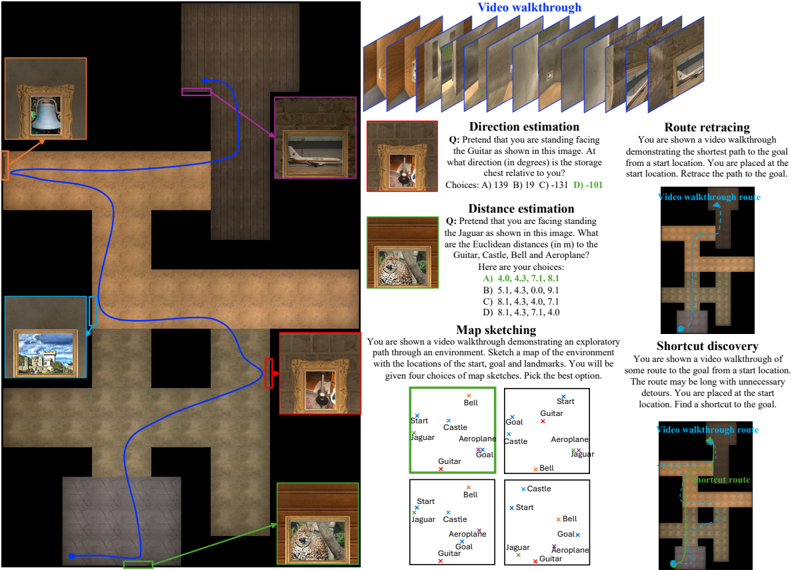
### Visual Description
## Maze Navigation Task
### Overview
The image presents a maze navigation task with several sub-tasks, including direction estimation, distance estimation, map sketching, route retracing, and shortcut discovery. The maze is depicted with various landmarks (Guitar, Castle, Bell, Aeroplane, Jaguar) represented as framed pictures. The image also includes questions related to spatial reasoning within the maze environment.
### Components/Axes
* **Maze Environment:** A top-down view of a maze with pathways and walls. The maze has a sandy/brown floor and dark/black walls.
* **Landmarks:** Framed pictures placed at different locations within the maze:
* Orange frame: Bell
* Cyan frame: Castle
* Red frame: Guitar
* Green frame: Jaguar
* Purple frame: Aeroplane
* **Paths:** Colored lines indicating routes or directions:
* Blue: Main path in the maze
* Red: Path in the "Route retracing" task
* Green: Path in the "Shortcut discovery" task
* Purple: Direction in the "Direction estimation" task
* **Sub-tasks:**
* Direction estimation
* Distance estimation
* Map sketching
* Route retracing
* Shortcut discovery
* **Video Walkthroughs:** Visual representation of video frames, suggesting a video-based navigation aid.
### Detailed Analysis
**Maze Layout:**
* The maze has a complex layout with multiple turns and intersections.
* The starting point of the blue path is near the bottom-left corner, close to the Jaguar (green frame).
* The path winds through the maze, passing by the Castle (cyan frame), Guitar (red frame), and Bell (orange frame), before reaching the Aeroplane (purple frame) at the top-right.
**Landmark Placement:**
* Bell (orange frame) is located in the top-left quadrant of the maze.
* Castle (cyan frame) is located in the bottom-left quadrant of the maze.
* Guitar (red frame) is located in the bottom-right quadrant of the maze.
* Jaguar (green frame) is located in the bottom-center of the maze.
* Aeroplane (purple frame) is located in the top-right quadrant of the maze.
**Sub-task Details:**
* **Direction estimation:** The question asks for the direction of the storage chest relative to the Guitar. The purple arrow indicates the direction. Answer choices are provided in degrees: A) 139, B) 19, C) -131, D) -101.
* **Distance estimation:** The question asks for the Euclidean distances from the Jaguar to the Guitar, Castle, Bell, and Aeroplane. Answer choices are provided in meters:
* A) 4.0, 4.3, 7.1, 8.1
* B) 5.1, 4.3, 0.0, 9.1
* C) 8.1, 4.3, 4.0, 7.1
* D) 8.1, 4.3, 7.1, 4.0
* **Map sketching:** The task requires sketching a map of the environment with the locations of the start, goal, and landmarks. Four map sketches are provided as multiple-choice options.
* **Route retracing:** The task involves retracing the shortest path from a start location to the goal. A video walkthrough route is shown on a smaller maze diagram. The red path indicates the route to be retraced.
* **Shortcut discovery:** The task involves finding a shortcut from a start location to the goal. A video walkthrough route is shown on a smaller maze diagram. The green path indicates the shortcut.
### Key Observations
* The maze environment is designed to test spatial reasoning and navigation skills.
* The sub-tasks assess different aspects of spatial cognition, including direction sense, distance estimation, and map learning.
* The video walkthroughs provide visual aids for understanding the maze layout and navigation tasks.
### Interpretation
The image presents a comprehensive spatial navigation task designed to evaluate a user's ability to understand and navigate a complex environment. The inclusion of landmarks, sub-tasks, and video walkthroughs suggests a multi-faceted approach to assessing spatial cognition. The tasks require the user to integrate visual information, spatial reasoning, and memory to successfully navigate the maze and answer the related questions. The different sub-tasks target different cognitive skills, providing a more complete assessment of spatial abilities.
</details>
## Large-scale spatial cognition
- Direction estimation:
Prompts 1, 2 and 3
- Distance estimation:
Prompts 4, 5 and 6
- •
- Map sketching:
Prompts 4, 5 and 6
- Route retracing:
Prompts 10, 11, 12 and 13
- •
- Shortcut discovery:
Prompts 14, 15, 16 and 17
## Small-scale spatial cognition
- Mental rotation test: Prompts 18 and 19
- Perspective taking test:
Prompts 20 and 21
- Water level test:
Prompt 22
- Minnesota Paper Form Board test:
Prompts 23 and 24
- Judgement of Line Orientation test:
Prompts 25 and 26
- Selective attention task:
Prompts 27 and 28
- Maze completion task:
Prompts 29 and 30
- Corsi block-tapping task: Prompts 32 and 31
- •
- Spatial addition task:
Prompts 33 and 34
- Cambridge spatial working memory test:
Prompts 35 and 36
Figure 5: Large-scale spatial cognition with DM image observations. Please note that the top-down visualization on the left needs to be rotated by 90 ◦ clockwise to get the DM images.
<details>
<summary>Image 5 Details</summary>
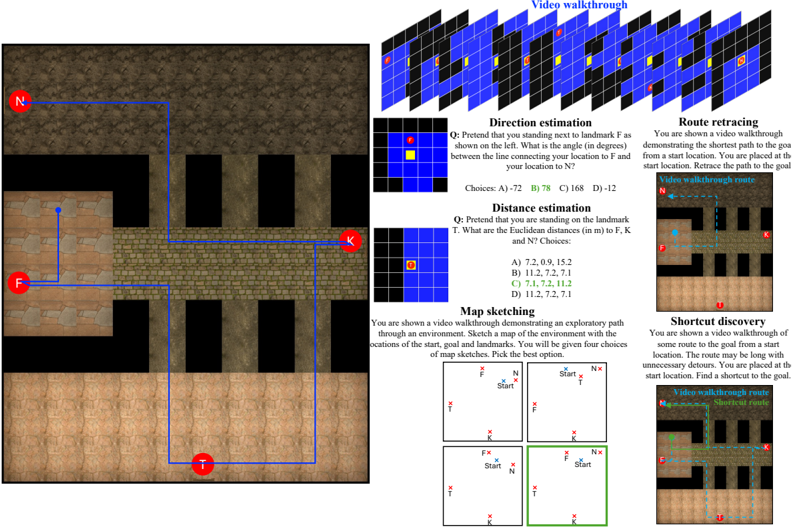
### Visual Description
## Maze Navigation and Cognitive Tasks
### Overview
The image presents a series of cognitive tasks related to navigating a maze-like environment. It includes a visual representation of the maze, along with questions and scenarios involving direction estimation, distance estimation, map sketching, route retracing, and shortcut discovery. The image appears to be designed for assessing spatial reasoning and navigational abilities.
### Components/Axes
* **Maze Map:** A top-down view of a maze with walls and open pathways. Landmarks are marked with red circles labeled "N", "F", "K", and "T". A blue line indicates a path through the maze.
* **Video Walkthrough:** A series of frames depicting a first-person perspective video walkthrough of the maze.
* **Direction Estimation:** A question asking for the angle between the line connecting the user's location to landmark F and the user's location to N. A small grid shows the user's location (yellow) and landmark F (red).
* **Distance Estimation:** A question asking for the Euclidean distances from the user's location (landmark T) to landmarks F, K, and N. A small grid shows the user's location (red).
* **Map Sketching:** A task where the user is shown a video walkthrough and asked to sketch a map of the environment, choosing the best option from four provided sketches. One of the sketches is highlighted with a green border.
* **Route Retracing:** A scenario where the user is shown a video walkthrough and asked to retrace the shortest path to the goal from a start location. A small map shows the "Video walkthrough route" in blue.
* **Shortcut Discovery:** A scenario where the user is shown a video walkthrough of a longer route and asked to find a shortcut to the goal. A small map shows the "Video walkthrough route" and the "Shortcut route" in green.
### Detailed Analysis
* **Maze Map:** The maze consists of interconnected rooms and corridors. The path indicated by the blue line connects landmarks N, F, K, and T.
* **Direction Estimation:** The question asks for the angle between the user's location to F and the user's location to N. The choices are A) -72, B) 78, C) 168, D) -12.
* **Distance Estimation:** The question asks for the Euclidean distances from T to F, K, and N. The choices are A) 7.2, 0.9, 15.2; B) 11.2, 7.2, 7.1; C) 7.1, 7.2, 11.2; D) 11.2, 7.2, 7.1. Option C is highlighted in green.
* **Map Sketching:** Four map sketches are presented, each showing the relative positions of the start location, goal (N), and landmarks (F, K, T). The bottom-right sketch is highlighted in green, suggesting it is the correct answer.
* **Route Retracing:** The map shows the "Video walkthrough route" in blue, starting near N and ending near K.
* **Shortcut Discovery:** The map shows the "Video walkthrough route" and the "Shortcut route" in green, indicating a more direct path to the goal.
### Key Observations
* The image combines visual navigation with cognitive tasks.
* The tasks assess different aspects of spatial reasoning, including direction sense, distance estimation, and map creation.
* The use of video walkthroughs adds a dynamic element to the tasks.
* The highlighting of specific answers (distance estimation and map sketching) suggests a correct solution is being provided.
### Interpretation
The image presents a comprehensive assessment of spatial navigation and cognitive abilities within a virtual maze environment. The tasks require the user to integrate visual information from the maze map and video walkthroughs with their spatial reasoning skills to estimate directions, distances, sketch maps, and find optimal routes. The inclusion of multiple tasks suggests a multi-faceted approach to evaluating spatial intelligence. The highlighting of correct answers in some tasks may serve as a learning tool or a means of providing feedback to the user. The overall design indicates an attempt to simulate real-world navigation challenges in a controlled and measurable setting.
</details>
Figure 6: Large-scale spatial cognition with DM image observations. Please note that the top-down visualization on the left needs to be rotated by 90 ◦ clockwise to get the DM images.
<details>
<summary>Image 6 Details</summary>
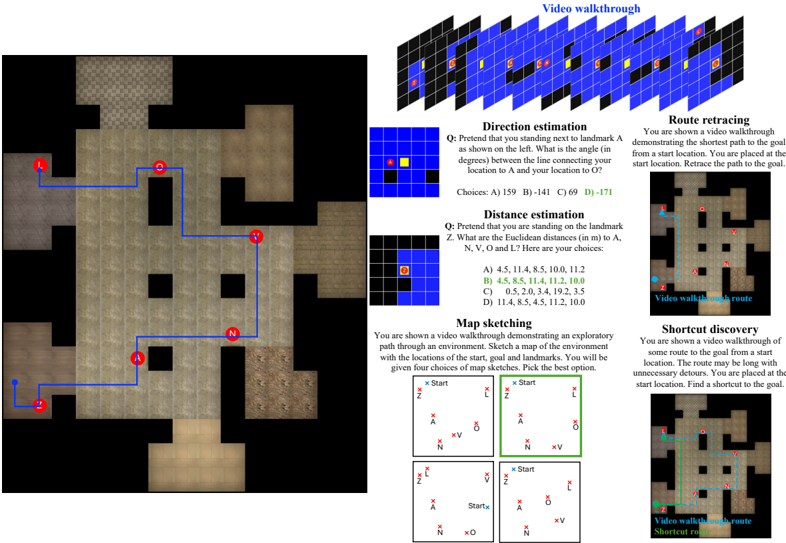
### Visual Description
## Game Environment Navigation Tasks
### Overview
The image presents a series of tasks related to navigation within a game environment, likely for training or evaluation purposes. These tasks include direction estimation, distance estimation, map sketching, route retracing, and shortcut discovery. The image includes visual representations of the environment, questions related to navigation, and multiple-choice answers.
### Components/Axes
* **Game Environment Maps:** Several maps of the game environment are shown, with landmarks labeled as A, N, V, O, L, and Z.
* **Video Walkthrough:** A series of frames representing a video walkthrough are shown at the top-right.
* **Task Descriptions:** Textual descriptions of each task are provided.
* **Questions:** Each task includes a question related to the navigation challenge.
* **Multiple Choice Answers:** Each question is followed by multiple-choice answers (A, B, C, D).
### Detailed Analysis
**1. Video Walkthrough:**
* A sequence of frames, arranged in a grid, shows a first-person perspective of navigating the environment. The frames are primarily blue and black, with yellow and red markers indicating points of interest or landmarks.
**2. Direction Estimation:**
* **Question:** "Pretend that you standing next to landmark A as shown on the left. What is the angle (in degrees) between the line connecting your location to A and your location to O?"
* **Choices:**
* A) 159
* B) -141
* C) 69
* D) -171
* A small map shows the relative positions of the current location (yellow square) and landmark A (red square).
**3. Distance Estimation:**
* **Question:** "Pretend that you are standing on the landmark Z. What are the Euclidean distances (in m) to A, N, V, O and L? Here are your choices:"
* **Choices:**
* A) 4.5, 11.4, 8.5, 10.0, 11.2
* B) 4.5, 8.5, 11.4, 11.2, 10.0
* C) 0.5, 2.0, 3.4, 19.2, 3.5
* D) 11.4, 8.5, 4.5, 11.2, 10.0
* A small map shows the relative position of the current location (yellow square) and landmark Z (red square).
**4. Map Sketching:**
* **Description:** "You are shown a video walkthrough demonstrating an exploratory path through an environment. Sketch a map of the environment with the locations of the start, goal and landmarks. You will be given four choices of map sketches. Pick the best option."
* Four map sketches are presented, each showing the relative positions of the start point, goal (labeled as 'V'), and landmarks (A, N, O, L, Z). The second map sketch (top-right) is highlighted with a green border, suggesting it is the correct answer.
**5. Route Retracing:**
* **Description:** "You are shown a video walkthrough demonstrating the shortest path to the goal from a start location. You are placed at the start location. Retrace the path to the goal."
* A map of the environment is shown with a blue line indicating the shortest path from the start (labeled 'Z') to the goal (labeled 'L'). Landmarks A, N, and O are also marked on the map.
**6. Shortcut Discovery:**
* **Description:** "You are shown a video walkthrough of some route to the goal from a start location. The route may be long with unnecessary detours. You are placed at the start location. Find a shortcut to the goal."
* A map of the environment is shown with a green line indicating a shortcut route from the start (labeled 'Z') to the goal (labeled 'L').
### Key Observations
* The tasks are designed to assess spatial reasoning and navigation skills within a virtual environment.
* The map sketching task requires the participant to create a cognitive map of the environment based on a video walkthrough.
* The route retracing and shortcut discovery tasks involve identifying the optimal path between two points.
* The direction and distance estimation tasks test the participant's ability to estimate angles and distances within the environment.
### Interpretation
The image illustrates a comprehensive approach to evaluating navigation abilities in a virtual environment. The tasks cover a range of cognitive skills, including spatial awareness, memory, and problem-solving. The use of video walkthroughs and map representations provides a realistic and engaging context for the assessment. The multiple-choice format allows for objective scoring and analysis of performance. The tasks are likely part of a larger training or evaluation program aimed at improving navigation skills in virtual environments.
</details>
Figure 7: Mental rotation (MRT) with visual inputs: Which choice image shows the reference shape rotated in 3D?
<details>
<summary>Image 7 Details</summary>
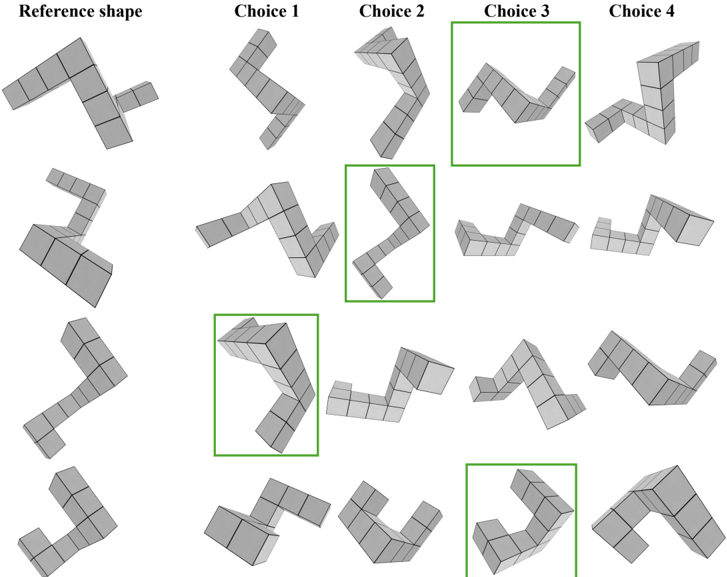
### Visual Description
## Shape Comparison
### Overview
The image presents a visual comparison task. A "Reference shape" is shown on the left, and the task is to identify the matching shape from four "Choice" options (1, 2, 3, and 4). The image contains four rows, each with a reference shape and the four choices. The correct choices are highlighted with green boxes.
### Components/Axes
* **Title:** The image is implicitly titled as a shape comparison task.
* **Labels:**
* "Reference shape" (top-left)
* "Choice 1" (top)
* "Choice 2" (top)
* "Choice 3" (top)
* "Choice 4" (top)
* **Shapes:** Each shape is constructed from a series of connected cubes.
* **Highlighting:** Green boxes indicate the correct choice in each row.
### Detailed Analysis
The image contains four rows of shape comparison tasks. Each row consists of a reference shape and four choices. The correct choice in each row is highlighted with a green box.
* **Row 1:** The reference shape is an "L" shape with an extra cube on the end of the vertical part of the "L". The correct choice is "Choice 3", which is a rotated version of the reference shape.
* **Row 2:** The reference shape is a "Z" shape. The correct choice is "Choice 2", which is a rotated version of the reference shape.
* **Row 3:** The reference shape is an inverted "L" shape. The correct choice is "Choice 1", which is a rotated version of the reference shape.
* **Row 4:** The reference shape is an "L" shape. The correct choice is "Choice 3", which is a rotated version of the reference shape.
### Key Observations
* The task involves identifying rotated versions of the reference shape.
* The correct choices are highlighted with green boxes.
* The shapes are constructed from connected cubes.
### Interpretation
The image presents a spatial reasoning task where the user must mentally rotate the reference shape to identify the matching choice. The green boxes indicate the correct answers, suggesting this is either a test or an example problem. The task assesses the ability to perform mental rotations and spatial visualization.
</details>
view ,none, back used,year ,none view,been ,none
Figure 8: Mental rotation (MRT) with text inputs: Which choice array shows the reference array rotated in 2D?
<details>
<summary>Image 8 Details</summary>
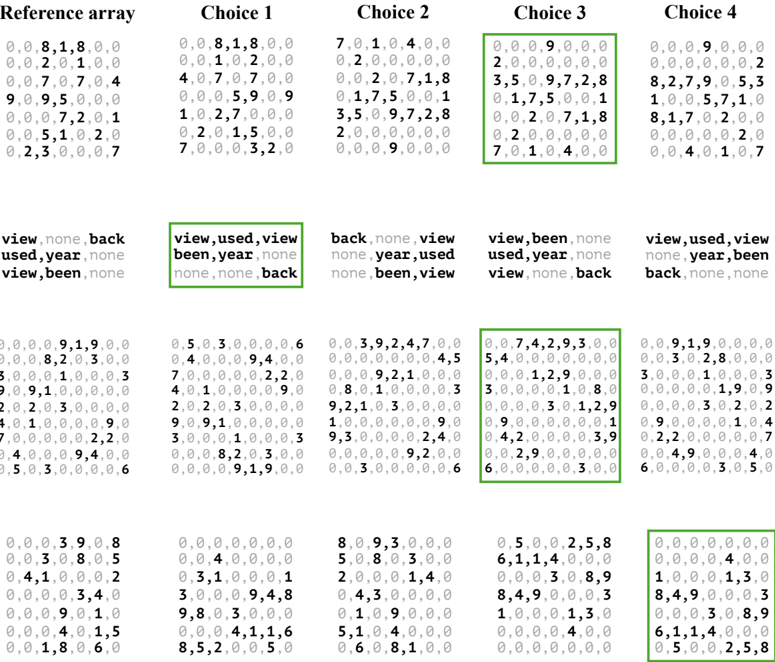
### Visual Description
## Array Comparison with Choices
### Overview
The image presents a "Reference array" and four "Choice" arrays, each containing numerical data and categorical labels. The task appears to be identifying the "best" choice based on some criteria, as indicated by green boxes highlighting specific elements within the arrays and labels.
### Components/Axes
* **Title:** "Reference array", "Choice 1", "Choice 2", "Choice 3", "Choice 4"
* **Numerical Arrays:** Each array consists of 8 rows and 7 columns of numerical values, primarily integers.
* **Categorical Labels:** Each choice has three rows of categorical labels. The labels include "view", "none", "back", "used", "year", and "been".
* **Highlighting:** Green boxes highlight specific numerical elements and categorical labels within certain choices.
### Detailed Analysis
**Numerical Arrays:**
* **Reference array:**
* Row 1: 0, 0, 8, 1, 8, 0, 0
* Row 2: 0, 0, 2, 0, 1, 0, 0
* Row 3: 0, 0, 7, 0, 7, 0, 4
* Row 4: 9, 0, 9, 5, 0, 0, 0
* Row 5: 0, 0, 0, 7, 2, 0, 1
* Row 6: 0, 0, 5, 1, 0, 2, 0
* Row 7: 0, 2, 3, 0, 0, 0, 7
* Row 8: 0, 0, 0, 3, 9, 0, 8
* Row 9: 0, 0, 3, 0, 8, 0, 5
* Row 10: 0, 4, 1, 0, 0, 0, 2
* Row 11: 0, 0, 0, 0, 3, 4, 0
* Row 12: 0, 0, 0, 9, 0, 1, 0
* Row 13: 0, 0, 0, 4, 0, 1, 5
* Row 14: 0, 0, 1, 8, 0, 6, 0
* **Choice 1:**
* Row 1: 0, 0, 8, 1, 8, 0, 0
* Row 2: 0, 0, 1, 0, 2, 0, 0
* Row 3: 4, 0, 7, 0, 7, 0, 0
* Row 4: 0, 0, 0, 5, 9, 0, 9
* Row 5: 1, 0, 2, 7, 0, 0, 0
* Row 6: 0, 2, 0, 1, 5, 0, 0
* Row 7: 7, 0, 0, 0, 3, 2, 0
* Row 8: 0, 5, 0, 3, 0, 0, 0
* Row 9: 0, 4, 0, 0, 0, 9, 4
* Row 10: 7, 0, 0, 0, 0, 0, 2
* Row 11: 4, 0, 1, 0, 0, 0, 9
* Row 12: 2, 0, 2, 0, 3, 0, 0
* Row 13: 4, 0, 1, 0, 0, 0, 9
* Row 14: 3, 0, 0, 0, 1, 0, 0
* Row 15: 9, 0, 9, 1, 0, 0, 0
* Row 16: 0, 0, 0, 8, 2, 0, 3
* Row 17: 3, 5, 0, 3, 0, 0, 0
* Row 18: 0, 0, 0, 0, 0, 0, 0
* Row 19: 0, 0, 4, 0, 0, 0, 0
* Row 20: 0, 3, 1, 0, 0, 0, 1
* Row 21: 3, 0, 0, 0, 9, 4, 8
* Row 22: 9, 8, 0, 3, 0, 0, 0
* Row 23: 0, 0, 0, 4, 1, 1, 6
* Row 24: 8, 5, 2, 0, 0, 5, 0
* **Choice 2:**
* Row 1: 7, 0, 1, 0, 4, 0, 0
* Row 2: 0, 2, 0, 0, 0, 0, 0
* Row 3: 0, 0, 2, 0, 7, 1, 8
* Row 4: 0, 1, 7, 5, 0, 0, 1
* Row 5: 3, 5, 0, 9, 7, 2, 8
* Row 6: 2, 0, 0, 0, 0, 0, 0
* Row 7: 0, 0, 0, 9, 0, 0, 0
* Row 8: 0, 0, 3, 9, 2, 4, 7
* Row 9: 0, 0, 0, 0, 0, 0, 4
* Row 10: 0, 0, 0, 9, 2, 1, 0
* Row 11: 0, 8, 0, 1, 0, 0, 0
* Row 12: 9, 2, 1, 0, 3, 0, 0
* Row 13: 1, 0, 0, 0, 0, 0, 0
* Row 14: 9, 3, 0, 0, 0, 0, 2
* Row 15: 0, 0, 0, 0, 0, 9, 2
* Row 16: 0, 0, 3, 0, 0, 0, 0
* Row 17: 8, 0, 9, 3, 0, 0, 0
* Row 18: 5, 0, 8, 0, 3, 0, 0
* Row 19: 2, 0, 0, 0, 1, 4, 0
* Row 20: 0, 4, 3, 0, 0, 0, 0
* Row 21: 0, 1, 0, 9, 0, 0, 0
* Row 22: 5, 1, 0, 4, 0, 0, 0
* Row 23: 0, 6, 0, 8, 1, 0, 0
* **Choice 3:**
* Row 1: 0, 0, 0, 9, 0, 0, 0
* Row 2: 2, 0, 0, 0, 0, 0, 0
* Row 3: 3, 5, 0, 9, 7, 2, 8
* Row 4: 0, 1, 7, 5, 0, 0, 1
* Row 5: 0, 0, 2, 0, 7, 1, 8
* Row 6: 0, 2, 0, 0, 0, 0, 0
* Row 7: 7, 0, 1, 0, 4, 0, 0
* Row 8: 0, 0, 7, 4, 2, 9, 3
* Row 9: 5, 4, 0, 0, 0, 0, 0
* Row 10: 0, 0, 0, 1, 2, 9, 0
* Row 11: 3, 0, 0, 0, 0, 1, 0
* Row 12: 0, 0, 0, 0, 3, 0, 1
* Row 13: 0, 9, 0, 0, 0, 0, 0
* Row 14: 0, 4, 2, 0, 0, 0, 0
* Row 15: 0, 0, 2, 9, 0, 0, 0
* Row 16: 6, 0, 0, 0, 0, 0, 3
* Row 17: 0, 5, 0, 0, 2, 5, 8
* Row 18: 6, 1, 1, 4, 0, 0, 0
* Row 19: 0, 0, 0, 3, 0, 8, 9
* Row 20: 8, 4, 9, 0, 0, 0, 3
* Row 21: 1, 0, 0, 0, 1, 3, 0
* Row 22: 0, 0, 0, 0, 4, 0, 0
* Row 23: 0, 0, 0, 0, 0, 0, 0
* **Choice 4:**
* Row 1: 0, 0, 0, 9, 0, 0, 0
* Row 2: 0, 0, 0, 0, 0, 0, 2
* Row 3: 8, 2, 7, 9, 0, 5, 3
* Row 4: 1, 0, 0, 5, 7, 1, 0
* Row 5: 8, 1, 7, 0, 2, 0, 0
* Row 6: 0, 0, 0, 0, 0, 2, 0
* Row 7: 0, 0, 4, 0, 1, 0, 7
* Row 8: 0, 0, 9, 1, 9, 0, 0
* Row 9: 0, 0, 3, 0, 2, 8, 0
* Row 10: 3, 0, 0, 0, 1, 0, 0
* Row 11: 0, 0, 0, 0, 1, 9, 0
* Row 12: 0, 0, 0, 0, 3, 0, 2
* Row 13: 0, 9, 0, 0, 0, 0, 1
* Row 14: 0, 2, 2, 0, 0, 0, 0
* Row 15: 0, 0, 4, 9, 0, 0, 0
* Row 16: 6, 0, 0, 0, 0, 3, 0
* Row 17: 0, 0, 0, 0, 0, 0, 0
* Row 18: 0, 0, 0, 0, 4, 0, 0
* Row 19: 1, 0, 0, 0, 1, 3, 0
* Row 20: 8, 4, 9, 0, 0, 0, 3
* Row 21: 0, 0, 0, 3, 0, 8, 9
* Row 22: 6, 1, 1, 4, 0, 0, 0
* Row 23: 0, 5, 0, 0, 2, 5, 8
**Categorical Labels:**
* **Choice 1:** "view, used, view", "been, year, none", "none, none, back" (highlighted in green)
* **Choice 3:** "view, been, none", "used, year, none", "view, none, back" (highlighted in green)
* **Other Choices:** Various combinations of "view", "none", "back", "used", "year", and "been".
**Highlighting:**
* Choice 1 has a green box around the categorical labels.
* Choice 3 has a green box around the numerical array and the categorical labels.
* Choice 4 has a green box around the last numerical array.
### Key Observations
* The green boxes suggest that Choice 1, Choice 3, and Choice 4 are being evaluated as potential matches or solutions.
* The categorical labels seem to represent different states or attributes associated with each choice.
* Choice 3 is the only one with both the numerical array and categorical labels highlighted.
### Interpretation
The image likely represents a problem-solving scenario where the goal is to select the "best" choice from a set of options. The "Reference array" might be a target or ideal state, and the choices are attempts to match or achieve that state. The numerical arrays could represent data or parameters, while the categorical labels provide additional context or attributes. The green boxes indicate that Choice 1, Choice 3, and Choice 4 are being considered as potential solutions, with Choice 3 possibly being the most promising due to the highlighting of both its numerical and categorical components. The specific criteria for determining the "best" choice are not explicitly stated in the image.
</details>
Pretend that you are standing at the bat and facing the book. At what clockwise angle (in degrees) is the apple located relative to you?
<details>
<summary>Image 9 Details</summary>
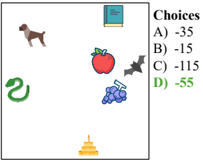
### Visual Description
## Image Analysis: Object Association with Numerical Choices
### Overview
The image presents a visual association task. A square frame contains several cartoon-style objects, and to the right of the frame is a list of numerical choices labeled A through D. The task appears to be to associate one of the numerical choices with the objects inside the frame.
### Components/Axes
* **Frame:** A square frame containing the objects.
* **Objects:** The objects within the frame include:
* A brown dog (top-left)
* A green snake (left)
* A red apple (center)
* Blue grapes (center-right)
* A gray bat (center-right)
* A yellow cake (bottom)
* A blue book (top-right)
* **Choices:** A list of numerical choices labeled A through D:
* A) -35
* B) -15
* C) -115
* D) -55 (highlighted in green)
### Detailed Analysis or ### Content Details
The image presents a multiple-choice question where the correct answer, D) -55, is highlighted in green. The other choices are A) -35, B) -15, and C) -115. The objects within the frame are not explicitly linked to the numerical choices, but the task implies a relationship or association between them.
### Key Observations
* The correct answer is explicitly marked in green.
* The objects are diverse and do not immediately suggest a common numerical association.
### Interpretation
The image likely represents a question from a test or educational exercise. The task requires the viewer to identify a connection between the objects and the numerical choices. The highlighting of choice D) -55 indicates that this is the intended answer, but the basis for this association is not provided within the image itself. The association could be based on a hidden rule, a pattern, or a specific context not visible in the image.
</details>
Pretend that you are standing at the grapes and facing the donut. At what clockwise angle (in degrees) is the book relative to you?
Pretend that you are standing at the cake and facing the desk. At what clockwise angle (in degrees) is the bat relative to you?
Figure 9: Perspective taking (PTT) with visual inputs .
<details>
<summary>Image 10 Details</summary>
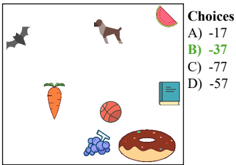
### Visual Description
## Image Analysis: Visual Math Problem
### Overview
The image presents a visual math problem. It shows a collection of different objects scattered across a white background. To the right of the objects is a list of multiple-choice answers, one of which is highlighted in green.
### Components/Axes
* **Objects:** A bat, a dog, a watermelon slice, a carrot, a basketball, grapes, a donut, and a book.
* **Choices:** A list of four numerical options labeled A, B, C, and D.
* A) -17
* B) -37 (highlighted in green)
* C) -77
* D) -57
### Detailed Analysis
The image does not provide any mathematical operations or relationships between the objects. It appears to be a question where the viewer needs to determine the correct answer based on some unknown criteria. The correct answer, according to the image, is -37, as it is highlighted in green.
### Key Observations
* The objects are randomly placed and do not seem to have any spatial relationship.
* The multiple-choice answers are simple integers.
* The highlighting of option B suggests it is the correct answer.
### Interpretation
The image presents a math problem where the solution is already provided. The purpose might be to test pattern recognition, visual association, or some other form of abstract reasoning. Without additional context or instructions, it is impossible to determine the logic behind the correct answer. The image could be part of a larger test or puzzle.
</details>
<details>
<summary>Image 11 Details</summary>
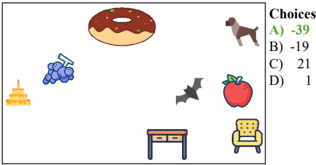
### Visual Description
## Image Analysis: Visual Association Task
### Overview
The image presents a visual association task. It displays a collection of cartoon-style objects scattered across a white background. To the right of the objects is a list of numerical choices labeled A, B, C, and D. The task likely involves associating one of the objects with one of the numerical choices.
### Components/Axes
* **Objects:** A donut, a dog, grapes, a bat, an apple, a table, a chair, and a layered cake.
* **Choices:**
* A) -39 (in green)
* B) -19
* C) 21
* D) 1
### Detailed Analysis or ### Content Details
The objects are arranged somewhat randomly across the white space. The "Choices" list is vertically aligned on the right side of the image. The first choice, "A) -39", is highlighted in green, suggesting it may be the correct answer or a selected option.
### Key Observations
* The green color of choice A) -39 is the only visual cue indicating a potential answer.
* The objects are common items, and their arrangement doesn't immediately suggest a numerical relationship.
### Interpretation
The image represents a task that requires associating a visual element (one of the objects) with a numerical value. The green highlighting of choice A) -39 implies that this is either the correct answer or the user's current selection. Without further context or instructions, it's impossible to determine the logic behind the association. The task could be based on arbitrary rules, semantic relationships, or other criteria not evident from the image alone.
</details>
Figure 10: Perspective taking (PTT) with text inputs . The array colors are only for illustration purposes.
<details>
<summary>Image 12 Details</summary>
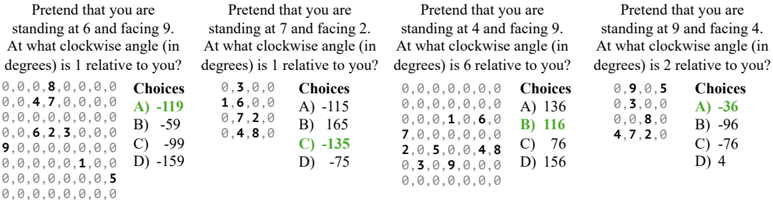
### Visual Description
## Multiple Choice Questions: Angular Orientation
### Overview
The image presents four multiple-choice questions related to angular orientation. Each question describes a scenario where a person is standing at a specific location and facing a particular direction. The task is to determine the clockwise angle to another location relative to the person's facing direction. Each question is accompanied by a grid of numbers and four answer choices, one of which is highlighted in green, indicating the correct answer.
### Components/Axes
* **Question Text:** Each question starts with "Pretend that you are standing at [location] and facing [direction]. At what clockwise angle (in degrees) is [target location] relative to you?"
* **Number Grid:** A grid of numbers, likely representing a spatial layout or coordinate system.
* **Choices:** Four answer choices labeled A, B, C, and D, each with a numerical value representing an angle in degrees. The correct answer is highlighted in green.
### Detailed Analysis
**Question 1:**
* **Question:** Pretend that you are standing at 6 and facing 9. At what clockwise angle (in degrees) is 1 relative to you?
* **Number Grid:**
```
0,0,0,8,0,0,0,0
0,0,4,7,0,0,0,0
0,0,0,0,0,0,0,0
0,0,6,2,3,0,0,0
9,0,0,0,0,0,0,0
0,0,0,0,0,1,0,0
0,0,0,0,0,0,0,5
0,0,0,0,0,0,0,0
```
* **Choices:**
* A) -119
* B) -59
* C) -99
* D) -159
* **Correct Answer:** A) -119 (highlighted in green)
**Question 2:**
* **Question:** Pretend that you are standing at 7 and facing 2. At what clockwise angle (in degrees) is 1 relative to you?
* **Number Grid:**
```
0,3,0,0
1,6,0,0
0,7,2,0
0,4,8,0
```
* **Choices:**
* A) -115
* B) 165
* C) -135
* D) -75
* **Correct Answer:** C) -135 (highlighted in green)
**Question 3:**
* **Question:** Pretend that you are standing at 4 and facing 9. At what clockwise angle (in degrees) is 6 relative to you?
* **Number Grid:**
```
0,0,0,0,0,0,0,0
0,0,0,0,0,0,0,0
0,0,0,1,0,6,0
7,0,0,0,0,0,0
2,0,5,0,0,4,8
0,3,0,9,0,0,0
0,0,0,0,0,0,0,0
```
* **Choices:**
* A) 136
* B) 116
* C) 76
* D) 156
* **Correct Answer:** B) 116 (highlighted in green)
**Question 4:**
* **Question:** Pretend that you are standing at 9 and facing 4. At what clockwise angle (in degrees) is 2 relative to you?
* **Number Grid:**
```
0,9,0,5
0,3,0,0
0,0,8,0
4,7,2,0
```
* **Choices:**
* A) -36
* B) -96
* C) -76
* D) 4
* **Correct Answer:** B) -96 (highlighted in green)
### Key Observations
* Each question involves determining an angle based on a relative position and facing direction.
* The number grids likely represent a spatial context, but their exact meaning is not explicitly defined.
* The correct answers are provided, highlighted in green.
### Interpretation
The image presents a set of spatial reasoning problems. The questions test the ability to visualize angles and relative positions. The number grids likely provide a visual aid, but without further context, their precise function is unclear. The problems seem designed to assess spatial awareness and the understanding of angular relationships. The negative angles suggest a clockwise rotation from the facing direction.
</details>
Figure 11: Water level (WLT) with vision inputs: Given a water container filled with water, predict the water level in the rotated container.
<details>
<summary>Image 13 Details</summary>
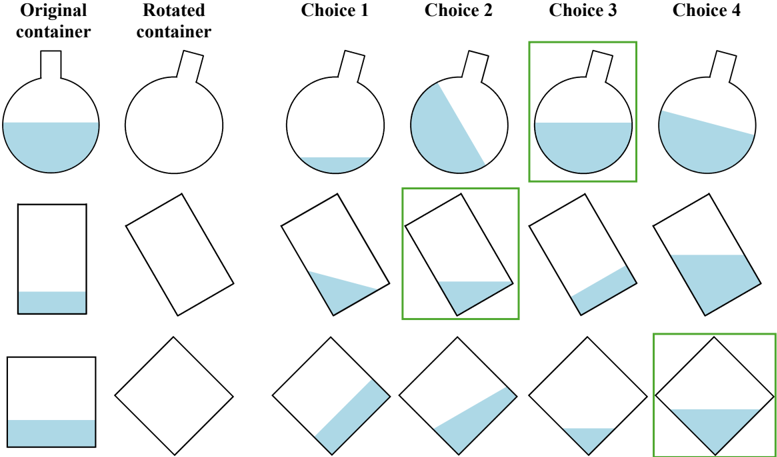
### Visual Description
## Fluid Level Diagram: Rotated Containers
### Overview
The image presents a diagram illustrating the behavior of fluid levels in containers of different shapes (flask, rectangle, square) when rotated. The diagram compares the original container orientation with a rotated version and four possible choices for the fluid level after rotation. The correct choices are highlighted with green boxes.
### Components/Axes
* **Columns:**
* Original container
* Rotated container
* Choice 1
* Choice 2
* Choice 3
* Choice 4
* **Rows:**
* Flask-shaped container
* Rectangular container
* Square container
* **Containers:** Each cell contains a drawing of a container, either in its original orientation, rotated, or as one of the four choices.
* **Fluid:** The fluid inside the containers is represented by a light blue fill.
* **Green Boxes:** Green boxes highlight the correct choices for the fluid level in the rotated containers.
### Detailed Analysis or ### Content Details
**Row 1: Flask-shaped container**
* **Original container:** Flask with a horizontal fluid level filling approximately the bottom third of the flask.
* **Rotated container:** Empty flask rotated slightly counter-clockwise.
* **Choice 1:** Flask with no fluid.
* **Choice 2:** Flask with fluid level at an angle.
* **Choice 3:** Flask with a horizontal fluid level filling approximately the bottom third of the flask. This choice is highlighted with a green box.
* **Choice 4:** Flask with fluid level at an angle.
**Row 2: Rectangular container**
* **Original container:** Rectangle with a horizontal fluid level filling approximately the bottom fifth of the rectangle.
* **Rotated container:** Empty rectangle rotated counter-clockwise.
* **Choice 1:** Rectangle with fluid level at an angle.
* **Choice 2:** Rectangle with a horizontal fluid level filling approximately the bottom fifth of the rectangle. This choice is highlighted with a green box.
* **Choice 3:** Rectangle with fluid level at an angle.
* **Choice 4:** Rectangle with fluid level at an angle.
**Row 3: Square container**
* **Original container:** Square with a horizontal fluid level filling approximately the bottom fifth of the square.
* **Rotated container:** Empty square rotated 45 degrees.
* **Choice 1:** Square with fluid level at an angle.
* **Choice 2:** Square with fluid level at an angle.
* **Choice 3:** Square with fluid level at an angle.
* **Choice 4:** Square with a horizontal fluid level filling approximately the bottom fifth of the square. This choice is highlighted with a green box.
### Key Observations
* The fluid level remains horizontal regardless of the container's orientation due to gravity.
* The green boxes correctly identify the choices where the fluid level is horizontal in the rotated containers.
* The amount of fluid in each container remains constant across all orientations and choices.
### Interpretation
The diagram demonstrates the principle that fluid levels remain horizontal due to gravity, even when the container is rotated. The correct choices highlight this principle, showing that the fluid adjusts to maintain a horizontal surface. The diagram effectively illustrates this concept using different container shapes, reinforcing the understanding that the shape of the container does not affect the fluid's tendency to level itself horizontally.
</details>
Figure 12: Minnesota Paper Form Board (MPFB) with visual inputs: Which one of the four choices shows what it would be like when the puzzle pieces are put together? The puzzle pieces can be rotated but not flipped.
<details>
<summary>Image 14 Details</summary>
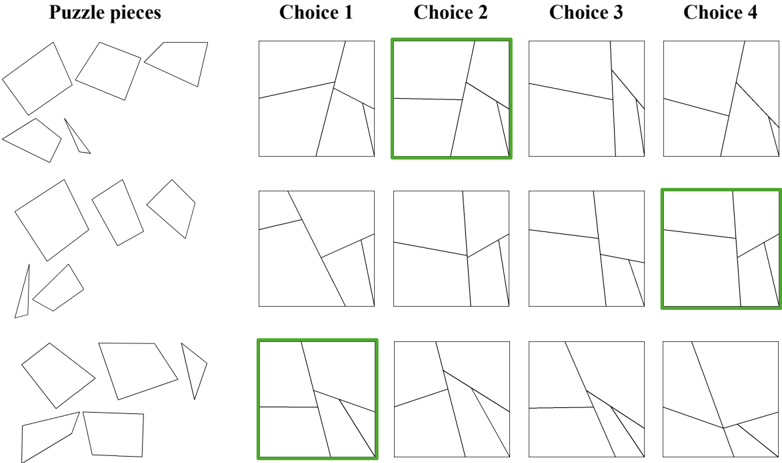
### Visual Description
## Puzzle: Matching Puzzle Pieces to Assembled Shapes
### Overview
The image presents a puzzle-solving task. On the left, there are scattered puzzle pieces. On the right, there are three rows of four assembled shapes, labeled as "Choice 1", "Choice 2", "Choice 3", and "Choice 4". The task is to identify which assembled shape can be formed using the puzzle pieces on the left. Each row represents a different set of puzzle pieces. The correct choices are highlighted with a green border.
### Components/Axes
* **Puzzle pieces:** Scattered shapes on the left side of the image. There are three distinct sets of puzzle pieces, each corresponding to a row of choices.
* **Choice 1, Choice 2, Choice 3, Choice 4:** Labels for the four assembled shapes in each row.
* **Rows:** Three rows of assembled shapes, each corresponding to a different set of puzzle pieces.
* **Green Border:** Indicates the correct choice in each row.
### Detailed Analysis or ### Content Details
* **Row 1:** The puzzle pieces in the first row can be assembled to form the shape in "Choice 2". This choice is highlighted with a green border.
* **Row 2:** The puzzle pieces in the second row can be assembled to form the shape in "Choice 4". This choice is highlighted with a green border.
* **Row 3:** The puzzle pieces in the third row can be assembled to form the shape in "Choice 1". This choice is highlighted with a green border.
### Key Observations
* Each row presents a unique set of puzzle pieces and assembled shapes.
* Only one choice per row is correct, as indicated by the green border.
* The puzzle pieces are simple geometric shapes.
* The assembled shapes are formed by combining the puzzle pieces without overlap.
### Interpretation
The image demonstrates a spatial reasoning task where the user must mentally manipulate the puzzle pieces to determine which assembled shape they can form. The green borders indicate the correct solutions, providing a visual guide for the user. The task assesses the ability to visualize and combine shapes, a fundamental skill in spatial problem-solving.
</details>
Figure 13: Minnesota Paper Form Board (MPFB) with text inputs: Which one of the four choices shows what it would be like when the array pieces are put together? The pieces merge at the edges (1s). They can be rotated in multiples of 90 degrees but not flipped. The array colors are purely for illustration purposes.
<details>
<summary>Image 15 Details</summary>
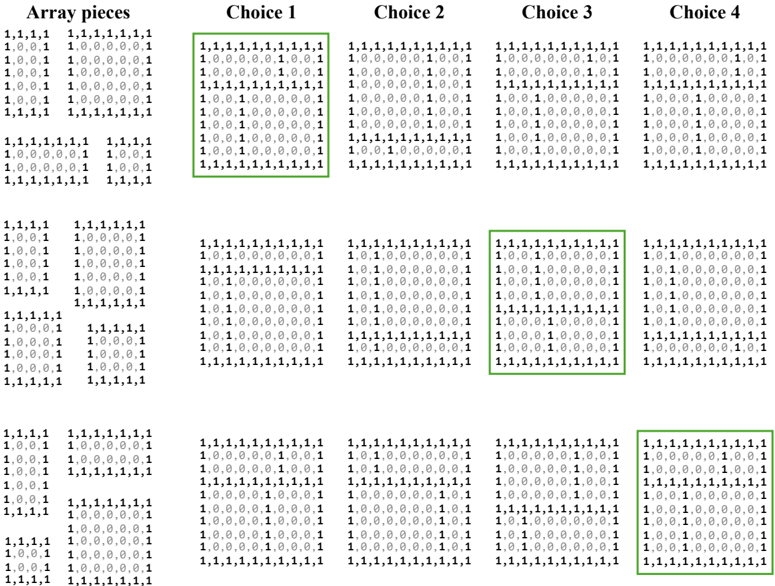
### Visual Description
## Array Selection Task
### Overview
The image presents a pattern recognition task. It shows a set of "Array pieces" on the left, followed by four "Choices" (1, 2, 3, and 4). Each array piece and choice consists of a 10x10 grid of 1s and 0s. The task appears to be identifying which of the four choices contains the array pieces. Green boxes highlight the correct choices.
### Components/Axes
* **Title:** Array pieces, Choice 1, Choice 2, Choice 3, Choice 4
* **Data:** 10x10 arrays of 1s and 0s for each array piece and choice.
* **Highlighting:** Green boxes around the correct choices.
### Detailed Analysis or ### Content Details
**Array Pieces:**
* The array pieces are presented in three groups of two arrays each, arranged vertically.
* Each array is a 10x10 grid of 1s and 0s.
* The specific patterns of 1s and 0s vary between the arrays.
**Choices:**
* There are four choices, labeled "Choice 1" through "Choice 4".
* Each choice is a 10x10 grid of 1s and 0s.
* The patterns of 1s and 0s vary between the choices.
**Correct Choices:**
* Choice 1 (top row) is highlighted with a green box.
* Choice 3 (middle row) is highlighted with a green box.
* Choice 4 (bottom row) is highlighted with a green box.
**Data Transcription:**
Due to the size and complexity of the arrays, a full transcription is impractical. However, here are the first few rows of each array to illustrate the data:
* **Array Pieces (Top-Left):**
* 1,1,1,1
* 1,0,0,1
* 1,0,0,1
* 1,0,0,1
* 1,1,1,1
* 1,1,1,1,1,1,1
* 1,0,0,0,0,0,1
* 1,0,0,0,0,0,1
* 1,0,0,0,0,0,1
* 1,1,1,1,1,1,1
* **Choice 1 (Top-Right):**
* 1,1,1,1,1,1,1,1,1,1
* 1,0,0,0,0,0,1,0,0,1
* 1,0,0,0,0,0,1,0,0,1
* 1,1,1,1,1,1,1,1,1,1
* 1,0,0,1,0,0,0,0,0,1
* 1,0,0,1,0,0,0,0,0,1
* 1,0,0,1,0,0,0,0,0,1
* 1,1,1,1,1,1,1,1,1,1
* **Choice 2 (Top-Middle-Right):**
* 1,1,1,1,1,1,1,1,1,1
* 1,0,0,0,0,0,1,0,0,1
* 1,0,0,0,0,0,1,0,0,1
* 1,1,1,1,1,1,1,1,1,1
* 1,0,0,1,0,0,0,0,0,1
* 1,0,0,1,0,0,0,0,0,1
* 1,0,0,1,0,0,0,0,0,1
* 1,1,1,1,1,1,1,1,1,1
* **Choice 3 (Top-Middle):**
* 1,1,1,1,1,1,1,1,1,1
* 1,0,0,0,0,0,1,0,0,1
* 1,0,0,0,0,0,1,0,0,1
* 1,1,1,1,1,1,1,1,1,1
* 1,0,0,1,0,0,0,0,0,1
* 1,0,0,1,0,0,0,0,0,1
* 1,0,0,1,0,0,0,0,0,1
* 1,1,1,1,1,1,1,1,1,1
* **Choice 4 (Top-Right):**
* 1,1,1,1,1,1,1,1,1,1
* 1,0,0,0,0,0,1,0,0,1
* 1,0,0,0,0,0,1,0,0,1
* 1,1,1,1,1,1,1,1,1,1
* 1,0,0,1,0,0,0,0,0,1
* 1,0,0,1,0,0,0,0,0,1
* 1,0,0,1,0,0,0,0,0,1
* 1,1,1,1,1,1,1,1,1,1
### Key Observations
* The task involves identifying the presence of the "Array pieces" within the "Choices".
* Multiple choices can be correct, as indicated by the green boxes around Choice 1, 3, and 4.
* The arrays consist of binary data (1s and 0s).
### Interpretation
The image represents a pattern recognition or image matching task. The "Array pieces" are likely smaller sub-patterns that need to be located within the larger "Choices". The green boxes indicate successful matches. This type of task is relevant to fields like computer vision, image processing, and data analysis, where identifying specific patterns within larger datasets is a common problem. The fact that multiple choices are correct suggests that the array pieces may overlap or be present in multiple locations.
</details>
Figure 14: Judgement of line orientation (JLO) with visual inputs: Which pair of lines from the legend have a matching angle to the lines in the input image?
<details>
<summary>Image 16 Details</summary>
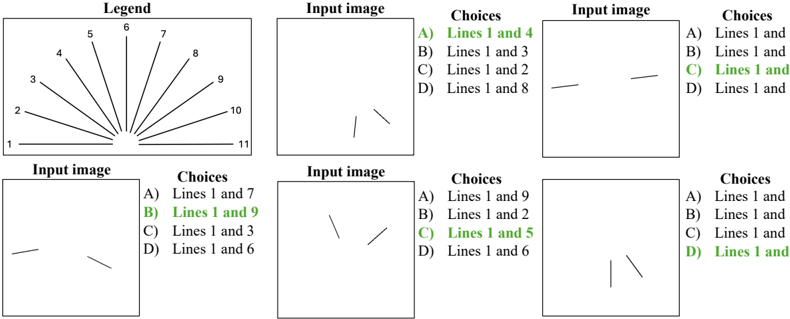
### Visual Description
## Diagram: Line Orientation Matching
### Overview
The image presents a series of line orientation matching problems. A legend shows numbered lines radiating from a central point. Each problem consists of an "Input image" containing one or more lines, and a set of "Choices" that list pairs of line numbers from the legend. The task is to identify the choice that best matches the orientations of the lines in the input image to the lines in the legend. The correct answers are highlighted in green.
### Components/Axes
* **Legend:** Located at the top-left of the image. It shows 11 lines radiating from a central point, numbered 1 to 11.
* **Input Image:** A square box containing one or more lines with varying orientations.
* **Choices:** A list of four options (A, B, C, D), each specifying a pair of line numbers from the legend. The correct choice is highlighted in green.
### Detailed Analysis
The image contains four separate line orientation matching problems. Each problem consists of an "Input image" and a set of "Choices". The correct choices are highlighted in green.
**Problem 1 (Top-Right):**
* **Input Image:** Contains two lines. One line is oriented horizontally, and the other is oriented at a slight upward angle.
* **Choices:**
* A) Lines 1 and 4
* B) Lines 1 and 3
* C) Lines 1 and 2
* D) Lines 1 and 8
* **Correct Answer:** A) Lines 1 and 4
**Problem 2 (Top-Right):**
* **Input Image:** Contains two lines. One line is oriented horizontally, and the other is oriented at a slight upward angle.
* **Choices:**
* A) Lines 1 and
* B) Lines 1 and
* C) Lines 1 and
* D) Lines 1 and
* **Correct Answer:** C) Lines 1 and 2
**Problem 3 (Bottom-Left):**
* **Input Image:** Contains two lines. One line is oriented horizontally, and the other is oriented at a slight upward angle.
* **Choices:**
* A) Lines 1 and 7
* B) Lines 1 and 9
* C) Lines 1 and 3
* D) Lines 1 and 6
* **Correct Answer:** B) Lines 1 and 9
**Problem 4 (Bottom-Right):**
* **Input Image:** Contains two lines. One line is oriented horizontally, and the other is oriented at a slight upward angle.
* **Choices:**
* A) Lines 1 and 9
* B) Lines 1 and 2
* C) Lines 1 and 5
* D) Lines 1 and 6
* **Correct Answer:** C) Lines 1 and 5
**Problem 5 (Bottom-Left):**
* **Input Image:** Contains two lines. One line is oriented vertically, and the other is oriented at a slight upward angle.
* **Choices:**
* A) Lines 1 and
* B) Lines 1 and
* C) Lines 1 and
* D) Lines 1 and
* **Correct Answer:** D) Lines 1 and
### Key Observations
* The legend provides a reference for line orientations.
* Each problem requires matching the line orientations in the "Input image" to the lines in the legend.
* The correct answer is always a pair of line numbers.
* The correct answers are highlighted in green.
### Interpretation
The image presents a visual task that tests the ability to perceive and match line orientations. The legend serves as a reference, and the problems require comparing the orientations of lines in the "Input image" to the lines in the legend. The highlighted correct answers indicate the intended solution for each problem. The problems are designed to assess visual perception and spatial reasoning skills.
</details>
Figure 15: Judgement of line orientation (JLO) with text inputs: Which choice has an angle between lines 1 and 2 that matches the angle from the input array? The array colors are purely for illustration purposes.
<details>
<summary>Image 17 Details</summary>
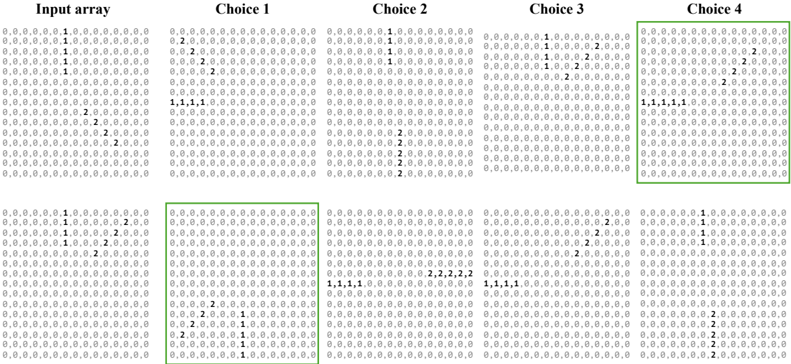
### Visual Description
## Array Comparison: Input vs. Choices
### Overview
The image presents a problem-solving scenario involving an input array and four choices. Each array consists of 15 rows and 15 columns, filled with either "0", "1", or "2". The task is to identify which of the four choices matches a specific transformation or pattern derived from the input array. Choice 4 is highlighted with a green box, suggesting it is the correct answer.
### Components/Axes
* **Titles:**
* Input array
* Choice 1
* Choice 2
* Choice 3
* Choice 4
* **Array Structure:** Each array is a 15x15 grid.
* **Values:** Each cell contains either "0", "1", or "2".
* **Highlight:** Choice 4 is enclosed in a green box.
### Detailed Analysis or ### Content Details
**Input Array:**
* Row 1: `0,0,0,0,0,0,1,0,0,0,0,0,0,0,0`
* Row 2: `0,0,0,0,0,0,1,0,0,0,0,0,0,0,0`
* Row 3: `0,0,0,0,0,0,1,0,0,0,0,0,0,0,0`
* Row 4: `0,0,0,0,0,0,1,0,0,0,0,0,0,0,0`
* Row 5: `0,0,0,0,0,0,1,0,0,0,0,0,0,0,0`
* Row 6: `0,0,0,0,0,0,0,0,0,0,0,0,0,0,0`
* Row 7: `0,0,0,0,0,0,0,0,2,0,0,0,0,0,0`
* Row 8: `0,0,0,0,0,0,0,2,0,0,0,0,0,0,0`
* Row 9: `0,0,0,0,0,0,0,0,2,0,0,0,0,0,0`
* Row 10: `0,0,0,0,0,0,0,0,0,2,0,0,0,0,0`
* Row 11: `0,0,0,0,0,0,0,0,0,0,0,0,0,0,0`
* Row 12: `0,0,0,0,0,0,0,0,0,0,0,0,0,0,0`
* Row 13: `0,0,0,0,0,0,1,0,0,0,0,0,2,0,0`
* Row 14: `0,0,0,0,0,0,1,0,0,0,0,2,0,0,0`
* Row 15: `0,0,0,0,0,0,1,0,0,0,2,0,0,0,0`
**Choice 1:**
* Row 1: `0,2,0,0,0,0,0,0,0,0,0,0,0,0,0`
* Row 2: `0,2,0,0,0,0,0,0,0,0,0,0,0,0,0`
* Row 3: `0,2,0,0,0,0,0,0,0,0,0,0,0,0,0`
* Row 4: `0,0,0,0,0,0,0,0,0,0,0,0,0,0,0`
* Row 5: `0,0,0,0,0,0,0,0,0,0,0,0,0,0,0`
* Row 6: `0,0,0,0,0,0,0,0,0,0,0,0,0,0,0`
* Row 7: `1,1,1,1,0,0,0,0,0,0,0,0,0,0,0`
* Row 8: `0,0,0,0,0,0,0,0,0,0,0,0,0,0,0`
* Row 9: `0,0,0,0,0,0,0,0,0,0,0,0,0,0,0`
* Row 10: `0,0,0,0,0,0,0,0,0,0,0,0,0,0,0`
* Row 11: `0,0,0,0,0,0,0,0,0,0,0,0,0,0,0`
* Row 12: `0,0,0,0,0,0,0,0,0,0,0,0,0,0,0`
* Row 13: `0,0,0,0,2,0,0,0,1,0,0,0,0,0,0`
* Row 14: `0,0,0,0,0,0,0,0,1,0,0,0,0,0,0`
* Row 15: `0,2,0,0,0,0,0,1,0,0,0,0,0,0,0`
**Choice 2:**
* Row 1: `0,0,0,0,0,0,1,0,0,0,0,0,0,0,0`
* Row 2: `0,0,0,0,0,0,1,0,0,0,0,0,0,0,0`
* Row 3: `0,0,0,0,0,0,1,0,0,0,0,0,0,0,0`
* Row 4: `0,0,0,0,0,0,0,0,0,0,0,0,0,0,0`
* Row 5: `0,0,0,0,0,0,0,0,0,0,0,0,0,0,0`
* Row 6: `0,0,0,0,0,0,0,0,0,0,0,0,0,0,0`
* Row 7: `0,0,0,0,0,0,0,0,0,0,0,0,0,0,0`
* Row 8: `0,0,0,0,0,0,0,0,2,0,0,0,0,0,0`
* Row 9: `0,0,0,0,0,0,0,0,2,0,0,0,0,0,0`
* Row 10: `0,0,0,0,0,0,0,0,2,0,0,0,0,0,0`
* Row 11: `0,0,0,0,0,0,0,0,2,0,0,0,0,0,0`
* Row 12: `0,0,0,0,0,0,0,0,0,0,0,0,0,0,0`
* Row 13: `0,0,0,0,0,0,0,0,0,0,0,0,0,0,0`
* Row 14: `0,0,0,0,0,0,0,2,0,0,0,0,0,0,0`
* Row 15: `0,0,0,0,0,0,0,0,0,0,0,0,0,0,0`
**Choice 3:**
* Row 1: `0,0,0,0,0,0,1,0,0,0,0,0,2,0,0`
* Row 2: `0,0,0,0,0,0,1,0,0,0,0,2,0,0,0`
* Row 3: `0,0,0,0,0,0,1,0,0,0,2,0,0,0,0`
* Row 4: `0,0,0,0,0,0,0,0,0,0,2,0,0,0,0`
* Row 5: `0,0,0,0,0,0,0,0,0,0,0,0,0,0,0`
* Row 6: `0,0,0,0,0,0,0,0,0,0,0,0,0,0,0`
* Row 7: `0,0,0,0,0,0,0,0,0,0,0,0,0,0,0`
* Row 8: `0,0,0,0,0,0,0,0,0,0,0,0,0,0,0`
* Row 9: `0,0,0,0,0,0,0,0,0,0,0,0,0,0,0`
* Row 10: `0,0,0,0,0,0,0,0,0,0,0,0,0,0,0`
* Row 11: `0,0,0,0,0,0,0,0,0,0,0,0,0,0,0`
* Row 12: `0,0,0,0,0,0,0,0,0,0,0,0,0,0,0`
* Row 13: `0,0,0,0,0,0,0,2,0,0,0,0,0,0,0`
* Row 14: `1,1,1,1,0,0,0,0,0,0,0,0,0,0,0`
* Row 15: `0,0,0,0,0,0,0,0,0,0,0,0,0,0,0`
**Choice 4:**
* Row 1: `0,0,0,0,0,0,0,0,0,0,0,0,2,0,0`
* Row 2: `0,0,0,0,0,0,0,0,0,0,0,2,0,0,0`
* Row 3: `0,0,0,0,0,0,0,0,0,0,2,0,0,0,0`
* Row 4: `0,0,0,0,0,0,0,0,0,0,0,0,0,0,0`
* Row 5: `0,0,0,0,0,0,0,0,0,0,0,0,0,0,0`
* Row 6: `0,0,0,0,0,0,0,0,0,0,0,0,0,0,0`
* Row 7: `1,1,1,1,1,0,0,0,0,0,0,0,0,0,0`
* Row 8: `0,0,0,0,0,0,0,0,0,0,0,0,0,0,0`
* Row 9: `0,0,0,0,0,0,0,0,0,0,0,0,0,0,0`
* Row 10: `0,0,0,0,0,0,0,0,0,0,0,0,0,0,0`
* Row 11: `0,0,0,0,0,0,1,0,0,0,0,0,0,0,0`
* Row 12: `0,0,0,0,0,0,1,0,0,0,0,2,0,0,0`
* Row 13: `0,0,0,0,0,0,1,0,0,0,2,0,0,0,0`
* Row 14: `0,0,0,0,0,0,1,0,0,0,0,0,0,0,0`
* Row 15: `0,0,0,0,0,0,0,0,0,2,0,0,0,0,0`
### Key Observations
* The input array has a vertical line of "1"s in the 7th column for the first 5 rows.
* The input array has a diagonal line of "2"s starting from row 7, column 9.
* The bottom rows of the input array have "1"s in the 7th column and "2"s in columns 12, 11, and 10 respectively.
* Choice 4 is highlighted, suggesting it is the correct answer.
### Interpretation
The image presents a pattern recognition problem. The task is to identify which of the four choices correctly transforms or continues the pattern presented in the input array. The green box around Choice 4 indicates that it is the solution. The transformation appears to involve shifting the "1"s and "2"s from the input array to different positions in the grid, and adding a row of "1"s.
</details>
Figure 16: Selective attention (SAtt) with visual inputs: What are the (row, column) grid locations of the reference object? The top-left element of the grid is (0, 0).
<details>
<summary>Image 18 Details</summary>
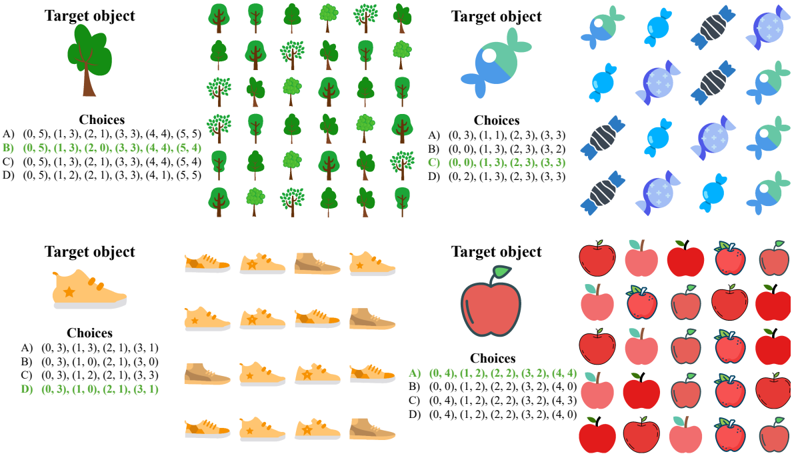
### Visual Description
## Visual Matching Task
### Overview
The image presents four separate visual matching tasks. Each task consists of a "Target object" and a grid of "Choices". The task is to identify the choice that matches the target object based on a given coordinate system. The correct answer for each task is highlighted in green.
### Components/Axes
Each task has the following components:
- **Target object:** A single image of an object (tree, candy, shoe, apple).
- **Choices:** A grid of images, each representing a potential match to the target object. The grid is arranged in rows and columns.
- **Choices Labels:** Each choice is labeled with a letter (A, B, C, D) followed by coordinates in parentheses. The coordinates likely correspond to row and column positions within the grid of choices.
### Detailed Analysis or ### Content Details
**Task 1: Tree**
- **Target object:** A green tree.
- **Choices Grid:** A 6x6 grid of trees with varying shapes and shades of green.
- **Choices Labels:**
- A) (0, 5), (1, 3), (2, 1), (3, 3), (4, 4), (5, 5)
- B) (0, 5), (1, 3), (2, 0), (3, 3), (4, 4), (5, 4)
- C) (0, 5), (1, 3), (2, 1), (3, 3), (4, 4), (5, 4) - **Correct Answer (Green)**
- D) (0, 5), (1, 2), (2, 1), (3, 3), (4, 1), (5, 5)
- **Correct Choices:** The correct choice is C. The trees at the coordinates (0, 5), (1, 3), (2, 1), (3, 3), (4, 4), and (5, 4) match the target object.
**Task 2: Candy**
- **Target object:** A blue and green candy.
- **Choices Grid:** A 4x4 grid of candies with varying colors and patterns.
- **Choices Labels:**
- A) (0, 3), (1, 1), (2, 3), (3, 3)
- B) (0, 0), (1, 3), (2, 3), (3, 2)
- C) (0, 0), (1, 3), (2, 3), (3, 3) - **Correct Answer (Green)**
- D) (0, 2), (1, 3), (2, 3), (3, 3)
- **Correct Choices:** The correct choice is C. The candies at the coordinates (0, 0), (1, 3), (2, 3), and (3, 3) match the target object.
**Task 3: Shoe**
- **Target object:** A yellow shoe with a star.
- **Choices Grid:** A 4x4 grid of shoes with varying colors and styles.
- **Choices Labels:**
- A) (0, 3), (1, 3), (2, 1), (3, 1)
- B) (0, 3), (1, 0), (2, 1), (3, 0)
- C) (0, 3), (1, 2), (2, 1), (3, 3)
- D) (0, 3), (1, 0), (2, 1), (3, 1) - **Correct Answer (Green)**
- **Correct Choices:** The correct choice is D. The shoes at the coordinates (0, 3), (1, 0), (2, 1), and (3, 1) match the target object.
**Task 4: Apple**
- **Target object:** A red apple with a green leaf.
- **Choices Grid:** A 5x4 grid of apples with varying shades of red and leaf styles.
- **Choices Labels:**
- A) (0, 4), (1, 2), (2, 2), (3, 2), (4, 4) - **Correct Answer (Green)**
- B) (0, 0), (1, 2), (2, 2), (3, 2), (4, 0)
- C) (0, 4), (1, 2), (2, 2), (3, 2), (4, 3)
- D) (0, 4), (1, 2), (2, 2), (3, 2), (4, 0)
- **Correct Choices:** The correct choice is A. The apples at the coordinates (0, 4), (1, 2), (2, 2), (3, 2), and (4, 4) match the target object.
### Key Observations
- Each task involves identifying multiple instances of the target object within the choices grid.
- The coordinate system appears to start at (0,0) in the top-left corner of the grid.
- The correct answers are highlighted in green, making them easily identifiable.
### Interpretation
The image demonstrates a visual pattern recognition task. The tasks assess the ability to identify specific objects within a set of similar objects, based on visual features. The coordinate system provides a method for specifying the location of each matching object. The consistent structure across all four tasks suggests a standardized assessment format.
</details>
Figure 17: Selective attention (SAtt) with text inputs: What are the (row, column) grid locations of the target character? The top-left element of the grid is (0, 0).
<details>
<summary>Image 19 Details</summary>
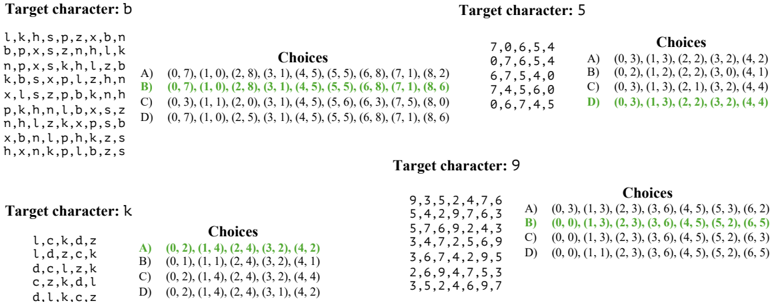
### Visual Description
## Character Recognition Choices
### Overview
The image presents a series of character recognition tasks, where the goal is to identify the correct sequence of coordinates that corresponds to a given target character. For each target character (b, 5, 9, k), a list of possible character sequences is provided, along with multiple-choice options representing coordinate sequences. The correct choice is highlighted in green.
### Components/Axes
Each character recognition task is structured as follows:
1. **Target Character:** The character to be recognized (e.g., "Target character: b").
2. **Character Sequences:** A list of character sequences associated with the target character.
3. **Choices:** Multiple-choice options (A, B, C, D) representing coordinate sequences. The correct choice is highlighted in green.
### Detailed Analysis or ### Content Details
**Target character: b**
* Character Sequences:
* l,k,h,s,p,z,x,b,n
* b,p,x,s,z,n,h,l,k
* n,p,x,s,k,h,l,z,b
* k,b,s,x,p,l,z,h,n
* x,l,s,z,p,b,k,n,h
* p,k,h,n,l,b,x,s,z
* n,h,l,z,k,x,p,s,b
* x,b,n,l,p,h,k,z,s
* h,x,n,k,p,l,b,z,s
* Choices:
* A) (0, 7), (1, 0), (2, 8), (3, 1), (4, 5), (5, 5), (6, 8), (7, 1), (8, 2)
* B) (0, 7), (1, 0), (2, 8), (3, 1), (4, 5), (5, 5), (6, 8), (7, 1), (8, 6) - **Correct Choice**
* C) (0, 3), (1, 1), (2, 0), (3, 1), (4, 5), (5, 6), (6, 3), (7, 5), (8, 0)
* D) (0, 7), (1, 0), (2, 5), (3, 1), (4, 5), (5, 5), (6, 8), (7, 1), (8, 6)
**Target character: 5**
* Character Sequences:
* 7,0,6,5,4
* 0,7,6,5,4
* 6,7,5,4,0
* 7,4,5,6,0
* 0,6,7,4,5
* Choices:
* A) (0, 3), (1, 3), (2, 2), (3, 2), (4, 2)
* B) (0, 2), (1, 2), (2, 2), (3, 0), (4, 1)
* C) (0, 3), (1, 3), (2, 1), (3, 2), (4, 4)
* D) (0, 3), (1, 3), (2, 2), (3, 2), (4, 4) - **Correct Choice**
**Target character: 9**
* Character Sequences:
* 9,3,5,2,4,7,6
* 5,4,2,9,7,6,3
* 5,7,6,9,2,4,3
* 3,4,7,2,5,6,9
* 3,6,7,4,2,9,5
* 2,6,9,4,7,5,3
* 3,5,2,4,6,9,7
* Choices:
* A) (0, 3), (1, 3), (2, 3), (3, 6), (4, 5), (5, 3), (6, 2)
* B) (0, 0), (1, 3), (2, 3), (3, 6), (4, 5), (5, 2), (6, 5) - **Correct Choice**
* C) (0, 0), (1, 3), (2, 3), (3, 6), (4, 5), (5, 2), (6, 3)
* D) (0, 0), (1, 1), (2, 3), (3, 6), (4, 5), (5, 2), (6, 5)
**Target character: k**
* Character Sequences:
* l,c,k,d,z
* l,d,z,c,k
* d,c,l,z,k
* c,z,k,d,l
* d,l,k,c,z
* Choices:
* A) (0, 2), (1, 4), (2, 4), (3, 2), (4, 2) - **Correct Choice**
* B) (0, 1), (1, 1), (2, 4), (3, 2), (4, 1)
* C) (0, 2), (1, 4), (2, 4), (3, 2), (4, 4)
* D) (0, 2), (1, 4), (2, 4), (3, 1), (4, 2)
### Key Observations
* For each target character, there is a set of character sequences and a corresponding set of coordinate choices.
* Only one choice is correct for each target character, indicated by the green highlighting.
* The coordinate sequences appear to represent spatial locations or features associated with the character sequences.
### Interpretation
The image demonstrates a character recognition task where the system must identify the correct coordinate sequence that corresponds to a given target character. The multiple-choice options provide a set of possible coordinate sequences, and the system must select the one that best matches the character sequences associated with the target character. The green highlighting indicates the correct choice, suggesting that the system has successfully identified the correct coordinate sequence for each target character. This task could be part of a larger system for optical character recognition (OCR) or handwriting recognition.
</details>
Figure 18: Corsi block tapping (CBTT) with visual inputs: Each row shows a set of blue boxes. The boxes are tapped in a sequence (highlighted in yellow). What is the sequence of taps? Use the box ids in the reference.
<details>
<summary>Image 20 Details</summary>
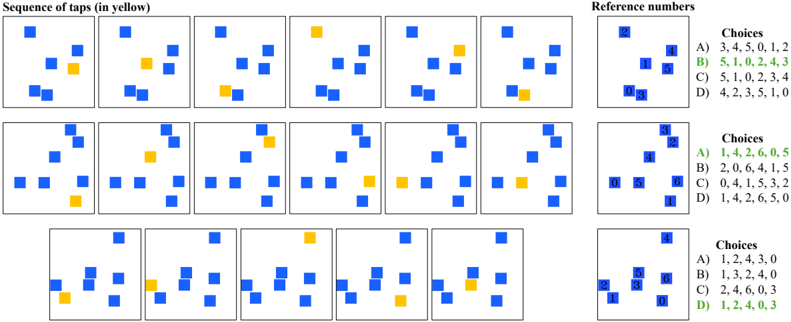
### Visual Description
## Diagram: Sequence of Taps and Reference Numbers
### Overview
The image presents a visual puzzle involving a sequence of taps on a grid of blue squares, with the tapped square highlighted in yellow. The goal is to match the sequence of taps to a corresponding set of reference numbers and choices provided on the right side of the image. There are three rows, each representing a different puzzle.
### Components/Axes
* **Title (Top-Left):** "Sequence of taps (in yellow)"
* **Title (Top-Right):** "Reference numbers"
* **Grids:** Each grid contains several blue squares and one yellow square, representing the sequence of taps.
* **Choices:** Each puzzle has four choices (A, B, C, D), each listing a sequence of numbers. The correct choice is highlighted in green.
### Detailed Analysis
**Row 1:**
* **Sequence of Taps:** The sequence of yellow squares appears in the 2nd, 3rd, and 6th positions in the sequence of 6 grids.
* **Reference Numbers:** A grid of 6 blue squares, numbered 0 through 5.
* **Choices:**
* A) 3, 4, 5, 0, 1, 2
* B) **5, 1, 0, 2, 4, 3** (Highlighted in green)
* C) 5, 1, 0, 2, 3, 4
* D) 4, 2, 3, 5, 1, 0
**Row 2:**
* **Sequence of Taps:** The sequence of yellow squares appears in the 3rd, 4th, and 5th positions in the sequence of 6 grids.
* **Reference Numbers:** A grid of 7 blue squares, numbered 0 through 6.
* **Choices:**
* A) **1, 4, 2, 6, 0, 5** (Highlighted in green)
* B) 2, 0, 6, 4, 1, 5
* C) 0, 4, 1, 5, 3, 2
* D) 1, 4, 2, 6, 5, 0
**Row 3:**
* **Sequence of Taps:** The sequence of yellow squares appears in the 1st, 2nd, and 4th positions in the sequence of 6 grids.
* **Reference Numbers:** A grid of 7 blue squares, numbered 0 through 6.
* **Choices:**
* A) 1, 2, 4, 3, 0
* B) 1, 3, 2, 4, 0
* C) 2, 4, 6, 0, 3
* D) **1, 2, 4, 0, 3** (Highlighted in green)
### Key Observations
* Each row presents a different puzzle.
* The "Sequence of taps" section shows a series of grids, each with blue squares and one yellow square.
* The "Reference numbers" section shows a grid of blue squares with numbers assigned to each square.
* The "Choices" section provides multiple sequences of numbers, one of which corresponds to the sequence of taps.
* The correct choice is highlighted in green.
### Interpretation
The image presents a visual reasoning task. The user must identify the sequence of taps (yellow squares) in the grids and then match that sequence to the corresponding numbers in the "Reference numbers" grid. The correct answer is the choice that matches the sequence of numbers derived from the tap sequence. The image demonstrates a spatial reasoning and pattern recognition task.
</details>
Figure 19: Corsi block tapping (CBTT) with text inputs: Each row shows a set of boxes ( B ) laid out in space. This is shown as a 2D array where 0 is empty space. The boxes are tapped in a sequence (highlighted as T ). What is the sequence of taps? Use the box ids in the reference. The array colors are purely for illustration purposes.
<details>
<summary>Image 21 Details</summary>
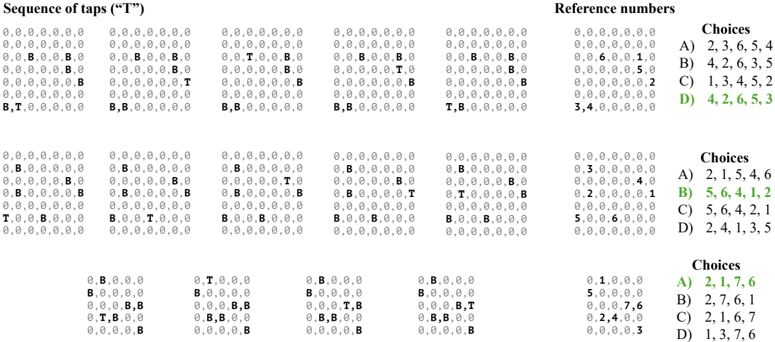
### Visual Description
## Sequence Analysis and Choices
### Overview
The image presents a series of sequences composed of "0", "B", and "T", labeled as "Sequence of taps ('T')". Each sequence is associated with a "Reference number" and a set of "Choices" (A, B, C, D), each containing a list of numbers. The correct choices are highlighted in green.
### Components/Axes
* **Title:** Sequence of taps ("T")
* **Elements:** The sequences consist of "0", "B", and "T".
* **Reference Numbers:** Numerical values associated with each sequence.
* **Choices:** Multiple-choice options (A, B, C, D) with numerical lists.
* **Correct Answers:** Highlighted in green.
### Detailed Analysis
The image is divided into three rows, each containing a sequence of taps, a reference number, and a set of choices.
**Row 1:**
* **Sequence of taps:**
* `0,0,0,0,0,0,0`
* `0,0,0,0,0,0,0`
* `0,0,0,0,0,0,0`
* `0,0,B,0,0,B,0`
* `0,0,B,0,0,B,0`
* `0,0,B,0,0,B,0`
* `0,0,0,0,0,B,0`
* `0,0,0,0,0,B,0`
* `0,0,0,0,0,B,0`
* `0,0,0,0,0,0,B`
* `0,0,0,0,0,0,T`
* `0,0,0,0,0,0,B`
* `0,0,0,0,0,0,0`
* `0,0,0,0,0,0,0`
* `0,0,0,0,0,0,0`
* `B,T,0,0,0,0,0`
* `B,B,0,0,0,0,0`
* `B,B,0,0,0,0,0`
* **Reference Numbers:**
* `0,0,0,0,0,0,0`
* `0,0,0,0,0,0,0`
* `0,0,0,0,0,0,0`
* `0,0,6,0,0,1,0`
* `0,0,0,0,0,5,0`
* `0,0,0,0,0,0,2`
* `3,4,0,0,0,0,0`
* **Choices:**
* A) 2, 3, 6, 5, 4
* B) 4, 2, 6, 3, 5
* C) 1, 3, 4, 5, 2
* D) 4, 2, 6, 5, 3 (Highlighted in green)
**Row 2:**
* **Sequence of taps:**
* `0,0,0,0,0,0,0`
* `0,0,0,0,0,0,0`
* `0,0,0,0,0,0,0`
* `0,B,0,0,0,0,0`
* `0,B,0,0,0,0,0`
* `0,B,0,0,0,0,0`
* `0,0,0,0,0,B,0`
* `0,0,0,0,0,B,0`
* `0,0,0,0,0,B,0`
* `T,0,0,B,0,0,0`
* `B,0,0,T,0,0,0`
* `B,0,0,B,0,0,0`
* `0,0,0,0,0,0,0`
* `0,0,0,0,0,0,0`
* `0,0,0,0,0,0,0`
* `B,0,0,B,0,0,0`
* `B,0,0,B,0,0,0`
* `B,0,0,B,0,0,0`
* **Reference Numbers:**
* `0,0,0,0,0,0,0`
* `0,0,0,0,0,0,0`
* `0,0,0,0,0,0,0`
* `0,3,0,0,0,0,0`
* `0,0,0,0,0,4,0`
* `0,2,0,0,0,0,1`
* `5,0,0,6,0,0,0`
* **Choices:**
* A) 2, 1, 5, 4, 6
* B) 5, 6, 4, 1, 2 (Highlighted in green)
* C) 5, 6, 4, 2, 1
* D) 2, 4, 1, 3, 5
**Row 3:**
* **Sequence of taps:**
* `0,B,0,0,0,0`
* `0,B,0,0,0,0`
* `0,B,0,0,0,0`
* `B,0,0,0,0`
* `B,0,0,0,0`
* `B,0,0,0,0`
* `0,0,0,B,B`
* `0,0,0,B,B`
* `0,0,0,T,B`
* `0,T,B,0,0`
* `0,B,B,0,0`
* `0,B,B,0,0`
* `0,0,0,0,B`
* `0,0,0,0,B`
* `0,0,0,0,B`
* `0,T,0,0,0`
* `0,B,0,0,0`
* `0,B,0,0,0`
* `0,0,0,B,T`
* `0,B,B,0,0`
* `0,B,B,0,0`
* `0,0,0,0,B`
* `0,0,0,0,B`
* `0,0,0,0,B`
* **Reference Numbers:**
* `0,1,0,0,0`
* `5,0,0,0,0`
* `0,0,0,7,6`
* `0,2,4,0,0`
* `0,0,0,0,3`
* **Choices:**
* A) 2, 1, 7, 6 (Highlighted in green)
* B) 2, 7, 6, 1
* C) 2, 1, 6, 7
* D) 1, 3, 7, 6
### Key Observations
* Each row presents a distinct sequence of taps, reference numbers, and choices.
* The correct answers are highlighted in green.
* The sequences consist of "0", "B", and "T" in various arrangements.
### Interpretation
The image appears to be part of a test or exercise where the task is to match a given sequence of taps to a corresponding reference number and then select the correct choice from the provided options. The highlighted answers indicate the correct matches for each row. The sequences of taps likely represent some form of input or pattern, and the reference numbers and choices are used to identify and validate the correct response.
</details>
Figure 20: Spatial addition (SAdd) with visual inputs: What is the sum of the two arrays? Ignore red circles. Blue circles represent 1, white circles represent 2 and empty spaces represent 0.
<details>
<summary>Image 22 Details</summary>
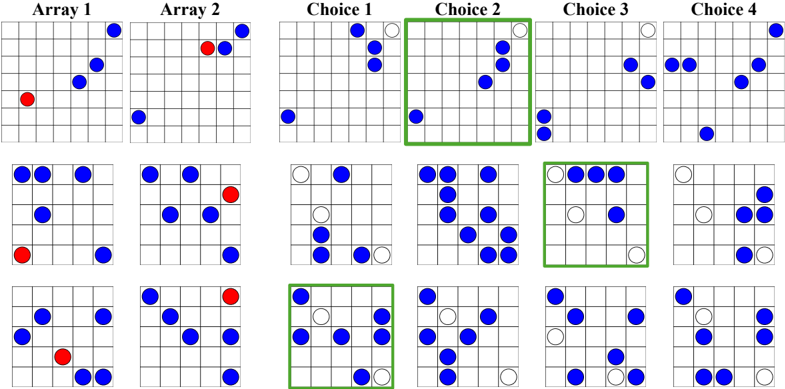
### Visual Description
## Pattern Recognition Task
### Overview
The image presents a pattern recognition task. It consists of six 7x7 grids labeled "Array 1", "Array 2", "Choice 1", "Choice 2", "Choice 3", and "Choice 4". There are three rows of these grids. Each grid contains blue and red (or white) circles. The task likely involves identifying which of the "Choice" grids matches a pattern derived from "Array 1" and "Array 2". Green boxes highlight the correct choices.
### Components/Axes
* **Grids:** Six 7x7 grids in each row.
* **Labels:** "Array 1", "Array 2", "Choice 1", "Choice 2", "Choice 3", "Choice 4" are the column labels.
* **Circles:** Blue and red (or white) circles are placed within the grids.
* **Green Boxes:** Green boxes highlight the correct choices.
### Detailed Analysis
**Row 1:**
* **Array 1:** Contains blue circles in the top-right corner, diagonally downwards, and a red circle in the bottom-left corner.
* **Array 2:** Contains blue circles in the bottom-left corner and the top-right corner, with a red circle near the top-right corner.
* **Choice 1:** Contains blue circles in the bottom-left corner and the top-right corner, with white circles near the top-right corner.
* **Choice 2:** Contains blue circles in the top-right corner and the bottom-left corner. This choice is highlighted with a green box.
* **Choice 3:** Contains blue circles in the top-right corner and the bottom-left corner, with white circles in the top-right corner.
* **Choice 4:** Contains blue circles in the top-right corner and the bottom-left corner, with white circles in the top-right corner.
**Row 2:**
* **Array 1:** Contains blue circles in the top-left and bottom-right corners, with a red circle in the bottom-left corner.
* **Array 2:** Contains blue circles in the top-left and bottom-right corners, with a red circle near the top-right corner.
* **Choice 1:** Contains blue circles in the top-left and bottom-right corners, with white circles in the top-left corner.
* **Choice 2:** Contains blue circles in the top-left and bottom-right corners.
* **Choice 3:** Contains blue circles in the top-left and bottom-right corners, with white circles in the top-left corner. This choice is highlighted with a green box.
* **Choice 4:** Contains blue circles in the top-left and bottom-right corners, with white circles in the top-left corner.
**Row 3:**
* **Array 1:** Contains blue circles in the top-left and bottom-right corners, with a red circle in the bottom-left corner.
* **Array 2:** Contains blue circles in the top-left and bottom-right corners, with a red circle near the top-right corner.
* **Choice 1:** Contains blue circles in the top-left and bottom-right corners, with white circles in the top-left corner. This choice is highlighted with a green box.
* **Choice 2:** Contains blue circles in the top-left and bottom-right corners.
* **Choice 3:** Contains blue circles in the top-left and bottom-right corners, with white circles in the top-left corner.
* **Choice 4:** Contains blue circles in the top-left and bottom-right corners, with white circles in the top-left corner.
### Key Observations
* The "Array 1" and "Array 2" grids in each row have similar patterns, with the red circles being the main difference.
* The correct "Choice" grids (highlighted in green) seem to combine elements from "Array 1" and "Array 2", often omitting the red circles and sometimes replacing blue circles with white circles.
* The pattern recognition task appears to involve identifying a combination or transformation of the patterns in "Array 1" and "Array 2".
### Interpretation
The image depicts a visual reasoning or pattern recognition task. The task likely requires the observer to analyze the patterns presented in "Array 1" and "Array 2" and then select the "Choice" grid that best represents a combination or transformation of those patterns. The green boxes indicate the correct answers, suggesting a specific rule or logic is being applied to derive the correct choice. The presence of red and blue circles, and their replacement with white circles in some choices, adds a layer of complexity to the task.
</details>
Figure 21: Spatial addition (SAdd) with text inputs: What is the sum of the two arrays? Ignore R . E is 0, B is 1 and W is 2. The array colors are purely for illustration purposes.
<details>
<summary>Image 23 Details</summary>
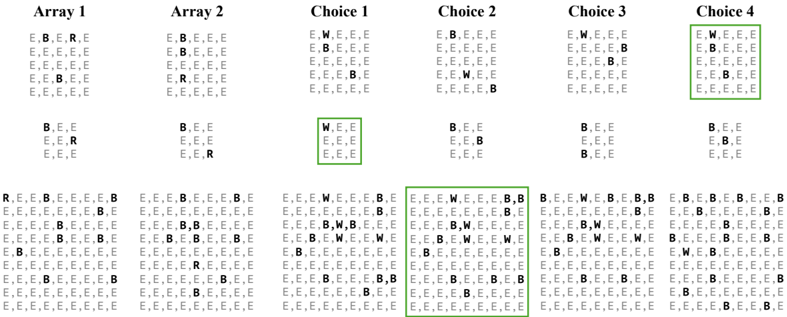
### Visual Description
## Character Array Comparison
### Overview
The image presents a comparison of character arrays, specifically focusing on the distribution of 'E', 'B', 'R', and 'W' within these arrays. There are two initial arrays (Array 1 and Array 2) and four choices (Choice 1, Choice 2, Choice 3, and Choice 4). Each array consists of a grid of characters. Some of the choices are highlighted with green boxes.
### Components/Axes
* **Titles:** Array 1, Array 2, Choice 1, Choice 2, Choice 3, Choice 4
* **Character Set:** E, B, R, W
* **Array Structure:** Each array is structured as a grid of characters. The arrays at the top are 5x5, the arrays in the middle are 3x3, and the arrays at the bottom are 9x9.
* **Highlighting:** Green boxes highlight specific arrays among the choices.
### Detailed Analysis or ### Content Details
**Array 1:**
* Top Array (5x5):
* Row 1: E, B, E, R, E
* Row 2-5: E, E, E, E, E
* Middle Array (3x3):
* Row 1: B, E, E
* Row 2: E, E, R
* Row 3: E, E, E
* Bottom Array (9x9):
* Row 1: R, E, E, B, E, E, E, E, B
* Row 2: E, E, E, B, E, E, E, B, E
* Row 3: E, E, E, E, E, E, E, B, E
* Row 4-5: E, E, E, E, E, E, E, E, E
* Row 6: E, E, E, E, B, E, E, E, E
* Row 7: E, E, E, B, B, E, E, E, E
* Row 8: E, E, B, E, B, E, E, B, E
* Row 9: B, E, E, E, E, E, E, E, E
**Array 2:**
* Top Array (5x5):
* Row 1: E, B, E, E, E
* Row 2-3: E, B, E, E, E
* Row 4: E, R, E, E, E
* Row 5: E, E, E, E, E
* Middle Array (3x3):
* Row 1: B, E, E
* Row 2: E, E, R
* Row 3: E, E, E
* Bottom Array (9x9):
* Row 1: E, E, E, B, E, E, E, B, E
* Row 2: E, E, E, E, E, E, E, B, E
* Row 3: E, E, E, E, B, E, E, E, E
* Row 4-5: E, E, E, E, E, E, E, E, E
* Row 6: E, E, E, E, E, E, B, E, E
* Row 7: E, E, E, E, E, E, E, E, E
* Row 8: E, E, E, E, R, E, E, E, E
* Row 9: E, E, E, E, E, E, E, E, E
**Choice 1:**
* Top Array (5x5):
* Row 1: E, W, E, E, E
* Row 2: E, B, E, E, E
* Row 3-4: E, E, E, E, E
* Row 5: E, E, E, B, E
* Middle Array (3x3): Highlighted in green
* Row 1: W, E, E
* Row 2-3: E, E, E
* Bottom Array (9x9):
* Row 1: E, E, E, W, E, E, E, B, E
* Row 2: E, E, E, E, E, E, E, B, E
* Row 3: E, E, E, B, W, B, E, E, E
* Row 4: E, E, B, E, W, E, E, W, E
* Row 5-6: E, B, E, E, E, E, E, E, E
* Row 7: E, E, E, E, E, E, E, E, E
* Row 8: E, E, E, B, E, E, B, E, B
* Row 9: E, E, E, E, E, E, E, E, E
**Choice 2:**
* Top Array (5x5):
* Row 1: E, B, E, E, E
* Row 2-3: E, E, E, E, E
* Row 4: E, W, E, E, E
* Row 5: E, E, E, E, B
* Middle Array (3x3):
* Row 1: B, E, E
* Row 2: E, E, B
* Row 3: E, E, E
* Bottom Array (9x9): Highlighted in green
* Row 1: E, E, E, W, E, E, E, B, B
* Row 2: E, E, E, E, E, E, E, B, E
* Row 3: E, E, E, B, W, E, E, E, E
* Row 4: E, E, B, E, W, E, E, W, E
* Row 5-6: E, B, E, E, E, E, E, E, E
* Row 7: E, E, E, E, E, E, E, E, E
* Row 8: E, E, E, B, E, E, B, E, B
* Row 9: E, E, E, E, E, E, E, E, E
**Choice 3:**
* Top Array (5x5):
* Row 1: E, W, E, E, E
* Row 2: E, E, E, B, E
* Row 3-5: E, E, E, E, E
* Middle Array (3x3):
* Row 1: B, E, E
* Row 2: E, E, E
* Row 3: B, E, E
* Bottom Array (9x9):
* Row 1: B, E, E, W, E, B, E, B, B
* Row 2: E, E, E, E, E, E, E, B, E
* Row 3: E, E, E, B, W, E, E, E, E
* Row 4: E, E, B, E, W, E, E, W, E
* Row 5-6: E, B, E, E, E, E, E, E, E
* Row 7: E, E, E, E, E, E, E, E, E
* Row 8: E, E, E, B, E, E, B, E, E
* Row 9: E, E, E, E, E, E, E, E, E
**Choice 4:**
* Top Array (5x5): Highlighted in green
* Row 1: E, W, E, E, E
* Row 2: E, B, E, E, E
* Row 3-5: E, E, E, E, E
* Middle Array (3x3):
* Row 1: B, E, E
* Row 2: E, B, E
* Row 3: E, E, E
* Bottom Array (9x9):
* Row 1: E, B, E, B, E, B, E, E, B
* Row 2: E, E, B, E, E, E, E, B, E
* Row 3: E, E, E, E, B, E, E, E, E
* Row 4-5: E, E, E, E, E, E, E, E, E
* Row 6: E, W, E, B, E, E, E, E, E
* Row 7: E, E, E, E, E, E, E, E, E
* Row 8: E, E, E, E, B, E, E, B, E
* Row 9: E, E, E, E, E, E, E, E, E
### Key Observations
* The characters 'E', 'B', 'R', and 'W' are used in the arrays.
* The distribution of these characters varies across the arrays and choices.
* Choices 1, 2, and 4 have green boxes around them, indicating they are of particular interest.
* Array 1 and Array 2 only contain 'E', 'B', and 'R'.
* Choices 1-4 contain 'E', 'B', and 'W'.
### Interpretation
The image likely represents a task where the goal is to select the "best" choice based on some criteria related to the distribution of characters within the arrays. The green boxes suggest that Choices 1, 2, and 4 are potential solutions or are being evaluated. The differences in character distribution between the initial arrays (Array 1 and Array 2) and the choices may be relevant to the selection criteria. The task could involve pattern matching, statistical analysis of character frequencies, or some other form of comparison. The presence of 'W' in the choices but not in the initial arrays could be a significant factor.
</details>
Figure 22: Maze completion (MCT) with visual inputs: We illustrate examples of mazes used for the MCT task. We programmatically generate mazes of different sizes using Mazelib (Stilley, 2014). Blue cells are obstacles. Black cells are navigable space. The yellow square represents the current location. The red circle represents the goal location.
<details>
<summary>Image 24 Details</summary>
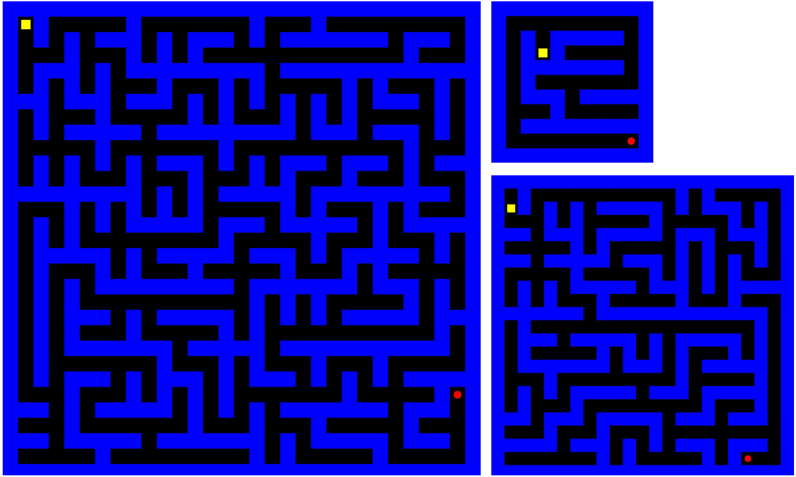
### Visual Description
## Maze Diagram: Three Mazes of Varying Complexity
### Overview
The image presents three distinct mazes, each enclosed within a square or rectangular boundary. The mazes are rendered in a blue and black color scheme, with a yellow starting point and a red ending point. The mazes vary in size and complexity.
### Components/Axes
* **Maze Walls:** Represented by black lines.
* **Maze Paths:** Represented by blue lines.
* **Start Point:** A yellow square located near the top-left corner of each maze.
* **End Point:** A red square located near the bottom-right corner of the largest maze, and near the bottom-right corner of the smaller mazes.
* **Maze 1:** The largest maze, located on the left side of the image.
* **Maze 2:** A smaller maze, located on the top-right side of the image.
* **Maze 3:** A medium-sized maze, located on the bottom-right side of the image.
### Detailed Analysis or Content Details
* **Maze 1 (Large):** The start point is located in the top-left corner. The end point is located in the bottom-right corner. The maze has a high level of complexity, with numerous twists and turns.
* **Maze 2 (Small):** The start point is located in the top-left corner. The end point is located in the bottom-right corner. The maze has a low level of complexity, with fewer twists and turns.
* **Maze 3 (Medium):** The start point is located in the top-left corner. The end point is located in the bottom-right corner. The maze has a medium level of complexity, with a moderate number of twists and turns.
### Key Observations
* All three mazes share a consistent color scheme and design.
* The mazes vary significantly in size and complexity.
* The start and end points are consistently located in the top-left and bottom-right corners, respectively.
### Interpretation
The image likely serves as a visual representation of problem-solving challenges of varying difficulty. The mazes, with their different levels of complexity, could symbolize different levels of difficulty in a task or problem. The consistent placement of start and end points suggests a standardized goal, while the varying paths represent different routes or strategies to achieve that goal. The image could be used to illustrate concepts related to algorithms, pathfinding, or problem-solving strategies.
</details>
Figure 23: Maze completion (MCT) with text inputs: We illustrate examples of mazes used for the MCT task. We programmatically generate mazes of different sizes using Mazelib (Stilley, 2014). 0 s are obstacles. 1 s are navigable space. A represents the current location. G represents the goal location. The array colors are purely for illustration purposes.
<details>
<summary>Image 25 Details</summary>
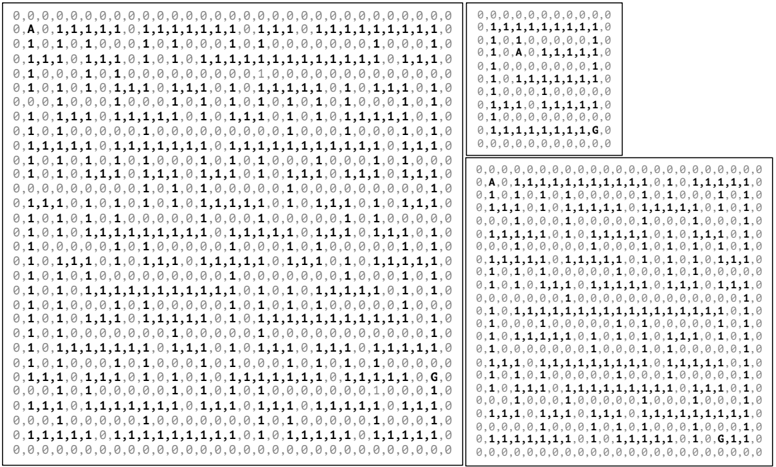
### Visual Description
## Character Grid: Binary Representation with Markers
### Overview
The image presents three grids of binary data (0s and 1s), each with dimensions approximately 20x30. The grids are enclosed in boxes. The top-left grid and the bottom grid contain the letter "A" in the second row and the letter "G" near the bottom. The top-right grid also contains "A" and "G".
### Components/Axes
* **Grid Cells:** Each cell contains either a "0" or a "1".
* **Markers:** The letters "A" and "G" are present in specific cells within the grids.
* **Grid Boundaries:** Each grid is enclosed within a rectangular border.
### Detailed Analysis or ### Content Details
**Grid 1 (Top-Left):**
* Dimensions: Approximately 20 rows x 31 columns.
* Top Row: All "0"s.
* Second Row: "0,A,0,1,1,1,1,1,0,1,1,1,1,1,1,1,0,1,1,1,0,1,1,1,1,1,1,1,1,1,0"
* Bottom Row: All "0"s.
* Letter "A": Located at position (2,2).
* Letter "G": Located near the bottom-right. The row containing "G" reads "...1,1,1,0,G,0".
**Grid 2 (Top-Right):**
* Dimensions: Approximately 10 rows x 20 columns.
* Top Row: All "0"s.
* Second Row: "0,A,0,1,1,1,1,1,0"
* Bottom Row: All "0"s.
* Letter "A": Located at position (2,2).
* Letter "G": Located near the bottom-right. The row containing "G" reads "...1,1,1,1,G,0".
**Grid 3 (Bottom):**
* Dimensions: Approximately 20 rows x 31 columns.
* Top Row: All "0"s.
* Second Row: "0,A,0,1,1,1,1,1,1,1,1,1,1,1,0,1,0,1,1,1,1,1,0"
* Bottom Row: All "0"s.
* Letter "A": Located at position (2,2).
* Letter "G": Located near the bottom-right. The row containing "G" reads "...1,1,1,1,1,0,G,1,1,0".
### Key Observations
* All grids start and end with rows of "0"s.
* The letter "A" consistently appears in the second row, second column of each grid.
* The letter "G" appears near the bottom-right corner of each grid.
* The majority of the grid cells contain "1"s, with "0"s sparsely distributed.
### Interpretation
The image likely represents a binary encoding of some data, possibly characters or other information. The "A" and "G" markers could indicate the start and end points of a specific data sequence or represent some other form of metadata within the encoding. The grids may represent different segments or versions of the same underlying data. The high density of "1"s suggests a specific encoding scheme where "1" is the dominant bit value.
</details>
Figure 24: Cambridge spatial working memory (CSWM) with visual inputs: Weillustrate two game plays of the CSWM task in the two rows. In each row, we show the initial observation followed by actions taken and the resulting observations. Note how the box identities change after each step. This is intended to force models to remember boxes by their spatial locations instead of their integer identities. As treasures get collected, they are populated in the 'Treasures collected' section of the game screen. When a treasure is collected, a new treasure is placed in one of the boxes where the treasure never appeared before.
<details>
<summary>Image 26 Details</summary>
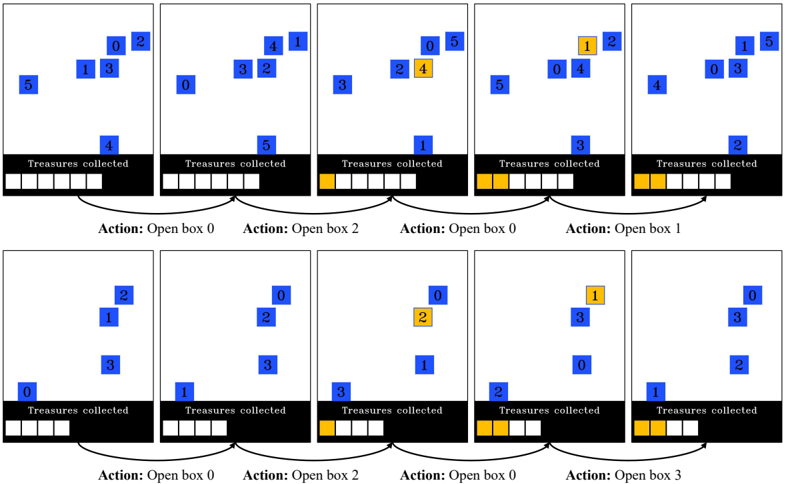
### Visual Description
## Diagram: Treasure Collection Simulation
### Overview
The image depicts a simulation of treasure collection, visualized across ten separate frames arranged in two rows of five. Each frame shows a set of blue squares labeled with numbers, representing potential treasure locations, and a black bar at the bottom indicating the number of treasures collected. When a treasure is collected, the corresponding square turns yellow. The action taken in each frame (opening a specific box) is labeled below each frame.
### Components/Axes
* **Frames:** Ten individual frames showing the state of the treasure collection process at different steps.
* **Blue Squares:** Represent potential treasure locations, labeled with numbers from 0 to 5.
* **Yellow Squares:** Indicate collected treasures.
* **Black Bar:** Represents the "Treasures collected," with white squares indicating uncollected treasures and yellow squares indicating collected treasures.
* **Action Labels:** Text labels below each frame indicating the action taken (e.g., "Action: Open box 0").
### Detailed Analysis
**Row 1:**
* **Frame 1:**
* Blue squares labeled 0, 1, 2, 3, 4, and 5.
* "Treasures collected": 0 (all squares in the black bar are white).
* Action: Open box 0.
* **Frame 2:**
* Blue squares labeled 0, 1, 2, 3, 4.
* "Treasures collected": 0 (all squares in the black bar are white).
* Action: Open box 2.
* **Frame 3:**
* Blue squares labeled 0, 1, 3, 4, 5. Square 2 is now yellow.
* "Treasures collected": 1 (one yellow square in the black bar).
* Action: Open box 0.
* **Frame 4:**
* Blue squares labeled 0, 1, 2, 4, 5. Square 0 is now yellow.
* "Treasures collected": 2 (two yellow squares in the black bar).
* Action: Open box 1.
* **Frame 5:**
* Blue squares labeled 0, 1, 3, 4, 5. Square 1 is now yellow.
* "Treasures collected": 3 (three yellow squares in the black bar).
**Row 2:**
* **Frame 6:**
* Blue squares labeled 0, 1, 2, 3.
* "Treasures collected": 3 (three yellow squares in the black bar).
* Action: Open box 0.
* **Frame 7:**
* Blue squares labeled 0, 1, 2, 3.
* "Treasures collected": 3 (three yellow squares in the black bar).
* Action: Open box 2.
* **Frame 8:**
* Blue squares labeled 0, 1, 2, 3. Square 2 is now yellow.
* "Treasures collected": 4 (four yellow squares in the black bar).
* Action: Open box 0.
* **Frame 9:**
* Blue squares labeled 0, 1, 3. Square 0 is now yellow.
* "Treasures collected": 5 (five yellow squares in the black bar).
* Action: Open box 3.
* **Frame 10:**
* Blue squares labeled 0, 1, 2, 3. Square 3 is now yellow.
* "Treasures collected": 6 (six yellow squares in the black bar).
### Key Observations
* The simulation progresses by opening boxes, which may or may not contain a treasure.
* When a treasure is found, the corresponding square turns yellow, and the "Treasures collected" count increases.
* The actions taken are not necessarily sequential (e.g., opening box 0 multiple times).
* The number of potential treasure locations varies slightly between frames.
### Interpretation
The diagram illustrates a simple treasure collection simulation, likely used to demonstrate a reinforcement learning or decision-making process. The agent (or algorithm) takes actions (opening boxes) and receives rewards (collecting treasures). The goal is likely to learn an optimal strategy for maximizing the number of treasures collected. The varying number of potential treasure locations and the non-sequential actions suggest a dynamic and potentially stochastic environment. The simulation demonstrates how actions lead to changes in the state of the environment (treasure locations and collected treasures) and how these changes can be tracked and visualized.
</details>
Figure 25: Cambridge spatial working memory (CSWM) with text inputs: We illustrate two game plays of the CSWM task in the two rows. In each row, we show the initial observation (provided as text arrays) followed by actions taken and the resulting observations. The boxes in each array are the non-zero elements. Note how the box identities change after each step. This is intended to force models to remember boxes by their spatial locations instead of their integer identities. As treasures get collected, the 'Number of treasures collected' gets incremented. When a treasure is collected, a new treasure is placed in one of the boxes where the treasure never appeared before. The array colors are purely for illustration purposes.
<details>
<summary>Image 27 Details</summary>
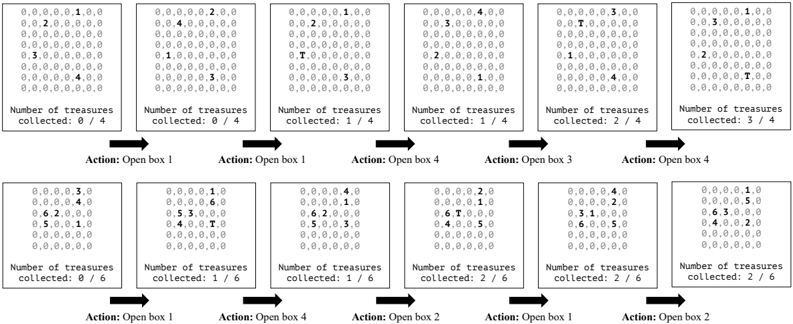
### Visual Description
## Diagram: Treasure Box Game States
### Overview
The image depicts a sequence of states in a treasure box game. Each state is represented by an 8x8 grid of numbers, indicating the probability distribution of a treasure being in a particular box. The sequence shows how the probability distribution changes as the player opens boxes and collects treasures. The image is divided into two rows, each showing a series of game states with corresponding actions and treasure counts.
### Components/Axes
* **Grid:** Each grid is an 8x8 matrix of numbers, representing the probability distribution.
* **Number of treasures collected:** Text label indicating the number of treasures collected in the current state, along with the total number of treasures available.
* **Action:** Text label indicating the action taken to transition to the next state (i.e., which box was opened).
* **Arrows:** Arrows indicate the flow of the game from one state to the next.
### Detailed Analysis
**Top Row:**
* **State 1 (Top-Left):**
* Grid:
```
0,0,0,0,0,1,0,0
0,0,0,0,0,2,0,0
0,0,0,0,0,1,0,0
0,0,0,0,0,4,0,0
0,0,0,0,0,3,0,0
0,0,0,0,0,1,0,0
0,0,0,0,0,0,0,0
0,0,0,0,0,0,0,0
```
* Number of treasures collected: 0 / 4
* Action: Open box 1
* **State 2:**
* Grid:
```
0,0,0,0,0,2,0,0
0,0,0,0,0,4,0,0
0,0,0,0,0,2,0,0
0,0,0,0,0,3,0,0
0,0,0,0,0,0,0,0
0,0,0,0,0,0,0,0
0,0,0,0,0,0,0,0
0,0,0,0,0,0,0,0
```
* Number of treasures collected: 0 / 4
* Action: Open box 1
* **State 3:**
* Grid:
```
0,0,0,0,0,1,0,0
0,0,0,0,0,2,0,0
0,0,0,0,0,1,0,0
0,0,0,0,0,0,0,0
0,0,0,0,0,0,0,0
0,0,0,0,0,0,0,0
0,0,0,0,0,0,0,0
0,0,0,0,0,0,0,0
```
Note: There is a "T" in the 4th row, 6th column.
* Number of treasures collected: 1 / 4
* Action: Open box 4
* **State 4:**
* Grid:
```
0,0,0,0,0,4,0,0
0,0,0,0,0,3,0,0
0,0,0,0,0,2,0,0
0,0,0,0,0,1,0,0
0,0,0,0,0,0,0,0
0,0,0,0,0,0,0,0
0,0,0,0,0,0,0,0
0,0,0,0,0,0,0,0
```
* Number of treasures collected: 1 / 4
* Action: Open box 3
* **State 5:**
* Grid:
```
0,0,0,0,0,3,0,0
0,0,0,0,0,1,0,0
0,0,0,0,0,1,0,0
0,0,0,0,0,4,0,0
0,0,0,0,0,0,0,0
0,0,0,0,0,0,0,0
0,0,0,0,0,0,0,0
0,0,0,0,0,0,0,0
```
Note: There is a "T" in the 2nd row, 6th column.
* Number of treasures collected: 2 / 4
* Action: Open box 4
* **State 6 (Top-Right):**
* Grid:
```
0,0,0,0,0,3,0,0
0,0,0,0,0,1,0,0
0,0,0,0,0,2,0,0
0,0,0,0,0,0,0,0
0,0,0,0,0,0,0,0
0,0,0,0,0,0,0,0
0,0,0,0,0,0,0,0
0,0,0,0,0,0,0,0
```
Note: There is a "T" in the 3rd row, 6th column.
* Number of treasures collected: 3 / 4
**Bottom Row:**
* **State 7 (Bottom-Left):**
* Grid:
```
0,0,0,0,3,0,0,0
0,0,0,0,4,0,0,0
0,6,2,0,0,0,0,0
0,5,0,0,1,0,0,0
0,0,0,0,0,0,0,0
0,0,0,0,0,0,0,0
0,0,0,0,0,0,0,0
0,0,0,0,0,0,0,0
```
* Number of treasures collected: 0 / 6
* Action: Open box 1
* **State 8:**
* Grid:
```
0,0,0,0,1,0,0,0
0,0,0,0,6,0,0,0
0,5,3,0,0,0,0,0
0,4,0,0,1,0,0,0
0,0,0,0,0,0,0,0
0,0,0,0,0,0,0,0
0,0,0,0,0,0,0,0
0,0,0,0,0,0,0,0
```
Note: There is a "T" in the 4th row, 5th column.
* Number of treasures collected: 1 / 6
* Action: Open box 4
* **State 9:**
* Grid:
```
0,0,0,0,4,0,0,0
0,0,0,0,1,0,0,0
0,6,2,0,0,0,0,0
0,5,0,0,3,0,0,0
0,0,0,0,0,0,0,0
0,0,0,0,0,0,0,0
0,0,0,0,0,0,0,0
0,0,0,0,0,0,0,0
```
* Number of treasures collected: 1 / 6
* Action: Open box 2
* **State 10:**
* Grid:
```
0,0,0,0,2,0,0,0
0,0,0,0,1,0,0,0
0,6,1,0,0,0,0,0
0,4,0,0,5,0,0,0
0,0,0,0,0,0,0,0
0,0,0,0,0,0,0,0
0,0,0,0,0,0,0,0
0,0,0,0,0,0,0,0
```
Note: There is a "T" in the 3rd row, 3rd column.
* Number of treasures collected: 2 / 6
* Action: Open box 1
* **State 11:**
* Grid:
```
0,0,0,0,4,0,0,0
0,0,0,0,2,0,0,0
0,3,1,0,0,0,0,0
0,6,0,0,5,0,0,0
0,0,0,0,0,0,0,0
0,0,0,0,0,0,0,0
0,0,0,0,0,0,0,0
0,0,0,0,0,0,0,0
```
* Number of treasures collected: 2 / 6
* Action: Open box 2
* **State 12 (Bottom-Right):**
* Grid:
```
0,0,0,0,1,0,0,0
0,0,0,0,5,0,0,0
0,6,3,0,0,0,0,0
0,4,0,0,2,0,0,0
0,0,0,0,0,0,0,0
0,0,0,0,0,0,0,0
0,0,0,0,0,0,0,0
0,0,0,0,0,0,0,0
```
* Number of treasures collected: 2 / 6
### Key Observations
* The numbers in the grid represent probabilities or some other form of weighting.
* The "T" character appears to indicate the location of a treasure after a box is opened.
* The number of treasures collected increases as the game progresses.
* The actions taken influence the probability distribution in the subsequent states.
### Interpretation
The diagram illustrates a game where the player is trying to find treasures hidden in boxes. The numbers in the grid likely represent the probability of a treasure being in a particular box. As the player opens boxes, the probabilities are updated based on whether a treasure was found or not. The "T" character marks the location of a found treasure. The goal of the game is likely to maximize the number of treasures collected within a certain number of moves. The diagram shows how the player's actions affect the probability distribution and their chances of finding more treasures. The two rows represent different game scenarios or levels, with the bottom row having a higher total number of treasures (6) compared to the top row (4).
</details>
```
```
Prompt 1: Direction estimation (Ego image)
```
Prompt 2: Direction estimation (DM image)
USER: You are playing a game in a 2D world. Each image shows the immediate surroundings around you, with you at the center of
the image (in yellow). The black cells are obstacles, i.e., you cannot move over them. The blue cells are navigable spaces that you can
move over. Some blue cells have landmarks in them (red circles with a text label). These are important to remember. Here is a video
taken in the 2D world as you were navigating in it. Understand the 2D world you are navigating in, build a map of the world to keep
track of your position as well as locations of landmarks in the world.
<IMAGE 1>
<IMAGE 2>
.
.
.
You must now answer a question based on your understanding of the 2D world. Pretend that you are standing next to the landmark A.
See image below.
<IMAGE OF A>
What is the angle between the line connecting your current location to the landmark A and the line connecting your current location to
the landmark C? Angles range from -180 to 180 degrees. Here are your choices: 1) 156 2) 96 3) 66 4) -24 Think step by step. Then
answer your question in the following json format.
```
{
"answer": <fill in one of 1/2/3/4 integer choice value>
}
```
```
Prompt 2: Direction estimation (DM image)
## Large-scale spatial cognition
| | | Direction est. | Distance est. | Map sketching | Route retracing | Shortcut discovery |
|-----------|-------------|------------------|-----------------|-----------------|-------------------|----------------------|
| Ego image | # questions | 150 | 135 | 30 | 30 | 30 |
| | # videos | 30 | 30 | 30 | 30 | 30 |
| DMimage | # questions | 150 | 135 | 30 | 30 | 30 |
| | # videos | 30 | 30 | 30 | 30 | 30 |
| DMtext | # questions | 150 | 135 | 30 | 30 | 30 |
## Small-scale spatial cognition
| | | MRT | PTT | WLT | MPFB | JLO | SAtt | MCT | CBTT | SAdd | CSWM |
|---------|-------------|-------|-------|-------|--------|-------|--------|-------|--------|--------|--------|
| Visual | # questions | 172 | 100 | 50 | 50 | 50 | 100 | 45 | 50 | 50 | 50 |
| Visual | # images | 139 | 20 | 300 | 250 | 51 | 200 | - | 297 | 300 | - |
| Textual | # questions | 40 | 100 | - | 50 | 50 | 100 | 45 | 50 | 50 | 50 |
Table 6: SPACE benchmark statistics: We show the number of questions, images, and videos for each SPACE task. For large-scale spatial cognition tasks, we have one video per environment. We generate questions and navigation tasks based on these videos. Some small-scale spatial cognition tasks have multiple images for the same question (e.g., MPFB, WLT, SAtt and CBTT), while other tasks have multiple questions for the same image (e.g., PTT, MRT). For interactive tasks like MCT, CSWM, route retracing and shortcut discovery, images are rendered conditioned on the actions taken by the agent.
Prompt 3: Direction estimation (DM text)
USER: You are playing a game in a 2D text world. The console of the game is represented as a comma-separated text array. Obstacles are represented using 0, i.e., you cannot move over them. Navigable spaces that you can move over are represented using 1. Some navigable spaces have landmarks represented as an ascii character (A - Z). These are also navigable spaces and are just labeled with an ascii character. These landmarks are important to remember. You will always be located at the center of the array with your position highlighted using the '*' character. Here is a sequence of console screen recordings taken as you were navigating in the 2D text world. Understand the world you are navigating in, build a map of the world to keep track of your position as well as locations of landmarks in the world.
```
```
You must now answer a question based on your understanding of the 2D text world. Pretend that you are standing next to the landmark B as shown below.
```
1, 1, 1, 1, 1, 1
1, 1, 1, 1, 1, 1
1, B *, 1, 1
1, 0, 1, 1, 0
1, 1, 1, 1, 1
```
What is the angle between the line connecting your current location to the landmark B and the line connecting your current location to the landmark C? Angles range from -180 to 180 degrees. Note that you may not see landmark C in your immediate vicinity. You must use spatial knowledge from the sequence of screen recordings to locate your current position and both landmarks to answer this question.
```
Here are your choices: 1) -127 2) 53 3) 83 4) -97
Think step by step. Then answer your question in the following json format.
```
{
"answer": <fill in one of 1/2/3/4 integer choice value>
}
```
```
```
Prompt 4: Distance estimation (Ego image)
```
Prompt 4: Distance estimation (Ego image)
Prompt 5: Distance estimation (DM image)
USER: You are playing a game in a 2D world. Each image shows the immediate surroundings around you, with you at the center of the image (in yellow). The black cells are obstacles, i.e., you cannot move over them. The blue cells are navigable spaces that you can move over. Some blue cells have landmarks in them (red circles with a text label). These are important to remember. Here is a video taken in the 2D world as you were navigating in it. Understand the 2D world you are navigating in, build a map of the world to keep track of your position as well as locations of landmarks in the world.
```
taken in the 2D world as you were navigating in it. Understand the 2D world you are navigating in, build a map of the world to keep track of your position as well as locations of landmarks in the world.
<IMAGE>
<IMAGE>
.
.
.
You must now answer a question based on your understanding of the 2D world. Pretend that you are standing on the landmark C. What are the euclidean distances (in meters) from landmark C to each of the following landmarks: B, A, N, O, Y? Assume that each grid square (white borders) is 1m x 1m in size. Here are your choices: 1) 4.5, 8.5, 11.4, 11.2, 10.0 2) 11.4, 8.5, 4.5, 11.2, 10.3) 10.0, 8.5, 4.5, 11.4, 11.2) 12.5, 6.0, 3.4, -3.5, 7.2
Think step by step. Then answer your question in the following json format.
```
Prompt 6: Distance estimation (DM text)
USER: You are playing a game in a 2D text world. The console of the game is represented as a comma-separated text array. Obstacles are represented using 0, i.e., you cannot move over them. Navigable spaces that you can move over are represented using 1. Some navigable spaces have landmarks represented as an ascii character (A - Z). These are also navigable spaces and are just labeled with an ascii character. These landmarks are important to remember. You will always be located at the center of the array with your position highlighted using the '*' character. Here is a sequence of console screen recordings taken as you were navigating in the 2D text world. Understand the world you are navigating in, build a map of the world to keep track of your position as well as locations of landmarks
```
USER: You are playing a game in a 2D text world. The console of the game is represented as a comma-separated text array. Obstacles
are represented using 0, i.e., you cannot move over them. Navigable spaces that you can move over are represented using 1. Some
navigable spaces have landmarks represented as an ascii character (A - Z). These are also navigable spaces and are just labeled with an
ascii character. These landmarks are important to remember. You will always be located at the center of the array with your position
highlighted using the "*" character. Here is a sequence of console screen recordings taken as you were navigating in the 2D text world.
Understand the world you are navigating in, build a map of the world to keep track of your position as well as locations of landmarks
in the world.
======== Start of console screen recordings ======
Screen at time = 0
======== End of console screen recordings ======
```
```
USER: You are a sentient AI system capable of visually understanding the physical world, performing spatial reasoning, remembering
landmarks in the world and navigating in it. Here is a video taken in a physical enviornment as you were navigating in it. Understand
the environment you are navigating in, build a map of the environment to keep track of your position as well as locations of landmarks
in the environment. Landmarks are paintings of objects hung on the walls.
<IMAGE 1>
<IMAGE 2>
.
.
```
Prompt 7: Map sketching (Ego image)
## Prompt 8: Map sketching (DM image)
```
Prompt 8: Map sketching (DM image)
USER: You are playing a game in a 2D world. Each image shows the immediate surroundings around you, with you at the center of
the image (in yellow). The black cells are obstacles, i.e., you cannot move over them. The blue cells are navigable spaces that you can
move over. Some blue cells have landmarks in them (red circles with a text label). These are important to remember. Here is a video
taken in the 2D world as you were navigating in it. Understand the 2D world you are navigating in, build a map of the world to keep
track of your position as well as locations of landmarks in the world.
<IMAGE 1>
<IMAGE 2>
.
.
You must now sketch a map of the environment with the locations of the start and landmark locations. Use your understanding of the
2D world. Which of these map sketches best capture the true structure of the 2D world?
Choice 1
<SKETCH IMAGE OF Choice 1>
Choice 2
<SKETCH IMAGE OF Choice 2>
Choice 3
<SKETCH IMAGE OF Choice 3>
Choice 4
<SKETCH IMAGE OF Choice 4>
Think step by step. Then answer your question in the following json format.
```
{
"answer": <fill in one of 1/2/3/4 integer choice value>
}
```
```
```
Prompt 9: Map sketching (DM text)
USER: You are playing a game in a 2D text world. The console screen of the game is represented as a comma-separated text array.
Obstacles are represented using 0, i.e., you cannot move over them. Navigable spaces that you can move over are represented using 1.
Some navigable spaces have landmarks represented as an ascii character (A - Z). These are also navigable spaces and are just labeled
with an ascii character. These landmarks are important to remember. You will always be located at the center of the array with your
position highlighted using the "*" character. Here is a sequence of console screen recordings taken as you were navigating in the 2D
text world. Understand the world you are navigating in, build a map of the world to keep track of your position as well as locations of
landmarks in the world.
========= Start of console screen recordings =========
Screen at time = 0
0,0,0,0
0,0,0,0
0,1+,1,1
0,C,1,1,1
0,0,1,1,0
Screen at time = 1
0,0,0,0,0
0,0,0,0,0
0,0,*,1,1
0,0,C,1,1
0,0,0,1,1
.
.
========= End of console screen recordings =========
```
Prompt 9: Map sketching (DM text)
## Prompt 10: Route retracing (Ego image)
SYSTEM: You are a sentient living creature capable of navigating in environments, building internal spatial representations of environments, and finding goals in them. You will be shown a video of the shortest route from the initial position to the goal. You must look at the video and understand the environment structure and the route taken. Then, you will be placed in the environment at the same initial position. You must navigate from the initial position to the goal using the same route shown in the video, as quickly as possible. Below, you will find sections highlighting more details about the task. You can refer to these for more information.
## OBSERVATIONS:
The images are recorded from a perspective viewpoint (i.e., egocentric or first-person). This means that you are likely to see objects from different angles, resulting in a skewed appearance of the underlying 3D objects. It is important for you to look past this skew in the appearance and percive the true shape of the object in 3D.
## GOAL:
You will be provided an object goal using a text description and an image of the object. You must find the goal object in the environment by repeating the path shown in the video walkthrough. Once you find it, move close to the location of the goal and re-orient yourself to face the object.
## ACTIONS:
You have four actions available.
move forward: move forward by 0.25m along the current heading direction. It does not change the heading angle. turn left: decrease your heading angle by 30 degrees. It does not change the (x, y) position. turn right: increase your heading angle by 30 degrees. It does not change the (x, y) position.
stop: ends the current task. Issue this action only if you think you have reached the goal. If you haven't reached the goal, this action will result in a navigation failure that cannot be recovered from.
## STUCK IN PLACE BEHAVIOR:
Avoid getting stuck in one place, i.e., do not alternate between left and right turns without going anywhere. You must try and move around consistently without being stuck in one place.
## STOP CRITERIA:
Before executing stop, you must ensure that you've 'reached' the goal correctly. To reach a goal, you have to move close enough to the wall where you see the goal, and see the object clearly in your observation in front of you.
## RESPONSE FORMAT:
Respond in the following format:
Reasoning: text explanation string in one or two short sentences - provide all your explanations and inner thoughts here - avoid verbosity and be concise
Intent: state your intent in one short sentence, i.e., what you are trying to achieve
Then provide the final action to take in a json formatted string.
```
```
USER: Here are the sequence of frames from the walkthrough video demonstrating the route you need to take. Analyze the walkthrough to understand the movements and the maze structure. Take a note of all the details needed to help you repeat this route when navigating next. Think step by step.
```
<IMAGE 1>
<IMAGE 2>
*
*
```
## ASSISTANT: ...
USER: Now, you must navigate to the goal. Here is the goal description and the image: Painting of a Soccer Ball
```
USER: Now, you must navigate to the goal. H
```
Prompt 11: Route retracing (DM image)
SYSTEM: You are playing a game in a 2D world. You will be shown a video of the shortest route from an initial position to a goal. You must look at the video and understand the 2D world structure and the route taken. Then, you will be placed in the 2D world at the same initial position. You must navigate from the initial position to the goal using the same route shown in the video, as quickly as possible. Below, you will find sections highlighting more details about the 2D world and the task. You can refer to these for more information.
## 2D WORLD:
The world consists of the following.
* black cells: these are obstacles, i.e., you cannot move over them
* blue cells: these are navigable spaces, i.e., you can move over them
Some blue cells contain landmarks, which are red circles filled with a text character. These are important as they will allow you to better understand the world and locate yourself. Your position will be marked using a yellow square.
## OBSERVATIONS:
The images are recorded from a birds-eye view of the 2D world. The images capture a local neighborhood surrounding your current position in the world, i.e., you will always remain at the center of the image while the world changes around you.
## GOAL:
You will be asked to navigate to a goal landmark. You must find the goal in the 2D world by repeating the path shown in the video. Once you find it, move to the location of the goal till you are standing on the landmark and then execute a stop action.
## ACTIONS:
You have four actions available.
up: move up by one unit cell down: move down by one unit cell
left: move left by one unit cell right: move right by one unit cell
stop: ends the current task. Issue this action only if you think you have reached the goal. If you haven't reached the goal, this action will result in a navigation failure that cannot be recovered from.
## STOP CRITERIA:
Before executing stop, you must ensure that you've 'reached' the goal correctly. To reach a goal, you have to move to the cell containing the goal landmark. Then execute the stop action.
## RESPONSE FORMAT:
Respond in the following format:
Reasoning: text explanation string in one or two short sentences - provide all your explanations and inner thoughts here - avoid verbosity and be concise
Intent: state your intent in one short sentence, i.e., what you are trying to achieve
```
Intent: state your intent in one short sentence, i.e., what you are trying to achieve
Then provide the final action to take in a json formatted string.
```
{
"action": <action name -- must be one of up, down, left, right>
}
```
```
```
{
"action": <action name -- must be one of up, down, left, right>
}
```
```
USER: Here is sequence of video frames recorded in the 2D world. This demonstrates the route you need to repeat. Analyze the video to understand the movements and the world structure. Take a note of all the details needed to help you repeat this route when navigating next. Think step by step.
```
<IMAGE 1>
<IMAGE 2>
*
*
```
## ASSISTANT: ...
USER: Now, you must navigate to the goal based on your knowledge of the 2D world you obtained from the video. Here is the goal description: landmark Y
USER: Here is the local view of your surroundings in the 2D world. You are at the center of this view.
```
<PRE>
<CURRENT IMAGE OBSERVATION>
```
## ASSISTANT: ...
USER: Here is the local view of your surroundings in the 2D world. You are at the center of this view.
```
<PRE>
<CURRENT IMAGE OBSERVATION>
```
.
.
.
## Prompt 12: Route retracing (DM text) - part 1
SYSTEM: You are playing a game in a 2D text world. The console screen of the game is represented as a comma-separated text array. You will be shown a sequence of console screen recordings that demonstrate the shortest route from an initial position to a goal. You must look at the sequence and understand the 2D text world structure and the route taken. Then, you will be placed in the 2D text world at the same initial position. You must navigate from the initial position to the goal using the same route shown in the screen recording sequence, as quickly as possible. Below, you will find sections highlighting more details about the 2D text world and the task. You can refer to these for more information.
## 2D TEXT WORLD:
The console of the game is represented as a comma-separated text array. Obstacles are represented using 0, i.e., you cannot move over them. Navigable spaces that you can move over are represented using 1. Some navigable spaces have landmarks represented as an ascii character (A - Z). These are also navigable spaces and are just labeled with an ascii character. These landmarks are important to remember. You will always be located at the center of the array with your position highlighted using the '*' character.
## OBSERVATIONS:
The images are recorded from a birds-eye view of the 2D world. The images capture a local neighborhood surrounding your current position in the world, i.e., you will always remain at the center of the image while the world changes around you.
## GOAL:
You will be asked to navigate to a goal landmark. You must find the goal in the 2D text world by repeating the path shown in the console screen recording sequence. Once you find it, move to the location of the goal till you are standing on the landmark and then execute a stop action.
## ACTIONS:
You have four actions available.
up: move up by one unit cell down: move down by one unit cell
left: move left by one unit cell right: move right by one unit cell
stop: ends the current task. Issue this action only if you think you have reached the goal. If you haven't reached the goal, this action will result in a navigation failure that cannot be recovered from.
## STOP CRITERIA:
Before executing stop, you must ensure that you've 'reached' the goal correctly. To reach a goal, you have to move to the cell containing the goal landmark. Then execute the stop action.
## RESPONSE FORMAT:
## Respond in the following format:
Reasoning: text explanation string in one or two short sentences - provide all your explanations and inner thoughts here - avoid verbosity and be concise Intent: state your intent in one short sentence, i.e., what you are trying to achieve Then provide the final action to take in a json formatted string.
```
```
{
"action": <action name -- must be one of up, down, left, right>
}
```
```
USER: Here is the sequence of console screen recordings taken in the 2D text world. This demonstrates the route you need to repeat. Analyze the sequence to understand the movements and the world structure. Take a note of all the details needed to help you repeat this route when navigating next. Think step by step.
```
USER: Here is the sequence of console screen recordings analyze the sequence to understand the movements and the route when navigating next. Think step by step.
#### Console screen recorded at time = 0
```
0,0,0,0,0
0,0,0,0,0
0,1,*,1,1
0,C,1,1,1
0,0,1,1,0
```
#### Console screen recorded at time = 1
```
0,0,0,0,0
0,1,1,1,1
0,C,*,1,1
0,0,1,1,0
0,1,1,1,1
```
Prompt 13: Route retracing (DM text) - part 2
<details>
<summary>Image 28 Details</summary>
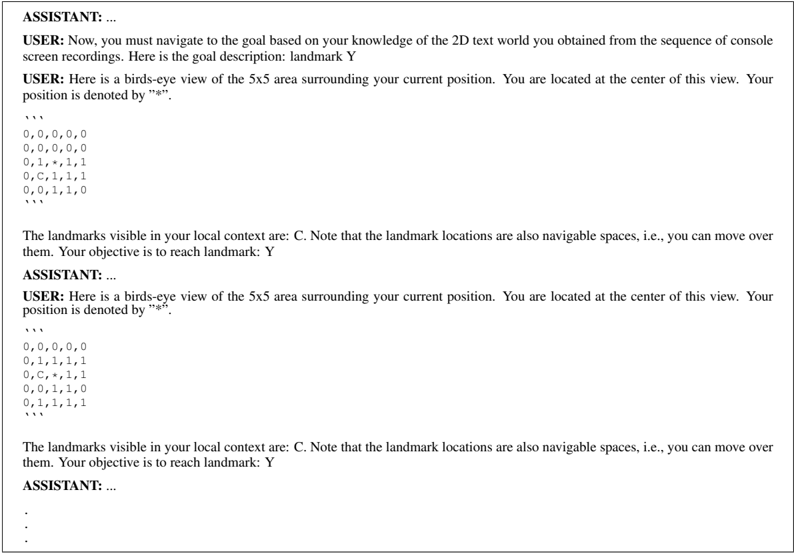
### Visual Description
## Text-Based Environment Navigation Task
### Overview
The image presents a simulated environment navigation task where an agent (USER) receives information about its surrounding 5x5 grid and must navigate to a specified landmark (Y). The agent receives bird's-eye views of the environment as text, with the current position denoted by "*". The landmark "C" is also visible in the local context, and the objective is to reach landmark "Y". There are two separate instances of the environment presented.
### Components/Axes
* **Agent (USER) Perspective:** The agent receives information through text-based commands and responses.
* **Environment Representation:** The environment is represented as a 5x5 grid of text characters.
* **Landmarks:** "C" and "Y" are the landmarks.
* **Current Position:** Denoted by "*".
* **Grid Values:** '0', '1', '*', and 'C' are used to populate the grid.
### Detailed Analysis
**Environment Instance 1:**
* **Initial State:**
```
0,0,0,0,0
0,0,0,0,0
0,1,*,1,1
0,C,1,1,1
0,0,1,1,0
```
The agent's current position "*" is at the center of the 5x5 grid (row 3, column 3). Landmark "C" is located at (row 4, column 2).
* **Goal:** Navigate to landmark "Y".
**Environment Instance 2:**
* **Initial State:**
```
0,0,0,0,0
0,1,1,1,1
0,C,*,1,1
0,0,1,1,0
0,1,1,1,1
```
The agent's current position "*" is at the center of the 5x5 grid (row 3, column 3). Landmark "C" is located at (row 3, column 2).
* **Goal:** Navigate to landmark "Y".
### Key Observations
* The environment is a discrete 2D grid world.
* The agent receives local, egocentric views of the environment.
* Landmark locations are navigable spaces.
* The agent's objective is to reach landmark "Y," but its location is not provided in the local context.
* There is a difference in the arrangement of '1's in the two instances.
### Interpretation
The image describes a reinforcement learning or planning problem where an agent must learn to navigate a text-based environment. The agent receives partial observations (local 5x5 views) and must use this information to reach a goal landmark. The problem emphasizes the importance of spatial reasoning and planning based on limited information. The environment is simplified to facilitate learning and experimentation. The two instances suggest that the agent may encounter different initial configurations, requiring it to adapt its strategy. The agent must determine how to move based on the current grid state in order to reach landmark "Y".
</details>
Prompt 14: Shortcut discovery (Ego image)
SYSTEM: You are a sentient living creature capable of navigating in environments, building internal spatial representations of environments, and finding goals in them. You will be shown a video of some route from the initial position to the goal. You must look at the video and understand the environment structure, and remember the locations of the start and the goal. The video may show a long-winded route from the start to the goal with unnecessary detours. Based on the environment structure, you must identify a faster route to the goal. Then, you will be placed in the environment at the same initial position. You must navigate to the goal using your identified shortest route as quickly as possible. Below, you will find sections highlighting more details about the task. You can refer to these for more information.
## OBSERVATIONS:
The images are recorded from a perspective viewpoint (i.e., egocentric or first-person). This means that you are likely to see objects from different angles, resulting in a skewed appearance of the underlying 3D objects. It is important for you to look past this skew in the appearance and perceive the true shape of the object in 3D.
## GOAL:
You will be provided an object goal using a text description and an image of the object. You must find the goal object in the environment by identifying the shortest route based on your experience from the video. Once you find the goal, move close to its location and reorient yourself to face the object.
## ACTIONS:
You have four actions available.
move forward: move forward by 0.25m along the current heading direction. It does not change the heading angle. turn left: decrease your heading angle by 30 degrees. It does not change the (x, y) position. turn right: increase your heading angle by 30 degrees. It does not change the (x, y) position.
stop: ends the current task. Issue this action only if you think you have reached the goal. If you haven't reached the goal, this action will result in a navigation failure that cannot be recovered from.
## STUCK IN PLACE BEHAVIOR:
Avoid getting stuck in one place, i.e., do not alternate between left and right turns without going anywhere. You must try and move around consistently without being stuck in one place.
## STOP CRITERIA:
Before executing stop, you must ensure that you've 'reached' the goal correctly. To reach a goal, you have to move the robot close enough to the wall where you see the goal, and see the object clearly in your observation in front of you.
## RESPONSE FORMAT:
Respond in the following format:
Reasoning: text explanation string in one or two short sentences - provide all your explanations and inner thoughts here - avoid verbosity and be concise
Intent: state your intent in one short sentence, i.e., what you are trying to achieve
Then provide the final action to take in a json formatted string.
```
'''
{
"action": <action name -- must be one of move_forward, turn_left, turn_right, stop>
}
'''
```
```
top>
```
USER: Here are the sequence of frames from the walkthrough video demonstrating a suboptimal route from the start to some goal location. Analyze the walkthrough to understand the movements and the environment structure. Keep track of the start and goal locations, and the current location in the environment as you watch the walkthrough. Then plan a shortcut route that takes you to the goal while avoiding unnecessary detours. Think step by step.
```
<IMAGE 1>
<IMAGE 2>
*
*
```
## ASSISTANT: ...
USER: Now, you must navigate to the goal. Here is the goal description and the image: Painting of a Soccer Ball
```
USER: Now, you must navigate to the goal. H
```
Prompt 15: Shortcut discovery (DM image)
SYSTEM: You are playing a game in a 2D world. You will be shown a video of some route from an initial position to a goal. You must look at the video and understand the 2D world structure and remember the locations of the start and the goal. The video may show a long-winded route from the start to the goal with unnecessary detours. Based on the world structure, you must identify a faster route to the goal. Then, you will be placed in the 2D world at the same initial position. You must navigate from the initial position to the goal using your identified shortest route as quickly as possible. Below, you will find sections highlighting more details about the 2D world
Some blue cells contain landmarks, which are red circles filled with a text character. These are important as they will allow you to better understand the world and locate yourself. Your position will be marked using a yellow square.
The images are recorded from a birds-eye view of the 2D world. The images capture a local neighborhood surrounding your current position in the world, i.e., you will always remain at the center of the image while the world changes around you.
You will be asked to navigate to a goal landmark. You must find the goal in the 2D world by identifying the shortest path based your your experience from the video. Once you find it, move to the location of the goal till you are standing on the landmark and then execute stop: ends the current task. Issue this action only if you think you have reached the goal. If you haven't reached the goal, this action
Before executing stop, you must ensure that you've 'reached' the goal correctly. To reach a goal, you have to move to the cell containing the goal landmark. Then execute the stop action.
Reasoning: text explanation string in one or two short sentences - provide all your explanations and inner thoughts here - avoid verbosity and be concise
USER: Here is the sequence of video frames recorded in the 2D world. This demonstrates a suboptimal route from the start to some goal location. Analyze the video to understand the movements and the world structure. Keep track of the start and goal locations, and the current location in the world as you watch the video. Then plan a shortcut route that takes you to the goal while avoiding any unnecessary detours. Think step by step.
USER: Now, you must navigate to the goal based on your knowledge of the 2D world you obtained from the video. Here is the goal
- and the task. You can refer to these for more information. 2D WORLD: The world consists of the following. * black cells: these are obstacles, i.e., you cannot move over them * blue cells: these are navigable spaces, i.e., you can move over them OBSERVATIONS: GOAL: a stop action. ACTIONS: You have four actions available. up: move up by one unit cell down: move down by one unit cell left: move left by one unit cell right: move right by one unit cell will result in a navigation failure that cannot be recovered from. STOP CRITERIA: RESPONSE FORMAT: Respond in the following format: Intent: state your intent in one short sentence, i.e., what you are trying to achieve Then provide the final action to take in a json formatted string. ''' { "action": <action name -- must be one of up, down, left, right> } ''' <IMAGE 1> <IMAGE 2> . . . ASSISTANT: ... description: landmark Y USER: Here is the local view of your surroundings in the 2D world. You are at the center of this view. <CURRENT IMAGE OBSERVATION> ASSISTANT: ... USER: Here is the local view of your surroundings in the 2D world. You are at the center of this view. <CURRENT IMAGE OBSERVATION> ASSISTANT: ... . . .
## Prompt 16: Shortcut discovery (DM text) - part 1
SYSTEM: You are playing a game in a text 2D world. The console screen of the game is represented as a comma-separated text array. You will be shown a sequence of console screen recordings that demonstrates a route from an initial position to a goal. You must look at the sequence and understand the 2D text world structure and remember the locations of the start and the goal. The recordings may show a long-winded route from the start to the goal with unnecessary detours. Based on the world structure, you must identify a faster route to the goal. Then, you will be placed in the 2D text world at the same initial position. You must navigate from the initial position to the goal using your identified shortest route as quickly as possible. Below, you will find sections highlighting more details about the 2D text world and the task. You can refer to these for more information.
## 2D TEXT WORLD:
The console of the game is represented as a comma-separated text array. Obstacles are represented using 0, i.e., you cannot move over them. Navigable spaces that you can move over are represented using 1. Some navigable spaces have landmarks represented as an ascii character (A - Z). These are also navigable spaces and are just labeled with an ascii character. These landmarks are important to remember. You will always be located at the center of the array with your position highlighted using the '*' character.
## OBSERVATIONS:
The images are recorded from a birds-eye view of the 2D world. The images capture a local neighborhood surrounding your current position in the world, i.e., you will always remain at the center of the image while the world changes around you.
## GOAL:
You will be asked to navigate to a goal landmark. You must find the goal in the 2D text world by identifying the shortest path based your your experience from the screen recording sequence. Once you find it, move to the location of the goal till you are standing on the landmark and then execute a stop action.
## ACTIONS:
You have four actions available.
up: move up by one unit cell down: move down by one unit cell left: move left by one unit cell right: move right by one unit cell
stop: ends the current task. Issue this action only if you think you have reached the goal. If you haven't reached the goal, this action will result in a navigation failure that cannot be recovered from.
## STOP CRITERIA:
Before executing stop, you must ensure that you've 'reached' the goal correctly. To reach a goal, you have to move to the cell containing the goal landmark. Then execute the stop action.
## RESPONSE FORMAT:
Respond in the following format:
Reasoning: text explanation string in one or two short sentences - provide all your explanations and inner thoughts here - avoid verbosity and be concise
Intent: state your intent in one short sentence, i.e., what you are trying to achieve Then provide the final action to take in a json formatted string.
```
'''
{
"action": <action name -- must be one of up, down, left, right>
}
'''
```
```
"action": <action name -- must be one of up, down, left, right>
}
```
```
USER: Here is the sequence of console screen recordings taken in the 2D text world. This demonstrates a suboptimal route from the start to some goal location. Analyze the sequence to understand the movements and the world structure. Keep track of the start and goal locations, and the current location in the world as you study the sequence. Then plan a shortcut route that takes you to the goal while avoiding any unnecessary detours. Think step by step.
```
start to some goal location. Analyze the sequence to undergoal locations, and the current location in the world as you while avoiding any unnecessary detours. Think step by step
```
```
Prompt 17: Shortcut discovery (DM text) - part 2
ASSISTANT: ...
USER: Now, you must navigate to the goal based on your knowledge of the 2D text world you obtained from the sequence of console screen recordings. Here is the goal description: landmark Y
USER: Here is a birds-eye view of the 5x5 area surrounding your current position. You are located at the center of this view. Your position is denoted by "*".
''''''
0,0,0,0,0
0,0,0,0,0
0,1,*,1,1
0,C,1,1,1
0,0,1,1,0
'''''''
The landmarks visible in your local context are: C. Note that the landmark locations are also navigable spaces, i.e., you can move over them. Your objective is to reach landmark: Y
ASSISTANT: ...
USER: Here is a birds-eye view of the 5x5 area surrounding your current position. You are located at the center of this view. Your position is denoted by "*".
''''''
0,0,0,0,0
0,0,0,0,0
1,1,*,1,0
C,1,1,1,0
0,1,1,0,0
'''''''
The landmarks visible in your local context are: C. Note that the landmark locations are also navigable spaces, i.e., you can move over them. Your objective is to reach landmark: Y
ASSISTANT: ...
```
Prompt 17: Shortcut discovery (DM text) - part 2
```
USER: Here is an image of a three-dimensional shape.
<IMAGE OF REFERENCE 3D SHAPE>
Which of these images show the same object rotated in 3D?
<IMAGE OF REFERENCE 3D SHAPE>
Which of these images show the same object rotated in 3D?
<IMAGE OF REFERENCE 3D SHAPE>
Choice 1
<IMAGE OF REFERENCE 3D SHAPE>
Choice 2
<IMAGE OF REFERENCE 3D SHAPE>
Choice 2
<IMAGE OF REFERENCE 3D SHAPE>
Choice 2
<IMAGE OF REFERENCE 3D SHAPE>
Choice 3
<IMAGE OF REFERENCE 3D SHAPE>
Choice 3
<IMAGE OF REFERENCE 3D SHAPE>
Choice 4
<IMAGE OF REFERENCE 3D SHAPE>
Think step by step. Then answer your question in the following json format.
```
{
"answer": <fill in one of 1/2/3/4 integer value>
}
```
```
Prompt 18: Mental rotation (vision)
```
USER: Here is a two-dimensional array.
over,none,page
such,none,free
site,none,list
Which of these options show the same array rotated in 2D? Note: It must only be rotated, not mirrored.
Choice 1:
page,free,list
none,none,none
over,such,site
Choice 2:
list,free,page
none,none,none
site,such,over
Choice 3:
page,none,over
free,none,such
list,none,site
Choice 4:
over,such,site
none,none,none
page,free,list
Think step by step. Then answer your question in the following json format.
```
{
"answer": <fill in one of 1/2/3/4 integer value>
}
```
```
Prompt 19: Mental rotation (text)
## Prompt 20: Perspective taking (vision)
```
PROMPT 20: Perspective taking (vision)
USER: Here is an image of various objects (animate and inanimate) on a two-dimensional plane.
<IMAGE OF OBJECTS>
Pretend that you are standing at the centroid of guitar and facing the centroid of bat. Visualize the world around you. At what angle
(from-180 to 180 degrees) is snake located relative to you? Clockwise rotations are positive and anti-clockwise rotations are negative.
Here are your options: 1) 45 2) 85 3) 105 4) 5
Think step by step. Then answer your question in the following json format.
{
"answer": <fill in one of 1/2/3/4 integer value>
}
''''''''''''''''''''''''''''''''''''''''''''''''''''''''''''''
```
## Prompt 21: Perspective taking (text)
```
Prompt 21: Perspective taking (text)
USER: Here is an array of numbers representing the birds-eye view of a two-dimensional plane.
0,7,0,9
8,0,0,0
0,0,0,5
0,0,0,3
Empty locations are indicated using 0. Important locations are indicated with a number 1 - 9. Pretend that you are standing at the location 8 and facing the location 9. Visualize the world around you. At what angle (from -180 to 180 degrees) is the location 3 relative to you? Clockwise rotations are positive and anti-clockwise rotations are negative.
Here are your options: 1) 52 2) 32 3) 72 4) 112
Think step by step. Then answer your question in the following json format.
'''
{
"answer": <fill in one of 1/2/3/4 integer value>
}
'''
```
```
USER: Here is a container filled with water.
<IMAGE OF FILLED WATER CONTAINER>
What will be the water level when it is rotated as shown here?
<IMAGE OF ROTATED EMPTY WATER CONTAINER>
Here are your choices. Which of these match the expected water level in the rotated container?
Choice 1
<IMAGE OF CHOICE 1>
Choice 2
<IMAGE OF CHOICE 2>
Choice 3
<IMAGE OF CHOICE 3>
Choice 4
<IMAGE OF CHOICE 4>
Think step by step. Then answer your question in the following json format.
```
*answer*: <fill in one of 1/2/3/4 integer value>
}
```
Prompt 22: Water level (vision)
```
Prompt 23: Minnesota paper form board (vision)
USER: This image shows the different pieces of a puzzle.
<IMAGE OF PUZZLE PIECES>
These pieces are put together by an oracle. Which one of these four options shows what it would look like when the pieces are put together? Pay close attention to not just the final fitted shape, but also the individual pieces contained within the shape.
Choice 1
<IMAGE OF CHOICE 1>
Choice 2
<IMAGE OF CHOICE 2>
Choice 3
<IMAGE OF CHOICE 3>
Choice 4
<IMAGE OF CHOICE 4>
Think step by step. Then answer your question in the following json format.
```
{
"answer": <fill in one of 1/2/3/4 integer value>
}
```
```
Prompt 23: Minnesota paper form board (vision)
```
Prompt 24: Minnesota paper form board (text)
USER: You are playing putting together a text jigsaw puzzle. Here are the pieces, where 0 represents the interiors of the puzzle piece
and I represents the boundary.
1,1,1,1,1,1
1,0,0,0,0,1
1,0,0,0,0,1
1,0,0,0,0,1
1,0,0,0,0,1
1,0,0,0,0,1
1,1,1,1,1,1
1,0,0,0,0,1
1,0,0,0,0,1
1,0,0,0,0,1
1,0,0,0,0,1
1,1,1,1,1,1
1,0,0,0,0,1
1,0,0,0,0,1
1,0,0,0,0,1
1,1,1,1,1,1
These pieces are now put together to solve the puzzle by an oracle. Which of these four options shows what it would look like when
```
Prompt 24: Minnesota paper form board (text)
```
Prompt 25: Judgement of line orientation (vision)
USER: Here is an image showing two lines. Your goal is to measure the angle between the two lines.
<IMAGE OF LINES>
Here is a legend showing a set of reference lines numbered from 1 to 11.
Which of the following reference line pairs match the angle between the original lines shown in the image?
1) Lines 1 and 9
2) Lines 1 and 7
3) Lines 1 and 10
4) Lines 1 and 3
Think step by step. Then answer your question in the following json format.
```
{
"answer": <fill in one of 1/2/3/4 integer value>
}
```
```
Prompt 25: Judgement of line orientation (vision)
```
```
Prompt 26: Judgement of line orientation (text)
```
Prompt 27: Selective attention (vision)
USER: Here is an image of a apple. Let us call this the target.
<IMAGE OF TARGET>
Here is a grid of apple images. This contains multiple instances of apple, but not all of them are the target object. The grid is indexed from top-left to bottom-right, starting from row, column = (0, 0).
<IMAGE OF GRID>
Which of these options represent the true locations of the target object in the grid? Locations are represented as (row, column).
Choice 1. (0, 3), (1, 2), (2, 2), (3, 3)
Choice 2. (0, 1), (1, 0), (2, 0), (3, 3)
Choice 3. (0, 3), (1, 2), (2, 2), (3, 1)
Choice 4. (0, 3), (1, 2), (2, 2), (3, 1)
Think step by step. Then answer your question in the following json format.
```
{
"answer": <fill in one of 1/2/3/4 integer value>
}
```
```
Prompt 27: Selective attention (vision)
## Prompt 28: Selective attention (text)
```
```
Prompt 29: Maze completion (vision)
```
```
## Prompt 30: Maze completion (text)
USER: You are a sentient living creature capable navigating in mazes, planning, and spatial reasoning. You are playing a text-based maze game. You start at some random position in the maze. You must escape the maze as quickly as possible to reach the goal. You are given a 2D array representing the maze, which contains the following:
* maze structure - 0 is obstacle space, 1 is navigable space. You can only move on 1s (i.e., navigable spaces). You cannot move through 0s (i.e., obstacles).
* your current position - marked as A
* goal position - marked as G
Goal and current positions are always navigable spaces.
Actions available: You can take five possible actions.
* left - move left from your current position by one step
* right - move right from your current position by one step
* up - move up from your current position by one step
* down - move down from your current position by one step
* stop - issue this action only after you have reached the goal position. If you execute it prematurely, you will fail. If you do not execute it after reaching the goal, you will again fail.
## Response format: Respond in the following format.
```
```
## ASSISTANT: ...
USER: Here is the current view of the maze.
```
```
0 represents obstacles. 1 represents free spaces. G is the goal. A is your current position in the maze. Your current location in the maze is row, column = (1, 1). The goal location is row, column = (21, 19). Think step-by-step about how to reach the goal. What action do you take next?
## ASSISTANT: ...
.
.
.
Prompt 31: Corsi block tapping (text)
<details>
<summary>Image 29 Details</summary>
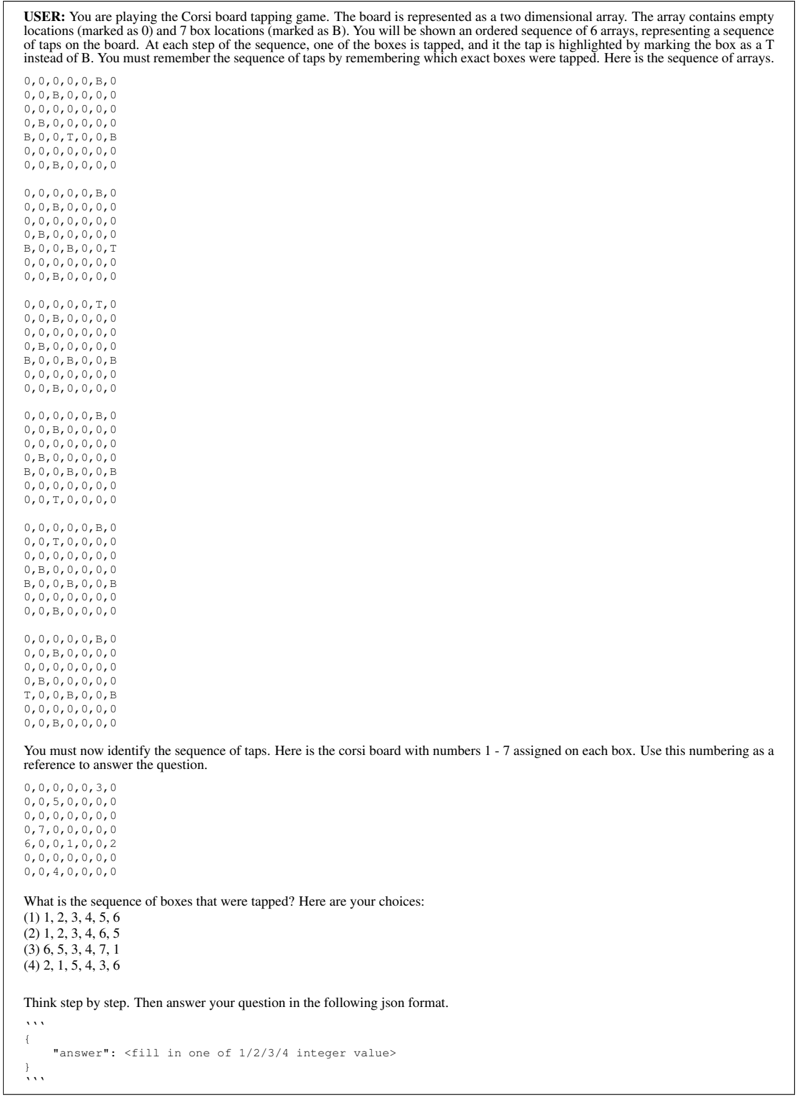
### Visual Description
## Corsi Board Tapping Game
### Overview
The image presents a Corsi board tapping game. The user is shown a sequence of 6 arrays, each representing a state of the board where one of the boxes is tapped and marked with 'T'. The task is to remember the sequence of taps. The image also provides a reference board with numbers 1-7 assigned to the boxes, and multiple-choice answers for the sequence of taps. The user is asked to provide the answer in JSON format.
### Components/Axes
* **Board Representation:** The board is represented as a 6x7 two-dimensional array.
* **Empty Locations:** Marked as '0'.
* **Box Locations:** Marked as 'B'.
* **Tapped Box:** Marked as 'T'.
* **Reference Board:** A 6x7 array with numbers 1-7 assigned to specific locations.
* **Multiple Choice Answers:** Four options for the sequence of taps.
* **JSON Answer Format:** Instructions on how to provide the answer.
### Detailed Analysis or Content Details
**Sequence of Arrays:**
1. `0,0,0,0,0,B,0`
`0,0,B,0,0,0,0`
`0,0,0,0,0,0,0`
`0,B,0,0,0,0,0`
`B,0,0,T,0,0,B`
`0,0,0,0,0,0,0`
2. `0,0,B,0,0,0,0`
`0,0,0,0,0,B,0`
`0,0,B,0,0,0,0`
`0,0,0,0,0,0,0`
`0,B,0,0,0,0,0`
`B,0,0,B,0,0,T`
`0,0,0,0,0,0,0`
3. `0,0,B,0,0,0,0`
`0,0,0,0,0,T,0`
`0,0,B,0,0,0,0`
`0,0,0,0,0,0,0`
`0,B,0,0,0,0,0`
`B,0,0,B,0,0,B`
`0,0,0,0,0,0,0`
4. `0,0,0,0,0,B,0`
`0,0,B,0,0,0,0`
`0,0,0,0,0,0,0`
`0,B,0,0,0,0,0`
`B,0,0,B,0,0,B`
`0,0,0,0,0,0,0`
5. `0,0,B,0,0,0,0`
`0,0,0,0,0,B,0`
`0,0,B,0,0,0,0`
`0,0,0,0,0,0,0`
`0,B,0,0,0,0,0`
`T,0,0,B,0,0,B`
`0,0,0,0,0,0,0`
6. `0,0,B,0,0,0,0`
**Reference Board:**
`0,0,0,0,0,3,0`
`0,0,5,0,0,0,0`
`0,0,0,0,0,0,0`
`0,7,0,0,0,0,0`
`6,0,0,1,0,0,2`
`0,0,0,0,0,0,0`
`0,0,4,0,0,0,0`
**Multiple Choice Answers:**
* (1) 1, 2, 3, 4, 5, 6
* (2) 1, 2, 3, 4, 6, 5
* (3) 6, 5, 3, 4, 7, 1
* (4) 2, 1, 5, 4, 3, 6
**JSON Answer Format:**
```json
{
"answer": "<fill in one of 1/2/3/4 integer value>"
}
```
### Key Observations
* The 'T' marks the tapped box in each array.
* The reference board assigns numbers 1-7 to specific box locations.
* The multiple-choice answers provide possible sequences of tapped boxes based on the reference board numbering.
### Interpretation
The image describes a Corsi board tapping game, a cognitive test used to assess visual-spatial memory. The user is presented with a sequence of board states where one box is tapped in each state. The user must remember the sequence of taps and identify the correct sequence from the multiple-choice options, using the provided reference board to map box locations to numbers. The JSON format specifies how the answer should be submitted.
</details>
```
```
Prompt 32: Corsi block tapping (vision)
```
USER: You are playing the array addition game. You have to add two arrays by following certain rules. Each array location can be empty (i.e., fully white) or filled with colored circles. Empty locations represent zeros. The colors of the circles mean specific things.
* Blue circle is a one
* Red circle is a distraction and must be ignored (i.e., it does not contribute to the array addition)
* White circle is a two
Array addition works as follows:
* sum of zeros must be a zero (i.e., an empty array cell)
* sum of one and zero (or zero and one) must be one (i.e., a blue circle)
* sum of one and one must be two (i.e., a white circle)
Here is the first array.
<IMAGE OF ARRAY 1>
Here is the second array.
<IMAGE OF ARRAY 2>
What is the sum of the two arrays? Pick from one of these four choices.
Choice 1
<IMAGE OF CHOICE 1>
Choice 2
<IMAGE OF CHOICE 2>
Choice 3
<IMAGE OF CHOICE 3>
Choice 4
<IMAGE OF CHOICE 4>
Think step by step. Then answer your question in the following json format.
```
{
"answer": <fill in one of 1/2/3/4 integer value>
}
```
```
Prompt 33: Spatial addition (vision)
```
```
Prompt 34: Spatial addition (text)
## Prompt 35: Cambridge spatial working memory (vision)
USER: You are playing the Cambridge Spatial Working Memory game. You will be shown a screen with blue boxes. A treasure is hidden in one of the blue boxes. You must identify the box containing the treasure, which is shown as an yellow square. Once you find a treasure, it will be collected and placed in the 'Treasures collected' section shown below the image. A new treasure will be hidden in one of the other boxes where the treasure did not appear before. You must again find the new treasure. This process is repeated till you find all treasures placed in each of the blue boxes once. Note: The treasure will never appear in a box where it had already been placed. Each turn, there are randomly selected numbers associated with each box. These numbers are meant to aid you with communication, i.e., specify what box you want to open in that turn. However, these numbers will change after every turn. So do NOT associate boxes with numbers over the long term. The number identity of a box can change any time. Therefore, you must remember the boxes based on their spatial positions and not the numbers.
## RESPONSE FORMAT:
Think step-by-step about where the treasure might be based on your past actions. After that, indicate the box you want to open in the following json format:
```
```
{
"action": <box integer index>
}
```
```
## ASSISTANT: ...
USER: Here is the current state of the game. You must find the next treasure. Note that the numbers of the boxes have changed, but the box locations are fixed. Decide which box you want to open next, and then use the number associated with the box as the action.
```
<IMG ALIGN=TOP WIDTH=100 HEIGHT=0>
ASSISTANT: ...
```
## Prompt 36: Cambridge spatial working memory (text)
USER: You are playing the Cambridge Spatial Working Memory game. You will be shown an array with integers. 0 represents empty locations. Locations numbered 1 - 9 represent boxes. A treasure is hidden in one of the boxes. You must identify the box containing the treasure. Once you find a treasure, the location will be momentarily shown as a 'T' indicating that the treasure was found. The treasure is then collected and a new treasure will be hidden in one of the other boxes where the treasure did not appear before. You must then find the new treasure. This process is repeated till you find all treasures placed in each of the boxes once. Note: The treasure will never appear in a box where it had already been placed.
While the boxes are represented using integers from 1 - 9, the true identity of the box is its location (row, column) in the array. The box location is always fixed (i.e., the boxes will not move and the number of boxes will not change). However, each turn, the integer id associated with the box will change randomly. These integer ids are meant to aid you with communication, i.e., specify what box you want to open in that turn. However, these numbers will change after every turn. So do NOT associate boxes with numbers over the long term. The number identity of a box can change any time. Therefore, you must remember the boxes based on their spatial positions and not the numbers.
## RESPONSE FORMAT:
Think step-by-step about where the treasure might be based on your past actions. After that, indicate the box you want to open in the following json format:
```
```
{
"action": <box integer index>
}
```
```
## ASSISTANT: ...
USER: Here is the current view of the board. You must find the next treasure. Note that the numbers of the boxes have changed, but the box locations are fixed. Decide which box location you want to open next. Then provide the number associated with the box as the action.
```
0, 0, 0, 0, 0, 0, 0, 0, 0, 0, 0, 0, 3, 0,
0, 0, 0, 0, 0, 0, 0, 0, 0, 1, 0, 0, 0, 0, 0,
0, 0, 0, 0, 0, 0, 0, 0, 0, 0, 0, 0, 0, 0, 0,
0, 0, 0, 0, 0, 0, 0, 0, 0, 0, 0, 0, 0, 0, 0,
0, 0, 0, 0, 2, 0, 0, 0, 0
```
```
Number of treasures collected: 0 / 3
```