# Articulated Animal AI: An Environment for Animal-like Cognition in a Limbed Agent
**Authors**:
- Jeremy Lucas (McGill University)
- Isabeau Prémont-Schwarz
## Abstract
This paper presents the Articulated Animal AI Environment for Animal Cognition, an enhanced version of the previous AnimalAI Environment. Key improvements include the addition of agent limbs, enabling more complex behaviors and interactions with the environment that closely resemble real animal movements. The testbench features an integrated curriculum training sequence and evaluation tools, eliminating the need for users to develop their own training programs. Additionally, the tests and training procedures are randomized, which will improve the agent’s generalization capabilities. These advancements significantly expand upon the original AnimalAI framework and will be used to evaluate agents on various aspects of animal cognition.
## 1 Introduction
The field of artificial intelligence has seen the development of numerous frameworks designed to test and evaluate models. Each new framework or dataset has often spurred on signmificant progress as different research teams compete to achieve the state the of the art on that specific benchmark. This paper specifically addresses AI frameworks that focus on tasks modeled after animal cognition. Despite significant advancements, many animals still outperform even the most advanced AI systems in various cognitive tasks. A notable framework within this domain is the AnimalAI Environment, which features a simplistic setup with a single spherical agent capable of only basic movements, such as moving forward or backward, and rotating left or right. This environment offers a set of simple building blocks—such as blocks, half-cylinders, spherical pieces of food, ramps, and walls—within a built-in arena, allowing researchers to create their own cognitive tasks for the agent.
However, the AnimalAI Environment presents several limitations. The broad scope of the environment adds complexity to the task of training AI models, as researchers must first design effective tests. Additionally, the environment lacks generalization capabilities; object positions and rotations must be manually configured, leading to the potential for overfitting due to the absence of randomization in tests. Moreover, the agent itself is rudimentary and unrealistic, restricting the exploration of cognitive abilities related to movement. The Articulated Animal AI Environment has been developed to address these shortcomings, offering a more sophisticated and versatile platform for evaluating AI in the context of animal cognition tasks.
## 2 The Influence from Animal AI
The AnimalAI test environment serves as a versatile platform that enables scientists and researchers to design cognitive assessments for a simple agent using modular building blocks. Upon the publication of their paper, the AnimalAI team introduced a competition aimed at developing a highly generalizable agent capable of performing across a diverse array of unknown tests. This competition presented researchers with the challenge of generating a sufficient number of tests to train such an agent. The tests devised for the competition by the AnimalAI team were grounded in ten distinct categories of animal cognition. The results of the competition were disappointing, with even the best AI models performing significantly worse than a human child on every task apart from food retrieval, internal modeling, and numerosity. The meaning and definitions of these categories are described in the next section. Although the competition outcomes were underwhelming, the challenge itself was noteworthy. [1] [2]
## 3 Animal AI’s Cognition Benchmarks
We utilized the cognitive categories employed in the AnimalAI competition to develop our benchmark platform. These ten categories are as follows:
1. Basic food retrieval: This category tests the agent’s ability to reliably retrieve food in the presence of only food items. It is necessary to make sure agents have the same motivation as animals for subsequent tests.
1. Preferences: This category tests an agent’s ability to choose the most rewarding course of action. Tests are designed to be unambiguous as to the correct course of action based on the rewards in our environment.
1. Obstacles: This category contains objects that might impede the agent’s navigation. To succeed, the agent will have to explore its environment, a key component of animal behavior.
1. Avoidance: This category identifies an agent’s ability to detect and avoid negative stimuli, which is critical for biological organisms and important for subsequent tests.
1. Spatial Reasoning: This category tests an agent’s ability to understand the spatial affordances of its environment, including knowledge of simple physics and memory of previously visited locations.
1. Robustness: This category includes variations of the environment that look superficially different, but for which affordances and solutions to problems remain the same.
1. Internal Models: In these tests, the lights may turn off, and the agent must remember the layout of the environment to navigate in the dark.
1. Object Permanence and Working Memory: This category checks whether the agent understands that objects persist even when they are out of sight, as they do in the real world and in our environment.
1. Numerosity: This category tests the agent’s to judge which area has the most food, as it only gets to choose one area.
1. Causal Reasoning and Object Affordances: This category tests the agent’s ability to use objects to reach it’s goal.
## 4 Additional Categories
In addition to the 10 categories listed above, we introduced two additional categories, L0 - Initial Food Contact and L11 - Body Awareness, to address specific challenges posed by the multi-limbed agent within our environment. L0 was created to provide a simpler framework for the agent to learn to move toward food, recognizing the necessity for a foundational category focused on basic movement. L11 was developed in response to the absence of limb-related cognitive tests in the original AnimalAI competition, which featured a spherical, limbless agent. This new category was essential for evaluating the agent’s understanding and coordination of its limbs.
## 5 Environment Design
### 5.1 The Agent
<details>
<summary>extracted/5920856/Research/agent.png Details</summary>
### Visual Description
## Diagram: Symmetrical 3D Molecular or Mechanical Structure
### Overview
The image displays a computer-generated 3D model of a symmetrical structure against a dark blue grid background. The structure consists of a central red sphere with four white, cylindrical arms extending outward in a perfect "X" or cross formation. There is no textual information, labels, axes, legends, or data points present in the image.
### Components/Axes
* **Central Component:** A glossy, red sphere positioned at the geometric center of the image. It has a specular highlight (a small white spot) on its upper surface, indicating a light source from above.
* **Radial Components:** Four identical white cylinders. Each cylinder is attached to the central sphere and extends diagonally outward toward the corners of the frame. They are arranged with 90-degree rotational symmetry.
* **Background:** A dark blue field overlaid with a faint, lighter blue grid of horizontal and vertical lines, suggesting a 3D modeling workspace or a coordinate system. The grid lines are evenly spaced.
* **Spatial Grounding:** The entire structure is centered within the frame. The arms terminate near the top-left, top-right, bottom-left, and bottom-right corners of the image.
### Detailed Analysis
* **No Quantitative Data:** The image contains no numerical values, measurements, scales, or textual annotations. It is a purely visual representation.
* **Visual Properties:**
* **Color:** Central sphere is a solid, medium red (#E06070 approx.). Arms are solid white (#FFFFFF). Background is dark blue (#1A2639 approx.) with grid lines in a lighter blue (#2A3A59 approx.).
* **Form:** The model uses simple geometric primitives (sphere and cylinders). The surfaces appear smooth with basic shading to imply volume and a single light source.
* **Symmetry:** The structure exhibits perfect four-fold rotational symmetry around an axis perpendicular to the viewing plane.
### Key Observations
1. **Complete Absence of Text:** The image is devoid of any labels, titles, legends, or annotations that would define its purpose, scale, or the identity of its components.
2. **High Symmetry:** The precise, identical arrangement of the four arms is the most prominent visual feature.
3. **Contextual Ambiguity:** The grid background implies a technical or design context (e.g., CAD software, molecular modeling), but the structure itself is generic.
### Interpretation
The image presents a conceptual or illustrative model rather than a technical document containing extractable facts or data. Its meaning is entirely dependent on external context not provided within the frame.
* **Possible Representations:** Without labels, the structure could represent:
* A simplified molecular model (e.g., a central atom with four identical bonded atoms in a tetrahedral or square planar arrangement, though the 2D projection flattens the 3D geometry).
* A mechanical component, such as a rotor, a connector, or a universal joint.
* An abstract symbol or logo.
* A basic test object for 3D rendering or physics simulation.
* **Function of the Grid:** The background grid serves to ground the object in a virtual space, providing a sense of scale and orientation, but no specific units are given.
* **Primary Information Conveyed:** The image communicates **form, symmetry, and spatial relationship** between a central node and four identical radial elements. Any deeper meaning—chemical identity, mechanical function, symbolic significance—is absent and must be supplied by accompanying documentation or prior knowledge.
**Conclusion:** This image is a visual diagram of a symmetrical, four-armed structure. It contains **zero textual or numerical data**. Its informational value lies solely in its geometric composition, which could be described as "a central red sphere with four white cylindrical arms extending diagonally in an X-pattern on a blue grid." To extract technical facts, this image would need to be paired with a key, caption, or dataset.
</details>
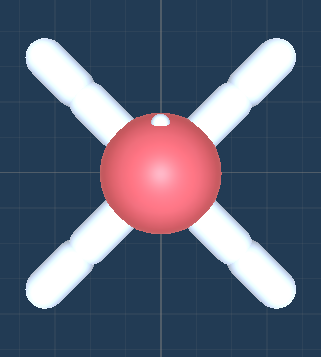
Figure 1: The Top Down view of the agent.
Description:
The agent is a soft body constructed using configurable joints. It has four thighs and four legs, totaling eight joints. Each joint can rotate in the x direction (up and down) between -90 and 90 degrees and in the z direction (sideways) between -45 and 45 degrees. The head has a mass of 0.5, while each thigh and leg have a mass of 1. The lighter weight of the head helps the agent walk more effectively, preventing it from dragging its head on the ground.
### 5.2 Observational Parameters
The vision space for the agent offers a choice between customizing a camera or using raycasts. By default, the agent’s joint rotations are normalized within the range of [-1, 1] and used as observations.
#### 5.2.1 Camera
The camera extends from the agent’s eye (indicated by a white dot) and can be set to grayscale. It supports resolutions ranging from 8x8 to 512x512 pixels.
#### 5.2.2 Raycast
Raycasts also emanate from the agent’s eye. The viewing angle and number of rays can be customized. The viewing angle ranges from 5 to 180 degrees, encompassing both the left and right sides of the agent. A viewing angle of 180 degrees covers the full 360-degree surroundings of the agent, while a 90-degree viewing angle covers the front half. The number of rays, ranging from 1 to 20, determines the number of rays emitted in each direction. There is always a ray pointing directly forward.
### 5.3 Action Parameters
#### 5.3.1 Joint Rotation
Selecting joint rotation enables the agent to move its joints by setting a target rotation property. The joints are propelled to reach the target rotation through motor control.
#### 5.3.2 Joint Velocity
Selecting joint velocity allows the agent to move its joints by setting a target angular velocity property. The joints are propelled by adding the specified angular velocity.
### 5.4 Rewards
There are four distinct types of rewards in these environments:
- Food Pieces: Green food pieces provide rewards equal to their scale or size. Yellow food pieces provide rewards equal to half of their scale or size.
- Wall Collisions: Agents receive a -1 reward when they collide with walls.
- Training Facilitation: Agents receive two rewards each timestep, both equal to -(0.5)/maxsteps. The first reward is received only if the head is on the ground, encouraging the agent to walk rather than drag its head. The second reward is given every timestep, incentivizing the agent to explore and make decisions.
### 5.5 Other Parameters
Maxsteps: This parameter defines the number of steps the agent has per episode. It is recommended to set this value between 1000 and 5000 steps.
### 5.6 The Environment
#### 5.6.1 Parameters
Difficulty: The difficulty parameter ranges from 0 to 10, increasing the challenge of the current level when generated. The specific aspects that become more difficult vary for each level and are described in the test bench.
Seed: The seed parameter allows for the saving of certain configurations for comparative testing. Setting a unique seed ensures that the level will generate and behave consistently every time.
### 5.7 The Test Bench
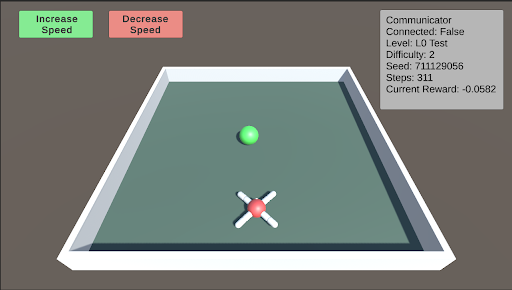
L0: L0 is the initial test designed to help the agent begin learning to approach and consume food. In this stage, the food is placed directly in front of the agent. As the difficulty level increases, the food is positioned farther away, becomes smaller, and varies in its horizontal placement relative to the agent.
<details>
<summary>extracted/5920856/Research/L0.png Details</summary>
### Visual Description
\n
## Screenshot: Simulation Interface with Status Panel
### Overview
This image is a screenshot of a graphical user interface (GUI) for what appears to be a 3D simulation or game environment, likely used for testing or training an AI agent. The interface consists of three primary regions: a control header at the top, a central 3D scene, and a status information panel on the right.
### Components/Axes
**1. Header Region (Top of Screen):**
* **Left Side:** Two rectangular buttons.
* **Button 1 (Green):** Text reads "Increase Speed".
* **Button 2 (Red):** Text reads "Decrease Speed".
* **Right Side:** A gray status panel with white text.
**2. Main 3D Scene (Central Area):**
* A perspective view of a rectangular, green platform with a white border.
* **Object 1:** A small, solid green sphere located in the upper-center area of the platform.
* **Object 2:** A red sphere with four white, cylindrical protrusions extending outward in an 'X' pattern, located in the lower-center area of the platform. This resembles a drone or agent model.
**3. Status Panel (Top-Right Corner):**
* A gray rectangle containing the following text, listed line by line:
* `Communicator`
* `Connected: False`
* `Level: L0 Test`
* `Difficulty: 2`
* `Seed: 711129056`
* `Steps: 0`
* `Current Reward: -0.0582`
### Detailed Analysis
* **Text Transcription:** All text is in English. The complete transcription is provided in the Components section above.
* **Spatial Grounding:**
* The "Increase Speed" button is green and positioned at the top-left.
* The "Decrease Speed" button is red and positioned immediately to the right of the green button.
* The status panel is anchored to the top-right corner of the window.
* The green sphere (target?) is positioned further away (higher on the screen) than the red agent sphere.
* **Data Points (from Status Panel):**
* **Connection Status:** `False` (The system is not connected to a communicator).
* **Test Level:** `L0 Test` (Indicates a basic or initial test level).
* **Difficulty Setting:** `2` (On an unspecified scale).
* **Random Seed:** `711129056` (This number is used to initialize the simulation's random number generator for reproducibility).
* **Step Counter:** `0` (The simulation has not yet progressed; it is at the initial state).
* **Reward Value:** `-0.0582` (A negative numerical value, likely a performance metric for the agent at step 0).
### Key Observations
1. **Initial State:** The simulation is at its very beginning (`Steps: 0`). The agent (red sphere) has not yet taken any action.
2. **Negative Starting Reward:** The `Current Reward` is already negative (`-0.0582`). This suggests the reward function may be based on factors like distance from a target (the green sphere) or time elapsed, incurring an immediate cost.
3. **Disconnected State:** The `Connected: False` status implies the control interface (buttons) may not be actively linked to the simulation's communication backend, or this is a local, standalone test.
4. **Visual Layout:** The scene is simple, with two distinct objects on a plain background, typical of a controlled reinforcement learning environment.
### Interpretation
This screenshot captures the initial state of a reinforcement learning (RL) simulation environment. The red, drone-like object is the **agent** being trained or tested. The green sphere is likely a **target** or goal location.
* **Purpose:** The interface allows a user to manually adjust simulation speed and monitor key training metrics. The "Seed" value is critical for reproducing the exact same test scenario.
* **Data Relationship:** The `Current Reward` is the most important dynamic metric. Its negative value at step 0 provides a baseline. The goal of the agent would be to take actions (moving towards the green sphere?) that cause this reward value to increase (become less negative or turn positive) over subsequent `Steps`.
* **Anomaly/Note:** The `Connected: False` status is noteworthy. It could mean the GUI is in a monitoring-only mode, or that the agent's policy is not currently receiving commands from an external controller. The speed control buttons may be non-functional in this state.
* **Underlying System:** The presence of a "Communicator" field suggests this environment is designed to interface with an external learning algorithm or controller, which is currently inactive. The "L0 Test" and "Difficulty: 2" indicate this is a configured, reproducible test scenario within a larger suite of challenges.
**In summary, this is a diagnostic and control view for an AI agent simulation at its starting point, showing a negative initial reward and a disconnected control state, ready for a test run initialized with seed `711129056`.**
</details>
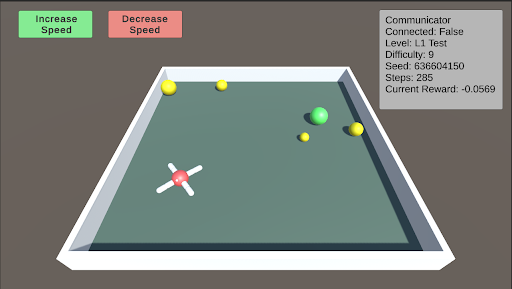
L1: Basic Food Retrieval L1 serves as a benchmark to test the agent’s understanding of the food. The agent must recognize that yellow food pieces do not end the episode, while green food pieces do. As the difficulty increases, more pieces of food are distributed throughout the arena, ranging from 1 to 5 pieces. At lower difficulty levels, the food is mostly stationary, but it begins to move as the difficulty increases.
<details>
<summary>extracted/5920856/Research/L1.png Details</summary>
### Visual Description
## Simulation Environment Screenshot: AI Training Arena
### Overview
This image is a screenshot of a 3D simulation environment, likely used for training or testing an AI agent (a drone-like object). The interface includes control buttons, a status information panel, and a central arena containing the agent and target objects. The scene is rendered with simple, low-polygon graphics.
### Components/Axes
The image is divided into three primary regions:
1. **Header/UI Region (Top):**
* **Top-Left:** Two rectangular buttons.
* Green button with white text: `Increase Speed`
* Red button with white text: `Decrease Speed`
* **Top-Right:** A semi-transparent gray information panel titled `Communicator`. It contains the following text lines:
* `Connected: False`
* `Level: L1 Test`
* `Difficulty: 9`
* `Seed: 639604150`
* `Steps: 1000`
* `Current Reward: -0.0569`
2. **Main Arena (Center):**
* A rectangular, green-floored arena with a white border and gray outer walls, viewed from an isometric perspective.
* **Objects within the arena:**
* A white, cross-shaped drone with a red central hub, positioned in the lower-left quadrant.
* A large, bright green sphere located in the center-right area.
* Five smaller yellow spheres scattered around the arena: two near the top-left corner, one near the top-center, one near the green sphere, and one in the lower-right quadrant.
3. **Background:** A solid, dark gray background surrounds the arena.
### Detailed Analysis
* **Text Transcription (Communicator Panel):**
* `Connected: False` - Indicates the simulation or agent is not currently connected to a controlling system or server.
* `Level: L1 Test` - Specifies the current test level or scenario.
* `Difficulty: 9` - A numerical difficulty rating, suggesting a high level of challenge.
* `Seed: 639604150` - A random seed number used to initialize the simulation's state for reproducibility.
* `Steps: 1000` - The number of simulation steps or time units that have elapsed.
* `Current Reward: -0.0569` - The cumulative reward value for the agent at this step. The negative value indicates the agent's actions have, on net, been penalized according to the task's reward function.
* **Spatial Grounding & Object Placement:**
* The `Communicator` panel is fixed in the **top-right corner** of the screen.
* The control buttons are fixed in the **top-left corner**.
* The drone is located at approximately **30% from the left edge and 60% from the top edge** of the arena floor.
* The large green sphere is at approximately **70% from the left and 40% from the top** of the arena floor.
* The yellow spheres are distributed, with the closest pair in the **top-left corner** of the arena.
### Key Observations
1. **Negative Reward State:** The `Current Reward` of `-0.0569` after `1000` steps is a critical data point. It suggests the agent is not successfully completing its objective (e.g., reaching a target, collecting items) and may be incurring penalties for time, collisions, or inefficient movement.
2. **High Difficulty Setting:** A `Difficulty` level of `9` implies the task parameters (e.g., speed of targets, complexity of navigation, precision required) are set to a challenging level.
3. **Disconnected State:** The `Connected: False` status is notable. It could mean the simulation is running autonomously with a pre-trained policy, or that the interface for external control is inactive.
4. **Object Configuration:** The presence of one large green sphere and multiple small yellow spheres suggests a potential task hierarchy. The green sphere may be a primary target or obstacle, while the yellow spheres could be secondary targets, waypoints, or hazards.
### Interpretation
This screenshot captures a snapshot of a reinforcement learning or AI robotics simulation in progress. The data suggests an agent (the drone) is operating in a challenging, pre-configured environment (`L1 Test`, `Difficulty: 9`, `Seed: 639604150`). After a significant number of steps (`1000`), the agent's performance is suboptimal, as indicated by the negative cumulative reward. This could be due to the high difficulty, an ineffective policy, or the agent being in an exploratory phase of learning.
The spatial arrangement implies a navigation or collection task. The agent's position in the lower-left, distant from the cluster of objects in the center and top-left, may explain the negative reward—it has not yet reached a high-value area. The "Increase/Decrease Speed" buttons suggest a human operator can interact with the simulation's time scale, possibly to observe behavior more closely or to speed up training. The `Connected: False` status is the most ambiguous element; it frames the entire scene as either a recorded playback, a test of an autonomous system, or a session where the primary learning connection is severed.
</details>
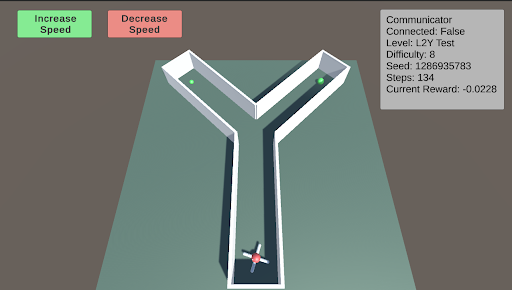
L2: Preferences - Y-Maze L2 tests the agent’s ability to make choices to obtain better or more food. The Y-maze consists of two paths. When the difficulty is below 5, there will be only one piece of green food at one of the two paths. When the difficulty is above 5, there is an additional smaller piece of green food in the other path. The agent must learn to choose the optimal path.
<details>
<summary>extracted/5920856/Research/L2.png Details</summary>
### Visual Description
## Screenshot: AI Navigation Simulation Environment
### Overview
This image is a screenshot of a 3D simulation environment, likely used for testing or training an autonomous agent (e.g., a robot or AI) in a navigation task. The scene features a Y-shaped maze, an agent at the starting point, and a user interface (UI) overlay with control buttons and a status panel.
### Components/Axes
The image is divided into two primary regions: the 3D simulation viewport and the 2D UI overlay.
**UI Overlay Elements:**
1. **Top-Left Control Buttons:**
* A green button labeled **"Increase Speed"**.
* A red button labeled **"Decrease Speed"**.
2. **Top-Right Status Panel (Gray Box):** Contains the following key-value pairs:
* `Communicator`
* `Connected: False`
* `Level: L2Y Test`
* `Difficulty: 8`
* `Seed: 1286935783`
* `Speed: 0.0`
* `Current Reward: -0.0228`
**3D Simulation Viewport Elements:**
* **Environment:** A Y-shaped maze or corridor structure with white walls and a flat, teal-colored floor. The maze is viewed from an elevated, isometric-like perspective.
* **Agent:** A small, multi-colored (red, white, blue) object resembling a simple robot or vehicle. It is positioned at the bottom-center of the viewport, at the entrance of the single corridor leading into the Y-junction.
* **Goal/Target Objects:** Two small, green spheres. One is located at the end of the left arm of the Y, and the other is at the end of the right arm.
* **Background:** A plain, dark gray background surrounds the maze platform.
### Detailed Analysis
* **Spatial Layout:** The UI elements are anchored to the top corners of the screen, leaving the central and lower portions clear for the simulation view. The maze is centered within the viewport.
* **Agent State:** The agent is stationary at the starting position (`Speed: 0.0`). It is oriented facing "up" the screen, towards the Y-junction.
* **Simulation Parameters:**
* The task is identified as `Level: L2Y Test`, with a high `Difficulty: 8`.
* The `Seed: 1286935783` indicates a specific, reproducible random configuration for the environment.
* The `Communicator` status is `Connected: False`, which may imply a lack of connection to an external controller or learning algorithm.
* **Performance Metric:** The `Current Reward: -0.0228` is a small negative value. In reinforcement learning contexts, this typically indicates the agent has incurred a minor penalty, possibly for time elapsed without progress or for being in a non-optimal state.
### Key Observations
1. **Task Structure:** The Y-shaped maze presents a classic decision-making scenario. The agent must choose between two paths (left or right) to reach one of the green goal spheres.
2. **Initial Condition:** The simulation appears to be in a paused or initial state (`Speed: 0.0`). The agent has not yet begun to move or make a decision.
3. **Negative Reward:** The negative reward value, even before movement, suggests the reward function may include a small time-based penalty or an initial state penalty.
4. **Disconnected State:** The `Connected: False` status is a critical observation. It may explain why the agent is stationary—the control system is not active.
### Interpretation
This screenshot captures the setup phase of a reinforcement learning or AI planning experiment. The environment is designed to test an agent's ability to make a binary choice (go left or right) in a spatial navigation task. The high difficulty level (8) suggests the task may involve complexities not immediately visible, such as delayed rewards, deceptive paths, or dynamic elements.
The negative starting reward and disconnected communicator indicate the system is not currently "learning" or "acting." A user would likely need to establish a connection (changing `Connected` to `True`) and increase the simulation speed using the UI buttons to begin the trial. The specific seed allows for exact replication of this maze configuration for consistent testing. The ultimate goal for the agent would be to learn a policy that maximizes cumulative reward, which in this context likely means reaching a green sphere as efficiently as possible.
</details>
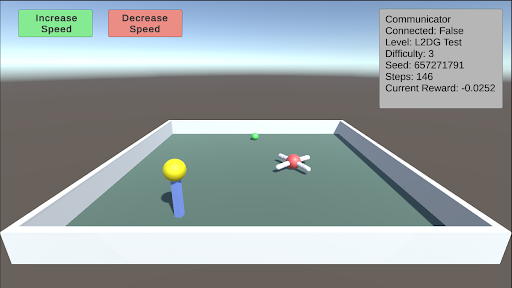
L2: Preferences - Delayed Gratification This test consists of a small piece of green food in front of the agent and a larger piece of yellow food on top of a pillar that is slowly descending. The agent must learn to wait for the yellow food to come down before consuming the green food. As the difficulty increases, the time it takes for the pillar to descend also increases.
<details>
<summary>extracted/5920856/Research/L2DG.png Details</summary>
### Visual Description
\n
## Screenshot: Simulation Environment Interface
### Overview
This image is a screenshot of a 3D simulation environment, likely for testing or training an AI agent. The interface consists of a main 3D viewport showing a simple arena with objects, overlaid with control buttons and a status information panel. The scene is rendered with basic geometric shapes and flat colors.
### Components/Axes
**UI Elements (Top of Screen):**
* **Top-Left Corner:** Two rectangular buttons.
* Left button: Green background, black text reading "Increase Speed".
* Right button: Red background, black text reading "Decrease Speed".
* **Top-Right Corner:** A semi-transparent gray information panel with white text. The text is left-aligned and lists the following key-value pairs:
* `Communicator`
* `Connected: False`
* `Level: L2DG test`
* `Difficulty: 3`
* `Seed: 857271791`
* `Steps: 1`
* `Current Reward: -0.0252`
**3D Scene (Main Viewport):**
* **Environment:** A rectangular, white-walled arena with a flat, muted green floor. The arena is viewed from an elevated, angled perspective.
* **Background:** A simple gradient sky, transitioning from a light blue at the top to a pale gray at the horizon line.
* **Objects within the Arena:**
1. **Foreground Left:** A tall, blue cylinder. On top of it sits a large, yellow sphere.
2. **Center-Right:** A red sphere. Protruding from it are six white, cylindrical rods, arranged symmetrically like spokes or legs.
3. **Background Center:** A small, green sphere, positioned further back in the arena.
### Detailed Analysis
The image presents a snapshot of a simulation at a very early stage (`Steps: 1`). The primary data is textual and relates to the simulation's configuration and state.
* **Simulation State:** The agent or system is not currently connected (`Connected: False`). The simulation is at step 1, indicating the beginning of an episode.
* **Configuration:** The test is running on a level named "L2DG test" with a difficulty setting of 3. The random seed is set to `857271791`, which would allow for reproducible runs.
* **Performance Metric:** The only quantitative performance metric is `Current Reward: -0.0252`. The negative value suggests the agent has incurred a small penalty or has not yet achieved a positive outcome at this initial step.
* **Spatial Relationships:** The blue cylinder with the yellow sphere is the most prominent object in the foreground. The red, spoked object is positioned centrally but to the right. The small green sphere is distant and appears to be a potential target or point of interest. The "Increase/Decrease Speed" buttons are logically grouped and color-coded (green for increase, red for decrease) for intuitive control.
### Key Observations
1. **Initial State:** All indicators point to this being the very start of a simulation run (Step 1, negative reward, not connected).
2. **Object Design:** The objects are simple, distinct, and color-coded (blue/yellow, red/white, green), which is typical for reinforcement learning environments to simplify visual processing for an AI agent.
3. **UI Layout:** The interface is minimal, providing only essential controls (speed) and critical state information. The lack of a complex HUD suggests the focus is on the 3D environment itself.
4. **Reward Signal:** The immediate negative reward at step 1 is notable. It could indicate an initial penalty for position, a cost for time, or that the starting state is inherently sub-optimal.
### Interpretation
This screenshot captures the setup phase of a reinforcement learning or AI agent testing environment. The "L2DG test" level likely involves a task where an agent must navigate or interact with the objects in the arena. The red, spoked object might be the agent itself, while the blue cylinder and green sphere could be obstacles or targets.
The data suggests a controlled experiment: the difficulty is set, a seed ensures reproducibility, and the reward function is actively tracking performance from the first step. The negative starting reward is a critical piece of information—it establishes the baseline from which the agent must improve. The "Connected: False" status implies this might be a local simulation instance, not yet linked to a training server or external controller.
The primary purpose of this interface is to monitor and control a simulation run. The visual simplicity ensures that the agent's learning is based on clear, unambiguous features, while the text panel provides the necessary meta-data for the human researcher to log and understand the experiment's conditions and outcome.
</details>
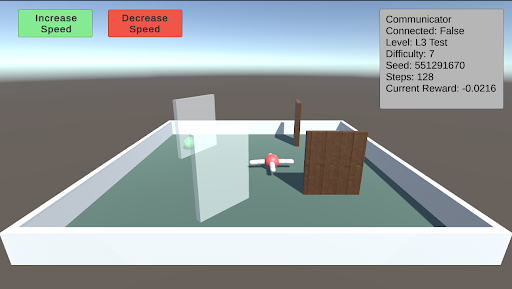
L3: Obstacles This test involves a single green piece of food placed in a random position and covered by a randomly sized transparent wall. Additionally, other walls will spawn in random orientations as obstacles. As the difficulty increases, both the size of the walls and the number of additional walls increase.
<details>
<summary>extracted/5920856/Research/L3.png Details</summary>
### Visual Description
## Screenshot: AI Simulation Environment
### Overview
This image is a screenshot of a 3D simulation environment, likely used for testing or training an AI agent. The scene depicts a simple, walled arena containing several objects and an agent. A heads-up display (HUD) provides control buttons and real-time simulation parameters.
### Components/Axes
The image is divided into two primary regions: the HUD overlay and the 3D simulation viewport.
**1. HUD Overlay (Top Region):**
* **Top-Left Control Buttons:**
* A green rectangular button with the text "Increase Speed".
* A red rectangular button with the text "Decrease Speed".
* **Top-Right Information Panel:** A semi-transparent gray box containing the following key-value pairs:
* `Communicator Connected: False`
* `Level: L3 Test`
* `Difficulty: 7`
* `Seed: 551291670`
* `Steps: 0`
* `Current Reward: -0.0216`
**2. 3D Simulation Viewport (Main Region):**
* **Environment:** A square arena with low, white walls and a flat, teal-green floor. The background is a simple gradient from light blue (sky) to gray (ground).
* **Objects within the Arena:**
* A tall, transparent, vertical pane (like a glass wall) positioned slightly left of center.
* A short, brown, vertical pole located behind the transparent pane.
* A large, brown, wooden-textured wall or block on the right side.
* A small, red and white object (likely the AI agent or a tool) positioned between the transparent pane and the wooden wall. It appears to be holding or connected to a gray, horizontal bar.
### Detailed Analysis
* **Simulation State:** The simulation is at its initial state (`Steps: 0`). The `Current Reward` is a small negative value (`-0.0216`), which may represent an initial penalty or cost.
* **Configuration:** The test is running on a specific level (`L3 Test`) with a high difficulty setting (`7`). The simulation is deterministic, seeded with the number `551291670`.
* **Connectivity:** The `Communicator Connected: False` status indicates the simulation is running in a standalone mode, not connected to an external training server or client.
* **Spatial Layout:** The agent (red/white object) is centrally located but oriented towards the right, facing the large wooden obstacle. The transparent pane creates a partial barrier on its left.
### Key Observations
1. **Initial Condition:** All metrics are at their starting point (`Steps: 0`), providing a baseline for the simulation run.
2. **Negative Starting Reward:** The reward is not zero at step zero, suggesting the reward function may include an immediate cost for initialization or agent state.
3. **Obstacle Configuration:** The environment presents a mix of obstacle types: a visual barrier (transparent pane), a physical barrier (wooden wall), and a simple marker (brown pole).
4. **UI Design:** The control buttons use universal color semantics (green for increase/go, red for decrease/stop) for intuitive operation.
### Interpretation
This screenshot captures the setup phase of a reinforcement learning or AI agent evaluation scenario. The "L3 Test" level with high difficulty (7) implies a non-trivial task. The presence of varied obstacles suggests the agent is being tested on navigation, manipulation, or decision-making in a constrained space.
The negative initial reward is a critical detail. In reinforcement learning, this could be a "time penalty" encouraging efficiency, a "energy cost" for the agent's motors, or a penalty for not being in a goal state. The fact the communicator is disconnected points to a local, possibly debugging or validation, run of the environment.
The primary purpose of this interface is to allow a human supervisor to monitor the agent's initial conditions and adjust the simulation speed in real-time. The seed value ensures the experiment is reproducible. To understand the agent's performance, one would need to observe how the `Steps` and `Current Reward` values change over time as the agent interacts with the objects in the arena.
</details>
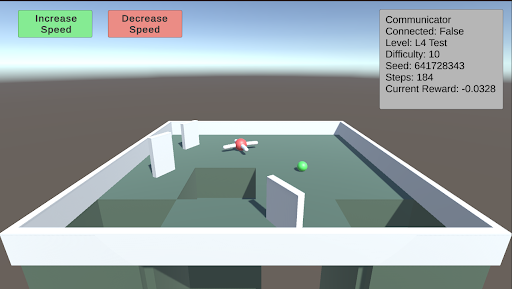
L4: Avoidance This test involves creating holes in the ground to serve as a negative stimulus. While the previous AnimalAI paper used negative reward floor pads, holes provide a more realistic challenge. As the difficulty increases, the holes become larger. The test starts with two holes, and when the difficulty exceeds 5, a third hole is introduced.
<details>
<summary>extracted/5920856/Research/L4.png Details</summary>
### Visual Description
\n
## Screenshot: AI Agent Simulation Environment
### Overview
This image is a screenshot from a 3D simulation environment, likely used for training or testing an AI agent (represented by a drone). The scene depicts a simple maze with a drone, a target object, and a user interface (UI) overlay containing control buttons and a status information panel.
### Components/Axes
The image is divided into two primary regions: the 3D simulation viewport and the 2D UI overlay.
**1. UI Overlay (Top Region):**
* **Top-Left Corner:** Two rectangular buttons.
* **Left Button:** Green background. Text: "Increase Speed".
* **Right Button:** Red background. Text: "Decrease Speed".
* **Top-Right Corner:** A semi-transparent grey information panel titled "Communicator". It contains the following key-value pairs:
* `Communicator`
* `Connected: False`
* `Level: L4 Test`
* `Difficulty: 1.0`
* `Seed: 641728343`
* `Step: 14`
* `Current Reward: -0.0328`
**2. 3D Simulation Viewport (Main Region):**
* **Environment:** A square arena with low, white perimeter walls. The floor is a flat, green surface.
* **Structures:** Several white, rectangular walls are placed within the arena, creating a simple maze or obstacle course. There are at least two distinct open pits or holes in the floor, appearing as dark green recessed areas.
* **Agents/Objects:**
* **Drone:** A small, red and white quadcopter-style drone is positioned near the center of the arena, slightly to the left. It appears to be hovering or resting on the floor.
* **Target Sphere:** A small, bright green sphere is located on the floor to the right of the drone.
### Detailed Analysis
* **Spatial Layout:** The drone is positioned approximately 1/3 from the left edge and centered vertically in the viewport. The green sphere is about 2/3 from the left edge, slightly lower than the drone. The two largest pits are in the foreground (bottom of the viewport) and to the left of the drone.
* **UI State:** The "Communicator" panel indicates the simulation is active but not connected to an external system (`Connected: False`). The agent is on step 14 of an episode in a test level ("L4 Test") with a fixed random seed (`641728343`). The current cumulative reward is negative (`-0.0328`), suggesting the agent has incurred penalties, possibly for time elapsed or inefficient movement.
* **Visual Style:** The graphics are simple and low-poly, characteristic of a research or development simulation environment (e.g., Unity, MuJoCo). Lighting is flat with soft shadows.
### Key Observations
1. **Agent Status:** The drone is stationary or moving slowly near the center of the maze. Its proximity to the green sphere (likely a goal or target) is notable.
2. **Negative Reward:** The negative reward value (`-0.0328`) at step 14 is a critical data point. It implies the agent's policy is currently suboptimal, as it is accumulating penalties rather than positive rewards.
3. **Environment Hazards:** The presence of open pits suggests a navigation challenge where falling in would likely result in a large negative reward or episode termination.
4. **Control Interface:** The "Increase/Decrease Speed" buttons imply this is a interactive debugging or visualization tool, allowing a human observer to control the simulation speed.
### Interpretation
This screenshot captures a moment in a reinforcement learning or robotics simulation. The **"L4 Test"** level with a **"Difficulty: 1.0"** and a specific **"Seed"** indicates a controlled, reproducible experiment. The agent (drone) is tasked with navigating the maze, likely to reach the green sphere while avoiding pits.
The **negative reward** is the most significant piece of data. It suggests that within the first 14 steps, the agent has either:
* Remained idle (incurring a time penalty).
* Moved inefficiently.
* Possibly collided with a wall or fallen into a pit (though its current position on the floor makes this less likely at this exact step).
The **"Connected: False"** status means this is a local simulation run, not being controlled by or streaming data to an external learning algorithm at this moment. The setup is typical for evaluating a pre-trained policy or debugging environment mechanics. The visual evidence points to a standard test scenario in AI research for embodied agents, where the core challenge is spatial reasoning and reward optimization.
</details>
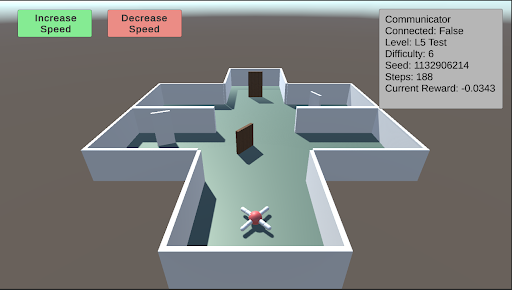
L5: Spatial Reasoning This test evaluates the agent’s ability to navigate a maze to find a piece of food hidden behind a wall in a random sector. Additional walls are placed to obstruct the agent’s path. As the difficulty increases, the number and size of the walls increase, and the maze itself becomes larger and more complex.
<details>
<summary>extracted/5920856/Research/L5.png Details</summary>
### Visual Description
## Screenshot: AI Navigation Simulation Environment
### Overview
This image is a screenshot of a 3D simulation environment, likely used for training or testing an autonomous agent (e.g., a drone or robot) in a navigation task. The scene displays a top-down, isometric view of a simple maze structure with an agent positioned at the entrance. Overlaid on the 3D view are user interface (UI) elements for control and status monitoring.
### Components/Axes
The image can be segmented into three primary regions:
1. **Header/UI Overlay (Top of Screen):**
* **Top-Left:** Two rectangular buttons.
* Left button: Green background, white text reading "Increase Speed".
* Right button: Red background, white text reading "Decrease Speed".
* **Top-Right:** A semi-transparent grey data panel with white text, displaying simulation metrics.
2. **Main 3D View (Central Area):**
* **Environment:** A simple, grey-walled maze or building floor plan on a light teal floor. The structure has multiple rectangular rooms connected by open doorways. Two brown, rectangular doors are visible within the central corridor.
* **Agent:** A small, stylized drone or robot model is positioned at the bottom-center of the maze, near the entrance. It has a white body with red and blue accents, possibly indicating orientation or sensor arrays.
* **Background:** A solid, muted brownish-grey color fills the space outside the maze walls.
3. **Data Panel (Top-Right Corner):**
* **Title:** "Communicator"
* **Metrics Listed (Line by Line):**
* `Connected: False`
* `Level: L5 Test`
* `Difficulty: 6`
* `Seed: 12906214`
* `Steps: 188`
* `Current Reward: -0.0343`
### Detailed Analysis
* **Agent State:** The agent is stationary at the starting point of the maze. The "Steps: 188" indicates the simulation has been running for 188 time steps, but the agent's position suggests it may be stuck, resetting, or the step count includes planning phases.
* **Simulation Parameters:**
* The task is identified as "L5 Test" with a "Difficulty" level of 6.
* The "Seed: 12906214" is a random seed value, ensuring the maze layout and any stochastic elements are reproducible.
* **Performance Metric:** The "Current Reward: -0.0343" is a negative value. In reinforcement learning contexts, this typically indicates the agent is incurring a small penalty per time step, often for not reaching a goal or for energy consumption.
* **Control Interface:** The "Increase Speed" and "Decrease Speed" buttons suggest the user can control the simulation's playback or execution speed in real-time.
### Key Observations
1. **Disconnected State:** The "Connected: False" status is a critical observation. It implies the control interface (the buttons) or the data panel is not currently linked to the active simulation agent or backend process. This could mean the displayed data is stale, or the user is in an observation/setup mode.
2. **Negative Reward:** The agent has a slightly negative cumulative reward after 188 steps, suggesting it has not yet accomplished a positive goal and is likely being penalized for time or distance from a target.
3. **Maze Layout:** The environment is a simple, structured maze with clear corridors and rooms. The presence of closed doors (brown rectangles) may represent obstacles that require specific actions to open or bypass.
4. **Visual Design:** The graphics are low-poly and utilitarian, typical of research or development simulation environments where function is prioritized over visual fidelity.
### Interpretation
This screenshot captures a moment in a reinforcement learning or AI robotics development workflow. The environment is a standardized testbed ("L5 Test") for evaluating an agent's navigation policy. The agent appears to be initialized but not actively progressing, as evidenced by its starting position and the negative reward.
The "Connected: False" status is the most significant operational detail. It suggests the viewer is looking at a monitoring dashboard that is not live-linked to the running agent, or the agent's communication module is disabled. This could be a setup phase, a paused state, or a diagnostic view.
The negative reward value, while small, indicates the agent's current policy is suboptimal—it is not efficiently moving toward a goal. The seed number allows developers to recreate this exact maze configuration for debugging. The speed control buttons are a practical tool for developers to observe agent behavior at a manageable pace or to accelerate training/inference cycles.
Overall, the image depicts a controlled, reproducible experiment in artificial intelligence, focusing on the challenges of autonomous navigation in a simple but structured environment. The disconnect between the UI and the agent highlights a common stage in development: separating the simulation core from the monitoring and control interfaces.
</details>
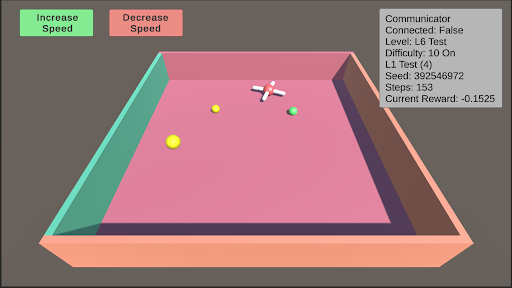
L6: Robustness Robustness is inherently present in all these tests due to their randomized nature. However, enabling robustness specifically will result in a random test from L0 to L11 being selected, and the colors of the test objects changing to one of five randomly generated colors.
<details>
<summary>extracted/5920856/Research/L6.png Details</summary>
### Visual Description
## Screenshot: Simulation Environment Interface
### Overview
The image is a screenshot of a 3D simulation environment, likely for testing an AI agent or robotic navigation. It features an isometric view of a bounded platform with various objects and a heads-up display (HUD) containing control buttons and status information.
### Components/Axes
**1. Control Interface (Top-Left):**
* Two rectangular buttons with rounded corners.
* **Left Button:** Green background, black text: "Increase Speed".
* **Right Button:** Red background, black text: "Decrease Speed".
**2. Status HUD (Top-Right):**
A semi-transparent grey text box containing the following labeled data fields:
* **Communicator**
* **Connected:** False
* **Level:** L6 Test
* **Difficulty:** 10 On
* **L2:** 100
* **Seed:** 392546972
* **Steps:** 153
* **Current Reward:** -0.1525
**3. Simulation Environment (Main View):**
* **Platform:** A large, flat, pink rectangular surface.
* **Walls:** The platform is bounded by walls of different colors.
* **Left Wall:** Teal/greenish-blue.
* **Right Wall:** Brown.
* **Front Wall:** Peach/light orange.
* **Objects on Platform:**
* **Three Yellow Spheres:** One large sphere in the front-left quadrant, one medium sphere in the center-left, and one small sphere in the center-right.
* **One White Cross:** A white, cross-shaped object (resembling a plus sign or a drone marker) located in the center-right area, slightly behind the small yellow sphere.
* **One Green Sphere:** A small green sphere located to the right of the white cross.
### Detailed Analysis
* **Spatial Layout:** The HUD elements are anchored to the top corners of the screen. The simulation view occupies the entire frame below them. The objects on the platform are scattered without a clear geometric pattern.
* **Data Values:** The status HUD provides precise numerical and categorical data about the simulation state. The "Current Reward" value is negative, indicating a penalty state. The "Seed" value suggests the simulation is procedurally generated and reproducible.
* **Visual Style:** The graphics are simple, using flat shading and basic geometric primitives (spheres, cross, rectangular prism for the platform). This is typical of a development or testing environment focused on function over visual fidelity.
### Key Observations
1. **Disconnected State:** The "Connected: False" status is a critical piece of information, suggesting the simulation or agent is not currently linked to a controlling system or communicator.
2. **Negative Reward:** The agent or system is currently in a state of negative reward (-0.1525), which in reinforcement learning contexts typically means it is performing a sub-optimal or penalized action.
3. **Object Hierarchy:** There is a clear size hierarchy among the yellow spheres (large > medium > small), which may correspond to different target values, distances, or object types within the simulation's logic.
4. **Isolated Green Object:** The single green sphere is spatially separated from the cluster of yellow spheres and the cross, potentially marking it as a different class of object (e.g., a goal, an obstacle, or a different type of target).
### Interpretation
This image captures a snapshot of a reinforcement learning or AI agent testing scenario. The environment is a simple, bounded arena ("L6 Test") with a high difficulty setting ("10 On"). The agent's task likely involves navigating to or interacting with the objects on the platform.
The **negative reward** and **disconnected communicator** are the most significant data points. They suggest the current test episode is not going well—the agent may be failing to reach targets, colliding with walls, or otherwise violating the task's success criteria. The disconnected state could be the cause of this poor performance (the agent is acting autonomously with a flawed policy) or a result of it (the system halted the connection due to failure).
The variety of objects (different-sized yellow spheres, a green sphere, a cross) implies a multi-objective or complex task. The agent might need to prioritize targets, avoid certain objects, or reach a specific sequence. The "Seed" value allows developers to recreate this exact scenario for debugging. Overall, the screenshot documents a moment of sub-optimal performance within a controlled, reproducible AI experiment.
</details>
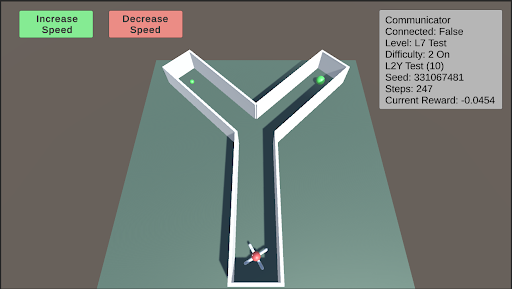
L7: Internal Models This test assesses the agent’s internal modeling capabilities using its camera. Blackouts will occur, with the frequency and duration of these blackouts increasing as the difficulty rises. During these blackouts, the agent’s camera will render a dark screen. Enabling internal models will select a random test from L0 to L11 and apply the blackouts described above.
<details>
<summary>extracted/5920856/Research/L7.png Details</summary>
### Visual Description
## Screenshot: Reinforcement Learning Simulation Environment
### Overview
The image is a screenshot of a 3D simulation environment, likely used for training or testing a reinforcement learning agent. The scene features a Y-shaped maze or pathway on a flat plane, with a multi-colored agent at the entrance and two green spherical targets in the upper branches. User interface (UI) elements for controlling simulation speed and displaying environment status are overlaid on the scene.
### Components/Axes
The image can be segmented into three primary regions:
1. **Header/UI Overlay (Top of Screen):**
* **Top-Left:** Two rectangular buttons.
* Left Button: Green background, white text: "Increase Speed".
* Right Button: Red background, white text: "Decrease Speed".
* **Top-Right:** A semi-transparent grey panel titled "Communicator". It contains the following key-value pairs of text:
* `Communicator` (Title)
* `Connected: False`
* `Level: L7 Test`
* `Difficulty: 2 On`
* `L2Y Test (10)`
* `Seed: 1234567481`
* `Steps: 247`
* `Current Reward: -0.0454`
2. **Main Scene (Center):**
* **Environment:** A flat, teal-colored ground plane under a grey sky.
* **Maze Structure:** A white, Y-shaped pathway with raised edges. The stem of the "Y" is at the bottom center, branching into two arms that extend towards the top-left and top-right of the scene.
* **Agent:** A multi-colored (red, blue, white, black) object resembling a simple robot or vehicle, positioned at the very start of the maze's stem (bottom-center).
* **Targets:** Two identical, bright green spheres. One is located in the left branch of the maze, and the other is in the right branch.
3. **Footer/Background:** The lower portion of the image shows the continuation of the teal ground plane and the grey background/skybox. No additional UI or text is present here.
### Detailed Analysis
* **Spatial Layout:** The UI elements are anchored to the top corners of the viewport. The simulation scene is rendered in a perspective view, with the maze receding into the distance. The agent is in the foreground, and the targets are in the mid-ground.
* **State Information:** The "Communicator" panel provides a snapshot of the simulation's internal state:
* The agent is not currently connected to an external communicator (`Connected: False`).
* The task is identified as "L7 Test" with a difficulty setting of "2 On".
* A specific test variant is noted: "L2Y Test (10)".
* The simulation is deterministic, based on the provided seed `1234567481`.
* The episode has been running for `247` steps.
* The cumulative reward at this moment is negative (`-0.0454`), suggesting the agent may have incurred penalties (e.g., for time elapsed or inefficient movement).
### Key Observations
1. **Task Structure:** The Y-shaped maze presents a classic decision-making scenario for an AI agent: choose the left or right path to reach a goal.
2. **Agent State:** The agent is at the starting position, implying the beginning of an episode or a reset state.
3. **Reward Signal:** The negative current reward is a critical data point. In reinforcement learning, this indicates the agent's actions up to step 247 have not yet resulted in a net positive outcome, possibly due to a small time-step penalty.
4. **Control Interface:** The presence of "Increase/Decrease Speed" buttons indicates this is an interactive visualization tool, allowing a human observer to control the pace of the simulation for analysis.
### Interpretation
This image captures a snapshot of a reinforcement learning experiment in progress. The setup is designed to test an agent's ability to navigate a simple spatial decision problem (the Y-maze). The "L2Y Test" label likely refers to this specific "Left-2-Right" or "Y" maze configuration.
The data suggests the following narrative: The agent has been operating for 247 time steps within the "L7 Test" environment at difficulty level 2. Despite this runtime, it has not yet reached a goal (the green spheres), as evidenced by the negative cumulative reward. The reward function likely includes a small negative penalty per time step to encourage efficiency. The agent's next critical decision will be to choose which branch of the "Y" to explore. The outcome of this choice—whether it leads to a target and a positive reward—will determine if the `Current Reward` value becomes positive in subsequent steps.
The "Connected: False" status implies the agent is running autonomously based on its current policy, without receiving real-time guidance from an external system. This screenshot serves as a diagnostic view for researchers to monitor the agent's progress, environment configuration, and learning dynamics.
</details>
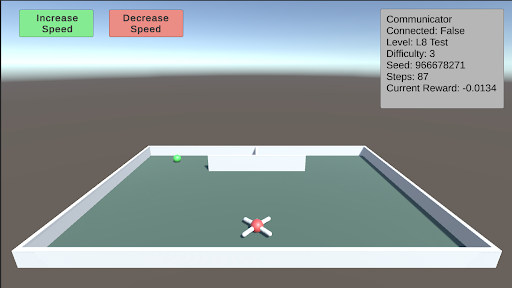
L8: Object Permanence This test involves a green piece of food that spawns on either side of a wall facing the agent. The food then moves behind the wall. There is a barrier separating the two sides behind the wall, with one side containing the food and the other side containing a hole. The agent must remember that the food still exists behind the wall. As difficulty increases, the speed at which the food moves behind the wall also increases.
<details>
<summary>extracted/5920856/Research/L8.png Details</summary>
### Visual Description
## Screenshot: Simulation Environment with UI Overlay
### Overview
The image is a screenshot of a 3D simulation environment, likely for testing an autonomous agent or drone. It features a walled arena containing a drone, a target object, and overlaid user interface (UI) elements displaying controls and simulation state data. The scene is rendered with simple, low-polygon graphics.
### Components/Axes
The image can be segmented into two primary regions: the **3D Simulation View** (main area) and the **UI Overlay** (top portion).
**1. UI Overlay (Top of Screen):**
* **Top-Left Corner:** Two rectangular buttons.
* **Left Button:** Green background, white text: "Increase Speed".
* **Right Button:** Red background, white text: "Decrease Speed".
* **Top-Right Corner:** A semi-transparent gray information panel with white text, aligned to the right edge. The text reads:
* `Communicator Connected: False`
* `Level: L8 Test`
* `Difficulty: 3`
* `Seed: 866678271`
* `Steps: 0`
* `Current Reward: -0.0134`
**2. 3D Simulation View (Main Area):**
* **Environment:** A rectangular arena enclosed by low, white walls. The floor is a flat, dark teal/green color. The background shows a simple skybox with a gradient from light blue at the top to a hazy gray at the horizon.
* **Primary Agent:** A white, quadcopter-style drone with red "X" markings on its top surface. It is positioned in the foreground, slightly below the center of the view.
* **Target/Goal Object:** A small, bright green sphere located near the back wall, to the left of the center.
* **Background Structure:** A simple, white, rectangular block or wall segment positioned against the back wall, slightly right of center. A small, dark vertical line (possibly a pole or marker) is visible on top of it.
### Detailed Analysis
* **Simulation State:** The simulation is at its initial state (`Steps: 0`). The agent has received a small negative reward (`-0.0134`), which could be an initial penalty or a baseline cost.
* **Configuration:** The test is running on a specific level (`L8 Test`) with a set difficulty (`3`) and a deterministic seed (`866678271`), allowing for reproducible runs.
* **Connectivity:** A key system component, the "Communicator," is reported as not connected (`False`).
* **Spatial Layout:** The drone is centrally located in the foreground. The green sphere (likely a target) is in the mid-ground left. The white block is in the mid-ground right. The UI elements are non-diegetic, floating over the scene.
### Key Observations
1. **Initial Condition:** The simulation has just begun (`Steps: 0`), and the agent is already in a slightly negative reward state.
2. **Disconnected State:** The "Communicator Connected: False" status is a critical piece of information, suggesting a potential issue with external control, data logging, or multi-agent communication.
3. **Visual Cues:** The green sphere is a strong visual candidate for a target or goal location due to its distinct color and placement. The drone's design is simple, prioritizing function over visual detail.
4. **UI Design:** The control buttons use universal color semantics (green for increase/positive, red for decrease/negative). The info panel uses a monospace font for clear readability of numerical data.
### Interpretation
This screenshot captures the setup phase of a reinforcement learning or robotics simulation. The environment is designed to test an agent's ability to navigate within a bounded space, likely to reach the green sphere target. The negative initial reward is a common technique to incentivize the agent to complete tasks quickly to minimize cumulative penalty.
The "Communicator" status being false is the most significant anomaly. In a typical setup, this might mean the agent is running a pre-trained policy autonomously without a live connection to a training server or human operator. Alternatively, it could indicate a system error. The specific seed value ensures that this exact scenario—with the drone, target, and background structure in these precise positions—can be recreated perfectly for debugging or evaluation.
The presence of speed control buttons suggests this interface is for a human supervisor to adjust the simulation's real-time execution speed, which is useful for observing fast-paced agent behavior or debugging step-by-step. Overall, the image depicts a controlled, instrumented testbed for developing and evaluating autonomous navigation algorithms.
</details>
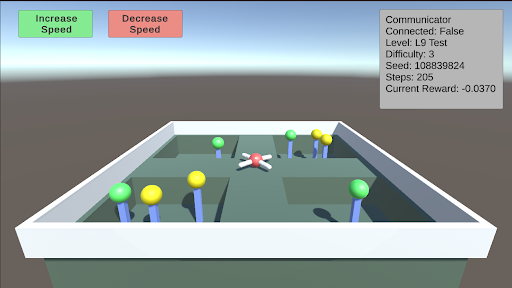
L9: Numerosity This test requires the agent to choose between different sectors based on the quantity of food present. There are four sectors, each containing a random number of food pieces. The agent must enter a sector and collect all the food within it. Once the agent enters a sector, the opening will close. The agent must correctly choose the sector with the most food. As the difficulty increases, the number of food pieces in each sector increases, making the decision more challenging.
<details>
<summary>extracted/5920856/Research/L9.png Details</summary>
### Visual Description
## Screenshot: AI Agent Simulation Environment
### Overview
This image is a screenshot of a 3D simulation environment, likely used for training or testing an autonomous agent (a drone). The scene depicts a walled maze containing a central drone and several colored spheres on poles. A user interface overlay provides control buttons and a status panel with real-time metrics.
### Components/Axes
The image is divided into two primary regions: the 3D simulation viewport and the 2D UI overlay.
**UI Overlay Elements:**
1. **Control Buttons (Top-Left):**
* A green button labeled "Increase Speed".
* A red button labeled "Decrease Speed".
2. **Status Panel (Top-Right):** A semi-transparent grey box containing the following text fields and values:
* `Communicator`
* `Connected: False`
* `Level: L9 Test`
* `Difficulty: 3`
* `Seed: 108839824`
* `Steps: 100`
* `Current Reward: -0.0370`
**3D Simulation Viewport:**
* **Environment:** A rectangular, walled arena with a light grey floor and darker grey walls. The interior is divided by low walls into several compartments or pathways.
* **Agent:** A white and red quadcopter drone is positioned near the center of the arena, hovering above the floor.
* **Objects:** Multiple colored spheres are mounted on thin blue poles of varying heights, placed throughout the maze compartments.
* **Green Spheres:** At least 5 are visible.
* **Yellow Spheres:** At least 4 are visible.
* **Perspective:** The view is from an elevated, angled perspective looking down into the arena.
### Detailed Analysis
* **Text Transcription:** All text from the UI overlay has been transcribed exactly as shown in the "Components/Axes" section above.
* **Spatial Grounding:**
* The control buttons are anchored to the top-left corner of the screen.
* The status panel is anchored to the top-right corner.
* The drone is centrally located within the maze structure.
* The colored spheres are distributed across different sections of the maze. For example, a cluster of one green and two yellow spheres is in the bottom-left compartment, while another cluster of two green and two yellow spheres is in the top-right compartment.
* **Data Points:** The only quantitative data provided are from the status panel:
* Difficulty Level: 3
* Simulation Seed: 108839824
* Step Count: 100
* Current Cumulative Reward: -0.0370 (a negative value).
### Key Observations
1. **Simulation State:** The agent is disconnected (`Connected: False`), suggesting the simulation may be paused, the controlling program is not attached, or it's in a pre-run state.
2. **Negative Reward:** The `Current Reward` is negative (-0.0370) after 100 steps. In reinforcement learning contexts, this typically indicates the agent is incurring penalties, possibly for time elapsed, collisions, or not reaching goals.
3. **Environment Design:** The maze layout with colored spheres suggests a navigation or collection task. The different colors (green vs. yellow) likely represent different types of targets, objectives, or penalties.
4. **Control Interface:** The presence of "Increase/Decrease Speed" buttons implies manual override or adjustment of the simulation speed is possible.
### Interpretation
This screenshot captures a snapshot of a reinforcement learning or robotics simulation testbed. The "L9 Test" at "Difficulty: 3" indicates a specific, likely challenging, scenario configuration. The negative reward after 100 steps suggests the agent (the drone) has not yet successfully completed its objective and may be exploring inefficiently or violating constraints. The colored spheres are almost certainly the goal objects; the agent's task is probably to navigate the maze and collect specific spheres (e.g., only green ones) while avoiding others or minimizing path length. The disconnected status and manual speed controls point to this being a development or debugging view, allowing a human operator to monitor and influence the agent's training environment. The specific seed number (`108839824`) allows for exact replication of this maze layout and initial conditions for reproducible experiments.
</details>
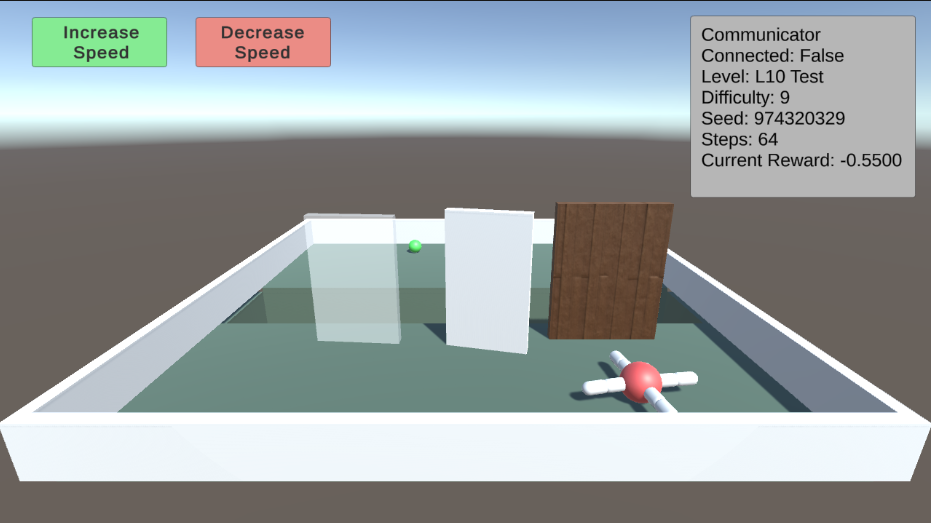
L10: Causal Reasoning This test evaluates the agent’s cognitive ability to understand the environment around it. By pushing over a plank, the agent can walk over a trench to reach a piece of food. However, as the difficulty increases, transparent and opaque walls will appear alongside the plank. The agent must comprehend the cause and effect of its actions, and pick the plank to push over. Additionally, the trench will gradually become wider.
<details>
<summary>extracted/5920856/Research/L10.png Details</summary>
### Visual Description
## Screenshot: AI Simulation Environment
### Overview
The image is a screenshot of a 3D simulation environment, likely used for testing or training an AI agent (e.g., a drone or robot). The scene depicts a simple, enclosed arena with obstacles and a target object. A status panel and control buttons are overlaid on the interface.
### Components/Axes
**User Interface Elements:**
1. **Top-Left Control Buttons:**
* A green button labeled "Increase Speed".
* A red button labeled "Decrease Speed".
2. **Top-Right Status Panel (Gray Box):** Contains the following text labels and values:
* `Communicator`
* `Connected: False`
* `Level: L10 Test`
* `Difficulty: 9`
* `Seed: 974320329`
* `Steps: 64`
* `Current Reward: -0.5500`
**3D Environment Components:**
* **Arena:** A square, white-walled enclosure with a green floor.
* **Agent:** A red and white, drone-like object with four arms, positioned in the bottom-right quadrant of the arena.
* **Target:** A small, bright green sphere located near the back wall, slightly left of center.
* **Obstacles:** Three vertical panels placed in a line across the middle of the arena:
* Left: A transparent, glass-like panel.
* Center: An opaque white panel.
* Right: A brown, wood-textured panel.
* **Background:** A simple gradient sky (light blue to white) above a flat, gray horizon.
### Detailed Analysis
* **Spatial Layout:** The agent (drone) is in the foreground (bottom-right). The three obstacle panels form a barrier between the agent and the target (green sphere), which is in the background (top-center/left).
* **Status Data:** The simulation is at step 64 of an episode. The current cumulative reward is negative (-0.5500), indicating the agent has incurred penalties, possibly for time elapsed or collisions. The "Communicator" is not connected. The test is configured with a high difficulty (9) and a specific random seed (974320329) for reproducibility.
* **Visual Style:** The graphics are simple and functional, typical of a research or development simulation environment (e.g., Unity, MuJoCo).
### Key Observations
1. **Negative Reward:** The agent's performance is currently sub-optimal, as indicated by the negative reward value.
2. **Obstacle Course:** The agent must navigate around or through the line of three distinct panels to reach the target sphere.
3. **Disconnected State:** The "Communicator Connected: False" status suggests a potential issue with an external control or logging system, or that this feature is intentionally disabled for this test.
4. **High Difficulty:** A difficulty setting of 9 (presumably on a scale where higher is harder) implies this is a challenging configuration for the agent.
### Interpretation
This screenshot captures a moment in a reinforcement learning or robotics simulation. The setup is a classic navigation task: an agent must reach a target while avoiding or overcoming obstacles. The negative reward suggests the agent is either taking too long, has collided with obstacles, or is otherwise failing to make progress toward the goal efficiently.
The "L10 Test" level and high difficulty indicate this is a specific, challenging benchmark scenario. The use of a seed (974320329) means the environment's randomness (e.g., initial positions) is fixed, allowing for repeatable experiments. The disconnected communicator might be a red herring for the test or a critical fault preventing the agent from receiving optimal commands.
The primary information conveyed is the **state of a controlled experiment**: the environment configuration, the agent's progress (step count), and its current performance metric (reward). The visual scene provides the physical context for that data.
</details>
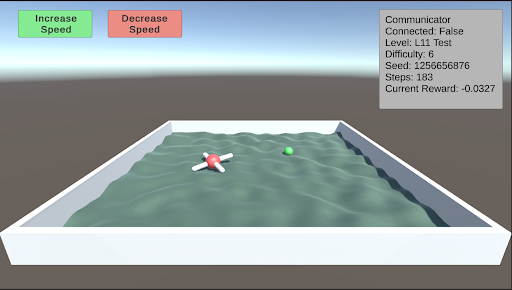
L11: Body Awareness This test assesses the agent’s understanding of its own body. After navigating through the corridors of the Y-maze, Thorndike hut, and a normal maze, the agent has developed a basic understanding of its body. This test further evaluates the agent’s ability to function on rough terrain. A single piece of food is placed away from the agent on uneven terrain. As the difficulty increases, the terrain becomes progressively rougher.
<details>
<summary>extracted/5920856/Research/L11.png Details</summary>
### Visual Description
## Screenshot: Simulation Environment Interface
### Overview
This image is a screenshot of a 3D simulation environment, likely used for testing or training an autonomous agent (e.g., a drone). The interface consists of a main 3D scene, control buttons, and a data readout panel. The scene depicts a contained water environment with two objects.
### Components/Axes
The image is segmented into three primary regions:
1. **Header (Top Region):**
* **Control Buttons (Top-Left):** Two rectangular buttons.
* Left button: Green background, white text reading "Increase Speed".
* Right button: Red background, white text reading "Decrease Speed".
* **Data Panel (Top-Right):** A semi-transparent grey rectangle containing white text. The text is left-aligned and lists simulation parameters.
2. **Main Scene (Central Region):**
* A 3D perspective view of a rectangular, white-walled pool or tank.
* The pool is filled with a textured, greenish-grey surface representing water.
* **Object 1 (Center-Left):** A white, cross-shaped object resembling a quadcopter drone. It has red accents on its central body and appears to be floating on the water's surface.
* **Object 2 (Center-Right):** A small, solid green sphere, also floating on the water's surface.
* The background is a simple gradient from light blue (sky) to a darker grey-blue (horizon).
3. **Footer (Bottom Region):** The bottom edge of the pool wall and the grey ground plane it sits on. No text or interactive elements are present here.
### Detailed Analysis
**Text Transcription from Data Panel (Top-Right):**
All text is in English.
```
Communicator
Connected: False
Level: L11 Test
Difficulty: 6
Seed: 1255656876
Steps: 1
Current Reward: -0.0327
```
**Visual Scene Details:**
* **Pool:** The container has a distinct white rim and interior walls. The water surface has a rippled, non-uniform texture.
* **Drone:** Positioned slightly left of the pool's center. Its orientation is not perfectly aligned with the pool's axes.
* **Green Sphere:** Positioned to the right and slightly behind the drone relative to the camera's viewpoint.
* **Lighting:** The scene is lit from above, casting soft shadows inside the pool walls.
### Key Observations
1. **Simulation State:** The simulation is at a very early stage (`Steps: 1`).
2. **Performance Metric:** The `Current Reward` is negative (`-0.0327`), indicating the agent's actions at this initial step have resulted in a penalty or suboptimal outcome according to the environment's scoring function.
3. **Connectivity:** The `Communicator` is `Connected: False`, suggesting this might be a local simulation instance or that an external control connection is not active.
4. **Reproducibility:** A specific `Seed` (1255656876) is provided, which would allow for exact replication of this simulation run, including the initial state and any stochastic elements.
5. **Task Parameters:** The test is identified as `Level: L11 Test` with a `Difficulty: 6`, implying a structured set of challenges with increasing complexity.
### Interpretation
This screenshot captures the initial state of a reinforcement learning or robotics simulation trial. The setup suggests a task where an agent (the drone) must interact with its environment (the pool and the green sphere) to maximize a reward signal.
* **The Negative Reward:** The immediate negative reward at step 1 is notable. It could indicate a penalty for starting in a suboptimal position, for an initial random action, or for a baseline cost of operation (e.g., energy use). It sets a starting point from which the agent must improve.
* **The Green Sphere:** This is likely a target object. The agent's goal may be to navigate to it, push it, or avoid it, depending on the specific task defined for "L11 Test."
* **The "Communicator: False" Status:** This could mean the simulation is running in a standalone mode, or it might be an error state. In a technical context, this would be a critical detail for debugging or understanding the system's architecture.
* **Purpose:** The interface is designed for monitoring and basic control (speed adjustment). The detailed data panel provides essential metrics for evaluating agent performance and ensuring experimental reproducibility via the seed. The combination of a visual scene and quantitative data is characteristic of development environments for autonomous systems.
</details>
## 6 Curriculum Training
We provide a curriculum training inspired by [3] where the agent focuses on tasks were the learning progress (or regression) is fastest. The system operates by organizing the levels and difficulties into a 2D matrix, where each cell represents a specific level at a given difficulty. Upon the completion of an episode, the agent’s reward is recorded in the corresponding cell of the matrix. A rolling moving average and variance are calculated for each cell over a period of 10 episodes, and the z-value for each cell is determined using the following equation.
$$
z_i:=\frac{σ_i}{|μ_i|+10^-7} \tag{1}
$$
These z-values are then used to create a probability distribution that guides the selection of the next training level and difficulty, prioritizing levels with higher variance. Thus the agent will focus more on tasks where it’s performance is highly variable. The probability of each cell being selected next is determined according to the equation below.
$$
p_i=\frac{z_i+c}{∑_j=1^n(z_j+c)} \tag{2}
$$
This curriculum training procedure effectively promotes learning and facilitates training. As the agent begins to learn and increases its end reward for a task, the rolling variance rises, which in turn increases the z-value and the likelihood of the same level and difficulty being presented again. This creates a feedback loop until the agent either stops learning or completes the current level and difficulty. As the variance decreases, a new level and difficulty pair is presented to the agent for further learning. Additionally, this training combats catastrophic forgetting. If the agent revisits a previously mastered level and difficulty pair but is currently failing, the increased variance will cause this pair to reappear more frequently until the task is relearned. Overall, this curriculum training procedure provides an effective method for training an agent across a diverse range of tasks.
## 7 Future Work
In the initial release of the Articulated Animal AI Environment, our goal is to enable researchers to familiarize themselves with the platform and test their cognition-based models using the provided test bench. A designated set of testing seeds has been reserved within the environment, which will be used for future evaluations of selected candidates or potential competition scenarios.
## 8 Conclusion
The Articulated Animal AI Environment is a robust framework designed to assess the capabilities of a multi-limbed agent in performing animal cognition tasks. Building upon the foundational AnimalAI Environment, the Articulated Animal AI Environment enhances the training process by offering pre-randomized and generalized tests, coupled with a structured curriculum training program and comprehensive evaluation tools. This setup allows researchers to concentrate on refining their models rather than on the time-intensive task of developing effective tests.
## Acknowledgments
This work was supported in part by McGill University.
## References
- [1] Matthew Crosby, Benjamin Beyret, Murray Shanahan, José Hernández-Orallo, Lucy Cheke, and Marta Halina. Animal-ai: A testbed for experiments on autonomous agents. arXiv preprint arXiv:1909.07483, 2019.
- [2] Konstantinos Voudouris, Ibrahim Alhas, Wout Schellaert, Matthew Crosby, Joel Holmes, John Burden, Niharika Chaubey, Niall Donnelly, Matishalin Patel, Marta Halina, José Hernández-Orallo, and Lucy G. Cheke. Animal-ai 3: What’s new & why you should care. arXiv preprint arXiv:2312.11414, 2023.
- [3] Jacqueline Gottlieb, Pierre-Yves Oudeyer, Manuel Lopes, and Adrien Baranes. Information seeking, curiosity and attention: computational and neural mechanisms. Trends in Cognitive Sciences, 17(11):585–593, 2013.
## Appendix A Appendix
This appendix contains additional information about how to use the interface. All source code is available online.
Environment source code: https://github.com/jeremy-lucas-mcgill/Articulated-Animal-AI-Environment
## The Interface
The interface provides users with the capability to customize their agents by selecting specific actions, vision settings, and general parameters. Users can then choose the levels and difficulty range for training. The interface offers two primary options for initiating the training process: "Start Random," which randomly selects a level and difficulty for each episode, or "Start Curriculum," which begins the curriculum-based training program.
<details>
<summary>extracted/5920856/Research/Interface.png Details</summary>
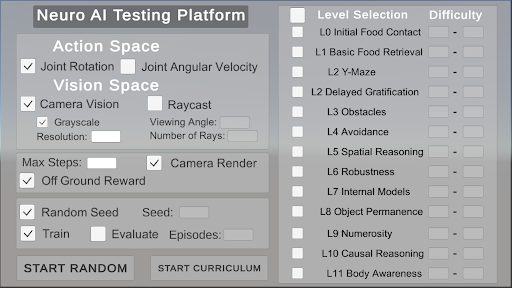
### Visual Description
## Screenshot: Neuro AI Testing Platform Interface
### Overview
This image is a screenshot of a graphical user interface (GUI) for a software application titled "Neuro AI Testing Platform." The interface is designed for configuring parameters and selecting tasks for testing or training an artificial intelligence system, likely in a simulated environment. The layout is divided into two primary vertical panels: a configuration panel on the left and a level selection panel on the right.
### Components/Axes
The interface is composed of the following major sections and elements:
**1. Header:**
* **Title:** "Neuro AI Testing Platform" (centered at the top).
**2. Left Configuration Panel:**
This panel contains multiple grouped settings with checkboxes, labels, and input fields.
* **Action Space:**
* Checkbox: `[✓] Joint Rotation`
* Checkbox: `[ ] Joint Angular Velocity`
* **Vision Space:**
* Checkbox: `[✓] Camera Vision`
* Checkbox: `[ ] Raycast`
* Checkbox: `[✓] Grayscale` (indented under Camera Vision)
* Label & Input Field: `Viewing Angle: [ ]`
* Label & Input Field: `Resolution: [ ]`
* Label & Input Field: `Number of Rays: [ ]`
* **General Settings:**
* Label & Input Field: `Max Steps: [ ]`
* Checkbox: `[✓] Camera Render`
* Checkbox: `[✓] Off Ground Reward`
* **Training Control:**
* Checkbox: `[✓] Random Seed`
* Label & Input Field: `Seed: [ ]`
* Checkbox: `[✓] Train`
* Checkbox: `[ ] Evaluate`
* Label & Input Field: `Episodes: [ ]`
* **Action Buttons:**
* Button: `START RANDOM`
* Button: `START CURRICULUM`
**3. Right Level Selection Panel:**
This panel is a vertical list of selectable tasks or training levels.
* **Column Headers:** `Level Selection` and `Difficulty`
* **List of Levels (each with a checkbox):**
* `[ ] L0 Initial Food Contact` | Difficulty: `-`
* `[ ] L1 Basic Food Retrieval` | Difficulty: `-`
* `[ ] L2 Y-Maze` | Difficulty: `-`
* `[ ] L2 Delayed Gratification` | Difficulty: `-`
* `[ ] L3 Obstacles` | Difficulty: `-`
* `[ ] L4 Avoidance` | Difficulty: `-`
* `[ ] L5 Spatial Reasoning` | Difficulty: `-`
* `[ ] L6 Robustness` | Difficulty: `-`
* `[ ] L7 Internal Models` | Difficulty: `-`
* `[ ] L8 Object Permanence` | Difficulty: `-`
* `[ ] L9 Numerosity` | Difficulty: `-`
* `[ ] L10 Causal Reasoning` | Difficulty: `-`
* `[ ] L11 Body Awareness` | Difficulty: `-`
### Detailed Analysis
* **State of Controls:** Several checkboxes are pre-selected (marked with `✓`), indicating default or active settings: `Joint Rotation`, `Camera Vision`, `Grayscale`, `Camera Render`, `Off Ground Reward`, `Random Seed`, and `Train`.
* **Empty Input Fields:** All numerical input fields (`Viewing Angle`, `Resolution`, `Number of Rays`, `Max Steps`, `Seed`, `Episodes`) are empty, represented by blank boxes `[ ]`.
* **Level List Structure:** The level list contains 12 entries (L0 through L11). Notably, there are two distinct entries labeled "L2": "L2 Y-Maze" and "L2 Delayed Gratification." All checkboxes in this list are unselected (`[ ]`).
* **Difficulty Column:** The "Difficulty" column for every level contains only a hyphen (`-`), suggesting this value is either not set, not applicable, or to be determined by the system or user.
* **Spatial Layout:** The configuration panel occupies approximately the left 60% of the window. The level selection panel occupies the right 40%. The two action buttons are positioned at the bottom of the left panel.
### Key Observations
1. **Dual L2 Levels:** The presence of two separate "L2" levels is a notable structural anomaly. This could indicate a versioning error, two sub-tasks within the same difficulty tier, or a simple labeling mistake.
2. **Default Configuration:** The interface loads with a specific set of features enabled (vision, certain rewards, training mode), suggesting a common starting point for users.
3. **Unpopulated Parameters:** All configurable numerical values are blank, requiring user input before execution. The difficulty ratings are also unpopulated.
4. **Task Progression:** The level names (L0-L11) suggest a curriculum or progression of complexity, starting from basic sensory-motor tasks ("Initial Food Contact") and advancing to abstract cognitive challenges ("Causal Reasoning," "Body Awareness").
### Interpretation
This interface is the control panel for a neuro-evolutionary or reinforcement learning AI testing platform. Its purpose is to allow researchers or engineers to define the **morphology** (action and vision spaces) and **environmental parameters** of an AI agent, and then select a specific **task or competency** (from the Level Selection list) to train or evaluate it on.
* **Relationship Between Elements:** The left panel defines the agent's capabilities and the rules of its world. The right panel defines the specific challenge it must solve. The "START" buttons initiate the process, either with randomized parameters (`START RANDOM`) or following a predefined curriculum (`START CURRICULUM`).
* **Implied Workflow:** A user would: 1) Configure the agent's sensors and actuators, 2) Set training parameters like step limits and random seeds, 3) Select one or more competency levels from the list, and 4) Launch the simulation.
* **Underlying Purpose:** The platform appears designed to systematically test and develop increasingly sophisticated cognitive abilities in artificial agents, moving from reflexive behaviors to higher-order reasoning. The empty difficulty fields imply that the challenge of each level may be dynamic or assessed during testing.
* **Notable Absence:** There is no visible output console, visualization window, or data readout in this screenshot. This suggests it is purely a configuration screen, with results likely displayed in a separate window or after execution.
</details>