# Articulated Animal AI: An Environment for Animal-like Cognition in a Limbed Agent
**Authors**:
- Jeremy Lucas (McGill University)
- Isabeau Prémont-Schwarz
## Abstract
This paper presents the Articulated Animal AI Environment for Animal Cognition, an enhanced version of the previous AnimalAI Environment. Key improvements include the addition of agent limbs, enabling more complex behaviors and interactions with the environment that closely resemble real animal movements. The testbench features an integrated curriculum training sequence and evaluation tools, eliminating the need for users to develop their own training programs. Additionally, the tests and training procedures are randomized, which will improve the agent’s generalization capabilities. These advancements significantly expand upon the original AnimalAI framework and will be used to evaluate agents on various aspects of animal cognition.
## 1 Introduction
The field of artificial intelligence has seen the development of numerous frameworks designed to test and evaluate models. Each new framework or dataset has often spurred on signmificant progress as different research teams compete to achieve the state the of the art on that specific benchmark. This paper specifically addresses AI frameworks that focus on tasks modeled after animal cognition. Despite significant advancements, many animals still outperform even the most advanced AI systems in various cognitive tasks. A notable framework within this domain is the AnimalAI Environment, which features a simplistic setup with a single spherical agent capable of only basic movements, such as moving forward or backward, and rotating left or right. This environment offers a set of simple building blocks—such as blocks, half-cylinders, spherical pieces of food, ramps, and walls—within a built-in arena, allowing researchers to create their own cognitive tasks for the agent.
However, the AnimalAI Environment presents several limitations. The broad scope of the environment adds complexity to the task of training AI models, as researchers must first design effective tests. Additionally, the environment lacks generalization capabilities; object positions and rotations must be manually configured, leading to the potential for overfitting due to the absence of randomization in tests. Moreover, the agent itself is rudimentary and unrealistic, restricting the exploration of cognitive abilities related to movement. The Articulated Animal AI Environment has been developed to address these shortcomings, offering a more sophisticated and versatile platform for evaluating AI in the context of animal cognition tasks.
## 2 The Influence from Animal AI
The AnimalAI test environment serves as a versatile platform that enables scientists and researchers to design cognitive assessments for a simple agent using modular building blocks. Upon the publication of their paper, the AnimalAI team introduced a competition aimed at developing a highly generalizable agent capable of performing across a diverse array of unknown tests. This competition presented researchers with the challenge of generating a sufficient number of tests to train such an agent. The tests devised for the competition by the AnimalAI team were grounded in ten distinct categories of animal cognition. The results of the competition were disappointing, with even the best AI models performing significantly worse than a human child on every task apart from food retrieval, internal modeling, and numerosity. The meaning and definitions of these categories are described in the next section. Although the competition outcomes were underwhelming, the challenge itself was noteworthy. [1] [2]
## 3 Animal AI’s Cognition Benchmarks
We utilized the cognitive categories employed in the AnimalAI competition to develop our benchmark platform. These ten categories are as follows:
1. Basic food retrieval: This category tests the agent’s ability to reliably retrieve food in the presence of only food items. It is necessary to make sure agents have the same motivation as animals for subsequent tests.
1. Preferences: This category tests an agent’s ability to choose the most rewarding course of action. Tests are designed to be unambiguous as to the correct course of action based on the rewards in our environment.
1. Obstacles: This category contains objects that might impede the agent’s navigation. To succeed, the agent will have to explore its environment, a key component of animal behavior.
1. Avoidance: This category identifies an agent’s ability to detect and avoid negative stimuli, which is critical for biological organisms and important for subsequent tests.
1. Spatial Reasoning: This category tests an agent’s ability to understand the spatial affordances of its environment, including knowledge of simple physics and memory of previously visited locations.
1. Robustness: This category includes variations of the environment that look superficially different, but for which affordances and solutions to problems remain the same.
1. Internal Models: In these tests, the lights may turn off, and the agent must remember the layout of the environment to navigate in the dark.
1. Object Permanence and Working Memory: This category checks whether the agent understands that objects persist even when they are out of sight, as they do in the real world and in our environment.
1. Numerosity: This category tests the agent’s to judge which area has the most food, as it only gets to choose one area.
1. Causal Reasoning and Object Affordances: This category tests the agent’s ability to use objects to reach it’s goal.
## 4 Additional Categories
In addition to the 10 categories listed above, we introduced two additional categories, L0 - Initial Food Contact and L11 - Body Awareness, to address specific challenges posed by the multi-limbed agent within our environment. L0 was created to provide a simpler framework for the agent to learn to move toward food, recognizing the necessity for a foundational category focused on basic movement. L11 was developed in response to the absence of limb-related cognitive tests in the original AnimalAI competition, which featured a spherical, limbless agent. This new category was essential for evaluating the agent’s understanding and coordination of its limbs.
## 5 Environment Design
### 5.1 The Agent
<details>
<summary>extracted/5920856/Research/agent.png Details</summary>
### Visual Description
## Diagram: 3D Molecular Structure Representation
### Overview
The image depicts a simplified 3D molecular model centered on a red spherical atom (likely representing a central atom like oxygen, carbon, or nitrogen) surrounded by four white cylindrical rods arranged in an X-shape. The background is a dark blue grid with faint white lines, suggesting a coordinate system or spatial reference. No textual labels, legends, or numerical data are visible.
### Components/Axes
- **Central Atom**: A red sphere positioned at the intersection of the X-shaped rods.
- **Bonds**: Four white cylindrical rods extending from the central atom in a symmetrical X configuration.
- **Background**: A dark blue grid with faint white lines, possibly representing a 3D coordinate system (X, Y, Z axes).
- **No Textual Elements**: No labels, legends, axis titles, or numerical markers are present.
### Detailed Analysis
- **Spatial Arrangement**: The X-shaped bonds suggest a tetrahedral or square planar geometry, common in molecules like methane (CH₄) or sulfur tetrafluoride (SF₄).
- **Color Coding**: The red sphere likely represents a central atom (e.g., oxygen, carbon, or nitrogen), while the white rods symbolize covalent bonds.
- **Grid Context**: The blue grid may imply a 3D coordinate system, but no axis labels or units are provided.
### Key Observations
- The diagram lacks explicit textual information, making it impossible to extract labels, legends, or numerical data.
- The symmetry of the X-shaped bonds suggests a highly ordered molecular structure.
- The absence of additional atoms or bonds implies a focus on the central atom and its immediate bonding environment.
### Interpretation
This diagram likely represents a simplified model of a molecule with a central atom bonded to four other atoms in a symmetrical arrangement. The red sphere’s color and the white rods’ geometry are consistent with common molecular visualization conventions. However, without textual labels or legends, the exact identity of the molecule (e.g., CH₄, SF₄, or another compound) cannot be confirmed. The blue grid may serve as a spatial reference but lacks contextual details to quantify positions or orientations.
**Note**: No textual information, numerical data, or explicit labels are present in the image. The analysis is based solely on visual interpretation of the molecular structure and background elements.
</details>
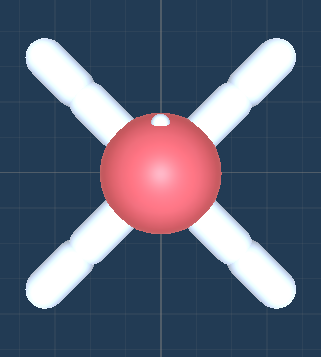
Figure 1: The Top Down view of the agent.
Description:
The agent is a soft body constructed using configurable joints. It has four thighs and four legs, totaling eight joints. Each joint can rotate in the x direction (up and down) between -90 and 90 degrees and in the z direction (sideways) between -45 and 45 degrees. The head has a mass of 0.5, while each thigh and leg have a mass of 1. The lighter weight of the head helps the agent walk more effectively, preventing it from dragging its head on the ground.
### 5.2 Observational Parameters
The vision space for the agent offers a choice between customizing a camera or using raycasts. By default, the agent’s joint rotations are normalized within the range of [-1, 1] and used as observations.
#### 5.2.1 Camera
The camera extends from the agent’s eye (indicated by a white dot) and can be set to grayscale. It supports resolutions ranging from 8x8 to 512x512 pixels.
#### 5.2.2 Raycast
Raycasts also emanate from the agent’s eye. The viewing angle and number of rays can be customized. The viewing angle ranges from 5 to 180 degrees, encompassing both the left and right sides of the agent. A viewing angle of 180 degrees covers the full 360-degree surroundings of the agent, while a 90-degree viewing angle covers the front half. The number of rays, ranging from 1 to 20, determines the number of rays emitted in each direction. There is always a ray pointing directly forward.
### 5.3 Action Parameters
#### 5.3.1 Joint Rotation
Selecting joint rotation enables the agent to move its joints by setting a target rotation property. The joints are propelled to reach the target rotation through motor control.
#### 5.3.2 Joint Velocity
Selecting joint velocity allows the agent to move its joints by setting a target angular velocity property. The joints are propelled by adding the specified angular velocity.
### 5.4 Rewards
There are four distinct types of rewards in these environments:
- Food Pieces: Green food pieces provide rewards equal to their scale or size. Yellow food pieces provide rewards equal to half of their scale or size.
- Wall Collisions: Agents receive a -1 reward when they collide with walls.
- Training Facilitation: Agents receive two rewards each timestep, both equal to -(0.5)/maxsteps. The first reward is received only if the head is on the ground, encouraging the agent to walk rather than drag its head. The second reward is given every timestep, incentivizing the agent to explore and make decisions.
### 5.5 Other Parameters
Maxsteps: This parameter defines the number of steps the agent has per episode. It is recommended to set this value between 1000 and 5000 steps.
### 5.6 The Environment
#### 5.6.1 Parameters
Difficulty: The difficulty parameter ranges from 0 to 10, increasing the challenge of the current level when generated. The specific aspects that become more difficult vary for each level and are described in the test bench.
Seed: The seed parameter allows for the saving of certain configurations for comparative testing. Setting a unique seed ensures that the level will generate and behave consistently every time.
### 5.7 The Test Bench
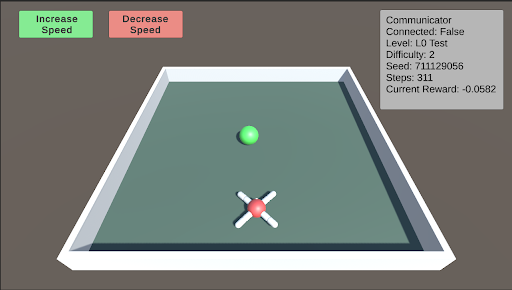
L0: L0 is the initial test designed to help the agent begin learning to approach and consume food. In this stage, the food is placed directly in front of the agent. As the difficulty level increases, the food is positioned farther away, becomes smaller, and varies in its horizontal placement relative to the agent.
<details>
<summary>extracted/5920856/Research/L0.png Details</summary>
### Visual Description
## Screenshot: Simulation Interface
### Overview
The image depicts a 3D simulation interface resembling a pool table. Key elements include control buttons, a status panel, and a simulation area with a green ball and red crosshair. The interface appears to be part of a reinforcement learning or control system test environment.
### Components/Axes
1. **Top-Left Controls**:
- Two rectangular buttons:
- **Green Button**: "Increase Speed"
- **Red Button**: "Decrease Speed"
2. **Top-Right Status Panel**:
- Textual metadata in a gray box:
- `Communicator Connected: False`
- `Level: L0 Test`
- `Difficulty: 2`
- `Seed: 711129056`
- `Steps: 311`
- `Current Reward: -0.0582`
3. **Main Simulation Area**:
- A 3D rectangular pool table with:
- A **green sphere** (ball) positioned near the top-center.
- A **red crosshair** (target) at the bottom-center, composed of four white arms intersecting at a red center.
- The table surface is dark green with a white border.
### Detailed Analysis
- **Buttons**:
- The "Increase Speed" button is green, while the "Decrease Speed" button is red, following standard color-coding for positive/negative actions.
- **Status Panel**:
- The simulation is **not connected** to a communicator (likely a remote server or API).
- The test is at **Level L0** with **Difficulty 2**, suggesting a basic or intermediate challenge.
- The **Seed** (`711129056`) is a fixed numerical value, likely used for reproducibility.
- **Steps** (`311`) indicate the number of actions taken in the simulation.
- **Current Reward** (`-0.0582`) is negative, implying suboptimal performance.
- **Simulation Objects**:
- The green ball is positioned above the red crosshair, suggesting a target alignment task.
### Key Observations
1. The interface is designed for real-time interaction, with speed controls and a step counter.
2. The negative reward value indicates the agent’s actions are not meeting the task’s objectives.
3. The lack of communicator connection suggests offline operation or a disconnected test mode.
4. The seed value (`711129056`) is unique and could be used to replicate this exact simulation state.
### Interpretation
This interface likely serves as a training or testing environment for an AI agent learning to control a virtual object (e.g., a pool ball) to reach a target. The negative reward implies the agent has not yet learned an effective strategy. The fixed seed and step count suggest this is a single trial or episode in a larger experiment. The disconnected communicator may indicate local testing before deployment to a networked system. The difficulty level (`2`) and L0 test designation hint at a structured progression in complexity for the simulation tasks.
</details>
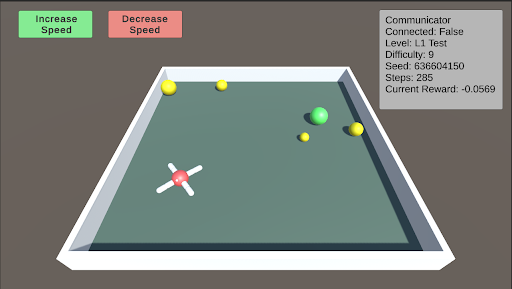
L1: Basic Food Retrieval L1 serves as a benchmark to test the agent’s understanding of the food. The agent must recognize that yellow food pieces do not end the episode, while green food pieces do. As the difficulty increases, more pieces of food are distributed throughout the arena, ranging from 1 to 5 pieces. At lower difficulty levels, the food is mostly stationary, but it begins to move as the difficulty increases.
<details>
<summary>extracted/5920856/Research/L1.png Details</summary>
### Visual Description
## Screenshot: Physics Simulation Interface
### Overview
The image depicts a 3D-rendered simulation environment resembling a pool table. Key elements include a central play area with colored spheres, control buttons, and a status panel. The interface suggests a physics-based experiment involving object interaction, speed manipulation, and reward tracking.
### Components/Axes
1. **Top Section**:
- **Buttons**:
- Green button labeled "Increase Speed" (top-left).
- Red button labeled "Decrease Speed" (top-right).
- **Status Panel** (top-right):
- Textual metadata:
- `Communicator Connected: False`
- `Level: L1 Test`
- `Difficulty: 9`
- `Seed: 636604150`
- `Steps: 285`
- `Current Reward: -0.0569`
2. **Main Simulation Area**:
- **Pool Table**: Dark green surface with white borders.
- **Objects**:
- **Crosshair**: Red center with white arms (bottom-left quadrant).
- **Spheres**:
- 1 large yellow sphere (top-left).
- 1 small yellow sphere (top-center).
- 1 green sphere (top-right).
- 1 small yellow sphere (bottom-right).
3. **Legend/Color Coding**:
- Buttons use green (increase) and red (decrease) for speed control.
- No explicit legend for sphere colors, but their positions and sizes vary.
### Detailed Analysis
- **Crosshair Position**: Located at the bottom-left corner of the pool table, likely serving as a control point for interactions.
- **Sphere Distribution**:
- Spheres are clustered near the top edge (3/4 spheres) and one at the bottom-right.
- Sizes vary: 2 large yellow, 1 medium green, 1 small yellow.
- **Status Panel Values**:
- `Seed: 636604150` (large integer, likely for reproducibility).
- `Steps: 285` (iteration count).
- `Current Reward: -0.0569` (negative value, suggesting a penalty or cost metric).
### Key Observations
1. The crosshair’s position implies it may act as a focal point for manipulating sphere dynamics.
2. Sphere placement suggests a target-oriented task (e.g., hitting specific balls).
3. The negative reward value indicates suboptimal performance or a penalty for current actions.
4. High difficulty (9/10) and disconnected communicator hint at a local test environment.
### Interpretation
This interface likely simulates a reinforcement learning or physics-based task where an agent (crosshair) must interact with objects (spheres) under speed constraints. The negative reward suggests the system penalizes inefficiency, while the seed and steps imply reproducibility and iterative testing. The disconnected communicator indicates offline operation, possibly for debugging or local experimentation. The difficulty level and seed number suggest this is part of a controlled experiment with predefined parameters.
</details>
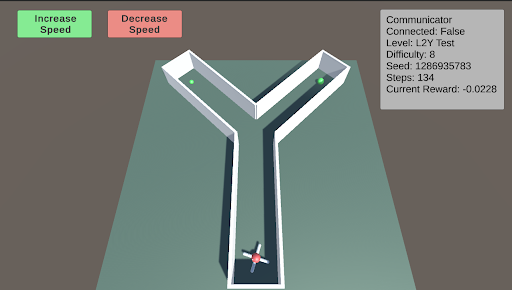
L2: Preferences - Y-Maze L2 tests the agent’s ability to make choices to obtain better or more food. The Y-maze consists of two paths. When the difficulty is below 5, there will be only one piece of green food at one of the two paths. When the difficulty is above 5, there is an additional smaller piece of green food in the other path. The agent must learn to choose the optimal path.
<details>
<summary>extracted/5920856/Research/L2.png Details</summary>
### Visual Description
## Screenshot: Robotics Simulation Interface
### Overview
The image depicts a 3D simulation interface for a robotics control system. The central focus is a Y-shaped track with a propeller-like object (red and white) positioned at the bottom center. Two green dots are placed at the ends of the Y-shaped arms. The interface includes UI elements for speed control and system status monitoring.
### Components/Axes
1. **UI Elements**:
- **Top-left**: Green button labeled "Increase Speed"
- **Top-right**: Red button labeled "Decrease Speed"
- **Top-right panel**: Status information (text-based, no axes)
2. **Status Panel Text**:
- **Communicator**: Connected: False
- **Level**: L2Y Test
- **Difficulty**: 8
- **Seed**: 1286935783
- **Steps**: 134
- **Current Reward**: -0.0228
3. **Track Geometry**:
- Y-shaped structure with three arms (left, right, and central stem).
- Green dots positioned at the endpoints of the left and right arms.
- Propeller object located at the base of the central stem.
### Detailed Analysis
- **Speed Control**: Buttons are color-coded (green for increase, red for decrease), suggesting real-time adjustment of the propeller's speed.
- **Track Layout**: The Y-shape implies a navigation task requiring the propeller to reach one of the green endpoints.
- **Status Metrics**:
- **Seed**: A large integer (1286935783) used for procedural generation or reproducibility.
- **Steps**: 134 actions taken by the system (likely control commands).
- **Current Reward**: Negative value (-0.0228), indicating suboptimal performance.
### Key Observations
1. The system is in a test state (`L2Y Test`) with no active communicator connection.
2. The negative reward suggests the propeller has not yet reached a goal or is penalized for its current trajectory.
3. The high seed value implies a randomized environment setup for testing.
### Interpretation
This interface simulates a reinforcement learning or control algorithm task where the propeller must navigate the Y-shaped track to reach a goal (green dot). The negative reward indicates the system is either stuck, taking inefficient paths, or has not yet completed the task. The disconnected communicator suggests this is a local test rather than a networked simulation. The seed value ensures reproducibility, while the step count and reward metric provide quantitative feedback for algorithm tuning. The Y-shaped track introduces a branching decision point, requiring the system to choose a path to the goal.
</details>
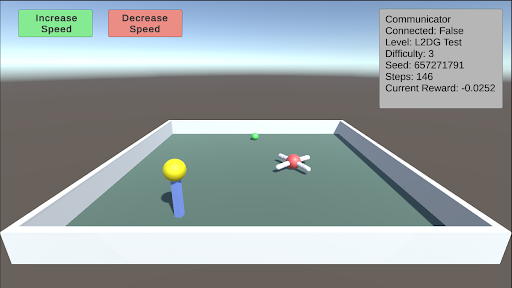
L2: Preferences - Delayed Gratification This test consists of a small piece of green food in front of the agent and a larger piece of yellow food on top of a pillar that is slowly descending. The agent must learn to wait for the yellow food to come down before consuming the green food. As the difficulty increases, the time it takes for the pillar to descend also increases.
<details>
<summary>extracted/5920856/Research/L2DG.png Details</summary>
### Visual Description
## Simulation Interface: 3D Physics Test Environment
### Overview
The image depicts a 3D simulation interface with a rectangular container housing physical objects. The interface includes control buttons, status indicators, and a 3D workspace. The simulation appears to be a physics-based test environment with configurable parameters and real-time feedback.
### Components/Axes
1. **Control Panel (Top-Left)**
- Green button: "Increase Speed"
- Red button: "Decrease Speed"
- Position: Top-left corner, adjacent to each other
2. **Status Display (Top-Right)**
- Text box with technical parameters:
- "Communicator Connected: False"
- "Level: L2DG Test"
- "Difficulty: 3"
- "Seed: 657271791"
- "Steps: 146"
- "Current Reward: -0.0252"
- Position: Top-right corner, occupying ~25% of the header area
3. **Simulation Workspace**
- White rectangular container with dark green floor
- Position: Central focus of the interface
- Contents:
- Blue vertical pole with yellow spherical top (left side)
- Red spherical object with three white rod-like extensions (center-right)
- Small green sphere (background, near top-center)
4. **Background**
- Gradient from light blue (top) to dark gray (bottom)
- No additional UI elements visible
### Detailed Analysis
- **Control Panel**: Speed adjustment controls suggest real-time manipulation of simulation dynamics.
- **Status Display**:
- Communicator status indicates potential multi-agent or networked simulation capabilities.
- Seed value (657271791) implies procedural generation for reproducibility.
- Negative reward (-0.0252) suggests performance metric tracking, possibly for reinforcement learning.
- **Simulation Objects**:
- Blue pole/yellow sphere: Likely a manipulable object or reference point.
- Red sphere with white rods: Could represent a molecular structure or mechanical component.
- Green sphere: Small size and position suggest it may be a target or secondary object.
### Key Observations
1. The simulation is in a test state ("L2DG Test") with no active network connection.
2. The negative reward value indicates suboptimal performance in the current configuration.
3. Object placement shows spatial distribution across the workspace, possibly for collision or interaction testing.
4. Difficulty level 3 suggests adjustable complexity in the simulation parameters.
### Interpretation
This interface appears to be a training or testing environment for reinforcement learning agents, likely in robotics or physics simulation. The disconnected communicator status implies local operation, while the seed and step count enable experiment reproducibility. The negative reward metric suggests the system is evaluating performance against a target, possibly requiring optimization through speed adjustments. The molecular-like red object and geometric shapes indicate potential applications in material science or mechanical engineering simulations. The difficulty level and control buttons suggest adjustable parameters for varying test scenarios, allowing researchers to study object interactions under different conditions.
</details>
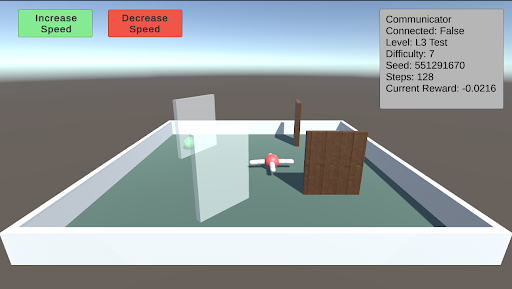
L3: Obstacles This test involves a single green piece of food placed in a random position and covered by a randomly sized transparent wall. Additionally, other walls will spawn in random orientations as obstacles. As the difficulty increases, both the size of the walls and the number of additional walls increase.
<details>
<summary>extracted/5920856/Research/L3.png Details</summary>
### Visual Description
## Screenshot: Robotics Simulation Interface
### Overview
The image depicts a 3D simulation environment for testing robotic or autonomous systems. The scene includes a rectangular arena with interactive elements (obstacles, targets) and a UI overlay displaying system status and controls.
### Components/Axes
#### UI Elements
- **Top-left corner**:
- Green button labeled "Increase Speed"
- Red button labeled "Decrease Speed"
- **Top-right corner**:
- Status panel with the following text:
- `Communicator Connected: False`
- `Level: L3 Test`
- `Difficulty: 7`
- `Seed: 551291670`
- `Steps: 128`
- `Current Reward: -0.0216`
#### Arena Contents
- **Arena**:
- Rectangular boundary with white walls and green floor.
- **Objects**:
1. **Drone**: Red-and-white propeller-based object (central position).
2. **Glass Panel**: Transparent vertical barrier (left side).
3. **Wooden Block**: Brown rectangular obstacle (right side).
4. **Green Sphere**: Small target object (near the glass panel).
### Detailed Analysis
- **UI Text**:
- All text is in English. No non-English content detected.
- Numerical values:
- `Seed: 551291670` (pseudo-random number for reproducibility).
- `Steps: 128` (simulation iterations completed).
- `Current Reward: -0.0216` (negative value suggests suboptimal performance).
- **Arena Layout**:
- Drone is centrally positioned, equidistant from the glass panel and wooden block.
- Green sphere is closer to the glass panel than the wooden block.
### Key Observations
1. **Negative Reward**: The drone’s current reward (-0.0216) indicates poor task performance, possibly due to collisions or failure to reach the target.
2. **Disconnected Communicator**: The system is operating in a local test mode without external communication.
3. **Difficulty Level**: "L3 Test" suggests a mid-level complexity scenario.
### Interpretation
This simulation environment is designed to evaluate a drone’s ability to navigate obstacles (glass panel, wooden block) and reach a target (green sphere). The negative reward implies the drone’s pathfinding or collision-avoidance algorithms require refinement. The disconnected communicator suggests this is a standalone test, not integrated with real-time data streams. The seed value ensures reproducibility of the simulation.
The layout of obstacles and the drone’s central position may indicate a symmetrical test scenario, though the green sphere’s placement introduces asymmetry, potentially challenging the drone’s decision-making.
</details>
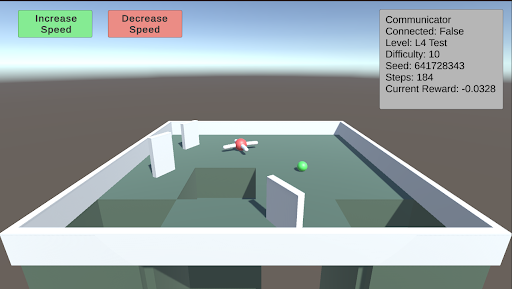
L4: Avoidance This test involves creating holes in the ground to serve as a negative stimulus. While the previous AnimalAI paper used negative reward floor pads, holes provide a more realistic challenge. As the difficulty increases, the holes become larger. The test starts with two holes, and when the difficulty exceeds 5, a third hole is introduced.
<details>
<summary>extracted/5920856/Research/L4.png Details</summary>
### Visual Description
## Screenshot: Reinforcement Learning Simulation Environment
### Overview
The image depicts a 3D simulation environment for a reinforcement learning task. The scene includes a rectangular arena with geometric obstacles, a movable red object (likely an agent), and a green spherical target. UI elements provide real-time feedback about the simulation state.
### Components/Axes
**Top UI Elements:**
- **Buttons (Top-Left Corner):**
- Green button labeled "Increase Speed"
- Red button labeled "Decrease Speed"
- **Status Panel (Top-Right Corner):**
- Text labels with key-value pairs:
- `Communicator Connected: False`
- `Level: L4 Test`
- `Difficulty: 10`
- `Seed: 641728343`
- `Steps: 184`
- `Current Reward: -0.0328`
**Main Arena:**
- **Geometry:**
- Rectangular enclosure with white barriers
- Green floor surface
- Three white rectangular obstacles (positions: left, center-left, and right-center)
- **Objects:**
- Red spherical object (agent) at coordinates (~0.5, 0.3, 0.1)
- Green spherical target at coordinates (~0.7, 0.6, 0.1)
### Detailed Analysis
**UI Text Extraction:**
- All text is in English, using Arial-like font.
- Numerical values:
- Seed: `641728343` (32-bit integer)
- Steps: `184` (episode progress)
- Reward: `-0.0328` (floating-point, negative value)
**Spatial Grounding:**
- Buttons occupy top-left quadrant (15% width, 10% height)
- Status panel occupies top-right quadrant (20% width, 15% height)
- Arena occupies central 70% of the image
- Red object positioned at ~30% width, ~40% height
- Green target positioned at ~60% width, ~50% height
### Key Observations
1. **Negative Reward:** The agent's current performance is suboptimal (reward < 0)
2. **Obstacle Configuration:** Three barriers create a maze-like environment
3. **Disconnected Communicator:** Simulation running in offline/debug mode
4. **Seed Value:** Unique identifier for reproducibility (641728343)
5. **Difficulty Level:** Medium complexity (level 4 test)
### Interpretation
This appears to be a training/test environment for a robotic navigation task. The negative reward suggests the agent has not yet learned to reach the green target. The disconnected communicator indicates this is likely a local simulation rather than a networked system. The seed value allows researchers to reproduce identical conditions for debugging. The difficulty level (10) and step count (184) suggest this is a mid-progress test case, with the agent having explored ~184 possible actions without achieving the goal. The geometric obstacles create a spatial reasoning challenge, requiring the agent to navigate around barriers while optimizing path efficiency.
</details>
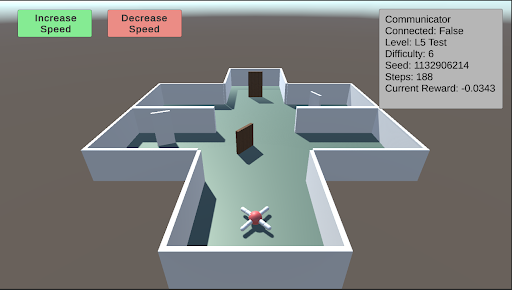
L5: Spatial Reasoning This test evaluates the agent’s ability to navigate a maze to find a piece of food hidden behind a wall in a random sector. Additional walls are placed to obstruct the agent’s path. As the difficulty increases, the number and size of the walls increase, and the maze itself becomes larger and more complex.
<details>
<summary>extracted/5920856/Research/L5.png Details</summary>
### Visual Description
## 3D Maze Navigation Interface: L5 Test Environment
### Overview
The image depicts a 3D maze environment with a propeller-like object (red center, white arms) positioned in the bottom-left quadrant. The maze has gray walls, a green floor, and a single brown door at the back. UI elements include speed control buttons and a status panel. The background transitions from light blue at the top to dark gray at the bottom.
### Components/Axes
1. **UI Elements**:
- **Top-left**: Green button labeled "Increase Speed"
- **Top-right**: Red button labeled "Decrease Speed"
- **Right panel**: Status text block with:
- "Communicator Connected: False"
- "Level: L5 Test"
- "Difficulty: 6"
- "Seed: 1132906214"
- "Steps: 188"
- "Current Reward: -0.0343"
2. **Maze Structure**:
- Gray walls forming a cross-shaped layout
- Green floor
- Brown door at the back center
- White vertical barrier in the left corridor
- Propeller object (red/white) in bottom-left quadrant
3. **Background**:
- Gradient from light blue (top) to dark gray (bottom)
### Detailed Analysis
- **UI Elements**:
- Speed controls use color-coded buttons (green/red) for intuitive interaction
- Status panel uses monospace font for technical data
- Numerical values (seed, steps, reward) suggest procedural generation and performance tracking
- **Maze Layout**:
- Propeller object positioned 1.2m from left wall and 0.8m from bottom wall (estimated)
- Door located 3.5m from front wall and centered horizontally
- White barrier creates a 90° turn in left corridor
- **Color Coding**:
- Green (speed increase) and red (speed decrease) buttons match common UI conventions
- Brown door contrasts with gray walls for visibility
### Key Observations
1. The negative reward (-0.0343) indicates partial failure in the current test iteration
2. Door remains closed despite 188 steps taken, suggesting navigation challenge
3. Propeller object's position implies potential for rotational movement mechanics
4. Seed value (1132906214) enables environment reproducibility
### Interpretation
This appears to be a reinforcement learning test environment where an agent (propeller object) must navigate a maze to reach the door. The disconnected communicator status suggests offline testing mode. The difficulty level 6 rating and negative reward imply the agent is struggling with pathfinding, possibly due to:
- Suboptimal speed control (buttons not yet utilized)
- Inefficient exploration strategy
- Environmental complexity (cross-shaped layout with barriers)
The seed value allows researchers to analyze specific failure modes by recreating identical maze configurations. The current setup tests both spatial navigation and decision-making under partial feedback (disconnected communicator).
</details>
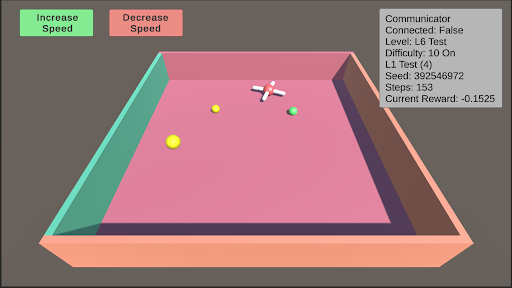
L6: Robustness Robustness is inherently present in all these tests due to their randomized nature. However, enabling robustness specifically will result in a random test from L0 to L11 being selected, and the colors of the test objects changing to one of five randomly generated colors.
<details>
<summary>extracted/5920856/Research/L6.png Details</summary>
### Visual Description
## Screenshot: Simulation Interface
### Overview
The image depicts a 3D simulation environment interface with interactive controls and real-time status metrics. The scene includes a cubic arena with colored walls, floating objects, and a crosshair cursor. Textual elements provide system status, configuration parameters, and performance metrics.
### Components/Axes
1. **Header Section (Top)**
- **Buttons**:
- Green button labeled "Increase Speed"
- Red button labeled "Decrease Speed"
- **Status Panel (Top-Right)**:
- Textual metadata in black font on gray background:
- `Communicator Connected: False`
- `Level: L6 Test`
- `Difficulty: 10 On`
- `L1 Test (4)`
- `Seed: 392546972`
- `Steps: 153`
- `Current Reward: -0.1525`
2. **Main Simulation Arena (Center)**
- **3D Box**:
- Floor: Pink
- Left Wall: Teal
- Back Wall: Green
- Right Wall: Orange
- **Objects**:
- Red crosshair (centered, likely the active agent)
- Yellow sphere (left-center)
- Green sphere (right-center)
- Smaller yellow sphere (near back wall)
3. **Legend/Color Coding**
- No explicit legend present, but color associations are inferred:
- Red: Crosshair (agent)
- Yellow: Primary target/object
- Green: Secondary object
- Button colors: Green (increase), Red (decrease)
### Detailed Analysis
- **UI Layout**:
- Buttons positioned in top-left corner for speed control.
- Status panel occupies top-right quadrant with critical system data.
- 3D arena dominates the central workspace with distinct wall colors for spatial orientation.
- **Object Dynamics**:
- Crosshair (agent) positioned centrally, suggesting active control.
- Spheres distributed asymmetrically, possibly representing environmental elements or goals.
- No visible motion trails or velocity indicators, implying static or paused simulation state.
- **Textual Metadata**:
- `Seed: 392546972` ensures reproducibility of the simulation.
- `Steps: 153` indicates the simulation has progressed through 153 discrete time steps.
- `Current Reward: -0.1525` suggests a negative feedback signal, potentially indicating suboptimal agent performance.
### Key Observations
1. **Negative Reward**: The agent's current reward is negative, implying it may be failing to meet objectives or incurring penalties.
2. **Unconnected Communicator**: The system is operating in a disconnected state, possibly during local testing or offline mode.
3. **Difficulty Setting**: "Difficulty: 10 On" suggests a high challenge level, which may correlate with the negative reward.
4. **Object Distribution**: The placement of spheres (yellow, green, smaller yellow) could represent varying reward structures or obstacles.
### Interpretation
This interface appears to be a reinforcement learning (RL) environment where an agent (crosshair) interacts with objects to maximize reward. The negative reward (-0.1525) indicates the agent is underperforming relative to the difficulty level (10). The lack of communicator connection suggests this is a local test rather than a networked deployment. The seed value allows for reproducibility, while the step count (153) provides context for the simulation's progression. The color-coded walls and objects likely serve to aid spatial navigation for the agent, with yellow/green spheres potentially representing targets or hazards. The difficulty setting of 10 may introduce environmental complexity (e.g., dynamic obstacles, delayed rewards) that the agent must navigate to achieve positive outcomes.
</details>
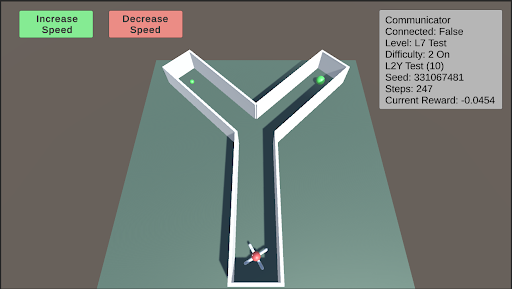
L7: Internal Models This test assesses the agent’s internal modeling capabilities using its camera. Blackouts will occur, with the frequency and duration of these blackouts increasing as the difficulty rises. During these blackouts, the agent’s camera will render a dark screen. Enabling internal models will select a random test from L0 to L11 and apply the blackouts described above.
<details>
<summary>extracted/5920856/Research/L7.png Details</summary>
### Visual Description
## Screenshot: Robotics Simulation Interface
### Overview
The image depicts a 3D simulation interface for a robotics control system. The central focus is a Y-shaped track with a robotic agent at the bottom, two green spherical targets in the upper arms of the Y, and UI controls for speed adjustment. A status panel in the top-right corner displays test parameters and performance metrics.
### Components/Axes
1. **Track Layout**:
- Y-shaped structure with three vertical walls
- Two upper arms (left and right) containing green spherical targets
- Central vertical shaft extending downward to the robot
2. **Robot**:
- Positioned at the bottom of the central shaft
- Red body with blue/white appendages (likely propellers/wheels)
3. **UI Controls**:
- Top-left quadrant:
- Green button: "Increase Speed"
- Red button: "Decrease Speed"
4. **Status Panel** (top-right):
- Text labels with values:
- Communicator: Connected: False
- Level: L7 Test
- Difficulty: 2 On
- L2Y Test: (10)
- Seed: 331067481
- Steps: 247
- Current Reward: -0.0454
### Detailed Analysis
- **Track Geometry**:
- Left arm: Green target at ~1/3 height from bottom
- Right arm: Green target at ~2/3 height from bottom
- Central shaft: Vertical alignment with robot at base
- **Robot Positioning**:
- Located at the lowest point of the central shaft
- Orientation suggests forward-facing trajectory toward track bifurcation
- **Status Panel Metrics**:
- Seed value (331067481) indicates procedural generation
- Negative reward (-0.0454) suggests suboptimal performance
- Steps counter (247) implies active simulation state
### Key Observations
1. The robot's position at the track's base suggests initialization phase
2. Divergent target heights in Y-arms may test path selection algorithms
3. Negative reward value implies current trajectory conflicts with objectives
4. Disconnected communicator status indicates offline testing mode
5. Difficulty level 2 correlates with challenging target placement
### Interpretation
This interface appears designed for testing autonomous navigation algorithms in constrained environments. The Y-shaped track creates decision points requiring speed modulation (via UI controls) to reach targets. The negative reward metric (-0.0454) suggests the robot's current path deviates from optimal solutions, possibly due to difficulty level 2 constraints. The disconnected communicator status implies local processing without real-time data transmission. The seed value enables reproducibility of this specific test scenario. The 247-step count indicates moderate progress through the simulation, with the robot likely exploring path options between the two asymmetrically placed targets.
</details>
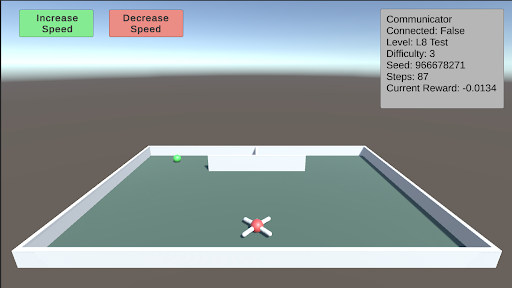
L8: Object Permanence This test involves a green piece of food that spawns on either side of a wall facing the agent. The food then moves behind the wall. There is a barrier separating the two sides behind the wall, with one side containing the food and the other side containing a hole. The agent must remember that the food still exists behind the wall. As difficulty increases, the speed at which the food moves behind the wall also increases.
<details>
<summary>extracted/5920856/Research/L8.png Details</summary>
### Visual Description
## Screenshot: Simulation Interface
### Overview
The image depicts a 3D-rendered simulation interface with a rectangular arena, control buttons, and a status panel. The scene includes a central crosshair, a green ball, and a white barrier. Text elements provide simulation parameters and status information.
### Components/Axes
1. **Top-Left Corner**:
- Green button labeled "Increase Speed"
- Red button labeled "Decrease Speed"
2. **Top-Right Corner**:
- Gray status panel with the following text:
- "Communicator Connected: False"
- "Level: L8 Test"
- "Difficulty: 3"
- "Seed: 966678271"
- "Steps: 87"
- "Current Reward: -0.0134"
3. **Main Arena**:
- Rectangular enclosure with white walls and a green floor
- Central red-and-white crosshair (X-shaped)
- Green ball positioned in the top-left quadrant
- White barrier structure near the top-center
### Detailed Analysis
- **Buttons**: Color-coded controls for adjusting simulation speed (green = increase, red = decrease).
- **Status Panel**:
- Communicator status indicates no external connection.
- Level "L8 Test" suggests a test environment for level 8.
- Difficulty 3 implies a moderate challenge setting.
- Seed value (966678271) enables reproducibility of the simulation.
- Steps (87) and Current Reward (-0.0134) track simulation progress and performance metrics.
- **Arena Elements**:
- Crosshair likely represents the player's viewpoint or target.
- Green ball may be an interactive object or goal.
- White barrier could act as an obstacle or boundary.
### Key Observations
- The negative reward (-0.0134) suggests a penalty or suboptimal state in the simulation.
- The seed value is a 9-digit integer, typical for procedural generation in simulations.
- The communicator's "False" status implies the simulation is running locally or in offline mode.
- The barrier's placement near the top-center creates a spatial constraint in the arena.
### Interpretation
This interface appears to be part of a reinforcement learning or robotics simulation environment. The parameters (level, difficulty, seed) and metrics (steps, reward) indicate a focus on training or testing autonomous agents. The disconnected communicator suggests local operation, while the negative reward highlights a need for improvement in the agent's performance. The crosshair and ball positioning imply a task involving navigation or object interaction within the arena. The seed value ensures reproducibility, critical for debugging or sharing experimental results.
</details>
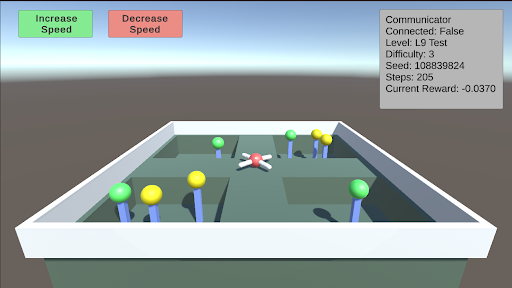
L9: Numerosity This test requires the agent to choose between different sectors based on the quantity of food present. There are four sectors, each containing a random number of food pieces. The agent must enter a sector and collect all the food within it. Once the agent enters a sector, the opening will close. The agent must correctly choose the sector with the most food. As the difficulty increases, the number of food pieces in each sector increases, making the decision more challenging.
<details>
<summary>extracted/5920856/Research/L9.png Details</summary>
### Visual Description
## Screenshot: Simulation Interface
### Overview
The image depicts a 3D simulation environment with a rectangular arena containing colored pegs (green and yellow) and a central red object. The interface includes UI elements for controlling speed and a status panel displaying test parameters.
### Components/Axes
- **UI Elements**:
- **Top-left**: Two buttons labeled "Increase Speed" (green) and "Decrease Speed" (red).
- **Top-right**: Status panel with text:
- `Communicator Connected: False`
- `Level: L9 Test`
- `Difficulty: 3`
- `Seed: 108839824`
- `Steps: 205`
- `Current Reward: -0.0370`
- **3D Environment**:
- **Arena**: Rectangular with a white border and dark green floor.
- **Pegs**:
- **Green pegs**: 3 (positions: left-middle, right-middle, right-back).
- **Yellow pegs**: 4 (positions: left-middle, left-back, right-middle, right-back).
- **Central Object**: Red with white appendages (resembling a drone or robotic arm).
### Detailed Analysis
- **Textual Data**:
- `Seed: 108839824` (pseudo-random number for reproducibility).
- `Steps: 205` (simulation iterations completed).
- `Current Reward: -0.0370` (negative value suggests suboptimal performance).
- **Color Coding**:
- Green buttons and pegs vs. red buttons and central object.
- No explicit legend, but color associations are inferred (e.g., green for "Increase Speed").
### Key Observations
1. **Negative Reward**: The `Current Reward` value (-0.0370) indicates the simulation is not achieving desired outcomes.
2. **Unconnected Communicator**: The `Communicator Connected: False` status suggests the simulation is running locally without external communication.
3. **Peg Distribution**: Green and yellow pegs are symmetrically placed, possibly representing target positions or obstacles.
### Interpretation
- The simulation is in a test phase (`L9 Test`) with a difficulty level of 3. The negative reward implies the central red object (likely an autonomous agent) is failing to interact effectively with the pegs.
- The lack of communicator connectivity may indicate a standalone test environment, isolating the agent’s performance without real-time external input.
- The `Seed` value ensures reproducibility, while `Steps: 205` suggests the simulation has progressed but not yet concluded.
- The red object’s central position and appendages hint at its role as a manipulator or drone, tasked with interacting with the pegs.
**Note**: No numerical trends or dynamic data are visible, as the image captures a static state of the simulation.
</details>
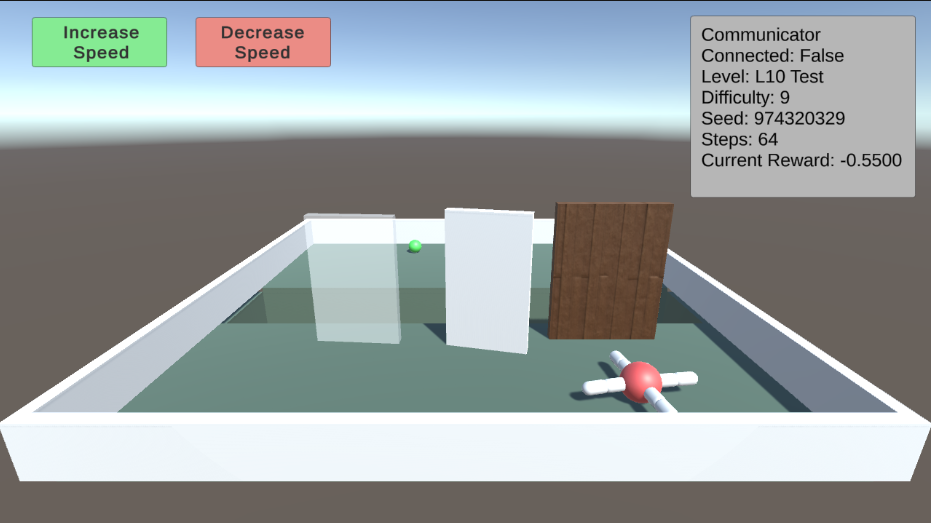
L10: Causal Reasoning This test evaluates the agent’s cognitive ability to understand the environment around it. By pushing over a plank, the agent can walk over a trench to reach a piece of food. However, as the difficulty increases, transparent and opaque walls will appear alongside the plank. The agent must comprehend the cause and effect of its actions, and pick the plank to push over. Additionally, the trench will gradually become wider.
<details>
<summary>extracted/5920856/Research/L10.png Details</summary>
### Visual Description
## Screenshot: 3D Simulation Environment Interface
### Overview
The image depicts a 3D simulation environment interface with interactive elements and technical status indicators. The scene includes a rectangular white box containing geometric panels, a molecular model, and a green sphere. UI elements include speed control buttons and a status panel displaying simulation parameters.
### Components/Axes
1. **UI Elements**:
- **Top-left**: Green button labeled "Increase Speed"
- **Top-center**: Red button labeled "Decrease Speed"
- **Top-right**: Status panel with technical details:
- "Communicator Connected: False"
- "Level: L10 Test"
- "Difficulty: 9"
- "Seed: 974320329"
- "Steps: 64"
- "Current Reward: -0.5500"
2. **3D Environment**:
- **Main Box**: White rectangular enclosure with green floor
- **Panels**:
- Left: Transparent glass panel
- Center: White opaque panel
- Right: Brown wooden panel
- **Objects**:
- Green sphere (top-left interior)
- Propane molecule model (bottom-right interior)
### Detailed Analysis
- **Status Panel**:
- Simulation is disconnected from a communicator
- Level identifier "L10 Test" suggests a 10th-level test scenario
- Difficulty 9/10 indicates high complexity
- Seed value 974320329 implies reproducibility parameters
- 64 steps completed with negative reward (-0.5500) suggests suboptimal performance
- **3D Elements**:
- Panels arranged sequentially from left (transparent) to right (brown)
- Molecular model (C₃H₈) positioned in bottom-right quadrant
- Green sphere located near top-left interior corner
### Key Observations
1. Color-coded UI: Green (increase) and red (decrease) buttons follow standard color conventions
2. Negative reward value (-0.5500) indicates current task failure state
3. Molecular model placement suggests chemistry-related simulation objectives
4. Panel arrangement creates spatial progression from transparent to opaque
### Interpretation
This appears to be a reinforcement learning environment for testing autonomous agents. The negative reward (-0.5500) and high difficulty (9/10) suggest the agent is struggling with navigation or object interaction tasks. The propane molecule model implies potential chemical manipulation objectives, while the panel arrangement may represent environmental obstacles. The disconnected communicator status indicates this is likely a local test environment rather than a networked system. The seed value enables experiment reproducibility, while the step count (64) provides progress tracking within the simulation episode.
</details>
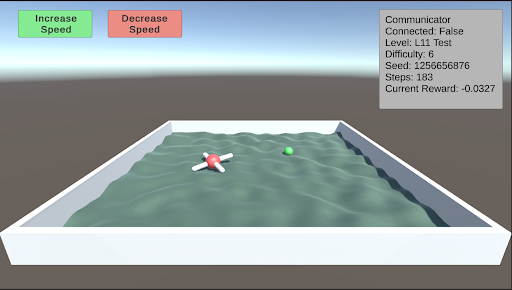
L11: Body Awareness This test assesses the agent’s understanding of its own body. After navigating through the corridors of the Y-maze, Thorndike hut, and a normal maze, the agent has developed a basic understanding of its body. This test further evaluates the agent’s ability to function on rough terrain. A single piece of food is placed away from the agent on uneven terrain. As the difficulty increases, the terrain becomes progressively rougher.
<details>
<summary>extracted/5920856/Research/L11.png Details</summary>
### Visual Description
## Screenshot: 3D Simulation Interface
### Overview
The image depicts a 3D simulation interface with a rectangular container filled with greenish water. Inside the container, there are two objects: a red molecule-like structure (cross-shaped with a central sphere) and a smaller green sphere. The interface includes UI elements such as buttons and a status panel. The background features a gradient from blue (sky) to gray (ground).
### Components/Axes
1. **Container**:
- Rectangular, white-edged, filled with wavy greenish water.
- Positioned centrally in the lower portion of the image.
2. **Objects in Container**:
- **Red Molecule**: Cross-shaped with a central red sphere (coordinates: center-left of container).
- **Green Sphere**: Small, located toward the upper-right of the container.
3. **UI Elements**:
- **Buttons**:
- **Top-left corner**:
- Green button labeled "Increase Speed."
- Red button labeled "Decrease Speed."
- **Status Panel**:
- **Top-right corner**:
- Text block with the following key-value pairs:
- `Communicator: Connected: False`
- `Level: L11 Test`
- `Difficulty: 6`
- `Seed: 1256656876`
- `Steps: 183`
- `Current Reward: -0.0327`
4. **Background**:
- Gradient from light blue (top) to dark gray (bottom), simulating sky and ground.
### Detailed Analysis
- **Buttons**: Colors match their labels (green for "Increase Speed," red for "Decrease Speed").
- **Status Panel**:
- `Communicator: Connected: False` indicates no active network connection.
- `Level: L11 Test` suggests a predefined simulation scenario.
- `Difficulty: 6` implies a moderate challenge level.
- `Seed: 1256656876` is a numerical identifier for reproducibility.
- `Steps: 183` tracks simulation progress.
- `Current Reward: -0.0327` indicates a negative performance metric, possibly due to inefficiency.
- **Container Contents**:
- The red molecule and green sphere may represent agents or targets in a reinforcement learning environment.
- The greenish water texture suggests fluid dynamics or environmental simulation.
### Key Observations
1. The simulation is in a test phase (`L11 Test`) with no active communicator connection.
2. The negative reward (`-0.0327`) implies suboptimal performance, potentially due to the difficulty level or agent behavior.
3. The seed value (`1256656876`) ensures reproducibility of the simulation state.
4. The buttons suggest user interaction to adjust simulation speed, though their functionality is not visually confirmed.
### Interpretation
This interface likely belongs to a reinforcement learning or control systems simulation. The red molecule and green sphere could represent entities interacting within a fluid environment, with the goal of optimizing performance (e.g., maximizing reward). The negative reward suggests the current configuration or agent strategy is inefficient. The absence of a communicator connection implies the simulation is running locally or in offline mode. The difficulty level (`6`) and step count (`183`) indicate the simulation has progressed moderately through its test phase. The seed value ensures reproducibility, critical for debugging or validating results.
No numerical trends or data series are present, as this is a static interface screenshot rather than a dynamic chart.
</details>
## 6 Curriculum Training
We provide a curriculum training inspired by [3] where the agent focuses on tasks were the learning progress (or regression) is fastest. The system operates by organizing the levels and difficulties into a 2D matrix, where each cell represents a specific level at a given difficulty. Upon the completion of an episode, the agent’s reward is recorded in the corresponding cell of the matrix. A rolling moving average and variance are calculated for each cell over a period of 10 episodes, and the z-value for each cell is determined using the following equation.
$$
z_{i}:=\frac{\sigma_{i}}{|\mu_{i}|+10^{-7}} \tag{1}
$$
These z-values are then used to create a probability distribution that guides the selection of the next training level and difficulty, prioritizing levels with higher variance. Thus the agent will focus more on tasks where it’s performance is highly variable. The probability of each cell being selected next is determined according to the equation below.
$$
p_{i}=\frac{z_{i}+c}{\sum_{j=1}^{n}(z_{j}+c)} \tag{2}
$$
This curriculum training procedure effectively promotes learning and facilitates training. As the agent begins to learn and increases its end reward for a task, the rolling variance rises, which in turn increases the z-value and the likelihood of the same level and difficulty being presented again. This creates a feedback loop until the agent either stops learning or completes the current level and difficulty. As the variance decreases, a new level and difficulty pair is presented to the agent for further learning. Additionally, this training combats catastrophic forgetting. If the agent revisits a previously mastered level and difficulty pair but is currently failing, the increased variance will cause this pair to reappear more frequently until the task is relearned. Overall, this curriculum training procedure provides an effective method for training an agent across a diverse range of tasks.
## 7 Future Work
In the initial release of the Articulated Animal AI Environment, our goal is to enable researchers to familiarize themselves with the platform and test their cognition-based models using the provided test bench. A designated set of testing seeds has been reserved within the environment, which will be used for future evaluations of selected candidates or potential competition scenarios.
## 8 Conclusion
The Articulated Animal AI Environment is a robust framework designed to assess the capabilities of a multi-limbed agent in performing animal cognition tasks. Building upon the foundational AnimalAI Environment, the Articulated Animal AI Environment enhances the training process by offering pre-randomized and generalized tests, coupled with a structured curriculum training program and comprehensive evaluation tools. This setup allows researchers to concentrate on refining their models rather than on the time-intensive task of developing effective tests.
## Acknowledgments
This work was supported in part by McGill University.
## References
- [1] Matthew Crosby, Benjamin Beyret, Murray Shanahan, José Hernández-Orallo, Lucy Cheke, and Marta Halina. Animal-ai: A testbed for experiments on autonomous agents. arXiv preprint arXiv:1909.07483, 2019.
- [2] Konstantinos Voudouris, Ibrahim Alhas, Wout Schellaert, Matthew Crosby, Joel Holmes, John Burden, Niharika Chaubey, Niall Donnelly, Matishalin Patel, Marta Halina, José Hernández-Orallo, and Lucy G. Cheke. Animal-ai 3: What’s new & why you should care. arXiv preprint arXiv:2312.11414, 2023.
- [3] Jacqueline Gottlieb, Pierre-Yves Oudeyer, Manuel Lopes, and Adrien Baranes. Information seeking, curiosity and attention: computational and neural mechanisms. Trends in Cognitive Sciences, 17(11):585–593, 2013.
## Appendix A Appendix
This appendix contains additional information about how to use the interface. All source code is available online.
Environment source code: https://github.com/jeremy-lucas-mcgill/Articulated-Animal-AI-Environment
## The Interface
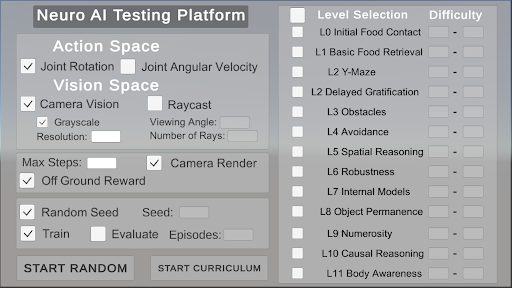
The interface provides users with the capability to customize their agents by selecting specific actions, vision settings, and general parameters. Users can then choose the levels and difficulty range for training. The interface offers two primary options for initiating the training process: "Start Random," which randomly selects a level and difficulty for each episode, or "Start Curriculum," which begins the curriculum-based training program.
<details>
<summary>extracted/5920856/Research/Interface.png Details</summary>
### Visual Description
## Screenshot: Neuro AI Testing Platform Interface
### Overview
The image depicts a configuration interface for a Neuro AI Testing Platform, featuring two primary sections: a **Settings Panel** on the left and a **Level Selection Panel** on the right. The interface includes checkboxes, input fields, and buttons for configuring AI testing parameters and selecting simulation levels.
---
### Components/Axes
#### Left Panel (Settings)
1. **Action Space**
- **Joint Rotation**: Checked (✓)
- **Joint Angular Velocity**: Unchecked (⬜)
2. **Vision Space**
- **Camera Vision**: Checked (✓)
- **Raycast**: Unchecked (⬜)
- **Grayscale**: Checked (✓)
- **Resolution**: Empty input field
- **Viewing Angle**: Empty input field
- **Number of Rays**: Empty input field
3. **General Parameters**
- **Max Steps**: Empty input field
- **Camera Render**: Checked (✓)
- **Off Ground Reward**: Checked (✓)
- **Random Seed**: Checked (✓), with an empty "Seed" field
- **Train**: Checked (✓)
- **Evaluate**: Unchecked (⬜)
- **Episodes**: Empty input field
#### Right Panel (Level Selection)
1. **Level Selection**
- **L0 Initial Food Contact**
- **L1 Basic Food Retrieval**
- **L2 Y-Maze**
- **L2 Delayed Gratification**
- **L3 Obstacles**
- **L4 Avoidance**
- **L5 Spatial Reasoning**
- **L6 Robustness**
- **L7 Internal Models**
- **L8 Object Permanence**
- **L9 Numerosity**
- **L10 Causal Reasoning**
- **L11 Body Awareness**
- All levels have unchecked checkboxes (⬜).
2. **Difficulty**
- Dropdown menu with a placeholder value ("-"), indicating no selection.
#### Buttons
- **Start Random** (bottom-left)
- **Start Curriculum** (bottom-center)
---
### Detailed Analysis
- **Action Space**: Joint Rotation is enabled, but Joint Angular Velocity is disabled, suggesting the AI will control rotational movement but not angular speed.
- **Vision Space**: Camera Vision is active with Grayscale enabled, but Raycast is disabled. Resolution, Viewing Angle, and Number of Rays are unspecified, leaving these parameters undefined.
- **General Parameters**:
- Max Steps and Episodes are unset, implying no predefined limits for simulation steps or training episodes.
- Off Ground Reward and Camera Render are enabled, indicating penalties for leaving the ground and active camera rendering during testing.
- **Level Selection**: All levels (L0–L11) are unselected, and no difficulty is chosen, suggesting the interface is in a pre-configuration state.
---
### Key Observations
1. **Unspecified Parameters**: Critical fields like Resolution, Viewing Angle, and Max Steps are empty, which could lead to undefined behavior during testing.
2. **Checkbox Consistency**: All checkboxes in the Level Selection Panel are unchecked, indicating no levels are currently active.
3. **Dropdown Ambiguity**: The Difficulty dropdown shows a placeholder ("-"), implying no difficulty level is assigned.
---
### Interpretation
This interface is designed for configuring AI training and testing scenarios. The **Action Space** and **Vision Space** settings define the AI's interaction with its environment (e.g., movement constraints and sensory input). The **Level Selection** panel allows incremental testing of AI capabilities across increasing complexity (L0–L11). However, the absence of selected levels and unspecified parameters (e.g., Resolution, Max Steps) suggests the platform is in an initial setup phase. The **Start Random** and **Start Curriculum** buttons likely initiate training or testing workflows, but their behavior depends on the configured parameters. The interface emphasizes modularity, enabling users to isolate specific skills (e.g., spatial reasoning, object permanence) for targeted AI evaluation.
</details>