# TPU-Gen: LLM-Driven Custom Tensor Processing Unit Generator
**Authors**:
- Ramtin Zand, Shaahin Angizi (New Jersey Institute of Technology, Newark, NJ, USA,
University of South Carolina, Columbia, SC, USA)
- E-mails: {dv336,shaahin.angizi}@njit.edu
## Abstract
The increasing complexity and scale of Deep Neural Networks (DNNs) necessitate specialized tensor accelerators, such as Tensor Processing Units (TPUs), to meet various computational and energy efficiency requirements. Nevertheless, designing optimal TPU remains challenging due to the high domain expertise level, considerable manual design time, and lack of high-quality, domain-specific datasets. This paper introduces TPU-Gen, the first Large Language Model (LLM) based framework designed to automate the exact and approximate TPU generation process, focusing on systolic array architectures. TPU-Gen is supported with a meticulously curated, comprehensive, and open-source dataset that covers a wide range of spatial array designs and approximate multiply-and-accumulate units, enabling design reuse, adaptation, and customization for different DNN workloads. The proposed framework leverages Retrieval-Augmented Generation (RAG) as an effective solution for a data-scare hardware domain in building LLMs, addressing the most intriguing issue, hallucinations. TPU-Gen transforms high-level architectural specifications into optimized low-level implementations through an effective hardware generation pipeline. Our extensive experimental evaluations demonstrate superior performance, power, and area efficiency, with an average reduction in area and power of 92% and 96% from the manual optimization reference values. These results set new standards for driving advancements in next-generation design automation tools powered by LLMs.
## I Introduction
The rising computational demands of Deep Neural Networks (DNNs) have driven the adoption of specialized tensor processing accelerators, such as Tensor Processing Units (TPUs). These accelerators, characterized by low global data transfer, high clock frequencies, and deeply pipelined Processing Elements (PEs), excel in accelerating training and inference tasks by optimizing matrix multiplication [1]. Despite their effectiveness, the complexity and expertise required for their design remain significant barriers. Static accelerator design tools, such as Gemmini [2] and DNNWeaver [3], address some of these challenges by providing templates for systolic arrays, data flows, and software ecosystems [4, 5]. However, these tools still face limitations, including complex programming interfaces, high memory usage, and inefficiencies in handling diverse computational patterns [6, 7]. These constraints underscore the need for innovative solutions to streamline hardware design processes.
Large Language Models (LLMs) have emerged as a promising solution, offering the ability to generate hardware descriptions from high-level design intents. LLMs can potentially reduce the expertise and time required for DNN hardware development by encapsulating vast domain-specific knowledge. However, realizing this potential requires overcoming three critical challenges. First, existing datasets are often limited in size and detail, hindering the generation of reliable designs [8, 9]. Second, while fine-tuning is essential to minimize the human intervention, fine-tuning LLMs often results in hallucinations producing non-sensical or factually incorrect responses, compromising their applicability [10, 11]. Finally, an effective pipeline is needed to mitigate these hallucinations and ensure the generation of consistent, contextually accurate code [11]. Therefore, the core questions we seek to answer are the following– Can there be an effective way to rely on LLM to act as a critical mind and adapt implementations like Retrieval-Augmented Generation (RAG) to minimize hallucinations? Can we leverage domain-specific LLMs with RAG through an effective pipeline to automate the design process of TPU to meet various computational and energy efficiency requirements?
TABLE I: Comparison of the Selected LLM-based HDL/HLS generators.
| Property | Ours | [10] | [9] | [8] | [12] | [13] | [14] | [15] | [16] | [17] | [18] |
| --- | --- | --- | --- | --- | --- | --- | --- | --- | --- | --- | --- |
| Function | TPU Gen. | Verilog Gen. | AI Accel. Gen. | Verilog Gen. | Verilog Gen. | Verilog Gen. | Hardware Verf. | Hardware Verf. | Verilog Gen. | $\dagger$ | AI Accel. Gen. |
| Chatbot ∗ | ✓ | ✗ | ✗ | ✗ | ✗ | ✗ | ✓ | ✓ | ✗ | ✗ | ✗ |
| Dataset | ✓ | ✓(Verilog) | ✗ | NA | NA | NA | ✗ | ✗ | ✓ | ✓ | ✓ |
| Output format | Verilog | Verilog | HLS | Verilog | Verilog | Verilog | Verilog | HDL | Verilog | Verilog | Chisel |
| Auto. Verif. | ✓ | ✗ | ✗ | ✗ | ✗ | ✓ | ✓ | ✗ | ✓ | ✗ | ✓ |
| Human in Loop | Low | Medium | Medium | Medium | High | Low | Low | Low | Low | Low | Low |
| Fine tuning | ✓ | ✓ | ✓ | ✗ | ✗ | ✗ | ✗ | ✗ | ✗ | ✓ | ✗ |
| RAG | ✓ | ✗ | ✗ | ✗ | ✗ | ✗ | ✗ | ✓ | ✗ | ✗ | ✗ |
∗ A user interface featuring Prompt template generation for the input of LLM. † Not applicable.
To answer this question, we develop the first-of-its-kind TPU-Gen as an automated exact and approximate TPU design generation framework with a comprehensive dataset specifically tailored for ever-growing DNN topologies. Our contributions in this paper are threefold: (1) Due to the limited availability of annotated data necessary for efficient fine-tuning of an open-source LLM, we introduce a meticulously curated dataset that encompasses various levels of detail and corresponding hardware descriptions, designed to enhance LLMs’ learning and generative capabilities in the context of TPU design; (2) We develop TPU-Gen as a potential solution to reduce hallucinations leveraging RAG and fine-tuning, to align best for the LLMs to streamline the approximate TPU design generation process considering budgetary constraints (e.g., power, latency, area), ensuring a seamless transition from high-level specifications to low-level implementations; and (3) We design extensive experiments to evaluate our approach’s performance and reliability, demonstrating its superiority over existing methods. We anticipate that TPU-Gen will provide a framework that will influence the future trajectory of DNN hardware acceleration research for generations to come The dataset and fine-tuned models are open-sourced. The link is omitted to maintain anonymity since the GitHub anonymous link should be under 2GB which is exceeded in this study..
## II background
LLM for Hardware Design. LLMs show promise in generating Hardware Description Language (HDL) and High-Level Synthesis (HLS) code. Table I compares notable methods in this field. VeriGen [10] and ChatEDA [19] refine hardware design workflows, automating the RTL to GDSII process with fine-tuned LLMs. ChipGPT [8] and Autochip [13] integrate LLMs to generate and optimize hardware designs, with Autochip producing precise Verilog code through simulation feedback. Chip-Chat [12] demonstrates interactive LLMs like ChatGPT-4 in accelerating design space exploration. MEV-LLM [20] proposes multi-expert LLM architecture for Verilog code generation. RTLLM [21] and GPT4AIGChip [9] enhance design efficiency, showcasing LLMs’ ability to manage complex design tasks and broaden access to AI accelerator design. To the best of our knowledge, GPT4AIGChip [9] and SA-DS [18] are a few initial works focus on an extensive framework specifically aimed at the generation of domain-specific AI accelerator designs where SA-DS focus on creating a dataset in HLS and employ fine-tuning free methods such as single-shot and multi-shot inputs to LLM. Other works for hardware also include creation of SPICE circuits [22, 23]. However, the absence of prompt optimization, tailored datasets, model fine-tuning, and LLM hallucination pose a barrier to fully harnessing the potential of LLMs in such frameworks [19, 18]. This limitation confines their application to standard LLMs without fine-tuning or In-Context Learning (ICL) [19], which are among the most promising methods for optimizing LLMs [24].
Retrieval-Augmented Generation. RAG is a promising paradigm that combines deep learning with traditional retrieval techniques to help mitigate hallucinations in LLMs [25]. RAG leverages external knowledge bases, such as databases, to retrieve relevant information, facilitating the generation of more accurate and reliable responses [26, 25]. The primary challenge in deploying LLMs for hardware generation or any application lies in their tendency to deviate from the data and hallucinate, making it challenging to capture the essence of circuits and architectural components. LLMs tend to prioritize creativity and finding innovative solutions, which often results in straying from the data [11]. As previous works show, the RAG model can be a cost-efficient solution by retrieving and augmenting data, avoiding heavy computational demands [27].
Approximate MAC Units. Approximate computing has been widely explored as a means to trade reduced accuracy for gains in design metrics, including area, power consumption, and performance [28, 29, 30, 31, 32, 33]. As the computation core in various PEs in TPUs, several approximate Multiply-and-Accumulate (MAC) units have been proposed as alternatives to precise multipliers and adders and extensively analyzed in accelerating deep learning [34, 35]. These MAC units are composed of two arithmetic stages—multiplication and accumulation with previous products—each of which can be independently approximated. Most approximate multipliers, such as logarithmic multipliers, are composed of two key components: low-precision arithmetic logic and a pre-processing unit that acts as steering logic to prepare the operands for low-precision computation [36]. These multipliers typically balance accuracy and power efficiency. For example, the logarithmic multiplier introduced in [29] emphasizes accuracy, while the multipliers in [37] are designed to reduce power and latency. On the other hand, most approximate adders, such as lower part OR adder (LOA) [38], exploit the fact that extended carry propagation is infrequent, allowing adders to be divided into independent sub-adders shortening the critical path. To preserve computational accuracy, the approximation is applied to the least significant bits of the operands, while the most significant bits remain accurate.
<details>
<summary>x1.png Details</summary>
### Visual Description
\n
## Hardware Architecture Diagram: Neural Network Accelerator Dataflow
### Overview
The image displays a block diagram of a specialized hardware architecture, likely for accelerating neural network computations (e.g., convolutional layers). It illustrates the data flow and control paths between memory units, processing elements, and control logic. The diagram is schematic, using colored blocks and arrows to represent components and their interconnections.
### Components/Axes
The diagram is composed of several distinct functional blocks, connected by solid arrows (data flow) and dashed arrows (control signals).
**Memory Blocks (Blue):**
1. **IFMAP/Weight Memory** (Top, horizontal): Stores input feature maps and weights.
2. **Weight/IFMAP Memory** (Left, vertical): Another memory bank for weights and input feature maps.
3. **Output Memory (OFMAP)** (Bottom, horizontal): Stores the output feature maps.
**Routing & Buffering Components:**
1. **DEMUX** (Demultiplexer, Pink, Trapezoid):
* One at the top, receiving data from "IFMAP/Weight Memory".
* One on the left, receiving data from "Weight/IFMAP Memory".
* Function: Routes incoming data streams to multiple downstream paths.
2. **FIFO** (First-In-First-Out Buffer, Yellow, Rectangle with vertical bars):
* Multiple instances shown in a column on the left side, fed by the left DEMUX.
* Function: Acts as a queue to buffer data before it enters the processing array.
3. **MUX** (Multiplexer, Pink, Trapezoid, inverted relative to DEMUX):
* Located at the bottom, collecting data from the processing array.
* Function: Aggregates results from multiple processing paths into a single stream for the output memory.
**Processing Elements:**
1. **PAU** (Processing Array Unit?, Yellow, Square):
* Multiple instances. Some are positioned vertically above the APE grid, fed by the top DEMUX via yellow buffers. Others are positioned horizontally to the left of the APE grid, fed by the FIFOs.
* Function: Likely performs initial processing or weight/activation preparation.
2. **APE** (Array Processing Element, Green, Square):
* Arranged in a 2D grid (matrix). The diagram shows a 2x3 grid with ellipses (`...`) indicating it extends further in both dimensions.
* Function: The core computational units, likely performing multiply-accumulate (MAC) operations in a systolic or similar parallel array fashion.
**Control:**
1. **Controller** (White box with dashed outline, top-left):
* Sends control signals (dashed arrows) to:
* The top DEMUX.
* The yellow buffers feeding the top PAUs.
* The FIFOs on the left.
* The MUX at the bottom.
* Function: Orchestrates the entire dataflow, managing the timing and routing of data through the system.
**Data Flow & Connectivity:**
* **Primary Data Path 1 (Vertical):** `IFMAP/Weight Memory` -> Top `DEMUX` -> Yellow Buffers -> `PAU` -> `APE` (top row) -> `APE` (subsequent rows) -> `MUX` -> `Output Memory (OFMAP)`.
* **Primary Data Path 2 (Horizontal):** `Weight/IFMAP Memory` -> Left `DEMUX` -> `FIFO` -> `PAU` -> `APE` (left column) -> `APE` (subsequent columns) -> `MUX` -> `Output Memory (OFMAP)`.
* **Control Path:** `Controller` -> (dashed lines) -> Top DEMUX, Yellow Buffers, FIFOs, MUX.
* The `APE` grid receives data from both the top (via PAUs) and the left (via PAUs), suggesting a two-dimensional dataflow where weights and activations might enter from different sides. The ellipses (`...`) between columns and rows of APEs indicate a scalable, regular array structure.
### Detailed Analysis
* **Spatial Layout:** The diagram is organized with memory at the periphery (top, left, bottom) and the processing core (PAUs and APE grid) in the center. The Controller is positioned in the upper-left quadrant, overseeing the system.
* **Scalability Indicators:** The use of ellipses (`...`) is critical. It appears:
* Between the columns of yellow buffers/PAUs fed by the top DEMUX.
* Between the rows of FIFOs/PAUs fed by the left DEMUX.
* Between the columns and rows of the APE grid.
* This explicitly denotes that the number of parallel processing paths (columns/rows) is variable and larger than the two or three instances drawn.
* **Color Coding:**
* **Blue:** Memory (Storage).
* **Pink:** Routing (DEMUX, MUX).
* **Yellow:** Buffering/Pre-processing (FIFO, PAU in buffer paths).
* **Green:** Core Computation (APE).
* **White (Dashed):** Control Logic.
### Key Observations
1. **Systolic Array Characteristic:** The 2D grid of APEs with data flowing in from two orthogonal directions (top and left) and results flowing out at the bottom/right is a hallmark of a systolic array architecture, commonly used for matrix multiplication in neural networks.
2. **Dual Memory Ports:** The system has two separate memory interfaces ("IFMAP/Weight Memory" and "Weight/IFMAP Memory"), which may allow for simultaneous fetching of input activations and weights to feed the array without contention.
3. **Explicit Buffering:** The presence of dedicated FIFOs and yellow buffers before the PAUs/APEs highlights the importance of data staging and synchronization in this pipelined architecture.
4. **Centralized Control:** A single "Controller" manages all data routing (DEMUX/MUX) and likely the computation scheduling within the APEs, indicating a globally synchronized design.
### Interpretation
This diagram represents the **dataflow architecture of a hardware accelerator for deep learning**, specifically optimized for operations like convolution. The design prioritizes parallelism and pipelining.
* **What it demonstrates:** The architecture shows how a large computational task (e.g., a convolution) is broken down and mapped onto a grid of simple processing elements (APEs). Data (activations and weights) is streamed from memory, routed to the correct starting points in the array, and flows through the APEs in a coordinated manner. Each APE performs a small part of the overall computation, and results are aggregated as they propagate.
* **Relationships:** The memory systems feed the array, the DEMUX/MUX and buffers manage the data traffic, and the Controller acts as the conductor, ensuring all parts work in lockstep. The PAUs likely handle data formatting or preliminary calculations before data enters the main APE grid.
* **Notable Implications:** The scalability (ellipses) suggests this architecture can be tailored for different performance targets by instantiating more APEs. The dual memory paths aim to maximize throughput by keeping the compute array constantly supplied with data. The design is typical of domain-specific architectures (DSAs) that achieve high efficiency by matching the hardware structure to the regular, parallel patterns of neural network computations.
</details>
Figure 1: The overall template for TPU design.
## III TPU-Gen Framework
### III-A Architectural Template
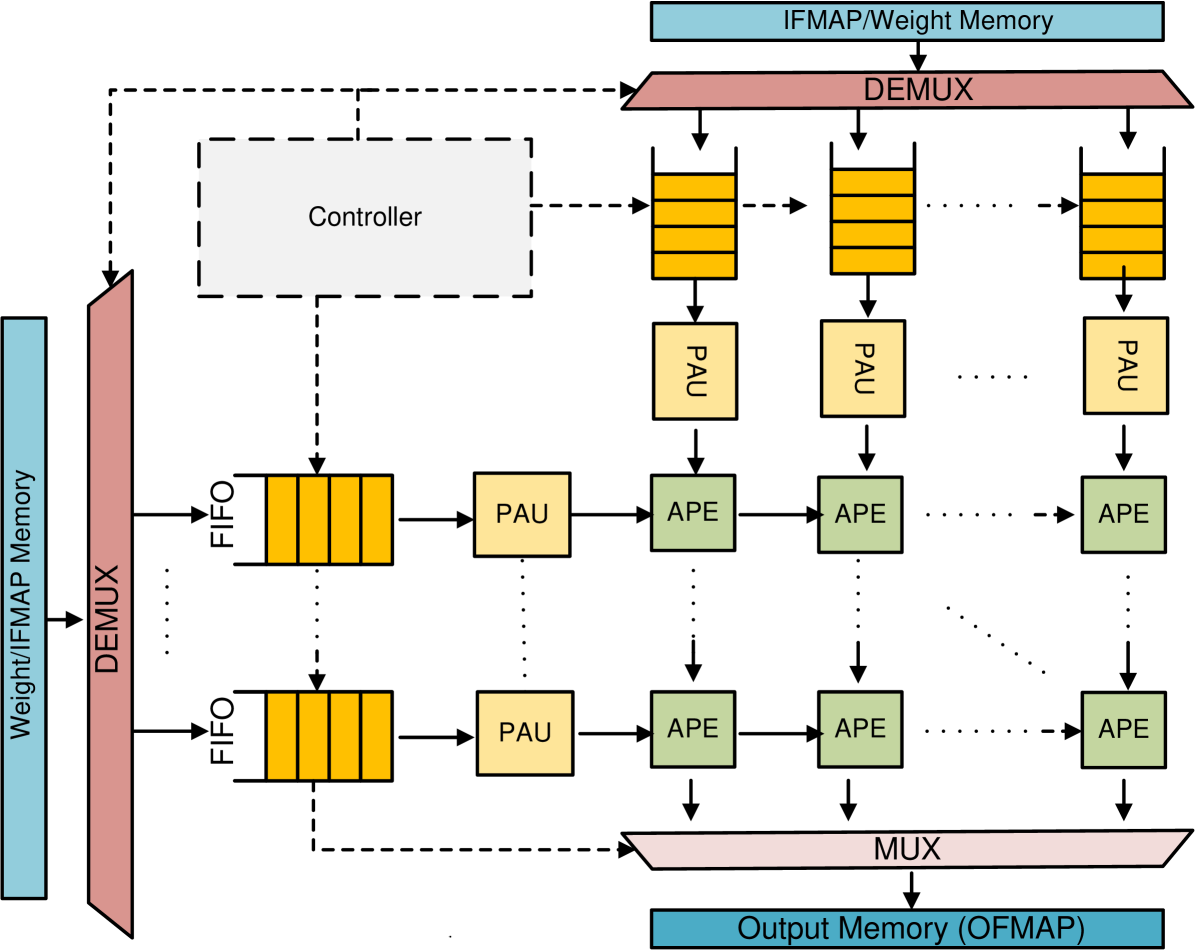
Developing a Generic Template. The TPU architecture utilizes a systolic array of PEs with MAC units for efficient matrix and vector computations. This design enhances performance and reduces energy consumption by reusing data, minimizing buffer operations [1]. Input data propagates diagonally through the array in parallel. The TPU template, illustrated in Fig. 1, extends the TPU’s systolic array with Output Stationary (OS) dataflow to enable concurrent approximation of input feature maps (IFMaps) and weights. It comprises five components: weight/IFMap memory, FIFOs, a controller, Pre-Approximate Units (PAUs), and Approximate Processing Elements (APEs). The weights and IFMaps are stored in their respective memories, with the controller managing memory access and data transfer to FIFOs per the OS dataflow. PAUs, positioned between FIFOs and APEs, dynamically truncate high-precision operands to lower precision before sending them to APEs, which perform MAC operations using approximate multipliers and adders. Sharing PAUs across rows and columns reduces hardware overhead, introducing minimal latency but significantly improving overall performance [39].
Highly-Parameterized RTL Code. We design highly flexible and parameterized RTL codes for 13 different approximate adders and 12 different approximate multipliers as representative approximate circuits. For the approximate adders, we have two tunable parameters: the bit-width and the imprecise part. The bit-width specifies the number of bits for each operand and the imprecise part specifies the number of inexact bits in the adder output. For the approximate multipliers, we have one common parameter, i.e., Width (W), which specifies the bit-width of the multiplication operands. We also have more tunable parameters based on specific multipliers, some of which are listed in Table II.
TABLE II: Approximate multiplier hyper-parameters
| Design | Parameter | Description | Default |
| --- | --- | --- | --- |
| BAM [40] | VBL | No. of zero bits during partial product generation | W/2 |
| ALM_LOA [41] | M | Inaccurate part of LOA adder | W/2 |
| ALM_MAA3 [41] | M | Inaccurate part of MAA3 adder | W/2 |
| ALM_SOA [41] | M | Inaccurate part of SOA adder | W/2 |
| ASM [42] | Nibble_Width | number of precomputed alphabets | 4 |
| DRALM [37] | MULT_DW | Truncated bits of each operand | W/2 |
| RoBA [43] | ROUND_WIDTH | Scales the widths of the shifter | 1 |
We leveraged the parametrized RTL library of approximate arithmetic circuits to build a TPU library that enables automatic selection of the systolic array size $S$ , bit precision $n$ , and one of the approximate multipliers and approximate adders. The internal parameters that are used to tune the approximate arithmetic libraries are also included in the TPU parameterized RTL library, thus, allowing the user to have complete flexibility to adjust their designs to meet specific hardware specifications and application accuracy requirements. Moreover, we developed a design automation methodology, enabling the automatic implementation and simulation of many TPU circuits in various simulation platforms such as Design Compiler and Vivado. In addition to the highly parameterized RTL codes, we developed TCL and Python scripts to autonomously measure their error, area, performance, and power dissipation under various constraints.
### III-B Framework Overview
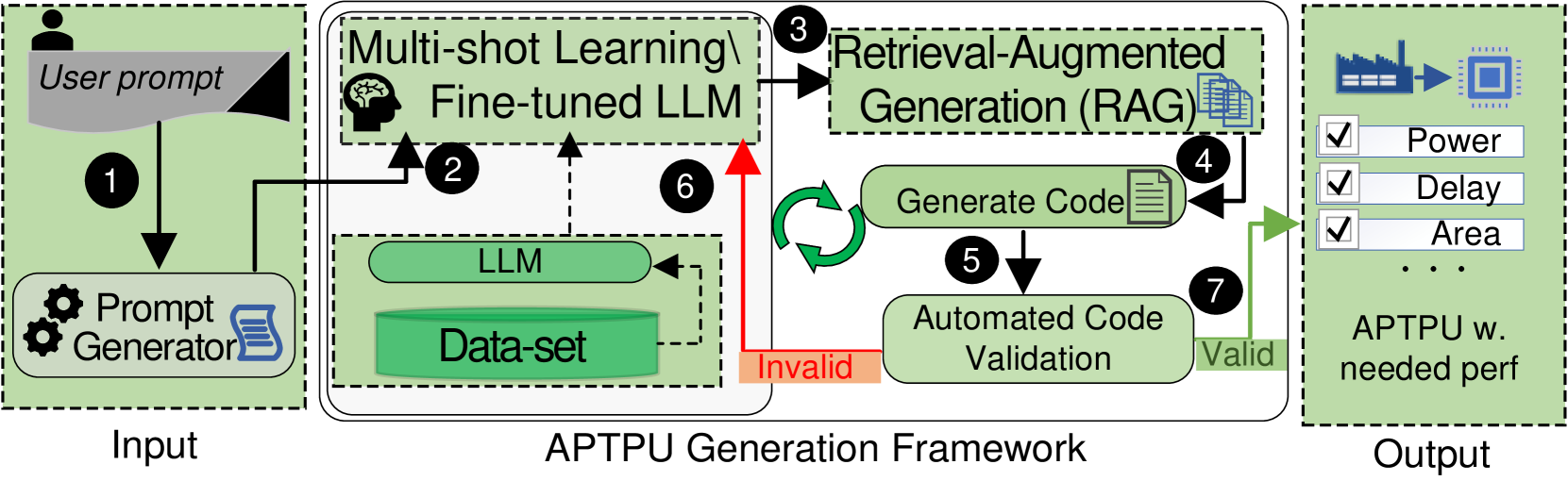
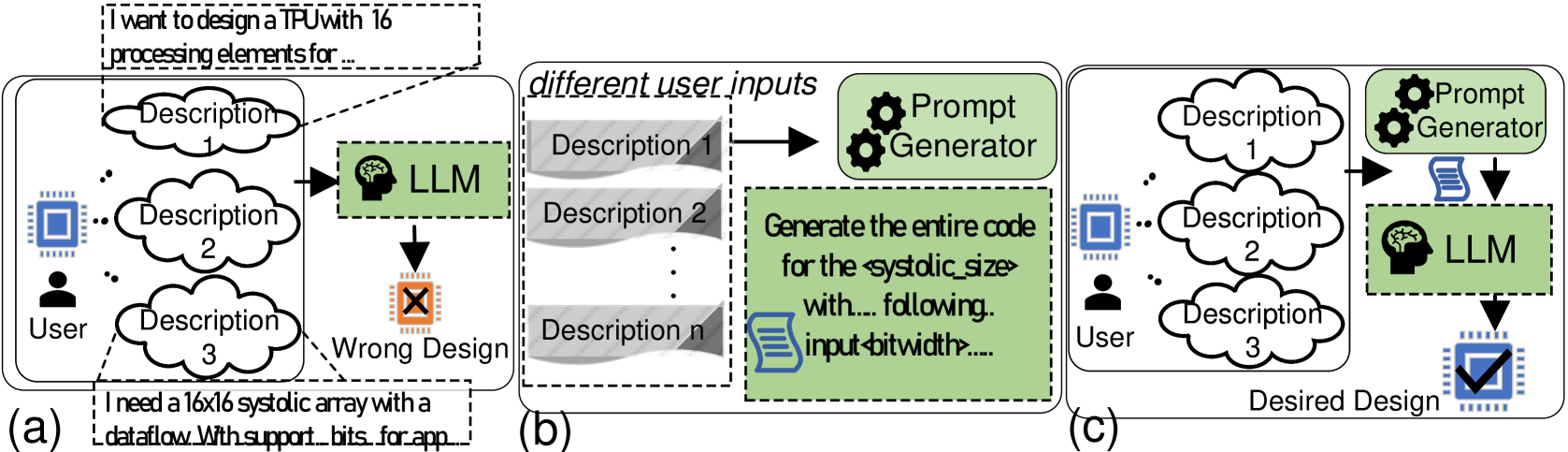
TPU-Gen framework depicted in Fig. 2 targets the development of domain-specific LLMs, emphasizing the interplay between the model’s responses and two key factors: the input prompt and the model’s learned parameters. The framework optimizes both elements to enhance LLM’s performance. An initial prompt conveying the user’s intent and key software and hardware specifications of the intended TPU design and application is enabled through the Prompt Generator in Step 1. A verbal description of a tensor processing accelerator design can often result in a many-to-one mapping as shown in Fig. 3 (a), especially when such descriptions do not align with the format of the training dataset. This misalignment increases the likelihood of hallucinations in the LLM’s output, potentially leading to faulty designs [44]. To minimize hallucinations and incorrect outputs in LLM-generated designs, studies have shown that inputs adhering closely to patterns observed in the training data produce more accurate and desirable results [17, 18]. However, this critical aspect has often been overlooked in previous state-of-the-art research [9], with some researchers opting instead to address the issue through prompt optimization techniques [18]. In this framework, we tackle the problem by employing a script that extracts key features, such as systolic size and relevant metrics, from any given verbal input by the user. These features are then embedded into a template, which serves as the prompt for the LLM input. As a domain-specific LLM, TPU-Gen focuses on generating the most valuable RTL top file detailing the circuit, and blocks involved in the presented architectural template in Section III.A.
<details>
<summary>x2.png Details</summary>
### Visual Description
## System Architecture Diagram: APTPU Generation Framework
### Overview
The image is a technical flowchart illustrating the architecture and workflow of the "APTPU Generation Framework." It depicts an automated system that takes a user prompt as input and generates a specialized processing unit (APTPU) with specified performance characteristics. The process involves multiple stages of prompt engineering, large language model (LLM) processing, retrieval-augmented generation, code generation, and validation.
### Components/Flow
The diagram is organized into three primary vertical sections, from left to right:
1. **Input Section (Left, light green background):** Contains the starting point of the workflow.
2. **APTPU Generation Framework (Center, white background):** The core processing engine, containing multiple interconnected modules.
3. **Output Section (Right, light green background):** Shows the final deliverable.
**Key Components and Their Spatial Placement:**
* **User prompt:** Top-left corner, represented by a document icon with a user silhouette.
* **Prompt Generator:** Below the User prompt, represented by a gear icon and a document icon.
* **Multi-shot Learning / Fine-tuned LLM:** Top-center of the framework section, represented by a brain icon.
* **LLM & Data-set:** Center-left of the framework, shown as a cylinder (Data-set) connected to a rounded rectangle (LLM).
* **Retrieval-Augmented Generation (RAG):** Top-right of the framework, represented by a document stack icon.
* **Generate Code:** Center-right of the framework, represented by a document icon.
* **Automated Code Validation:** Below "Generate Code," represented by a rounded rectangle.
* **Output Block:** Far right, showing a factory icon leading to a chip icon, followed by a checklist and the final label "APTPU w. needed perf".
**Process Flow (Numbered Steps):**
The flow is indicated by black arrows and numbered circles (1-7).
1. The **User prompt** feeds into the **Prompt Generator**.
2. The output of the Prompt Generator is sent to the **Multi-shot Learning / Fine-tuned LLM**.
3. The LLM's output is sent to the **Retrieval-Augmented Generation (RAG)** module.
4. The RAG module's output is sent to the **Generate Code** module.
5. Generated code is sent to **Automated Code Validation**.
6. **Feedback Loop:** If validation fails (marked by a red arrow labeled "Invalid"), the process loops back to the **Multi-shot Learning / Fine-tuned LLM** for refinement.
7. If validation succeeds (marked by a green arrow labeled "Valid"), the process proceeds to the **Output**.
**Internal Data Flow within the Framework:**
* A dashed arrow connects the **Data-set** to the **LLM**, indicating training or reference data.
* A dashed arrow connects the **LLM** to the **Multi-shot Learning / Fine-tuned LLM**, suggesting the base model is used to create the fine-tuned version.
* A circular green arrow between "Generate Code" and "Automated Code Validation" indicates an iterative refinement loop.
### Detailed Analysis
**Textual Content Transcription:**
* **Input Section:** "User prompt", "Prompt Generator"
* **APTPU Generation Framework:**
* "Multi-shot Learning \ Fine-tuned LLM"
* "Retrieval-Augmented Generation (RAG)"
* "LLM"
* "Data-set"
* "Generate Code"
* "Automated Code Validation"
* Flow labels: "Invalid" (on red arrow), "Valid" (on green arrow)
* **Output Section:**
* Checklist items: "Power", "Delay", "Area", "..." (ellipsis indicating more items)
* Final label: "APTPU w. needed perf"
**Component Relationships:**
The system is a sequential pipeline with a critical feedback loop. The **Prompt Generator** acts as an initial translator of user intent. The core intelligence resides in the **Fine-tuned LLM**, which is augmented by both a static **Data-set** and a dynamic **RAG** system for retrieving relevant information during generation. The **Generate Code** module produces hardware description code, which is then vetted by **Automated Code Validation**. The "Invalid" feedback path (Step 6) is crucial, as it forces the LLM to learn from its mistakes, creating a self-improving system. The "Valid" path (Step 7) leads to the final product.
### Key Observations
1. **Hybrid AI Architecture:** The framework combines several advanced AI techniques: prompt engineering, multi-shot learning, fine-tuning, and Retrieval-Augmented Generation (RAG). This suggests a system designed for high accuracy and adaptability.
2. **Closed-Loop Validation:** The presence of the "Automated Code Validation" step with a feedback loop to the LLM is a key feature. It implies the system doesn't just generate code once but iteratively improves it until it meets functional or performance criteria.
3. **Performance-Driven Output:** The output is explicitly defined by a checklist of hardware metrics ("Power", "Delay", "Area"), indicating the framework's goal is to generate hardware (an APTPU) optimized for specific, quantifiable performance targets.
4. **Modular Design:** Each major function (prompt generation, LLM processing, retrieval, code generation, validation) is a distinct module, suggesting a flexible and maintainable system architecture.
### Interpretation
This diagram illustrates a sophisticated **AI-driven hardware design automation tool**. The "APTPU" likely stands for something like "Application-Specific Processing Unit" or "Adaptive Processing Unit." The framework's purpose is to bridge the gap between high-level, possibly natural language, design specifications ("User prompt") and low-level, synthesizable hardware code.
The inclusion of RAG is particularly significant. It suggests the system doesn't rely solely on the LLM's parametric knowledge but can actively retrieve and incorporate up-to-date or specialized design rules, component libraries, or architectural templates from an external knowledge base during the generation process. This would greatly enhance the relevance and correctness of the generated hardware designs.
The feedback loop transforms the system from a simple code generator into a **correct-by-construction synthesis engine**. By validating the output and feeding failures back into the LLM, the system can learn common pitfalls and constraints of hardware design, progressively improving its success rate. The final output is not just code, but a guaranteed (to the extent of the validator's checks) hardware block meeting specified power, performance, and area (PPA) constraints, which are the fundamental metrics in chip design.
In essence, the image depicts a pipeline that automates the specialized hardware design process using a suite of modern AI techniques, aiming to reduce design time, lower the expertise barrier, and reliably produce optimized hardware accelerators.
</details>
Figure 2: The proposed TPU-Gen framework.
<details>
<summary>x3.png Details</summary>
### Visual Description
\n
## Diagram: LLM-Based Hardware Design Generation Process Comparison
### Overview
The image is a three-part diagram (labeled a, b, c) illustrating different workflows for generating hardware designs (specifically a TPU/systolic array) using a Large Language Model (LLM). It contrasts a flawed direct approach with an improved method that incorporates a "Prompt Generator" to refine user inputs before LLM processing.
### Components/Axes
The diagram is divided into three distinct panels arranged horizontally:
* **Panel (a):** Leftmost panel, labeled "(a)". Depicts a direct, flawed process.
* **Panel (b):** Center panel, labeled "(b)". Depicts an intermediate step of prompt generation.
* **Panel (c):** Rightmost panel, labeled "(c)". Depicts the improved, desired process.
**Key Components & Labels:**
* **User:** Represented by a person icon. Present in panels (a) and (c).
* **Chip/Design Icon:** A blue square chip icon. Present in all panels, representing the hardware design goal.
* **LLM:** Represented by a green box containing a brain icon and the text "LLM". Present in all panels.
* **Prompt Generator:** Represented by a green box containing two gear icons and the text "Prompt Generator". Present in panels (b) and (c).
* **Descriptions:** Represented by cloud-shaped bubbles labeled "Description 1", "Description 2", "Description 3", etc.
* **Design Output Icons:**
* **Wrong Design:** An orange chip icon with a black 'X' inside, in panel (a).
* **Desired Design:** A blue chip icon with a black checkmark inside, in panel (c).
* **Text Bubbles/Callouts:**
* Top-left of (a): "I want to design a TPU with 16 processing elements for..."
* Bottom-left of (a): "I need a 16x16 systolic array with a dataflow With support... bits for app..."
* Center of (b): A green box with the text: "Generate the entire code for the `<systolic_size>` with... following. input `<bitwidth>`...."
* **Flow Arrows:** Black arrows indicate the direction of data/process flow between components.
### Detailed Analysis
**Panel (a) - Direct LLM Input (Flawed Process):**
1. **Spatial Layout:** The User icon is on the far left. Three description clouds ("Description 1", "2", "3") are stacked vertically to its right. The LLM box is to the right of the descriptions. The "Wrong Design" icon is below the LLM.
2. **Flow:** User -> Multiple Descriptions -> LLM -> Wrong Design.
3. **Textual Content:** Two example user prompts are shown in dashed-line callouts pointing to the description clouds:
* Top callout: "I want to design a TPU with 16 processing elements for..."
* Bottom callout: "I need a 16x16 systolic array with a dataflow With support... bits for app..."
* The ellipses (...) indicate the text is truncated.
**Panel (b) - Prompt Generation (Intermediate Step):**
1. **Spatial Layout:** A dashed box labeled "different user inputs" contains a stack of gray, wavy-edged boxes labeled "Description 1", "Description 2", ..., "Description n". An arrow points from this stack to the "Prompt Generator" box. Below the Prompt Generator is a large green text box.
2. **Flow:** Multiple User Inputs -> Prompt Generator -> [Generated Prompt].
3. **Textual Content:** The green text box contains a template for a generated prompt:
* "Generate the entire code for the `<systolic_size>` with... following. input `<bitwidth>`...."
* The angle brackets `< >` denote placeholder variables.
**Panel (c) - Improved Process with Prompt Generator:**
1. **Spatial Layout:** Similar to (a), with the User icon on the left and three description clouds. However, the flow is different. An arrow points from the descriptions to the "Prompt Generator" box (top right). An arrow from the Prompt Generator points down to a document icon, which then points to the LLM box. The "Desired Design" icon is below the LLM.
2. **Flow:** User -> Descriptions -> Prompt Generator -> [Refined Prompt as Document] -> LLM -> Desired Design.
3. **Key Difference:** The Prompt Generator acts as an intermediary, processing the raw user descriptions before they reach the LLM.
### Key Observations
1. **Process Evolution:** The diagram shows a clear progression from a naive, error-prone method (a) to a more robust method (c) by introducing a dedicated prompt engineering step (b).
2. **Role of the Prompt Generator:** Its function is to take multiple, potentially vague or incomplete user descriptions ("Description 1...n") and synthesize them into a single, structured, and detailed prompt (as shown in the green box in panel b) suitable for the LLM.
3. **Visual Coding of Success/Failure:** The outcome is color-coded and symbolized: an orange chip with an 'X' for failure ("Wrong Design") versus a blue chip with a checkmark for success ("Desired Design").
4. **Input Complexity:** The user's initial requests (shown in panel a) are specific but appear to be natural language fragments. The system in (c) is designed to handle such inputs more effectively.
### Interpretation
This diagram argues that directly using natural language user descriptions to prompt an LLM for complex hardware design tasks is unreliable and leads to incorrect outputs ("Wrong Design"). The core problem is the gap between informal human requirements and the precise specifications needed by an LLM to generate correct hardware description language (HDL) code.
The proposed solution is a **Prompt Generator** module. This component acts as a translator and refiner. It takes the user's high-level, possibly fragmented or ambiguous descriptions and transforms them into a formal, detailed, and structured prompt. The example prompt template ("Generate the entire code for the `<systolic_size>`...") shows this output includes explicit parameters and clear instructions.
The improved workflow in panel (c) demonstrates that inserting this automated prompt engineering step between the user and the LLM significantly increases the likelihood of achieving the "Desired Design." It highlights the importance of **prompt quality** in LLM-based code generation for specialized domains like hardware design, suggesting that the LLM's capability is unlocked not by the model alone, but by the quality of its input instructions. The diagram is likely from a research paper or technical proposal advocating for such a two-stage (or multi-stage) generation framework.
</details>
Figure 3: (a) Multiple descriptions for a single TPU design demonstrate that a design can be verbally defined in numerous ways, potentially misleading LLMs in generating the intended design, (b) Proposed prompt generator extracts the required features from the given verbal descriptions, (c) Using a script to generate a verbal description aligned with the training data.
An immediate usage of the proposed dataset explained in Section III.C in TPU-Gen is to help fine-tune a generic LLM for the task of TPU design, where the input with a prompt will be fed to the LLM (Step 2 in Fig. 2). Equivalently, one may employ ICL, or multi-shot learning as a more computationally efficient compromise to fine-tuning [24]. The multi-shot prompting techniques can be used where the proposed dataset will function as the source for multi-shot examples. Given that the TPU-Gen dataset integrates verbal descriptions with corresponding TPU systolic array design pairs, the LLM generates a TPU’s top-level file as the output in Verilog. This top-level file includes all necessary architectural module dependencies to ensure a fully functional design (step 3). Further, we propose to leverage the RAG module to generate the other dependency files into the project, completing the design (step 4). Next, a third-party quality evaluation tool can be employed to provide a quantitative evaluation of the design, verify functional correctness, and integrate the design with the full stack (step 5). Here, for quality and functional evaluation, the generated designs, initially described in Verilog, are synthesized using YOSYS [45]. This synthesis process incorporates an automated RTL-to-GDSII validation stage, where the generated designs are evaluated and classified as either Valid or Invalid based on the completeness of their code sequences and the correctness of their input-output relationships. Valid designs proceed to resource validation, where they are optimized with respect to Power, Performance, and Area (PPA) metrics. In contrast, designs flagged as Invalid initiate a feedback loop for error analysis and subsequent LLM retraining, enabling iterative refinement (steps 2 to 6) to achieve predefined performance criteria. Ultimately, designs that successfully pass these stages in step 7 are ready for submission to the foundry.
<details>
<summary>x4.png Details</summary>
### Visual Description
## Process Diagram: APTPU Document Generation Workflow
### Overview
This image is a technical flowchart illustrating a five-step, iterative process for generating and refining documents related to "APTPU" (likely an acronym for a specific technical unit or project). The workflow moves from initial configuration files through verification, synthesis, data collection, and prompt engineering to produce a final generated output stored in a database. The process emphasizes iteration and the enrichment of data at each stage.
### Components/Axes
The diagram is organized into a flow from left to right, with numbered steps (1-5) indicating the sequence. Key components include:
1. **Input (Top-Left):** A stack of three blue document icons labeled **"APTPU CONFIG FILES"**.
2. **Process Block 1 (Bottom-Left):** A light blue rounded rectangle labeled **"Verification"** with the subtext **"Verify, Synthesize."**. It is accompanied by a document icon and two gear icons to its left.
3. **Process Block 2 (Bottom-Center):** A light blue rounded rectangle labeled **"OpenRoad"** with the subtext **"PPA reports"**. It is accompanied by a document icon.
4. **Data Corpus (Top-Center):** A stack of three orange document icons labeled **"APTPU + Metrics corpus"**.
5. **Prompt Element (Top-Center/Right):** A scroll icon labeled **"granulated prompt"**.
6. **Enriched Data (Top-Right):** A stack of three green document icons labeled **"APTPU + Metrics + Descriptions"**.
7. **Output (Bottom-Right):** A cylindrical database icon labeled **"APTPU-Gen"** with a scroll icon inside it.
8. **Iterative Loop (Top-Left/Center):** A circular arrow icon labeled **"Iterative process"** positioned between the initial config files and the metrics corpus.
### Detailed Analysis
The process flow is explicitly numbered:
* **Step 1:** An arrow points from the **"APTPU CONFIG FILES"** down to the **"Verification"** block. The label on this arrow reads **"Tune variables, features"**. This indicates the initial configuration is used to set parameters for verification and synthesis.
* **Step 2:** An arrow points from the **"Verification"** block to the **"OpenRoad"** block. This suggests the verified and synthesized output is passed to the OpenRoad tool (a known open-source VLSI design suite).
* **Step 3:** An arrow points upward from the **"OpenRoad"** block to the **"APTPU + Metrics corpus"**. This indicates that the PPA (Power, Performance, Area) reports generated by OpenRoad are used to build or update a corpus of data containing APTPU information and associated metrics.
* **Step 4:** An arrow points from the **"APTPU + Metrics corpus"** to the **"APTPU + Metrics + Descriptions"** stack. This arrow passes through the **"granulated prompt"** scroll icon. This step involves using a detailed prompt to enrich the existing metrics corpus with descriptive text, resulting in a more comprehensive dataset.
* **Step 5:** An arrow points downward from the **"APTPU + Metrics + Descriptions"** stack to the **"APTPU-Gen"** database. This is the final generation step, where the enriched data is used to produce and store the final output.
The **"Iterative process"** loop connects the later stages back to the beginning, implying that the generated outputs or learned metrics can be used to retune the initial configuration variables and features, starting the cycle anew for improvement.
### Key Observations
* **Data Enrichment Pipeline:** The core pattern is the progressive enrichment of data: from raw configs, to verified designs, to PPA metrics, to metrics with descriptions, and finally to a generated product.
* **Tool Integration:** The diagram explicitly names **"OpenRoad"**, indicating this workflow is integrated with or designed for the open-source silicon implementation toolchain.
* **Focus on PPA:** The mention of **"PPA reports"** strongly suggests this process is related to hardware design or chip development, where Power, Performance, and Area are critical optimization targets.
* **Prompt Engineering:** The inclusion of a **"granulated prompt"** as a distinct step highlights the use of natural language processing or generative AI techniques to transform structured data (metrics) into enriched data (metrics + descriptions).
* **Closed-Loop Iteration:** The presence of the iterative loop signifies this is not a one-pass process but a continuous refinement cycle.
### Interpretation
This diagram outlines a sophisticated, automated or semi-automated pipeline for generating technical documentation or design specifications for an "APTPU." The process leverages hardware design tools (OpenRoad) to generate quantitative data (PPA metrics) from configuration files. This structured data is then combined with descriptive text, likely generated via a large language model using a carefully crafted ("granulated") prompt, to create a rich, human-readable corpus. The final "APTPU-Gen" output could be a complete design report, a datasheet, or even generative code for the unit.
The **Peircean investigative** reading suggests this is a system for creating **representamen** (the generated documents) that accurately stand for the **object** (the actual APTPU design) based on an **interpretant** (the enriched metrics+descriptions corpus). The iterative loop is crucial, as it allows the system to self-correct and improve the fidelity of its representations over time. The outlier or notable emphasis is the central role of the "granulated prompt," positioning prompt engineering as a critical bridge between quantitative engineering data and qualitative descriptive output in this technical generation workflow.
</details>
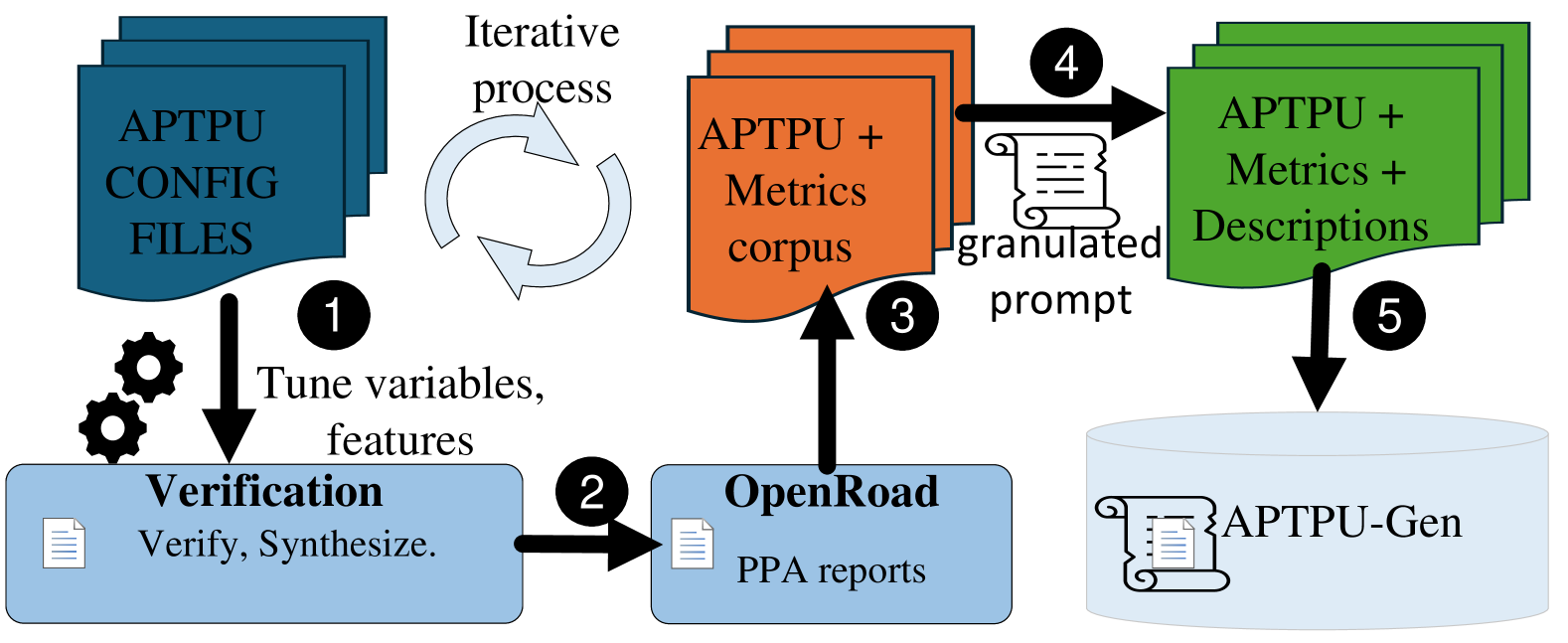
Figure 4: TPU-Gen dataset curation.
### III-C Dataset Curation
Leveraging the parameterized RTL code of the TPU, we develop a script to systematically explore various architectural configurations and generate a wide range of designs within the proposed framework (step 1 in Fig. 4). The generated designs undergo synthesis and functional verification (step 2). Subsequently, the OpenROAD suite [46] is employed to produce PPA metrics (step 3). The PPA data is parsed using Pyverilog (step 4), resulting in the creation of a detailed, multi-level dataset that captures the reported PPA metrics (step 5). Steps 1 to 3 are iterated until all architectural variations are generated. The time required for each data point generation varies depending on the specific configuration. To efficiently populate the TPU-Gen dataset, we utilize multiple scripts that automate the generation of data points across different systolic array sizes, ensuring comprehensive coverage of design space exploration. Fig. 4 shows the detailed methodology underpinning our dataset creation. The validation when compared to prior works [10, 47] understanding we work in a different design space abstraction makes it tough to have a fair comparison. However, looking by the scale of operation and the framework’s efficiency we require minimal efforts comparatively.
<details>
<summary>x5.png Details</summary>
### Visual Description
\n
## Diagram: APTPU (Approximate Processing Tensor Processing Unit) Architecture
### Overview
The image is a technical block diagram illustrating the architecture of an APTPU (Approximate Processing Tensor Processing Unit), specifically a Processing Array Unit (PAU) composed of multiple Approximate Processing Elements (APEs). The diagram details the data flow for input feature maps (IFMap) and weights, the internal operations within an APE, and the configurable data widths for different operations. It also lists example approximate arithmetic components.
### Components/Axes
**Main Block: PAU (Processing Array Unit)**
* A large, light blue rectangle labeled "PAU" at the top center.
* Inside the PAU is a smaller, light yellow rectangle representing the core processing array.
* The entire structure is labeled "APTPU (MxN)" at the bottom center, indicating a scalable M-by-N array of processing elements.
**Inputs (Left Side):**
* Two inputs labeled "IFMap" (Input Feature Map) enter from the left. Each is represented by a blue, textured square block.
* Two inputs labeled "Weight" enter from the top. Each is represented by a similar blue, textured square block.
**Processing Elements (APEs):**
* The core contains four identical blocks arranged in a 2x2 grid, each labeled "APE" (Approximate Processing Element) at its bottom-right corner.
* **Internal APE Components:** Each APE contains:
* A blue circle with an "X" (Multiplier).
* A yellow rectangle with "<<" (Left Shift operation).
* A white rectangle with a "+" (Adder).
* Red arrows connect the multiplier to the shifter, and the shifter to the adder.
* Black arrows show data flow between APEs horizontally and vertically.
**Legend (Top-Right):**
* A black-bordered box contains a legend defining arrow types and data widths.
* **Solid Black Arrow:** Labeled "DW : [8,16,32]" (Data Width).
* **Dashed Black Arrow:** Labeled "WW : [3,4,5,6,7,8,16,32]" (Weight Width).
* **Solid Red Arrow:** Labeled "Mult_DW : [2,3,4,...,12]" (Multiplier Data Width).
**Annotation Box (Right Side):**
* A large, black-bordered bracket points from the legend to two blue-bordered boxes on the right.
* **Top Box:** Titled "Approximate Adders". Lists examples: "SETA, HERLOA, MHEAA...10 more".
* **Bottom Box:** Titled "Approximate Multipliers". Lists examples: "BAM, UDM, ALM_LOA...10 more".
### Detailed Analysis
**Data Flow and Connections:**
1. **IFMap Path:** The two "IFMap" inputs (left) connect via dashed yellow lines to the multipliers in the left column of APEs.
2. **Weight Path:** The two "Weight" inputs (top) connect via dashed blue lines to the multipliers in the top row of APEs.
3. **Internal APE Flow:** Within each APE:
* The multiplier (X) receives one input from the IFMap path and one from the Weight path.
* The multiplier's output (red arrow) goes to the left shift operation (<<).
* The shifter's output (red arrow) goes to the adder (+).
4. **Inter-APE Flow:**
* Horizontal black arrows connect the adder of a left APE to the multiplier of the APE to its right.
* Vertical black arrows connect the adder of a top APE to the multiplier of the APE below it.
* This creates a systolic or dataflow pattern for accumulation.
**Legend & Data Width Specifics:**
* **DW (Data Width):** Configurable to 8, 16, or 32 bits. This likely applies to the main data paths (IFMap, intermediate results).
* **WW (Weight Width):** Highly configurable, with options from 3 to 32 bits. This allows for precision scaling of the weight parameters.
* **Mult_DW (Multiplier Data Width):** Ranges from 2 to 12 bits. This is a key feature of approximate computing, allowing the use of lower-precision, more efficient multipliers.
**Approximate Components:**
* The diagram explicitly states that the APEs can be implemented using various approximate adder and multiplier designs.
* It provides three named examples for each category (SETA, HERLOA, MHEAA for adders; BAM, UDM, ALM_LOA for multipliers) and indicates there are "10 more" of each type available, suggesting a library of approximate arithmetic units.
### Key Observations
1. **Modular and Scalable Design:** The "APTPU (MxN)" label and the 2x2 APE grid imply the architecture is designed to be scaled by adding more APEs in a mesh.
2. **Precision Flexibility:** The system supports a wide range of data and weight precisions (DW, WW, Mult_DW), enabling trade-offs between computational accuracy, energy efficiency, and hardware cost.
3. **Explicit Approximate Computing:** The core innovation is the integration of "Approximate Adders" and "Approximate Multipliers" directly into the processing element's data path, as highlighted by the dedicated annotation box.
4. **Dataflow Architecture:** The connection pattern between APEs (horizontal and vertical accumulation) is characteristic of a systolic array or a similar dataflow architecture optimized for matrix/tensor operations common in neural networks.
### Interpretation
This diagram describes a hardware accelerator designed for **approximate computing**, specifically targeted at tensor processing tasks like those in neural network inference. The core idea is to replace exact arithmetic units with approximate ones (e.g., SETA adders, BAM multipliers) to achieve significant gains in power efficiency and performance at the cost of controlled, minor computational errors.
The configurable data widths (DW, WW, Mult_DW) are crucial knobs for managing this accuracy-efficiency trade-off. For instance, using a 4-bit multiplier (Mult_DW) on 8-bit data (DW) would drastically reduce hardware complexity compared to a standard 8x8 multiplier. The listed approximate components (SETA, BAM, etc.) represent specific circuit-level designs that implement these approximate functions.
The architecture's value lies in its flexibility. It allows a system designer to select, for each layer or operation in a neural network, the most efficient combination of approximate adders and multipliers and the lowest viable precision, thereby optimizing the hardware for a specific accuracy target and workload. The "10 more" note suggests this is a modular framework where different approximate arithmetic libraries can be plugged into the same APE template.
</details>
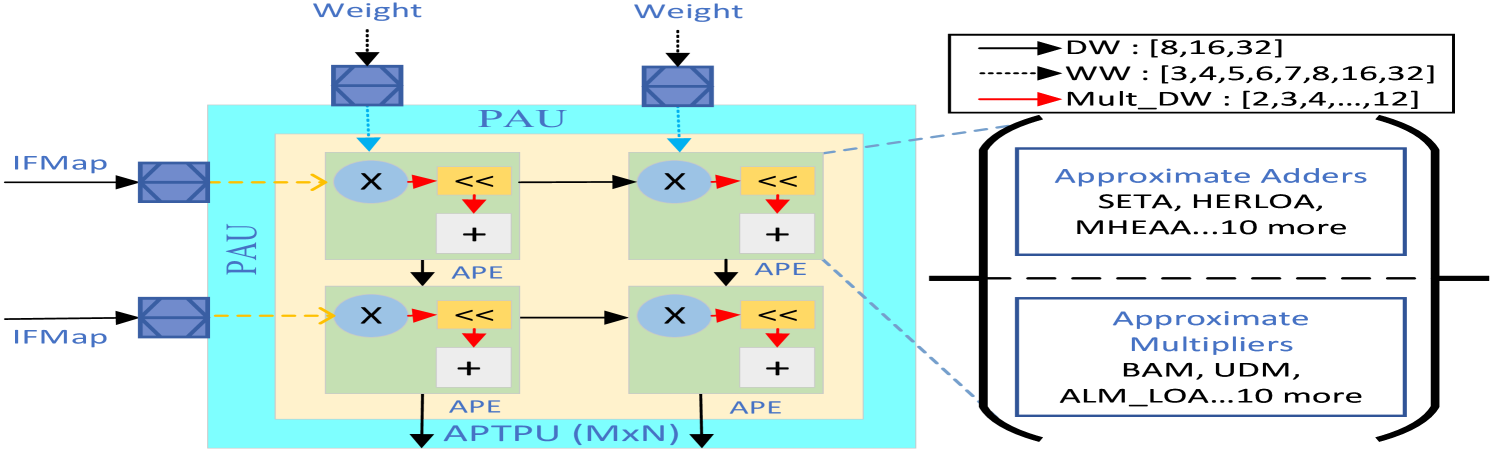
Figure 5: An example of one category and its design space parameters.
Fig. 5 visualizes the selection of different circuits to make PAUs and APEs accommodating different input Data Widths (DW) (8, 16, 32 bits) and Weight Widths (WW) (ranging from 3 to 32 bits) to generate approximate MAC units. These feature units highlight the flexible template of the TPU and enhance its adaptability and performance across various DNN workloads. Including lower bit-width weights is particularly advantageous for highly quantified models, enabling efficient processing with reduced computational resources.
<details>
<summary>x6.png Details</summary>
### Visual Description
## Code Snippet with Annotations: Configurable Systolic Array Design
### Overview
The image displays a two-panel technical document. The left panel contains a block of Verilog preprocessor code and associated design metrics. The right panel provides three levels of textual summary (Block, Detailed Global, and High-Level Global) that describe the purpose and functionality of the code. The document appears to be an annotated output from a hardware design or analysis tool.
### Components/Axes
The image is segmented into two primary regions:
1. **Left Panel (Code & Metrics):**
* **Header Line:** A JSON-formatted string containing design metrics.
* **Code Block:** A series of Verilog preprocessor `` `define `` and conditional compilation directives (`` `ifdef ``, `` `elsif ``). Comments are denoted by `//`.
* **Ellipses (`......`):** Indicate omitted or truncated code sections.
2. **Right Panel (Summaries):**
* **Three distinct summary boxes** with bold headers:
* `BLOCK SUMMARY`
* `DETAILED GLOBAL SUMMARY`
* `HIGH-LEVEL GLOBAL SUMMARY`
* Each summary contains descriptive text with ellipses (`.....`) indicating where content has been truncated or summarized.
### Detailed Analysis
#### Left Panel: Code and Metrics
* **Metrics Line:**
`Metrics: {"Area": "29162", "WNS": "-12.268", "Total Power": "4.21e-03"}`
* **Area:** 29162 (unit unspecified, likely square micrometers or gate equivalents).
* **WNS (Worst Negative Slack):** -12.268 (unit unspecified, likely nanoseconds). A negative value indicates a timing violation.
* **Total Power:** 4.21e-03 (4.21 milliwatts, assuming standard units).
* **Code Definitions:**
* `` `define DW 8 `` // Choose IFMAP bitwidth
* `` `define M 4 `` // Choose M dimensions of the systolic array
* `` `define N 4 `` // Choose N dimensions of the systolic array
* ``......`` (Omitted code)
* `` `define HERLOA //APADDER ``
* ``......`` (Omitted code)
* Conditional Compilation Block:
* `` `ifdef MITCHELL ... ``
* `` `define SHARED_PRE_APPROX ``
* `` `elsif ALM_SOA ``
* `` `define SHARED_PRE_APPROX ``
* `` `elsif ALM_LOA ``
* `` `define SHARED_PRE_APPROX ``
* `` `elsif ROBA ``
* ``.......`` (Omitted code)
#### Right Panel: Summaries
* **BLOCK SUMMARY:**
* `block_0`: Describes preprocessor macros for design parameters: nibble width (`NIBBLE_WIDTH`), IFMAP bitwidth (`DW`), systolic array dimensions (`M` and `N`), and accurate part of approximate multipliers (`MULT_DW`).
* `block_4`: Mentions code related to different approximate... and the `ALM` macro.
* **DETAILED GLOBAL SUMMARY:**
States the Verilog code represents a design for a **4x4 systolic array implementation**. It mentions choices for multiplier type, adder, and other design features, including a pre-approximation feature (`SHARED_PRE_APPROX`). These macros are controlled by selection. The overall design is adjusted via preprocessor macros.
* **HIGH-LEVEL GLOBAL SUMMARY:**
Describes the code as a **4x4 systolic array design** that utilizes an adder (HERLOA). It emphasizes the design is **highly configurable** via bitwidths and other features. This flexibility allows tailoring for improvements in **area, power, and timing performance**, which are critical for factors like machine learning efficiency.
### Key Observations
1. **Configurability:** The core theme is a highly parameterizable hardware design. Key parameters (bitwidth `DW`, array dimensions `M`x`N`) are defined as macros, allowing easy reconfiguration without rewriting core logic.
2. **Approximate Computing Focus:** The code and summaries repeatedly reference "approximate" multipliers and pre-approximation (`SHARED_PRE_APPROX`). The conditional compilation block (`MITCHELL`, `ALM_SOA`, `ALM_LOA`, `ROBA`) suggests support for multiple approximate arithmetic algorithms.
3. **Performance Metrics:** The provided metrics (Area, WNS, Power) are the direct outputs of synthesizing or implementing this configurable design with a specific set of macro definitions.
4. **Hierarchical Summarization:** The right panel demonstrates an automated or tool-generated summarization process, moving from specific block-level details to a high-level overview of the design's purpose and value.
### Interpretation
This image captures a snapshot of a **design-space exploration** for a hardware accelerator, likely for neural network inference. The systolic array is a common architecture for matrix multiplication, a core operation in machine learning.
* **The "Why":** The configurable macros allow designers to rapidly evaluate trade-offs. For example, changing `DW` from 8 to 4 bits would reduce area and power but potentially increase error due to lower precision. Selecting different approximate multipliers (`MITCHELL` vs. `ALM_SOA`) trades off computational accuracy for gains in power and area.
* **The Data's Story:** The negative Worst Negative Slack (`WNS: -12.268`) is a critical observation. It indicates that for the current configuration, the design **fails to meet its timing constraints** at the target clock frequency. This is a major red flag in hardware design, meaning the circuit would not function correctly at the desired speed. The designer must now use the configurability—perhaps by reducing bitwidths, simplifying the approximate multiplier, or pipelining—to improve timing (make WNS less negative or positive) while balancing the impact on Area and Power.
* **Underlying Goal:** The summaries explicitly link this configurability to "machine learning efficiency." The ultimate objective is to find a "sweet spot" in the design space where the hardware accelerator provides sufficient computational accuracy for a given ML model while minimizing resource consumption (area, power) and meeting performance (timing) targets. This image shows one data point in that extensive search process.
</details>
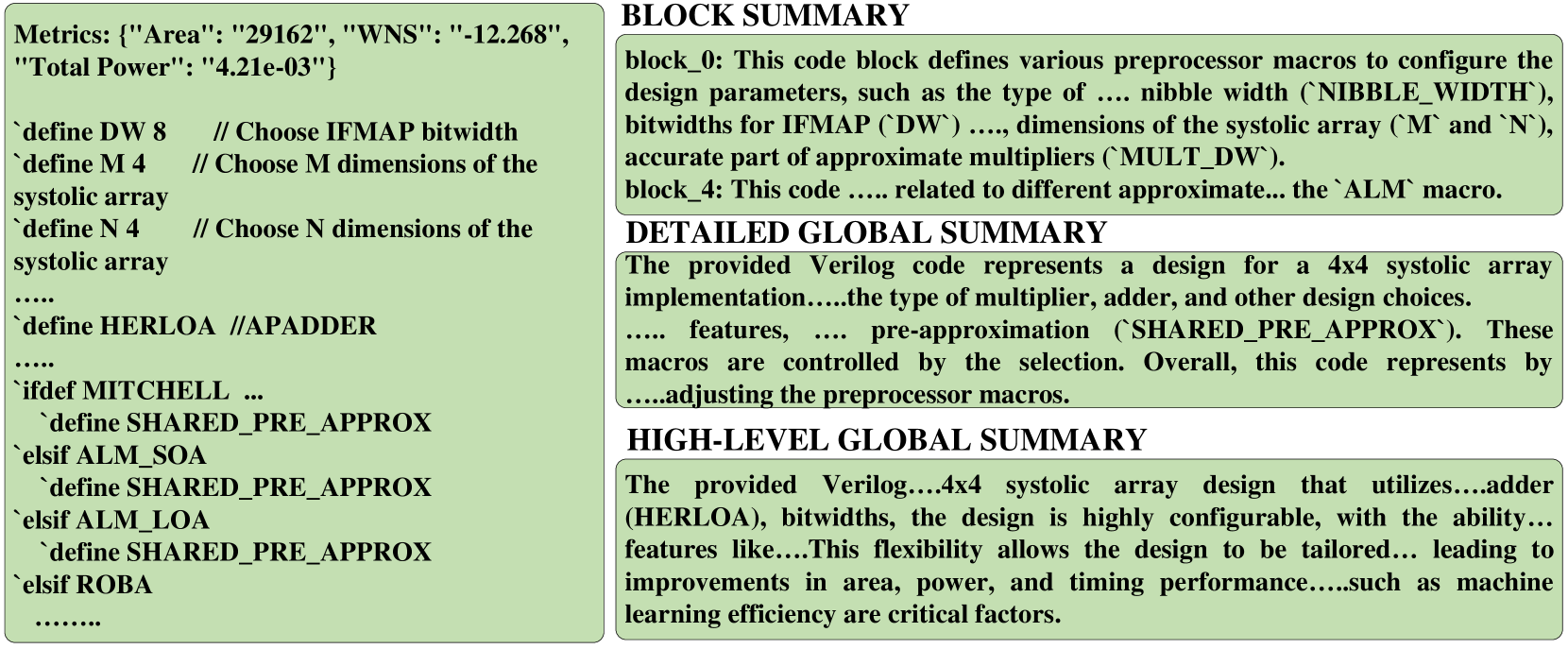
Figure 6: An example of a data point by adapting MG-V format.
TPU-Gen dataset offers 29,952 possible variations for a systolic array size with 8 different systolic array implementations to facilitate various workloads spanning from 4 $\times$ 4 for smaller loads to 256 $\times$ 256 to crunch bigger DNN workloads. Accounting for the systolic size variations in the TPU-Gen dataset promises a total of 29,952 $\times$ 8 = 2,39,616 data points with PPA metrics reported. While TPU-Gen is constantly growing with newer data points, we checkpoint our dataset creation currently reported as having 25,000 individual TPU designs. We provide two variations: $(i)$ A top module file consisting of details of the entire circuit implementation, which can be used in cases such as RAG implementation to save the computation resources, and $(ii)$ A detailed, multi-level granulated dataset, as depicted in Fig. 6, is curated by adapting MG-Verilog [17] to assist LLM in generating Verilog code to support the development of a highly sophisticated, fine-tuned model. This model facilitates the automated generation of individual hardware modules, intelligent integration, deployment, and reuse across various designs and architectures. Please note that due to the domain-specific nature of the dataset, some data redundancy is inevitable, as similar modules are reused and reconfigured to construct new TPUs with varying architectural configurations. This structured dataset enables efficient exploration and customization of TPU designs while ensuring that the generated modules can be systematically adapted for different design requirements, leading to enhanced flexibility and scalability in hardware design automation. Additionally, we provide detailed metrics for each design iteration, which aid the LLM in generating budget-constrained designs or in creating an efficient design space exploration strategy to accelerate the result optimization process.
TABLE III: Prompts to successfully generate exact TPU modules via TPU-Gen.
| LLM Model Mistral-7B (Q3) | Module Generation Pass@1 17% | Module Integration Pass@3 83% | Pass@5 100% | Pass@10 100% | Pass@1 0% | Pass@3 25% | Pass@5 75% | Pass@10 100% |
| --- | --- | --- | --- | --- | --- | --- | --- | --- |
| CodeLlama-7B (Q4) | 0% | 50% | 83% | 100% | 0% | 50% | 75% | 100% |
| CodeLlama-13B (Q4) | 66% | 83% | 100% | 100% | 25% | 75% | 100% | 100% |
| Claude 3.5 Sonnet | 83% | 100% | 100% | 100% | 75% | 100% | 100% | 100% |
| ChatGPT-4o | 83% | 100% | 100% | 100% | 50% | 100% | 100% | 100% |
| Gemmini Advanced | 50% | 50% | 74% | 91% | 25% | 75% | 74% | 91% |
## IV Experiment Results
### IV-A Objectives
We designed four distinct experiments employing various approaches, each tailored to the unique capabilities of LLMs such as GPT [48], Gemini [49], and Claude [50], as well as the best open-source models from the leader board [51]. Each model is deployed in experiments aligning with the study’s objectives and anticipated outcomes. Experiments 1 focus on observing the prompting mechanism that assists LLM in generating the desired output by implementing ICL; with this knowledge, we develop the prompt template discussed in Sections III-B. Experiment 2 focuses on adapting the proposed TPU-Gen framework by fine-tuning LLM models. For fine-tuning, we used 4 $\times$ A100 GPU with 80GB VRAM. Experiment 3 is to demonstrate the effectiveness of RAG in TPU-Gen and it’s applicability for hardware design. Experiment 4 tests the TPU-Gen framework’s ability to generate designs efficiently with an industry-standard 45nm technology library. Throughout the process, we also consider hardware under the given PPA budget to ensure the feasibility of achieving the objectives outlined in the initial phases.
### IV-B Experiments and Results
<details>
<summary>x7.png Details</summary>
### Visual Description
## [Chart Type]: Comparative Bar Charts of LLM Prompt Requirements
### Overview
The image contains two distinct bar charts, labeled (a) and (b), presented side-by-side. Chart (a) compares the average number of prompts required for Commercial versus Open-Sourced Large Language Models (LLMs) across a series of "APTPU Modules." Chart (b) provides a breakdown of the number of prompts for six specific LLM models. The overall theme is an analysis of prompt efficiency or complexity across different LLM types and specific models.
### Components/Axes
**Chart (a) - Left Panel:**
* **Title/Label:** (a) is positioned at the bottom-left corner.
* **X-Axis:** Labeled "APTPU Modules". The axis is marked with major ticks at 0, 5, 10, 15, 20, and 25. There are 25 distinct module positions represented by paired bars.
* **Y-Axis:** Labeled "Average Prompts for LLMs". The scale runs from 0 to 25, with major ticks at intervals of 5.
* **Legend:** Positioned at the top of the chart.
* **Black Square:** "Commercial LLMs"
* **Gray Square:** "Open-Sourced LLMs"
* **Blue Dashed Line:** "Trendline Commercial"
* **Red Dashed Line:** "Trendline Open-Sourced"
**Chart (b) - Right Panel:**
* **Title/Label:** (b) is positioned at the bottom-left corner of its panel.
* **X-Axis:** Labeled "LLM Models". The axis is marked with numbers 1 through 6, corresponding to specific models listed in the legend.
* **Y-Axis:** Labeled "Number of Prompts". The scale runs from 0 to 8, with major ticks at intervals of 2.
* **Legend:** Positioned inside the chart area, top-right. It maps numbers to specific model names:
1. **Black Square:** ChatGPT 4o
2. **Dark Gray Square:** Gemini Advanced
3. **Medium Gray Square:** Claude
4. **Light Gray Square:** Codellama 13B
5. **Very Light Gray Square:** Codellama 7B
6. **White Square:** Mistral 7B
### Detailed Analysis
**Chart (a) Data & Trends:**
* **Commercial LLMs (Black Bars):** The values are consistently low across all APTPU Modules. They start near 0-1 prompts for modules 1-3, rise slightly to approximately 2-3 prompts by module 10, and show a very gradual, shallow upward trend, ending at approximately 6-7 prompts by module 25. The blue dashed trendline confirms this slow, linear increase.
* **Open-Sourced LLMs (Gray Bars):** The values are significantly higher and show a distinct pattern.
* **Modules 1-9:** Values fluctuate between approximately 7 and 9 prompts.
* **Module 10:** A sharp increase occurs, jumping to approximately 18 prompts.
* **Modules 11-25:** Values plateau at a high level, mostly ranging between 18 and 21 prompts, with a slight peak around module 12 (~21) and module 24 (~21). The red dashed trendline shows a steep increase from module 1 to about module 15, after which it flattens, indicating the plateau.
* **Spatial Relationship:** For every module, the gray bar (Open-Sourced) is substantially taller than the black bar (Commercial). The gap between them widens dramatically after module 9.
**Chart (b) Data:**
* **Model 1 (ChatGPT 4o):** Approximately 1 prompt.
* **Model 2 (Gemini Advanced):** Approximately 2 prompts.
* **Model 3 (Claude):** Approximately 1 prompt.
* **Model 4 (Codellama 13B):** Approximately 5 prompts.
* **Model 5 (Codellama 7B):** Approximately 7 prompts (the highest value in this chart).
* **Model 6 (Mistral 7B):** Approximately 4 prompts.
### Key Observations
1. **Major Disparity:** The most striking observation is the large and consistent gap between Open-Sourced and Commercial LLMs in chart (a). Open-sourced models require, on average, 2-3 times more prompts across the measured APTPU Modules.
2. **Phase Change in Open-Sourced Data:** There is a clear discontinuity or "phase change" in the open-sourced data around APTPU Module 10, where the average prompt count more than doubles and then stabilizes at this new, higher level.
3. **Model-Specific Performance:** Chart (b) reveals significant variation among individual models. The two Codellama models (7B and 13B) require notably more prompts than the commercial models (ChatGPT 4o, Gemini Advanced, Claude) and Mistral 7B. Codellama 7B is the most prompt-intensive model shown.
4. **Trendline Confirmation:** The trendlines in chart (a) visually summarize the core finding: a slow, linear increase for commercial models versus a rapid initial increase followed by a high plateau for open-sourced models.
### Interpretation
The data suggests a fundamental difference in either the **capability** or the **interaction paradigm** between the tested Commercial and Open-Sourced LLMs within the context of "APTPU Modules."
* **Efficiency vs. Complexity:** Commercial LLMs appear to be more "prompt-efficient," achieving their outputs with fewer instructions or iterations. This could indicate more advanced instruction-following capabilities, better alignment, or a more integrated system design.
* **The "Module 10" Threshold:** The sharp jump for open-sourced models at module 10 implies a critical point where the task complexity or the nature of the APTPU Module changes in a way that disproportionately challenges these models. They may require more iterative prompting, clarification, or error correction to handle the increased complexity.
* **Model Size vs. Performance:** Interestingly, in chart (b), the smaller Codellama 7B model requires *more* prompts than its larger 13B counterpart. This could suggest that for this specific task, raw model size isn't the only factor; architecture, training data, or fine-tuning might play a larger role in prompt efficiency. The commercial models (ChatGPT, Gemini, Claude) cluster at the low end of the prompt scale, reinforcing the trend seen in chart (a).
**In summary, the charts provide evidence that, for the evaluated tasks (APTPU Modules), commercial LLMs operate with significantly greater prompt efficiency than open-sourced alternatives, which exhibit a distinct two-phase behavior of moderate then high prompt dependency.**
</details>
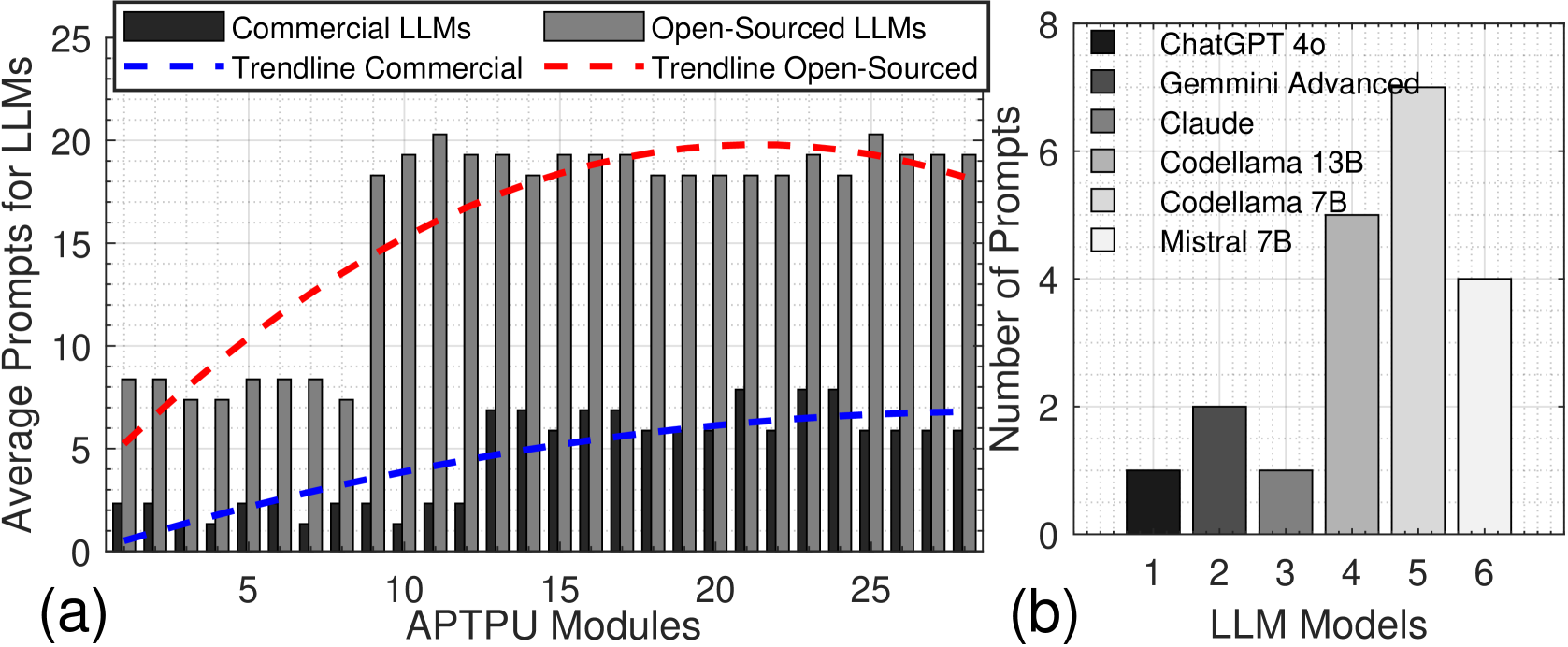
Figure 7: Average TPU-Gen prompts for (a) Module Generation, and (b) Module Integration via LLMs.
#### IV-B 1 Experiment 1: ICL-Driven TPU Generation and Approximate Design Adaptation.
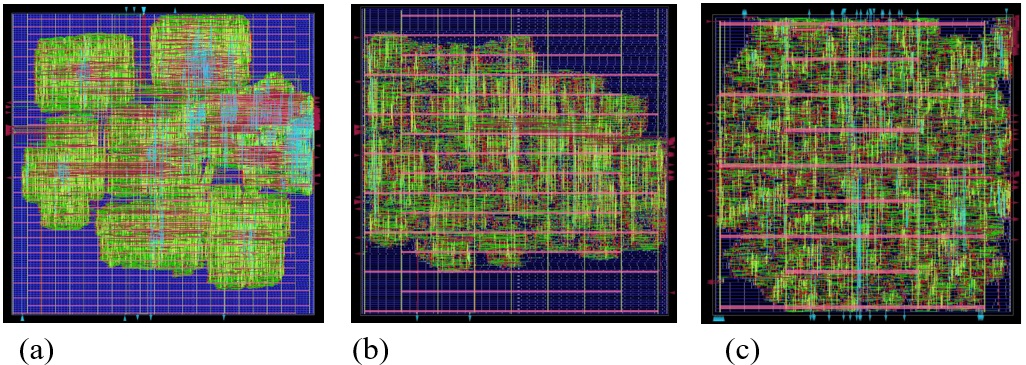
We evaluate the capability of LLMs to generate and synthesize a novel TPU architecture and its approximate version using TPU-Gen. Utilizing the prompt template from [18], we refined it to harness LLM capabilities better. LLM performance is assessed on two metrics: $(i)$ Module Generation —the ability to generate required modules, and $(ii)$ Module Integration —the capability to construct the top module by integrating components. We tested commercial models like [48, 49] via chat interfaces and open-source models listed in Table III, using LM Studio [52]. For the TPU, we successfully developed the design and obtained the GDSII layout (Fig. 8 (a)). Commercial models performed well with a single prompt at pass@1, averaging 72% in module generation and 50% in integration. Open-source models performed better with the increase of pass@k, averaging 72% for pass@1 in module generation to 100% and 50% to 100% upscale from pass@3 to pass@10 in integration. For the approximate TPU, involving approximate circuit algorithms, we provided example circuits and used ICL and Chain of Thought (CoT) to guide the LLMs. Open-source models struggled due to a lack of specialized knowledge, as shown in Fig. 7. The design layout from this experiment is in Fig. 8 (b). All outputs were manually verified using test benches. This is the first work to generate both exact and approximate TPU architectures using prompting to LLM. However, significant human expertise and intervention are required, especially for complex architectures like approximate circuits. To minimize the human involvement, we implement fine-tuning.
Takeaway 1. LLMs with efficient prompting are capable of generating exact and approximate TPU modules and integrate them to create complete designs. However, human involvement is extensively required, especially for novel architectures. Fine-tuning LLMs is necessary to reduce human intervention and facilitate the exploration of new designs.
#### IV-B 2 Experiment 2: Full TPU-Gen Implementation
This experiment investigates cost-efficient approaches for adapting domain-specific language models to hardware design. In previous experiments, we observed that limited spatial and hierarchical hardware knowledge hindered LLM performance in integrating circuits. The TPU-Gen template (Fig. 2) addresses this by delegating creative tasks to the LLM and retrieving dependent modules via RAG, optimizing AI accelerator design while reducing computational overhead and minimizing LLM hallucinations. ICL experiments show that fine-tuning enhances LLM reliability. The TPU-Gen proposes a way to develop domain-specific LLMs with minimal data. The experiment used a TPU-Gen dataset version 1 of 5,000 Verilog headers DW and WW inputs. This dataset comprises systolic array implementations with biased approximate circuit variations. We split data statically in 80:20 for training and testing open-source LLMs [51], with two primary goals of $1.$ Analyzing the impact of the prompt template generator on the fine-tuned LLM’s performance (Table IV). $2.$ Investigating the RAG model for hardware development.
<details>
<summary>extracted/6256789/Figures/GDSII.jpg Details</summary>
### Visual Description
## Diagram Set: Three-Panel Visualization of Network or Circuit Topologies
### Overview
The image displays three separate square panels arranged horizontally, labeled (a), (b), and (c). Each panel contains a complex, dense visualization of interconnected lines on a dark blue grid background. The visualizations appear to represent some form of network, circuit, or data flow, with colored lines (primarily green, red, and cyan) forming intricate patterns. There are no numerical axes, data tables, or explicit legends within the diagrams themselves. The only text present are the labels "(a)", "(b)", and "(c)" beneath each respective panel.
### Components/Axes
* **Panels:** Three distinct square panels, each with a black border.
* **Background:** A dark blue grid composed of fine, light blue horizontal and vertical lines, creating a coordinate system or layout grid.
* **Primary Visual Elements:** Dense networks of colored lines. The dominant colors are:
* **Green:** Forms the majority of the interconnected web in all panels.
* **Red:** Interwoven with the green, often appearing in horizontal clusters.
* **Cyan/Light Blue:** Appears as distinct vertical and horizontal lines, sometimes forming clearer pathways or axes within the chaos.
* **Labels:** The text "(a)", "(b)", and "(c)" is present in white font, centered below each panel.
### Detailed Analysis
**Panel (a):**
* **Spatial Grounding:** The visualization is clustered, with denser regions in the center and towards the top-left and bottom-right corners. The edges of the grid are less populated.
* **Pattern:** The lines form irregular, cloud-like clusters. There is no clear global structure; the connections appear highly localized and tangled. Red elements are scattered throughout the green mass.
**Panel (b):**
* **Spatial Grounding:** The pattern is more structured than (a). There is a clearer horizontal emphasis, with red and green lines forming distinct horizontal bands across the middle and upper sections of the grid.
* **Pattern:** While still dense, the lines show more rectilinear organization. Vertical cyan lines are more apparent, creating a loose grid-like structure within the main grid. The overall shape is more rectangular and fills the space more evenly than (a).
**Panel (c):**
* **Spatial Grounding:** This panel shows the most uniform and dense distribution of lines, filling almost the entire grid area.
* **Pattern:** The visualization is extremely dense, with a high concentration of green and red lines. Notably, there are several prominent, nearly continuous vertical cyan lines running from top to bottom, and a few strong horizontal pink/red lines. This creates a more defined, almost woven or matrix-like structure compared to the other two panels.
### Key Observations
1. **Progression of Density and Structure:** There is a clear visual progression from panel (a) to (c). Panel (a) is the most clustered and irregular, (b) introduces more horizontal banding and structure, and (c) is the most dense and exhibits strong, grid-aligned vertical and horizontal features.
2. **Color Function:** While no legend is provided, the consistent use of colors suggests they may represent different types of connections, data flows, or components. Green is the base network, red may indicate specific pathways or high-activity zones, and cyan appears to mark major structural axes or backbones.
3. **Absence of Quantitative Data:** The diagrams are purely qualitative visualizations. There are no numerical values, scales, or axes titles to extract specific data points or measurements.
### Interpretation
These diagrams likely represent visualizations of complex systems, such as:
* **Integrated Circuit (IC) or Chip Layouts:** The grid could represent the silicon die, with colored lines representing different metal interconnect layers (e.g., green for lower-level local routing, red for mid-level, cyan for upper-level global power/ground rails or clock trees). The progression from (a) to (c) could show different stages of place-and-route optimization, or views of different hierarchical levels within the chip design.
* **Network Topologies:** They could map connections in a computer network, social network, or neural network. The increasing structure from (a) to (c) might illustrate the effect of different organizational algorithms, moving from a random or clustered network to a more small-world or scale-free network with defined hubs (the strong cyan lines).
* **Data Flow or Algorithm Visualization:** The images might visualize the execution trace of a parallel algorithm or the state of a complex simulation, where lines represent communication between processing nodes.
**Underlying Message:** The set demonstrates how the same fundamental components (the grid and colored lines) can be organized into vastly different patterns—from chaotic and localized to highly structured and global. This highlights principles of **emergent structure**, **network organization**, and the visual impact of **density and connectivity patterns** in complex systems. The lack of explicit data forces the viewer to focus on the qualitative, topological differences between the three states.
</details>
Figure 8: A GDSII layout of (a) TPU, (b) TPU by prompting LLM, (c) approximate TPU by TPU-Gen framework.
All models used Low-Rank Adaptation (LoRA) fine-tuning with the Adam optimizer at a learning rate of $1e^{-5}$ . The fine-tuned models were evaluated to generate the desired results efficiently with a random prompt at pass@ $1$ to generate the TPU. From Table IV, we can observe that the outputs without the prompt generator are labeled as failures as they were unsuitable for further development and RAG integration. We can observe the same prompt when parsed to the prompt-template generator with a single try; we score an accuracy of 86.6%. Further, we used RAG and then processed the generated Verilog headers for module retrieval. According to [11], LLMs tend to prioritize creativity and finding innovative solutions, which often results in straying from the data. To address this, we employed a compute and cost-efficient method. This shows that the fine-tuning along with RAG can greatly enhance the performance. Fig. 8 (c) shows the GDSII layout of the design generated by the TPU-Gen framework.
TABLE IV: Prompt Generator vs Human inputs to Fine-tuned models.
| CodeLlama-7B-hf CodeQwen1.5 -7B Mistral -7B | 27 25 28 | 03 05 02 | 01 0 02 | 29 30 28 |
| --- | --- | --- | --- | --- |
| Starcoder2-7B | 24 | 06 | 0 | 30 |
Takeaway 2. Prompting techniques such as prompt template steer LLM to generate desired results after fine-tuning, as observed 86% success in generation. RAG, a cost-efficient method to generate the hardware modules reliably, completing the entire Verilog design for an application with minimal computational overhead.
#### IV-B 3 Experiment 3: Significance of RAG
To assess the effectiveness of RAG in the TPU-Gen framework, we evaluated 1,000 Verilog header codes generated by fine-tuned LLMs under two conditions: with and without RAG integration. Table V presents results over 30 designs tested by our framework to generate complete project files. Without RAG, failures occurred due to output token limitations and hallucinated variables. RAG is essential as the design is not a standalone file to compile. Validated header codes were provided in the RAG-enabled pipeline, and required modules were dynamically retrieved from the RAG database, ensuring fully functional and accurate designs. Conversely, models without RAG relied solely on internal knowledge, leading to hallucinations, token constraints, and incomplete designs. Models using RAG consistently achieved pass rates exceeding 95%, with Mistral-7B and CodeLlama-7B-hf attaining 100% success. In contrast, all models failed entirely without RAG, underscoring its pivotal role in ensuring design accuracy and addressing LLM limitations. RAG provides a robust solution to key challenges in fine-tuned LLMs for TPU hardware design by retrieving external information from the RAG database, ensuring contextual accuracy, and significantly reducing hallucinations. Additionally, RAG dynamically fetches dependencies in a modular manner, enabling the generation of complete and accurate designs without exceeding token limits. RAG is a promising solution in this context since our models were fine-tuned with only Verilog header data detailing design features. However, fine-tuning models with the entire design data would expose LLMs to severe hallucinations and token limitations, making generating detailed and functional designs challenging.
TABLE V: significance of RAG in TPU-Gen.
| CodeLama-7B-hf Mistral-7B CodeQwen1.5-7B | 100 100 95 | 0 0 5 | 0 0 0 | 100 100 100 |
| --- | --- | --- | --- | --- |
| StarCoder2-7B | 98 | 2 | 0 | 100 |
Takeaway 3. The experiment highlights the significance of the RAG usage with a fine-tuned model to avoid hallucinations and let LLM be creative consistently.
#### IV-B 4 Experiment 4: Design Generation Efficiency
Building on the successful generation of approximate TPU in experiment 2, here we evaluate and benchmark the architectures produced by the TPU-Gen framework as the work performed in this paper is the first of it’s kind we are comparing against manual optimization created by expert human designers, focusing on power, area, and latency as shown in Fig. 9 (a)-(c). We utilize four DNN architectures for this evaluation: LeNet, ResNet18, VGG16, and ResNet56, performing inference tasks on the MNIST, CIFAR-10, SVHN, and CIFAR-100 datasets. In the manually optimized designs, a skilled hardware engineer fine-tunes parameters within the TPU template. This iterative optimization process is repeated until no further performance gains can be achieved within a reasonable timeframe of approximately one day [9], or the expert determines, based on empirical results, that additional refinements would yield minimal benefits. Using the PPA metrics as reference values (e.g., 100mW, 0.25mm 2, 48ms for ResNet56), both TPU-Gen and the manual user are tasked with generating the TPU architecture. Fig. 9 illustrates that across a range of network architectures, TPU-Gen consistently yields results with minimal deviation from the reference benchmarks. In contrast, the manual designs exhibit significant violations in terms of PPA.
<details>
<summary>x8.png Details</summary>
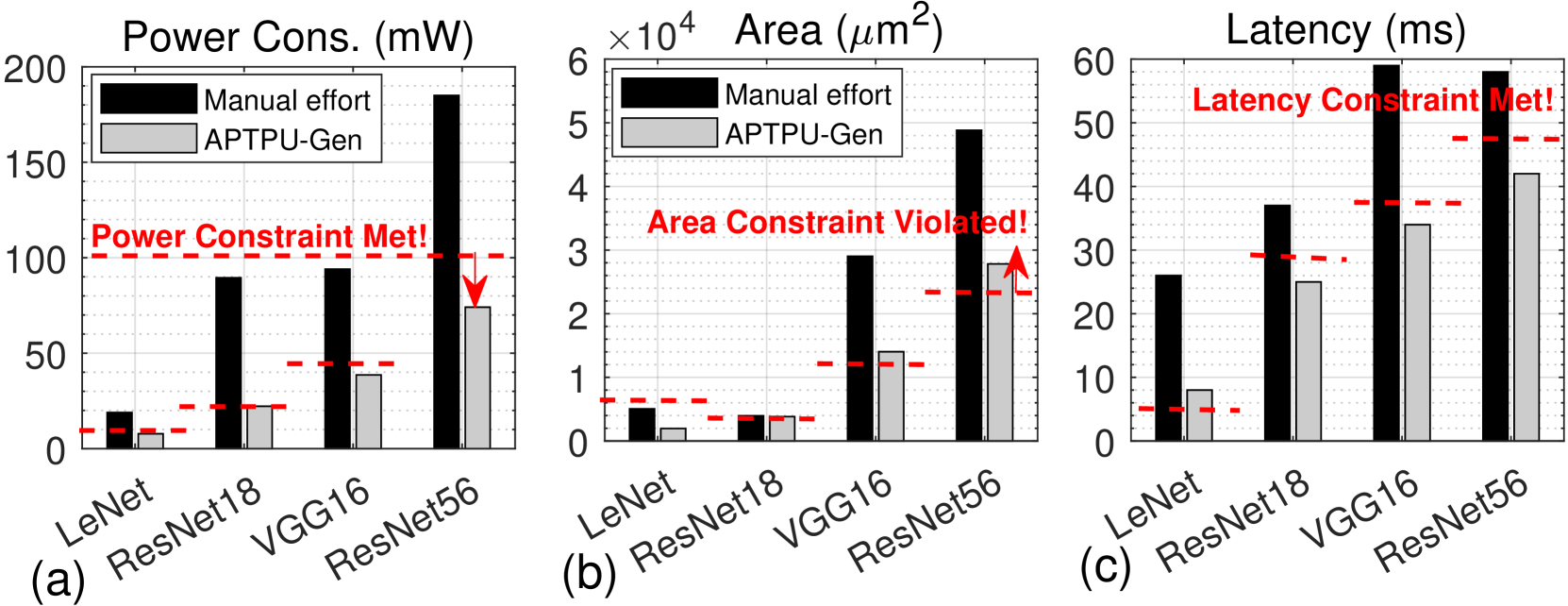
### Visual Description
## Bar Charts: Comparison of Manual Effort vs. APTPU-Gen Across Neural Network Models
### Overview
The image contains three side-by-side bar charts labeled (a), (b), and (c). Each chart compares two methods—"Manual effort" (black bars) and "APTPU-Gen" (gray bars)—across four neural network models: LeNet, ResNet18, VGG16, and ResNet56. The charts evaluate three distinct hardware design metrics: Power Consumption, Area, and Latency. Each chart includes a red dashed horizontal line representing a design constraint, with an annotation stating whether the constraint is met or violated.
### Components/Axes
**Common Elements Across All Charts:**
* **X-axis (Categories):** Four neural network models: `LeNet`, `ResNet18`, `VGG16`, `ResNet56`.
* **Legend:** Located in the top-left corner of each chart. A black square denotes `Manual effort`. A gray square denotes `APTPU-Gen`.
* **Constraint Line:** A red dashed horizontal line. Its vertical position (Y-value) varies per chart.
* **Annotation:** Red text placed near the constraint line.
**Chart (a): Power Consumption**
* **Title:** `Power Cons. (mW)`
* **Y-axis:** Linear scale from 0 to 200, with major ticks at 0, 50, 100, 150, 200. Label: `Power Cons. (mW)`.
* **Constraint Line Position:** At Y ≈ 100 mW.
* **Annotation Text:** `Power Constraint Met!` (positioned above the constraint line, spanning from ResNet18 to VGG16).
**Chart (b): Area**
* **Title:** `Area (µm²)`
* **Y-axis:** Linear scale from 0 to 6, with a multiplier `×10⁴` at the top. Major ticks at 0, 1, 2, 3, 4, 5, 6. Label: `Area (µm²)`.
* **Constraint Line Position:** At Y ≈ 2.4 (i.e., 24,000 µm²).
* **Annotation Text:** `Area Constraint Violated!` (positioned above the constraint line, spanning from VGG16 to ResNet56).
**Chart (c): Latency**
* **Title:** `Latency (ms)`
* **Y-axis:** Linear scale from 0 to 60, with major ticks at 0, 10, 20, 30, 40, 50, 60. Label: `Latency (ms)`.
* **Constraint Line Position:** At Y ≈ 48 ms.
* **Annotation Text:** `Latency Constraint Met!` (positioned above the constraint line, spanning from VGG16 to ResNet56).
### Detailed Analysis
**Chart (a) - Power Consumption (mW):**
* **Trend Verification:** For both methods, power consumption generally increases with model complexity (from LeNet to ResNet56). The `Manual effort` (black) bars show a steep, consistent increase. The `APTPU-Gen` (gray) bars also increase but at a much lower rate.
* **Data Points (Approximate):**
* **LeNet:** Manual ≈ 20 mW, APTPU-Gen ≈ 8 mW.
* **ResNet18:** Manual ≈ 90 mW, APTPU-Gen ≈ 22 mW.
* **VGG16:** Manual ≈ 95 mW, APTPU-Gen ≈ 40 mW.
* **ResNet56:** Manual ≈ 190 mW, APTPU-Gen ≈ 75 mW.
* **Constraint Check:** The red dashed line is at ~100 mW. All `APTPU-Gen` bars are below this line. The `Manual effort` bars for VGG16 and ResNet56 are above it. The annotation "Power Constraint Met!" likely refers to the APTPU-Gen results.
**Chart (b) - Area (µm²):**
* **Trend Verification:** Area usage increases with model complexity for both methods. The `Manual effort` bars show a very sharp increase, especially for VGG16 and ResNet56. The `APTPU-Gen` bars increase more moderately.
* **Data Points (Approximate, in units of 10⁴ µm²):**
* **LeNet:** Manual ≈ 0.6, APTPU-Gen ≈ 0.2.
* **ResNet18:** Manual ≈ 0.4, APTPU-Gen ≈ 0.4.
* **VGG16:** Manual ≈ 3.0, APTPU-Gen ≈ 1.4.
* **ResNet56:** Manual ≈ 5.0, APTPU-Gen ≈ 2.9.
* **Constraint Check:** The red dashed line is at ~2.4 (24,000 µm²). The `APTPU-Gen` bar for ResNet56 (≈2.9) is above this line. The annotation "Area Constraint Violated!" points directly to this violation with a red arrow.
**Chart (c) - Latency (ms):**
* **Trend Verification:** Latency increases with model complexity for both methods. The `Manual effort` bars are consistently higher than the `APTPU-Gen` bars for each corresponding model.
* **Data Points (Approximate):**
* **LeNet:** Manual ≈ 26 ms, APTPU-Gen ≈ 8 ms.
* **ResNet18:** Manual ≈ 37 ms, APTPU-Gen ≈ 25 ms.
* **VGG16:** Manual ≈ 60 ms, APTPU-Gen ≈ 34 ms.
* **ResNet56:** Manual ≈ 58 ms, APTPU-Gen ≈ 42 ms.
* **Constraint Check:** The red dashed line is at ~48 ms. All `APTPU-Gen` bars are below this line. The `Manual effort` bars for VGG16 and ResNet56 are above it. The annotation "Latency Constraint Met!" likely refers to the APTPU-Gen results.
### Key Observations
1. **Consistent Performance Advantage:** The `APTPU-Gen` method consistently outperforms `Manual effort` across all three metrics (Power, Area, Latency) for every neural network model shown.
2. **Scalability:** The performance gap between `Manual effort` and `APTPU-Gen` widens significantly for larger, more complex models (VGG16, ResNet56), particularly in Power Consumption and Area.
3. **Constraint Adherence:** `APTPU-Gen` successfully meets the power and latency constraints for all models. However, it violates the area constraint for the largest model, ResNet56.
4. **Area as a Bottleneck:** The "Area Constraint Violated!" annotation highlights that while `APTPU-Gen` improves efficiency, physical chip area remains a critical limiting factor for the most complex networks.
### Interpretation
This set of charts presents a compelling case for an automated hardware generation tool (`APTPU-Gen`) compared to traditional manual design efforts. The data suggests that `APTPU-Gen` is highly effective at optimizing for power consumption and computational latency, delivering substantial savings that scale well with model complexity. This is crucial for deploying neural networks on power-constrained edge devices.
However, the violation of the area constraint for ResNet56 reveals a key trade-off. The tool's optimizations may lead to less area-efficient circuit layouts for very large models, or the inherent complexity of ResNet56 simply demands more physical space than the constraint allows. This indicates that while `APTPU-Gen` is a powerful tool for performance optimization, area constraints must be carefully considered during the design phase, especially for large-scale models. The charts collectively argue that automated generation can surpass manual design in key performance metrics but requires careful constraint management to avoid physical implementation failures.
</details>
Figure 9: PPA metrics comparison for TPU architectures generated by TPU-Gen and the manual user: (a) Power consumption, (b) Area, (c) Latency.
Takeaway 4. TPU-Gen consistently yields results with minimal deviation from the PPA reference, whereas the manual designs exhibit significant violations.
## V Conclusions
This paper introduces TPU-Gen, a novel dataset and a novel framework for TPU generation, addressing the complexities of generating AI accelerators amidst rapid AI model evolution. A key challenge, hallucinated variables, is mitigated using an RAG approach, dynamically adapting hardware modules. RAG enables cost-effective, full-scale RTL code generation, achieving budget-constrained outputs via fine-tuned models. Our extensive experimental evaluations demonstrate superior performance, power, and area efficiency, with an average reduction in area and power of 92% and 96% from the manual optimization reference values. These results set new standards for driving advancements in next-generation design automation tools powered by LLMs. We are committed to releasing the dataset and fine-tuned models publicly if accepted.
## References
- [1] N. Jouppi, C. Young, N. Patil, and D. Patterson, “Motivation for and evaluation of the first tensor processing unit,” IEEE Micro, vol. 38, no. 3, pp. 10–19, 2018.
- [2] H. Genc et al., “Gemmini: Enabling systematic deep-learning architecture evaluation via full-stack integration,” in 2021 58th ACM/IEEE Design Automation Conference (DAC). IEEE, 2021, pp. 769–774.
- [3] H. Sharma, J. Park, D. Mahajan, E. Amaro, J. K. Kim, C. Shao, A. Mishra, and H. Esmaeilzadeh, “From high-level deep neural models to fpgas,” in 2016 49th Annual IEEE/ACM International Symposium on Microarchitecture (MICRO). IEEE, 2016, pp. 1–12.
- [4] W.-Q. Ren et al., “A survey on collaborative dnn inference for edge intelligence,” Machine Intelligence Research, vol. 20, no. 3, pp. 370–395, 2023.
- [5] D. Vungarala, M. Morsali, S. Tabrizchi, A. Roohi, and S. Angizi, “Comparative study of low bit-width dnn accelerators: Opportunities and challenges,” in 2023 IEEE 66th International Midwest Symposium on Circuits and Systems (MWSCAS). IEEE, 2023, pp. 797–800.
- [6] P. Xu and Y. Liang, “Automatic code generation for rocket chip rocc accelerators,” 2020.
- [7] S. Angizi, Z. He, A. Awad, and D. Fan, “Mrima: An mram-based in-memory accelerator,” IEEE Transactions on Computer-Aided Design of Integrated Circuits and Systems, vol. 39, no. 5, pp. 1123–1136, 2019.
- [8] K. Chang, Y. Wang, H. Ren, M. Wang, S. Liang, Y. Han, H. Li, and X. Li, “Chipgpt: How far are we from natural language hardware design,” arXiv preprint arXiv:2305.14019, 2023.
- [9] Y. Fu, Y. Zhang, Z. Yu, S. Li, Z. Ye, C. Li, C. Wan, and Y. C. Lin, “Gpt4aigchip: Towards next-generation ai accelerator design automation via large language models,” in 2023 IEEE/ACM International Conference on Computer Aided Design (ICCAD). IEEE, 2023, pp. 1–9.
- [10] S. Thakur, B. Ahmad, H. Pearce, B. Tan, B. Dolan-Gavitt, R. Karri, and S. Garg, “Verigen: A large language model for verilog code generation,” ACM Transactions on Design Automation of Electronic Systems, vol. 29, no. 3, pp. 1–31, 2024.
- [11] X. Jiang, Y. Tian, F. Hua, C. Xu, Y. Wang, and J. Guo, “A survey on large language model hallucination via a creativity perspective,” arXiv preprint arXiv:2402.06647, 2024.
- [12] J. Blocklove, S. Garg, R. Karri, and H. Pearce, “Chip-chat: Challenges and opportunities in conversational hardware design,” in 2023 ACM/IEEE 5th Workshop on Machine Learning for CAD (MLCAD). IEEE, 2023, pp. 1–6.
- [13] S. Thakur, J. Blocklove, H. Pearce, B. Tan, S. Garg, and R. Karri, “Autochip: Automating hdl generation using llm feedback,” arXiv preprint arXiv:2311.04887, 2023.
- [14] R. Ma, Y. Yang, Z. Liu, J. Zhang, M. Li, J. Huang, and G. Luo, “Verilogreader: Llm-aided hardware test generation,” arXiv:2406.04373v1, 2024.
- [15] W. Fang et al., “Assertllm: Generating and evaluating hardware verification assertions from design specifications via multi-llms,” arXiv:2402.00386v1, 2024.
- [16] M. Liu, N. Pinckney, B. Khailany, and H. Ren, “Verilogeval: Evaluating large language models for verilog code generation,” arXiv:2309.07544v2, 2024.
- [17] Y. Zhang, Z. Yu, Y. Fu, C. Wan, and Y. C. Lin, “Mg-verilog: Multi-grained dataset towards enhanced llm-assisted verilog generation,” arXiv preprint arXiv:2407.01910, 2024.
- [18] D. Vungarala, M. Nazzal, M. Morsali, C. Zhang, A. Ghosh, A. Khreishah, and S. Angizi, “Sa-ds: A dataset for large language model-driven ai accelerator design generation,” arXiv e-prints, pp. arXiv–2404, 2024.
- [19] H. Wu et al., “Chateda: A large language model powered autonomous agent for eda,” IEEE Transactions on Computer-Aided Design of Integrated Circuits and Systems, 2024.
- [20] B. Nadimi and H. Zheng, “A multi-expert large language model architecture for verilog code generation,” arXiv preprint arXiv:2404.08029, 2024.
- [21] Y. Lu, S. Liu, Q. Zhang, and Z. Xie, “Rtllm: An open-source benchmark for design rtl generation with large language model,” in 2024 29th Asia and South Pacific Design Automation Conference (ASP-DAC). IEEE, 2024, pp. 722–727.
- [22] D. Vungarala, S. Alam, A. Ghosh, and S. Angizi, “Spicepilot: Navigating spice code generation and simulation with ai guidance,” arXiv preprint arXiv:2410.20553, 2024.
- [23] Y. Lai, S. Lee, G. Chen, S. Poddar, M. Hu, D. Z. Pan, and P. Luo, “Analogcoder: Analog circuit design via training-free code generation,” arXiv preprint arXiv:2405.14918, 2024.
- [24] D. Dai, Y. Sun, L. Dong, Y. Hao, S. Ma, Z. Sui, and F. Wei, “Why can gpt learn in-context? language models implicitly perform gradient descent as meta-optimizers,” arXiv preprint arXiv:2212.10559, 2022.
- [25] G. Izacard et al., “Atlas: Few-shot learning with retrieval augmented language models,” Journal of Machine Learning Research, vol. 24, no. 251, pp. 1–43, 2023.
- [26] J. Chen, H. Lin, X. Han, and L. Sun, “Benchmarking large language models in retrieval-augmented generation,” arXiv preprint arXiv:2309.01431, 2023.
- [27] R. Qin et al., “Robust implementation of retrieval-augmented generation on edge-based computing-in-memory architectures,” arXiv:2405.04700v1, 2024.
- [28] A. Roohi, S. Sheikhfaal, S. Angizi, D. Fan, and R. F. DeMara, “Apgan: Approximate gan for robust low energy learning from imprecise components,” IEEE Transactions on Computers, vol. 69, no. 3, pp. 349–360, 2019.
- [29] M. S. Ansari, B. Cockburn, and J. Han, “An improved logarithmic multiplier for energy-efficient neural computing,” IEEE Trans. on Comput., vol. 70, pp. 614–625, 2021.
- [30] S. Angizi, M. Morsali, S. Tabrizchi, and A. Roohi, “A near-sensor processing accelerator for approximate local binary pattern networks,” IEEE Transactions on Emerging Topics in Computing, vol. 12, no. 1, pp. 73–83, 2023.
- [31] H. Jiang, S. Angizi, D. Fan, J. Han, and L. Liu, “Non-volatile approximate arithmetic circuits using scalable hybrid spin-cmos majority gates,” IEEE Transactions on Circuits and Systems I: Regular Papers, vol. 68, no. 3, pp. 1217–1230, 2021.
- [32] S. Angizi, Z. He, A. S. Rakin, and D. Fan, “Cmp-pim: an energy-efficient comparator-based processing-in-memory neural network accelerator,” in Proceedings of the 55th Annual Design Automation Conference, 2018, pp. 1–6.
- [33] S. Angizi, H. Jiang, R. F. DeMara, J. Han, and D. Fan, “Majority-based spin-cmos primitives for approximate computing,” IEEE Transactions on Nanotechnology, vol. 17, no. 4, pp. 795–806, 2018.
- [34] M. E. Elbtity, H.-W. Son, D.-Y. Lee, and H. Kim, “High speed, approximate arithmetic based convolutional neural network accelerator,” 2020 International SoC Design Conference (ISOCC), pp. 71–72, 2020. [Online]. Available: https://api.semanticscholar.org/CorpusID:231826033
- [35] H. Younes, A. Ibrahim, M. Rizk, and M. Valle, “Algorithmic level approximate computing for machine learning classifiers,” 2019 26th IEEE Int. Conf. on Electron., Circuits and Syst. (ICECS), pp. 113–114, 2019.
- [36] S. Hashemi, R. I. Bahar, and S. Reda, “DRUM: A dynamic range unbiased multiplier for approximate applications,” 2015 IEEE/ACM Int. Conf. on Comput.-Aided Design (ICCAD), pp. 418–425, 2015.
- [37] P. Yin, C. Wang, H. Waris, W. Liu, Y. Han, and F. Lombardi, “Design and analysis of energy-efficient dynamic range approximate logarithmic multipliers for machine learning,” IEEE Transactions on Sustainable Computing, vol. 6, no. 4, pp. 612–625, 2021.
- [38] A. Dalloo, A. Najafi, and A. Garcia-Ortiz, “Systematic design of an approximate adder: The optimized lower part constant-or adder,” IEEE Transactions on Very Large Scale Integration (VLSI) Systems, vol. 26, no. 8, pp. 1595–1599, 2018.
- [39] M. E. Elbtity, P. S. Chandarana, B. Reidy, J. K. Eshraghian, and R. Zand, “Aptpu: Approximate computing based tensor processing unit,” IEEE Transactions on Circuits and Systems I: Regular Papers, vol. 69, no. 12, pp. 5135–5146, 2022.
- [40] F. Farshchi et al., “New approximate multiplier for low power digital signal processing,” The 17th CSI International Symposium on Computer Architecture & Digital Systems (CADS 2013), pp. 25–30, 2013.
- [41] W. Liu et al., “Design and evaluation of approximate logarithmic multipliers for low power error-tolerant applications,” IEEE Trans. on Circuits and Syst. I: Reg. Papers, vol. 65, pp. 2856–2868, 2018.
- [42] S. S. Sarwar et al., “Energy-efficient neural computing with approximate multipliers,” ACM Journal on Emerging Technologies in Computing Systems (JETC), vol. 14, pp. 1 – 23, 2018.
- [43] R. Zendegani et al., “Roba multiplier: A rounding-based approximate multiplier for high-speed yet energy-efficient digital signal processing,” IEEE Transactions on Very Large Scale Integration (VLSI) Systems, vol. 25, pp. 393–401, 2017. [Online]. Available: https://api.semanticscholar.org/CorpusID:206810935
- [44] M. Niu, H. Li, J. Shi, H. Haddadi, and F. Mo, “Mitigating hallucinations in large language models via self-refinement-enhanced knowledge retrieval,” arXiv preprint arXiv:2405.06545, 2024.
- [45] (2024) Yosys. [Online]. Available: https://github.com/YosysHQ/yosys
- [46] (2018) Openroad. [Online]. Available: https://github.com/The-OpenROAD-Project/OpenROAD
- [47] H. Pearce et al., “Dave: Deriving automatically verilog from english,” in MLCAD, 2020, pp. 27–32.
- [48] (2024) Openai gpt-4. [Online]. Available: https://openai.com/index/hello-gpt-4o/
- [49] (2024) Gemini. [Online]. Available: https://deepmind.google
- [50] (2023) Anthropic. [Online]. Available: https://www.anthropic.com
- [51] Evalplus leaderboard. https://evalplus.github.io/leaderboard.html. Accessed: 2024-09-21.
- [52] “Lm studio - discover, download, and run local llms,” https://lmstudio.ai/, accessed: 2024-09-21.