# Don’t Overthink it. Preferring Shorter Thinking Chains for Improved LLM Reasoning
Abstract
Reasoning large language models (LLMs) heavily rely on scaling test-time compute to perform complex reasoning tasks by generating extensive “thinking” chains. While demonstrating impressive results, this approach incurs significant computational costs and inference time. In this work, we challenge the assumption that long thinking chains results in better reasoning capabilities. We first demonstrate that shorter reasoning chains within individual questions are significantly more likely to yield correct answers—up to $34.5\%$ more accurate than the longest chain sampled for the same question. Based on these results, we suggest short-m@k, a novel reasoning LLM inference method. Our method executes $k$ independent generations in parallel and halts computation once the first $m$ thinking processes are done. The final answer is chosen using majority voting among these $m$ chains. Basic short-1@k demonstrates similar or even superior performance over standard majority voting in low-compute settings—using up to $40\%$ fewer thinking tokens. short-3@k, while slightly less efficient than short-1@k, consistently surpasses majority voting across all compute budgets, while still being substantially faster (up to $33\%$ wall time reduction). To further validate our findings, we finetune LLMs using short, long, and randomly selected reasoning chains. We then observe that training on the shorter ones leads to better performance. Our findings suggest rethinking current methods of test-time compute in reasoning LLMs, emphasizing that longer “thinking” does not necessarily translate to improved performance and can, counter-intuitively, lead to degraded results.
1 Introduction
Scaling test-time compute has been shown to be an effective strategy for improving the performance of reasoning LLMs on complex reasoning tasks (OpenAI, 2024; 2025; Team, 2025b). This method involves generating extensive thinking —very long sequences of tokens that contain enhanced reasoning trajectories, ultimately yielding more accurate solutions. Prior work has argued that longer model responses result in enhanced reasoning capabilities (Guo et al., 2025; Muennighoff et al., 2025; Anthropic, 2025). However, generating such long-sequences also leads to high computational cost and slow decoding time due to the autoregressive nature of LLMs.
In this work, we demonstrate that scaling test-time compute does not necessarily improve model performance as previously thought. We start with a somewhat surprising observation. We take four leading reasoning LLMs, and for each generate multiple answers to each question in four complex reasoning benchmarks. We then observe that taking the shortest answer for each question strongly and consistently outperforms both a strategy that selects a random answer (up to $18.8\%$ gap) and one that selects the longest answer (up to $34.5\%$ gap). These performance gaps are on top of the natural reduction in sequence length—the shortest chains are $50\%$ and $67\%$ shorter than the random and longest chains, respectively.
<details>
<summary>x1.png Details</summary>
### Visual Description
## Diagram: Model Output Comparison
### Overview
The image presents a comparison of the outputs from two models, "majority@k" and "short-1@k (ours)", in response to a mathematical question. It illustrates the reasoning steps (indicated by " So the answer is 49". The other three blocks are followed by "// Terminated thinking".
* Final answer: 49 (marked with a green checkmark, indicating a correct answer).
* **Visual elements:** Each model is represented by a cartoon llama with glasses and a speech bubble containing three dots. Arrows connect the reasoning steps to the final answers. A dashed line separates the two models.
### Detailed Analysis
* **majority@k:**
* The model outputs four potential answers during its reasoning process: 52, 49, 33, and 52.
* The final answer selected by the model is 52, which is marked as incorrect.
* **short-1@k (ours):**
* The model outputs one potential answer during its reasoning process: 49.
* The model terminates its thinking in three steps.
* The final answer selected by the model is 49, which is marked as correct.
### Key Observations
* The "majority@k" model provides multiple potential answers during its reasoning process, ultimately selecting an incorrect one.
* The "short-1@k (ours)" model provides one potential answer during its reasoning process, which is the correct answer.
* The "short-1@k (ours)" model explicitly indicates terminated thinking steps.
### Interpretation
The diagram demonstrates a comparison between two models' performance on a mathematical problem. The "majority@k" model, despite generating multiple potential answers, arrives at an incorrect final answer. In contrast, the "short-1@k (ours)" model arrives at the correct answer. The inclusion of "// Terminated thinking" in the "short-1@k (ours)" model suggests a more controlled or efficient reasoning process. The image suggests that "short-1@k (ours)" is a more reliable model for this type of problem.
</details>
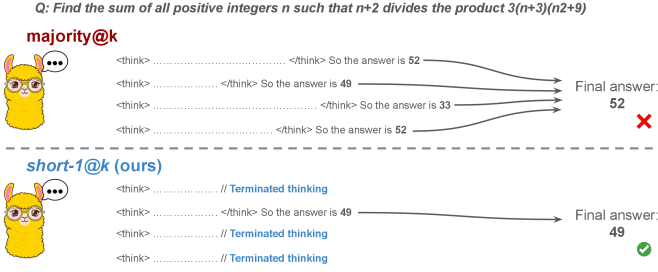
Figure 1: Visual comparison between majority voting and our proposed method short-m@k with $m=1$ (“…” represent thinking time). Given $k$ parallel attempts for the same question, majority@ $k$ waits until all attempts are done, and perform majority voting among them. On the other hand, our short-m@k method halts computation for all attempts as soon as the first $m$ attempts finish “thinking”, which saves compute and time, and surprisingly also boost performance in most cases.
Building on these findings, we propose short-m@k —a novel inference method for reasoning LLMs. short-m@k executes $k$ generations in parallel and terminates computation for all generations as soon as the first $m$ thinking processes are completed. The final answer is then selected via majority voting among those shortest chains, where ties are broken by taking the shortest answer among the tied candidates. See Figure ˜ 1 for visualization.
We evaluate short-m@k using six reasoning LLMs, and compare it to majority voting—the most common aggregation method for evaluating reasoning LLMs on complex benchmarks (Wang et al., 2022; Abdin et al., 2025). We show that in low-compute regimes, short-1@k, i.e., taking the single shortest chain, outperforms majority voting, while significantly reducing the time and compute needed to generate the final answer. For example, using LN-Super- $49$ B (Bercovich and others, 2025), short-1@k can reduce up to $40\%$ of the compute while giving the same performance as majority voting. Moreover, for high-compute regimes, short-3@k, which halts generation after three thinking chains are completed, consistently outperforms majority voting across all compute budgets, while running up to $33\%$ faster.
To gain further insights into the underlining mechanism of why shorter thinking is preferable, we analyze the generated reasoning chains. We first show that while taking the shorter reasoning is beneficial per individual question, longer reasoning is still needed to solve harder questions, as claimed in recent studies (Anthropic, 2025; OpenAI, 2024; Muennighoff et al., 2025). Next, we analyze the backtracking and re-thinking behaviors of reasoning chains. We find that shorter reasoning paths are more effective, as they involve fewer backtracks, with a longer average backtrack length. This finding holds both generally and when controlling for overall trajectory length.
To further strengthening our findings, we study whether training on short reasoning chains can lead to more accurate models. To do so, we finetune two Qwen- $2.5$ (Yang and others, 2024) models ( $7$ B and $32$ B) on three variants of the S $1$ dataset (Muennighoff et al., 2025): S $1$ -short, S $1$ -long, and S $1$ -random, consisting of examples with the shortest, longest, and randomly sampled reasoning trajectories among several generations, respectively. Our experiments demonstrate that finetuning using S $1$ -short not only yields shorter thinking lengths, but also improves model performance. Conversely, finetuning on S $1$ -long increases reasoning time with no significant performance gains.
This work rethinks the test-time compute paradigm for reasoning LLMs, showing that longer thinking not only does not ensure better reasoning, but also leads to worse reasoning in most cases. Our short-m@k methods prioritize shorter reasoning, yielding improved performance and reduced computational costs for current reasoning LLMs. We also show that training reasoning LLMs with shorter reasoning trajectories can enhance performance and reduce costs. Our results pave the way towards a new era of efficient and high-performing reasoning LLMs.
2 Related work
Reasoning LLMs and test-time scaling.
Reasoning LLMs tackle complex tasks by employing extensive reasoning processes, often involving detailed, step-by-step trajectories (OpenAI (2024); OpenAI (2025); Q. Team (2025b); M. Abdin, S. Agarwal, A. Awadallah, V. Balachandran, H. Behl, L. Chen, G. de Rosa, S. Gunasekar, M. Javaheripi, N. Joshi, et al. (2025); Anthropic (2025); A. Bercovich et al. (2025); D. Guo, D. Yang, H. Zhang, J. Song, R. Zhang, R. Xu, Q. Zhu, S. Ma, P. Wang, X. Bi, et al. (2025); 27; G. DeepMind (2025); Q. Team (2025a)). This capability is fundamentally based on techniques like chain-of-thought (CoT; Wei et al., 2022), which encourage models to generate intermediate reasoning steps before arriving at a final answer. Modern LLMs use a large number of tokens, often referred to as “thinking tokens”, to explore multiple problem-solving approaches, to employ self-reflection, and to perform verification. This thinking capability has allowed them to achieve superior performance on challenging tasks such as mathematical problem-solving and code generation (Ke et al., 2025).
The LLM thinking capability is typically achieved through post-training methods applied to a strong base model. The two primary approaches to instilling or improving this reasoning ability are using reinforcement learning (RL) (Guo et al., 2025; Team, 2025b) and supervised fine-tuning (Muennighoff et al., 2025; Ye et al., 2025). Guo et al. (2025) have demonstrated that as training progresses the model tends to generate longer thinking trajectories, which results in improved performance on complex tasks. Similarly, Anthropic (2025) and Muennighoff et al. (2025) have shown a correlation between increased average thinking length during inference and improved performance. We challenge this assumption, demonstrating that shorter sequences are more likely to yield an accurate answer.
Efficiency in reasoning LLMs.
While shortening the length of CoT is beneficial for non-reasoning models (Nayab et al., 2024; Kang et al., 2025), it is higly important for reasoning LLMs as they require a very large amount of tokens to perform the thinking process. As a result, recent studies tried to make the process more efficient, e.g., by using early exit techniques for reasoning trajectories (Pu et al., 2025; Yang et al., 2025), by suppressing backtracks (Wang et al., 2025a) or by training reasoning models which enable control over the thinking length (Yu et al., 2025).
Several recent works studied the relationship between reasoning trajectory length and correctness. Lu et al. (2025) proposed a method for reducing the length of thinking trajectories in reasoning training datasets. Their method employs a reasoning LLM several times over an existing trajectory in order to make it shorter. As this approach eventually trains a model over shorter trajectories it is similar to the method we employ in Section ˜ 6. However, our method is simpler as it does not require an LLM to explicitly shorten the sequence. Fatemi et al. (2025); Qi et al. (2025) and Arora and Zanette (2025) proposed RL methods to shorten reasoning in language models. Fatemi et al. (2025) also observed that correct answers typically require shorter thinking trajectories by averaging lengths across examples, suggesting that lengthy responses might inherently stem from RL-based optimization during training. In Section ˜ 5.1 we show that indeed correct answers usually use shorter thinking trajectories, but also highlight that averaging across all examples might hinder this effect as easier questions require sustainably lower amount of reasoning tokens compared to harder ones.
More relevant to our work, Wu et al. (2025) showed that there is an optimal thinking length range for correct answers according to the difficulty of the question, while Wang et al. (2025b) found that for a specific question, correct responses from reasoning models are usually shorter than incorrect ones. We provide further analysis supporting these observations in Sections ˜ 3 and 5. Finally, our proposed inference method short-m@k is designed to enhance the efficiency of reasoning LLMs by leveraging this property, which can be seen as a generalization of the FFS method (Agarwal et al., 2025), which selects the shortest answer among several candidates as in our short-1@k.
3 Shorter thinking is preferable
As mentioned above, the common wisdom in reasoning LLMs suggests that increased test-time computation enhances model performance. Specifically, it is widely assumed that longer reasoning process, which entails extensive reasoning thinking chains, correlates with improved task performance (OpenAI, 2024; Anthropic, 2025; Muennighoff et al., 2025). We challenge this assumption and ask whether generating more tokens per trajectory actually leads to better performance. To that end, we generate multiple answers per question and compare performance based solely on the shortest, longest and randomly sampled thinking chains among the generated samples.
3.1 Experimental details
We consider four leading, high-performing, open, reasoning LLMs. Llama- $3.3$ -Nemotron-Super- $49$ B-v $1$ [LN-Super- $49$ B; Bercovich and others, 2025]: a reasoning RL-enhanced version of Llama- $3.3$ - $70$ B (Grattafiori et al., 2024); R $1$ -Distill-Qwen- $32$ B [R $1$ - $32$ B; Guo et al., 2025]: an SFT finetuned version of Qwen- $2.5$ - $32$ B-Instruct (Yang and others, 2024) derived from R $1$ trajectories; QwQ- $32$ B a reasoning RL-enhanced version Qwen- $2.5$ - $32$ B-Instruct (Team, 2025b); and R1- $0528$ a $670$ B RL-trained flagship reasoning model (R $1$ - $670$ B; Guo et al., 2025). We also include results for smaller models in Appendix ˜ D.
We evaluate all models using four competitive reasoning benchmarks. We use AIME $2024$ (of America, 2024), AIME $2025$ (of America, 2025) and HMMT February $2025$ , from the Math Arena benchmark (Balunović et al., 2025). This three benchmarks are derived from math competitions, and involve solving problems that cover a broad range of mathematics topics. Each dataset consists of $30$ examples with varied difficulty. We also evaluate the models using the GPQA-diamond benchmark [GPQA-D; Rein et al., 2024], which consists of $198$ multiple-choice scientific questions, and is considered to be challenging for reasoning LLMs (DeepMind, 2025).
For each question, we generate $20$ responses per model, yielding a total of about $36$ k generations. For all models we use temperature of $0.7$ , top-p= $0.95$ and a maximum number of generated tokens of $32$ , $768$ . When measuring the thinking chain length, we measure the token count between the <think> and </think> tokens. We run inference for all models using paged attention via the vLLM framework (Kwon et al., 2023).
3.2 The shorter the better
Table 1: Shorter thinking performs better. Comparison between taking the shortest/longest/random generation per example.
| | GPQA-D | AIME 2024 | AIME 2025 | HMMT | Math Average | | | | | |
| --- | --- | --- | --- | --- | --- | --- | --- | --- | --- | --- |
| Thinking Tokens $\downarrow$ | Acc. $\uparrow$ | Thinking Tokens $\downarrow$ | Acc. $\uparrow$ | Thinking Tokens $\downarrow$ | Acc. $\uparrow$ | Thinking Tokens $\downarrow$ | Acc. $\uparrow$ | Thinking Tokens $\downarrow$ | Acc. $\uparrow$ | |
| LN-Super-49B | | | | | | | | | | |
| random | 5357 | 65.1 | 11258 | 58.8 | 12105 | 51.3 | 13445 | 33.0 | 12270 | 47.7 |
| longest | 8763 $(+64\%)$ | 57.6 | 18566 | 33.3 | 18937 | 30.0 | 19790 | 23.3 | 19098 $(+56\%)$ | 28.9 |
| shortest | 2790 $(-48\%)$ | 69.1 | 0 6276 | 76.7 | 0 7036 | 66.7 | 0 7938 | 46.7 | 7083 $(-42\%)$ | 63.4 |
| R1-32B | | | | | | | | | | |
| random | 5851 | 62.5 | 9614 | 71.8 | 11558 | 56.4 | 12482 | 38.3 | 11218 | 55.5 |
| longest | 9601 $(+64\%)$ | 57.1 | 17689 | 53.3 | 19883 | 36.7 | 20126 | 23.3 | 19233 $(+71\%)$ | 37.8 |
| shortest | 3245 $(-45\%)$ | 64.7 | 0 4562 | 80.0 | 0 6253 | 63.3 | 0 6557 | 36.7 | 5791 $(-48\%)$ | 60.0 |
| QwQ-32B | | | | | | | | | | |
| random | 8532 | 63.7 | 13093 | 82.0 | 14495 | 72.3 | 16466 | 52.5 | 14685 | 68.9 |
| longest | 12881 $(+51\%)$ | 54.5 | 20059 | 70.0 | 21278 | 63.3 | 24265 | 36.7 | 21867 $(+49\%)$ | 56.7 |
| shortest | 5173 $(-39\%)$ | 64.7 | 0 8655 | 86.7 | 10303 | 66.7 | 11370 | 60.0 | 10109 $(-31\%)$ | 71.1 |
| R1-670B | | | | | | | | | | |
| random | 11843 | 76.2 | 16862 | 83.8 | 18557 | 82.5 | 21444 | 68.2 | 18954 | 78.2 |
| longest | 17963 $(+52\%)$ | 63.1 | 22603 | 70.0 | 23570 | 66.7 | 27670 | 40.0 | 24615 $(+30\%)$ | 58.9 |
| shortest | 8116 $(-31\%)$ | 75.8 | 11229 | 83.3 | 13244 | 83.3 | 13777 | 83.3 | 12750 $(-33\%)$ | 83.3 |
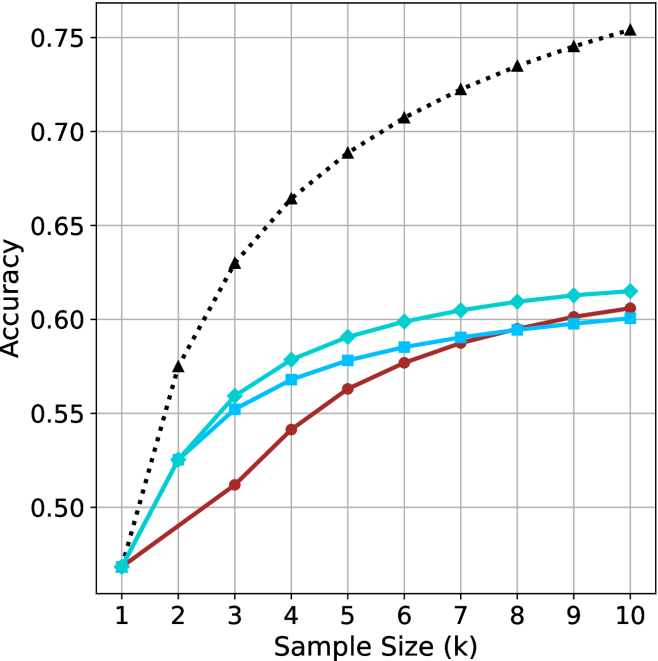
For all generated answers, we compare short vs. long thinking chains for the same question, along with a random chain. Results are presented in Table ˜ 1. In this section we exclude generations where thinking is not completed within the maximum generation length, as these often result in an infinite thinking loop. First, as expected, the shortest answers are $25\%$ – $50\%$ shorter compared to randomly sampled responses. However, we also note that across almost all models and benchmarks, considering the answer with the shortest thinking chain actually boosts performance, yielding an average absolute improvement of $2.2\%$ – $15.7\%$ on the math benchmarks compared to randomly selected generations. When considering the longest thinking answers among the generations, we further observe an increase in thinking chain length, with up to $75\%$ more tokens per chain. These extended reasoning trajectories substantially degrade performance, resulting in average absolute reductions ranging between $5.4\%$ – $18.8\%$ compared to random generations over all benchmarks. These trends are most noticeable when comparing the shortest generation with the longest ones, with an absolute performance gain of up to $34.5\%$ in average accuracy and a substantial drop in the number of thinking tokens.
The above results suggest that long generations might come with a significant price-tag, not only in running time, but also in performance. That is, within an individual example, shorter thinking trajectories are much more likely to be correct. In Section ˜ 5.1 we examine how these results relate to the common assumption that longer trajectories leads to better LLM performance. Next, we propose strategies to leverage these findings to improve the efficiency and effectiveness of reasoning LLMs.
4 short-m@k: faster and better inference of reasoning LLMs
Based on the results presented in Section ˜ 3, we suggest a novel inference method for reasoning LLMs. Our method— short-m@k —leverages batch inference of LLMs per question, using multiple parallel decoding runs for the same query. We begin by introducing our method in Section ˜ 4.1. We then describe our evaluation methodology, which takes into account inference compute and running time (Section ˜ 4.2). Finally, we present our results (Section ˜ 4.3).
4.1 The short-m@k method
The short-m@k method, visualized in Figure ˜ 1, performs parallel decoding of $k$ generations for a given question, halting computation across all generations as soon as the $m≤ k$ shortest thinking trajectories are completed. It then conducts majority voting among those shortest answers, resolving ties by selecting the answer with the shortest thinking chain. Given that thinking trajectories can be computationally intensive, terminating all generations once the $m$ shortest trajectories are completed not only saves computational resources but also significantly reduces wall time due to the parallel decoding approach, as shown in Section ˜ 4.3.
Below we focus on short-1@k and short-3@k, with short-1@k being the most efficient variant of short-m@k and short-3@k providing the best balance of performance and efficiency (see Section ˜ 4.3). Ablation studies on $m$ and other design choices are presented in Appendix ˜ C, while results for smaller models are presented in Appendix ˜ D.
4.2 Evaluation setup
We evaluate all methods under the same setup as described in Section ˜ 3.1. We report the averaged results across the math benchmarks, while the results for GPQA-D presented in Appendix ˜ A. The per benchmark resutls for the math benchmarks are in Appendix ˜ B. We report results using our method (short-m@k) with $m∈\{1,3\}$ . We compare the proposed method to the standard majority voting (majority $@k$ ), arguably the most common method for aggregating multiple outputs (Wang et al., 2022), which was recently adapted for reasoning LLMs (Guo et al., 2025; Abdin et al., 2025; Wang et al., 2025b). As an oracle, we consider pass $@k$ (Kulal et al., 2019; Chen and others, 2021), which measures the probability of including the correct solution within $k$ generated responses.
We benchmark the different methods with sample sizes of $k∈\{1,2,...,10\}$ , assuming standard parallel decoding setup, i.e., all samples are generated in parallel. Section 5.3 presents sequential analysis where parallel decoding is not assumed. For the oracle (pass@ $k$ ) approach, we use the unbiased estimator presented in Chen and others (2021), with our $20$ generations per question ( $n$ $=$ $20$ ). For the short-1@k method, we use the rank-score@ $k$ metric (Hassid et al., 2024), where we sort the different generations according to thinking length. For majority $@k$ and short-m@k where $m>1$ , we run over all $k$ -sized subsets out of the $20$ generations per example.
We evaluate the different methods considering three main criteria: (a) Sample-size (i.e., $k$ ), where we compare methods while controlling for the number of generated samples; (b) Thinking-compute, where we measure the total number of thinking tokens used across all generations in the batch; and (c) Time-to-answer, which measures the wall time of running inference using each method. In this parallel framework, our method (short-m@k) terminates all other generations after the first $m$ decoding thinking processes terminate. Thus, the overall thinking compute is the total number of thinking tokens for each of the $k$ generations at that point. Similarly, the overall time is that of the $m$ ’th shortest generation process. Conversely, for majority $@k$ , the method’s design necessitates waiting for all generations to complete before proceeding. Hence, we consider the compute as the total amount of thinking tokens in all generations and run time according to the longest thinking chain. As for the oracle approach, we terminate all thinking trajectories once the shortest correct one is finished, and consider the compute and time accordingly.
4.3 Results
<details>
<summary>x2.png Details</summary>
### Visual Description
## Line Chart: Accuracy vs. Sample Size
### Overview
The image is a line chart comparing the accuracy of different methods as a function of sample size. The x-axis represents the sample size (k), ranging from 1 to 10. The y-axis represents accuracy, ranging from 0.50 to 0.75. There are three distinct lines, each representing a different method, distinguished by color and marker style.
### Components/Axes
* **X-axis:** Sample Size (k), with values ranging from 1 to 10 in increments of 1.
* **Y-axis:** Accuracy, with values ranging from 0.50 to 0.75 in increments of 0.05.
* **Data Series:**
* Black dotted line with triangle markers.
* Turquoise line with diamond markers.
* Blue line with square markers.
* Brown line with circle markers.
### Detailed Analysis
* **Black dotted line with triangle markers:** This line shows the highest accuracy overall. It starts at approximately 0.47 at sample size 1 and increases rapidly to approximately 0.63 at sample size 3. It continues to increase, but at a decreasing rate, reaching approximately 0.76 at sample size 10.
* (1, 0.47)
* (2, 0.57)
* (3, 0.63)
* (4, 0.66)
* (5, 0.69)
* (6, 0.71)
* (7, 0.725)
* (8, 0.735)
* (9, 0.745)
* (10, 0.76)
* **Turquoise line with diamond markers:** This line starts at approximately 0.47 at sample size 1 and increases to approximately 0.56 at sample size 3. It continues to increase, but at a decreasing rate, reaching approximately 0.61 at sample size 10.
* (1, 0.47)
* (2, 0.53)
* (3, 0.56)
* (4, 0.58)
* (5, 0.595)
* (6, 0.60)
* (7, 0.605)
* (8, 0.61)
* (9, 0.61)
* (10, 0.61)
* **Blue line with square markers:** This line starts lower than the turquoise line and increases steadily.
* (1, 0.47)
* (2, 0.51)
* (3, 0.54)
* (4, 0.56)
* (5, 0.575)
* (6, 0.585)
* (7, 0.59)
* (8, 0.595)
* (9, 0.60)
* (10, 0.605)
* **Brown line with circle markers:** This line starts at approximately 0.47 at sample size 1 and increases to approximately 0.52 at sample size 3. It continues to increase, but at a decreasing rate, reaching approximately 0.60 at sample size 10.
* (1, 0.47)
* (2, 0.49)
* (3, 0.52)
* (4, 0.54)
* (5, 0.56)
* (6, 0.575)
* (7, 0.585)
* (8, 0.59)
* (9, 0.595)
* (10, 0.60)
### Key Observations
* All lines show an increase in accuracy as the sample size increases.
* The black dotted line (with triangle markers) consistently outperforms the other methods in terms of accuracy.
* The rate of increase in accuracy decreases as the sample size increases for all methods, suggesting diminishing returns.
* The brown line (with circle markers) consistently shows the lowest accuracy among the four methods.
* The turquoise and blue lines perform similarly, with the turquoise line showing slightly higher accuracy.
### Interpretation
The chart demonstrates the relationship between sample size and accuracy for different methods. The black dotted line represents the most effective method, achieving the highest accuracy with increasing sample sizes. The diminishing returns observed for all methods suggest that there is a point beyond which increasing the sample size provides only marginal improvements in accuracy. The relative performance of the different methods can be compared directly, with the black dotted line consistently outperforming the others. The data suggests that the choice of method has a significant impact on accuracy, and that increasing the sample size can improve accuracy, but only up to a certain point.
</details>
(a) LN-Super-49B
<details>
<summary>x3.png Details</summary>
### Visual Description
## Line Chart: Accuracy vs. Sample Size
### Overview
The image is a line chart comparing the accuracy of different methods as a function of sample size. The x-axis represents the sample size (k), ranging from 1 to 10. The y-axis represents accuracy, ranging from 0.55 to 0.75. Four different methods are plotted as lines with distinct markers and colors.
### Components/Axes
* **X-axis:** Sample Size (k), ranging from 1 to 10 in increments of 1.
* **Y-axis:** Accuracy, ranging from 0.55 to 0.75 in increments of 0.05.
* **Data Series:**
* Black dotted line with triangle markers.
* Teal line with diamond markers.
* Brown line with circle markers.
* Blue line with square markers.
### Detailed Analysis
* **Black dotted line with triangle markers:** This line shows the highest accuracy overall. It increases rapidly from a sample size of 1 to 3, then continues to increase at a slower rate, approaching a value of approximately 0.75 at a sample size of 10.
* Sample Size 1: ~0.54
* Sample Size 2: ~0.63
* Sample Size 3: ~0.67
* Sample Size 4: ~0.69
* Sample Size 5: ~0.71
* Sample Size 6: ~0.72
* Sample Size 7: ~0.73
* Sample Size 8: ~0.735
* Sample Size 9: ~0.74
* Sample Size 10: ~0.75
* **Teal line with diamond markers:** This line starts at approximately 0.54 at a sample size of 1, increases rapidly until a sample size of 6, and then plateaus around 0.645.
* Sample Size 1: ~0.54
* Sample Size 2: ~0.585
* Sample Size 3: ~0.62
* Sample Size 4: ~0.63
* Sample Size 5: ~0.635
* Sample Size 6: ~0.64
* Sample Size 7: ~0.643
* Sample Size 8: ~0.645
* Sample Size 9: ~0.645
* Sample Size 10: ~0.645
* **Brown line with circle markers:** This line starts at approximately 0.54 at a sample size of 1, increases steadily until a sample size of 9, and then plateaus around 0.65.
* Sample Size 1: ~0.54
* Sample Size 2: ~0.57
* Sample Size 3: ~0.59
* Sample Size 4: ~0.61
* Sample Size 5: ~0.625
* Sample Size 6: ~0.635
* Sample Size 7: ~0.64
* Sample Size 8: ~0.645
* Sample Size 9: ~0.65
* Sample Size 10: ~0.65
* **Blue line with square markers:** This line starts at approximately 0.54 at a sample size of 1, increases rapidly until a sample size of 4, and then plateaus around 0.61.
* Sample Size 1: ~0.54
* Sample Size 2: ~0.57
* Sample Size 3: ~0.595
* Sample Size 4: ~0.605
* Sample Size 5: ~0.61
* Sample Size 6: ~0.61
* Sample Size 7: ~0.61
* Sample Size 8: ~0.61
* Sample Size 9: ~0.61
* Sample Size 10: ~0.61
### Key Observations
* The black dotted line (triangle markers) consistently outperforms the other methods in terms of accuracy across all sample sizes.
* The teal line (diamond markers) and brown line (circle markers) perform similarly, with the brown line showing slightly better accuracy at larger sample sizes.
* The blue line (square markers) has the lowest accuracy and plateaus at a lower value compared to the other methods.
* All methods show diminishing returns in accuracy as the sample size increases, with the most significant gains occurring at smaller sample sizes.
### Interpretation
The chart demonstrates the relationship between sample size and accuracy for different methods. The black dotted line represents the most effective method, achieving the highest accuracy with increasing sample sizes. The other methods show varying degrees of improvement with larger sample sizes, but none reach the accuracy level of the black dotted line method. The plateauing of the lines suggests that there is a limit to the accuracy that can be achieved with these methods, regardless of the sample size. The data suggests that the black dotted line method is the most robust and efficient in terms of accuracy gains with increasing sample size.
</details>
(b) R $1$ - $32$ B
<details>
<summary>x4.png Details</summary>
### Visual Description
## Line Chart: Accuracy vs. Sample Size
### Overview
The image is a line chart showing the relationship between "Accuracy" (y-axis) and "Sample Size (k)" (x-axis) for three different data series. The x-axis ranges from 1 to 10, and the y-axis ranges from 0.66 to 0.82. There are three distinct lines, each representing a different data series, distinguished by color and marker style.
### Components/Axes
* **X-axis:** "Sample Size (k)" with values ranging from 1 to 10 in integer increments.
* **Y-axis:** "Accuracy" with values ranging from 0.66 to 0.82 in increments of 0.02.
* **Data Series:** Three data series are plotted:
* A black dotted line with triangle markers.
* A cyan solid line with diamond markers.
* A brown solid line with circle markers.
* A blue solid line with square markers.
### Detailed Analysis
**1. Black Dotted Line (Triangle Markers):**
* Trend: This line shows a steep upward trend initially, then gradually plateaus.
* Data Points:
* (1, 0.67) +/- 0.005
* (2, 0.73) +/- 0.005
* (3, 0.77) +/- 0.005
* (4, 0.79) +/- 0.005
* (5, 0.80) +/- 0.005
* (6, 0.81) +/- 0.005
* (7, 0.815) +/- 0.005
* (8, 0.82) +/- 0.005
* (9, 0.82) +/- 0.005
* (10, 0.825) +/- 0.005
**2. Cyan Solid Line (Diamond Markers):**
* Trend: This line shows an upward trend, but less steep than the black dotted line, and also plateaus.
* Data Points:
* (1, 0.67) +/- 0.005
* (2, 0.70) +/- 0.005
* (3, 0.725) +/- 0.005
* (4, 0.74) +/- 0.005
* (5, 0.74) +/- 0.005
* (6, 0.745) +/- 0.005
* (7, 0.745) +/- 0.005
* (8, 0.75) +/- 0.005
* (9, 0.75) +/- 0.005
* (10, 0.755) +/- 0.005
**3. Brown Solid Line (Circle Markers):**
* Trend: This line shows a gradual upward trend, plateauing towards the end.
* Data Points:
* (1, 0.67) +/- 0.005
* (2, 0.69) +/- 0.005
* (3, 0.705) +/- 0.005
* (4, 0.72) +/- 0.005
* (5, 0.73) +/- 0.005
* (6, 0.735) +/- 0.005
* (7, 0.74) +/- 0.005
* (8, 0.745) +/- 0.005
* (9, 0.745) +/- 0.005
* (10, 0.75) +/- 0.005
**4. Blue Solid Line (Square Markers):**
* Trend: This line shows an upward trend, then decreases slightly.
* Data Points:
* (1, 0.67) +/- 0.005
* (2, 0.70) +/- 0.005
* (3, 0.71) +/- 0.005
* (4, 0.715) +/- 0.005
* (5, 0.715) +/- 0.005
* (6, 0.715) +/- 0.005
* (7, 0.715) +/- 0.005
* (8, 0.715) +/- 0.005
* (9, 0.715) +/- 0.005
* (10, 0.71) +/- 0.005
### Key Observations
* All lines start at approximately the same accuracy value (around 0.67) when the sample size is 1.
* The black dotted line (triangle markers) consistently achieves the highest accuracy for any given sample size greater than 1.
* The blue solid line (square markers) plateaus and even decreases slightly after a sample size of 4.
* The cyan solid line (diamond markers) and brown solid line (circle markers) show similar trends, with the cyan line consistently having a slightly higher accuracy.
### Interpretation
The chart illustrates how accuracy changes with increasing sample size for four different methods or models. The black dotted line (triangle markers) represents the most effective method, as it achieves the highest accuracy and plateaus at a high value. The blue solid line (square markers) is the least effective, as its accuracy plateaus and even decreases slightly, indicating that increasing the sample size beyond a certain point does not improve its performance. The cyan and brown lines show intermediate performance. The data suggests that the choice of method or model significantly impacts the accuracy achieved, and that increasing the sample size has diminishing returns for all methods, eventually leading to a plateau in accuracy.
</details>
(c) QwQ-32B
<details>
<summary>x5.png Details</summary>
### Visual Description
## Line Chart: Accuracy vs. Sample Size
### Overview
The image is a line chart comparing the accuracy of different methods ("pass@k (Oracle)", "majority@k", "short-1@k (Ours)", and "short-3@k (Ours)") as a function of sample size (k), ranging from 1 to 10. The y-axis represents accuracy, ranging from 0.78 to 0.90.
### Components/Axes
* **X-axis:** Sample Size (k), with tick marks at integers from 1 to 10.
* **Y-axis:** Accuracy, with tick marks at 0.78, 0.80, 0.82, 0.84, 0.86, 0.88, and 0.90.
* **Legend:** Located in the bottom-right corner, it identifies the lines:
* Black dotted line with triangles: pass@k (Oracle)
* Brown solid line with circles: majority@k
* Blue solid line with squares: short-1@k (Ours)
* Teal solid line with diamonds: short-3@k (Ours)
### Detailed Analysis
* **pass@k (Oracle):** (Black dotted line with triangles)
* Trend: Slopes sharply upward, then plateaus.
* Data Points:
* k=1: ~0.78
* k=2: ~0.83
* k=3: ~0.86
* k=4: ~0.87
* k=5: ~0.88
* k=6: ~0.88
* k=7: ~0.89
* k=8: ~0.89
* k=9: ~0.90
* k=10: ~0.90
* **majority@k:** (Brown solid line with circles)
* Trend: Slopes upward, but at a decreasing rate.
* Data Points:
* k=1: ~0.78
* k=2: ~0.80
* k=3: ~0.81
* k=4: ~0.82
* k=5: ~0.83
* k=6: ~0.84
* k=7: ~0.85
* k=8: ~0.86
* k=9: ~0.86
* k=10: ~0.87
* **short-1@k (Ours):** (Blue solid line with squares)
* Trend: Slopes upward, then plateaus.
* Data Points:
* k=1: ~0.78
* k=2: ~0.82
* k=3: ~0.83
* k=4: ~0.84
* k=5: ~0.84
* k=6: ~0.85
* k=7: ~0.85
* k=8: ~0.85
* k=9: ~0.85
* k=10: ~0.85
* **short-3@k (Ours):** (Teal solid line with diamonds)
* Trend: Slopes upward, then plateaus.
* Data Points:
* k=1: ~0.78
* k=2: ~0.82
* k=3: ~0.85
* k=4: ~0.86
* k=5: ~0.87
* k=6: ~0.87
* k=7: ~0.88
* k=8: ~0.88
* k=9: ~0.89
* k=10: ~0.89
### Key Observations
* "pass@k (Oracle)" consistently achieves the highest accuracy across all sample sizes.
* "short-3@k (Ours)" performs better than "short-1@k (Ours)" and "majority@k".
* "majority@k" has the lowest accuracy among the four methods.
* All methods show diminishing returns in accuracy as the sample size increases beyond a certain point.
### Interpretation
The chart demonstrates the relationship between sample size and accuracy for different methods. The "pass@k (Oracle)" method serves as an upper bound or ideal performance, while the other methods ("majority@k", "short-1@k (Ours)", and "short-3@k (Ours)") show varying degrees of improvement with increasing sample size. The "short-3@k (Ours)" method appears to be a more effective approach than "short-1@k (Ours)" and "majority@k". The plateauing of accuracy suggests that there is a limit to the benefits of increasing the sample size for these methods. The data suggests that "short-3@k" is a good compromise between the oracle and the majority vote.
</details>
(d) R1-670B
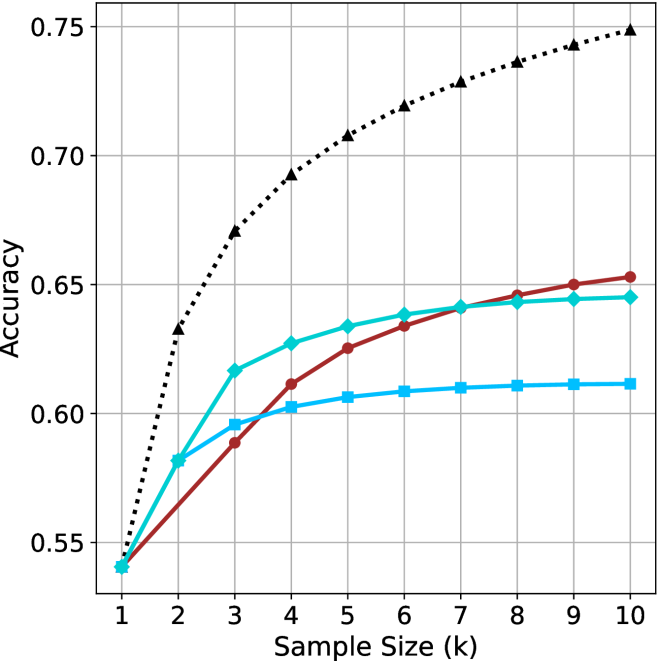
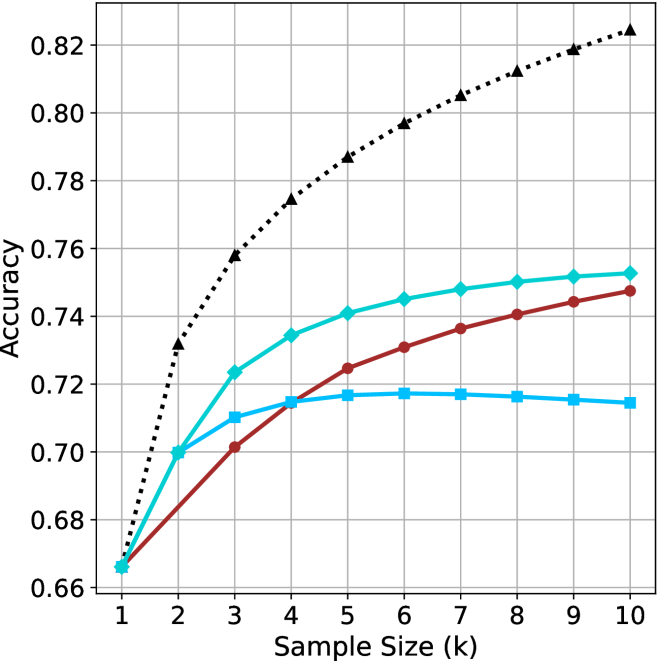
Figure 2: Comparing different inference methods under controlled sample size ( $k$ ). All methods improve with larger sample sizes. Interestingly, this trend also holds for the short-m@k methods.
<details>
<summary>x6.png Details</summary>
### Visual Description
## Chart: Accuracy vs. Thinking Compute
### Overview
The image is a line chart comparing the accuracy of different models as a function of "Thinking Compute" (measured in thousands of tokens). There are three data series represented by different colored lines with distinct markers: black triangles (dotted line), cyan diamonds (solid line), and brown circles (solid line). The chart shows how accuracy increases with increasing compute for each model.
### Components/Axes
* **X-axis:** "Thinking Compute (thinking tokens in thousands)". The axis ranges from approximately 15 to 125, with tick marks at intervals of 20.
* **Y-axis:** "Accuracy". The axis ranges from 0.50 to 0.75, with tick marks at intervals of 0.05.
* **Data Series:**
* Black dotted line with triangle markers.
* Cyan solid line with diamond markers.
* Brown solid line with circle markers.
* **Grid:** The chart has a grid with vertical and horizontal lines at each tick mark on the axes.
### Detailed Analysis
* **Black (Triangle Markers, Dotted Line):** This line shows the highest accuracy for a given compute value. The line increases rapidly from approximately (15, 0.47) to (30, 0.66), then continues to increase, but at a slower rate, reaching approximately (80, 0.75).
* **Cyan (Diamond Markers, Solid Line):** This line starts at approximately (15, 0.47), increases to approximately (60, 0.60), and then plateaus, reaching approximately (80, 0.62).
* **Brown (Circle Markers, Solid Line):** This line starts at approximately (15, 0.47), increases more slowly than the other two lines, reaching approximately (125, 0.61).
### Key Observations
* The black dotted line (triangle markers) consistently outperforms the other two models in terms of accuracy for a given amount of thinking compute.
* The cyan line (diamond markers) initially performs similarly to the black line but plateaus at a lower accuracy.
* The brown line (circle markers) shows the slowest increase in accuracy with increasing compute.
### Interpretation
The chart suggests that the model represented by the black dotted line (triangle markers) is the most efficient in terms of accuracy gained per unit of thinking compute. The other two models, represented by the cyan and brown lines, show diminishing returns in accuracy as compute increases, with the brown line being the least efficient. The data demonstrates the relationship between computational resources and model performance, highlighting the importance of choosing an efficient model architecture. The black line's rapid initial increase suggests it quickly learns from the initial tokens, while the other models require more compute to achieve comparable accuracy.
</details>
(a) LN-Super-49B
<details>
<summary>x7.png Details</summary>
### Visual Description
## Chart: Accuracy vs. Thinking Compute
### Overview
The image is a line chart comparing the accuracy of different models as a function of "Thinking Compute," measured in thousands of thinking tokens. There are three distinct data series represented by different colored lines with different markers. The chart shows how accuracy improves with increased computational resources for each model.
### Components/Axes
* **X-axis:** Thinking Compute (thinking tokens in thousands). The axis ranges from approximately 10 to 120, with major tick marks at intervals of 20.
* **Y-axis:** Accuracy. The axis ranges from 0.55 to 0.75, with major tick marks at intervals of 0.05.
* **Data Series:**
* **Black dotted line with triangle markers:** This line shows the highest accuracy and increases rapidly at first, then plateaus.
* **Teal line with diamond markers:** This line shows intermediate accuracy and increases steadily before plateauing.
* **Brown line with circle markers:** This line shows the lowest accuracy and increases steadily before plateauing.
* **Light Blue line with square markers:** This line shows intermediate accuracy and increases steadily before plateauing at a lower level than the teal line.
### Detailed Analysis
* **Black dotted line (triangle markers):**
* Trend: Rapid initial increase, then plateaus.
* Data Points:
* (15, 0.55)
* (25, 0.63)
* (35, 0.68)
* (50, 0.72)
* (65, 0.74)
* (70, 0.75)
* **Teal line (diamond markers):**
* Trend: Steady increase, then plateaus.
* Data Points:
* (15, 0.54)
* (25, 0.58)
* (35, 0.61)
* (45, 0.63)
* (60, 0.64)
* **Brown line (circle markers):**
* Trend: Steady increase, then plateaus.
* Data Points:
* (20, 0.55)
* (40, 0.59)
* (60, 0.62)
* (80, 0.64)
* (100, 0.65)
* (120, 0.65)
* **Light Blue line (square markers):**
* Trend: Steady increase, then plateaus.
* Data Points:
* (15, 0.54)
* (30, 0.60)
* (45, 0.61)
* (60, 0.61)
### Key Observations
* The black dotted line (triangle markers) achieves the highest accuracy with the least amount of thinking compute.
* The brown line (circle markers) requires the most thinking compute to reach its maximum accuracy.
* All lines show diminishing returns as thinking compute increases, indicating a plateau in accuracy.
* The light blue line (square markers) plateaus at a lower accuracy level compared to the teal line (diamond markers) and the brown line (circle markers).
### Interpretation
The chart illustrates the trade-off between computational resources (thinking tokens) and model accuracy. The black dotted line (triangle markers) represents a more efficient model, achieving higher accuracy with fewer resources. The other lines represent models that require more computational power to achieve comparable or lower accuracy. The plateauing effect suggests that there is a limit to how much accuracy can be gained by simply increasing computational resources, and that other factors, such as model architecture or training data, may play a more significant role beyond a certain point. The light blue line (square markers) may represent a model with inherent limitations, as it plateaus at a lower accuracy level despite increasing computational resources.
</details>
(b) R $1$ - $32$ B
<details>
<summary>x8.png Details</summary>
### Visual Description
## Line Chart: Accuracy vs. Thinking Compute
### Overview
The image is a line chart comparing accuracy against "Thinking Compute" (measured in thousands of thinking tokens). There are four data series represented by different colored lines with distinct markers. The chart shows how accuracy changes as the thinking compute increases.
### Components/Axes
* **X-axis:** "Thinking Compute (thinking tokens in thousands)". The scale ranges from approximately 10 to 160, with major ticks at intervals of 25 (25, 50, 75, 100, 125, 150).
* **Y-axis:** "Accuracy". The scale ranges from 0.66 to 0.82, with major ticks at intervals of 0.02 (0.66, 0.68, 0.70, 0.72, 0.74, 0.76, 0.78, 0.80, 0.82).
* **Data Series:** Four data series are plotted on the chart, distinguished by color and marker style. The legend is missing, so the series are described by their color and marker.
### Detailed Analysis
**Data Series 1: Black dotted line with triangle markers**
* Trend: This line shows the highest accuracy and increases rapidly at first, then the rate of increase slows down.
* Data Points:
* (15, 0.67)
* (25, 0.73)
* (35, 0.77)
* (50, 0.79)
* (75, 0.805)
* (100, 0.815)
* (125, 0.825)
**Data Series 2: Cyan line with diamond markers**
* Trend: This line shows a moderate increase in accuracy, with the rate of increase slowing down as the thinking compute increases.
* Data Points:
* (15, 0.665)
* (25, 0.70)
* (35, 0.725)
* (50, 0.735)
* (75, 0.745)
* (100, 0.75)
* (125, 0.752)
**Data Series 3: Brown line with circle markers**
* Trend: This line shows a gradual increase in accuracy.
* Data Points:
* (15, 0.665)
* (25, 0.695)
* (50, 0.70)
* (75, 0.725)
* (100, 0.73)
* (150, 0.747)
**Data Series 4: Cyan line with square markers**
* Trend: This line increases initially, then flattens out and slightly decreases.
* Data Points:
* (15, 0.665)
* (25, 0.70)
* (35, 0.71)
* (50, 0.715)
* (75, 0.717)
* (100, 0.715)
* (125, 0.714)
### Key Observations
* The black dotted line with triangle markers consistently achieves the highest accuracy across all thinking compute values.
* The cyan line with square markers plateaus and slightly decreases after a certain point.
* The brown line with circle markers shows a steady, but less pronounced, increase in accuracy compared to the black dotted line and the cyan line with diamond markers.
### Interpretation
The chart suggests that increasing "Thinking Compute" generally leads to higher accuracy, but the extent of improvement varies depending on the specific data series (presumably different models or configurations). The black dotted line represents the most effective configuration, showing the highest accuracy gains with increasing compute. The flattening or slight decrease in accuracy for the cyan line with square markers indicates a point of diminishing returns or potential overfitting for that particular configuration. The data highlights the importance of optimizing not just the amount of compute, but also the specific model or configuration used.
</details>
(c) QwQ-32B
<details>
<summary>x9.png Details</summary>
### Visual Description
## Chart: Accuracy vs. Thinking Compute
### Overview
The image is a line chart comparing the accuracy of different methods (pass@k (Oracle), majority@k, short-1@k (Ours), and short-3@k (Ours)) against the thinking compute, measured in thousands of thinking tokens. The chart shows how accuracy improves with increased thinking compute for each method.
### Components/Axes
* **X-axis:** Thinking Compute (thinking tokens in thousands). Scale ranges from 0 to 150, with tick marks at 50, 100, and 150.
* **Y-axis:** Accuracy. Scale ranges from 0.78 to 0.90, with tick marks at 0.78, 0.80, 0.82, 0.84, 0.86, 0.88, and 0.90.
* **Legend:** Located in the bottom-right corner of the chart.
* `pass@k (Oracle)`: Black dotted line with triangle markers.
* `majority@k`: Brown/Red solid line with circle markers.
* `short-1@k (Ours)`: Blue solid line with square markers.
* `short-3@k (Ours)`: Cyan solid line with diamond markers.
### Detailed Analysis
* **pass@k (Oracle):** (Black dotted line with triangle markers)
* Trend: Rapidly increases initially, then the rate of increase slows down.
* Data Points:
* At x=20, y ≈ 0.82
* At x=50, y ≈ 0.86
* At x=100, y ≈ 0.89
* At x=150, y ≈ 0.905
* **majority@k:** (Brown/Red solid line with circle markers)
* Trend: Increases almost linearly.
* Data Points:
* At x=20, y ≈ 0.78
* At x=50, y ≈ 0.81
* At x=75, y ≈ 0.83
* At x=100, y ≈ 0.845
* At x=125, y ≈ 0.855
* At x=150, y ≈ 0.87
* **short-1@k (Ours):** (Blue solid line with square markers)
* Trend: Increases, then plateaus.
* Data Points:
* At x=20, y ≈ 0.78
* At x=50, y ≈ 0.83
* At x=75, y ≈ 0.845
* At x=100, y ≈ 0.847
* At x=125, y ≈ 0.848
* **short-3@k (Ours):** (Cyan solid line with diamond markers)
* Trend: Increases, then the rate of increase slows down.
* Data Points:
* At x=20, y ≈ 0.78
* At x=50, y ≈ 0.82
* At x=75, y ≈ 0.86
* At x=100, y ≈ 0.875
* At x=125, y ≈ 0.882
* At x=150, y ≈ 0.89
### Key Observations
* `pass@k (Oracle)` consistently outperforms the other methods across all thinking compute values.
* `majority@k` shows a steady, linear increase in accuracy as thinking compute increases.
* `short-1@k (Ours)` plateaus in accuracy after a certain point.
* `short-3@k (Ours)` performs better than `short-1@k (Ours)` and `majority@k`, but worse than `pass@k (Oracle)`.
### Interpretation
The chart illustrates the relationship between thinking compute and accuracy for different methods. The `pass@k (Oracle)` method achieves the highest accuracy, suggesting it is the most effective approach. The `majority@k` method shows a consistent improvement with increased compute, while the `short-1@k (Ours)` method reaches a point of diminishing returns. The `short-3@k (Ours)` method provides a balance between performance and compute efficiency. The data suggests that increasing thinking compute generally improves accuracy, but the extent of improvement varies depending on the method used. The "Oracle" method likely represents an upper bound on performance, while the other methods represent practical implementations.
</details>
(d) R1-670B
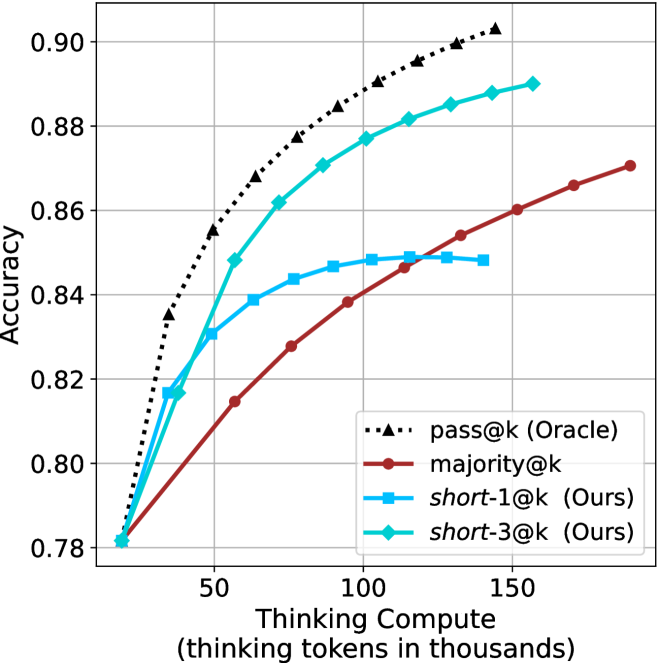
Figure 3: Comparing different inference methods under controlled thinking compute. short-1@k is highly performant in low compute regimes. short-3@k dominates the curve compared to majority $@k$ .
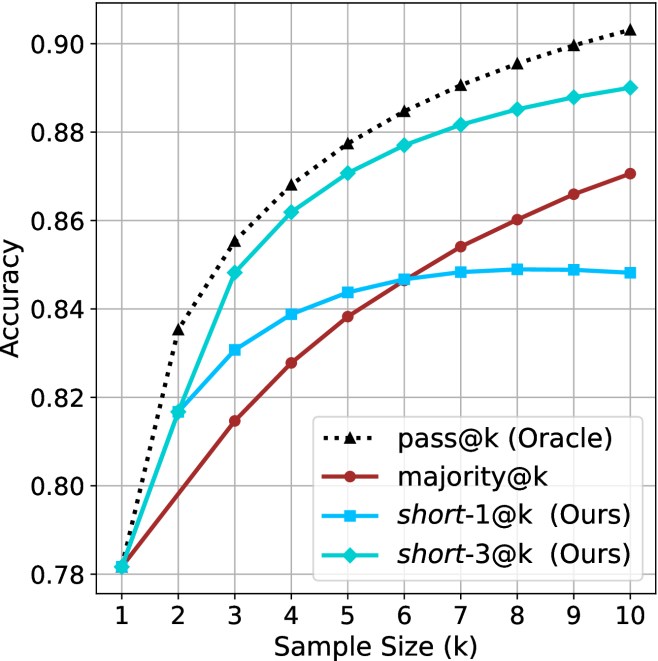
Sample-size ( $k$ ).
We start by examining different methods across benchmarks for a fixed sample size $k$ . Results aggregated across math benchmarks are presented in Figure ˜ 2, while Figure ˜ 6 in Appendix ˜ A presents GPQA-D results, and detailed results per benchmark can be seen at Appendix ˜ B. We observe that, generally, all methods improve with larger sample sizes, indicating that increased generations per question enhance performance. This trend is somewhat expected for the oracle (pass@ $k$ ) and majority@ $k$ methods but surprising for our method, as it means that even when a large amount of generations is used, the shorter thinking ones are more likely to be correct. The only exception is QwQ- $32$ B (Figure ˜ 2(c)), which shows a small of decline when considering larger sample sizes with the short-1@k method.
When comparing short-1@k to majority@ $k$ , the former outperforms at smaller sample sizes, but is outperformed by the latter in three out of four models when the sample size increases. Meanwhile, the short-3@k method demonstrates superior performance, dominating across nearly all models and sample sizes. Notably, for the R $1$ - $670$ B model, short-3@k exhibits performance nearly on par with the oracle across all sample sizes. We next analyze how this performance advantage translates into efficiency benefits.
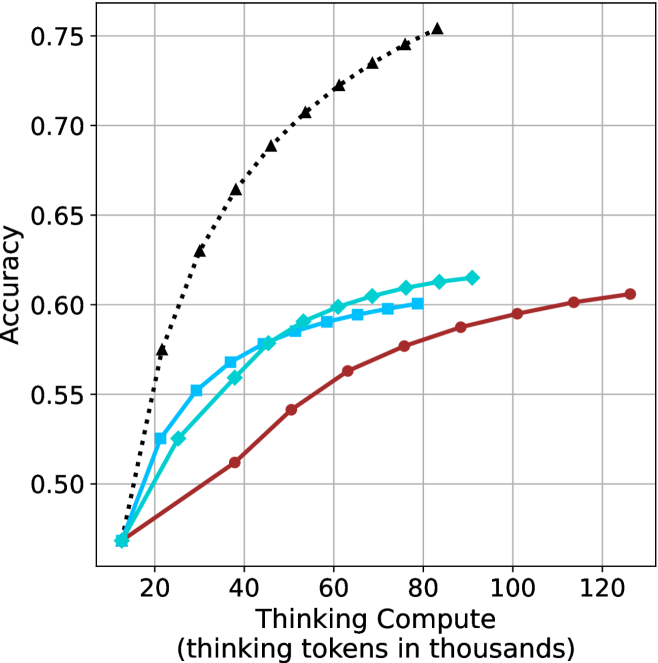
Thinking-compute.
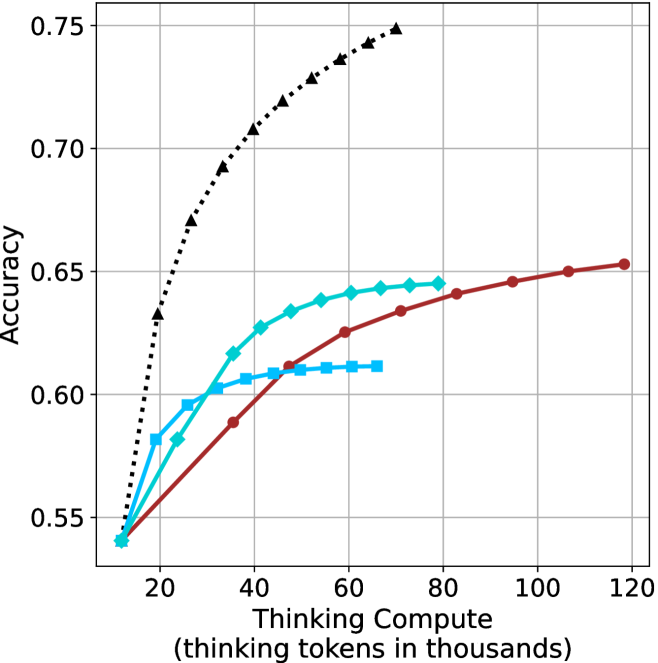
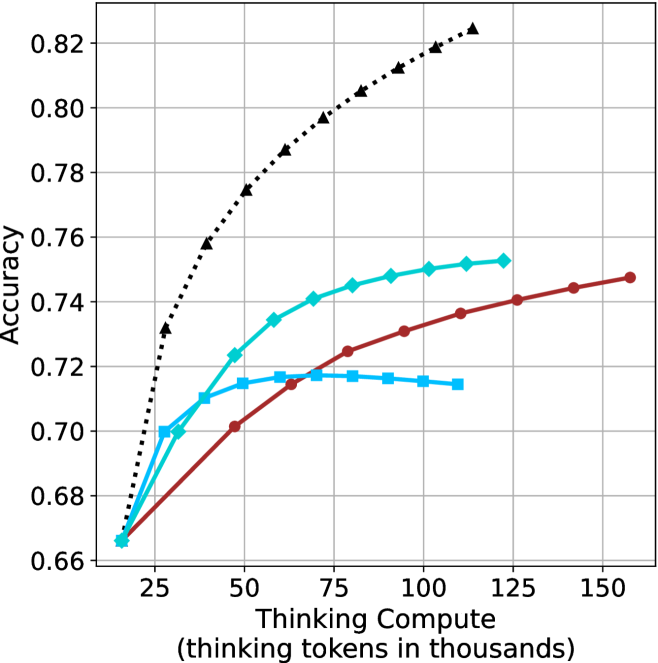
The aggregated performance results for math benchmarks, evaluated with respect to thinking compute, are presented in Figure ˜ 3 (per-benchmark results provided in Appendix ˜ B), while the GPQA-D respective results are presented in Figure ˜ 7 in Appendix ˜ A. We again observe that the short-1@k method outperforms majority $@k$ at lower compute budgets. Notably, for LN-Super- $49$ B (Figure ˜ 3(a)), the short-1@k method surpasses majority $@k$ across all compute budgets. For instance, short-1@k achieves $57\%$ accuracy with approximately $60\%$ of the compute budget used by majority@ $k$ to achieve the same accuracy. For R $1$ - $32$ B, QwQ- $32$ B and R $1$ - $670$ B models, the short-1@k method exceeds majority $@k$ up to compute budgets of $45$ k, $60$ k and $100$ k total thinking tokens, respectively, but is underperformed by it on larger compute budgets.
The short-3@k method yields even greater performance improvements, incurring only a modest increase in thinking compute compared to short-1@k. When compared to majority $@k$ , short-3@k consistently achieves higher performance with lower thinking compute across all models and compute budgets. For example, with the QwQ- $32$ B model (Figure ˜ 3(c)), and an average compute budget of $80$ k thinking tokens per example, short-3@k improves accuracy by $2\%$ over majority@ $k$ . For the R $1$ - $670$ B model (Figure ˜ 3(d)), short-3@k consistently outperforms majority voting, yielding an approximate $4\%$ improvement with an average token budget of $100$ k.
<details>
<summary>x10.png Details</summary>
### Visual Description
## Scatter Plot: Accuracy vs. Time-to-Answer
### Overview
The image is a scatter plot comparing "Accuracy" on the y-axis with "Time-to-Answer (longest thinking in thousands)" on the x-axis. The plot displays data points for different values of 'k' (1, 3, 5, and 9), with two distinct series represented by different colors and shapes: cyan (squares, diamonds, and octagons) and red (circles).
### Components/Axes
* **X-axis:** "Time-to-Answer (longest thinking in thousands)". The scale ranges from 8 to 18, with gridlines at each integer value.
* **Y-axis:** "Accuracy". The scale ranges from 0.48 to 0.62, with gridlines at intervals of 0.02.
* **Data Series:**
* Cyan: Represented by squares (k=3, k=9), diamonds (k=3, k=5, k=9), and an octagon (k=1).
* Red: Represented by circles (k=3, k=5, k=9).
* **Legend:** There is no explicit legend, but the 'k' values are labeled directly next to each data point.
### Detailed Analysis
**Cyan Data Series:**
* **k=1:** Located at approximately (12.5, 0.47). Shape: Octagon.
* **k=3:** Located at approximately (9.5, 0.55). Shape: Square.
* **k=3:** Located at approximately (15.5, 0.56). Shape: Diamond.
* **k=5:** Located at approximately (8.5, 0.58). Shape: Square.
* **k=5:** Located at approximately (13.5, 0.59). Shape: Diamond.
* **k=9:** Located at approximately (8, 0.60). Shape: Square.
* **k=9:** Located at approximately (11.5, 0.61). Shape: Diamond.
**Red Data Series:**
* **k=3:** Located at approximately (16, 0.51). Shape: Circle.
* **k=5:** Located at approximately (17.5, 0.56). Shape: Circle.
* **k=9:** Located at approximately (18, 0.60). Shape: Circle.
### Key Observations
* For the cyan data series, as 'k' increases, the accuracy tends to increase, but the time-to-answer also increases.
* For the red data series, as 'k' increases, both accuracy and time-to-answer increase.
* The cyan data points generally have lower time-to-answer values compared to the red data points for the same 'k' value (except for k=9 where they are very close).
* The lowest accuracy is observed for k=1 (cyan series).
### Interpretation
The scatter plot visualizes the relationship between accuracy and time-to-answer for different values of 'k'. The two distinct data series (cyan and red) likely represent different algorithms or configurations. The data suggests that increasing 'k' generally improves accuracy, but at the cost of increased time-to-answer. The cyan series appears to achieve higher accuracy with lower time-to-answer for lower values of 'k', but the red series catches up at k=9. The choice of 'k' and the algorithm (cyan vs. red) would depend on the specific requirements of the application, balancing the need for high accuracy with acceptable response times. The single point at k=1 for the cyan series is an outlier, showing the lowest accuracy and a relatively low time-to-answer.
</details>
(a) LN-Super- $49$ B
<details>
<summary>x11.png Details</summary>
### Visual Description
## Scatter Plot: Accuracy vs. Time-to-Answer
### Overview
The image is a scatter plot comparing the accuracy of a system against the time it takes to answer, with data points differentiated by the parameter 'k'. The x-axis represents "Time-to-Answer (longest thinking in thousands)", and the y-axis represents "Accuracy". There are two distinct series of data points, represented by different shapes and colors: cyan squares, cyan diamonds, and brown circles. Each data point is labeled with a 'k' value.
### Components/Axes
* **X-axis:** Time-to-Answer (longest thinking in thousands). Scale ranges from approximately 7 to 19, with gridlines at integer values.
* **Y-axis:** Accuracy. Scale ranges from approximately 0.53 to 0.65, with gridlines at intervals of 0.02.
* **Data Series:**
* Cyan Squares: k=3, k=5, k=9
* Cyan Diamonds: k=1, k=3, k=5, k=9
* Brown Circles: k=3, k=5, k=9
### Detailed Analysis
**Cyan Squares Data Series:**
* k=9: Located at approximately (7.5, 0.61)
* k=5: Located at approximately (8.5, 0.605)
* k=3: Located at approximately (9, 0.595)
* Trend: As 'k' decreases, the time-to-answer increases slightly, and the accuracy decreases slightly.
**Cyan Diamonds Data Series:**
* k=1: Located at approximately (11.7, 0.54)
* k=3: Located at approximately (15, 0.615)
* k=5: Located at approximately (11.5, 0.63)
* k=9: Located at approximately (9.5, 0.645)
* Trend: The accuracy increases as k increases from 1 to 9. The time-to-answer is lowest for k=9 and highest for k=3.
**Brown Circles Data Series:**
* k=3: Located at approximately (15.5, 0.59)
* k=5: Located at approximately (16.5, 0.625)
* k=9: Located at approximately (18.5, 0.65)
* Trend: As 'k' increases, both the time-to-answer and the accuracy increase.
### Key Observations
* The cyan squares data points are clustered in the top-left of the plot, indicating relatively low time-to-answer and moderate accuracy.
* The cyan diamonds data points are more spread out, with k=1 having the lowest accuracy and k=9 having the highest accuracy.
* The brown circles data points are located in the top-right of the plot, indicating relatively high time-to-answer and high accuracy.
* For the brown circles, increasing 'k' results in both increased time-to-answer and increased accuracy.
### Interpretation
The scatter plot visualizes the relationship between accuracy and time-to-answer for different values of 'k'. The data suggests that there is a trade-off between accuracy and time-to-answer, and that the optimal value of 'k' depends on the specific application.
The cyan squares and cyan diamonds appear to represent different algorithms or configurations, as they exhibit different trends. The brown circles show a clear positive correlation between 'k', time-to-answer, and accuracy.
The plot highlights the importance of considering both accuracy and time-to-answer when evaluating the performance of a system. It also suggests that tuning the parameter 'k' can have a significant impact on the system's performance.
</details>
(b) R $1$ - $32$ B
<details>
<summary>x12.png Details</summary>
### Visual Description
## Scatter Plot: Accuracy vs. Time-to-Answer
### Overview
The image is a scatter plot showing the relationship between "Accuracy" and "Time-to-Answer" (longest thinking in thousands). There are two data series, represented by different shapes and colors: cyan squares and diamonds, and brown circles. Each data point is labeled with a "k" value (k=1, k=3, k=5, k=9).
### Components/Axes
* **X-axis:** "Time-to-Answer (longest thinking in thousands)". The scale ranges from 12 to 20, with gridlines at each integer value.
* **Y-axis:** "Accuracy". The scale ranges from 0.68 to 0.74, with gridlines at intervals of 0.02.
* **Data Series 1:** Cyan squares and diamonds, labeled with k=1, k=3, k=5, k=9.
* **Data Series 2:** Brown circles, labeled with k=3, k=5, k=9.
### Detailed Analysis
**Cyan Squares and Diamonds Data Series:**
* **k=1:** Located at approximately (15.5, 0.66). Shape: Star.
* **k=3:** Located at approximately (14, 0.71). Shape: Square.
* **k=5:** Located at approximately (12.5, 0.72). Shape: Square.
* **k=9:** Located at approximately (12, 0.72). Shape: Square.
* **k=3:** Located at approximately (18, 0.725). Shape: Diamond.
* **k=5:** Located at approximately (17, 0.74). Shape: Diamond.
* **k=9:** Located at approximately (16, 0.75). Shape: Diamond.
**Trend:** The cyan data points show a complex relationship. For k=1, 3, 5, and 9, the time-to-answer decreases as accuracy increases. For k=3, 5, and 9, the time-to-answer increases as accuracy increases.
**Brown Circles Data Series:**
* **k=3:** Located at approximately (18, 0.70).
* **k=5:** Located at approximately (19, 0.725).
* **k=9:** Located at approximately (20, 0.745).
**Trend:** The brown data points show a positive correlation between time-to-answer and accuracy. As time-to-answer increases, accuracy also increases.
### Key Observations
* The cyan data points are clustered in the lower left of the plot, while the brown data points are in the upper right.
* The cyan data points show a more complex relationship between time-to-answer and accuracy than the brown data points.
* The "k" values are associated with each data point, but the plot does not explain what "k" represents.
### Interpretation
The scatter plot visualizes the relationship between the time taken to answer a question and the accuracy of the answer, for different values of "k". The two data series (cyan and brown) exhibit different trends. The brown data series shows a clear positive correlation: more time spent thinking leads to higher accuracy. The cyan data series shows a more complex relationship, possibly indicating diminishing returns or different strategies at play. The meaning of "k" is not defined in the plot, but it appears to be a parameter influencing both time-to-answer and accuracy. The plot suggests that optimizing for "k" could lead to different trade-offs between speed and accuracy.
</details>
(c) QwQ-32B
<details>
<summary>x13.png Details</summary>
### Visual Description
## Scatter Plot: Accuracy vs. Time-to-Answer
### Overview
The image is a scatter plot comparing the accuracy of different methods (majority@k, short-1@k, and short-3@k) against their time-to-answer. The x-axis represents the time-to-answer in thousands, and the y-axis represents the accuracy. Each data point is labeled with a 'k' value, indicating a parameter used in the method.
### Components/Axes
* **X-axis:** Time-to-Answer (longest thinking in thousands). Scale ranges from 14 to 22, with gridlines at each integer value.
* **Y-axis:** Accuracy. Scale ranges from 0.78 to 0.88, with gridlines at intervals of 0.02.
* **Legend:** Located in the bottom-right corner.
* Red circle: majority@k
* Blue square: short-1@k (Ours)
* Teal diamond: short-3@k (Ours)
* **Data Points:** Each point is labeled with its corresponding 'k' value.
### Detailed Analysis
**1. majority@k (Red Circles):**
* Trend: As 'k' increases, both time-to-answer and accuracy increase.
* k=3: Time-to-Answer ≈ 21.5, Accuracy ≈ 0.815
* k=5: Time-to-Answer ≈ 22, Accuracy ≈ 0.84
* k=9: Time-to-Answer ≈ 22.5, Accuracy ≈ 0.865
**2. short-1@k (Blue Squares):**
* Trend: As 'k' increases, both time-to-answer and accuracy increase.
* k=1: Time-to-Answer ≈ 19.5, Accuracy ≈ 0.78
* k=3: Time-to-Answer ≈ 16, Accuracy ≈ 0.83
* k=5: Time-to-Answer ≈ 15.5, Accuracy ≈ 0.845
* k=9: Time-to-Answer ≈ 14.5, Accuracy ≈ 0.85
**3. short-3@k (Teal Diamonds):**
* Trend: As 'k' increases, both time-to-answer and accuracy increase.
* k=1: Time-to-Answer ≈ 19.5, Accuracy ≈ 0.78
* k=3: Time-to-Answer ≈ 21, Accuracy ≈ 0.85
* k=5: Time-to-Answer ≈ 18, Accuracy ≈ 0.87
* k=9: Time-to-Answer ≈ 17.5, Accuracy ≈ 0.89
### Key Observations
* For all three methods, increasing the value of 'k' generally leads to higher accuracy but also longer time-to-answer.
* The short-3@k method appears to achieve the highest accuracy overall, but also has a relatively high time-to-answer.
* The short-1@k method has the lowest time-to-answer, but also the lowest accuracy.
* The majority@k method has the highest time-to-answer, but does not achieve the highest accuracy.
### Interpretation
The scatter plot illustrates the trade-off between accuracy and time-to-answer for different methods and 'k' values. The choice of method and 'k' value would depend on the specific application and the relative importance of accuracy versus speed. The 'short-3@k' method seems to offer a good balance between accuracy and time-to-answer, especially for higher values of 'k'. The data suggests that increasing 'k' improves accuracy, but at the cost of increased processing time. The plot allows for a visual comparison of the performance characteristics of each method, aiding in the selection of the most suitable approach for a given task.
</details>
(d) R1-670B
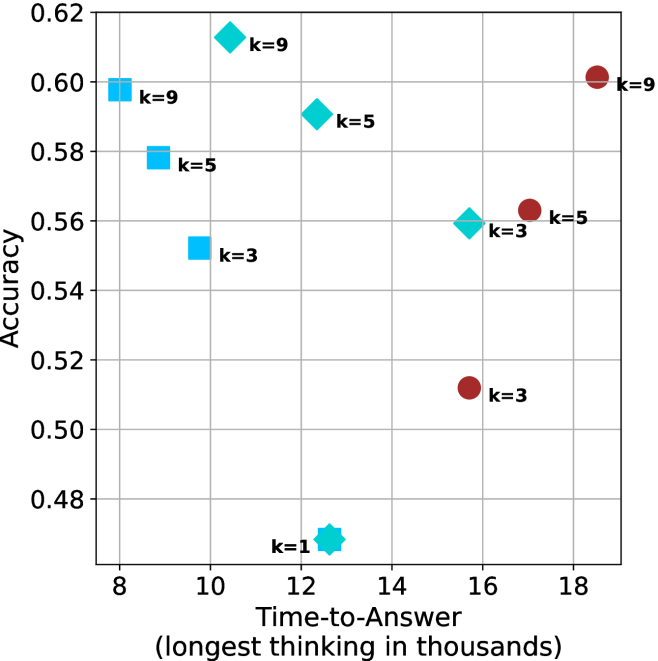
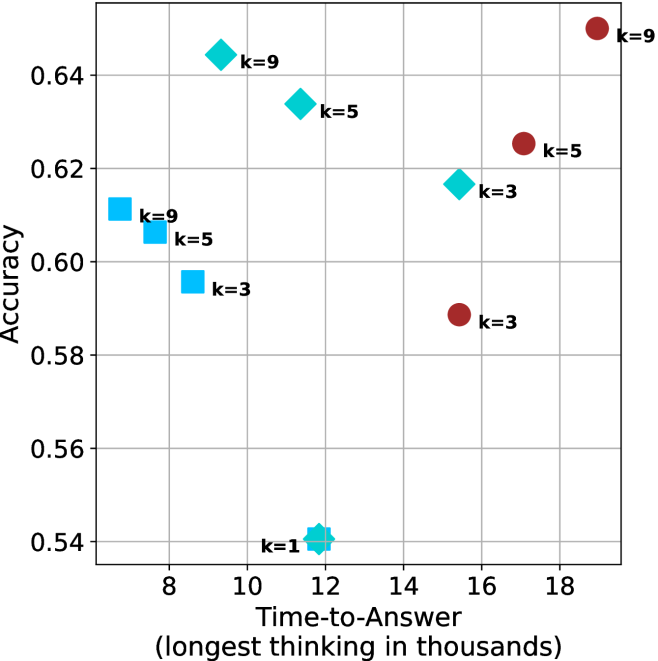
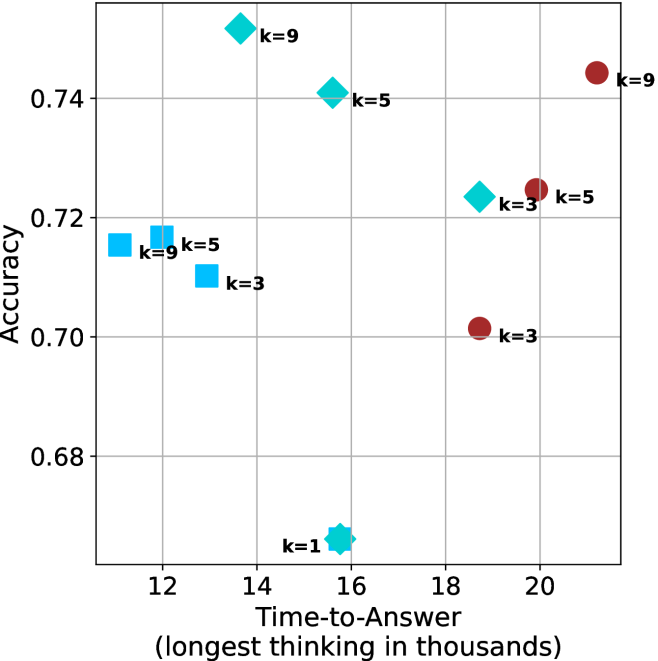
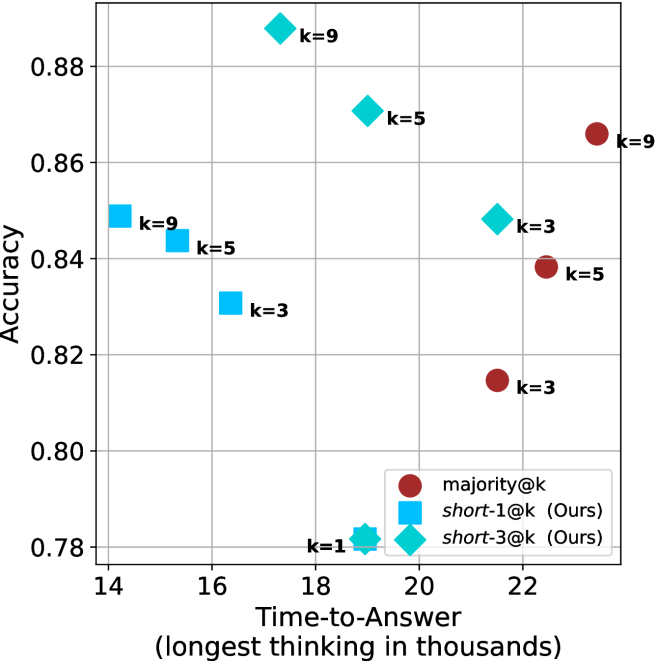
Figure 4: Comparing time-to-answer for different inference methods. Our methods substantially reduce time cost with no major loss in performance. Unlike majority $@k$ , which becomes slower as $k$ grows, our methods run faster with $k$ , as the probability of finding a short chain increases with $k$ .
Time-to-answer.
Finally, the math aggregated time-to-answer results are shown in Figure ˜ 4, with GPQA-D results shown in Figure ˜ 8 and pe math benchmark in Appendix ˜ B. For readability, Figure 4 omits the oracle, and methods are compared across a subset of sample sizes. As sample size increases, majority $@k$ exhibits longer time-to-answer, driven by a higher probability of sampling generations with extended thinking chains, requiring all trajectories to complete. Conversely, the short-1@k method shows reduced time-to-answer with larger sample sizes, as the probability of encountering a short answer increases. This trend also holds for the short-3@k method after three reasoning processes complete.
This phenomenon makes the short-1@k and short-3@k methods substantially more usable compared to basic majority $@k$ . For example, when using the LN-Super- $49$ B model (Figure ˜ 4(a)), with a sample size of $5$ , the short-1@k method reduces time consumption by almost $50\%$ while also increasing performance by about $1.5\%$ compared to majority@ $k$ . When considering a larger sample size of $9$ , the performance values are almost the same but short-1@k is more than $55\%$ faster.
Finally, we observe that for most models and sample sizes, short-3@k boosts performance, while for larger ones it also reduces time-to-answer significantly. For example, on R $1$ - $32$ B (Figure ˜ 4(b)), with $k=5$ , short-3@k is $33\%$ faster than majority@ $k$ , while reaching superior performance. A similar boost in time-to-answer and performance is observed with QwQ- $32$ B/R $1$ - $670$ B and sample size $9$ (Figure ˜ 4(c) and Figure ˜ 4(d)).
5 Analysis
To obtain deeper insights into the underlying process, making shorter thinking trajectories preferable, we conduct additional analysis. We first investigate the relation between using shorter thinking per individual example, and the necessity of longer trajectories to solve more complex problems (Section ˜ 5.1). Subsequently, we analyze backtracks in thinking trajectories to better understand the characteristics of shorter trajectories (Section ˜ 5.2). Lastly, we analyze the perfomance of short-m@k in sequential setting (Section ˜ 5.3). All experiments in this section use trajectories produced by our models as described in Section ˜ 3.1. For Sections 5.1 and 5.2 we exclude generations that were not completed within the generation length.
5.1 Hard questions (still) require more thinking
We split the questions into three equal size groups according to model’s success rate. Then, we calculate the average thinking length for each of the splits, and provide the average lengths for the correct and incorrect attempts per split.
Table 2: Average thinking tokens for correct (C), incorrect (IC) and all (A) answers, per split by difficulty for the math benchmarks. The numbers are in thousands of tokens.
| Model | Easy | Medium | Hard |
| --- | --- | --- | --- |
| C/IC/A | C/IC/A | C/IC/A | |
| LN-Super-49B | $\phantom{0}5.3/11.1/\phantom{0}5.7$ | $11.4/17.1/14.6$ | $12.4/16.8/16.6$ |
| R1-32B | $\phantom{0}4.9/13.7/\phantom{0}5.3$ | $10.9/17.3/13.3$ | $14.4/15.8/15.7$ |
| QwQ-32B The QwQ-32B and R1-670B models correctly answered all of their easier questions in all attempts. | $\phantom{0}8.4/\phantom{0.}\text{--}\phantom{0}/\phantom{0}8.4$ | $14.8/21.6/15.6$ | $19.1/22.8/22.3$ |
| R1-670B footnotemark: | $13.0/\phantom{0.}\text{--}\phantom{0}/13.0$ | $15.3/20.9/15.5$ | $23.0/31.7/28.4$ |
Tables ˜ 2 and 5 shows the averages thinking tokens per split for the math benchmarks and GPQA-D, respectively. We first note that as observed in Section ˜ 3.2, within each question subset, correct answers are typically shorter than incorrect ones. This suggests that correct answers tend to be shorter, and it holds for easier questions as well as harder ones.
Nevertheless, we also observe that models use more tokens for more challenging questions, up to a factor of $2.9$ . This finding is consistent with recent studies (Anthropic, 2025; OpenAI, 2024; Muennighoff et al., 2025) indicating that using longer thinking is needed in order to solve harder questions. To summarize, harder questions require a longer thinking process compared to easier ones, but within a single question (both easy and hard), shorter thinking is preferable.
5.2 Backtrack analysis
One may hypothesize that longer thinking reflect a more extensive and less efficient search path, characterized by a higher degree of backtracking and “rethinking”. In contrast, shorter trajectories indicate a more direct and efficient path, which often leads to a more accurate answer.
To this end, we track several keywords identified as indicators of re-thinking and backtracking within different trajectories. The keywords we used are: [’but’, ’wait’, ’however’, ’alternatively’, ’not sure’, ’going back’, ’backtrack’, ’trace back’, ’hmm’, ’hmmm’] We then categorize the trajectories into correct and incorrect sets, and measure the number of backtracks and their average length (quantified by keyword occurrences divided by total thinking length) for each set. We present the results for the math benchmarks and GPQA-D in Tables ˜ 3 and 6, respectively.
Table 3: Average number of backtracks, and their average length for correct (C), incorrect (IC) and all (A) answers in math benchmarks.
| Model | # Backtracks | Backtrack Len. |
| --- | --- | --- |
| C/IC/A | C/IC/A | |
| LN-Super-49B | $106/269/193$ | $\phantom{0}88/\phantom{0}70/76$ |
| R1-32B | $\phantom{0}95/352/213$ | $117/\phantom{0}63/80$ |
| QwQ-32B | $182/269/193$ | $\phantom{0}70/\phantom{0}60/64$ |
| R1-670B | $188/323/217$ | $\phantom{0}92/102/99$ |
As our results indicate, for all models and benchmarks, correct trajectories consistently exhibit fewer backtracks compared to incorrect ones. Moreover, in almost all cases, backtracks of correct answers are longer. This may suggest that correct solutions involve less backtracking where each backtrack is longer, potentially more in-depth that leads to improved reasoning, whereas incorrect ones explores more reasoning paths that are abandoned earlier (hence tend to be shorter).
Lastly, we analyze the backtrack behavior in a length-controlled manner. Specifically, we divide trajectories into bins based on their length. Within each bin, we compare the number of backtracks between correct and incorrect trajectories. Our hypothesis is that even for trajectories of comparable length, correct trajectories would exhibit fewer backtracks, indicating a more direct path to the answer. The results over the math benchmarks and GPQA-D are presented in Appendix ˜ F. As can be seen, in almost all cases, even among trajectories of comparable length, correct ones show a lower number of backtracks. The only exception is the R $1$ - $670$ B model over the math benchmarks. This finding further suggests that correct trajectories are superior because they spend less time on searching for the correct answer and instead dive deeply into a smaller set of paths.
5.3 short-m@k with sequential compute
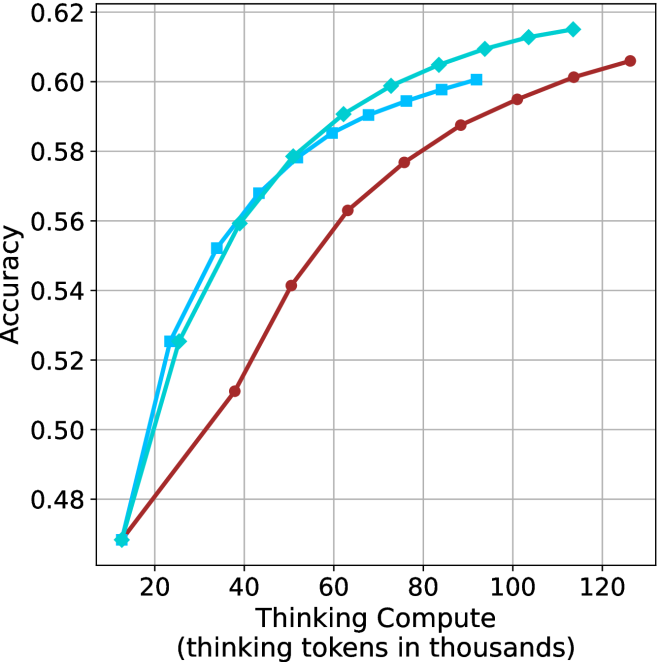
Our results so far assume sufficient resources for generating the output in parallel. We now study the potential of our proposed method without this constraint, by comparing short-m@k to the baselines in sequential (non-batched) setting, and measuring the amount of thinking tokens used by each method. For short-m@k, each generation is terminated once its length exceeds the maximum length observed among the $m$ shortest previously completed generations.
The results for the math benchmarks are presented in Figure ˜ 5 while the GPQA-D results are in Appendix ˜ E. While the performance of short-m@k shows decreased efficiency in terms of total thinking compute usage compared to a fully batched decoding setup (Section ˜ 4.3), the method’s superiority over standard majority voting remains. Specifically, at low compute regimes, both short-1@k and short-3@k demonstrate higher efficiency and improved performance compared to majority voting. As for higher compute regimes, short-3@k outperforms the majority voting baseline.
<details>
<summary>x14.png Details</summary>
### Visual Description
## Line Chart: Accuracy vs. Thinking Compute
### Overview
The image is a line chart comparing the accuracy of different models as a function of "Thinking Compute," measured in thousands of thinking tokens. There are three data series plotted, each represented by a different colored line with distinct markers. The chart shows how accuracy increases with increasing compute for each model.
### Components/Axes
* **X-axis:** "Thinking Compute (thinking tokens in thousands)". The scale ranges from 20 to 120, with tick marks at intervals of 20.
* **Y-axis:** "Accuracy". The scale ranges from 0.48 to 0.62, with tick marks at intervals of 0.02.
* **Data Series:**
* **Light Blue with Diamond Markers:** This line represents one model's performance.
* **Cyan with Square Markers:** This line represents another model's performance.
* **Brown with Circle Markers:** This line represents a third model's performance.
### Detailed Analysis
* **Light Blue (Diamond Markers):**
* Trend: The line slopes upward, indicating increasing accuracy with increasing compute. The rate of increase slows down as compute increases.
* Data Points:
* (20, 0.47)
* (40, 0.525)
* (60, 0.575)
* (80, 0.59)
* (100, 0.61)
* (120, 0.615)
* **Cyan (Square Markers):**
* Trend: The line slopes upward, indicating increasing accuracy with increasing compute. The rate of increase slows down as compute increases.
* Data Points:
* (20, 0.525)
* (40, 0.56)
* (60, 0.585)
* (80, 0.595)
* (100, 0.60)
* **Brown (Circle Markers):**
* Trend: The line slopes upward, indicating increasing accuracy with increasing compute. The rate of increase slows down as compute increases.
* Data Points:
* (20, 0.47)
* (40, 0.51)
* (60, 0.56)
* (80, 0.575)
* (100, 0.59)
* (120, 0.605)
### Key Observations
* All three models show improved accuracy with increased thinking compute.
* The light blue line (diamond markers) and cyan line (square markers) generally outperform the brown line (circle markers) across the range of thinking compute values.
* The rate of accuracy increase diminishes for all models as thinking compute increases, suggesting diminishing returns.
### Interpretation
The chart demonstrates the relationship between the amount of computational resources ("Thinking Compute") allocated to a model and its resulting accuracy. The data suggests that increasing compute generally leads to higher accuracy, but the extent of improvement decreases as compute increases. The different lines likely represent different model architectures or training methodologies, with some being more efficient in utilizing compute to achieve higher accuracy than others. The flattening of the curves at higher compute values indicates a potential saturation point, where further increases in compute yield minimal gains in accuracy. This information is valuable for optimizing model design and resource allocation, suggesting that there is a point of diminishing returns for increasing "Thinking Compute".
</details>
(a) LN-Super-49B
<details>
<summary>x15.png Details</summary>
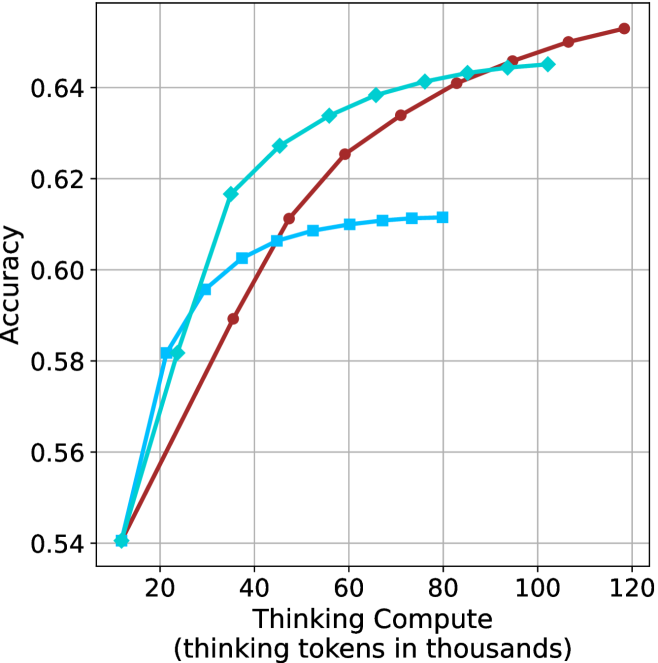
### Visual Description
## Line Chart: Accuracy vs. Thinking Compute
### Overview
The image is a line chart comparing the accuracy of three different models as a function of "Thinking Compute," measured in thousands of thinking tokens. The x-axis represents the thinking compute, ranging from 0 to 120 (in thousands), and the y-axis represents the accuracy, ranging from 0.54 to 0.64. Three lines, each representing a different model, are plotted on the chart.
### Components/Axes
* **X-axis:** "Thinking Compute (thinking tokens in thousands)". The axis ranges from 0 to 120, with tick marks at intervals of 20 (20, 40, 60, 80, 100, 120).
* **Y-axis:** "Accuracy". The axis ranges from 0.54 to 0.64, with tick marks at intervals of 0.02 (0.54, 0.56, 0.58, 0.60, 0.62, 0.64).
* **Data Series:** There are three data series represented by lines of different colors and markers:
* **Cyan with Diamond Markers:** This line starts at approximately (15, 0.54) and increases rapidly, then plateaus around (100, 0.64).
* **Brown with Circle Markers:** This line starts at approximately (15, 0.54) and increases steadily, reaching approximately (120, 0.65).
* **Light Blue with Square Markers:** This line starts at approximately (25, 0.60) and increases slightly, then plateaus around (70, 0.61).
### Detailed Analysis
* **Cyan (Diamond Markers):**
* (15, 0.54)
* (25, 0.58)
* (30, 0.60)
* (35, 0.62)
* (45, 0.63)
* (60, 0.635)
* (80, 0.64)
* (100, 0.64)
* **Brown (Circle Markers):**
* (15, 0.54)
* (40, 0.59)
* (60, 0.61)
* (80, 0.63)
* (100, 0.64)
* (120, 0.65)
* **Light Blue (Square Markers):**
* (25, 0.60)
* (40, 0.61)
* (60, 0.61)
* (75, 0.61)
### Key Observations
* The cyan line (diamond markers) shows the highest initial increase in accuracy with increasing thinking compute, but plateaus earlier than the brown line.
* The brown line (circle markers) demonstrates a more consistent increase in accuracy across the entire range of thinking compute, eventually surpassing the cyan line.
* The light blue line (square markers) plateaus at a lower accuracy level compared to the other two lines.
### Interpretation
The chart illustrates the relationship between the amount of computational resources ("Thinking Compute") allocated to three different models and their resulting accuracy. The data suggests that increasing the thinking compute generally leads to higher accuracy, but the specific gains vary depending on the model. The brown model appears to benefit most from increased compute, while the light blue model plateaus quickly. The cyan model shows a strong initial improvement but diminishing returns at higher compute levels. This information could be used to optimize resource allocation for each model, focusing on the range of compute where each model shows the most significant gains in accuracy.
</details>
(b) R $1$ - $32$ B
<details>
<summary>x16.png Details</summary>
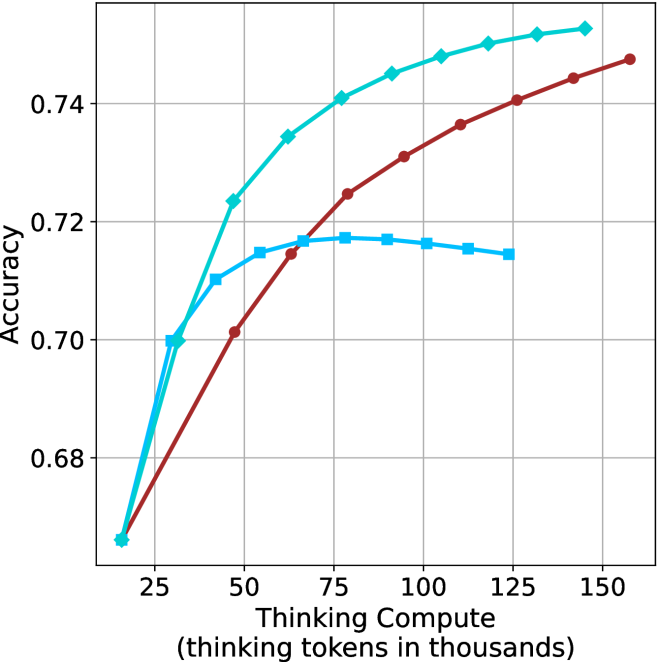
### Visual Description
## Line Chart: Accuracy vs. Thinking Compute
### Overview
The image is a line chart comparing accuracy against "Thinking Compute" (measured in thousands of thinking tokens). There are three distinct data series represented by lines of different colors: brown, light blue with diamond markers, and light blue with square markers. The chart shows how accuracy changes as "Thinking Compute" increases.
### Components/Axes
* **X-axis:** "Thinking Compute (thinking tokens in thousands)". The scale ranges from approximately 20 to 160, with tick marks at intervals of 25.
* **Y-axis:** "Accuracy". The scale ranges from 0.68 to 0.74, with tick marks at intervals of 0.02.
* **Data Series:**
* Brown line with circle markers.
* Light blue line with diamond markers.
* Light blue line with square markers.
### Detailed Analysis
* **Brown Line (Circle Markers):**
* Trend: The brown line slopes upward, indicating an increase in accuracy as "Thinking Compute" increases. The rate of increase appears to slow down as "Thinking Compute" gets larger.
* Data Points:
* At Thinking Compute = 25, Accuracy ≈ 0.67
* At Thinking Compute = 50, Accuracy ≈ 0.70
* At Thinking Compute = 75, Accuracy ≈ 0.72
* At Thinking Compute = 100, Accuracy ≈ 0.735
* At Thinking Compute = 125, Accuracy ≈ 0.74
* At Thinking Compute = 150, Accuracy ≈ 0.75
* **Light Blue Line (Diamond Markers):**
* Trend: The light blue line with diamond markers slopes upward, indicating an increase in accuracy as "Thinking Compute" increases. The rate of increase slows down as "Thinking Compute" gets larger.
* Data Points:
* At Thinking Compute = 25, Accuracy ≈ 0.67
* At Thinking Compute = 50, Accuracy ≈ 0.725
* At Thinking Compute = 75, Accuracy ≈ 0.74
* At Thinking Compute = 100, Accuracy ≈ 0.75
* At Thinking Compute = 125, Accuracy ≈ 0.755
* **Light Blue Line (Square Markers):**
* Trend: The light blue line with square markers initially slopes upward, reaches a peak, and then slopes downward.
* Data Points:
* At Thinking Compute = 25, Accuracy ≈ 0.70
* At Thinking Compute = 50, Accuracy ≈ 0.715
* At Thinking Compute = 75, Accuracy ≈ 0.717
* At Thinking Compute = 100, Accuracy ≈ 0.717
* At Thinking Compute = 125, Accuracy ≈ 0.714
### Key Observations
* The light blue line with diamond markers consistently shows higher accuracy than the brown line across the range of "Thinking Compute" values.
* The light blue line with square markers reaches a plateau and then declines, suggesting a point of diminishing returns or potential overfitting.
* All three lines show a significant increase in accuracy between "Thinking Compute" values of 25 and 75.
### Interpretation
The chart suggests that increasing "Thinking Compute" generally leads to higher accuracy, but the relationship is not always linear. The light blue line with diamond markers demonstrates the highest accuracy gains with increasing "Thinking Compute", while the brown line shows a more gradual increase. The light blue line with square markers indicates that there may be a point where increasing "Thinking Compute" no longer improves accuracy and may even decrease it. This could be due to factors such as overfitting or the model reaching its capacity. The data implies that the optimal "Thinking Compute" level depends on the specific model or configuration being used. Further investigation would be needed to understand the specific characteristics of each data series and the reasons for their different performance trends.
</details>
(c) QwQ-32B
<details>
<summary>x17.png Details</summary>
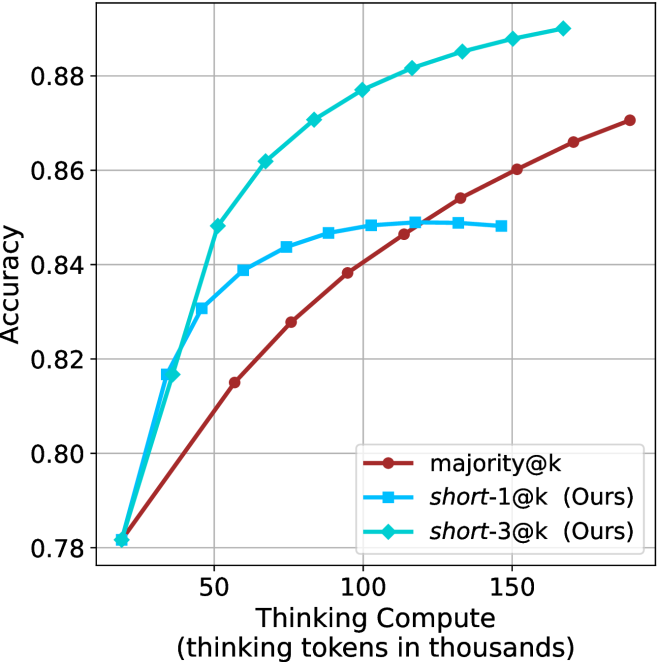
### Visual Description
## Chart: Accuracy vs. Thinking Compute
### Overview
The image is a line chart comparing the accuracy of three different methods ("majority@k", "short-1@k (Ours)", and "short-3@k (Ours)") as a function of "Thinking Compute" (measured in thousands of thinking tokens). The chart shows how accuracy changes as the computational resources increase for each method.
### Components/Axes
* **X-axis:** "Thinking Compute" (thinking tokens in thousands). Scale ranges from 0 to 150, with tick marks at 50, 100, and 150.
* **Y-axis:** "Accuracy". Scale ranges from 0.78 to 0.88, with tick marks at 0.78, 0.80, 0.82, 0.84, 0.86, and 0.88.
* **Legend:** Located in the bottom-right corner of the chart.
* Brown line with circle markers: "majority@k"
* Blue line with square markers: "short-1@k (Ours)"
* Teal line with diamond markers: "short-3@k (Ours)"
### Detailed Analysis
* **majority@k (Brown line with circle markers):** The accuracy starts at approximately 0.78 at 20k thinking tokens and increases steadily, reaching approximately 0.87 at 160k thinking tokens.
* (20, 0.78)
* (50, 0.815)
* (100, 0.84)
* (160, 0.87)
* **short-1@k (Ours) (Blue line with square markers):** The accuracy increases rapidly initially, then plateaus.
* (20, 0.78)
* (50, 0.84)
* (80, 0.85)
* (120, 0.85)
* (140, 0.85)
* **short-3@k (Ours) (Teal line with diamond markers):** The accuracy increases rapidly and then slows down, but remains the highest among the three methods.
* (20, 0.78)
* (50, 0.85)
* (80, 0.87)
* (120, 0.88)
* (160, 0.89)
### Key Observations
* "short-3@k (Ours)" consistently outperforms the other two methods across all levels of "Thinking Compute".
* "short-1@k (Ours)" shows diminishing returns as "Thinking Compute" increases, plateauing at a lower accuracy than "short-3@k (Ours)".
* "majority@k" shows a steady increase in accuracy with increasing "Thinking Compute", but remains below "short-3@k (Ours)".
### Interpretation
The chart suggests that the "short-3@k (Ours)" method is the most effective in terms of accuracy for a given amount of "Thinking Compute". The "short-1@k (Ours)" method provides a good initial boost in accuracy but quickly plateaus, indicating that it may not scale as well as the other methods. The "majority@k" method shows a consistent improvement with increased compute, but its overall performance is lower than "short-3@k (Ours)". The data implies that the "short-3@k" method is the most efficient use of computational resources for achieving higher accuracy in this context.
</details>
(d) R1-670B
Figure 5: Comparing different methods for the math benchmarks under sequential (non-parallel) decoding.
6 Finetuning using shorter trajectories
Based on our findings, we investigate whether fine-tuning on shorter reasoning chains improves LLM reasoning accuracy. While one might intuitively expect this to be the case, given the insights from Section ˜ 3 and Section ˜ 5, this outcome is not trivial. A potential counterargument is that training on shorter trajectories could discourage the model from performing necessary backtracks (Section ˜ 5.2), thereby hindering its ability to find a correct solution. Furthermore, the benefit of using shorter trajectories for bootstrapping reasoning remains an open question.
To do so, we follow the S $1$ paradigm, which fine-tunes an LLM to perform reasoning using only $1,$ $000$ trajectories (Muennighoff et al., 2025). We create three versions of the S $1$ dataset, built from examples with the shortest, longest, and random reasoning chains among several generations.
Data creation and finetuning setup.
To construct the three variants of S $1$ , we generate multiple responses for each S $1$ question-answer pair. Specifically, for each example, we produce $10$ distinct answers using the QwQ- $32$ B model, which we select for its superior performance with respect to model size (Section ˜ 3). From these $10$ responses per example, we derive three dataset variants—S $1$ -short, S $1$ -long, and S $1$ -random—by selecting the shortest/longest/random response, respectively. This results in three datasets, each containing the same $1,$ $000$ queries but with distinct reasoning trajectories and answers. We then finetune the Qwen- $2.5$ - $7$ B-Instruct and Qwen- $2.5$ - $32$ B-Instruct models on the three S $1$ variants. We further detail about the generation process, the finetuning setup and evaluation setup in Appendix ˜ G.
Finetuning results.
Results for the 32B model are presented in Table ˜ 4 (7B model results are in Table ˜ 10). For GPQA-D, AIME $2025$ and HMMT benchmarks, the S $1$ -short variant achieves superior performance while using fewer thinking tokens. While performance on AIME $2024$ is similar across models, S $1$ -short still demonstrates the shortest thinking. Aggregated results across math benchmarks reveal that S $1$ -short improves relative performance by $2.8\%$ compared to the S $1$ -random baseline, with a reduction of $5.8\%$ in thinking tokens. Conversely, the S $1$ -long model consumes more tokens than S $1$ -random, but obtains similar performance.
These results suggest that training on shorter reasoning sequences can lead to better reasoning models that exhibit reduced computational overhead. This observation aligns with our findings in Section ˜ 3, which shows that answers with shorter thinking trajectories tend to be more accurate. We believe that developing models that reason more effectively with less computation holds significant potential.
Table 4: Results for our finetuned models over the S $1$ variants using Qwen-2.5-32B-Instruct: S $1$ -short/long/random. The S $1$ -short model improves performance over the other two models, while using fewer thinking tokens.
| | GPQA-D | AIME 2024 | AIME 2025 | HMMT | Math Average | | | | | |
| --- | --- | --- | --- | --- | --- | --- | --- | --- | --- | --- |
| Thinking Tokens $\downarrow$ | Acc. $\uparrow$ | Thinking Tokens $\downarrow$ | Acc. $\uparrow$ | Thinking Tokens $\downarrow$ | Acc. $\uparrow$ | Thinking Tokens $\downarrow$ | Acc. $\uparrow$ | Thinking Tokens $\downarrow$ | Acc. $\uparrow$ | |
| S1-random | 11566 | 62.5 | 16145 | 68.8 | 17798 | 59.3 | 19243 | 40.8 | 17729 | 56.3 |
| S1-long | 12279 $(+6.1\%)$ | 63.7 | 16912 | 67.3 | 17973 | 58.5 | 19397 | 42.1 | 18094 $(+2.1\%)$ | 56.0 |
| S1-short | 10845 $(-6.2\%)$ | 64.8 | 15364 | 68.3 | 17195 | 60.2 | 17557 | 45.2 | 16706 $(-5.8\%)$ | 57.9 |
7 Conclusion
In this work, we challenged the common assumption that increased test-time computation leads to better performance in reasoning LLMs. Through empirical analysis on four complex mathematical and reasoning benchmarks, we showed that shorter reasoning chains consistently outperform longer ones, both in accuracy and computational efficiency. Building on this insight, we introduced short-m@k, an inference method that prioritizes early-terminating generations. short-1@k, our most efficient variant, is preferred over traditional majority voting in low-compute settings. short-3@k, while slightly less efficient, outperforms majority voting across all compute budgets. We further investigate thinking trajectories, and find that shorter thinking usually involve less backtracks, and a more direct way to solution. To further validate our findings, we fine-tuned an LLM on short reasoning trajectories and observed improved accuracy and faster runtime, whereas training on longer chains yields diminishing returns. These findings highlight a promising direction for developing faster and more effective reasoning LLMs by embracing brevity over extended computation.
Acknowledgments
We thank Miri Varshavsky Hassid for the great feedback and moral support.
References
- M. Abdin, S. Agarwal, A. Awadallah, V. Balachandran, H. Behl, L. Chen, G. de Rosa, S. Gunasekar, M. Javaheripi, N. Joshi, et al. (2025) Phi-4-reasoning technical report. arXiv preprint arXiv:2504.21318. Cited by: §1, §2, §4.2.
- A. Agarwal, A. Sengupta, and T. Chakraborty (2025) First finish search: efficient test-time scaling in large language models. arXiv preprint arXiv:2505.18149. Cited by: §2.
- Anthropic (2025) Claude’s extended thinking. External Links: Link Cited by: §1, §1, §2, §2, §3, §5.1.
- D. Arora and A. Zanette (2025) Training language models to reason efficiently. arXiv preprint arXiv:2502.04463. Cited by: §2.
- M. Balunović, J. Dekoninck, I. Petrov, N. Jovanović, and M. Vechev (2025) MathArena: evaluating llms on uncontaminated math competitions. SRI Lab, ETH Zurich. External Links: Link Cited by: §3.1.
- A. Bercovich et al. (2025) Llama-nemotron: efficient reasoning models. External Links: 2505.00949, Link Cited by: Appendix D, §1, §2, §3.1.
- M. Chen et al. (2021) Evaluating large language models trained on code. Note: arXiv:2107.03374 External Links: Link Cited by: §4.2, §4.2.
- G. DeepMind (2025) Gemini 2.5: our most intelligent ai model. External Links: Link Cited by: §2, §3.1.
- M. Fatemi, B. Rafiee, M. Tang, and K. Talamadupula (2025) Concise reasoning via reinforcement learning. arXiv preprint arXiv:2504.05185. Cited by: §2.
- A. Grattafiori, A. Dubey, A. Jauhri, A. Pandey, A. Kadian, A. Al-Dahle, A. Letman, A. Mathur, A. Schelten, A. Vaughan, et al. (2024) The llama 3 herd of models. arXiv preprint arXiv:2407.21783. Cited by: §3.1.
- D. Guo, D. Yang, H. Zhang, J. Song, R. Zhang, R. Xu, Q. Zhu, S. Ma, P. Wang, X. Bi, et al. (2025) Deepseek-r1: incentivizing reasoning capability in llms via reinforcement learning. arXiv preprint arXiv:2501.12948. Cited by: Appendix D, §1, §2, §2, §3.1, §4.2.
- M. Hassid, T. Remez, J. Gehring, R. Schwartz, and Y. Adi (2024) The larger the better? improved llm code-generation via budget reallocation. arXiv preprint arXiv:2404.00725 arXiv:2404.00725. External Links: Link Cited by: §4.2.
- Y. Kang, X. Sun, L. Chen, and W. Zou (2025) C3ot: generating shorter chain-of-thought without compromising effectiveness. In Proceedings of the AAAI Conference on Artificial Intelligence, Vol. 39, pp. 24312–24320. Cited by: §2.
- Z. Ke, F. Jiao, Y. Ming, X. Nguyen, A. Xu, D. X. Long, M. Li, C. Qin, P. Wang, S. Savarese, et al. (2025) A survey of frontiers in llm reasoning: inference scaling, learning to reason, and agentic systems. arXiv preprint arXiv:2504.09037. Cited by: §2.
- S. Kulal, P. Pasupat, K. Chandra, M. Lee, O. Padon, A. Aiken, and P. S. Liang (2019) SPoC: search-based pseudocode to code. In Advances in Neural Information Processing Systems, H. Wallach, H. Larochelle, A. Beygelzimer, F. d'Alché-Buc, E. Fox, and R. Garnett (Eds.), Vol. 32, pp. . External Links: Link Cited by: §4.2.
- W. Kwon, Z. Li, S. Zhuang, Y. Sheng, L. Zheng, C. H. Yu, J. Gonzalez, H. Zhang, and I. Stoica (2023) Efficient memory management for large language model serving with pagedattention. In Proceedings of the 29th Symposium on Operating Systems Principles, pp. 611–626. Cited by: §3.1.
- X. Lu, S. Han, D. Acuna, H. Kim, J. Jung, S. Prabhumoye, N. Muennighoff, M. Patwary, M. Shoeybi, B. Catanzaro, et al. (2025) Retro-search: exploring untaken paths for deeper and efficient reasoning. arXiv preprint arXiv:2504.04383. Cited by: §2.
- N. Muennighoff, Z. Yang, W. Shi, X. L. Li, L. Fei-Fei, H. Hajishirzi, L. Zettlemoyer, P. Liang, E. Candès, and T. Hashimoto (2025) S1: simple test-time scaling. arXiv preprint arXiv:2501.19393. Cited by: Appendix G, §1, §1, §1, §2, §3, §5.1, §6.
- S. Nayab, G. Rossolini, M. Simoni, A. Saracino, G. Buttazzo, N. Manes, and F. Giacomelli (2024) Concise thoughts: impact of output length on llm reasoning and cost. arXiv preprint arXiv:2407.19825. Cited by: §2.
- M. A. of America (2024) AIME 2024. External Links: Link Cited by: §3.1.
- M. A. of America (2025) AIME 2025. External Links: Link Cited by: §3.1.
- OpenAI (2024) Learning to reason with llms. External Links: Link Cited by: §1, §1, §2, §3, §5.1.
- OpenAI (2025) OpenAI o3-mini. Note: Accessed: 2025-02-24 External Links: Link Cited by: §1, §2.
- X. Pu, M. Saxon, W. Hua, and W. Y. Wang (2025) THOUGHTTERMINATOR: benchmarking, calibrating, and mitigating overthinking in reasoning models. arXiv preprint arXiv:2504.13367. Cited by: §2.
- P. Qi, Z. Liu, T. Pang, C. Du, W. S. Lee, and M. Lin (2025) Optimizing anytime reasoning via budget relative policy optimization. arXiv preprint arXiv:2505.13438. Cited by: §2.
- D. Rein, B. L. Hou, A. C. Stickland, J. Petty, R. Y. Pang, J. Dirani, J. Michael, and S. R. Bowman (2024) Gpqa: a graduate-level google-proof q&a benchmark. In First Conference on Language Modeling, Cited by: §3.1.
- [27] (2025) Skywork open reasoner series. Note: https://capricious-hydrogen-41c.notion.site/Skywork-Open-Reaonser-Series-1d0bc9ae823a80459b46c149e4f51680 Notion Blog Cited by: §2.
- Q. Team (2025a) Qwen3. External Links: Link Cited by: §2.
- Q. Team (2025b) QwQ-32b: embracing the power of reinforcement learning. External Links: Link Cited by: §1, §2, §2, §3.1.
- C. Wang, Y. Feng, D. Chen, Z. Chu, R. Krishna, and T. Zhou (2025a) Wait, we don’t need to" wait"! removing thinking tokens improves reasoning efficiency. arXiv preprint arXiv:2506.08343. Cited by: §2.
- J. Wang, S. Zhu, J. Saad-Falcon, B. Athiwaratkun, Q. Wu, J. Wang, S. L. Song, C. Zhang, B. Dhingra, and J. Zou (2025b) Think deep, think fast: investigating efficiency of verifier-free inference-time-scaling methods. arXiv preprint arXiv:2504.14047. Cited by: §2, §4.2.
- X. Wang, J. Wei, D. Schuurmans, Q. Le, E. Chi, S. Narang, A. Chowdhery, and D. Zhou (2022) Self-consistency improves chain of thought reasoning in language models. arXiv preprint arXiv:2203.11171. Cited by: §1, §4.2.
- J. Wei, X. Wang, D. Schuurmans, M. Bosma, F. Xia, E. Chi, Q. V. Le, D. Zhou, et al. (2022) Chain-of-thought prompting elicits reasoning in large language models. Advances in neural information processing systems 35, pp. 24824–24837. Cited by: §2.
- Y. Wu, Y. Wang, Z. Ye, T. Du, S. Jegelka, and Y. Wang (2025) When more is less: understanding chain-of-thought length in llms. arXiv preprint arXiv:2502.07266. Cited by: §2.
- A. Yang et al. (2024) Qwen2.5 technical report. arXiv preprint arXiv:2412.15115. Cited by: §1, §3.1.
- C. Yang, Q. Si, Y. Duan, Z. Zhu, C. Zhu, Z. Lin, L. Cao, and W. Wang (2025) Dynamic early exit in reasoning models. arXiv preprint arXiv:2504.15895. Cited by: §2.
- Y. Ye, Z. Huang, Y. Xiao, E. Chern, S. Xia, and P. Liu (2025) LIMO: less is more for reasoning. arXiv preprint arXiv:2502.03387. Cited by: §2.
- Z. Yu, Y. Wu, Y. Zhao, A. Cohan, and X. Zhang (2025) Z1: efficient test-time scaling with code. arXiv preprint arXiv:2504.00810. Cited by: §2.
Appendix A GPQA diamond results
We present below results for the GPQA-D benchmark. Figure ˜ 6, Figure ˜ 7 and Figure ˜ 8 are the sample-size/compute/time-to-answer results for GPQA-D, respectively. Table ˜ 5 correspond to the Table ˜ 2 in Section ˜ 5.1. Table ˜ 6 and Table ˜ 9 correspond to Table ˜ 3 and Table ˜ 8 in Section ˜ 5.2, respectively.
<details>
<summary>x18.png Details</summary>
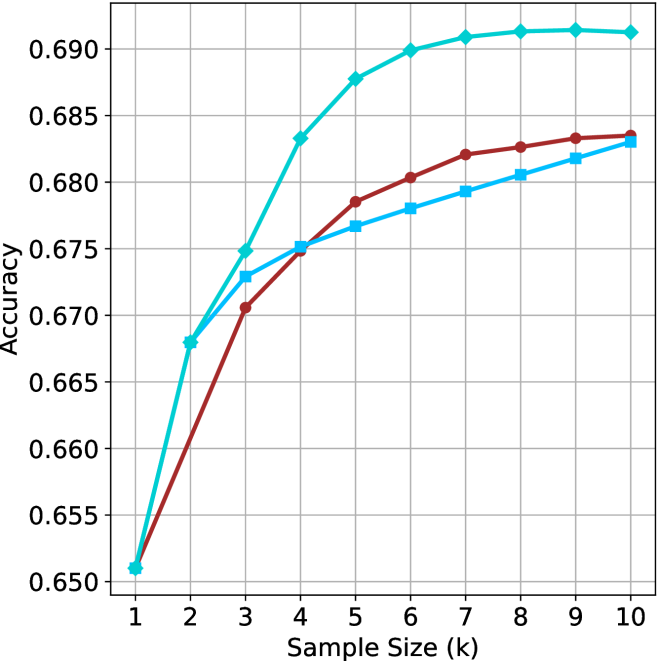
### Visual Description
## Line Chart: Accuracy vs. Sample Size
### Overview
The image is a line chart comparing the accuracy of three different methods as a function of sample size. The x-axis represents the sample size (k), ranging from 1 to 10. The y-axis represents the accuracy, ranging from 0.650 to 0.690. Three lines, each representing a different method, are plotted on the chart.
### Components/Axes
* **X-axis:** Sample Size (k), with tick marks at each integer value from 1 to 10.
* **Y-axis:** Accuracy, with tick marks at 0.650, 0.655, 0.660, 0.665, 0.670, 0.675, 0.680, 0.685, and 0.690.
* **Data Series:** Three data series are plotted on the chart, each represented by a different color and marker. The legend is missing, so the exact identity of each line is unknown.
* **Cyan line with diamond markers:** This line starts at approximately (1, 0.651) and increases rapidly until approximately (5, 0.688), then plateaus around 0.691.
* **Brown line with circle markers:** This line starts at approximately (1, 0.651) and increases steadily until approximately (8, 0.683), then plateaus around 0.684.
* **Light Blue line with square markers:** This line starts at approximately (1, 0.651) and increases steadily until approximately (10, 0.683).
### Detailed Analysis
* **Cyan line with diamond markers:**
* (1, 0.651)
* (2, 0.668)
* (3, 0.674)
* (4, 0.683)
* (5, 0.688)
* (6, 0.690)
* (7, 0.691)
* (8, 0.691)
* (9, 0.691)
* (10, 0.691)
* **Brown line with circle markers:**
* (1, 0.651)
* (2, 0.661)
* (3, 0.671)
* (4, 0.675)
* (5, 0.679)
* (6, 0.681)
* (7, 0.682)
* (8, 0.683)
* (9, 0.683)
* (10, 0.684)
* **Light Blue line with square markers:**
* (1, 0.651)
* (2, 0.671)
* (3, 0.673)
* (4, 0.676)
* (5, 0.677)
* (6, 0.679)
* (7, 0.680)
* (8, 0.681)
* (9, 0.682)
* (10, 0.683)
### Key Observations
* All three methods start with the same accuracy at a sample size of 1.
* The cyan line (with diamond markers) shows the most rapid increase in accuracy initially, but plateaus at a sample size of around 5.
* The brown line (with circle markers) increases steadily and plateaus at a sample size of around 8.
* The light blue line (with square markers) increases steadily and does not appear to have fully plateaued by a sample size of 10.
* The cyan line achieves the highest accuracy overall.
### Interpretation
The chart compares the accuracy of three different methods as a function of sample size. The cyan line (with diamond markers) appears to be the most effective method, achieving the highest accuracy with a smaller sample size. The other two methods (brown and light blue lines) show a more gradual increase in accuracy as the sample size increases. The data suggests that the cyan method may be more efficient for achieving high accuracy, while the other two methods may require larger sample sizes to reach similar levels of performance. The absence of a legend makes it impossible to determine what methods are being compared.
</details>
(a) LN-Super- $49$ B
<details>
<summary>x19.png Details</summary>
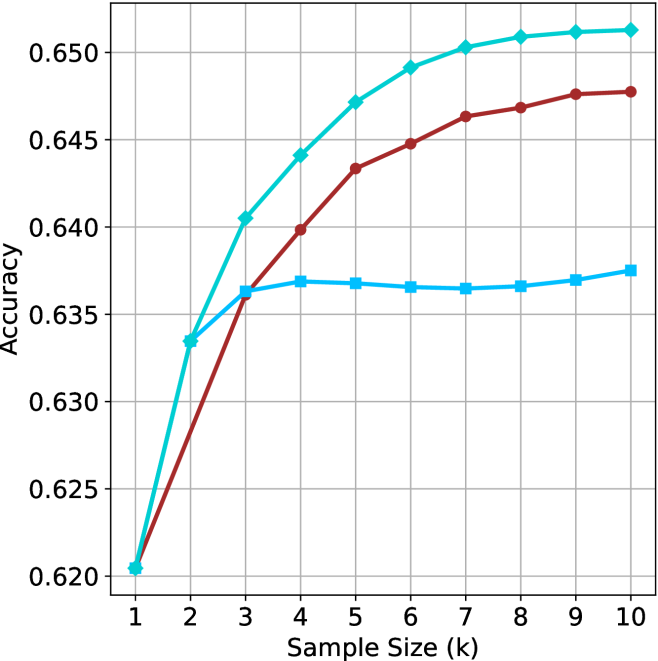
### Visual Description
## Line Chart: Accuracy vs. Sample Size
### Overview
The image is a line chart comparing the accuracy of three different methods as a function of sample size (k). The x-axis represents the sample size, ranging from 1 to 10. The y-axis represents accuracy, ranging from 0.620 to 0.650. There are three distinct lines, each representing a different method, distinguished by color and marker shape.
### Components/Axes
* **X-axis:** Sample Size (k), ranging from 1 to 10 in integer increments.
* **Y-axis:** Accuracy, ranging from 0.620 to 0.650 in increments of 0.005.
* **Gridlines:** Present on the chart, aiding in value estimation.
* **Data Series:** Three data series are plotted.
* **Cyan line with diamond markers:** Represents the first method.
* **Brown line with circle markers:** Represents the second method.
* **Light blue line with square markers:** Represents the third method.
### Detailed Analysis
* **Cyan line with diamond markers:**
* At sample size 1, accuracy is approximately 0.620.
* At sample size 2, accuracy is approximately 0.633.
* At sample size 3, accuracy is approximately 0.640.
* At sample size 5, accuracy is approximately 0.647.
* At sample size 7, accuracy is approximately 0.651.
* At sample size 10, accuracy is approximately 0.651.
* Trend: This line shows a steep initial increase in accuracy, which gradually plateaus as the sample size increases.
* **Brown line with circle markers:**
* At sample size 1, accuracy is approximately 0.620.
* At sample size 2, accuracy is approximately 0.627.
* At sample size 3, accuracy is approximately 0.635.
* At sample size 5, accuracy is approximately 0.643.
* At sample size 7, accuracy is approximately 0.646.
* At sample size 10, accuracy is approximately 0.648.
* Trend: This line also shows an increase in accuracy with sample size, but the increase is less pronounced than the cyan line. It also plateaus, but at a lower accuracy level.
* **Light blue line with square markers:**
* At sample size 1, accuracy is approximately 0.620.
* At sample size 2, accuracy is approximately 0.636.
* At sample size 3, accuracy is approximately 0.637.
* At sample size 5, accuracy is approximately 0.637.
* At sample size 7, accuracy is approximately 0.637.
* At sample size 10, accuracy is approximately 0.637.
* Trend: This line shows a rapid initial increase, but quickly plateaus and remains relatively constant across the sample sizes.
### Key Observations
* The cyan line (with diamond markers) consistently shows the highest accuracy across all sample sizes.
* The light blue line (with square markers) plateaus at a lower accuracy level compared to the other two methods.
* All three methods start at approximately the same accuracy level (0.620) when the sample size is 1.
* The brown line (with circle markers) shows a moderate increase in accuracy before plateauing.
### Interpretation
The chart suggests that the method represented by the cyan line (with diamond markers) is the most effective in terms of accuracy, especially as the sample size increases. The method represented by the light blue line (with square markers) is the least effective, as its accuracy plateaus early and remains relatively low. The method represented by the brown line (with circle markers) offers a middle ground, with a moderate increase in accuracy before plateauing. The data implies that increasing the sample size beyond a certain point (around 5-7) yields diminishing returns for all three methods, as the accuracy plateaus.
</details>
(b) R $1$ - $32$ B
<details>
<summary>x20.png Details</summary>
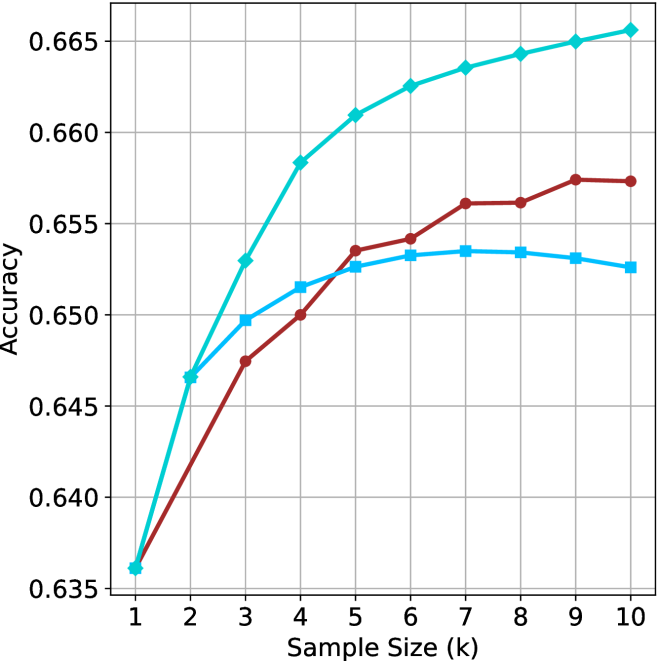
### Visual Description
## Line Chart: Accuracy vs. Sample Size
### Overview
The image is a line chart showing the relationship between "Accuracy" and "Sample Size (k)". There are three distinct data series represented by different colored lines: a turquoise line with diamond markers, a light blue line with square markers, and a brown line with circular markers. The chart displays how accuracy changes with increasing sample size for each of the three series.
### Components/Axes
* **X-axis:** "Sample Size (k)" with integer values from 1 to 10.
* **Y-axis:** "Accuracy" with values ranging from 0.635 to 0.665, in increments of 0.005.
* **Data Series:**
* Turquoise line with diamond markers.
* Light blue line with square markers.
* Brown line with circular markers.
* **Grid:** The chart has a grid to aid in reading the values.
### Detailed Analysis
**Turquoise Line (Diamond Markers):**
This line shows a generally upward trend, indicating that accuracy increases with sample size.
* At Sample Size 1, Accuracy is approximately 0.637.
* At Sample Size 2, Accuracy is approximately 0.647.
* At Sample Size 3, Accuracy is approximately 0.653.
* At Sample Size 4, Accuracy is approximately 0.658.
* At Sample Size 5, Accuracy is approximately 0.661.
* At Sample Size 6, Accuracy is approximately 0.663.
* At Sample Size 7, Accuracy is approximately 0.664.
* At Sample Size 8, Accuracy is approximately 0.6645.
* At Sample Size 9, Accuracy is approximately 0.665.
* At Sample Size 10, Accuracy is approximately 0.6655.
**Light Blue Line (Square Markers):**
This line initially increases, plateaus, and then slightly decreases.
* At Sample Size 1, Accuracy is approximately 0.637.
* At Sample Size 2, Accuracy is approximately 0.650.
* At Sample Size 3, Accuracy is approximately 0.652.
* At Sample Size 4, Accuracy is approximately 0.653.
* At Sample Size 5, Accuracy is approximately 0.6535.
* At Sample Size 6, Accuracy is approximately 0.6535.
* At Sample Size 7, Accuracy is approximately 0.6535.
* At Sample Size 8, Accuracy is approximately 0.6535.
* At Sample Size 9, Accuracy is approximately 0.653.
* At Sample Size 10, Accuracy is approximately 0.6525.
**Brown Line (Circular Markers):**
This line shows an increasing trend, then plateaus.
* At Sample Size 1, Accuracy is approximately 0.637.
* At Sample Size 2, Accuracy is approximately 0.647.
* At Sample Size 3, Accuracy is approximately 0.649.
* At Sample Size 4, Accuracy is approximately 0.6515.
* At Sample Size 5, Accuracy is approximately 0.6535.
* At Sample Size 6, Accuracy is approximately 0.6545.
* At Sample Size 7, Accuracy is approximately 0.656.
* At Sample Size 8, Accuracy is approximately 0.656.
* At Sample Size 9, Accuracy is approximately 0.6575.
* At Sample Size 10, Accuracy is approximately 0.6575.
### Key Observations
* The turquoise line consistently outperforms the other two in terms of accuracy across all sample sizes.
* The light blue line plateaus and slightly decreases after a sample size of 7.
* The brown line plateaus after a sample size of 9.
* All three lines start at approximately the same accuracy for a sample size of 1.
### Interpretation
The chart suggests that increasing the sample size generally improves accuracy, but the extent of improvement varies depending on the specific data series (potentially representing different models or algorithms). The turquoise line demonstrates the most significant and consistent improvement in accuracy with increasing sample size, indicating it may be the most effective model. The plateauing or slight decrease in accuracy for the other two lines suggests that there may be a point of diminishing returns or overfitting occurring as the sample size increases beyond a certain point. The fact that all three lines start at the same accuracy for a sample size of 1 suggests that the models perform similarly with very small datasets.
</details>
(c) QwQ-32B
<details>
<summary>x21.png Details</summary>
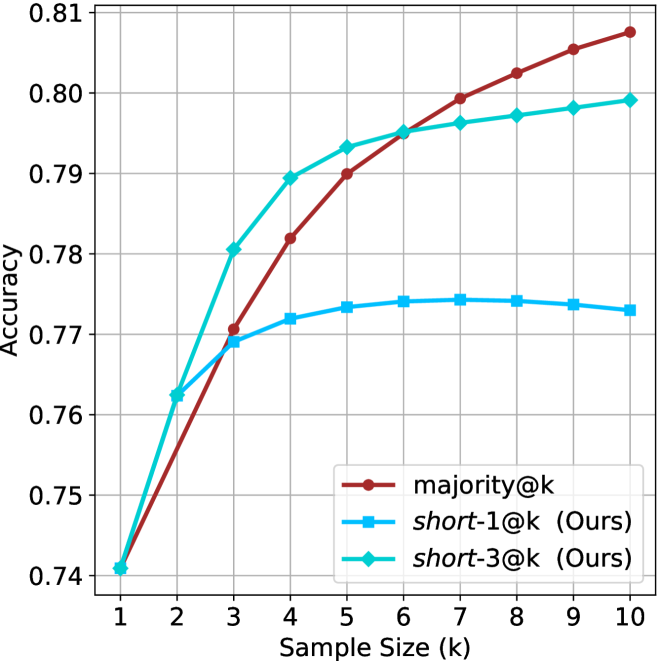
### Visual Description
## Line Chart: Accuracy vs. Sample Size
### Overview
The image is a line chart comparing the accuracy of three different methods ("majority@k", "short-1@k (Ours)", and "short-3@k (Ours)") as a function of sample size (k), which ranges from 1 to 10. The y-axis represents accuracy, ranging from 0.74 to 0.81.
### Components/Axes
* **X-axis:** Sample Size (k), with integer values from 1 to 10.
* **Y-axis:** Accuracy, ranging from 0.74 to 0.81, with gridlines at intervals of 0.01.
* **Legend:** Located in the bottom-right corner, it identifies the three data series:
* **Brown line with circle markers:** "majority@k"
* **Light blue line with square markers:** "short-1@k (Ours)"
* **Light blue line with diamond markers:** "short-3@k (Ours)"
### Detailed Analysis
* **majority@k (Brown line with circle markers):**
* Trend: The line slopes upward, indicating increasing accuracy with larger sample sizes.
* Data Points:
* k=1: Accuracy ≈ 0.74
* k=3: Accuracy ≈ 0.77
* k=5: Accuracy ≈ 0.785
* k=7: Accuracy ≈ 0.80
* k=10: Accuracy ≈ 0.808
* **short-1@k (Ours) (Light blue line with square markers):**
* Trend: The line increases initially, then plateaus and slightly decreases.
* Data Points:
* k=1: Accuracy ≈ 0.74
* k=3: Accuracy ≈ 0.77
* k=5: Accuracy ≈ 0.773
* k=7: Accuracy ≈ 0.774
* k=10: Accuracy ≈ 0.772
* **short-3@k (Ours) (Light blue line with diamond markers):**
* Trend: The line slopes upward, but the rate of increase diminishes as sample size increases.
* Data Points:
* k=1: Accuracy ≈ 0.74
* k=3: Accuracy ≈ 0.78
* k=5: Accuracy ≈ 0.793
* k=7: Accuracy ≈ 0.796
* k=10: Accuracy ≈ 0.799
### Key Observations
* The "majority@k" method consistently shows the highest accuracy for sample sizes greater than 3.
* The "short-1@k (Ours)" method plateaus at a lower accuracy compared to the other two methods.
* The "short-3@k (Ours)" method initially increases rapidly in accuracy, but the rate of increase slows down as the sample size increases.
### Interpretation
The chart compares the performance of three different methods for a task, likely a classification or prediction task, based on the accuracy achieved with varying sample sizes. The "majority@k" method appears to be the most effective, achieving the highest accuracy as the sample size increases. The "short-1@k (Ours)" method seems to have limited effectiveness, as its accuracy plateaus early on. The "short-3@k (Ours)" method shows a good initial increase in accuracy, but its performance plateaus as well, though at a higher level than "short-1@k (Ours)". The data suggests that increasing the sample size is most beneficial for the "majority@k" method, while the other two methods reach a point of diminishing returns. The "(Ours)" annotation suggests that "short-1@k" and "short-3@k" are novel methods being proposed by the authors of the chart.
</details>
(d) R1-670B
Figure 6: GPQA-D - sample size ( $k$ ) comparison.
<details>
<summary>x22.png Details</summary>
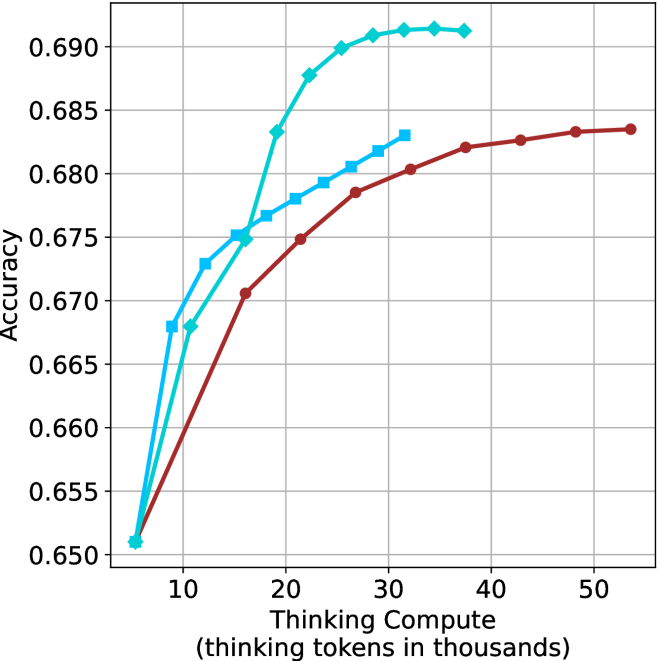
### Visual Description
## Line Chart: Accuracy vs. Thinking Compute
### Overview
The image is a line chart comparing "Accuracy" against "Thinking Compute" (measured in thousands of thinking tokens). Three distinct data series are plotted, each represented by a different colored line (cyan, blue, and brown). The chart illustrates how accuracy changes with increasing thinking compute for each series.
### Components/Axes
* **Y-axis (Vertical):** "Accuracy". The scale ranges from 0.650 to 0.690, with increments of 0.005.
* **X-axis (Horizontal):** "Thinking Compute (thinking tokens in thousands)". The scale ranges from 0 to 50 (thousands), with increments of 10 (thousands).
* **Data Series:** Three data series are plotted.
* Cyan line with diamond markers.
* Blue line with square markers.
* Brown line with circle markers.
* **Gridlines:** Light gray gridlines are present, aiding in value estimation.
### Detailed Analysis
* **Cyan Line (Diamond Markers):** This line shows the highest accuracy overall. It increases rapidly from approximately 0.651 at 5k tokens to approximately 0.691 at 30k tokens, then plateaus.
* (5, 0.651)
* (10, 0.668)
* (15, 0.683)
* (20, 0.689)
* (25, 0.690)
* (30, 0.691)
* (40, 0.691)
* (50, 0.691)
* **Blue Line (Square Markers):** This line shows a moderate increase in accuracy. It starts at approximately 0.651 at 5k tokens, increases to approximately 0.683 at 30k tokens, then plateaus.
* (5, 0.651)
* (10, 0.673)
* (15, 0.676)
* (20, 0.679)
* (25, 0.681)
* (30, 0.683)
* **Brown Line (Circle Markers):** This line shows the lowest accuracy among the three. It starts at approximately 0.651 at 5k tokens, increases to approximately 0.684 at 50k tokens.
* (5, 0.651)
* (10, 0.668)
* (15, 0.671)
* (20, 0.675)
* (25, 0.679)
* (30, 0.681)
* (40, 0.683)
* (50, 0.684)
### Key Observations
* All three lines start at approximately the same accuracy level (0.651) with low thinking compute (5k tokens).
* The cyan line achieves the highest accuracy and plateaus earlier than the other two lines.
* The brown line shows the slowest increase in accuracy and does not plateau within the displayed range.
* The blue line's performance is in between the cyan and brown lines.
### Interpretation
The chart suggests that increasing "Thinking Compute" generally improves "Accuracy," but the extent of improvement and the point at which diminishing returns are observed varies depending on the specific data series (likely representing different models or configurations). The cyan line demonstrates the most efficient use of "Thinking Compute," achieving high accuracy with a relatively lower amount of compute compared to the brown line. The blue line represents a middle ground in terms of efficiency. The data implies that there are different strategies for improving accuracy, and some are more effective than others in terms of computational cost.
</details>
(a) LN-Super- $49$ B
<details>
<summary>x23.png Details</summary>
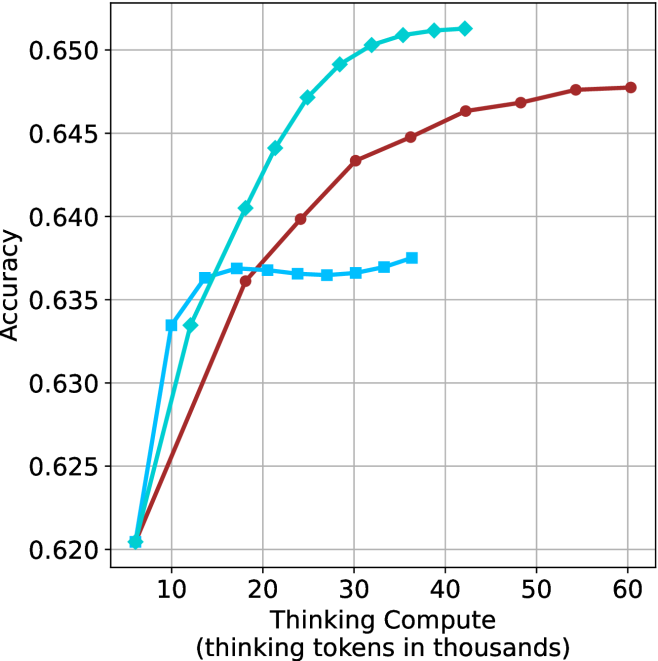
### Visual Description
## Line Chart: Accuracy vs. Thinking Compute
### Overview
The image is a line chart that plots accuracy against thinking compute (measured in thousands of thinking tokens). There are three distinct data series represented by lines of different colors (light blue, brown, and a darker blue). The chart illustrates how accuracy changes with increasing thinking compute for each series.
### Components/Axes
* **X-axis:** "Thinking Compute (thinking tokens in thousands)". The scale ranges from approximately 5 to 60, with tick marks at intervals of 10.
* **Y-axis:** "Accuracy". The scale ranges from 0.620 to 0.650, with tick marks at intervals of 0.005.
* **Data Series:**
* Light Blue (with diamond markers): This line represents one data series.
* Brown (with circle markers): This line represents another data series.
* Darker Blue (with square markers): This line represents a third data series.
### Detailed Analysis
* **Light Blue (Diamond Markers):**
* Trend: The line slopes sharply upward initially, then gradually flattens out.
* Data Points:
* (5, 0.620)
* (10, 0.634)
* (15, 0.641)
* (20, 0.647)
* (25, 0.651)
* (30, 0.652)
* (35, 0.652)
* (40, 0.653)
* **Brown (Circle Markers):**
* Trend: The line slopes upward, with a less steep slope than the light blue line.
* Data Points:
* (5, 0.620)
* (20, 0.637)
* (30, 0.644)
* (40, 0.647)
* (50, 0.648)
* (60, 0.648)
* **Darker Blue (Square Markers):**
* Trend: The line slopes upward initially, then flattens out to a nearly horizontal line.
* Data Points:
* (5, 0.633)
* (10, 0.636)
* (15, 0.637)
* (20, 0.637)
* (25, 0.637)
* (30, 0.637)
* (35, 0.638)
* (40, 0.638)
### Key Observations
* The light blue line (diamond markers) achieves the highest accuracy among the three series.
* The darker blue line (square markers) plateaus at a lower accuracy level compared to the other two.
* All three lines show an increase in accuracy with increasing thinking compute, but the rate of increase varies.
### Interpretation
The chart suggests that increasing thinking compute generally leads to higher accuracy, but the extent of improvement depends on the specific data series (likely representing different models or configurations). The light blue series demonstrates the most significant improvement in accuracy with increasing compute, while the darker blue series plateaus quickly, indicating diminishing returns beyond a certain compute level. The brown series shows a steady, moderate increase in accuracy. The data implies that the light blue configuration is the most effective in leveraging increased thinking compute to achieve higher accuracy.
</details>
(b) R $1$ - $32$ B
<details>
<summary>x24.png Details</summary>
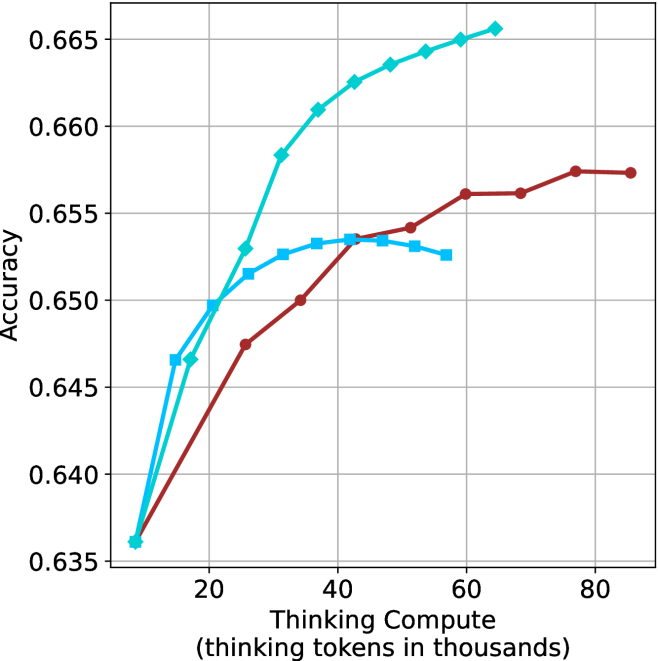
### Visual Description
## Line Chart: Accuracy vs. Thinking Compute
### Overview
The image is a line chart showing the relationship between "Thinking Compute" (measured in thousands of thinking tokens) and "Accuracy". There are three distinct data series represented by lines of different colors (light blue, blue, and brown), each showing a different trend. The chart has a grid background for easier value estimation.
### Components/Axes
* **X-axis:** "Thinking Compute (thinking tokens in thousands)". The axis ranges from approximately 0 to 80, with tick marks at 20, 40, 60, and 80.
* **Y-axis:** "Accuracy". The axis ranges from 0.635 to 0.665, with tick marks at 0.635, 0.640, 0.645, 0.650, 0.655, 0.660, and 0.665.
* **Data Series:**
* Light Blue Line (with diamond markers): Represents a data series that generally increases with "Thinking Compute", showing a steeper initial increase and then plateauing.
* Blue Line (with square markers): Represents a data series that increases initially, peaks around a "Thinking Compute" value of 40, and then decreases slightly.
* Brown Line (with circle markers): Represents a data series that increases steadily until a "Thinking Compute" value of approximately 60, after which it plateaus.
### Detailed Analysis
* **Light Blue Line (Diamond Markers):**
* At "Thinking Compute" = 10, Accuracy ≈ 0.636
* At "Thinking Compute" = 20, Accuracy ≈ 0.648
* At "Thinking Compute" = 30, Accuracy ≈ 0.658
* At "Thinking Compute" = 40, Accuracy ≈ 0.663
* At "Thinking Compute" = 50, Accuracy ≈ 0.664
* At "Thinking Compute" = 60, Accuracy ≈ 0.665
* At "Thinking Compute" = 70, Accuracy ≈ 0.665
* At "Thinking Compute" = 80, Accuracy ≈ 0.665
* Trend: The light blue line shows a strong positive correlation between "Thinking Compute" and "Accuracy" initially, but the effect diminishes as "Thinking Compute" increases.
* **Blue Line (Square Markers):**
* At "Thinking Compute" = 10, Accuracy ≈ 0.636
* At "Thinking Compute" = 20, Accuracy ≈ 0.652
* At "Thinking Compute" = 30, Accuracy ≈ 0.653
* At "Thinking Compute" = 40, Accuracy ≈ 0.654
* At "Thinking Compute" = 50, Accuracy ≈ 0.653
* At "Thinking Compute" = 60, Accuracy ≈ 0.652
* Trend: The blue line increases initially, peaks around a "Thinking Compute" value of 40, and then decreases slightly.
* **Brown Line (Circle Markers):**
* At "Thinking Compute" = 10, Accuracy ≈ 0.637
* At "Thinking Compute" = 20, Accuracy ≈ 0.647
* At "Thinking Compute" = 30, Accuracy ≈ 0.650
* At "Thinking Compute" = 40, Accuracy ≈ 0.653
* At "Thinking Compute" = 50, Accuracy ≈ 0.654
* At "Thinking Compute" = 60, Accuracy ≈ 0.656
* At "Thinking Compute" = 70, Accuracy ≈ 0.657
* At "Thinking Compute" = 80, Accuracy ≈ 0.657
* Trend: The brown line shows a positive correlation between "Thinking Compute" and "Accuracy" until a "Thinking Compute" value of approximately 60, after which it plateaus.
### Key Observations
* The light blue line consistently achieves the highest accuracy across the range of "Thinking Compute" values.
* The blue line peaks and then declines, suggesting that there may be a point of diminishing returns or overfitting for this particular configuration.
* The brown line plateaus at a lower accuracy level compared to the light blue line.
### Interpretation
The chart suggests that increasing "Thinking Compute" generally improves accuracy, but the extent of improvement varies depending on the specific configuration represented by each line. The light blue line demonstrates the most significant and sustained improvement in accuracy with increasing "Thinking Compute". The blue line's peak and subsequent decline indicate that there might be an optimal level of "Thinking Compute" beyond which performance degrades. The brown line's plateau suggests that further increases in "Thinking Compute" do not lead to significant gains in accuracy for that particular configuration. The data implies that the light blue configuration is the most effective in leveraging "Thinking Compute" to achieve higher accuracy.
</details>
(c) QwQ-32B
<details>
<summary>x25.png Details</summary>
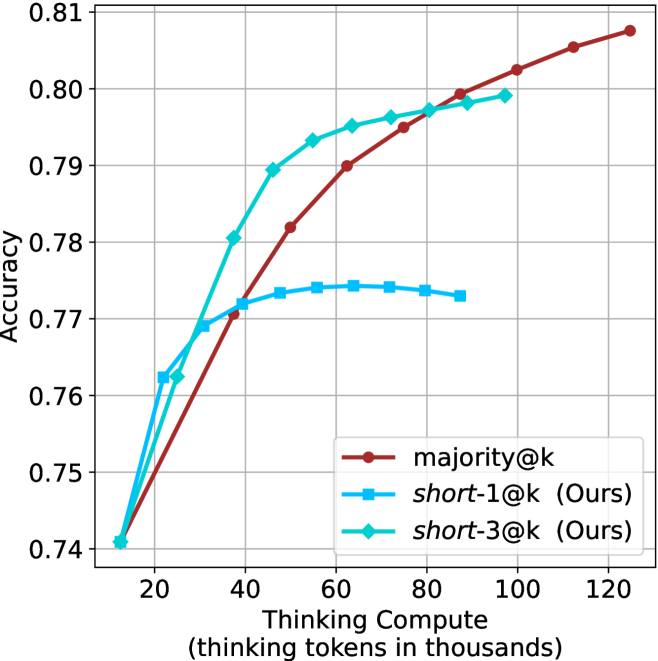
### Visual Description
## Line Chart: Accuracy vs. Thinking Compute
### Overview
The image is a line chart comparing the accuracy of three different methods ("majority@k", "short-1@k (Ours)", and "short-3@k (Ours)") as a function of "Thinking Compute" (measured in thousands of thinking tokens). The chart displays how accuracy changes with increasing computational effort for each method.
### Components/Axes
* **X-axis:** Thinking Compute (thinking tokens in thousands). Scale ranges from approximately 10 to 120, with tick marks at intervals of 20.
* **Y-axis:** Accuracy. Scale ranges from 0.74 to 0.81, with tick marks at intervals of 0.01.
* **Legend:** Located in the bottom-right corner of the chart.
* **Brown line with circle markers:** "majority@k"
* **Blue line with square markers:** "short-1@k (Ours)"
* **Cyan line with diamond markers:** "short-3@k (Ours)"
### Detailed Analysis
* **majority@k (Brown line):** The line starts at approximately (15, 0.74) and slopes upward.
* (15, 0.74)
* (40, 0.77)
* (60, 0.79)
* (80, 0.80)
* (100, 0.805)
* (125, 0.81)
* **short-1@k (Ours) (Blue line):** The line starts at approximately (15, 0.74) and increases to a peak, then decreases slightly.
* (15, 0.74)
* (30, 0.77)
* (50, 0.774)
* (70, 0.774)
* (90, 0.772)
* **short-3@k (Ours) (Cyan line):** The line starts at approximately (15, 0.74) and slopes upward, plateauing around 80.
* (15, 0.74)
* (25, 0.762)
* (40, 0.79)
* (60, 0.795)
* (80, 0.798)
* (100, 0.798)
### Key Observations
* Initially, "short-3@k (Ours)" achieves higher accuracy with less compute compared to "majority@k" and "short-1@k (Ours)".
* "short-1@k (Ours)" plateaus and even slightly decreases in accuracy after a certain compute level.
* "majority@k" consistently increases in accuracy with increasing compute, eventually surpassing "short-3@k (Ours)".
### Interpretation
The chart suggests that "short-3@k (Ours)" is more efficient in terms of accuracy gain for lower compute budgets. However, "majority@k" eventually outperforms the other methods with sufficient computational resources. "short-1@k (Ours)" appears to have diminishing returns and may not be as effective for higher compute levels. The data indicates a trade-off between initial efficiency and long-term performance depending on the available compute. The "Ours" label suggests that "short-1@k" and "short-3@k" are novel methods being compared against the baseline "majority@k".
</details>
(d) R1-670B
Figure 7: GPQA-D - thinking compute comparison.
<details>
<summary>x26.png Details</summary>
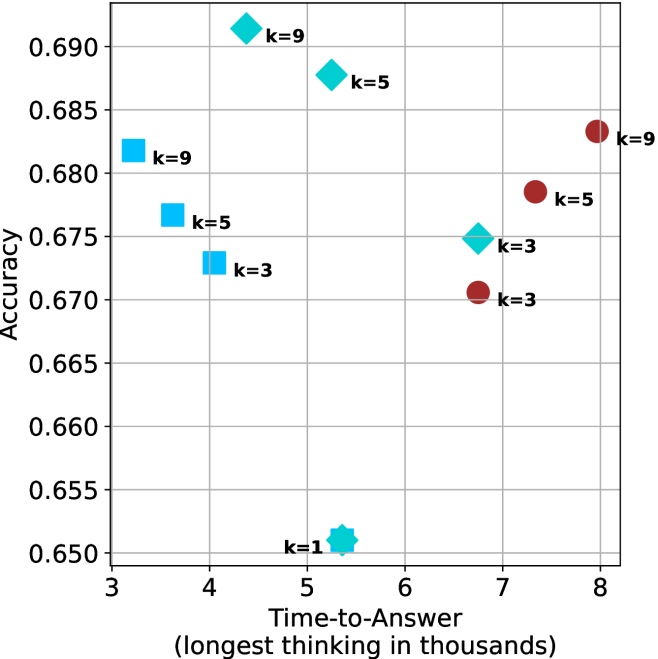
### Visual Description
## Scatter Plot: Accuracy vs. Time-to-Answer for Different 'k' Values
### Overview
The image is a scatter plot showing the relationship between "Time-to-Answer" (in thousands) and "Accuracy" for different values of 'k'. There are three distinct data series, each represented by a different marker shape and color: light blue squares, light blue diamonds, and dark red circles. Each data point is labeled with its corresponding 'k' value.
### Components/Axes
* **X-axis:** "Time-to-Answer (longest thinking in thousands)". The axis ranges from 3 to 8, with tick marks at each integer value.
* **Y-axis:** "Accuracy". The axis ranges from 0.650 to 0.690, with tick marks at intervals of 0.005.
* **Data Series:**
* Light Blue Squares: Representing one data series.
* Light Blue Diamonds: Representing another data series.
* Dark Red Circles: Representing a third data series.
* **Labels:** Each data point is labeled with "k=[value]", where [value] is the specific 'k' value for that point (1, 3, 5, or 9).
### Detailed Analysis
* **Light Blue Squares:**
* k=9: Time-to-Answer ≈ 3.5, Accuracy ≈ 0.681
* k=5: Time-to-Answer ≈ 3.8, Accuracy ≈ 0.676
* k=3: Time-to-Answer ≈ 4.0, Accuracy ≈ 0.673
* Trend: As 'k' decreases, both Time-to-Answer and Accuracy decrease.
* **Light Blue Diamonds:**
* k=9: Time-to-Answer ≈ 4.8, Accuracy ≈ 0.691
* k=5: Time-to-Answer ≈ 5.3, Accuracy ≈ 0.688
* k=3: Time-to-Answer ≈ 6.7, Accuracy ≈ 0.675
* k=1: Time-to-Answer ≈ 5.3, Accuracy ≈ 0.651
* Trend: As 'k' decreases from 9 to 3, both Time-to-Answer and Accuracy decrease. The k=1 point is an outlier, with a low accuracy.
* **Dark Red Circles:**
* k=9: Time-to-Answer ≈ 8.0, Accuracy ≈ 0.684
* k=5: Time-to-Answer ≈ 7.8, Accuracy ≈ 0.678
* k=3: Time-to-Answer ≈ 6.8, Accuracy ≈ 0.671
* Trend: As 'k' decreases, both Time-to-Answer and Accuracy decrease.
### Key Observations
* For each data series (light blue squares, light blue diamonds, and dark red circles), there is a general trend of decreasing accuracy as the time to answer decreases.
* The light blue diamonds series has a data point for k=1, which has a significantly lower accuracy compared to the other 'k' values in that series.
* The dark red circles series generally has a higher time-to-answer compared to the other two series for similar 'k' values.
### Interpretation
The scatter plot visualizes the trade-off between accuracy and time-to-answer for different configurations (represented by 'k' values) of a system or model. The data suggests that increasing the 'k' value generally leads to higher accuracy but also requires more time to generate an answer. The outlier (k=1 for the light blue diamonds) indicates that there might be a point where decreasing 'k' too much negatively impacts accuracy. The different data series (light blue squares, light blue diamonds, and dark red circles) likely represent different methods or configurations being tested, each exhibiting a different relationship between accuracy and time. The dark red circles series, for example, consistently takes longer to answer than the other series, potentially indicating a more computationally intensive but potentially more accurate approach (at higher k values).
</details>
(a) LN-Super- $49$ B
<details>
<summary>x27.png Details</summary>
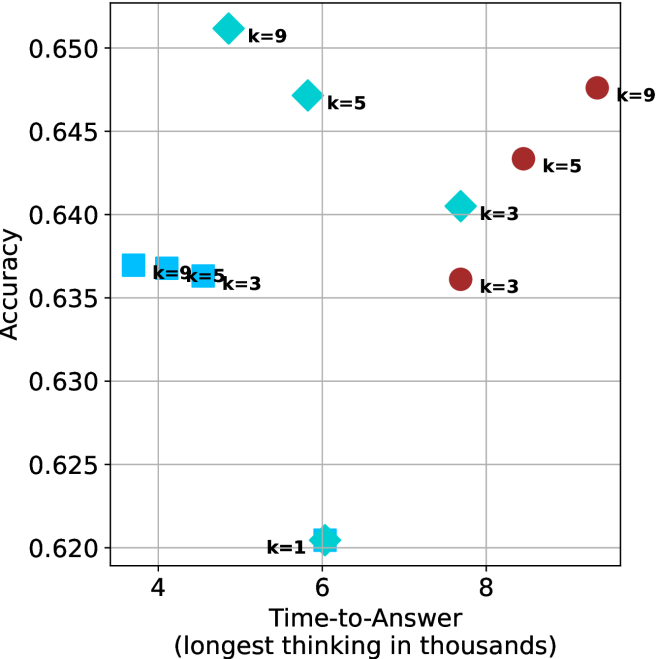
### Visual Description
## Scatter Plot: Accuracy vs. Time-to-Answer
### Overview
The image is a scatter plot showing the relationship between "Accuracy" and "Time-to-Answer" for different values of 'k'. There are two distinct data series, represented by cyan and brown markers, with each point labeled with its corresponding 'k' value.
### Components/Axes
* **X-axis:** "Time-to-Answer (longest thinking in thousands)". The scale ranges from approximately 3.5 to 9.
* **Y-axis:** "Accuracy". The scale ranges from 0.620 to 0.650.
* **Data Series:**
* Cyan markers (squares, diamonds, and star): Represent one data series.
* Brown markers (circles): Represent another data series.
* **Labels:** Each data point is labeled with "k=[value]", where [value] is 1, 3, 5, or 9.
* **Gridlines:** Present on the plot.
### Detailed Analysis
**Cyan Data Series:**
* **k=1:** Located at approximately (6, 0.620). Shape is a star.
* **k=3:** Located at approximately (4, 0.637). Shape is a square.
* **k=5:** Located at approximately (4, 0.637). Shape is a square.
* **k=9:** Located at approximately (4, 0.637). Shape is a square.
* **k=3:** Located at approximately (7.5, 0.640). Shape is a diamond.
* **k=5:** Located at approximately (7, 0.647). Shape is a diamond.
* **k=9:** Located at approximately (6, 0.652). Shape is a diamond.
**Brown Data Series:**
* **k=3:** Located at approximately (8, 0.636). Shape is a circle.
* **k=5:** Located at approximately (8.5, 0.643). Shape is a circle.
* **k=9:** Located at approximately (9, 0.648). Shape is a circle.
### Key Observations
* For the cyan data series, as 'k' increases from 1 to 9, the time-to-answer generally decreases, while accuracy increases.
* For the brown data series, as 'k' increases from 3 to 9, both time-to-answer and accuracy increase.
* The cyan data series has a cluster of points at approximately (4, 0.637) for k=3, 5, and 9.
* The cyan data series has a point at approximately (6, 0.620) for k=1.
* The brown data series has a point at approximately (8, 0.636) for k=3.
### Interpretation
The scatter plot visualizes the trade-off between accuracy and time-to-answer for two different algorithms or configurations, represented by the cyan and brown data series. The 'k' value likely represents a parameter within these algorithms.
The cyan data series shows that increasing 'k' initially improves accuracy while decreasing time-to-answer, but plateaus around (4, 0.637) for k=3, 5, and 9. The point at k=1 shows a lower accuracy and a higher time-to-answer.
The brown data series shows a positive correlation between 'k', time-to-answer, and accuracy. Increasing 'k' leads to both higher accuracy and longer processing times.
The choice of 'k' would depend on the specific application and the relative importance of accuracy versus speed. If speed is critical, a lower 'k' value in the cyan data series might be preferable. If accuracy is paramount, a higher 'k' value in the brown data series might be chosen, accepting the longer time-to-answer.
</details>
(b) R $1$ - $32$ B
<details>
<summary>x28.png Details</summary>
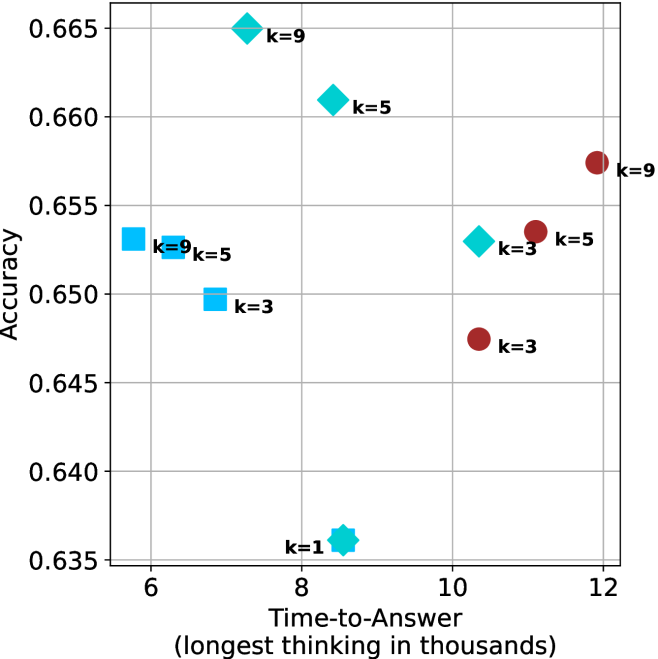
### Visual Description
## Scatter Plot: Accuracy vs. Time-to-Answer
### Overview
The image is a scatter plot showing the relationship between "Accuracy" and "Time-to-Answer" (longest thinking in thousands). The plot displays data points for different values of 'k' (1, 3, 5, and 9), represented by different shapes and colors. The x-axis represents the time taken to answer, and the y-axis represents the accuracy.
### Components/Axes
* **X-axis:** "Time-to-Answer (longest thinking in thousands)". The scale ranges from approximately 5 to 12, with gridlines at integer values.
* **Y-axis:** "Accuracy". The scale ranges from 0.635 to 0.665, with gridlines at intervals of 0.005.
* **Data Points:**
* Cyan Squares: k=3, k=5, k=9
* Cyan Diamonds: k=3, k=5, k=9
* Cyan Star: k=1
* Maroon Circles: k=3, k=5, k=9
### Detailed Analysis
* **Cyan Squares:**
* k=9: Located at approximately (5.8, 0.653)
* k=5: Located at approximately (6.2, 0.652)
* k=3: Located at approximately (6.5, 0.650)
* Trend: As k decreases, the time-to-answer increases slightly, and the accuracy decreases slightly.
* **Cyan Diamonds:**
* k=9: Located at approximately (8.5, 0.665)
* k=5: Located at approximately (9.2, 0.661)
* k=3: Located at approximately (10.2, 0.653)
* Trend: As k decreases, the time-to-answer increases, and the accuracy decreases.
* **Cyan Star:**
* k=1: Located at approximately (8.0, 0.636)
* **Maroon Circles:**
* k=9: Located at approximately (11.8, 0.657)
* k=5: Located at approximately (11.5, 0.653)
* k=3: Located at approximately (10.8, 0.647)
* Trend: As k decreases, the time-to-answer decreases, and the accuracy decreases.
### Key Observations
* The cyan squares are clustered in the top-left corner of the plot, indicating shorter time-to-answer and relatively high accuracy.
* The cyan diamonds are more spread out, with a general trend of decreasing accuracy as time-to-answer increases.
* The maroon circles are located in the top-right to center-right of the plot, indicating longer time-to-answer.
* The cyan star (k=1) has the lowest accuracy and a moderate time-to-answer.
### Interpretation
The scatter plot visualizes the trade-off between accuracy and time-to-answer for different values of 'k'. The data suggests that:
* There is no clear optimal value of 'k' that maximizes both accuracy and minimizes time-to-answer.
* Lower values of 'k' (like k=1) result in the lowest accuracy.
* The choice of 'k' depends on the specific application and the relative importance of accuracy and speed.
* The cyan squares are the most efficient, but the cyan diamonds have the highest accuracy.
* The maroon circles have the longest time-to-answer.
</details>
(c) QwQ-32B
<details>
<summary>x29.png Details</summary>
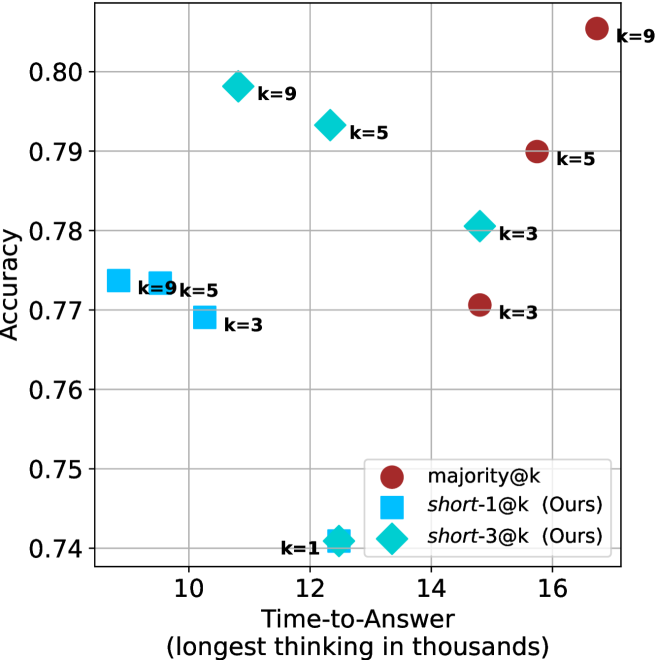
### Visual Description
## Scatter Plot: Accuracy vs. Time-to-Answer
### Overview
The image is a scatter plot comparing the accuracy of different methods (majority@k, short-1@k, and short-3@k) against the time-to-answer. The x-axis represents the time-to-answer (longest thinking in thousands), and the y-axis represents accuracy. Each data point is labeled with a 'k' value, indicating a parameter used in the method.
### Components/Axes
* **X-axis:** Time-to-Answer (longest thinking in thousands). Scale ranges from approximately 9 to 17.
* **Y-axis:** Accuracy. Scale ranges from 0.74 to 0.80.
* **Legend (bottom-right):**
* Red circle: majority@k
* Blue square: short-1@k (Ours)
* Teal diamond: short-3@k (Ours)
* **Data Points:** Each point is labeled with its corresponding 'k' value.
### Detailed Analysis
**1. majority@k (Red Circles):**
* Trend: Accuracy generally increases with time-to-answer.
* k=3: Time-to-Answer ≈ 15, Accuracy ≈ 0.77
* k=5: Time-to-Answer ≈ 15.7, Accuracy ≈ 0.79
* k=9: Time-to-Answer ≈ 16.7, Accuracy ≈ 0.81
**2. short-1@k (Blue Squares):**
* Trend: Accuracy is relatively stable for k=3, k=5, and k=9, with a significant drop for k=1.
* k=9, k=5: Time-to-Answer ≈ 9.8, Accuracy ≈ 0.77
* k=3: Time-to-Answer ≈ 10.5, Accuracy ≈ 0.77
* k=1: No data point present
**3. short-3@k (Teal Diamonds):**
* Trend: Accuracy increases with time-to-answer.
* k=1: Time-to-Answer ≈ 12, Accuracy ≈ 0.74
* k=3: Time-to-Answer ≈ 13.7, Accuracy ≈ 0.78
* k=5: Time-to-Answer ≈ 13, Accuracy ≈ 0.793
* k=9: Time-to-Answer ≈ 11.5, Accuracy ≈ 0.798
### Key Observations
* The majority@k method shows a clear positive correlation between time-to-answer and accuracy.
* The short-1@k method has similar accuracy for k=3, k=5, and k=9, but no data is present for k=1.
* The short-3@k method also shows a positive correlation between time-to-answer and accuracy.
* For the short-1@k method, the data points for k=9 and k=5 are overlapping.
### Interpretation
The scatter plot compares the performance of three different methods (majority@k, short-1@k, and short-3@k) in terms of accuracy and time-to-answer. The 'k' value likely represents a parameter that influences the method's behavior.
The data suggests that increasing the time-to-answer generally improves the accuracy of the majority@k and short-3@k methods. The short-1@k method appears to have a stable accuracy for higher 'k' values (3, 5, and 9). The absence of a data point for k=1 in the short-1@k method might indicate a limitation or inapplicability of the method for that specific parameter value.
The plot allows for a direct comparison of the trade-offs between accuracy and time-to-answer for each method and 'k' value. For example, one can observe that the majority@k method achieves the highest accuracy but also requires the longest time-to-answer.
</details>
(d) R1-670B
Figure 8: GPQA-D - time-to-answer comparison.
Table 5: Average thinking tokens for correct (C), incorrect (IC) and all (A) answers, per split by difficulty for GPQA-D. The numbers are in thousands of tokens.
| Model | Easy | Medium | Hard |
| --- | --- | --- | --- |
| C/IC/A | C/IC/A | C/IC/A | |
| LN-Super-49B | $2.5/\text{--}/2.5$ | $\phantom{0}6.2/\phantom{0}7.8/\phantom{0}6.6$ | $\phantom{0}7.1/\phantom{0}6.9/\phantom{0}7.0$ |
| R1-32B | $3.4/\text{--}/3.4$ | $\phantom{0}6.4/\phantom{0}7.9/\phantom{0}6.8$ | $\phantom{0}8.3/\phantom{0}7.8/\phantom{0}7.9$ |
| QwQ-32B | $5.3/\text{--}/5.3$ | $\phantom{0}8.9/13.0/\phantom{0}9.7$ | $11.1/10.6/10.6$ |
| R1-670B | $8.1/\text{--}/8.1$ | $10.9/16.0/11.4$ | $17.9/17.9/17.9$ |
Table 6: Average number of backtracks, and their average length for correct (C), incorrect (IC) and all (A) answers in GPQA-D.
| Model | # Backtracks | Backtrack Len. |
| --- | --- | --- |
| C/IC/A | C/IC/A | |
| LN-Super-49B | $\phantom{0}89/107/\phantom{0}94$ | $72/56/63$ |
| R1-32B | $\phantom{0}92/173/120$ | $78/48/60$ |
| QwQ-32B | $152/241/178$ | $52/41/46$ |
| R1-670B | $122/237/156$ | $83/60/69$ |
Appendix B Per benchmark results
We present the per-benchmark results for each of the criteria presented in Section ˜ 4.2. The sample-size ( $k$ ) results are presented in Figures ˜ 9, 10 and 11. The thinking compute comparison results are presented in Figures ˜ 12, 13 and 14. The time-to-answer results per benchamrk are presented in Figures ˜ 15, 16 and 17.
<details>
<summary>x30.png Details</summary>
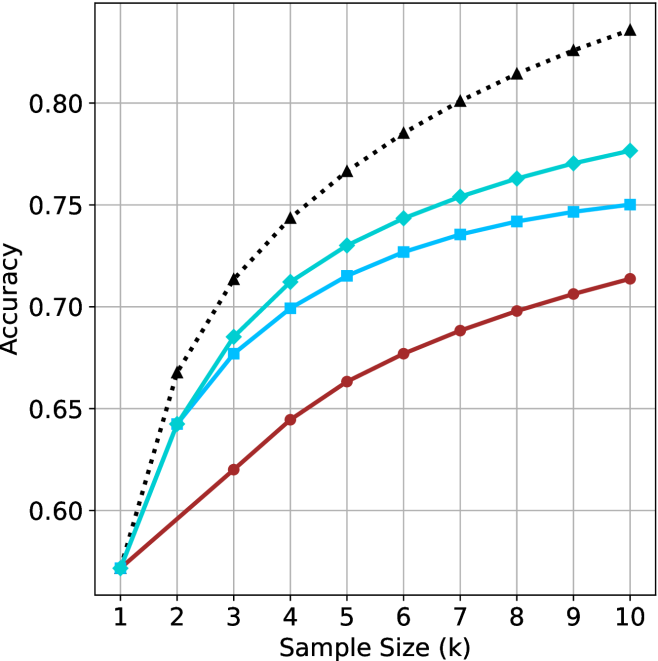
### Visual Description
## Line Chart: Accuracy vs. Sample Size
### Overview
The image is a line chart comparing the accuracy of different models as a function of sample size. The x-axis represents the sample size in thousands (k), ranging from 1 to 10. The y-axis represents the accuracy, ranging from 0.60 to 0.80. There are three distinct lines, each representing a different model, distinguished by color and marker style.
### Components/Axes
* **X-axis:** Sample Size (k), ranging from 1 to 10 in increments of 1.
* **Y-axis:** Accuracy, ranging from 0.60 to 0.80 in increments of 0.05.
* **Gridlines:** Present for both x and y axes, aiding in value estimation.
* **Data Series:**
* **Black dotted line with triangle markers:** This line shows the highest accuracy across all sample sizes.
* **Teal line with diamond markers:** This line shows the second-highest accuracy.
* **Light Blue line with square markers:** This line shows the third-highest accuracy.
* **Brown line with circle markers:** This line shows the lowest accuracy.
### Detailed Analysis
* **Black dotted line with triangle markers:**
* At sample size 1, accuracy is approximately 0.57.
* At sample size 2, accuracy is approximately 0.66.
* At sample size 3, accuracy is approximately 0.71.
* At sample size 5, accuracy is approximately 0.77.
* At sample size 10, accuracy is approximately 0.83.
* Trend: The accuracy increases rapidly initially and then plateaus.
* **Teal line with diamond markers:**
* At sample size 1, accuracy is approximately 0.57.
* At sample size 2, accuracy is approximately 0.64.
* At sample size 3, accuracy is approximately 0.68.
* At sample size 5, accuracy is approximately 0.73.
* At sample size 10, accuracy is approximately 0.77.
* Trend: The accuracy increases steadily, with a slight plateau towards the end.
* **Light Blue line with square markers:**
* At sample size 1, accuracy is approximately 0.57.
* At sample size 2, accuracy is approximately 0.62.
* At sample size 3, accuracy is approximately 0.67.
* At sample size 5, accuracy is approximately 0.73.
* At sample size 10, accuracy is approximately 0.75.
* Trend: The accuracy increases steadily, with a more pronounced plateau towards the end.
* **Brown line with circle markers:**
* At sample size 1, accuracy is approximately 0.57.
* At sample size 2, accuracy is approximately 0.60.
* At sample size 3, accuracy is approximately 0.63.
* At sample size 5, accuracy is approximately 0.67.
* At sample size 10, accuracy is approximately 0.71.
* Trend: The accuracy increases steadily, with no clear plateau within the shown range.
### Key Observations
* All models start with the same accuracy at a sample size of 1 (approximately 0.57).
* The black dotted line (triangle markers) consistently outperforms the other models across all sample sizes.
* The teal line (diamond markers) performs better than the light blue line (square markers).
* The brown line (circle markers) consistently shows the lowest accuracy.
* The rate of accuracy increase diminishes as the sample size increases for all models, indicating diminishing returns.
### Interpretation
The chart illustrates the relationship between sample size and the accuracy of different models. The black dotted line model demonstrates the highest accuracy and the most significant improvement with increasing sample size, suggesting it is the most effective model among those compared. The other models show varying degrees of improvement, with the brown line model consistently underperforming. The diminishing returns observed for all models suggest that increasing the sample size beyond a certain point may not significantly improve accuracy. The data suggests that the choice of model has a significant impact on accuracy, and the optimal sample size depends on the specific model and the desired level of accuracy.
</details>
(a) LN-Super- $49$ B
<details>
<summary>x31.png Details</summary>
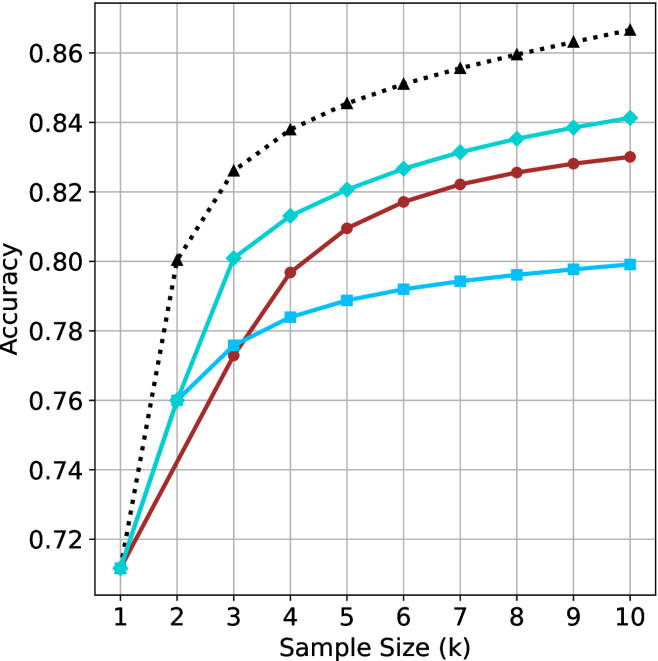
### Visual Description
## Line Chart: Accuracy vs. Sample Size
### Overview
The image is a line chart showing the relationship between "Accuracy" and "Sample Size (k)" for four different data series. The x-axis represents the sample size, ranging from 1 to 10. The y-axis represents accuracy, ranging from 0.72 to 0.86. Four lines with different markers and colors represent different data series.
### Components/Axes
* **X-axis:** Sample Size (k), with values ranging from 1 to 10 in increments of 1.
* **Y-axis:** Accuracy, with values ranging from 0.72 to 0.86 in increments of 0.02.
* **Data Series:** Four data series are represented by lines with different colors and markers:
* Black dotted line with triangle markers.
* Teal line with diamond markers.
* Brown line with circle markers.
* Light blue line with square markers.
### Detailed Analysis
**1. Black Dotted Line with Triangle Markers:**
* Trend: The line slopes sharply upward from sample size 1 to 2, then continues to increase at a decreasing rate, approaching a plateau.
* Data Points:
* Sample Size 1: Accuracy ~0.71
* Sample Size 2: Accuracy ~0.80
* Sample Size 3: Accuracy ~0.83
* Sample Size 4: Accuracy ~0.84
* Sample Size 5: Accuracy ~0.85
* Sample Size 6: Accuracy ~0.855
* Sample Size 7: Accuracy ~0.858
* Sample Size 8: Accuracy ~0.86
* Sample Size 9: Accuracy ~0.862
* Sample Size 10: Accuracy ~0.865
**2. Teal Line with Diamond Markers:**
* Trend: The line slopes upward from sample size 1 to 10, with the rate of increase decreasing as the sample size increases.
* Data Points:
* Sample Size 1: Accuracy ~0.71
* Sample Size 2: Accuracy ~0.76
* Sample Size 3: Accuracy ~0.80
* Sample Size 4: Accuracy ~0.81
* Sample Size 5: Accuracy ~0.82
* Sample Size 6: Accuracy ~0.825
* Sample Size 7: Accuracy ~0.83
* Sample Size 8: Accuracy ~0.835
* Sample Size 9: Accuracy ~0.838
* Sample Size 10: Accuracy ~0.84
**3. Brown Line with Circle Markers:**
* Trend: The line slopes upward from sample size 1 to 10, with the rate of increase decreasing as the sample size increases.
* Data Points:
* Sample Size 1: Accuracy ~0.71
* Sample Size 2: Accuracy ~0.74
* Sample Size 3: Accuracy ~0.77
* Sample Size 4: Accuracy ~0.80
* Sample Size 5: Accuracy ~0.81
* Sample Size 6: Accuracy ~0.82
* Sample Size 7: Accuracy ~0.823
* Sample Size 8: Accuracy ~0.826
* Sample Size 9: Accuracy ~0.828
* Sample Size 10: Accuracy ~0.83
**4. Light Blue Line with Square Markers:**
* Trend: The line slopes upward from sample size 1 to 10, with the rate of increase decreasing as the sample size increases.
* Data Points:
* Sample Size 1: Accuracy ~0.71
* Sample Size 2: Accuracy ~0.76
* Sample Size 3: Accuracy ~0.78
* Sample Size 4: Accuracy ~0.785
* Sample Size 5: Accuracy ~0.79
* Sample Size 6: Accuracy ~0.792
* Sample Size 7: Accuracy ~0.794
* Sample Size 8: Accuracy ~0.796
* Sample Size 9: Accuracy ~0.798
* Sample Size 10: Accuracy ~0.80
### Key Observations
* All four data series show an increase in accuracy as the sample size increases.
* The black dotted line (triangle markers) achieves the highest accuracy across all sample sizes, and its accuracy increases rapidly at smaller sample sizes.
* The light blue line (square markers) has the lowest accuracy compared to the other three lines.
* The rate of increase in accuracy decreases as the sample size increases for all four data series, suggesting diminishing returns with larger sample sizes.
### Interpretation
The chart demonstrates the relationship between sample size and accuracy for four different methods or models. The black dotted line (triangle markers) represents the most effective method, as it consistently achieves the highest accuracy with increasing sample size. The other three methods (teal, brown, and light blue lines) also show improved accuracy with larger sample sizes, but their performance is lower than the black dotted line. The diminishing returns observed for all methods suggest that there is a point beyond which increasing the sample size provides only marginal improvements in accuracy. This information can be used to optimize the sample size for each method, balancing the cost of data collection with the desired level of accuracy.
</details>
(b) R $1$ - $32$ B
<details>
<summary>x32.png Details</summary>
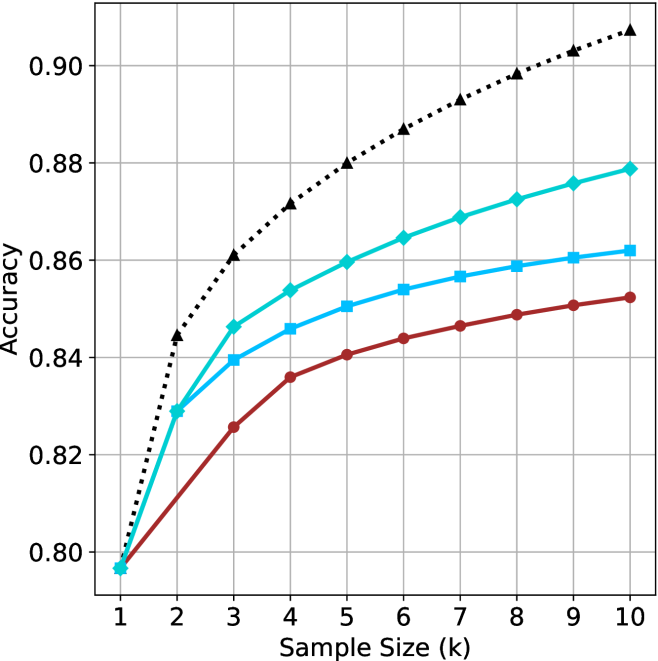
### Visual Description
## Line Chart: Accuracy vs. Sample Size
### Overview
The image is a line chart showing the relationship between "Sample Size (k)" on the x-axis and "Accuracy" on the y-axis for four different data series. The chart displays how accuracy changes as the sample size increases.
### Components/Axes
* **X-axis:** "Sample Size (k)" with tick marks at integers from 1 to 10.
* **Y-axis:** "Accuracy" with tick marks at 0.80, 0.82, 0.84, 0.86, 0.88, and 0.90.
* **Gridlines:** Present for both x and y axes.
* **Data Series:** Four distinct lines, each representing a different condition or model. The legend is missing, so the exact meaning of each line is unknown. The lines are distinguished by color and marker style.
### Detailed Analysis
Here's a breakdown of each data series:
1. **Black Dotted Line with Triangle Markers:** This line shows the highest accuracy overall.
* At Sample Size 1, Accuracy is approximately 0.80.
* At Sample Size 2, Accuracy is approximately 0.845.
* At Sample Size 3, Accuracy is approximately 0.86.
* At Sample Size 4, Accuracy is approximately 0.87.
* At Sample Size 5, Accuracy is approximately 0.878.
* At Sample Size 6, Accuracy is approximately 0.885.
* At Sample Size 7, Accuracy is approximately 0.89.
* At Sample Size 8, Accuracy is approximately 0.895.
* At Sample Size 9, Accuracy is approximately 0.90.
* At Sample Size 10, Accuracy is approximately 0.905.
* **Trend:** The line slopes upward, indicating increasing accuracy with larger sample sizes. The rate of increase slows down as the sample size increases.
2. **Light Blue Line with Diamond Markers:** This line shows the second-highest accuracy.
* At Sample Size 1, Accuracy is approximately 0.795.
* At Sample Size 2, Accuracy is approximately 0.83.
* At Sample Size 3, Accuracy is approximately 0.845.
* At Sample Size 4, Accuracy is approximately 0.855.
* At Sample Size 5, Accuracy is approximately 0.86.
* At Sample Size 6, Accuracy is approximately 0.865.
* At Sample Size 7, Accuracy is approximately 0.87.
* At Sample Size 8, Accuracy is approximately 0.873.
* At Sample Size 9, Accuracy is approximately 0.876.
* At Sample Size 10, Accuracy is approximately 0.878.
* **Trend:** The line slopes upward, indicating increasing accuracy with larger sample sizes. The rate of increase slows down as the sample size increases.
3. **Blue Line with Square Markers:** This line shows the third-highest accuracy.
* At Sample Size 1, Accuracy is approximately 0.795.
* At Sample Size 2, Accuracy is approximately 0.82.
* At Sample Size 3, Accuracy is approximately 0.84.
* At Sample Size 4, Accuracy is approximately 0.85.
* At Sample Size 5, Accuracy is approximately 0.855.
* At Sample Size 6, Accuracy is approximately 0.857.
* At Sample Size 7, Accuracy is approximately 0.859.
* At Sample Size 8, Accuracy is approximately 0.86.
* At Sample Size 9, Accuracy is approximately 0.861.
* At Sample Size 10, Accuracy is approximately 0.862.
* **Trend:** The line slopes upward, indicating increasing accuracy with larger sample sizes. The rate of increase slows down as the sample size increases.
4. **Brown Line with Circle Markers:** This line shows the lowest accuracy.
* At Sample Size 1, Accuracy is approximately 0.795.
* At Sample Size 2, Accuracy is approximately 0.81.
* At Sample Size 3, Accuracy is approximately 0.825.
* At Sample Size 4, Accuracy is approximately 0.835.
* At Sample Size 5, Accuracy is approximately 0.84.
* At Sample Size 6, Accuracy is approximately 0.845.
* At Sample Size 7, Accuracy is approximately 0.847.
* At Sample Size 8, Accuracy is approximately 0.849.
* At Sample Size 9, Accuracy is approximately 0.851.
* At Sample Size 10, Accuracy is approximately 0.852.
* **Trend:** The line slopes upward, indicating increasing accuracy with larger sample sizes. The rate of increase slows down as the sample size increases.
### Key Observations
* All four data series show an increase in accuracy as the sample size increases.
* The rate of increase in accuracy diminishes as the sample size grows larger for all series.
* The black dotted line consistently outperforms the other three in terms of accuracy.
* The brown line consistently shows the lowest accuracy among the four.
### Interpretation
The chart suggests that increasing the sample size generally improves the accuracy of whatever is being measured. However, the diminishing returns indicate that there's a point beyond which increasing the sample size yields only marginal improvements in accuracy. The different lines likely represent different models or conditions, with the black dotted line representing the most effective one in terms of achieving high accuracy with increasing sample sizes. Without a legend, the specific meaning of each line remains unclear, but the chart clearly demonstrates the relationship between sample size and accuracy for these four distinct scenarios.
</details>
(c) QwQ-32B
<details>
<summary>x33.png Details</summary>
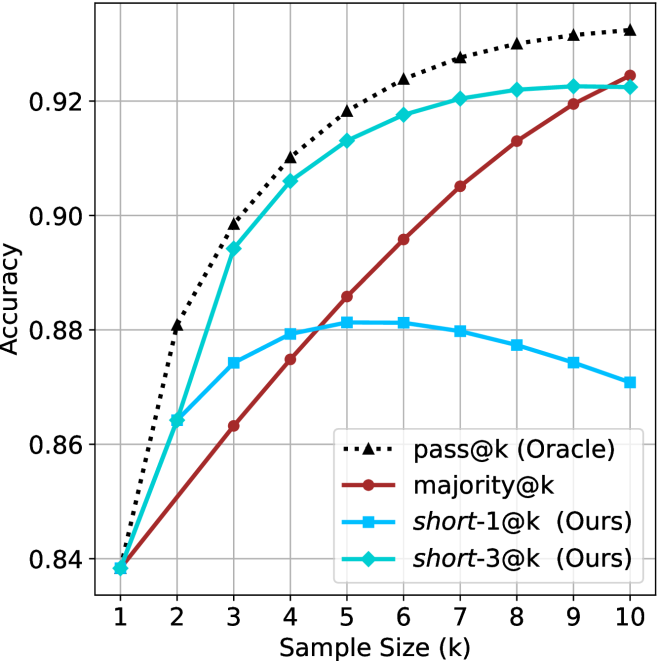
### Visual Description
## Line Chart: Accuracy vs. Sample Size
### Overview
The image is a line chart comparing the accuracy of four different methods ("pass@k (Oracle)", "majority@k", "short-1@k (Ours)", and "short-3@k (Ours)") as a function of sample size (k), which ranges from 1 to 10. The y-axis represents accuracy, ranging from 0.84 to 0.92.
### Components/Axes
* **X-axis:** Sample Size (k), ranging from 1 to 10 in integer increments.
* **Y-axis:** Accuracy, ranging from 0.84 to 0.92 in increments of 0.02.
* **Legend:** Located in the bottom-right of the chart.
* `pass@k (Oracle)`: Black dotted line with triangle markers.
* `majority@k`: Brown line with circle markers.
* `short-1@k (Ours)`: Light blue line with square markers.
* `short-3@k (Ours)`: Cyan line with diamond markers.
### Detailed Analysis
* **pass@k (Oracle):** The black dotted line with triangle markers represents the "pass@k (Oracle)" method. The accuracy increases rapidly from k=1 to k=3, then plateaus.
* k=1: ~0.84
* k=2: ~0.88
* k=3: ~0.91
* k=6: ~0.92
* k=10: ~0.925
* **majority@k:** The brown line with circle markers represents the "majority@k" method. The accuracy increases linearly with the sample size.
* k=1: ~0.84
* k=3: ~0.86
* k=5: ~0.885
* k=7: ~0.905
* k=10: ~0.925
* **short-1@k (Ours):** The light blue line with square markers represents the "short-1@k (Ours)" method. The accuracy increases from k=1 to k=5, then decreases slightly.
* k=1: ~0.84
* k=3: ~0.875
* k=5: ~0.88
* k=7: ~0.877
* k=10: ~0.87
* **short-3@k (Ours):** The cyan line with diamond markers represents the "short-3@k (Ours)" method. The accuracy increases from k=1 to k=6, then plateaus.
* k=1: ~0.84
* k=3: ~0.895
* k=6: ~0.92
* k=10: ~0.923
### Key Observations
* The "pass@k (Oracle)" method achieves the highest accuracy overall, especially for smaller sample sizes.
* The "majority@k" method shows a steady, linear increase in accuracy as the sample size increases.
* The "short-1@k (Ours)" method initially increases in accuracy but then decreases slightly after k=5.
* The "short-3@k (Ours)" method performs well, approaching the accuracy of "pass@k (Oracle)" as the sample size increases.
### Interpretation
The chart compares the performance of different methods for a task, likely related to prediction or classification, as a function of the number of samples used. The "pass@k (Oracle)" method serves as an upper bound or ideal performance, while the other methods represent different approaches to the same problem. The "short-3@k (Ours)" method appears to be a competitive alternative, achieving similar accuracy to the "Oracle" method with larger sample sizes. The "short-1@k (Ours)" method's performance suggests that there may be a trade-off between sample size and accuracy for this particular approach. The linear increase of "majority@k" suggests a simpler, but less efficient, approach.
</details>
(d) R $1$ - $670$ B
Figure 9: AIME 2024 - sample size ( $k$ ) comparison.
<details>
<summary>x34.png Details</summary>
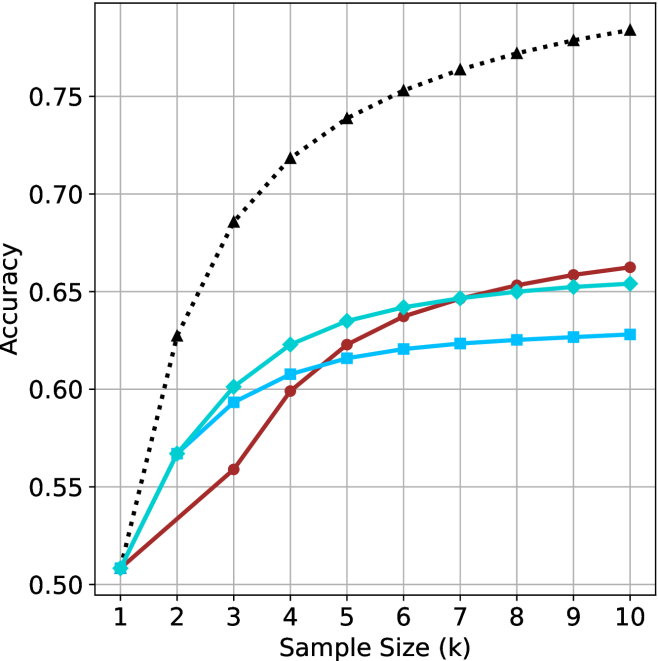
### Visual Description
## Line Chart: Accuracy vs. Sample Size
### Overview
The image is a line chart comparing the accuracy of different methods as a function of sample size. The x-axis represents the sample size (k), ranging from 1 to 10. The y-axis represents the accuracy, ranging from 0.50 to 0.75. There are four data series represented by different colored lines with distinct markers.
### Components/Axes
* **X-axis:** Sample Size (k), with values from 1 to 10.
* **Y-axis:** Accuracy, with values from 0.50 to 0.75, incrementing by 0.05.
* **Gridlines:** Present for both x and y axes.
* **Data Series:** Four data series are plotted. The legend is missing, so the exact names of the series are unknown.
### Detailed Analysis
Here's a breakdown of each data series:
1. **Black dotted line with triangle markers:** This line starts at approximately 0.51 at sample size 1 and increases rapidly to approximately 0.68 at sample size 2. It continues to increase, but at a decreasing rate, reaching approximately 0.73 at sample size 4, approximately 0.75 at sample size 6, and approximately 0.77 at sample size 10.
2. **Turquoise line with diamond markers:** This line starts at approximately 0.51 at sample size 1 and increases to approximately 0.57 at sample size 2. It continues to increase, reaching approximately 0.60 at sample size 3, approximately 0.62 at sample size 4, approximately 0.635 at sample size 5, approximately 0.64 at sample size 6, approximately 0.645 at sample size 7, approximately 0.65 at sample size 8, approximately 0.655 at sample size 9, and approximately 0.655 at sample size 10.
3. **Blue line with square markers:** This line starts at approximately 0.51 at sample size 1 and increases to approximately 0.59 at sample size 3. It continues to increase, but at a decreasing rate, reaching approximately 0.61 at sample size 4, approximately 0.62 at sample size 5, approximately 0.625 at sample size 6, approximately 0.625 at sample size 7, approximately 0.628 at sample size 8, approximately 0.628 at sample size 9, and approximately 0.63 at sample size 10.
4. **Brown line with circle markers:** This line starts at approximately 0.51 at sample size 1 and increases to approximately 0.56 at sample size 3. It continues to increase, reaching approximately 0.60 at sample size 4, approximately 0.62 at sample size 5, approximately 0.635 at sample size 6, approximately 0.645 at sample size 7, approximately 0.655 at sample size 8, approximately 0.66 at sample size 9, and approximately 0.665 at sample size 10.
### Key Observations
* The black dotted line (with triangle markers) shows the highest accuracy across all sample sizes and exhibits diminishing returns as the sample size increases.
* The turquoise line (with diamond markers) and the brown line (with circle markers) perform similarly, with the turquoise line consistently slightly higher.
* The blue line (with square markers) shows the lowest accuracy among the three solid lines.
* All lines show an increase in accuracy with increasing sample size, but the rate of increase diminishes as the sample size grows.
### Interpretation
The chart illustrates the relationship between sample size and accuracy for four different methods. The black dotted line represents the most effective method, achieving high accuracy even with smaller sample sizes. The other three methods show lower accuracy and require larger sample sizes to approach the performance of the first method. The diminishing returns observed in all lines suggest that there is a point beyond which increasing the sample size provides only marginal improvements in accuracy. Without a legend, it's impossible to know what each line represents, but the data suggests that the method represented by the black dotted line is superior in terms of accuracy and efficiency.
</details>
(a) LN-Super- $49$ B
<details>
<summary>x35.png Details</summary>
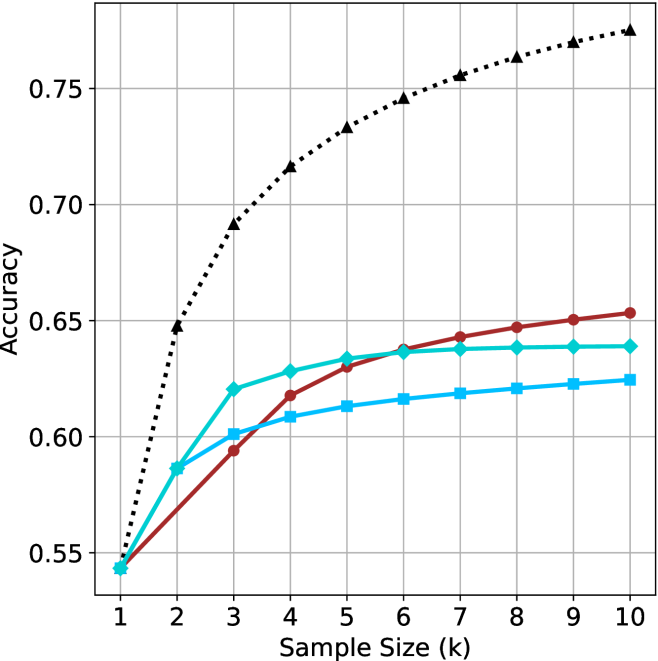
### Visual Description
## Line Chart: Accuracy vs. Sample Size
### Overview
The image is a line chart comparing the accuracy of different models as a function of sample size. The x-axis represents the sample size (k), ranging from 1 to 10. The y-axis represents the accuracy, ranging from 0.55 to 0.75. There are three distinct data series represented by different colored lines with different markers.
### Components/Axes
* **X-axis:** Sample Size (k), ranging from 1 to 10 in integer increments.
* **Y-axis:** Accuracy, ranging from 0.55 to 0.75 in increments of 0.05.
* **Gridlines:** Present on the chart for both x and y axes.
* **Data Series:**
* Black dotted line with triangle markers.
* Teal line with diamond markers.
* Brown line with circle markers.
* Light Blue line with square markers.
### Detailed Analysis
* **Black dotted line with triangle markers:** This line shows a steep upward trend initially, then plateaus as the sample size increases.
* k=1, Accuracy ≈ 0.54
* k=2, Accuracy ≈ 0.65
* k=3, Accuracy ≈ 0.69
* k=4, Accuracy ≈ 0.72
* k=5, Accuracy ≈ 0.73
* k=6, Accuracy ≈ 0.74
* k=7, Accuracy ≈ 0.75
* k=8, Accuracy ≈ 0.76
* k=9, Accuracy ≈ 0.77
* k=10, Accuracy ≈ 0.78
* **Teal line with diamond markers:** This line shows a gradual upward trend, with a slight plateau towards the end.
* k=1, Accuracy ≈ 0.54
* k=2, Accuracy ≈ 0.58
* k=3, Accuracy ≈ 0.62
* k=4, Accuracy ≈ 0.63
* k=5, Accuracy ≈ 0.635
* k=6, Accuracy ≈ 0.64
* k=7, Accuracy ≈ 0.64
* k=8, Accuracy ≈ 0.64
* k=9, Accuracy ≈ 0.64
* k=10, Accuracy ≈ 0.64
* **Brown line with circle markers:** This line also shows an upward trend, similar to the teal line, but with slightly lower accuracy values.
* k=1, Accuracy ≈ 0.54
* k=2, Accuracy ≈ 0.57
* k=3, Accuracy ≈ 0.59
* k=4, Accuracy ≈ 0.61
* k=5, Accuracy ≈ 0.63
* k=6, Accuracy ≈ 0.64
* k=7, Accuracy ≈ 0.645
* k=8, Accuracy ≈ 0.648
* k=9, Accuracy ≈ 0.65
* k=10, Accuracy ≈ 0.653
* **Light Blue line with square markers:** This line shows a gradual upward trend, with a slight plateau towards the end.
* k=1, Accuracy ≈ 0.54
* k=2, Accuracy ≈ 0.57
* k=3, Accuracy ≈ 0.60
* k=4, Accuracy ≈ 0.61
* k=5, Accuracy ≈ 0.615
* k=6, Accuracy ≈ 0.62
* k=7, Accuracy ≈ 0.62
* k=8, Accuracy ≈ 0.62
* k=9, Accuracy ≈ 0.623
* k=10, Accuracy ≈ 0.625
### Key Observations
* The black dotted line (triangle markers) consistently outperforms the other models across all sample sizes.
* The accuracy of all models generally increases with sample size, but the rate of increase diminishes as the sample size grows.
* The teal and brown lines are very close in accuracy, with the brown line slightly lower.
* The light blue line has the lowest accuracy of the four.
### Interpretation
The chart suggests that increasing the sample size generally improves the accuracy of the models. However, the diminishing returns indicate that there is a point beyond which increasing the sample size provides only marginal improvements in accuracy. The black dotted line represents the most effective model, as it achieves the highest accuracy with the smallest sample size. The other models (teal, brown, and light blue) are less effective, as they require larger sample sizes to achieve comparable accuracy. The choice of model and sample size would depend on the specific application and the trade-off between accuracy and computational cost.
</details>
(b) R $1$ - $32$ B
<details>
<summary>x36.png Details</summary>
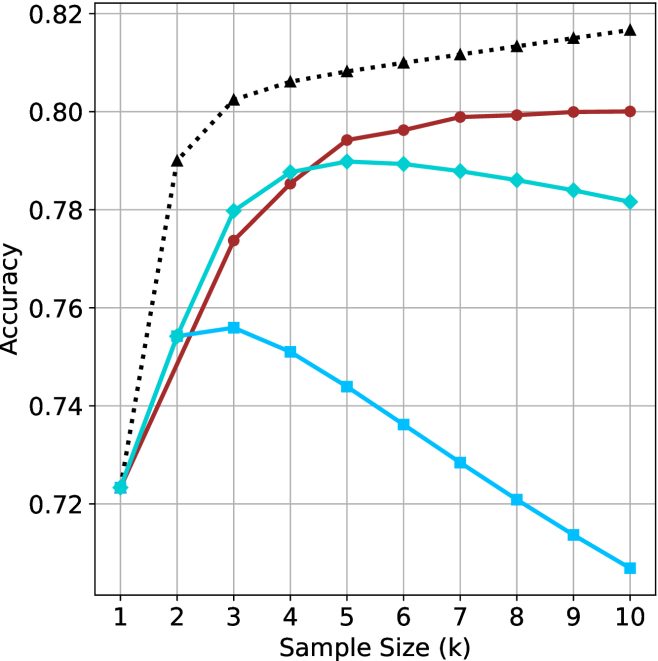
### Visual Description
## Line Chart: Accuracy vs. Sample Size
### Overview
The image is a line chart comparing the accuracy of different models as a function of sample size (k). There are three data series represented by different colored lines with distinct markers. The x-axis represents the sample size, ranging from 1 to 10, and the y-axis represents accuracy, ranging from 0.72 to 0.82.
### Components/Axes
* **X-axis:** Sample Size (k), with values ranging from 1 to 10.
* **Y-axis:** Accuracy, with values ranging from 0.72 to 0.82, in increments of 0.02.
* **Data Series:**
* Black dotted line with triangle markers.
* Brown line with circle markers.
* Light blue line with square markers.
* Turquoise line with diamond markers.
### Detailed Analysis
* **Black dotted line with triangle markers:** This line shows a steep initial increase in accuracy, followed by a gradual increase.
* k=1: Accuracy ≈ 0.72
* k=2: Accuracy ≈ 0.79
* k=3: Accuracy ≈ 0.80
* k=5: Accuracy ≈ 0.807
* k=8: Accuracy ≈ 0.813
* k=10: Accuracy ≈ 0.818
* **Brown line with circle markers:** This line shows a steady increase in accuracy, plateauing after k=6.
* k=1: Accuracy ≈ 0.72
* k=3: Accuracy ≈ 0.775
* k=5: Accuracy ≈ 0.794
* k=8: Accuracy ≈ 0.799
* k=10: Accuracy ≈ 0.80
* **Light blue line with square markers:** This line shows an initial increase in accuracy, followed by a steady decrease.
* k=1: Accuracy ≈ 0.72
* k=3: Accuracy ≈ 0.756
* k=5: Accuracy ≈ 0.74
* k=8: Accuracy ≈ 0.72
* k=10: Accuracy ≈ 0.707
* **Turquoise line with diamond markers:** This line shows an initial increase in accuracy, plateauing after k=5, and then a slight decrease.
* k=1: Accuracy ≈ 0.723
* k=3: Accuracy ≈ 0.78
* k=5: Accuracy ≈ 0.79
* k=8: Accuracy ≈ 0.787
* k=10: Accuracy ≈ 0.782
### Key Observations
* The black dotted line consistently shows the highest accuracy across all sample sizes.
* The light blue line shows a decrease in accuracy after a certain sample size, suggesting overfitting or other issues.
* The brown line plateaus after k=6, indicating diminishing returns with larger sample sizes.
* The turquoise line plateaus after k=5, indicating diminishing returns with larger sample sizes.
### Interpretation
The chart compares the performance of different models (represented by the different colored lines) as the sample size increases. The black dotted line represents the best-performing model, as it consistently achieves the highest accuracy. The light blue line's decreasing accuracy suggests that this model may be overfitting the data as the sample size increases. The brown and turquoise lines show that increasing the sample size beyond a certain point (k=5 or k=6) does not significantly improve accuracy. This information is valuable for selecting the best model and determining the optimal sample size for a given task.
</details>
(c) QwQ-32B
<details>
<summary>x37.png Details</summary>
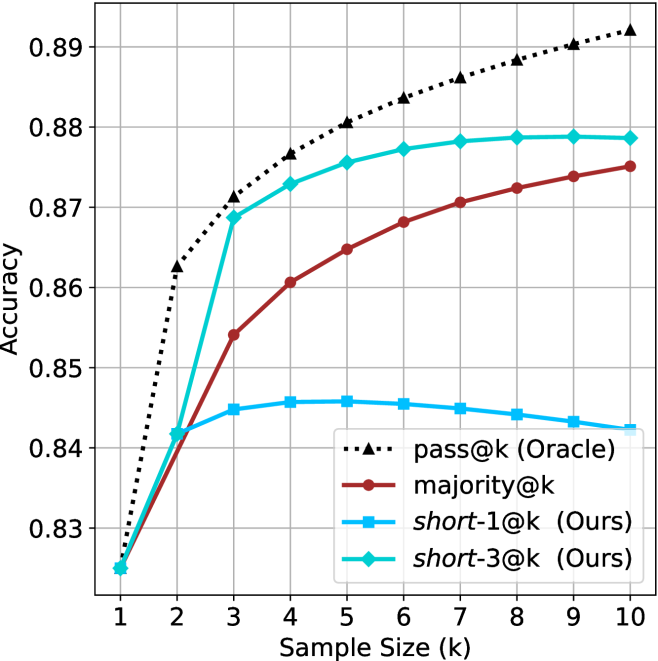
### Visual Description
## Chart: Accuracy vs. Sample Size
### Overview
The image is a line chart comparing the accuracy of four different methods ("pass@k (Oracle)", "majority@k", "short-1@k (Ours)", and "short-3@k (Ours)") as a function of sample size (k), which ranges from 1 to 10. The y-axis represents accuracy, ranging from 0.83 to 0.89.
### Components/Axes
* **X-axis:** Sample Size (k), with tick marks at integers from 1 to 10.
* **Y-axis:** Accuracy, with tick marks at 0.83, 0.84, 0.85, 0.86, 0.87, 0.88, and 0.89.
* **Legend:** Located in the bottom-right corner, it identifies the four methods:
* pass@k (Oracle) - black dotted line with triangle markers
* majority@k - brown solid line with circle markers
* short-1@k (Ours) - blue solid line with square markers
* short-3@k (Ours) - cyan solid line with diamond markers
### Detailed Analysis
* **pass@k (Oracle):** (Black dotted line with triangle markers) Starts at approximately 0.825 at k=1, rises sharply to approximately 0.862 at k=2, and continues to increase, but at a decreasing rate, reaching approximately 0.88 at k=6 and approximately 0.891 at k=10.
* **majority@k:** (Brown solid line with circle markers) Starts at approximately 0.825 at k=1, rises to approximately 0.854 at k=3, and continues to increase, but at a decreasing rate, reaching approximately 0.868 at k=5, approximately 0.872 at k=8, and approximately 0.875 at k=10.
* **short-1@k (Ours):** (Blue solid line with square markers) Starts at approximately 0.825 at k=1, rises to approximately 0.843 at k=2, peaks at approximately 0.846 at k=5, and then decreases slightly to approximately 0.844 at k=10.
* **short-3@k (Ours):** (Cyan solid line with diamond markers) Starts at approximately 0.825 at k=1, rises sharply to approximately 0.869 at k=3, and continues to increase, but at a decreasing rate, reaching approximately 0.878 at k=6 and approximately 0.879 at k=10.
### Key Observations
* The "pass@k (Oracle)" method consistently achieves the highest accuracy across all sample sizes.
* The "short-3@k (Ours)" method performs significantly better than "short-1@k (Ours)".
* The accuracy of "short-1@k (Ours)" plateaus and even decreases slightly after a sample size of 5.
* All methods show diminishing returns in accuracy as the sample size increases beyond a certain point.
### Interpretation
The chart demonstrates the relationship between sample size and accuracy for different methods. The "pass@k (Oracle)" method represents an upper bound on performance, likely an ideal or theoretical scenario. The "majority@k" method shows steady improvement with increasing sample size, while the "short-3@k (Ours)" method achieves a good balance between accuracy and sample size. The "short-1@k (Ours)" method appears to suffer from some limitation that prevents it from improving beyond a certain sample size, suggesting a potential overfitting issue or a limitation in the method itself. The diminishing returns observed for all methods suggest that there is a point beyond which increasing the sample size provides little additional benefit in terms of accuracy.
</details>
(d) R1-670B
Figure 10: AIME 2025 - sample size ( $k$ ) comparison.
<details>
<summary>x38.png Details</summary>
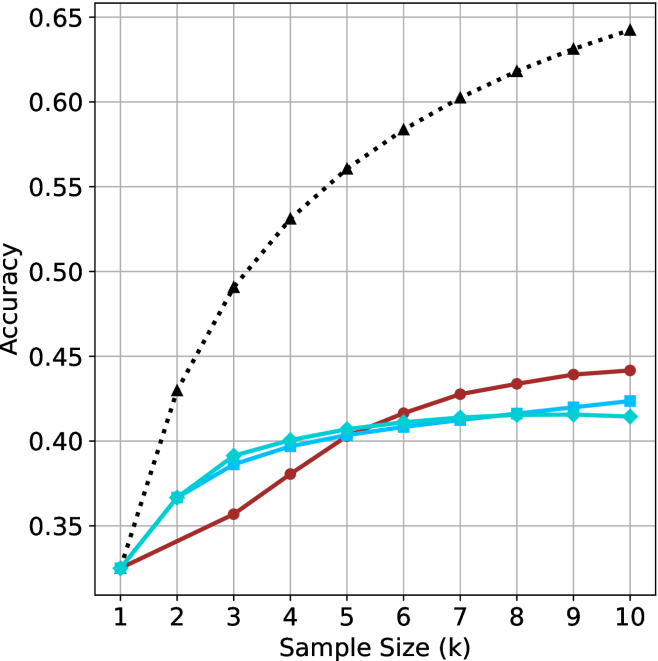
### Visual Description
## Line Chart: Accuracy vs. Sample Size
### Overview
The image is a line chart that plots the accuracy of different models against the sample size, measured in thousands (k). There are four data series represented by different colored lines with distinct markers. The chart shows how accuracy changes as the sample size increases.
### Components/Axes
* **X-axis:** Sample Size (k), ranging from 1 to 10 in increments of 1.
* **Y-axis:** Accuracy, ranging from 0.35 to 0.65 in increments of 0.05.
* **Gridlines:** Present for both x and y axes.
* **Data Series:** Four distinct data series are plotted. The legend is missing, so the series are described by color and marker.
* Black dotted line with triangle markers.
* Red line with circle markers.
* Blue line with square markers.
* Cyan line with diamond markers.
### Detailed Analysis
**1. Black Dotted Line with Triangle Markers:**
* **Trend:** This line shows a steep upward trend, indicating a significant increase in accuracy with increasing sample size.
* **Data Points:**
* Sample Size 1k: Accuracy ~0.33
* Sample Size 2k: Accuracy ~0.43
* Sample Size 3k: Accuracy ~0.49
* Sample Size 4k: Accuracy ~0.53
* Sample Size 5k: Accuracy ~0.56
* Sample Size 6k: Accuracy ~0.58
* Sample Size 7k: Accuracy ~0.60
* Sample Size 8k: Accuracy ~0.62
* Sample Size 9k: Accuracy ~0.63
* Sample Size 10k: Accuracy ~0.64
**2. Red Line with Circle Markers:**
* **Trend:** This line shows a gradual upward trend, with the accuracy increasing at a slower rate compared to the black dotted line.
* **Data Points:**
* Sample Size 1k: Accuracy ~0.33
* Sample Size 2k: Accuracy ~0.35
* Sample Size 3k: Accuracy ~0.37
* Sample Size 4k: Accuracy ~0.39
* Sample Size 5k: Accuracy ~0.40
* Sample Size 6k: Accuracy ~0.41
* Sample Size 7k: Accuracy ~0.43
* Sample Size 8k: Accuracy ~0.43
* Sample Size 9k: Accuracy ~0.44
* Sample Size 10k: Accuracy ~0.44
**3. Blue Line with Square Markers:**
* **Trend:** This line shows a slight upward trend, with the accuracy increasing very slowly.
* **Data Points:**
* Sample Size 1k: Accuracy ~0.33
* Sample Size 2k: Accuracy ~0.37
* Sample Size 3k: Accuracy ~0.39
* Sample Size 4k: Accuracy ~0.40
* Sample Size 5k: Accuracy ~0.41
* Sample Size 6k: Accuracy ~0.41
* Sample Size 7k: Accuracy ~0.42
* Sample Size 8k: Accuracy ~0.42
* Sample Size 9k: Accuracy ~0.43
* Sample Size 10k: Accuracy ~0.43
**4. Cyan Line with Diamond Markers:**
* **Trend:** This line shows a slight upward trend, similar to the blue line.
* **Data Points:**
* Sample Size 1k: Accuracy ~0.33
* Sample Size 2k: Accuracy ~0.37
* Sample Size 3k: Accuracy ~0.39
* Sample Size 4k: Accuracy ~0.40
* Sample Size 5k: Accuracy ~0.40
* Sample Size 6k: Accuracy ~0.41
* Sample Size 7k: Accuracy ~0.41
* Sample Size 8k: Accuracy ~0.42
* Sample Size 9k: Accuracy ~0.42
* Sample Size 10k: Accuracy ~0.42
### Key Observations
* The black dotted line (triangle markers) demonstrates the most significant improvement in accuracy as the sample size increases.
* The red, blue, and cyan lines show much smaller improvements in accuracy with increasing sample size.
* The blue and cyan lines are very close to each other, indicating similar performance characteristics.
* All lines start at approximately the same accuracy (~0.33) with a sample size of 1k.
### Interpretation
The chart suggests that the model represented by the black dotted line benefits the most from larger sample sizes, achieving significantly higher accuracy compared to the other models. The other models (red, blue, and cyan) show diminishing returns with increasing sample size, indicating that their performance is less sensitive to the amount of training data. This could be due to differences in model complexity, architecture, or training methodology. The black dotted line model is likely more complex or better suited to leverage the additional information provided by larger datasets.
</details>
(a) LN-Super- $49$ B
<details>
<summary>x39.png Details</summary>
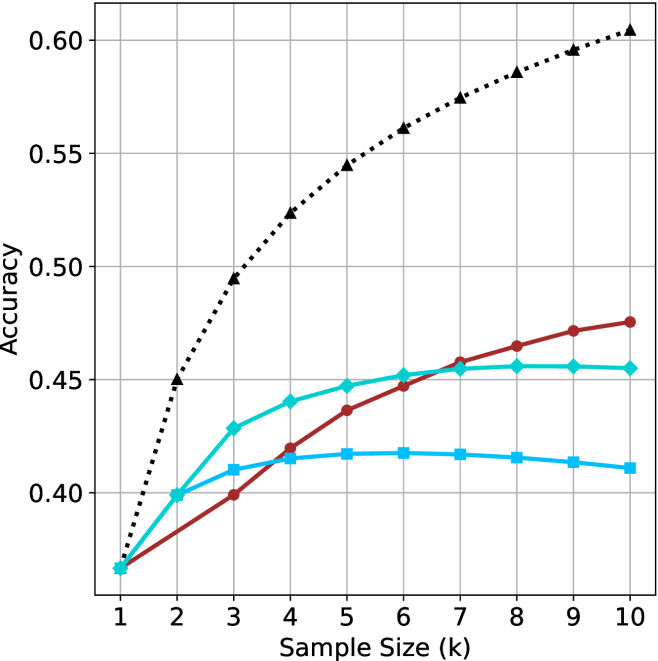
### Visual Description
## Line Chart: Accuracy vs. Sample Size
### Overview
The image is a line chart comparing the accuracy of three different methods as a function of sample size. The x-axis represents the sample size (k), ranging from 1 to 10. The y-axis represents the accuracy, ranging from 0.40 to 0.60. Three lines, each representing a different method, are plotted on the chart.
### Components/Axes
* **X-axis:** Sample Size (k), with tick marks at each integer value from 1 to 10.
* **Y-axis:** Accuracy, with tick marks at 0.40, 0.45, 0.50, 0.55, and 0.60.
* **Data Series:**
* Black dotted line with triangle markers.
* Brown line with circle markers.
* Cyan line with diamond markers.
* Blue line with square markers.
### Detailed Analysis
**1. Black Dotted Line (Triangle Markers):**
* Trend: The black dotted line with triangle markers shows a steep upward trend initially, which gradually slows down as the sample size increases.
* Data Points:
* k=1, Accuracy ≈ 0.37
* k=2, Accuracy ≈ 0.45
* k=3, Accuracy ≈ 0.50
* k=4, Accuracy ≈ 0.53
* k=5, Accuracy ≈ 0.55
* k=6, Accuracy ≈ 0.57
* k=7, Accuracy ≈ 0.58
* k=8, Accuracy ≈ 0.59
* k=9, Accuracy ≈ 0.60
* k=10, Accuracy ≈ 0.61
**2. Brown Line (Circle Markers):**
* Trend: The brown line with circle markers shows an upward trend, but it is less steep than the black dotted line. The rate of increase slows down as the sample size increases.
* Data Points:
* k=1, Accuracy ≈ 0.37
* k=2, Accuracy ≈ 0.39
* k=3, Accuracy ≈ 0.40
* k=4, Accuracy ≈ 0.42
* k=5, Accuracy ≈ 0.44
* k=6, Accuracy ≈ 0.45
* k=7, Accuracy ≈ 0.46
* k=8, Accuracy ≈ 0.46
* k=9, Accuracy ≈ 0.47
* k=10, Accuracy ≈ 0.48
**3. Cyan Line (Diamond Markers):**
* Trend: The cyan line with diamond markers shows an upward trend, similar to the brown line, but it plateaus and slightly decreases towards the end.
* Data Points:
* k=1, Accuracy ≈ 0.37
* k=2, Accuracy ≈ 0.40
* k=3, Accuracy ≈ 0.43
* k=4, Accuracy ≈ 0.44
* k=5, Accuracy ≈ 0.45
* k=6, Accuracy ≈ 0.455
* k=7, Accuracy ≈ 0.455
* k=8, Accuracy ≈ 0.46
* k=9, Accuracy ≈ 0.455
* k=10, Accuracy ≈ 0.455
**4. Blue Line (Square Markers):**
* Trend: The blue line with square markers shows an upward trend, but it plateaus and slightly decreases towards the end.
* Data Points:
* k=1, Accuracy ≈ 0.37
* k=2, Accuracy ≈ 0.40
* k=3, Accuracy ≈ 0.41
* k=4, Accuracy ≈ 0.415
* k=5, Accuracy ≈ 0.417
* k=6, Accuracy ≈ 0.417
* k=7, Accuracy ≈ 0.417
* k=8, Accuracy ≈ 0.415
* k=9, Accuracy ≈ 0.413
* k=10, Accuracy ≈ 0.41
### Key Observations
* The black dotted line (triangle markers) consistently outperforms the other methods across all sample sizes.
* The brown line (circle markers) shows a steady increase in accuracy, but it remains lower than the black dotted line.
* The cyan line (diamond markers) and blue line (square markers) show similar trends, with accuracy plateauing and slightly decreasing at larger sample sizes.
* All methods start at approximately the same accuracy level when the sample size is 1.
### Interpretation
The chart suggests that the method represented by the black dotted line (triangle markers) is the most effective in terms of accuracy, especially as the sample size increases. The other methods show diminishing returns or even a slight decrease in accuracy at larger sample sizes, indicating that they may not benefit as much from increased data. The initial convergence of all methods at a sample size of 1 suggests that they may have similar baseline performance, but the black dotted line method is better at leveraging larger datasets to improve accuracy.
</details>
(b) R $1$ - $32$ B
<details>
<summary>x40.png Details</summary>
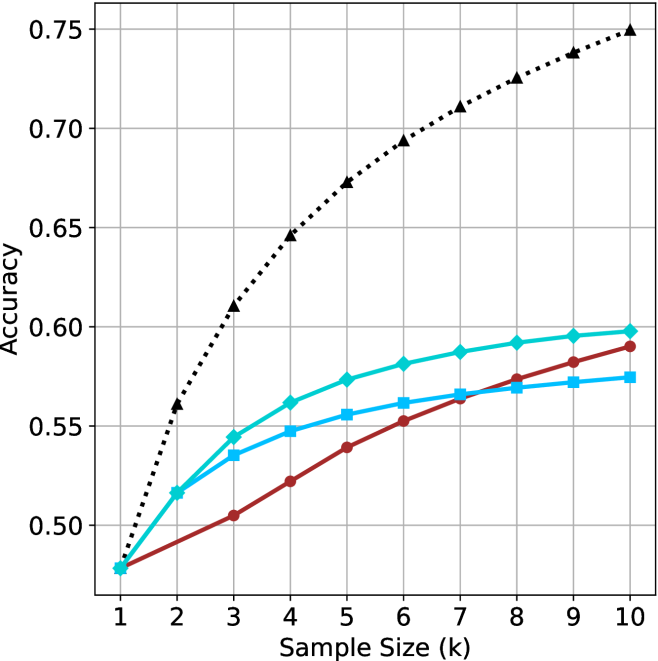
### Visual Description
## Line Chart: Accuracy vs. Sample Size
### Overview
The image is a line chart comparing the accuracy of three different methods as a function of sample size. The x-axis represents the sample size (k), ranging from 1 to 10. The y-axis represents the accuracy, ranging from 0.50 to 0.75. Three data series are plotted, each represented by a different color and marker.
### Components/Axes
* **X-axis:** Sample Size (k), with tick marks at 1, 2, 3, 4, 5, 6, 7, 8, 9, and 10.
* **Y-axis:** Accuracy, with tick marks at 0.50, 0.55, 0.60, 0.65, 0.70, and 0.75.
* **Data Series:**
* Black dotted line with triangle markers.
* Turquoise line with diamond markers.
* Brown line with circle markers.
* Light Blue line with square markers.
### Detailed Analysis
**1. Black Dotted Line (Triangle Markers):**
* Trend: The accuracy increases rapidly at first, then the rate of increase slows down as the sample size increases.
* Data Points:
* k=1: Accuracy ≈ 0.48
* k=2: Accuracy ≈ 0.56
* k=3: Accuracy ≈ 0.61
* k=4: Accuracy ≈ 0.64
* k=5: Accuracy ≈ 0.67
* k=6: Accuracy ≈ 0.69
* k=7: Accuracy ≈ 0.71
* k=8: Accuracy ≈ 0.72
* k=9: Accuracy ≈ 0.74
* k=10: Accuracy ≈ 0.75
**2. Turquoise Line (Diamond Markers):**
* Trend: The accuracy increases steadily, but the rate of increase slows down as the sample size increases.
* Data Points:
* k=1: Accuracy ≈ 0.48
* k=2: Accuracy ≈ 0.52
* k=3: Accuracy ≈ 0.54
* k=4: Accuracy ≈ 0.57
* k=5: Accuracy ≈ 0.58
* k=6: Accuracy ≈ 0.59
* k=7: Accuracy ≈ 0.59
* k=8: Accuracy ≈ 0.59
* k=9: Accuracy ≈ 0.60
* k=10: Accuracy ≈ 0.60
**3. Brown Line (Circle Markers):**
* Trend: The accuracy increases steadily, but the rate of increase slows down as the sample size increases.
* Data Points:
* k=1: Accuracy ≈ 0.48
* k=2: Accuracy ≈ 0.50
* k=3: Accuracy ≈ 0.52
* k=4: Accuracy ≈ 0.54
* k=5: Accuracy ≈ 0.55
* k=6: Accuracy ≈ 0.56
* k=7: Accuracy ≈ 0.57
* k=8: Accuracy ≈ 0.58
* k=9: Accuracy ≈ 0.59
* k=10: Accuracy ≈ 0.59
**4. Light Blue Line (Square Markers):**
* Trend: The accuracy increases steadily, but the rate of increase slows down as the sample size increases.
* Data Points:
* k=1: Accuracy ≈ 0.48
* k=2: Accuracy ≈ 0.51
* k=3: Accuracy ≈ 0.53
* k=4: Accuracy ≈ 0.54
* k=5: Accuracy ≈ 0.55
* k=6: Accuracy ≈ 0.56
* k=7: Accuracy ≈ 0.57
* k=8: Accuracy ≈ 0.57
* k=9: Accuracy ≈ 0.57
* k=10: Accuracy ≈ 0.58
### Key Observations
* The black dotted line (triangle markers) consistently shows the highest accuracy across all sample sizes.
* The turquoise line (diamond markers) consistently shows the second highest accuracy across all sample sizes.
* The brown line (circle markers) consistently shows the third highest accuracy across all sample sizes.
* The light blue line (square markers) consistently shows the lowest accuracy across all sample sizes.
* All methods show diminishing returns in accuracy as the sample size increases beyond a certain point.
### Interpretation
The chart compares the performance of four different methods (represented by the four lines) in terms of accuracy as the sample size increases. The black dotted line (triangle markers) represents the most effective method, as it achieves the highest accuracy with increasing sample size. The other methods (turquoise, brown, and light blue lines) show lower accuracy levels. The diminishing returns observed for all methods suggest that increasing the sample size beyond a certain point does not significantly improve accuracy. This information is valuable for determining the optimal sample size for each method, balancing accuracy with the cost and effort of acquiring larger samples.
</details>
(c) QwQ-32B
<details>
<summary>x41.png Details</summary>
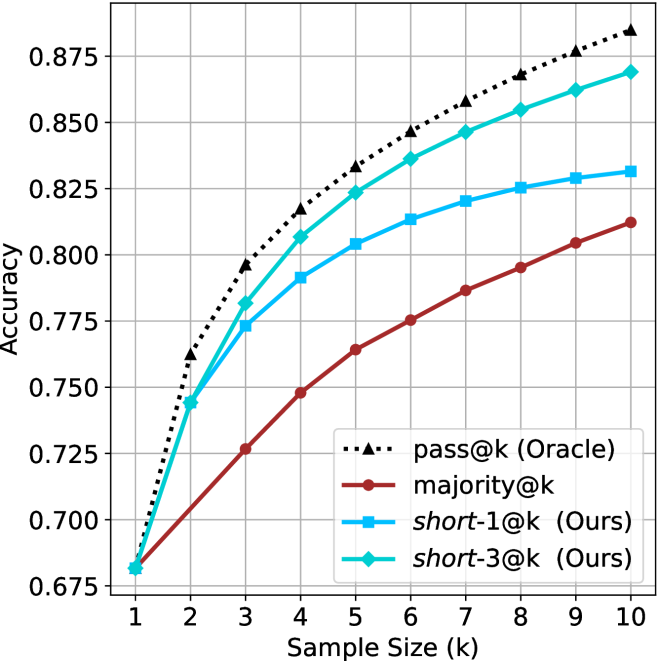
### Visual Description
## Line Chart: Accuracy vs. Sample Size
### Overview
The image is a line chart comparing the accuracy of different methods ("pass@k (Oracle)", "majority@k", "short-1@k (Ours)", and "short-3@k (Ours)") as a function of sample size (k). The chart shows how accuracy increases with sample size for each method.
### Components/Axes
* **X-axis:** Sample Size (k), ranging from 1 to 10.
* **Y-axis:** Accuracy, ranging from 0.675 to 0.875, with increments of 0.025.
* **Legend:** Located in the bottom-center of the chart, identifying each line by color and marker:
* Black dotted line with triangle markers: pass@k (Oracle)
* Brown line with circle markers: majority@k
* Blue line with square markers: short-1@k (Ours)
* Cyan line with diamond markers: short-3@k (Ours)
### Detailed Analysis
* **pass@k (Oracle):** The black dotted line with triangle markers represents this method. The trend is upward, with a steep initial increase, followed by a gradual flattening.
* k=1: Accuracy ≈ 0.68
* k=2: Accuracy ≈ 0.77
* k=3: Accuracy ≈ 0.82
* k=10: Accuracy ≈ 0.88
* **majority@k:** The brown line with circle markers represents this method. The trend is upward, with a relatively linear increase.
* k=1: Accuracy ≈ 0.68
* k=2: Accuracy ≈ 0.72
* k=5: Accuracy ≈ 0.77
* k=10: Accuracy ≈ 0.81
* **short-1@k (Ours):** The blue line with square markers represents this method. The trend is upward, with a steep initial increase, followed by a gradual flattening.
* k=1: Accuracy ≈ 0.68
* k=2: Accuracy ≈ 0.74
* k=5: Accuracy ≈ 0.81
* k=10: Accuracy ≈ 0.83
* **short-3@k (Ours):** The cyan line with diamond markers represents this method. The trend is upward, with a steep initial increase, followed by a gradual flattening.
* k=1: Accuracy ≈ 0.68
* k=2: Accuracy ≈ 0.75
* k=5: Accuracy ≈ 0.83
* k=10: Accuracy ≈ 0.87
### Key Observations
* All methods show an increase in accuracy as the sample size (k) increases.
* The "pass@k (Oracle)" method consistently achieves the highest accuracy across all sample sizes.
* The "majority@k" method consistently achieves the lowest accuracy across all sample sizes.
* The "short-3@k (Ours)" method performs better than "short-1@k (Ours)" across all sample sizes.
* The rate of increase in accuracy diminishes as the sample size increases, especially for "pass@k (Oracle)", "short-1@k (Ours)", and "short-3@k (Ours)".
### Interpretation
The chart demonstrates the relationship between sample size and accuracy for different methods. The "pass@k (Oracle)" method serves as an upper bound or ideal performance, while the other methods ("majority@k", "short-1@k (Ours)", and "short-3@k (Ours)") show varying degrees of improvement with increasing sample size. The "majority@k" method appears to be the least effective. The "short-1@k (Ours)" and "short-3@k (Ours)" methods show significant improvement over "majority@k", with "short-3@k (Ours)" approaching the performance of "pass@k (Oracle)" at larger sample sizes. The flattening of the curves suggests that there are diminishing returns to increasing the sample size beyond a certain point. The data suggests that the "short-3@k (Ours)" method is a promising approach, as it achieves relatively high accuracy with increasing sample size.
</details>
(d) R1-670B
Figure 11: HMMT Feb 2025 - sample size ( $k$ ) comparison.
<details>
<summary>x42.png Details</summary>
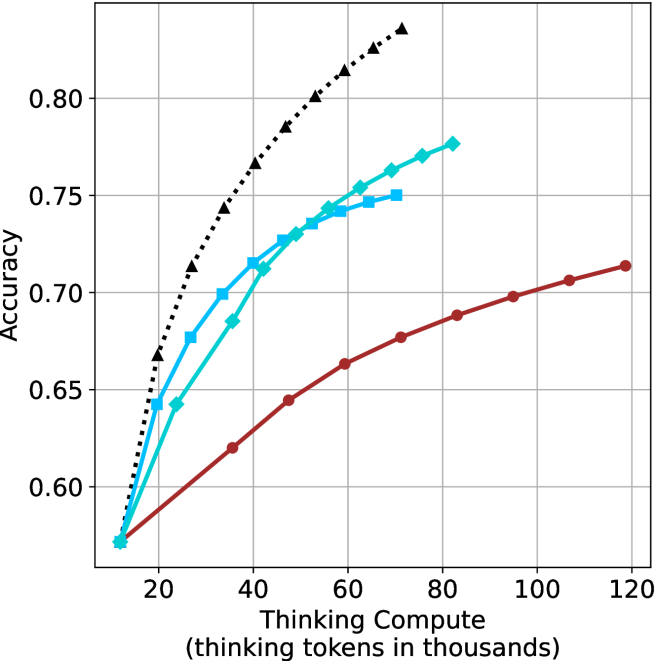
### Visual Description
## Line Chart: Accuracy vs. Thinking Compute
### Overview
The image is a line chart comparing the accuracy of different models as a function of "Thinking Compute," measured in thousands of tokens. There are three distinct data series represented by different colored lines with different markers. The chart shows how accuracy increases with more compute for each model.
### Components/Axes
* **X-axis:** "Thinking Compute (thinking tokens in thousands)". The scale ranges from approximately 10 to 120 in increments of 20.
* **Y-axis:** "Accuracy". The scale ranges from 0.60 to 0.80 in increments of 0.05.
* **Data Series:**
* **Black dotted line with triangle markers:** This line shows the highest accuracy for a given compute level.
* **Blue line with square markers:** This line shows intermediate accuracy.
* **Teal line with diamond markers:** This line shows intermediate accuracy.
* **Brown line with circle markers:** This line shows the lowest accuracy for a given compute level.
* **Gridlines:** Present on both axes to aid in reading values.
### Detailed Analysis
* **Black dotted line (triangle markers):** This line starts at approximately (15, 0.58) and rises sharply, reaching approximately (70, 0.83).
* (15, 0.58)
* (20, 0.65)
* (30, 0.72)
* (40, 0.76)
* (50, 0.79)
* (60, 0.81)
* (70, 0.83)
* **Blue line (square markers):** This line starts at approximately (15, 0.58) and rises, reaching approximately (75, 0.75).
* (15, 0.58)
* (25, 0.68)
* (35, 0.72)
* (50, 0.745)
* (75, 0.75)
* **Teal line (diamond markers):** This line starts at approximately (15, 0.58) and rises, reaching approximately (75, 0.77).
* (15, 0.58)
* (30, 0.70)
* (40, 0.725)
* (50, 0.74)
* (75, 0.77)
* **Brown line (circle markers):** This line starts at approximately (15, 0.58) and rises more slowly, reaching approximately (120, 0.715).
* (15, 0.58)
* (30, 0.62)
* (40, 0.64)
* (60, 0.665)
* (80, 0.685)
* (100, 0.70)
* (120, 0.715)
### Key Observations
* The black dotted line (triangle markers) shows the highest accuracy across all compute levels.
* The brown line (circle markers) shows the lowest accuracy across all compute levels.
* The blue line (square markers) and teal line (diamond markers) perform similarly, with the teal line showing slightly higher accuracy.
* All lines show an increase in accuracy as "Thinking Compute" increases.
* The rate of increase in accuracy appears to diminish as "Thinking Compute" increases, especially for the black dotted line.
### Interpretation
The chart demonstrates the relationship between "Thinking Compute" (likely representing computational resources or processing time) and the accuracy of different models. The black dotted line represents the most efficient model, achieving the highest accuracy with the least amount of compute. The brown line represents the least efficient model. The other two models fall in between. The diminishing returns observed suggest that there is a point beyond which increasing compute provides only marginal gains in accuracy. This information is valuable for optimizing model performance and resource allocation.
</details>
(a) LN-Super- $49$ B
<details>
<summary>x43.png Details</summary>
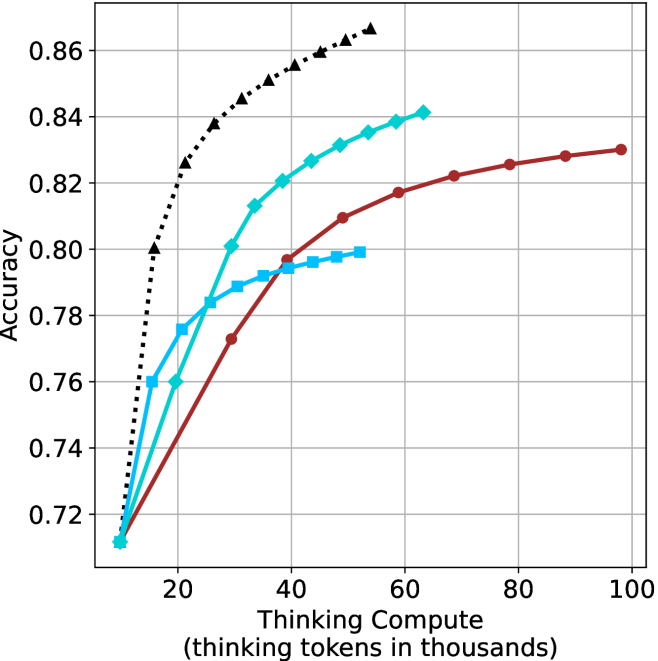
### Visual Description
## Line Chart: Accuracy vs. Thinking Compute
### Overview
The image is a line chart comparing the accuracy of different models as a function of "Thinking Compute" (measured in thousands of thinking tokens). Four different models are represented by different colored lines with distinct markers. The chart illustrates how accuracy improves with increased computational resources.
### Components/Axes
* **X-axis:** "Thinking Compute (thinking tokens in thousands)". The scale ranges from 0 to 100, with tick marks at intervals of 20.
* **Y-axis:** "Accuracy". The scale ranges from 0.72 to 0.86, with tick marks at intervals of 0.02.
* **Data Series:** Four distinct data series are plotted:
* Black dotted line with triangle markers.
* Turquoise line with diamond markers.
* Brown line with circle markers.
* Light blue line with square markers.
* **Grid:** The chart has a light gray grid to aid in reading values.
### Detailed Analysis
* **Black dotted line with triangle markers:** This line shows the highest accuracy for a given thinking compute value. It increases rapidly from approximately (12, 0.72) to (20, 0.80), then continues to increase, but at a slower rate, reaching approximately (30, 0.84) and (35, 0.85), and finally reaching approximately (40, 0.86).
* **Turquoise line with diamond markers:** This line starts at approximately (12, 0.71). It increases steadily, reaching approximately (20, 0.77), (30, 0.81), (40, 0.83), (50, 0.84), (60, 0.845).
* **Brown line with circle markers:** This line starts at approximately (12, 0.71). It increases steadily, reaching approximately (25, 0.77), (40, 0.79), (60, 0.82), (80, 0.825), and (95, 0.83).
* **Light blue line with square markers:** This line starts at approximately (12, 0.71). It increases steadily, reaching approximately (20, 0.77), (30, 0.79), (40, 0.795), (50, 0.80), and then stops.
### Key Observations
* The black dotted line (with triangle markers) achieves the highest accuracy with the least amount of thinking compute.
* All lines show diminishing returns as thinking compute increases, meaning the rate of accuracy improvement slows down at higher compute values.
* The light blue line (with square markers) plateaus and stops at a thinking compute value of approximately 50.
### Interpretation
The chart demonstrates the relationship between computational resources (thinking compute) and model accuracy. The different lines likely represent different model architectures or training strategies. The black dotted line represents the most efficient model, achieving high accuracy with relatively low compute. The other models require more compute to achieve similar levels of accuracy, and some plateau before reaching the maximum accuracy achieved by the black dotted line model. The diminishing returns observed across all models suggest that there is a limit to how much accuracy can be gained by simply increasing compute, and that optimizing model architecture or training methods may be necessary to achieve further improvements.
</details>
(b) R $1$ - $32$ B
<details>
<summary>x44.png Details</summary>
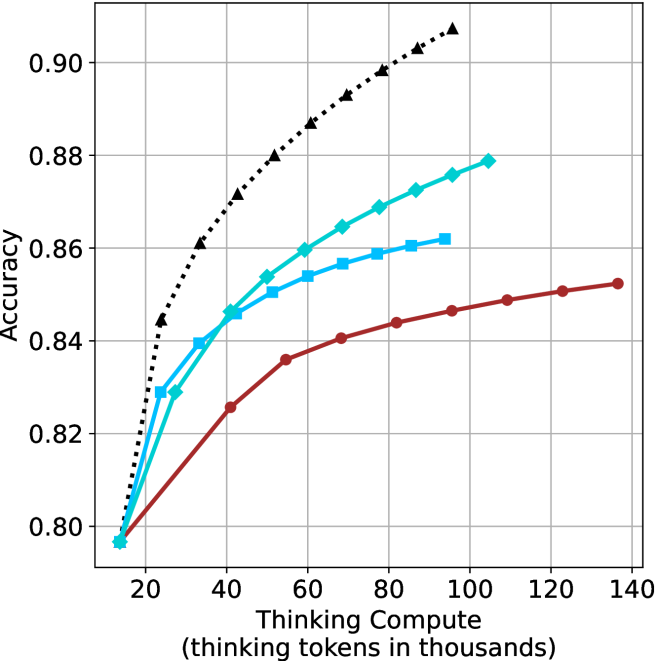
### Visual Description
## Line Chart: Accuracy vs. Thinking Compute
### Overview
The image is a line chart comparing the accuracy of different models as a function of "Thinking Compute" (measured in thousands of thinking tokens). There are three distinct lines, each representing a different model, with accuracy increasing as thinking compute increases.
### Components/Axes
* **X-axis:** "Thinking Compute (thinking tokens in thousands)". The scale ranges from approximately 15 to 140, with gridlines at intervals of 20.
* **Y-axis:** "Accuracy". The scale ranges from 0.80 to 0.90, with gridlines at intervals of 0.02.
* **Data Series:** There are three data series represented by lines of different colors and markers:
* **Black dotted line with triangle markers:** This line shows the highest accuracy for a given thinking compute value.
* **Teal line with diamond markers:** This line shows intermediate accuracy.
* **Brown line with circle markers:** This line shows the lowest accuracy.
### Detailed Analysis
* **Black dotted line (triangle markers):** This line starts at approximately (15, 0.80) and increases rapidly, reaching approximately (40, 0.87), then continues to increase at a slower rate, reaching approximately (100, 0.90) and (140, 0.915).
* **Teal line (diamond markers):** This line starts at approximately (15, 0.795) and increases, reaching approximately (40, 0.85), then continues to increase at a slower rate, reaching approximately (80, 0.87) and (100, 0.878).
* **Brown line (circle markers):** This line starts at approximately (15, 0.795) and increases, reaching approximately (40, 0.825), then continues to increase at a slower rate, reaching approximately (80, 0.85), (120, 0.852) and (140, 0.854).
### Key Observations
* All three models show an increase in accuracy as the thinking compute increases.
* The black dotted line (triangle markers) consistently outperforms the other two models.
* The rate of increase in accuracy decreases as the thinking compute increases for all three models.
* The brown line (circle markers) shows the least improvement in accuracy as thinking compute increases.
### Interpretation
The chart demonstrates the relationship between "Thinking Compute" and the accuracy of different models. The data suggests that increasing the thinking compute generally leads to higher accuracy, but the marginal gains diminish as the compute increases. The black dotted line (triangle markers) represents the most efficient model, achieving the highest accuracy with the least amount of thinking compute. The other two models show lower accuracy and diminishing returns as the thinking compute increases. The chart highlights the trade-off between computational cost and model performance, suggesting that there is a point of diminishing returns where increasing the thinking compute provides minimal improvement in accuracy.
</details>
(c) QwQ-32B
<details>
<summary>x45.png Details</summary>
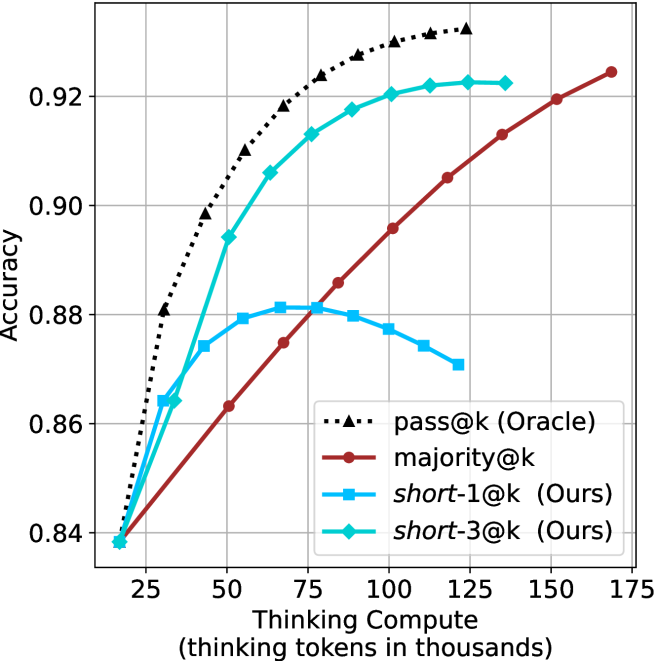
### Visual Description
## Line Chart: Accuracy vs. Thinking Compute
### Overview
The image is a line chart comparing the accuracy of four different methods ("pass@k (Oracle)", "majority@k", "short-1@k (Ours)", and "short-3@k (Ours)") against the "Thinking Compute" measured in thousands of thinking tokens. The chart displays how accuracy changes as the thinking compute increases for each method.
### Components/Axes
* **X-axis:** "Thinking Compute (thinking tokens in thousands)". The scale ranges from approximately 25 to 175, with tick marks at intervals of 25.
* **Y-axis:** "Accuracy". The scale ranges from 0.84 to 0.92, with tick marks at intervals of 0.02.
* **Legend:** Located in the bottom-right corner of the chart.
* Black dotted line with triangle markers: "pass@k (Oracle)"
* Brown solid line with circle markers: "majority@k"
* Light blue solid line with square markers: "short-1@k (Ours)"
* Teal solid line with diamond markers: "short-3@k (Ours)"
### Detailed Analysis
* **pass@k (Oracle):** (Black dotted line with triangle markers)
* Trend: The line slopes sharply upward initially, then flattens out as the thinking compute increases.
* Data Points:
* At 25k tokens, accuracy is approximately 0.88.
* At 50k tokens, accuracy is approximately 0.91.
* At 75k tokens, accuracy is approximately 0.925.
* At 100k tokens, accuracy is approximately 0.93.
* At 125k tokens, accuracy is approximately 0.93.
* At 150k tokens, accuracy is approximately 0.93.
* At 175k tokens, accuracy is approximately 0.93.
* **majority@k:** (Brown solid line with circle markers)
* Trend: The line slopes upward consistently.
* Data Points:
* At 25k tokens, accuracy is approximately 0.84.
* At 50k tokens, accuracy is approximately 0.87.
* At 75k tokens, accuracy is approximately 0.89.
* At 100k tokens, accuracy is approximately 0.905.
* At 125k tokens, accuracy is approximately 0.915.
* At 150k tokens, accuracy is approximately 0.92.
* At 175k tokens, accuracy is approximately 0.925.
* **short-1@k (Ours):** (Light blue solid line with square markers)
* Trend: The line slopes upward initially, reaches a peak, and then slopes downward.
* Data Points:
* At 25k tokens, accuracy is approximately 0.84.
* At 50k tokens, accuracy is approximately 0.88.
* At 75k tokens, accuracy is approximately 0.882.
* At 100k tokens, accuracy is approximately 0.88.
* At 125k tokens, accuracy is approximately 0.87.
* **short-3@k (Ours):** (Teal solid line with diamond markers)
* Trend: The line slopes upward initially, then flattens out.
* Data Points:
* At 25k tokens, accuracy is approximately 0.84.
* At 50k tokens, accuracy is approximately 0.89.
* At 75k tokens, accuracy is approximately 0.91.
* At 100k tokens, accuracy is approximately 0.92.
* At 125k tokens, accuracy is approximately 0.922.
* At 150k tokens, accuracy is approximately 0.922.
* At 175k tokens, accuracy is approximately 0.922.
### Key Observations
* "pass@k (Oracle)" achieves the highest accuracy overall.
* "majority@k" shows a steady increase in accuracy with increasing thinking compute, but it consistently underperforms compared to "pass@k (Oracle)" and "short-3@k (Ours)".
* "short-1@k (Ours)" reaches a peak accuracy and then declines, suggesting that increasing thinking compute beyond a certain point may be detrimental to its performance.
* "short-3@k (Ours)" performs well, approaching the accuracy of "pass@k (Oracle)" as thinking compute increases.
### Interpretation
The chart demonstrates the relationship between thinking compute and accuracy for different methods. The "pass@k (Oracle)" method serves as an upper bound or ideal performance, while the other methods show varying degrees of improvement as thinking compute increases. The "short-1@k (Ours)" method's decline in accuracy after a certain point suggests a potential overfitting or diminishing returns effect. The "short-3@k (Ours)" method appears to be a promising approach, achieving relatively high accuracy with increasing thinking compute. The "majority@k" method shows consistent improvement but lags behind the others, indicating it may not be as effective in leveraging increased thinking compute. The data suggests that the choice of method and the amount of thinking compute should be carefully considered to optimize accuracy.
</details>
(d) R1-670B
Figure 12: AIME 2024 - thinking compute comparison.
<details>
<summary>x46.png Details</summary>
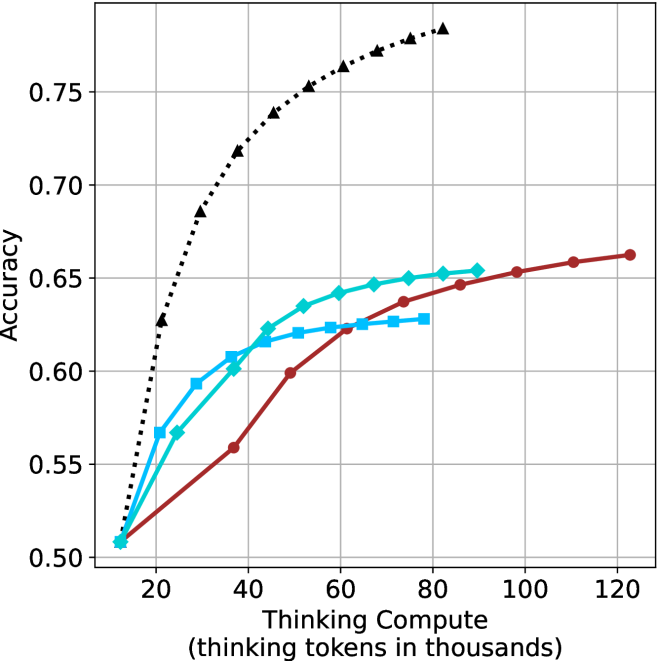
### Visual Description
## Chart: Accuracy vs. Thinking Compute
### Overview
The image is a line chart comparing the accuracy of different models as a function of "Thinking Compute" (measured in thousands of thinking tokens). There are four data series represented by different colored lines with distinct markers. The chart shows how accuracy improves with increased compute for each model.
### Components/Axes
* **X-axis:** "Thinking Compute (thinking tokens in thousands)". The scale ranges from approximately 10 to 120 in increments of 20.
* **Y-axis:** "Accuracy". The scale ranges from 0.50 to 0.75 in increments of 0.05.
* **Data Series:**
* Black dotted line with triangle markers.
* Teal line with diamond markers.
* Blue line with square markers.
* Brown line with circle markers.
* **Grid:** The chart has a grid with vertical and horizontal lines.
### Detailed Analysis
* **Black dotted line (triangle markers):** This line shows the highest accuracy for a given compute level. The line increases rapidly from approximately (12, 0.51) to (80, 0.78).
* **Teal line (diamond markers):** This line shows a moderate increase in accuracy. The line starts at approximately (12, 0.51) and increases to approximately (80, 0.65).
* **Blue line (square markers):** This line shows a similar trend to the teal line, but with slightly lower accuracy. The line starts at approximately (12, 0.51) and increases to approximately (80, 0.63).
* **Brown line (circle markers):** This line shows the lowest accuracy for a given compute level. The line starts at approximately (12, 0.51) and increases to approximately (120, 0.66).
**Specific Data Points (Approximate):**
* **Black (Triangle):**
* (12, 0.51)
* (20, 0.60)
* (30, 0.70)
* (40, 0.73)
* (50, 0.75)
* (60, 0.76)
* (70, 0.77)
* (80, 0.78)
* **Teal (Diamond):**
* (12, 0.51)
* (20, 0.57)
* (30, 0.60)
* (40, 0.62)
* (50, 0.63)
* (60, 0.64)
* (70, 0.65)
* (80, 0.65)
* **Blue (Square):**
* (12, 0.51)
* (20, 0.55)
* (30, 0.59)
* (40, 0.61)
* (50, 0.62)
* (60, 0.62)
* (70, 0.63)
* (80, 0.63)
* **Brown (Circle):**
* (12, 0.51)
* (20, 0.53)
* (30, 0.56)
* (40, 0.60)
* (50, 0.61)
* (60, 0.62)
* (70, 0.63)
* (80, 0.64)
* (90, 0.65)
* (100, 0.65)
* (110, 0.66)
* (120, 0.66)
### Key Observations
* The black dotted line (triangle markers) shows the most significant improvement in accuracy with increasing compute.
* The teal and blue lines show similar trends, with the teal line consistently performing slightly better.
* The brown line shows the slowest improvement in accuracy with increasing compute, but it continues to improve even at higher compute levels where the other lines plateau.
* All lines start at approximately the same accuracy level (0.51) with minimal compute (12k tokens).
### Interpretation
The chart demonstrates the relationship between "Thinking Compute" and accuracy for different models. The black dotted line represents a model that benefits significantly from increased compute, achieving the highest accuracy. The other lines represent models that show diminishing returns with increased compute, plateauing at lower accuracy levels. The brown line suggests a model that may continue to improve with even higher compute levels, as it does not plateau within the range shown. The data suggests that the choice of model and the amount of compute allocated are critical factors in achieving high accuracy.
</details>
(a) LN-Super- $49$ B
<details>
<summary>x47.png Details</summary>
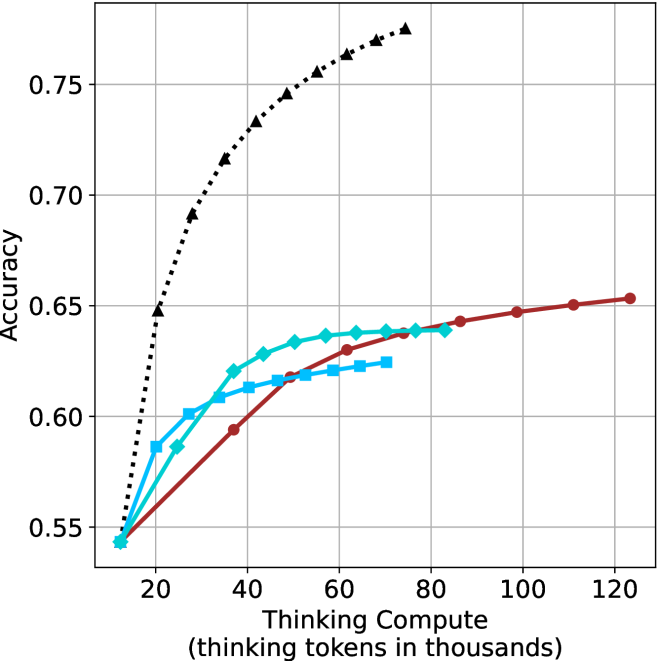
### Visual Description
## Line Chart: Accuracy vs. Thinking Compute
### Overview
The image is a line chart comparing the accuracy of different models as a function of "Thinking Compute," measured in thousands of thinking tokens. There are four data series plotted, each represented by a different line style and marker. The chart shows how accuracy improves with increased thinking compute for each model.
### Components/Axes
* **X-axis:** "Thinking Compute (thinking tokens in thousands)". The axis ranges from approximately 10 to 120 in increments of 20.
* **Y-axis:** "Accuracy". The axis ranges from 0.55 to 0.75 in increments of 0.05.
* **Data Series:** Four data series are plotted on the chart, each distinguished by color and marker style. The legend is missing, so the exact identity of each series is unknown.
* **Black dotted line with triangle markers:** This line starts at approximately (15, 0.55) and rises sharply, plateauing around 0.77 at higher thinking compute values.
* **Teal line with diamond markers:** This line starts at approximately (15, 0.55) and increases gradually, reaching approximately 0.64 at 80 thinking compute.
* **Blue line with square markers:** This line starts at approximately (15, 0.55) and increases gradually, reaching approximately 0.62 at 70 thinking compute.
* **Brown line with circle markers:** This line starts at approximately (15, 0.55) and increases gradually, reaching approximately 0.65 at 120 thinking compute.
* **Gridlines:** The chart has gridlines for both the x and y axes, aiding in value estimation.
### Detailed Analysis
* **Black dotted line (triangle markers):**
* (15, 0.55)
* (20, 0.65)
* (30, 0.72)
* (40, 0.74)
* (50, 0.75)
* (60, 0.76)
* (70, 0.765)
* (80, 0.77)
* **Teal line (diamond markers):**
* (15, 0.55)
* (20, 0.58)
* (30, 0.60)
* (40, 0.62)
* (50, 0.635)
* (60, 0.64)
* (70, 0.64)
* (80, 0.64)
* **Blue line (square markers):**
* (15, 0.55)
* (20, 0.58)
* (30, 0.60)
* (40, 0.61)
* (50, 0.62)
* (60, 0.62)
* (70, 0.625)
* **Brown line (circle markers):**
* (15, 0.55)
* (40, 0.59)
* (60, 0.62)
* (80, 0.635)
* (100, 0.645)
* (120, 0.65)
### Key Observations
* The black dotted line (triangle markers) shows the most rapid initial increase in accuracy with increasing thinking compute. It also plateaus earlier than the other lines.
* The teal line (diamond markers) and blue line (square markers) show similar performance, with the teal line consistently performing slightly better.
* The brown line (circle markers) shows the slowest initial increase in accuracy but continues to improve even at higher thinking compute values.
* All lines start at approximately the same accuracy level (0.55) at the lowest thinking compute value (15).
### Interpretation
The chart illustrates the relationship between "Thinking Compute" and accuracy for different models. The black dotted line (triangle markers) likely represents a model that benefits greatly from initial increases in compute but reaches a performance ceiling relatively quickly. The other lines represent models that improve more gradually with increased compute, potentially indicating different architectural or training characteristics. Without a legend, it's impossible to definitively identify the models represented by each line. The data suggests that the optimal choice of model depends on the available compute budget and the desired level of accuracy.
</details>
(b) R $1$ - $32$ B
<details>
<summary>x48.png Details</summary>
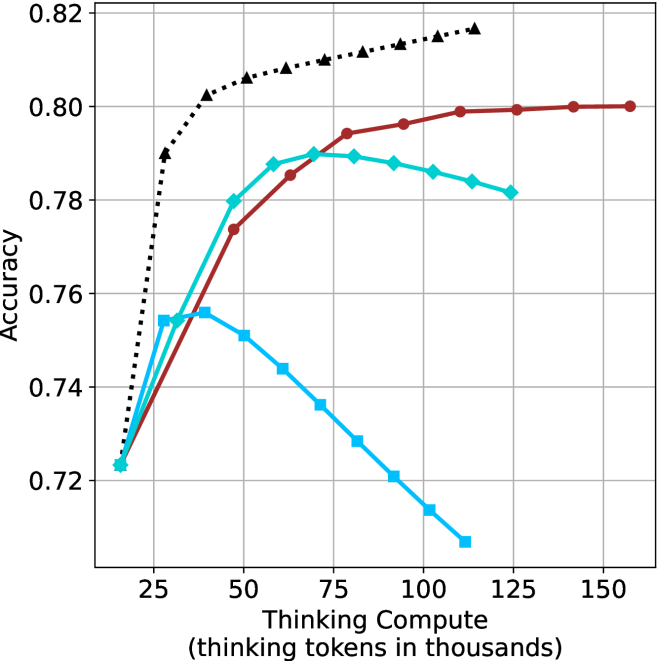
### Visual Description
## Chart: Accuracy vs. Thinking Compute
### Overview
The image is a line chart comparing the accuracy of different models as a function of "Thinking Compute," measured in thousands of thinking tokens. There are four data series represented by different colored lines with distinct markers. The chart shows how accuracy changes as the computational resources increase.
### Components/Axes
* **X-axis:** "Thinking Compute (thinking tokens in thousands)". The scale ranges from approximately 10 to 150, with major ticks at 25, 50, 75, 100, 125, and 150.
* **Y-axis:** "Accuracy". The scale ranges from 0.72 to 0.82, with major ticks at 0.72, 0.74, 0.76, 0.78, 0.80, and 0.82.
* **Data Series:** Four distinct data series are plotted:
* Black dotted line with triangle markers.
* Brown solid line with circle markers.
* Cyan solid line with diamond markers.
* Cyan solid line with square markers.
### Detailed Analysis
* **Black Dotted Line (Triangles):** This line shows a rapid increase in accuracy initially, then plateaus.
* At x=25, y ≈ 0.73
* At x=50, y ≈ 0.80
* At x=75, y ≈ 0.81
* At x=100, y ≈ 0.815
* At x=125, y ≈ 0.818
* **Brown Solid Line (Circles):** This line shows a gradual increase in accuracy, reaching a plateau.
* At x=25, y ≈ 0.73
* At x=50, y ≈ 0.78
* At x=75, y ≈ 0.795
* At x=100, y ≈ 0.798
* At x=125, y ≈ 0.80
* At x=150, y ≈ 0.80
* **Cyan Solid Line (Diamonds):** This line increases initially, then decreases.
* At x=25, y ≈ 0.725
* At x=50, y ≈ 0.78
* At x=75, y ≈ 0.79
* At x=100, y ≈ 0.785
* At x=125, y ≈ 0.782
* **Cyan Solid Line (Squares):** This line increases initially, then decreases significantly.
* At x=25, y ≈ 0.725
* At x=50, y ≈ 0.755
* At x=75, y ≈ 0.74
* At x=100, y ≈ 0.715
* At x=125, y ≈ 0.708
### Key Observations
* The black dotted line (triangles) achieves the highest accuracy overall.
* The brown solid line (circles) plateaus at a lower accuracy than the black dotted line.
* The cyan lines (diamonds and squares) show an initial increase in accuracy, but then decrease as "Thinking Compute" increases beyond a certain point. The cyan line with squares decreases more sharply.
### Interpretation
The chart illustrates the relationship between computational resources ("Thinking Compute") and model accuracy. The black dotted line (triangles) represents a model that benefits most from increased computation, quickly reaching a high accuracy and maintaining it. The brown solid line (circles) also benefits, but plateaus at a lower accuracy. The cyan lines (diamonds and squares) suggest that for some models, increasing computation beyond a certain point can actually decrease accuracy, possibly due to overfitting or other factors. The model represented by the cyan line with squares is particularly sensitive to this effect.
</details>
(c) QwQ-32B
<details>
<summary>x49.png Details</summary>
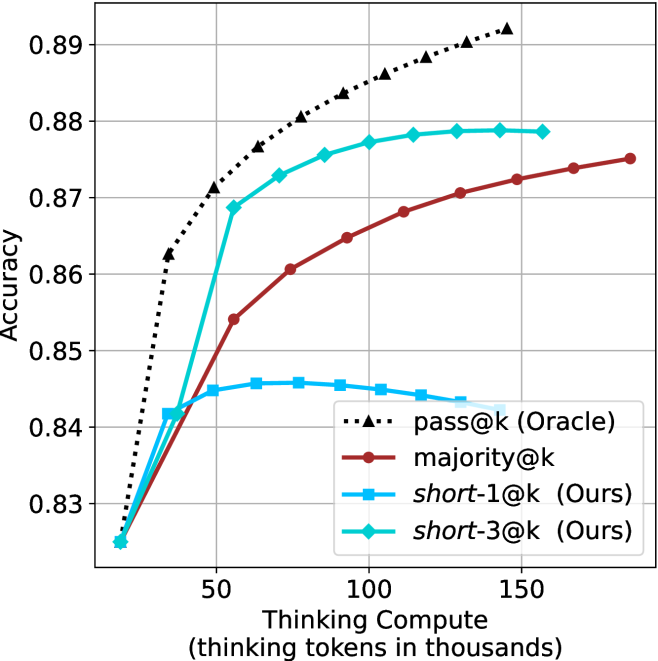
### Visual Description
## Line Chart: Accuracy vs. Thinking Compute
### Overview
The image is a line chart comparing the accuracy of different models ("pass@k (Oracle)", "majority@k", "short-1@k (Ours)", and "short-3@k (Ours)") as a function of "Thinking Compute" (measured in thousands of thinking tokens). The chart shows how accuracy changes as the models are given more computational resources.
### Components/Axes
* **X-axis:** "Thinking Compute (thinking tokens in thousands)". The scale ranges from approximately 20 to 170, with major ticks at 50, 100, and 150.
* **Y-axis:** "Accuracy". The scale ranges from 0.83 to 0.89, with major ticks at 0.83, 0.84, 0.85, 0.86, 0.87, 0.88, and 0.89.
* **Legend:** Located on the right side of the chart.
* Black dotted line with triangle markers: "pass@k (Oracle)"
* Brown line with circle markers: "majority@k"
* Light blue line with square markers: "short-1@k (Ours)"
* Teal line with diamond markers: "short-3@k (Ours)"
### Detailed Analysis
* **pass@k (Oracle) (Black dotted line with triangle markers):** The line starts at approximately (20, 0.825) and increases rapidly to approximately (50, 0.87), then continues to increase at a slower rate, reaching approximately (160, 0.891). The trend is upward, with diminishing returns as Thinking Compute increases.
* **majority@k (Brown line with circle markers):** The line starts at approximately (20, 0.825) and increases steadily to approximately (160, 0.875). The trend is upward, with a decreasing slope as Thinking Compute increases.
* **short-1@k (Ours) (Light blue line with square markers):** The line starts at approximately (20, 0.825), increases to approximately (60, 0.846), and then decreases slightly to approximately (160, 0.845). The trend is initially upward, then slightly downward, forming a plateau.
* **short-3@k (Ours) (Teal line with diamond markers):** The line starts at approximately (20, 0.825), increases rapidly to approximately (50, 0.87), and then increases slowly to approximately (140, 0.879). The trend is upward, with diminishing returns as Thinking Compute increases.
### Key Observations
* The "pass@k (Oracle)" model consistently achieves the highest accuracy across all levels of Thinking Compute.
* The "short-3@k (Ours)" model performs better than the "majority@k" model and the "short-1@k (Ours)" model.
* The "short-1@k (Ours)" model plateaus and even decreases slightly in accuracy as Thinking Compute increases beyond a certain point.
* All models show diminishing returns in accuracy as Thinking Compute increases, suggesting that there is a limit to how much accuracy can be gained by simply increasing computational resources.
### Interpretation
The chart demonstrates the relationship between the amount of computational resources (Thinking Compute) and the accuracy of different models. The "pass@k (Oracle)" model serves as an upper bound or ideal performance, while the other models ("majority@k", "short-1@k (Ours)", and "short-3@k (Ours)") show varying levels of performance. The "short-3@k (Ours)" model appears to be the most effective of the "Ours" models, approaching the performance of the "pass@k (Oracle)" model at higher levels of Thinking Compute. The plateauing or decreasing accuracy of the "short-1@k (Ours)" model suggests that there may be a point of diminishing returns or even overfitting with this particular model as Thinking Compute increases. The data suggests that optimizing the model architecture (as potentially done in "short-3@k") is more effective than simply increasing computational resources.
</details>
(d) R1-670B
Figure 13: AIME 2025 - thinking compute comparison.
<details>
<summary>x50.png Details</summary>
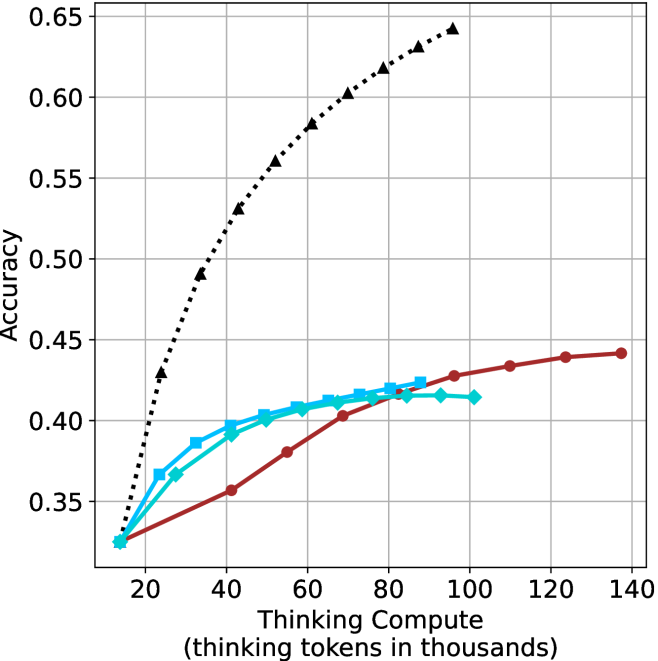
### Visual Description
## Line Chart: Accuracy vs. Thinking Compute
### Overview
The image is a line chart comparing "Accuracy" against "Thinking Compute" (measured in thousands of thinking tokens). There are three distinct data series plotted, each represented by a different colored line with unique markers. The chart illustrates how accuracy changes with increasing thinking compute for each series.
### Components/Axes
* **X-axis:** "Thinking Compute" with the label "(thinking tokens in thousands)". The axis ranges from approximately 10 to 140 in increments of 20.
* **Y-axis:** "Accuracy". The axis ranges from 0.35 to 0.65 in increments of 0.05.
* **Data Series:**
* **Black dotted line with triangle markers:** This line shows a steep upward trend initially, then plateaus as thinking compute increases.
* **Brown solid line with circle markers:** This line shows a gradual upward trend, starting lower than the other lines and increasing steadily.
* **Cyan solid line with square/diamond markers:** This line shows an upward trend, similar to the brown line, but slightly higher.
### Detailed Analysis
* **Black dotted line (triangle markers):**
* At 20k tokens, Accuracy is approximately 0.33.
* At 40k tokens, Accuracy is approximately 0.49.
* At 60k tokens, Accuracy is approximately 0.56.
* At 80k tokens, Accuracy is approximately 0.61.
* At 100k tokens, Accuracy is approximately 0.64.
* Trend: Rapid initial increase, followed by diminishing returns.
* **Brown solid line (circle markers):**
* At 20k tokens, Accuracy is approximately 0.33.
* At 40k tokens, Accuracy is approximately 0.39.
* At 60k tokens, Accuracy is approximately 0.41.
* At 80k tokens, Accuracy is approximately 0.42.
* At 100k tokens, Accuracy is approximately 0.43.
* At 140k tokens, Accuracy is approximately 0.44.
* Trend: Gradual, consistent increase.
* **Cyan solid line (square/diamond markers):**
* At 20k tokens, Accuracy is approximately 0.33.
* At 40k tokens, Accuracy is approximately 0.39.
* At 60k tokens, Accuracy is approximately 0.41.
* At 80k tokens, Accuracy is approximately 0.42.
* At 100k tokens, Accuracy is approximately 0.42.
* Trend: Similar to the brown line, but slightly higher and plateaus earlier.
### Key Observations
* The black dotted line (triangle markers) achieves the highest accuracy with lower thinking compute compared to the other two lines.
* The brown solid line (circle markers) shows the most consistent increase in accuracy across the entire range of thinking compute.
* The cyan solid line (square/diamond markers) plateaus earlier than the brown line.
### Interpretation
The chart suggests that different models or configurations (represented by the three lines) have varying relationships between thinking compute and accuracy. The black dotted line indicates a model that benefits significantly from initial increases in thinking compute, but its performance plateaus quickly. The brown solid line represents a model that benefits more consistently from increased thinking compute, although its overall accuracy is lower than the black line at lower compute levels. The cyan line is somewhere in between. This could indicate different algorithms, architectures, or training methodologies, each responding differently to increased computational resources. The data implies that there is a point of diminishing returns for the black dotted line model, while the brown line model continues to improve, albeit at a slower rate, with more compute.
</details>
(a) LN-Super- $49$ B
<details>
<summary>x51.png Details</summary>
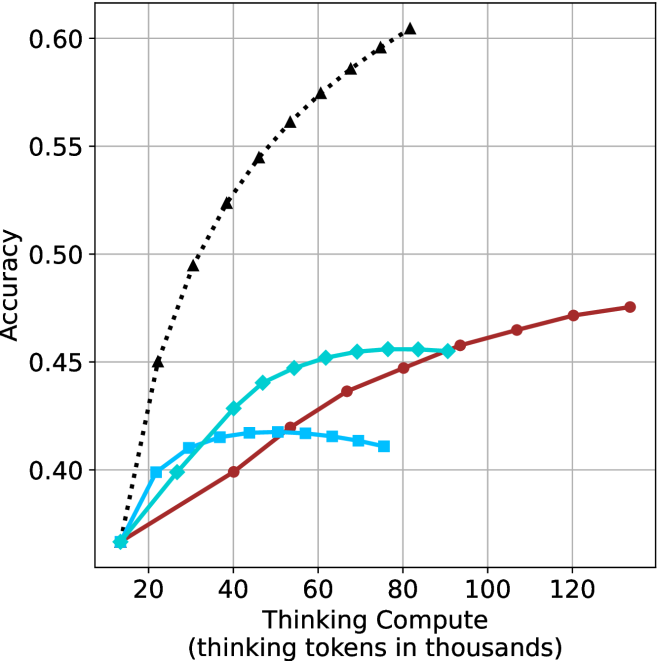
### Visual Description
## Line Chart: Accuracy vs. Thinking Compute
### Overview
The image is a line chart comparing the accuracy of different models as a function of "Thinking Compute," measured in thousands of tokens. There are four distinct data series represented by different colored lines with different markers. The x-axis represents "Thinking Compute (thinking tokens in thousands)," and the y-axis represents "Accuracy."
### Components/Axes
* **X-axis:** "Thinking Compute (thinking tokens in thousands)". The scale ranges from 20 to 120 in increments of 20.
* **Y-axis:** "Accuracy". The scale ranges from 0.40 to 0.60 in increments of 0.05.
* **Data Series:**
* Black dotted line with triangle markers.
* Turquoise line with diamond markers.
* Brown line with circle markers.
* Blue line with square markers.
### Detailed Analysis
* **Black dotted line with triangle markers:** This line shows the highest accuracy overall. It starts at approximately 0.37 accuracy at 20k tokens and increases rapidly to approximately 0.45 at 20k tokens. It continues to increase, but at a decreasing rate, reaching approximately 0.60 accuracy at 80k tokens.
* (20, 0.37)
* (40, 0.52)
* (60, 0.57)
* (80, 0.60)
* **Turquoise line with diamond markers:** This line starts at approximately 0.37 accuracy at 20k tokens. It increases to approximately 0.45 accuracy at 60k tokens, then plateaus.
* (20, 0.37)
* (40, 0.43)
* (60, 0.45)
* (80, 0.45)
* **Brown line with circle markers:** This line starts at approximately 0.37 accuracy at 20k tokens. It increases steadily to approximately 0.48 accuracy at 120k tokens.
* (20, 0.37)
* (40, 0.40)
* (60, 0.43)
* (80, 0.45)
* (100, 0.46)
* (120, 0.47)
* **Blue line with square markers:** This line starts at approximately 0.37 accuracy at 20k tokens. It increases to approximately 0.42 accuracy at 60k tokens, then decreases.
* (20, 0.37)
* (40, 0.42)
* (60, 0.42)
* (80, 0.41)
### Key Observations
* The black dotted line (triangle markers) achieves the highest accuracy with the least amount of "Thinking Compute."
* The turquoise line (diamond markers) plateaus after 60k tokens.
* The brown line (circle markers) shows a steady increase in accuracy as "Thinking Compute" increases.
* The blue line (square markers) increases and then decreases in accuracy.
### Interpretation
The chart illustrates the relationship between "Thinking Compute" (in thousands of tokens) and the accuracy of different models. The black dotted line represents a model that quickly reaches a high level of accuracy with relatively low computational cost. The turquoise line represents a model that improves with increased compute, but plateaus. The brown line represents a model that steadily improves with more compute. The blue line represents a model that initially improves but then degrades with more compute. This suggests that the black dotted line model is the most efficient in terms of accuracy gained per unit of "Thinking Compute." The other models may have different architectures or training regimes that lead to their varying performance. The blue line's performance suggests that over-thinking can be detrimental to accuracy in some models.
</details>
(b) R $1$ - $32$ B
<details>
<summary>x52.png Details</summary>
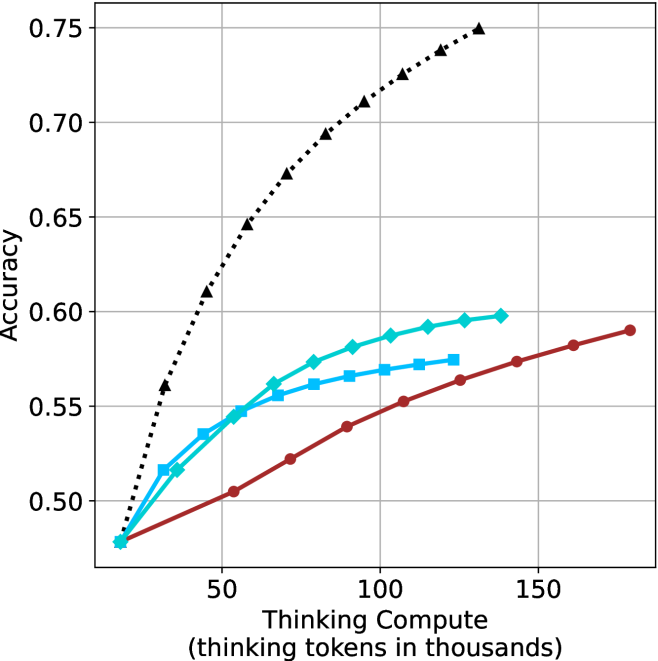
### Visual Description
## Line Chart: Accuracy vs. Thinking Compute
### Overview
The image is a line chart comparing the accuracy of different models as a function of "Thinking Compute," measured in thousands of thinking tokens. There are three distinct lines, each representing a different model, with accuracy on the y-axis and thinking compute on the x-axis.
### Components/Axes
* **X-axis:** "Thinking Compute (thinking tokens in thousands)". The scale ranges from approximately 0 to 150 in increments of 50.
* **Y-axis:** "Accuracy". The scale ranges from 0.50 to 0.75 in increments of 0.05.
* **Data Series:**
* **Black dotted line with triangle markers:** This line shows the highest accuracy and increases rapidly initially, then plateaus.
* **Teal line with diamond markers:** This line shows intermediate accuracy and increases steadily.
* **Brown line with circle markers:** This line shows the lowest accuracy and increases gradually.
### Detailed Analysis
* **Black dotted line (triangle markers):**
* At x=10, y=0.50
* At x=50, y=0.63
* At x=100, y=0.71
* At x=140, y=0.75
* Trend: Rapid initial increase, followed by a plateau.
* **Teal line (diamond markers):**
* At x=10, y=0.48
* At x=50, y=0.54
* At x=100, y=0.585
* At x=140, y=0.595
* Trend: Steady increase.
* **Brown line (circle markers):**
* At x=10, y=0.48
* At x=50, y=0.50
* At x=100, y=0.565
* At x=140, y=0.59
* Trend: Gradual increase.
### Key Observations
* The black dotted line (triangle markers) achieves the highest accuracy across all thinking compute values.
* The teal line (diamond markers) and brown line (circle markers) start at approximately the same accuracy level but diverge as thinking compute increases.
* The black dotted line (triangle markers) shows diminishing returns with increasing thinking compute, while the other two lines show more linear increases.
### Interpretation
The chart suggests that the model represented by the black dotted line (triangle markers) is the most effective in terms of accuracy for a given amount of thinking compute. However, it also indicates that this model may be approaching a performance ceiling, as the accuracy gains diminish with increasing compute. The other two models, represented by the teal line (diamond markers) and brown line (circle markers), show more consistent gains in accuracy with increasing compute, suggesting they may have more potential for improvement with further investment in thinking compute. The relationship between the models highlights a trade-off between initial performance and potential for future gains.
</details>
(c) QwQ-32B
<details>
<summary>x53.png Details</summary>
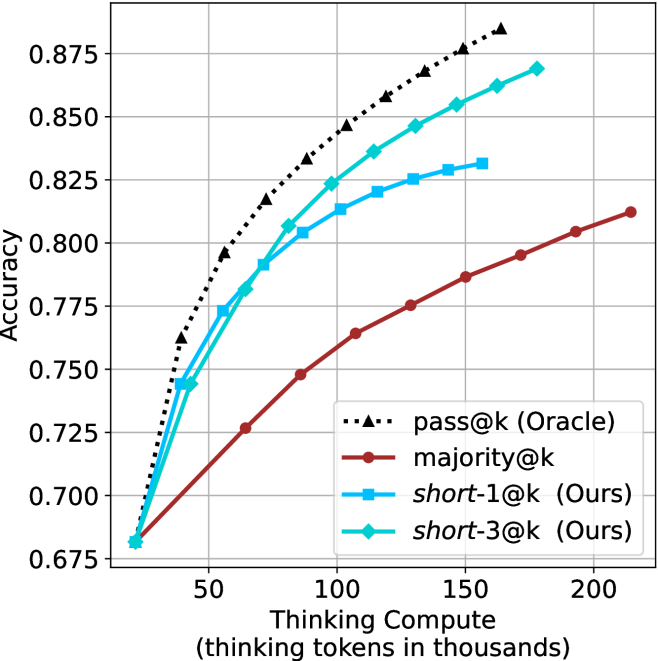
### Visual Description
## Line Chart: Accuracy vs. Thinking Compute
### Overview
The image is a line chart comparing the accuracy of different methods (pass@k, majority@k, short-1@k, and short-3@k) as a function of thinking compute, measured in thousands of thinking tokens. The chart shows how accuracy increases with more compute for each method.
### Components/Axes
* **X-axis:** Thinking Compute (thinking tokens in thousands). Scale ranges from 0 to 200 in increments of 50.
* **Y-axis:** Accuracy. Scale ranges from 0.675 to 0.875 in increments of 0.025.
* **Legend:** Located in the bottom-right of the chart.
* Black dotted line with triangle markers: pass@k (Oracle)
* Brown line with circle markers: majority@k
* Blue line with square markers: short-1@k (Ours)
* Cyan line with diamond markers: short-3@k (Ours)
### Detailed Analysis
* **pass@k (Oracle):** (Black dotted line with triangle markers)
* Trend: Slopes upward, with decreasing gains as compute increases.
* Data Points:
* At 25k compute, accuracy is approximately 0.745.
* At 50k compute, accuracy is approximately 0.805.
* At 75k compute, accuracy is approximately 0.835.
* At 100k compute, accuracy is approximately 0.855.
* At 150k compute, accuracy is approximately 0.870.
* At 200k compute, accuracy is approximately 0.880.
* **majority@k:** (Brown line with circle markers)
* Trend: Slopes upward, approximately linear.
* Data Points:
* At 25k compute, accuracy is approximately 0.685.
* At 50k compute, accuracy is approximately 0.725.
* At 75k compute, accuracy is approximately 0.755.
* At 100k compute, accuracy is approximately 0.775.
* At 150k compute, accuracy is approximately 0.795.
* At 200k compute, accuracy is approximately 0.810.
* **short-1@k (Ours):** (Blue line with square markers)
* Trend: Slopes upward, with decreasing gains as compute increases.
* Data Points:
* At 25k compute, accuracy is approximately 0.685.
* At 50k compute, accuracy is approximately 0.775.
* At 75k compute, accuracy is approximately 0.800.
* At 100k compute, accuracy is approximately 0.820.
* At 150k compute, accuracy is approximately 0.825.
* At 200k compute, accuracy is approximately 0.830.
* **short-3@k (Ours):** (Cyan line with diamond markers)
* Trend: Slopes upward, with decreasing gains as compute increases.
* Data Points:
* At 25k compute, accuracy is approximately 0.680.
* At 50k compute, accuracy is approximately 0.745.
* At 75k compute, accuracy is approximately 0.790.
* At 100k compute, accuracy is approximately 0.820.
* At 150k compute, accuracy is approximately 0.855.
* At 200k compute, accuracy is approximately 0.860.
### Key Observations
* The "pass@k (Oracle)" method consistently achieves the highest accuracy across all compute levels.
* The "majority@k" method has the lowest accuracy and a nearly linear increase with compute.
* The "short-1@k (Ours)" and "short-3@k (Ours)" methods perform similarly, with "short-3@k" generally having slightly higher accuracy.
* All methods show diminishing returns in accuracy as compute increases, especially beyond 100k thinking tokens.
### Interpretation
The chart demonstrates the relationship between computational resources (thinking tokens) and the accuracy of different methods. The "pass@k (Oracle)" method serves as an upper bound or ideal performance, while "majority@k" represents a baseline. The "short-1@k" and "short-3@k" methods, developed by the authors ("Ours"), aim to improve upon the baseline. The data suggests that increasing thinking compute generally improves accuracy, but the gains diminish as compute increases. The "short-3@k" method appears to be a more effective approach than "short-1@k," achieving higher accuracy for a given compute level. The diminishing returns suggest that there may be a point of saturation where additional compute provides minimal improvement in accuracy, and other factors may become more important.
</details>
(d) R1-670B
Figure 14: HMMT Feb 2025 - thinking compute comparison.
<details>
<summary>x54.png Details</summary>
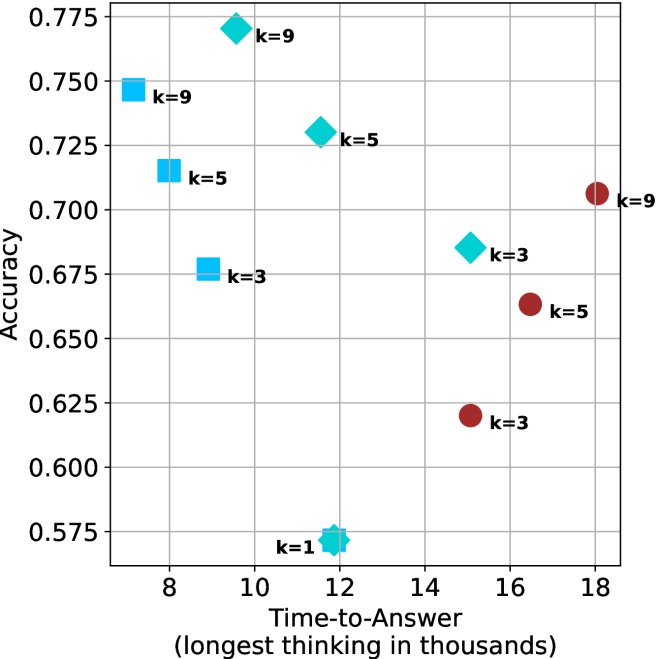
### Visual Description
## Scatter Plot: Accuracy vs. Time-to-Answer
### Overview
The image is a scatter plot showing the relationship between "Time-to-Answer" (in thousands) and "Accuracy". The plot displays data points for different values of 'k' (1, 3, 5, and 9), represented by different shapes and colors. The x-axis represents "Time-to-Answer" and the y-axis represents "Accuracy".
### Components/Axes
* **Title:** There is no explicit title on the chart.
* **X-axis:** "Time-to-Answer (longest thinking in thousands)". The x-axis ranges from approximately 7 to 18.
* **Y-axis:** "Accuracy". The y-axis ranges from 0.575 to 0.775.
* **Data Points:**
* Light Blue Squares: Represent data points where 'k=9', 'k=5', and 'k=3'.
* Light Blue Diamonds: Represent data points where 'k=9', 'k=5', 'k=3', and 'k=1'.
* Dark Red Circles: Represent data points where 'k=9', 'k=5', and 'k=3'.
* **Gridlines:** The plot has gridlines for both x and y axes.
### Detailed Analysis
Here's a breakdown of the data points:
* **Light Blue Squares:**
* k=9: Located at approximately (7.5, 0.75).
* k=5: Located at approximately (8, 0.715).
* k=3: Located at approximately (8.5, 0.675).
* **Light Blue Diamonds:**
* k=9: Located at approximately (11.5, 0.77).
* k=5: Located at approximately (13, 0.73).
* k=3: Located at approximately (14.5, 0.69).
* k=1: Located at approximately (12, 0.57).
* **Dark Red Circles:**
* k=9: Located at approximately (18, 0.705).
* k=5: Located at approximately (16, 0.665).
* k=3: Located at approximately (15.5, 0.62).
### Key Observations
* For the light blue squares, as 'k' decreases from 9 to 3, both the time-to-answer and accuracy decrease.
* For the light blue diamonds, as 'k' decreases from 9 to 1, the time-to-answer increases slightly, and the accuracy decreases significantly.
* For the dark red circles, as 'k' decreases from 9 to 3, both the time-to-answer and accuracy decrease.
* The lowest accuracy is observed when k=1.
* The highest accuracy is observed when k=9 with light blue diamonds.
### Interpretation
The scatter plot visualizes the relationship between the time taken to answer a question and the accuracy achieved, categorized by different values of 'k'. The data suggests that there is no simple linear relationship between time-to-answer and accuracy. The optimal 'k' value appears to be 'k=9' with light blue diamonds, as it yields the highest accuracy, although it requires a moderate time-to-answer. The 'k=1' value results in the lowest accuracy, indicating that this parameter setting is not effective. The plot highlights the importance of tuning the 'k' parameter to achieve the best balance between time efficiency and accuracy. The different shapes (squares, diamonds, and circles) likely represent different algorithms or methods being tested, with each having a different performance profile based on 'k' and time-to-answer.
</details>
(a) LN-Super- $49$ B
<details>
<summary>x55.png Details</summary>
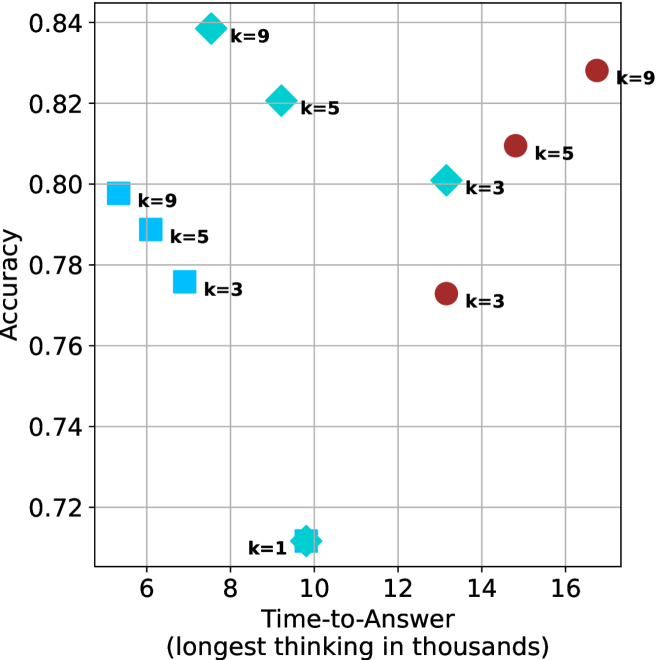
### Visual Description
## Scatter Plot: Accuracy vs. Time-to-Answer
### Overview
The image is a scatter plot showing the relationship between "Accuracy" and "Time-to-Answer" (longest thinking in thousands). There are three distinct data series, each represented by a different shape and color: squares (light blue), diamonds (light blue), and circles (dark red). Each data point is labeled with a "k=" value, indicating a parameter or category.
### Components/Axes
* **X-axis:** "Time-to-Answer (longest thinking in thousands)". The scale ranges from approximately 5 to 17, with gridlines at integer values.
* **Y-axis:** "Accuracy". The scale ranges from 0.72 to 0.84, with gridlines at intervals of 0.02.
* **Data Series:**
* Squares (light blue): Represent one data series with k=3, k=5, and k=9.
* Diamonds (light blue): Represent one data series with k=1, k=3, k=5, and k=9.
* Circles (dark red): Represent one data series with k=3, k=5, and k=9.
* **Labels:** Each data point is labeled with its corresponding "k=" value.
### Detailed Analysis
* **Squares (light blue):**
* k=3: Time-to-Answer ≈ 7, Accuracy ≈ 0.77
* k=5: Time-to-Answer ≈ 6, Accuracy ≈ 0.79
* k=9: Time-to-Answer ≈ 6, Accuracy ≈ 0.80
Trend: As 'k' increases, the accuracy appears to increase slightly, while the time-to-answer remains relatively constant.
* **Diamonds (light blue):**
* k=1: Time-to-Answer ≈ 10, Accuracy ≈ 0.71
* k=3: Time-to-Answer ≈ 13, Accuracy ≈ 0.80
* k=5: Time-to-Answer ≈ 9.5, Accuracy ≈ 0.82
* k=9: Time-to-Answer ≈ 8, Accuracy ≈ 0.84
Trend: As 'k' increases, the accuracy increases, and the time-to-answer initially decreases, then increases slightly.
* **Circles (dark red):**
* k=3: Time-to-Answer ≈ 13.5, Accuracy ≈ 0.77
* k=5: Time-to-Answer ≈ 14.5, Accuracy ≈ 0.81
* k=9: Time-to-Answer ≈ 16.5, Accuracy ≈ 0.83
Trend: As 'k' increases, both the accuracy and the time-to-answer increase.
### Key Observations
* The light blue diamonds generally exhibit higher accuracy compared to the other two series for similar 'k' values.
* The dark red circles show a clear positive correlation between 'k' and both accuracy and time-to-answer.
* The light blue squares show a slight positive correlation between 'k' and accuracy, with a relatively constant time-to-answer.
* The lowest accuracy is observed for the light blue diamond with k=1.
### Interpretation
The scatter plot visualizes the performance of a system or model under different configurations represented by the 'k' parameter. The three data series (squares, diamonds, and circles) likely represent different algorithms, models, or settings.
The data suggests that:
* The light blue diamond configuration is generally more accurate, especially for higher 'k' values, but it also has a varying time-to-answer.
* The dark red circle configuration shows a trade-off between accuracy and time-to-answer, as increasing 'k' improves accuracy but also increases the time required to produce an answer.
* The light blue square configuration offers a relatively stable time-to-answer with a slight improvement in accuracy as 'k' increases.
The choice of the optimal configuration would depend on the specific requirements of the application, balancing the need for high accuracy with the acceptable time-to-answer. The outlier at k=1 for the light blue diamonds suggests that this configuration may be particularly sensitive or unstable.
</details>
(b) R $1$ - $32$ B
<details>
<summary>x56.png Details</summary>
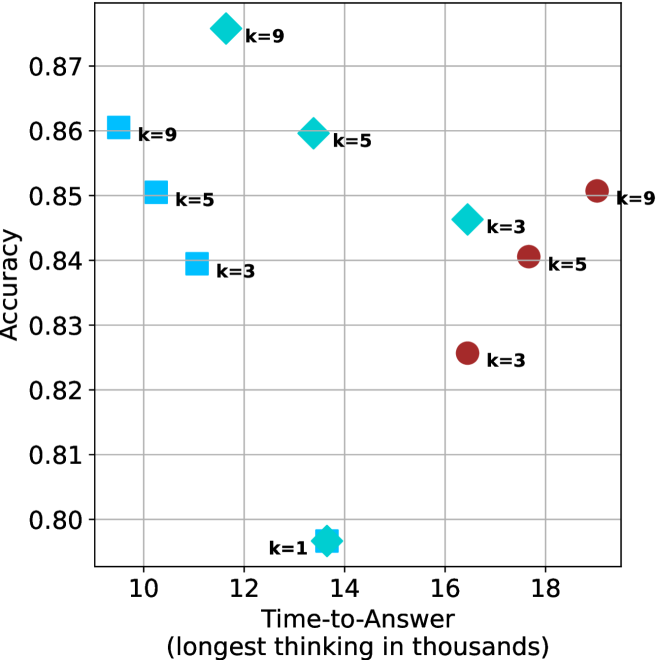
### Visual Description
## Scatter Plot: Accuracy vs. Time-to-Answer
### Overview
The image is a scatter plot showing the relationship between "Accuracy" and "Time-to-Answer" for different values of 'k'. The plot contains data points represented by different shapes and colors, each labeled with a 'k' value.
### Components/Axes
* **X-axis:** "Time-to-Answer (longest thinking in thousands)". The axis ranges from approximately 9 to 19, with gridlines at integer values.
* **Y-axis:** "Accuracy". The axis ranges from 0.80 to 0.87, with gridlines at intervals of 0.01.
* **Data Points:**
* Light Blue Squares: k=9, k=5, k=3
* Light Blue Diamonds: k=9, k=5, k=3
* Light Blue Octagon: k=1
* Dark Red Circles: k=9, k=5, k=3
* **Labels:** Each data point is labeled with its corresponding 'k' value.
### Detailed Analysis
Here's a breakdown of the data points:
* **Light Blue Squares:**
* k=9: Accuracy ~0.86, Time-to-Answer ~10
* k=5: Accuracy ~0.85, Time-to-Answer ~11
* k=3: Accuracy ~0.84, Time-to-Answer ~12
* **Light Blue Diamonds:**
* k=9: Accuracy ~0.875, Time-to-Answer ~12
* k=5: Accuracy ~0.86, Time-to-Answer ~14
* k=3: Accuracy ~0.845, Time-to-Answer ~16
* **Light Blue Octagon:**
* k=1: Accuracy ~0.795, Time-to-Answer ~13.5
* **Dark Red Circles:**
* k=9: Accuracy ~0.85, Time-to-Answer ~18.5
* k=5: Accuracy ~0.84, Time-to-Answer ~17.5
* k=3: Accuracy ~0.825, Time-to-Answer ~16.5
### Key Observations
* Accuracy generally decreases as Time-to-Answer increases for each shape.
* The light blue squares have the lowest Time-to-Answer values.
* The dark red circles have the highest Time-to-Answer values.
* The light blue octagon (k=1) has the lowest accuracy and a moderate Time-to-Answer.
### Interpretation
The scatter plot visualizes the trade-off between accuracy and time-to-answer for different values of 'k'. The data suggests that increasing 'k' (represented by the light blue squares, diamonds, and dark red circles) generally leads to a decrease in accuracy and an increase in time-to-answer. The light blue octagon (k=1) represents a scenario with low accuracy and a moderate time-to-answer, suggesting that a very low 'k' value might not be optimal. The plot indicates that there is a relationship between the parameter 'k', the time taken to answer, and the accuracy of the answers.
</details>
(c) QwQ-32B
<details>
<summary>x57.png Details</summary>
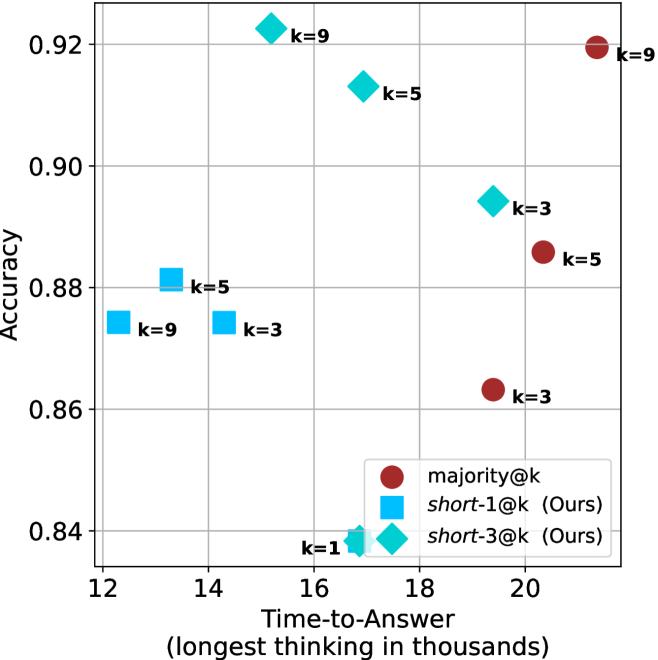
### Visual Description
## Scatter Chart: Accuracy vs. Time-to-Answer
### Overview
The image is a scatter plot comparing the accuracy of different methods (majority@k, short-1@k, and short-3@k) against the time taken to answer, measured in thousands. Each data point is labeled with a 'k' value, indicating a parameter associated with the method.
### Components/Axes
* **X-axis:** Time-to-Answer (longest thinking in thousands). Scale ranges from 12 to 20 in increments of 2.
* **Y-axis:** Accuracy. Scale ranges from 0.84 to 0.92 in increments of 0.02.
* **Legend (bottom-right):**
* Brown circle: majority@k
* Cyan square: short-1@k (Ours)
* Cyan diamond: short-3@k (Ours)
* **Data Points:** Each point is labeled with its corresponding 'k' value.
### Detailed Analysis
**1. majority@k (Brown Circles):**
* Trend: Accuracy generally increases with Time-to-Answer.
* k=3: Time-to-Answer ≈ 19, Accuracy ≈ 0.86
* k=5: Time-to-Answer ≈ 20, Accuracy ≈ 0.885
* k=9: Time-to-Answer ≈ 21, Accuracy ≈ 0.92
**2. short-1@k (Cyan Squares):**
* Trend: Accuracy is relatively stable with Time-to-Answer.
* k=9: Time-to-Answer ≈ 12.5, Accuracy ≈ 0.875
* k=5: Time-to-Answer ≈ 13.5, Accuracy ≈ 0.88
* k=3: Time-to-Answer ≈ 14.5, Accuracy ≈ 0.875
**3. short-3@k (Cyan Diamonds):**
* Trend: Accuracy increases with Time-to-Answer.
* k=1: Time-to-Answer ≈ 17, Accuracy ≈ 0.84
* k=3: Time-to-Answer ≈ 19, Accuracy ≈ 0.895
* k=5: Time-to-Answer ≈ 17.5, Accuracy ≈ 0.91
* k=9: Time-to-Answer ≈ 17, Accuracy ≈ 0.925
### Key Observations
* The 'majority@k' method shows a clear positive correlation between Time-to-Answer and Accuracy.
* The 'short-1@k' method has a relatively consistent accuracy, regardless of Time-to-Answer.
* The 'short-3@k' method demonstrates a positive correlation between Time-to-Answer and Accuracy, with the highest accuracy among the three methods for k=9.
* For 'short-3@k', k=1 has the lowest accuracy and shortest time.
### Interpretation
The scatter plot visualizes the trade-off between accuracy and time-to-answer for different methods. The 'majority@k' method benefits from increased thinking time, leading to higher accuracy. The 'short-1@k' method prioritizes speed, achieving a stable accuracy level regardless of time spent. The 'short-3@k' method appears to offer a balance, achieving high accuracy with a moderate time investment, especially for higher 'k' values. The data suggests that the choice of method depends on the specific requirements of the application, balancing the need for accuracy with the constraints on response time. The 'k' parameter seems to influence the performance of 'majority@k' and 'short-3@k' significantly.
</details>
(d) R1-670B
Figure 15: AIME 2024 - time-to-answer comparison.
<details>
<summary>x58.png Details</summary>
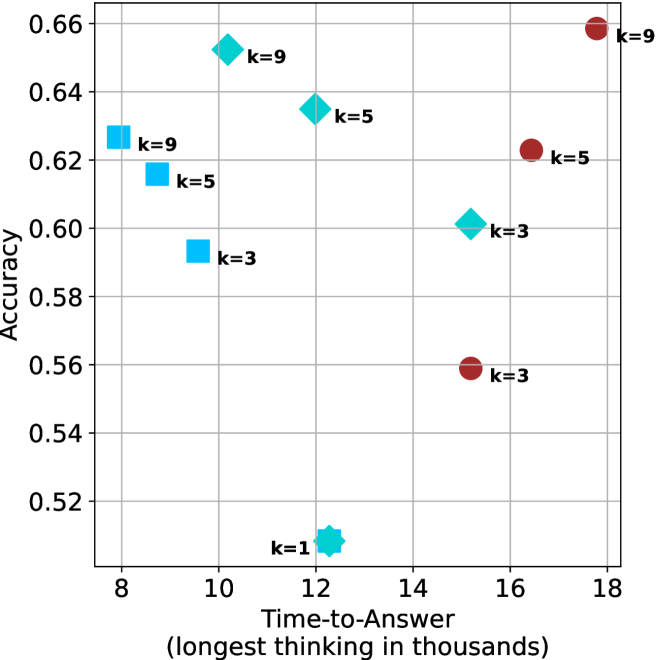
### Visual Description
## Scatter Plot: Accuracy vs. Time-to-Answer
### Overview
The image is a scatter plot showing the relationship between "Accuracy" and "Time-to-Answer" (longest thinking in thousands). The plot displays data points for different values of 'k' (k=1, k=3, k=5, k=9), represented by different shapes and colors. The cyan data points are squares, diamonds, and stars, while the red data points are circles.
### Components/Axes
* **X-axis:** "Time-to-Answer (longest thinking in thousands)". The scale ranges from approximately 8 to 18, with gridlines at integer values.
* **Y-axis:** "Accuracy". The scale ranges from 0.52 to 0.66, with gridlines at intervals of 0.02.
* **Data Points:**
* Cyan Squares: k=9, k=5, k=3
* Cyan Diamonds: k=9, k=5, k=3
* Cyan Star: k=1
* Red Circles: k=9, k=5, k=3
### Detailed Analysis
* **Cyan Data Points (Squares, Diamonds, Star):**
* k=9 (Square): Accuracy ~0.625, Time-to-Answer ~8.5
* k=5 (Square): Accuracy ~0.615, Time-to-Answer ~9.5
* k=3 (Square): Accuracy ~0.595, Time-to-Answer ~10
* k=1 (Star): Accuracy ~0.51, Time-to-Answer ~12
* k=9 (Diamond): Accuracy ~0.655, Time-to-Answer ~11
* k=5 (Diamond): Accuracy ~0.635, Time-to-Answer ~13
* k=3 (Diamond): Accuracy ~0.60, Time-to-Answer ~15
* **Red Data Points (Circles):**
* k=3 (Circle): Accuracy ~0.56, Time-to-Answer ~15.5
* k=5 (Circle): Accuracy ~0.625, Time-to-Answer ~16
* k=9 (Circle): Accuracy ~0.66, Time-to-Answer ~17.5
### Key Observations
* There are two distinct sets of data points, cyan and red, for k=3, k=5, and k=9.
* The cyan data points (squares, diamonds, star) generally show an increase in accuracy with increasing 'k' values, but also an increase in time-to-answer.
* The red data points (circles) show a similar trend of increasing accuracy with increasing 'k' values and increasing time-to-answer.
* The k=1 data point (cyan star) has the lowest accuracy and a moderate time-to-answer.
### Interpretation
The scatter plot illustrates the trade-off between accuracy and time-to-answer for different values of 'k'. The presence of two distinct sets of data points (cyan and red) for k=3, k=5, and k=9 suggests that there are two different methods or configurations being compared. The cyan data points (squares, diamonds, star) generally have lower time-to-answer values compared to the red data points (circles) for the same 'k' value, but also tend to have lower accuracy. The k=1 data point (cyan star) appears to be an outlier, with the lowest accuracy and a moderate time-to-answer. Overall, the plot suggests that increasing 'k' generally leads to higher accuracy but also requires more time-to-answer.
</details>
(a) LN-Super- $49$ B
<details>
<summary>x59.png Details</summary>
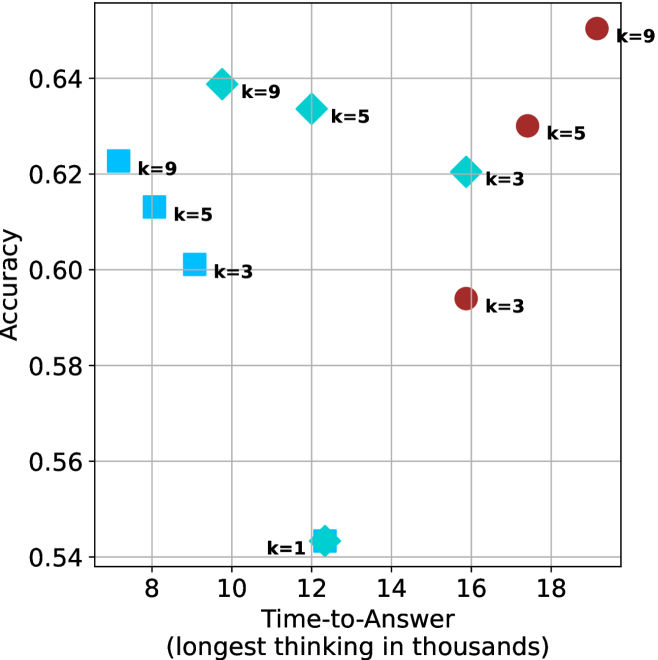
### Visual Description
## Scatter Plot: Accuracy vs. Time-to-Answer
### Overview
The image is a scatter plot showing the relationship between "Accuracy" and "Time-to-Answer" (longest thinking in thousands). The plot displays data points for different values of 'k' (1, 3, 5, and 9), represented by different shapes and colors. The x-axis represents time in thousands, and the y-axis represents accuracy.
### Components/Axes
* **X-axis:** "Time-to-Answer (longest thinking in thousands)". The axis ranges from approximately 7 to 19, with gridlines at integer values.
* **Y-axis:** "Accuracy". The axis ranges from 0.54 to 0.64, with gridlines at intervals of 0.02.
* **Data Points:**
* Cyan Squares: k=3, k=5, k=9
* Cyan Diamonds: k=3, k=5, k=9
* Cyan Star: k=1
* Red Circles: k=3, k=5, k=9
### Detailed Analysis
**Cyan Squares (k=3, k=5, k=9):**
* k=3: Time-to-Answer ≈ 9, Accuracy ≈ 0.60
* k=5: Time-to-Answer ≈ 8, Accuracy ≈ 0.62
* k=9: Time-to-Answer ≈ 7.5, Accuracy ≈ 0.62
**Cyan Diamonds (k=3, k=5, k=9):**
* k=3: Time-to-Answer ≈ 16, Accuracy ≈ 0.62
* k=5: Time-to-Answer ≈ 13, Accuracy ≈ 0.63
* k=9: Time-to-Answer ≈ 10, Accuracy ≈ 0.64
**Cyan Star (k=1):**
* k=1: Time-to-Answer ≈ 12, Accuracy ≈ 0.54
**Red Circles (k=3, k=5, k=9):**
* k=3: Time-to-Answer ≈ 16, Accuracy ≈ 0.59
* k=5: Time-to-Answer ≈ 17, Accuracy ≈ 0.63
* k=9: Time-to-Answer ≈ 19, Accuracy ≈ 0.65
### Key Observations
* For the cyan squares, as 'k' increases from 3 to 9, the time-to-answer decreases slightly, while the accuracy increases slightly.
* For the cyan diamonds, as 'k' increases from 3 to 9, both the time-to-answer and accuracy decrease.
* The cyan star (k=1) has the lowest accuracy and a moderate time-to-answer.
* For the red circles, as 'k' increases from 3 to 9, both the time-to-answer and accuracy increase.
### Interpretation
The scatter plot visualizes the trade-off between accuracy and time-to-answer for different values of 'k'. The data suggests that increasing 'k' does not always lead to higher accuracy or lower time-to-answer. The optimal value of 'k' depends on the specific application and the relative importance of accuracy and speed. The red circles show a clear positive correlation between time-to-answer and accuracy, suggesting that for this particular configuration, spending more time on the answer leads to better results. The cyan shapes show a more complex relationship, possibly indicating different algorithmic behaviors or data characteristics. The single point for k=1 is a clear outlier, indicating that this value of k is significantly worse than the others in terms of accuracy.
</details>
(b) R $1$ - $32$ B
<details>
<summary>x60.png Details</summary>
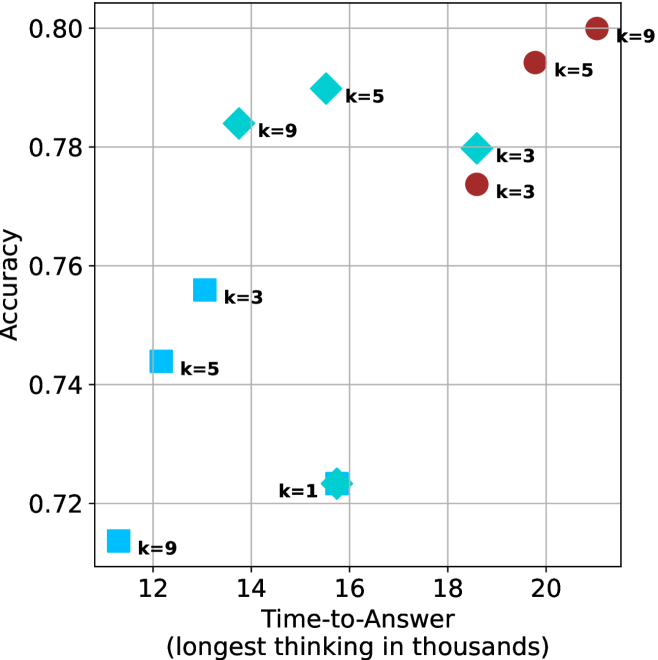
### Visual Description
## Scatter Plot: Accuracy vs. Time-to-Answer
### Overview
The image is a scatter plot showing the relationship between "Accuracy" and "Time-to-Answer" (longest thinking in thousands). The plot contains data points for different values of 'k' (k=1, k=3, k=5, k=9), represented by cyan and brown markers. The cyan markers are squares, diamonds, and stars, while the brown markers are circles.
### Components/Axes
* **X-axis:** "Time-to-Answer (longest thinking in thousands)". The axis ranges from approximately 11 to 21, with gridlines at integer values.
* **Y-axis:** "Accuracy". The axis ranges from 0.72 to 0.80, with gridlines at intervals of 0.02.
* **Data Points:**
* Cyan markers (squares, diamonds, and stars)
* Brown markers (circles)
* **Labels:** Each data point is labeled with its corresponding 'k' value (k=1, k=3, k=5, k=9).
### Detailed Analysis
**Cyan Data Points:**
* **k=9 (square):** Located at approximately (11.7, 0.715).
* **k=5 (square):** Located at approximately (12.5, 0.743).
* **k=3 (square):** Located at approximately (13.5, 0.757).
* **k=1 (star):** Located at approximately (15.8, 0.723).
* **k=9 (diamond):** Located at approximately (14, 0.783).
* **k=5 (diamond):** Located at approximately (15.5, 0.79).
* **k=3 (diamond):** Located at approximately (18, 0.78).
**Brown Data Points:**
* **k=3 (circle):** Located at approximately (18.2, 0.773).
* **k=5 (circle):** Located at approximately (19.5, 0.793).
* **k=9 (circle):** Located at approximately (20.5, 0.80).
### Key Observations
* The cyan data points (squares, diamonds, and stars) generally show an increase in accuracy as the time-to-answer increases, up to a point, then accuracy decreases.
* The brown data points (circles) show an increase in accuracy as the time-to-answer increases.
* For the brown data points, as k increases, both the time-to-answer and accuracy increase.
* The cyan data points are more scattered than the brown data points.
### Interpretation
The scatter plot visualizes the relationship between the accuracy of a model and the time it takes to generate an answer, for different values of 'k'. The plot suggests that increasing the time-to-answer generally improves accuracy, but this effect may vary depending on the value of 'k' and the type of marker. The brown data points show a clear positive correlation between time-to-answer and accuracy, while the cyan data points show a more complex relationship. The cyan data points may represent a different model or configuration than the brown data points. The 'k' value seems to influence both the time-to-answer and the accuracy, with higher 'k' values generally leading to longer time-to-answer and higher accuracy for the brown data points.
</details>
(c) QwQ-32B
<details>
<summary>x61.png Details</summary>
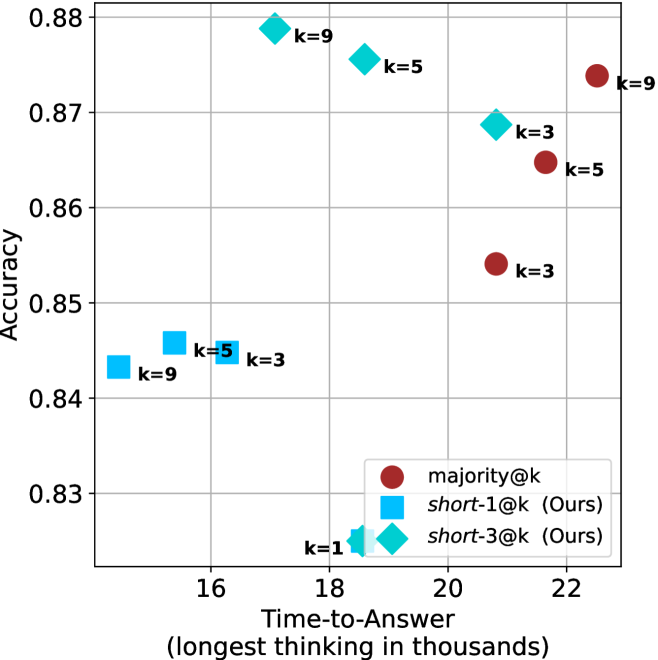
### Visual Description
## Scatter Plot: Accuracy vs. Time-to-Answer
### Overview
The image is a scatter plot comparing the accuracy of different methods (majority@k, short-1@k, and short-3@k) against their time-to-answer. The x-axis represents the time-to-answer in thousands, and the y-axis represents the accuracy. Each data point is labeled with a 'k' value, indicating a parameter associated with the method.
### Components/Axes
* **X-axis:** Time-to-Answer (longest thinking in thousands). Scale ranges from approximately 15 to 23.
* **Y-axis:** Accuracy. Scale ranges from 0.83 to 0.88.
* **Legend (bottom-right):**
* Red circle: majority@k
* Cyan square: short-1@k (Ours)
* Cyan diamond: short-3@k (Ours)
* **Data Points:** Each point is labeled with its corresponding 'k' value.
### Detailed Analysis
**1. majority@k (Red Circles):**
* Trend: As time-to-answer increases, accuracy generally increases.
* k=3: Time-to-Answer ≈ 21, Accuracy ≈ 0.853
* k=5: Time-to-Answer ≈ 21.5, Accuracy ≈ 0.864
* k=9: Time-to-Answer ≈ 22.2, Accuracy ≈ 0.874
**2. short-1@k (Cyan Squares):**
* Trend: As time-to-answer increases, accuracy increases slightly.
* k=9: Time-to-Answer ≈ 15.2, Accuracy ≈ 0.843
* k=5: Time-to-Answer ≈ 16.2, Accuracy ≈ 0.844
* k=3: Time-to-Answer ≈ 17, Accuracy ≈ 0.844
**3. short-3@k (Cyan Diamonds):**
* Trend: As time-to-answer increases, accuracy increases significantly.
* k=1: Time-to-Answer ≈ 17.8, Accuracy ≈ 0.826
* k=3: Time-to-Answer ≈ 19.8, Accuracy ≈ 0.869
* k=5: Time-to-Answer ≈ 19, Accuracy ≈ 0.875
* k=9: Time-to-Answer ≈ 18.5, Accuracy ≈ 0.878
### Key Observations
* The 'short-3@k' method (cyan diamonds) generally achieves the highest accuracy compared to the other methods.
* The 'short-1@k' method (cyan squares) has the lowest time-to-answer but also the lowest accuracy among the 'k' values shown.
* For the 'majority@k' method (red circles), increasing the 'k' value leads to higher accuracy and longer time-to-answer.
* For the 'short-3@k' method, increasing the 'k' value from 1 to 9 leads to higher accuracy and longer time-to-answer.
### Interpretation
The scatter plot illustrates the trade-off between accuracy and time-to-answer for different methods. The 'short-3@k' method appears to be the most effective, achieving high accuracy with a relatively short time-to-answer. The 'majority@k' method shows a clear positive correlation between 'k' value, accuracy, and time-to-answer. The 'short-1@k' method prioritizes speed but sacrifices accuracy. The choice of method would depend on the specific requirements of the application, balancing the need for accuracy with the constraint of time.
</details>
(d) R1-670B
Figure 16: AIME 2025 - time-to-answer comparison.
<details>
<summary>x62.png Details</summary>
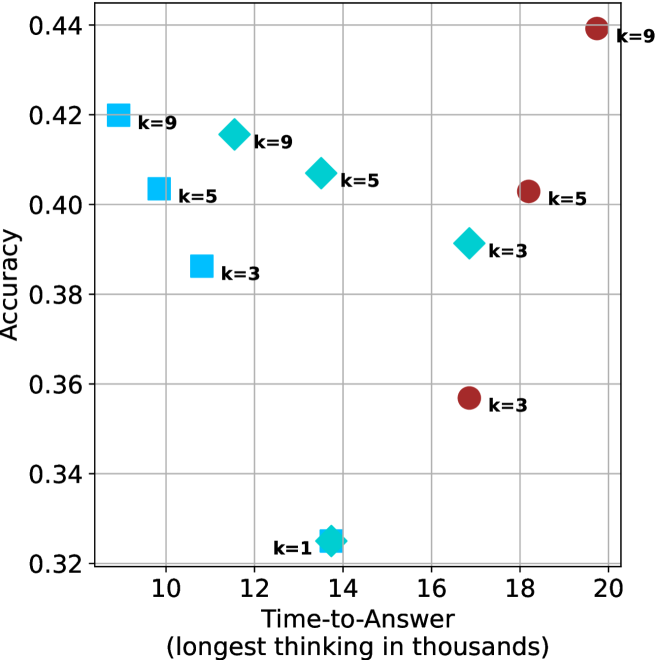
### Visual Description
## Scatter Plot: Accuracy vs. Time-to-Answer
### Overview
The image is a scatter plot comparing the accuracy of a model against the time taken to answer, with data points grouped by the parameter 'k'. The x-axis represents "Time-to-Answer (longest thinking in thousands)", and the y-axis represents "Accuracy". There are three distinct series of data points, each represented by a different shape and color: blue squares, cyan diamonds, and brown circles. Each data point is labeled with its corresponding 'k' value.
### Components/Axes
* **X-axis:** Time-to-Answer (longest thinking in thousands). Scale ranges from 10 to 20, with gridlines at intervals of 2.
* **Y-axis:** Accuracy. Scale ranges from 0.32 to 0.44, with gridlines at intervals of 0.02.
* **Data Series:**
* Blue Squares: Represent one series of data points.
* Cyan Diamonds: Represent another series of data points.
* Brown Circles: Represent a third series of data points.
* **Labels:** Each data point is labeled with "k=[value]", where [value] is 1, 3, 5, or 9.
### Detailed Analysis
Here's a breakdown of the data points for each series:
* **Blue Squares:**
* k=9: Located at approximately (10, 0.42).
* k=5: Located at approximately (10, 0.40).
* k=3: Located at approximately (11, 0.39).
The trend for the blue squares is that as k decreases, both the time-to-answer and accuracy decrease.
* **Cyan Diamonds:**
* k=9: Located at approximately (12, 0.42).
* k=5: Located at approximately (14, 0.41).
* k=3: Located at approximately (16.5, 0.39).
* k=1: Located at approximately (13.5, 0.325).
The trend for the cyan diamonds is that as k decreases, the time-to-answer increases slightly from k=9 to k=3, then decreases significantly for k=1, while accuracy decreases overall.
* **Brown Circles:**
* k=9: Located at approximately (20, 0.44).
* k=5: Located at approximately (18, 0.40).
* k=3: Located at approximately (17.5, 0.355).
The trend for the brown circles is that as k decreases, both the time-to-answer and accuracy decrease.
### Key Observations
* The brown circles generally have higher time-to-answer values compared to the blue squares and cyan diamonds for the same k values.
* The cyan diamonds show a non-linear relationship between k, time-to-answer, and accuracy, with the lowest k value (k=1) having the lowest accuracy and a moderate time-to-answer.
* The highest accuracy is achieved by the brown circle with k=9, but it also has the highest time-to-answer.
### Interpretation
The scatter plot visualizes the trade-off between accuracy and time-to-answer for different values of the parameter 'k'. The data suggests that increasing 'k' generally leads to higher accuracy but also increases the time required to generate an answer. However, this relationship is not strictly linear, as seen with the cyan diamonds, where a very low 'k' value (k=1) results in a significant drop in accuracy. The choice of 'k' would depend on the specific application and the relative importance of accuracy versus speed. The different shapes (blue squares, cyan diamonds, and brown circles) likely represent different models or configurations, each exhibiting a unique relationship between 'k', accuracy, and time-to-answer.
</details>
(a) LN-Super- $49$ B
<details>
<summary>x63.png Details</summary>
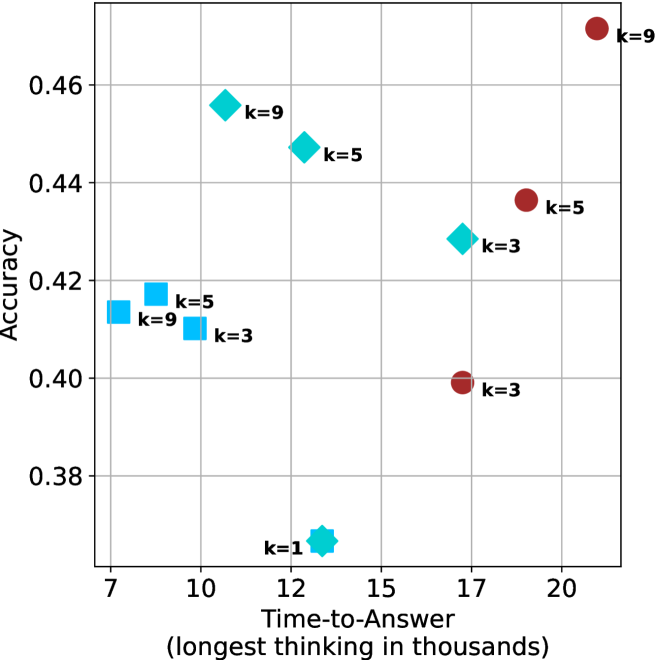
### Visual Description
## Scatter Plot: Accuracy vs. Time-to-Answer
### Overview
The image is a scatter plot comparing the accuracy of a model against the time it takes to answer, with different markers representing different values of 'k'. The x-axis represents "Time-to-Answer (longest thinking in thousands)" and the y-axis represents "Accuracy". There are three distinct marker types: squares, diamonds, and circles, each associated with different 'k' values.
### Components/Axes
* **X-axis:** "Time-to-Answer (longest thinking in thousands)". The scale ranges from approximately 7 to 20, with gridlines at intervals of 1.
* **Y-axis:** "Accuracy". The scale ranges from 0.38 to 0.46, with gridlines at intervals of 0.02.
* **Markers:**
* Squares (light blue): k=3, k=5, k=9
* Diamonds (light blue): k=3, k=5, k=9
* Circles (brown): k=3, k=5, k=9
* Star (light blue): k=1
### Detailed Analysis
* **Squares (light blue):**
* k=3: Time-to-Answer ≈ 9.8, Accuracy ≈ 0.41
* k=5: Time-to-Answer ≈ 8.5, Accuracy ≈ 0.42
* k=9: Time-to-Answer ≈ 7.5, Accuracy ≈ 0.415
* **Diamonds (light blue):**
* k=3: Time-to-Answer ≈ 16.5, Accuracy ≈ 0.43
* k=5: Time-to-Answer ≈ 13.5, Accuracy ≈ 0.445
* k=9: Time-to-Answer ≈ 11.5, Accuracy ≈ 0.455
* **Circles (brown):**
* k=3: Time-to-Answer ≈ 17, Accuracy ≈ 0.40
* k=5: Time-to-Answer ≈ 18.5, Accuracy ≈ 0.435
* k=9: Time-to-Answer ≈ 20.5, Accuracy ≈ 0.47
* **Star (light blue):**
* k=1: Time-to-Answer ≈ 13.5, Accuracy ≈ 0.37
### Key Observations
* For the same 'k' value, the different marker types (squares, diamonds, circles) show a trend of increasing Time-to-Answer and Accuracy from squares to diamonds to circles.
* The 'k=1' data point (star) has the lowest accuracy and a moderate Time-to-Answer.
* The 'k=9' data point (circle) has the highest accuracy and the highest Time-to-Answer.
### Interpretation
The scatter plot suggests a relationship between the 'k' value, Time-to-Answer, and Accuracy. The different marker types (squares, diamonds, circles) likely represent different model configurations or algorithms. The trend indicates that as 'k' increases, both the Time-to-Answer and Accuracy tend to increase, especially when comparing the same marker type. The 'k=1' data point is an outlier, suggesting that this configuration is less effective in terms of accuracy. The plot highlights a trade-off between accuracy and time, with higher accuracy generally requiring more time to answer. The different marker types could represent different models, and the plot suggests that the circular model performs the best, but takes the longest time.
</details>
(b) R $1$ - $32$ B
<details>
<summary>x64.png Details</summary>
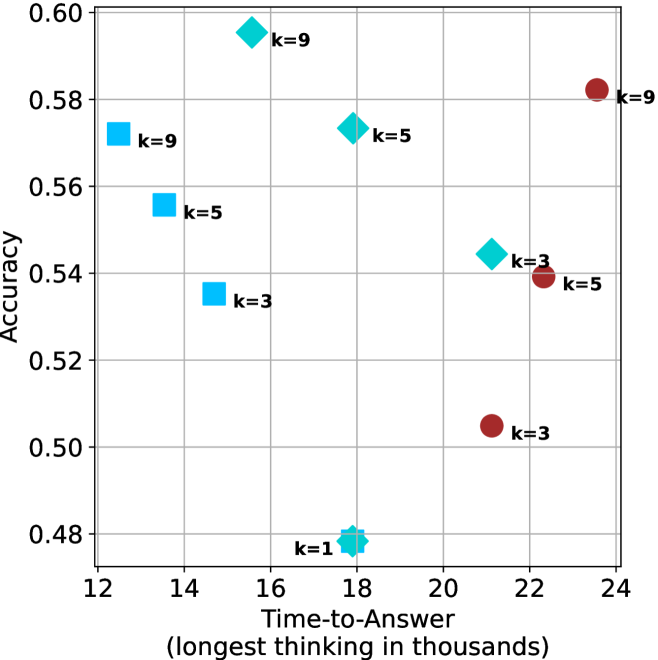
### Visual Description
## Scatter Plot: Accuracy vs. Time-to-Answer
### Overview
The image is a scatter plot showing the relationship between "Accuracy" and "Time-to-Answer" (longest thinking in thousands). The plot displays data points for different values of 'k' (1, 3, 5, and 9), represented by different shapes and colors: squares (light blue), diamonds (cyan), and circles (brown).
### Components/Axes
* **X-axis:** "Time-to-Answer (longest thinking in thousands)". The scale ranges from 12 to 24, with gridlines at each integer value.
* **Y-axis:** "Accuracy". The scale ranges from 0.48 to 0.60, with gridlines at intervals of 0.02.
* **Data Points:**
* Light Blue Squares: Represent data points where 'k=9', 'k=5', and 'k=3'.
* Cyan Diamonds: Represent data points where 'k=9', 'k=5', 'k=3', and 'k=1'.
* Brown Circles: Represent data points where 'k=9', 'k=5', and 'k=3'.
### Detailed Analysis
Here's a breakdown of the data points and their approximate coordinates:
* **Light Blue Squares:**
* k=9: (13, 0.575)
* k=5: (14, 0.555)
* k=3: (14.5, 0.535)
* **Cyan Diamonds:**
* k=9: (17, 0.59)
* k=5: (19, 0.57)
* k=3: (21.5, 0.545)
* k=1: (18, 0.48)
* **Brown Circles:**
* k=9: (23.5, 0.585)
* k=5: (22, 0.54)
* k=3: (21, 0.505)
### Key Observations
* **Accuracy vs. Time-to-Answer:** There is no clear linear relationship between Time-to-Answer and Accuracy across all values of 'k'.
* **Performance by 'k' value:**
* k=9: Appears to have the highest accuracy overall, with both the light blue square and brown circle data points showing high accuracy.
* k=1: Has the lowest accuracy and a Time-to-Answer around 18.
* k=3 and k=5: Show intermediate accuracy values.
### Interpretation
The scatter plot visualizes the performance of a system or model under different configurations, represented by the parameter 'k'. The plot suggests that the optimal value of 'k' for maximizing accuracy is around 9, although this comes at the cost of increased Time-to-Answer compared to k=1. The performance for k=3 and k=5 is intermediate. The plot indicates a trade-off between accuracy and time, and the choice of 'k' would depend on the specific requirements of the application.
</details>
(c) QwQ-32B
<details>
<summary>x65.png Details</summary>
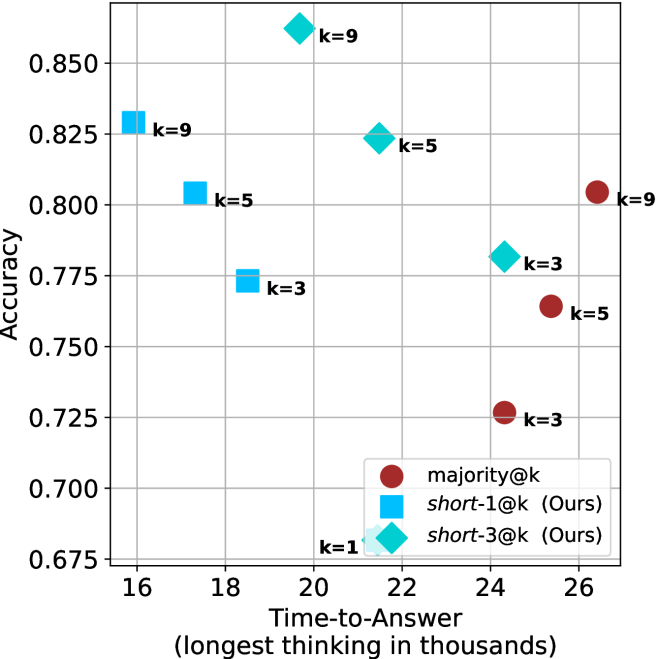
### Visual Description
## Scatter Plot: Accuracy vs. Time-to-Answer
### Overview
The image is a scatter plot comparing the accuracy of different methods (majority@k, short-1@k, and short-3@k) against the time taken to answer, measured in thousands. Each data point is labeled with a 'k' value, indicating a parameter associated with the method.
### Components/Axes
* **X-axis:** Time-to-Answer (longest thinking in thousands). Scale ranges from 16 to 26, with gridlines at each integer value.
* **Y-axis:** Accuracy. Scale ranges from 0.675 to 0.850, with gridlines at intervals of 0.025.
* **Legend (bottom-right):**
* Brown circles: majority@k
* Light blue squares: short-1@k (Ours)
* Light blue diamonds: short-3@k (Ours)
* Each data point is labeled with its corresponding 'k' value.
### Detailed Analysis
**1. majority@k (Brown Circles):**
* k=3: Accuracy ~0.725, Time-to-Answer ~25
* k=5: Accuracy ~0.765, Time-to-Answer ~26
* k=9: Accuracy ~0.805, Time-to-Answer ~26
Trend: As 'k' increases, accuracy increases slightly, while the time-to-answer remains approximately constant at 26.
**2. short-1@k (Light Blue Squares):**
* k=3: Accuracy ~0.775, Time-to-Answer ~18
* k=5: Accuracy ~0.800, Time-to-Answer ~17.5
* k=9: Accuracy ~0.825, Time-to-Answer ~16
Trend: As 'k' increases, accuracy increases, and the time-to-answer decreases.
**3. short-3@k (Light Blue Diamonds):**
* k=1: Accuracy ~0.680, Time-to-Answer ~21
* k=3: Accuracy ~0.780, Time-to-Answer ~24
* k=5: Accuracy ~0.825, Time-to-Answer ~22
* k=9: Accuracy ~0.860, Time-to-Answer ~21
Trend: As 'k' increases, accuracy increases, and the time-to-answer initially increases, then decreases.
### Key Observations
* The 'short-1@k' method generally has the lowest time-to-answer.
* The 'short-3@k' method achieves the highest accuracy (0.860) at k=9.
* The 'majority@k' method has the simplest trend: accuracy increases with 'k' while time-to-answer remains constant.
### Interpretation
The scatter plot visualizes the trade-off between accuracy and time-to-answer for different methods and 'k' values. The 'short-3@k' method appears to offer the best performance in terms of accuracy, but it's important to consider the time-to-answer, which varies with 'k'. The 'short-1@k' method provides a faster response time, but at the cost of lower accuracy compared to 'short-3@k'. The 'majority@k' method is the slowest, but has a steady increase in accuracy as k increases. The choice of method and 'k' value would depend on the specific requirements of the application, balancing the need for accuracy and speed.
</details>
(d) R1-670B
Figure 17: HMMT Feb 2025 - time-to-answer comparison.
Appendix C Ablation studies
We investigate two axis of short-m@k: the value of $m$ and the tie breaking method. For all experiments we use LN-Super- $49$ B, reporting results over the three benchmarks described in Section ˜ 3.1. For the ablation studies we focus on controlling thinking compute.
We start by ablating different $m∈\{1,3,4,5,7,9\}$ for short-m@k. Results are shown in Figure ˜ 18(a). As observed in our main results, short-1@k outperforms others in low-compute regimes, while being less effective for larger compute budgets. Larger $m$ values seem to perform similarly, with higher $m$ values yielding slightly better results in high-compute scenarios.
Next, we analyze the tie-breaking rule of short-m@k. We suggest the selection of the shortest reasoning chain among the vote-leading options. We compare this strategy to random tie-breaking, and to tie breaking according to the longest reasoning chain among the options. As shown in Figure ˜ 18(b), the short-m@k strategy outperforms random tie-breaking. In contrast, choosing the option with the longest reasoning chain yields inferior results.
<details>
<summary>x66.png Details</summary>
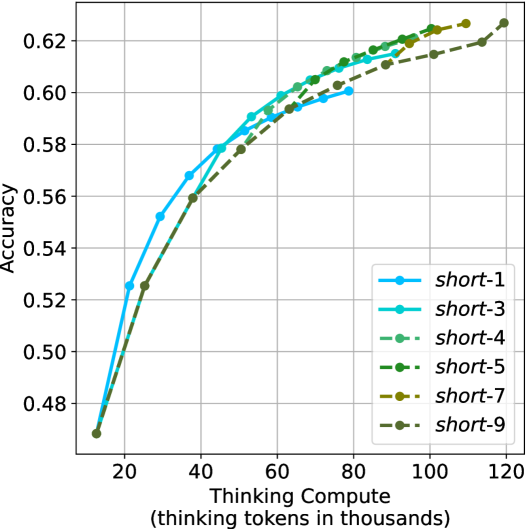
### Visual Description
## Line Chart: Accuracy vs. Thinking Compute
### Overview
The image is a line chart comparing the accuracy of different models ("short-1" to "short-9") against the "Thinking Compute" (measured in thousands of thinking tokens). The chart shows how accuracy increases with more compute for each model.
### Components/Axes
* **X-axis:** "Thinking Compute (thinking tokens in thousands)". Scale ranges from 20 to 120 in increments of 20.
* **Y-axis:** "Accuracy". Scale ranges from 0.48 to 0.62 in increments of 0.02.
* **Legend:** Located in the bottom-right of the chart. It identifies each line by its corresponding model name:
* `short-1`: Blue solid line with circle markers.
* `short-3`: Cyan solid line with circle markers.
* `short-4`: Green dashed line with circle markers.
* `short-5`: Dark Green dashed line with circle markers.
* `short-7`: Olive dashed line with circle markers.
* `short-9`: Dark Olive dashed line with circle markers.
### Detailed Analysis
* **short-1 (Blue):** Starts at approximately (16, 0.47) and increases rapidly to (40, 0.57), then continues to (60, 0.59), (80, 0.61), and ends at approximately (90, 0.615).
* **short-3 (Cyan):** Starts at approximately (16, 0.47) and increases rapidly to (40, 0.58), then continues to (60, 0.595), (80, 0.615), and ends at approximately (90, 0.62).
* **short-4 (Green):** Starts at approximately (16, 0.47) and increases rapidly to (40, 0.59), then continues to (60, 0.60), (80, 0.61), and ends at approximately (100, 0.62).
* **short-5 (Dark Green):** Starts at approximately (16, 0.47) and increases rapidly to (40, 0.56), then continues to (60, 0.59), (80, 0.60), (100, 0.62), and ends at approximately (120, 0.63).
* **short-7 (Olive):** Starts at approximately (16, 0.47) and increases rapidly to (40, 0.56), then continues to (60, 0.59), (80, 0.60), (100, 0.62), and ends at approximately (120, 0.63).
* **short-9 (Dark Olive):** Starts at approximately (16, 0.47) and increases rapidly to (40, 0.56), then continues to (60, 0.59), (80, 0.60), (100, 0.62), and ends at approximately (120, 0.63).
### Key Observations
* All models show a positive correlation between "Thinking Compute" and "Accuracy".
* The accuracy increases rapidly at lower compute values and then plateaus as compute increases.
* The models "short-5", "short-7", and "short-9" appear to perform similarly, achieving slightly higher accuracy at higher compute values compared to "short-1" and "short-3".
### Interpretation
The chart demonstrates the relationship between the amount of computational resources ("Thinking Compute") allocated to different models and their resulting accuracy. The initial rapid increase in accuracy suggests that even a small amount of compute can significantly improve performance. However, the plateauing effect indicates diminishing returns, where increasing compute beyond a certain point yields only marginal gains in accuracy. The models "short-5", "short-7", and "short-9" seem to be more efficient in utilizing higher compute values to achieve slightly better accuracy compared to the other models. This could be due to differences in their architecture or training methodologies.
</details>
(a) $m$ values ablation of short-m@k
<details>
<summary>x67.png Details</summary>
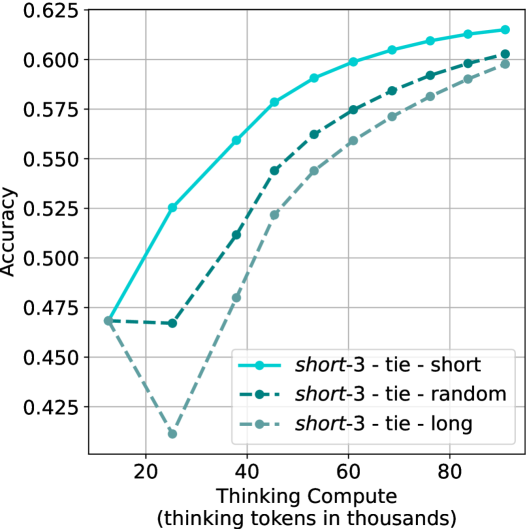
### Visual Description
## Line Chart: Accuracy vs. Thinking Compute
### Overview
The image is a line chart comparing the accuracy of three different configurations ("short-3 - tie - short", "short-3 - tie - random", and "short-3 - tie - long") against the "Thinking Compute" (measured in thousands of thinking tokens). The chart shows how accuracy changes as the thinking compute increases.
### Components/Axes
* **X-axis:** "Thinking Compute (thinking tokens in thousands)". The scale ranges from approximately 10 to 90, with tick marks at 20, 40, 60, and 80.
* **Y-axis:** "Accuracy". The scale ranges from 0.425 to 0.625, with tick marks at 0.425, 0.450, 0.475, 0.500, 0.525, 0.550, 0.575, 0.600, and 0.625.
* **Legend:** Located in the bottom-right corner.
* **Teal (solid line):** "short-3 - tie - short"
* **Dark Teal (dashed line):** "short-3 - tie - random"
* **Light Teal (dashed line):** "short-3 - tie - long"
### Detailed Analysis
**1. short-3 - tie - short (Teal Solid Line):**
* Trend: Generally increasing accuracy as thinking compute increases.
* Data Points:
* At 10 thinking compute, accuracy is approximately 0.47.
* At 20 thinking compute, accuracy is approximately 0.47.
* At 40 thinking compute, accuracy is approximately 0.56.
* At 60 thinking compute, accuracy is approximately 0.59.
* At 80 thinking compute, accuracy is approximately 0.61.
* At 90 thinking compute, accuracy is approximately 0.62.
**2. short-3 - tie - random (Dark Teal Dashed Line):**
* Trend: Generally increasing accuracy as thinking compute increases.
* Data Points:
* At 10 thinking compute, accuracy is approximately 0.47.
* At 20 thinking compute, accuracy is approximately 0.47.
* At 40 thinking compute, accuracy is approximately 0.51.
* At 60 thinking compute, accuracy is approximately 0.56.
* At 80 thinking compute, accuracy is approximately 0.58.
* At 90 thinking compute, accuracy is approximately 0.60.
**3. short-3 - tie - long (Light Teal Dashed Line):**
* Trend: Initially decreasing, then generally increasing accuracy as thinking compute increases.
* Data Points:
* At 10 thinking compute, accuracy is approximately 0.47.
* At 20 thinking compute, accuracy is approximately 0.42.
* At 40 thinking compute, accuracy is approximately 0.48.
* At 60 thinking compute, accuracy is approximately 0.54.
* At 80 thinking compute, accuracy is approximately 0.57.
* At 90 thinking compute, accuracy is approximately 0.59.
### Key Observations
* "short-3 - tie - short" consistently outperforms the other two configurations across the range of thinking compute values.
* "short-3 - tie - long" shows an initial dip in accuracy before increasing, suggesting a different learning curve compared to the other two.
* All three configurations show diminishing returns in accuracy as thinking compute increases beyond 60,000 tokens.
### Interpretation
The chart demonstrates the relationship between "Thinking Compute" and accuracy for three different configurations. The "short-3 - tie - short" configuration appears to be the most effective, achieving the highest accuracy with a given amount of thinking compute. The initial dip in accuracy for "short-3 - tie - long" might indicate a need for a certain threshold of thinking compute before it can effectively learn. The diminishing returns observed for all configurations suggest that increasing thinking compute beyond a certain point may not significantly improve accuracy, indicating a potential optimization point for resource allocation.
</details>
(b) Tie breaking ablation
Figure 18: Ablation studies over different $m$ values for short-m@k, and different tie breaking methods. Both figures show the model’s average accuracy across benchmarks as a function of the length of its thinking trajectories (measured in thousands).
Appendix D Small models results
We present our main results (Sections ˜ 3 and 4) using smaller models. We use Llama- $3.1$ -Nemotron-Nano- $8$ B-v $1$ [LN-Nano- $8$ B; Bercovich and others, 2025] and R $1$ -Distill-Qwen- $7$ B [R $1$ - $7$ B; Guo et al., 2025]. Table ˜ 7 (corresponds to Table ˜ 1), presents a comparison between shortest/longest/random generation per example for the smaller models. As observed for larger models, using the shortest answer outperforms both random and longest answers across all benchmarks and models.
Table 7: Comparison between taking the shortest/longest/random generation per example.
| | GPQA-D | AIME 2024 | AIME 2025 | HMMT | Math Average | | | | | |
| --- | --- | --- | --- | --- | --- | --- | --- | --- | --- | --- |
| Thinking Tokens $\downarrow$ | Acc. $\uparrow$ | Thinking Tokens $\downarrow$ | Acc. $\uparrow$ | Thinking Tokens $\downarrow$ | Acc. $\uparrow$ | Thinking Tokens $\downarrow$ | Acc. $\uparrow$ | Thinking Tokens $\downarrow$ | Acc. $\uparrow$ | |
| LN-Nano-8B | | | | | | | | | | |
| random | 7003 | 52.2 | 10380 | 62.1 | 11869 | 46.5 | 12693 | 34.0 | 11647 | 47.5 |
| longest | 10594 $(+51\%)$ | 41.4 | 16801 | 40.0 | 17140 | 33.3 | 18516 | 23.3 | 17486 $(+50\%)$ | 32.2 |
| shortest | 3937 $(-44\%)$ | 55.1 | 0 6047 | 70.0 | 0 7127 | 46.7 | 0 7508 | 50.0 | 6894 $(-41\%)$ | 55.6 |
| R1-7B | | | | | | | | | | |
| random | 7015 | 35.5 | 11538 | 57.8 | 12377 | 42.2 | 14693 | 25.0 | 12869 | 41.7 |
| longest | 11863 $(+69\%)$ | 29.8 | 21997 | 26.7 | 21029 | 26.7 | 23899 | 13.3 | 22308 $(+73\%)$ | 22.2 |
| shortest | 3438 $(-51\%)$ | 46.5 | 0 5217 | 76.7 | 0 6409 | 53.3 | 0 6950 | 43.3 | 6192 $(-52\%)$ | 57.8 |
Next, we analyze the performance of short-m@k using smaller models (see details in Section ˜ 4). Figure ˜ 19, Figure ˜ 20 and Figure ˜ 21 are the sample-size/compute/time-to-answer results for the small models over the math benchmarks, respectively. Figure ˜ 22, Figure ˜ 23 and Figure ˜ 24 are the sample-size/compute/time-to-answer results for the small models for GPQA-D, respectively.
The performance of short-m@k using small models remain consistent with those observed in larger ones. short-1@k demonstrates a performance advantage over majority voting in low compute regimes, while short-3@k dominates it across all compute budgets.
<details>
<summary>x68.png Details</summary>
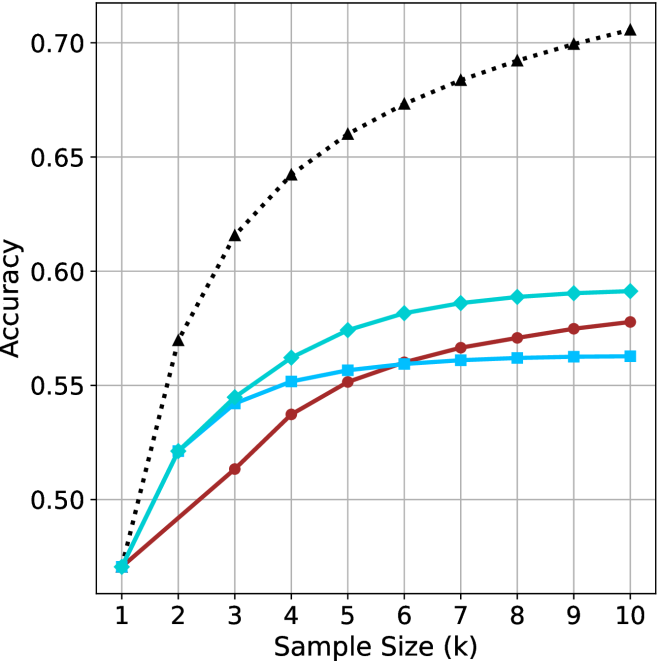
### Visual Description
## Line Chart: Accuracy vs. Sample Size
### Overview
The image is a line chart comparing the accuracy of different models as a function of sample size. The x-axis represents the sample size (k), ranging from 1 to 10. The y-axis represents the accuracy, ranging from 0.50 to 0.70. There are four distinct data series represented by different colored lines with different markers.
### Components/Axes
* **X-axis:** Sample Size (k), with tick marks at each integer value from 1 to 10.
* **Y-axis:** Accuracy, with tick marks at 0.50, 0.55, 0.60, 0.65, and 0.70.
* **Data Series:**
* Black dotted line with triangle markers.
* Turquoise line with diamond markers.
* Brown line with circle markers.
* Light Blue line with square markers.
### Detailed Analysis
* **Black dotted line with triangle markers:** This line shows the highest accuracy overall. It increases rapidly from approximately 0.47 at sample size 1 to approximately 0.63 at sample size 2. It continues to increase, but at a decreasing rate, reaching approximately 0.71 at sample size 10.
* (1, 0.47)
* (2, 0.57)
* (3, 0.62)
* (4, 0.64)
* (5, 0.66)
* (6, 0.67)
* (7, 0.68)
* (8, 0.69)
* (9, 0.70)
* (10, 0.71)
* **Turquoise line with diamond markers:** This line starts at approximately 0.47 at sample size 1, increases to approximately 0.54 at sample size 3, and then gradually increases to approximately 0.59 at sample size 10.
* (1, 0.47)
* (2, 0.52)
* (3, 0.54)
* (4, 0.56)
* (5, 0.575)
* (6, 0.58)
* (7, 0.585)
* (8, 0.59)
* (9, 0.59)
* (10, 0.59)
* **Brown line with circle markers:** This line starts at approximately 0.47 at sample size 1, increases to approximately 0.54 at sample size 4, and then gradually increases to approximately 0.57 at sample size 10.
* (1, 0.47)
* (2, 0.50)
* (3, 0.52)
* (4, 0.54)
* (5, 0.55)
* (6, 0.56)
* (7, 0.565)
* (8, 0.57)
* (9, 0.57)
* (10, 0.575)
* **Light Blue line with square markers:** This line starts at approximately 0.47 at sample size 1, increases to approximately 0.54 at sample size 3, and then gradually increases to approximately 0.56 at sample size 10.
* (1, 0.47)
* (2, 0.51)
* (3, 0.54)
* (4, 0.55)
* (5, 0.56)
* (6, 0.56)
* (7, 0.56)
* (8, 0.56)
* (9, 0.56)
* (10, 0.565)
### Key Observations
* The black dotted line (triangle markers) consistently outperforms the other models in terms of accuracy across all sample sizes.
* All models show diminishing returns in accuracy as the sample size increases beyond a certain point (around 6-7).
* The turquoise line (diamond markers) performs better than the brown line (circle markers) and the light blue line (square markers).
* The brown line (circle markers) and the light blue line (square markers) perform similarly.
### Interpretation
The chart suggests that increasing the sample size generally improves the accuracy of the models, but the extent of improvement varies between the models. The model represented by the black dotted line is significantly more effective than the others. The diminishing returns observed for all models indicate that there is a point beyond which increasing the sample size provides only marginal gains in accuracy. This information could be used to optimize the sample size for each model, balancing the cost of data collection with the desired level of accuracy.
</details>
(a) LN-Nano-8B
<details>
<summary>x69.png Details</summary>
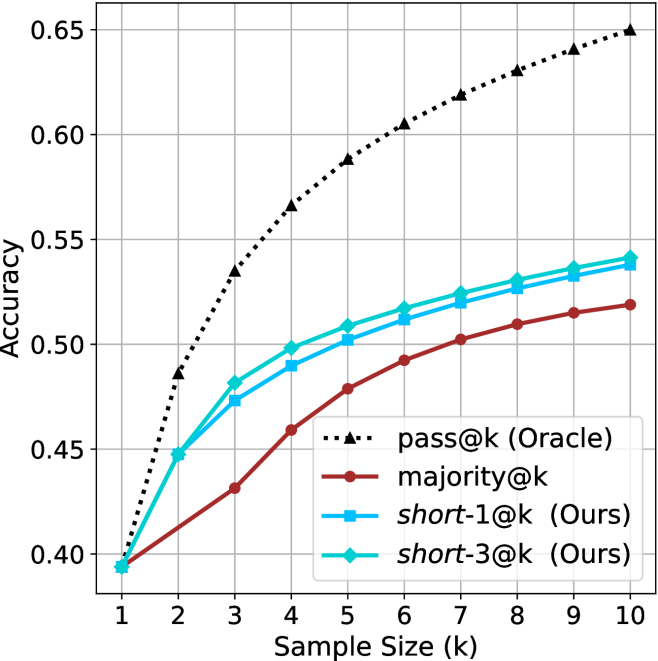
### Visual Description
## Line Chart: Accuracy vs. Sample Size
### Overview
The image is a line chart comparing the accuracy of four different methods ("pass@k (Oracle)", "majority@k", "short-1@k (Ours)", and "short-3@k (Ours)") as a function of sample size (k). The x-axis represents the sample size, ranging from 1 to 10. The y-axis represents accuracy, ranging from 0.40 to 0.65.
### Components/Axes
* **X-axis:** Sample Size (k), with tick marks at each integer value from 1 to 10.
* **Y-axis:** Accuracy, with tick marks at 0.40, 0.45, 0.50, 0.55, 0.60, and 0.65.
* **Legend:** Located in the bottom-right corner, it identifies each line by color and label:
* Black dotted line with triangles: pass@k (Oracle)
* Brown line with circles: majority@k
* Blue line with squares: short-1@k (Ours)
* Cyan line with diamonds: short-3@k (Ours)
### Detailed Analysis
* **pass@k (Oracle):** (Black dotted line with triangles) Starts at approximately 0.39 at k=1 and increases rapidly to approximately 0.49 at k=2, 0.53 at k=3, 0.57 at k=4, 0.60 at k=5, 0.61 at k=6, 0.62 at k=7, 0.63 at k=8, 0.64 at k=9, and 0.65 at k=10. The trend is upward, with the most significant increase in accuracy occurring between k=1 and k=5.
* **majority@k:** (Brown line with circles) Starts at approximately 0.39 at k=1 and increases steadily to approximately 0.43 at k=2, 0.45 at k=3, 0.47 at k=4, 0.49 at k=5, 0.50 at k=6, 0.51 at k=7, 0.52 at k=8, 0.52 at k=9, and 0.52 at k=10. The trend is upward, but the rate of increase slows down as k increases.
* **short-1@k (Ours):** (Blue line with squares) Starts at approximately 0.39 at k=1 and increases to approximately 0.45 at k=2, 0.48 at k=3, 0.49 at k=4, 0.51 at k=5, 0.52 at k=6, 0.53 at k=7, 0.53 at k=8, 0.54 at k=9, and 0.54 at k=10. The trend is upward, with a decreasing rate of increase as k increases.
* **short-3@k (Ours):** (Cyan line with diamonds) Starts at approximately 0.39 at k=1 and increases to approximately 0.45 at k=2, 0.48 at k=3, 0.49 at k=4, 0.51 at k=5, 0.51 at k=6, 0.52 at k=7, 0.53 at k=8, 0.53 at k=9, and 0.54 at k=10. The trend is upward, with a decreasing rate of increase as k increases.
### Key Observations
* The "pass@k (Oracle)" method consistently outperforms the other three methods across all sample sizes.
* The "majority@k" method has the lowest accuracy among the four methods.
* The "short-1@k (Ours)" and "short-3@k (Ours)" methods perform similarly, with "short-3@k (Ours)" slightly better.
* All methods show diminishing returns in accuracy as the sample size increases beyond k=5.
### Interpretation
The chart demonstrates the relationship between sample size and accuracy for different methods. The "pass@k (Oracle)" method serves as an upper bound or ideal performance, while the other methods ("majority@k", "short-1@k (Ours)", and "short-3@k (Ours)") show varying degrees of improvement with increasing sample size. The fact that the "pass@k (Oracle)" method has significantly higher accuracy suggests that there is room for improvement in the other methods. The diminishing returns observed for all methods indicate that increasing the sample size beyond a certain point may not be the most efficient way to improve accuracy. The "short-1@k (Ours)" and "short-3@k (Ours)" methods, being developed by the authors ("Ours"), are likely the focus of the study, and their performance is being compared to the baseline "majority@k" and the ideal "pass@k (Oracle)".
</details>
(b) R $1$ - $7$ B
Figure 19: Small models - sample size ( $k$ ) comparison over math benchmarks.
<details>
<summary>x70.png Details</summary>
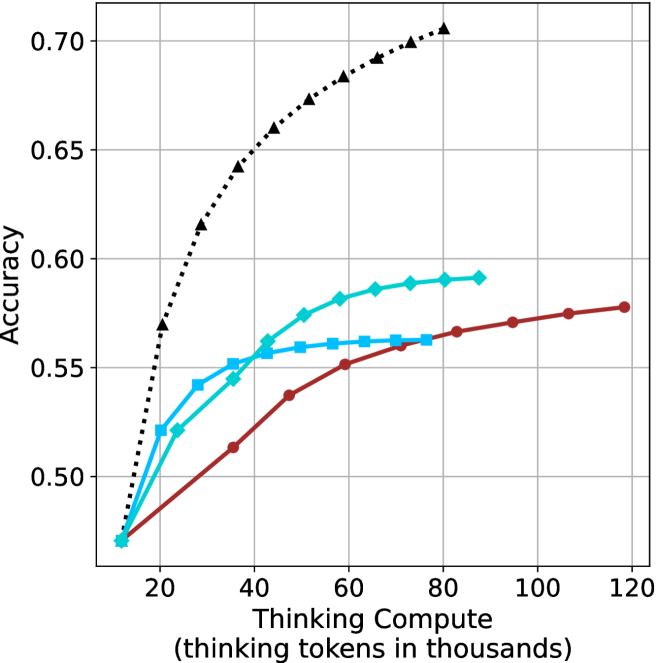
### Visual Description
## Line Chart: Accuracy vs. Thinking Compute
### Overview
The image is a line chart comparing the accuracy of different models as a function of "Thinking Compute," measured in thousands of tokens. There are three distinct data series represented by different colored lines with different markers. The chart shows how accuracy increases with more computational resources.
### Components/Axes
* **X-axis:** "Thinking Compute (thinking tokens in thousands)". The scale ranges from approximately 10 to 120, with gridlines at intervals of 20.
* **Y-axis:** "Accuracy". The scale ranges from 0.50 to 0.70, with gridlines at intervals of 0.05.
* **Data Series:**
* Black dotted line with triangle markers.
* Teal line with diamond markers.
* Brown line with circle markers.
* Light Blue line with square markers.
### Detailed Analysis
* **Black dotted line with triangle markers:** This line shows the highest accuracy overall. It increases rapidly from approximately 0.47 at 15k tokens to approximately 0.68 at 60k tokens, and then continues to increase, reaching approximately 0.70 at 70k tokens.
* **Teal line with diamond markers:** This line starts at approximately 0.47 at 15k tokens, increases to approximately 0.56 at 40k tokens, and plateaus around 0.59 between 60k and 80k tokens.
* **Brown line with circle markers:** This line starts at approximately 0.47 at 15k tokens, increases more gradually than the other lines, reaching approximately 0.55 at 60k tokens, and continues to increase to approximately 0.58 at 120k tokens.
* **Light Blue line with square markers:** This line starts at approximately 0.47 at 15k tokens, increases to approximately 0.56 at 60k tokens, and plateaus around 0.56 between 60k and 80k tokens.
### Key Observations
* The black dotted line (with triangle markers) demonstrates the most significant improvement in accuracy with increasing "Thinking Compute."
* The teal line (with diamond markers) and light blue line (with square markers) show similar performance, with accuracy plateauing after a certain point.
* The brown line (with circle markers) shows the slowest but most consistent increase in accuracy across the entire range of "Thinking Compute."
### Interpretation
The chart suggests that increasing "Thinking Compute" generally improves the accuracy of the models. However, the extent of improvement varies depending on the model (represented by the different lines). The black dotted line represents a model that benefits the most from increased compute, while the teal and light blue lines represent models that reach a point of diminishing returns. The brown line represents a model that benefits steadily from increased compute, even at higher levels. The data indicates that the choice of model architecture significantly impacts how effectively computational resources are utilized to improve accuracy.
</details>
(a) LN-Nano-8B
<details>
<summary>x71.png Details</summary>
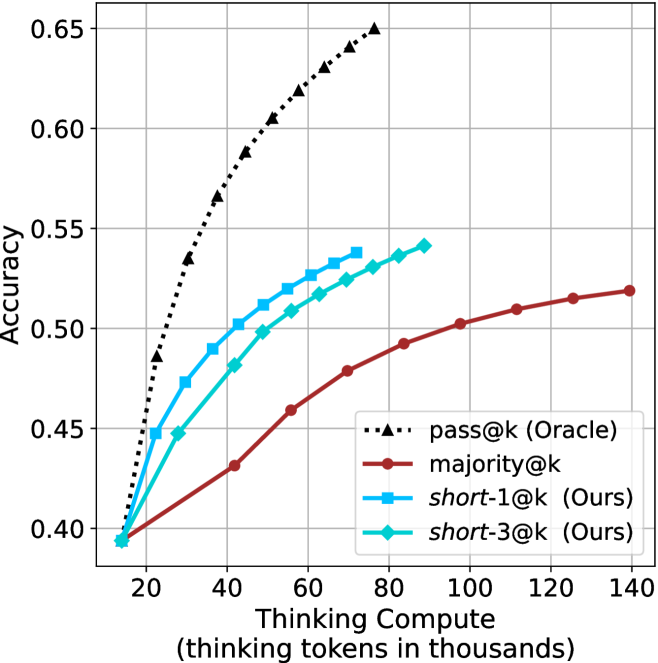
### Visual Description
## Chart: Accuracy vs. Thinking Compute
### Overview
The image is a line chart comparing the accuracy of different models (pass@k (Oracle), majority@k, short-1@k (Ours), and short-3@k (Ours)) against the thinking compute (thinking tokens in thousands). The chart shows how accuracy increases with thinking compute for each model.
### Components/Axes
* **X-axis:** Thinking Compute (thinking tokens in thousands). Scale ranges from 20 to 140, with tick marks at 20, 40, 60, 80, 100, 120, and 140.
* **Y-axis:** Accuracy. Scale ranges from 0.40 to 0.65, with tick marks at 0.40, 0.45, 0.50, 0.55, 0.60, and 0.65.
* **Legend:** Located in the bottom-right corner of the chart.
* `pass@k (Oracle)`: Black dotted line with triangle markers.
* `majority@k`: Brown solid line with circle markers.
* `short-1@k (Ours)`: Blue solid line with square markers.
* `short-3@k (Ours)`: Teal solid line with diamond markers.
### Detailed Analysis
* **pass@k (Oracle):** The black dotted line with triangle markers shows a steep upward trend, indicating a rapid increase in accuracy with increasing thinking compute.
* At 20k tokens, accuracy is approximately 0.40.
* At 40k tokens, accuracy is approximately 0.50.
* At 60k tokens, accuracy is approximately 0.58.
* At 80k tokens, accuracy is approximately 0.63.
* At 85k tokens, accuracy is approximately 0.65.
* **majority@k:** The brown solid line with circle markers shows a gradual upward trend, indicating a slower increase in accuracy with increasing thinking compute.
* At 20k tokens, accuracy is approximately 0.40.
* At 40k tokens, accuracy is approximately 0.43.
* At 60k tokens, accuracy is approximately 0.47.
* At 80k tokens, accuracy is approximately 0.50.
* At 100k tokens, accuracy is approximately 0.51.
* At 120k tokens, accuracy is approximately 0.515.
* At 140k tokens, accuracy is approximately 0.52.
* **short-1@k (Ours):** The blue solid line with square markers shows an upward trend, with accuracy increasing with thinking compute.
* At 20k tokens, accuracy is approximately 0.40.
* At 40k tokens, accuracy is approximately 0.49.
* At 60k tokens, accuracy is approximately 0.52.
* At 80k tokens, accuracy is approximately 0.54.
* **short-3@k (Ours):** The teal solid line with diamond markers shows an upward trend, with accuracy increasing with thinking compute.
* At 20k tokens, accuracy is approximately 0.40.
* At 40k tokens, accuracy is approximately 0.48.
* At 60k tokens, accuracy is approximately 0.51.
* At 80k tokens, accuracy is approximately 0.54.
### Key Observations
* The `pass@k (Oracle)` model achieves the highest accuracy for a given thinking compute value.
* The `majority@k` model has the lowest accuracy compared to the other models.
* The `short-1@k (Ours)` and `short-3@k (Ours)` models perform similarly, with `short-1@k` slightly outperforming `short-3@k`.
* All models show an increase in accuracy with increasing thinking compute, but the rate of increase varies.
### Interpretation
The chart demonstrates the relationship between thinking compute and accuracy for different models. The `pass@k (Oracle)` model serves as an upper bound or ideal performance, while the `majority@k` model represents a baseline. The `short-1@k (Ours)` and `short-3@k (Ours)` models show improved performance compared to the baseline, suggesting that the "Ours" models are effective in leveraging thinking compute to improve accuracy. The diminishing returns observed in the `majority@k` model suggest that simply increasing compute may not always lead to significant gains in accuracy, and more sophisticated models like `pass@k` and the "Ours" models are needed to effectively utilize higher compute budgets.
</details>
(b) R $1$ - $7$ B
Figure 20: Small models - thinking compute comparison over math benchmarks.
<details>
<summary>x72.png Details</summary>
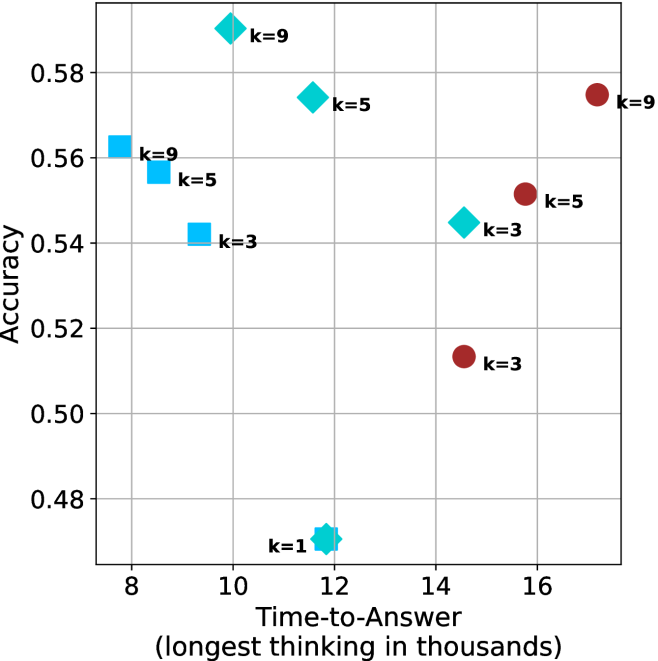
### Visual Description
## Scatter Plot: Accuracy vs. Time-to-Answer
### Overview
The image is a scatter plot showing the relationship between "Accuracy" and "Time-to-Answer" for different values of 'k'. The plot contains data points represented by two distinct shapes and colors: cyan squares, cyan diamonds, and brown circles, each labeled with a 'k' value (k=1, k=3, k=5, k=9). The x-axis represents "Time-to-Answer" in thousands, and the y-axis represents "Accuracy".
### Components/Axes
* **X-axis:** "Time-to-Answer (longest thinking in thousands)". The scale ranges from 8 to 16, with gridlines at each integer value.
* **Y-axis:** "Accuracy". The scale ranges from 0.48 to 0.58, with gridlines at intervals of 0.02.
* **Data Points:**
* Cyan Squares: k=9, k=5, k=3
* Cyan Diamonds: k=9, k=5, k=3, k=1
* Brown Circles: k=9, k=5, k=3
* **Labels:** Each data point is labeled with its corresponding 'k' value.
### Detailed Analysis
**Cyan Squares:**
* k=9: Accuracy ~0.56, Time-to-Answer ~8
* k=5: Accuracy ~0.56, Time-to-Answer ~9
* k=3: Accuracy ~0.54, Time-to-Answer ~9.5
**Cyan Diamonds:**
* k=9: Accuracy ~0.58, Time-to-Answer ~11
* k=5: Accuracy ~0.57, Time-to-Answer ~12
* k=3: Accuracy ~0.545, Time-to-Answer ~14
* k=1: Accuracy ~0.47, Time-to-Answer ~12
**Brown Circles:**
* k=9: Accuracy ~0.575, Time-to-Answer ~16.5
* k=5: Accuracy ~0.55, Time-to-Answer ~15
* k=3: Accuracy ~0.51, Time-to-Answer ~14.5
### Key Observations
* For cyan squares, as 'k' decreases, both accuracy and time-to-answer decrease.
* For cyan diamonds, as 'k' decreases from 9 to 3, the time-to-answer increases, while the accuracy decreases slightly. The k=1 diamond has the lowest accuracy and a time-to-answer similar to k=5.
* For brown circles, as 'k' decreases, both accuracy and time-to-answer decrease.
* The cyan squares have the lowest time-to-answer values.
* The brown circles have the highest time-to-answer values.
* The cyan diamonds have time-to-answer values between the cyan squares and brown circles.
### Interpretation
The scatter plot visualizes the trade-off between accuracy and time-to-answer for different values of 'k'. The data suggests that increasing 'k' generally leads to higher accuracy but also requires more time to answer. However, there are diminishing returns, as seen with the cyan diamonds, where increasing 'k' beyond a certain point does not significantly improve accuracy and may even decrease it (k=1). The different shapes (squares, diamonds, circles) likely represent different algorithms or methods being tested. The cyan squares appear to be the fastest but least accurate, while the brown circles are the slowest but more accurate. The cyan diamonds offer a balance between speed and accuracy, with k=9 performing the best among them. The outlier k=1 diamond suggests that a very low 'k' value can significantly degrade performance.
</details>
(a) LN-Nano-8B
<details>
<summary>x73.png Details</summary>
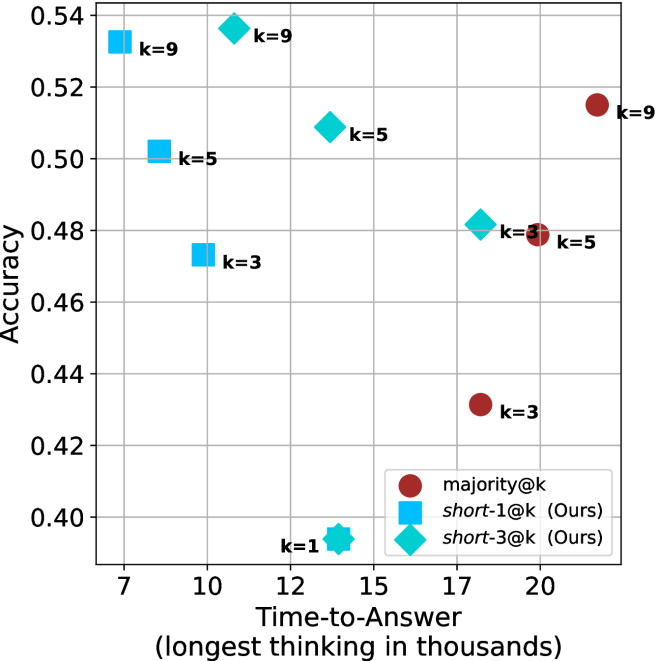
### Visual Description
## Scatter Plot: Accuracy vs. Time-to-Answer
### Overview
The image is a scatter plot comparing the accuracy of different methods (majority@k, short-1@k, and short-3@k) against the time-to-answer. The x-axis represents the time-to-answer in thousands, and the y-axis represents the accuracy. Each data point is labeled with a 'k' value, indicating a parameter used in the respective method.
### Components/Axes
* **X-axis:** Time-to-Answer (longest thinking in thousands). Scale ranges from 7 to 20, with gridlines at each integer value.
* **Y-axis:** Accuracy. Scale ranges from 0.40 to 0.54, with gridlines at intervals of 0.02.
* **Legend:** Located in the bottom-right corner.
* Red circle: majority@k
* Blue square: short-1@k (Ours)
* Teal diamond: short-3@k (Ours)
* **Data Points:** Each point is labeled with its corresponding 'k' value.
### Detailed Analysis
**1. majority@k (Red Circles):**
* Trend: Accuracy increases with time-to-answer.
* k=3: Time-to-Answer ≈ 17, Accuracy ≈ 0.43
* k=5: Time-to-Answer ≈ 19, Accuracy ≈ 0.48
* k=9: Time-to-Answer ≈ 20.5, Accuracy ≈ 0.515
**2. short-1@k (Blue Squares):**
* Trend: Accuracy decreases with time-to-answer.
* k=9: Time-to-Answer ≈ 7, Accuracy ≈ 0.535
* k=5: Time-to-Answer ≈ 8, Accuracy ≈ 0.50
* k=3: Time-to-Answer ≈ 9.5, Accuracy ≈ 0.47
**3. short-3@k (Teal Diamonds):**
* Trend: Accuracy decreases with time-to-answer.
* k=9: Time-to-Answer ≈ 10, Accuracy ≈ 0.54
* k=5: Time-to-Answer ≈ 14, Accuracy ≈ 0.51
* k=3: Time-to-Answer ≈ 18, Accuracy ≈ 0.48
* k=1: Time-to-Answer ≈ 14, Accuracy ≈ 0.395
### Key Observations
* For the "majority@k" method, increasing the 'k' value and time-to-answer leads to higher accuracy.
* For the "short-1@k" and "short-3@k" methods, increasing the 'k' value generally leads to higher accuracy, but increasing the time-to-answer leads to lower accuracy.
* The "short-3@k" method with k=9 achieves the highest accuracy among all methods.
* The "short-3@k" method with k=1 has the lowest accuracy and the lowest time-to-answer.
### Interpretation
The scatter plot illustrates the trade-off between accuracy and time-to-answer for different methods. The "majority@k" method benefits from longer processing times, while the "short-1@k" and "short-3@k" methods appear to be more effective with shorter processing times. The optimal 'k' value varies depending on the method and the desired balance between accuracy and speed. The "short-3@k" method with k=9 seems to offer the best performance in terms of accuracy, but it's important to consider the time-to-answer implications. The data suggests that "short-1@k" and "short-3@k" are optimized for speed, while "majority@k" is optimized for accuracy.
</details>
(b) R $1$ - $7$ B
Figure 21: Small models - time-to-answer comparison over math benchmarks.
<details>
<summary>x74.png Details</summary>
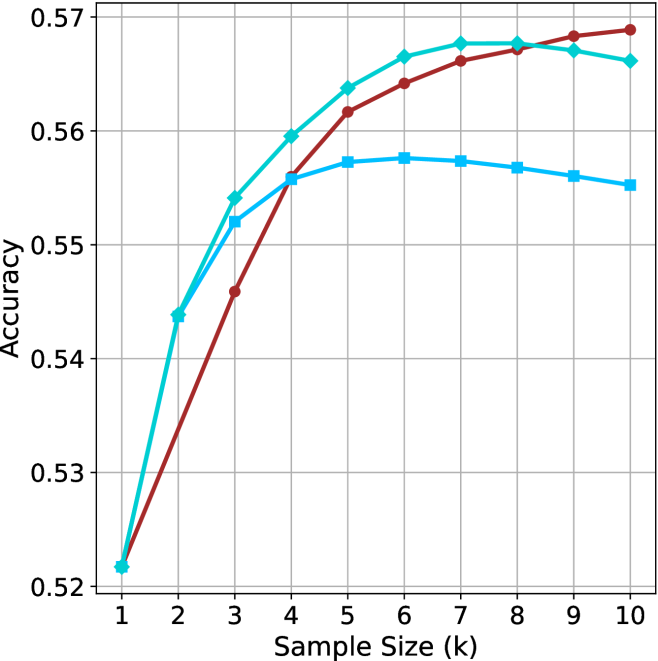
### Visual Description
## Line Chart: Accuracy vs. Sample Size
### Overview
The image is a line chart displaying the relationship between "Accuracy" (y-axis) and "Sample Size (k)" (x-axis) for three different data series, represented by different colored lines: cyan, brown, and light blue. The chart includes a grid for easier reading of values.
### Components/Axes
* **X-axis:** "Sample Size (k)" ranges from 1 to 10 in integer increments.
* **Y-axis:** "Accuracy" ranges from 0.52 to 0.57 in increments of 0.01.
* **Grid:** Present in the background to aid in value estimation.
* **Data Series:** Three distinct lines, each with different markers:
* Cyan line with diamond markers.
* Brown line with circle markers.
* Light blue line with square markers.
### Detailed Analysis
* **Cyan Line (Diamond Markers):**
* Trend: Initially increases sharply, peaks around a sample size of 7, then decreases slightly.
* Data Points:
* Sample Size 1: Accuracy ~0.522
* Sample Size 3: Accuracy ~0.55
* Sample Size 5: Accuracy ~0.562
* Sample Size 7: Accuracy ~0.567
* Sample Size 10: Accuracy ~0.565
* **Brown Line (Circle Markers):**
* Trend: Increases sharply, peaks around a sample size of 8, then decreases slightly.
* Data Points:
* Sample Size 1: Accuracy ~0.522
* Sample Size 3: Accuracy ~0.546
* Sample Size 5: Accuracy ~0.564
* Sample Size 8: Accuracy ~0.568
* Sample Size 10: Accuracy ~0.569
* **Light Blue Line (Square Markers):**
* Trend: Increases, plateaus around a sample size of 6-7, then decreases slightly.
* Data Points:
* Sample Size 1: Accuracy ~0.522
* Sample Size 3: Accuracy ~0.552
* Sample Size 5: Accuracy ~0.556
* Sample Size 7: Accuracy ~0.556
* Sample Size 10: Accuracy ~0.555
### Key Observations
* All three lines start at approximately the same accuracy value (~0.522) for a sample size of 1.
* The brown line (circle markers) achieves the highest peak accuracy, slightly above 0.568, at a sample size of approximately 8.
* The light blue line (square markers) plateaus at a lower accuracy compared to the other two lines.
* All three lines show a slight decrease in accuracy after reaching their peak values.
### Interpretation
The chart illustrates how accuracy changes with varying sample sizes for three different models or algorithms. The initial increase in accuracy suggests that larger sample sizes generally improve performance. However, the plateauing and subsequent decrease indicate that there is a point of diminishing returns, and beyond a certain sample size, the accuracy either stabilizes or even decreases, possibly due to overfitting or increased noise in the data. The brown line (circle markers) appears to be the most effective, achieving the highest accuracy among the three. The light blue line (square markers) is the least effective, plateauing at a lower accuracy.
</details>
(a) LN-Nano-8B
<details>
<summary>x75.png Details</summary>
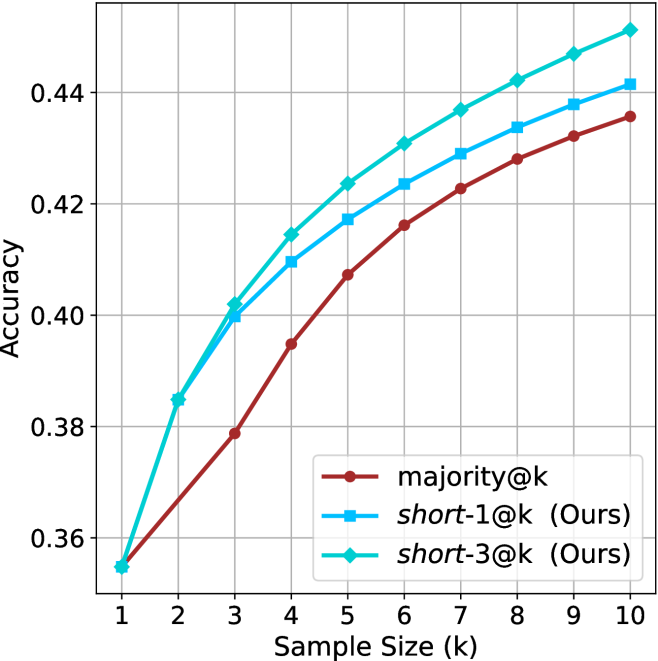
### Visual Description
## Line Chart: Accuracy vs. Sample Size
### Overview
The image is a line chart comparing the accuracy of three different methods ("majority@k", "short-1@k (Ours)", and "short-3@k (Ours)") as a function of sample size (k), which ranges from 1 to 10. The chart displays how accuracy increases with sample size for each method.
### Components/Axes
* **X-axis:** Sample Size (k), with integer values from 1 to 10.
* **Y-axis:** Accuracy, ranging from 0.36 to 0.44, with gridlines at intervals of 0.02.
* **Legend:** Located in the bottom-right corner, it identifies the three methods:
* Brown line with circle markers: "majority@k"
* Blue line with square markers: "short-1@k (Ours)"
* Cyan line with diamond markers: "short-3@k (Ours)"
### Detailed Analysis
* **majority@k (Brown line, circle markers):**
* The line starts at approximately 0.355 at k=1 and increases steadily.
* At k=2, the accuracy is approximately 0.378.
* At k=3, the accuracy is approximately 0.398.
* At k=4, the accuracy is approximately 0.405.
* At k=5, the accuracy is approximately 0.408.
* At k=6, the accuracy is approximately 0.423.
* At k=7, the accuracy is approximately 0.428.
* At k=8, the accuracy is approximately 0.432.
* At k=9, the accuracy is approximately 0.436.
* At k=10, the accuracy is approximately 0.440.
* The trend is upward, with the rate of increase slowing as k increases.
* **short-1@k (Ours) (Blue line, square markers):**
* The line starts at approximately 0.355 at k=1 and increases steadily.
* At k=2, the accuracy is approximately 0.385.
* At k=3, the accuracy is approximately 0.400.
* At k=4, the accuracy is approximately 0.410.
* At k=5, the accuracy is approximately 0.418.
* At k=6, the accuracy is approximately 0.423.
* At k=7, the accuracy is approximately 0.430.
* At k=8, the accuracy is approximately 0.433.
* At k=9, the accuracy is approximately 0.438.
* At k=10, the accuracy is approximately 0.442.
* The trend is upward, with the rate of increase slowing as k increases.
* **short-3@k (Ours) (Cyan line, diamond markers):**
* The line starts at approximately 0.355 at k=1 and increases steadily.
* At k=2, the accuracy is approximately 0.385.
* At k=3, the accuracy is approximately 0.400.
* At k=4, the accuracy is approximately 0.410.
* At k=5, the accuracy is approximately 0.420.
* At k=6, the accuracy is approximately 0.430.
* At k=7, the accuracy is approximately 0.435.
* At k=8, the accuracy is approximately 0.438.
* At k=9, the accuracy is approximately 0.442.
* At k=10, the accuracy is approximately 0.445.
* The trend is upward, with the rate of increase slowing as k increases.
### Key Observations
* All three methods show an increase in accuracy as the sample size (k) increases.
* The "short-3@k (Ours)" method generally has the highest accuracy across all sample sizes.
* The "majority@k" method generally has the lowest accuracy across all sample sizes.
* The rate of accuracy increase diminishes as the sample size grows larger for all three methods.
### Interpretation
The chart demonstrates that increasing the sample size (k) generally improves the accuracy of all three methods tested. The "short-3@k (Ours)" method consistently outperforms the other two, suggesting it is the most effective approach among those compared. The diminishing returns observed as k increases indicate that there is a point beyond which increasing the sample size provides only marginal improvements in accuracy. This information is valuable for optimizing the performance of these methods in practical applications, balancing the trade-off between accuracy and computational cost associated with larger sample sizes.
</details>
(b) R $1$ - $7$ B
Figure 22: Small models - sample size ( $k$ ) comparison over GPQA-D.
<details>
<summary>x76.png Details</summary>
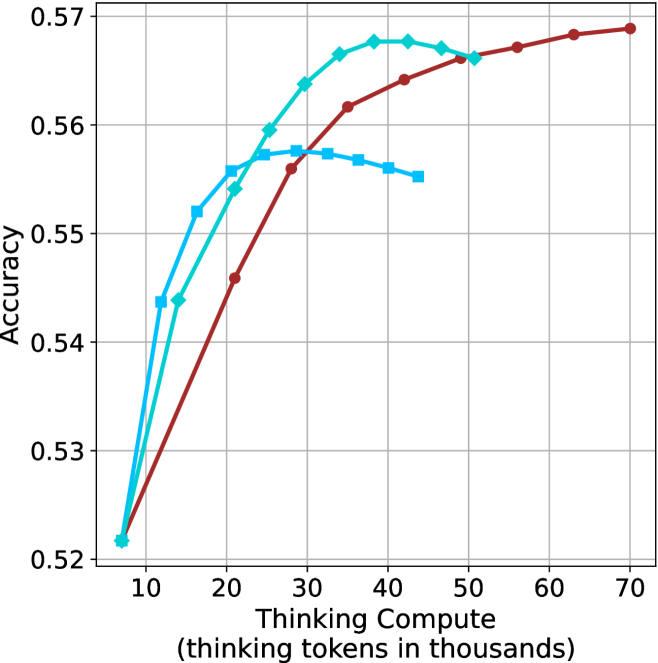
### Visual Description
## Line Chart: Accuracy vs. Thinking Compute
### Overview
The image is a line chart comparing the accuracy of different models against the "Thinking Compute" (measured in thousands of thinking tokens). Three different models are represented by three lines: a light blue line with diamond markers, a dark red line with circle markers, and a medium blue line with square markers. The chart shows how accuracy changes as the thinking compute increases.
### Components/Axes
* **X-axis:** "Thinking Compute (thinking tokens in thousands)". The axis ranges from approximately 5 to 70, with tick marks at intervals of 10 (10, 20, 30, 40, 50, 60, 70).
* **Y-axis:** "Accuracy". The axis ranges from 0.52 to 0.57, with tick marks at intervals of 0.01 (0.52, 0.53, 0.54, 0.55, 0.56, 0.57).
* **Data Series:**
* Light Blue line with diamond markers.
* Dark Red line with circle markers.
* Medium Blue line with square markers.
* **Grid:** The chart has a grid for easier reading of values.
### Detailed Analysis
* **Light Blue (Diamond Markers):**
* Trend: Initially increases rapidly, peaks around x=40, then decreases slightly.
* Data Points:
* (8, 0.522)
* (15, 0.544)
* (20, 0.550)
* (30, 0.560)
* (40, 0.568)
* (50, 0.567)
* **Dark Red (Circle Markers):**
* Trend: Increases steadily, then plateaus.
* Data Points:
* (8, 0.522)
* (20, 0.547)
* (30, 0.557)
* (40, 0.564)
* (50, 0.566)
* (60, 0.568)
* (70, 0.569)
* **Medium Blue (Square Markers):**
* Trend: Increases, peaks around x=35, then decreases.
* Data Points:
* (8, 0.522)
* (15, 0.544)
* (20, 0.550)
* (30, 0.557)
* (40, 0.553)
* (50, 0.552)
### Key Observations
* All three models start with similar accuracy at low thinking compute values.
* The light blue model (diamond markers) achieves the highest accuracy initially, but its performance plateaus and then slightly decreases after a certain point.
* The dark red model (circle markers) shows a consistent increase in accuracy with increasing thinking compute, eventually surpassing the other models.
* The medium blue model (square markers) peaks and then declines.
### Interpretation
The chart suggests that increasing "Thinking Compute" generally improves model accuracy, but the optimal amount of compute varies depending on the model architecture. The light blue model benefits less from increased compute beyond a certain point, while the dark red model continues to improve even at higher compute levels. The medium blue model's performance degrades after a certain compute level, suggesting potential overfitting or other issues. The data indicates that there is a trade-off between compute cost and accuracy, and the best model choice depends on the specific application and resource constraints.
</details>
(a) LN-Nano-8B
<details>
<summary>x77.png Details</summary>
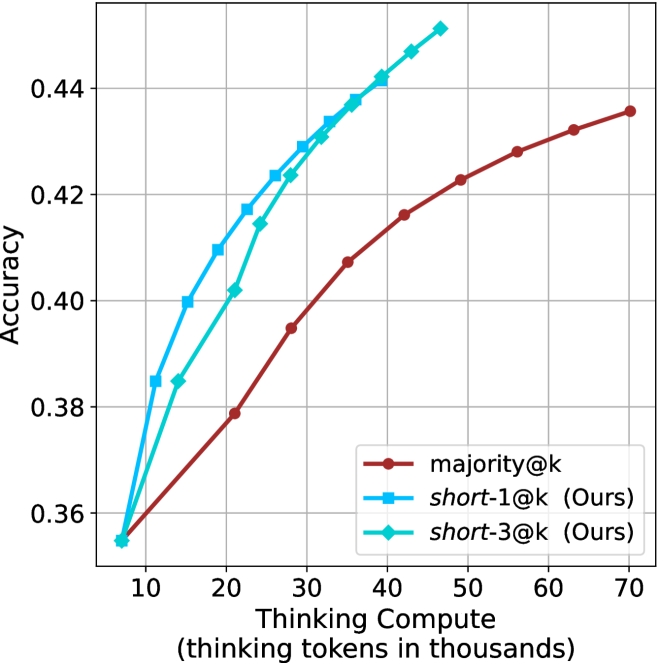
### Visual Description
## Line Chart: Accuracy vs. Thinking Compute
### Overview
The image is a line chart comparing the accuracy of three different models ("majority@k", "short-1@k (Ours)", and "short-3@k (Ours)") as a function of "Thinking Compute" (measured in thousands of thinking tokens). The chart displays how accuracy increases with increasing computational resources for each model.
### Components/Axes
* **X-axis:** "Thinking Compute (thinking tokens in thousands)". The axis ranges from approximately 5 to 70, with tick marks at intervals of 10 (10, 20, 30, 40, 50, 60, 70).
* **Y-axis:** "Accuracy". The axis ranges from 0.36 to 0.44, with gridlines at intervals of 0.02 (0.36, 0.38, 0.40, 0.42, 0.44).
* **Legend:** Located in the bottom-right corner of the chart.
* **Brown line with circle markers:** "majority@k"
* **Blue line with square markers:** "short-1@k (Ours)"
* **Cyan line with diamond markers:** "short-3@k (Ours)"
### Detailed Analysis
* **majority@k (Brown line with circle markers):** The line starts at approximately (8, 0.357) and increases to (70, 0.435). The slope decreases as the Thinking Compute increases, indicating diminishing returns in accuracy with more compute.
* **short-1@k (Ours) (Blue line with square markers):** The line starts at approximately (8, 0.355) and increases to (45, 0.445). The slope is steeper than "majority@k" at lower Thinking Compute values.
* **short-3@k (Ours) (Cyan line with diamond markers):** The line starts at approximately (8, 0.355) and increases to (45, 0.450). The slope is similar to "short-1@k (Ours)" at lower Thinking Compute values.
### Key Observations
* All three models show an increase in accuracy as Thinking Compute increases.
* The "short-1@k (Ours)" and "short-3@k (Ours)" models outperform "majority@k" at lower Thinking Compute values.
* The "short-3@k (Ours)" model has a slightly higher accuracy than "short-1@k (Ours)" for most of the observed range.
* The rate of accuracy increase diminishes for all models as Thinking Compute increases, suggesting a point of diminishing returns.
### Interpretation
The chart suggests that the "short-1@k (Ours)" and "short-3@k (Ours)" models are more efficient in terms of accuracy gained per unit of Thinking Compute, especially at lower compute levels, compared to the "majority@k" model. This could indicate that the "short-1@k" and "short-3@k" models are better optimized or more effective at utilizing computational resources. The diminishing returns observed for all models indicate that there is a limit to how much accuracy can be gained by simply increasing Thinking Compute. Further investigation might explore alternative optimization strategies or model architectures to overcome this limitation.
</details>
(b) R $1$ - $7$ B
Figure 23: Small models - thinking compute comparison over GPQA-D.
<details>
<summary>x78.png Details</summary>
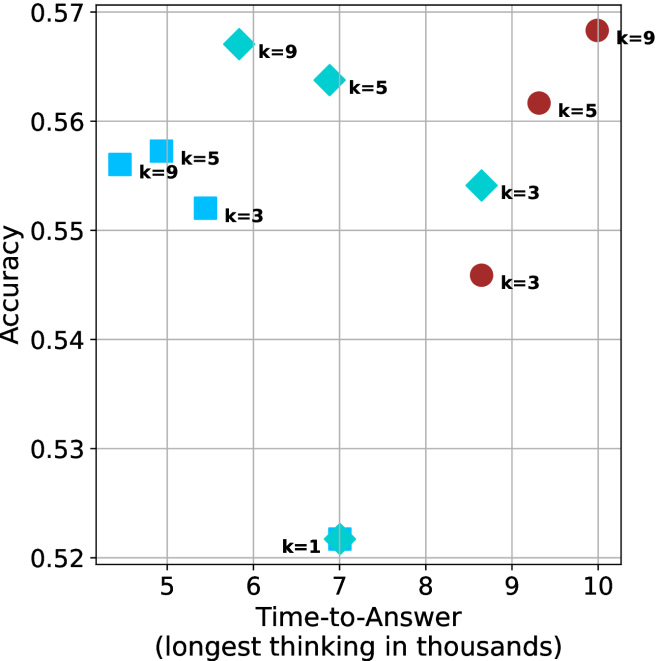
### Visual Description
## Scatter Plot: Accuracy vs. Time-to-Answer
### Overview
The image is a scatter plot showing the relationship between "Accuracy" and "Time-to-Answer" for different values of 'k'. The plot contains two distinct data series, represented by cyan and brown markers, with each point labeled with its corresponding 'k' value.
### Components/Axes
* **X-axis:** "Time-to-Answer (longest thinking in thousands)". The axis ranges from 5 to 10, with gridlines at each integer value.
* **Y-axis:** "Accuracy". The axis ranges from 0.52 to 0.57, with gridlines at intervals of 0.01.
* **Data Series:** Two data series are plotted:
* Cyan markers (squares, diamonds, and a star)
* Brown markers (circles)
* **Labels:** Each data point is labeled with "k=[value]", where [value] is the specific k-value for that point. The k-values are 1, 3, 5, and 9.
### Detailed Analysis
**Cyan Data Series:**
* **k=1:** Located at approximately (7, 0.52). The marker is a star.
* **k=3:** Located at approximately (5.5, 0.55). The marker is a square.
* **k=5:** Two points:
* Located at approximately (5.2, 0.56). The marker is a square.
* Located at approximately (7.5, 0.565). The marker is a diamond.
* **k=9:** Two points:
* Located at approximately (5, 0.555). The marker is a square.
* Located at approximately (7.2, 0.57). The marker is a diamond.
**Brown Data Series:**
* **k=3:** Located at approximately (8.5, 0.545). The marker is a circle.
* **k=5:** Located at approximately (9, 0.56). The marker is a circle.
* **k=9:** Located at approximately (10, 0.57). The marker is a circle.
### Key Observations
* For the cyan data series, there are multiple points for k=5 and k=9.
* The brown data series shows a clear upward trend: as Time-to-Answer increases, Accuracy also increases.
* The cyan data series does not show a clear trend.
### Interpretation
The scatter plot visualizes the relationship between the time taken to answer and the accuracy achieved, for different values of the parameter 'k'. The two data series (cyan and brown) likely represent different methods or configurations.
The brown data series suggests that increasing the "Time-to-Answer" (or "longest thinking") generally leads to higher accuracy. This could indicate that allowing more processing time results in better performance for that particular method.
The cyan data series is more complex. The multiple points for k=5 and k=9 suggest that there might be other factors influencing the accuracy besides just the 'k' value and "Time-to-Answer". The lack of a clear trend indicates that the relationship between these variables is not straightforward for this method. The different shapes (square, diamond, star) for the cyan data series may represent different sub-categories or experimental conditions, but this is not explicitly stated in the image.
</details>
(a) LN-Nano-8B
<details>
<summary>x79.png Details</summary>
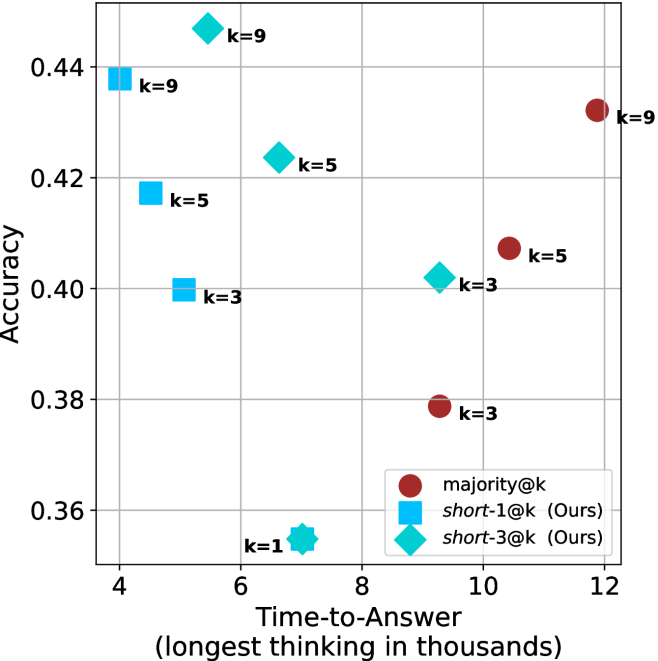
### Visual Description
## Scatter Plot: Accuracy vs. Time-to-Answer
### Overview
The image is a scatter plot comparing the accuracy of different methods (majority@k, short-1@k, and short-3@k) against the time-to-answer. The x-axis represents the time-to-answer in thousands, and the y-axis represents the accuracy. Each data point is labeled with a 'k' value, indicating a parameter associated with the method.
### Components/Axes
* **X-axis:** Time-to-Answer (longest thinking in thousands). Scale ranges from 4 to 12.
* **Y-axis:** Accuracy. Scale ranges from 0.36 to 0.44.
* **Legend (bottom-right):**
* Red circle: majority@k
* Blue square: short-1@k (Ours)
* Teal diamond: short-3@k (Ours)
* **Data Points:** Each point is labeled with its corresponding 'k' value.
### Detailed Analysis
**1. majority@k (Red Circles):**
* Trend: Accuracy increases with time-to-answer.
* k=3: Time-to-Answer ≈ 9, Accuracy ≈ 0.38
* k=5: Time-to-Answer ≈ 10, Accuracy ≈ 0.41
* k=9: Time-to-Answer ≈ 12, Accuracy ≈ 0.43
**2. short-1@k (Ours) (Blue Squares):**
* Trend: Accuracy increases with time-to-answer.
* k=3: Time-to-Answer ≈ 5, Accuracy ≈ 0.40
* k=5: Time-to-Answer ≈ 4.5, Accuracy ≈ 0.42
* k=9: Time-to-Answer ≈ 4, Accuracy ≈ 0.44
**3. short-3@k (Ours) (Teal Diamonds):**
* Trend: Accuracy increases with time-to-answer.
* k=1: Time-to-Answer ≈ 7, Accuracy ≈ 0.355
* k=3: Time-to-Answer ≈ 9, Accuracy ≈ 0.40
* k=5: Time-to-Answer ≈ 6.5, Accuracy ≈ 0.425
* k=9: Time-to-Answer ≈ 5.5, Accuracy ≈ 0.45
### Key Observations
* For the 'majority@k' method, increasing 'k' and time-to-answer results in higher accuracy.
* The 'short-1@k' method achieves relatively high accuracy with lower time-to-answer values.
* The 'short-3@k' method shows a similar trend to 'short-1@k', but with slightly different accuracy values for the same time-to-answer.
* The 'short-1@k' and 'short-3@k' methods (Ours) generally outperform the 'majority@k' method in terms of accuracy for a given time-to-answer.
### Interpretation
The scatter plot visualizes the trade-off between accuracy and time-to-answer for different methods. The 'short-1@k' and 'short-3@k' methods appear to be more efficient, achieving higher accuracy with less time-to-answer compared to the 'majority@k' method. The parameter 'k' seems to influence the accuracy of each method, with higher 'k' values generally leading to better accuracy. The plot suggests that the 'Ours' methods are a potentially better approach.
</details>
(b) R $1$ - $7$ B
Figure 24: Small models - time-to-answer comparison over GPQA-D.
Appendix E GPQA-D sequential results
The results for GPQA-D when accounting for sequential compute are presented in Figure ˜ 25.
<details>
<summary>x80.png Details</summary>
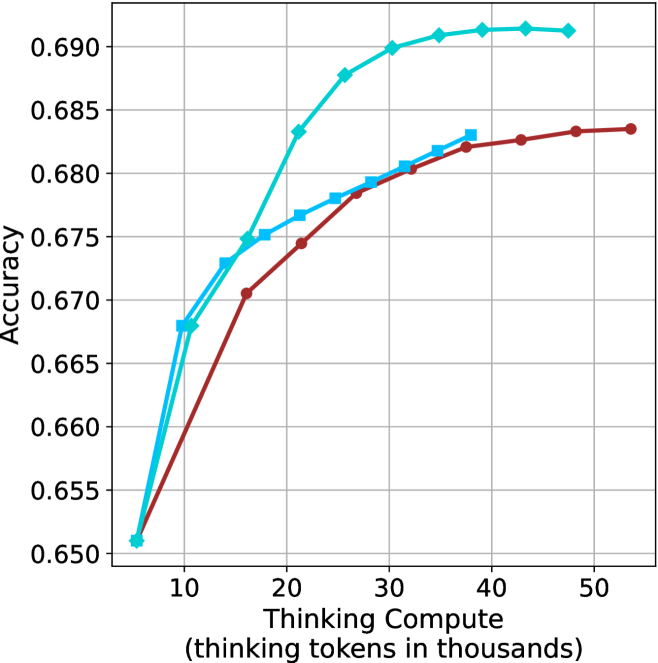
### Visual Description
## Line Chart: Accuracy vs. Thinking Compute
### Overview
The image is a line chart comparing accuracy against thinking compute (measured in thousands of thinking tokens). There are two data series plotted, represented by a light blue line with diamond markers and a darker red line with circle markers, and a light blue line with square markers. The chart shows how accuracy changes as thinking compute increases.
### Components/Axes
* **Y-axis (Accuracy):** Ranges from 0.650 to 0.690, with increments of 0.005.
* **X-axis (Thinking Compute):** Ranges from 0 to 50 (thousands of thinking tokens), with increments of 10.
* **Data Series 1:** Light blue line with diamond markers.
* **Data Series 2:** Dark red line with circle markers.
* **Data Series 3:** Light blue line with square markers.
* **Gridlines:** Present for both x and y axes.
### Detailed Analysis
* **Light Blue Line with Diamond Markers:**
* Trend: Initially increases rapidly, then plateaus around 0.691.
* Data Points:
* (7, 0.651)
* (15, 0.672)
* (23, 0.688)
* (35, 0.691)
* (45, 0.691)
* **Dark Red Line with Circle Markers:**
* Trend: Increases steadily, then begins to plateau around 0.684.
* Data Points:
* (7, 0.652)
* (18, 0.671)
* (28, 0.679)
* (38, 0.682)
* (52, 0.684)
* **Light Blue Line with Square Markers:**
* Trend: Increases steadily, then begins to plateau around 0.682.
* Data Points:
* (7, 0.652)
* (15, 0.675)
* (23, 0.678)
* (35, 0.682)
### Key Observations
* The light blue line with diamond markers achieves the highest accuracy, plateauing at approximately 0.691.
* The dark red line with circle markers has a slower initial increase in accuracy compared to the light blue line with diamond markers, and plateaus at a lower accuracy of approximately 0.684.
* The light blue line with square markers has a slower initial increase in accuracy compared to the light blue line with diamond markers, and plateaus at a lower accuracy of approximately 0.682.
* All lines show diminishing returns as thinking compute increases beyond 30,000 tokens.
### Interpretation
The chart illustrates the relationship between the amount of "thinking compute" used and the resulting accuracy of a model or system. The light blue line with diamond markers represents a configuration that initially benefits more from increased compute, achieving higher accuracy faster, but eventually plateaus. The dark red line with circle markers represents a configuration that benefits less initially, but still reaches a reasonable accuracy. The light blue line with square markers represents a configuration that benefits less initially, and reaches a lower accuracy. The diminishing returns observed suggest that there is a point beyond which increasing compute provides minimal improvement in accuracy, indicating a need for optimization or alternative strategies.
</details>
(a) LN-Super-49B
<details>
<summary>x81.png Details</summary>
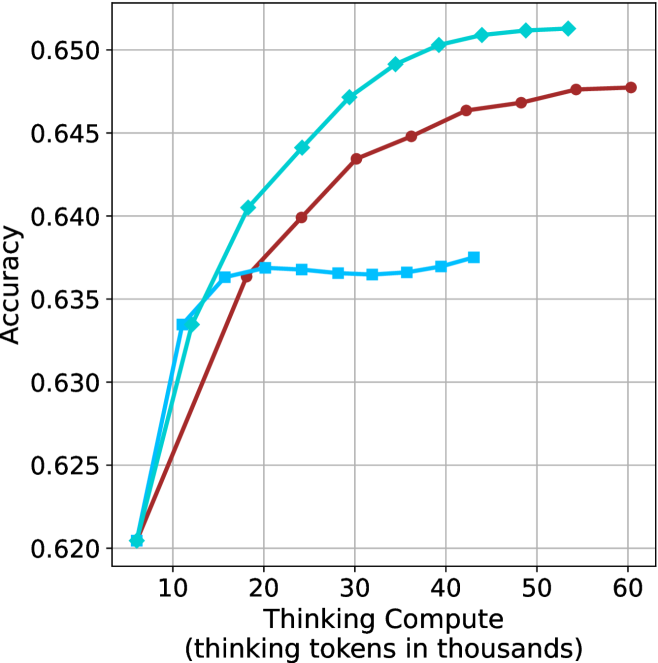
### Visual Description
## Line Chart: Accuracy vs. Thinking Compute
### Overview
The image is a line chart comparing the accuracy of three different models as a function of "Thinking Compute" (measured in thousands of tokens). The x-axis represents the amount of compute, ranging from approximately 5,000 to 60,000 tokens. The y-axis represents accuracy, ranging from 0.620 to 0.650. Three distinct lines, each representing a different model, are plotted on the chart.
### Components/Axes
* **X-axis:** "Thinking Compute (thinking tokens in thousands)". The axis ranges from 0 to 60, with tick marks at intervals of 10.
* **Y-axis:** "Accuracy". The axis ranges from 0.620 to 0.650, with tick marks at intervals of 0.005.
* **Data Series:** Three data series are plotted, each represented by a different color and marker:
* **Light Blue (Diamond markers):** This line generally slopes upward, indicating increasing accuracy with increasing compute.
* **Brown (Circle markers):** This line also slopes upward, but appears to plateau at higher compute values.
* **Light Blue (Square markers):** This line remains relatively flat after an initial increase, suggesting minimal improvement in accuracy with increasing compute beyond a certain point.
### Detailed Analysis
**Light Blue (Diamond markers):**
* At 8, the accuracy is approximately 0.620.
* At 20, the accuracy is approximately 0.641.
* At 30, the accuracy is approximately 0.647.
* At 40, the accuracy is approximately 0.651.
* At 50, the accuracy is approximately 0.652.
* At 60, the accuracy is approximately 0.652.
* Trend: The line slopes upward, indicating increasing accuracy with increasing compute.
**Brown (Circle markers):**
* At 8, the accuracy is approximately 0.620.
* At 20, the accuracy is approximately 0.637.
* At 30, the accuracy is approximately 0.644.
* At 40, the accuracy is approximately 0.646.
* At 50, the accuracy is approximately 0.648.
* At 60, the accuracy is approximately 0.648.
* Trend: The line slopes upward, but appears to plateau at higher compute values.
**Light Blue (Square markers):**
* At 8, the accuracy is approximately 0.620.
* At 20, the accuracy is approximately 0.637.
* At 30, the accuracy is approximately 0.637.
* At 40, the accuracy is approximately 0.638.
* Trend: The line remains relatively flat after an initial increase, suggesting minimal improvement in accuracy with increasing compute beyond a certain point.
### Key Observations
* The light blue line with diamond markers consistently achieves the highest accuracy across all compute values.
* The brown line with circle markers shows a similar initial increase in accuracy to the light blue line, but plateaus at a lower accuracy level.
* The light blue line with square markers plateaus early, indicating that increasing compute does not significantly improve its accuracy.
* All three models start at approximately the same accuracy level (0.620) with minimal compute.
### Interpretation
The chart demonstrates the relationship between "Thinking Compute" and the accuracy of three different models. The light blue line with diamond markers appears to be the most effective model, as it consistently achieves the highest accuracy with increasing compute. The brown line with circle markers shows diminishing returns with increasing compute, while the light blue line with square markers plateaus early, suggesting it is not well-suited for higher compute values. The data suggests that the choice of model significantly impacts the accuracy achieved for a given amount of compute. The initial convergence of all models at low compute suggests a baseline level of performance, with the models diverging as compute increases, highlighting their varying capabilities.
</details>
(b) R $1$ - $32$ B
<details>
<summary>x82.png Details</summary>
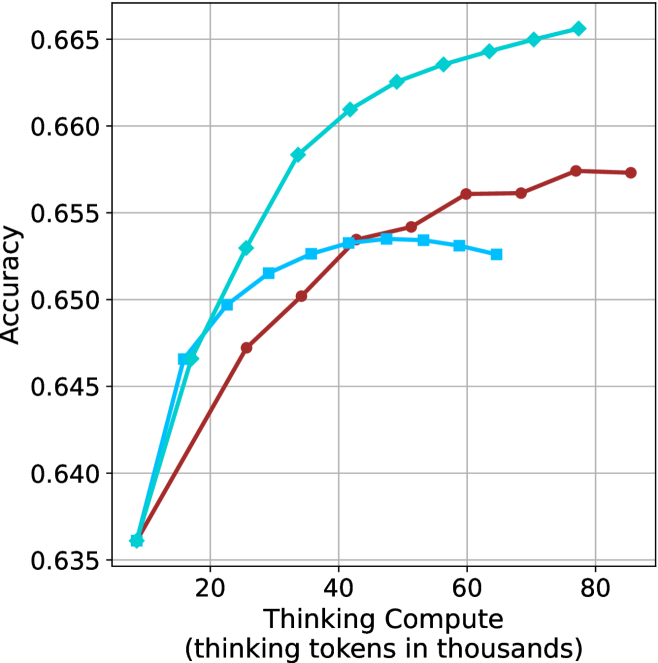
### Visual Description
## Line Chart: Accuracy vs. Thinking Compute
### Overview
The image is a line chart comparing the accuracy of different models as a function of "Thinking Compute" (measured in thousands of tokens). There are three data series represented by lines of different colors (cyan, blue, and brown), each showing how accuracy changes with increasing compute.
### Components/Axes
* **X-axis:** "Thinking Compute (thinking tokens in thousands)". The axis ranges from approximately 0 to 80 in increments of 20.
* **Y-axis:** "Accuracy". The axis ranges from 0.635 to 0.665 in increments of 0.005.
* **Data Series:**
* Cyan line with diamond markers.
* Blue line with square markers.
* Brown line with circle markers.
* **Gridlines:** Present in both horizontal and vertical directions.
### Detailed Analysis
* **Cyan Line (Diamond Markers):** This line shows a generally upward trend, indicating increasing accuracy with increasing thinking compute.
* At x=10, y ≈ 0.636
* At x=20, y ≈ 0.647
* At x=30, y ≈ 0.653
* At x=40, y ≈ 0.661
* At x=50, y ≈ 0.663
* At x=60, y ≈ 0.664
* At x=70, y ≈ 0.665
* At x=80, y ≈ 0.666
* **Blue Line (Square Markers):** This line initially increases, peaks around x=40, and then decreases slightly.
* At x=10, y ≈ 0.636
* At x=20, y ≈ 0.652
* At x=30, y ≈ 0.653
* At x=40, y ≈ 0.654
* At x=50, y ≈ 0.653
* At x=60, y ≈ 0.652
* **Brown Line (Circle Markers):** This line shows an upward trend, plateauing after x=60.
* At x=10, y ≈ 0.636
* At x=20, y ≈ 0.647
* At x=30, y ≈ 0.650
* At x=40, y ≈ 0.653
* At x=50, y ≈ 0.656
* At x=60, y ≈ 0.656
* At x=70, y ≈ 0.657
* At x=80, y ≈ 0.657
### Key Observations
* The cyan line consistently outperforms the other two in terms of accuracy across the range of thinking compute.
* The blue line reaches a peak accuracy and then declines, suggesting a point of diminishing returns or potential overfitting.
* The brown line shows a steady increase in accuracy, but plateaus at higher compute values.
### Interpretation
The chart suggests that increasing "Thinking Compute" generally improves model accuracy, but the extent of improvement varies depending on the model (represented by the different colored lines). The cyan model benefits most from increased compute, while the blue model shows a point where further compute does not lead to better accuracy, and may even decrease it. The brown model shows diminishing returns at higher compute levels. This information is valuable for determining the optimal allocation of computational resources for each model to achieve the best performance.
</details>
(c) QwQ-32B
<details>
<summary>x83.png Details</summary>
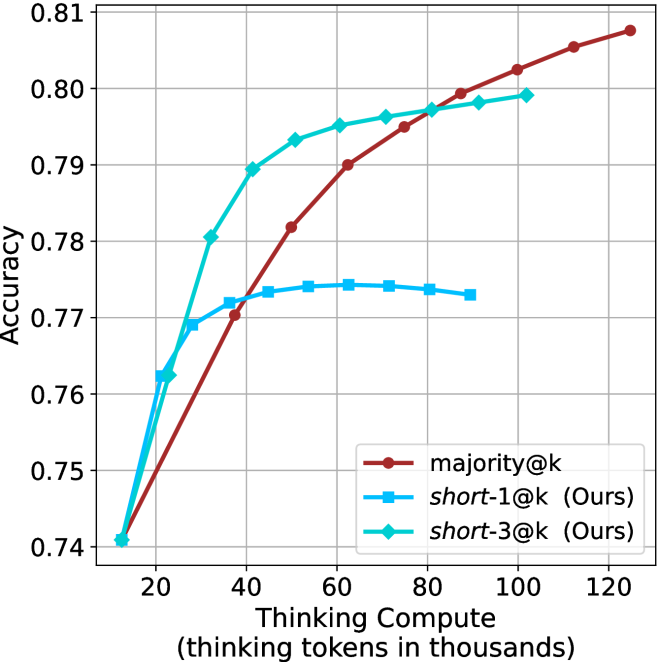
### Visual Description
## Line Chart: Accuracy vs. Thinking Compute
### Overview
The image is a line chart comparing the accuracy of three different models ("majority@k", "short-1@k (Ours)", and "short-3@k (Ours)") as a function of "Thinking Compute" (measured in thousands of thinking tokens). The chart displays accuracy on the y-axis, ranging from 0.74 to 0.81, and thinking compute on the x-axis, ranging from 20,000 to 120,000 tokens.
### Components/Axes
* **X-axis:** "Thinking Compute (thinking tokens in thousands)". The axis ranges from 20 to 120 in increments of 20.
* **Y-axis:** "Accuracy". The axis ranges from 0.74 to 0.81 in increments of 0.01.
* **Legend:** Located in the bottom-right corner of the chart.
* **Brown line with circle markers:** "majority@k"
* **Light blue line with square markers:** "short-1@k (Ours)"
* **Teal line with diamond markers:** "short-3@k (Ours)"
### Detailed Analysis
* **majority@k (Brown line with circle markers):**
* Trend: The line generally slopes upward, indicating increasing accuracy with increasing thinking compute.
* Data Points:
* (20, 0.74)
* (40, 0.77)
* (60, 0.788)
* (80, 0.798)
* (100, 0.805)
* (120, 0.809)
* **short-1@k (Ours) (Light blue line with square markers):**
* Trend: The line increases initially, plateaus, and then slightly decreases.
* Data Points:
* (20, 0.74)
* (40, 0.772)
* (60, 0.774)
* (80, 0.774)
* (100, 0.772)
* **short-3@k (Ours) (Teal line with diamond markers):**
* Trend: The line increases and then plateaus.
* Data Points:
* (20, 0.74)
* (40, 0.78)
* (60, 0.794)
* (80, 0.796)
* (100, 0.799)
### Key Observations
* All three models start with the same accuracy at a thinking compute of 20,000 tokens (0.74).
* The "majority@k" model consistently increases in accuracy as thinking compute increases.
* The "short-1@k (Ours)" model plateaus and slightly decreases after a certain point.
* The "short-3@k (Ours)" model plateaus after an initial increase.
* The "majority@k" model has the highest accuracy at the highest thinking compute (120,000 tokens).
### Interpretation
The chart compares the performance of three different models as a function of thinking compute. The "majority@k" model appears to benefit most from increased thinking compute, as its accuracy consistently increases. The "short-1@k (Ours)" and "short-3@k (Ours)" models show diminishing returns, with accuracy plateauing or even decreasing after a certain point. This suggests that the "majority@k" model may be more efficient or better suited for higher levels of thinking compute compared to the other two models. The "short-3@k (Ours)" model performs better than "short-1@k (Ours)" overall.
</details>
(d) R1-670B
Figure 25: Comparing different methods for the GPQA-D benchmark under sequential compute.
Appendix F Backtracks under controlled length results
Below we present the results for the backtrack count under controlled length scenarios (Section ˜ 5.2). The results over the math benchmarks are presented in Table ˜ 8 and for GPQA-D in Table ˜ 9.
Table 8: Average number of backtracks for correct (C), incorrect (IC) answers, binned by thinking length. Results are averaged across math benchmarks.
| Model Thinking Tokens | 0-5k | 5-10k | 10-15k | 15-20k | 20-25k | 25-30k | 30-32k |
| --- | --- | --- | --- | --- | --- | --- | --- |
| C/IC | C/IC | C/IC | C/IC | C/IC | C/IC | C/IC | |
| LN-Super-49B | 35/ 0 64 | 100/133 | 185/236 | 261/299 | 307/320 | 263/323 | 0 – 0 / 0 304 |
| R1-32B | 29/ 0 74 | 0 88/166 | 171/279 | 244/351 | 334/370 | 268/355 | 326/1006 |
| QwQ-32B | 50/148 | 120/174 | 194/247 | 285/353 | 354/424 | 390/476 | 551/ 0 469 |
| R1-670B | 58/ 0 27 | 100/ 0 86 | 143/184 | 222/203 | 264/254 | 309/289 | 352/ 0 337 |
Table 9: Average number of backtracks for correct (C), incorrect (IC) answers, binned by thinking length. Results are reported for GPQA-D.
| Model Thinking Tokens | 0-5k | 5-10k | 10-15k | 15-20k | 20-25k | 25-30k | 30-32k |
| --- | --- | --- | --- | --- | --- | --- | --- |
| C/IC | C/IC | C/IC | C/IC | C/IC | C/IC | C/IC | |
| LN-Super-49B | 38/52 | 175/164 | 207/213 | 0 – 0 / 0 – 0 | 0 – 0 / 0 – 0 | 0 – 0 / 0 – 0 | 0 – 0 / 0 – 0 |
| R1-32B | 39/54 | 194/221 | 301/375 | 525/668 | 0 – 0 / 0 – 0 | 0 – 0 / 0 – 0 | 0 – 0 / 0 – 0 |
| QwQ-32B | 65/71 | 169/178 | 333/358 | 378/544 | 357/703 | 0 – 0 / 0 – 0 | 0 – 0 / 0 – 0 |
| R1-670B | 44/72 | 0 93/155 | 178/232 | 297/300 | 341/341 | 463/382 | 553/477 |
Appendix G Further details and results for finetuning experiments
The generation process of all three variants of S $1$ uses the hyperparameters detailed in Section ˜ 3.1. Figure ˜ 26 shows the thinking token count histograms for the three variants of the S1 dataset (short/long/random) presented in Section ˜ 6.
As for finetuning, we follow the S $1$ approach, and finetune the Qwen- $2.5$ - $7$ B-Instruct and Qwen- $2.5$ - $32$ B-Instruct models on the three S $1$ variants. The finetuning hyperparameters are consistent with those used for the S $1.1$ model (Muennighoff et al., 2025), and training is conducted on $32$ H $100$ GPUs. We match the number of gradient steps as in used for S1.1. The resulting models are evaluated using the benchmarks and experimental setup described in Section ˜ 3.1. Specifically, for each model we generate 20 answers per example, and report average accuracy.
Results for the 7B version model are presented in Table ˜ 10.
<details>
<summary>x84.png Details</summary>
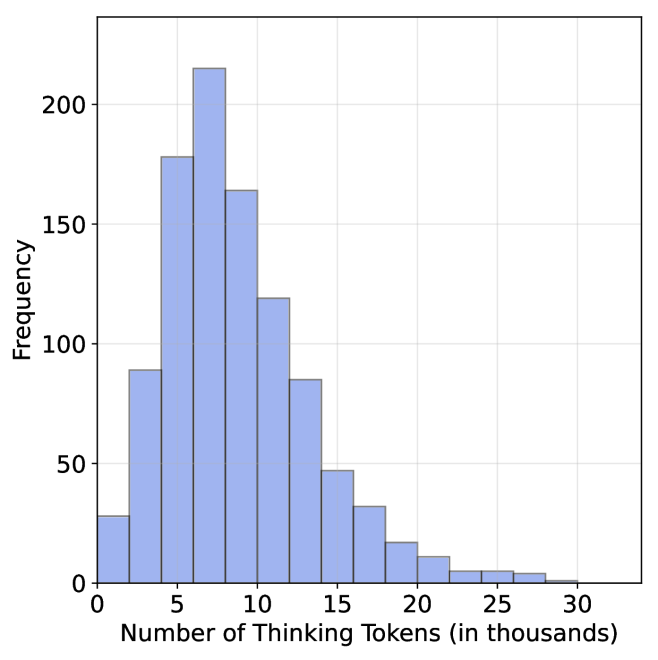
### Visual Description
## Histogram: Distribution of Thinking Tokens
### Overview
The image is a histogram showing the distribution of "Thinking Tokens" in thousands. The x-axis represents the number of tokens, and the y-axis represents the frequency of occurrence. The histogram bars are light blue.
### Components/Axes
* **X-axis:** "Number of Thinking Tokens (in thousands)". The axis ranges from 0 to 30, with tick marks at intervals of 5 (0, 5, 10, 15, 20, 25, 30).
* **Y-axis:** "Frequency". The axis ranges from 0 to 200, with tick marks at intervals of 50 (0, 50, 100, 150, 200).
### Detailed Analysis
The histogram shows the frequency distribution of the number of thinking tokens. The data appears to be right-skewed, with the highest frequency occurring between 5,000 and 10,000 tokens.
Here's a breakdown of the approximate frequency for each bin:
* 0-5k: Approximately 90
* 5-10k: Approximately 215
* 10-15k: Approximately 165
* 15-20k: Approximately 120
* 20-25k: Approximately 85
* 25-30k: Approximately 50
* 30-35k: Approximately 30
* 35-40k: Approximately 15
* 40-45k: Approximately 10
* 45-50k: Approximately 5
### Key Observations
* The distribution is unimodal, with a peak between 5,000 and 10,000 tokens.
* The frequency decreases as the number of tokens increases beyond 10,000.
* There are relatively few instances with a high number of thinking tokens.
### Interpretation
The histogram suggests that the majority of observations have a relatively low number of "Thinking Tokens". The right skew indicates that while most observations fall within a lower range, there are some instances with significantly higher token counts, pulling the tail of the distribution to the right. This could indicate that some processes or entities require or generate a much larger number of tokens compared to the average. The data could represent the distribution of computational resources used by different tasks, the number of words used in different documents, or any other scenario where "Thinking Tokens" are a relevant metric.
</details>
(a) S1-short
<details>
<summary>x85.png Details</summary>
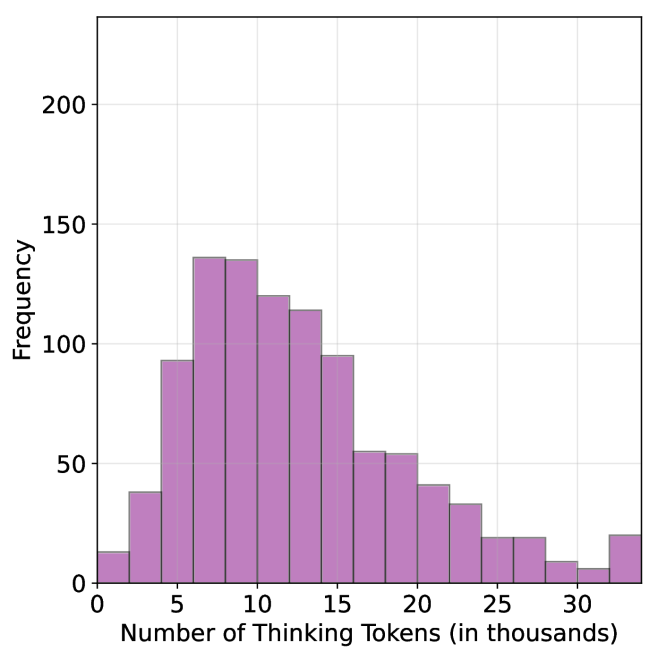
### Visual Description
## Histogram: Distribution of Thinking Tokens
### Overview
The image is a histogram showing the distribution of "Thinking Tokens" in thousands. The x-axis represents the number of thinking tokens, and the y-axis represents the frequency (count) of occurrences. The bars are light purple.
### Components/Axes
* **X-axis:** Number of Thinking Tokens (in thousands). The axis ranges from 0 to 30, with tick marks at intervals of 5 (0, 5, 10, 15, 20, 25, 30).
* **Y-axis:** Frequency. The axis ranges from 0 to 200, with tick marks at intervals of 50 (0, 50, 100, 150, 200).
* **Bars:** Light purple, representing the frequency of each range of thinking tokens.
### Detailed Analysis
Here's a breakdown of the approximate frequency for each range of thinking tokens:
* **0-2.5:** Approximately 12
* **2.5-5:** Approximately 38
* **5-7.5:** Approximately 92
* **7.5-10:** Approximately 135
* **10-12.5:** Approximately 120
* **12.5-15:** Approximately 112
* **15-17.5:** Approximately 90
* **17.5-20:** Approximately 55
* **20-22.5:** Approximately 42
* **22.5-25:** Approximately 32
* **25-27.5:** Approximately 18
* **27.5-30:** Approximately 10
* **30-32.5:** Approximately 22
### Key Observations
* The distribution is unimodal and skewed to the right.
* The highest frequency occurs between 7.5 and 10 thousand thinking tokens.
* The frequency decreases as the number of thinking tokens increases beyond 10 thousand, with a slight increase at the end.
### Interpretation
The histogram suggests that the most common number of "Thinking Tokens" is between 7,500 and 10,000. The right skew indicates that while most instances have a relatively low number of tokens, there are some instances with a significantly higher number of tokens, pulling the average to the right. The slight increase at the end (30-32.5) could indicate a secondary, smaller group with a high number of tokens. The data demonstrates the distribution of "Thinking Tokens" and highlights the typical range and the presence of outliers with higher token counts.
</details>
(b) S1-random
<details>
<summary>x86.png Details</summary>
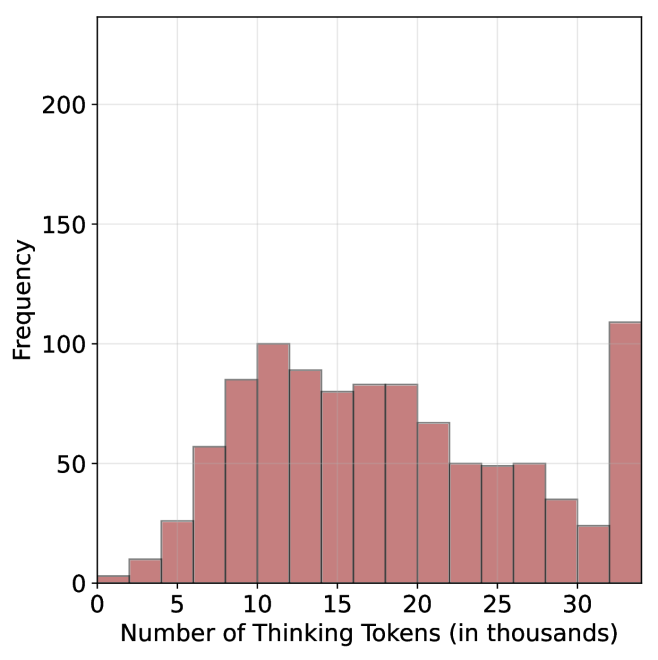
### Visual Description
## Histogram: Distribution of Thinking Tokens
### Overview
The image is a histogram showing the distribution of "Thinking Tokens" in thousands. The x-axis represents the number of thinking tokens, and the y-axis represents the frequency of occurrence. The histogram bars are a reddish-brown color.
### Components/Axes
* **X-axis:** "Number of Thinking Tokens (in thousands)". The axis ranges from approximately 0 to 35, with tick marks at intervals of 5 (5, 10, 15, 20, 25, 30).
* **Y-axis:** "Frequency". The axis ranges from 0 to 200, with tick marks at intervals of 50 (50, 100, 150, 200).
* **Bars:** The histogram consists of reddish-brown bars representing the frequency of each range of thinking tokens.
### Detailed Analysis
Here's a breakdown of the approximate frequency for each range of thinking tokens:
* **0-5:** Frequency is approximately 10.
* **5-7.5:** Frequency is approximately 60.
* **7.5-10:** Frequency is approximately 85.
* **10-12.5:** Frequency is approximately 100.
* **12.5-15:** Frequency is approximately 90.
* **15-17.5:** Frequency is approximately 80.
* **17.5-20:** Frequency is approximately 80.
* **20-22.5:** Frequency is approximately 70.
* **22.5-25:** Frequency is approximately 50.
* **25-27.5:** Frequency is approximately 50.
* **27.5-30:** Frequency is approximately 35.
* **30-32.5:** Frequency is approximately 25.
* **32.5-35:** Frequency is approximately 110.
### Key Observations
* The distribution is somewhat skewed to the right, with a peak around 10-12.5 thousand thinking tokens.
* There is a significant increase in frequency at the highest range (32.5-35 thousand tokens).
### Interpretation
The histogram suggests that the most common number of "Thinking Tokens" falls between 10,000 and 12,500. The spike at the end (32.5-35 thousand) indicates a secondary, significant group with a much higher number of tokens. This could represent an outlier group or a different category within the data. The overall distribution shows a moderate level of variability in the number of thinking tokens.
</details>
(c) S1-long
Figure 26: Thinking token count histograms for S1-short, S1-random and S1-long datasets.
Table 10: Results for our finetuned models over the S $1$ variants using Qwen-2.5-7B-Instruct: S $1$ -short/long/random.
| | GPQA-D | AIME 2024 | AIME 2025 | HMMT | Math Average | | | | | |
| --- | --- | --- | --- | --- | --- | --- | --- | --- | --- | --- |
| Thinking Tokens $\downarrow$ | Acc. $\uparrow$ | Thinking Tokens $\downarrow$ | Acc. $\uparrow$ | Thinking Tokens $\downarrow$ | Acc. $\uparrow$ | Thinking Tokens $\downarrow$ | Acc. $\uparrow$ | Thinking Tokens $\downarrow$ | Acc. $\uparrow$ | |
| S1-random | 14095 | 39.1 | 25207 | 22.0 | 23822 | 22.0 | 25028 | 10.8 | 24686 | 18.2 |
| S1-long | 15528 $(+10.2\%)$ | 38.5 | 26210 | 21.7 | 24395 | 19.5 | 26153 | 9.2 | 25586 $(+3.7\%)$ | 16.8 |
| S1-short | 13093 $(-7.1\%)$ | 40.3 | 24495 | 22.0 | 21945 | 20.8 | 23329 | 11.2 | 23256 $(-5.8\%)$ | 18.0 |