# : Guiding the Creation of Multi-agent Workflows with Design Space Visualization as a Thinking Scaffold
**Authors**: Pan Hao0009-0006-4473-, Dongyeop Kang0000-0002-9021-, Nicholas Hinds, andQianwen Wang0000-0002-1825-
1729 Research Applications Pan Hao, Dongyeop Kang, Nicholas Hinds, and Qianwen Wang are with the University of Minnesota, Twin Cities, MN, USA. E-mail: {pan00342, dongyeop, hinds084, qianwen}@umn.edu
## Abstract
Multi-agent workflows have become an effective strategy for tackling complicated tasks by decomposing them into multiple sub-tasks and assigning them to specialized agents. However, designing optimal workflows remains challenging due to the vast and intricate design space. Current practices rely heavily on the intuition and expertise of practitioners, often resulting in design fixation or an unstructured, time-consuming exploration of trial-and-error. To address these challenges, this work introduces , an interactive visualization tool to facilitate the creation of multi-agent workflow through i) a structured visual exploration of the design space and ii) in-situ guidance informed by established design patterns. Based on formative studies and literature review, organizes the workflow design process into three hierarchical levels (, task planning, agent assignment, and agent optimization), ranging from abstract to concrete. This structured visual exploration enables users to seamlessly move from high-level planning to detailed design decisions and implementations, while comparing alternative solutions across multiple performance metrics. Additionally, drawing from established workflow design patterns, provides context-aware, in-situ suggestions at each level as users navigate the design space, enhancing the workflow creation process with practical guidance. Use cases and user studies demonstrate the usability and effectiveness of , while also yielding valuable insights into how practitioners explore design spaces and leverage guidance during workflow development.
keywords: LLM workflows, Multi-agent Workflows, design space, hierarchical visualization
<details>
<summary>x1.png Details</summary>
### Visual Description
## Flowchart: Workflows for Generating Data-Driven Visual Storytelling
### Overview
The diagram illustrates a multi-stage workflow for creating data-driven visual storytelling, divided into three primary components:
1. **Design Space Overview** (A1-A2): Explores configuration options for workflows
2. **Workflow Components** (B1-B3): Defines core processes and agent interactions
3. **Collaboration Patterns** (C1-C3): Shows agent coordination strategies
### Components/Axes
**A1: Design Space Overview**
- Flowchart with 4 main flows (Flow 1-4)
- Subflows labeled with numeric codes (e.g., 2-1a, 3-2b)
- X-axis: "# subtask" (dropdown menu)
- Y-axis: "# agents" (dropdown menu)
- Legend elements: S (purple), D (red), RF (orange)
**A2: Configuration Grid**
- X-axis: "# subtask" (dropdown)
- Y-axis: "# agents" (dropdown)
- Grid cells show combinations of subtasks/agents
- Latency indicator present
**B1: Topic Selector**
- Proposes candidate story topics based on dataset
- Connects to Visualize Distribution and Insight Integration
**B2: Lead with Curiosity**
- Task: Propose candidate story topics
- Agent roles: Scientist (logical/scientific), Journalist (emotion-evoking)
- Aggregation: Select topic from two agents
**B3: Visualization Interface**
- Shows multiple visualization panels
- Includes data points and connection lines
**C1: Collaboration Patterns**
- Sequential: Linear workflow (□→□→□)
- Parallel: Branching workflow (□→□→□)
**C2: Reflection/Discussion**
- Reflection: Single agent self-feedback (□↔□)
- Discussion: Multi-agent dialogue (□↔□↔□)
**C3: Tool Use**
- Tool Use: Visualization tools (📊)
- Prompting: Text generation (💬)
- Data Retrieval: Database access (💾)
### Detailed Analysis
**A1 Flow Details**
- Flow 1: 2-1a, 2-1b, 2-2a
- Flow 2: 2-2
- Flow 3: 3-1, 3-2, 3-3, 3-2b, 3-2c
- Flow 4: 4-1, 4-2, 4-2a
**A2 Grid Observations**
- Cells show varying combinations of subtasks/agents
- No numerical values visible in grid cells
- Latency indicator suggests performance considerations
**B2 Agent Configuration**
- Scientist agent: "more logical and scientific"
- Journalist agent: "more emotion-evoking and engaging"
- Aggregation requires selecting from two agents
**C1-C3 Pattern Details**
- Sequential: 3-step linear process
- Parallel: 3-branch concurrent process
- Reflection: 2-agent self-feedback loop
- Discussion: 3-agent dialogue network
- Redundant: 4-agent verification chain
- Supervision: 3-agent oversight structure
### Key Observations
1. **Iterative Design**: Multiple flow variations suggest emphasis on adaptability
2. **Agent Specialization**: Distinct roles for different cognitive strengths
3. **Collaboration Complexity**: Ranges from simple (2-agent) to complex (4-agent) interactions
4. **Visualization Integration**: Multiple visualization types connected to data sources
5. **Redundancy Mechanisms**: Built-in verification through multiple agent perspectives
### Interpretation
This workflow diagram demonstrates a sophisticated approach to data-driven storytelling that:
- Balances exploration (multiple flow options) with structured execution
- Leverages specialized agent capabilities for different storytelling aspects
- Implements multi-layered collaboration patterns to enhance output quality
- Incorporates iterative refinement through reflection and discussion
- Uses visualization as both output and intermediate processing step
The configuration grid (A2) suggests that optimal results may depend on finding the right balance between subtask complexity and agent count, though specific performance metrics aren't provided. The collaboration patterns indicate a progression from basic to advanced coordination methods, implying scalability for different project needs.
</details>
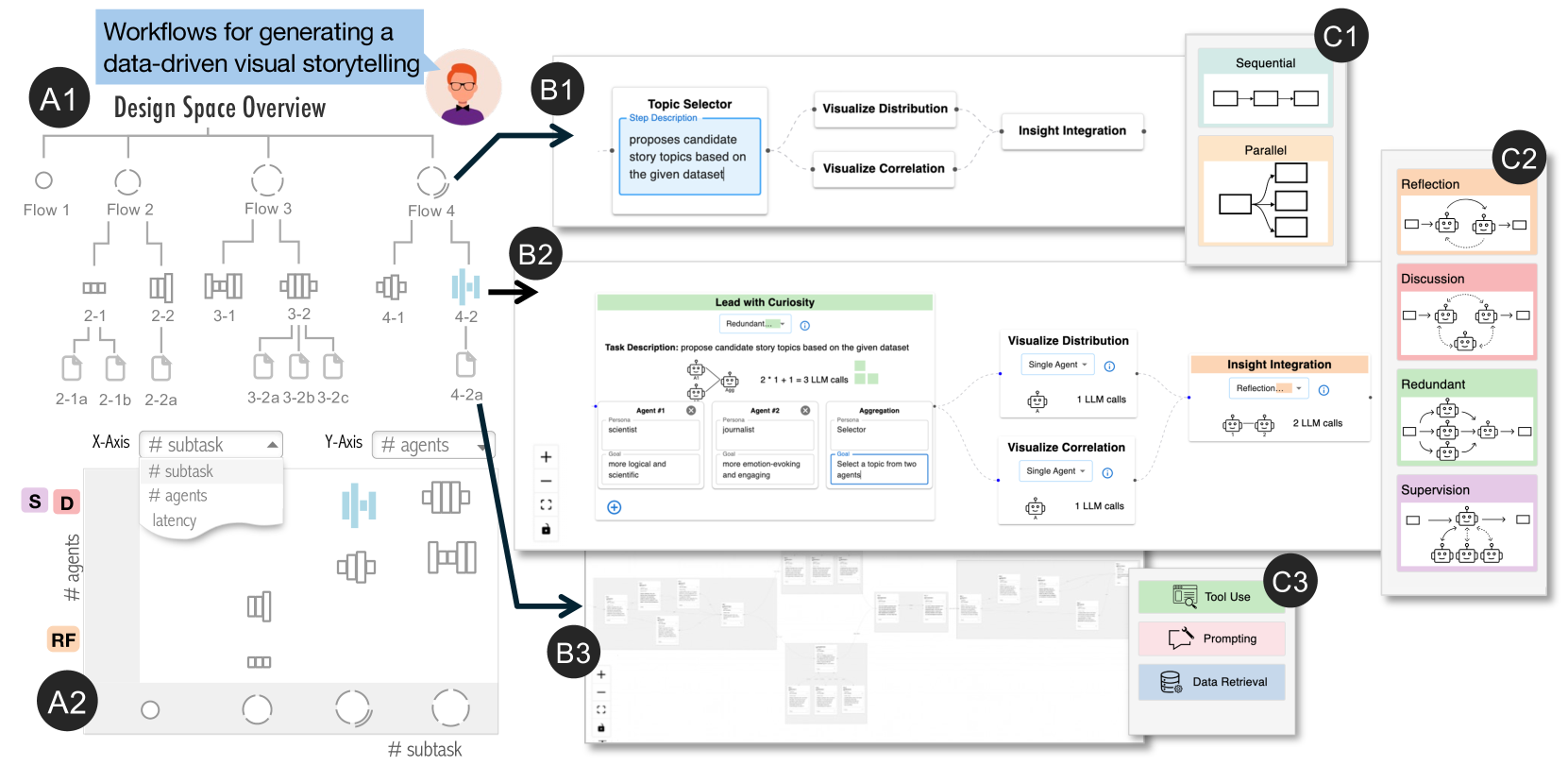
facilitates the creation of multi-agent workflows through structured, guided visual exploration of the design space. This is achieved by coordinating a hierarchical tree view (A1) and a scatter plot (A2), both of which use a novel glyph design to represent each workflow’s computational cost and level of abstraction. Users can select a workflow for detailed inspection in the Canvas View (B1-B3), which supports semantic zooming that reveals more abstract representations greater detail within more abstract representations depending on the zoom level. Additionally, in-situ suggestions based on well-established design patterns are provided to guide users as they navigate the design space (C1-C3).
Introduction
Recently, multi-agent workflows have emerged as a promising solution for complex tasks by decomposing them into subtasks, each handled by specialized LLM agents that collaboratively reason and execute tasks [5, 4]. These multi-agent workflows have demonstrated remarkable capabilities across various applications, such as software development, societal simulation, and even scientific discovery [19, 38]. Notably, Google’s AI co-scientist [17], a multi-agent LLM workflow system for scientific discovery, successfully uncovered a novel gene transfer mechanism, reproducing unpublished experimental findings [39].
However, designing effective multi-agent workflows remains a considerable challenge due to the vast design space. AI researchers and practitioners must balance critical trade-offs between performance, latency, and computational cost [18, 57]. Despite recent advancements in automatic task decomposition and agent collaboration (e.g., Manus AI [13]), the over-reliance on LLMs for workflow generation not only compromises transparency and controllability but also often results in suboptimal solutions [9]. Rather than relying on fully automated methods, AI researchers and practitioners typically draw on their own intuition and domain expertise, leveraging well-established human problem-solving strategies [57, 18].
Current studies predominantly focus on implementation support, helping users (, AI researchers and practitioners) translate existing workflow ideas into executable systems, but offer limited assistance for the exploratory design processes [52, 24]. However, people’s problem-solving approaches are heavily influenced by the available tools, which makes certain actions more accessible while rendering others difficult or impractical [20]. In the context of multi-agent workflows, the affordances of existing tools have similarly shaped common practices in ways that discourage broad exploration. Users often begin with a rough idea of the workflow and move directly to implementation, a process that tends to bypass divergent thinking and leads to several limitations: First, early commitment to a specific workflow structure can restrict exploration of alternative solutions that might perform better within the broader design space. This contradicts the widely accepted divergence-before-convergence principle [8], leading to fixation on suboptimal designs. Second, by starting with complete implementations, users skip over abstraction layers in the design space. When performance issues arise, they tend to make superficial adjustments (e.g., tweaking agent prompts) rather than revisiting fundamental design decisions (e.g., task decomposition strategies) where greater improvements could be made.
Recent studies attempted to address this gap by introducing design patterns specifically tailored to multi-agent workflows. Design patterns represent reusable, adaptable solutions proven effective across various contexts. For example, Liu et al.. [57] identified 18 agent design patterns (e.g., self-reflection, voting) through an extensive review of 57 multi-agent studies. Grunde-McLaughlin et al.. [18] summarized five architecture workflow building blocks (, sequential, branching, redundant, dynamic, communicative) by borrowing lessons about task decomposition and validation from crowdsourcing. Even though these studies provide valuable guidance, these patterns remain disconnected from practical tools and environments, requiring AI researchers and practitioners to actively seek out, efficiently learn, and manually apply them during the design process.
To address these challenges, we propose , an interactive visualization tool to facilitate AI researchers and practitioners in creating effective multi-agent workflows ( : Guiding the Creation of Multi-agent Workflows with Design Space Visualization as a Thinking Scaffold). not only provides an intuitive visual interface for building workflows, but, more importantly, actively scaffolds users’ design thinking by explicitly visualizing the design space and providing in-situ design guidance. Based on formative studies and literature review, organizes the workflow design process into three levels (, task planning, agent assignment, and agent optimization), progressing from abstract concepts to concrete implementation. A structured visual exploration of the design space is enabled through the coordination of a hierarchical tree view and a scatter plot. Within this coordinated visualization, we introduce a novel glyph design that encodes both the abstraction level and computational cost of each solution. Users can select any solution for closer inspection in the Canvas View, where it is visualized as a node-link diagram with semantic zooming to reveal increasing detail as users zoom in. Additionally, drawing from established workflow design patterns, provides contextually relevant in-situ suggestions at each level as users navigate the design space, illustrating current practice to the workflow creation process. Evaluations showed that enabled users to create workflows more efficiently, explore a wider range of design alternatives, and produce higher-quality outputs compared to the baseline system.
Main contributions of this paper include:
- A structured characterization and visualization of the design space for multi-agent workflows, augmented with in-situ suggestions of relevant design patterns.
- , an interactive visualization tool that guides users in designing and creating multi-agent workflows.
- Case studies and user studies demonstrating the effectiveness and usability of the proposed approach, along with insights into how users leverage guidance to explore and refine workflow designs.
## 1 Related Work
### 1.1 Creating Multi-agent Workflows
Existing research on multi-agent workflow creation can be categorized into three main areas: workflow authoring frameworks, empirical design guidelines, and automated generation methods.
Workflow authoring frameworks provide programming libraries or visualization tools for simplifying multi-agent workflow creation. Programming frameworks, such as LangGraph [24] and AutoGen [52], offer APIs that allow users to efficiently define agent roles and manage inter-agent communication. To make workflow creation more accessible to non-programmers, no-code platforms, such as Rivet [3], Vellum [1], and AutoGen Studio [11], offer visual interfaces for designing and testing complex workflows. Users can define agents as compact cards and construct workflows using a drag-and-drop interface. Additionally, interactive tools, like AI Chains and Prompt Chainer [53], streamline the process of chaining prompts via interactive visualizations. However, these studies primarily assist in implementing workflows that users have already conceptualized and still heavily rely on user expertise for workflow design (e.g., task planning and orchestrating communication among agents).
To mitigate the complexity in designing workflows, recent studies have derived design patterns and guidelines from systematic investigation of existing workflow implementations [57, 18, 19, 62]. For example, Liu et al. [57] identified 18 design patterns (e.g., self-reflection, voting, Role-based cooperation) across various scenarios. Grunde-McLaughlin et al. [18] summarized and tested five workflow building blocks (, sequential, branching, redundant, dynamic, communicative) by drawing inspiration from crowdsourcing methodologies and study designs. Meanwhile, industry guidelines from major technology companies have increasingly emerged, outlining common practices used in the community, such as group chat, debate, and reflection [33, 32, 5].
Automated methods offer another research direction, focusing on reducing user workload by automatically generating optimized workflow designs. One prevalent approach involves introducing a “supervisor” agent that decomposes tasks and orchestrates agent collaboration. For instance, ADAS [22] employs a meta-agent to generate and refine reusable code snippets, assembling them into complete workflows. Another approach models the search for suitable workflows as an optimization problem that can be solved computationally [63, 59, 62]. For example, GPTSwarm [63] formulates multi-agent workflow construction as an optimization over computational graphs, with agents as nodes and communication channels as edges. While these methods simplify the task orchestration, they often sacrifice transparency, reliability, and controllability, which are crucial in critical or high-stakes scenarios.
As a result, existing studies tend to fall into two extremes, either fully relying on a user’s own knowledge or entirely automating the workflow creation. Our proposed method aims to strike a balance by embedding design space exploration and empirical design guidance directly into the workflow-building environment.
### 1.2 Visualizing Design Space
A design space encompasses the conceptual realm of possible solutions for a given problem and serves as a fundamental framework for structured exploration in various design processes, including machine learning architecture design [49, 56], creative writing [43], and image generation [7, 15]. Effective visualization of design spaces helps users navigate and interpret the numerous solutions by clearly representing their dimensions and abstraction levels.
Dimensions represent key parameters that define and distinguish various possible solutions within a design space, and can be used to effectively categorize different design choices. For example, Luminate [43] visualizes the design space of creative writing via dimensions such as genres, personality, story tone. Similarly, PromptMagician [15] and Promptify [7] structure the design space of text-to-image generation by incorporating object- and style-related dimensions. Various visualization techniques, including scatter plots [43, 7], tree diagrams [44, 50], and parallel coordinates [56], have been employed to represent these dimensions and organize various solutions.
Levels of abstraction further facilitate design space navigation by hierarchically structuring solutions from high-level concepts to fine-grained specifics. Different visualization techniques are often employed to effectively represent each abstraction layer. For example, ATMSeer [49] visualizes the design space of machine learning models through three hierarchical levels (, algorithm type, hyper-partition, and hyper-parameter) using histogram, bar chart, and scatter plot, respectively. Meanwhile, studies have used focus + context technique to allow users to view both an abstract overview and detailed information simultaneously [56, 50]. DNN Genealogy [50] dynamically displaying solutions as either text labels or glyphs based on the calculated degree of interest. Semantic zooming is another technique for navigating hierarchical design spaces, dynamically adapting visual representations based on zoom level. For example, when visualizing the design space of LLM prompts, abstract level (zoomed out) represents solutions as simple points, whereas detailed level(zoomed in) reveals full text outputs or generated images [43, 15, 7].
Our work builds upon these prior visualization methods, uniquely adapting them to scaffold user cognition and provide in-situ support during multi-agent workflow design.
## 2 Designing
### 2.1 Understanding Design Challenges
To identify the current challenges in designing multi-agent workflows, we conducted a formative study involving four AI researchers (E1-E4) with extensive experience in multi-agent systems. These participants represent our target user base of AI researchers and practitioners who design, development, and evaluate multi-agent workflows for solving complex tasks. Participants were recruited through personal networks and snowball sampling. All participants had led at least one major project about multi-agent LLM systems. One expert is the author of this paper while others are not. Each session consisted of a 45-60 minute semi-structured interview conducted over Zoom. Participants were asked to talk about their current practice in multi-agent workflows. They also reflected on the difficulties in constructing multi-agent workflows, and the limitations of the current tools. With consent from the participants, the interviews were recorded, transcribed, and thematically analyzed. We identified four key challenges:
1. Vast Design Space. All participants emphasized designing a multi-agent workflow involves navigating a vast and complex design space. Designers must make decisions across several dimensions: how to decompose a task, whether a task should be handled by a single agent or multiple agents, how agents should communicate, and how to configure individual agent behavior. Despite their experience, participants relied heavily on intuition, past examples, and human problem-solving analogies. For complex tasks, they noted that relying on “supervisor” agents for orchestration was often insufficient, and human oversight remained critical. The vast size and high complexity of design space made exploration difficult without structured support.
1. Unstructured Trial-and-error Exploration. Workflow design often follows an ad hoc trial-and-error process. Participants described iterating on ideas after failures, often tweaking small elements (e.g., prompts), mid-level elements (e.g., conversation rounds), or larger architectural components (e.g., switching from hierarchical to sequential designs). However, without a structured framework, this process was time-consuming, frustrating, and frequently unguided.
1. Design Fixation. Practitioners reported that they often begin by implementing a single workflow first and then iterating to refine it. Due to the complexity of implementing and fine-tuning a workflow, practitioners are often hesitant to explore alternatives. Most of their exploration were reactive in response to failures, rather than proactively seeking better designs. Once a runnable version of the workflow is achieved, further modifications were usually incremental, leading to premature convergence and missed opportunities for better-performing designs.
1. Navigating Trade-offs between Performance Metrics. Navigating multi-agent workflows often requires balancing conflicting priorities, such as computational cost, response latency, creativity, and accuracy. These trade-offs are subjective and context-dependent, such as generating fast forward videos for research papers (E1) and writing politics essays (E2), involving multiple design considerations. For example, E3 commented that “latency was the biggest concern” in one previous project, driving all design decisions. At the same time, it is challenging to account for different metrics simultaneously during the design phase. Some considerations (e.g., practical costs) often become apparent only after implementation, at which point practitioners may be reluctant to make major changes.
<details>
<summary>x2.png Details</summary>
### Visual Description
## Flowchart: Multi-Agent System Workflow
### Overview
The image depicts a three-stage workflow for a multi-agent system, visualized as a hierarchical flowchart with interconnected components. The stages are labeled "Task Planning," "Agent Assignment," and "Agent Optimization," with directional arrows indicating process flow. Key elements include decision nodes, agent representations, and optimization tools.
### Components/Axes
1. **Task Planning Section**
- Flowchart with labeled steps:
- Step 1 → Step 2a → Step 3
- Step 1 → Step 2b → Step 3
- Arrows indicate branching logic (e.g., conditional paths).
2. **Agent Assignment Section**
- Central node with arrows connecting to multiple agent nodes (represented by robot icons).
- One agent node is highlighted with an orange dashed circle, suggesting selection or prioritization.
3. **Agent Optimization Section**
- Subcomponents:
- Robot with a wrench (tooling/optimization).
- Robot with a document (task execution).
- Database icon (data storage/retrieval).
- Arrows show interactions between agents, tools, and data.
### Detailed Analysis
- **Task Planning**:
- Step 1 branches into two paths (2a and 2b), both converging at Step 3. This suggests parallel processing or decision-making.
- No numerical values are present; steps are abstractly labeled.
- **Agent Assignment**:
- Central node distributes tasks to agents (robot icons).
- The orange dashed circle around one agent implies it is either the primary agent or a focus for optimization.
- **Agent Optimization**:
- Tools (wrench) and data (database) are integrated into the workflow, indicating iterative improvements.
- The robot with a document likely represents task completion, while the wrench symbolizes adjustments.
### Key Observations
1. **Hierarchical Structure**: The workflow progresses from high-level planning (top) to agent-specific execution (bottom).
2. **Optimization Focus**: The orange dashed lines and highlighted agent suggest targeted refinement in the final stage.
3. **Tool Integration**: The wrench and database icons emphasize resource utilization during optimization.
### Interpretation
This diagram illustrates a systematic approach to managing multi-agent systems:
1. **Task Planning** defines the workflow logic, enabling parallel or sequential execution.
2. **Agent Assignment** allocates tasks to specialized agents, with one agent prioritized for optimization.
3. **Agent Optimization** integrates tools and data to refine agent performance, ensuring efficient task completion.
The use of dashed lines and highlighted nodes indicates flexibility and adaptability in the system, allowing for dynamic adjustments based on task requirements. The inclusion of a database underscores the importance of data-driven decision-making in optimization.
</details>
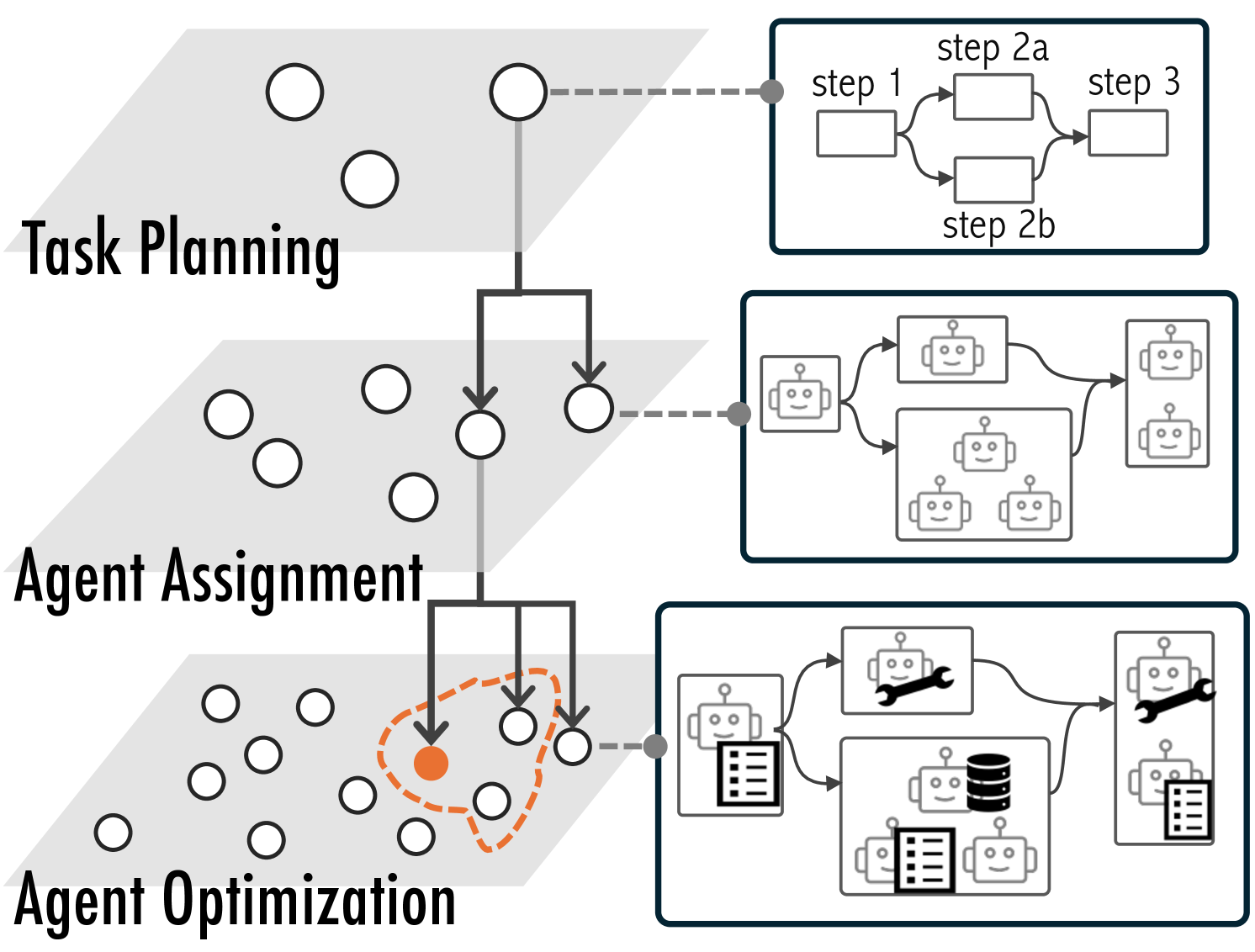
Figure 1: The design space of multi-agent workflows can be conceptualized across three hierarchical levels. Current frameworks primarily operate at the most granular level, which often leads to design fixation (the orange dot) rather than encourage exploration of the full solution space.
Table 1: Design Patterns for Multi-Agent Workflows supported in .
p0.05cm| p2.4cmp5.2cmp6.0cm p1.9cm
Pattern Definition Example References
Level-1 Sequential
<details>
<summary>x3.png Details</summary>
### Visual Description
## Diagram: Sequential Process Flow
### Overview
The image depicts a simple linear diagram consisting of three connected rectangular boxes (nodes) with directional arrows between them. There are no labels, numerical values, or textual annotations present in the diagram.
### Components/Axes
- **Nodes**: Three identical rectangular boxes arranged horizontally.
- **Arrows**: Two black arrows connecting the boxes sequentially from left to right.
- **No legends, axis titles, or textual markers** are visible.
### Detailed Analysis
- **Node Placement**:
- Node 1: Leftmost position.
- Node 2: Center position.
- Node 3: Rightmost position.
- **Arrow Direction**:
- Arrow 1: From Node 1 to Node 2 (left to center).
- Arrow 2: From Node 2 to Node 3 (center to right).
- **Visual Style**:
- Black outlines for boxes and arrows.
- White fill for boxes.
- No shading, gradients, or additional graphical elements.
### Key Observations
- The diagram represents a unidirectional flow with no feedback loops or branching paths.
- The absence of labels or annotations suggests the diagram is either a placeholder, a generic representation, or part of a larger context not shown here.
- The uniformity of the nodes implies equal importance or identical function across the sequence.
### Interpretation
This diagram likely illustrates a linear process, workflow, or data pipeline where information or tasks move sequentially from one stage to the next. The lack of labels or numerical data prevents specific interpretation of the nodes' purposes or the nature of the flow. However, the structure aligns with common representations of:
1. **Process Workflows**: E.g., "Idea Generation → Development → Deployment."
2. **Data Pipelines**: E.g., "Raw Data → Processing → Output."
3. **Decision Trees**: Simplified decision paths with no conditional branches.
The simplicity suggests it may be used as a template for customization or as a conceptual illustration in instructional materials. Without additional context, the diagram’s utility is limited to demonstrating sequential relationships rather than conveying specific data or logic.
</details>
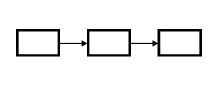
The task can be decomposed into a sequence of steps, which are executed sequentially and completed in an orderly progression. Debugging visualizations via first interpreting code, identifying issues, and then writing code [54]. [54] [5] [2] [55] [41]
Parallel
<details>
<summary>x4.png Details</summary>
### Visual Description
## Flowchart Diagram: Unlabeled Process Flow
### Overview
The image depicts a simple flowchart with no textual labels, annotations, or numerical data. It consists of four rectangular blocks and three bidirectional arrows connecting them. The layout suggests a process flow or decision tree structure.
### Components/Axes
- **Rectangles**:
- One rectangle on the left side (input/output node).
- Three vertically aligned rectangles on the right side (output/decision nodes).
- **Arrows**:
- Three bidirectional arrows connecting the left rectangle to each of the three right rectangles.
- Arrows are evenly spaced and symmetrically positioned.
### Detailed Analysis
- **Structure**:
- The left rectangle acts as a central node, with bidirectional arrows indicating two-way interactions or feedback loops with each of the three right rectangles.
- The right rectangles are arranged vertically, suggesting a hierarchical or sequential relationship.
- **Visual Elements**:
- All rectangles are unadorned (no text, icons, or shading).
- Arrows are simple black lines with arrowheads at both ends.
### Key Observations
- No textual labels, legends, or numerical values are present.
- The bidirectional arrows imply mutual relationships between the left node and each right node.
- The vertical alignment of the right rectangles may indicate prioritization, categorization, or sequential steps.
### Interpretation
This flowchart likely represents a generic process where:
1. The left rectangle serves as a starting point, input, or central decision node.
2. The three right rectangles represent possible outcomes, sub-processes, or decision branches.
3. Bidirectional arrows suggest feedback mechanisms, iterative processes, or reversible actions between the nodes.
The absence of labels makes it impossible to determine the exact purpose, but the structure aligns with common flowchart conventions for workflows, decision trees, or system interactions. Further context (e.g., accompanying documentation) would be required to assign specific meanings to the nodes and arrows.
</details>
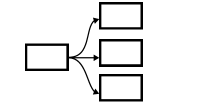
The task can be divided into multiple subtasks that can be parallelized for potential speedup. When generating a travel plan, ideating various vacation activities simultaneously [53]. [54] [5] [40] [55] [41]
Level-2 Reflection
<details>
<summary>x5.png Details</summary>
### Visual Description
## Diagram: Feedback Loop Between Two Robotic Components
### Overview
The image depicts a simplified technical diagram illustrating a feedback loop between two identical robotic components. The system includes two input/output blocks (rectangles) and two robot icons connected by directional arrows, forming a cyclical interaction.
### Components/Axes
- **Left Rectangle**: Labeled as an input/output block (no explicit label).
- **Robot A**: Identical to Robot B, featuring a square body, circular head with two eyes, and a single antenna.
- **Robot B**: Mirror image of Robot A, positioned to the right.
- **Right Rectangle**: Labeled as an input/output block (no explicit label).
- **Arrows**:
- Solid arrow from left rectangle → Robot A.
- Solid arrow from Robot A → Robot B.
- Solid arrow from Robot B → right rectangle.
- Dashed bidirectional arrow between Robot A and Robot B, indicating a feedback loop.
### Detailed Analysis
- **Flow Direction**:
1. Data/process flows from the left rectangle into Robot A.
2. Robot A processes the input and sends it to Robot B.
3. Robot B outputs the result to the right rectangle.
4. A feedback mechanism (dashed arrow) allows Robot B to send data back to Robot A, creating a closed-loop system.
- **Component Symmetry**:
Both robots are identical in design, suggesting they perform the same function or represent interchangeable nodes in the system.
### Key Observations
- The feedback loop (dashed arrow) implies iterative processing or real-time adjustment between the two robots.
- The absence of labels on the rectangles leaves their specific roles (e.g., sensor, actuator) ambiguous.
- The simplicity of the diagram prioritizes conceptual clarity over technical detail.
### Interpretation
This diagram likely represents a **closed-loop control system** or **iterative processing pipeline** where two identical components collaborate to refine or stabilize an output. The feedback loop suggests mechanisms for error correction, adaptive learning, or continuous improvement. The lack of explicit labels indicates the diagram is meant to abstractly illustrate a generalizable workflow rather than a specific implementation.
**Notable Design Choices**:
- Use of identical robots emphasizes symmetry and uniformity in the system.
- Dashed feedback arrow visually distinguishes the cyclical interaction from the linear flow.
- Rectangles at both ends imply bidirectional input/output capabilities, though their exact roles are undefined.
</details>
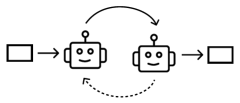
One agent generates and refines a response while another evaluates it, repeating the process until a predefined criterion (quality or number of iterations) is met. Often used to improve accuracy. One agent generates code, which a reviewer then assesses for quality and returns feedback for adjustment [52]. [5] [42] [33] [57] [42] [63] [22] [46] [60]
Redundant
<details>
<summary>x6.png Details</summary>
### Visual Description
## Diagram: Robot Interaction System
### Overview
The image depicts a simplified diagram of a robot interaction system with three interconnected robotic units and two terminal nodes. The system features a closed-loop feedback mechanism among the robots and a linear processing path terminating at external nodes.
### Components/Axes
- **Robotic Units**: Three identical robot icons arranged in a triangular formation (top, middle, bottom).
- **Arrows**:
- Clockwise circular arrows connecting the robots (top → middle → bottom → top).
- Linear arrows connecting the middle robot to two rectangular terminal nodes (left and right).
- **Terminal Nodes**: Two blank rectangles positioned at the start and end of the linear path.
### Detailed Analysis
- **Robotic Loop**: The three robots form a closed feedback loop with bidirectional arrows, suggesting continuous interaction or data exchange.
- **Linear Path**: The middle robot acts as a bridge between the feedback loop and the terminal nodes, with unidirectional arrows indicating a one-way flow toward the terminals.
- **Terminal Nodes**: No labels or identifiers are present on the rectangles, leaving their purpose ambiguous.
### Key Observations
1. The system emphasizes cyclical collaboration among the robots.
2. The linear path introduces asymmetry, directing output from the middle robot to external systems.
3. No explicit labels or legends clarify the function of components or data flow semantics.
### Interpretation
This diagram likely represents a distributed system where:
- The robotic loop symbolizes a self-sustaining subsystem (e.g., coordination, resource sharing).
- The linear path suggests a processing pipeline feeding results to external systems (e.g., user interfaces, storage).
- The absence of labels implies the diagram is conceptual, focusing on structural relationships rather than specific functionalities.
The design prioritizes modularity, with the middle robot serving as a critical junction between cyclical and linear processes. Potential applications include workflow automation, distributed computing, or human-robot interaction frameworks.
</details>
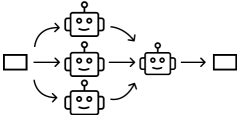
Multiple agents simultaneously respond to the same input while adopting different personas or perspectives, generating diverse outputs. Often used to improve robustness or creativity. Four agents in roles of physics, chemistry, biology, and general science experts attempt to solve graduate-level questions in science individually, then their answers are aggregated [22]. [27] [5] [18] [36] [22]
Supervision
<details>
<summary>x7.png Details</summary>
### Visual Description
## Diagram: Robot Network Architecture
### Overview
The diagram illustrates a hierarchical robot network with directional flow between components. A central robot node connects to three subordinate robots, which in turn interface with external systems represented by rectangles. Arrows indicate data or control flow, with distinct styles differentiating connection types.
### Components/Axes
- **Nodes**:
- 1 central robot (top position)
- 3 subordinate robots (bottom row)
- 2 external system rectangles (left and right edges)
- **Arrows**:
- Solid arrows: Direct connections (central → right rectangle, subordinate robots → right rectangle)
- Dashed arrows: Indirect/optional connections (central → subordinate robots)
- **Spatial Layout**:
- Central robot: Top-center
- Subordinate robots: Bottom row, evenly spaced
- Rectangles: Left and right edges, aligned with flow direction
### Detailed Analysis
1. **Central Robot**:
- Receives input from left rectangle via solid arrow
- Distributes control to three subordinate robots via dashed arrows
- Sends consolidated output to right rectangle via solid arrow
2. **Subordinate Robots**:
- Each receives input from central robot (dashed arrows)
- Each sends output to right rectangle (solid arrows)
- No inter-robot connections depicted
3. **External Systems**:
- Left rectangle: Input source for central robot
- Right rectangle: Output destination for central robot and all subordinate robots
### Key Observations
- Centralized control architecture with distributed processing
- Solid arrows represent mandatory/primary pathways
- Dashed arrows suggest secondary/optional communication channels
- Right rectangle acts as both input (from central) and output (from all robots) node
### Interpretation
This diagram likely represents a distributed processing system where:
1. A central controller (top robot) orchestrates tasks
2. Subordinate robots perform parallel processing
3. Results are aggregated back to a central output system
4. The dashed arrows may indicate fallback mechanisms or optional data sharing
The architecture suggests redundancy in output pathways (multiple robots feeding the right rectangle) while maintaining single-point input control. The use of dashed arrows for downward connections implies potential for future expansion or conditional routing.
</details>
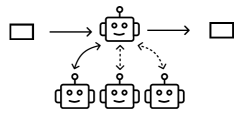
A hierarchical structure where a central agent dynamically decides which worker agents to act based on the input. Often used for complicated tasks that require diverse expertise and careful quality control. A supervisor agent directs user inquiries to specialized agents based on intent—such as technical support, refund and return processing, or handling complaints [4]. [5] [26] [33] [4] [46] [57] [19] [2] [4] [58] [53] Discussion
<details>
<summary>x8.png Details</summary>
### Visual Description
## Diagram: Robot Interaction Flow
### Overview
The image depicts a cyclical interaction between three robot icons arranged in a triangular formation. Arrows indicate directional flow between the robots, forming a closed loop. No textual labels, legends, or numerical data are present.
### Components/Axes
- **Robots**: Three identical robot icons with a simple design (square body, circular head, antenna).
- **Arrows**: Dashed lines connecting the robots in a triangular pattern.
- **No textual elements**: No labels, axis titles, legends, or embedded text.
### Detailed Analysis
- **Flow Direction**:
- Robot A → Robot B → Robot C → Robot A (closed loop).
- Arrows are bidirectional (dashed lines with arrows on both ends).
- **Visual Elements**:
- Robots are uniformly styled with no distinguishing features.
- No background elements or contextual indicators.
### Key Observations
- The diagram lacks explicit textual information, making it ambiguous in purpose.
- The cyclical flow suggests a repetitive process or system interaction.
- No numerical data, categories, or sub-categories are present.
### Interpretation
The image likely represents a conceptual model of interconnected systems or processes, emphasizing cyclical relationships. The absence of labels implies the diagram is either a placeholder, a generic representation, or part of a larger context where labels are defined elsewhere. The uniformity of the robots suggests interchangeable roles within the flow.
**Note**: No factual or numerical data is extractable from this image. The diagram serves as a symbolic representation rather than a data-driven visualization.
</details>
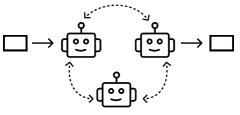
A group of agents engage in a conversation, where they take turns speaking in a round-robin, random manner, or simultaneously. Often used to increase creativity for open-ended tasks. Three agents in roles of news author, critic, and psychologist take turns to generate their response based on the conversation to evaluate open-ended question answers [10]. [46] [10] [29] [12] [33] [19] [57]
Level-3 Single Agent
<details>
<summary>x9.png Details</summary>
### Visual Description
## Diagram: Robot Interaction Flowchart
### Overview
The image depicts a simplified flowchart featuring a central robot figure with bidirectional arrows and directional indicators. The diagram uses geometric shapes and dashed lines to represent relationships and processes. No textual labels, numerical data, or legends are present.
### Components/Axes
- **Central Robot**:
- Square body with rounded edges.
- Circular head with two dot-like eyes and a curved smile.
- Single antenna atop the head.
- **Arrows**:
- Two horizontal dashed arrows extending left and right from the robot’s body.
- Three vertical dashed arrows below the robot: left, down, and right.
- **Background**: Plain white with no gridlines or annotations.
### Detailed Analysis
- **Robot Positioning**: Centered in the diagram, acting as the focal point.
- **Arrow Flow**:
- Horizontal arrows suggest bidirectional interaction or output.
- Vertical arrows below the robot imply directional choices or states (left, neutral, right).
- **Visual Style**: Minimalist, using black outlines on a white background.
### Key Observations
- No textual labels or numerical values are present.
- The robot’s smiley face may imply a user-friendly or autonomous system.
- Dashed arrows suggest non-permanent or conditional pathways.
### Interpretation
This diagram likely represents a decision-making or process flow for an autonomous system (e.g., a robot navigating choices). The central robot could symbolize a core algorithm or AI module, with arrows indicating input/output streams or state transitions. The absence of labels leaves the exact purpose ambiguous, but the structure resembles a state machine or interaction model. The vertical arrows below the robot might represent conditional logic (e.g., "turn left," "stop," "turn right"), while the horizontal arrows could denote data exchange or task delegation.
**Note**: The diagram lacks explicit textual or numerical data, so interpretations are speculative based on visual symbolism.
</details>
The basic building block of multi-agent workflows, a single LLM enhanced with augmentations such as data retrieval, tools, prompting, and memory. A single agent augmented with Web search tool queries for question-answering [35]. A basic module with diverse augmentations to enhance individual ability and versatility. [26] [5] [22] [52] [57] [19] [2] [28] [46] [35]
### 2.2 Design Space of Multi-agent Workflows
To address these challenges, summarizes and visualizes the design space of multi-agent workflows, offering users a structured overview of various possible solutions. This subsection introduces the three key components of this design space: design dimensions, reusable design patterns, hierarchical abstraction levels, grounded in both user study and recent literature. While these components are not exhaustive and are likely to evolve with ongoing research, they provide a strong foundation for demonstrating the usefulness of visualizing design space and integrating established design patterns.
#### 2.2.1 Design Dimensions
Dimensions are key factors that define and distinguish various workflows within the design space, such as the running time, the number of agents, and the rate of hallucination. Certain key dimensions are common across various tasks, while others are specific to particular applications. For example, dimensions such as accuracy and computational efficiency are universally relevant to most tasks, as practitioners generally seek to optimize them regardless of application. In contrast, specialized dimensions like the degree of dynamic updating are important for specific contexts. Our formative study revealed that while experts (E1-E4) unanimously rejected fully automated workflow generation, they sometimes incorporated components with dynamic updating capabilities (e.g., agents that select subsequent agents based on output analysis) in particular scenarios where adaptability was essential. Dimensions can also be highly granular, addressing specific characteristics like output length, formatting elements (e.g., bullet points), or the presence of certain keywords. They can influence design choices across the design process, such as reducing the number of agents to lower computational costs. Since these design dimensions can be very task-specific, there is not an exclusive list of all possible dimensions.
#### 2.2.2 Design Patterns
Design patterns are reusable, generalizable strategies for structuring workflows that emerge from repeated adaptation across numerous existing implementations. A design patterns is often associated with optimizing specific performance dimensions, e.g., reflection based design pattern can improve accuracy.
Even though existing surveys provided valuable insights about workflow design, they either focus on one aspect of the design process (e.g., task planning [18]) or overlook the high-level abstraction within the design space and focus on implementation details [19]. Therefore, we extended existing workflow surveys [57, 18, 19] and analyzed 43 multi-agent systems drawn from papers, blog posts, framework documentation, via keyword-based searches (e.g., “multi-agent”, “LLM workflows”, “agent orchestration”). Using axial coding, we grouped recurring structures into design patterns. While terminology varies across sources (e.g., “Group Chat” vs “Discussion”), we adopted the most commonly used terms in our dataset for consistency. A full summary of these patterns is provided in subsection 2.1. Although our collection does not capture every possible structure (e.g., dynamic prompt-based feedback [22]), it provides a robust foundation that effectively demonstrates the value of visualizing the design space and integrating established patterns into workflow creation processes. The detailed analysis process is included in the project web page.
#### 2.2.3 Hierarchical Abstraction Levels
We model the design space as three levels of abstraction (Fig. 1). This approach follows the established practices in design-related fields that employ layered abstractions to manage complexity and structure the design process [34, 48]. To construct each abstraction layer, we employ axial coding to organize the design patterns documented in our literature review, alongside the important design decisions and challenges identified through our formative study. This coding process groups related concepts into three hierarchical levels that progressively address the workflow development complexity.
- The first level, Task Planning, serves as the strategic foundation where complex tasks are systematically decomposed into discrete, manageable sub-tasks.
- The second level, Agent Assignment, builds directly upon the task decomposition by assigning appropriate agents to each sub-task. Some tasks may require a single agent, while others may necessitate collaboration between multiple agents with complementary roles.
- The third level, Agent Optimization, provides granular control mechanisms, allowing users to fine-tune individual agents through prompt engineering, tool integration, or access to external datasets, to precisely shape their behavior and response characteristics.
These hierarchical levels reflect a natural design progression, from abstract strategy to detailed implementation, and form the structural backbone of the visual exploration offered by
<details>
<summary>x10.png Details</summary>
### Visual Description
## Screenshot: FlowForge Interface for Peer-Review Simulation
### Overview
This image depicts a web-based interface for "FlowForge," a tool designed to simulate multi-agent peer-review processes for academic research papers. The interface combines task configuration, design space visualization, and workflow simulation components. Key elements include a task description field, a design space overview with flow diagrams, a latency/agent graph, and a detailed workflow simulation with agent interactions.
### Components/Axes
1. **Task Configuration Section**
- **Task Description**: "Conduct a comprehensive and systematic review of a given research paper that emulates standard peer-review practices. Multiple, distinct paper that emulates standard peer-review practices."
- **Buttons**:
- Blue "SUBMIT TASK" button
- "Example Tasks" dropdown menu
- Cloud icon with "+" for optional input
2. **Design Space Overview (B1)**
- **Flow Diagram**:
- Four main flows (Flow 1-4) with hierarchical sub-flows (e.g., Flow 2 → 2-1, 2-2)
- Visual connections between flows using lines and arrows
- Color-coded components (blue, gray, black)
3. **Latency/Agent Graph (B2)**
- **Axes**:
- X-axis: "# agents" (dropdown)
- Y-axis: "latency" (dropdown)
- **Legend**:
- Colors: S (purple), D (red), RF (orange), RD (green)
- **Data**: Bar chart with multiple colored bars (exact values unclear)
4. **Workflow Diagram (C1)**
- **Steps**:
1. Initial review → Structure check → Method assessment
2. Evaluate results → Draft review
- **Components**:
- "6 LLM calls" annotations
- "Reflection" and "Discussion" nodes
- "Summary" and "Facilitator" roles
- **Time Metric**: "Time Used: 30.27s"
5. **Agent Interaction Log (C3)**
- **Messages**:
- Step1 Agent1: "The initial reading of the paper reveals a well-structured argument..."
- Step1 Agent2: "Building on the initial impressions, the paper's argument..."
- Step1 Agent3: "Building on the initial impressions, the paper's argument..."
- Step1 Agent4: "Building on the initial impressions, the paper's argument..."
- Step1 Summary: "Upon the initial reading of the paper, it presents a well-structured and coherent argument..."
- Step2 Worker1: "Upon the initial reading of the paper, it presents a well-structured and coherent argument..."
- Step3 Worker1: "Upon the initial reading of the paper, it presents a well-structured and coherent argument..."
### Detailed Analysis
- **Design Space**: The flow diagram shows a hierarchical structure with four primary flows (1-4) branching into sub-flows (e.g., 2-1, 2-2). This suggests modular review components that can be combined or isolated.
- **Latency Graph**: While exact values are unclear, the presence of multiple colored bars (S/D/RF/RD) indicates comparative analysis of agent performance metrics across different configurations.
- **Workflow Simulation**: The multi-step process includes reflection points and collaborative discussion, mirroring real-world peer-review cycles. The "6 LLM calls" annotation suggests automated agent interactions.
- **Agent Logs**: Truncated messages reveal iterative analysis of paper structure, coherence, and argument quality, with agents building on prior reviews.
### Key Observations
1. The interface emphasizes iterative refinement through "REFLECTION" and "DISCUSSION" nodes.
2. Multiple agent configurations (S/D/RF/RD) are tracked, though specific performance metrics remain ambiguous.
3. The 30.27s time metric suggests real-time simulation capabilities.
4. Truncated agent messages indicate complex, multi-step reasoning processes.
### Interpretation
FlowForge appears to model collaborative academic review through:
1. **Modular Design**: The flow diagram's hierarchical structure allows customization of review components.
2. **Agent Collaboration**: Multiple agents (S/D/RF/RD) contribute specialized perspectives, with reflection points enabling consensus-building.
3. **Automated Evaluation**: The "6 LLM calls" annotation implies machine learning integration for initial analysis.
4. **Temporal Constraints**: The 30.27s metric suggests either rapid simulation or real-time processing limits.
The tool bridges human-like peer review with computational efficiency, though the latency graph's ambiguity raises questions about scalability. The truncated agent messages hint at sophisticated natural language processing capabilities, though full transparency would require access to complete logs.
</details>
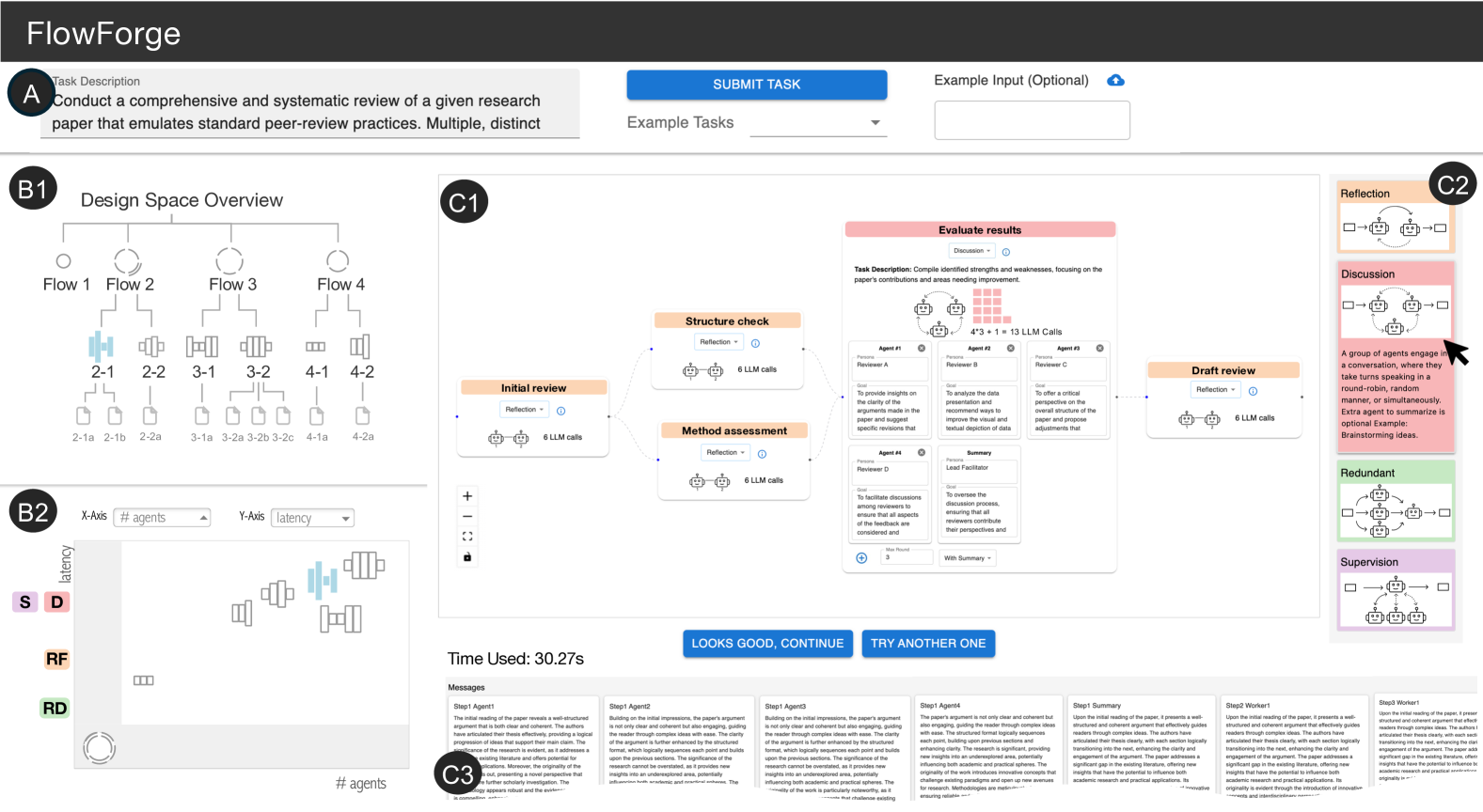
Figure 2: Interface Overview. Users start by entering a task description (A). supports workflow creation through two main views: the Design Space View, with a hierarchical tree (B1) and a scatter plot (B2), and the Canvas View, which shows workflow details (C1), in-situ design suggestions (C2), and execution results (C3).
### 2.3 Design Goals
is developed with the following design goals in mind, informed directly by the challenges uncovered in our formative study:
1. Step-by-step guidance from abstract to concrete. supports a top-down design process by structuring the workflow creation experience, guiding users from high-level task decomposition to granular agent optimization. This helps users navigate the complexity of the design space and mitigates unstructured exploration (C.1 , C.2 ).
1. Support for divergent and convergent thinking. The system encourages users to explore multiple workflow alternatives early in the design process before committing to a final solution. This prevents them from design fixation and promotes more deliberate decision-making (C.3 ).
1. In-situ guidance for best practices. As users explore the design space, provides context-aware design pattern suggestions drawn from validated design patterns. These suggestions surfaced at appropriate abstraction levels, assisting users without disrupting their flow (C.1 C.2 ).
1. Parallel exploration across multiple dimensions. Users can evaluate and compare different workflows across key performance dimensions (e.g., latency, accuracy, cost) as well as task-specific dimensions (e.g., format constraints), enabling a more holistic understanding of trade-offs and priorities (C.4 ).
## 3 System
is an interactive visualization system that supports the design and exploration of multi-agent workflows. As shown in Fig. 2, users begin by entering a task description (A), after which generates and visualizes candidate workflows. The interface is composed of two main components: the Design Space View, which displays the levels and dimensions via a hierarchical tree (B1) and a scatter plot (B2); and the Canvas View, which presents the detailed structure of a selected workflow (C1), along with in-situ design suggestions (C2) and execution results (C3).
### 3.1 Design Space View: Visualizing Abstraction Levels
The hierarchical tree (Fig. 2.B1) captures three levels of abstraction in workflow design. This tree dynamically updates as users navigate the space, guiding them through the progressive stages of workflow design: task planning, agent assignment, and agent optimization (DG.1.). This structure encourages both depth-first exploration (, jump directly to concrete implementation) and breath-first exploration (, comparing options before committing), as the latter is often overlooked in current practices (DG.2.). For instance, at the task planning level, users may compare task decompositions with three vs. four subtasks. At the agent assignment level, they can explore collaboration strategies, such as having two agents co-work on a subtask versus one completing it and another reviewing the output.
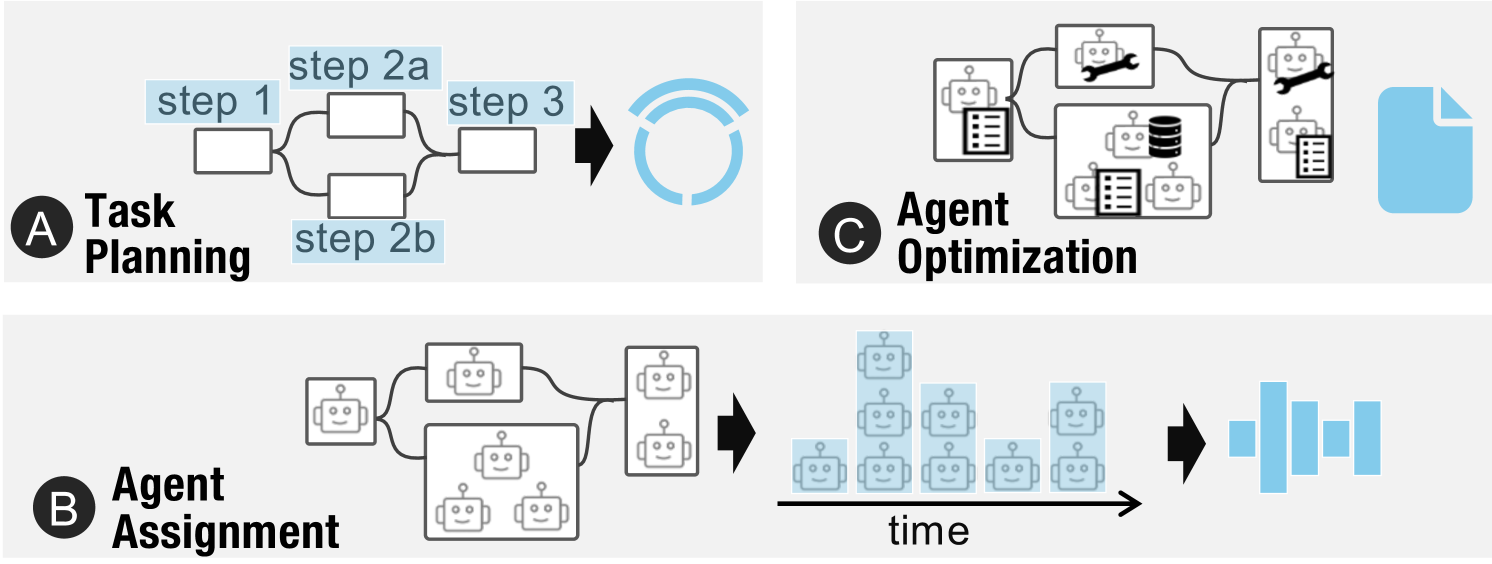
To represent workflows across these levels, we introduce a set of visual glyph nodes (Fig. 3). These glyph nodes encode the computational efficiency, a universally relevant dimension in workflow design (Sect. 2.2.1) that can be estimated before execution.
- Level 1 (Task Planning): Glyphs use the number of arcs to indicate the number of subtasks. Stacked arcs represent parallel subtasks, and node size reflects the number of sequential steps.
- Level 2 (Agent Assignment): Glyphs consist of bars, where each bar represents a pseudo-time step of the workflow running process, and its height indicates the number of concurrent agent calls.
- Level 3 (Agent Optimization): As this level does not introduce structural changes, glyphs are rendered as file icons, denoting a fully runnable workflow.
These glyphs provide a quick, visual summary of each workflow, helping users efficiently compare alternatives without delving into detailed specifications. While we experimented with encoding additional dimensions into the glyphs, we found that increasing complexity introduced unnecessary cognitive burdens.
<details>
<summary>x11.png Details</summary>
### Visual Description
## Diagram: Multi-Stage Process Flow with Agent-Based Workflow
### Overview
The image depicts a three-stage technical workflow involving task planning, agent assignment, and agent optimization. It uses flowchart diagrams with robotic icons and process symbols to represent an automated system. The workflow progresses from left to right across three labeled sections (A, B, C).
### Components/Axes
**Section A: Task Planning**
- Text labels: "step 1", "step 2a", "step 2b", "step 3"
- Diagram elements:
- Three decision boxes (rectangles)
- Two parallel paths from step 1 (2a and 2b)
- Converging arrow to step 3
- Circular refresh symbol (blue) at end
**Section B: Agent Assignment**
- Text label: "Agent Assignment"
- Diagram elements:
- Three robot icons (simplified humanoid figures)
- Central aggregation box (larger rectangle)
- Timeline axis labeled "time" with blue robot icons
- Progression arrow from assignment to timeline
**Section C: Agent Optimization**
- Text label: "Agent Optimization"
- Diagram elements:
- Robots with wrenches (maintenance tools)
- Database icon (stacked cylinders)
- Document icon (blue paper with folded corner)
- Interconnected network of components
### Detailed Analysis
**Section A: Task Planning**
- Step 1 branches into two parallel paths (2a and 2b)
- Both paths converge at step 3
- Circular refresh symbol suggests iterative process
**Section B: Agent Assignment**
- Three robots connect to central aggregation box
- Timeline shows increasing number of robots over time
- Blue color coding for timeline elements
**Section C: Agent Optimization**
- Robots with wrenches indicate maintenance/improvement
- Database and document icons suggest data processing
- Network connections imply system integration
### Key Observations
1. The workflow follows a strict sequential progression (A→B→C)
2. Parallel processing occurs in task planning (steps 2a/2b)
3. Agent count increases over time in section B
4. Optimization phase integrates multiple system components
5. Blue color coding used for timeline and document elements
### Interpretation
This diagram illustrates an automated workflow where:
1. Tasks are decomposed into parallelizable steps (A)
2. Agents (robots) are dynamically assigned to tasks over time (B)
3. System optimization occurs through maintenance (wrenches) and data management (database) (C)
The timeline progression suggests that agent assignment scales with task complexity, while the optimization phase emphasizes continuous improvement through system integration. The circular refresh symbol in task planning implies potential for iterative refinement before agent deployment.
No numerical data points or quantitative measurements are present in the diagram. All elements appear to represent conceptual rather than empirical data.
</details>
Figure 3: Glyphs. (A) At Level 1 (task planning), arcs represent subtasks and node size for sequential count. (B) At Level 2 (agent assignment), bars show agent calls over pseudo-time steps. (C) At Level 3 (agent optimization), workflows are denoted as file icons, as no new structural information is added and the workflow is fully runnable.
### 3.2 Design Space View: Visualizing Design Dimensions
Although the hierarchical tree organizes workflows by abstraction level, it offers limited visibility into design dimensions (e.g., number of agents, number of subtasks, number of LLM calls, running time). To address this, includes a configurable scatter plot (Fig. 2.B2) that enables comparison of workflows across key dimensions (DG.4.). In this scatter plot, users can assign different dimensions to the x- and y-axes. We provide a list of predefined dimensions based on feedback from formative studies, while allowing users to add customized dimensions (e.g., user rating for the workflow outputs) via manually annotating the workflow outputs. Workflows with undefined values on a selected axis are displayed in gray margin areas. For example, in : Guiding the Creation of Multi-agent Workflows with Design Space Visualization as a Thinking Scaffold. A2, workflows at Level 1 (task planning) do not include information about the number of agents (y-axis), and are put in the bottom gray area of the scatter plot. The scatter plot only displays workflows at the current level or one level above the selected node in the tree. This selective display is informed by the user feedback we received during the iterative design process, as showing all workflows across three abstraction levels can be cognitively overwhelming.
We chose a scatter plot because it provides a clear overview of the design space, making it easier to identify regions that are heavily explored (, clusters) versus those that remain underexplored (, spatial gaps). For example, Fig. 2 shows that the current exploration has exclusively focused on workflows that have multiple agents, as evidenced by the glyph nodes clustered in the upper-right corner. This insight may prompt users to consider exploring workflows with fewer subtasks or simpler configurations that have been overlooked (DG.2.).
We have explored alternative designs such as tables, parallel coordinates, and connected scatter plots. Although tables and parallel coordinates can display more than two dimensions simultaneously, users often struggle to interpret and compare more than two dimensions effectively [49]. During the iterative design process, we also experimented explicitly connecting related workflows across levels in the scatter plot. However, the additional edges in the scatter plot were unnecessary in most cases, since the children node typically share some dimension values as their parent nodes and their hierarchical relation can be easily recognized based on the alignment of the glyph nodes, e.g., same x position in the : Guiding the Creation of Multi-agent Workflows with Design Space Visualization as a Thinking Scaffold.A2.
<details>
<summary>x12.png Details</summary>
### Visual Description
## Flowchart: Task Planning and Agent Optimization Workflow
### Overview
The image depicts a multi-stage workflow for creating and optimizing video scripts using AI agents. It includes task planning, agent assignments, and iterative optimization processes. Key components involve curiosity-driven openings, evaluator/optimizer roles, and feedback loops.
### Components/Axes
1. **Task Planning (Section A)**
- **Step 1: Lead with Curiosity**
- **Step Description**: Open with a compelling question related to the research topic, drawing viewers in. Visual: Text animation of the question over an intriguing background. Duration: 3 seconds.
- **Reflection**: Dropdown menu labeled "Reflection" with an info icon.
2. **Agent Assignment (Sections B1 and B2)**
- **B1: Agent Assignment**
- **6 LLM Calls**: Visual representation of two interconnected agents (labeled 1 and 2) with a total of 6 LLM calls.
- **B2: Agent Assignment**
- **Evaluator Persona**: Responsible for assessing script quality (captivating openings, smooth transitions, compelling conclusions). Provides feedback to enhance clarity and engagement.
- **Optimizer Persona**: Iteratively improves scripts, focusing on unique narratives, accessibility, and precise timing.
- **Max Round**: 3 iterations.
3. **Agent Optimization (Section C)**
- **Step 1: Optimizer**
- **LLM Model**: GPT-4o.
- **System Prompt**: "You are the optimizer, tasked with refining scripts based on feedback."
- **Step 1: Evaluator**
- **LLM Model**: GPT-4o.
- **System Prompt**: "You are the evaluator, responsible for assessing the quality of each video script."
- **Feedback Loop**: Dashed red lines connect Optimizer and Evaluator, indicating iterative refinement.
### Detailed Analysis
- **Task Planning**: The initial step emphasizes engaging viewers with a curiosity-driven question, supported by a 3-second text animation.
- **Agent Roles**:
- **Evaluator**: Focuses on script quality metrics (e.g., transitions, conclusions).
- **Optimizer**: Prioritizes narrative uniqueness and timing precision.
- **Feedback Mechanism**: The dashed lines in Section C suggest a cyclical process where the Evaluator’s feedback informs the Optimizer’s revisions.
- **LLM Usage**: GPT-4o is the primary model for both optimization and evaluation tasks.
### Key Observations
- **Iterative Process**: The workflow emphasizes repeated refinement (3 max rounds) to balance creativity and technical precision.
- **Resource Allocation**: 6 LLM calls in B1 suggest significant computational effort for initial script generation.
- **Dual-Agent System**: Separation of evaluator and optimizer roles mirrors human creative workflows (e.g., writer-editor dynamics).
### Interpretation
This workflow illustrates a hybrid human-AI collaboration model for content creation. The "Lead with Curiosity" step leverages psychological engagement tactics, while the agent assignments mirror specialized human roles (e.g., editors, directors). The feedback loop between Optimizer and Evaluator ensures scripts evolve through data-driven iterations, balancing artistic and technical criteria. The 3-second animation duration and 6 LLM calls highlight constraints on runtime and computational resources, respectively.
**Notable Patterns**:
- The Optimizer’s goal to "deliver a unique and engaging narrative" while maintaining accessibility suggests a tension between creativity and inclusivity.
- The Evaluator’s focus on "smooth transitions" implies technical polish is prioritized alongside content quality.
- The 3-round limit may reflect practical limits on revision cycles before finalizing a script.
**Underlying Implications**:
- The diagram assumes GPT-4o’s capability to handle nuanced feedback, which may depend on prompt engineering quality.
- The separation of evaluator and optimizer roles could reduce cognitive load but may introduce latency in the feedback loop.
- The emphasis on "compelling conclusions" aligns with research showing viewers retain information better when openings and closings are strong.
</details>
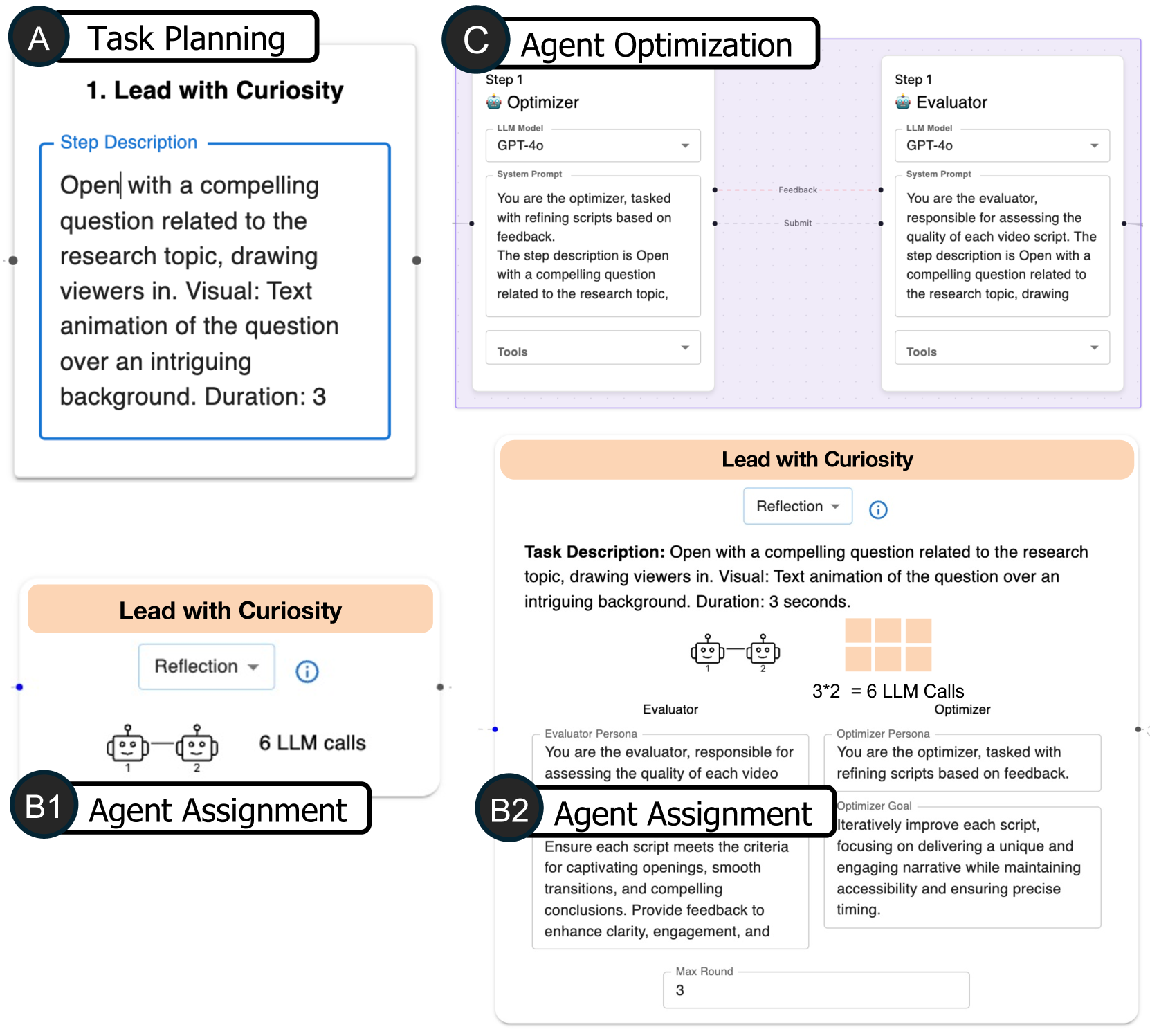
Figure 4: In the Canvas View, the visual representation of each node adapts based on the abstraction level.
### 3.3 Canvas View: Editing Individual Workflows
Workflows selected from the design space are displayed in the Canvas View, as interactive node-link diagrams. Users can navigate between abstraction levels (DG.1.), using the “Looks Good, Continue” and “Try Another One” buttons in the Canvas View. The former advances the current workflow to a more concrete level (e.g., from task planning to agent assignment), while the latter prompts alternative solutions at the same level (e.g., a different way to decompose the task). To prevent potential confusion between the tree representation of the design space and the node-link diagram of an individual workflow, different visualizations are used: circular nodes and step-wise edges for the tree and rectangular nodes with curved edges for the workflow. Node styles of the workflow adapt according to the abstraction level selected in the left-side Design Space View:
- Level 1 (Task Planning): Nodes represent subtasks with editable text descriptions. Edges denote dependencies and execution order of subtasks, with the flow progressing from left to right. Users can modify task structure, text, and dependencies.
- Level 2 (Agent Assignment): Nodes correspond to agent groups assigned to subtasks. When zoomed out (B1), nodes show summary information, , the subtask name, the associated collaboration pattern, and the estimated number of LLM calls. Zooming in (B2) reveals detailed configurations, such as agent roles, collaboration patterns (e.g., reflection, supervision) (subsection 2.1), and pattern-specific parameters (e.g., number of agents in redundancy or discussion rounds).
- Level 3 (Agent Optimization): Nodes represent individual agents, and agents working on the same subtask are grouped within the same purple rectangle. Users can configure agents using common patterns, including prompt engineering, tool usage, and retrieval augmentation.
### 3.4 Design Cards: In-situ Guidance via Design Patterns
To support in-situ design thinking, surfaces relevant design patterns on the right side of the Canvas View. Each pattern is presented as a card with its name, visual representation, and expandable details (Fig. 2.C2). When users hover over a pattern card, all corresponding nodes adopting the pattern are highlighted.
Since different design patterns tend to prioritize different performance dimensions, we also annotate the scatter plot axes with relevant patterns when one of these dimensions is used as an axis. For example, as shown in Fig. 2.B2, when latency is selected as the y-axis, patterns such as Redundancy, Reflection, and Discussion, are recommended and marked along the axis to aid interpretation: Redundancy at the bottom (minimal latency), Reflection mid-range (moderate latency), and Discussion near the top (high latency due to multi-round interactions).
### 3.5 Workflow and Suggestion Generation
The generation approach employs a straightforward, prompt-based methodology using GPT-4o [37], as existing methods are either not open-source or limited to specific tasks [21]. This prompt-based approach proves sufficient for demonstrating the effectiveness of . While we acknowledged that the generation can be further improved with more advanced approaches (e.g., reinforcement learning), novel methods for automatic workflow generation and recommendation is beyond the scope of this study.
Specifically, generates workflows and design patterns following the three levels of abstraction:
- Level 1 (Task Planning): prompts GPT-4o to generate diverse decompositions of a given task while maintaining a unified format. Each generated subtask is formatted to include a label, task description, output format, and a pointer to the next step. The prompt encourages variation in complexity (number of subtasks), structure (sequential or parallel), and perspective (distinct focus for each plan). Users can customize the decomposition by editing, adding, or deleting subtasks via node modifications, and reorder them by reconnecting edges in the Canvas View.
- Level 2 (Agent Assignment): GPT-4o is prompted to rank a given list of design patterns for each subtask and provide explanations of its recommendation. For each subtask, the prompt combines its context (task name and description) with the full list of design patterns (names, definitions, and brief examples). Based on this information, GPT-4o heuristically evaluates the subtask’s characteristics and suggests suitable patterns, e.g., Redundant for multifaceted analysis. The combination of design patterns is randomized to mitigate the position bias of LLM [61]. Users can view the description and estimated computational cost of the suggested patterns, modify the design pattern for each subtask (e.g., change from Discussion to Reflection), and customize its corresponding parameters (e.g., number of agents).
- Level 3 (Agent Optimization): GPT-4o is prompted to generate configuration details of each agent, including persona, goals, input and output format, based on the subtask’s input and output, the selected design pattern, as well as available tools and external databases. Multiple agents within one pattern are encouraged to embody distinct perspectives that align with real-world roles. Users may refine prompt content, the underlying LLM, the tool usage, and the external database of a specific agent.
Full implementation details are available in the project website.
### 3.6 Implementation
is implemented in JavaScript using React for building the user interface, D3 [6] for rendering custom data-driven visualizations, and ReactFlow [16] for managing and displaying the individual multi-agent workflows as interactive node-link diagrams. We use LangGraph [24] to store and execute the generated workflows. maintains its own internal data structure and uses a separate converter to translate this structure into compatible LangGraph files. This modular design allows to be easily adapted to other workflow frameworks by modifying the converter to support other formats. The source code, online demo, and documentation of are available at https://visual-intelligence-umn.github.io/FlowForge.
## 4 Case Studies
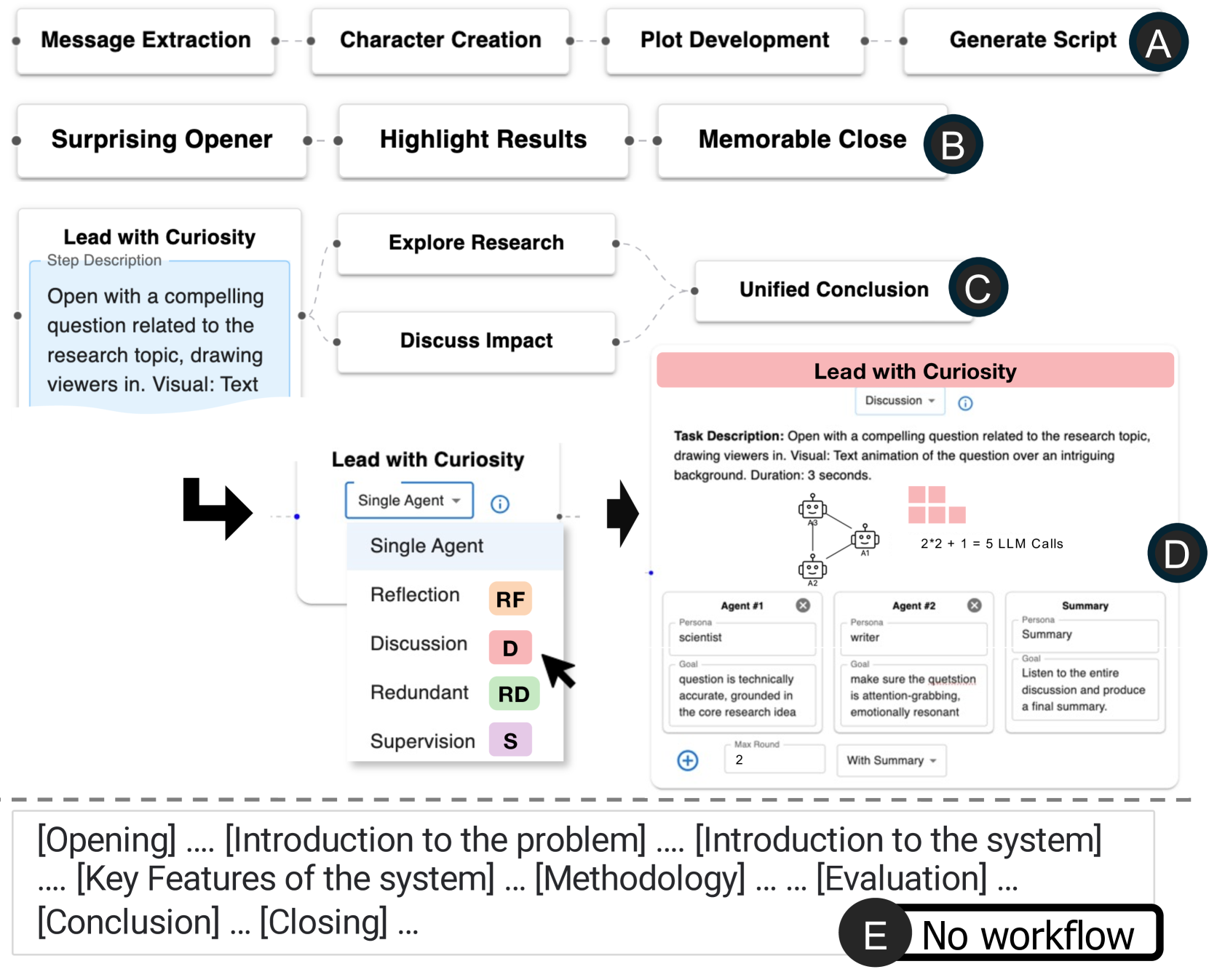
To demonstrate the utility of in real-world scenarios, we present two example use cases of , developed in collaboration with LLM researchers (Section. 2.1).
<details>
<summary>x13.png Details</summary>
### Visual Description
## Flowchart: Script Generation Workflow with Multi-Agent Collaboration
### Overview
The image depicts a complex workflow diagram for generating educational scripts, combining automated processes with multi-agent collaboration. It includes sequential steps, decision points, and agent roles, with a focus on curiosity-driven content creation.
### Components/Axes
1. **Top Section (A-B)**
- Sequential steps: Message Extraction → Character Creation → Plot Development → Generate Script
- Visual elements: Dashed connections between steps
2. **Middle Section (C)**
- Three parallel tracks:
- Lead with Curiosity (text animation)
- Explore Research (scientist role)
- Discuss Impact (writer role)
- Unified Conclusion (final synthesis)
3. **Agent Collaboration (D)**
- Single Agent interface with:
- Reflection (RF)
- Discussion (D)
- Redundant (RD)
- Supervision (S)
- Task Description: 3-second text animation with question opening
- Agent Roles:
- Scientist (accuracy focus)
- Writer (emotional resonance)
- Summary (final synthesis)
4. **Bottom Section (E)**
- Textual template structure:
[Opening] → [Introduction to problem] → [Introduction to system] → [Key features] → [Methodology] → [Evaluation] → [Conclusion] → [Closing]
### Detailed Analysis
1. **Workflow Structure**
- Primary path (A-B): Traditional script generation pipeline
- Secondary path (C): Curiosity-driven content creation with research integration
- Agent collaboration (D): Multi-perspective content refinement
- Template structure (E): Script organization framework
2. **Agent Collaboration Mechanics**
- 5 LLM calls required for task completion (2*2 + 1)
- Scientist agent ensures technical accuracy
- Writer agent focuses on emotional engagement
- Summary agent synthesizes final output
3. **Visual Elements**
- Color-coded agent roles (RF=orange, D=red, RD=green, S=purple)
- Text animation duration specified (3 seconds)
- Dashed connections indicate optional/alternative paths
### Key Observations
1. The workflow emphasizes curiosity-driven content creation as a parallel process to traditional script development
2. Multi-agent collaboration introduces redundancy checks and perspective balancing
3. The "No workflow" note in section E suggests potential for alternative processing paths
4. Task duration constraints (3 seconds) indicate optimization for viewer engagement
### Interpretation
This diagram represents an advanced content generation system that combines automated script creation with human-like curiosity and multi-perspective analysis. The integration of agent roles suggests a hybrid approach where technical accuracy (scientist) and emotional resonance (writer) are balanced through iterative refinement. The "No workflow" designation implies the system can adapt to different content requirements, potentially bypassing certain steps based on context. The emphasis on curiosity-driven openings indicates a focus on viewer engagement through provocative questions, while the structured template ensures comprehensive content coverage.
</details>
Figure 5: Case Study 1: Fast-Forward Video Planning. (A-D) helps users create multiple creative ways of generating the transcript of fast-forward videos for a research paper. (E) In contrast, directly prompting GPT-4o often produces transcripts with conventional structures and exceeds the 25-second constraints. Detailed text responses are omitted due to space constraints.
### 4.1 Fast-Forward Video Generation for Research Papers
In this use case, a user wants to create a multi-agent workflow for generating ideas for a 25-second fast-forward video that advertises a research paper. This case demonstrates ’s ability to improve diversity and creativity of workflow designs.
After submitting a task description, generates five different task planning options with varying lengths. While these workflows follow a similar structure comprising a beginning, an optional middle section, and an ending, they differ in how each subtask is defined and executed. For example, some workflows begin with an intriguing question (Fig. 5.C), while others open with a surprising research finding (Fig. 5.B). One particularly creative workflow introduces a storytelling element to engage the audience (Fig. 5.A). It begins with a “message extraction” step to identify the paper’s core contribution, followed by three narrative-oriented subtasks: character creation, plot development, and script preparation. Ultimately, the user selects a workflow that incorporates a parallel structure in the middle section (Fig. 5.C). This design enables two alternative narrative paths: one that explains the research method and another that emphasizes the broader impact of the work. The workflow can then evaluate the outputs of both paths and select the more compelling version for the final fast-forward video.
With the task planning finalized, the user proceeds to the agent assignment level. Most subtasks are assigned to single agents, likely because they are simple and well-defined. However, for crafting the video’s opening, where creativity is key, the user wants to encourage a more dynamic and collaborative process. To inform this decision, the user configures the scatter plot to display “Creativity” along the y-axis. As revealed in the scatter plot, certain design patterns, such as Discussion and Redundancy, are associated with higher creativity scores. Based on this, the user replaces the single-agent setup with a Discussion pattern, enabling multiple agents to brainstorm and refine the opening collaboratively (Fig. 5.D). In the final stage, the user enters the agent optimization level and fine-tunes the prompts for each agent to better control the expected outputs. The workflow is then executed within , where both the runtime and outputs are automatically recorded. Users can rate the results, iterate by modifying agent prompts, and compare different versions in the scatter plot across different dimensions.
Comparison with a one-pass LLM. While a single GPT-4o prompt can generate a video script, it typically defaults to conventional structures (e.g., introduction, method, conclusion), and often fails to respect format constraints such as time limits. In our test, even with clear instructions for a 25-second limit, GPT-4o generated long-form outputs mimicking full paper summaries with five or more sections (Fig. 5.E). In contrast, empowers users to explore varied narrative structures (Fig. 5.A-C), experiment with different decompositions, and fine-tune agent behaviors, offering greater control, diversity, and creativity in workflows generation.
### 4.2 Data Storytelling from a Dataset
In this case study, a user creates a workflow to generate visualizations and produce data-driven storytelling based on a given dataset. We use a Movies dataset [45] as the input to evaluate the outputs of different workflow configurations. This case demonstrates ’s ability to compare different workflows and their generated outputs.
<details>
<summary>x14.png Details</summary>
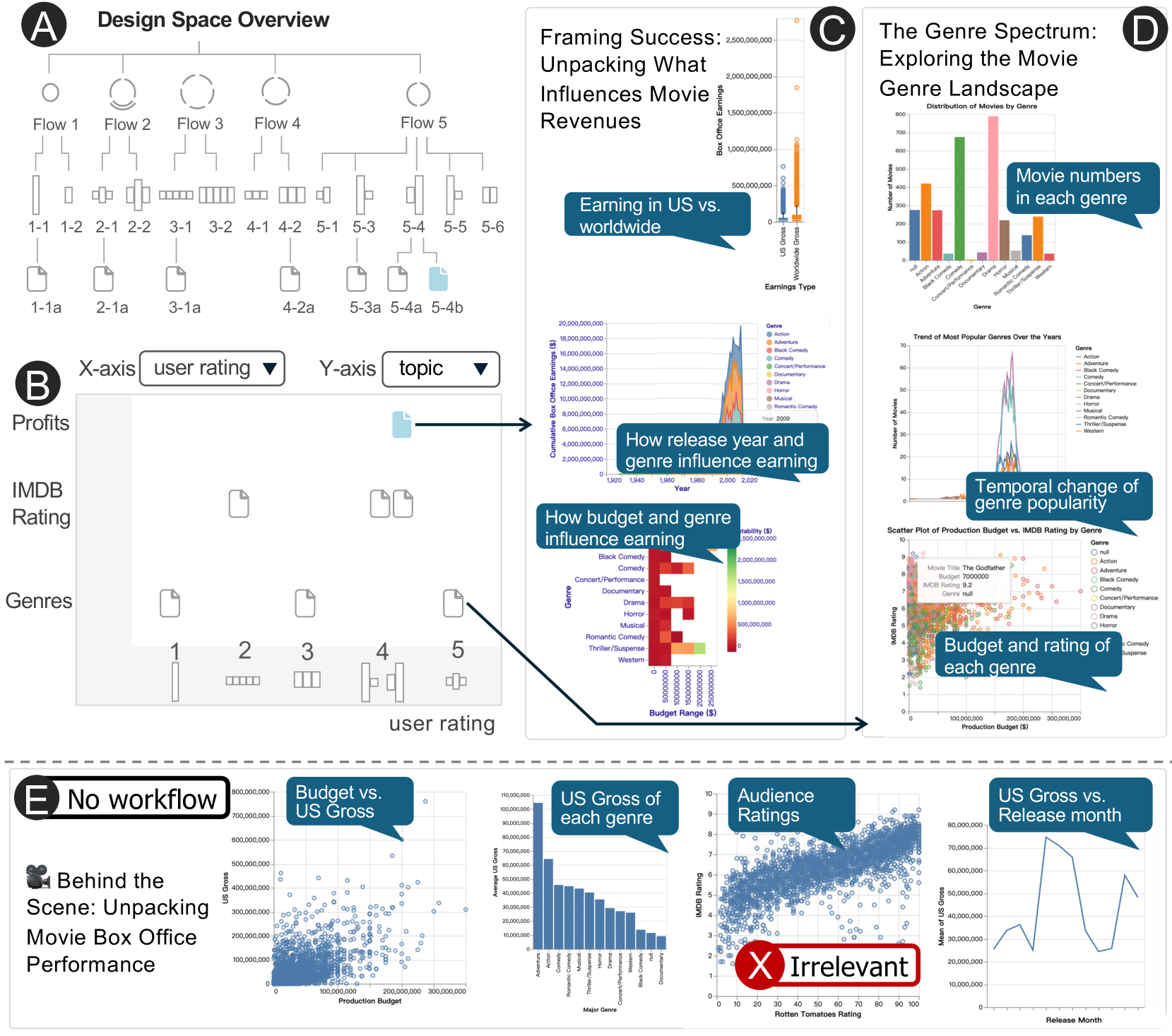
### Visual Description
## Infographic: Movie Industry Analysis Framework
### Overview
The image presents a multi-section technical document analyzing movie industry dynamics through data visualization. It combines flowcharts, scatter plots, bar charts, and line graphs to explore relationships between production budgets, earnings, genres, and audience reception. Sections A-E represent distinct analytical frameworks.
### Components/Axes
**Section A: Design Space Overview**
- Flowchart with 5 main flows (Flow 1-5) and sub-flows (1-1a, 2-1a, 3-1a, 4-2a, 5-3a, 5-4b)
- Components: Circles (flows), rectangles (sub-flows), connecting lines
- Labels: "Flow 1" to "Flow 5" with hierarchical sub-flow numbering
**Section B: Genre-User Rating Matrix**
- X-axis: User Rating (dropdown)
- Y-axis: Topic (dropdown)
- Elements: Profits, IMDb Rating, Genres (represented by document icons)
- Positioning: Matrix layout with 5 genre categories (1-5)
**Section C: Framing Success**
1. **Bar Chart**: US vs. Worldwide Earnings
- X-axis: Earnings Type (US Gross, Worldwide Gross)
- Y-axis: Earnings ($)
- Data: US Gross ~$1.2B, Worldwide Gross ~$3.5B
2. **Line Graph**: Release Year vs. Genre Influence
- X-axis: Year (2009-2020)
- Y-axis: Cumulative Earnings ($)
- Trend: Peak in 2015 ($20B), decline to $15B by 2020
3. **Heatmap**: Budget vs. Genre Influence
- Color scale: Red (high budget) to Blue (low budget)
- Notable: Action/Adventure shows highest budget density
4. **Scatter Plot**: Budget vs. IMDb Rating
- X-axis: Production Budget ($)
- Y-axis: IMDb Rating (0-10)
- Red X labeled "Irrelevant" at ($300M, 4.5)
**Section D: Genre Spectrum**
1. **Bar Chart**: Genre Distribution
- Genres: Action (450), Comedy (300), Drama (600), Horror (200), Romance (150)
- Y-axis: Number of Movies (0-800)
2. **Line Graph**: Genre Popularity Over Time
- X-axis: Year (2000-2020)
- Y-axis: Movie Count (0-80)
- Trend: Peak ~2010 (70 movies), decline to 40 by 2020
3. **Scatter Plot**: Budget vs. IMDb Rating
- Color gradient: Red (high budget) to Blue (low budget)
- Notable: High-budget films cluster at lower ratings
**Section E: No Workflow Analysis**
1. **Scatter Plot**: Budget vs. US Gross
- X-axis: Production Budget ($)
- Y-axis: US Gross ($)
- Data points: Blue dots showing weak correlation
2. **Bar Chart**: US Gross by Genre
- Genres: Action ($1.2B), Comedy ($800M), Drama ($950M), Horror ($600M)
3. **Scatter Plot**: Audience Ratings vs. Rotten Tomatoes
- X-axis: Rotten Tomatoes (0-100)
- Y-axis: Audience Rating (0-10)
- Blue dots show positive correlation
4. **Line Graph**: US Gross vs. Release Month
- X-axis: Month (Jan-Dec)
- Y-axis: US Gross ($)
- Trend: Peaks in March ($75M) and July ($90M)
### Key Observations
1. **Budget-Quality Disconnect**: High-budget films (red in heatmap) show lower IMDb ratings (red X at $300M budget, 4.5 rating)
2. **Genre Dominance**: Action/Adventure dominates both budget and earnings metrics
3. **Temporal Shifts**: Genre popularity peaked in 2010, with significant decline by 2020
4. **Release Timing**: March and July show highest US gross earnings
5. **Audience-Professional Alignment**: Positive correlation between audience ratings and Rotten Tomatoes scores
### Interpretation
The data reveals complex industry dynamics:
1. **Budget vs. Quality**: High production budgets don't guarantee critical success, evidenced by the "Irrelevant" outlier
2. **Genre Economics**: Action/Adventure dominates financially but shows declining popularity over time
3. **Release Strategy**: Summer months (March-July) correlate with highest earnings, suggesting strategic release planning
4. **Audience Consensus**: Strong alignment between professional (Rotten Tomatoes) and audience ratings indicates reliable critical consensus
5. **Market Saturation**: Despite high budgets, the scatter plots show no clear correlation between spending and returns, suggesting market unpredictability
The framework demonstrates how multiple factors (budget, genre, timing) interact to influence movie success, with notable exceptions challenging traditional assumptions about production investment and returns.
</details>
Figure 6: Case Study 2: Visualization Generation. (A–B) enables users to explore and compare different workflows for generating data-driven visual stories from a given dataset. (C–D) Example outputs from these workflows. (E) Directly prompting GPT-4o generates visualizations irrelevant to the data story topic. Due to space constraints, detailed text narration for each visualization is not included.
As shown in Fig. 6.A, the user explores a variety of task planning and agent configurations. One specific task planning option, Flow 5, is explored more extensively, indicated by its five child nodes in the hierarchical tree view. This workflow contains only two subtasks (represented by two arcs in the glyph), which the user favors due to lower latency. At the agent assignment level, the user evaluates multiple alternatives and selects only a subset to refine further at the agent optimization level, which is reflected by the fact that only certain glyphs have child nodes in the hierarchical tree. When the workflow has fewer subtasks, the user tends to prefer configurations with more agents per step (indicated by higher bars), such as choosing Flow 1-1 over 1-2 in Fig. 6.A. Conversely, for workflows with more subtasks, the user tends to favor configurations with fewer agents per step (indicated by shorter bars), such as selecting Flow 3-1 over 3-2.
To arrange and compare different workflows, the user configures the x- and y-axes of the scatter plot (Fig. 6 B). These axes can represent system-level metrics such as runtime and token usage, or custom metrics defined by the user, such as subjective ratings of output quality or the topic of the generated storytelling.
As shown in Fig. 6 B, the workflow outputs vary in both topic and quality. Glyphs at Level 2 (agent assignment) appear in the bottom gray area of the scatter plot, as they lack the topic attribute required for comparison. Their horizontal positions reflect the average user rating of each workflow. Interestingly, in this experiment, neither increasing the number of steps nor adding more agents consistently led to better storytelling outcomes. Fig. 6.C–D present example outputs from two selected workflows, illustrating the variability in topic focus.
Comparing with one-pass LLM. When prompting a single LLM (GPT-4o), the model often failed to strictly follow instructions: create visualizations centered on a specific topic with a coherent narrative. For example, in our experiments, GPT-4o generated a data-driven story titled “Behind the Scene: Unpacking Movie Box Office Performance”. However, the outputs included unrelated visualizations that were not aligned with the intended focus, such as a scatter plot comparing Rotten Tomatoes Rating against IMDB Rating for each movie (Fig. 6.E). In contrast, supports focused, modular task decomposition, enabling users to guide narrative flow, specify visualization goals, and experiment with structure, all of which contribute to higher coherence and alignment with user intent.
## 5 User Studies
To evaluate how supports the design experience of creating multi-agent workflows, we conducted an observational study comparing it against LangGraph Studio [25], a widely-used state-of-the-art interface for creating multi-agent workflows.
### 5.1 Study Design
Participants. We recruited nine participants (seven male, two female; seven aged 18–24, two aged 25–34) via email list and personal contact. All participants have prior knowledge about multi-agent LLM workflows but had no prior exposure to this project. Each study session lasted approximately one hour, and participants received a $10 Amazon gift card as compensation. The study was approved by the Institutional Review Board, and all participants signed an informed consent form.
Baseline. For the baseline condition, we used LangGraph Studio (Fig. 7), a visual programming tool for building and executing multi-agent workflows. While highly expressive and widely adapted, LangGraph Studio does not provide structured design scaffolding or exploratory support, which are key features of .
<details>
<summary>x15.png Details</summary>
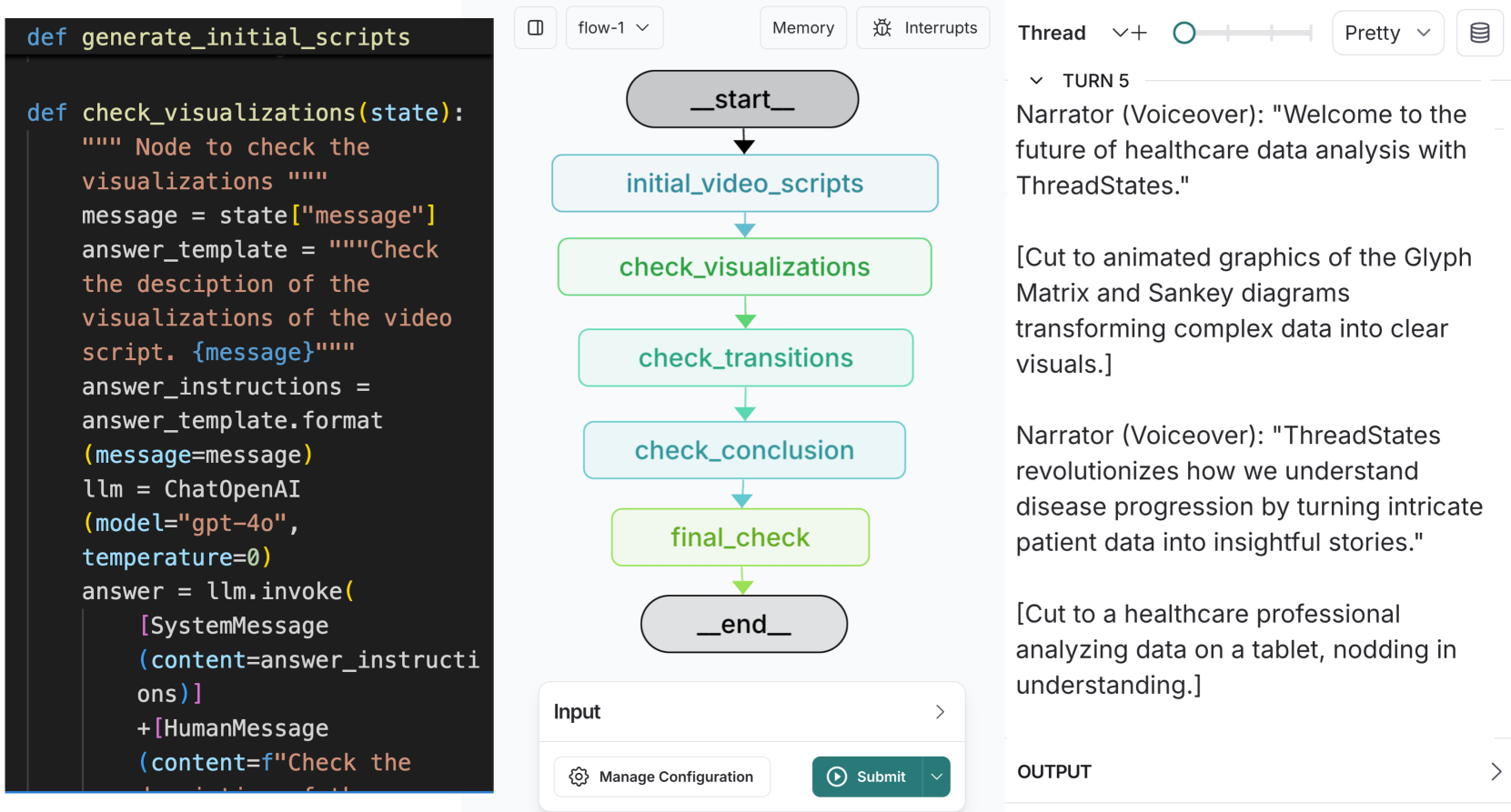
### Visual Description
## Screenshot: Technical Workflow Interface
### Overview
The image displays a technical interface divided into three vertical sections:
1. **Left**: Python code snippets
2. **Center**: Flowchart visualization
3. **Right**: Narrative text with voiceover transcript
---
### Components/Axes
#### Left Section (Code)
- **Functions**:
- `def generate_initial_scripts()`
- `def check_visualizations(state):`
- **Variables**:
- `message = state["message"]`
- `answer_template = """Check the description..."""`
- `answer_instructions = answer_template.format(message=message)`
- `llm = ChatOpenAI(model="gpt-4o", temperature=0)`
- `answer = llm.invoke([SystemMessage(content=answer_instructions), HumanMessage(content="Check the description...")])`
#### Center Section (Flowchart)
- **Nodes**:
- `_start_` (gray oval)
- `initial_video_scripts` (blue rectangle)
- `check_visualizations` (green rectangle)
- `check_transitions` (light green rectangle)
- `check_conclusion` (light blue rectangle)
- `final_check` (green rectangle)
- `_end_` (gray oval)
- **Flow**:
- `_start_` → `initial_video_scripts` → `check_visualizations` → `check_transitions` → `check_conclusion` → `final_check` → `_end_`
- **Colors**:
- Gray: Start/End nodes
- Blue: Initial scripts
- Green: Visualization checks
- Light Green: Transitions
- Light Blue: Conclusion
#### Right Section (Text)
- **Narrator Voiceover**:
- "Welcome to the future of healthcare data analysis with ThreadStates."
- "ThreadStates revolutionizes how we understand disease progression by turning intricate patient data into insightful stories."
- **Visual Examples**:
- Glyph Matrix and Sankey diagrams
- Healthcare professional analyzing data on a tablet
---
### Detailed Analysis
#### Left Section (Code)
- **Key Parameters**:
- `model="gpt-4o"` (OpenAI's GPT-4o model)
- `temperature=0` (deterministic output)
- **Process**:
1. Extracts `message` from `state`
2. Formats `answer_template` with the message
3. Invokes LLM with system/human messages
#### Center Section (Flowchart)
- **Color Coding**:
- Green nodes (`check_visualizations`, `final_check`) indicate validation steps
- Light blue node (`check_conclusion`) represents final synthesis
- **Flow Logic**:
- Sequential progression from script generation to final validation
#### Right Section (Text)
- **Key Phrases**:
- "transforming complex data into clear visuals"
- "nodding in understanding" (emphasizing user comprehension)
---
### Key Observations
1. **Code-UI Integration**: The Python code directly informs the flowchart's logic (e.g., `check_visualizations` corresponds to the green node).
2. **Healthcare Focus**: The narrative emphasizes ThreadStates' role in simplifying medical data analysis.
3. **Visual Hierarchy**: Green nodes dominate the flowchart, suggesting validation is a critical phase.
---
### Interpretation
This interface demonstrates a **healthcare data analysis pipeline** where:
- **AI-generated scripts** (`generate_initial_scripts`) are validated through iterative checks (`check_visualizations`, `check_transitions`).
- The **flowchart** mirrors the code's logic, using color to denote process stages (e.g., green for validation).
- The **narrative** positions ThreadStates as a tool that bridges raw data (Glyph Matrix/Sankey diagrams) to actionable insights for healthcare professionals.
**Notable Pattern**: The use of `temperature=0` in the LLM call ensures consistent, reproducible outputs, critical for medical data analysis where accuracy is paramount.
**Uncertainty**: The exact purpose of `answer_instructions` remains unclear without additional context, but it likely guides the LLM's response formatting.
</details>
Figure 7: User Study Baseline. We use LangGraph Studio as the baseline system in the user study.
<details>
<summary>x16.png Details</summary>
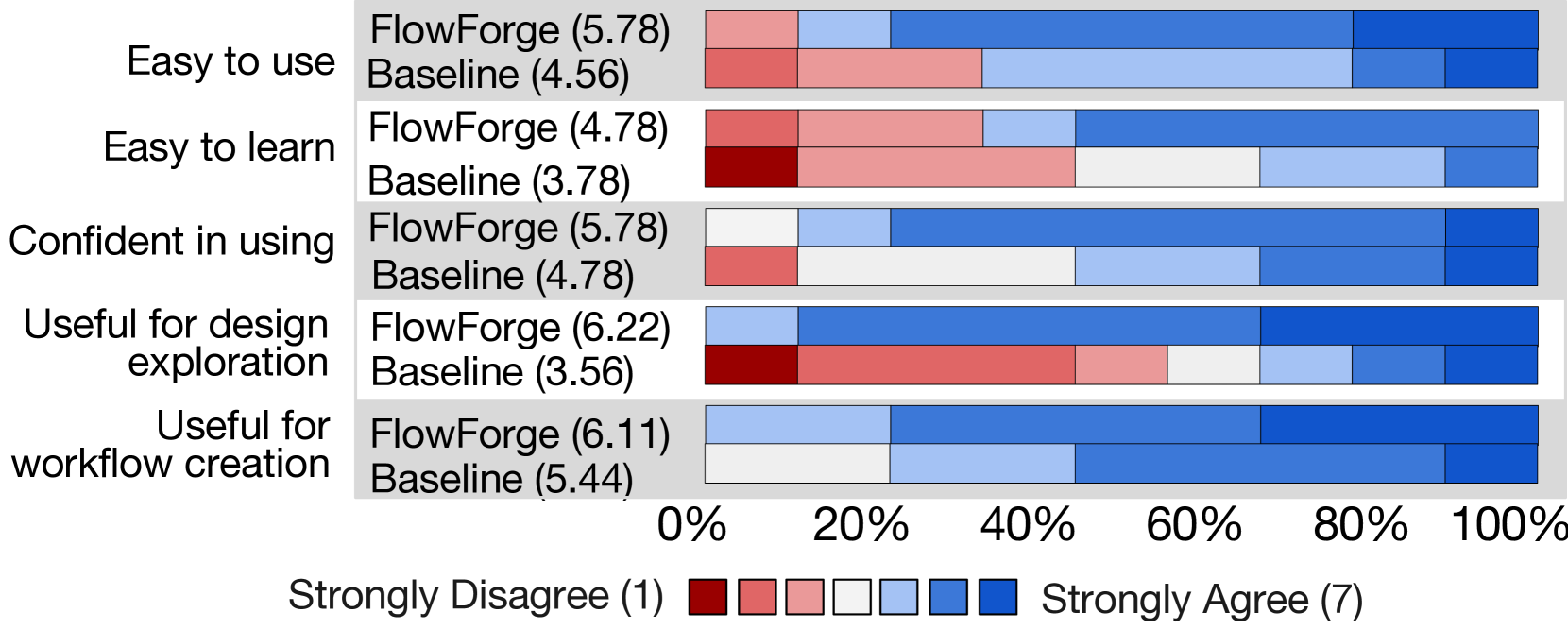
### Visual Description
## Bar Chart: Comparison of FlowForge and Baseline Across User Criteria
### Overview
The chart compares user perceptions of two systems (FlowForge and Baseline) across five criteria: "Easy to use," "Easy to learn," "Confident in using," "Useful for design exploration," and "Useful for workflow creation." Each criterion is evaluated on a 7-point scale (1 = Strongly Disagree, 7 = Strongly Agree), with FlowForge consistently scoring higher than Baseline.
### Components/Axes
- **Y-Axis**: Five criteria (left to right):
1. Easy to use
2. Easy to learn
3. Confident in using
4. Useful for design exploration
5. Useful for workflow creation
- **X-Axis**: Percentage scale (0% to 100%) representing agreement distribution.
- **Legend**: Color-coded agreement levels:
- Red: Strongly Disagree (1)
- Light red: Disagree (2)
- Pink: Neutral (3)
- White: Neutral (4)
- Light blue: Agree (5)
- Blue: Strongly Agree (6)
- Dark blue: Strongly Agree (7)
- **Bars**: Horizontal bars for FlowForge (top) and Baseline (bottom) per criterion, with numerical values above each bar.
### Detailed Analysis
1. **Easy to use**:
- FlowForge: 5.78 (light blue, Agree)
- Baseline: 4.56 (white, Neutral)
2. **Easy to learn**:
- FlowForge: 4.78 (white, Neutral)
- Baseline: 3.78 (red, Strongly Disagree)
3. **Confident in using**:
- FlowForge: 5.78 (light blue, Agree)
- Baseline: 4.78 (white, Neutral)
4. **Useful for design exploration**:
- FlowForge: 6.22 (blue, Strongly Agree)
- Baseline: 3.56 (red, Strongly Disagree)
5. **Useful for workflow creation**:
- FlowForge: 6.11 (blue, Strongly Agree)
- Baseline: 5.44 (light blue, Agree)
### Key Observations
- FlowForge scores **significantly higher** than Baseline across all criteria, with differences ranging from 0.84 (Easy to learn) to 2.66 (Useful for design exploration).
- Baseline scores cluster around **Neutral to Disagree** (3.56–4.78), while FlowForge scores range from **Neutral to Strongly Agree** (4.78–6.22).
- The largest gap occurs in "Useful for design exploration" (FlowForge: 6.22 vs. Baseline: 3.56).
### Interpretation
The data demonstrates that FlowForge is perceived as **more user-friendly, intuitive, and effective** than the Baseline system. The consistent upward trend in FlowForge’s scores suggests it better meets user expectations across all evaluated dimensions. The Baseline’s lower scores, particularly in design exploration and workflow creation, indicate potential shortcomings in functionality or usability. The scale’s 7-point granularity allows nuanced differentiation, but the absence of standard error bars limits confidence in the precision of these differences. This chart likely supports a conclusion favoring FlowForge for adoption or further development.
</details>
Figure 8: User Ratings. Comparison of and the baseline system based on post-study questionnaire responses. Participants rated each item on a 7-point Likert scale ranging from strongly disagree (1) to strongly agree (7). Numbers in parentheses indicate the average rating.
Task & Study Procedure. In both conditions ( vs. baseline), participants created workflows for the same task: generating scripts for a 25-second fast-forward video that introduces a research paper. Prior to the study, participants received comprehensive orientation including task explanation, example papers for workflow evaluation, and detailed prompting specifications describing the desired outputs. During the study, participants completed both conditions in randomized order to control for potential learning effects. Targeted tutorials and demonstrations for the corresponding system are provided before beginning each condition. In both conditions, participants constructed workflows from scratch without any default templates, with explicit encouragement to create and compare multiple workflows. The session of a condition ended when participants expressed satisfaction with their results or upon reaching the 25-minute time limit, whichever occurred first. Participants were instructed to think aloud throughout the sessions and can ask questions freely at any time. After two conditions, participants completed a usability questionnaire and a post-study interview.
Data Analysis. We analyzed (i) the workflows created by participants, including the time participants spent creating them and their overall quality; (ii) self-reported usability ratings for both systems; and (iii) participants’ think-aloud protocols, interactions during the study, and qualitative feedback from post-study interviews.
### 5.2 Quantitative Results
Our quantitative evaluations demonstrated that outperformed the baseline system, delivering improvements in both user experience and workflow creation efficiency.
First, led to improved user experience in creating LLM workflows. Fig. 8 presents participants’ subjective ratings comparing and the baseline across five dimensions related to usability and utility. Overall, was rated more favorably. Participants found it easier to use, with a higher proportion agreeing or strongly agreeing that they would not require technical support to operate the system. They also reported greater confidence when using , as well as stronger agreement on its usefulness for both exploring alternative workflows and executing them.
<details>
<summary>x17.png Details</summary>
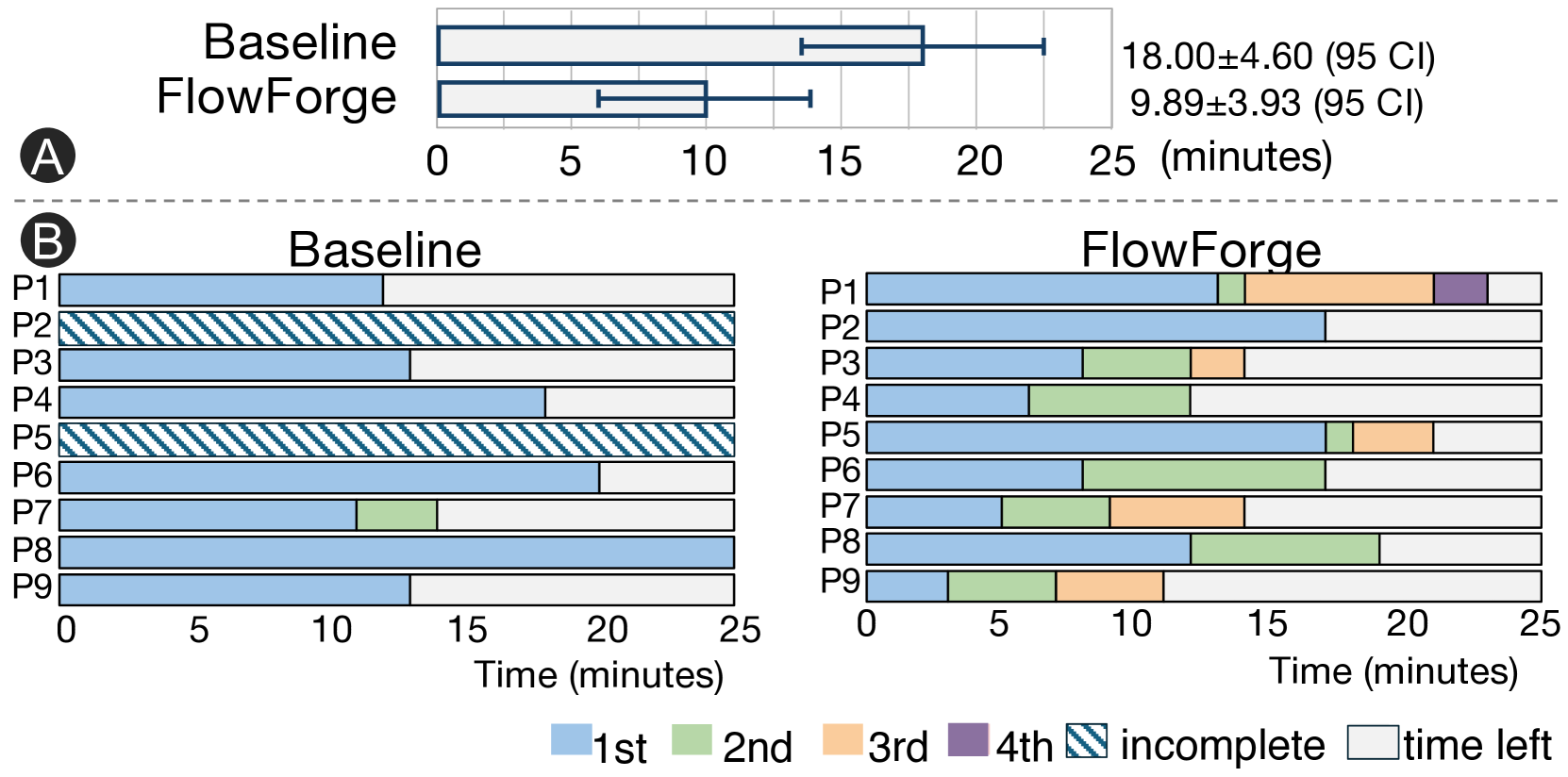
### Visual Description
## Box Plot and Bar Charts: Baseline vs FlowForge Performance
### Overview
The image compares two performance metrics across two conditions: **Baseline** and **FlowForge**. Section A presents a box plot showing median values and confidence intervals, while Section B displays segmented bar charts for individual participants (P1-P9) under both conditions.
---
### Components/Axes
#### Section A (Box Plot)
- **X-axis**: Time (minutes), scaled from 0 to 25.
- **Y-axis**: Two categories: "Baseline" and "FlowForge".
- **Legend**: Not explicitly labeled in Section A, but statistical annotations are provided:
- Baseline: `18.00 ± 4.60 (95 CI)`
- FlowForge: `9.89 ± 3.93 (95 CI)`
#### Section B (Bar Charts)
- **X-axis**: Time (minutes), scaled from 0 to 25.
- **Y-axis**: Participants labeled P1 to P9.
- **Legend** (bottom center):
- **Blue**: 1st segment
- **Green**: 2nd segment
- **Orange**: 3rd segment
- **Purple**: 4th segment
- **Diagonal stripes**: Incomplete
- **White**: Time left
---
### Detailed Analysis
#### Section A (Box Plot)
- **Baseline**:
- Median: 18.00 minutes
- 95% Confidence Interval: ±4.60 (range: 13.40–22.60)
- **FlowForge**:
- Median: 9.89 minutes
- 95% Confidence Interval: ±3.93 (range: 5.96–13.82)
#### Section B (Bar Charts)
**Baseline**:
- **P1**: Entire bar is blue (1st segment), no incomplete or time left.
- **P2**: Entire bar has diagonal stripes (incomplete).
- **P3**: Blue (1st) + white (time left).
- **P4**: Blue (1st) + white (time left).
- **P5**: Diagonal stripes (incomplete).
- **P6**: Blue (1st) + white (time left).
- **P7**: Blue (1st) + green (2nd) + white (time left).
- **P8**: Full blue (1st segment).
- **P9**: Blue (1st) + white (time left).
**FlowForge**:
- **P1**: Blue (1st) + green (2nd) + orange (3rd) + purple (4th) + white (time left).
- **P2**: Blue (1st) + white (time left).
- **P3**: Blue (1st) + green (2nd) + orange (3rd) + white (time left).
- **P4**: Blue (1st) + green (2nd) + orange (3rd) + white (time left).
- **P5**: Blue (1st) + green (2nd) + orange (3rd) + white (time left).
- **P6**: Blue (1st) + green (2nd) + orange (3rd) + white (time left).
- **P7**: Blue (1st) + green (2nd) + orange (3rd) + white (time left).
- **P8**: Blue (1st) + green (2nd) + orange (3rd) + white (time left).
- **P9**: Blue (1st) + green (2nd) + orange (3rd) + white (time left).
---
### Key Observations
1. **Section A**:
- FlowForge demonstrates a **significantly lower median time** (9.89 vs. 18.00 minutes) with a tighter confidence interval, suggesting improved efficiency.
2. **Section B**:
- **Baseline**:
- 3 participants (P2, P5) show incomplete tasks (diagonal stripes).
- 6 participants have partial time left (white segments).
- **FlowForge**:
- All participants complete tasks across 1st–4th segments, with minimal time left (white segments).
- Structured segmentation (blue, green, orange, purple) indicates phased task completion.
---
### Interpretation
- **Efficiency**: FlowForge reduces task completion time by ~45% compared to Baseline, with greater consistency (narrower CI).
- **Task Structure**: FlowForge’s segmented approach eliminates incomplete tasks and minimizes time left, implying better resource allocation or workflow optimization.
- **Participant Variability**: Baseline shows higher variability in task completion (e.g., P2 and P5 fully incomplete), while FlowForge standardizes performance across participants.
- **Unresolved Questions**: The purpose of the 4th segment (purple) in FlowForge is unclear but may represent a final validation or review phase.
---
### Spatial Grounding
- **Section A**: Box plot centered above the two bar charts, with statistical annotations to the right.
- **Section B**:
- Baseline chart on the left, FlowForge on the right.
- Legend positioned at the bottom center, aligned with both charts.
---
### Content Details
- **Statistical Values**:
- Baseline: `18.00 ± 4.60 (95 CI)`
- FlowForge: `9.89 ± 3.93 (95 CI)`
- **Legend Colors**:
- Blue (1st), Green (2nd), Orange (3rd), Purple (4th), Diagonal stripes (incomplete), White (time left).
---
### Final Notes
The data suggests FlowForge optimizes task completion through structured segmentation, reducing variability and inefficiencies observed in the Baseline condition. Further investigation into the 4th segment’s role could clarify its contribution to performance gains.
</details>
Figure 9: Workflow Creation Time and Quantity. (A) Users spent less time creating their first runnable workflow in compared to the baseline. Error bars indicate 95% confidence intervals (CI). (B) Users created more workflows in compared with the baseline.
Second, enabled more efficient workflow creation with more diverse designs. Fig. 9 presents participants’ workflow creation time. Participants spent on average 9.89 (95% CI: 5.96-13.82) minutes to create and run the first workflow in , and 18.0 (95% CI: 13.40-22.60) minutes in the baseline. Student’s t-test showed a significant difference between their completion time for the first workflow (t =-8.1, p =.003). Most (8/9) of the participants were able to create and explore more than one workflow in after the initial try, while some participants (2) failed to create a workflow in the baseline. For participants who did not finish, 25 minutes (maximum allowed time per session) was used as their estimated completion time.
To evaluate workflow diversity, we conducted a manual analysis of workflows created by participants across both conditions. While workflows created in both conditions contained a similar number of subtasks (baseline: 3.43, : 3.89), produced more parallel subtasks (3) than the baseline (1). Participants also created more diverse agent communications using . Using , participants implemented a variety of agent communication patterns (7 reflection, 5 supervision, 7 redundancy, 8 discussion, out of 35 total instances). In contrast, baseline workflows exclusively employed single-agent across all 22 instances.
### 5.3 Observations and Feedback
Based on the think-aloud comments and interviews, we reported how participants approached workflow creation across the two conditions.
Across both conditions, participants prioritized creating an initial functional workflow before exploring alternatives. Participants appreciated the guidance provided at each level. They noted that while Levels 2 and 3 of the design guidance were more “technically oriented”, Level 1 introduced innovative concepts that were accessible and valuable even without specialized AI knowledge.
Participants demonstrated iterative workflow design behaviors in both conditions, yet their approaches differed substantially. In the baseline condition, participants typically constructed workflows with only one or two sequential subtasks. When refining these workflows, they focused exclusively on prompt refinement for individual agents while maintaining the original workflow structure unchanged. When using , participants exhibited broader explorations. Most participants (8/9) explored different task planning (level 1) to generate alternative workflows and compare workflows based on key dimensions such as output quality and latency. Two participants made strategic modifications when encountering performance issues. Informed by the design cards at level 3, P5 improved output quality by incorporating detailed domain expertise into agent personas. Through analysis of latency of different design patterns in the Design Space View, P9 transitioned from the Discussion pattern to Redundant and restructured task planning to enable parallel subtask execution, successfully reducing execution time while preserving output quality.
## 6 Discussion
### 6.1 Design Implications.
We reflect on the design implications of by connecting it with previous visualization tools developed for AI research.
Design Space Visualization. This work presents an initial exploration of using design space visualization to support the navigation and construction of complex multi-agent workflows. Although visualization of the design space has been shown as an effective approach in AI applications such as deep neural network design [50], automated machine learning [49], and neural architecture search [56], it has not yet been applied to the emerging context of multi-agent LLM workflows. This new context presents unique opportunities. Compared to traditional AI development, which often requires deep technical expertise to understand the design space, LLM workflows significantly lower the barrier to entry, allowing a broader range of end users to design AI-driven systems. As this shift moves design tools from expert-centric to end-user-facing contexts, visualization must evolve to offer greater clarity and interpretability.
Thinking Scaffold for both LLMs and humans. While is designed for building multi-agent workflows, we observed that human users also benefit from the thinking scaffold it provides, particularly in open-ended and creative tasks (e.g., creatively crafting fast-forward videos using character and plot elements in Section 4.1). By explicitly visualizing workflows, users engage in cognitive externalization that aligns with extended mind theory, where cognitive processes are distributed across both internal mental representations and external artifacts, making it easier to brainstorm effectively with LLMs.
This approach represents a different perspective from traditional visualization for AI interpretability, which has focused on visualizing low-level computational processes (e.g., neuron activations) [23, 30, 31]. The emerging of LLMs has enabled new interpretability opportunities by exporting reasoning in workflows and agent interactions [54]. Interactive visualizations of these reasoning processes can thus serve as accessible collaborative interfaces moving beyond expert-only tools.
### 6.2 Limitations and Future Directions.
First, does not cover the full spectrum of workflow designs and application scenarios. Regarding workflow architecture, focuses on workflows with static or conditional communication protocols but does not support dynamic architecture modifications during execution. For example, the system cannot support workflows that undergo real-time architecture revision based on human-in-the-loop interventions [47] or agent feedback [22]. Regarding application scenarios, is specifically designed for structured problem-solving tasks rather than world simulation applications [51, 19], which may require fundamentally different architectural considerations and interaction patterns.
Second, in , we used straightforward prompting techniques for task decomposition and design pattern recommendation, as the primary focus of this study is to demonstrate the benefits of visualizing and interacting with the design space during workflow exploration. We acknowledge that the quality of generated workflows would be further improved with more advanced methods, such as using reinforcement learning to optimize the workflow design.
Finally, in spite of the intuitiveness and effectiveness, the three-level abstraction of design space is not the only viable scaffold and can be further enhanced. For example, Liu et al.. [57] proposed a decision tree that covers key decisions for designing multi-agent LLM systems. Compared to these alternatives, our method aims to strike a balance between expressiveness (, enabling diverse workflow constructions) and conciseness (, avoiding excessive complexity). There are several promising directions for further enhancing this abstraction. Each level may benefit from further decomposition into sublevels that capture more nuanced design choices. For example, the task planning level may involve sub-levels such as failure handling mechanism. Meanwhile, additional support can be provided to capture the inter-level dependencies and facilitate design iterations across abstraction levels [14], such as revisiting task planning decisions based on agent optimization.
## 7 Conclusion
This study presents , an interactive visualization tool that supports the creation of multi-agent LLM workflows by organizing the levels and dimensions of the design space, visualizing the design space and the various solutions within it, and integrating in-situ guidance from well-established design patterns in design exploration. Our evaluation demonstrated that improved user experience, increased workflow creation efficiency, and enhanced the diversity of created workflows. This work highlights the potential of design space visualization as a thinking scaffold for both LLMs and human designers in complex LLM system development.
## References
- [1] Cellum. Purpose-Built GUI and SDK for AI Development. https://www.vellum.ai/.
- [2] CrewAI: Build AI agent teams that work together to tackle complex tasks. https://docs.crewai.com/introduction.
- [3] Rivet. The Open-Source Visual AI Programming Environment. https://rivet.ironcladapp.com/.
- [4] Amazon. Multi-Agent Orchestrator framework. https://awslabs.github.io/multi-agent-orchestrator/.
- [5] Anthropic. Building Effective Agents. https://www.anthropic.com/research/building-effective-agents, 2024.
- [6] M. Bostock, V. Ogievetsky, and J. Heer. D3 Data-Driven Documents. IEEE Transactions on Visualization and Computer Graphics, 17(12):2301–2309, 2011. doi: 10 . 1109/TVCG . 2011 . 185
- [7] S. Brade, B. Wang, M. Sousa, S. Oore, and T. Grossman. Promptify: Text-to-Image Generation through Interactive Prompt Exploration with Large Language Models. In Proceedings of the 36th Annual ACM Symposium on User Interface Software and Technology, UIST ’23, article no. 96, 14 pages. ACM, New York, 2023. doi: 10 . 1145/3586183 . 3606725
- [8] B. Buxton. Sketching user experiences: getting the design right and the right design. Morgan Kaufmann, San Francisco, 2010. doi: 10 . 1016/B978-0-12-374037-3 . X5043-3
- [9] M. Cemri, M. Z. Pan, S. Yang, L. A. Agrawal, B. Chopra, R. Tiwari, K. Keutzer, A. Parameswaran, D. Klein, K. Ramchandran, M. Zaharia, J. E. Gonzalez, and I. Stoica. Why Do Multi-Agent LLM Systems Fail?, 2025. doi: 10 . 48550/arXiv . 2503 . 13657
- [10] C.-M. Chan, W. Chen, Y. Su, J. Yu, W. Xue, S. Zhang, J. Fu, and Z. Liu. ChatEval: Towards Better LLM-based Evaluators through Multi-Agent Debate, 2023. doi: 10 . 48550/arXiv . 2308 . 07201
- [11] V. Dibia, J. Chen, G. Bansal, S. Syed, A. Fourney, E. Zhu, C. Wang, and S. Amershi. AUTOGEN STUDIO: A No-Code Developer Tool for Building and Debugging Multi-Agent Systems. In D. I. Hernandez Farias, T. Hope, and M. Li, eds., Proceedings of the 2024 Conference on Empirical Methods in Natural Language Processing: System Demonstrations, pp. 72–79. Association for Computational Linguistics, Miami, 2024. doi: 10 . 18653/v1/2024 . emnlp-demo . 8
- [12] Y. Du, S. Li, A. Torralba, J. B. Tenenbaum, and I. Mordatch. Improving Factuality and Reasoning in Language Models through Multiagent Debate. In Proceedings of the 41st International Conference on Machine Learning, ICML’24, article no. 467, 31 pages. JMLR.org, 2024. doi: 10 . 5555/3692070 . 3692537
- [13] B. Effect. Manus AI: A General AI Agent. https://manus.im/. Accessed: 2025-03-18.
- [14] W. Epperson, G. Bansal, V. C. Dibia, A. Fourney, J. Gerrits, E. Zhu, and S. Amershi. Interactive debugging and steering of multi-agent ai systems. In Proceedings of the 2025 CHI Conference on Human Factors in Computing Systems, pp. 1–15, 2025.
- [15] Y. Feng, X. Wang, K. K. Wong, S. Wang, Y. Lu, M. Zhu, B. Wang, and W. Chen. PromptMagician: Interactive Prompt Engineering for Text-to-Image Creation . IEEE Transactions on Visualization and Computer Graphics, 30(01):295–305, 2024. doi: 10 . 1109/TVCG . 2023 . 3327168
- [16] W. GmbH. React Flow: A library for building node-based UIs. https://reactflow.dev/, 2024. Accessed: 2025-03-26.
- [17] J. Gottweis, W.-H. Weng, A. Daryin, T. Tu, A. Palepu, P. Sirkovic, A. Myaskovsky, F. Weissenberger, K. Rong, R. Tanno, et al. Towards an AI co-scientist, 2025. doi: 10 . 48550/arXiv . 2502 . 18864
- [18] M. Grunde-McLaughlin, M. S. Lam, R. Krishna, D. S. Weld, and J. Heer. Designing LLM Chains by Adapting Techniques from Crowdsourcing Workflows. ACM Transactions on Computer-Human Interaction, 32(3), article no. 27, 57 pages, 2025. doi: 10 . 1145/3716134
- [19] T. Guo, X. Chen, Y. Wang, R. Chang, S. Pei, N. V. Chawla, O. Wiest, and X. Zhang. Large Language Model based Multi-Agents: A Survey of Progress and Challenges, 2024. doi: 10 . 48550/arXiv . 2402 . 01680
- [20] M. Heidegger. The Question Concerning Technology, and Other Essays. Harper & Row, New York, 1977.
- [21] S. Hong, M. Zhuge, J. Chen, X. Zheng, Y. Cheng, J. Wang, C. Zhang, Z. Wang, S. K. S. Yau, Z. Lin, L. Zhou, C. Ran, L. Xiao, C. Wu, and J. Schmidhuber. MetaGPT: Meta Programming for A Multi-Agent Collaborative Framework. In The Twelfth International Conference on Learning Representations, 2024. doi: 10 . 48550/arXiv . 2308 . 00352
- [22] S. Hu, C. Lu, and J. Clune. Automated Design of Agentic Systems, 2024. doi: 10 . 48550/arXiv . 2408 . 08435
- [23] Z. Jin, Y. Wang, Q. Wang, Y. Ming, T. Ma, and H. Qu. GNNLens: A visual analytics approach for prediction error diagnosis of graph neural networks. IEEE Transactions on Visualization and Computer Graphics, 29(6):3024–3038, 2022. doi: 10 . 1109/TVCG . 2022 . 3148107
- [24] LangChain. LangGraph. Building language agents as graphs.
- [25] LangChain. LangGraph Studio: The first agent IDE. https://blog.langchain.dev/langgraph-studio-the-first-agent-ide/.
- [26] LangChain. Multi-agent Systems. https://langchain-ai.github.io/langgraph/concepts/multi_agent/.
- [27] LangChain. Multi-agent Workflows. https://langchain-ai.github.io/langgraph/tutorials/workflows/.
- [28] G. Li, H. A. Al Kader Hammoud, H. Itani, D. Khizbullin, and B. Ghanem. CAMEL: Communicative Agents for "Mind" Exploration of Large Language Model Society. In Proceedings of the 37th International Conference on Neural Information Processing Systems, NIPS ’23, article no. 2264, 18 pages. Curran Associates Inc., Red Hook, 2023. doi: 10 . 5555/3666122 . 3668386
- [29] T. Liang, Z. He, W. Jiao, X. Wang, Y. Wang, R. Wang, Y. Yang, S. Shi, and Z. Tu. Encouraging Divergent Thinking in Large Language Models through Multi-Agent Debate. In Y. Al-Onaizan, M. Bansal, and Y.-N. Chen, eds., Proceedings of the 2024 Conference on Empirical Methods in Natural Language Processing, pp. 17889–17904. Association for Computational Linguistics, Miami, Florida, USA, 2024. doi: 10 . 18653/v1/2024 . emnlp-main . 992
- [30] M. Liu, J. Shi, Z. Li, C. Li, J. Zhu, and S. Liu. Towards better analysis of deep convolutional neural networks. IEEE Transactions on Visualization and Computer Graphics, 23(1):91–100, 2016. doi: 10 . 1109/TVCG . 2016 . 2598831
- [31] Y. Lu, C. Chen, Y. Chen, K. Huang, M. Zitnik, and Q. Wang. Gnn 101: Visual learning of graph neural networks in your web browser. arXiv preprint arXiv:2411.17849, 2024. doi: 10 . 48550/arXiv . 2411 . 17849
- [32] Microsoft AutoGen. Conversation Patterns. https://microsoft.github.io/autogen/0.2/docs/tutorial/conversation-patterns/.
- [33] Microsoft AutoGen. Multi-Agent Design Patteamrns. https://microsoft.github.io/autogen/stable/user-guide/core-user-guide/design-patterns/intro.html.
- [34] T. Munzner. A nested model for visualization design and validation. IEEE Transactions on Visualization and Computer Graphics, 15(6):921–928, 2009.
- [35] R. Nakano, J. Hilton, S. Balaji, J. Wu, L. Ouyang, C. Kim, C. Hesse, S. Jain, V. Kosaraju, W. Saunders, X. Jiang, K. Cobbe, T. Eloundou, G. Krueger, K. Button, M. Knight, B. Chess, and J. Schulman. WebGPT: Browser-assisted question-answering with human feedback, 2022. doi: 10 . 48550/arXiv . 2112 . 09332
- [36] B. Niu, Y. Song, K. Lian, Y. Shen, Y. Yao, K. Zhang, and T. Liu. Flow: Modularized Agentic Workflow Automation, 2025. doi: 10 . 48550/arXiv . 2501 . 07834
- [37] OpenAI. GPT-4o System Card, 2024. doi: 10 . 48550/arXiv . 2410 . 21276
- [38] J. S. Park, J. O’Brien, C. J. Cai, M. R. Morris, P. Liang, and M. S. Bernstein. Generative Agents: Interactive Simulacra of Human Behavior. In Proceedings of the 36th Annual ACM Symposium on User Interface Software and Technology, UIST ’23, article no. 2, 22 pages. ACM, New York, 2023. doi: 10 . 1145/3586183 . 3606763
- [39] J. R. Penadés, J. Gottweis, L. He, J. B. Patkowski, A. Shurick, W.-H. Weng, T. Tu, A. Palepu, A. Myaskovsky, A. Pawlosky, N. Vivek, K. Alan, and T. R. D. Costa. AI mirrors experimental science to uncover a novel mechanism of gene transfer crucial to bacterial evolution. bioRxiv, pp. 2025–02, 2025. doi: 10 . 1101/2025 . 02 . 19 . 639094
- [40] A. Prasad, A. Koller, M. Hartmann, P. Clark, A. Sabharwal, M. Bansal, and T. Khot. ADaPT: As-Needed Decomposition and Planning with Language Models. In K. Duh, H. Gomez, and S. Bethard, eds., Findings of the Association for Computational Linguistics: NAACL 2024, pp. 4226–4252. Association for Computational Linguistics, Mexico City, 2024. doi: 10 . 18653/v1/2024 . findings-naacl . 264
- [41] C. Qian, W. Liu, H. Liu, N. Chen, Y. Dang, J. Li, C. Yang, W. Chen, Y. Su, X. Cong, J. Xu, D. Li, Z. Liu, and M. Sun. ChatDev: Communicative Agents for Software Development. In L.-W. Ku, A. Martins, and V. Srikumar, eds., Proceedings of the 62nd Annual Meeting of the Association for Computational Linguistics (Volume 1: Long Papers), pp. 15174–15186. Association for Computational Linguistics, Bangkok, Thailand, 2024. doi: 10 . 18653/v1/2024 . acl-long . 810
- [42] N. Shinn, F. Cassano, E. Berman, A. Gopinath, K. Narasimhan, and S. Yao. Reflexion: Language Agents with Verbal Reinforcement Learning, 2023. doi: 10 . 48550/arXiv . 2303 . 11366
- [43] S. Suh, M. Chen, B. Min, T. J.-J. Li, and H. Xia. Luminate: Structured Generation and Exploration of Design Space with Large Language Models for Human-AI Co-Creation. In Proceedings of the 2024 CHI Conference on Human Factors in Computing Systems, CHI ’24, article no. 644, 26 pages. ACM, New York, 2024. doi: 10 . 1145/3613904 . 3642400
- [44] S. Suh, B. Min, S. Palani, and H. Xia. Sensecape: Enabling Multilevel Exploration and Sensemaking with Large Language Models. In Proceedings of the 36th Annual ACM Symposium on User Interface Software and Technology, UIST ’23, article no. 1, 18 pages. ACM, New York, 2023. doi: 10 . 1145/3586183 . 3606756
- [45] Vega-Lite. Movies dataset. https://vega.github.io/vega-lite/data/movies.json, 2017.
- [46] C. Wang, Q. Wu, and the AG2 Community. AG2: Open-Source AgentOS for AI Agents. https://docs.ag2.ai/, 2024. Available at https://docs.ag2.ai/.
- [47] L. Wang, C. Ma, X. Feng, Z. Zhang, H. Yang, J. Zhang, Z. Chen, J. Tang, X. Chen, Y. Lin, W. X. Zhao, Z. Wei, and J. Wen. A survey on large language model based autonomous agents. Frontiers of Computer Science, 18(6), 2024. doi: 10 . 1007/s11704-024-40231-1
- [48] Q. Wang, K. Huang, P. Chandak, M. Zitnik, and N. Gehlenborg. Extending the nested model for user-centric xai: A design study on gnn-based drug repurposing. IEEE Transactions on Visualization and Computer Graphics, 29(1):1266–1276, 2022. doi: 10 . 1109/TVCG . 2022 . 3209435
- [49] Q. Wang, Y. Ming, Z. Jin, Q. Shen, D. Liu, M. J. Smith, K. Veeramachaneni, and H. Qu. ATMSeer: Increasing Transparency and Controllability in Automated Machine Learning. In Proceedings of the 2019 CHI Conference on Human Factors in Computing Systems, CHI ’19, 12 pages, p. 1–12. ACM, New York, 2019. doi: 10 . 1145/3290605 . 3300911
- [50] Q. Wang, J. Yuan, S. Chen, H. Su, H. Qu, and S. Liu. Visual Genealogy of Deep Neural Networks. IEEE Transactions on Visualization and Computer Graphics, 26(11):3340–3352, 2020. doi: 10 . 1109/TVCG . 2019 . 2921323
- [51] Z. Wang, S. Cai, G. Chen, A. Liu, X. Ma, Y. Liang, and T. CraftJarvis. Describe, Explain, Plan and Select: Interactive Planning with Large Language Models Enables Open-World Multi-Task Agents. In Proceedings of the 37th International Conference on Neural Information Processing Systems, NIPS ’23, article no. 1480, 37 pages. Curran Associates Inc., Red Hook, 2023.
- [52] Q. Wu, G. Bansal, J. Zhang, Y. Wu, B. Li, E. Zhu, L. Jiang, X. Zhang, S. Zhang, J. Liu, et al. AutoGen: Enabling next-gen llm applications via multi-agent conversation. arXiv preprint arXiv:2308.08155, 2023. doi: 10 . 48550/arXiv . 2308 . 08155
- [53] T. Wu, E. Jiang, A. Donsbach, J. Gray, A. Molina, M. Terry, and C. J. Cai. PromptChainer: Chaining Large Language Model Prompts through Visual Programming. In Extended Abstracts of the 2022 CHI Conference on Human Factors in Computing Systems, CHI EA ’22, article no. 359, 10 pages. ACM, New York, 2022. doi: 10 . 1145/3491101 . 3519729
- [54] T. Wu, M. Terry, and C. J. Cai. AI Chains: Transparent and Controllable Human-AI Interaction by Chaining Large Language Model Prompts. In Proceedings of the 2022 CHI Conference on Human Factors in Computing Systems, CHI ’22, article no. 385, 22 pages. ACM, New York, 2022. doi: 10 . 1145/3491102 . 3517582
- [55] T. Wu, H. Zhu, M. Albayrak, A. Axon, A. Bertsch, W. Deng, Z. Ding, B. Guo, S. Gururaja, T.-S. Kuo, J. T. Liang, R. Liu, I. Mandal, J. Milbauer, X. Ni, N. Padmanabhan, S. Ramkumar, A. Sudjianto, J. Taylor, Y.-J. Tseng, P. Vaidos, Z. Wu, W. Wu, and C. Yang. LLMs as Workers in Human-Computational Algorithms? Replicating Crowdsourcing Pipelines with LLMs. In Proceedings of the Extended Abstracts of the CHI Conference on Human Factors in Computing Systems, CHI EA ’25, article no. 684, 10 pages. ACM, New York, 2025. doi: 10 . 1145/3706599 . 3706690
- [56] J. Yuan, M. Liu, F. Tian, and S. Liu. Visual Analysis of Neural Architecture Spaces for Summarizing Design Principles. IEEE Transactions on Visualization and Computer Graphics, 29(1):288–298, 2023. doi: 10 . 1109/TVCG . 2022 . 3209404
- [57] L. Yue, L. Sin Kit, L. Qinghua, Z. Liming, Z. Dehai, X. Xiwei, H. Stefan, and W. Jon. Agent Design Pattern Catalogue: A Collection of Architectural Patterns for Foundation Model based Agents. arXiv preprint arXiv: 2405.10467, 2024. doi: 10 . 48550/arXiv . 2405 . 10467
- [58] J. Zhang and I. Arawjo. ChainBuddy: An AI-assisted Agent System for Helping Users Set up LLM Pipelines. In Adjunct Proceedings of the 37th Annual ACM Symposium on User Interface Software and Technology, UIST Adjunct ’24, article no. 48, 3 pages. ACM, New York, 2024. doi: 10 . 1145/3672539 . 3686763
- [59] J. Zhang, J. Xiang, Z. Yu, F. Teng, X.-H. Chen, J. Chen, M. Zhuge, X. Cheng, S. Hong, J. Wang, B. Zheng, B. Liu, Y. Luo, and C. Wu. AFlow: Automating Agentic Workflow Generation. In The Thirteenth International Conference on Learning Representations, 2025. doi: 10 . 48550/arXiv . 2410 . 10762
- [60] S. Zhang, J. Zhang, J. Liu, L. Song, C. Wang, R. Krishna, and Q. Wu. Offline Training of Language Model Agents with Functions as Learnable Weights. In Proceedings of the 41st International Conference on Machine Learning, ICML’24, article no. 2496, 21 pages. JMLR.org, 2024.
- [61] L. Zheng, W.-L. Chiang, Y. Sheng, S. Zhuang, Z. Wu, Y. Zhuang, Z. Lin, Z. Li, D. Li, E. Xing, et al. Judging LLM-as-a-Judge with MT-Bench and chatbot arena. Advances in Neural Information Processing Systems, 36:46595–46623, 2023.
- [62] H. Zhou, X. Wan, R. Sun, H. Palangi, S. Iqbal, I. Vulić, A. Korhonen, and S. Ö. Arık. Multi-Agent Design: Optimizing Agents with Better Prompts and Topologies. arXiv preprint arXiv:2502.02533, 2025. doi: 10 . 48550/arXiv . 2502 . 02533
- [63] M. Zhuge, W. Wang, L. Kirsch, F. Faccio, D. Khizbullin, and J. Schmidhuber. GPTSwarm: Language Agents as Optimizable Graphs. In R. Salakhutdinov, Z. Kolter, K. Heller, A. Weller, N. Oliver, J. Scarlett, and F. Berkenkamp, eds., Proceedings of the 41st International Conference on Machine Learning, vol. 235 of Proceedings of Machine Learning Research, pp. 62743–62767. PMLR, 2024. doi: 10 . 48550/arXiv . 2402 . 16823