# World-in-World: World Models in a Closed-Loop World
**Authors**:
- Jiahan Zhang
- Muqing Jiang
- Nanru Dai
- Taiming Lu
- Arda Uzunoglu
- Shunchi Zhang
- Yana Wei
- Jiahao Wang
- Vishal M. Patel
- Paul Pu Liang
- Daniel Khashabi
- Cheng Peng
- Rama Chellappa
- Tianmin Shu
- Alan Yuille
- Yilun Du
- Jieneng Chen (JHU PKU Princeton MIT Harvard)
## Abstract
Generative world models (WMs) can now simulate worlds with striking visual realism, which naturally raises the question of whether they can endow embodied agents with predictive perception for decision making. Progress on this question has been limited by fragmented evaluation: most existing benchmarks adopt open-loop protocols that emphasize visual quality in isolation, leaving the core issue of embodied utility unresolved, i.e., do WMs actually help agents succeed at embodied tasks? To address this gap, we introduce World-in-World, the first open platform that benchmarks WMs in a closed-loop world that mirrors real agent-environment interactions. World-in-World provides a unified online planning strategy and a standardized action API, enabling heterogeneous WMs for decision making. We curate four closed-loop environments that rigorously evaluate diverse WMs, prioritize task success as the primary metric, and move beyond the common focus on visual quality; we also present the first data scaling law for world models in embodied settings. Our study uncovers three surprises: (1) visual quality alone does not guarantee task success—controllability matters more; (2) scaling post-training with action-observation data is more effective than upgrading the pretrained video generators; and (3) allocating more inference-time compute allows WMs to substantially improve closed-loop performance. Code will be available at github.com/World-In-World.
footnotetext: Correspondence to “jienengchen01@gmail.com”. We warmly welcome contributions to the open benchmark.
<details>
<summary>x1.png Details</summary>
### Visual Description
## [Technical Diagram & Chart Set]: Do Better Video Models Lead to Higher Embodied Success?
### Overview
The image is a technical visualization exploring the relationship between state-of-the-art (SoTA) video models and embodied AI success, using the *World-In-World* open platform. It includes a conceptual diagram (top) and three analytical charts (bottom) to illustrate model performance, scaling, and correlation.
### Components/Axes
#### Top: Conceptual Diagram (World-In-World Platform)
- **Left: SoTA Video Models**
Logos/names: *Wan, Cosmos, SVD, Runway, LTX, Hunyuan* (labeled “SoTA video models”).
- **Center: World-In-World (Open Platform)**
Robot icon with three connections:
- *Unified Action* (left arrow: video models → platform).
- *Embodied Policy* (right arrow: platform → tasks).
- *Closed-Loop Interaction* (bottom arrow: tasks → platform).
- **Right: Embodied Tasks**
Four tasks with icons:
- *Active Recognition* (room scene).
- *Navigation* (map).
- *Question Answering* (room scene).
- *Manipulation* (robot with blocks).
#### Bottom: Analytical Charts
1. **Leaderboard (Left)**
| Model | Task success (%) | Visual quality (score) |
|-------|------------------|------------------------|
| Wan2.1 | 82.6 | 0.880 |
| SVD* | 81.0 | 0.885 |
| Cosmos* | 80.2 | 0.880 |
2. **Data Scaling (Middle-Left)**
- X-axis: *Seen examples* (increasing).
- Y-axis: *Task success* (increasing).
- Two lines:
- Star icon (Wan2.1): Higher task success, increasing with seen examples.
- “S” icon (SVD*): Lower task success than Wan2.1, also increasing.
3. **Inference-time Scaling (Middle-Right)**
- X-axis: *Inference count* (increasing).
- Y-axis: *Task success* (increasing).
- Two lines (same as Data Scaling): Both increase with inference count, Wan2.1 remains higher.
4. **Correlation (Right)**
- X-axis: *Visual quality* (increasing).
- Y-axis: *Task success* (increasing).
- Points (models):
- *S* (SVD*): High visual quality, high task success.
- Star (Wan2.1): High task success, slightly lower visual quality than SVD*.
- Hexagon (Cosmos*): Lower visual quality, lower task success.
- *R* (Runway), *L* (LTX), *H* (Hunyuan): Lower visual quality, lower task success.
### Detailed Analysis
- **Leaderboard**: Wan2.1 leads in task success (82.6%) despite slightly lower visual quality than SVD* (0.880 vs. 0.885). Cosmos* trails in both metrics.
- **Scaling Charts**: Both *data scaling* (more seen examples) and *inference-time scaling* (more inference) improve task success for Wan2.1 and SVD*, with Wan2.1 consistently outperforming SVD*.
- **Correlation**: Visual quality and task success are positively correlated, but not perfectly (e.g., SVD* has higher visual quality than Wan2.1 but lower task success).
### Key Observations
- Wan2.1 outperforms SVD* and Cosmos* in task success, even with slightly lower visual quality than SVD*.
- Scaling (data or inference) boosts task success for top models.
- Visual quality is a factor but not the sole determinant of embodied success (Wan2.1’s lower visual quality but higher task success suggests other model attributes matter).
### Interpretation
The data suggests **better video models (higher task success) do lead to higher embodied success**, as seen in the leaderboard and scaling trends. The *World-In-World* platform integrates video models with embodied tasks, showing that scaling (data/inference) and model quality (task success) are critical. The correlation chart implies visual quality is important but not sufficient—other factors (e.g., model architecture, training) also drive embodied performance. For embodied AI, optimizing both video model quality and task-specific scaling is key to success.
(Note: All text, labels, and data points are extracted. The diagram’s flow (video models → platform → tasks → platform) and chart trends are detailed to enable full reconstruction of the image’s information.)
</details>
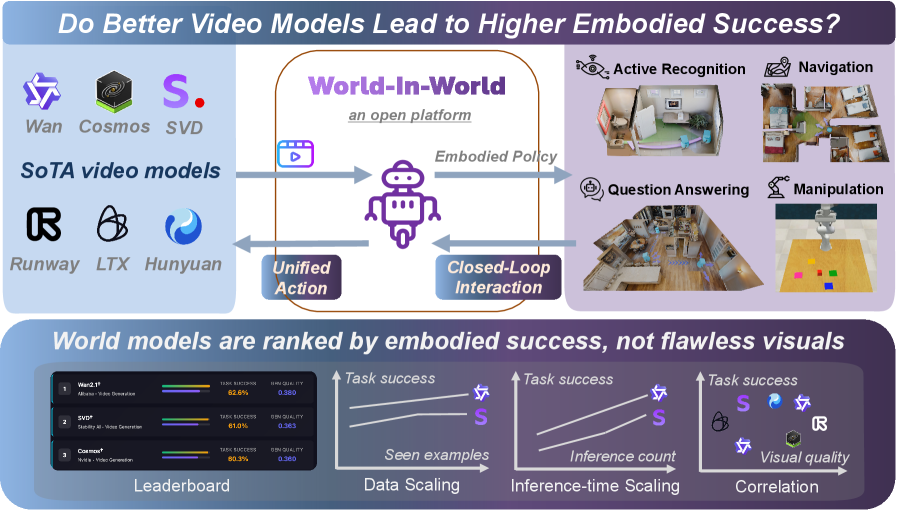
Figure 1: We introduce the first open benchmark to evaluate world models by closed-loop task success, analyze the link between task success and visual quality, and investigate scaling laws.
## 1 Introduction
Recent advances in visual generation have sparked interest in world generation, a field focused on the creation of diverse environments populated with varied scenes and entities, with applications in entertainment, gaming, simulation, and embodied AI. The rapid progress in video generation (Brooks et al., 2024b; Yang et al., 2024b; Wan et al., 2025), 3D scene generation (Fridman et al., 2023; Chung et al., 2023; Yu et al., 2024; Koh et al., 2023; Ling et al., 2025), and 4D scene generation (Bahmani et al., 2024b; Xu et al., 2024; Bahmani et al., 2024a) has demonstrated high-quality individual scene generation, highlighting the potential of these models as world generation systems.
Building on these developments, recent world generation systems (Yang et al., 2023b; Parker-Holder and Fruchter, 2025; Li et al., 2025b; Ye et al., 2025; Lu et al., 2025; He et al., 2025c) show promise as world models for embodied agents. Given an agent’s initial observation and a candidate action, such systems predict the resulting video, thereby estimating the future state of the environment. These action-conditioned simulators mirror human mental models by forecasting future states and can provide missing context under partial observability. As a result, they offer a pathway to improved decision-making for embodied tasks that rely on perception, planning, and control.
Despite this promise, the community lacks a unified benchmark that evaluates visual world models through the lens of embodied interaction. Existing suites emphasize video generation quality (e.g., VBench (Huang et al., 2024)) or visual plausibility (e.g., WorldModelBench (Li et al., 2025a)). The recent WorldScore (Duan et al., 2025) offers a unified assessment for models that take an image and a camera trajectory as input. However, no current benchmark tests whether generated worlds actually enhance embodied reasoning and task performance —for example, helping an agent perceive the environment, plan and execute actions, and replan based on new observations within such a closed loop. Establishing this evaluation framework is essential for tracking genuine progress across the rapidly expanding landscape of visual world models and embodied AI.
<details>
<summary>x2.png Details</summary>
### Visual Description
## Scatter Plot: Model Performance Comparison (Generative Quality vs. Task Success Rate)
### Overview
This image is a scatter plot comparing the performance of various AI models, likely for video or image generation tasks. It plots two key metrics against each other: "Gen. Quality (Aesthetic+Image Quality)" on the horizontal axis and "Task Success Rate (%)" on the vertical axis. Each data point represents a specific model, labeled with its name and categorized by its training paradigm (Zero-shot, Post-trained, or Others).
### Components/Axes
* **Chart Type:** Scatter Plot.
* **X-Axis:**
* **Label:** `Gen. Quality (Aesthetic+Image Quality)↑`
* **Scale:** Linear, ranging from approximately 0.325 to 0.475. The upward arrow (↑) indicates that higher values are better.
* **Major Ticks:** 0.325, 0.350, 0.375, 0.400, 0.425, 0.450, 0.475.
* **Y-Axis:**
* **Label:** `Task Success Rate (%)`
* **Scale:** Linear, ranging from 55% to 63%.
* **Major Ticks:** 55, 56, 57, 58, 59, 60, 61, 62, 63.
* **Legend:** Located in the top-right corner.
* **Pink Circle:** `Zero-shot`
* **Blue Circle:** `Post-trained`
* **Green Square:** `Others`
* **Data Points & Labels:** Each point is labeled with a model name. Some names are followed by a dagger symbol (†), which, based on their blue color, appears to denote a post-trained variant of a base model.
### Detailed Analysis
The plot contains 15 distinct data points. Below is a reconstruction of the data, with approximate coordinates read from the chart. The color/category is confirmed by cross-referencing with the legend.
| Model Name (Label) | Approx. Gen. Quality (X) | Approx. Task Success Rate (Y) | Color/Shape | Category (from Legend) |
| :--- | :--- | :--- | :--- | :--- |
| Wan2.1† | 0.380 | 62.5% | Blue Circle | Post-trained |
| SVD† | 0.365 | 61.0% | Blue Circle | Post-trained |
| Cosmos-P2† | 0.355 | 60.3% | Blue Circle | Post-trained |
| Wan2.2 A14B | 0.455 | 59.5% | Pink Circle | Zero-shot |
| Wan2.1 | 0.475 | 58.2% | Pink Circle | Zero-shot |
| Hunyuan | 0.400 | 57.7% | Pink Circle | Zero-shot |
| SVD | 0.375 | 57.7% | Pink Circle | Zero-shot |
| LTXVideo† | 0.340 | 57.5% | Blue Circle | Post-trained |
| SE3DS | 0.365 | 57.5% | Green Square | Others |
| NWM | 0.325 | 57.3% | Green Square | Others |
| Pathdreamer | 0.340 | 57.0% | Green Square | Others |
| Wan2.2 5B† | 0.380 | 56.3% | Blue Circle | Post-trained |
| LTXVideo | 0.385 | 56.0% | Pink Circle | Zero-shot |
| Wan2.2 5B | 0.395 | 55.3% | Pink Circle | Zero-shot |
| Cosmos-P2 | 0.475 | 55.3% | Pink Circle | Zero-shot |
**Trend Verification:**
* **Post-trained Models (Blue):** This series shows a general trend where higher generative quality correlates with higher task success rate. The line formed by points like LTXVideo†, SVD†, and Wan2.1† slopes upward from left to right.
* **Zero-shot Models (Pink):** This series is more dispersed. There is a cluster of models (Wan2.2 5B, LTXVideo, Cosmos-P2) with lower task success rates (~55-56%) but spanning a wide range of generative quality (0.385 to 0.475). Another cluster (Hunyuan, SVD, Wan2.1, Wan2.2 A14B) has higher task success (~57.7-59.5%) and also spans a wide quality range.
* **Others (Green):** These three models (NWM, Pathdreamer, SE3DS) are clustered in the lower-left quadrant, indicating relatively lower performance on both metrics compared to the top performers.
### Key Observations
1. **Top Performer:** `Wan2.1†` (Post-trained) achieves the highest Task Success Rate (~62.5%) with moderate Generative Quality (~0.380).
2. **Quality Leader:** `Wan2.1` and `Cosmos-P2` (both Zero-shot) tie for the highest Generative Quality (~0.475), but their Task Success Rates are among the lowest (~55.3% and ~58.2% respectively).
3. **Post-training Effect:** For several model families, the post-trained variant (†) significantly outperforms its zero-shot counterpart in Task Success Rate, often with a trade-off in Generative Quality.
* **Example:** `Wan2.1†` vs. `Wan2.1`: Task Success ↑ ~4.3%, Gen. Quality ↓ ~0.095.
* **Example:** `SVD†` vs. `SVD`: Task Success ↑ ~3.3%, Gen. Quality ↓ ~0.010.
4. **Model Family Spread:** The "Wan" model family (Wan2.1, Wan2.2 5B, Wan2.2 A14B) and its post-trained variants are represented across a wide area of the plot, showing significant performance variability based on size and training.
### Interpretation
This chart visualizes a fundamental trade-off in generative AI model development: **optimizing for aesthetic/image quality does not guarantee success on downstream tasks, and vice-versa.**
* **Post-training is highly effective for task performance.** The clear upward trend and superior positioning of the blue "Post-trained" points suggest that specialized fine-tuning is crucial for achieving high task success rates, even if it slightly reduces generic quality metrics.
* **Zero-shot models excel in raw quality.** The highest generative quality scores belong to zero-shot models, indicating these base models are excellent at producing visually pleasing outputs without task-specific tuning.
* **The "Others" category lags behind.** The green-square models occupy a lower-performance region, suggesting they may be older, smaller, or less specialized architectures compared to the Wan, SVD, and Cosmos families highlighted here.
* **Strategic Choice:** The data implies a strategic choice for practitioners: select a **post-trained model** (like Wan2.1†) for applications where task completion is critical, or select a high-quality **zero-shot model** (like Wan2.1) for applications where visual fidelity is the primary concern. The ideal model would be in the top-right corner, a goal not yet achieved by any model in this comparison.
</details>
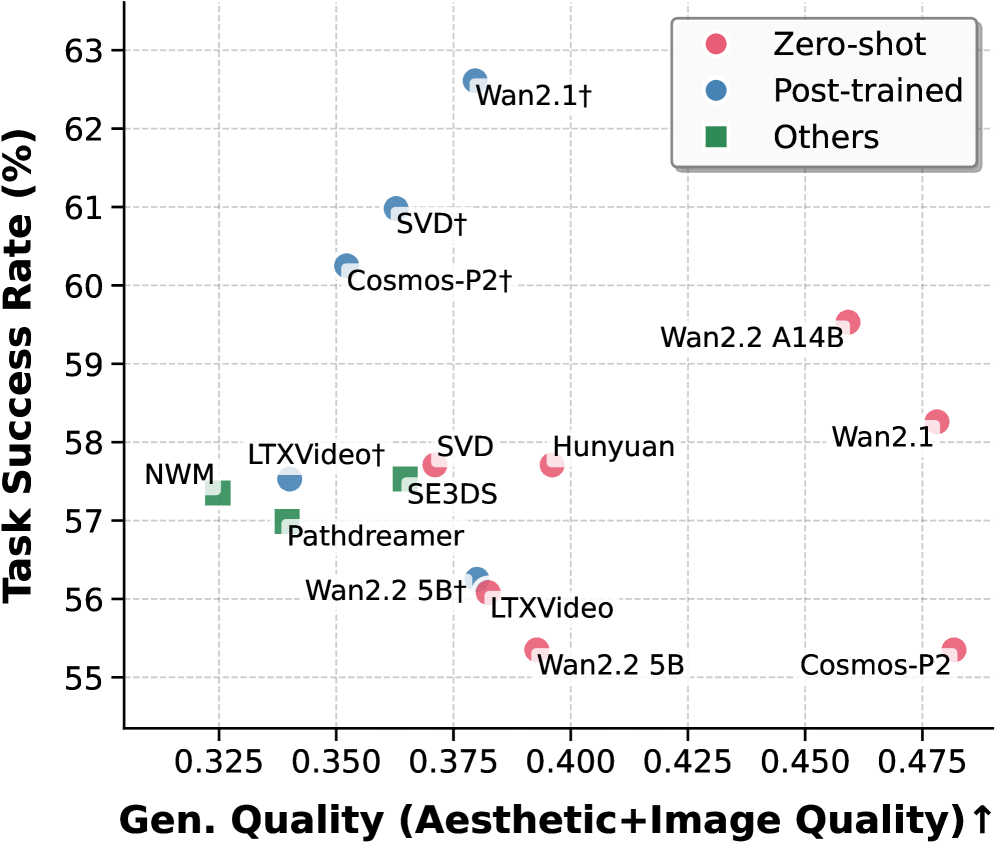
Figure 2: Task success rate vs. generation quality. $\dagger$ : post-trained with extra data. We defend that world models live and die by their closed-loop success, not flawless generated visuals.
In this work, we address this gap by proposing World-in-World, which wraps generative World models In a closed-loop World interface to measure their practical utility for embodied agents. Specifically, we present a unified strategy for closed-loop online planning and a standardized action API to seamlessly integrate diverse world models into closed-loop tasks. The online planning strategy allows the agent to look ahead by anticipating environmental changes and task rewards before committing to an action. The standardized action API harmonizes input modalities expected by different world models, so that each model can be controlled consistently within the same evaluation protocol. In addition, we introduce a post-training protocol that fine-tunes pretrained video generators using a modest amount of action–observation data drawn from the same action space as the downstream tasks, which allows us to examine their adaptation potential and to characterize a data scaling law.
World-in-World offers a fair, closed-loop world interface to evaluate diverse WMs. We benchmark leading video generators (Wan et al., 2025; HaCohen et al., 2024; Kong et al., 2024) alongside task-focused world models (Bar et al., 2025a; Koh et al., 2023, 2021a) in perception, navigation, and manipulation settings. Our findings reveal three consistent trends: (1) high visual quality does not necessarily translate into strong task success; (2) scaling post-training with action-observation data is more effective than upgrading the pretrained video generators; and (3) increasing inference-time compute via online planning substantially improves closed-loop performance. As shown in Figure ˜ 2, world models with strong visual scores do not necessarily bring high success rates, which underscores the need for closed-loop evaluation when judging WM practical value for embodied agents.
Our work makes three main contributions:
- We introduce World-in-World, the first comprehensive closed-loop benchmark that evaluates world models through the lens of embodied interaction, moving beyond the common focus on generation quality.
- We propose a unified closed-loop planning strategy with a unified action API, allowing diverse world models to be seamlessly integrated and evaluated within a single framework across four embodied tasks.
- We discover that high visual quality does not necessarily guarantee task success, and demonstrate how the performance of pretrained video generators can be substantially improved through training-time data scaling and inference-time scaling.
## 2 World-in-World: a Closed-Loop Interface for Visual World Models
Design overview. Our goal is to establish a benchmark that evaluates world-generation methods by their utility for embodied agents. Unlike prior work focused on generative quality, we develop a predictive-control framework to test how well a world model supports online decision-making. The evaluation setting mirrors practical scenarios in embodied AI, emphasizing the interaction between prediction, control, and reward under closed-loop operation.
We detail the unified strategy for closed-loop online planning (Section ˜ 2.1) and the unified action API (Section ˜ 2.2), which together provide a common interface across tasks and models. We then describe our task selection and evaluation protocol (Section ˜ 2.3). Finally, we present a post-training recipe that adapts a pretrained video generator into a more effective embodied world model (Section ˜ 2.4).
<details>
<summary>x3.png Details</summary>
### Visual Description
## Diagram: Closed-loop Online Planning System
### Overview
This image is a technical system diagram illustrating a "Closed-loop online planning" framework for an embodied robotic agent. The diagram depicts a cyclical process where the agent uses imagined interactions to propose and revise action plans before executing them in a real environment. The flow is indicated by colored arrows, with a legend differentiating between imagined (purple) and real (teal) interactions.
### Components/Axes
**Legend (Top-Left):**
* **Purple Arrow:** Imagined Interactions
* **Teal Arrow:** Real Interactions
**Main Diagram Components (Spatially arranged from left to right, then looping back):**
1. **Embodied Task Env. (Left):** A dashed box containing icons representing the agent's environment. Icons include a globe, a robotic arm, a person at a desk, and a chat bubble.
2. **Observation Sequence (Top-Left):** A series of image icons labeled `O₁`, `O₂`, `O₃`, ..., `Oₜ`. A purple arrow points from this sequence into the planning system.
3. **Robot Icon (Center-Left):** A simple robot figure. Teal arrows point from the "Embodied Task Env." to the robot and from the robot back to the environment, indicating real interaction.
4. **Action Sequence (Bottom-Left):** A series of directional arrow icons labeled `D*₁`, `D*₂`, `D*₃`, ..., `D*ₜ`. A purple arrow points from the planning system to this sequence.
5. **Planning System (Right, within a large rounded rectangle):** This is the core processing unit, containing four numbered modules:
* **① π proposal:** Represented by a neural network icon. It receives observations (`Oₜ`) and outputs multiple candidate action plans.
* **Candidate Action Plans:** Listed as `Âₜ⁽¹⁾`, `Âₜ⁽²⁾`, ..., `Âₜ⁽ᴹ⁾`.
* **② Unified Action API:** Represented by an icon with an 'A' inside a circle and arrows. It receives the candidate plans.
* **③ World Model gθ:** Represented by a globe icon. It receives text/camera trajectories/actions from the API and outputs possible future states.
* **Possible Future States:** Listed as `Ôₜ⁽¹⁾`, `Ôₜ⁽²⁾`, ..., `Ôₜ⁽ᴹ⁾`.
* **④ π revision:** Represented by a document/gear icon. It receives the possible future states and outputs the final chosen action sequence (`D*ₜ`).
6. **Output Icons (Far Right):** Three small icons vertically aligned: a camera, a path/trajectory symbol, and the letter 'T'. These are connected to the World Model via a purple arrow labeled "Text/Camera traj/Actions".
### Detailed Analysis
**Flow and Relationships:**
The process begins with the agent observing the environment (`O₁...Oₜ`). These observations are fed (purple arrow) into the **π proposal** module (1), which generates `M` candidate action plans (`Âₜ⁽¹⁾...Âₜ⁽ᴹ⁾`). These plans are processed by the **Unified Action API** (2), which interfaces with the **World Model gθ** (3). The World Model simulates the outcomes of each candidate plan, producing `M` corresponding **Possible Future States** (`Ôₜ⁽¹⁾...Ôₜ⁽ᴹ⁾`). These simulated outcomes are evaluated by the **π revision** module (4), which selects the optimal action sequence (`D*₁...D*ₜ`). This chosen sequence is then executed in the real **Embodied Task Env.** via the robot (teal arrows), closing the loop. The cycle repeats with new observations.
**Text Transcription:**
All text in the diagram is in English. Key transcribed text includes:
* Title: "Closed-loop online planning"
* Legend: "Imagined Interactions", "Real Interactions"
* Module Labels: "① π proposal", "② Unified Action API", "③ World Model gθ", "④ π revision"
* Data Labels: `O₁`, `O₂`, `O₃`, `Oₜ`; `Âₜ⁽¹⁾`, `Âₜ⁽²⁾`, `Âₜ⁽ᴹ⁾`; `Ôₜ⁽¹⁾`, `Ôₜ⁽²⁾`, `Ôₜ⁽ᴹ⁾`; `D*₁`, `D*₂`, `D*₃`, `D*ₜ`
* Descriptive Text: "Embodied Task Env.", "Candidate Action Plan 1", "Candidate Action Plan 2", "Candidate Action Plan M", "Possible Future State 1", "Possible Future State 2", "Possible Future State M", "Text/Camera traj/Actions"
### Key Observations
1. **Dual Interaction Loops:** The system explicitly separates internal, simulated planning (purple "Imagined Interactions") from external, physical execution (teal "Real Interactions").
2. **Parallel Hypothesis Testing:** The core of the planning system is parallelized. Both the action proposal (`Âₜ⁽ᴹ⁾`) and the world model's state prediction (`Ôₜ⁽ᴹ⁾`) operate over `M` candidates simultaneously, suggesting a Monte Carlo or beam-search-like approach to planning.
3. **Model-Based Reinforcement Learning Structure:** The architecture follows a classic model-based RL pattern: an actor (π proposal) proposes actions, a world model (gθ) predicts outcomes, and a critic/revision module (π revision) evaluates them to select the best action.
4. **Symbolic and Perceptual Integration:** The World Model takes "Text/Camera traj/Actions" as input, indicating it integrates both symbolic (text) and perceptual (camera) data to make its predictions.
### Interpretation
This diagram represents a sophisticated architecture for an intelligent agent that "thinks before it acts." The key innovation is the **closed-loop online planning** mechanism. Instead of reacting reflexively, the agent uses its internal **World Model (gθ)**—a learned simulator of reality—to imagine the consequences of multiple potential action plans. The **π revision** module then acts as a decision-maker, choosing the plan predicted to lead to the most desirable future state.
The system's power lies in this ability to conduct risk-free, rapid internal simulations. It allows the robot to explore various strategies in its "mind" before committing to a physical action, which is crucial for complex, irreversible, or safety-critical tasks in the real world. The separation of the "Unified Action API" suggests a modular design where different planning strategies or action representations can be plugged in. The entire loop enables continuous adaptation: the agent acts, observes the real outcome, updates its understanding, and refines its future plans accordingly. This is a foundational paradigm for creating autonomous systems that can operate effectively in dynamic and uncertain environments.
</details>
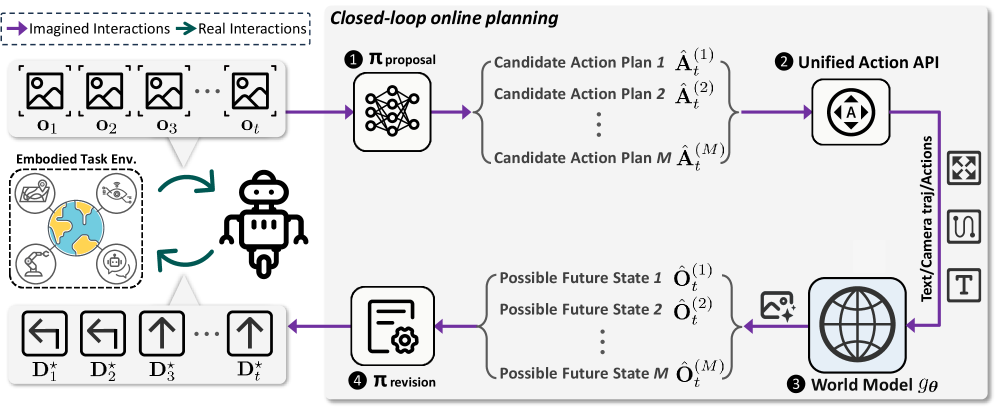
Figure 3: Closed-loop online planning in World-in-World: At time step $t$ , the agent receives the world state, represented by observation $\mathbf{o}_{t}$ , and invokes a proposal policy $\pi_{\text{proposal}}$ (❶) to produce a total of $M$ candidate action plans. The unified action API (❷) transforms each plan into the control inputs required by the world model. The world model (❸) then predicts the corresponding future states as observations $\hat{\mathbf{O}}_{t}$ . The revision policy $\pi_{\text{revision}}$ (❹) evaluates all rollouts and commits to the best, yielding decision $\mathbf{D}^{\star}_{t}$ . This decision is applied in the environment, closing the interaction loop.
### 2.1 Unified Strategy for Closed-Loop Online Planning
In Figure ˜ 3, we present a unified closed-loop strategy that uses visual world models for decision-making. It cycles through proposal, simulation, and revision. In proposal, the agent generates candidate plans; in simulation, each plan is rolled out by the world model to predict counterfactual futures; in revision, the agent scores rollouts and refines its plan. Finally, the agent executes the top-scoring plan in the environment, coupling model-based planning with real execution.
Let $\mathbf{o}_{t}$ denote the agent’s egocentric observation at time step $t$ . The observation can be RGB, RGB-D, or other sensory modalities. For clarity, we use $\mathbf{o}$ as the generic notation throughout. Define the agent’s future potential action sequence of horizon $L$ starting at time step $t$ as $\hat{\mathbf{A}}_{t}\;=\;\bigl[\hat{a}_{t+1},\,\hat{a}_{t+2},\,\dots,\,\hat{a}_{t+L}\bigr],$ where each elementary action $\hat{a}$ is specified in either a continuous action space or a discrete action space, i.e., $\hat{a}\in\mathcal{V}$ , with $\mathcal{V}$ denoting the set of action primitives available to the agent.
Our unified strategy can be formalized as a policy-guided beam search. The beam width corresponds to the number of candidate plans $M$ drawn from the proposal policy $\pi_{\text{proposal}}$ . At time step $t$ , given the current observation $\mathbf{o}_{t}$ and the task goal $\mathrm{g}$ , the proposal policy $\pi_{\text{proposal}}$ samples $M$ candidate action sequences that serve as future candidate plans:
$$
\hat{\mathbf{A}}_{t}^{(m)}\;\sim\;\pi_{\text{proposal}}\bigl(\mathbf{A}\,\big|\,\mathbf{o}_{t},\,\mathrm{g}\bigr),\qquad m=1,\dots,M. \tag{1}
$$
Each candidate plan $\hat{\mathbf{A}}_{t}^{(m)}$ is subsequently transformed by the unified action API $C$ into the control inputs expected by the world model: $I_{t}^{(m)}\;=\;C\bigl(\hat{\mathbf{A}}_{t}^{(m)}\bigr),$ where $I_{t}^{(m)}$ may include textual prompts, camera trajectories, or low-level action sequences, depending on the required format of the chosen world model. The visual world model $g_{\boldsymbol{\theta}}$ then performs a counterfactual rollout based on these control inputs, predicting the future world states $\hat{\mathbf{O}}_{t}^{(m)}$ with horizon $L$ :
$$
\hat{\mathbf{O}}_{t}^{(m)}\;\sim\;g_{\boldsymbol{\theta}}\!\Bigl(\mathbf{O}\,\big|\,\mathbf{o}_{t},\,I_{t}^{(m)}\Bigr),\qquad\hat{\mathbf{O}}_{t}^{(m)}=\bigl[\hat{\mathbf{o}}_{t+1}^{(m)},\,\hat{\mathbf{o}}_{t+2}^{(m)},\,\dots,\,\hat{\mathbf{o}}_{t+L}^{(m)}\bigr]. \tag{2}
$$
Then, the candidate plans and their simulated rollouts $\bigl(\hat{\mathbf{A}}_{t}^{(m)},\hat{\mathbf{O}}_{t}^{(m)}\bigr)$ are evaluated and revised by the revision policy $\pi_{\text{revision}}$ , which assigns a score to each trajectory and selects the decision that maximizes the expected reward. In the most general form, we write
$$
\mathbf{D}^{\star}_{t}=\pi_{\text{revision}}\Bigl(\{\,(\hat{\mathbf{A}}_{t}^{(m)},\,\hat{\mathbf{O}}_{t}^{(m)})\,\}_{m=1}^{M},\,\mathbf{o}_{t},\,\mathrm{g}\Bigr). \tag{3}
$$
Here, $\mathbf{D}^{\star}_{t}$ denotes the best decision according to $\pi_{\text{revision}}$ at time step $t$ . Depending on the task, $\mathbf{D}^{\star}_{t}$ may represent a high-level answer, a recognition result, or a refined sequence of low-level actions, which renders the framework more general than classical Model Predictive Control (MPC) (Morari and H. Lee, 1999), where optimization is restricted to sequences of actions.
A common instantiation implements $\pi_{\text{revision}}$ as a score-and-select operator $S$ . When the decision is an action sequence, selection is performed over the $M$ candidate plans produced at time step $t$ :
$$
m^{\star}=\operatorname*{arg\,max}_{m\in\{1,\dots,M\}}\;S\!\left(\hat{\mathbf{A}}_{t}^{(m)},\,\hat{\mathbf{O}}_{t}^{(m)}\,\big|\,\mathbf{o}_{t},\,\mathrm{g}\right),\qquad\mathbf{D}^{\star}_{t}=\hat{\mathbf{A}}_{t}^{(m^{\star})}. \tag{4}
$$
Here, $S(\cdot)$ denotes a task-specific scoring function that estimates the expected reward or utility of a candidate plan based on its simulated outcomes. Alternatively, $\pi_{\text{revision}}$ may synthesize or update a new decision by aggregating information across the candidate set and their predicted consequences, rather than selecting one candidate verbatim.
Once the best decision $\mathbf{D}^{\star}_{t}$ is executed in the environment, the agent acquires a new observation at time step $t{+}1$ . The unified strategy then re-enters the proposal-simulation-revision loop, using the newly observed state to initiate the next round of proposal, simulation, and revision. In our framework, both $\pi_{\text{proposal}}$ and $\pi_{\text{revision}}$ can be instantiated flexibly: they may be pretrained modules, such as large-scale vision-language models or diffusion policies, or simple rule-based heuristics. In our experiments, we explore multiple instantiations to systematically explore the flexibility and generality of our framework for different tasks.
### 2.2 Unified Action API
In this section, we present a unified action API that transforms an action sequence $\mathbf{A}$ into control inputs $I$ that guide the world model, i.e., $I\!=\!C(\mathbf{A})$ . The action API is designed to be flexible so that the same interface can serve a wide range of world models and tasks. It supports three principal types of control information: (1) text prompt, (2) camera trajectory/viewpoint, and (3) low-level actions, depending on the inputs expected by the chosen world model.
Text prompt. For image-and-text-to-video world models, the controller maps the intended action sequence into a descriptive text prompt. A predefined template converts each primitive action into a phrase, and concatenating these phrases yields the final prompt $I_{\text{text}}$ .
Camera trajectory / viewpoint. For models that consume explicit viewpoints, the controller translates $\mathbf{A}$ into a camera trajectory, e.g., each translation action moves the camera by $0.2\,\text{m}$ , and each rotation action changes the azimuth by $22.5^{\circ}$ . The resulting trajectory is represented as a sequence $\bigl[(x_{k},y_{k},\phi_{k})\bigr]_{k=1}^{K}$ with $(x_{k},y_{k})\in\mathbb{R}^{2}$ and azimuth $\phi_{k}\in\mathbb{R}$ .
Low-level actions. For world models that take discrete or continuous low-level actions as input, the controller maps the action sequence $\mathbf{A}$ to the world model’s action vocabulary, yielding $\mathbf{A}_{\text{world}}$ . This mapping $\mathbf{A}\mapsto\mathbf{A}_{\text{world}}$ applies the necessary transformations to maintain a unique and consistent correspondence between the agent’s actions and the inputs expected by the world model.
### 2.3 Comprehensive Embodied Tasks
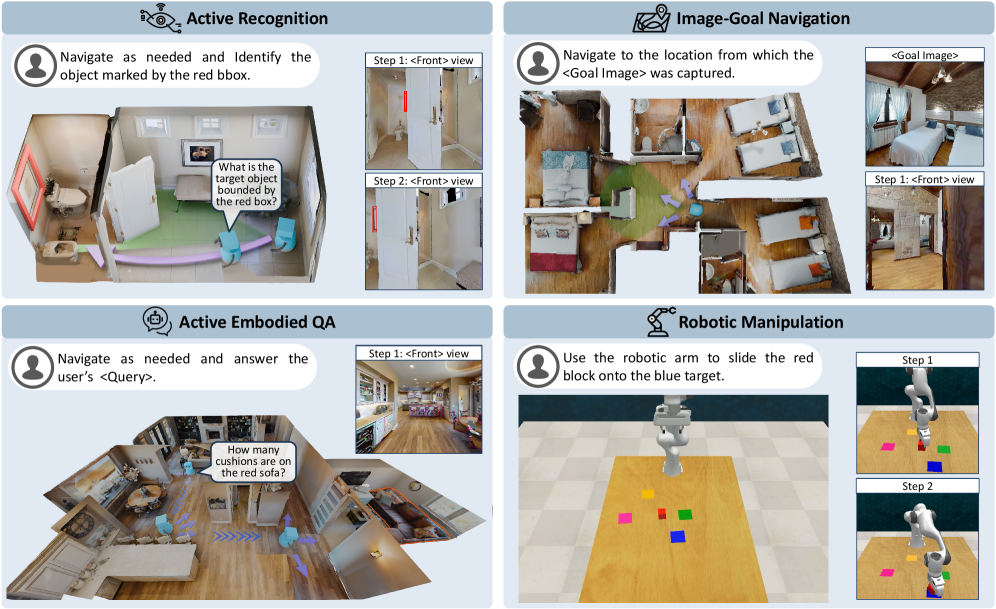
To evaluate the practical utility of visual world models in embodied tasks, we select a diverse set of tasks that span multiple domains and stress distinct capabilities. We focus on four representative tasks: Active Recognition (AR), Active Embodied Question Answering (A-EQA), Image-Goal Navigation (ImageNav), and Robotic Manipulation, as illustrated in Figure ˜ 4. Taken together, these tasks emphasize complementary aspects of embodied intelligence, including perception, navigation, and object-level manipulation, and thus provide a comprehensive testbed for assessing how effectively a visual world model supports online planning and decision-making. Below, we describe the tasks included in our benchmark, and more detailed settings are provided in Appendix ˜ B.
<details>
<summary>x4.png Details</summary>
### Visual Description
## Diagram: Four Embodied AI Task Scenarios
### Overview
The image is a composite diagram divided into four distinct panels, each illustrating a different task for an embodied AI agent (e.g., a robot). The panels are arranged in a 2x2 grid. Each panel contains a title, a task instruction, a primary 3D scene visualization, and, in most cases, a secondary panel showing a first-person ("Front") view or a step-by-step sequence. The overall theme is demonstrating capabilities in navigation, visual understanding, question answering, and physical manipulation within simulated indoor environments.
### Components/Axes
The diagram is segmented into four quadrants:
1. **Top-Left:** "Active Recognition"
2. **Top-Right:** "Image-Goal Navigation"
3. **Bottom-Left:** "Active Embodied QA"
4. **Bottom-Right:** "Robotic Manipulation"
Each quadrant contains:
* A title with an associated icon.
* A text bubble with a task instruction directed at an agent (represented by a person icon).
* A main visual scene (a top-down or isometric view of a room or workspace).
* A secondary visual element (a "Front" view panel or a step-by-step sequence).
### Detailed Analysis
#### Panel 1: Active Recognition (Top-Left)
* **Instruction Text:** "Navigate as needed and Identify the object marked by the red bbox."
* **Main Scene:** A top-down view of a living room. A light blue agent figure is shown with a purple path indicating movement. A red bounding box highlights a picture frame on the wall. A speech bubble from the agent asks: "What is the target object bounded by the red box?"
* **Secondary Panel (Right):** Two stacked images labeled "Step 1: <Front> view" and "Step 2: <Front> view". Both show a first-person perspective looking at a white door with a red vertical handle. The view in Step 2 appears slightly closer or adjusted compared to Step 1.
#### Panel 2: Image-Goal Navigation (Top-Right)
* **Instruction Text:** "Navigate to the location from which the <Goal Image> was captured."
* **Main Scene:** A top-down view of a multi-room apartment (bedroom, bathroom, living area). A light blue agent figure is shown with a purple path leading from a starting point to a goal location in the bedroom. A green cone emanates from the agent, indicating its field of view.
* **Secondary Panel (Right):** Two images. The top is labeled "<Goal Image>" and shows a bedroom with a bed, wooden ceiling, and a window. The bottom is labeled "Step 1: <Front> view" and shows a first-person perspective from within the bedroom, looking towards a doorway.
#### Panel 3: Active Embodied QA (Bottom-Left)
* **Instruction Text:** "Navigate as needed and answer the user's <Query>."
* **Main Scene:** An isometric view of a large, open-plan living and kitchen area. A light blue agent figure is shown with a purple path. A speech bubble from a user (person icon) asks: "How many cushions are on the red sofa?" The red sofa is visible in the scene.
* **Secondary Panel (Right):** A single image labeled "Step 1: <Front> view". It shows a first-person perspective from the kitchen area, looking towards the living room where the red sofa is partially visible.
#### Panel 4: Robotic Manipulation (Bottom-Right)
* **Instruction Text:** "Use the robotic arm to slide the red block onto the blue target."
* **Main Scene:** A top-down view of a wooden table. A white robotic arm is positioned over the table. On the table are several colored blocks: pink, yellow, green, red, and blue. The blue block is square and appears to be the target.
* **Secondary Panel (Right):** Two images showing a sequence. "Step 1" shows the robotic arm's gripper approaching the red block. "Step 2" shows the gripper having pushed the red block so that it is now on top of the blue target block.
### Key Observations
* **Consistent Agent Representation:** The AI agent is consistently visualized as a light blue, simplified humanoid figure in the navigation tasks (Panels 1-3).
* **Path Visualization:** Movement is indicated by a semi-transparent purple path with directional arrows.
* **First-Person Verification:** Three of the four tasks include a "<Front> view" panel, emphasizing the importance of the agent's egocentric visual perspective for completing the task.
* **Task Progression:** The "Robotic Manipulation" panel explicitly shows a two-step action sequence, while the others imply navigation steps.
* **Environment Complexity:** The environments range from a single room (Active Recognition) to a multi-room apartment (Image-Goal Navigation) and a complex open-plan space (Active Embodied QA).
### Interpretation
This diagram serves as a visual taxonomy or set of examples for core challenges in embodied AI. It demonstrates how an intelligent agent must integrate several capabilities:
1. **Perception & Grounding:** Identifying objects (Active Recognition) and understanding spatial relationships from images (Image-Goal Navigation).
2. **Action & Planning:** Generating navigation paths (purple lines) and physical manipulation sequences (sliding the block).
3. **Interactive Reasoning:** Combining navigation with visual question answering (Active Embodied QA), where the agent must move to gather visual information to answer a query.
4. **Multi-Modal Instruction Following:** Each task begins with a natural language instruction that the agent must interpret and execute.
The inclusion of both third-person (top-down) and first-person ("<Front> view") perspectives highlights a key research challenge: bridging the gap between an external observer's understanding of a scene and the agent's limited, on-board sensory input. The tasks progress from pure perception (Recognition) to goal-directed navigation, then to interactive QA, and finally to direct physical interaction, showcasing a hierarchy of complexity in agent capabilities. The clean, simulated environments suggest these are likely benchmark tasks for training and evaluating AI agents in controlled settings before deployment in the real world.
</details>
Figure 4: Top-left: Active Recognition (AR), the agent needs to identify a designated target under occlusions or extreme viewpoints while minimizing navigation cost. Top-right: Image-Goal Navigation (ImageNav), the agent reaches the viewpoint matching a goal image, emphasizing success rate and path efficiency. Bottom-left: Active Embodied Question Answering (A-EQA), the agent answers an open-ended question after active exploration. Bottom-right: Robotic Manipulation, the agent needs to control a robotic arm to complete tasks such as grasping and placement to specified targets.
Active Recognition (AR) is closely related to amodal recognition (Aydemir et al., 2013; Liu et al., 2018; Yang et al., 2019; Fan et al., 2024; Bhattacharjee et al., 2025), in which the agent must identify a designated target that may be observed from extreme viewpoints or be heavily occluded. In addition, AR allows the agent to acquire additional observations through active exploration. All AR experiments are conducted in the Habitat-Sim (Savva et al., 2019), encompassing 551 episodes across 29 scenes from the validation split of Matterport3D (Chang et al., 2017). Within AR, the visual world model assists two decision-making processes. For answering, synthetic views provide auxiliary evidence that helps the agent reason about occlusions and extreme viewpoints that impede recognition. For navigation, rollouts simulate the consequences of potential actions so that the agent can choose a path that is more likely to yield informative observations.
Image-Goal Navigation (ImageNav), also referred to as goal-conditioned visual navigation, requires an embodied agent to reach a target position in a scene given a single reference image that specifies the goal viewpoint. We construct 144 ImageNav episodes from 87 validation scenes of HM3D (Ramakrishnan et al., 2021). In this task, the visual world model exclusively supports navigation decisions. The agent simulates the outcomes of candidate action plans, selects the best option, executes the first segment of that plan, and then replans with the newly observed state in a closed-loop manner.
Active Embodied Question Answering (A-EQA) requires an agent to answer open-ended natural-language questions after actively exploring a 3D environment. Our evaluation set includes 184 questions across 54 indoor scenes from the official OpenEQA split (Majumdar et al., 2024) and the HM3D validation set (Ramakrishnan et al., 2021). As in AR, the visual world model supports both question answering and navigation. For answering, synthetic views generated by the world model provide complementary perspectives that help resolve references to occluded or distant objects. For navigation, the agent simulates high-level action plans using the world model’s predictions to choose exploration strategies likely to reveal question-relevant information.
Robotic Manipulations are fundamental capabilities for embodied agents that must operate in real-world interaction settings. We study how visual world models contribute to closed-loop manipulation planning, evaluating performance on four RLBench (James et al., 2020) tasks with 50 episodes per task. Here, the visual world model supports the agent in assessing candidate $7$ -DoF gripper actions by providing visual evidence about anticipated object motions and interactions, which enables a comparison of alternative plans before execution. The predicted outcomes then guide the selection of actions that are more likely to achieve the specified objective, thereby linking visual prediction accuracy to improvements in manipulation performance.
### 2.4 Exploiting World Models via Post-Training
To evaluate the feasibility of adapting pretrained video generators for embodied tasks, we introduce a post-training procedure that aligns a pretrained model with the domain distribution and action space of target environments. We perform fine-tuning separately on data from two simulators, Habitat-Sim and CoppeliaSim, to match the corresponding task domains. For Habitat-Sim tasks (AR, A-EQA, ImageNav), we post-train on a panoramic action-observation dataset collected from the HM3D (Ramakrishnan et al., 2021) training split. For CoppeliaSim tasks (Robotic Manipulation), we post-train on task demonstrations generated with RLBench (James et al., 2020). To assess generalization rather than memorization, all Habitat-Sim data used for post-training are sourced from scenes that are disjoint from our evaluation scenes, so the scenes in our evaluation tasks remain unseen by the world models after post-training. Additional details regarding the training objective, dataset construction, and training configuration are provided in Appendices ˜ C and D.
## 3 Evaluation Results and Analysis
In this section, we report quantitative results and key observations on the four embodied tasks in Section ˜ 3.1, followed by ablation studies in Section ˜ 3.2. We evaluate visual world models spanning image-based (PathDreamer (Koh et al., 2021b), SE3DS (Koh et al., 2023)) and video-based (SVD (Blattmann et al., 2023a), LTX-Video (HaCohen et al., 2024), Hunyuan (Kong et al., 2024), Wan2.1 (Wan et al., 2025), Wan2.2 (Wan et al., 2025), Cosmos-Predict2 (Agarwal et al., 2025), NWM (Bar et al., 2025a)) approaches, covering major control interfaces. For video-based models, we compare off-the-shelf versions with their post-trained variants.
### 3.1 Benchmark Results
Table 1: Active Recognition (AR) and Image-Goal Navigation (ImageNav) performance across various models and base policies. Higher success rate (SR %), success weighted by path length (SPL %), and lower mean trajectory length (Mean Traj.) are better. “ $\dagger$ ” denotes our post-trained video generators.
| Model Details | AR | ImageNav | | | | | | | |
| --- | --- | --- | --- | --- | --- | --- | --- | --- | --- |
| Model Type | Method | Control Type | Input Type | #Param. | SR $\uparrow$ | Mean Traj. $\downarrow$ | SR $\uparrow$ | Mean Traj. $\downarrow$ | SPL $\uparrow$ |
| Base Policy | Heuristic (w/o WM) | – | RGB | – | 39.02 | 8.81 | 2.08 | 59.6 | 0.63 |
| + Video Gen. Post-Train | SVD $\dagger$ | Action | RGB; Pano | 1.5B | 60.62 | 5.17 | 20.83 | 58.5 | 11.86 |
| WAN2.1 $\dagger$ | Action | RGB; Pano | 14B | 62.98 | 4.71 | 22.92 | 58.7 | 11.63 | |
| Base Policy | VLM (w/o WM) | – | RGB | 72B | 50.27 | 6.24 | 35.42 | 47.5 | 25.88 |
| + Image Gen. | PathDreamer | Viewpoint | RGB - D; Pano | 0.69B | 56.99 | 5.28 | 36.80 | 47.3 | 26.85 |
| + Image Gen. | SE3DS | Viewpoint | RGB - D; Pano | 1.1B | 57.53 | 5.29 | 36.11 | 47.0 | 26.91 |
| + Video Gen. | NWM | Trajectory | RGB | 1B | 57.35 | 5.68 | 40.28 | 47.1 | 27.83 |
| + Video Gen. Zero-Shot | SVD | Image | RGB | 1.5B | 57.71 | 5.29 | 40.28 | 46.4 | 28.59 |
| LTX - Video | Text | RGB | 2B | 56.08 | 5.37 | 36.81 | 47.5 | 25.85 | |
| Hunyuan | Text | RGB | 13B | 57.71 | 5.21 | 36.11 | 46.8 | 26.89 | |
| Wan2.1 | Text | RGB | 14B | 58.26 | 5.24 | 38.19 | 48.2 | 25.92 | |
| Wan2.2 | Text | RGB | 5B | 55.35 | 5.73 | 38.88 | 46.5 | 28.87 | |
| Cosmos - P2 | Text | RGB | 2B | 55.35 | 5.71 | 36.81 | 47.6 | 25.89 | |
| Wan2.2 | Text | RGB | A14B | 59.53 | 4.91 | 43.05 | 45.8 | 31.46 | |
| Runway Gen4 (proprietary) | Text | RGB | – | 64.79 | 4.06 | - | - | - | |
| + Video Gen. Post-Train | SVD $\dagger$ | Action | RGB; Pano | 1.5B | 60.98 | 5.02 | 43.05 | 46.0 | 30.96 |
| LTX - Video $\dagger$ | Action | RGB; Pano | 2B | 57.53 | 5.49 | 38.89 | 47.4 | 27.47 | |
| WAN2.1 $\dagger$ | Action | RGB; Pano | 14B | 62.61 | 4.73 | 45.14 | 45.8 | 32.10 | |
| Cosmos - P2 $\dagger$ | Action | RGB; Pano | 2B | 60.25 | 5.08 | 41.67 | 45.5 | 30.29 | |
| Wan2.2 $\dagger$ | Action | RGB; Pano | 5B | 56.26 | 5.15 | 38.89 | 46.7 | 28.24 | |
| Wan2.2 $\dagger$ | Action | RGB; Pano | A14B | 62.43 | 4.67 | 46.53 | 44.6 | 34.61 | |
Table 2: Active Embodied Question Answering (A-EQA) performance.
| Model Details | A-EQA Performance | | | |
| --- | --- | --- | --- | --- |
| Model Type | Method | Ans. Score $\uparrow$ | Mean Traj. $\downarrow$ | SPL $\uparrow$ |
| Base Policy | VLM (w/o WM) | 45.7 | 20.4 | 29.6 |
| + Image Gen. | PathDreamer | 46.0 | 20.4 | 29.3 |
| + Image Gen. | SE3DS | 45.8 | 20.3 | 29.4 |
| + Video Gen. | NWM | 47.1 | 20.5 | 30.1 |
| + Video Gen. | Wan2.1 | 45.7 | 20.1 | 28.8 |
| Wan2.2 (5B) | 46.3 | 20.3 | 31.4 | |
| LTX - Video | 46.6 | 20.8 | 29.5 | |
| Cosmos - P2 | 46.6 | 21.0 | 31.3 | |
| Hunyuan | 46.8 | 20.4 | 29.9 | |
| SVD | 46.9 | 20.4 | 29.7 | |
| Wan2.2 (A14B) | 47.2 | 20.7 | 31.9 | |
| + Video Gen. Post-Train | SVD $\dagger$ | 46.4 | 21.1 | 30.1 |
| Cosmos - P2 $\dagger$ | 46.5 | 20.6 | 30.1 | |
| Wan2.2 $\dagger$ (5B) | 47.5 | 20.8 | 30.7 | |
| Wan2.1 $\dagger$ | 48.2 | 20.7 | 31.6 | |
| LTX - Video $\dagger$ | 48.6 | 20.7 | 31.8 | |
| Wan2.2 $\dagger$ (A14B) | 48.4 | 20.2 | 31.9 | |
Table 3: Robotic manipulation performance across various models and base policies.
| Model Details | Manipulation Performance | | |
| --- | --- | --- | --- |
| Model Type | Method | SR $\uparrow$ | Mean Traj. $\downarrow$ |
| Base Policy | VLM (w/o WM) | 44.5 | 2.52 |
| + Video Gen. | SVD | 44.0 | 2.47 |
| LTX - Video | 44.5 | 2.46 | |
| Hunyuan | 44.5 | 2.44 | |
| Wan2.1 | 44.0 | 2.51 | |
| Cosmos - P2 | 44.0 | 2.50 | |
| + Video Gen. Post-Train | SVD $\dagger$ | 46.5 | 2.38 |
| Cosmos - P2 $\dagger$ | 45.0 | 2.40 | |
| Base Policy | 3D - DP (w/o WM) | 24.0 | 5.21 |
| + Video Gen. Post-Train | SVD $\dagger$ | 44.7 | 4.41 |
| Cosmos - P2 $\dagger$ | 38.0 | 4.79 | |
World models can enhance the performance of the base proposal policy. Across AR, A-EQA, ImageNav, and Manipulation, adding a visual world model consistently improves the performance of the base proposal policy (e.g., a VLM policy, a heuristic policy, or a 3D diffusion policy), as shown in Tables ˜ 1, 3 and 3. For example, in AR, the best proprietary model (Runway Gen4) attains an accuracy of $64.79\$ while reducing the mean steps per episode to $4.06$ , compared to the VLM base policy with an accuracy of $50.27\$ and mean steps $6.24$ . Similarly, in ImageNav, the best open-source model Wan2.1 $\dagger$ achieves a success rate of $45.14\$ with an average path length of $45.8$ , outperforming the VLM base policy at $35.42\$ SR and $47.5$ average length. These results support the effectiveness of our World-in-World online planning framework with world models, in which the world model provides simulated future states that inform better decisions.
World models struggle to simulate precise motion and dynamics in manipulation. The gains are less pronounced for Robotic Manipulations (Table ˜ 3), likely because accurately modeling contact-rich interactions and robot kinematics is significantly more challenging than predicting purely view changes. For instance, the best post-trained model on manipulation (SVD $\dagger$ ) reaches an SR of $46.5\$ with a mean trajectory length of $2.38$ , only modestly above the VLM baseline at $44.5\$ SR and $2.52$ mean length. This gap suggests that while current visual world models can effectively guide perception and navigation, capturing fine-grained physical dynamics and action-conditioned object motion remains an open challenge.
Post-training substantially boosts world-model utility. Our post-training adaptation yields consistent improvements. Relative to off-the-shelf Wan2.1, Wan2.1 $\dagger$ raises AR accuracy from $58.26\$ to $62.61\$ and ImageNav SR from $38.19\$ to $45.14\$ (Table ˜ 1). Likewise, SVD $\dagger$ improves AR accuracy from $57.71\$ to $60.98\$ and ImageNav SR from $40.28\$ to $43.05\$ . These gains show that aligning the generative model to the target domain and action space of the specific embodied tasks improves downstream decision-making.
### 3.2 Ablation and Findings
<details>
<summary>x5.png Details</summary>
### Visual Description
## Scatter Plot Comparison: Model Performance on Task Success Rate vs. Generative Quality & Controllability
### Overview
The image contains two side-by-side scatter plots. Both plots share the same Y-axis, "Task Success Rate (%)", but compare it against two different X-axis metrics: "Gen. Quality (Aesthetic+Image Quality) ↑" on the left and "Controllability (1 - LPIPS) ↑" on the right. The plots compare the performance of various AI models, categorized into three groups: Zero-shot (pink circles), Post-trained (blue circles), and Others (green squares). The upward arrows (↑) on the X-axis labels indicate that higher values are better.
### Components/Axes
**Common Elements:**
* **Y-axis:** "Task Success Rate (%)". Scale ranges from 55 to 65, with major ticks at every integer.
* **Legend:** Located in the top-left corner of each plot.
* Pink Circle: Zero-shot
* Blue Circle: Post-trained
* Green Square: Others
* **Data Points:** Each point is labeled with a model name. The color and shape correspond to the legend.
**Left Plot:**
* **X-axis:** "Gen. Quality (Aesthetic+Image Quality) ↑". Scale ranges from 0.325 to 0.475, with major ticks at 0.025 intervals.
**Right Plot:**
* **X-axis:** "Controllability (1 - LPIPS) ↑". Scale ranges from 0.15 to 0.50, with major ticks at 0.05 intervals.
### Detailed Analysis
**Left Plot: Task Success Rate vs. Generative Quality**
* **Trend Verification:** There is a general, weak positive trend. Models with higher Generative Quality scores tend to have slightly higher Task Success Rates, but the correlation is not strong, and there is significant scatter.
* **Data Points (Approximate Coordinates - Gen. Quality, Task Success):**
* **Zero-shot (Pink):**
* Runway Gen4: (0.450, 65.0)
* Wan2.2 A14B: (0.450, 59.5)
* Wan2.1: (0.475, 58.3)
* Hunyuan: (0.400, 58.0)
* Wan2.2 5B: (0.400, 55.0)
* Cosmos-P2: (0.475, 55.0)
* **Post-trained (Blue):**
* Wan2.1†: (0.375, 62.5)
* SVD†: (0.360, 61.0)
* Cosmos-P2†: (0.350, 60.0)
* SVD: (0.375, 57.5)
* Pathdreamer: (0.350, 57.0)
* Wan2.2 5B†: (0.375, 56.0)
* **Others (Green):**
* LTXVideo†: (0.350, 57.5)
* SE3DS: (0.365, 57.3)
* LTXVideo: (0.375, 56.5)
* NWM: (0.325, 57.2)
**Right Plot: Task Success Rate vs. Controllability**
* **Trend Verification:** There is a clearer positive trend compared to the left plot. Models with higher Controllability scores generally achieve higher Task Success Rates.
* **Data Points (Approximate Coordinates - Controllability, Task Success):**
* **Zero-shot (Pink):**
* Runway Gen4: (0.325, 65.0)
* Wan2.2 A14B: (0.325, 59.5)
* Wan2.1: (0.275, 58.3)
* SVD: (0.325, 57.8)
* Hunyuan: (0.350, 57.5)
* LTXVideo: (0.325, 56.0)
* Wan2.2 5B: (0.325, 55.5)
* Cosmos-P2: (0.175, 55.0)
* **Post-trained (Blue):**
* Wan2.1†: (0.500, 62.5)
* SVD†: (0.500, 61.0)
* Cosmos-P2†: (0.500, 60.0)
* Wan2.2 5B†: (0.450, 56.0)
* **Others (Green):**
* LTXVideo†: (0.350, 57.5)
* SE3DS: (0.350, 57.3)
* Pathdreamer: (0.300, 57.0)
* NWM: (0.375, 57.2)
### Key Observations
1. **Top Performer:** "Runway Gen4" (Zero-shot) is the clear outlier, achieving the highest Task Success Rate (~65%) in both plots, with high Generative Quality but only moderate Controllability.
2. **Post-training Effect:** Models with the "†" suffix (indicating post-training) consistently show a significant rightward shift on the Controllability axis (right plot) compared to their base versions, while maintaining or slightly improving Task Success Rate. This effect is less pronounced on the Generative Quality axis.
3. **Metric Correlation:** Task Success Rate appears to have a stronger visual correlation with Controllability than with Generative Quality.
4. **Cluster of "Others":** The green "Others" models (NWM, SE3DS, LTXVideo) cluster in a mid-range for both metrics, generally between 56-58% Task Success Rate.
5. **Cosmos-P2 Anomaly:** The base "Cosmos-P2" model has the lowest Controllability score (~0.175) but a mid-range Generative Quality score, indicating a potential trade-off or specialization in its design.
### Interpretation
This comparative analysis suggests several insights about the evaluated models:
* **The Success-Controlability Link:** The stronger trend in the right plot implies that a model's ability to be precisely controlled (as measured by 1-LPIPS) is a more reliable predictor of its overall task success than its raw aesthetic or image quality. This makes intuitive sense for applied tasks where following instructions is paramount.
* **Value of Post-training:** The dramatic improvement in Controllability for post-trained models (†) highlights the effectiveness of this technique for enhancing steerability without sacrificing—and sometimes even improving—task performance. This is a key finding for model development.
* **Performance vs. Specialization:** "Runway Gen4" demonstrates that it's possible to achieve top-tier task success with a zero-shot model, but its controllability is not the highest. Conversely, post-trained models like "Wan2.1†" and "SVD†" achieve the highest controllability scores, suggesting they may be preferable for applications requiring fine-grained user input.
* **Trade-off Identification:** The position of "Cosmos-P2" suggests a model architecture or training focus that prioritizes generative quality over controllability. This isn't inherently negative but defines its use case.
In summary, the data argues that for maximizing task success in this evaluation framework, optimizing for controllability is likely more impactful than optimizing solely for generative quality, and post-training is a highly effective method for achieving that optimization.
</details>
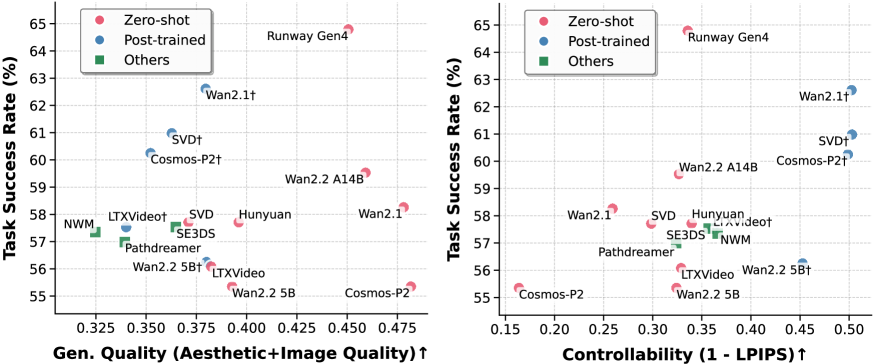
Figure 5: (a) SR vs. generation quality in AR; generation quality is scored as the average of an aesthetic predictor (Akio Kodaira, 2024) and an image-quality predictor (Ke et al., 2021), both trained to match human preferences. (b) SR vs. controllability in AR; controllability is quantified as $1-\mathrm{LPIPS}$ between ground-truth and predicted observations.
Fine-grained controllability matters more than visuals for task success. Although recent off-the-shelf video generators like Wan2.1 produce visually appealing clips, they are driven by text prompts with limited fine-grained low-level controls. Without adaptation, these models yield only small gains on downstream embodied tasks. We further study the relation between controllability and the success rate on AR. Here, controllability is defined as alignment between intended actions and the motions in the model’s predictions. After action-conditioned post-training, alignment improves substantially and SR rises accordingly. Figure ˜ 5 (b) shows a positive correlation: models that respond reliably to low-level controls achieve higher SR. These results indicate that precise control, not just visual quality, is critical for embodied world models to support effective decision-making.
<details>
<summary>x6.png Details</summary>
### Visual Description
## Line Chart: Model Success Rate vs. Training Examples
### Overview
This image is a line chart comparing the performance of three different models or methods (Wan2.2†, Wan2.1†, and SVD†) as a function of the number of examples seen during training. The chart plots "Success Rate (%)" against "Seen Examples During Training" on a logarithmic scale. The data suggests an analysis of model learning efficiency or scaling behavior.
### Components/Axes
* **X-Axis (Horizontal):** Labeled **"Seen Examples During Training"**. It uses a logarithmic scale with major tick marks at **400**, **4K** (4,000), **40K** (40,000), and **80K** (80,000).
* **Y-Axis (Vertical):** Labeled **"Success Rate (%)"**. It uses a linear scale ranging from **52** to **64**, with major tick marks at every integer value.
* **Legend:** Located in the **bottom-right corner** of the chart area. It contains three entries:
* **Wan2.2†**: Represented by a **yellow star (★)** symbol.
* **Wan2.1†**: Represented by a **green line with circular markers (●)**.
* **SVD†**: Represented by a **blue line with square markers (■)**.
* **Data Series & Points:**
* **Wan2.1† (Green Line):** A solid green line connecting four circular data points.
* **SVD† (Blue Line):** A solid blue line connecting four square data points.
* **Wan2.2† (Yellow Star):** A single, isolated data point marked with a star.
### Detailed Analysis
**Data Series: Wan2.1† (Green Line with Circles)**
* **Trend:** The line shows a consistent, gradual upward slope from left to right, indicating a steady increase in success rate with more training examples.
* **Data Points:**
* At **400** examples: **60.25%**
* At **4K** examples: **61.52%**
* At **40K** examples: **62.61%**
* At **80K** examples: **63.34%**
**Data Series: SVD† (Blue Line with Squares)**
* **Trend:** The line shows a very shallow increase between 400 and 4K examples, followed by a steep upward slope between 4K and 40K examples, and then plateaus (flattens) between 40K and 80K examples.
* **Data Points:**
* At **400** examples: **56.26%**
* At **4K** examples: **56.44%**
* At **40K** examples: **60.98%**
* At **80K** examples: **60.98%**
**Data Point: Wan2.2† (Yellow Star)**
* **Placement:** This is a single data point located at the **40K** examples mark on the x-axis.
* **Value:** **62.61%**. This value is identical to the Wan2.1† data point at the same x-axis position.
### Key Observations
1. **Performance Hierarchy:** At all measured points, the Wan2.1† model (green) achieves a higher success rate than the SVD† model (blue).
2. **Convergence at 40K:** At 40,000 training examples, the performance of Wan2.1† and Wan2.2† is identical (62.61%).
3. **Diminishing Returns for SVD†:** The SVD† model shows no improvement in success rate between 40K and 80K examples, suggesting a performance plateau.
4. **Continuous Improvement for Wan2.1†:** The Wan2.1† model continues to show measurable improvement (from 62.61% to 63.34%) when scaling from 40K to 80K examples.
5. **Initial Gap:** The initial performance gap at 400 examples between Wan2.1† (60.25%) and SVD† (56.26%) is approximately **4 percentage points**.
### Interpretation
This chart demonstrates the scaling laws or data efficiency of different models. The **Wan2.1†** model exhibits superior and more consistent learning, maintaining a positive growth trajectory across the entire observed range. The **SVD†** model benefits significantly from increased data between 4K and 40K examples but hits a ceiling, indicating it may be a less scalable approach or has reached its capacity with the given architecture.
The single data point for **Wan2.2†** is intriguing. Its performance matching Wan2.1† at 40K examples could imply it is a variant or an optimized version that achieves comparable results at that specific data scale. The absence of data points for Wan2.2† at other scales leaves its overall scaling behavior unknown.
**Underlying Message:** For the task measured by "Success Rate," investing in more training data is beneficial for all models, but the returns are model-dependent. Wan2.1† appears to be the most robust and scalable choice among the three, as it continues to improve where SVD† stagnates. The chart provides empirical evidence to guide decisions on model selection and data collection budgets.
</details>
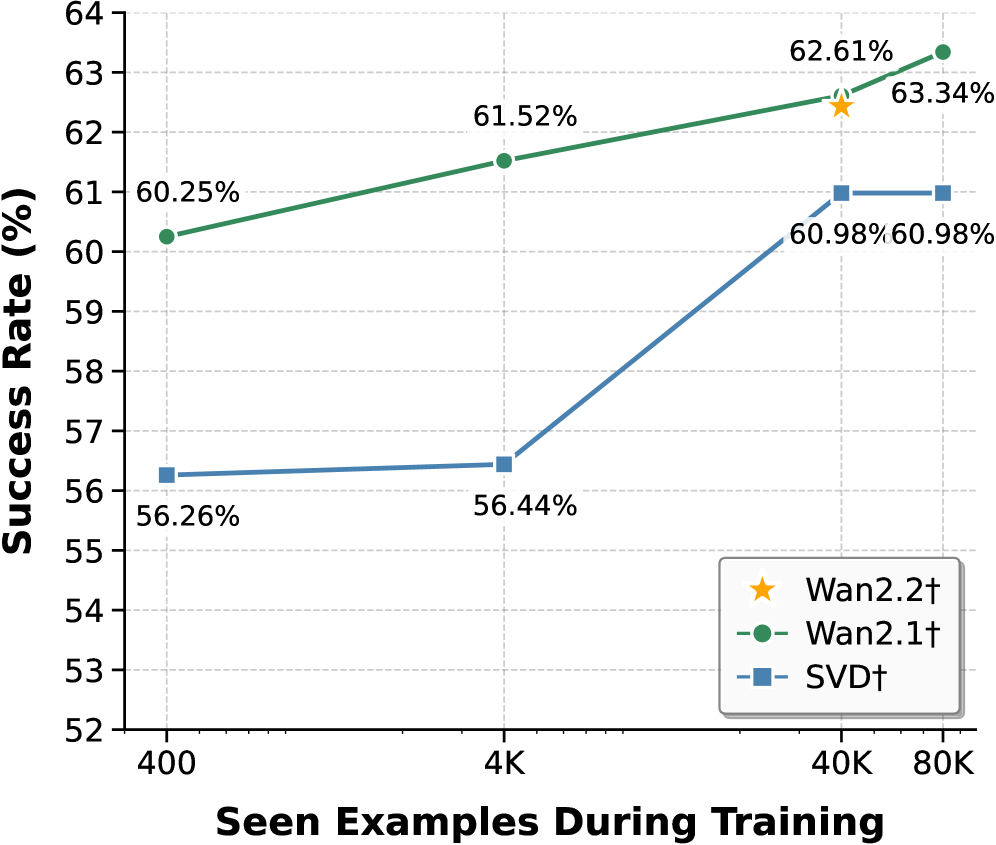
Figure 6: SR vs. seen examples during post-training. SR increases consistently with more downstream data, revealing a clear data-scaling trend for adaptation.
<details>
<summary>x7.png Details</summary>
### Visual Description
## Line Chart: Success Rate vs. Average Inference Count per Episode
### Overview
The image is a line chart comparing the performance of two methods, labeled "Wan2.1†" and "SVD†", by plotting their Success Rate (%) against the Average Inference Count per Episode. The chart demonstrates a positive correlation between the number of inferences and the success rate for both methods.
### Components/Axes
* **Chart Type:** Line chart with markers.
* **X-Axis (Horizontal):**
* **Title:** "Avg Inference Count per Episode"
* **Scale:** Linear, ranging from 3.0 to 11.0.
* **Major Tick Marks:** 3.0, 4.0, 5.0, 6.0, 7.0, 8.0, 9.0, 10.0, 11.0.
* **Y-Axis (Vertical):**
* **Title:** "Success Rate (%)"
* **Scale:** Linear, ranging from 52 to 64.
* **Major Tick Marks:** 52, 53, 54, 55, 56, 57, 58, 59, 60, 61, 62, 63, 64.
* **Legend:**
* **Placement:** Bottom-right corner of the chart area.
* **Entry 1:** A green dashed line with a circle marker, labeled "Wan2.1†".
* **Entry 2:** A blue dashed line with a square marker, labeled "SVD†".
* **Data Series & Points:**
* **Series 1 (Wan2.1† - Green line, circle markers):**
* Point 1: x ≈ 3.0, y = 56.62%
* Point 2: x ≈ 6.0, y = 58.26%
* Point 3: x ≈ 8.0, y = 59.71%
* Point 4: x ≈ 11.0, y = 62.61%
* **Series 2 (SVD† - Blue line, square markers):**
* Point 1: x ≈ 3.0, y = 53.36%
* Point 2: x ≈ 6.0, y = 56.44%
* Point 3: x ≈ 8.5, y = 57.17%
* Point 4: x ≈ 11.0, y = 60.98%
### Detailed Analysis
* **Trend Verification:**
* **Wan2.1† (Green):** The line shows a consistent, nearly linear upward slope from left to right. The rate of increase is steady across the measured range.
* **SVD† (Blue):** The line also slopes upward overall. The increase is steeper between the first two points (3.0 to 6.0), then flattens slightly between 6.0 and 8.5, before rising sharply again between 8.5 and 11.0.
* **Data Point Extraction:** All data points are explicitly labeled on the chart with their percentage values. The x-axis positions for the points are approximate based on their visual placement relative to the axis ticks.
### Key Observations
1. **Performance Gap:** The Wan2.1† method consistently achieves a higher Success Rate than the SVD† method at every comparable average inference count.
2. **Converging Trend:** The performance gap between the two methods appears to narrow slightly as the average inference count increases. At x=3.0, the gap is 3.26 percentage points (56.62% vs 53.36%). At x=11.0, the gap is 1.63 percentage points (62.61% vs 60.98%).
3. **SVD†'s Non-Linear Response:** The SVD† method shows a less uniform response to increased inferences, with a notable plateau between approximately 6.0 and 8.5 inferences per episode.
### Interpretation
The chart presents a clear performance comparison in a technical context, likely from a machine learning or AI research paper (suggested by terms like "Inference Count" and "Success Rate"). The data suggests that:
* **Resource-Performance Trade-off:** For both methods, investing more computational resources (higher average inference count per episode) yields a higher success rate. This is a common trade-off in iterative or sampling-based algorithms.
* **Method Superiority:** Wan2.1† is the more effective method under the tested conditions, providing a higher success rate for the same computational budget (inference count).
* **Algorithmic Behavior:** The differing slopes and shapes of the lines hint at underlying algorithmic differences. Wan2.1†'s steady improvement suggests a more predictable scaling behavior. SVD†'s plateau could indicate a point of diminishing returns or a phase where additional inferences provide minimal gain before another performance jump, which might be an important characteristic for system optimization. The narrowing gap at higher inference counts could imply that SVD† benefits more from very large computational budgets, though it remains inferior in the measured range.
</details>
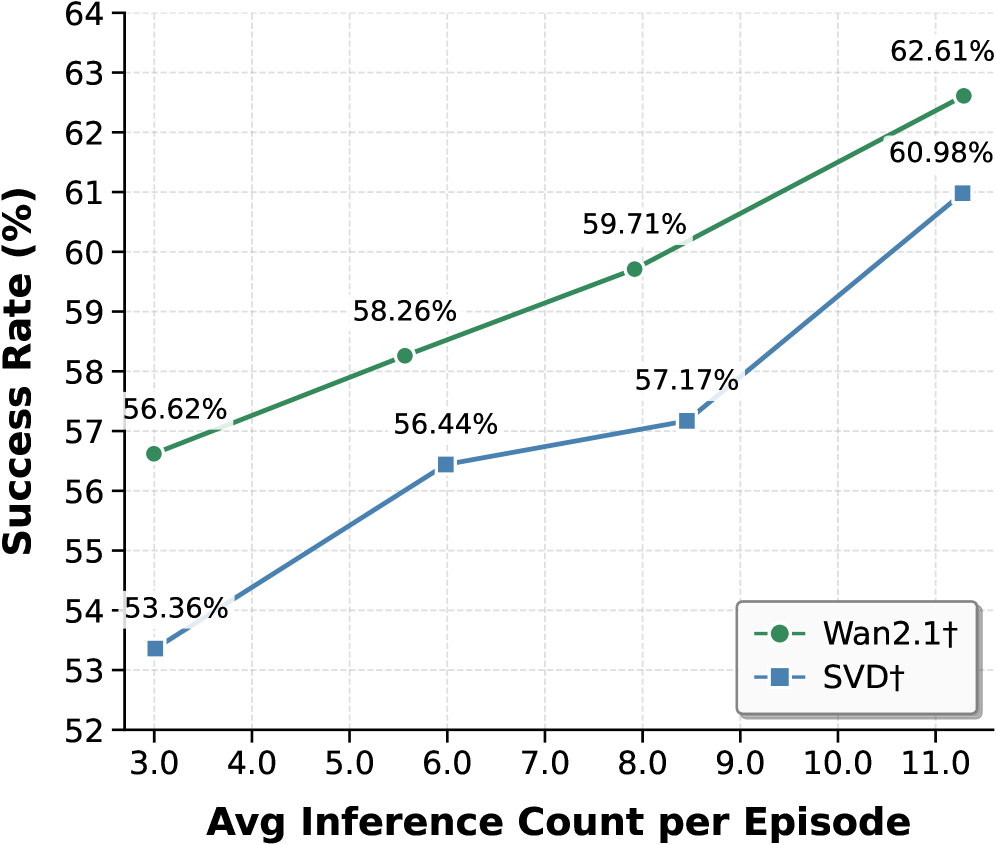
Figure 7: SR vs. average number of world-model inferences per episode. Increasing the inference-time computation allocated to each decision step leads to higher SR.
Data-size scaling for post-trained models. We study how post-training data size affects WM performance (Wan2.2 $\dagger$ , Wan2.1 $\dagger$ , SVD $\dagger$ ). Each WM is post-trained for one epoch on datasets from $400$ to $80\text{K}$ instances. As shown in Figure ˜ 7, more post-training data consistently improves AR performance: Wan2.1 $\dagger$ rises from $60.25\$ to $63.34\$ , and SVD $\dagger$ from $56.80\$ to $60.98\$ . Wan2.2 $\dagger$ (A14B), despite substantially larger web-video pretraining, reaches nearly the same performance as Wan2.1 $\dagger$ after $40\text{K}$ post-training instances, suggesting that scaling action-conditioned post-training is more effective for embodied utility than upgrading the pretrained generator. Moreover, larger models (Wan2.1 $\dagger$ , 14B) benefit more and saturate less than smaller ones (SVD $\dagger$ , 1.5B), indicating greater capacity to absorb action-conditioned supervision.
Inference-time scaling for online planning with world models. Within our online planning framework, the number of world-model inferences (simulated potential futures per episode) directly affects task performance. As shown in Figure ˜ 7, increasing the average inferences per episode for AR yields a clear positive correlation with SR. For example, increasing the average inference count from 3 to 11 improves SR from $53.36\$ to $60.98\$ for SVD $\dagger$ . This suggests that allocating more inference-time computation to simulate potential futures lets the planner make more informed decisions, thereby improving overall performance.
Table 4: Post-training with different input contexts: front view vs. panorama.
| Task | Model | Front View | Panorama | | |
| --- | --- | --- | --- | --- | --- |
| SR $\uparrow$ | Mean Traj. $\downarrow$ | SR $\uparrow$ | Mean Traj. $\downarrow$ | | |
| AR | SVD $\dagger$ | 57.89 | 5.04 | 60.98 | 5.02 |
| Wan2.1 $\dagger$ | 62.25 | 4.82 | 62.61 | 4.73 | |
| Wan2.2 $\dagger$ (5B) | 57.16 | 5.08 | 56.26 | 5.15 | |
| Cosmos-P2 $\dagger$ | 58.98 | 4.94 | 60.25 | 5.08 | |
| ImageNav | SVD $\dagger$ | 38.19 | 47.0 | 43.05 | 46.0 |
| Wan2.1 $\dagger$ | 48.61 | 43.8 | 45.14 | 45.8 | |
| Wan2.2 $\dagger$ (5B) | 40.97 | 45.8 | 38.89 | 46.7 | |
| Cosmos-P2 $\dagger$ | 40.97 | 47.0 | 41.67 | 45.5 | |
Global vs. local context for generation. We study the effect of input context format. Specifically, we compare post-trained models conditioned on panoramic versus front-view input (Table ˜ 4). Panoramic input provides a $360^{\circ}$ field of view, whereas front view offers a focused but limited perspective. For fairness, generated panoramas are converted to perspective views with the same horizontal field of view during evaluation. Although panoramic input offers richer global context, it does not consistently yield large gains across all settings. Likely, panorama-to-perspective conversion introduces resolution loss, degrading downstream perception and planning.
## 4 Discussion and Future Directions
Generalization capacity of world models is critical for practical use. Most video generators are pretrained on web videos. In unseen embodied environments, they may revert to training priors or ignore action controls, yielding plausible but physically or semantically inconsistent rollouts (see Figures ˜ 13 and 14). These deviations mislead planning and reduce success. Larger models or more pretraining data can partly help, but robust generalization remains central. Future work should prioritize strategies and action representations to improve transfer to novel environments, such as unified action representations (Wang et al., 2025b; Zhi et al., 2025; Wang et al., 2025a) and curriculum or domain-specific data collection (Zhao et al., 2025).
Long-horizon planning with world models remains challenging. In our experiments, visual world models simulate short-term changes but struggle on long horizons due to limited mechanisms for accumulating spatiotemporal history. We attempted to alleviate this issue by replacing front-view inputs with panoramas to provide global context, but gains were inconsistent across models and tasks. Future work should better encode and retrieve long-term dependencies, e.g., spatial memory (Zhou et al., 2025b; Xiao et al., 2025; Li et al., 2025c; Yu et al., 2025a; Ren et al., 2025) and episode-level memory (Cai et al., 2025; Guo et al., 2025), to maintain scene-level context and enable coherent planning over extended horizons.
Precise modeling of interactions and dynamics remains difficult. For manipulation, capturing contact-rich interactions, compliance, friction, and state changes of articulated or deformable objects is essential. Current visual world models often miss these details, producing rollouts that violate physics and degrade planning and control—consistent with our observations and prior analyses (Kang et al., 2024). Promising directions include physics-guided motion generation (Chefer et al., 2025; Zhang et al., 2025b; Akkerman et al., 2025) and inferring or generating physical properties to inform action-conditioned predictions (Cao et al., 2025; Gillman et al., 2025; Zhang et al., 2024). Integrating such signals into conditioning pathways may improve fidelity when precise dynamics are required.
Stronger proposal and revision policies set the performance floor. The agent’s overall performance depends on both world-model fidelity and the strength of the proposal and revision policies that select and refine decisions. While simulated rollouts improve decision-making, base policies must be effective to provide a reliable starting point, and strengthening them raises the ceiling. Future work could explore stronger policies (Geng et al., 2025; Kim et al., 2025), and integration strategies that deepen synergy between world models and decision-making (Neary et al., 2025), such as more human-aligned reward models (Wang et al., 2024; Seneviratne et al., 2025; Rocamonde et al., 2023).
## 5 Conclusion
We introduce World-in-World, a closed-loop world interface and benchmark that evaluates generative world models via embodied interaction rather than isolated visual metrics. By unifying heterogeneous controls, our action API enables any world model to serve as perception and planning utilities for an embodied agent. Coupled with a unified closed-loop planning strategy that proposes, simulates, and revises action plans, the benchmark measures agent performance on four demanding tasks. Our experiments reveal large gaps between visual metrics and task success, underscoring the need for closed-loop evaluation, and show that pretrained video generators improve with post-training data scaling and inference-time scaling. We expect World-in-World to guide world models toward not only striking visual realism but also reliable perception, planning, and action in embodied scenarios.
## References
- Agarwal et al. (2025) Niket Agarwal, Arslan Ali, Maciej Bala, Yogesh Balaji, Erik Barker, Tiffany Cai, Prithvijit Chattopadhyay, Yongxin Chen, Yin Cui, Yifan Ding, et al. Cosmos world foundation model platform for physical ai. arXiv preprint arXiv:2501.03575, 2025.
- Akio Kodaira (2024) Sayan Goswami Akio Kodaira. Aesthetic predictor v2.5, May 2024. URL https://github.com/discus0434/aesthetic-predictor-v2-5/.
- Akkerman et al. (2025) Rick Akkerman, Haiwen Feng, Michael J. Black, Dimitrios Tzionas, and Victoria Fernández Abrevaya. Interdyn: Controllable interactive dynamics with video diffusion models. In Proceedings of the Computer Vision and Pattern Recognition Conference, pages 12467–12479, 2025.
- Alonso et al. (2024) Eloi Alonso, Adam Jelley, Vincent Micheli, Anssi Kanervisto, Amos Storkey, Tim Pearce, and François Fleuret. Diffusion for world modeling: Visual details matter in atari. In Advances in Neural Information Processing Systems (NeurIPS), 2024.
- Aydemir et al. (2013) Alper Aydemir, Andrzej Pronobis, Moritz Göbelbecker, and Patric Jensfelt. Active visual object search in unknown environments using uncertain semantics. IEEE Transactions on Robotics, 29(4):986–1002, August 2013. ISSN 1941-0468.
- Bahmani et al. (2024a) Sherwin Bahmani, Xian Liu, Wang Yifan, Ivan Skorokhodov, Victor Rong, Ziwei Liu, Xihui Liu, Jeong Joon Park, Sergey Tulyakov, Gordon Wetzstein, et al. Tc4d: Trajectory-conditioned text-to-4d generation. In Proceedings of the European Conference on Computer Vision (ECCV), pages 53–72. Springer, 2024a.
- Bahmani et al. (2024b) Sherwin Bahmani, Ivan Skorokhodov, Victor Rong, Gordon Wetzstein, Leonidas Guibas, Peter Wonka, Sergey Tulyakov, Jeong Joon Park, Andrea Tagliasacchi, and David B Lindell. 4d-fy: Text-to-4d generation using hybrid score distillation sampling. In Proceedings of the IEEE/CVF Conference on Computer Vision and Pattern Recognition (CVPR), pages 7996–8006, 2024b.
- Bai et al. (2025) Shuai Bai, Keqin Chen, Xuejing Liu, Jialin Wang, Wenbin Ge, Sibo Song, Kai Dang, Peng Wang, Shijie Wang, Jun Tang, Humen Zhong, Yuanzhi Zhu, Mingkun Yang, Zhaohai Li, Jianqiang Wan, Pengfei Wang, Wei Ding, Zheren Fu, Yiheng Xu, Jiabo Ye, Xi Zhang, Tianbao Xie, Zesen Cheng, Hang Zhang, Zhibo Yang, Haiyang Xu, and Junyang Lin. Qwen2.5-vl technical report, 2025.
- Bar et al. (2025a) Amir Bar, Gaoyue Zhou, Danny Tran, Trevor Darrell, and Yann LeCun. Navigation world models. In Proceedings of the IEEE/CVF Conference on Computer Vision and Pattern Recognition (CVPR), 2025a.
- Bar et al. (2025b) Amir Bar, Gaoyue Zhou, Danny Tran, Trevor Darrell, and Yann LeCun. Navigation world models. In Proceedings of the IEEE/CVF Conference on Computer Vision and Pattern Recognition (CVPR), 2025b.
- Bhattacharjee et al. (2025) Subhransu S. Bhattacharjee, Dylan Campbell, and Rahul Shome. Believing is seeing: Unobserved object detection using generative models, March 2025.
- Blattmann et al. (2023a) Andreas Blattmann, Tim Dockhorn, Sumith Kulal, Daniel Mendelevitch, Maciej Kilian, Dominik Lorenz, Yam Levi, Zion English, Vikram Voleti, Adam Letts, et al. Stable video diffusion: Scaling latent video diffusion models to large datasets. arXiv preprint arXiv:2311.15127, 2023a.
- Blattmann et al. (2023b) Andreas Blattmann, Robin Rombach, Huan Ling, Tim Dockhorn, Seung Wook Kim, Sanja Fidler, and Karsten Kreis. Align your latents: High-resolution video synthesis with latent diffusion models. In Proceedings of the IEEE/CVF Conference on Computer Vision and Pattern Recognition (CVPR), 2023b.
- Brooks et al. (2024a) Tim Brooks, Bill Peebles, Connor Holmes, Will DePue, Yufei Guo, Li Jing, David Schnurr, Joe Taylor, Troy Luhman, Eric Luhman, et al. Video generation models as world simulators. OpenAI Blog, 1:8, 2024a.
- Brooks et al. (2024b) Tim Brooks, Bill Peebles, Connor Holmes, Will DePue, Yufei Guo, Li Jing, David Schnurr, Joe Taylor, Troy Luhman, Eric Luhman, et al. Sora: Video generation models as world simulators. OpenAI Blog, 1:8, 2024b.
- Cai et al. (2025) Shengqu Cai, Ceyuan Yang, Lvmin Zhang, Yuwei Guo, Junfei Xiao, Ziyan Yang, Yinghao Xu, Zhenheng Yang, Alan L. Yuille, Leonidas J. Guibas, Maneesh Agrawala, Lu Jiang, and Gordon Wetzstein. Mixture of contexts for long video generation. ArXiv, 2508.21058, 2025.
- Cao et al. (2025) Ziang Cao, Zhaoxi Chen, Liang Pan, and Ziwei Liu. Physx-3d: Physical-grounded 3d asset generation. ArXiv, 2507.12465, 2025.
- Chang et al. (2017) Angel Chang, Angela Dai, Thomas Funkhouser, Maciej Halber, Matthias Niebner, Manolis Savva, Shuran Song, Andy Zeng, and Yinda Zhang. Matterport3d: Learning from rgb-d data in indoor environments. In Proceedings of the International Conference on 3D Vision (3DV), pages 667–676, October 2017.
- Chefer et al. (2025) Hila Chefer, Uriel Singer, Amit Zohar, Yuval Kirstain, Adam Polyak, Yaniv Taigman, Lior Wolf, and Shelly Sheynin. Videojam: Joint appearance-motion representations for enhanced motion generation in video models. ArXiv, 2502.02492, 2025.
- Cheng et al. (2024) Tianheng Cheng, Lin Song, Yixiao Ge, Wenyu Liu, Xinggang Wang, and Ying Shan. Yolo-world: Real-time open-vocabulary object detection. In Proceedings of the IEEE/CVF Conference on Computer Vision and Pattern Recognition (CVPR), pages 16901–16911, 2024.
- Chung et al. (2023) Jaeyoung Chung, Suyoung Lee, Hyeongjin Nam, Jaerin Lee, and Kyoung Mu Lee. Luciddreamer: Domain-free generation of 3d gaussian splatting scenes. arXiv preprint arXiv:2311.13384, 2023.
- Du et al. (2023) Yilun Du, Sherry Yang, Bo Dai, Hanjun Dai, Ofir Nachum, Josh Tenenbaum, Dale Schuurmans, and Pieter Abbeel. Learning universal policies via text-guided video generation. Advances in neural information processing systems, 36:9156–9172, 2023.
- Du et al. (2024) Yilun Du, Sherry Yang, Pete Florence, Fei Xia, Ayzaan Wahid, brian ichter, Pierre Sermanet, Tianhe Yu, Pieter Abbeel, Joshua B. Tenenbaum, Leslie Pack Kaelbling, Andy Zeng, and Jonathan Tompson. Video language planning. In Proceedings of the International Conference on Learning Representations (ICLR), 2024.
- Duan et al. (2025) Haoyi Duan, Hong-Xing Yu, Sirui Chen, Li Fei-Fei, and Jiajun Wu. Worldscore: A unified evaluation benchmark for world generation. arXiv preprint arXiv:2504.00983, 2025.
- Fan et al. (2024) Lei Fan, Mingfu Liang, Yunxuan Li, Gang Hua, and Ying Wu. Evidential active recognition: Intelligent and prudent open-world embodied perception. In Proceedings of the IEEE/CVF Conference on Computer Vision and Pattern Recognition (CVPR), pages 16351–16361, 2024.
- Fridman et al. (2023) Rafail Fridman, Amit Abecasis, Yoni Kasten, and Tali Dekel. Scenescape: Text-driven consistent scene generation. Advances in Neural Information Processing Systems (NeurIPS), 36:39897–39914, 2023.
- Gao et al. (2024) Shenyuan Gao, Jiazhi Yang, Li Chen, Kashyap Chitta, Yihang Qiu, Andreas Geiger, Jun Zhang, and Hongyang Li. Vista: A generalizable driving world model with high fidelity and versatile controllability. In Advances in Neural Information Processing Systems (NeurIPS), November 2024.
- Geng et al. (2025) Haoran Geng, Feishi Wang, Songlin Wei, Yuyang Li, Bangjun Wang, Boshi An, Charlie Tianyue Cheng, Haozhe Lou, Peihao Li, Yen-Jen Wang, Yutong Liang, Dylan Goetting, Chaoyi Xu, Haozhe Chen, Yuxi Qian, Yiran Geng, Jiageng Mao, Weikang Wan, Mingtong Zhang, Jiangran Lyu, Siheng Zhao, Jiazhao Zhang, Jialiang Zhang, Chengyang Zhao, Haoran Lu, Yufei Ding, Ran Gong, Yuran Wang, Yuxuan Kuang, Ruihai Wu, Baoxiong Jia, Carlo Sferrazza, Hao Dong, Siyuan Huang, Yue Wang, Jitendra Malik, and Pieter Abbeel. Roboverse: Towards a unified platform, dataset and benchmark for scalable and generalizable robot learning. ArXiv, 2504.18904, 2025.
- Gillman et al. (2025) Nate Gillman, Charles Herrmann, Michael Freeman, Daksh Aggarwal, Evan Luo, Deqing Sun, and Chen Sun. Force prompting: Video generation models can learn and generalize physics-based control signals. ArXiv, 2505.19386, 2025.
- Guo et al. (2025) Yuwei Guo, Ceyuan Yang, Ziyan Yang, Zhibei Ma, Zhijie Lin, Zhenheng Yang, Dahua Lin, and Lu Jiang. Long context tuning for video generation. ArXiv, 2503.10589, 2025.
- HaCohen et al. (2024) Yoav HaCohen, Nisan Chiprut, Benny Brazowski, Daniel Shalem, Dudu Moshe, Eitan Richardson, Eran Levin, Guy Shiran, Nir Zabari, Ori Gordon, Poriya Panet, Sapir Weissbuch, Victor Kulikov, Yaki Bitterman, Zeev Melumian, and Ofir Bibi. Ltx-video: Realtime video latent diffusion. arXiv preprint arXiv:2501.00103, 2024.
- He et al. (2025a) Hao He, Yinghao Xu, Yuwei Guo, Gordon Wetzstein, Bo Dai, Hongsheng Li, and Ceyuan Yang. Cameractrl: Enabling camera control for text-to-video generation. arXiv preprint arXiv:2404.02101, 2025a.
- He et al. (2025b) Hao He, Ceyuan Yang, Shanchuan Lin, Yinghao Xu, Meng Wei, Liangke Gui, Qi Zhao, Gordon Wetzstein, Lu Jiang, and Hongsheng Li. Cameractrl ii: Dynamic scene exploration via camera-controlled video diffusion models. arXiv preprint arXiv:2503.10592, 2025b.
- He et al. (2025c) Xianglong He, Chunli Peng, Zexiang Liu, Boyang Wang, Yifan Zhang, Qi Cui, Fei Kang, Biao Jiang, Mengyin An, Yangyang Ren, Baixin Xu, Hao-Xiang Guo, Kaixiong Gong, Cyrus Wu, Wei Li, Xuchen Song, Yang Liu, Eric Li, and Yahui Zhou. Matrix-game 2.0: An open-source, real-time, and streaming interactive world model. arXiv preprint arXiv:2508.13009, 2025c.
- Ho et al. (2020) Jonathan Ho, Ajay Jain, and Pieter Abbeel. Denoising diffusion probabilistic models. In Advances in Neural Information Processing Systems (NeurIPS), 2020.
- Hu et al. (2023) Anthony Hu, Lloyd Russell, Hudson Yeo, Zak Murez, George Fedoseev, Alex Kendall, Jamie Shotton, and Gianluca Corrado. Gaia-1: A generative world model for autonomous driving, September 2023.
- Huang et al. (2024) Ziqi Huang, Yinan He, Jiashuo Yu, Fan Zhang, Chenyang Si, Yuming Jiang, Yuanhan Zhang, Tianxing Wu, Qingyang Jin, Nattapol Chanpaisit, et al. Vbench: Comprehensive benchmark suite for video generative models. In Proceedings of the IEEE/CVF Conference on Computer Vision and Pattern Recognition (CVPR), pages 21807–21818, 2024.
- James et al. (2020) Stephen James, Zicong Ma, David Rovick Arrojo, and Andrew J. Davison. Rlbench: The robot learning benchmark & learning environment. IEEE Robotics and Automation Letters, 2020.
- Jiang et al. (2018) Jindong Jiang, Lunan Zheng, Fei Luo, and Zhijun Zhang. Rednet: Residual encoder-decoder network for indoor rgb-d semantic segmentation. arXiv preprint arXiv:1806.01054, 2018.
- Kang et al. (2024) Bingyi Kang, Yang Yue, Rui Lu, Zhijie Lin, Yang Zhao, Kaixin Wang, Gao Huang, and Jiashi Feng. How far is video generation from world model: A physical law perspective. ArXiv, 2411.02385, 2024.
- Ke et al. (2021) Junjie Ke, Qifei Wang, Yilin Wang, Peyman Milanfar, and Feng Yang. Musiq: Multi-scale image quality transformer. In Proceedings of the IEEE/CVF International Conference on Computer Vision (ICCV), pages 5128–5137, 2021.
- Ke et al. (2024) Tsung-Wei Ke, Nikolaos Gkanatsios, and Katerina Fragkiadaki. 3d diffuser actor: Policy diffusion with 3d scene representations. Arxiv, 2024.
- Kim et al. (2025) Moo Jin Kim, Chelsea Finn, and Percy Liang. Fine-tuning vision-language-action models: Optimizing speed and success. ArXiv, 2502.19645, 2025.
- Ko et al. (2023) Po-Chen Ko, Jiayuan Mao, Yilun Du, Shao-Hua Sun, and Joshua B Tenenbaum. Learning to act from actionless videos through dense correspondences. arXiv preprint arXiv:2310.08576, 2023.
- Koh et al. (2021a) Jing Yu Koh, Honglak Lee, Yinfei Yang, Jason Baldridge, and Peter Anderson. Pathdreamer: A world model for indoor navigation. In Proceedings of the IEEE/CVF International Conference on Computer Vision (ICCV), 2021a.
- Koh et al. (2021b) Jing Yu Koh, Honglak Lee, Yinfei Yang, Jason Baldridge, and Peter Anderson. Pathdreamer: A world model for indoor navigation. In Proceedings of the IEEE/CVF International Conference on Computer Vision (ICCV), pages 14738–14748, 2021b.
- Koh et al. (2023) Jing Yu Koh, Harsh Agrawal, Dhruv Batra, Richard Tucker, Austin Waters, Honglak Lee, Yinfei Yang, Jason Baldridge, and Peter Anderson. Simple and effective synthesis of indoor 3d scenes. Proceedings of the AAAI Conference on Artificial Intelligence (AAAI), 37(1):1169–1178, June 2023. ISSN 2374-3468.
- Kong et al. (2024) Weijie Kong, Qi Tian, Zijian Zhang, Rox Min, Zuozhuo Dai, Jin Zhou, Jiangfeng Xiong, Xin Li, Bo Wu, Jianwei Zhang, et al. Hunyuanvideo: A systematic framework for large video generative models. arXiv preprint arXiv:2412.03603, 2024.
- Li et al. (2025a) Dacheng Li, Yunhao Fang, Yukang Chen, Shuo Yang, Shiyi Cao, Justin Wong, Michael Luo, Xiaolong Wang, Hongxu Yin, Joseph E. Gonzalez, Ion Stoica, Song Han, and Yao Lu. Worldmodelbench: Judging video generation models as world models. ArXiv, 2502.20694, 2025a.
- Li et al. (2025b) Jiaqi Li, Junshu Tang, Zhi-Ting Xu, Longhuang Wu, Yuan Zhou, Shuai Shao, Tianbao Yu, Zhiguo Cao, and Qinglin Lu. Hunyuan-gamecraft: High-dynamic interactive game video generation with hybrid history condition. ArXiv, 2506.17201, 2025b.
- Li et al. (2025c) Runjia Li, Philip H. S. Torr, Andrea Vedaldi, and Tomas Jakab. Vmem: Consistent interactive video scene generation with surfel-indexed view memory. ArXiv, 2506.18903, 2025c.
- Ling et al. (2025) Lu Ling, Chen-Hsuan Lin, Tsung-Yi Lin, Yifan Ding, Yu Zeng, Yichen Sheng, Yunhao Ge, Ming-Yu Liu, Aniket Bera, and Zhaoshuo Li. Scenethesis: A language and vision agentic framework for 3d scene generation. arXiv preprint arXiv:2505.02836, 2025.
- Liu et al. (2018) Huaping Liu, Yupei Wu, and Fuchun Sun. Extreme trust region policy optimization for active object recognition. IEEE Transactions on Neural Networks and Learning Systems, 29(6):2253–2258, June 2018. ISSN 2162-2388.
- Long et al. (2025) Xiaoxiao Long, Qingrui Zhao, Kaiwen Zhang, Zihao Zhang, Dingrui Wang, Yumeng Liu, Zhengjie Shu, Yi Lu, Shouzheng Wang, Xinzhe Wei, Wei Li, Wei Yin, Yao Yao, Jiangtian Pan, Qiu Shen, Ruigang Yang, Xun Cao, and Qionghai Dai. A survey: Learning embodied intelligence from physical simulators and world models. ArXiv, 2507.00917, 2025.
- Lu et al. (2025) TaiMing Lu, Tianmin Shu, Alan Yuille, Daniel Khashabi, and Jieneng Chen. Generative world explorer. In Proceedings of the International Conference on Learning Representations (ICLR), 2025.
- Majumdar et al. (2024) Arjun Majumdar, Anurag Ajay, Xiaohan Zhang, Pranav Putta, Sriram Yenamandra, Mikael Henaff, Sneha Silwal, Paul Mcvay, Oleksandr Maksymets, Sergio Arnaud, Karmesh Yadav, Qiyang Li, Ben Newman, Mohit Sharma, Vincent Berges, Shiqi Zhang, Pulkit Agrawal, Yonatan Bisk, Dhruv Batra, Mrinal Kalakrishnan, Franziska Meier, Chris Paxton, Alexander Sax, and Aravind Rajeswaran. Openeqa: Embodied question answering in the era of foundation models. In Proceedings of the IEEE/CVF Conference on Computer Vision and Pattern Recognition (CVPR), pages 16488–16498, 2024.
- Morari and H. Lee (1999) Manfred Morari and Jay H. Lee. Model predictive control: Past, present and future. Computers & Chemical Engineering, 23(4):667–682, May 1999. ISSN 0098-1354.
- Neary et al. (2025) Cyrus Neary, Omar G. Younis, Artur Kuramshin, Ozgur Aslan, and Glen Berseth. Improving pre-trained vision-language-action policies with model-based search. ArXiv, 2508.12211, 2025.
- Parker-Holder and Fruchter (2025) Jack Parker-Holder and Shlomi Fruchter. Genie 3: A new frontier for world models, August 2025. URL https://deepmind.google/discover/blog/genie-3-a-new-frontier-for-world-models/. Google DeepMind Blog.
- Ramakrishnan et al. (2021) Santhosh Kumar Ramakrishnan, Aaron Gokaslan, Erik Wijmans, Oleksandr Maksymets, Alexander Clegg, John M. Turner, Eric Undersander, Wojciech Galuba, Andrew Westbury, Angel X. Chang, Manolis Savva, Yili Zhao, and Dhruv Batra. Habitat-matterport 3d dataset (hm3d): 1000 large-scale 3d environments for embodied ai. In Advances in Neural Information Processing Systems (NeurIPS), August 2021.
- Ravi et al. (2024) Nikhila Ravi, Valentin Gabeur, Yuan-Ting Hu, Ronghang Hu, Chaitanya Ryali, Tengyu Ma, Haitham Khedr, Roman Rädle, Chloe Rolland, Laura Gustafson, et al. Sam 2: Segment anything in images and videos. arXiv preprint arXiv:2408.00714, 2024.
- Ren et al. (2025) Xuanchi Ren, Tianchang Shen, Jiahui Huang, Huan Ling, Yifan Lu, Merlin Nimier-David, Thomas Muller, Alexander Keller, Sanja Fidler, and Jun Gao. Gen3c: 3d-informed world-consistent video generation with precise camera control. 2025 IEEE/CVF Conference on Computer Vision and Pattern Recognition (CVPR), pages 6121–6132, 2025.
- Rocamonde et al. (2023) Juan Rocamonde, Victoriano Montesinos, Elvis Nava, Ethan Perez, and David Lindner. Vision-language models are zero-shot reward models for reinforcement learning. ArXiv, 2310.12921, 2023.
- Rombach et al. (2022) Robin Rombach, Andreas Blattmann, Dominik Lorenz, Patrick Esser, and Björn Ommer. High-resolution image synthesis with latent diffusion models. In Proceedings of the IEEE/CVF Conference on Computer Vision and Pattern Recognition (CVPR), 2022.
- Runway Research (2025) Runway Research. Introducing runway gen-4. https://runwayml.com/research/introducing-runway-gen-4, March 2025. Research announcement, Runway AI, Inc. Accessed: 2025-09-21.
- Sargent et al. (2024) Kyle Sargent, Zizhang Li, Tanmay Shah, Charles Herrmann, Hong-Xing Yu, Yunzhi Zhang, Eric Ryan Chan, Dmitry Lagun, Li Fei-Fei, Deqing Sun, and Jiajun Wu. Zeronvs: Zero-shot 360-degree view synthesis from a single image. In Proceedings of the IEEE/CVF Conference on Computer Vision and Pattern Recognition (CVPR), pages 9420–9429, 2024.
- Savva et al. (2019) Manolis Savva, Abhishek Kadian, Oleksandr Maksymets, Yili Zhao, Erik Wijmans, Bhavana Jain, Julian Straub, Jia Liu, Vladlen Koltun, Jitendra Malik, Devi Parikh, and Dhruv Batra. Habitat: A platform for embodied ai research. In Proceedings of the IEEE/CVF International Conference on Computer Vision (ICCV), pages 9339–9347, 2019.
- Seneviratne et al. (2025) Gershom Seneviratne, Jianyu An, Sahire Ellahy, Kasun Weerakoon, Mohamed Bashir Elnoor, Jonathan Deepak Kannan, Amogha Thalihalla Sunil, and Dinesh Manocha. Halo: Human preference aligned offline reward learning for robot navigation. ArXiv, 2508.01539, 2025.
- Seo et al. (2024) Junyoung Seo, Kazumi Fukuda, Takashi Shibuya, Takuya Narihira, Naoki Murata, Shoukang Hu, Chieh-Hsin Lai, Seungryong Kim, and Yuki Mitsufuji. Genwarp: Single image to novel views with semantic-preserving generative warping. In Advances in Neural Information Processing Systems (NeurIPS), November 2024.
- Sohl-Dickstein et al. (2015) Jascha Sohl-Dickstein, Eric Weiss, Niru Maheswaranathan, and Surya Ganguli. Deep unsupervised learning using nonequilibrium thermodynamics. In Proceedings of the International Conference on Machine Learning (ICML), 2015.
- Voleti et al. (2024) Vikram Voleti, Chun-Han Yao, Mark Boss, Adam Letts, David Pankratz, Dmitrii Tochilkin, Christian Laforte, Robin Rombach, and Varun Jampani. SV3D: Novel multi-view synthesis and 3D generation from a single image using latent video diffusion. In Proceedings of the European Conference on Computer Vision (ECCV), 2024.
- Wan et al. (2025) Team Wan, Ang Wang, Baole Ai, Bin Wen, Chaojie Mao, Chen-Wei Xie, Di Chen, Feiwu Yu, Haiming Zhao, Jianxiao Yang, Jianyuan Zeng, et al. Wan: Open and advanced large-scale video generative models. arXiv preprint arXiv:2503.20314, 2025.
- Wang et al. (2023) Hanqing Wang, Wei Liang, Luc Van Gool, and Wenguan Wang. Dreamwalker: Mental planning for continuous vision-language navigation. In Proceedings of the IEEE/CVF International Conference on Computer Vision (ICCV), 2023.
- Wang et al. (2025a) Yiqi Wang, Mrinal Verghese, and Jeff Schneider. Latent policy steering with embodiment-agnostic pretrained world models. ArXiv, 2507.13340, 2025a.
- Wang et al. (2025b) Yuang Wang, Chao Wen, Haoyu Guo, Sida Peng, Minghan Qin, Hujun Bao, Xiaowei Zhou, and Ruizhen Hu. Precise action-to-video generation through visual action prompts. ArXiv, 2508.13104, 2025b.
- Wang et al. (2024) Yufei Wang, Zhanyi Sun, Jesse Zhang, Zhou Xian, Erdem Biyik, David Held, and Zackory Erickson. Rl-vlm-f: Reinforcement learning from vision language foundation model feedback. ArXiv, 2402.03681, 2024.
- Xiao et al. (2025) Zeqi Xiao, Yushi Lan, Yifan Zhou, Wenqi Ouyang, Shuai Yang, Yanhong Zeng, and Xingang Pan. Worldmem: Long-term consistent world simulation with memory, April 2025.
- Xie et al. (2024) Yiming Xie, Chun-Han Yao, Vikram Voleti, Huaizu Jiang, and Varun Jampani. Sv4d: Dynamic 3d content generation with multi-frame and multi-view consistency, July 2024.
- Xu et al. (2024) Dejia Xu, Hanwen Liang, Neel P Bhatt, Hezhen Hu, Hanxue Liang, Konstantinos N Plataniotis, and Zhangyang Wang. Comp4d: Llm-guided compositional 4d scene generation. arXiv preprint arXiv:2403.16993, 2024.
- Yang et al. (2019) Jianwei Yang, Zhile Ren, Mingze Xu, Xinlei Chen, David J Crandall, Devi Parikh, and Dhruv Batra. Embodied amodal recognition: Learning to move to perceive objects. In Proceedings of the IEEE/CVF International Conference on Computer Vision (ICCV), pages 2040–2050, 2019.
- Yang et al. (2023a) Jianwei Yang, Hao Zhang, Feng Li, Xueyan Zou, Chunyuan Li, and Jianfeng Gao. Set-of-mark prompting unleashes extraordinary visual grounding in gpt-4v, 2023a.
- Yang et al. (2023b) Mengjiao Yang, Yilun Du, Kamyar Ghasemipour, Jonathan Tompson, Dale Schuurmans, and Pieter Abbeel. Learning interactive real-world simulators. arXiv preprint arXiv:2310.06114, 1(2):6, 2023b.
- Yang et al. (2025) Rui Yang, Hanyang Chen, Junyu Zhang, Mark Zhao, Cheng Qian, Kangrui Wang, Qineng Wang, Teja Venkat Koripella, Marziyeh Movahedi, Manling Li, Heng Ji, Huan Zhang, and Tong Zhang. Embodiedbench: Comprehensive benchmarking multi-modal large language models for vision-driven embodied agents, February 2025.
- Yang et al. (2024a) Sherry Yang, Yilun Du, Seyed Kamyar Seyed Ghasemipour, Jonathan Tompson, Leslie Pack Kaelbling, Dale Schuurmans, and Pieter Abbeel. Learning interactive real-world simulators. In Proceedings of the International Conference on Learning Representations (ICLR), 2024a.
- Yang et al. (2024b) Zhuoyi Yang, Jiayan Teng, Wendi Zheng, Ming Ding, Shiyu Huang, Jiazheng Xu, Yuanming Yang, Wenyi Hong, Xiaohan Zhang, Guanyu Feng, et al. Cogvideox: Text-to-video diffusion models with an expert transformer. arXiv preprint arXiv:2408.06072, 2024b.
- Ye et al. (2025) Deheng Ye, Fangyun Zhou, Jiacheng Lv, Jianqi Ma, Jun Zhang, Junyan Lv, Junyou Li, Minwen Deng, Mingyu Yang, Qiang Fu, Wei Yang, Wenkai Lv, Yangbin Yu, Yewen Wang, Yonghang Guan, Zhihao Hu, Zhongbin Fang, and Zhongqian Sun. Yan: Foundational interactive video generation. ArXiv, 2508.08601, 2025.
- Yin et al. (2023) Shengming Yin, Chenfei Wu, Jian Liang, Jie Shi, Houqiang Li, Gong Ming, and Nan Duan. Dragnuwa: Fine-grained control in video generation by integrating text, image, and trajectory. arXiv preprint arXiv:2308.08089, 2023.
- Yu et al. (2024) Hong-Xing Yu, Haoyi Duan, Charles Herrmann, William T Freeman, and Jiajun Wu. Wonderworld: Interactive 3d scene generation from a single image. arXiv preprint arXiv:2406.09394, 2024.
- Yu et al. (2023) Jason J. Yu, Fereshteh Forghani, Konstantinos G. Derpanis, and Marcus A. Brubaker. Long-term photometric consistent novel view synthesis with diffusion models. In Proceedings of the IEEE/CVF International Conference on Computer Vision (ICCV), pages 7094–7104, 2023.
- Yu et al. (2025a) Jiwen Yu, Jianhong Bai, Yiran Qin, Quande Liu, Xintao Wang, Pengfei Wan, Di Zhang, and Xihui Liu. Context as memory: Scene-consistent interactive long video generation with memory retrieval. ArXiv, 2506.03141, 2025a.
- Yu et al. (2025b) Jiwen Yu, Yiran Qin, Xintao Wang, Pengfei Wan, Di Zhang, and Xihui Liu. Gamefactory: Creating new games with generative interactive videos, January 2025b.
- Zhang et al. (2025a) Hongxin Zhang, Zeyuan Wang, Qiushi Lyu, Zheyuan Zhang, Sunli Chen, Tianmin Shu, Behzad Dariush, Kwonjoon Lee, Yilun Du, and Chuang Gan. COMBO: Compositional world models for embodied multi-agent cooperation. In Proceedings of the International Conference on Learning Representations (ICLR), 2025a.
- Zhang et al. (2025b) Ke Zhang, Cihan Xiao, Yiqun Mei, Jiacong Xu, and Vishal M. Patel. Think before you diffuse: Llms-guided physics-aware video generation. ArXiv, 2505.21653, 2025b.
- Zhang et al. (2023) Lvmin Zhang, Anyi Rao, and Maneesh Agrawala. Adding conditional control to text-to-image diffusion models. In Proceedings of the IEEE/CVF International Conference on Computer Vision (ICCV), pages 3836–3847, 2023.
- Zhang et al. (2024) Tianyuan Zhang, Hong-Xing Yu, Rundi Wu, Brandon Y. Feng, Changxi Zheng, Noah Snavely, Jiajun Wu, and William T. Freeman. Physdreamer: Physics-based interaction with 3d objects via video generation. ArXiv, 2404.13026, 2024.
- Zhao et al. (2025) Qi Zhao, Xingyu Ni, Ziyu Wang, Feng Cheng, Ziyan Yang, Lu Jiang, and Bohan Wang. Synthetic video enhances physical fidelity in video synthesis. ArXiv, 2503.20822, 2025.
- Zhen et al. (2025) Haoyu Zhen, Qiao Sun, Hongxin Zhang, Junyan Li, Siyuan Zhou, Yilun Du, and Chuang Gan. Tesseract: Learning 4d embodied world models. arXiv preprint arXiv:2504.20995, 2025.
- Zhi et al. (2025) Hongyan Zhi, Peihao Chen, Siyuan Zhou, Dong Yu, Quanxi Wu, Lei Han, and Mingkui Tan. 3dflowaction: Learning cross-embodiment manipulation from 3d flow world model. ArXiv, 2506.06199, 2025.
- Zhou et al. (2025a) Jensen Zhou, Hang Gao, Vikram Voleti, Aaryaman Vasishta, Chun-Han Yao, Mark Boss, Philip Torr, Christian Rupprecht, and Varun Jampani. Stable virtual camera: Generative view synthesis with diffusion models. arXiv preprint arXiv:2503.14489, April 2025a.
- Zhou et al. (2025b) Siyuan Zhou, Yilun Du, Yuncong Yang, Lei Han, Peihao Chen, Dit-Yan Yeung, and Chuang Gan. Learning 3d persistent embodied world models. ArXiv, 2505.05495, 2025b.
- Zhu et al. (2025) Jinguo Zhu, Weiyun Wang, Zhe Chen, Zhaoyang Liu, Shenglong Ye, Lixin Gu, Yuchen Duan, Hao Tian, Weijie Su, Jie Shao, Zhangwei Gao, Erfei Cui, Yue Cao, Yangzhou Liu, Haomin Wang, Weiye Xu, Hao Li, Jiahao Wang, Han Lv, Dengnian Chen, Songze Li, Yinan He, Tan Jiang, Jiapeng Luo, Yi Wang, Cong He, Botian Shi, Xingcheng Zhang, Wenqi Shao, Junjun He, Ying Xiong, Wenwen Qu, Peng Sun, Penglong Jiao, Lijun Wu, Kai Zhang, Hui Deng, Jiaye Ge, Kaiming Chen, Limin Wang, Min Dou, Lewei Lu, Xizhou Zhu, Tong Lu, Dahua Lin, Yu Qiao, Jifeng Dai, and Wenhai Wang. Internvl3: Exploring advanced training and test-time recipes for open-source multimodal models. ArXiv, 2504.10479, 2025.
World-in-World: World Models in a Closed-Loop World Appendix Contents
1. 1 Introduction
1. 2 World-in-World: a Closed-Loop Interface for Visual World Models
1. 2.1 Unified Strategy for Closed-Loop Online Planning
1. 2.2 Unified Action API
1. 2.3 Comprehensive Embodied Tasks
1. 2.4 Exploiting World Models via Post-Training
1. 3 Evaluation Results and Analysis
1. 3.1 Benchmark Results
1. 3.2 Ablation and Findings
1. 4 Discussion and Future Directions
1. 5 Conclusion
1. A Related Work
1. B Embodied Task Details
1. B.1 Active Recognition (AR)
1. B.2 Image-Goal Navigation (ImageNav)
1. B.3 Active Embodied Question Answering (A-EQA)
1. B.4 Robotic Manipulation
1. B.5 Policies in Embodied Tasks
1. B.6 World Models in Embodied Tasks
1. C Post-Training Recipe for Embodied World Models
1. C.1 Problem Formulation
1. C.2 Post-Training Configuration
1. D Post-Training Dataset Construction
1. D.1 Trajectory Sampling
1. E Visualizing World Model Predictions
1. F Prompt Templates used in World-in-World
1. F.1 Active Recognition (AR) Prompt
1. F.2 Image-Goal Navigation (ImageNav) Prompt
1. F.3 Active Embedded Question Answering (A-EQA) Prompt
1. F.4 Robotic Manipulation Prompt
## Appendix A Related Work
Visual generation. Recent advances in diffusion models (Sohl-Dickstein et al., 2015; Ho et al., 2020; Rombach et al., 2022; Brooks et al., 2024a) have significantly improved the quality of image generation (Rombach et al., 2022; Zhang et al., 2023) and video generation (Blattmann et al., 2023b, a; Voleti et al., 2024; Xie et al., 2024), enabling temporally coherent and visually rich content synthesis from text prompts or a single image. Image generators (Koh et al., 2021a, 2023; Yu et al., 2023; Sargent et al., 2024; Seo et al., 2024) allow us to synthesize novel views with conditions on targeted viewpoints. Text-to-video generators such as Sora (Brooks et al., 2024a) can generate minutes-long videos from text. Extensions incorporating camera trajectories as conditioning signals (Yin et al., 2023; Bar et al., 2025b; He et al., 2025a, b; Zhou et al., 2025a; Bahmani et al., 2024a) push video generation toward dynamic scenes. However, the absence of a unified conditioning framework hinders integration into downstream applications (e.g., embodied decision making) and prevents fair cross‐method comparisons. Moreover, these generative methods remain passive: generated worlds are treated as static backdrops and evaluated in an open-loop fashion using visual quality score (Huang et al., 2024) or controllability score (Duan et al., 2025). In contrast, our work assesses not only generation quality but also closed-loop task success within a physical simulation.
#### World models.
Video-based generative models used as world models have demonstrated effectiveness in various settings, including games (Alonso et al., 2024; Yu et al., 2025b; Li et al., 2025b; Ye et al., 2025; He et al., 2025c), manipulation (Du et al., 2023; Ko et al., 2023; Du et al., 2024; Yang et al., 2024a; Zhen et al., 2025), autonomous driving (Gao et al., 2024; Hu et al., 2023), and navigation (Bar et al., 2025b; Wang et al., 2023; Koh et al., 2021a), with extensions to broader embodied tasks (Lu et al., 2025; Zhang et al., 2025a; Long et al., 2025). However, most of these works concentrate on a single task or a narrow domain, and systematic comparisons across multiple embodied tasks under practical closed-loop conditions remain limited. In contrast, our work provides a comprehensive evaluation across four closed-loop embodied tasks, benchmarking the practical utility of diverse world models.
## Appendix B Embodied Task Details
This section details the setups for the four embodied tasks evaluated in World-in-World: Active Recognition (AR) in Section ˜ B.1, Image-Goal Navigation (ImageNav) in Section ˜ B.2, Active Embodied Question Answering (A-EQA) in Section ˜ B.3, and Robotic Manipulation in Section ˜ B.4. We also describe the policies used across these tasks in Section ˜ B.5 and summarize the world model details in Section ˜ B.6.
### B.1 Active Recognition (AR)
All AR experiments are performed in Habitat-Sim using scenes from the validation split of Matterport3D (Chang et al., 2017). We focus on 29 scenes and curate a subset of 551 challenging episodes adapted from the dataset released by prior work (Fan et al., 2024). Each episode is manually inspected to ensure that it presents either an extreme viewpoint or a heavily occluded target object. These conditions force the agent to actively explore the environment and to rely on its world model for informed decision-making.
Task setup. In the AR setting, the agent is allowed at most $K=10$ decision steps. At each step $t$ , the agent receives an RGB observation $\mathbf{o}_{t}$ that includes a panoramic view and a front view with a horizontal field of view of $90^{\circ}$ . The agent’s output at each step consists of answers to two multiple-choice queries: (i) which object category $\hat{y}_{t}$ matches the target. (ii) which navigation primitive $a_{t}\!\in\!\mathcal{V}$ to execute next. For each query, the VLM selects the token with the highest likelihood, and the associated probability is interpreted as the model’s confidence. After choosing $a_{t}$ , the agent executes the action, acquires the next observation, and proceeds to step $t{+}1$ . The episode terminates when either the step budget $K$ is reached or the confidence of the predicted category $\hat{y}_{t}$ exceeds $95\$ .
Integrating a world model. Within the AR pipeline, the world model supports decision-making in two complementary ways that mirror the two queries above. For query (i), the model generates synthetic future views that act as auxiliary evidence in addition to the real observation $\mathbf{o}_{t}$ . These additional cues help the agent reason about occlusions, extreme viewpoints, and other distribution shifts that hinder recognition, as illustrated in Figure ˜ 8. For query (ii), agent will first generate $M$ candidate action sequences $\{\mathbf{A}_{t}^{m}\}_{m=1}^{M}$ , each of length $L$ . Given each candidate plan and its corresponding predicted observations, the agent estimates the value of alternative low-level control sequences before committing to an action in the real environment. Unlike a baseline policy that greedily chooses $a_{t+1}$ from $\mathbf{o}_{t}$ alone, the agent equipped with a world model compares simulated outcomes for all candidates and executes the sequence that is expected to yield the most informative next view. When a world model is used, the planner proposes $M=2$ candidate action sequences per step, each with horizon $L=4$ .
<details>
<summary>x8.png Details</summary>
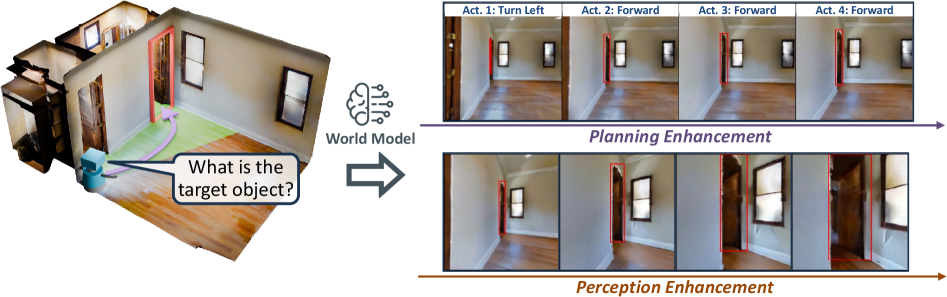
### Visual Description
## Diagram: AI Navigation and Perception Enhancement System
### Overview
The image is a technical diagram illustrating a robotic or AI agent's process for navigating an indoor environment. It shows a system that uses a "World Model" to enhance both planning (action sequence generation) and perception (visual understanding) in response to a query about a target object. The diagram flows from left to right, starting with an initial state and query, processing through a central model, and outputting two enhanced sequences.
### Components/Axes
The diagram is segmented into three main regions:
1. **Left Region (Initial State & Query):**
* A 3D isometric floor plan of a room with wooden flooring, white walls, and multiple doorways/windows.
* A small, blue, wheeled robot is positioned near the bottom-left corner.
* A light green, semi-transparent path with a purple arrow originates from the robot, curves through the room, and points towards a doorway outlined in red.
* A speech bubble emanates from the robot containing the text: **"What is the target object?"**
2. **Central Region (Processing Unit):**
* An icon depicting a brain with circuit-like connections, labeled **"World Model"**.
* A large, gray, right-pointing arrow connects the left region to the right region, passing through the "World Model" icon.
3. **Right Region (Enhanced Outputs):**
* This region is divided into two horizontal sequences, each containing four image frames.
* **Top Sequence (Planning Enhancement):**
* A purple arrow runs beneath the frames, pointing right, labeled **"Planning Enhancement"**.
* Each frame is labeled with an action:
* Frame 1: **"Act. 1: Turn Left"**
* Frame 2: **"Act. 2: Forward"**
* Frame 3: **"Act. 3: Forward"**
* Frame 4: **"Act. 4: Forward"**
* The frames show a first-person perspective from the robot, progressing through the room. A red outline highlights the doorway/frame the robot is approaching or moving through in each step.
* **Bottom Sequence (Perception Enhancement):**
* A brown/orange arrow runs beneath the frames, pointing right, labeled **"Perception Enhancement"**.
* The four frames show the same first-person perspective as the top sequence but at different moments.
* Red outlines highlight different architectural features (door frames, window frames) in each frame, suggesting the system is actively identifying and segmenting key environmental structures.
### Detailed Analysis
* **Flow and Relationship:** The diagram depicts a cause-and-effect flow. The agent's query ("What is the target object?") and its initial state (position and path in the 3D map) are input into the "World Model." This model then generates two parallel enhancements:
1. **Planning Enhancement:** Produces a discrete, four-step action plan (Turn Left, then move Forward three times) to navigate towards the area of interest (the red-outlined doorway in the initial path).
2. **Perception Enhancement:** Produces a sequence of visual frames where relevant environmental features (doorways, windows) are highlighted with red outlines, indicating improved scene understanding for navigation.
* **Spatial Grounding:** The red outline in the initial 3D map (left region) corresponds to the target doorway. In the "Planning Enhancement" sequence, the red outline consistently marks the doorway the agent is navigating through. In the "Perception Enhancement" sequence, the red outlines shift to highlight various structural elements in the agent's field of view.
* **Trend Verification:** The planning sequence shows a logical spatial progression: a turn followed by forward movement. The perception sequence shows a trend of the agent's viewpoint moving forward through the room, with the system consistently identifying and outlining structural boundaries.
### Key Observations
1. **Dual Enhancement Pathways:** The core concept is that a single "World Model" simultaneously improves both high-level action planning and low-level visual perception.
2. **Action-Perception Coupling:** The actions in the top sequence (e.g., "Forward") directly correspond to the changing viewpoints in the bottom sequence, demonstrating the link between planned movement and perceptual input.
3. **Focus on Structural Navigation:** The system's perception enhancement appears focused on identifying navigable portals (doors) and boundaries (windows), which are critical for indoor robot navigation.
4. **Query-Driven Process:** The entire process is initiated by a specific, goal-oriented question from the agent.
### Interpretation
This diagram illustrates a sophisticated AI architecture for embodied agents (like robots). It suggests that effective navigation in complex environments requires more than just path planning; it requires a **world model** that integrates:
* **Spatial Reasoning:** To generate a feasible action sequence (Planning Enhancement).
* **Semantic Scene Understanding:** To parse the visual input into meaningful, navigable components like doors and windows (Perception Enhancement).
The "World Model" acts as a central cognitive unit that transforms a vague goal ("find the target object") into concrete, executable steps while simultaneously sharpening the agent's "vision" to recognize the features necessary to execute those steps. The red outlines are key—they represent the model's internal representation of important environmental features, bridging the gap between raw pixels and actionable knowledge. This closed-loop system, where planning informs perception and vice-versa, is fundamental to creating autonomous agents that can operate reliably in human spaces.
</details>
Figure 8: In AR, the world model supports both queries (perception and planning). In this example, the agent must identify a wooden door that is initially visible only from an extreme viewpoint. For each candidate action sequence, the world model predicts future observations; these forecasts augment the agent’s perception and inform the choice of the next action.
Bounding box annotation. The target object is marked by a red bounding box overlaid on the image. For the current real observation $\mathbf{o}_{t}$ , the box is obtained from Habitat ground-truth annotations. For the predicted frames $\{\hat{\mathbf{o}}_{i}\}_{i=t+1}^{t+L}$ produced by the world model, we apply SAM2 (Ravi et al., 2024) to segment the target, seeding the segmenter with the ground-truth box from the current real observation $\mathbf{o}_{t}$ to maintain correspondence across time.
Metrics. AR performance is reported using two metrics: (1) Success Rate (SR), defined as the fraction of episodes in which the final predicted label $\hat{y}$ matches the ground-truth label $y$ ; and (2) Mean Trajectory Length, defined as the average number of executed actions before the agent either issues its final prediction or exhausts the step budget $K$ .
### B.2 Image-Goal Navigation (ImageNav)
Image-Goal Navigation (ImageNav), also known as goal-conditioned visual navigation, requires an embodied agent to reach the target location depicted by a single reference image of the goal. The environment is unknown, so the navigation policy must determine how to explore in order to locate the goal efficiently. To examine how world models can assist, we create 144 ImageNav episodes taken from 87 validation scenes of HM3D (Ramakrishnan et al., 2021).
Task setup. Each episode permits at most $K=20$ decision steps. As in the AR setting, at step $t$ the agent receives an RGB observation $\mathbf{o}_{t}$ comprising a panoramic view and a front view with a horizontal field of view of $90^{\circ}$ . The agent then proposes a sequence of low-level navigation primitives $\mathbf{A}_{t}=[a_{t+1},\,a_{t+2},\,\ldots,\,a_{t+L}]$ with a maximum horizon of $L=5$ . The first $L-2$ primitives from the selected plan are executed in the real environment, after which the agent replans based on the newly acquired observation. An episode is successful if, within the budget of $K$ steps, the agent’s position enters a sphere of radius $R_{g}=0.5,\text{m}$ centered at the location specified by the goal image $\mathbf{g}$ .
Integrating a world model. In ImageNav, the agent answers only the navigation query of which action sequence to execute next; therefore, the world model is used exclusively for planning enhancement. The agent first enumerates several candidate action sequences. For each candidate, the world model predicts the future observations that would follow if the sequence were executed from the current state. The agent then scores each sequence by assessing how informative its predictions are for locating the goal, and selects the sequence with the highest expected utility. When a world model is used, the planner proposes $M=3$ candidate action sequences at each decision step, with horizon $L=5$ . The first $L-2$ actions from the chosen sequence are carried out before the next cycle begins.
Metrics. We report three standard metrics for ImageNav: (1) Success Rate (SR), the fraction of episodes in which the agent reaches the goal within the decision budget; (2) Mean Trajectory Length, the average number of executed actions across all episodes; and (3) Success weighted by Path Length (SPL), which accounts for both success and path efficiency. Formally, for a set of $N$ episodes,
$$
\mathrm{SPL}=\frac{1}{N}\sum_{i=1}^{N}S_{i}\,\frac{L_{i}^{*}}{\max\!\bigl(L_{i},\,L_{i}^{*}\bigr)}\times 100\
$$
where $S_{i}\in\{0,1\}$ indicates whether episode $i$ is successful, $L_{i}^{*}$ is the shortest path length from the start position to the goal for episode $i$ , and $L_{i}$ is the actual path length executed by the agent in that episode.
### B.3 Active Embodied Question Answering (A-EQA)
Active Embodied Question Answering (A-EQA) tasks an embodied agent with answering open-ended, natural-language questions after actively exploring an environment. The questions span six broad categories that are common in embodied QA: recognizing objects, recognizing object attributes, recognizing object states, localizing objects, performing spatial reasoning, and performing functional reasoning. Our evaluation set contains 184 questions distributed across 54 indoor scenes drawn from the official OpenEQA split (Majumdar et al., 2024) and the validation set of HM3D (Ramakrishnan et al., 2021).
Task setup. In A-EQA, there is no predefined navigation goal, so the agent must design its own exploration strategy to gather sufficient visual evidence for answering the question. At every decision step $t$ , the agent receives a panoramic RGB observation that we decompose into four perspective views, each with a horizontal field of view of $105^{\circ}$ (see Figure ˜ 10). The exploration budget is limited to $250$ low-level actions; a single decision step can comprise multiple low-level actions, depending on the high-level intent. An episode terminates when the budget is exhausted or when the agent outputs a final answer $\hat{y}$ .
For A-EQA, we implement a two-level policy that separates deliberation and control. The high-level planner periodically issues one of two types of commands: (i) a textual instruction (for example, “move to the hallway visible in the front view”), or (ii) the index of a landmark object detected in the current panorama. Once a high-level command is produced, execution is delegated to the low-level controller. If the command specifies a landmark, the controller uses depth data together with a custom pathfinder to plan and follow a route to that landmark. If the command is a textual instruction, the controller generates a sequence of low-level actions to carry out the instruction. This planner-controller loop continues until either the $250$ atomic actions are consumed or the high-level planner decides to emit the final answer $\hat{y}$ .
<details>
<summary>x9.png Details</summary>
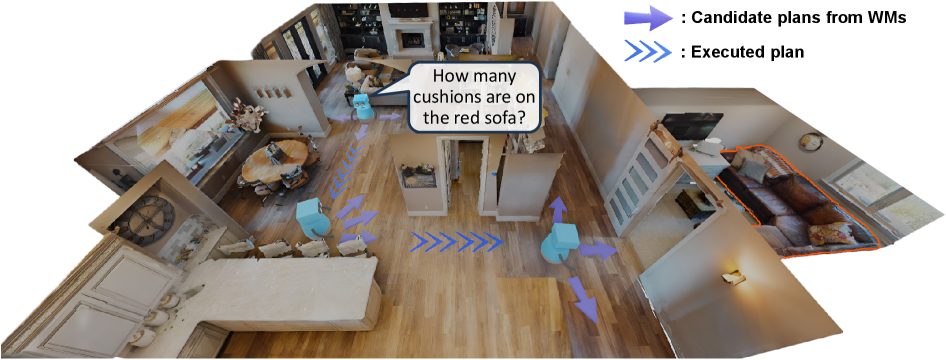
### Visual Description
## Diagram: AI Agent Navigation in Domestic Environment (Task: Count Cushions on Red Sofa)
### Overview
The image is a 3D-rendered top-down floor plan of a house, illustrating an AI agent’s (blue robotic figure) navigation and task planning to answer the question: *“How many cushions are on the red sofa?”* The diagram includes a legend for plan types, a speech bubble with the task, and a spatial layout of rooms/objects.
### Components/Axes
- **Legend (Top-Right)**:
- Purple arrow (single): *“Candidate plans from WMs”* (World Models, likely alternative navigation paths).
- Blue arrow (double): *“Executed plan”* (the path the agent actually took).
- **Rooms/Objects**:
- **Red Sofa**: Outlined in orange, located in the right-side living room area (visible cushions: ~3–4, though exact count is unclear from the diagram).
- **Dining Area**: Table with chairs, near the center-left.
- **Kitchen**: Cabinets and appliances, center.
- **Bedroom**: Bed and furniture, bottom-left.
- **Agents/Robots**: Blue, boxy figures with directional arrows (indicating movement plans).
- **Speech Bubble**: Contains the task: *“How many cushions are on the red sofa?”* (positioned near a blue agent in the middle-left area).
### Detailed Analysis
- **Spatial Layout**: The floor plan is a 3D perspective, showing interconnected rooms. The red sofa is a focal object (outlined in orange) in the right living room.
- **Agent Paths**:
- **Executed Plan (Blue Double Arrows)**: A path from the kitchen area (center) toward the red sofa (right), indicating the agent’s actual movement.
- **Candidate Plans (Purple Single Arrows)**: Multiple alternative paths (e.g., from the dining area, near the red sofa) showing potential navigation options from World Models.
- **Task Context**: The speech bubble frames the agent’s goal: counting cushions on the red sofa, requiring navigation to the sofa’s location.
### Key Observations
- The red sofa is a critical target object, outlined for emphasis.
- The diagram distinguishes between *planned* (candidate) and *executed* paths, highlighting decision-making in navigation.
- The agent’s position (blue figure) and arrows suggest a sequence: planning (purple) → execution (blue) → task completion (counting cushions).
### Interpretation
This diagram illustrates a scenario in **embodied AI/robotics** where an agent navigates a domestic environment to complete a visual task (counting cushions). The “candidate plans from WMs” represent the agent’s internal model of possible paths, while the “executed plan” shows the chosen path. The red sofa’s outline and the task question emphasize object interaction and spatial reasoning. This setup is relevant for testing AI agents’ ability to plan, navigate, and perform object-centric tasks in realistic environments, bridging perception (seeing the sofa) and action (moving to it). The diagram’s structure (legend, paths, task) clarifies the agent’s decision-making process, making it a useful tool for visualizing AI navigation and task execution.
*(Note: The image contains no numerical data or charts—only a diagrammatic representation of a robotic navigation task.)*
</details>
Figure 9: Overview of our embodied closed-loop evaluation for A-EQA. For each question, the high-level planner proposes multiple candidate action plans and queries the world model to generate the corresponding future observations. The agent then evaluates each plan together with its predicted observations and selects the plan that maximizes the expected reward before executing it in the environment.
Integrating a world model. In A-EQA, the world model is primarily used to strengthen the high-level planner. At each high-level decision point, the planner samples $M$ candidate action plans and queries the world model to produce the corresponding predicted observations, as illustrated in Figure ˜ 9. The agent then evaluates each plan-observation pair $(\hat{\mathbf{A}}_{t}^{(m)},\,\hat{\mathbf{O}}_{t}^{(m)})$ and chooses the plan that maximizes the estimated reward under the current question context. This differs from the AR setting, where perception and planning are evaluated through two separate queries. In A-EQA, the high-level planner must both design a long-horizon exploration sequence and decide when to stop exploring to output a final answer $\hat{y}$ . Consequently, the world model supports a single unified query: the predicted observations simultaneously refine the agent’s understanding of the scene and provide forecasts for scoring alternative exploration plans. When a world model is enabled, the planner proposes $M=3$ candidate sequences per step, each with horizon $L=14$ . Unlike AR or ImageNav, only the terminal predicted observation at step $L$ is returned to the high-level planner for scoring, rather than the full rollout over all $L$ steps.
<details>
<summary>x10.png Details</summary>
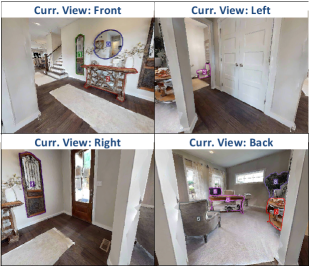
### Visual Description
## [Photograph Composite]: Four Interior Views of a Residential Space
### Overview
The image is a composite of four separate photographs arranged in a 2x2 grid. Each photograph shows a different perspective of what appears to be the same residential interior, likely an entryway or living area. Each quadrant is labeled with a blue text header indicating the camera's viewpoint.
### Components/Axes
The image is divided into four quadrants, each with a centered blue text label at the top:
* **Top-Left Quadrant:** Label: `Curr. View: Front`
* **Top-Right Quadrant:** Label: `Curr. View: Left`
* **Bottom-Left Quadrant:** Label: `Curr. View: Right`
* **Bottom-Right Quadrant:** Label: `Curr. View: Back`
### Detailed Analysis
**1. Top-Left Quadrant (Curr. View: Front)**
* **Perspective:** Looking straight into a hallway from what seems to be the main entrance.
* **Key Elements:**
* **Flooring:** Dark wood-look flooring (likely laminate or vinyl plank) runs throughout the visible area.
* **Walls:** Painted a light, neutral color (off-white or light gray).
* **Left Side:** A white door frame is partially visible. Further down the hall, a staircase with white balusters and a dark handrail ascends to the left.
* **Center/Right:** A large, round mirror with a dark frame hangs on the wall. Below it is a console table with a light-colored top and dark legs. On the table are decorative items, including what appears to be a vase with flowers and a small sculpture.
* **Far End:** The hallway opens into another room. A white door is visible on the far wall.
**2. Top-Right Quadrant (Curr. View: Left)**
* **Perspective:** Looking towards a wall to the left of the initial viewpoint.
* **Key Elements:**
* **Flooring:** Continuation of the dark wood-look flooring.
* **Walls:** Same light, neutral color.
* **Main Feature:** A white, paneled interior door is closed and centered in the frame.
* **Left Edge:** A sliver of the console table and mirror from the "Front" view is visible.
* **Right Edge:** A white door frame is partially visible.
**3. Bottom-Left Quadrant (Curr. View: Right)**
* **Perspective:** Looking towards a wall to the right of the initial viewpoint.
* **Key Elements:**
* **Flooring:** Dark wood-look flooring.
* **Walls:** Light, neutral color.
* **Main Feature:** A white front door with a large, vertical glass panel (sidelight) on its left side. The door has a dark handle/lockset.
* **Left Side:** A tall, narrow, dark-framed mirror or piece of art hangs on the wall.
* **Right Edge:** A white door frame is partially visible.
**4. Bottom-Right Quadrant (Curr. View: Back)**
* **Perspective:** Looking towards the rear of the space, opposite the "Front" view.
* **Key Elements:**
* **Flooring:** A light-colored, plush area rug covers most of the visible floor, placed over the dark wood-look flooring.
* **Walls:** Light, neutral color.
* **Furniture:** A gray upholstered armchair is positioned on the left. A small, round side table with a light top is next to it.
* **Background:** A window with white trim is visible on the far wall. Below it is a low, dark media console or shelf holding various items, including what appears to be a television. To the right, a colorful, patterned armchair or ottoman is partially visible.
* **Lighting:** A floor lamp with a white shade stands in the corner.
### Key Observations
* **Consistent Design Elements:** The space features a consistent palette of dark wood-look flooring, light neutral walls, and white trim/doors across all views.
* **Spatial Layout:** The four views collectively suggest a central hallway or entry space. The "Front" view looks down the hall, the "Left" and "Right" views show the side walls (one with an interior door, one with the main entry door), and the "Back" view shows a living area at the end of the hall.
* **Staging:** The space appears to be staged for real estate or interior design purposes, given the coordinated decor, lack of personal items, and clean presentation.
* **Image Quality:** The photographs are slightly low-resolution, making fine details (like specific decor items or textures) difficult to discern with absolute certainty.
### Interpretation
This composite image serves as a **virtual tour or spatial reference** for a single interior location. Its primary purpose is to provide a comprehensive, 360-degree understanding of the room's layout, finishes, and key features from a fixed central point.
* **Function:** It demonstrates the flow and connectivity of the space—how the entryway relates to the staircase, interior rooms, and the main living area.
* **Design Narrative:** The consistent materials and neutral color scheme suggest a modern, clean, and market-friendly interior design approach. The staging highlights potential furniture arrangements and the room's functionality.
* **Utility:** For a technical document (like a real estate listing, interior design proposal, or renovation plan), this image efficiently communicates spatial relationships, architectural details (door styles, flooring), and the overall condition and style of the property without requiring multiple separate photos. The labels are critical for orienting the viewer and correlating each perspective with a specific direction.
</details>
Figure 10: Illustration of the Set-of-Marks (SoM) representation that encodes candidate navigable directions. The high-level planner chooses among these discrete landmarks when constructing candidate action plans.
Landmark detection and labeling. Landmark objects are detected by first running YOLO-World to obtain bounding boxes and then applying SAM2 to derive instance masks (Ravi et al., 2024; Cheng et al., 2024). This detection pipeline follows the Set-of-Marks (SoM) strategy (Yang et al., 2023a) shown in Figure ˜ 10 and provides a discrete set of navigable targets for high-level planning.
Metrics. A-EQA performance is evaluated with three metrics. (1) Answering Score: a large language model (e.g., GPT-4o) compares the agent’s final answer $\hat{y}$ to the ground-truth answer $y$ and assigns a raw score in $[1,5]$ , where $5$ indicates a perfect match. We average the raw score across episodes and then linearly map it to $[0,100]$ . (2) Mean Trajectory Length. This is the average travel distance the agent covers before either producing its final answer or exhausting the step budget $K$ , lower is better. (3) Success weighted by Path Length (SPL): this metric rewards both answer quality and navigation efficiency. For episodes in which the agent fails to return an answer, we fall back to its blind LLM variant and set the SPL contribution to zero. Formally,
$$
\text{SPL}_{\text{A-EQA}}=\frac{1}{N}\sum_{i=1}^{N}\left(\frac{\sigma_{i}-1}{4}\right)\frac{L_{i}^{*}}{\max\!\bigl(L_{i},\,L_{i}^{*}\bigr)}\times 100\
$$
where $N$ is the number of evaluation episodes, $\sigma_{i}\in[1,5]$ denotes the raw Answering Score for episode $i$ , $L_{i}^{*}$ denotes the shortest-path length from the start to a viewpoint that affords a correct answer, and $L_{i}$ denotes the actual path length executed by the agent in episode $i$ . A higher value indicates both more accurate answering and more efficient exploration.
### B.4 Robotic Manipulation
We study whether world models can improve low-level manipulation, which is a core capability for embodied agents. Our evaluation covers four robotic manipulation tasks in RLBench (James et al., 2020): Push Buttons, Slide Block to Color Target, Insert onto Square Peg, and Stack Cups. RLBench is a widely used benchmark for robot learning. Each episode provides a natural-language instruction that specifies the task objective, and the agent must control a 7-DoF robotic arm to satisfy that objective. We prepare a total of 200 evaluation episodes, with 50 episodes for each task.
Task setup. At each decision step $t$ , the agent receives an observation $\mathbf{o}_{t}$ and proposes an action sequence $\mathbf{A}_{t}=\bigl[\mathbf{a}_{t+1},\,\mathbf{a}_{t+2},\,\ldots,\,\mathbf{a}_{t+L}\bigr]$ , where each low-level action is parameterized as $\mathbf{a}_{t}=[x,\,y,\,z,\,\text{roll},\,\text{pitch},\,\text{yaw},\,\text{gripper}]$ . We consider two base policy settings with different horizons: $L=5$ for a VLM base policy that emits discrete actions, and $L=50$ for a 3D diffusion base policy that emits continuous actions. An episode is counted as a success if the specified goal $\mathbf{g}$ is achieved within the step budget $K$ .
<details>
<summary>x11.png Details</summary>
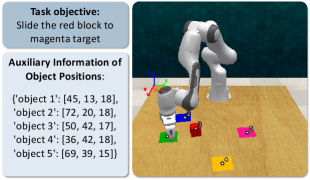
### Visual Description
## Screenshot: Robotics Task Environment
### Overview
The image is a screenshot from a robotics simulation or task planning interface. It displays a 3D scene of a robotic arm workspace alongside a text panel containing task instructions and object position data. The primary task is a pick-and-place or sliding manipulation involving colored blocks.
### Components/Axes
The image is divided into two main regions:
1. **Left Panel (Text Box):** A light gray box with a dark border containing two sections of text.
2. **Right Scene (3D View):** A rendered 3D environment showing a robotic arm on a wooden-textured table with several colored blocks.
**Text Panel Content (Transcribed):**
* **Task objective:** Slide the red block to magenta target
* **Auxiliary Information of Object Positions:**
* `['object 1': [45, 18, 18],`
* `'object 2': [72, 20, 18],`
* `'object 3': [50, 42, 17],`
* `'object 4': [36, 42, 18],`
* `'object 5': [69, 39, 15]]`
**3D Scene Components:**
* **Robotic Arm:** A white, multi-jointed robotic manipulator (resembling a Franka Emika Panda arm) mounted on the left side of the table.
* **Coordinate Axes:** A 3D coordinate system gizmo is visible near the robot's base, with red (X), green (Y), and blue (Z) axes.
* **Objects on Table:**
* A **red cube** (likely the target object to be moved).
* A **blue cube**.
* A **green cube**.
* A **yellow cube**.
* A **magenta cube** with a black target symbol (◎) on its top face (the destination target).
* **Table Surface:** A light brown, wood-grain textured plane.
### Detailed Analysis
**Object Position Data (from text panel):**
As listed in the Text Panel Content, the auxiliary information provides 3D coordinates [X, Y, Z] for five objects. The units are unspecified but likely represent centimeters or a simulation unit relative to a world origin.
**Visual Scene Analysis (Spatial Grounding):**
* **Robot Base:** Positioned on the left side of the table.
* **Red Block:** Located near the center of the table, slightly to the right of the robot's base. This is the object to be moved.
* **Magenta Target Block:** Positioned on the right side of the table, farther from the robot than the red block. It is marked with a target symbol.
* **Other Blocks (Blue, Green, Yellow):** Scattered between the robot and the target, acting as potential obstacles. The blue block is closest to the robot, the green is near the red block, and the yellow is in the foreground.
* **Coordinate System:** The origin appears to be at or near the robot's base. The positive X-axis (red) points to the right, the positive Y-axis (green) points away from the viewer (into the scene), and the positive Z-axis (blue) points upward.
**Trend/Logic Verification:**
The task is not a time-series chart but a static setup. The "trend" is the spatial relationship defined by the task: the robot must plan a path to move the red block (Object 1) to the magenta target (likely Object 5, given its position and the target symbol) while avoiding collisions with the other blocks (Objects 2, 3, 4).
### Key Observations
1. **Task Clarity:** The objective is explicitly stated: "Slide the red block to magenta target." This implies a planar pushing or sliding motion, not a pick-and-place.
2. **Data-Scene Correspondence:** The text provides precise numerical coordinates, while the image provides the visual context. The magenta block (Object 5) has the lowest Z-coordinate (15), which may indicate it is flatter or placed differently than the others (Z=17-18).
3. **Environment Complexity:** The presence of three additional blocks (blue, green, yellow) creates a cluttered environment, making the path planning non-trivial.
4. **Visual Target Marker:** The magenta block is uniquely identified by a black target symbol, reinforcing its role as the destination.
### Interpretation
This image represents a classic robotics manipulation problem setup, likely for research or testing in areas like motion planning, obstacle avoidance, and object manipulation.
* **What the data suggests:** The numerical coordinates are the ground truth state of the environment, essential for an algorithm to compute a collision-free path. The visual scene is the corresponding rendered output for human verification.
* **How elements relate:** The text panel defines the "what" (task and object states), and the 3D scene shows the "where" (physical arrangement). The robot is the agent that must act upon this information to achieve the goal.
* **Notable Anomalies/Considerations:**
* The task specifies "slide," which constrains the manipulation strategy compared to lifting.
* The coordinate for the magenta target (Object 5: [69, 39, 15]) has a notably lower Z-value. This could mean the target is a flat marker on the table rather than a cube of the same height as the others, which is consistent with the visual of a symbol on a surface.
* The setup is designed to test a planner's ability to navigate a constrained space. The red block must be moved from approximately (45,18) to (69,39) on the XY plane, a path that likely requires maneuvering around the green and yellow blocks.
**Language Declaration:** All text within the image is in English.
</details>
Figure 11: Illustration of the auxiliary information provided to the VLM policy. The objects are marked with indices, and their positions are given to the VLM to facilitate decision-making.
When a VLM is the base policy, directly producing precise low-level controls is challenging for current VLMs. Following (Yang et al., 2025), we therefore introduce two enhancements. First, we discretize the action space by dividing the position components $(x,y,z)$ into 100 bins and the orientation components $(\text{roll},\text{pitch},\text{yaw})$ into 120 bins. Second, we augment the observations with object index markers and provide precise object poses for indexed objects so that the VLM can directly access spatial information during planning (shown in Figure ˜ 11). Under this configuration, the manipulation policy is allowed at most $K=15$ low-level action steps per episode. In contrast, when using a 3D diffusion policy (Ke et al., 2024) as the base policy, the controller naturally generates continuous low-level actions, so we do not apply the discretization or the additional indexing enhancements. In this configuration, the manipulation policy is permitted at most $K=8$ macro decision steps per episode.
Integrating a world model. As in ImageNav, we use the world model exclusively for planning enhancement. The agent executes a propose, simulate, and revise loop so that it can reason about the consequences of alternative plans before applying any action in the real environment. At each decision step, the planner proposes $M=5$ candidate action sequences. When the length of a candidate sequence is shorter than the world model’s required action-conditioning length, the unified action API linearly interpolates the sequence to the required length. Conversely, when the candidate sequence is longer than required, the unified action API uniformly samples actions along the sequence to match the world model’s input length. The planner then evaluates the simulated outcomes and selects the sequence with the highest expected reward, and the loop repeats with updated observations.
Metrics. We report two standard metrics for manipulation tasks: (1) Success Rate (SR), the fraction of episodes in which the agent reaches the goal within the decision budget; and (2) Mean Trajectory Length, the average number of decision steps across all episodes.
### B.5 Policies in Embodied Tasks
There are three types of policies in paper: the base policy, the proposal policy, and the revision policy. The base policy is an independent policy that interacts with the environment without using a world model, and when a world model is enabled, it is always the same as the corresponding proposal policy. When a world model is integrated, the proposal policy generates multiple candidate action sequences at each decision step, and the revision policy evaluates these candidates and selects one based on the predicted rollouts produced by the world model.
In our experiments, we employ two types of base policies for AR and ImageNav: a VLM policy and a heuristic policy. For the VLM policy, we use Qwen2.5-VL-72B-Instruct-AWQ (Bai et al., 2025) as the default base policy and as the proposal policy when integrated with a world model to answer queries. For the heuristic policy, we implement a primitive action sampling mechanism that draws actions from the action space according to the previously executed actions and a set of handcrafted rules. Concretely, if there exists a previous action, then the next action must not be its inverse (for example, a turn_left cannot be immediately followed by a turn_right). In addition, we prevent excessively long subsequences of turns in the same direction by capping the maximum number of consecutive turns to four. These rules help the heuristic policy to avoid redundant back-and-forth movements and to explore the environment effectively.
For manipulation tasks, we likewise consider two base policies: a VLM policy and a 3D diffusion policy. The VLM policy remains Qwen2.5-VL-72B-Instruct-AWQ by default. The 3D diffusion policy follows 3D Diffuser Actor (Ke et al., 2024); we train it using the authors’ official code. To encourage diverse action trajectory proposals, we drop its text input and modify the task-definition scripts so that task variants occur with equal frequency during training. For each manipulation task, the diffusion policy is trained on 120 demonstrations and used as the proposal policy to generate short-horizon 7-DoF gripper action sequences within the planning loop.
For the revision policy in our closed-loop online planning, we use the same VLM as the proposal policy by default to score candidate plans and to select the decision that maximizes the expected task reward. For ablations, we also replace Qwen2.5-VL-72B-Instruct-AWQ with InternVL3-78B-AWQ (Zhu et al., 2025) as the VLM policy; results in Table ˜ 5 show that world model integration consistently improves performance regardless of the specific VLM used.
Table 5: Task performance for InternVL3 variants with and without a world model. Higher SR %, SPL %, and Ans. Score are better; lower Mean Traj. is better.
| Model Details | AR | ImageNav | A-EQA | | | | | | |
| --- | --- | --- | --- | --- | --- | --- | --- | --- | --- |
| Model Type | Method | SR $\uparrow$ | Mean Traj. $\downarrow$ | SR $\uparrow$ | Mean Traj. $\downarrow$ | SPL $\uparrow$ | Ans. Score $\uparrow$ | Mean Traj. $\downarrow$ | SPL $\uparrow$ |
| Base Policy | InternVL3 (w/o WM) | 49.91 | 7.06 | 13.19 | 60.30 | 7.46 | 47.28 | 20.45 | 31.22 |
| + Image Gen. | SVD $\dagger$ | 55.72 | 5.37 | 40.97 | 52.50 | 26.26 | 47.13 | 16.78 | 34.54 |
### B.6 World Models in Embodied Tasks
Output format. The world models evaluated in our framework fall into two categories according to their native output format: perspective models and panoramic models. Perspective models, such as NWM (Bar et al., 2025a), LTX-Video (HaCohen et al., 2024), and Wan2.1 (Wan et al., 2025), generate frames in a perspective view. Panoramic models, including PathDreamer (Koh et al., 2021b), SE3DS (Koh et al., 2023), and our post-trained variants, produce equirectangular panoramas. For integration into our closed-loop pipeline, panoramic outputs are decomposed into perspective views, which are then supplied to the agent. In A-EQA, the agent consumes four principal perspective views (front, left, right, back) when they are available. In AR, the agent uses the view that contains the target bounding box; if the box is not visible, we discard the generated frames until the predicted box (from SAM2) enters the field of view. Unless otherwise specified, each perspective view image is resized to $384\times 384$ pixels before being passed to the agent.
Input format. Panoramic models are conditioned on an equirectangular panorama at a resolution of $576\times 1024$ pixels. Perspective models, when possible, take the current front-view observation with resolution $480\times 480$ as input. Some models require additional modalities. SE3DS expects a depth map, while PathDreamer requires both depth and a per-pixel semantic label map. For all depth-aware models, we provide ground-truth depth from Habitat. For PathDreamer, the initial semantic map is obtained by running a pretrained RedNet (Jiang et al., 2018) on the initial RGB-D frame to produce per-pixel labels that match the required input specification.
## Appendix C Post-Training Recipe for Embodied World Models
In this section, we describe how an off-the-shelf video generation model is adapted, via post-training, into an action-controllable world model suitable for embodied tasks. We first formalize the learning objective and the action-observation alignment (Section ˜ C.1), and then detail the concrete post-training setup used for tasks in Habitat-Sim and for Robotic Manipulations (Section ˜ C.2).
### C.1 Problem Formulation
Let $\mathbf{x}_{1}\!\in\!\mathbb{R}^{3\times H\times W}$ denotes the initial RGB frame that conditions the generation process. Our goal is to synthesize an $N$ -frame video $\mathbf{X}=\bigl[\mathbf{x}_{1},\,\mathbf{x}_{2},\,\dots,\,\mathbf{x}_{N}\bigr]\in\mathbb{R}^{3\times H\times W\times N},$ where $\mathbf{X}$ represents a plausible sequence of future observations after executing a sequence of actions $\mathbf{A}=\bigl[a_{1},\,a_{2},\,\dots,\,a_{N}\bigr].$
For tasks in Habitat-Sim, we adopt a discrete action space with $a_{i}\in\mathcal{V}$ , where $\mathcal{V}$ is a finite set of navigation primitives (e.g., Forward, Turn-Left, Turn-Right, Stop). For manipulation, we use a continuous action space with $a_{i}\in\mathbb{R}^{7}$ , corresponding to 7-DoF end-effector poses. Actions in Habitat-Sim specify relative transformations between consecutive observations. Since $a_{i}$ maps $\mathbf{x}_{i-1}$ to $\mathbf{x}_{i}$ , no action precedes the first frame. To maintain a one-to-one alignment between frames and actions, we prepend a special token and set $a_{1}=a_{\text{Null}}$ . In contrast, for manipulation tasks during post-training, actions are absolute end-effector poses expressed in the world frame, so there is naturally a one-to-one correspondence between actions and frames.
We formulate future-observation synthesis with the world model $g_{\boldsymbol{\theta}}$ by learning the conditional distribution $p_{\boldsymbol{\theta}}\bigl(\mathbf{X}\,\big|\,\mathbf{x}_{1},\,C(\mathbf{A})\bigr),$ where $C(\mathbf{A})$ denotes the control signal emitted by the unified action API. This API converts the native action sequence $\mathbf{A}$ into the conditioning interface expected by the pretrained video generator (for example, a text prompt, a camera trajectory, or a sequence of low-level controls). This formulation yields action-conditioned rollouts that evolve from the initial frame $\mathbf{x}_{1}$ according to the specified action sequence, thereby aligning the pretrained model with the domain distribution and action space of the target embodied tasks.
### C.2 Post-Training Configuration
For tasks in Habitat-Sim, we use panoramic observations as both the input and the output of the video generators. We fine-tune the pretrained video generation models at a resolution of $576\times 1024$ and train them to predict $N$ future frames on our self-collected panoramic action-observation corpus from Habitat-Sim. In these tasks, the action space is discrete and comprises four navigation primitives: Forward 0.2 m, Turn_Left 22.5 ∘, Turn_Right 22.5 ∘, and Stop. For manipulation tasks, we use front-view observations as both the input and the output of the video generators. We fine-tune the pretrained video generation models at a resolution of $480\times 480$ (Cosmos-Predict2) or $448\times 448$ (SVD) and train them to predict $N$ future frames with continuous 7-DoF end-effector poses as conditioning.
Unless otherwise stated, post-training uses 40K sampled instances for the Habitat-Sim tasks and for the manipulation tasks. All models are initialized from their official pretrained weights and adapted on the corresponding dataset for one epoch. We rely on the official implementations and the recommended hyperparameters for fine-tuning whenever available; specific post-training details of various world models are summarized below in Tables ˜ 6 and 7.
Table 6: Post-trained (action-conditioned) world models used in our experiments, with repositories and training configurations.
| World Model | Domain | Repository | Frames ( $N$ ) | Train Res. | Notes |
| --- | --- | --- | --- | --- | --- |
| Post-training on Habitat-Sim data | | | | | |
| Cosmos-Predict2 $\dagger$ (Agarwal et al., 2025) | Habitat-Sim | github.com/nvidia-cosmos/cosmos-predict2 | 13 | $576\times 1024$ | Official repo |
| LTX-Video $\dagger$ (HaCohen et al., 2024) | Habitat-Sim | github.com/Lightricks/LTX-Video-Trainer | 17 | $576\times 1024$ | Official repo |
| Wan2.1 $\dagger$ (Wan et al., 2025) | Habitat-Sim | github.com/modelscope/DiffSynth-Studio | 13 | $576\times 1024$ | Official repo |
| Wan2.2 (5B) $\dagger$ (Wan et al., 2025) | Habitat-Sim | github.com/modelscope/DiffSynth-Studio | 13 | $576\times 1024$ | Official repo |
| Wan2.2 (A14B) $\dagger$ (Wan et al., 2025) | Habitat-Sim | github.com/modelscope/DiffSynth-Studio | 13 | $576\times 1024$ | Official repo |
| SVD $\dagger$ (Blattmann et al., 2023a) | Habitat-Sim | github.com/pixeli99/SVD_Xtend | 14 | $576\times 1024$ | Self-adapted based on repo |
| Post-training on manipulation data | | | | | |
| Cosmos-Predict2 $\dagger$ (Agarwal et al., 2025) | Manipulation | github.com/nvidia-cosmos/cosmos-predict2 | 13 | $480\times 480$ | Official repo |
| SVD $\dagger$ (Blattmann et al., 2023a) | Manipulation | github.com/pixeli99/SVD_Xtend | 14 | $448\times 448$ | Self-adapted based on repo |
Table 7: All the world models and their details in World-in-World. “ $\dagger$ ” denotes post-trained (action-conditioned) variants.
| World Model | Model Type | Control Type | Input Type | #Param. |
| --- | --- | --- | --- | --- |
| Zero-shot (no post-training) | | | | |
| PathDreamer (Koh et al., 2021b) | Image Gen. | Viewpoint | RGB-D; Pano | 0.69B |
| SE3DS (Koh et al., 2023) | Image Gen. | Viewpoint | RGB-D; Pano | 1.1B |
| NWM (Bar et al., 2025a) | Video Gen. | Trajectory | RGB | 1B |
| SVD (Blattmann et al., 2023a) | Video Gen. | Image | RGB | 1.5B |
| LTX-Video (HaCohen et al., 2024) | Video Gen. | Text | RGB | 2B |
| Hunyuan (Kong et al., 2024) | Video Gen. | Text | RGB | 13B |
| Wan2.1 (Wan et al., 2025) | Video Gen. | Text | RGB | 14B |
| Wan2.2 (Wan et al., 2025) | Video Gen. | Text | RGB | 5B |
| Wan2.2 (Wan et al., 2025) | Video Gen. | Text | RGB | A14B |
| Cosmos-Predict2 (Agarwal et al., 2025) | Video Gen. | Text | RGB | 2B |
| Runway Gen4 (Runway Research, 2025) | Video Gen. | Text | RGB | – |
| Post-trained (action-conditioned) | | | | |
| SVD $\dagger$ (Blattmann et al., 2023a) | Video Gen. | Action | RGB; Pano | 1.5B |
| LTX-Video $\dagger$ (HaCohen et al., 2024) | Video Gen. | Action | RGB; Pano | 2B |
| Wan2.1 $\dagger$ (Wan et al., 2025) | Video Gen. | Action | RGB; Pano | 14B |
| Wan2.2 $\dagger$ (Wan et al., 2025) | Video Gen. | Action | RGB; Pano | 5B |
| Wan2.2 $\dagger$ (Wan et al., 2025) | Video Gen. | Action | RGB; Pano | A14B |
| Cosmos-Predict2 $\dagger$ (Agarwal et al., 2025) | Video Gen. | Action | RGB; Pano | 2B |
In Table ˜ 8, we summarize the computational resources required to post-train each world model on $\sim$ 40k domain-specific clips collected from Habitat-Sim. This post-training stage is intentionally lightweight and is several orders of magnitude less expensive than full pretraining. For 14B-parameter variants, we adopt LoRA fine-tuning to reduce GPU memory usage, while all other models are fine-tuned with full weights.
Table 8: Post-training resources for $\sim$ 40k domain clips per model. The procedure is lightweight and substantially cheaper than full retraining.
| Model | Model Size | GPU Memory (peak) | H100 GPU-hours |
| --- | --- | --- | --- |
| SVD | 1.5B | 84 GB | 29 |
| LTX-Video | 2B | 61 GB | 5 |
| Wan2.1 | 14B | 57 GB | 74 |
| Cosmos-Predict2 | 2B | 71 GB | 15 |
## Appendix D Post-Training Dataset Construction
For the post-training dataset used in manipulation tasks, we rely on the official RLBench codebase (James et al., 2020) to generate data. Specifically, we produce 200 demonstrations for each manipulation task. Each demonstration includes approximately 150 front-view RGB observations together with the corresponding sequence of 7-DoF end-effector poses. These pose sequences are aligned with the image observations and serve as the action labels during post-training. For the tasks evaluated in Habitat-Sim (Savva et al., 2019), there is no existing pipeline for constructing a large-scale dataset of panoramic action trajectories. To address this gap, we build a comprehensive post-training dataset by sampling action trajectories from the training splits of indoor scenes in HM3D (Ramakrishnan et al., 2021) and Matterport3D (Chang et al., 2017). Our trajectory sampling procedure is described in Section ˜ D.1. A summary of the resulting dataset statistics is provided in Table ˜ 9.
### D.1 Trajectory Sampling
| Statistic | Value |
| --- | --- |
| Number of scenes | 858 |
| Panorama RGB frames | 763,724 |
| Action trajectories | 439,213 |
| Depth recorded | ✓ |
| Camera poses recorded | ✓ |
| Low-level actions recorded | ✓ |
Table 9: Statistics of the post-training panoramic dataset.
Our aim is to record physically reasonable trajectories that resemble the exploration behavior of real agents in indoor spaces. We follow three guiding principles: (i) Diversity. The trajectories should cover many viewpoints and actions so that the model sees the scene from different perspectives and motion patterns. (ii) Plausibility. The paths must respect physical constraints; the agent must not move through walls or other solid objects. (iii) Manageability. The data should be free of excessive redundancy so that training remains balanced and efficient.
Algorithm 1 Three-stage construction of the post-training panoramic dataset
Input: scene mesh $\mathcal{S}$ , waypoint density $\rho$ , weight $\alpha$ , filter radius $r_{\mathrm{f}}$ , leaf ratio $\eta$ Output: set of panoramic trajectories $\mathcal{T}$
1: // Stage 1: waypoint selection
2: $S\leftarrow\mathrm{Area}(\mathcal{S})$
3: $N_{\mathrm{wp}}\leftarrow\max\!\bigl(1400,\lfloor\rho S\rfloor\bigr)$ $\triangleright$ target number of points
4: $\mathcal{P}\leftarrow\textsc{UniformSampleNavigable}(\mathcal{S},N_{\mathrm{wp}})$
5: build geodesic distance matrix $D$ on $\mathcal{P}$
6: for all $p_{i}\in\mathcal{P}$ do $\triangleright$ leaf score $s(i)$
7: $\text{ecc}(i)\leftarrow\max_{j}D_{ij}$
8: $\bar{d}(i)\leftarrow\frac{1}{|\mathcal{P}|-1}\sum_{j}D_{ij}$
9: $s(i)\leftarrow\text{ecc}(i)+\alpha\,\bar{d}(i)$
10: sort $\mathcal{P}$ by $s(i)$ in descending order $\triangleright$ higher $s(i)$ = more peripheral
11: $\mathcal{W}\leftarrow\varnothing$
12: for all $p_{i}$ in sorted $\mathcal{P}$ do $\triangleright$ radius-based greedy pruning
13: if $\forall w\in\mathcal{W}:D_{iw}\geq r_{\mathrm{f}}$ then
14: $\mathcal{W}\leftarrow\mathcal{W}\cup\{p_{i}\}$
15: // Stage 2: path generation
16: $\mathcal{T}\leftarrow\varnothing$
17: $N_{\text{leaf}}\leftarrow\lceil\eta N_{\mathrm{wp}}\rceil$
18: $\mathcal{U}\leftarrow\mathcal{W}[{:}N_{\text{leaf}}]$ $\triangleright$ unvisited waypoints
19: $c\leftarrow\textsc{RandomSample}(\mathcal{U})$ $\triangleright$ random start
20: while $\mathcal{U}\neq\varnothing$ do
21: $n\leftarrow\arg\min_{w\in\mathcal{U}\setminus\{c\}}\textsc{GeodesicDist}(c,w)$
22: $\tau\leftarrow\textsc{ShortestPath}(c,n)$ $\triangleright$ Habitat planner
23: record panoramic RGB-D frames along $\tau$ and append to $\mathcal{T}$
24: // Stage 3: waypoint dynamic update
25: for all $w\in\mathcal{W}$ do
26: if $\exists m\in\tau:\textsc{GeodesicDist}(m,w)<r_{\mathrm{f}}$ then
27: $\mathcal{W}\leftarrow\mathcal{W}\setminus\{w\}$ $\triangleright$ mark as visited
28: recompute $s(\cdot)$ on updated $\mathcal{W}$ , then sort in descending order
29: $\mathcal{U}\leftarrow\mathcal{W}[{:}N_{\text{leaf}}]$ $\triangleright$ refresh unvisited set
30: $c\leftarrow n$
31: return $\mathcal{T}$
We implement these principles with a sampling procedure shown in Algorithm ˜ 1 and described below.
1. Waypoint selection. For a scene of floor area $S$ we set the waypoint density to $\rho=4\ \text{m}^{-2}$ and draw
$$
N_{\mathrm{wp}}=\max\!\bigl(1400,\lfloor\rho S\rfloor\bigr)
$$
navigable points $\mathcal{P}$ uniformly across the scene. We construct a complete graph whose edge weights $D_{ij}$ are the geodesic distances between points $p_{i}$ and $p_{j}$ . Each vertex $i$ is assigned a leaf score
$$
s(i)=\operatorname{ecc}(i)+\alpha\,\bar{d}(i),
$$
where $\operatorname{ecc}(i)=\max_{j}D_{ij}$ is the eccentricity, $\bar{d}(i)=(|\mathcal{P}|-1)^{-1}\sum_{j}D_{ij}$ is the mean geodesic distance to all other vertices, and $\alpha=1.7$ . Sorting vertices by $s(i)$ in descending order, we greedily build a waypoint set $\mathcal{W}$ that respects a minimum spacing of $r_{\mathrm{f}}=3$ m: a candidate $v$ is accepted only if $D_{vj}\geq r_{\mathrm{f}}$ for every waypoint $j$ already chosen.
1. Path generation. We maintain a list $\mathcal{U}$ of unvisited waypoints, initialized with the top $N_{\text{leaf}}$ vertices of $\mathcal{W}$ . Starting from a random waypoint $c\in\mathcal{U}$ , we repeatedly move to the nearest unvisited waypoint
$$
n=\arg\min_{w\in\mathcal{U}\setminus\{c\}}\textsc{GeodesicDist}(c,w),
$$
and use the Habitat path-finder to compute the shortest collision-free path $\tau$ from $c$ to $n$ . Panoramic RGB-D frames are recorded at every step along $\tau$ and appended to the trajectory set $\mathcal{T}$ .
1. Waypoint dynamic update. After each segment $\tau$ we label any waypoint $w$ with GeodesicDist(m,w) $<r_{\mathrm{f}}$ for some path point $m\in\tau$ as visited and remove it from $\mathcal{W}$ . We then recompute $s(\cdot)$ on the remaining vertices, resort $\mathcal{W}$ , and refresh the unvisited list
$$
\mathcal{U}\leftarrow\mathcal{W}[{:}N_{\text{leaf}}].
$$
The next segment starts from $c\leftarrow n$ , and the loop continues until $\mathcal{U}$ is empty. This dynamic reselection guarantees that peripheral regions are covered while avoiding redundant sampling in interior corridors.
<details>
<summary>x12.png Details</summary>
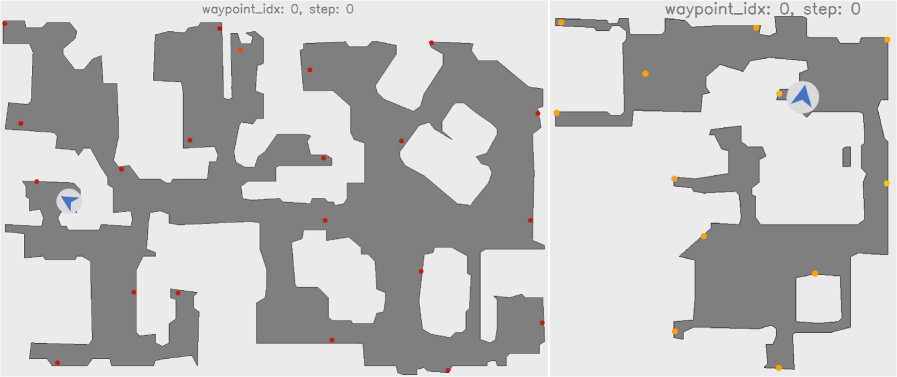
### Visual Description
## Diagram: Side-by-Side Navigation Map Comparison
### Overview
The image displays two side-by-side diagrams, each depicting a top-down view of a complex, maze-like environment. Both diagrams share the same title, "waypoint_idx: 0, step: 0," indicating they represent the initial state (step 0) for a navigation or pathfinding task involving a specific waypoint index (0). The environments consist of irregular gray shapes (representing navigable space or rooms) on a white background (representing walls or obstacles). Each map contains a set of colored dots (waypoints) and a blue arrow icon (likely representing an agent's starting position and orientation).
### Components/Axes
* **Titles:** Both the left and right panels have identical text at the top center: `waypoint_idx: 0, step: 0`.
* **Map Elements:**
* **Gray Areas:** Represent the traversable floor plan or free space.
* **White Areas:** Represent walls, obstacles, or non-traversable space.
* **Blue Arrow Icon:** A stylized arrow within a white circle, indicating the starting pose (position and direction) of an agent or robot.
* **Colored Dots:** Represent target waypoints. The left map uses **red dots**. The right map uses **yellow dots**.
* **Spatial Layout:** The two maps are presented in separate panels, left and right, for direct visual comparison.
### Detailed Analysis
**Left Panel Analysis:**
* **Environment Structure:** The gray navigable area is highly fragmented, forming a complex network of interconnected rooms and narrow corridors. The layout appears dense with many small, irregularly shaped chambers.
* **Agent Starting Position (Blue Arrow):** Located in the lower-left quadrant of the map. The arrow points to the **left**.
* **Waypoints (Red Dots):** There are approximately 18 red dots distributed throughout the gray area. They are placed in various locations: some in the center of rooms, others near corridor junctions, and a few close to the edges of the navigable space. Their distribution seems somewhat uniform across the entire map.
**Right Panel Analysis:**
* **Environment Structure:** The gray navigable area is less fragmented than the left map, featuring larger, more open rooms connected by wider passages. The overall layout appears more spacious.
* **Agent Starting Position (Blue Arrow):** Located in the upper-right quadrant of the map. The arrow points to the **right**.
* **Waypoints (Yellow Dots):** There are approximately 12 yellow dots. Their placement is notable: several are positioned at the extreme corners or dead-ends of the gray area (e.g., top-left corner, bottom-left corner, bottom-right corner). Others are located at key junctions or within larger rooms.
### Key Observations
1. **Structural Difference:** The primary difference is the map topology. The left map is a dense, complex maze, while the right map is a more open, structured floor plan.
2. **Waypoint Strategy:** The red dots (left) are scattered broadly, suggesting a coverage or exploration task. The yellow dots (right) are strategically placed at extremities and junctions, suggesting a task focused on reaching specific, challenging locations.
3. **Agent Orientation:** The agent starts facing different directions (left vs. right) in the two scenarios, which could influence initial path planning.
4. **Identical Metadata:** Both scenarios are at the exact same initial step (`step: 0`) for the same waypoint index (`waypoint_idx: 0`), confirming this is a controlled comparison of environments.
### Interpretation
This image is a technical visualization for comparing robotic or AI navigation performance across two distinct environmental challenges. The "waypoint_idx: 0" likely refers to the first target in a sequence. The diagrams set up a controlled experiment: an agent must navigate from its starting pose (blue arrow) to a set of target locations (colored dots) within a given map.
* **What the data suggests:** The left environment tests an agent's ability to handle complex, cluttered spaces with many potential paths and obstacles. The right environment tests efficiency in reaching distant, corner locations within a more open plan, potentially requiring long-range planning.
* **How elements relate:** The blue arrow (start) and colored dots (goals) define the navigation problem. The gray/white map defines the constraints. The side-by-side presentation allows for immediate visual comparison of problem difficulty and strategy.
* **Notable patterns:** The deliberate placement of yellow dots at corners in the right map is a key pattern, indicating a test of "frontier" or "extremity" reaching capability. The more random scatter of red dots on the left suggests a test of general-purpose navigation in clutter.
* **Underlying purpose:** This visualization is likely used to evaluate, debug, or demonstrate the performance of a pathfinding algorithm (like A*, RRT, or a reinforcement learning policy) before it executes any steps. It defines the initial conditions for a comparative test.
</details>
Figure 12: Top-down visualization of sampled waypoints in a scene. Red (left) and yellow (right) dots are the final waypoints after radius-based pruning. The proposed strategy places waypoints throughout peripheral regions while avoiding redundant interior points, yielding diverse and spatially balanced trajectories.
Compared with random sampling of start and end waypoints, the above strategy distributes waypoints across peripheral areas such as bedrooms while avoiding redundant paths through interior corridors. The resulting dataset therefore offers a balanced and diverse set of viewpoints for post-training (see Figure ˜ 12).
## Appendix E Visualizing World Model Predictions
We illustrate the behavior of several world models under identical action sequences generated by the planner. Figure ˜ 13 and Figure ˜ 14 show example rollouts in which the action sequence consists solely of Forward actions; a well-behaved model should yield pure forward motion. The figures contrast models that follow the commands with those that drift or hallucinate, underscoring the importance of precise action control for downstream embodied tasks. For further examples of good and bad predictions, see Figures ˜ 15, 16, 17 and 18.
<details>
<summary>x13.png Details</summary>
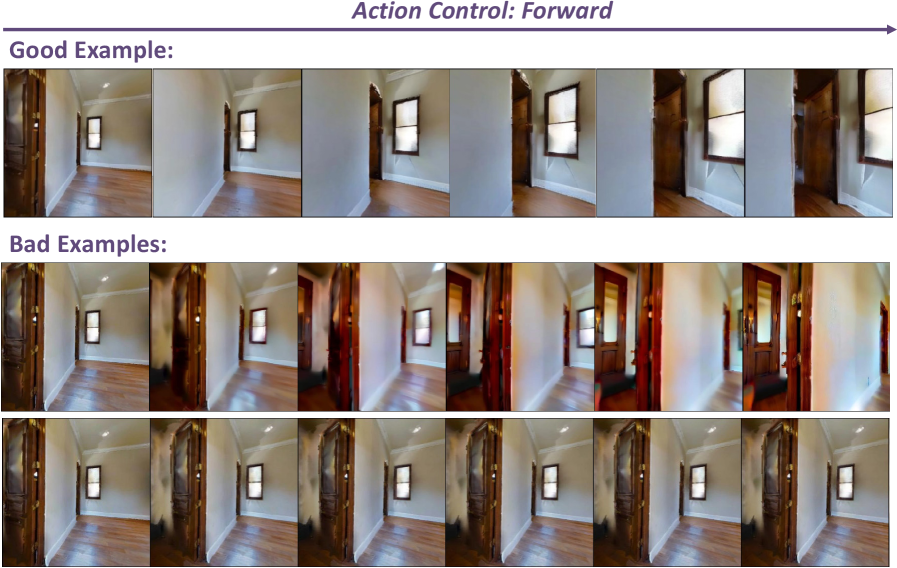
### Visual Description
## [Diagram/Sequence Comparison]: Action Control: Forward (Good vs. Bad Movement Examples)
### Overview
The image is a technical comparison of **forward movement sequences** (labeled "Action Control: Forward") in an interior room environment. It contrasts a "Good Example" (smooth, artifact-free motion) with "Bad Examples" (motion with visual artifacts/errors). The scene features a room with a wooden door (left), window (center-right), wooden flooring, and white walls.
### Components/Axes
- **Title**: "Action Control: Forward" (top, centered, purple text with a rightward arrow, indicating motion direction).
- **Sections**:
- *"Good Example:"* (top, left-aligned, purple text) → 1 row of 6 images (frames).
- *"Bad Examples:"* (middle, left-aligned, purple text) → 2 rows of 6 images each (total 12 frames).
- **Image Content**: Each frame shows an interior room with a wooden door (left), window (center-right), wooden flooring, and white walls. Perspective shifts to simulate forward movement (or errors in movement).
### Detailed Analysis
#### 1. Good Example (Top Row, 6 Frames)
- **Frame 1 (Leftmost)**: Door fully visible (left), window small (center-right), clear floor/walls.
- **Frame 2**: Door partially visible (left), window slightly larger, perspective shifts forward.
- **Frame 3**: Door less visible, window larger, more interior details.
- **Frame 4**: Door almost out of frame, window prominent, wall panel (white) visible.
- **Frame 5**: Door gone, window/wall panel clear, smooth forward progression.
- **Frame 6 (Rightmost)**: Window/wall panel fully visible, door out of frame, consistent forward motion.
#### 2. Bad Examples (Two Rows, 6 Frames Each)
- **First Bad Row (Middle Row)**:
- Frames show the door with **red color artifacts** (unrealistic tint) and dark distortions.
- Progression is inconsistent (e.g., door artifacts persist, window perspective shifts erratically).
- **Second Bad Row (Bottom Row)**:
- Frames show the door with **dark, smudged artifacts** (like a shadow or rendering error).
- Progression is inconsistent (e.g., door artifacts persist, window perspective shifts erratically).
### Key Observations
- **Good Example**: Smooth, artifact-free forward motion. Door gradually exits the frame; window/wall details become more prominent. No visual errors (distortions, color tints).
- **Bad Examples**:
- First bad row: Door has red color artifacts (unrealistic tint) and dark distortions.
- Second bad row: Door has dark, smudged artifacts (rendering/movement errors).
- Both bad rows show inconsistent, unnatural motion (artifacts) vs. the Good Example’s smooth progression.
### Interpretation
This image illustrates the quality of a **motion control system** (e.g., in simulation, robotics, or computer vision) for forward movement. The "Good Example" demonstrates successful, artifact-free motion (smooth perspective shift, natural object transitions). The "Bad Examples" highlight failures: color artifacts (red tint) or dark distortions on the door, indicating errors in rendering, movement prediction, or action execution.
The comparison emphasizes that accurate action control (forward motion) is critical to avoid visual artifacts and maintain a natural, consistent perspective shift. The "Good" system produces realistic motion, while "Bad" systems have rendering/movement errors, leading to unnatural artifacts. This data (image sequences) suggests the "Good" approach is superior for simulating or executing forward movement in this environment.
(Note: No numerical data or charts—this is a sequence comparison of visual motion quality.)
</details>
Figure 13: Examples of good and bad predictions. The action sequence contains only Forward actions. Models that violate this requirement yield observations that can mislead the planner.
<details>
<summary>x14.png Details</summary>
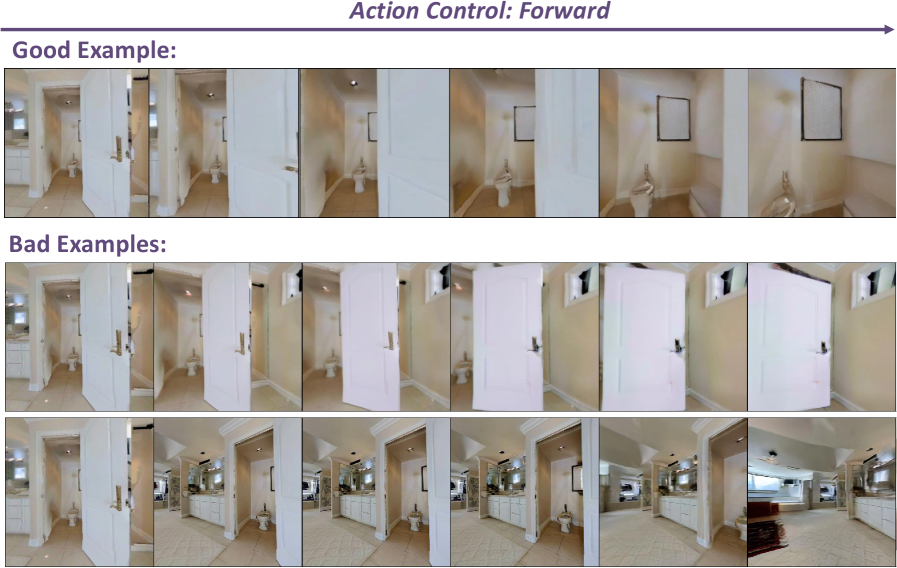
### Visual Description
## [Diagram: Action Control: Forward (Good vs. Bad Examples)]
### Overview
The image is a technical guide titled *“Action Control: Forward”* (with a purple arrow pointing right, indicating direction). It compares a **“Good Example”** (top row) of forward movement through a space (a bathroom) with two rows of **“Bad Examples”** (middle and bottom rows) that demonstrate incorrect execution.
### Components/Axes
- **Title**: *“Action Control: Forward”* (top, purple text, arrow right).
- **Sections**:
- *“Good Example:”* (top, purple text) – 6 sequential frames (left to right) showing consistent forward movement.
- *“Bad Examples:”* (middle, purple text) – Two rows of 6 frames each, showing inconsistent movement.
### Detailed Analysis
#### 1. Good Example (Top Row, 6 Frames)
- **Trend**: Smooth, consistent forward movement through a bathroom.
- **Frame-by-Frame (Left to Right)**:
1. Frame 1: View through a doorway into a bathroom (door open, toilet visible, framed picture on far wall).
2. Frame 2: Slightly closer, door still open, toilet/picture clearer.
3. Frame 3: Closer, door partially open, toilet/picture more prominent.
4. Frame 4: Even closer, door angle shifts (consistent with forward motion), toilet/picture larger.
5. Frame 5: Closer to the toilet, framed picture fills more of the frame.
6. Frame 6: Closest, framed picture dominates the view, toilet still visible.
- **Consistency**: The room (bathroom), toilet, framed picture, and door position (relative to movement) remain consistent. Movement is smooth and logical.
#### 2. Bad Examples (Two Rows, 6 Frames Each)
##### First Bad Row (Middle Row)
- **Trend**: Inconsistent door movement and a black artifact (error) on the door.
- **Frame-by-Frame (Left to Right)**:
1. Frame 1: Similar to Good Example start, but a black object (artifact) appears on the door.
2. Frame 2: Door angle inconsistent, black artifact persists.
3. Frame 3: Door angle shifts erratically, black artifact remains.
4. Frame 4: Door almost closed, black artifact still visible.
5. Frame 5: Door closed, black artifact.
6. Frame 6: Door closed, black artifact.
- **Errors**: Inconsistent door movement (closes instead of moving forward), presence of a black artifact (rendering error or wrong object).
##### Second Bad Row (Bottom Row)
- **Trend**: Inconsistent environment (room changes) and incorrect movement.
- **Frame-by-Frame (Left to Right)**:
1. Frame 1: Similar to Good Example start, but room layout differs (more mirrors, different fixtures).
2. Frame 2: Room changes (different bathroom/angle).
3. Frame 3: Room changes again (different environment).
4. Frame 4: Room with more mirrors, different toilet area.
5. Frame 5: Room with a different setup (e.g., bedroom-like).
6. Frame 6: Completely different room (e.g., living area with a couch).
- **Errors**: Inconsistent environment (room changes), wrong movement (not forward in the same space), and inconsistent fixtures (toilet, mirrors, furniture change).
### Key Observations
- **Good Example**: Consistent environment (same bathroom), smooth forward movement, and logical progression (door, toilet, picture remain consistent).
- **Bad Examples**:
- First bad row: Inconsistent door movement (closes instead of moving forward) and a black artifact (error).
- Second bad row: Inconsistent environment (room changes) and incorrect movement (not forward in the same space).
### Interpretation
This image illustrates **correct vs. incorrect execution of a “forward” action** in a simulated environment (e.g., for AI agent training).
- **Good Example**: Demonstrates *consistent environment* (same bathroom), *smooth forward movement*, and *logical object progression* (toilet, picture, door).
- **Bad Examples**: Highlight common errors:
- *First bad row*: Incorrect object (black artifact) and inconsistent door movement (closes instead of moving forward).
- *Second bad row*: Inconsistent environment (room changes) and incorrect movement (not forward in the same space).
This helps train AI agents to prioritize **environmental consistency**, **smooth motion**, and **logical object progression** when executing “forward” actions.
</details>
Figure 14: Examples of good and bad predictions. The action sequence contains only Forward actions. Models that violate this requirement yield observations that can mislead the planner.
<details>
<summary>x15.png Details</summary>
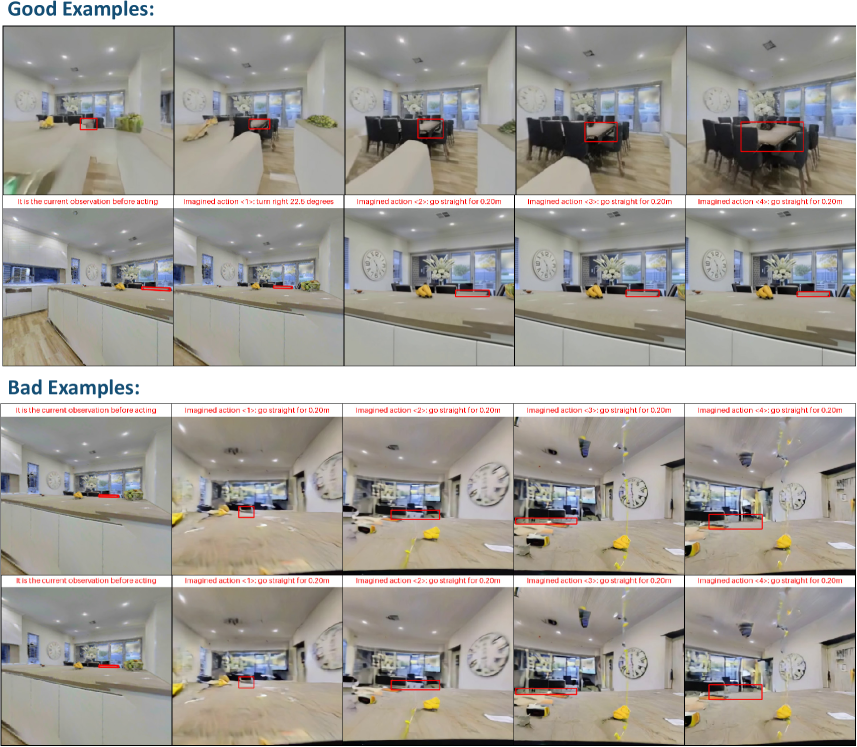
### Visual Description
## [Composite Image]: Comparison of "Good Examples" vs. "Bad Examples" for Visual Navigation/Action Sequences
### Overview
The image is a composite comparison divided into two primary horizontal sections: "Good Examples" (top half) and "Bad Examples" (bottom half). Each section contains two rows of sequential image frames, with each row consisting of five frames. The frames depict first-person perspective views of indoor environments, likely from a simulation or robotic navigation system. Each frame is annotated with a red bounding box highlighting a target area/object and a text caption below describing the state or an "imagined action."
### Components/Axes
* **Main Sections:**
* **Top Section:** Labeled "Good Examples:" in bold, blue text at the top-left.
* **Bottom Section:** Labeled "Bad Examples:" in bold, blue text at the top-left.
* **Frame Layout:** Each section contains two rows. Each row is a sequence of five frames progressing from left to right.
* **Frame Annotations:**
* **Red Bounding Box:** A rectangular red outline appears in each frame, highlighting a specific region or object in the scene.
* **Text Caption:** Located directly below each frame, printed in red text on a white background.
* **Environments Depicted:**
* **Good Examples (Top Row):** A clean, modern dining/living area with a large table, chairs, windows, and a wall clock.
* **Good Examples (Bottom Row):** A clean kitchen or counter area with white cabinets, a countertop, and decorative items.
* **Bad Examples (Both Rows):** Similar indoor environments but appear cluttered, distorted, or contain obstacles (e.g., yellow cone-like objects, debris, visual artifacts).
### Detailed Analysis / Content Details
**Text Transcription (All text is in English):**
**Good Examples - Top Row Sequence:**
1. Frame 1: "It is the current observation before acting"
2. Frame 2: "Imagined action <1>: turn right 22.5 degrees"
3. Frame 3: "Imagined action <2>: go straight for 0.20m"
4. Frame 4: "Imagined action <3>: go straight for 0.20m"
5. Frame 5: "Imagined action <4>: go straight for 0.20m"
**Good Examples - Bottom Row Sequence:**
1. Frame 1: "It is the current observation before acting"
2. Frame 2: "Imagined action <1>: go straight for 0.20m"
3. Frame 3: "Imagined action <2>: go straight for 0.20m"
4. Frame 4: "Imagined action <3>: go straight for 0.20m"
5. Frame 5: "Imagined action <4>: go straight for 0.20m"
**Bad Examples - Top Row Sequence:**
1. Frame 1: "It is the current observation before acting"
2. Frame 2: "Imagined action <1>: go straight for 0.20m"
3. Frame 3: "Imagined action <2>: go straight for 0.20m"
4. Frame 4: "Imagined action <3>: go straight for 0.20m"
5. Frame 5: "Imagined action <4>: go straight for 0.20m"
**Bad Examples - Bottom Row Sequence:**
1. Frame 1: "It is the current observation before acting"
2. Frame 2: "Imagined action <1>: go straight for 0.20m"
3. Frame 3: "Imagined action <2>: go straight for 0.20m"
4. Frame 4: "Imagined action <3>: go straight for 0.20m"
5. Frame 5: "Imagined action <4>: go straight for 0.20m"
**Visual Flow & Spatial Grounding:**
* In all sequences, the red bounding box remains relatively centered or tracks a specific point (like a table edge or counter edge) as the viewpoint advances.
* The "Good Examples" show clear, unobstructed paths. The camera movement appears smooth and logical, following the described actions (a turn followed by straight movement, or just straight movement).
* The "Bad Examples" show environments with visual clutter, obstacles (yellow objects), and possible rendering distortions. The camera path and the target within the red box appear less stable or are navigating through a more complex, potentially problematic scene.
### Key Observations
1. **Action Consistency:** All sequences, except the first action in the top "Good" row, consist of identical "go straight for 0.20m" commands. This suggests a test of precise, incremental forward movement.
2. **Environmental Contrast:** The core difference between "Good" and "Bad" is the state of the environment—clean and orderly versus cluttered and distorted.
3. **Annotation Consistency:** The format of the captions and the use of the red bounding box are identical across all frames, indicating a standardized evaluation or demonstration protocol.
### Interpretation
This image serves as a qualitative comparison for a visual navigation or embodied AI system. It demonstrates the system's performance under two distinct conditions:
* **"Good Examples"** represent ideal or successful operation. The system correctly identifies a target (red box) and executes a planned sequence of small, precise movements (turns and 0.20m steps) in a clean, structured environment. This shows the system's capability for fine-grained spatial reasoning and action execution under favorable conditions.
* **"Bad Examples"** likely represent failure cases or challenging scenarios. The presence of obstacles, visual noise, or environmental distortions appears to degrade the system's performance. While the same action commands are issued, the context implies these sequences may lead to errors, collisions, or failure to reach the intended target. This highlights the system's sensitivity to environmental complexity and visual artifacts.
The comparison underscores a common challenge in robotics and AI: systems that perform well in controlled, simulation-perfect settings ("Good Examples") may struggle in more realistic, cluttered, or visually noisy environments ("Bad Examples"). The image is likely used to argue for the need for more robust models or to showcase the specific conditions under which a proposed method succeeds or fails.
</details>
Figure 15: Additional examples of good and bad predictions.
<details>
<summary>x16.png Details</summary>
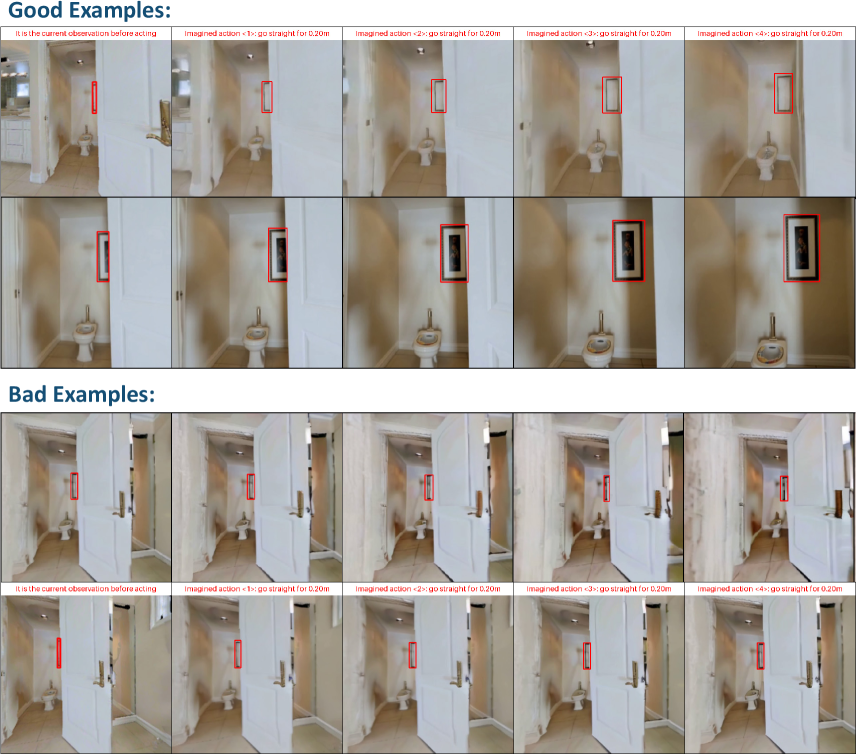
### Visual Description
## [Comparison of Good and Bad Object Tracking Examples]: Visual Task in a Bathroom Scene
### Overview
The image compares **"Good Examples"** and **"Bad Examples"** of object tracking (or detection) in a bathroom scene, using a red bounding box to highlight a target object (e.g., a mirror, framed picture, or vertical wall object). Each section (Good/Bad) contains two rows of images: the first row shows the *initial observation* and *imagined actions* (camera movement), while the second row shows the *result* of those actions.
### Components/Sections
The image is divided into two primary sections:
#### 1. Good Examples (Top Section)
- **Top Row (5 images)**:
- First image: *"It is the current observation before acting"* (bathroom with a white door, toilet, sink, and a vertical object (e.g., mirror) highlighted by a red box).
- Next four images: *"Imagined action <1> go straight for 0.20m"*, *"Imagined action <2> go straight for 0.20m"*, *"Imagined action <3> go straight for 0.20m"*, *"Imagined action <4> go straight for 0.20m"* (same bathroom scene; the red box consistently tracks the vertical object, which appears to be a mirror or framed item).
- **Bottom Row (5 images)**:
- First image: *"It is the current observation before acting"* (bathroom with the door open; the red box highlights a vertical object (now a framed picture)).
- Next four images: Same imagined actions (go straight for 0.20m); the red box tracks the framed picture, which becomes more visible (larger, clearer) as the camera moves straight.
#### 2. Bad Examples (Bottom Section)
- **Top Row (5 images)**:
- First image: *"It is the current observation before acting"* (bathroom with the door open; the red box highlights a vertical object (e.g., mirror)).
- Next four images: Same imagined actions; the red box tracks a *different object* (e.g., door handle, wall frame) instead of the intended vertical object.
- **Bottom Row (5 images)**:
- First image: *"It is the current observation before acting"* (bathroom with the door open; the red box highlights a vertical object (e.g., mirror)).
- Next four images: Same imagined actions; the red box tracks a *different object* (e.g., door frame, wall) instead of the intended vertical object.
### Detailed Analysis
#### Good Examples (Object Tracking Success)
- **Initial Observation**: The red box highlights a vertical object (e.g., mirror/framed picture) in the bathroom.
- **Imagined Actions (Go Straight for 0.20m)**:
- The red box *consistently tracks the intended object* across all actions.
- The object’s appearance changes (e.g., size, clarity) as the camera moves straight, indicating the action’s effect (e.g., the object becomes more visible/larger as the camera approaches).
#### Bad Examples (Object Tracking Failure)
- **Initial Observation**: The red box highlights a vertical object (e.g., mirror).
- **Imagined Actions (Go Straight for 0.20m)**:
- The red box *fails to track the intended object* and instead follows a different object (e.g., door handle, wall frame).
- The intended object (e.g., mirror) remains unclear or untracked, showing errors in object recognition/tracking.
### Key Observations
- **Spatial Grounding**: In *Good Examples*, the red box stays on the vertical object (center-right of the image). In *Bad Examples*, the red box shifts to a different object (e.g., left-side door handle, wall frame).
- **Trend Verification**: In *Good Examples*, the target object becomes more visible (larger, clearer) as the camera moves straight (consistent with the action’s effect). In *Bad Examples*, the target object does not become more visible, and the red box is misplaced.
- **Consistency**: *Good Examples* show consistent tracking of the intended object; *Bad Examples* show inconsistent or incorrect tracking.
### Interpretation
This image illustrates the difference between **successful** and **unsuccessful object tracking** in a simulated environment (bathroom scene) with imagined camera actions (moving straight).
- **Good Examples**: Demonstrate correct object recognition and tracking: the red box follows the intended object (mirror/framed picture) as the camera moves, and the object’s appearance changes (size, clarity) due to the action. This suggests the system correctly identifies the object’s identity and location.
- **Bad Examples**: Demonstrate errors in object recognition/tracking: the red box follows a different object (door handle, frame, etc.), failing to track the intended object. This suggests the system misidentifies the object or its location.
The task likely involves predicting how an object’s appearance changes with camera movement (action) and tracking it correctly. The “good” examples reflect a correct understanding of the object’s identity and spatial relationship to the camera, while “bad” examples reflect errors in this understanding.
(Note: All text is in English; no other languages are present.)
</details>
Figure 16: Additional examples of good and bad predictions.
<details>
<summary>x17.png Details</summary>
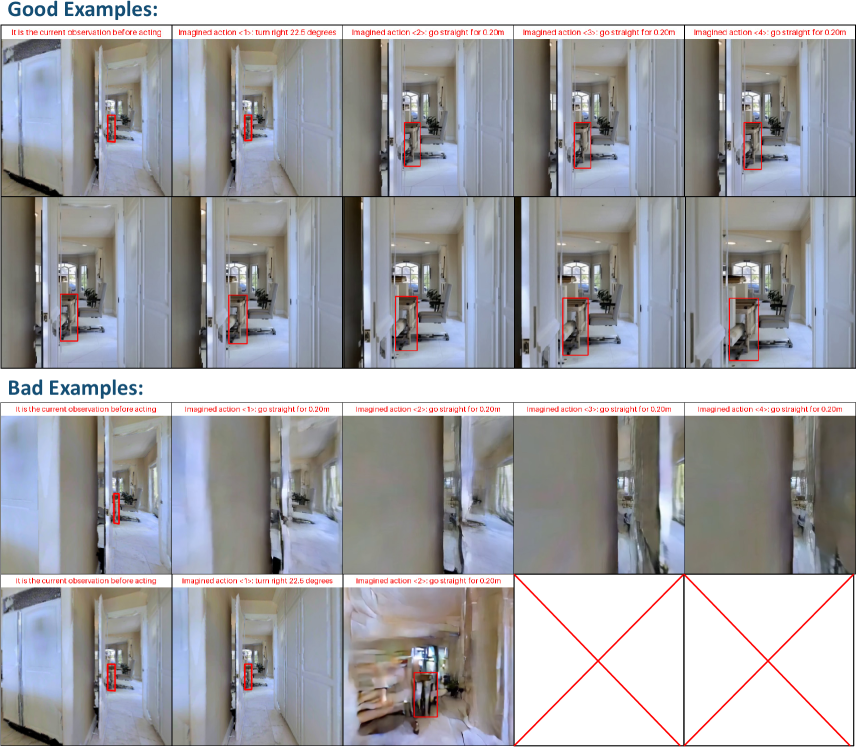
### Visual Description
## [Diagram/Comparison Chart]: Imagined Action Examples (Good vs. Bad)
### Overview
The image compares **“Good Examples”** and **“Bad Examples”** of an AI/robotics system’s ability to *imagine* the outcome of actions (turning or moving straight) in a hallway environment. Each example shows a sequence of images: the initial observation, followed by imagined actions (e.g., “turn right 22.5°” or “go straight for 0.20m”) with visual feedback (red bounding boxes, scene changes).
### Components/Sections
The image is divided into two main sections:
#### 1. Good Examples (Top 2 Rows)
- **Structure**: 2 rows × 5 columns.
- **Labels (Top of Each Column)**:
- Column 1: *“It is the current observation before acting”*
- Column 2: *“Imagined action <1>: turn right 22.5 degrees”*
- Column 3: *“Imagined action <2>: go straight for 0.20m”*
- Column 4: *“Imagined action <3>: go straight for 0.20m”*
- Column 5: *“Imagined action <4>: go straight for 0.20m”*
- **Visuals**: Hallway scenes with a red bounding box around an object (e.g., a robot/target). The scene progresses logically:
- Turning right shifts the view right (object remains in the box).
- Moving straight brings the object closer (box stays accurate).
#### 2. Bad Examples (Bottom 2 Rows)
- **Structure**: 2 rows × 5 columns.
- **Labels (Top of Each Column)**:
- Column 1: *“It is the current observation before acting”*
- Column 2: *“Imagined action <1>: go straight for 0.20m”* (first Bad row) / *“Imagined action <1>: turn right 22.5 degrees”* (second Bad row)
- Columns 3–5: *“Imagined action <2/3/4>: go straight for 0.20m”* (varies by row)
- **Visuals**: Hallway scenes with inconsistencies:
- Blurry/misaligned images (e.g., third Bad row, columns 3–5).
- Red “X” marks (second Bad row, columns 4–5) indicating **invalid/failed actions**.
### Detailed Analysis
#### Good Examples (Top 2 Rows)
- **Row 1 (Top)**:
- Column 1: Initial observation: Hallway with a red box around an object (e.g., a robot) in the distance.
- Column 2: Turn right 22.5°: View shifts right; object remains in the box.
- Column 3: Move straight 0.20m: Object appears closer; box stays accurate.
- Column 4: Move straight 0.20m: Object even closer; box consistent.
- Column 5: Move straight 0.20m: Object very close; box still correct.
- **Row 2 (Middle)**:
- Column 1: Initial observation: Similar to Row 1, object in distance.
- Column 2: Turn right 22.5°: View shifts right; object in box.
- Column 3: Move straight 0.20m: Object closer; box consistent.
- Column 4: Move straight 0.20m: Object closer; box accurate.
- Column 5: Move straight 0.20m: Object very close; box still correct.
#### Bad Examples (Bottom 2 Rows)
- **Row 3 (Third Row)**:
- Column 1: Initial observation: Object in distance, box around it.
- Column 2: Move straight 0.20m: Object closer, but scene is misaligned.
- Column 3: Move straight 0.20m: Object closer, but image is blurry.
- Column 4: Move straight 0.20m: Object closer, but box/scene is off.
- Column 5: Move straight 0.20m: Object very close, but scene is distorted.
- **Row 4 (Fourth Row)**:
- Column 1: Initial observation: Object in distance, box around it.
- Column 2: Turn right 22.5°: View shifts right; object in box.
- Column 3: Move straight 0.20m: Object closer, but image is blurry.
- Columns 4–5: Red “X” marks (no valid image, indicating **failed actions**).
### Key Observations
- **Good Examples**: Consistent progression of the object (in red box) with logical scene changes (closer object when moving straight, adjusted view when turning). The bounding box remains accurate.
- **Bad Examples**: Inconsistent/failed progressions: blurry images, misaligned scenes, or “X” marks (invalid actions). The bounding box or scene does not match the imagined action.
### Interpretation
This image tests an AI/robotics system’s ability to *imagine* action outcomes (e.g., “What happens if I turn right or move straight?”).
- **Good Examples** demonstrate **successful prediction**: The system correctly models how the scene (and object) changes with each action, maintaining the bounding box and logical progression.
- **Bad Examples** show **failures**: The system’s imagined actions do not match the actual (or predicted) scene, leading to misaligned images, blurry scenes, or invalid results (X’s).
This suggests the system’s performance in *action imagination*: Good examples reflect accurate scene understanding and action modeling, while bad examples reveal errors in prediction or scene representation.
(Note: All text is in English; no other languages are present.)
</details>
Figure 17: Additional examples of good and bad predictions.
<details>
<summary>x18.png Details</summary>
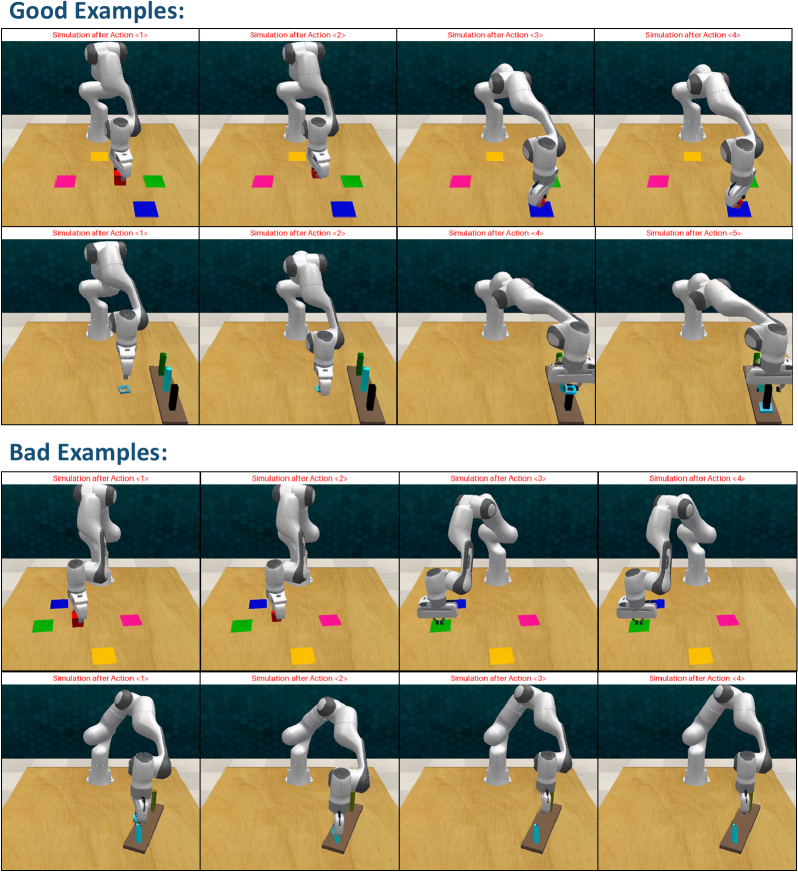
### Visual Description
## [Diagram Type]: Robotic Arm Simulation Comparison (Good vs. Bad Examples)
### Overview
The image compares **successful (Good Examples)** and **unsuccessful (Bad Examples)** robotic arm task executions in a simulated environment. It is divided into two main sections: *Good Examples* (top) and *Bad Examples* (bottom), each containing two rows of 4 frames (labeled "Simulation after Action <1>" to "Simulation after Action <4>"). The robotic arm interacts with colored blocks (pink, yellow, green, blue, black) on a wooden surface, with a blue background.
### Components/Axes
- **Sections**:
- *Good Examples* (top): 2 rows × 4 frames.
- *Bad Examples* (bottom): 2 rows × 4 frames.
- **Frames**: Each frame is labeled "Simulation after Action <1>", "Simulation after Action <2>", "Simulation after Action <3>", "Simulation after Action <4>".
- **Objects**:
- Robotic arm (white, articulated).
- Colored blocks: pink, yellow, green, blue, black (arranged on a wooden table).
- Background: Blue (consistent across all frames).
### Detailed Analysis (Good Examples)
#### Row 1 (Top Row, Good Examples)
- **Action 1**: Arm is positioned near pink, yellow, green, and blue blocks (no manipulation yet).
- **Action 2**: Arm moves slightly; blocks remain in place.
- **Action 3**: Arm interacts with the blue block (e.g., picking or placing it).
- **Action 4**: Arm retracts; blue block’s position is adjusted (suggesting successful manipulation).
#### Row 2 (Bottom Row, Good Examples)
- **Action 1**: Arm is near a black block and a green block (different setup).
- **Action 2**: Arm moves; black and green blocks remain.
- **Action 3**: Arm interacts with the green block (e.g., placing it on the black block).
- **Action 4**: Arm retracts; green block is stacked on the black block (successful stacking).
### Detailed Analysis (Bad Examples)
#### Row 1 (Top Row, Bad Examples)
- **Action 1**: Arm is near blue, green, pink, and yellow blocks (no manipulation yet).
- **Action 2**: Arm moves slightly; blocks remain.
- **Action 3**: Arm interacts with the green block (e.g., incorrect placement).
- **Action 4**: Arm retracts; green block is misplaced (e.g., not aligned with other blocks).
#### Row 2 (Bottom Row, Bad Examples)
- **Action 1**: Arm is near a blue block (different setup).
- **Action 2**: Arm moves; blue block remains.
- **Action 3**: Arm interacts with the blue block (e.g., incorrect manipulation).
- **Action 4**: Arm retracts; blue block is misplaced (e.g., not in the intended position).
### Key Observations
- **Good Examples**: The robotic arm successfully manipulates blocks (e.g., stacking green on black, adjusting blue’s position) over four actions.
- **Bad Examples**: The arm fails to manipulate blocks correctly (e.g., green block misplaced, blue block misaligned) over four actions.
- **Consistency**: Good examples show logical, successful task progression; bad examples show illogical, failed progression.
### Interpretation
This image is likely from a robotics/AI study comparing **successful vs. failed task execution** in a simulated environment. The "Good Examples" demonstrate the arm correctly completing tasks (e.g., stacking, placing blocks), while "Bad Examples" show errors (e.g., wrong block, wrong position). The purpose is to illustrate the difference between effective and ineffective robotic control, possibly for training algorithms or evaluating performance. The visual contrast highlights how small errors in action (e.g., misaligned gripper, incorrect block selection) lead to task failure.
</details>
Figure 18: Additional examples of good and bad predictions.
## Appendix F Prompt Templates used in World-in-World
In this section, we provide the exact prompt templates used in our experiments for four tasks in World-in-World: (i) Active Recognition (AR), (ii) Image-Goal Navigation (ImageNav), (iii) Active Embedded Question Answering (A-EQA), and (iv) Robotic Manipulation.
### F.1 Active Recognition (AR) Prompt
AR Answerer Prompt
Please recognize the object in the image bounded by the red box.
AR Planner Prompt
You are an AI agent tasked with identifying a target object within an image—specifically, the object enclosed by a red bounding box. Your objective is to navigate toward a viewpoint that maximizes the target’s visibility and recognition accuracy. Instructions: 1.
Based on the current {obs_key} observation, plan the next <look_ahead_action_num> action(s) to take in sequence. 2.
Use the following heuristics to guide planning: •
If the red-boxed object appears on the left side of the image, turning left often improves visibility. •
If it appears on the right side, turning right is usually beneficial. •
If the object is partially occluded or obstructed, consider repositioning to bypass the obstacle and refine your viewpoint. 3.
Choose a sequence of actions that leads to a clear, centered, and unobstructed view of the red-boxed object.
AR Answerer Additional Prompt (with WM Rollouts)
You now have a composite visualization formed by stitching imagined views from multiple perspectives around your current position. These perspectives are centered on the target object (enclosed within the red bounding box). Use these synthesized views to: •
Improve object identification accuracy. •
Make more informed recognition decisions.
AR Planner Additional Prompt (with WM Rollouts)
You are now simulating imagined future trajectories by generating hypothetical actions and their corresponding observations. Use these imagined observations to: •
Evaluate the potential outcomes of different action sequences. •
Make informed navigation decisions by selecting the next best action based on predicted future states and your current state. Note: •
Each imagined frame is annotated with the specific action taken and its index at the top of the image. •
Pay attention to the presence of red bounding boxes indicating the target object. If the target is not visible in a frame, this indicates a poor action. •
You should adjust your action selection strategy to avoid such failure states.
### F.2 Image-Goal Navigation (ImageNav) Prompt
ImageNav Planner Prompt
You are an AI navigation agent tasked with locating the position from which the goal image was captured. Your objective is to plan a sequence of actions that leads to a position where the goal image is clearly visible, centered in the front view, and appears to have been taken within at your current position. Inputs: You are provided with a sequence of images: 1.
First, the current egocentric observation: {obs_key}. 2.
Last, the goal image: a reference image that represents the target viewpoint you are trying to reach. Task: 1.
Based on the input images, plan the next <{look_ahead_action_num}> action(s) in order. 2.
Optimize for: •
Alignment: The goal image should be centered in the front view. •
Proximity: Your position should match the goal image’s capture point. •
Visibility: The goal image should appear clear and unobstructed in your current front view.
ImageNav Planner Prompt (with WM Rollouts)
You are an AI navigation agent tasked with locating the position from which the goal image was captured. Your objective is to plan a sequence of actions that leads to a position where the goal image is clearly visible, centered in the front view, and appears to have been taken within at your current position. Inputs: You are provided with: 1.
The goal image: a reference image that represents the target viewpoint you are trying to reach. Task: 1.
Based on the input images, plan the next <{look_ahead_action_num}> action(s) in order. 2.
Optimize for: •
Alignment: The goal image should be centered in the front view. •
Proximity: Your position should match the goal image’s capture point. •
Visibility: The goal image should appear clear and unobstructed in your current front view.
### F.3 Active Embedded Question Answering (A-EQA) Prompt
A-EQA High-Level Planner Prompt
You are an embodied navigation and question-answering agent specialized in indoor scene understanding. Your goal is to either answer the user’s question directly from the current observation or propose a high-level navigation planning to gather more information. User Query: {question} Inputs: You are provided with the following: 1.
A stitched panoramic image with annotations — composed of multiple directional images captured from your current position (the name of each view is labeled on the top of the image). Each detected object is annotated with its contour and a unique object index. 2.
A stitched panoramic image without annotations — visually identical but without overlays, serving as a clean reference. 3.
A dictionary mapping detected objects to their corresponding perspective views and object indices in the annotated image: Format: {{view_id: {{object_index: object_name}}}} Current mapping: {detected_objs} Note all the provided images are in the formt of {obs_key}. Task Description: Your task is to: 1.
Analyze the visual information from each perspective direction. 2.
Identify all possible exits and doorways in the environment. 3.
Give one high-level navigation plan to further explore the scene in order to answer the User Query. 4.
If the answer to the question is fully evident from the current observation, provide it directly. Otherwise, set your current answer to “None”. Output Format: Return your response as a dictionary with the following structure: { ’Reason’: <Your visual reasoning and analysis>, ’Action Plan’: <Description of your next high-level navigation plan>, ’Chosen View’: <One of: ’front’, ’left’, ’right’, or ’back’, indicating the view you are going to further explore in your Action Plan>, ’Chosen Landmark’: <Index of the selected object landmark from the annotated stitched image, or ’None’> ’Answer’: <Your answer to the User Query, or ’None’> } Constraints: •
Provide exactly one high-level action, including one ’Chosen View’ and one ’Chosen Landmark’. •
If no suitable annotated object is available in your desired direction, set ’Chosen Landmark’ to ’None’ and describe your intended action in the ’Action Plan’ field. •
Each ’Action Plan’ should include a clear and executable instruction and stop condition. – Good Example: ’Action Plan’: "Pass through the doorway (object index "3") in the front view, and stop once inside the next room." – Good Example: ’Action Plan’: "Approach the sofa (object idx "10") in the left view, and stop once we can see the objects on it." – Bad Example: ’Action Plan’: "Move into the kitchen area visible in the view and stop once inside the kitchen." – kitchen area is not a specific object and not clear how to get there. •
If a landmark is selected, it must correspond to a visible, annotated object in the stitched image. •
Do not select unlabeled objects — they typically indicate previously visited or non-informative regions. •
Populate ’Answer’ only when you are confident the question can be answered from the current observation. Otherwise, set ’Answer’: ’None’ in the dictionary. Tips: •
If you observe a door in a closed state, it means you cannot pass through it. •
If the current observation shows that your previous plan has not yet been completed, it is acceptable to propose a similar plan again to continue pursuing the same goal. •
Leverage human spatial habits to guide your planning. For instance, if the goal involves finding a television, selecting a nearby sofa may be effective, as these often appear together in living spaces.
A-EQA Low-Level Planner Prompt
You are now performing low-level navigation action planning for an indoor scene exploration task. Inputs: You are provided with: 1.
An updated RGB image with annotations, representing the egocentric view of your current environment: •
Detected objects are annotated with contours and unique object indices with square text boxes. 2.
A high-level navigation plan represented as a dictionary with two fields: •
’Action Plan’: A description of the intended navigation strategy. •
’Chosen Landmark’: The object index of the selected landmark from the annotated image to approach, or ’None’ if no landmark is selected (in which case follow the ’Action Plan’ description). The current high-level plan is: {high_level_plan} Note all the provided images are in the format of {obs_key}. Task: Your task is to: 1.
Analyze the visual scene and identify your position relative to the goal. 2.
Determine the next low-level action(s) to take in sequence, up to a maximum of <{look_ahead_action_num}> steps. Constraints: •
You must generate less than {look_ahead_action_num} low-level actions. •
The actions sequence should align with the goal descripted in high-level ’Action Plan’ and ’Chosen Landmark’. •
If the navigation goal or selected landmark in the high-level plan is either: –
not visible in the current observation, or –
already reached (i.e., centered, unobstructed, and close), then your only action should be “stop”. Tips: •
If the landmark object is partially occluded or obstructed, consider repositioning to bypass the obstacle before approaching it directly. •
Choose actions that meaningfully move the agent toward the selected landmark or fulfill the intent of the high-level plan. •
Maintain spatial awareness: understand the relationship between your egocentric view and the direction of the target.
A-EQA High-Level Planner Additional Prompt (with WM Rollouts)
In addition to your current (real) observations, you are now provided with simulated outcomes —low-resolution reconstructions that represent the potential result of executing future navigation plans. These simulated outcomes are designed to help you better understand your surroundings and support more informed navigation planning. Each simulated outcome includes: •
Proposed High-Level Plan: A hypothetical navigation strategy used to generate the simulated result. •
Simulated Observation: A stitched panoramic image showing what the environment might look like after following the proposed plan. You should use this information to: •
Evaluate the potential effectiveness and correctness of the proposed high-level strategies. •
Make informed decisions by selecting your next high-level plan based on both the simulated information and your current real observation. Notes: •
Object indices remain consistent across simulated and real observations. •
Simulated outcomes are NOT fully accurate. If you believe you can answer the user query based on simulation alone, you should NOT provide a final answer yet. Instead, select a high-level plan that will lead to a real observation and validate your answer afterward. Your current simulated outcomes are:
### F.4 Robotic Manipulation Prompt
Manipulation Planner Prompt
You are a Franka Panda robot with a parallel gripper. You can perform various tasks and output a sequence of gripper actions to accomplish a given task with images of your status. The input space, output action space and color space are defined as follows: Input Space You are given the following inputs: 1.
Human Instruction: A natural language command specifying the manipulation task goal. 2.
Object Dictionary: •
Each object is represented by a unique index (e.g., object 1) and mapped to a 3D discrete coordinate [X, Y, Z]. 3.
Annotated Scene Image: •
Each object in the image is annotated with: –
A circle point marker with –
A unique object index, which corresponds to the object dictionary. •
There is a red XYZ coordinate frame located in the top-left corner of the table. –
The XY plane represents the surface plane of the table (Z = 0). –
The valid coordinate range for X, Y, Z is: [0, {}]. Output Action Space •
Each output action is represented as a 7D discrete gripper action in the following format: [X, Y, Z, Roll, Pitch, Yaw, Gripper state]. •
X, Y, Z are the 3D discrete position of the gripper in the environment. It follows the same coordinate system as the input object coordinates. •
The allowed range of X, Y, Z is [0, {}]. •
Roll, Pitch, Yaw are the 3D discrete orientation of the gripper in the environment, represented as discrete Euler Angles. •
The allowed range of Roll, Pitch, Yaw is [0, {}] and each unit represents {} degrees. •
Gripper state is 0 for close and 1 for open. Color space •
Each object can only be described using one of the colors below: ["red", "maroon", "lime", "green", "blue", "navy", "yellow", "cyan", "magenta", "silver", "gray", "olive", "purple", "teal", "azure", "violet", "rose", "black", "white"], {}
Manipulation Planner Additional Prompt (with WM Rollouts)
You are now provided with simulated outcomes in addition to your real-time observations. These outcomes are low-resolution predictions of what the scene may look like after executing hypothetical action plans. They are intended to help you reason about the environment and make more informed decisions. Simulated Outcome Structure Each simulated-outcome item includes: •
Proposed Action Plan: The sequence of gripper actions that led to the simulated result. •
Simulated Observation: The simulated result after following the proposed plan. How to Use This Information You must consider both: 1.
Your current real observation of the environment, and 2.
The provided simulated outcomes. Use these to: •
Evaluate how well each proposed plan satisfies the task objective. •
Identify if any proposed plan fully achieves the instruction goal. •
If a proposed plan appears valid and effective, you may adopt it directly as your final response. •
If no plan fully meets the goal, generate a revised or entirely new action plan, guided by insights from the simulations and the real-world scene. Additional Notes •
Simulated outcomes are approximate. Treat them as helpful forecasts, not absolute truth. •
You must analyze these hypothetical action plans and their simulated outcomes in the reasoning_and_reflection field of the returned JSON (e.g., their differences and why you choose one over another). •
Always prioritize correctness and robustness in the final executable plan. You are now given the following simulated outcomes: