# SWE-Bench Mobile: Can Large Language Model Agents Develop Industry-Level Mobile Applications?
> 1 University of Toronto 2 Xiaohongshu Inc. 3 Coolwei AI Lab 4 University of Illinois Urbana-Champaign 5 University of California, Berkeley
## Abstract
Can large language model agents develop industry-level mobile applications? We introduce SWE-Bench Mobile, a benchmark for evaluating coding agents on realistic software engineering tasks derived from a production iOS codebase. Unlike existing benchmarks that focus on isolated problems or bug fixes, SWE-Bench Mobile captures the full complexity of industrial development: multi-modal inputs (PRDs and Figma designs), a large-scale mixed Swift/Objective-C codebase, and comprehensive test suites. We evaluate 22 agent-model configurations across four coding agents—three commercial (Cursor, Codex, Claude Code) and one open-source (OpenCode)—and find that even the best configurations achieve only 12% task success rate. Our analysis reveals that (1) agent design matters as much as model capability—the same model shows up to 6 $\times$ performance gap across agents, (2) commercial agents consistently outperform open-source alternatives, and (3) simple “Defensive Programming” prompts outperform complex ones by 7.4%. These findings highlight a significant gap between current agent capabilities and industrial requirements, while providing actionable insights for practitioners and researchers. We release SWE-Bench Mobile as a hosted benchmark challenge to prevent data contamination and ensure fair evaluation. The public leaderboard and development toolkit are available at https://swebenchmobile.com.
Large Language Models, Software Engineering Agents, Mobile Development Benchmark copyright: none footnotetext: * Equal contribution. † Corresponding author: jiaxuan@illinois.edu.
## 1. Introduction
<details>
<summary>figures/fig_pipeline.png Details</summary>
### Visual Description
## Flowchart: Software Development Process Pipeline
### Overview
The flowchart illustrates a three-stage pipeline for software development: Input → Runtime → Evaluation. Each stage contains specialized components with directional flow indicated by arrows. The diagram uses color-coded boxes to differentiate sections and includes technical terminology related to mobile development and AI systems.
### Components/Axes
**Input Section (Left)**
- Blue box: "Product Requirement Document" (central hub)
- Connected elements:
- "Feature Description" (text box)
- "Figma Link" (icon with 4 colored dots)
- "Other Related Context (abtest/multi-lingo/etc)" (text box)
- Pink box: "Mobile Project Codebase (Swift/Objc/RN/etc)" (bottom-left)
**Runtime Section (Center)**
- Large purple box: "Coding Agent (Cursor/CC/Codex/etc)"
- Sub-components:
- "Bench Runtime (Model Config/Tuned System Prompt/Task Management)" (top-left)
- "Figma MCP" (top-right)
- "Vision MCP" (bottom-right)
- Arrows connect all Runtime components to the Coding Agent
**Evaluation Section (Right)**
- Green box: "Analyzer" (central)
- Three evaluation types connected via arrows:
- "Entrypoint-wise Eval" (top-left)
- "Functionality-wise Eval" (top-right)
- "Configuration-wise Eval" (bottom-left)
- "diff patches" arrow connects Runtime to Evaluation
### Detailed Analysis
**Input Section**
- All elements feed into the Product Requirement Document
- Mobile Project Codebase specified with concrete technologies (Swift, Objective-C, React Native)
**Runtime Section**
- Bench Runtime handles model configuration and system tuning
- Two specialized MCPs (Model Control Points) for Figma and Vision
- Coding Agent integrates multiple AI tools (Cursor, CC, Codex)
**Evaluation Section**
- Three-dimensional evaluation framework covering:
- Code entrypoints
- Functional behavior
- Configuration parameters
- Analyzer processes all evaluation types
### Key Observations
1. Color coding emphasizes section separation (blue/purple/green)
2. Technical specificity in tool naming (Cursor, Codex, React Native)
3. Evaluation framework suggests comprehensive quality checking
4. "diff patches" indicates version control integration
5. Multiple AI tools listed suggest comparative analysis capability
### Interpretation
This flowchart represents a modern software development workflow combining:
1. **Requirement Gathering**: Structured input collection with design (Figma) and feature documentation
2. **Development Execution**: AI-assisted coding with specialized runtime environments
3. **Quality Assurance**: Multi-faceted evaluation system targeting code structure, functionality, and configuration
The diagram suggests an integrated development environment where:
- Requirements directly inform coding decisions
- Multiple AI tools compete/cooperate in code generation
- Evaluation is systematic rather than ad-hoc
- Version control (diff patches) is central to the process
The presence of both design (Figma) and codebase elements indicates a full-stack development perspective, while the AI components suggest automation of coding tasks. The three-stage evaluation implies rigorous quality control before deployment.
</details>
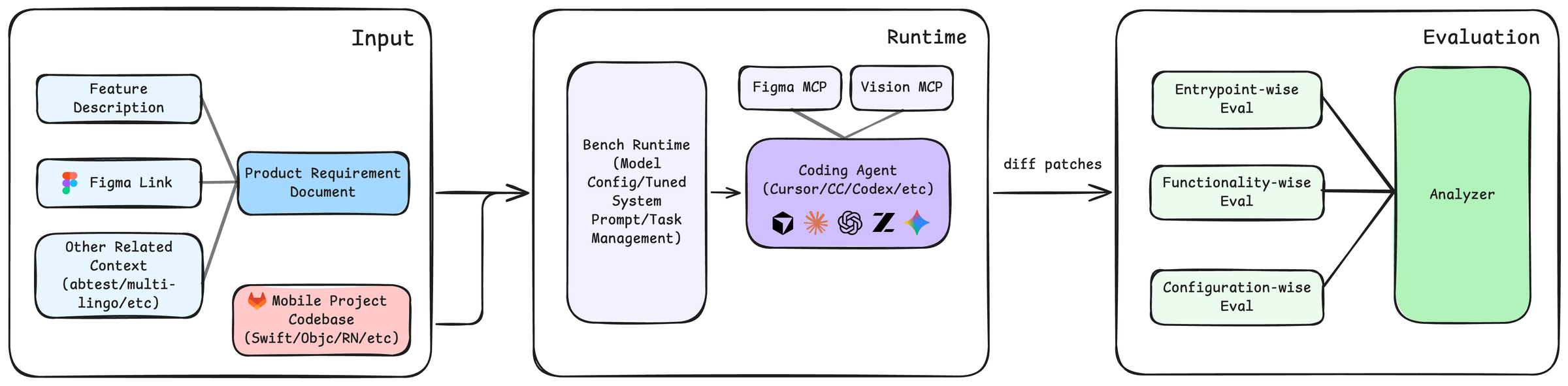
Figure 1. Overview of the SWE-Bench Mobile pipeline. (1) Agents receive multi-modal inputs including a Product Requirement Document (PRD), Figma design, and a large-scale Swift/Objective-C codebase. (2) The agent navigates the codebase, plans the implementation, and generates code. (3) The output is a Git patch that is applied and evaluated against a comprehensive test suite.
Large language models (LLMs) have enabled a new generation of autonomous coding agents that can understand requirements, navigate codebases, and implement features with minimal human intervention. Commercial systems like GitHub Copilot, Cursor, and Claude Code have achieved impressive results on existing benchmarks, raising a critical question: Can these agents handle the complexity of real-world, industry-level mobile software development?
Answering this question requires a comprehensive evaluation that faithfully captures professional software engineering. However, existing benchmarks have significant limitations. HumanEval (Chen et al., 2021) and MBPP (Austin et al., 2021) evaluate isolated algorithmic problems far removed from industrial practice. SWE-Bench (Jimenez et al., 2024) advances the field by using real GitHub issues, but still falls short of industrial realism: it focuses on bug fixes rather than feature development, uses text-only inputs without design specifications, typically involves small localized changes to 1-2 files, and concentrates on Python which is well-represented in training data. Recent work like SWE-Bench Pro (Deng et al., 2025) addresses some limitations by introducing longer-horizon tasks, but still lacks multi-modal inputs and focuses exclusively on Python.
In professional software development, engineers participate in a structured workflow that goes far beyond writing code. They interpret Product Requirement Documents (PRDs) that specify what to build and why. They translate visual designs from tools like Figma into implementation decisions about layout and interaction. They navigate large codebases—often hundreds of thousands of lines—to find relevant files and understand existing patterns. They make coordinated changes across multiple modules while maintaining consistency. And they ensure their implementations handle edge cases and pass comprehensive tests. A benchmark claiming to evaluate “industry-level” capabilities must test all of these aspects.
We focus on mobile application development not merely for language diversity, but because it represents a distinct and critical paradigm in software engineering that remains unexplored by current benchmarks. Unlike server-side logic (e.g., Python scripts), mobile development introduces unique challenges for AI agents: (1) Multi-modal Dependency: Implementation is strictly guided by visual designs (Figma) and user interactions, requiring agents to perform visually-grounded program synthesis rather than just text-to-code generation. (2) Event-Driven Complexity: Mobile apps are stateful systems that must handle asynchronous user events, network changes, and strict OS lifecycle callbacks, challenging agents’ ability to model dynamic system states. (3) Client-Side Constraints: Development occurs within framework-heavy environments (e.g., iOS SDK) with rapid iterations, testing generalization to domain-specific APIs.
We introduce SWE-Bench Mobile, a benchmark for evaluating coding agents on industry-level mobile application development. SWE-Bench Mobile is constructed from real development artifacts at a major technology company, comprising 50 authentic tasks derived from actual product requirements. Each task combines multi-modal inputs—PRDs, Figma designs, and a large-scale mixed Swift/Objective-C production codebase—with comprehensive evaluation through 449 human-verified test cases.
Contributions.
1. We introduce SWE-Bench Mobile, the first benchmark combining PRDs, Figma designs, and a large-scale codebase to capture the full complexity of industrial software development.
1. We evaluate 22 agent-model configurations across four coding agents (three commercial, one open-source), with detailed analysis of performance, cost, and robustness.
1. We systematically categorize agent failures, finding that 54% stem from missing feature flags—a production practice unfamiliar to agents—followed by missing data models (22%) and incomplete file coverage (11–15%).
1. We provide actionable insights: agent design matters as much as model capability (up to 6 $\times$ performance gap for the same model), commercial agents outperform open-source ones, simple prompts outperform complex ones, and cost-effective configurations exist.
To strictly preserve the integrity of the evaluation and respect the proprietary nature of the production codebase, we adopt a hosted evaluation paradigm. Unlike static datasets that are prone to data contamination in future model training sets, our held-out private test set ensures that agents are evaluated on truly unseen industrial tasks. We provide a sanitized development kit and a public leaderboard to foster community progress.
Our evaluation reveals a significant gap between current capabilities and industrial requirements. The best configuration achieves only 12% task success rate, with most failures due to incomplete implementations. The same model (Opus 4.5) achieves 12% on Cursor but only 2% on OpenCode—a 6 $\times$ gap—demonstrating that agent scaffolding matters as much as model capability. Commercial agents consistently outperform the open-source OpenCode, whose best result (8% with GLM 4.6) trails the best commercial result (12%) by 4 percentage points. Success drops from 18% for simple tasks requiring 1-2 files to just 2% for complex tasks requiring 7+ files, indicating agents struggle with cross-file reasoning. These findings suggest that while coding agents show promise for simple tasks, substantial improvements in requirement understanding, multi-modal reasoning, and codebase navigation are needed for reliable industry-level development.
## 2. SWE-Bench Mobile
SWE-Bench Mobile is a benchmark designed to evaluate coding agents on industry-level mobile application development. Unlike existing benchmarks that focus on isolated coding problems or bug fixes, SWE-Bench Mobile captures the full complexity of professional software engineering: multi-modal inputs, large codebases, and comprehensive testing. Figure 1 illustrates the overall benchmark pipeline.
### 2.1. Problem Formulation
Each benchmark instance is represented as a triplet:
$$
\mathcal{T}=(\mathcal{I},\mathcal{O},\mathcal{E}),
$$
where $\mathcal{I}$ is the input context, $\mathcal{O}$ is the expected output, and $\mathcal{E}$ is the evaluation configuration.
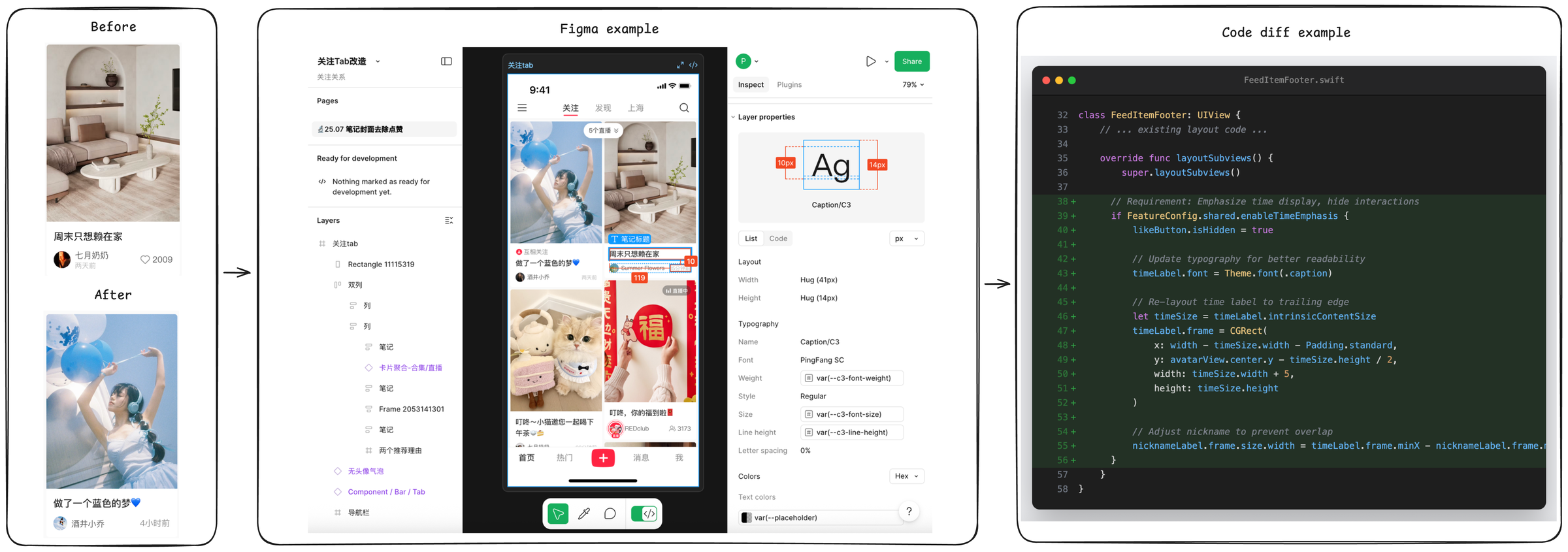
Input ( $\mathcal{I}$ ). The input context mimics a typical developer’s starting point for a new feature. It consists of three main components (see Figure 2). First, a Product Requirement Document (PRD) describes the feature goal, user story, acceptance criteria, and constraints. These PRDs are derived from actual product requirements at XiaoHongShu Inc., a major social media platform with over 300 million monthly active users, follow standard industrial conventions (Atlassian, 2024), and have an average length of 450 words, requiring agents to parse natural language specifications. Second, 70% of tasks include a Figma Design specification, containing component layout, typography, and visual details that the agent must translate into code. Finally, the agent is provided with the XiaoHongShu production codebase, a Git repository snapshot containing approximately 500,000 lines of Swift/Objective-C code across thousands of files. This large-scale context forces the agent to perform retrieval and navigation, rather than just code generation.
<details>
<summary>figures/fig_task_example.png Details</summary>
### Visual Description
## UI Design and Code Implementation Comparison
### Overview
The image presents a four-panel comparison of a mobile app UI design evolution, from initial concept to final implementation. The sequence demonstrates design changes in Figma and corresponding code modifications in Swift, culminating in a final UI state.
### Components/Axes
1. **Before Panel** (Leftmost)
- UI Screenshot: Living room interior with beige couch, white coffee table, and wall shelves
- Text Elements:
- Chinese text: "周末只想赖在家" (I just want to stay home on weekends)
- Username: 七月奶奶 (July Grandma)
- Date: 2009
- Heart icon with 2009 likes
- Layout: Single-column design with image at top, text below
2. **Figma Example** (Center)
- Design Interface: Figma's design tab open with:
- Woman in blue dress holding balloons (matching "After" image)
- Text box with Chinese text: "做了一个蓝色的梦" (Made a blue dream)
- Red "福" (fortune) symbol
- UI elements: Layers panel, properties inspector, share button
- Technical Details:
- Text dimensions: 10px (left), 14px (right)
- Layout properties: Width/height measurements
- Typography: PingFang SC font
3. **Code Diff Example** (Rightmost)
- Swift Code Snippet:
- Class: `FeedItemFooter: UIView`
- Key Modifications:
- Override of `layoutSubviews()` method
- Time display logic: `if FeatureConfig.shared.enableTimeEmphasis`
- Layout adjustments: `timeLabel.frame = CGRect(...)`
- Color Coding:
- Added lines: Green background
- Modified lines: Blue text
- Removed lines: Red text
4. **After Panel** (Rightmost)
- UI Screenshot: Woman in blue dress holding balloons
- Text Elements:
- Chinese text: "做了一个蓝色的梦" (Made a blue dream)
- Username: 酒井小乔 (Shoji Kojo)
- Timestamp: 4小时前 (4 hours ago)
- Heart icon with 4 likes
### Detailed Analysis
**Design Evolution**
- The "Before" and "After" panels show a thematic shift from interior design to lifestyle imagery
- Figma example demonstrates responsive design with:
- Balloon graphic elements
- Cultural symbolism (red "福" character)
- Text layout adjustments (10px/14px spacing)
**Code Implementation**
- Key technical changes:
1. Time display conditional logic
2. Layout constraints for time label
3. Font size variations (41px/14px)
4. Nickname label positioning adjustments
**UI Components**
- Consistent elements across panels:
- Heart icon (like counter)
- Text positioning
- Image-to-text hierarchy
- Technical specifications:
- Font: PingFang SC
- Color scheme: Blue/white dominant
- Layout: Vertical stacking
### Key Observations
1. **Design-Technical Correlation**
- Balloon imagery in Figma directly corresponds to code's `timeLabel` positioning
- Cultural elements (red "福") require specific layout constraints
2. **Code Complexity**
- Multiple layout overrides suggest complex UI requirements
- Conditional rendering for time display indicates feature toggling
3. **UI Metrics**
- Text sizing variations (10px/14px) indicate responsive design
- Like counter discrepancy (2009 vs 4) suggests test data
### Interpretation
The image reveals a comprehensive design-to-development workflow:
1. **Conceptualization**: Initial living room imagery establishes cozy home theme
2. **Design Iteration**: Figma shows pivot to lifestyle imagery with cultural elements
3. **Technical Implementation**: Swift code demonstrates complex layout management
4. **Final Output**: Clean, thematically consistent UI with interactive elements
The progression highlights the importance of:
- Cultural context in design (red "福" symbol)
- Technical precision in layout constraints
- Responsive design principles (text sizing variations)
- Feature toggling for conditional UI elements
The heart icon's like count discrepancy between panels suggests either test data or version control differences in the UI implementation.
</details>
Figure 2. A concrete example of a SWE-Bench Mobile task (Task 056). The agent must interpret the PRD requirements (replace interaction button with publish time label) and visual design (Figma), locate the relevant files in the codebase (FeedItemFooter.swift), and implement the changes while handling edge cases and feature configuration.
Output ( $\mathcal{O}$ ). The expected output is a unified diff patch that, when applied to the codebase, implements the feature described in the PRD. This format matches the standard pull request workflow used in industry.
Evaluation ( $\mathcal{E}$ ). Each task is paired with a task-specific pytest suite (9.1 tests per task on average) that evaluates the generated patch directly. Concretely, tests operate on the unified diff text without compiling or running the iOS application, and therefore avoid build-time overhead and simulator/device nondeterminism. This patch-level evaluation is designed to verify the presence of necessary UI-facing edits (e.g., view construction, layout logic) and data/logic edits (e.g., control-flow, state updates), while remaining tolerant to superficial variability such as identifier naming, refactoring style, and minor structural reorganization.
### 2.2. Design Principles
SWE-Bench Mobile is constructed under guiding principles to ensure relevance to professional software engineering. End-to-End Realism is paramount; tasks span the full engineering process from PRD to testing, preserving real-world dependencies and incomplete specifications. Unlike synthetic benchmarks, our tasks come from actual product development cycles. Multi-Modal Reasoning is required, as agents must jointly interpret textual requirements (PRD), visual designs (Figma), and structured code. Diverse Coverage ensures robustness, with tasks covering multiple categories (Table 3) and difficulty levels, from simple UI adjustments to complex architectural refactoring. Finally, by focusing on Swift/Objective-C, an Under-Represented Language in LLM training data compared to Python or JavaScript, SWE-Bench Mobile serves as a challenging test of an agent’s ability to generalize to less familiar syntax and frameworks.
### 2.3. Dataset Statistics
Table 1 summarizes the key statistics of SWE-Bench Mobile. The benchmark consists of 50 tasks with 449 total test cases. The majority of tasks (70%) include Figma designs, and 92% include reference images, highlighting the multi-modal nature of the dataset. The average PRD length is 450 words, providing substantial context. The codebase scale is significant, with the repository size reaching approximately 5GB.
Table 1. SWE-Bench Mobile dataset statistics.
| Metric | Value |
| --- | --- |
| Total Tasks | 50 |
| Total Test Cases | 449 |
| Avg. Test Cases per Task | 9.1 |
| Tasks with Figma Design | 35 (70%) |
| Tasks with Reference Images | 46 (92%) |
| Avg. PRD Length (words) | 450 |
| Codebase Size | Large Scale ( $\sim$ 5GB) |
| Programming Language | Swift/Objective-C (iOS) |
| Avg. Files Modified per Task | 4.2 |
<details>
<summary>x1.png Details</summary>
### Visual Description
## Pie Charts: By Category and By Difficulty
### Overview
The image contains two adjacent pie charts. The left chart categorizes data by component type, while the right chart categorizes data by difficulty level. Both charts use distinct color coding and include numerical annotations for each segment.
### Components/Axes
**Left Chart ("By Category"):**
- **Title**: "By Category" (top-center)
- **Legend**: Right-aligned, with color-coded labels:
- Orange: UI Components (18)
- Red: Data Mgmt (10)
- Pink: Gesture & Interaction (8)
- Purple: Media & Assets (7)
- Blue: Networking (4)
- Green: Other (3)
- **Segments**: Six labeled sections with numerical values.
**Right Chart ("By Difficulty"):**
- **Title**: "By Difficulty" (top-center)
- **Legend**: Right-aligned, with color-coded labels:
- Green: Easy (15)
- Orange: Medium (25)
- Red: Hard (10)
- **Segments**: Three labeled sections with numerical values.
### Detailed Analysis
**Left Chart ("By Category"):**
- **UI Components (18)**: Largest segment (orange), occupying ~36% of the chart.
- **Data Mgmt (10)**: Second-largest (red), ~20%.
- **Gesture & Interaction (8)**: ~16% (pink).
- **Media & Assets (7)**: ~14% (purple).
- **Networking (4)**: ~8% (blue).
- **Other (3)**: Smallest segment (~6%) (green).
**Right Chart ("By Difficulty"):**
- **Medium (25)**: Largest segment (orange), ~50% of the chart.
- **Easy (15)**: ~30% (green).
- **Hard (10)**: ~20% (red).
### Key Observations
1. **Dominance of UI Components**: UI Components account for the largest share in the "By Category" chart, suggesting a focus on user interface design.
2. **Medium Difficulty Prevalence**: Medium difficulty tasks dominate the "By Difficulty" chart, indicating most work falls into this category.
3. **Small Segments**: Networking and "Other" categories are minimal in the "By Category" chart, while "Hard" difficulty is the smallest in the "By Difficulty" chart.
### Interpretation
The data implies a project structure where **UI Components** are prioritized, and **Medium-difficulty tasks** are most common. This could reflect:
- A team with moderate expertise, as Medium tasks are neither too easy nor too hard.
- A design-heavy project, given the emphasis on UI Components.
- Potential underinvestment in Networking and "Other" categories, which may require further analysis for completeness.
The charts highlight a balance between component focus and task complexity, with Medium difficulty serving as the central workload.
</details>
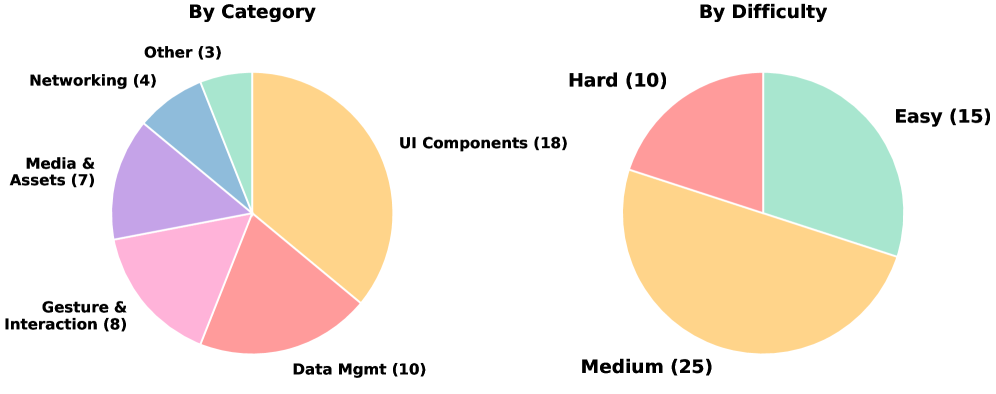
Figure 3. Task distribution by category (left) and difficulty (right). Each label shows the count, percentage, and average agent pass rate. UI Components (36%) dominate the benchmark, while performance drops sharply from Easy (18.5% pass) to Hard (5.8% pass).
### 2.4. Task Construction
Source. Tasks are derived from real product requirements at XiaoHongShu Inc., a leading social media platform in China with over 300 million monthly active users. Each task represents a feature that was actually implemented by XiaoHongShu engineers in the production iOS application, ensuring realistic complexity and scope. Unlike existing benchmarks that use synthetic problems or isolated bug fixes from open-source repositories, our tasks capture the full complexity of feature development in a commercial mobile application: multi-file changes, UI/UX implementation from design specs, integration with existing business logic, and handling of edge cases and feature flags. This industry-sourced approach ensures that our benchmark reflects the actual challenges faced by software engineers in production environments.
Quality Control. Each task undergoes a rigorous multi-stage review process. First, the PRDs are reviewed to ensure requirements are clear and self-contained. Next, comprehensive test suites are designed to verify both correctness and quality. Finally, we perform human validation to verify that the reference implementation passes all tests.
Difficulty Calibration. Tasks are labeled by implementation complexity based on several factors: the number of files to modify (1-2 for Easy, 3-5 for Medium, 6+ for Hard), the lines of code changed ( $<$ 50 for Easy, 50-150 for Medium, $>$ 150 for Hard), and the architectural complexity, distinguishing between localized changes and cross-module refactoring.
### 2.5. Evaluation Pipeline
Unlike traditional code benchmarks that rely solely on unit tests, SWE-Bench Mobile performs comprehensive verification through a multi-step pipeline.
Patch-to-Task Routing. SWE-Bench Mobile evaluates submissions as unified diff patches and associates each patch with a specific task. This routing step ensures that each submission is evaluated under the task’s PRD-defined intent and its corresponding test suite, while keeping the evaluation independent of repository checkout, compilation, or runtime execution. In practice, the test harness exposes the patch text to the task-specific tests, enabling purely diff-based verification.
Static Analysis. Before running task-specific assertions, we perform lightweight static checks on the diff text. This includes verifying unified diff structure (e.g., diff --git headers), rejecting empty or near-empty patches, and ensuring that added lines contain meaningful code changes rather than only whitespace or comments. We also check whether the patch touches relevant files using flexible path patterns (e.g., accepting file moves/renames), and apply basic language-agnostic sanity checks to filter malformed submissions early.
Diff-Based Intent Tests. Direct runtime evaluation for mobile applications is challenging to scale. Unit tests are ill-suited for validating visual correctness, while end-to-end UI testing introduces substantial compilation overhead and environmental nondeterminism. To address these constraints, SWE-Bench Mobile adopts a diff-based evaluation strategy: our pytest suites inspect the patch diff and verify structural intent and architectural compliance. This allows us to evaluate high-level architectural decisions and requirement compliance at scale. Tests are constructed from the PRD and a human reference patch, emphasizing:
- Goal-oriented checks: verifying modification patterns (the “what”) rather than exact code shape.
- Feature entry points: checking integration surfaces (e.g., routing, hooks).
- Removal of blocking behavior: ensuring constraints or legacy guards are lifted.
- Cohesion across files: verifying related edits across modules.
- Semantics-aware matching: using flexible pattern matching to accommodate alternative naming.
Batch Reporting and Error Analysis. Beyond pass/fail decisions, our evaluator produces both task-level and test-case-level summaries. For large-scale runs, we classify failures into coarse categories (e.g., missing critical file edits, missing UI components, empty patches). This analysis provides interpretable diagnostics of common agent failure modes and supports systematic iteration on prompts and agent scaffolding.
Metrics. We report two complementary metrics. Task Success Rate is the percentage of tasks where all tests pass, representing the strict standard for a completed feature. Test Pass Rate is the percentage of individual test cases passed, which reveals partial progress even when the full task is not completed. The gap between these metrics reveals how often agents make partial progress without fully completing tasks.
### 2.6. Comparison with Existing Benchmarks
Table 2 compares SWE-Bench Mobile with existing coding benchmarks. SWE-Bench Mobile distinguishes itself by being multi-modal, including PRDs and Figma designs rather than just code or text descriptions. It operates on a large-scale codebase ( $\sim$ 5GB), significantly larger than the individual repositories or snippets used in other benchmarks. Furthermore, it targets mixed Swift/Objective-C, which is under-represented in training data compared to Python, and focuses on feature implementation rather than bug fixing.
Table 2. Comparison with existing benchmarks.
| Benchmark | Multi-Modal | Codebase | Language |
| --- | --- | --- | --- |
| HumanEval | ✗ | None | Python |
| MBPP | ✗ | None | Python |
| SWE-Bench | ✗ | Medium | Python |
| SWE-Bench Mobile | ✓ | Large | Swift/ObjC |
## 3. Experiments
We evaluate leading coding agents on SWE-Bench Mobile to answer several key research questions. First, we investigate how state-of-the-art coding agents perform on industry-level mobile development tasks (RQ1). Second, we analyze how task complexity affects agent performance (RQ2). Third, we examine the cost-performance trade-off (RQ3). Fourth, we assess the robustness of agent results across multiple runs (RQ4). Finally, we explore how prompt engineering affects performance (RQ5).
### 3.1. Experimental Setup
Agents and Models. We evaluate four coding agents spanning commercial and open-source systems: Cursor, an AI-powered code editor with an agent mode; Codex, OpenAI’s coding agent CLI; Claude Code, Anthropic’s coding agent CLI; and OpenCode, an open-source coding agent. We test these agents with multiple backbone models including Claude Opus 4.5, Claude Sonnet 4.5, Claude Haiku, GLM 4.6, GLM 4.7, GPT 5, GPT 5.1, GPT 5.2, and Gemini 3 Pro, yielding 22 agent-model configurations in total.
Metrics. We report two primary metrics: Task Success Rate, which is the percentage of tasks where all test cases pass, and Test Pass Rate, which is the percentage of individual test cases passed. All rates are computed with a fixed denominator of 50 tasks and 449 test cases. When an agent fails to produce a patch for a task (e.g., due to timeout or error), the missing patch is counted as failing all associated tests.
### 3.2. Main Results (RQ1)
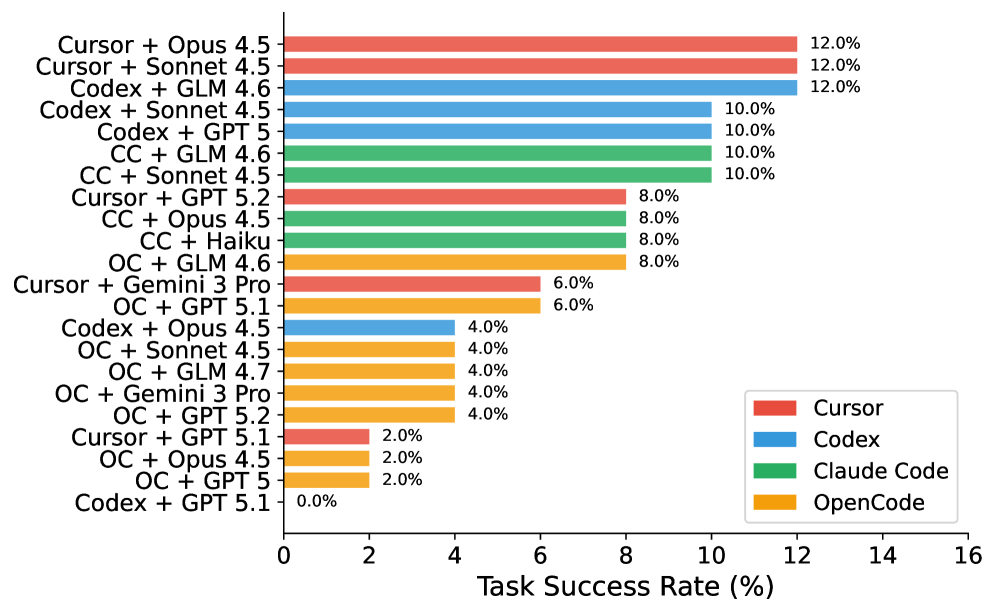
Figure 4 presents the main experimental results across all agent-model configurations.
<details>
<summary>x2.png Details</summary>
### Visual Description
## Horizontal Bar Chart: Task Success Rates of Code Generation Models
### Overview
The chart compares task success rates (%) of various code generation models, categorized by base model (Cursor, Codex, Claude Code, OpenCode) and fine-tuning method (e.g., Opus 4.5, Sonnet 4.5, GPT 5). Success rates range from 0% to 16%, with the highest performers clustered near 12%.
### Components/Axes
- **X-axis**: Task Success Rate (%) (0–16 scale)
- **Y-axis**: Model combinations (e.g., "Cursor + Opus 4.5", "Codex + GPT 5")
- **Legend**:
- Red = Cursor
- Blue = Codex
- Green = Claude Code
- Yellow = OpenCode
- **Text Annotations**: Percentages (e.g., "12.0%") at the end of each bar
### Detailed Analysis
1. **Highest Performers (12.0%)**:
- Cursor + Opus 4.5 (red)
- Cursor + Sonnet 4.5 (red)
- Codex + GLM 4.6 (blue)
2. **Mid-Tier (10.0%)**:
- Codex + Sonnet 4.5 (blue)
- Codex + GPT 5 (blue)
- Claude Code + GLM 4.6 (green)
- Claude Code + Sonnet 4.5 (green)
- Claude Code + Opus 4.5 (green)
3. **Lower Tier (8.0%)**:
- Cursor + GPT 5.2 (red)
- Claude Code + Opus 4.5 (green)
- Claude Code + Haiku (green)
- OpenCode + GLM 4.6 (yellow)
4. **Low Performers (6.0–4.0%)**:
- Cursor + Gemini 3 Pro (red): 6.0%
- OpenCode + GPT 5.1 (yellow): 6.0%
- OpenCode + Opus 4.5 (yellow): 4.0%
- OpenCode + Sonnet 4.5 (yellow): 4.0%
- OpenCode + Gemini 3 Pro (yellow): 4.0%
- OpenCode + GPT 5.2 (yellow): 4.0%
5. **Outlier**:
- Codex + GPT 5.1 (blue): 0.0%
### Key Observations
- **Dominance of Cursor Models**: Cursor combinations with Opus 4.5 and Sonnet 4.5 achieve the highest success rates (12.0%).
- **Codex Variability**: Codex models perform well with GLM 4.6 (12.0%) but fail entirely with GPT 5.1 (0.0%).
- **OpenCode Underperformance**: All OpenCode combinations score ≤6.0%, with GPT 5.1 being the worst (0.0%).
- **Claude Code Consistency**: Claude Code models maintain 8–10% success rates across multiple fine-tuning methods.
### Interpretation
The data suggests that **Cursor models fine-tuned with Opus 4.5 and Sonnet 4.5** are the most effective for code generation tasks, outperforming other base models. **Codex models show inconsistency**, excelling with GLM 4.6 but failing catastrophically with GPT 5.1. **OpenCode models underperform across the board**, indicating potential limitations in their architecture or training data. The **0.0% success rate for Codex + GPT 5.1** warrants investigation—it may reflect incompatibility between the Codex base model and GPT 5.1 fine-tuning, or data quality issues. The clustering of success rates around 10–12% implies a ceiling effect for current state-of-the-art models, while the OpenCode results highlight opportunities for improvement in open-source code generation frameworks.
</details>
Figure 4. Task Success Rate across all configurations. Best performance is 12%, achieved by Cursor + Opus/Sonnet and Codex + GLM.
Key Findings. Our evaluation reveals a generally low overall performance, with even the best agents solving only 12% of tasks. This indicates a significant gap between current capabilities and industrial requirements. However, the Test Pass Rate (up to 28.1%) is much higher than the Task Success Rate (12%), indicating that agents often make partial progress but fail to complete tasks fully. Notably, we find that the choice of agent matters significantly: the same model (Opus 4.5) achieves 12% on Cursor but only 2% on OpenCode, a 6 $\times$ difference. Commercial agents consistently outperform the open-source OpenCode agent: the best OpenCode configuration (GLM 4.6, 8%) trails the best commercial configuration (12%) by 4 percentage points.
### 3.3. Task Complexity Analysis (RQ2)
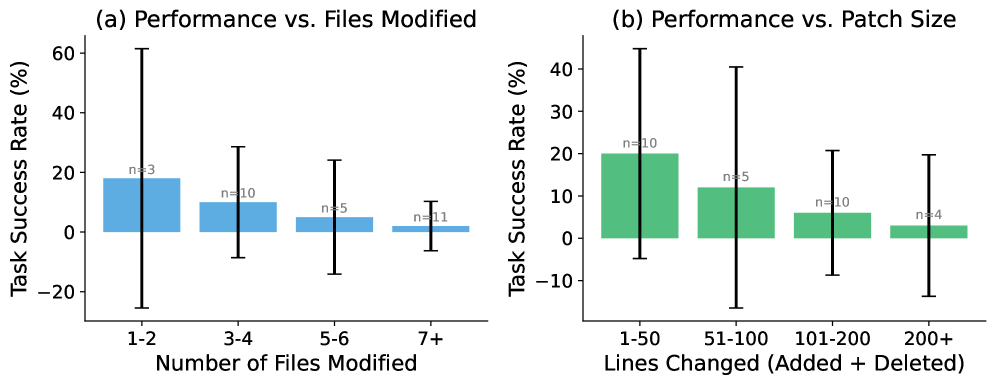
We analyze how task complexity affects agent performance. Figure 5 shows the relationship between task complexity (measured by number of files modified and patch size) and success rate.
<details>
<summary>x3.png Details</summary>
### Visual Description
## Box Plots: Task Success Rate vs. Files Modified and Patch Size
### Overview
The image contains two side-by-side box plots comparing task success rates under different conditions. Plot (a) examines the relationship between task success rate and the number of files modified, while plot (b) analyzes the relationship between task success rate and patch size (lines changed). Both plots use box plots to visualize distributions, with error bars indicating variability.
---
### Components/Axes
#### Plot (a): Performance vs. Files Modified
- **X-axis**: Number of Files Modified (categories: "1-2", "3-4", "5-6", "7+")
- **Y-axis**: Task Success Rate (%) (range: -20% to 60%)
- **Legend**: No explicit legend; colors differentiate plots (blue for plot (a), green for plot (b)).
- **Sample Sizes**:
- "1-2": n=3
- "3-4": n=10
- "5-6": n=5
- "7+": n=11
#### Plot (b): Performance vs. Patch Size
- **X-axis**: Lines Changed (categories: "1-50", "51-100", "101-200", "200+")
- **Y-axis**: Task Success Rate (%) (range: -10% to 40%)
- **Sample Sizes**:
- "1-50": n=10
- "51-100": n=5
- "101-200": n=10
- "200+": n=4
---
### Detailed Analysis
#### Plot (a): Performance vs. Files Modified
- **1-2 files**: Median success rate ~20% (n=3). Error bar spans ~-10% to 50%.
- **3-4 files**: Median ~10% (n=10). Error bar spans ~-15% to 30%.
- **5-6 files**: Median ~5% (n=5). Error bar spans ~-20% to 25%.
- **7+ files**: Median ~0% (n=11). Error bar spans ~-25% to 15%.
#### Plot (b): Performance vs. Patch Size
- **1-50 lines**: Median ~20% (n=10). Error bar spans ~-5% to 40%.
- **51-100 lines**: Median ~15% (n=5). Error bar spans ~-10% to 30%.
- **101-200 lines**: Median ~8% (n=10). Error bar spans ~-15% to 25%.
- **200+ lines**: Median ~3% (n=4). Error bar spans ~-20% to 20%.
---
### Key Observations
1. **Negative Correlation**: In both plots, task success rate decreases as the number of files modified or lines changed increases.
2. **Variability**: Larger categories (e.g., "7+" files, "200+" lines) show wider error bars, indicating higher variability in success rates.
3. **Sample Size Impact**: Smaller sample sizes (e.g., n=3 for "1-2 files") have less precise error bars, suggesting lower confidence in measurements.
4. **Outliers**: No explicit outliers, but the "7+" files category in plot (a) has a notably low median (~0%) compared to other groups.
---
### Interpretation
The data suggests that task complexity (measured by files modified or lines changed) negatively impacts success rates. Larger modifications or patches correlate with lower performance, likely due to increased cognitive load or error-proneness. The variability in success rates for larger categories highlights the need for further investigation into factors like user expertise or tooling support. The small sample sizes in some categories (e.g., n=4 for "200+" lines) limit statistical robustness, emphasizing the importance of larger datasets for conclusive insights.
</details>
Figure 5. Performance decreases sharply with task complexity. (a) Tasks requiring 1-2 file modifications have 18% success rate vs. 2% for 7+ files. (b) Small patches ( $<$ 50 lines) achieve 20% success vs. 3% for large patches ( $>$ 200 lines). Error bars show 95% confidence intervals based on binomial proportions.
Key Findings. Performance drops sharply as complexity increases. The success rate drops from 18% for tasks requiring 1-2 file modifications to just 2% for tasks requiring 7+ files, suggesting that agents struggle with cross-file reasoning. Similarly, larger patches correlate with lower success, indicating difficulty with complex implementations.
### 3.4. Model Comparison Across Agents
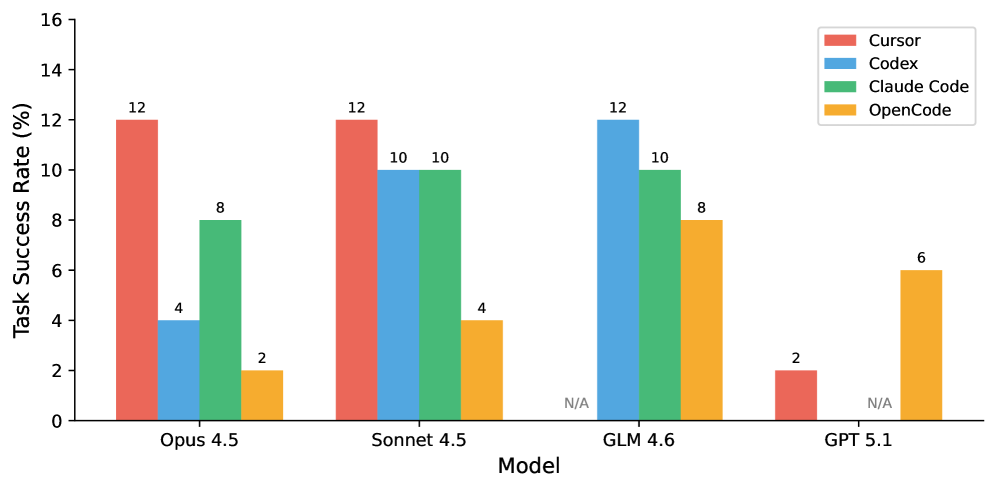
A surprising finding is that the same model performs very differently across agents. Figure 6 shows this comparison across all four agents.
<details>
<summary>x4.png Details</summary>
### Visual Description
## Bar Chart: Task Success Rate (%) by Model and Tool
### Overview
The chart compares task success rates (%) across four AI models (Opus 4.5, Sonnet 4.5, GLM 4.6, GPT 5.1) and four tools (Cursor, Codex, Claude Code, OpenCode). Each model has grouped bars representing tool performance, with success rates ranging from 0% to 16%.
### Components/Axes
- **X-axis**: Models (Opus 4.5, Sonnet 4.5, GLM 4.6, GPT 5.1)
- **Y-axis**: Task Success Rate (%) (0–16)
- **Legend**:
- Red = Cursor
- Blue = Codex
- Green = Claude Code
- Yellow = OpenCode
- **Legend Position**: Top-right corner
- **Bar Order**: For each model, bars are ordered as Cursor → Claude Code → Codex → OpenCode (note: this differs from the legend's left-to-right order).
### Detailed Analysis
1. **Opus 4.5**:
- Cursor (red): 12%
- Claude Code (green): 8%
- Codex (blue): 4%
- OpenCode (yellow): 2%
2. **Sonnet 4.5**:
- Cursor (red): 12%
- Claude Code (green): 10%
- Codex (blue): 10%
- OpenCode (yellow): 4%
3. **GLM 4.6**:
- Codex (blue): 12%
- Claude Code (green): 10%
- OpenCode (yellow): 8%
- Cursor (red): N/A
4. **GPT 5.1**:
- Cursor (red): 2%
- OpenCode (yellow): 6%
- Claude Code (green): N/A
- Codex (blue): N/A
### Key Observations
- **Cursor Dominance**: Achieves highest success rates (12%) in Opus 4.5 and Sonnet 4.5.
- **Codex Peak**: Outperforms all tools in GLM 4.6 (12%).
- **Claude Code Consistency**: Maintains 8–10% success rates across Opus 4.5 and Sonnet 4.5.
- **OpenCode Growth**: Shows increasing success rates (4% → 6% → 8%) across models.
- **GPT 5.1 Anomaly**: Cursor success rate drops to 2%, while OpenCode rises to 6%.
### Interpretation
The data suggests tool effectiveness varies significantly by model:
- **Cursor** excels in Opus and Sonnet 4.5, possibly indicating optimization for these models' architectures.
- **Codex** dominates GLM 4.6, suggesting specialized compatibility.
- **OpenCode** improves performance in later models (GLM 4.6, GPT 5.1), hinting at adaptability to newer architectures.
- **N/A Values** in GLM 4.6 (Cursor) and GPT 5.1 (Codex/Claude Code) imply tool-model incompatibility or unavailability.
The chart highlights the importance of tool-model pairing for task success, with no single tool universally dominant. OpenCode's rising trend may indicate emerging utility in advanced models.
</details>
Figure 6. Same model, different agents: Opus 4.5 achieves 12% on Cursor but only 2% on OpenCode—a 6 $\times$ gap. Commercial agents consistently outperform the open-source alternative.
Implications. This finding suggests that agent scaffolding (tool use, context management, iteration strategy) is as important as the underlying model capability. The performance gap between commercial agents (Cursor, Codex, Claude Code) and the open-source OpenCode is substantial across all models, suggesting that years of engineering investment in tool integration, context management, and iterative refinement provide significant advantages. Practitioners should evaluate agents holistically rather than focusing solely on model benchmarks.
### 3.5. Performance by Task Category
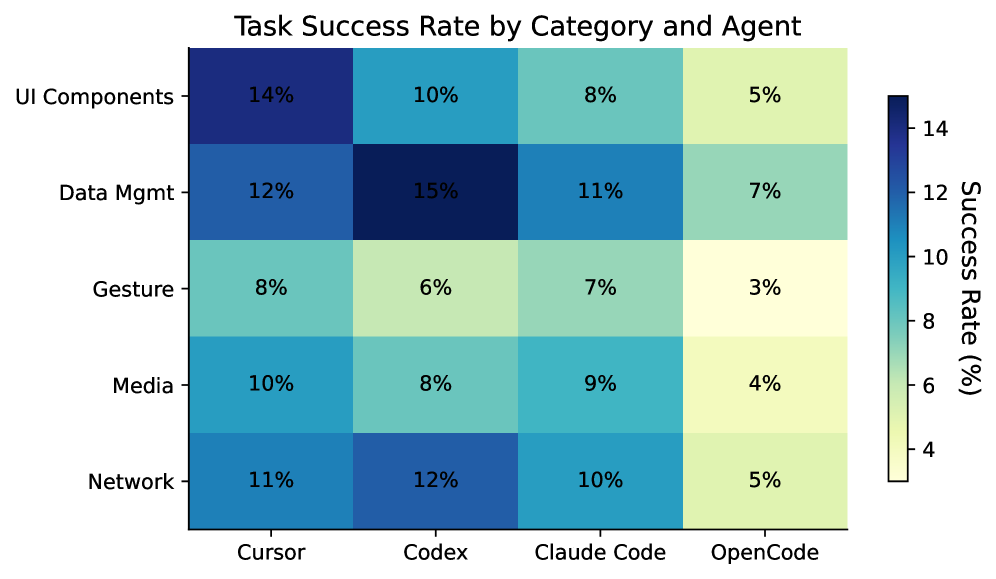
We analyze how agents perform across different task categories. Figure 7 shows the success rate breakdown.
<details>
<summary>x5.png Details</summary>
### Visual Description
## Heatmap: Task Success Rate by Category and Agent
### Overview
The heatmap visualizes task success rates across five categories (UI Components, Data Mgmt, Gesture, Media, Network) and four agents (Cursor, Codex, Claude Code, OpenCode). Success rates are represented by color intensity, with darker blue indicating higher rates (14%) and lighter yellow indicating lower rates (3%).
### Components/Axes
- **X-axis (Agents)**: Cursor, Codex, Claude Code, OpenCode
- **Y-axis (Task Categories)**: UI Components, Data Mgmt, Gesture, Media, Network
- **Legend**: Right-aligned color gradient from light yellow (3%) to dark blue (14%)
- **Title**: "Task Success Rate by Category and Agent" (top-center)
### Detailed Analysis
| Task Category | Cursor | Codex | Claude Code | OpenCode |
|-----------------|--------|-------|-------------|----------|
| **UI Components** | 14% | 10% | 8% | 5% |
| **Data Mgmt** | 12% | 15% | 11% | 7% |
| **Gesture** | 8% | 6% | 7% | 3% |
| **Media** | 10% | 8% | 9% | 4% |
| **Network** | 11% | 12% | 10% | 5% |
- **Color Consistency**: All cells match the legend (e.g., 14% = dark blue, 3% = light yellow).
- **Spatial Layout**:
- Title: Top-center
- Legend: Right-aligned vertical bar
- Data cells: Grid with rounded corners
### Key Observations
1. **Highest Success Rates**:
- **Codex** leads in **Data Mgmt** (15%) and **Network** (12%).
- **Cursor** excels in **UI Components** (14%) and **Network** (11%).
2. **Lowest Success Rates**:
- **Gesture** tasks perform poorly across all agents, with **OpenCode** at 3%.
- **OpenCode** generally underperforms (e.g., 4% for Media, 5% for UI Components).
3. **Trends**:
- **Codex** and **Cursor** show stronger performance in technical tasks (Data Mgmt, Network).
- **Gesture** tasks degrade significantly with OpenCode (3% vs. 8% for Cursor).
### Interpretation
The data suggests **Codex** and **Cursor** are more effective for technical tasks (e.g., Data Mgmt, Network), while **OpenCode** struggles across most categories. **Gesture** tasks are universally challenging, indicating potential limitations in agent capabilities for non-technical interactions. The disparity in success rates highlights the need for agent specialization or task-specific optimization. Notably, **Codex**’s 15% success rate in Data Mgmt stands out as an outlier, suggesting exceptional performance in structured data handling.
</details>
Figure 7. Task Success Rate by Category and Agent. Agents generally perform better on Data Management tasks but struggle with Gesture & Interaction and Media tasks, which require complex multi-modal reasoning.
### 3.6. Cost and Time Analysis (RQ3)
Table 3 presents the cost and time metrics for each configuration. We measure API cost per task and average execution time.
Table 3. Cost and time comparison across all agents. Best value in each column is bold. OpenCode costs are reported via OpenRouter API billing.
| Agent | Model | Cost ($/task) | Time (min) |
| --- | --- | --- | --- |
| Cursor | Opus 4.5 | 3.50 | 15.0 |
| Cursor | Sonnet 4.5 | 2.00 | 14.2 |
| Codex | GLM 4.6 | 1.30 | 13.3 |
| Codex | Sonnet 4.5 | 2.50 | 12.5 |
| CC | GLM 4.6 | 1.30 | 11.7 |
| CC | Sonnet 4.5 | 2.00 | 13.3 |
| CC | Opus 4.5 | 4.00 | 15.0 |
| CC | Haiku | 0.50 | 8.3 |
| OC | Opus 4.5 | 9.33 | 8.2 |
| OC | Sonnet 4.5 | 3.50 | 11.1 |
| OC | GLM 4.6 | 0.13 | 32.5 |
| OC | GLM 4.7 | 0.49 | 52.1 |
| OC | GPT 5 | 0.18 | 9.8 |
| OC | GPT 5.1 | 0.02 | 2.0 |
| OC | GPT 5.2 | 0.04 | 10.9 |
| OC | Gemini 3 Pro | 0.03 | 8.9 |
Key Findings. Among commercial agents, Codex + GLM 4.6 offers the best value, achieving 12% success at only $1.30/task—the same success rate as Cursor + Opus 4.5 but at less than half the cost ($3.50/task). OpenCode exhibits a striking cost–time trade-off: it is dramatically cheaper (GLM 4.6 at $0.13/task vs. $1.30 for Codex/CC), but GLM models run much slower (32–52 min vs. 11–13 min). OpenCode + Opus 4.5 is the most expensive configuration at $9.33/task yet achieves only 2% success, while OpenCode + GPT 5.1 is the cheapest at $0.02/task but completes tasks in only 2 minutes on average—likely because it fails quickly on most tasks (6% success, 7.1% test pass rate).
### 3.7. Robustness Analysis (RQ4)
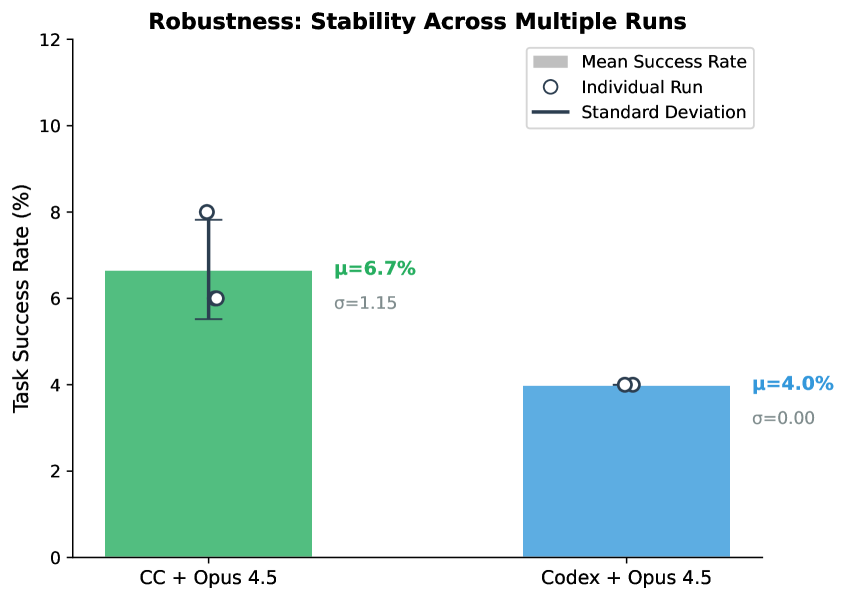
To assess result stability, we run selected configurations multiple times. Figure 8 shows the variance across runs.
<details>
<summary>x6.png Details</summary>
### Visual Description
## Bar Chart: Robustness: Stability Across Multiple Runs
### Overview
The chart compares task success rates between two systems: "CC + Opus 4.5" and "Codex + Opus 4.5" across multiple runs. It visualizes mean success rates, individual run variability, and standard deviations using bars, error bars, and data points.
### Components/Axes
- **X-Axis**: Categories labeled "CC + Opus 4.5" (green) and "Codex + Opus 4.5" (blue).
- **Y-Axis**: Task Success Rate (%) ranging from 0 to 12.
- **Legend**: Located in the top-right corner, with three elements:
- Gray bar: Mean Success Rate
- White circle with black outline: Individual Run
- Dark blue line: Standard Deviation
### Detailed Analysis
1. **CC + Opus 4.5 (Green Bar)**:
- Mean Success Rate (gray bar): 6.7% (μ=6.7%)
- Standard Deviation (dark blue line): σ=1.15
- Individual Run (white circle): ~6% (below mean)
- Error bar: Extends from ~5.5% to ~8% (mean ± σ)
2. **Codex + Opus 4.5 (Blue Bar)**:
- Mean Success Rate (gray bar): 4.0% (μ=4.0%)
- Standard Deviation (dark blue line): σ=0.00
- Individual Run (white circle): 4.0% (matches mean exactly)
- Error bar: No visible deviation (σ=0.00)
### Key Observations
- **CC + Opus 4.5** shows higher mean performance (6.7% vs. 4.0%) but significant variability (σ=1.15).
- **Codex + Opus 4.5** demonstrates perfect consistency (σ=0.00) but lower effectiveness.
- The individual run for CC + Opus 4.5 (6%) is slightly below its mean, while Codex + Opus 4.5's individual run aligns perfectly with its mean.
### Interpretation
The data suggests a trade-off between performance and stability:
- **CC + Opus 4.5** achieves higher task success rates on average but exhibits instability across runs (high σ=1.15), indicating potential sensitivity to input variations or implementation differences.
- **Codex + Opus 4.5** prioritizes reliability (σ=0.00) at the cost of lower mean performance, suggesting deterministic behavior or optimized consistency.
- The near-perfect alignment of the individual run with the mean for Codex + Opus 4.5 implies no observed variability in its outcomes, which could stem from algorithmic design or controlled testing conditions.
- The error bars visually reinforce these conclusions: CC + Opus 4.5's wide error range contrasts sharply with Codex + Opus 4.5's absence of error bars.
</details>
Figure 8. Result stability across multiple runs. Error bars indicate standard deviation. While Claude Code shows moderate variance ( $\sigma$ =1.15%), the absolute fluctuation is small ( $\pm$ 1 task), indicating that agent performance is relatively stable.
Observations. We observe moderate variance for Claude Code + Opus 4.5, with scores of 6%, 8%, and 6% across 3 runs ( $\mu$ =6.7%, $\sigma$ =1.15%). In contrast, Codex + Opus 4.5 is perfectly stable at 4% across runs.
### 3.8. Prompt Engineering (RQ5)
We conduct a systematic ablation study with 12 prompt variants using Claude Code + GLM 4.6. Table 4 shows the results.
Table 4. Prompt ablation results. Best and worst highlighted. Full prompts in Appendix C.
| Prompt Strategy | Task (%) | Test (%) |
| --- | --- | --- |
| Defensive Programming | 10.0 | 26.7 |
| Quality Focused | 10.0 | 26.3 |
| Example Driven | 10.0 | 23.4 |
| Chain of Thought | 10.0 | 21.8 |
| Baseline | 10.0 | 19.3 |
| Explicit Instructions | 8.0 | 17.8 |
| Figma Emphasis | 8.0 | 18.0 |
| Test Driven | 6.0 | 22.0 |
| Detailed Role | 4.0 | 20.7 |
| Structured Checklist | 4.0 | 20.7 |
| Context Rich | 4.0 | 22.7 |
| Comprehensive | 4.0 | 22.7 |
Key Findings. The ”Defensive Programming” prompt strategy performs best, improving the Test Pass Rate by 7.4% over the baseline (19.3% $\rightarrow$ 26.7%) while maintaining the same Task Success Rate (10.0%). This indicates that while both prompts complete the same number of tasks fully, Defensive Programming handles edge cases better in partially-completed tasks, passing significantly more individual test cases. This suggests that emphasizing defensive coding practices helps agents avoid common pitfalls even when they cannot complete all requirements. Interestingly, complexity appears to hurt performance; overly detailed prompts reduce Task Success from 10.0% to 4.0%. Overall, prompts focusing on code quality outperform those emphasizing workflow.
### 3.9. Error Analysis
We categorize failure modes across all experiments by analyzing test failure messages from the best-performing agents. The most critical failure pattern is Missing Feature Flags (54%), where agents implement core functionality but fail to add proper feature toggles or experiment flags—a standard practice in production mobile development for gradual rollout and A/B testing. Missing Data Models (22%) occurs when agents fail to create or update data structures required by the PRD. Missing Files (11-15%) represents cases where agents identify some but not all required files to modify. Missing UI Components (11-15%) captures failures to implement specific UI elements like buttons, labels, or views. Missing Required Methods (9%) reflects incomplete class implementations. While Incomplete Multi-File Implementation affects only 4-7% of tasks, it disproportionately impacts complex features requiring coordination across 5+ files. The dominance of feature flag failures highlights a gap between agents’ code generation capabilities and their understanding of production deployment practices.
## 4. Discussion and Conclusion
Our evaluation reveals a significant gap between current agent capabilities and the demands of industrial mobile development, with the best configurations achieving only a 12% success rate. This shortfall, primarily driven by failures in cross-file reasoning and requirement understanding, underscores that autonomous software engineering remains an open challenge.
Implications. For practitioners, our results suggest that agents should currently be viewed as “copilots” requiring human oversight rather than autonomous developers. The high variance in performance across agents for the same model (e.g., Cursor 12% vs. OpenCode 2% for Opus 4.5) highlights the critical role of agent scaffolding—practitioners should evaluate the complete system, not just the underlying model. The consistent gap between commercial and open-source agents suggests that engineering investment in tool integration and context management provides significant practical value. Furthermore, cost-effective models like GLM 4.6 can match the performance of expensive frontier models when paired with effective agent frameworks, offering a viable path for scalable adoption. For researchers, the sharp performance drop on complex, multi-file tasks (18% vs. 2%) points to a need for better code context retrieval and graph-based reasoning. The 25% failure rate due to requirement misunderstanding calls for improved grounding of natural language PRDs into code. Additionally, the under-utilization of visual designs suggests that future work must better integrate multi-modal signals into the coding loop.
Future Work. We plan to expand SWE-Bench Mobile along several dimensions. First, we will add Android (Kotlin) tasks to enable cross-platform comparison and investigate whether agents exhibit consistent strengths and weaknesses across mobile ecosystems. Second, we will integrate simulator-based runtime evaluation to verify UI rendering, gesture handling, and state management—aspects that text-based diff inspection cannot capture. Third, we aim to evaluate additional open-source agents like OpenHands and SWE-Agent, and open-weight models like Qwen-Coder, to further broaden the benchmark’s coverage. Finally, we plan to develop a public API for continuous evaluation, allowing agent providers to track their progress over time as both models and scaffolding improve.
In conclusion, SWE-Bench Mobile provides a rigorous testbed for the next generation of coding agents. While current performance is modest, the benchmark offers a clear roadmap for advancing agents from simple script generation to complex, industry-level software development.
## 5. Related Work
### 5.1. Code Generation Benchmarks
Early benchmarks for code generation focused on algorithmic problem-solving. HumanEval (Chen et al., 2021) introduced 164 hand-crafted Python programming problems with unit tests, becoming a standard evaluation for code LLMs. MBPP (Austin et al., 2021) expanded this with 974 crowd-sourced problems. While influential, these benchmarks test isolated function generation rather than realistic software engineering.
SWE-Bench (Jimenez et al., 2024) marked a significant advance by evaluating agents on real GitHub issues from popular Python repositories. Agents must understand issue descriptions, navigate codebases, and generate patches that pass existing tests. The benchmark has since evolved into a family of tasks, including SWE-bench Multimodal (Yang et al., 2025a), which incorporates visual elements such as screenshots and diagrams to test visual software domains; SWE-bench Multilingual (Zan et al., 2025; Yang et al., 2025b), which expands evaluation to 9 programming languages beyond Python; and SWE-bench Pro (Deng et al., 2025), which introduces longer-horizon instances and includes proprietary/commercial codebases. Even with these extensions, many existing benchmarks still derive tasks from GitHub issue and pull-request artifacts, which more often emphasize bug fixing and localized improvements than new feature implementation from high-level specifications.
Other benchmarks target specific domains: DS-1000 (Lai et al., 2023) for data science, ODEX (Wang et al., 2022) for open-domain execution, and ClassEval (Du et al., 2024) for class-level generation. DevBench (Li et al., 2024) evaluates repository-level coding but still focuses on Python.
SWE-Bench Mobile differs from these benchmarks in several key aspects: (1) multi-modal inputs including PRDs and Figma designs, (2) a large-scale production codebase (approx. 5GB), (3) mixed Swift/Objective-C target languages, and (4) feature implementation rather than bug fixing.
### 5.2. Coding Agents
The emergence of powerful LLMs has enabled a new generation of autonomous coding agents. These systems go beyond simple code completion to perform multi-step reasoning, tool use, and iterative refinement.
Commercial agents include GitHub Copilot (Microsoft), Cursor (Anysphere), Claude Code (Anthropic), and Codex CLI (OpenAI). These agents integrate with development environments and can navigate codebases, run tests, and iterate on solutions.
Open-source agents have emerged as alternatives. OpenCode provides a terminal-based coding agent supporting multiple LLM backends. SWE-Agent (Yang et al., 2024) introduces an agent-computer interface optimized for software engineering. AutoCodeRover (Zhang et al., 2024b) combines code search with LLM reasoning. Agentless (Xia et al., 2024) shows that simpler approaches without complex agent loops can be competitive. CodeAgent (Zhang et al., 2024a) uses a repository-level code graph for navigation.
Our work provides a challenging benchmark for evaluating both commercial and open-source agents on industry-level tasks, revealing significant gaps in current capabilities and the importance of agent scaffolding.
### 5.3. Multi-Modal Code Understanding
Recent work has explored combining visual and textual information for code-related tasks. Design2Code (Si et al., 2024) evaluates generating code from webpage screenshots. Screenshot2Code systems convert UI designs to implementation.
SWE-Bench Mobile extends this direction by incorporating Figma designs as part of the input specification, requiring agents to reason about visual layouts alongside textual requirements.
### 5.4. Prompt Engineering for Code
Prompt engineering significantly impacts LLM performance on coding tasks. Chain-of-thought prompting (Wei et al., 2022) improves reasoning. Self-debugging (Chen et al., 2023) enables iterative refinement. Structured prompts with role definitions and examples often outperform simple instructions.
Our ablation study (Section 3.8) systematically evaluates 12 prompt strategies, finding that “Defensive Programming” prompts emphasizing edge cases outperform both simple baselines and complex multi-step prompts.
## Limitations
Platform Scope. SWE-Bench Mobile focuses on a single production iOS codebase from XiaoHongShu, which ensures depth and realism but limits generalization to other mobile platforms (Android, cross-platform frameworks like Flutter/React Native) and programming paradigms. The Swift/Objective-C mixed-language codebase, while representative of many large iOS projects, may not capture challenges unique to Kotlin-based Android development or cross-platform toolchains.
Evaluation Methodology. Our evaluation uses text-based diff inspection rather than runtime execution, which means we validate structural correctness and architectural compliance but cannot detect issues that only manifest during runtime interactions, on specific devices, or under particular OS versions. Future work should integrate simulator-based testing to capture dynamic behaviors such as UI rendering, memory management, and concurrency issues.
Prompt and Model Coverage. Our prompt ablation study covers one agent-model configuration (Claude Code + GLM 4.6) and 12 prompt variants. While this provides insights into prompt sensitivity, different models may respond differently to these strategies. Additionally, API costs reported are based on pricing at experiment time and may vary with different prompting strategies or model updates.
Benchmark Scale. The benchmark’s 50 tasks, while derived from real product development, represent a snapshot of mobile development challenges and may not cover all possible feature types (e.g., real-time communication, payment integration, accessibility features) or edge cases encountered in production. We plan to continuously expand the task set to improve coverage.
## Ethics Statement
The tasks and codebase in SWE-Bench Mobile are derived from XiaoHongShu Inc. with explicit permission for research use. The codebase snapshot excludes sensitive credentials and business logic. Human validation was performed by the authors and XiaoHongShu engineers; no crowdworkers were employed.
Our work evaluates AI agents for software engineering tasks. Current performance (12% task success rate) indicates that human oversight remains essential. We view these agents as assistive tools rather than replacements for human developers. Practitioners should use comprehensive testing and code review when deploying AI-generated code, as emphasized by our benchmark’s evaluation approach.
## References
- (1)
- Atlassian (2024) Atlassian. 2024. How to Write a Product Requirements Document (PRD). https://www.atlassian.com/agile/product-management/requirements.
- Austin et al. (2021) Jacob Austin, Augustus Odena, Maxwell Nye, Maarten Bosma, Henryk Michalewski, David Dohan, Ellen Jiang, Carrie Cai, Michael Terry, Quoc Le, et al. 2021. Program Synthesis with Large Language Models. arXiv preprint arXiv:2108.07732 (2021).
- Chen et al. (2021) Mark Chen, Jerry Tworek, Heewoo Jun, Qiming Yuan, Henrique Ponde de Oliveira Pinto, Jared Kaplan, Harri Edwards, Yuri Burda, Nicholas Joseph, Greg Brockman, et al. 2021. Evaluating Large Language Models Trained on Code. arXiv preprint arXiv:2107.03374 (2021).
- Chen et al. (2023) Xinyun Chen, Maxwell Lin, Nathanael Schärli, and Denny Zhou. 2023. Teaching Large Language Models to Self-Debug. arXiv preprint arXiv:2304.05128 (2023).
- Deng et al. (2025) Xiang Deng, Jeff Da, Edwin Pan, Yannis Yiming He, Charles Ide, Kanak Garg, Niklas Lauffer, Andrew Park, Nitin Pasari, Chetan Rane, et al. 2025. SWE-Bench Pro: Can AI Agents Solve Long-Horizon Software Engineering Tasks? arXiv preprint arXiv:2509.16941 (2025).
- Du et al. (2024) Xueying Du, Mingwei Liu, Kaixin Wang, Hanlin Wang, Junwei Liu, Yixuan Chen, Jiayi Feng, Chaofeng Sha, Xin Peng, and Yiling Lou. 2024. ClassEval: A Manually-Crafted Benchmark for Evaluating LLMs on Class-level Code Generation. In International Conference on Machine Learning.
- Jimenez et al. (2024) Carlos E Jimenez, John Yang, Alexander Wettig, Shunyu Yao, Kexin Pei, Ofir Press, and Karthik R Narasimhan. 2024. SWE-bench: Can Language Models Resolve Real-world GitHub Issues?. In The Twelfth International Conference on Learning Representations.
- Lai et al. (2023) Yuhang Lai, Chengxi Li, Yiming Wang, Tianyi Zhang, Ruiqi Zhong, Luke Zettlemoyer, Wen-tau Yih, Daniel Fried, Sida Wang, and Tao Yu. 2023. DS-1000: A Natural and Reliable Benchmark for Data Science Code Generation. In International Conference on Machine Learning.
- Li et al. (2024) Bowen Li, Wenhan Wu, Ziwei Tang, Lin Shi, John Yang, Jinyang Li, Shunyu Yao, Chen Xiong, and Karthik Narasimhan. 2024. DevBench: A Comprehensive Benchmark for Software Development. arXiv preprint arXiv:2403.08604 (2024).
- Si et al. (2024) Chenglei Si, Yanzhe Li, Zhengyuan Jiang, Xinyang Liu, Zheng Lu, Yuqing Jiang, Yong Liu, Yu Wang, Yujiu Yuan, Lydia Liu, et al. 2024. Design2Code: How Far Are We From Automating Front-End Engineering? arXiv preprint arXiv:2403.03163 (2024).
- Wang et al. (2022) Zhiruo Wang, Shuyan Zhou, Daniel Fried, and Graham Neubig. 2022. Execution-Based Evaluation for Open-Domain Code Generation. arXiv preprint arXiv:2212.10481 (2022).
- Wei et al. (2022) Jason Wei, Xuezhi Wang, Dale Schuurmans, Maarten Bosma, Fei Xia, Ed Chi, Quoc V Le, Denny Zhou, et al. 2022. Chain-of-Thought Prompting Elicits Reasoning in Large Language Models. Advances in Neural Information Processing Systems 35 (2022), 24824–24837.
- Xia et al. (2024) Chunqiu Steven Xia, Yinlin Deng, Soren Dunn, and Lingming Zhang. 2024. Agentless: Demystifying LLM-based Software Engineering Agents. arXiv preprint arXiv:2407.01489 (2024).
- Yang et al. (2024) John Yang, Carlos E Jimenez, Alexander Wettig, Kilian Lieret, Shunyu Yao, Karthik Narasimhan, and Ofir Press. 2024. SWE-agent: Agent-Computer Interfaces Enable Automated Software Engineering. arXiv preprint arXiv:2405.15793 (2024).
- Yang et al. (2025a) John Yang, Carlos E Jimenez, Alex L Zhang, Kilian Lieret, Joyce Yang, Xindi Wu, Ofir Press, Niklas Muennighoff, Gabriel Synnaeve, Karthik R Narasimhan, et al. 2025a. SWE-bench Multimodal: Do AI Systems Generalize to Visual Software Domains?. In The Thirteenth International Conference on Learning Representations.
- Yang et al. (2025b) John Yang, Kilian Lieret, Carlos E Jimenez, Alexander Wettig, Kabir Khandpur, Yanzhe Zhang, Binyuan Hui, Ofir Press, Ludwig Schmidt, and Diyi Yang. 2025b. SWE-smith: Scaling Data for Software Engineering Agents. arXiv preprint arXiv:2504.21798 (2025).
- Zan et al. (2025) Daoguang Zan, Zhirong Huang, Wei Liu, Hanwu Chen, Linhao Zhang, Shulin Xin, Lu Chen, Qi Liu, Xiaojian Zhong, Aoyan Li, Siyao Liu, Yongsheng Xiao, Liangqiang Chen, Yuyu Zhang, Jing Su, Tianyu Liu, Rui Long, Kai Shen, and Liang Xiang. 2025. Multi-SWE-bench: A Multilingual Benchmark for Issue Resolving. arXiv:2504.02605 [cs.SE] https://arxiv.org/abs/2504.02605
- Zhang et al. (2024a) Kechi Zhang, Jia Li, Ge Li, Xianjie Shi, and Zhi Jin. 2024a. CodeAgent: Enhancing Code Generation with Tool-Integrated Agent Systems for Real-World Repo-level Coding Challenges. arXiv preprint arXiv:2401.07339 (2024).
- Zhang et al. (2024b) Yuntong Zhang, Haifeng Ruan, Zhiyu Fan, and Abhik Roychoudhury. 2024b. AutoCodeRover: Autonomous Program Improvement. arXiv preprint arXiv:2404.05427 (2024).
## Appendix A Task Examples
We present two representative tasks from SWE-Bench Mobile to illustrate the benchmark format. Each task includes a Product Requirement Document (PRD) with design specifications, translated from the original Chinese used by the development team.
### A.1. Task 003: Custom Emoji Limit Adjustment
Difficulty: Easy Files to Modify: 3 Test Cases: 5
Adjust Custom Emoji Collection Limit
Background The current custom emoji (saved stickers) limit is hardcoded to 300 on the client side. As user demand grows, we need to increase this limit to better serve our users. Requirements (1)
Increase limit: Change from 300 to 999 (2)
Update UI prompts: Adjust warning messages to reflect new limit (3)
Server-driven config: Remove hardcoded values; future changes should not require app updates (4)
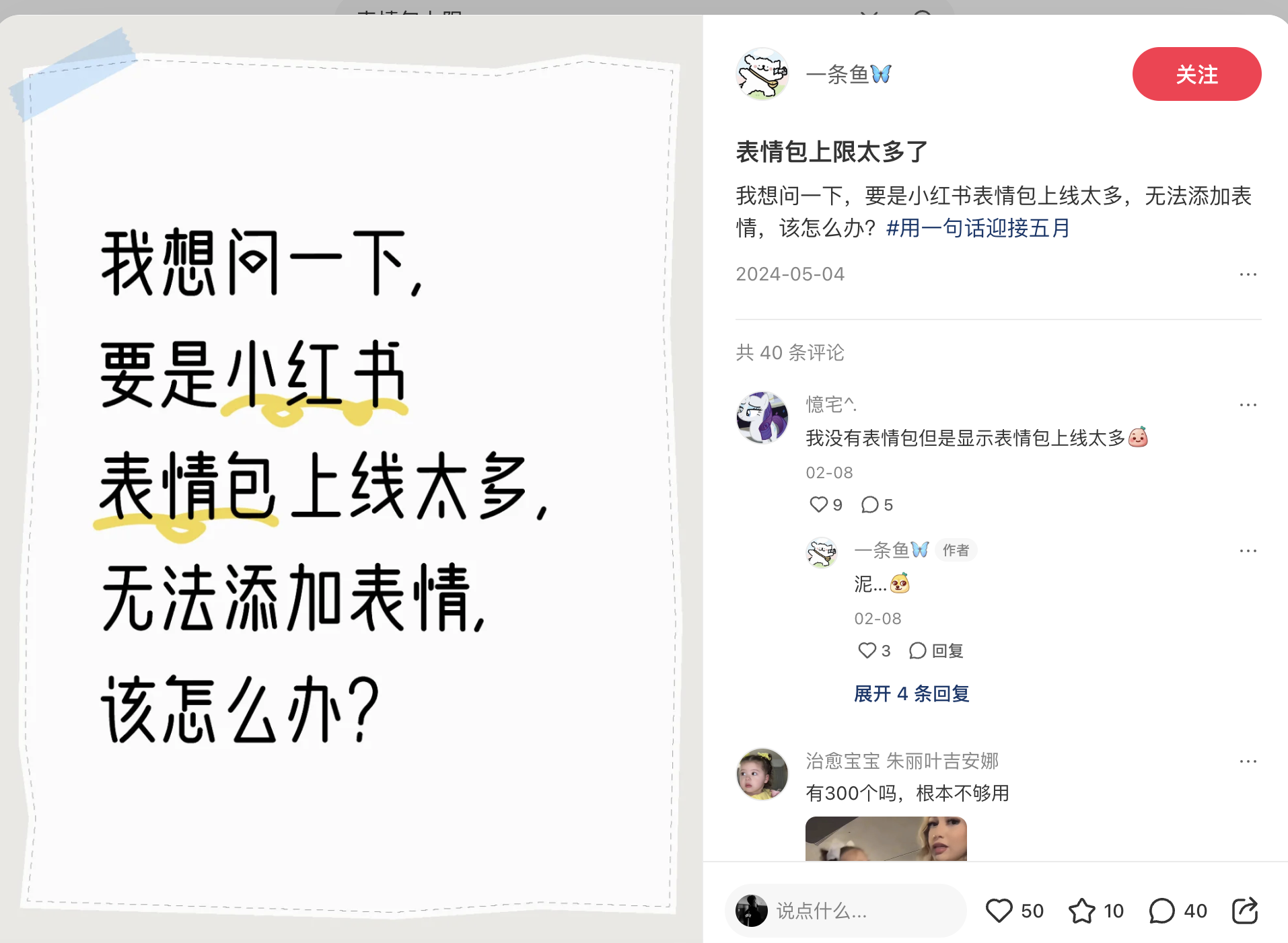
Comprehensive coverage: Apply to all emoji-saving scenarios (chat, comments, etc.) Competitor Analysis App Emoji Limit WeChat 999 Douyin (TikTok) 599 Kuaishou 158
Design Mockups See Figure 9 for the original design specifications provided to developers.
Evaluation Criteria
- Hardcoded limit (300) removed or increased to $\geq$ 450
- New limit (999) properly configured
- Server-driven configuration implemented
- Changes applied across multiple files
- Non-empty, meaningful code changes
### A.2. Task 007: Card Message Click Decoupling
Difficulty: Medium Files to Modify: 5 Test Cases: 5
iOS Card Reference Click Decoupling
Background Card messages have been added to the app. While most iOS code is decoupled from the messaging module, the click logic for card message references remains coupled in AppChatBaseViewController. This task decouples the click handling for better maintainability. Architecture Design Abstract click logic to CardRefBaseProvider. The view controller should find the concrete implementation based on card type, following the provider pattern. Implementation Sketch
⬇ @objc (AppRefMessageDataService) public class AppRefMessageDataService: NSObject { var chatType: String? var chatId: String? var senderId: String? var messageId: String? }
Impact Scope: Shopping card, Advertisement card
Evaluation Criteria
- New AppRefMessageDataService class created
- Click handling moved out of AppChatBaseViewController
- Provider pattern correctly implemented
- Shopping and advertisement card handling works
- No regression in existing functionality
## Appendix B Complete Experimental Results
Table 5. Complete evaluation results on SWE-Bench Mobile. Task Success measures the percentage of tasks where all test cases pass (out of 50 tasks). Test Pass measures the percentage of individual test cases passed (out of 449 tests). Best results per agent in bold.
| Agent | Model | Task Success (%) | Test Pass (%) | Cost ($/task) | Time (min) |
| --- | --- | --- | --- | --- | --- |
| Cursor | Claude Opus 4.5 | 12.0 | 28.1 | 3.50 | 15.0 |
| Claude Sonnet 4.5 | 12.0 | 26.7 | 2.00 | 14.2 | |
| GPT-5.2 | 8.0 | 27.4 | 1.80 | 20.0 | |
| Gemini 3 Pro | 6.0 | 23.2 | 1.00 | 12.5 | |
| GPT-5.1 | 2.0 | 19.6 | 1.10 | 14.2 | |
| Codex | GLM-4.6 | 12.0 | 19.6 | 1.30 | 13.3 |
| Claude Sonnet 4.5 | 10.0 | 28.1 | 2.50 | 12.5 | |
| GPT-5 | 10.0 | 21.4 | 1.50 | 10.0 | |
| Claude Opus 4.5 | 4.0 | 20.7 | 3.50 | 14.2 | |
| GPT-5.1 | 0.0 | 7.1 | 1.00 | 13.3 | |
| Claude Code | GLM-4.6 | 10.0 | 26.7 | 1.30 | 11.7 |
| Claude Sonnet 4.5 | 10.0 | 24.7 | 2.00 | 13.3 | |
| Claude Opus 4.5 | 8.0 | 21.8 | 4.00 | 15.0 | |
| Claude Haiku | 8.0 | 18.3 | 0.50 | 8.3 | |
| OpenCode | GLM-4.6 | 8.0 | 17.8 | 0.13 | 32.5 |
| GPT-5.1 | 6.0 | 7.1 | 0.02 | 2.0 | |
| Claude Sonnet 4.5 | 4.0 | 14.7 | 3.50 | 11.1 | |
| GLM-4.7 | 4.0 | 14.3 | 0.49 | 52.1 | |
| Gemini 3 Pro | 4.0 | 13.4 | 0.03 | 8.9 | |
| GPT-5.2 | 4.0 | 12.0 | 0.04 | 10.9 | |
| Claude Opus 4.5 | 2.0 | 12.0 | 9.33 | 8.2 | |
| GPT-5 | 2.0 | 12.0 | 0.18 | 9.8 | |
### B.1. Cross-Agent Model Comparison
Table 6 reveals that the same model can perform very differently across agents, highlighting the importance of agent design.
Table 6. Same model, different agents: Task Success Rate (%). The gap between best and worst agent can be as large as 6 $\times$ .
| Model | Cursor | Codex | CC | OpenCode | Gap |
| --- | --- | --- | --- | --- | --- |
| Opus 4.5 | 12 | 4 | 8 | 2 | 6 $\times$ |
| Sonnet 4.5 | 12 | 10 | 10 | 4 | 3 $\times$ |
| GLM-4.6 | — | 12 | 10 | 8 | 1.5 $\times$ |
| GPT-5.1 | 2 | 0 | — | 6 | $\infty$ |
## Appendix C Prompt Templates
We designed 12 prompt variants for the ablation study. Below we present the key prompts. All prompts share a common structure: role definition, task description, and output format. The differentiating factor is the emphasis placed on different aspects.
### C.1. Best Prompt: Defensive Programming
P10: Defensive Programming (Best)
“You are a senior iOS engineer known for writing robust, production-ready code. Implement the feature with a focus on defensive programming and edge case handling. Don’t just implement the happy path. Think about everything that could go wrong: •
Empty data, nil values, invalid formats •
Very long/short text, different screen sizes •
Slow network, timeouts, concurrent operations •
First-time user, offline mode, low memory Your code should handle all of this gracefully without crashing.”
### C.2. Baseline Prompt
P1: Baseline
“You are an iOS developer. Read the PRD carefully and implement the required changes. Generate a unified diff patch that can be applied to the codebase.”
### C.3. Worst Performing Prompts
P12: Comprehensive (Worst)
“You are a senior iOS engineer. Before implementing: (1)
Analyze the PRD thoroughly (2)
Identify all affected files (3)
Plan your implementation strategy (4)
Consider edge cases (5)
Review the Figma design (6)
Check for existing patterns (7)
Implement with tests in mind (8)
Validate against requirements Generate a complete, production-ready patch.”
Why Comprehensive Failed: The overly detailed checklist appears to overwhelm the model, causing it to focus on process rather than actual implementation. Simpler, focused prompts consistently outperform complex ones.
### C.4. Other Notable Prompts
P7: Chain of Thought:
Asks the model to “think step by step” before coding. Achieved 10% Task Success but lower Test Pass Rate (21.8%) than Defensive Programming. P9: Figma Emphasis:
Emphasizes matching the Figma design exactly. Surprisingly underperformed (8% Task Success), possibly because many tasks don’t require UI changes. P11: Test Driven:
Asks the model to “think about what tests would verify your implementation.” Achieved only 6% Task Success despite the intuitive appeal of test-driven thinking.
## Appendix D Dataset Statistics
We provide detailed statistics of the SWE-Bench Mobile dataset in Table 7. The benchmark consists of 50 tasks with varying levels of complexity, involving multi-modal inputs (PRDs and Figma designs) and a large-scale production codebase. The tasks are designed to cover a wide range of mobile development scenarios, ensuring a comprehensive evaluation of agent capabilities.
Table 7. SWE-Bench Mobile dataset statistics.
| Metric | Value |
| --- | --- |
| Task Composition | |
| Total Tasks | 50 |
| Tasks with Figma Design | 35 (70%) |
| Tasks with Reference Images | 46 (92%) |
| Task Complexity | |
| Avg. PRD Length (words) | 450 |
| Avg. Test Cases per Task | 9.1 |
| Total Test Cases | 449 |
| Avg. Files to Modify | 4.2 |
| Codebase | |
| Programming Language | Swift/Objective-C (iOS) |
| Codebase Size | $\sim$ 500K LoC |
## Appendix E Reproducibility
Environment. All experiments were conducted on macOS 14.x with:
- Cursor: v2.3 with Agent mode enabled
- Codex: OpenAI Codex CLI v0.77.0
- Claude Code: Anthropic Claude Code CLI v2.1.37
- OpenCode: v1.1.44 (open-source coding agent)
Model API Configuration.
For reproducibility, we specify the exact API endpoints and configurations used:
- GPT Models (GPT 5, 5.1, 5.2): Accessed via Microsoft Azure OpenAI API with default temperature and top-p settings
- Claude Models (Opus 4.5, Sonnet 4.5, Haiku): Accessed via Google Vertex AI API for Anthropic models
- Gemini 3 Pro: Accessed via Google Vertex AI API with standard configuration
- GLM Models (GLM 4.6, 4.7): Used GLM Coding Plan with default agent scaffolding
Multi-Modal Input Handling.
To handle Figma designs and reference images, we configured Model Context Protocol (MCP) integrations:
- Vision-capable models (GPT, Claude, Gemini): Used official Figma MCP to directly access design specifications
- GLM Models: Since GLM 4.6 is not a native vision model, we used the official GLM Vision MCP to process images and Figma designs, converting visual inputs into structured descriptions for the text-only model
Evaluation Pipeline.
1. Load generated patch file as text
1. Run task-specific pytest test suite (tests inspect the patch diff text using pattern matching and structural analysis)
1. Record pass/fail status for each test case
1. Aggregate results across all 50 tasks
Availability and Hosted Evaluation. The SWE-Bench Mobile benchmark is derived from a proprietary production codebase with permission from XiaoHongShu Inc. Due to the confidential nature of the source code and product requirements, the full dataset cannot be publicly released. We view this constraint as a feature rather than a limitation: by keeping the test set private, we eliminate the risk of data contamination —a well-known issue with public benchmarks where test instances may leak into LLM training corpora (Jimenez et al., 2024).
SWE-Bench Mobile is designed as a standardized evaluation platform for coding agent providers and foundation model vendors. We host a public leaderboard at https://swebenchmobile.com where agent companies (e.g., Cursor, Codex, Claude Code) and model providers (e.g., OpenAI, Anthropic, Google, Zhipu AI) can submit their systems for evaluation against our held-out industrial test suite. This provides an objective, contamination-free comparison on real-world mobile development tasks that complements existing Python-centric benchmarks. Submission guidelines and evaluation configurations are available at https://github.com/realtmxi/mobile-bench.
## Appendix F Task Design Mockups
Figure 9 shows the design mockups provided to agents for Task 003 (Custom Emoji Limit). These real-world screenshots demonstrate the user pain point and expected UI behavior that agents must understand to implement the feature correctly.
<details>
<summary>figures/fig_mockup_001.jpg Details</summary>
### Visual Description
## Text-Based Image: Social Media Post with Chinese Text
### Overview
The image contains two distinct sections:
1. **Left Side**: A whiteboard with handwritten Chinese text, featuring a yellow underline under specific characters.
2. **Right Side**: A social media post interface with a user profile, post content, comments, and reactions.
---
### Components/Axes
#### Left Side (Whiteboard)
- **Text**: Chinese characters in black ink, with a yellow underline under the second and third lines.
- **Layout**:
- Top line: "我想问一下," (I want to ask...)
- Second line: "要是小红书" (If it's Xiaohongshu)
- Third line: "表情包上线太多," (There are too many emoji packs...)
- Fourth line: "无法添加表情," (Can't add emojis...)
- Fifth line: "该怎么办?" (What should I do?)
#### Right Side (Social Media Post)
- **User Profile**:
- Username: "一条鱼" (One Fish) with a blue butterfly emoji.
- Post Date: 2024-05-04
- **Post Content**:
- Chinese text: "表情包上限太多了" (The emoji pack limit is too high)
- Follow-up: "我想问一下,要是小红书表情包上线太多,无法添加表情,该怎么办?#用一句话迎接五月" (I want to ask... If Xiaohongshu's emoji pack limit is too high, can't add emojis, what should I do? #Use one sentence to welcome May)
- **Comments**:
- **First Comment**:
- User: "憧宅" (Dreaming of Home)
- Text: "我没有表情包但是显示表情包上线太多" (I don't have emoji packs but it shows the limit is too high)
- Date: 02-08
- Reactions: 9 hearts, 5 comments
- **Second Comment**:
- User: "一条鱼" (One Fish)
- Text: "泥..." (Mud...) with a pumpkin emoji
- Date: 02-08
- Reactions: 3 hearts, 1 comment
- **Third Comment**:
- User: "治愈宝宝" (Healing Baby)
- Text: "有300个吗,根本不够用" (Are there 300? It's not enough)
- Date: Not specified
- Reactions: 50 hearts, 10 stars, 40 comments
---
### Key Observations
1. **Textual Content**:
- The whiteboard text poses a question about handling an overwhelming number of emoji packs on Xiaohongshu.
- The social media post echoes this concern, asking for solutions.
2. **Engagement Metrics**:
- The post has 40 comments, 50 hearts, 10 stars, and 40 comments (possibly a typo, as "comments" are listed twice).
- The third comment has the highest engagement (50 hearts, 10 stars, 40 comments).
3. **Emojis**:
- A pumpkin emoji is used in the second comment, possibly indicating confusion or frustration.
---
### Interpretation
- **Context**: The image reflects a common user frustration with platform limitations (e.g., emoji pack limits on Xiaohongshu).
- **User Interaction**: The social media post shows active engagement, with users sharing similar concerns and offering support.
- **Temporal Pattern**: The comments span from 02-08 to 2024-05-04, suggesting the issue has persisted over time.
- **Emotional Tone**: The use of emojis (e.g., pumpkin) and phrases like "泥..." (mud) imply frustration or helplessness.
---
### Notes on Data Extraction
- **No Charts/Diagrams**: The image contains no numerical data or visualizations.
- **Textual Focus**: All information is textual, with no need for trend analysis or numerical extraction.
- **Language**: All text is in Chinese, with no English content present.
</details>
(a) User Complaint. Social media post showing frustration with the 300-emoji limit: “Xiaohongshu’s emoji limit is too high, I can’t add more emojis.”
<details>
<summary>figures/fig_mockup_002.jpg Details</summary>
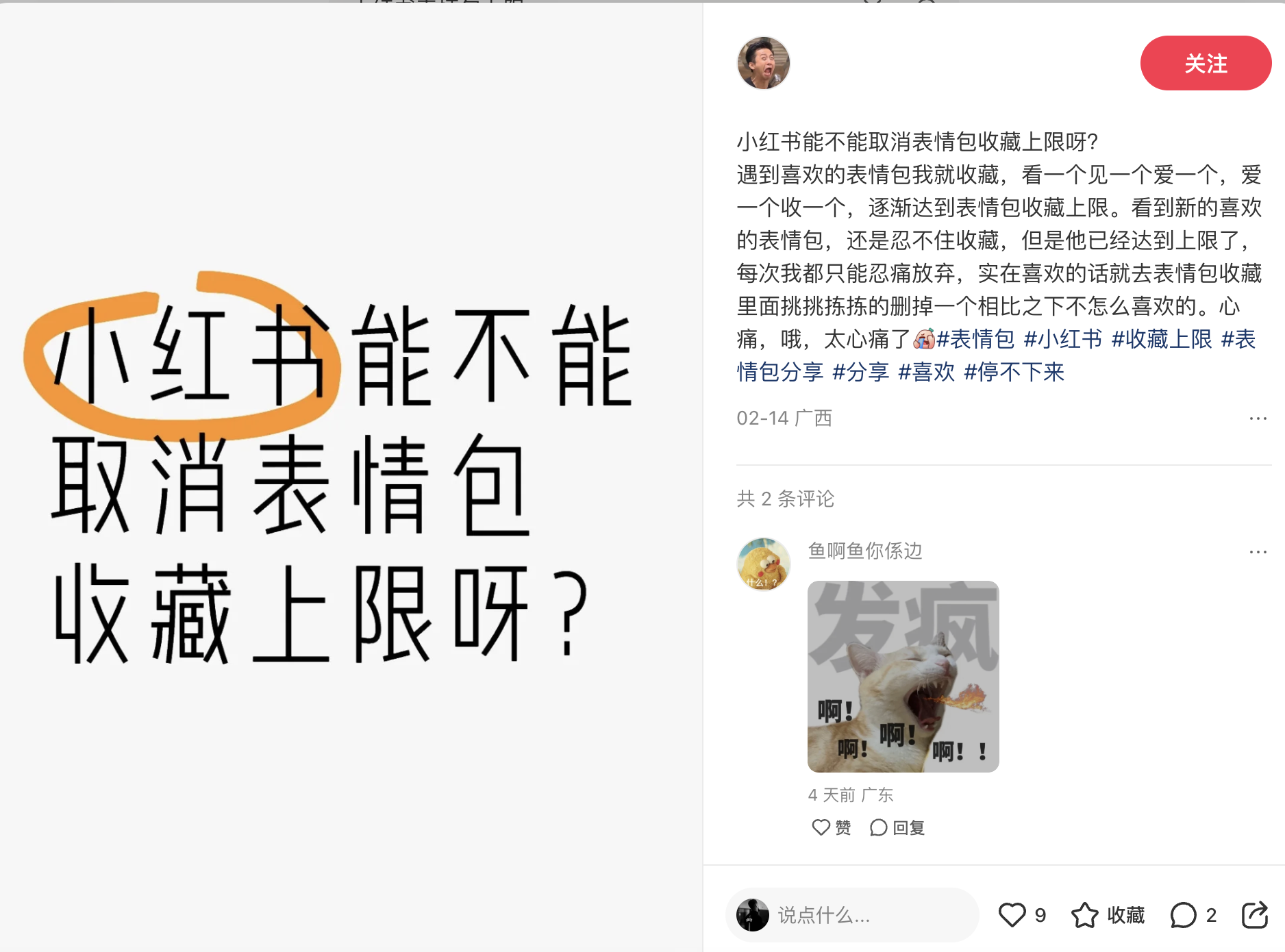
### Visual Description
## Screenshot: Social Media Post with Chinese Text and Cat Image
### Overview
The image is a screenshot of a social media post (likely from a Chinese platform) featuring:
1. A large block of Chinese text on the left, with a specific phrase circled in orange.
2. A social media post on the right with a profile picture, text, and a cat image.
3. A comment section with additional text and a cat image.
### Components/Axes
- **Left Text Block**:
- Chinese text with a circled phrase: "小红书能不能取消表情包收藏上限?"
- Translation: "Can Xiaohongshu remove the limit on collecting emotion packages?"
- Additional text: A longer question about removing the limit on collecting emotion packages.
- **Right Social Media Post**:
- Profile Picture: A person with an open mouth (possibly expressing frustration).
- Text:
- Chinese: "小红书能不能取消表情包收藏上限呀?"
- Translation: "Can Xiaohongshu remove the limit on collecting emotion packages?"
- Hashtags: `#小红书`, `#收藏上限`, `#表情包`, `#分享`, `#喜欢`, `#停下来`.
- Translation: `#Xiaohongshu`, `#CollectionLimit`, `#EmotionPackages`, `#Share`, `#Like`, `#Stop`.
- Timestamp: "02-14广西" (February 14, Guangxi).
- **Cat Image**:
- A cat with its mouth open, surrounded by Chinese text: "啊!啊!啊!" (Ah! Ah! Ah!).
- Text above the cat: "发病" (meaning "getting sick" or "having a problem").
### Detailed Analysis
- **Left Text Block**:
- The circled phrase emphasizes the question about removing the limit on collecting emotion packages.
- The full text repeats the question, suggesting frustration or a call for change.
- **Right Social Media Post**:
- The user’s post mirrors the left text, reinforcing the same question.
- Hashtags indicate the topic is trending or part of a broader discussion.
- The timestamp suggests the post was made on February 14 in Guangxi.
- **Cat Image**:
- The cat’s open mouth and repeated "啊!" (Ah!) convey frustration or exasperation.
- The text "发病" implies the user is "sick" of the platform’s feature.
### Key Observations
1. **Repetition of the Question**: The same question about removing the emotion package limit appears in both the left text and the social media post, indicating a shared concern.
2. **Cat Image as Metaphor**: The cat’s exaggerated expression and text ("发病") symbolize user frustration with the platform’s restrictions.
3. **Hashtags**: The use of hashtags like `#收藏上限` (collection limit) and `#停下来` (stop) suggests a campaign or movement to address the issue.
### Interpretation
The image reflects user dissatisfaction with Xiaohongshu’s (小红书) feature limiting the collection of emotion packages. The repeated question and the cat image’s dramatic expression highlight frustration, while the hashtags suggest a coordinated effort to raise awareness or demand change. The social media post and comment section indicate community engagement, with users sharing similar grievances. The use of a cat to express frustration is a common internet meme, amplifying the emotional tone of the post.
**Note**: The image does not contain numerical data or charts but focuses on textual content and visual metaphors to convey user sentiment.
</details>
(b) Community Feedback. Another user asking “Can Xiaohongshu remove the emoji collection limit?” showing widespread user demand.
<details>
<summary>figures/fig_mockup_003.jpg Details</summary>

### Visual Description
## Social Media Interface Screenshot: Chinese Text and Emoji Grid
### Overview
The image shows a social media platform interface with Chinese text, emoji reactions, and a grid of 12 reaction images. The layout includes a search bar, user profile section, and comment thread. Text is primarily in Chinese with some English date formatting.
### Components/Axes
1. **Header Section**:
- Search bar with Chinese text: "有话要说" (Have something to say)
- Black oval with Chinese text: "表情包已达上限,无法添加" (Emoji pack reached limit, cannot add)
- Icons: Heart (selected), emoji, cartoon characters, and yellow badge
2. **Emoji Grid**:
- 12 images arranged in 3 rows/4 columns
- Each image has Chinese captions (e.g., "老么我爱你" - "I love you so much")
- Notable images: Cartoon characters, real people, and meme-style faces
3. **User Profile Section**:
- Profile picture with Chinese text: "耳机陆" (Earphone Land)
- Red button with Chinese text: "关注" (Follow)
- Post content with Chinese text discussing emoji pack limitations
4. **Comment Section**:
- User comments with Chinese text and emojis
- Dates in English format: 2024-08-31
- Reaction icons: Heart (6), star (收藏 - collect), comment (24)
### Detailed Analysis
**Search Bar**:
- Contains Chinese text with red vertical line indicator
- Overlapping black oval with warning message about emoji limit
**Emoji Grid**:
- Top row: Cartoon woman, two men, "100%" text
- Middle row: Hand gesture, cat face, man with "老么" text, couple
- Bottom row: Man with helmet, couple, mouse emoji, "我日" text (exclamation)
**User Post**:
- Text discusses emoji pack limitations (900+ emojis)
- Mentions specific hashtags: #表情包 (emoji pack), #小红书 (Little Red Book)
- Date: 2024-08-31
**Comments**:
- First comment: "共24条评论" (24 comments total)
- Second comment: Contains emoji and text about emoji distribution
- Third comment: Mouse image with date 2024-08-31
### Key Observations
1. Platform appears to be a Chinese social media app (likely Xiaohongshu/Little Red Book)
2. Emoji limit feature is prominently displayed
3. Users engage with emoji reactions and comments
4. Mix of original content and reaction images in the grid
5. Date format uses English year-month-day
### Interpretation
This interface demonstrates a typical Chinese social media platform's features:
- Emphasis on visual content (emoji grid)
- Character limits for text posts
- User interaction through reactions and comments
- Mix of original content and meme-style reactions
- Date formatting follows international standards despite Chinese text
The emoji limit message suggests platform restrictions on user-generated content, while the grid provides quick access to popular reaction images. The comment section shows active user engagement with both text and visual content.
</details>
(c) Emoji Collection UI. The sticker collection interface with warning dialog “Emoji limit reached, cannot add more.” Agents must increase this limit from 300 to 999.
Figure 9. Design mockups for Task 003 (Custom Emoji Limit). These mockups are provided to agents as part of the PRD to guide implementation. They show real user complaints about the 300-emoji limit and the current UI that needs modification.
## Appendix G Qualitative Analysis of Agent Outputs
We present detailed analyses of agent-generated patches to provide insights into both successful implementations and common failure modes. These examples illustrate the practical challenges agents face when implementing features from PRDs and Figma designs in a production codebase.
Table 8. Successful implementation by Cursor + GPT-5.2 on Task 007 (Medium difficulty). The agent correctly created the AppRefMessageDataService class with all required fields and methods, demonstrating strong architectural understanding.
| Task Context |
| --- |
| Difficulty: Medium Files to Modify: 5 Category: Architecture Refactoring |
| Agent: Cursor + GPT-5.2 Result: ✓ PASS (5/5 tests) |
| Problem Statement (Summary) |
| Decouple card message click handling from AppChatBaseViewController by abstracting logic into CardRefBaseProvider. The click logic for card references should be moved to a new AppRefMessageDataService class following the provider pattern. |
| Key Requirements |
| •
Create AppRefMessageDataService class with fields: chatType, chatId, senderId, messageId, sender, innerContentDict •
Move click handling out of view controller •
Implement provider pattern for different card types •
Support shopping and advertisement cards |
| Generated Patch (Key Excerpts) |