## Image Transformation Task
### Overview
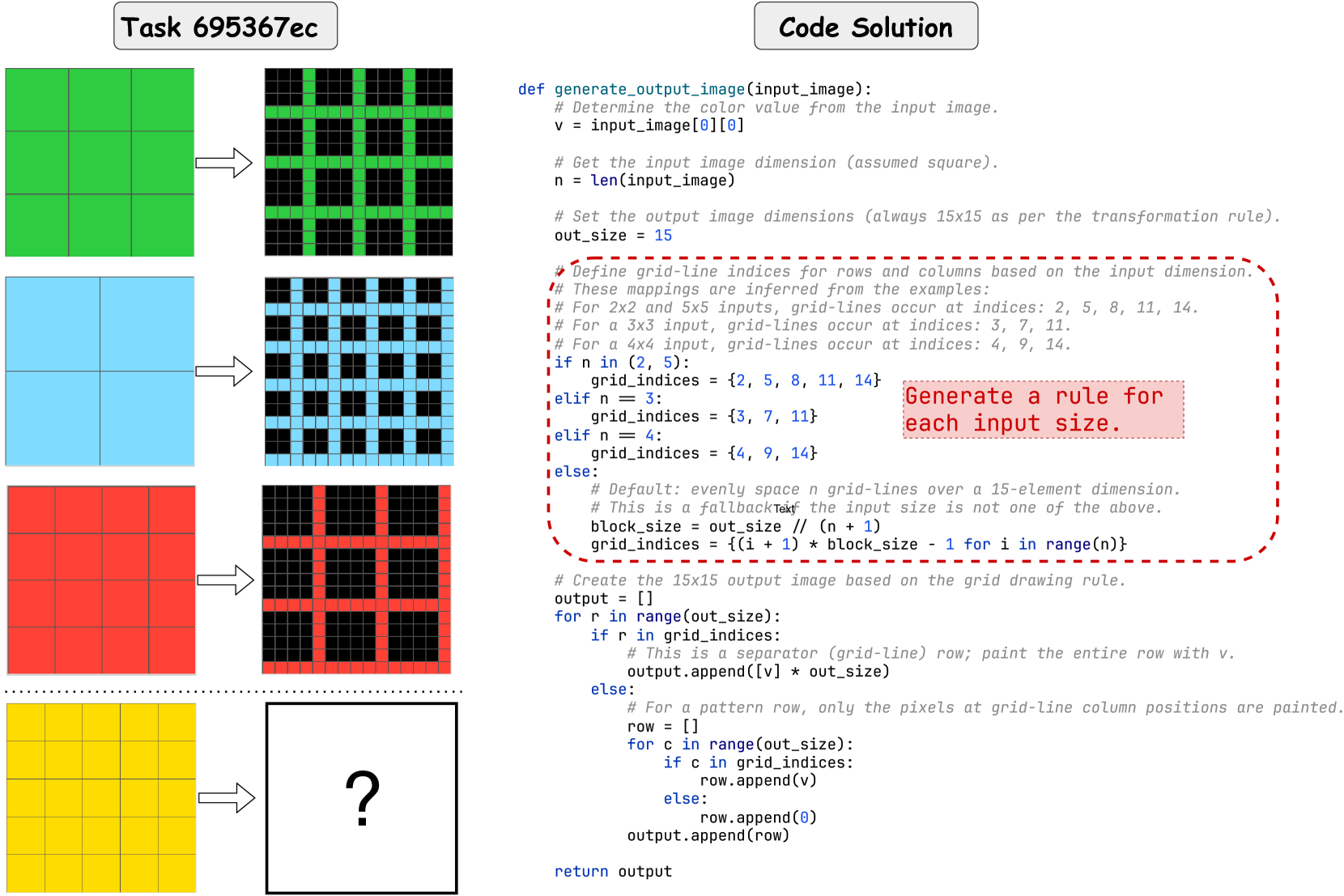
The image presents a task involving the transformation of colored grid images based on a provided code solution. The left side shows input grid images of different colors (green, blue, red, yellow) and sizes, each followed by an arrow indicating a transformation. The right side shows the corresponding transformed images, except for the last yellow grid, which is followed by a question mark, indicating the task is to determine the correct transformation. The code solution provides a Python function to perform this transformation.
### Components/Axes
* **Task Title:** "Task 695367ec" (top-left)
* **Code Solution Title:** "Code Solution" (top-right)
* **Input Images:** A series of colored grid images on the left. The colors are green, blue, red, and yellow.
* **Transformation Arrows:** Arrows pointing from the input images to the transformed images.
* **Transformed Images:** A series of black and colored grid images on the right, corresponding to the input images. The colors match the input images. The last transformed image is a white square with a question mark.
* **Code Block:** A Python code snippet defining the `generate_output_image` function.
### Detailed Analysis or Content Details
**Input Images and Transformations:**
1. **Green Grid (Top):** A 3x3 green grid transforms into a 15x15 grid with green horizontal and vertical lines on a black background. The green lines appear at indices approximately 3, 7, and 11.
2. **Blue Grid (Middle):** A 4x4 blue grid transforms into a 15x15 grid with blue horizontal and vertical lines on a black background. The blue lines appear at indices approximately 4, 9, and 14.
3. **Red Grid (Third):** A 2x2 red grid transforms into a 15x15 grid with red horizontal and vertical lines on a black background. The red lines appear at indices approximately 2, 5, 8, 11, and 14.
4. **Yellow Grid (Bottom):** A 5x5 yellow grid transforms into an unknown image, represented by a question mark.
**Code Analysis:**
The Python code defines a function `generate_output_image(input_image)` that takes an input image (presumably a 2D array representing the grid) and returns a transformed 15x15 image.
* The code first determines the color value `v` from the input image's top-left pixel (`input_image[0][0]`).
* It gets the input image dimension `n` (assumed square) using `len(input_image)`.
* The output image size `out_size` is fixed at 15.
* The code then defines `grid_indices` based on the input dimension `n`.
* If `n` is 2 or 5, `grid_indices` is set to `{2, 5, 8, 11, 14}`.
* If `n` is 3, `grid_indices` is set to `{3, 7, 11}`.
* If `n` is 4, `grid_indices` is set to `{4, 9, 14}`.
* Otherwise (default case), it calculates `block_size` as `out_size // (n + 1)` and generates `grid_indices` using a list comprehension: `{(i + 1) * block_size - 1 for i in range(n)}`.
* The code creates the 15x15 output image by iterating through rows and columns.
* If the row index `r` is in `grid_indices`, it creates a separator row by repeating the color value `v` `out_size` times.
* Otherwise, it creates a pattern row. For each column index `c`, if `c` is in `grid_indices`, it appends the color value `v`; otherwise, it appends 0 (presumably representing black).
### Key Observations
* The transformation involves creating a 15x15 grid with colored lines on a black background.
* The positions of the colored lines are determined by the size of the input grid.
* The code provides a specific mapping for input sizes 2, 3, 4, and 5.
* The default case calculates the line positions based on `block_size`.
### Interpretation
The task is to understand the transformation logic implemented in the Python code and apply it to the yellow 5x5 grid to determine the correct output image.
For the yellow 5x5 grid:
* `n = 5`
* The code will use the `if n in (2, 5)` condition, so `grid_indices = {2, 5, 8, 11, 14}`.
* The output image will be a 15x15 grid with yellow lines at indices 2, 5, 8, 11, and 14.
Therefore, the question mark should be replaced with a 15x15 grid with yellow horizontal and vertical lines at indices 2, 5, 8, 11, and 14 on a black background.