## Code Snippet and Explanatory Text: Incorrect Program Description
### Overview
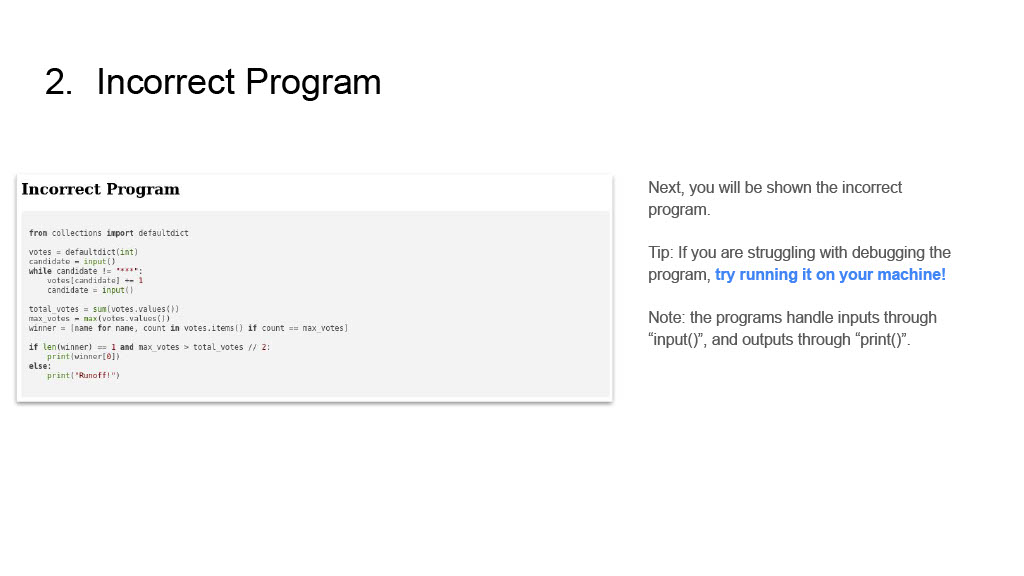
The image presents a section from a technical document or slide, focusing on a programming problem. It features a prominent title "2. Incorrect Program" at the top-left. The main content area on the left displays a Python code snippet, also titled "Incorrect Program," which simulates a vote counting and winner determination process. On the right, a side panel provides contextual information, a debugging tip, and a note regarding program input/output.
### Components/Axes
* **Main Header (Top-left)**: "2. Incorrect Program"
* **Code Block Container (Left-center)**: A white rectangular box with a light grey border.
* **Code Block Title (Inside container)**: "Incorrect Program" (bold text).
* **Code Snippet (Inside container)**: A Python program.
* **Explanatory Text Panel (Right-center)**: Contains three distinct paragraphs of text.
### Detailed Analysis
**Header (Top-left)**:
The primary heading for this section is "2. Incorrect Program".
**Main Content (Left-center)**:
A code editor-like block is present, titled "Incorrect Program". It contains the following Python code:
```python
from collections import defaultdict
votes = defaultdict(int)
candidate = input()
while candidate != "***":
votes[candidate] += 1
candidate = input()
total_votes = sum(votes.values())
max_votes = max(votes.values())
winner = [name for name, count in votes.items() if count == max_votes]
if len(winner) == 1 and max_votes > total_votes // 2:
print(winner[0])
else:
print("Runoff!")
```
**Side Panel (Right-center)**:
This section contains three paragraphs of explanatory text:
1. "Next, you will be shown the incorrect program."
2. "Tip: If you are struggling with debugging the program, try running it on your machine!" (The phrase "try running it on your machine!" is visually emphasized, likely bolded or highlighted).
3. "Note: the programs handle inputs through “input()”, and outputs through “print()”."
### Key Observations
* The document explicitly labels the provided Python code as "Incorrect Program," indicating that it contains a bug or logical flaw.
* The Python code uses `defaultdict(int)` to store vote counts for candidates.
* It continuously takes candidate names as input until the sentinel value "***" is entered.
* After collecting votes, it calculates the `total_votes`, `max_votes`, and identifies all `winner` candidates who received the `max_votes`.
* The program's logic for declaring a winner requires two conditions:
1. There must be exactly one candidate with the maximum votes (`len(winner) == 1`).
2. That single candidate's votes must be strictly greater than half of the total votes (`max_votes > total_votes // 2`).
* If these conditions are met, the winner's name is printed; otherwise, "Runoff!" is printed.
* The accompanying text provides a strong hint for debugging by suggesting to "try running it on your machine!"
* It also clarifies the standard input (`input()`) and output (`print()`) mechanisms used by the programs.
### Interpretation
This image serves as an instructional prompt for a programming exercise, likely in a debugging context. The core task is to identify and understand the "incorrectness" of the provided Python code. The program attempts to implement a simple voting system to determine a winner based on a majority rule, or declare a runoff if no clear winner emerges.
The "incorrectness" could stem from several potential issues:
1. **Majority Rule Definition**: The condition `max_votes > total_votes // 2` might be problematic for certain vote distributions, especially with odd `total_votes` or when a simple majority (more than 50%) is required versus a plurality. For example, if `total_votes` is 5, `total_votes // 2` is 2. A candidate with 3 votes would satisfy `3 > 2`, but if `total_votes` is 4, `total_votes // 2` is 2, and a candidate with 3 votes would also satisfy `3 > 2`. The definition of "more than half" can be subtle.
2. **Tie-breaking**: If multiple candidates tie for `max_votes`, `len(winner)` will be greater than 1, automatically leading to a "Runoff!" even if one of the tied candidates might have a simple majority if the tie were broken differently or if the rule was simply "most votes wins."
3. **Edge Cases**: Consider scenarios with very few votes, no votes, or all votes for one candidate.
4. **Input Handling**: While the note clarifies `input()`, potential issues like non-string inputs (though `input()` returns strings) or unexpected sentinel behavior could be considered.
The explicit instruction to "try running it on your machine!" encourages active, hands-on debugging, which is a fundamental skill in programming. The overall message is to analyze the code's logic, test it with various inputs, observe its behavior, and pinpoint where its output deviates from the expected correct outcome for a voting system.